audio AUDI Q8 2021 Owner´s Manual
[x] Cancel search | Manufacturer: AUDI, Model Year: 2021, Model line: Q8, Model: AUDI Q8 2021Pages: 332, PDF Size: 118.76 MB
Page 225 of 332
4M8012721BF
Media
Never leave mobile devices in the vehicle in
extremely high or low temperatures.
@ Tips
— Always follow the information found in
=> page 82.
— When you switch the ignition off, the USB
ports are still supplied with power until the
energy management intervenes.
— Do not use an additional adapter cable or
USB extension cable to connect mobile devi-
ces to the Audi music interface that already
have a cable or that must be connected with
a USB adapter cable (> page 222, fig. 151).
Using an additional adapter or US extension
cable may impair functionality.
— Functionality is not guaranteed for mobile
devices that do not conform to the USB 2.0
specification.
— USB hubs are not supported.
— Video playback through the Audi music in-
terface is not supported on Apple devices
and MTP devices (such as smartphones).
— iPod touch or iPhone malfunctions also af-
fect the operation of the MMI. Reset your
mobile device in these situations.
— Audi recommends updating the iPod touch
or iPhone software to the latest version. Re-
fer to your mobile device owner's manual
for more information.
— The USB adapter on the Audi music inter-
face will support iPod touch or iPhone devi-
ces from the 5th generation or newer with
the lightning connector.
—Aselection of supported devices can be
found in the database for tested mobile de-
vices at www.audi.com/mp3.
Playing media
The following sources can be selected depending
on the vehicle equipment:
— Amazon Alexa > page 221.
— USB device > page 222.
— DVD & page 221.
— External device: you can connect external devi-
ces via Bluetooth and use the Bluetooth audio
player > page 221, or you can connect an exter-
nal device directly to the Audi music interface
=> page 222.
Accessing media
Playing media files using the MMI
> Applies to: MMI: Select on the home screen:
MEDIA > Source > a source. Depending on the
connected device, the symbol for a source may
change. The device name may be displayed (for
example: myPhone).
> Select a track from the categories in the media
center > page 224.
Playing media files using the multifunction
steering wheel
Requirement: a media source must contain me-
dia files > page 223.
> Select the radio/media tab in the instrument
cluster.
> Turn the left thumbwheel to display the play-
list.
> To switch to a different source, press the
button.
> To select a media file or a source, turn and
press the left thumbwheel.
> To switch between radio and media, select in
the instrument cluster: the LE] button > Switch
to radio/Switch to media.
G) Tips
— For safety reasons, the video image is only
displayed when the vehicle is stationary. On-
ly the sound from the video plays while driv-
ing.
— Applies to: multifunction steering wheel:
Depending on the selected function, opera-
tion through the MMI may be required.
223
Page 226 of 332
Rooke cis
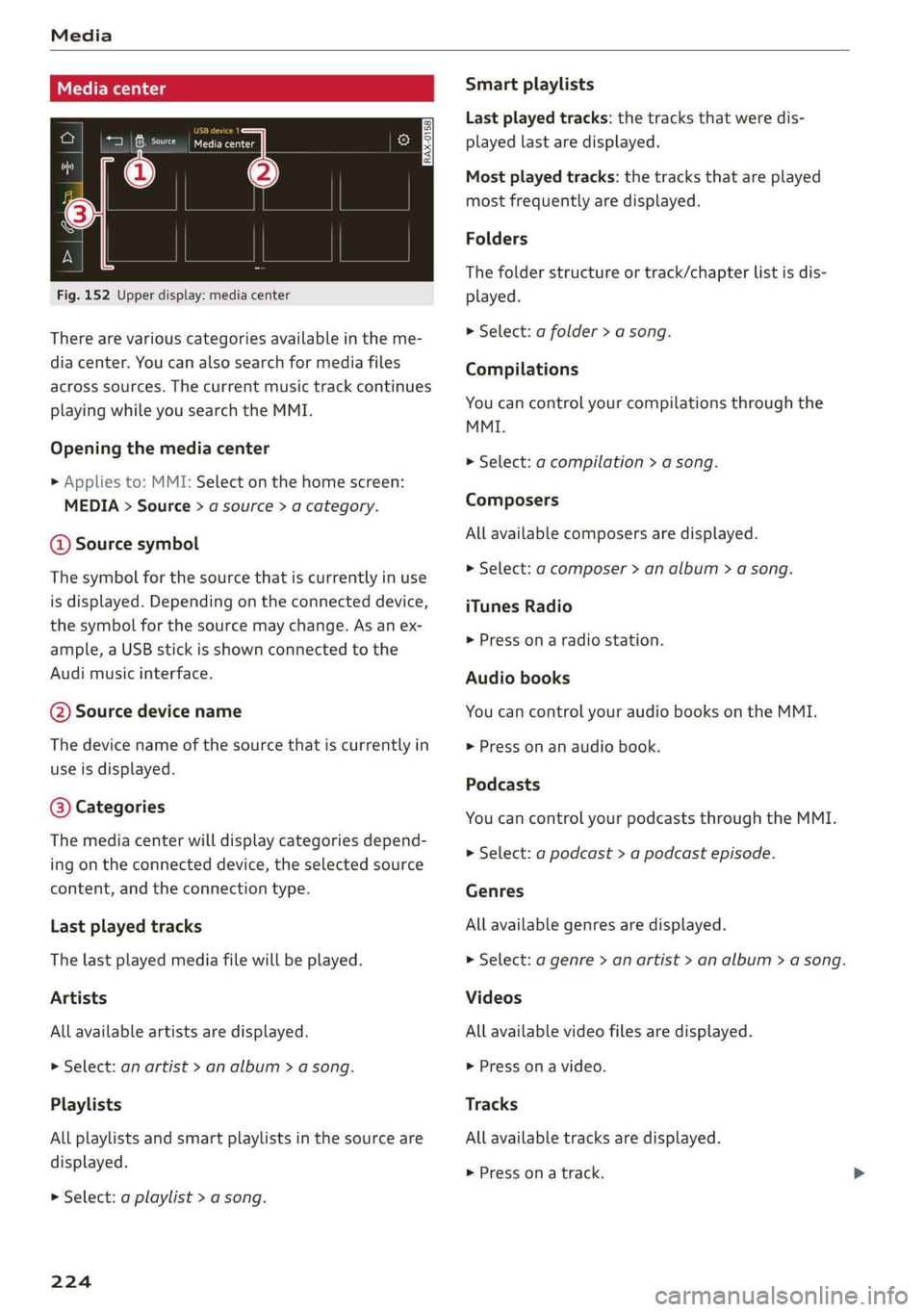
Fig. 152 Upper display: media center
There are various categories available in the me-
dia center. You can also search for media files
across sources. The current music track continues
playing while you search the MMI.
Opening the media center
» Applies to: MMI: Select on the home screen:
MEDIA > Source > a source > a category.
@ Source symbol
The symbol for the source that is currently in use
is displayed. Depending on the connected device,
the symbol for the source may change. As an ex-
ample, a USB stick is shown connected to the
Audi music interface.
@ Source device name
The device name of the source that is currently in
use is displayed.
@ Categories
The media center will display categories depend-
ing on the connected device, the selected source
content, and the connection type.
Last played tracks
The last played media file will be played.
Artists
All available artists are displayed.
> Select: an artist > an album > a song.
Playlists
All playlists and smart playlists in the source are
displayed.
> Select: a playlist > a song.
224
Smart playlists
Last played tracks: the tracks that were dis-
played last are displayed.
Most played tracks: the tracks that are played
most frequently are displayed.
Folders
The folder structure or track/chapter list is dis-
played.
» Select: a folder > a song.
Compilations
You can control your compilations through the
MMI.
» Select: a compilation > a song.
Composers
All available composers are displayed.
> Select: gd composer > an album > a song.
iTunes Radio
>» Press on a radio station.
Audio books
You can control your audio books on the MMI.
> Press on an audio book.
Podcasts
You can control your podcasts through the MMI.
> Select: a podcast > a podcast episode.
Genres
All available genres are displayed.
> Select: a genre > an artist > an album > a song.
Videos
All available video files are displayed.
> Press on a video.
Tracks
All available tracks are displayed.
> Press ona track.
Page 230 of 332
Media
Online additional data
Requirement: the MMI must be connected to the
Internet. A data plan must be available
=> page 196.
When the function is switched on, additional in-
formation (such as album cover, artist, track) will
be loaded depending on the availability from the
different providers.
DVD playback parental cntrl.
Playback of video DVDs can be restricted based
on age restrictions using parental control.
Displaying the DVD parental control menu
> Applies to: MMI: Select on the home screen:
MEDIA > ©} > DVD playback parental cntrl..
> Enter the PIN for parental control. The PIN set
at the factory is 1234.
> Press OK.
Switching the rating level on and off
Requirement: the DVD parental control menu
must be displayed.
> Select: DVD playback parental cntrl. > a rating
level (for example, level 5) > *, or
> To remove all restrictions, press Off.
Eight different protection levels can be set for
parental control. If you set the parental control
level at level 5, all DVDs from levels 1 - 5 can be
played. Video DVDs with a higher level will not
play.
Changing the PIN
Requirement: the DVD parental control menu
must be displayed.
> Select: Change PIN > enter a new PIN for pa-
rental control > OK.
> Repeat the entry and press OK.
G) Tips
— Not all video DVDs have parental control.
— The protection levels for the parental con-
trol are based on the US standards from the
Motion Picture Association of America
(MPAA). Note that the age levels for video
DVDs in European countries may differ.
— PIN entry for parental control will be locked
for approximately one minute if you enter
the incorrect PIN three times in a row. The
PIN can only be reset by an authorized Audi
dealer.
Supported media and file formats
OTe TN]
Depending on the vehicle equipment, the follow-
ing properties for media files may be supported
by the DVD drive and the connection for USB stor-
age devices:
Audio/video files
DVD drive: audio CDs (up to 80 min) with CD text (artist, album,
Supported media
song)*, CD-ROMs with a capacity of up to 700 MB; DVD+R/RW; DVD
video; DVD audio with audio tracks that are compatible with a DVD
video player;
Audi music interface: mobile devices > page 222 (such as an iPhone,
MTP player, USB storage device in “USB Device Subclass 1 and 6” that
conforms to USB 2.0: USB sticks, USB MP3 players (Plug-and-Play-ca-
pable), external USB flash drives and hard drives
File system
USB storage device: exFAT, FAT, FAT32, NTFS
USB storage device partitions (primary/logical*): 2 per USB connec-
tion
CD/DVD file systems: ISO9660, Joliet, UDF
228
Page 231 of 332
4M8012721BF
Media
Album cover: GIF, JPG, PNG with max. 800x800 px. The album cover
Metadata from the medium or from Gracenote®* is displayed, depending on
availability.
Playlists -M3U; .PLS; .WPL; .M3U8; .ASX
Number of files
DVD drive: max. 1,000 files per medium
USB mass storage device: max. 50,000 files per medium; max. 1,000
files per playlist/folder
Format File extension
MPEG 1/2 Layer 3 -mp3
Windows Media Audio 9/10 .wma
Up to maximum 320 kbit/s
48 kHz sampling frequencies
MPEG 2/4 .m4a; .m4b; .aac
Opus Opus; .0gg; .oga
FLAC flac
ALAC -m4a 48 kHz sampling frequency
Monkey's Audio -ape
Format File extension
MPEG 1/2 -mpg; .mpeg
MPEG4 AVC (H.264) .mp4; .m4v; .mov; .avi
up to maximum 15 Mbit/s and
1920x1080 px at maximum 30 fps
Windows Media Video 9 .wmv; .asf
MPEG-H (H.265/HEVC) -mp4; .mov
VP8/VP9 .webm
Flash video flv; .f4v
— The media sources do not support the Win-
dows Media Audio 9 Voice format.
— For compressing MP3 files, Audi recom-
mends a bit rate of at least 160 kbit/s. The
display showing the remaining play time
may differ for audio files with variable bit
rate.
— Special characters (such as those in ID3 tag
information) may display differently or may
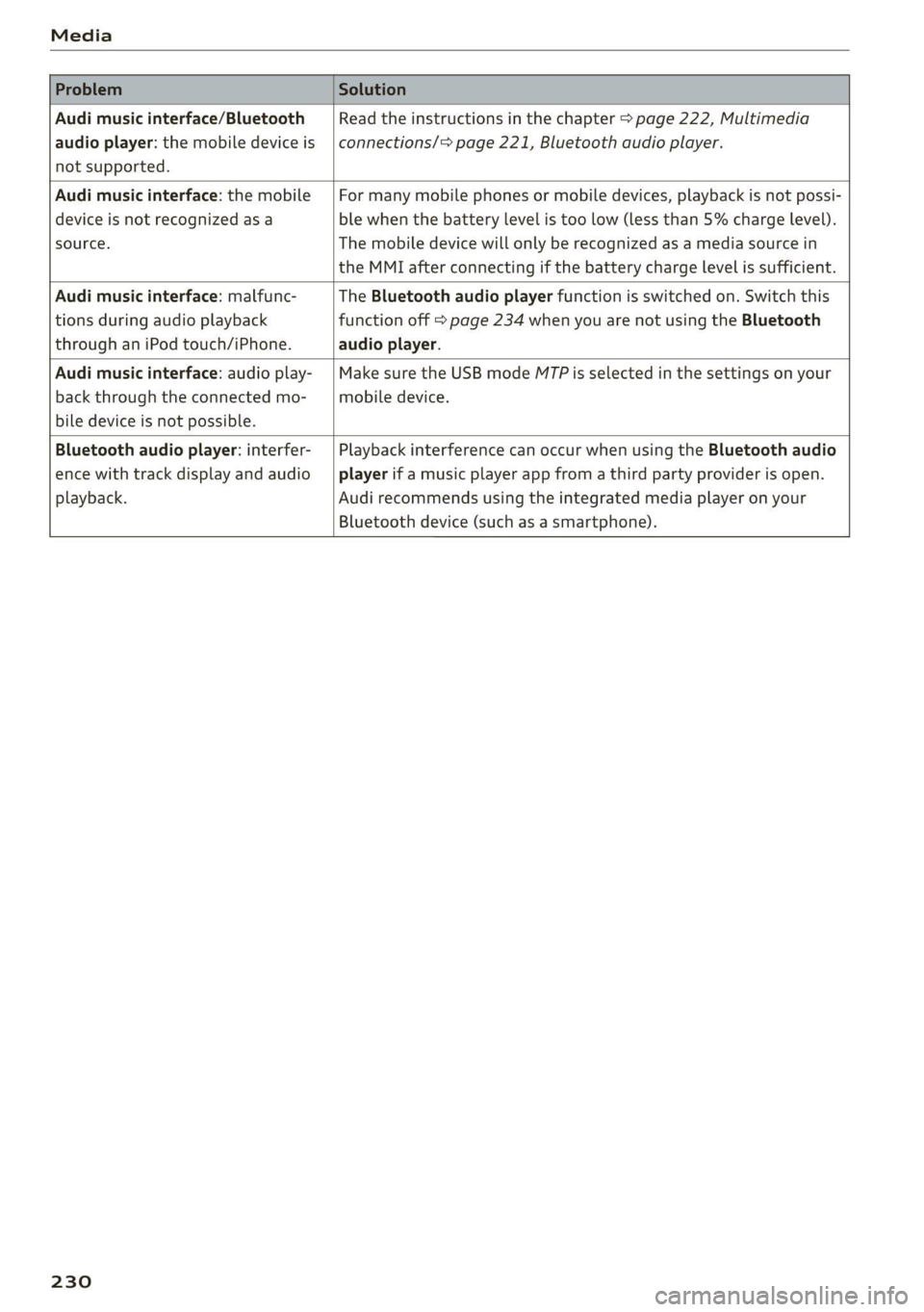
Troubleshooting
The information that follows lists some trouble-
shooting options. They depend on the equip-
ment. >
not always display, depending on the sys-
tem language.
— The manufacturer of the storage device can
provide information about its “USB Device
Subclass”.
—Some MTP player functions are not support-
ed, such as rating music tracks and video
playback.
229
Page 232 of 332
Media
Problem Solution
Audi music interface/Bluetooth
audio player: the mobile device is
not supported.
Read the instructions in the chapter > page 222, Multimedia
connections/> page 221, Bluetooth audio player.
Audi music interface: the mobile
device is not recognized as a
source.
For many mobile phones or mobile devices, playback is not possi-
ble when the battery level is too low (less than 5% charge level).
The mobile device will only be recognized as a media source in
the MMI after connecting if the battery charge level is sufficient.
Audi music interface: malfunc-
tions during audio playback
through an iPod touch/iPhone.
The Bluetooth audio player function is switched on. Switch this
function off > page 234 when you are not using the Bluetooth
audio player.
Audi music interface: audio play-
back through the connected mo-
bile device is not possible.
Make sure the USB mode MTP is selected in the settings on your
mobile device.
Bluetooth audio player: interfer-
ence with track display and audio
playback.
Playback interference can occur when using the Bluetooth audio
player if a music player app from a third party provider is open.
Audi recommends using the integrated media player on your
Bluetooth device (such as a smartphone).
230
Page 235 of 332
4M8012721BF
Additional settings
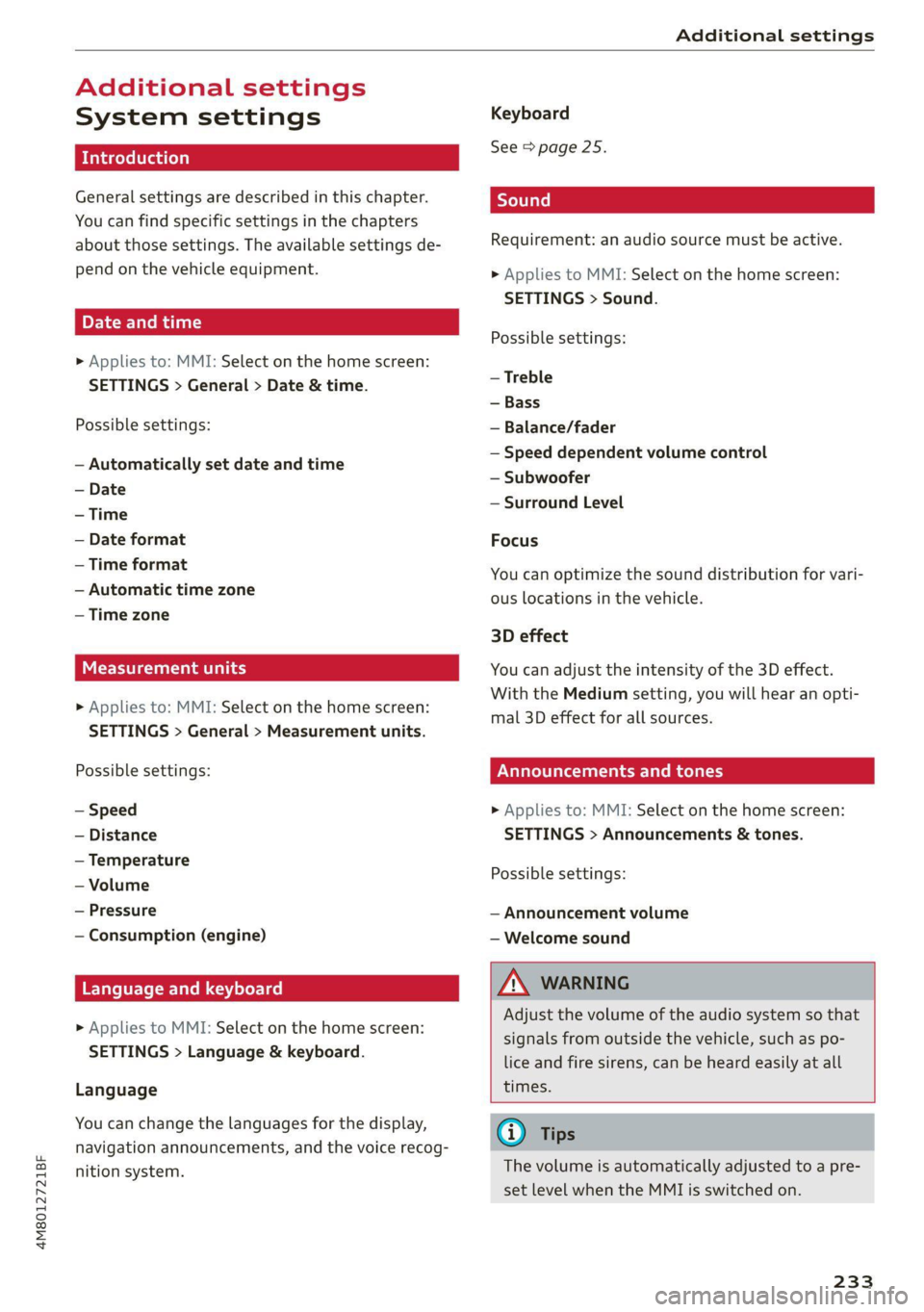
Additional settings
System settings
Introduction
General settings are described in this chapter.
You can find specific settings in the chapters
about
those settings. The available settings de-
pend on the vehicle equipment.
Date and time
> Applies to: MMI: Select on the home screen:
SETTINGS > General > Date & time.
Possible settings:
— Automatically set date and time
— Date format
— Time format
— Automatic time zone
— Time zone
Measurement units
> Applies to: MMI: Select on the home screen:
SETTINGS > General > Measurement units.
Possible settings:
— Speed
— Distance
— Temperature
— Volume
— Pressure
— Consumption (engine)
Language and keyboard
> Applies to MMI: Select on the home screen:
SETTINGS > Language & keyboard.
Language
You can change the languages for the display,
navigation announcements, and the voice recog-
nition system.
Keyboard
See > page 25.
Requirement: an audio source must be active.
> Applies to MMI: Select on the home screen:
SETTINGS > Sound.
Possible settings:
— Treble
— Bass
— Balance/fader
— Speed dependent volume control
— Subwoofer
— Surround Level
Focus
You can optimize the sound distribution for vari-
ous locations in the vehicle.
3D effect
You can adjust the intensity of the 3D effect.
With the Medium setting, you will hear an opti-
mal 3D effect for all sources.
PUL eee ely
> Applies to: MMI: Select on the home screen:
SETTINGS > Announcements & tones.
Possible settings:
— Announcement volume
— Welcome sound
Z\ WARNING
Adjust the volume of the audio system so that
signals from outside the vehicle, such as po-
lice and fire sirens, can be heard easily at all
times.
@ Tips
The volume is automatically adjusted to a pre-
set level when the MMI is switched on.
233
Page 236 of 332
Additional settings
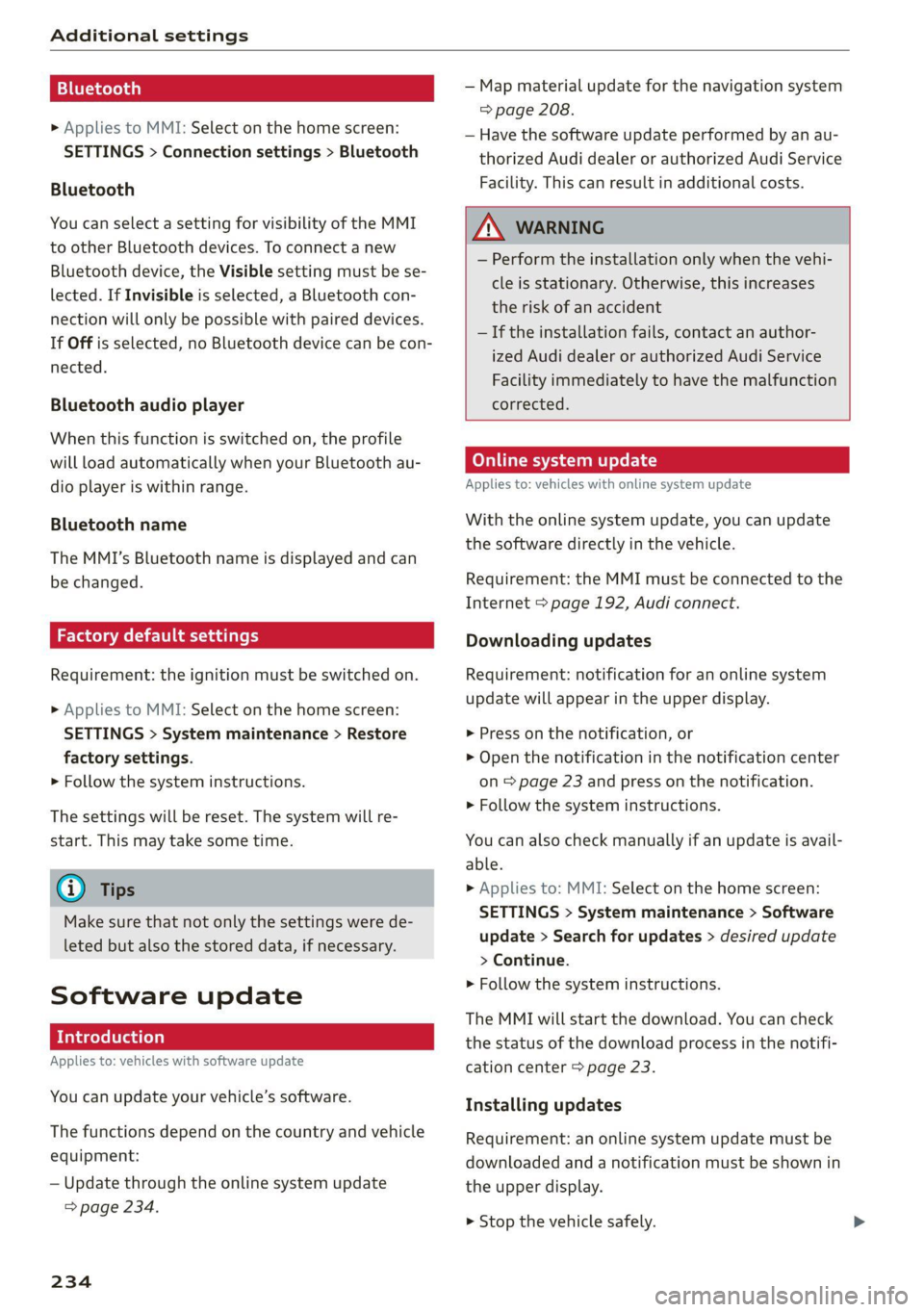
Bluetooth
> Applies to MMI: Select on the home screen:
SETTINGS > Connection settings > Bluetooth
Bluetooth
You can select a setting for visibility of the MMI
to other Bluetooth devices. To connect a new
Bluetooth device, the Visible setting must be se-
lected. If Invisible is selected, a Bluetooth con-
nection will only be possible with paired devices.
If Off is selected, no Bluetooth device can be con-
nected.
Bluetooth audio player
When this function is switched on, the profile
will load automatically when your Bluetooth au-
dio player is within range.
Bluetooth name
The MMI’s Bluetooth name is displayed and can
be changed.
Factory default settings
Requirement: the ignition must be switched on.
> Applies to MMI: Select on the home screen:
SETTINGS > System maintenance > Restore
factory settings.
> Follow the system instructions.
The settings will be reset. The system will re-
start. This may take some time.
@ Tips
Make sure that not only the settings were de-
leted but also the stored data, if necessary.
Software update
Introduction
Applies to: vehicles with software update
You can update your vehicle’s software.
The functions depend on the country and vehicle
equipment:
— Update through the online system update
=> page 234.
234
— Map material update for the navigation system
=> page 208.
— Have the software update performed by an au-
thorized Audi dealer or authorized Audi Service
Facility. This can result in additional costs.
ZA\ WARNING
— Perform the installation only when the vehi-
cle is stationary. Otherwise, this increases
the risk of an accident
— If the installation fails, contact an author-
ized Audi dealer or authorized Audi Service
Facility immediately to have the malfunction
corrected.
Online system update
Applies to: vehicles with online system update
With the online system update, you can update
the software directly in the vehicle.
Requirement: the MMI must be connected to the
Internet > page 192, Audi connect.
Downloading updates
Requirement: notification for an online system
update will appear in the upper display.
> Press on the notification, or
> Open the notification in the notification center
on page 23 and press on the notification.
> Follow the system instructions.
You can also check manually if an update is avail-
able.
> Applies to: MMI: Select on the home screen:
SETTINGS > System maintenance > Software
update > Search for updates > desired update
> Continue.
> Follow the system instructions.
The
MMI will start the download. You can check
the status of the download process in the notifi-
cation center > page 23.
Installing updates
Requirement: an online system update must be
downloaded and a notification must be shown in
the upper display.
> Stop the vehicle safely.
Page 237 of 332
4M8012721BF
Additional settings
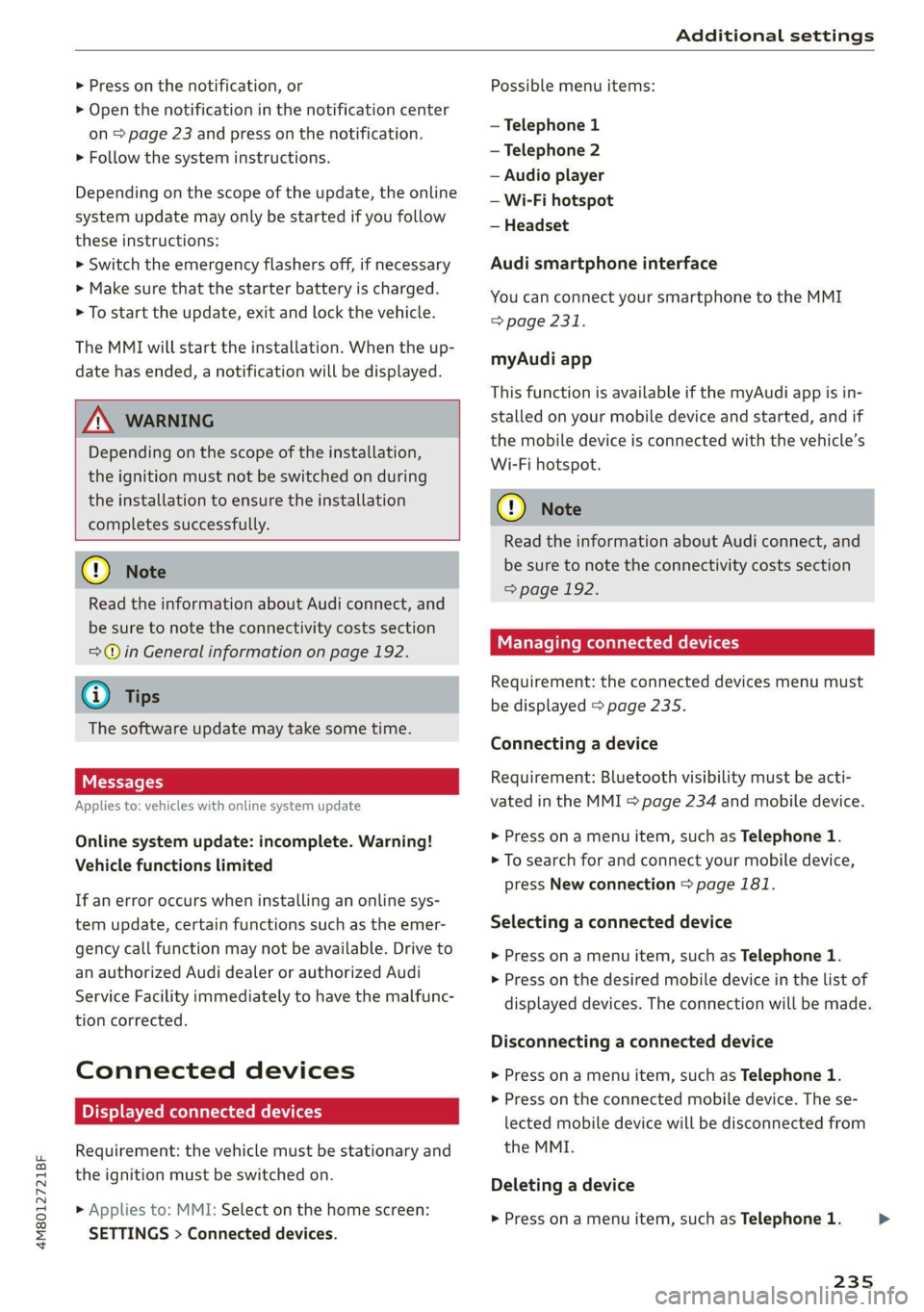
> Press on the notification, or
> Open the notification in the notification center
on > page 23 and press on the notification.
> Follow the system instructions.
Depending on the scope of the update, the online
system update may only be started if you follow
these instructions:
>» Switch the emergency flashers off, if necessary
> Make sure that the starter battery is charged.
> To start the update, exit and lock the vehicle.
The MMI will start the installation. When the up-
date has ended, a notification will be displayed.
ZA\ WARNING
Depending on the scope of the installation,
the ignition must not be switched on during
the installation to ensure the installation
completes successfully.
() Note
Read the information about Audi connect, and
be sure to note the connectivity costs section
=@ in General information on page 192.
@ Tips
The software update may take some time.
WEE Tel
Applies to: vehicles with online system update
Online system update: incomplete. Warning!
Vehicle functions limited
If an error occurs when installing an online sys-
tem update, certain functions such as the emer-
gency call function may not be available. Drive to
an authorized Audi dealer or authorized Audi
Service Facility immediately to have the malfunc-
tion corrected.
Connected devices
Displayed connected devices
Requirement: the vehicle must be stationary and
the ignition must be switched on.
> Applies to: MMI: Select on the home screen:
SETTINGS > Connected devices.
Possible menu items:
— Telephone 1
— Telephone 2
— Audio player
— Wi-Fi hotspot
— Headset
Audi smartphone interface
You can connect your smartphone to the MMI
> page 231.
myAudi app
This function is available if the myAudi app is in-
stalled on your mobile device and started, and if
the mobile device is connected with the vehicle’s
Wi-Fi hotspot.
() Note
Read the information about Audi connect, and
be sure to note the connectivity costs section
=> page 192.
Managing connected devices
Requirement: the connected devices menu must
be displayed > page 235.
Connecting a device
Requirement: Bluetooth visibility must be acti-
vated in the MMI & page 234 and mobile device.
> Press on a menu item, such as Telephone 1.
> To search for and connect your mobile device,
press New connection = page 181.
Selecting a connected device
> Press on a menu item, such as Telephone 1.
> Press on the desired mobile device in the list of
displayed devices. The connection will be made.
Disconnecting a connected device
> Press on a menu item, such as Telephone 1.
> Press on the connected mobile device. The se-
lected mobile device will be disconnected from
the MMI.
Deleting a device
> Press on a menu item, such as Telephone 1.
235
>
Page 317 of 332
4M8012721BF
A
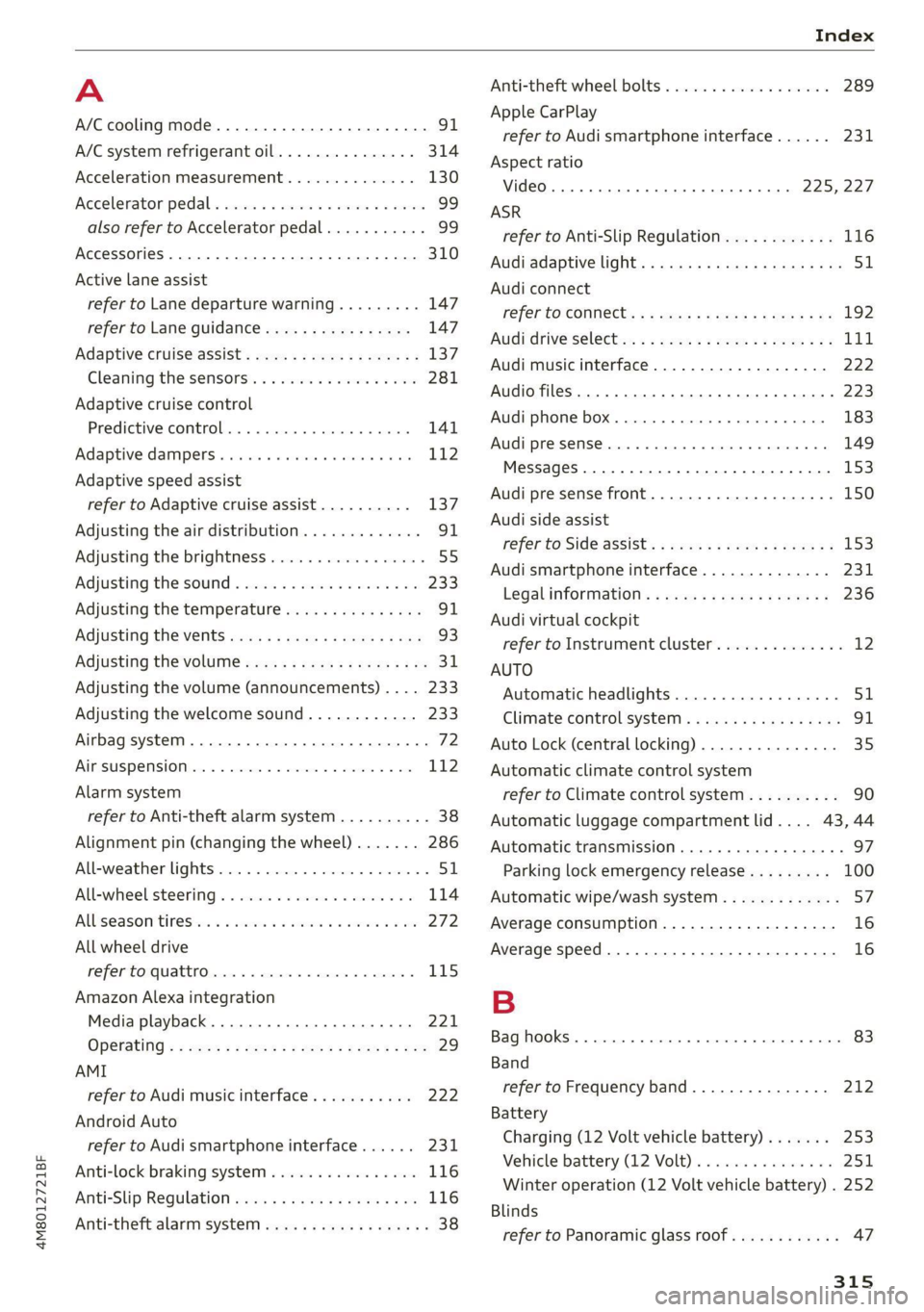
A/C cooling mode..........-. eee eee eee ee
A/C system refrigerant oil...............
Acceleration measurement..............
Accelerator pedal...............--00 000s
also refer to Accelerator pedal...........
AccessorieS.... 0... 0.00. eee eee
Active lane assist
refer to Lane departure warning.........
refer to Lane guidance................
Adaptive cruise assist................04.
Cleaning the sensors......... 0.0.0.0 005
Adaptive cruise control
Predictive control..............000005
Adaptive dampers « sve « « savece ae scare 6 0 oe
Adaptive speed assist
refer to Adaptive cruise assist..........
Adjusting the air distribution.............
Adjusting the brightness.................
Adjusting the sound................0005
Adjusting the temperature...............
Adjusting the vents ccs <= csws + © sews +o oer
Adjusting the volume............. eee eee
Adjusting the volume (announcements) ... .
Adjusting the welcome sound............
Airbag system... 2.2... eee eee
AIPSUSPONSION ix o © aowees « 2 mines + omnes 5, v0
Alarm system
refer to Anti-theft alarm system..........
Alignment pin (changing the wheel).......
All-weather lights...............-..00005
All-wheel steering.............---00005
ALUS@aSOntineSies. « 3 ssasess «x aimee a & iwesane sw a8
All wheel drive
refer to quattro.............0 0. eee
Amazon Alexa integration
Media playback................00000.
Operating « « seen s » ewes se eee G s FeeE Ys BOS
AMI
refer to Audi music interface...........
Android Auto
refer to Audi smartphone interface......
Anti-lock braking system................
Anti-Slip Regulation 0.642 5 eccs «sense ees
Anti-theft alarm system...............05.
Anti-theft wheel bolts...............0... 289
Apple CarPlay
refer to Audi smartphone interface...... 231
Aspect ratio
VIdCO eee eee eee eee eee 225,.227
ASR
refer to Anti-Slip Regulation............ 116
Audi adaptive light...............-.0000- 51
Audi connect
refer to CONnNect ; «= = sass ss sees ss eee ee ae 192
Audidrive'selecticy, « + scum oz scum « x pewe yoo 111
Audi music interface...............2.-- 222
Audio files............. 0000 c cece eee eee 223
Audi phone box...........0.- 00 eee eee 183
Audi presense....... 00... cee eee eee 149
Messages ........... 0.0. e eee eee eee 153
Audi pre sense front.............-...0-- 150
Audi side assist
refer to Side assist. ........ 0... cece eee 153
Audi smartphone interface.............. 231
Legalinformation.................005 236
Audi virtual cockpit
refer to Instrument cluster.............. 12
AUTO
Automatic headlights................4. 51
Climate control system.............0005 91
Auto Lock (central locking) ............... 35
Automatic climate control system
refer to Climate control system.......... 90
Automatic luggage compartment lid.... 43,44
Automatic transmission............-.0005 97
Parking lock emergency release......... 100
Automatic wipe/wash system............. 57
Average consumption................... 16
Average speed..........-. 00. cece eee ee 16
B
Bag hooks ........ 0.0. e eee eee eee eee 83
Band
refer to Frequency band............... 212
Battery
Charging (12 Volt vehicle battery)....... 253
Vehicle battery (12 Volt)............... 2511,
Winter operation (12 Volt vehicle battery) . 252
Blinds
refer to Panoramic glass roof............ 47
315
Page 318 of 332
Index
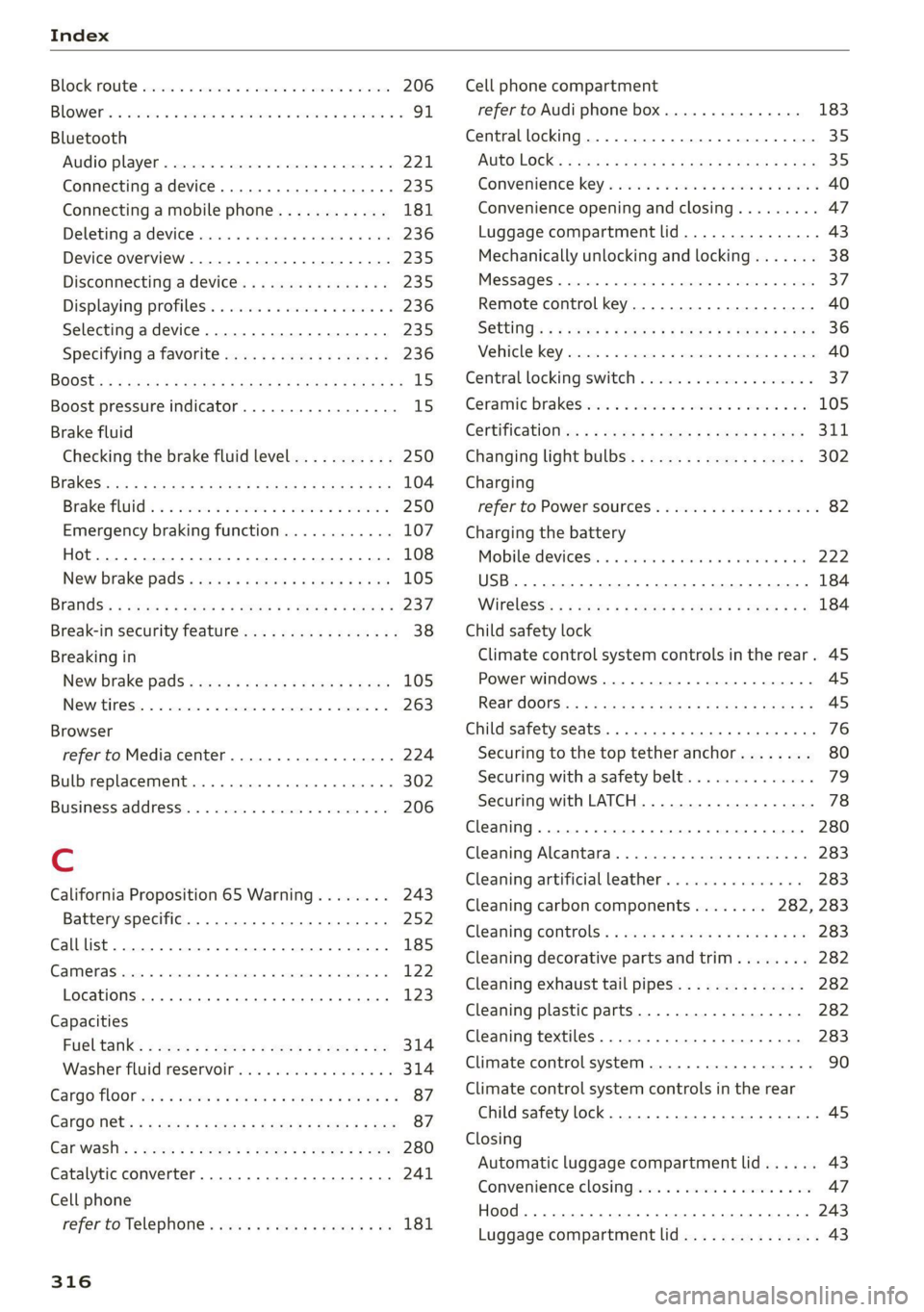
BOCK FOURE serene 6 & sense ¥ a cwavens ¥ Ht ceurene ¥ same 206
Blowers « sisi oe cena v6 arenes a omen ow oS Fo 91
Bluetooth
Audio player...........-000.0000 ee eee 221
Connecting a device. ....... cece ee eee 235
Connecting a mobile phone............ 181
Deleting atdevice rsicse + + scene a + soesene a 6 axece 236
Device overview............2..2-00008 235
Discoritiecting a device. sc csus xs ewes es 235
Displaying profiles................0005 236
Selecting adevice...............-.04. 235
Specifying a favorite ............00 000. 236
BOOSE:s » & sais 4 £ Saene & H GRD 4S GES TS ROS 15
Boost pressure indicator................. 15
Brake fluid
Checking the brake fluid level........... 250
BRAKGS cvax = scnay % § eesae ¢ ¥ HGS 7 E HaR FOES 104
Brake fluid: « 2 weed es wees a eee oo wees 2 250
Emergency braking function............ 107
(0) 108
New brake pads « weiss + mes se ey 2 ery 105
Brands’: « sae: x = comes 5 © pues & eeeeR © Femme « 237
Break-in security feature..............0.8. 38
Breaking in
New brake pads...........-. cece eeeee 105
INQWrtineSi: « «cerns «0 xenon © 9 semen © moons © 263
Browser
refer to Media center...............00. 224
Bulb replacement..................000- 302
Business,addressin.. . cence us oecan os aren wo 206
C
California Proposition 65 Warning........ 243
Battery specific.......... 0... ee eee 252
Calllist.. 0.0... 185
CAME ASH acess © 6 sensens % « omnes 5 vu omen & moments 122
Locations ......... cee eee eee eee 123,
Capacities
Fuel talk’: 2 sexs = = meen < ¥ tee v o Hes x He 314
Washer fluid reservoir..............005 314
Cargo MOOr ws ss wees « e meme 5 2 eee 2 pew Fe 87
Cargo Nets + 5 wee » o pew e + sees ee Bee Be ee 87
Gar wash's =
Cell phone
refer to Telephone...........-0ee eevee 181
316
Cell phone compartment
refer to Audi phone box.............4. 183
Central
locking............0 0... cece eee 35
AUTO LOCK: « saa s ana. am & § Suis G 3 Have 35
Convenience key............0 02: e eee eee 40
Convenience opening and closing......... 47
Luggage compartment lid............... 43
Mechanically unlocking and locking....... 38
MESSAGES « snc so smones oo wsme oo eames «soem 37
Remote control key............--.00005 40
SGttinGs s x cen » x eee £2 RES Fo wR 3 8 oe 36
Vehicle key sccm « 0 sss © a eenme = stonene i 3 omens 40
Central locking switch...........-...00-. 37
Ceramic DrakeSeonie. x a oeinis we seesam o secuwwe oo 5 105
Certificationts, s 2 asws « saun + ¢ sume 2 ¢ cee 311
Changing light bulbs................... 302
Charging
refer to Power sourceS.........-.-.00-05 82
Charging the battery
Mobilesdevicesis « « ssisin x « seine sw ayseie 0 as 222
USB... eee 184
Wirelessis « « saups ¢ © sues x 2 cto xe ees gb 184
Child safety lock
Climate control system controls inthe rear. 45
Power windows............0000 eee eee AS
REArdGGrSis« + s sean sa awa 2 Aaees s aeeR GS 45
Child safety seats... .. 0.0... cece eee eee 76
Securing to the top tether anchor........ 80
Securing with asafety belt... co. 6 6 coun s 79
Securing with LATCH...............-.0. 78
Cleaning... ... cece eee eee 280
Cleaning Alcantara...............000005 283
Cleaning artificial leather............... 283
Cleaning carbon components........ 282, 283
Cleaning controls’. « sees se sews & e saws x coe 283
Cleaning decorative parts andtrim........ 282
Cleaning exhaust tail pipes.............. 282
Cleaning plastic parts................0. 282
Cleaning textiles................0.000. 283
Climate control system...........-...0-- 90
Climate control system controls in the rear
Child safety lock................0 00000. 45
Closing
Automatic luggage compartment lid...... 43
Convenience closing.............+-.05 47
Hood... 1... eee eee eee 243
Luggage compartment lid............... 43