brake light AUDI Q8 2021 Owner´s Manual
[x] Cancel search | Manufacturer: AUDI, Model Year: 2021, Model line: Q8, Model: AUDI Q8 2021Pages: 332, PDF Size: 118.76 MB
Page 160 of 332
Driver assistance
As soon as the vehicle comes to a full stop, the
vehicle prepares for the vehicle passengers to be
rescued. The parking brake is set, “P” gear is en-
gaged, the doors are unlocked, and the interior
lighting is activated. The emergency call» will be
started if necessary once the vehicle has been
stationary
for several seconds.
Display
If /S\ is displayed for example, the emergency
assist is active.
Overriding the emergency assist
You can override emergency assist as follows
>A:
— Move the steering wheel. Or
— Press the brake pedal. Or
— Press the accelerator pedal distinctly.
When stationary, you can end the emergency as-
sist by leaving the "P" position or releasing the
parking brake > page 106.
Switching the emergency assist on and off
The system can be switched on and off in the
MMI & page 124.
Messages
a | or & is displayed when there is a malfunc-
tion, the emergency assist functions may be un-
available or may be limited.
A message that indicates the cause and possible
solution may appear with some displays. The
weather conditions may be too poor or a sensor
may be covered. Clean the area in front of the
sensors > page 123 and try to turn the system on
again later.
If the malfunction remains, drive to an author-
ized Audi dealer or authorized Audi Service Facili-
ty immediately to have the malfunction correct-
ed.
AN WARNING
— Observe the safety precautions and note the
limits of the assist systems, sensors, and
cameras > page 121.
— The emergency assist is an assist system
that should only be used in cases of emer-
gency to take over control of the vehicle and
bring it to a stop.
) This function is not available in every market and on all ve-
hicle equipment levels.
158
(i) Tips
— Depending on the severity of the detected
situation, not all safety measures will be ini-
tiated. Certain functions can be adjusted or
skipped if necessary.
— If the emergency assist was triggered, it will
only be available again after a brief period.
Page 175 of 332
4M8012721BF
Parking and maneuvering
— Park assist plus is an assist system. The driv-
er is still responsible for monitoring the ve-
hicle's surroundings and preventing colli-
sions when using the system.
— When using park assist plus to drive into or
out of a parking space, the steering wheel
turns quickly on its own. Reaching into the
steering wheel spokes while this is happen-
ing can result in injury.
@) Note
Resume steering immediately after the last
corrective movement and the takeover
prompt, so that the specified steering wheel
angle is not recentered.
G) Tips
You can reduce the speed selected by the ve-
hicle or stop the vehicle at any time by press-
ing the brake pedal.
Pausing park assist plus))2)
Applies to: vehicles with park assist plus
You can pause park assist plus at any time by re-
leasing the [>>P] button @ > page 171, fig. 130.
To resume the parking process, press and hold
the [>>P] button again.
Canceling automatically
Park assist plus is canceled automatically among
other things, if:
— If you switch off the system
— You take over steering or press the brake pedal,
— If the time limit is exceeded
— If an obstacle is detected
— The ESC intervenes
Resume control of the vehicle, end the parking
process manually, or:
You can resume the parking process in some sit-
uations. Press and hold the brake pedal and press
Pe.
)_ System availability may be limited depending on the mar-
ket.
2) In preparation at the time of printing.
ZA\ WARNING
Observe the safety precautions and note the
limits of the assist systems, sensors, and
cameras > page 121.
Messages
Applies to: vehicles with park assist plus
If the roll or il indicator light turns on, the
park assist is not available or was interrupted.
A message that indicates the cause and possible
solution may appear with some displays. The
weather conditions may be too poor or a sensor
may be covered. Clean the area in front of the
sensors > page 123 and try to turn the system on
again later.
If the malfunction remains, drive to an author-
ized Audi dealer or authorized Audi Service Facili-
ty immediately to have the malfunction correct-
ed.
Remote controlled
parking!)2)
General information
Applies to: vehicles with remote park assist plus
Remote controlled parking is part of park assist
plus/park assist plus with garage function. The
process for parking or exiting a parking space can
be controlled with a mobile device from outside
the vehicle. To do so, the driver must have both
the vehicle key and the mobile device with him or
her. While the driver controls the vehicle remote-
ly and monitors the vehicle's surroundings, the
system controls the steering, gear selection, ac-
celeration, braking, and locking the vehicle.
ZA\ WARNING
— Observe the safety precautions and note the
limits of the assist systems, sensors, and
cameras > page 121. >
173
Page 178 of 332
Parking and maneuvering
@) Tips
— When parking in garages, you can be
straight in front of the garage or at a slight
angle in front of the garage. You will have
the best results when you align and stop
your vehicle as straight as possible in front
of the garage.
— If there is enough space in a two-car garage,
the system automatically selects the park-
ing position in front of the vehicle that the
driver has selected.
Parking with the myAud re
Applies to: vehicles with remote park assist plus
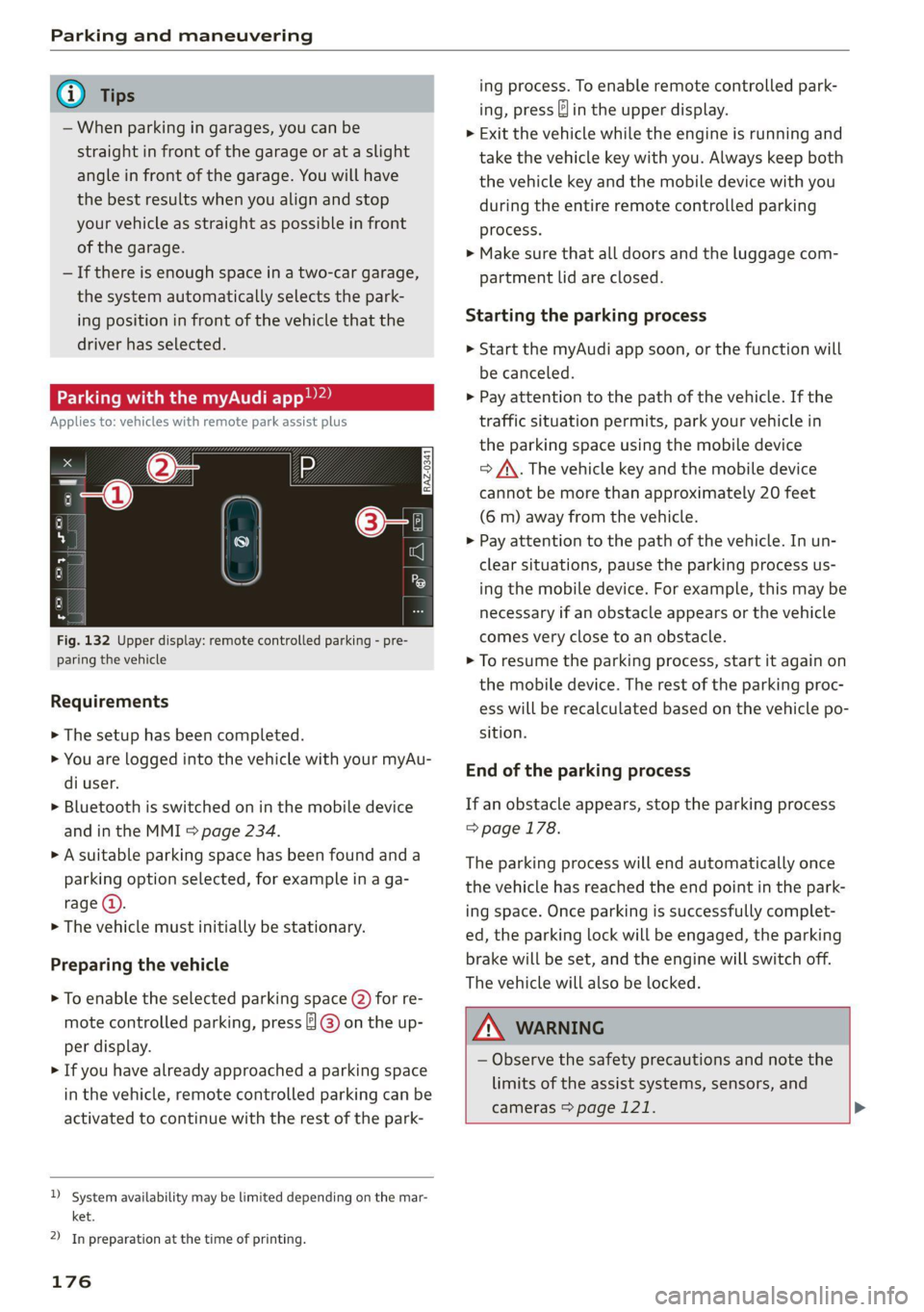
Fig. 132 Upper display: remote controlled parking - pre-
paring the vehicle
Requirements
> The setup has been completed.
> You are logged into the vehicle with your myAu-
di user.
> Bluetooth is switched on in the mobile device
and in the MMI > page 234.
> A suitable parking space has been found anda
parking option selected, for example in a ga-
rage (@).
> The vehicle must initially be stationary.
Preparing the vehicle
> To enable the selected parking space (2) for re-
mote controlled parking, press ] @) on the up-
per display.
> If you have already approached a parking space
in the vehicle, remote controlled parking can be
activated to continue with the rest of the park-
)_ system availability may be limited depending on the mar-
ket.
2) In preparation at the time of printing.
176
ing process. To enable remote controlled park-
ing, press J in the upper display.
> Exit the vehicle while the engine is running and
take the vehicle key with you. Always keep both
the vehicle key and the mobile device with you
during the entire remote controlled parking
process.
> Make sure that all doors and the luggage com-
partment lid are closed.
Starting the parking process
> Start the myAudi app soon, or the function will
be canceled.
> Pay attention to the path of the vehicle. If the
traffic situation permits, park your vehicle in
the parking space using the mobile device
> J\. The vehicle key and the mobile device
cannot be more than approximately 20 feet
(6 m) away from the vehicle.
> Pay attention to the path of the vehicle. In un-
clear situations, pause the parking process us-
ing the mobile device. For example, this may be
necessary if an obstacle appears or the vehicle
comes very close to an obstacle.
> To resume the parking process, start it again on
the mobile device. The rest of the parking proc-
ess will be recalculated based on the vehicle po-
sition.
End of the parking process
If an obstacle appears, stop the parking process
> page 178.
The parking process will end automatically once
the vehicle has reached the end point in the park-
ing space. Once parking is successfully complet-
ed, the parking lock will be engaged, the parking
brake will be set, and the engine will switch off.
The vehicle will also be locked.
ZA WARNING
— Observe the safety precautions and note the
limits of the assist systems, sensors, and
cameras > page 121. >
Page 181 of 332
4M8012721BF
Parking and maneuvering
— % Maneuver assist is temporarily deacti-
vated.
— A (symbol shown in gray) Maneuver assist
is not available.
— No symbol: maneuver assist was switched
off completely in the settings.
Braking intervention
Braking intervention can be initiated if there is an
impending possible collision with a detected sta-
tionary object. If the brakes were applied until
the vehicle stopped, Maneuver assist: vehicle
has been braked. Obstacle detected will appear
in the instrument cluster and you must take over
control of the vehicle.
If you continue driving toward the obstacle after
the vehicle is braked to a stop, maneuver assist
will automatically be temporarily deactivated un-
til the next maneuvering situation.
Z\ WARNING
Observe the safety precautions and note the
limits of the assist systems, sensors, and
cameras > page 121.
G@) Tips
— The system is only partially available when a
trailer is detected. The white outline is hid-
den at the inoperative areas. There is no
guarantee the functions will be deactivated
when using a retrofitted trailer hitch.
—Ifthe BB indicator light blinks while driving,
ESC will intervene to regulate and maneuver
assist will be canceled.
— System functions may not be available if the
ESC is limited or switched off, or if there is a
malfunction.
— The system will not be available when cer-
tain assist systems are switched on or if
park assist plus is used.
Activating or deactivating maneuver assist
Applies to: vehicles with maneuver assist
Requirements
> Maneuver assist must be switched on in the
parking system settings in the MMI.
> The speed must not be higher than approxi-
mately 6 mph (10 km/h).
Automatic activation
Maneuver assist activates automatically when re-
verse gear is engaged while the engine is run-
ning. A brief tone will sound.
Deactivating temporarily
If you do not want to use maneuver assist during
a parking cycle, you can deactivate it temporarily.
If maneuver assist is deactivated temporarily, it
will be activated again automatically the next
time park assist is activated.
> To deactivate maneuver assist temporarily,
press & @) > page 178, fig. 133 in the upper
display. The 7% symbol will appear.
If you continue driving toward the obstacle after
the vehicle is braked to a stop, maneuver assist
will automatically be temporarily deactivated un-
til the next maneuvering situation.
Activating manually
You can activate maneuver assist in various ways
depending on the situation:
> To activate maneuver assist manually (such as
when driving forward), press the 4 button in
the center console.
> To reactivate maneuver assist after it has been
deactivated temporarily, press 74 @,
=> page 178, fig. 133 in the upper display. The
= symbol will appear.
Switching on or off permanently
> Applies to MMI: Select on the home screen: VE-
HICLE > Parking aid > Maneuver assist. Or
> Select |-] > Maneuver assist in the upper dis-
play when the parking aid is active.
If maneuver assist is switched off permanently,
there will be no symbol in the center of the vehi-
cle graphic @) > page 178, fig. 133.
ZA WARNING
Observe the safety precautions and note the
limits of the assist systems, sensors, and
cameras > page 121.
179
Page 253 of 332
4M8012721BF
Checking and Filling
accident. Do not continue driving. See an au-
thorized Audi dealer or authorized Audi
Service Facility for assistance.
— If the brake fluid is old, bubbles may form in
the brake system during heavy braking. This
could impair braking performance and driv-
ing safety, which increases the risk of an ac-
cident.
— The brake fluid in your vehicle must meet
the standard VW 501 14 and is available at
an authorized Audi dealer or authorized
Audi Service Facility. If this brake fluid is not
available, another high-grade brake fluid of
equivalent quality may be used, and it must
meet
the U.S. Federal Motor Vehicle Stand-
ard (FMVSS) 116 DOT 4, Class 6.
Switch off all electrical equipment that is not
needed. If necessary, some equipment will be
switched off automatically. Vehicle functions or
driving stability may be limited. Drive to an au-
thorized Audi dealer or authorized Audi Service
Facility immediately.
= Electrical system: low battery charge. Bat-
tery
will be charged while driving
The starting ability may be impaired.
If this message turns off after a little while, the
vehicle battery has charged enough while driving.
If this message does not turn off, drive immedi-
ately to an authorized Audi dealer or authorized
Audi Service Facility.
@) Note
— If the brake fluid level is above the MAX
marking, brake fluid may leak out over the
edge of the reservoir and result in damage
to the vehicle.
— Do not allow any brake fluid to come into
contact with the vehicle paint, because it
will corrode the paint.
Electrical system
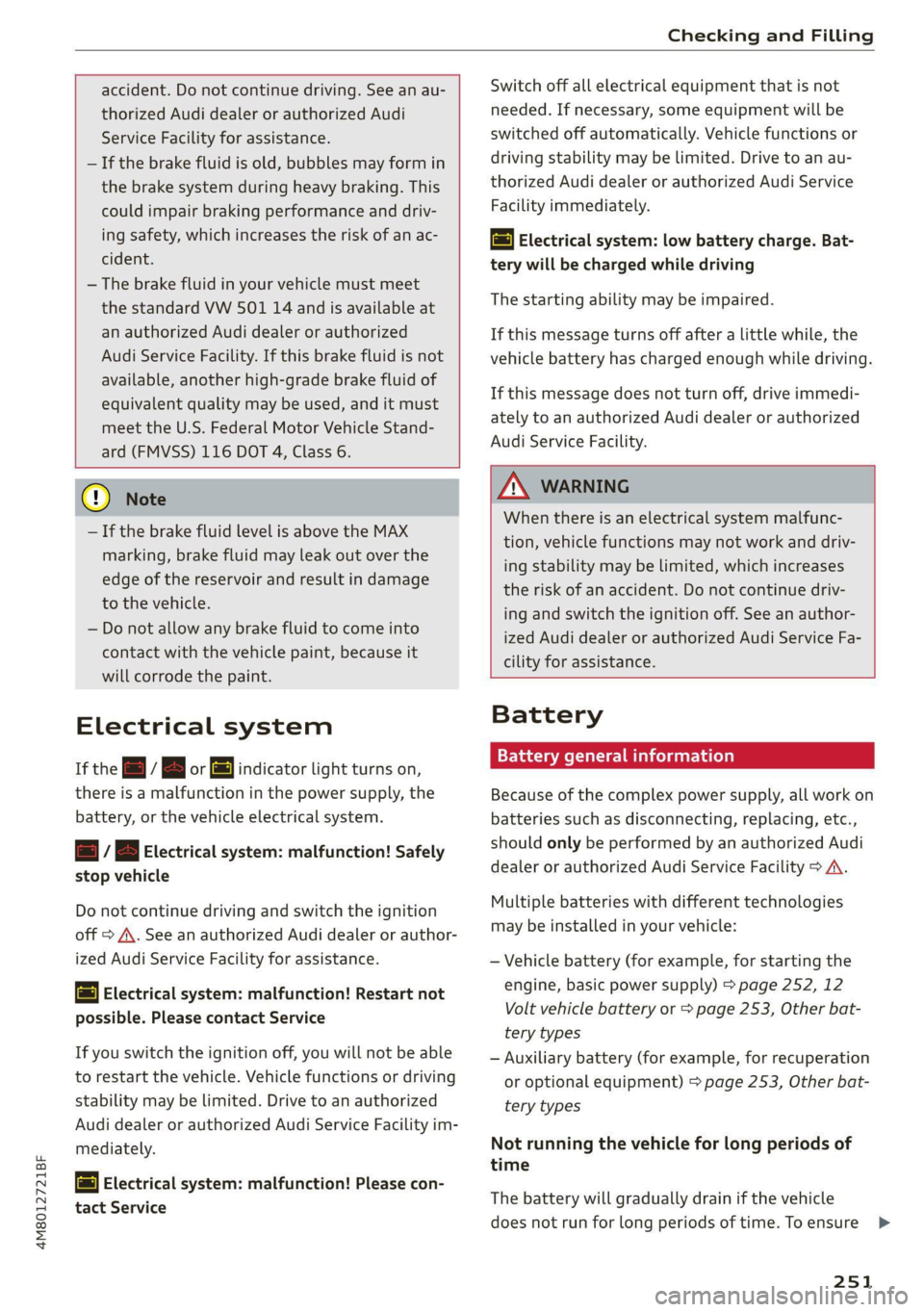
If the = f B or = indicator light turns on,
there is a malfunction in the power supply, the
battery, or the vehicle electrical system.
= f B Electrical system: malfunction! Safely
stop vehicle
Do not continue driving and switch the ignition
off > A\. See an authorized Audi dealer or author-
ized Audi Service Facility for assistance.
= Electrical system: malfunction! Restart not
possible. Please contact Service
If you switch the ignition off, you will not be able
to restart the vehicle. Vehicle functions or driving
stability may be limited. Drive to an authorized
Audi dealer or authorized Audi Service Facility im-
mediately.
= Electrical system: malfunction! Please con-
tact Service
Z\ WARNING
When there is an electrical system malfunc-
tion, vehicle functions may not work and driv-
ing stability may be limited, which increases
the risk of an accident. Do not continue driv-
ing and switch the ignition off. See an author-
ized Audi dealer or authorized Audi Service Fa-
cility for assistance.
Battery
lala Meme cd)
Because of the complex power supply, all work on
batteries such as disconnecting, replacing, etc.,
should only be performed by an authorized Audi
dealer or authorized Audi Service Facility > A\.
Multiple batteries with different technologies
may be installed in your vehicle:
— Vehicle battery (for example, for starting the
engine, basic power supply) > page 252, 12
Volt vehicle battery or > page 253, Other bat-
tery types
— Auxiliary battery (for example, for recuperation
or optional equipment) > page 253, Other bat-
tery types
Not running the vehicle for long periods of
time
The battery will gradually drain if the vehicle
does not run for long periods of time. To ensure
251
>
Page 283 of 332
4M8012721BF
Care and cleaning
height and width of the inside of the car
wash.
ZA WARNING
—To reduce the risk of accidents, only wash
the vehicle when the ignition is off and fol-
low the instructions from the car wash oper-
ator.
—To reduce the risk of paint damage, do not
wash the vehicle in direct sunlight.
—To reduce the risk of damage, do not wash
decorative decals* with a pressure washer.
—To reduce the risk of damage to the surface,
do not use insect removing sponges, kitchen
sponges, or similar items.
— When washing matte finish painted vehicle
components:
—To reduce the risk of cuts, protect yourself
from sharp metal components when wash-
ing the underbody or the inside of the wheel
housings.
— After washing the vehicle, the braking effect
may be delayed due to moisture on the
brake rotors or ice in the winter. This in-
creases the risk of an accident. The brakes
must be dried with a few careful brake appli-
cations.
— To reduce the risk of damage to the sur-
face, do not use polishing agents or hard
wax.
— Never use protective wax. It can destroy
the matte finish effect.
@) Note — Do not place any stickers or magnetic
signs on vehicle components painted with
matte finish paint. The paint could be
damaged when the stickers or magnets
are removed.
— If you wash the vehicle in an automatic car
wash, you must fold the exterior mirrors in
to reduce the risk of damage to the mirrors.
Power folding exterior mirrors* must only
be folded in and out using the power folding (@) For the sake of the environment
function.
—To reduce the risk of damage to the rims
and tires, compare the width between the
wheels on your vehicle with the distance be-
tween the guide rails in the car wash.
—To reduce the risk of damage, compare the
height and width of your vehicle with the
Only wash the vehicle in facilities specially de-
signed for that purpose. This will reduce the
risk of dirty water contaminated with oil from
entering the sewer system.
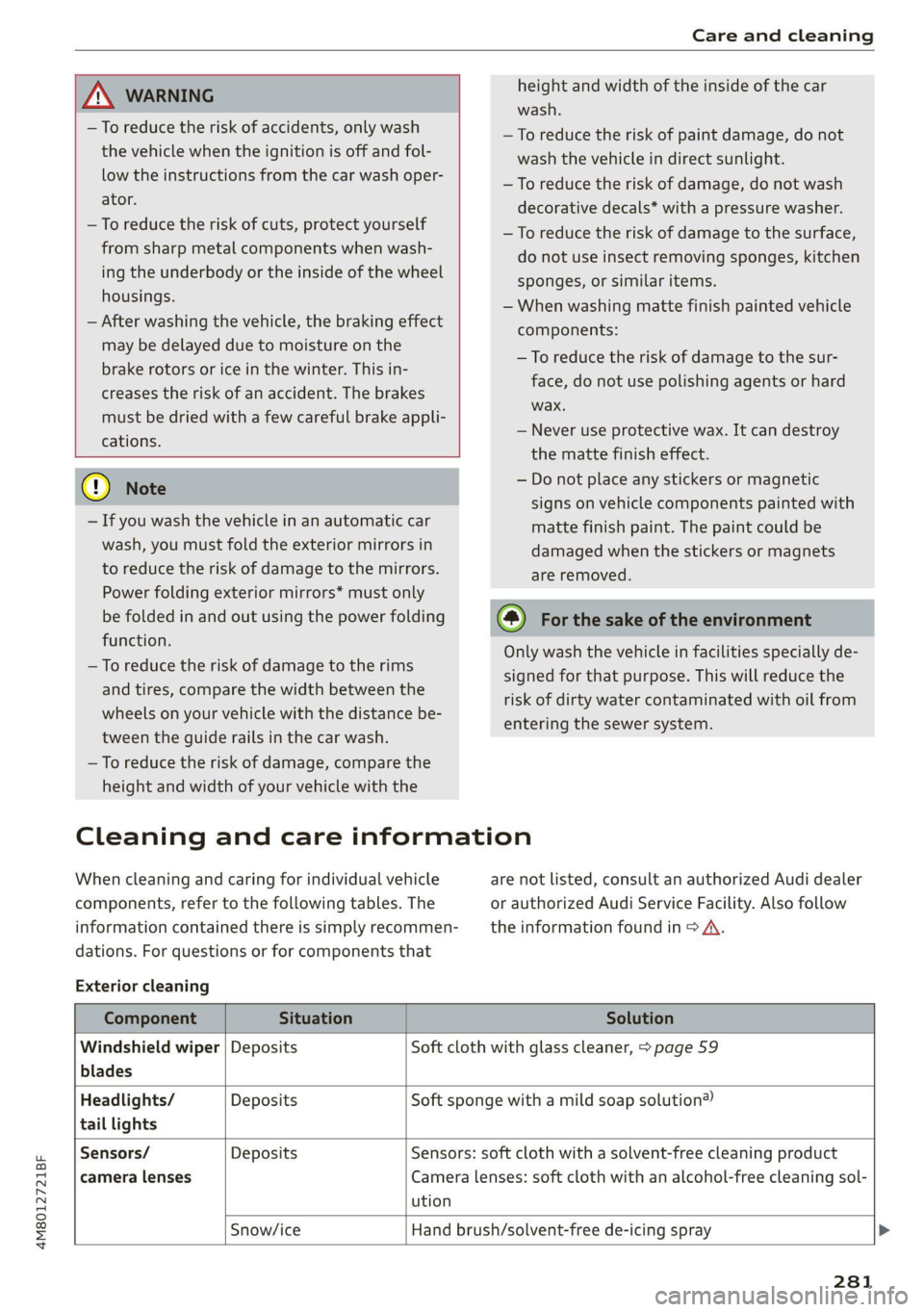
Cleaning and care information
When cleaning and caring for individual vehicle are not listed, consult an authorized Audi dealer
components, refer to the following tables. The or authorized Audi Service Facility. Also follow
information contained there is simply recommen- __ the information found in > A.
dations. For questions or for components that
Exterior cleaning
Component Situation Solution
Windshield wiper | Deposits Soft cloth with glass cleaner, > page 59
blades
Headlights/ Deposits Soft sponge with a mild soap solution®
tail lights
Sensors/ Deposits Sensors: soft cloth with a solvent-free cleaning product
camera lenses Camera lenses: soft cloth with an alcohol-free cleaning sol-
ution
Snow/ice Hand brush/solvent-free de-icing spray >
281
Page 301 of 332
4M8012721BF
Fuses and bulbs
@) Tips
— The following table does not list fuse loca-
tions that are not used.
— Some of the equipment listed in the follow-
ing tables applies only to certain model ver-
sions or certain optional equipment.
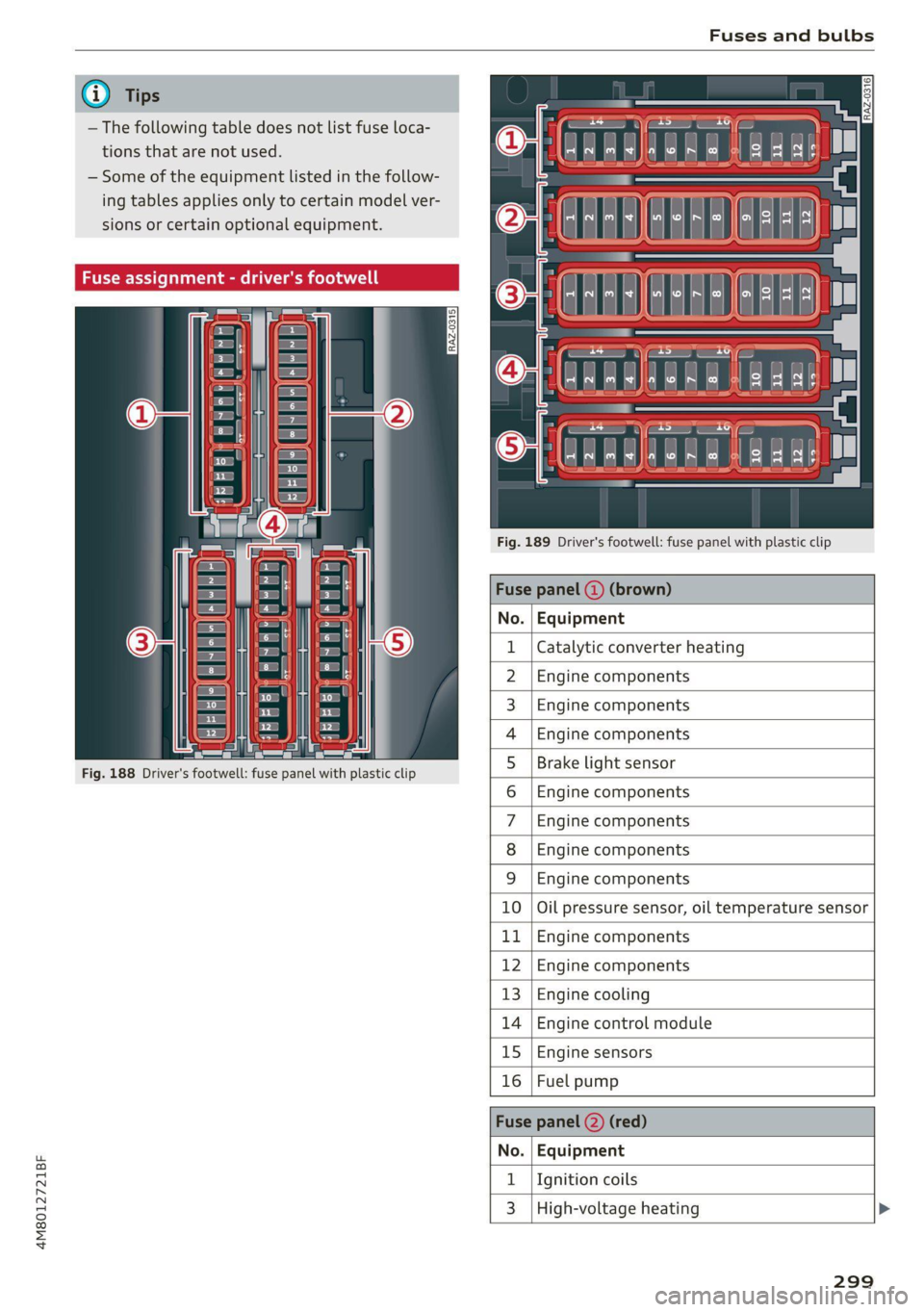
Fig. 189 Driver's footwell: fuse panel with plastic clip
Fuse panel (4) (brown)
No. | Equipment
Catalytic converter heating
Engine components
Engine components
Engine components
Fig. 188 Driver's footwell: fuse panel with plastic clip
Brake light sensor
Engine components
Engine components
Engine components
WlLOlINI
AD)
MW)
ASWIN/
PR
Engine components
BR Oo Oil pressure sensor, oil temperature sensor
b Bb Engine components
R N Engine components
H Ww Engine cooling
fa BR Engine control module
BR uw Engine sensors
Bb a Fuel pump
Fuse
No. | Equipment
1 | Ignition coils
3 | High-voltage heating
299
Page 302 of 332
Fuses and bulbs
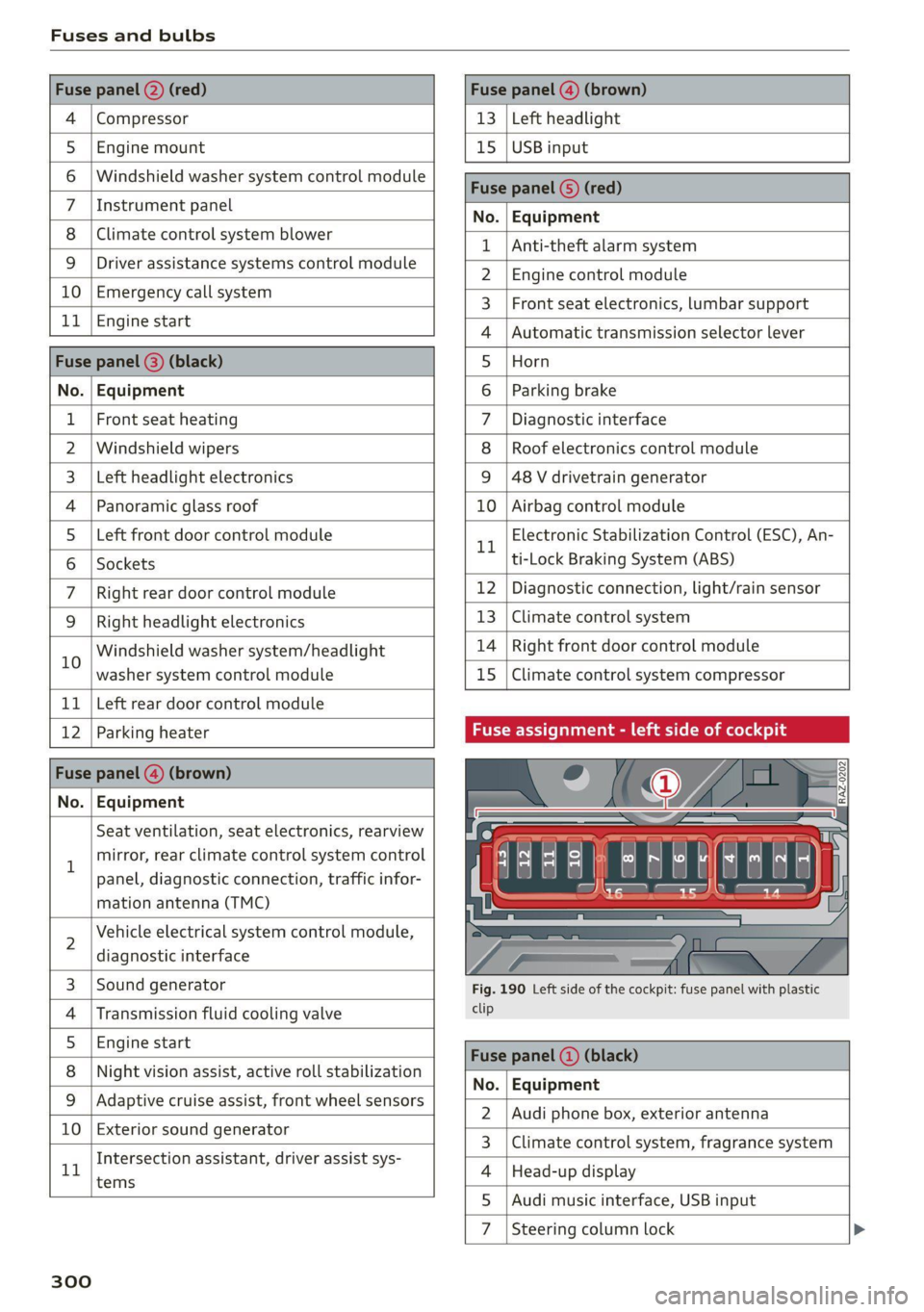
Compressor | 13 | Left headlight
Audi music interface, USB input
4
5 |Engine mount 15 | USB input
6 |Windshield washer system control module
7 LisioTnieNe panel Nas | Equipinent
8 | Climate control system blower T | Ant-theté dlaunsystem
9 |Driver assistance systems control module :
2 | Engine control module
E UL
10. | Emergency 'callsystem 3 | Front seat electronics, lumbar support
11 | Engi
ngine start 4 |Automatic transmission selector lever
Di 5 |Horn
No. | Equipment 6 | Parking brake
1 |Front seat heating 7 |Diagnostic interface
2 |Windshield wipers 8 | Roof electronics control module
3 | Left headlight electronics 9 |48 V drivetrain generator
4 |Panoramic glass roof 10 | Airbag control module
5 |Left front door control module Electronic Stabilization Control (ESC), An-
Il | ‘
6 |Sockets ti-Lock Braking System (ABS)
7 | Right rear door control module 12 | Diagnostic connection, light/rain sensor
9 | Right headlight electronics 13 | Climate control system
10 Windshield washer system/headlight 14 | Right front door control module
washer system control module 15 | Climate control system compressor
11 | Left rear door control module
12 | Parking heater Fuse assignment - left side of cockpit
No. | Equipment
Seat ventilation, seat electronics, rearview
1 mirror, rear climate control system control
panel, diagnostic connection, traffic infor-
mation antenna (TMC)
2 Vehicle electrical system control module,
diagnostic interface
3 |Sound generator Fig. 190 Left side of the cockpit: fuse panel with plastic
4 | Transmission fluid cooling valve ete
5 |Engine start
8 | Night vision assist, active roll stabilization 5
No. | Equipment
9 |Adaptive cruise assist, front wheel sensors - -
2. |Audi phone box, exterior antenna
10 | Exterior sound generator 5
3 | Climate control system, fragrance system
Intersection assistant, driver assist sys- .
11 4 |Head-up display
tems
5
7d
Steering column lock
300
Page 318 of 332
Index
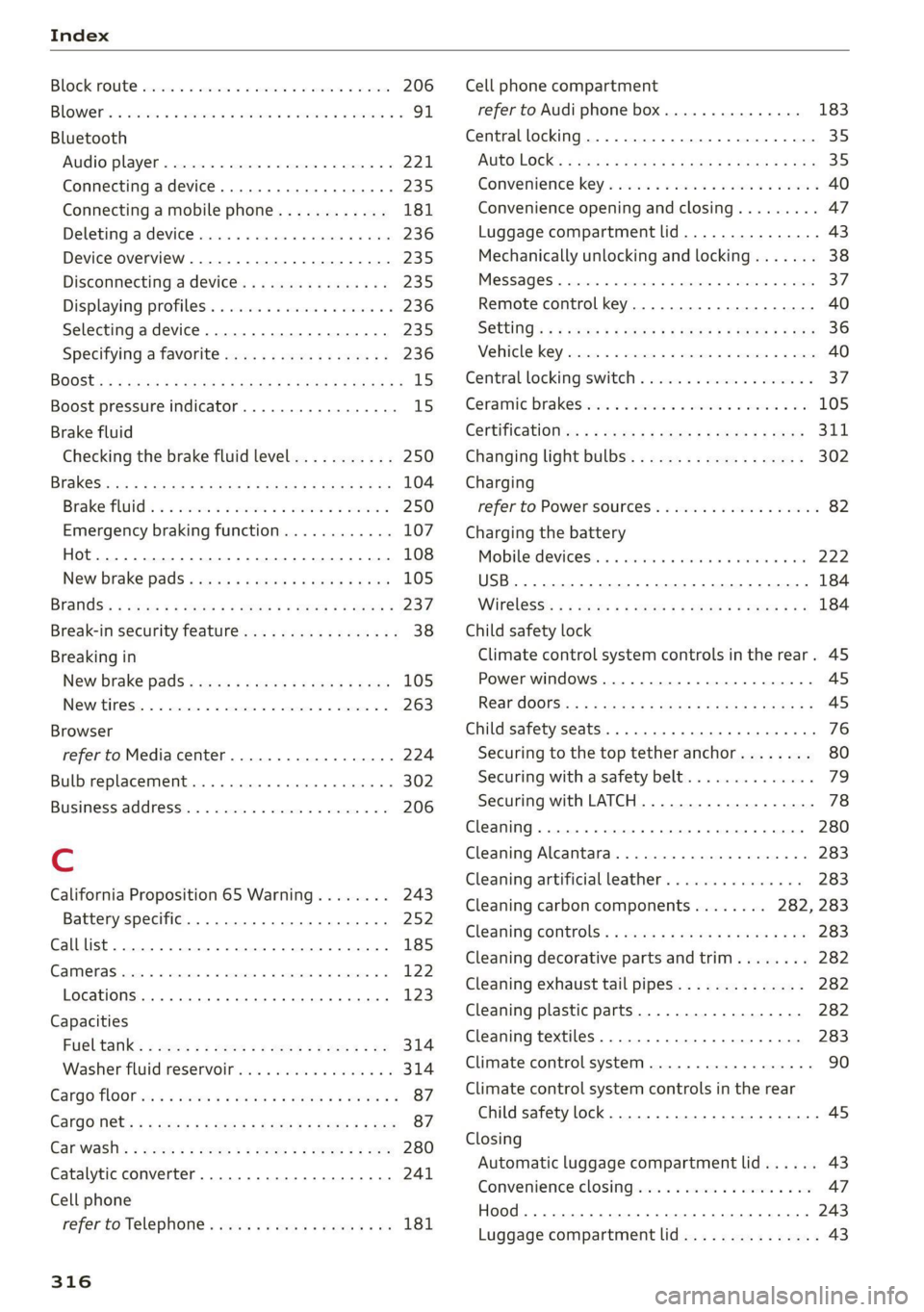
BOCK FOURE serene 6 & sense ¥ a cwavens ¥ Ht ceurene ¥ same 206
Blowers « sisi oe cena v6 arenes a omen ow oS Fo 91
Bluetooth
Audio player...........-000.0000 ee eee 221
Connecting a device. ....... cece ee eee 235
Connecting a mobile phone............ 181
Deleting atdevice rsicse + + scene a + soesene a 6 axece 236
Device overview............2..2-00008 235
Discoritiecting a device. sc csus xs ewes es 235
Displaying profiles................0005 236
Selecting adevice...............-.04. 235
Specifying a favorite ............00 000. 236
BOOSE:s » & sais 4 £ Saene & H GRD 4S GES TS ROS 15
Boost pressure indicator................. 15
Brake fluid
Checking the brake fluid level........... 250
BRAKGS cvax = scnay % § eesae ¢ ¥ HGS 7 E HaR FOES 104
Brake fluid: « 2 weed es wees a eee oo wees 2 250
Emergency braking function............ 107
(0) 108
New brake pads « weiss + mes se ey 2 ery 105
Brands’: « sae: x = comes 5 © pues & eeeeR © Femme « 237
Break-in security feature..............0.8. 38
Breaking in
New brake pads...........-. cece eeeee 105
INQWrtineSi: « «cerns «0 xenon © 9 semen © moons © 263
Browser
refer to Media center...............00. 224
Bulb replacement..................000- 302
Business,addressin.. . cence us oecan os aren wo 206
C
California Proposition 65 Warning........ 243
Battery specific.......... 0... ee eee 252
Calllist.. 0.0... 185
CAME ASH acess © 6 sensens % « omnes 5 vu omen & moments 122
Locations ......... cee eee eee eee 123,
Capacities
Fuel talk’: 2 sexs = = meen < ¥ tee v o Hes x He 314
Washer fluid reservoir..............005 314
Cargo MOOr ws ss wees « e meme 5 2 eee 2 pew Fe 87
Cargo Nets + 5 wee » o pew e + sees ee Bee Be ee 87
Gar wash's =
Cell phone
refer to Telephone...........-0ee eevee 181
316
Cell phone compartment
refer to Audi phone box.............4. 183
Central
locking............0 0... cece eee 35
AUTO LOCK: « saa s ana. am & § Suis G 3 Have 35
Convenience key............0 02: e eee eee 40
Convenience opening and closing......... 47
Luggage compartment lid............... 43
Mechanically unlocking and locking....... 38
MESSAGES « snc so smones oo wsme oo eames «soem 37
Remote control key............--.00005 40
SGttinGs s x cen » x eee £2 RES Fo wR 3 8 oe 36
Vehicle key sccm « 0 sss © a eenme = stonene i 3 omens 40
Central locking switch...........-...00-. 37
Ceramic DrakeSeonie. x a oeinis we seesam o secuwwe oo 5 105
Certificationts, s 2 asws « saun + ¢ sume 2 ¢ cee 311
Changing light bulbs................... 302
Charging
refer to Power sourceS.........-.-.00-05 82
Charging the battery
Mobilesdevicesis « « ssisin x « seine sw ayseie 0 as 222
USB... eee 184
Wirelessis « « saups ¢ © sues x 2 cto xe ees gb 184
Child safety lock
Climate control system controls inthe rear. 45
Power windows............0000 eee eee AS
REArdGGrSis« + s sean sa awa 2 Aaees s aeeR GS 45
Child safety seats... .. 0.0... cece eee eee 76
Securing to the top tether anchor........ 80
Securing with asafety belt... co. 6 6 coun s 79
Securing with LATCH...............-.0. 78
Cleaning... ... cece eee eee 280
Cleaning Alcantara...............000005 283
Cleaning artificial leather............... 283
Cleaning carbon components........ 282, 283
Cleaning controls’. « sees se sews & e saws x coe 283
Cleaning decorative parts andtrim........ 282
Cleaning exhaust tail pipes.............. 282
Cleaning plastic parts................0. 282
Cleaning textiles................0.000. 283
Climate control system...........-...0-- 90
Climate control system controls in the rear
Child safety lock................0 00000. 45
Closing
Automatic luggage compartment lid...... 43
Convenience closing.............+-.05 47
Hood... 1... eee eee eee 243
Luggage compartment lid............... 43
Page 320 of 332
Index
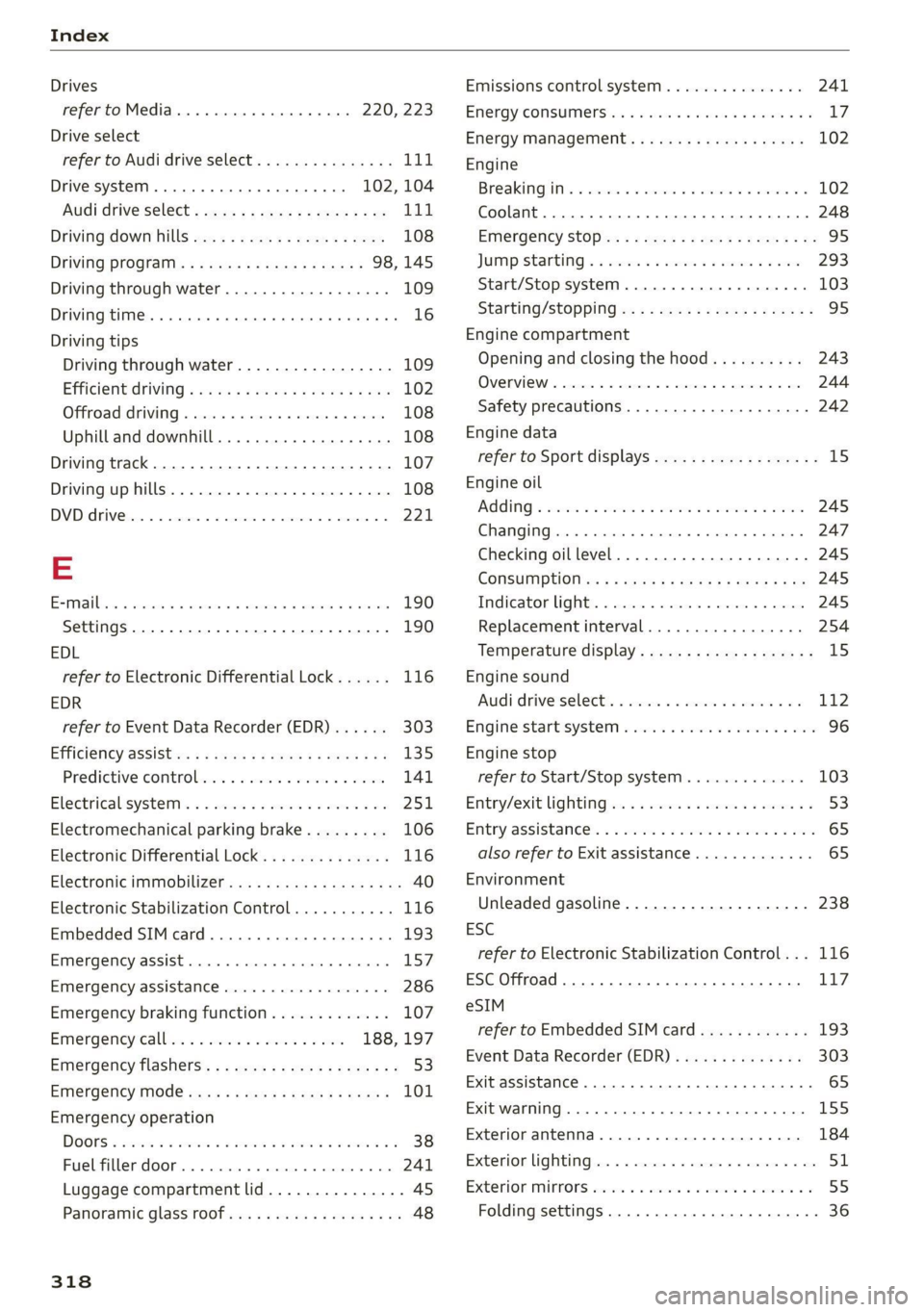
Drives
refer to Media.............000 eee 220, 223
Drive select
refer to Audi drive select............... 111
Drive systeM..... ee eee eee ee ee 102, 104
Audi drive Select s cso 2 ¢ cawe 2 2 gence a ee 111
Driving down hills...............-0.00- 108
DriVinig Program. ¢ «mas xc ees + cess 98,145
Driving through water............-..005 109
Driving time... .. 6. cece ee eee eee eee 16
Driving tips
Driving through water................- 109
Efficientdriving
¢ wuss « ¢ cows se cows xe ea 102
Offroad driving............. cee eee eee 108
Uphill and downhill................00. 108
Driving track. . 22... . ee eee eee eee 107
Drivinguphills................02..000. 108
DVDEARIVG is 1 3 cosnees «x cemeeas =o sammate = x amemens © © 221,
E
ESimaibress « aaueos oo asawtan a x ansuw x aanwrne « ¥ sent 190
Settings................ 00. e ee eee 190
EDL
refer to Electronic Differential Lock...... 116
EDR
refer to Event Data Recorder (EDR)...... 303
Efficiency aSSiStie: + 2 swe » 2 mew 2 y aes oe: 135
Predictive comtrobenics + i ices « mesa 2 + sein 141
Electricalisystem’s « « sessce 2 seeona ee ene owe 251
Electromechanical parking brake......... 106
Electronic Differential Lock... 2.0... 006.. 116
Electronic immiobiliZer «0: se ecns ak mows sg os 40
Electronic Stabilization Control........... 116
Embedded SIM card............--.00005 193
EMMERGENCYZASSISE averse « o ssenee © oneuens «6 vnesane 157
Emergency assistance ................2. 286
Emergency braking function............. 107
Emergency call ws: <2 sce se vnc ve ee 188, 197
Emergency flashers..............---00-+ 53
Emergency mode............. essen eeee 101
Emergency operation
DOONS « sean oo een 2 5 een ©» em 2 ee Yo 38
FUCUREP OOP a. « sticesus c s want 1 aesene 6 ae 241
Luggage compartment lid............... 45
Panoraftiic Glass TOOT iss « ¢ savns s x eave 2 oc 48
318
Emissions control system..............- 241
ENergyCONSUMErSias « & sone + wae oo wae oo 0 Ly:
Energy management................005 102
Engine
Breaking iin’: « esis <0 cee & ecw ve eon ¥ 102
Coolant. ... 0... 2. eee eee eee eee 248
Enisrgency StOpiax « «sews + vee s = ees es He 95
JUMP StARtiNg so sews ov sei oo scones ow sense 293
Start/Stop system. ...... 0... eee ee eee 103
Starting/Stopping
Opening and closing the hood.......... 243
OVERVIEW '« eswisics oo cesses oo stance ow siete © 0 ae 244
Safety precautions..................0. 242
Engine data
refer to Sport displays.................. 15
Engine oil
AGOING & esccen 3 2 cconoa oe ee ao Sa oe 245
Changing........ 2. cece eee eee eee 247
Checking oil level.............---000-. 245
CONSUIMPUOliiss x 2 czers ¢ = wees 2 & Rew 2 owe 245
Indicator light............... 2.00000 245
Replacement interval................. 254
Temperature display.................-. 15
Engine sound
Audi driveselectix «asco: ss sseses «x seoune 9 «3 112
Engine’start system war » sw 6 2 awa 8 6 we 96
Engine stop
refer to Start/Stop system............. 103
Entry/exit Lightings «+ sci 6 « sae & 6 overan aa 53
Entry aSSistanees. « 2 sews oo sie 9 2 eee oo saree 65
also refer to Exit assistance............. 65
Environment
Unleaded gasoline..................0. 238
ESC
refer to Electronic Stabilization Control... 116
ESC Offroad... 1... eee ee eee 117
eSIM
refer to Embedded SIM card............ 193
Event Data Recorder (EDR).............. 303
Exit assistance... 0.2... eee ee eee 65
Exit warning ............... 5 eee sees 15S
Exterior antenna.............02-..0 eee 184
Exterior lighting.................02-000. 51
Exterior MUPFOPS sic 2 6 wma sv sew © meee © x 55
Folding settings ..............0000 0000s 36