parking sensors AUDI Q8 2021 Owner´s Manual
[x] Cancel search | Manufacturer: AUDI, Model Year: 2021, Model line: Q8, Model: AUDI Q8 2021Pages: 332, PDF Size: 118.76 MB
Page 177 of 332
4M8012721BF
Parking and maneuvering
— Your mobile device should have a sufficient
battery charge level. If necessary, charge
the mobile device before starting to drive.
— Do not use the remote controlled parking
function with devices that are faulty or dam-
aged or whose function is impaired. Only
use the operating systems approved by the
mobile device manufacturer.
— When using remote controlled parking, al-
ways pay attention to the areas where your
vehicle can be accessed. Check that no one
can enter your vehicle and if the vehicle has
been locked after parking is completed.
Take the vehicle key with you when leaving
the vehicle.
Applies to: vehicles with remote park assist plus
The following steps must be completed before
using for the first time:
> Create a myAudi account by registering in the
myAudi app or at my.audi.com, depending on
your country.
> Add your vehicle to your myAudi account.
> Set the key user > page 32.
> Install the myAudi app on your mobile device
and log in with your access information.
Device compatibility
The mobile device will be checked at the start of
a parking procedure. If an incompatibility is de-
tected, it will be displayed in the myAudi app.
Audi does not recommend using the function if
an incompatibility is detected > A\.
A selection of supported Bluetooth devices can
be found in the database for tested mobile devi-
ces at www.audi.com/bluetooth. Compatibility
cannot be guaranteed for all types of mobile de-
vices. The availability depends on the following
factors, among others:
— Brand and build version of the mobile device
D_ System availability may be limited depending on the mar-
ket.
2) In preparation at the time of printing.
3) Applies to: vehicles with remote park assist plus with ga-
rage function
— Version of the mobile device operating system
— Software version of the app used
— Individual settings on the mobile device
Z\ WARNING
— Observe the safety precautions and note the
limits of the assist systems, sensors, and
cameras > page 121.
— There is a risk of an accident if an incompati-
ble mobile device is used. If there is a dis-
play indicating that functionality is restrict-
ed, the vehicle’s reaction speed may be im-
paired due to reduced transmission speed.
Parking options!)2)
Applies to: vehicles with remote park assist plus
Depending on the vehicle equipment, you may
have the following options when using remote
controlled parking:
Driving into parking spaces
— Parallel parking on the left or right side of the
street @ > page 168, fig. 126
— Driving forward or backing into perpendicular
parking spaces (2)/@) > page 168, fig. 126.
— Parking in one-car or two-car garages») ©)/@)
=> page 168, fig. 127
Exiting parking spaces
— Leaving perpendicular parking spaces @)
> page 168, fig. 128.
— Exiting parallel parking spaces (2).
— Exiting one-car or two-car garages?) ®.
Z\ WARNING
Observe the safety precautions and note the
limits of the assist systems, sensors, and
cameras > page 121. >
175
Page 178 of 332
Parking and maneuvering
@) Tips
— When parking in garages, you can be
straight in front of the garage or at a slight
angle in front of the garage. You will have
the best results when you align and stop
your vehicle as straight as possible in front
of the garage.
— If there is enough space in a two-car garage,
the system automatically selects the park-
ing position in front of the vehicle that the
driver has selected.
Parking with the myAud re
Applies to: vehicles with remote park assist plus
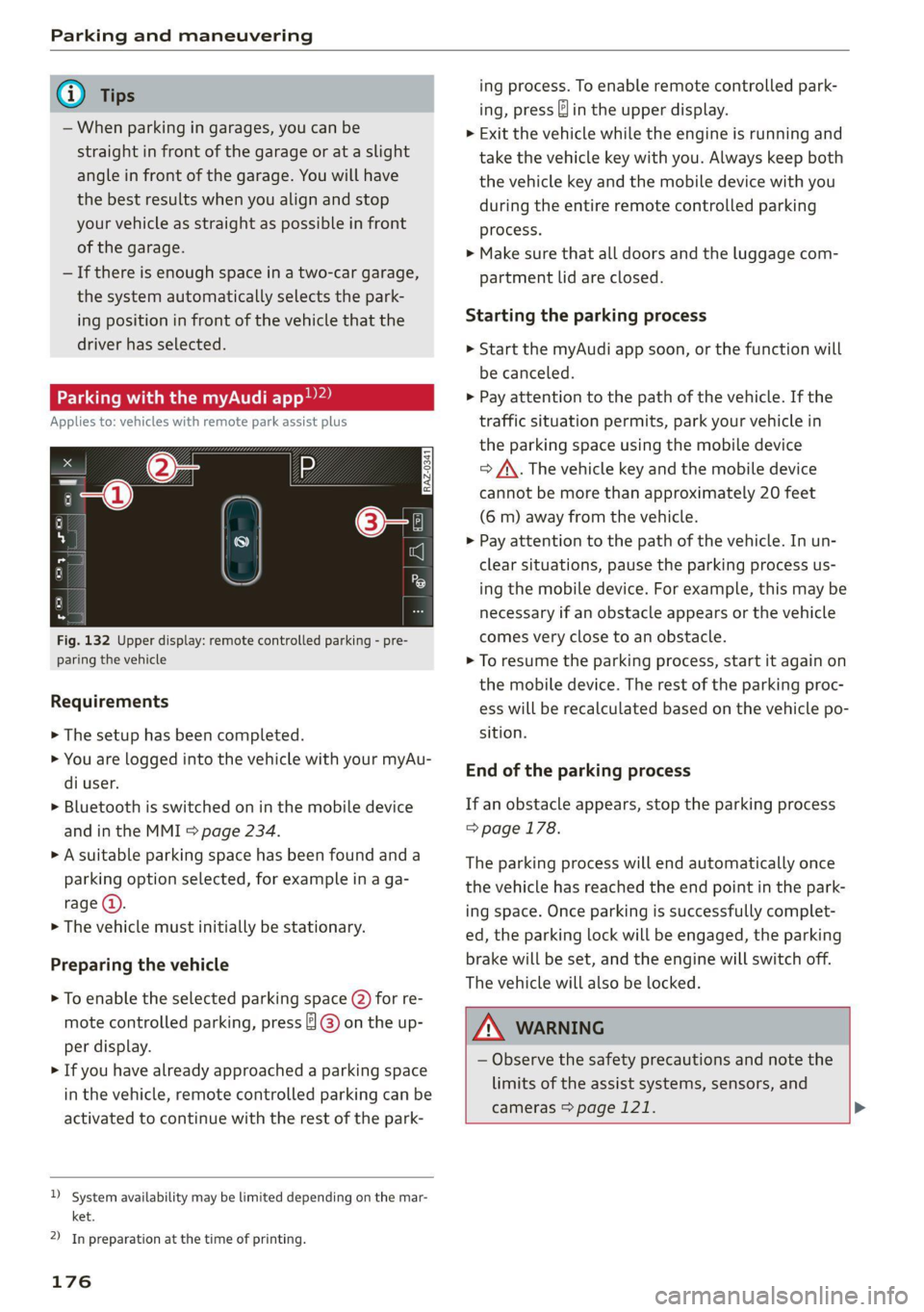
Fig. 132 Upper display: remote controlled parking - pre-
paring the vehicle
Requirements
> The setup has been completed.
> You are logged into the vehicle with your myAu-
di user.
> Bluetooth is switched on in the mobile device
and in the MMI > page 234.
> A suitable parking space has been found anda
parking option selected, for example in a ga-
rage (@).
> The vehicle must initially be stationary.
Preparing the vehicle
> To enable the selected parking space (2) for re-
mote controlled parking, press ] @) on the up-
per display.
> If you have already approached a parking space
in the vehicle, remote controlled parking can be
activated to continue with the rest of the park-
)_ system availability may be limited depending on the mar-
ket.
2) In preparation at the time of printing.
176
ing process. To enable remote controlled park-
ing, press J in the upper display.
> Exit the vehicle while the engine is running and
take the vehicle key with you. Always keep both
the vehicle key and the mobile device with you
during the entire remote controlled parking
process.
> Make sure that all doors and the luggage com-
partment lid are closed.
Starting the parking process
> Start the myAudi app soon, or the function will
be canceled.
> Pay attention to the path of the vehicle. If the
traffic situation permits, park your vehicle in
the parking space using the mobile device
> J\. The vehicle key and the mobile device
cannot be more than approximately 20 feet
(6 m) away from the vehicle.
> Pay attention to the path of the vehicle. In un-
clear situations, pause the parking process us-
ing the mobile device. For example, this may be
necessary if an obstacle appears or the vehicle
comes very close to an obstacle.
> To resume the parking process, start it again on
the mobile device. The rest of the parking proc-
ess will be recalculated based on the vehicle po-
sition.
End of the parking process
If an obstacle appears, stop the parking process
> page 178.
The parking process will end automatically once
the vehicle has reached the end point in the park-
ing space. Once parking is successfully complet-
ed, the parking lock will be engaged, the parking
brake will be set, and the engine will switch off.
The vehicle will also be locked.
ZA WARNING
— Observe the safety precautions and note the
limits of the assist systems, sensors, and
cameras > page 121. >
Page 179 of 332
4M8012721BF
Parking and maneuvering
— Failing to pay careful attention to the vehi-
cle's surroundings increases the risk of an
accident. Park your vehicle with the mobile
device only if you are sure that no obstacle is
in the vehicle's path or under the vehicle,
and that no obstacles will move into the ve-
hicle's path.
G) Tips
— If the parking space is located in a garage, it
must be detected correctly by the vehicle.
When the parking space is detected com-
pletely, the edges of the space will be high-
lighted @).
— The parking process can only be started if
the vehicle key is located outside the vehicle
after the vehicle is prepared. Always keep
both the vehicle key and the mobile device
with you during the entire remote control-
led parking process.
— Remote controlled parking may be restrict-
ed or unavailable in situations such as the
following:
— If the ESC is restricted or switched off, or
if there is a malfunction.
— If there is another vehicle key inside the
vehicle or nearby.
— The system can incorrectly interpret parking
space barriers (such as parking curbs). Take
over the parking process > page 178 if the
vehicle is not completely inside the parking
space or if the vehicle tries to drive over the
parking space barrier.
Exiting parking spaces wit
app)
Applies to: vehicles with remote park assist plus
the myAudi
> Start the myAudi app.
> Start the engine in the myAudi app soon. When
starting, the vehicle key and mobile device
must not be more than approximately 10 feet
(3 m) away from the vehicle.
> Start the parking process with the mobile de-
vice soon. Otherwise, the function will be can-
celed.
> Pay attention to the path of the vehicle. If the
traffic situation permits, drive the vehicle out of
the parking space using the mobile device
> /\. The vehicle key and the mobile device
cannot be more than approximately 20 feet
(6 m) away from the vehicle during remote con-
trolled parking.
> The process for exiting a parking space ends
when the maximum distance is reached or if ad-
ditional corrective movements are no longer
necessary. Unlock and resume manual control
of the vehicle.
If an obstacle appears, stop the parking process
=> page 178.
ZA\ WARNING
— Observe the safety precautions and note the
limits of the assist systems, sensors, and
cameras > page 121.
— Failing to pay careful attention to the vehi-
cle's surroundings increases the risk of an
accident. Park your vehicle with the mobile
device only if you are sure that no obstacle is
in the vehicle's path or under the vehicle,
and that no obstacles will move into the ve-
hicle's path.
)_ System availability may be limited depending on the mar-
ket.
2) In preparation at the time of printing.
(i) Tips
You can interrupt the path set by the vehicle,
for example if it will drive very close to an ob-
stacle, by pausing the parking process using
the mobile device. Based on the position of
the vehicle, the system then calculates the
additional steering and driving directions for
maneuvering.
1L7Z
Page 180 of 332
Parking and maneuvering
eae atm eatle Mel tecel (eM eee atte pace
Applies to: vehicles with remote park assist plus
To stop the vehicle, you can temporarily pause re-
mote controlled parking at any time using your
mobile device.
You can also completely stop the parking process
and come to full stop immediately using the ve-
hicle key by pressing any button on the vehicle
key. Therefore, always keep the vehicle key with
you during the remote controlled parking proc-
ess.
Canceling automatically
The remote controlled parking will be canceled
automatically in the following situations, among
other things:
— If the myAudi app is not started soon after exit-
ing
the vehicle,
— If you switch off the system
— If the time limit is exceeded
— The ESC intervenes
Taking over the parking process
After canceling the parking process, the vehicle
will come to a stop and the "P" position will be
engaged. Take over control of the vehicle, end the
parking process manually, and stop the vehicle.
You can also restart the entire parking process
from inside the vehicle.
Z\ WARNING
— Observe the safety precautions and note the
limits of the assist systems, sensors, and
cameras > page 121.
— Failing to pay careful attention to the vehi-
cle's surroundings increases the risk of an
accident. Park your vehicle with the mobile
device only if you are sure that no obstacle is
in the vehicle's path or under the vehicle,
and that no obstacles will move into the ve-
hicle's path.
D_ System availability may be limited depending on the mar-
ket.
2) In preparation at the time of printing.
178
G) Tips
The parking process will be interrupted tem-
porarily if an obstacle is detected.
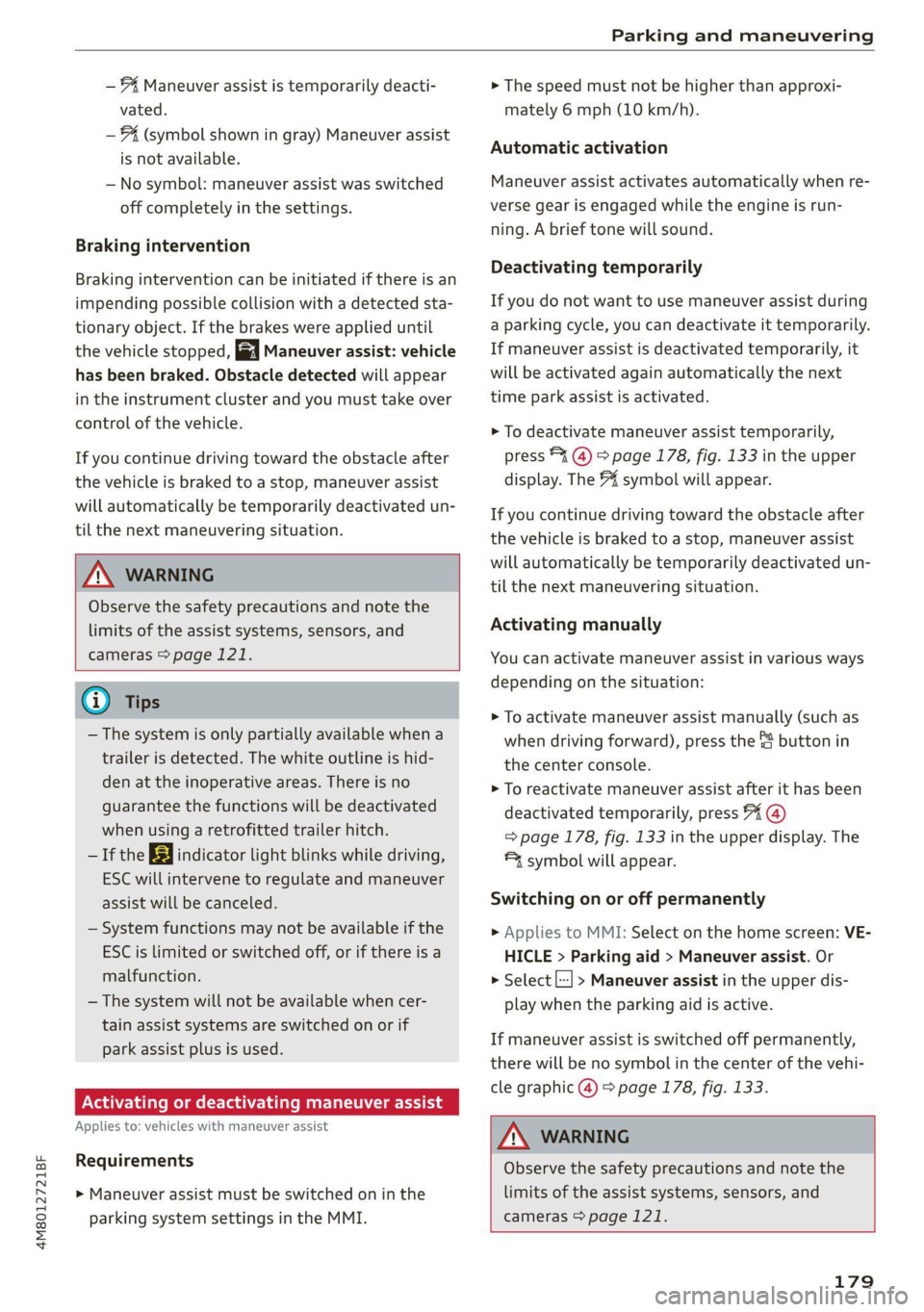
Maneuver assist2)”)
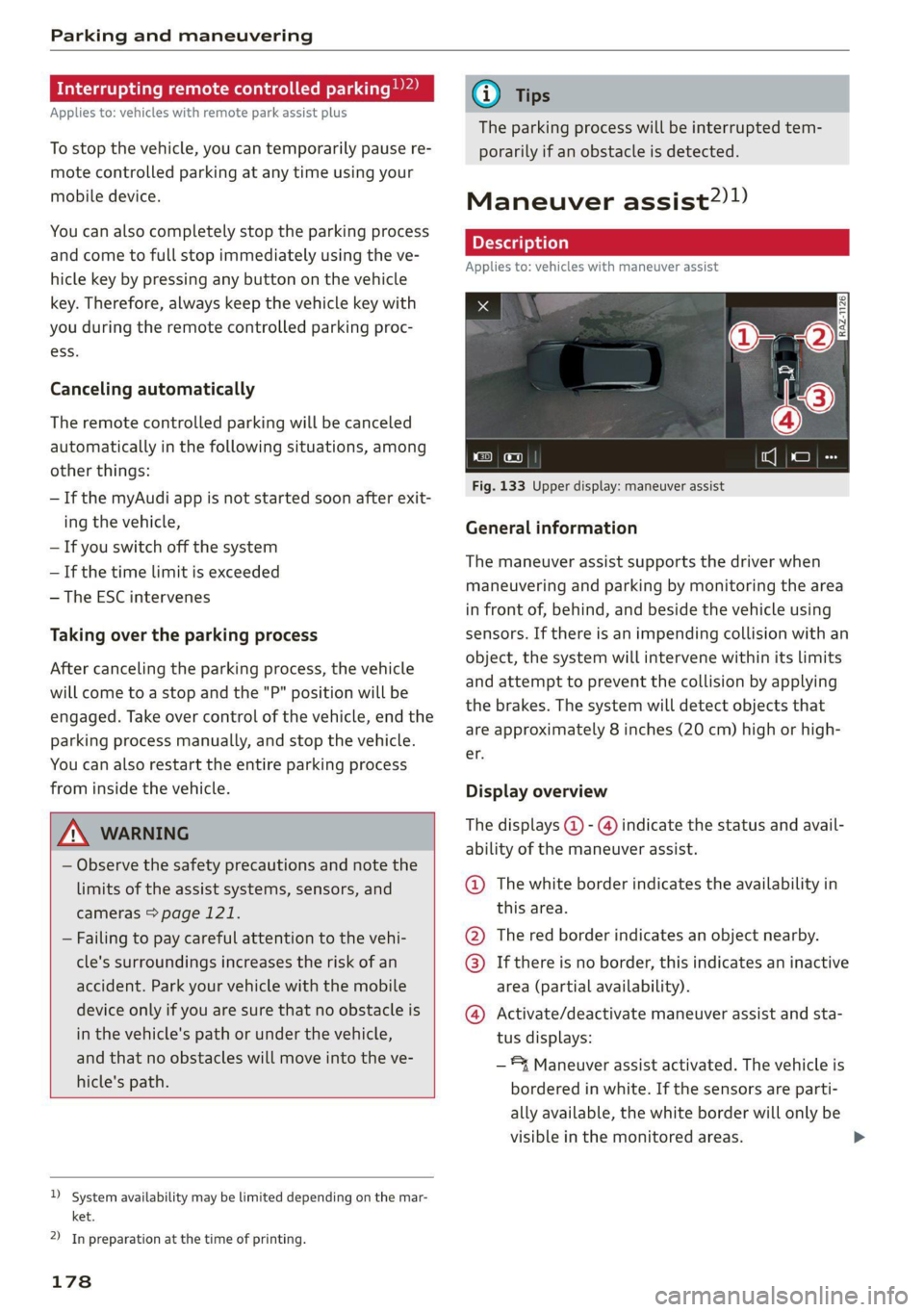
Fig. 133 Upper display: maneuver assist
General information
The maneuver assist supports the driver when
maneuvering and parking by monitoring the area
in front of, behind, and beside the vehicle using
sensors. If there is an impending collision with an
object, the system will intervene within its limits
and attempt to prevent the collision by applying
the brakes. The system will detect objects that
are approximately 8 inches (20 cm) high or high-
er.
Display overview
The displays @ - @ indicate the status and avail-
ability of the maneuver assist.
@ The white border indicates the availability in
this area.
The red border indicates an object nearby.
If there is no border, this indicates an inactive
area (partial availability).
Activate/deactivate maneuver assist and sta-
tus displays:
®
©®&
—*4 Maneuver assist activated. The vehicle is
bordered in white. If the sensors are parti-
ally available, the white border will only be
visible in the monitored areas.
Page 181 of 332
4M8012721BF
Parking and maneuvering
— % Maneuver assist is temporarily deacti-
vated.
— A (symbol shown in gray) Maneuver assist
is not available.
— No symbol: maneuver assist was switched
off completely in the settings.
Braking intervention
Braking intervention can be initiated if there is an
impending possible collision with a detected sta-
tionary object. If the brakes were applied until
the vehicle stopped, Maneuver assist: vehicle
has been braked. Obstacle detected will appear
in the instrument cluster and you must take over
control of the vehicle.
If you continue driving toward the obstacle after
the vehicle is braked to a stop, maneuver assist
will automatically be temporarily deactivated un-
til the next maneuvering situation.
Z\ WARNING
Observe the safety precautions and note the
limits of the assist systems, sensors, and
cameras > page 121.
G@) Tips
— The system is only partially available when a
trailer is detected. The white outline is hid-
den at the inoperative areas. There is no
guarantee the functions will be deactivated
when using a retrofitted trailer hitch.
—Ifthe BB indicator light blinks while driving,
ESC will intervene to regulate and maneuver
assist will be canceled.
— System functions may not be available if the
ESC is limited or switched off, or if there is a
malfunction.
— The system will not be available when cer-
tain assist systems are switched on or if
park assist plus is used.
Activating or deactivating maneuver assist
Applies to: vehicles with maneuver assist
Requirements
> Maneuver assist must be switched on in the
parking system settings in the MMI.
> The speed must not be higher than approxi-
mately 6 mph (10 km/h).
Automatic activation
Maneuver assist activates automatically when re-
verse gear is engaged while the engine is run-
ning. A brief tone will sound.
Deactivating temporarily
If you do not want to use maneuver assist during
a parking cycle, you can deactivate it temporarily.
If maneuver assist is deactivated temporarily, it
will be activated again automatically the next
time park assist is activated.
> To deactivate maneuver assist temporarily,
press & @) > page 178, fig. 133 in the upper
display. The 7% symbol will appear.
If you continue driving toward the obstacle after
the vehicle is braked to a stop, maneuver assist
will automatically be temporarily deactivated un-
til the next maneuvering situation.
Activating manually
You can activate maneuver assist in various ways
depending on the situation:
> To activate maneuver assist manually (such as
when driving forward), press the 4 button in
the center console.
> To reactivate maneuver assist after it has been
deactivated temporarily, press 74 @,
=> page 178, fig. 133 in the upper display. The
= symbol will appear.
Switching on or off permanently
> Applies to MMI: Select on the home screen: VE-
HICLE > Parking aid > Maneuver assist. Or
> Select |-] > Maneuver assist in the upper dis-
play when the parking aid is active.
If maneuver assist is switched off permanently,
there will be no symbol in the center of the vehi-
cle graphic @) > page 178, fig. 133.
ZA WARNING
Observe the safety precautions and note the
limits of the assist systems, sensors, and
cameras > page 121.
179
Page 182 of 332
Parking and maneuvering
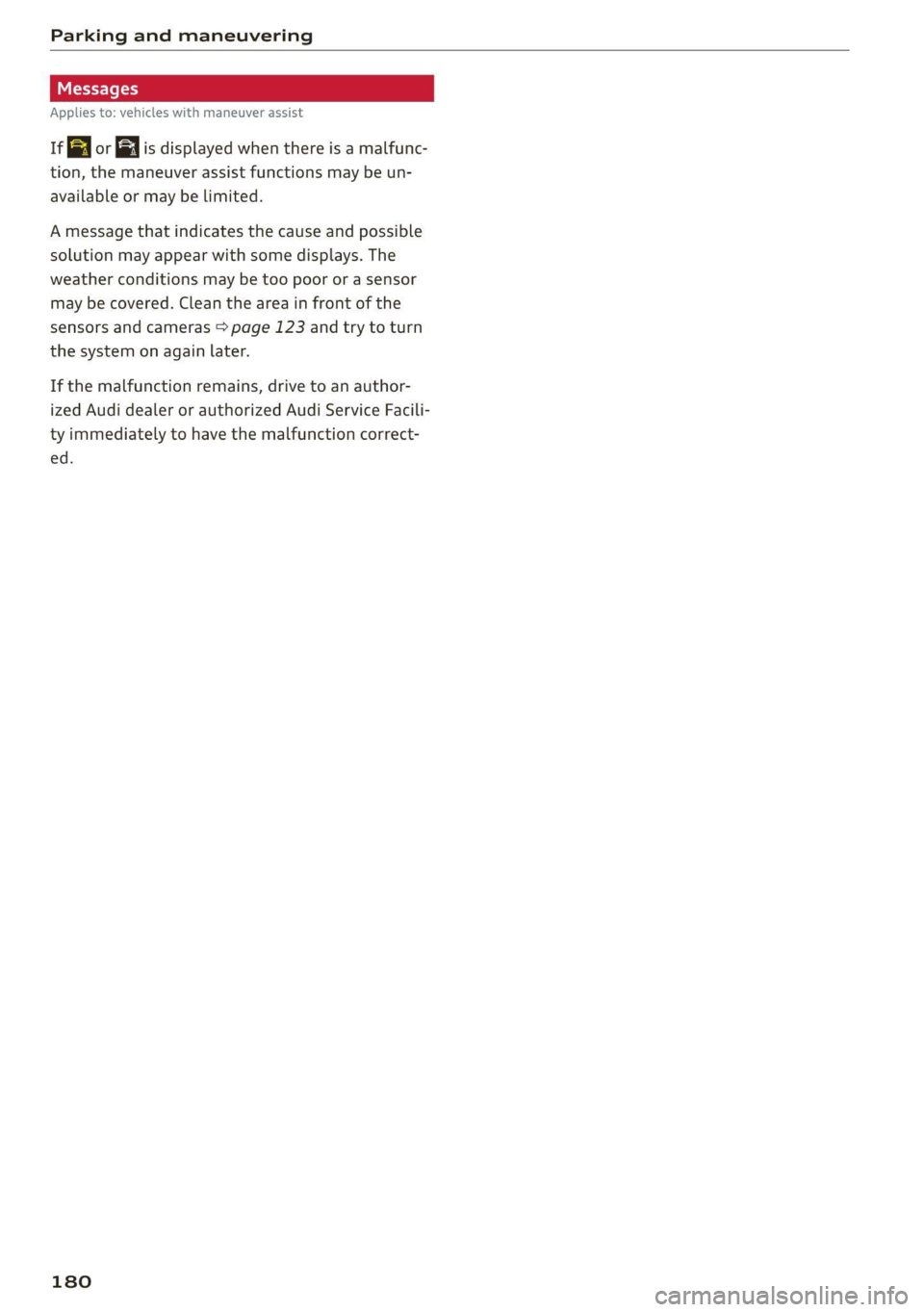
Messages
Applies to: vehicles with maneuver assist
if i or fd is displayed when there is a malfunc-
tion, the maneuver assist functions may be un-
available or may be limited.
A message that indicates the cause and possible
solution may appear with some displays. The
weather conditions may be too poor or a sensor
may be covered. Clean the area in front of the
sensors and cameras > page 123 and try to turn
the system on again later.
If the malfunction remains, drive to an author-
ized Audi dealer or authorized Audi Service Facili-
ty immediately to have the malfunction correct-
ed.
180
Page 302 of 332
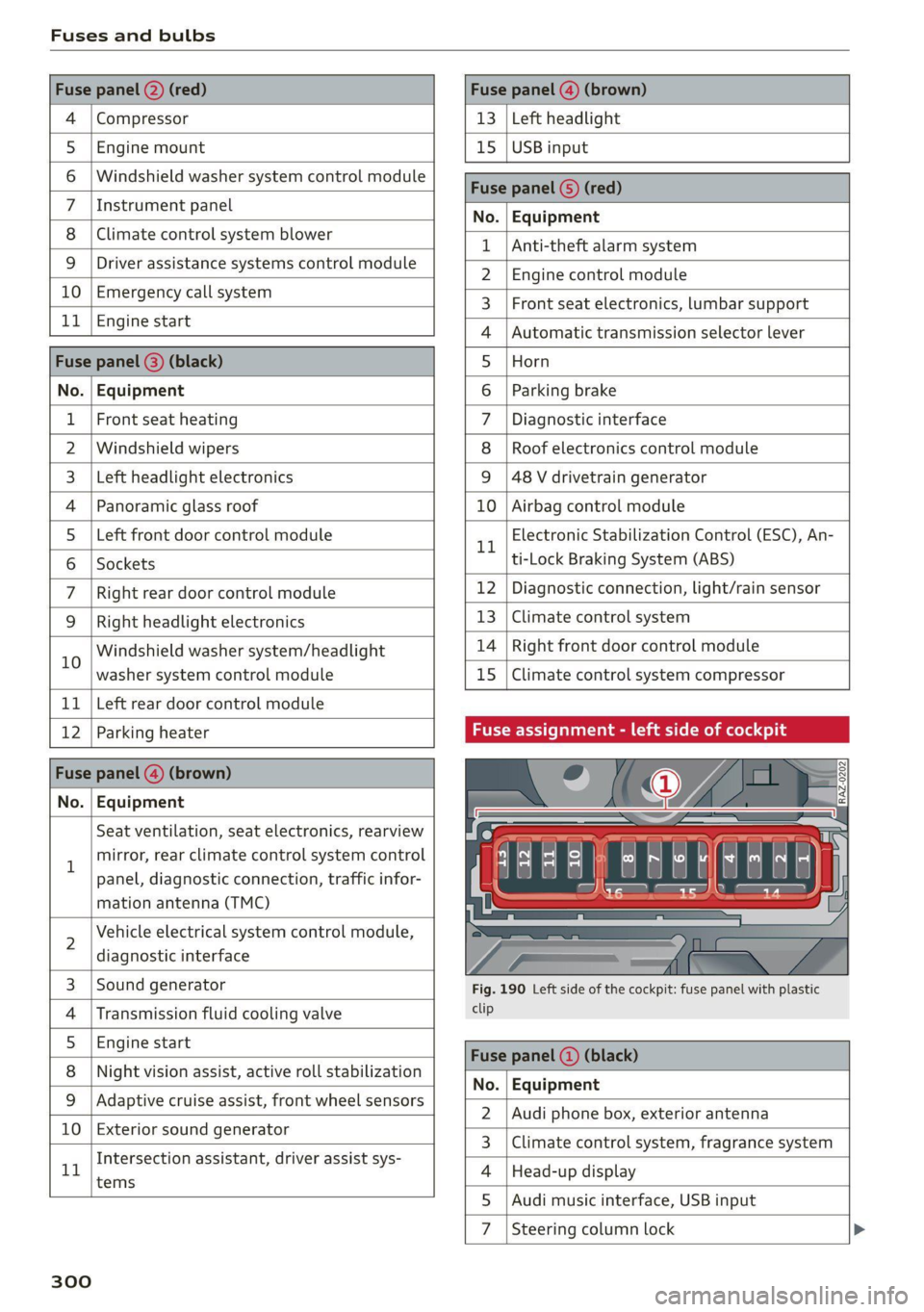
Fuses and bulbs
Compressor | 13 | Left headlight
Audi music interface, USB input
4
5 |Engine mount 15 | USB input
6 |Windshield washer system control module
7 LisioTnieNe panel Nas | Equipinent
8 | Climate control system blower T | Ant-theté dlaunsystem
9 |Driver assistance systems control module :
2 | Engine control module
E UL
10. | Emergency 'callsystem 3 | Front seat electronics, lumbar support
11 | Engi
ngine start 4 |Automatic transmission selector lever
Di 5 |Horn
No. | Equipment 6 | Parking brake
1 |Front seat heating 7 |Diagnostic interface
2 |Windshield wipers 8 | Roof electronics control module
3 | Left headlight electronics 9 |48 V drivetrain generator
4 |Panoramic glass roof 10 | Airbag control module
5 |Left front door control module Electronic Stabilization Control (ESC), An-
Il | ‘
6 |Sockets ti-Lock Braking System (ABS)
7 | Right rear door control module 12 | Diagnostic connection, light/rain sensor
9 | Right headlight electronics 13 | Climate control system
10 Windshield washer system/headlight 14 | Right front door control module
washer system control module 15 | Climate control system compressor
11 | Left rear door control module
12 | Parking heater Fuse assignment - left side of cockpit
No. | Equipment
Seat ventilation, seat electronics, rearview
1 mirror, rear climate control system control
panel, diagnostic connection, traffic infor-
mation antenna (TMC)
2 Vehicle electrical system control module,
diagnostic interface
3 |Sound generator Fig. 190 Left side of the cockpit: fuse panel with plastic
4 | Transmission fluid cooling valve ete
5 |Engine start
8 | Night vision assist, active roll stabilization 5
No. | Equipment
9 |Adaptive cruise assist, front wheel sensors - -
2. |Audi phone box, exterior antenna
10 | Exterior sound generator 5
3 | Climate control system, fragrance system
Intersection assistant, driver assist sys- .
11 4 |Head-up display
tems
5
7d
Steering column lock
300
Page 317 of 332
4M8012721BF
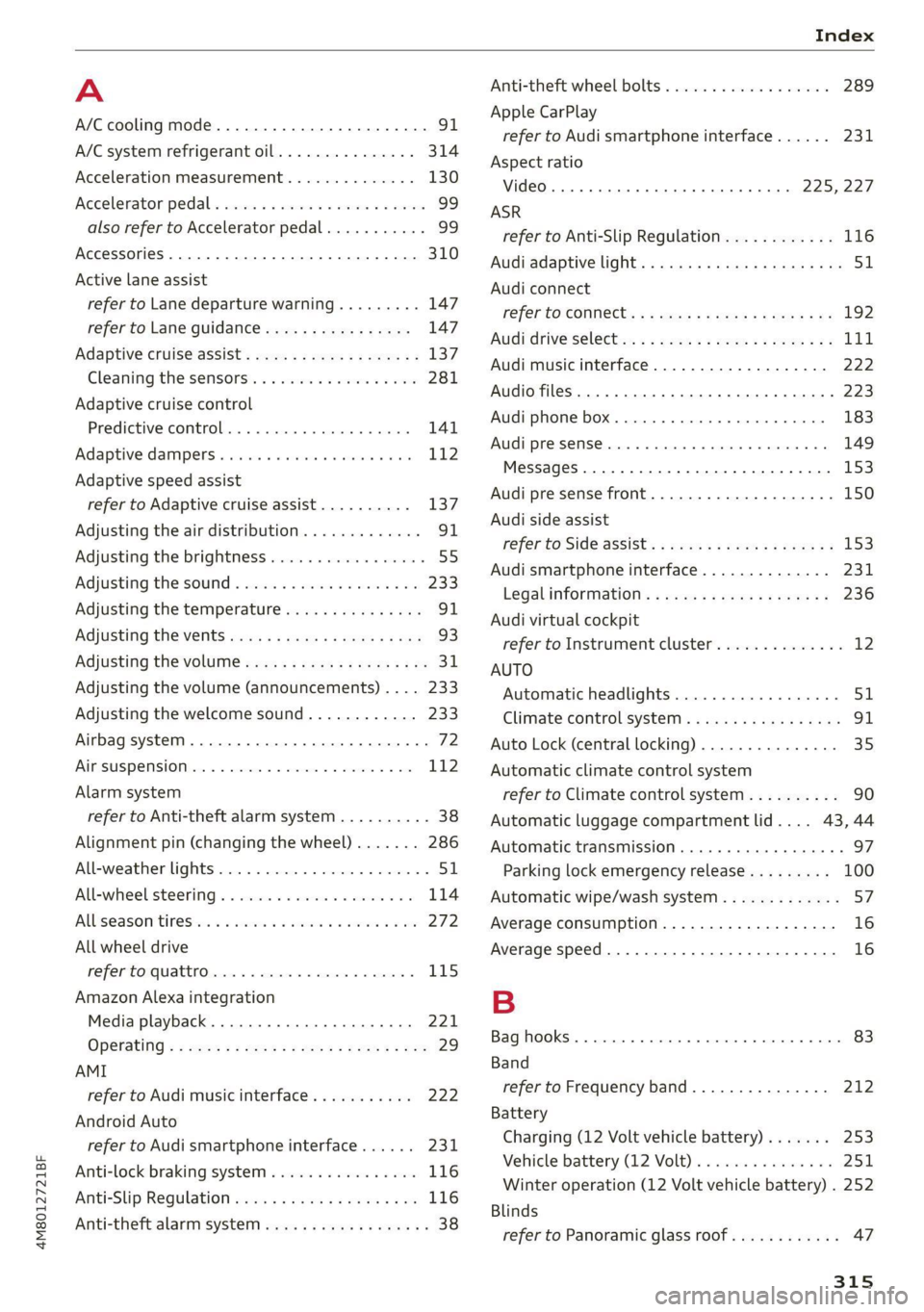
A
A/C cooling mode..........-. eee eee eee ee
A/C system refrigerant oil...............
Acceleration measurement..............
Accelerator pedal...............--00 000s
also refer to Accelerator pedal...........
AccessorieS.... 0... 0.00. eee eee
Active lane assist
refer to Lane departure warning.........
refer to Lane guidance................
Adaptive cruise assist................04.
Cleaning the sensors......... 0.0.0.0 005
Adaptive cruise control
Predictive control..............000005
Adaptive dampers « sve « « savece ae scare 6 0 oe
Adaptive speed assist
refer to Adaptive cruise assist..........
Adjusting the air distribution.............
Adjusting the brightness.................
Adjusting the sound................0005
Adjusting the temperature...............
Adjusting the vents ccs <= csws + © sews +o oer
Adjusting the volume............. eee eee
Adjusting the volume (announcements) ... .
Adjusting the welcome sound............
Airbag system... 2.2... eee eee
AIPSUSPONSION ix o © aowees « 2 mines + omnes 5, v0
Alarm system
refer to Anti-theft alarm system..........
Alignment pin (changing the wheel).......
All-weather lights...............-..00005
All-wheel steering.............---00005
ALUS@aSOntineSies. « 3 ssasess «x aimee a & iwesane sw a8
All wheel drive
refer to quattro.............0 0. eee
Amazon Alexa integration
Media playback................00000.
Operating « « seen s » ewes se eee G s FeeE Ys BOS
AMI
refer to Audi music interface...........
Android Auto
refer to Audi smartphone interface......
Anti-lock braking system................
Anti-Slip Regulation 0.642 5 eccs «sense ees
Anti-theft alarm system...............05.
Anti-theft wheel bolts...............0... 289
Apple CarPlay
refer to Audi smartphone interface...... 231
Aspect ratio
VIdCO eee eee eee eee eee 225,.227
ASR
refer to Anti-Slip Regulation............ 116
Audi adaptive light...............-.0000- 51
Audi connect
refer to CONnNect ; «= = sass ss sees ss eee ee ae 192
Audidrive'selecticy, « + scum oz scum « x pewe yoo 111
Audi music interface...............2.-- 222
Audio files............. 0000 c cece eee eee 223
Audi phone box...........0.- 00 eee eee 183
Audi presense....... 00... cee eee eee 149
Messages ........... 0.0. e eee eee eee 153
Audi pre sense front.............-...0-- 150
Audi side assist
refer to Side assist. ........ 0... cece eee 153
Audi smartphone interface.............. 231
Legalinformation.................005 236
Audi virtual cockpit
refer to Instrument cluster.............. 12
AUTO
Automatic headlights................4. 51
Climate control system.............0005 91
Auto Lock (central locking) ............... 35
Automatic climate control system
refer to Climate control system.......... 90
Automatic luggage compartment lid.... 43,44
Automatic transmission............-.0005 97
Parking lock emergency release......... 100
Automatic wipe/wash system............. 57
Average consumption................... 16
Average speed..........-. 00. cece eee ee 16
B
Bag hooks ........ 0.0. e eee eee eee eee 83
Band
refer to Frequency band............... 212
Battery
Charging (12 Volt vehicle battery)....... 253
Vehicle battery (12 Volt)............... 2511,
Winter operation (12 Volt vehicle battery) . 252
Blinds
refer to Panoramic glass roof............ 47
315
Page 325 of 332
4M8012721BF
Parking aids. + csssce x2 esemne oo encase ve enmuate ¥ ¥ 159
Adjusting the volume.............0005 161
Automatic activation.................. 160
Cleaning the sensors and camera........ 281
Deactivating rear cross-traffic assist. ... . 166
Park.assist plus; < - eses ss eee% ss eeaes es 170
Parking:aid plus « cisvie s & coe 6 soos ao wre 159
Parking space search.................. 167
Peripheral cameras................-4. 162
Rearview cametaies . 2 sccm so ewan vo exe y 162
Remote controlled parking............. 173
Switching off maneuver assist.......... 179
Trailerview's 2 ssn sees 2 o meow oo eee 2 ¥ 163
Parking and maneuvering............... 159
Parking brake
refer to Electromechanical parking brake. 106
Parking lightSivn « s mew ¢ o mews o ewney 3 ween a SL
Parking lock emergency release.......... 100
Partition Wetec s = ems sv seme s s meen ob eee 86
Pass-through...........2--..0 eee eee ee 86
Pedals. .... 2.2... cece eee eee eee eee 99
Pedestrian detection................04. 131
Perchlorate ....... 0... cee eee eee 308
Performance/torque display
refer to Sport displays.................. 15
Peripheral cameras.............--000-- 162
Phone
Connecting a second mobile device...... 182
Disconnecting a mobile device.......... 183
Sete S crnics ao serene «meme « w anene © memes w 188
Phonebook
refer to Directory.............0 eee ae 186
PIN
4-digit myAudi PIN..............-..00- 32
PROLCCUONica « s wou + & wiseu s & vaewe ¢ ¥ cows 33
Playback (media) « « sscs sv sees se eee ve es 223
Podcast
refer to Online radio............6% 216,217
Polishing iss + « ccavusys @ cqees @ © meres +e Rees eee 282
POUlUtane Titers oss x = saeays & 2 emus x = eee a 90
Power closing (doors)..........seeeeeeeee 35
Power sourceS........-.-0-0-0 eee 82,222
Power window malfunction............... 46
Power windows...........--.0 eee eee eee 46
Malfunctions « < seas ss saws ¢ 2 eee de eee 46
Predictive control.............0..00000- 141
Predictive messages...............- 99,136
pre sense
refer to Audi presense................ 149
Presentation mode...............-.005- 211
Presets
Radio... 2... 2. eee eee 215
Presets list
feferto Presets. «= isas teresa veieas ce 215
Pressure
Tire pressure monitoring system.... 275,276
THRs. oo sowie oo ceusie © 6 arene © 8 aoe we meee 266
Profilespietures siswin x + scausm a 3 aimesm © 0 omawene eH 32
Progressive StESTING’s ¢ & mews ¢ x wows ¢ y news ¢ 114
Protectinng:cs < = saves ¢ = saree & © eewie +s owes 282
Pyrotechnic elements............-...0- 308
Q
QGUSUERO's sas « 5 Nees 5 EGS, eB Eo HaeeR 115
Selective wheel torque control.......... 116
R
Radio’: = «wes e s secu ss ween 5 s weree © ¥ eee = 212
Radio text. ....... cece eee eee eee 215
Station list... 00... . eee eee eee 212
Radio communications equipment........ 310
Radio equipment.............. 0c eee eee 310
Radio Standards Specification (RSS)....... 311
Railseanrion’s «ssw 2 women ae ones: ao mcm 2 © a 112
Rain/light sensor
Headlights ......... 0.0... ce eee ee eee §1
Intermittent mode (windshield wipers) .... 57
Random
Fefer to Shute: « 2 gems = 2 gems = noes 3s Fe 225
RAnGe’s « sane se neue 5 & mem 5 y ae GB ee 16
Reading lights................00. eee eee 54
Rear cross-traffic assist............000.. 166
Rear lid
refer to Luggage compartment lid........ 43
Rear lowering.......... 00.0 e cece eee eee 85
Rear seats... 0... eee cece eee 65
Rearview camera...... 0.0.2... 0 ee ee eee 162
Rear window defogger............-..0--- 92
Rear wiper blades
Changing ......... 0. cece ee eee eee eee 59
ClOaNiNG :: « s sees ¢ s ees 4 e een vo eee se oe 59
Page 326 of 332
Index
REAR (climate control system) ............- 91
Recirculation Mode savin ss swims x sce 6 4 wee 92
Recuperationsses «= ses + 2 samen ¥ ¢ ees 9 coe 16
REfrigeranit Ollvs sz wavew xe exes ox meme 2 eae 314
RETUGLING « « wews 6 a news oe ees Fe ema ee 239
Remote access authorization (key user) ..... 33
Remote control
Garage door opener........se.ceeeeeees 48
Remote control key 39
Convenience opening and closing......... 47
Key replacement.............02-.00 eee 39
| Al
PANIGfUNCHION ¢ s wees ¢ gaseu aan ss een 39
Replacing the battery...............00. 41
Unlocking and locking..............0008 40
also refer to Vehicle key..............-. 39
Remote controlled parking.............. 173
Remote park assist plus
refer to Remote controlled parking...... 173
Remote park assist plus with garage function
refer to Remote controlled parking...... 173
Removing the caps (wheel bolts)......... 289
REPAIIS sess 6s mmo © 3 ees © a sume SF er oo 308
Replacement key.........--22e eee eee 39
Replacement parts............--..20--5 310
Replacing fuses........... 2. eee e ee eee 298
Reporting
Safety Defects................ 310
RIMS 0. eee eee eee eee 271
Cl@SNiNG's ¢ = 22m ¢ » wemn 2 2 ees yo eee sz Be 282
Road carrier... 0.6.2... eee eee eee eee 112
Rolling... .. cece cece eee eee eee 96
Rolling
ability
Electromechanical parking brake........ 106
Transmission idleis . isan si maven oo ccomea soo 98
Roof
refer to Panoramic glass roof............ 47
Roof LOad ©» awevis oo cvewsss v seavans ao sueeun ao came 314
ROORKACK asia + aon os waren 6 e naene a 2 BOR He 88
also refer to Roof rack..........--..000. 88
Route guidance
StOPPING ..... cee eee eee eee eee 204
also refer to Navigation............... 200
Running direction (tires)..............-. 291
324
Ss
Safety belts. ...... 0.0... eee eee eee 68
GCl@aNiNG ies « s wei + y ewe » eon ee Dew gE 283
LOEKING sexes ico seesene xe emevene ww maevare ¥ w anetese © 79
Securing child safety seats.............. 79
Satellite map...... 2... eee eee eee 207
Saving fuel
Energy consumers..........-.2-.020005 L7
Recuiperationts s sacs s zaee 5 s gees & x geome e 16
Screen
refer to Touch display ...........0e0eeee 18
SGrEWALIVET iss x = caves x = sae & & eerR 8 & OG s 286
Search function
refer to Free text search............... 227
Seat:heating « sci owes 2 wawn se meen 6 ¥ owe 92
Seats
Adjusting the front seats............... 63
Adjusting the rear seats................ 65
ClOaniNiG:<« = s gees + sees s been ge wees ae: 283
FOL Giaiss o wscass vo areas 6 Hama v Fame vO 86
Front passenger’s seat adjustment....... 65
Head restraititSies x « saws + = semis + eee eo 67
Massage function..........0seeeeee eee 63
Memory function..............--000 00 71
Resetting the position.................. 65
Storing aseat profile................... 71
Seat vertilationsecs so sexes 2 sce 2 2 orm 9 oo 92
Securing the vehicle............-..2+--5- 96
Selecting a source (media).............. 223
Selector lever cs x « news ¢ ¢ hoes ss eee oP eS 97
Sensors
COVETAGE ALCS « cercx : s wow so wegs + Rares o 122
LOCATIONS race x « canzone » © camsuae » & sunoane « @ meas 123
Service interval display................. 254
Setting measurement units.............. 233
S@ttiNGSiog « 5 wes = © ewes a eee ¢ Ree § Go Be 233
Announcements and tones............. 233
Bluetooth.....................000008 234
Dateanid titties: + saws x 2 eee « «ewe gs 233
LANGUAGE « sesso vo sens oo memes vo ERE vo es 233
Measurement units...............0005 233
Medidicn = 2 gaws : «meee s Hoon 4 > eu os ee 227
Navigationiccs « weve + even 6+ semen sv meres 210
Radio... 2.6... ce cece eee eee eee eee 218
SOUNG :geue ss wee 5 s seme fs meee Ee eee 233
SySteMss «+ assva 2 e eesen 2 v eeie 2 8 eae Foes 233