trailer AUDI Q8 2021 Owner´s Manual
[x] Cancel search | Manufacturer: AUDI, Model Year: 2021, Model line: Q8, Model: AUDI Q8 2021Pages: 332, PDF Size: 118.76 MB
Page 169 of 332
4M8012721BF
Parking and maneuvering
— Select | > Rear cross-traffic assist in the upper
display when the parking aid is active.
Messages
ire or > is displayed when there is a mal-
function, the rear cross traffic assist functions
may be unavailable or may be limited.
A message that indicates the cause and possible
solution may appear with some displays. The
weather conditions may be too poor or a sensor
may be covered. Clean the sensor area in the ve-
hicle rear and try to turn the system on again lat-
er.
If the malfunction remains, drive to an author-
ized Audi dealer or authorized Audi Service Facili-
ty immediately to have the malfunction correct-
ed.
Z\ WARNING
— Observe the safety precautions and note the
limits of the assist systems, sensors, and
cameras > page 121.
— The rear cross-traffic assist will not provide
alerts about people and cannot warn you
about every type of approaching objects,
such as cyclists. Always monitor the traffic
as well as the vehicle's surroundings with di-
rect eye contact.
— The system may not react if objects are ap-
proaching very quickly.
— The rear cross-traffic assist will not provide
alerts if your vehicle is parallel parked or if
your vehicle is pulled too far into the park-
ing space so that it is hidden by adjacent
vehicles.
@) Tips
— Once an automatic brake activation occurs,
the system cannot initiate another activa-
tion for several seconds.
— System functions may not be available if the
ESC is limited or switched off, or if there is a
malfunction.
— If there is an acoustic warning signal from
the rear cross-traffic assist, then the park-
ing aid may not warn you of detected obsta-
cles under certain circumstances.
— The system is not available when the vehicle
detects that you are towing a trailer. There
is no guarantee the functions will be deacti-
vated when using a retrofitted trailer hitch.
Do not use these functions when towing a
trailer.
— The coverage areas of the sensors > fig. 124
are diagrams and do not represent a true-
to-scale image of the sensor ranges.
— The system complies with United States FCC
regulations and ISED regulations
=> page 311.
Assisted parking
Applies to: vehicles with assisted parking
If your vehicle is equipped with park assist plus
or remote park assist plus, these systems will
help you to find suitable parking spaces. Parking
spaces are measured using ultrasonic sensors on
the sides of the vehicle. Depending on vehicle
equipment, the laser scanner may also improve
the measurement.
If a parking space is found, the systems will help
you to park while the driver monitors the vehi-
cle's surroundings with the parking aids, cam-
eras*, and direct eye contact.
ZA WARNING
Observe the safety precautions and note the
limits of the assist systems, sensors, and
cameras > page 121.
167
Page 172 of 332
Parking and maneuvering
@) Tips
— If you did not drive past a suitable parking
space too quickly, the system can also be ac-
tivated afterward by pressing Pe.
— The Electronic Stabilization Control (ESC)
must not be switched off during the parking
process. If the ESC intervenes, the parking
process will be canceled.
— You can also drive into a perpendicular park-
ing space yourself and then activate the sys-
tem. If this is the case, the front of the vehi-
cle should already be in the space (4)
=> page 168, fig. 126 so that the sensors
can measure the space.
— You cannot park with the parking assist sys-
tems when you are towing a trailer or have
the connector inserted in the trailer socket.
— The system is not available when certain as-
sist systems are switched on.
— If there are suitable parking spaces on both
sides of the street, for example, on a one-
way street, you can change the side where
the system is searching for parking spaces
by activating the turn signal for the other
side or by pressing on that side in the upper
display.
— The park systems do not provide support for
assisted parking on tight curves.
Park assist plus!)2)
General information
Applies to: vehicles with park assist plus
Park assist plus parks the vehicle after the park-
ing space search and also exits the parking space.
While the driver presses and holds the [>>P] but-
ton and monitors the vehicle's surroundings, park
assist plus controls the steering, gear selection,
acceleration, and braking.
)_ system availability may be limited depending on the mar-
ket.
2) In preparation at the time of printing.
170
ZA WARNING
— Observe the safety precautions and note the
limits of the assist systems, sensors, and
cameras > page 121.
— The driver is always responsible when enter-
ing or exiting a parking space and during
similar maneuvers.
— Do not use this function if the vehicle cannot
move freely, for example when on a vehicle
jack.
— Sensors and cameras have spots in which
the surrounding area cannot be detected.
Objects, animals, and people may only be
detected with limitations may not be detect-
ed at all. Always monitor the traffic and the
vehicle's surroundings directly and do not
become distracted.
@) Note
— Do not use park assist plus when transport-
ing cargo that extends outside of the vehicle
or when snow chains are mounted.
— Park assist plus and remote controlled park-
ing guides the vehicle either away from
curbs or onto them if other vehicles are
parked on the curb. Make sure that your ve-
hicle's tires and rims are not damaged. Re-
sume control of the vehicle in time or stop
the parking process if needed to prevent
damage.
— In parking spaces without curbs, maintain a
distance of at least 19 inches (50 cm) from
walls and buildings in order to reduce the
risk of vehicle damage.
G) Tips
Follow the legal regulations in the country
where you are operating the vehicle when us-
ing park assist plus. Park assist plus may be
prohibited in some countries. The system may
be unavailable in countries where it has been
deactivated in order to comply with legal reg-
ulations. Data will not be transmitted to Audi. >
Page 181 of 332
4M8012721BF
Parking and maneuvering
— % Maneuver assist is temporarily deacti-
vated.
— A (symbol shown in gray) Maneuver assist
is not available.
— No symbol: maneuver assist was switched
off completely in the settings.
Braking intervention
Braking intervention can be initiated if there is an
impending possible collision with a detected sta-
tionary object. If the brakes were applied until
the vehicle stopped, Maneuver assist: vehicle
has been braked. Obstacle detected will appear
in the instrument cluster and you must take over
control of the vehicle.
If you continue driving toward the obstacle after
the vehicle is braked to a stop, maneuver assist
will automatically be temporarily deactivated un-
til the next maneuvering situation.
Z\ WARNING
Observe the safety precautions and note the
limits of the assist systems, sensors, and
cameras > page 121.
G@) Tips
— The system is only partially available when a
trailer is detected. The white outline is hid-
den at the inoperative areas. There is no
guarantee the functions will be deactivated
when using a retrofitted trailer hitch.
—Ifthe BB indicator light blinks while driving,
ESC will intervene to regulate and maneuver
assist will be canceled.
— System functions may not be available if the
ESC is limited or switched off, or if there is a
malfunction.
— The system will not be available when cer-
tain assist systems are switched on or if
park assist plus is used.
Activating or deactivating maneuver assist
Applies to: vehicles with maneuver assist
Requirements
> Maneuver assist must be switched on in the
parking system settings in the MMI.
> The speed must not be higher than approxi-
mately 6 mph (10 km/h).
Automatic activation
Maneuver assist activates automatically when re-
verse gear is engaged while the engine is run-
ning. A brief tone will sound.
Deactivating temporarily
If you do not want to use maneuver assist during
a parking cycle, you can deactivate it temporarily.
If maneuver assist is deactivated temporarily, it
will be activated again automatically the next
time park assist is activated.
> To deactivate maneuver assist temporarily,
press & @) > page 178, fig. 133 in the upper
display. The 7% symbol will appear.
If you continue driving toward the obstacle after
the vehicle is braked to a stop, maneuver assist
will automatically be temporarily deactivated un-
til the next maneuvering situation.
Activating manually
You can activate maneuver assist in various ways
depending on the situation:
> To activate maneuver assist manually (such as
when driving forward), press the 4 button in
the center console.
> To reactivate maneuver assist after it has been
deactivated temporarily, press 74 @,
=> page 178, fig. 133 in the upper display. The
= symbol will appear.
Switching on or off permanently
> Applies to MMI: Select on the home screen: VE-
HICLE > Parking aid > Maneuver assist. Or
> Select |-] > Maneuver assist in the upper dis-
play when the parking aid is active.
If maneuver assist is switched off permanently,
there will be no symbol in the center of the vehi-
cle graphic @) > page 178, fig. 133.
ZA WARNING
Observe the safety precautions and note the
limits of the assist systems, sensors, and
cameras > page 121.
179
Page 272 of 332
Wheels
passengers that the vehicle is in-
tended to carry (“seating capaci-
ty”) with an assumed weight of
150 lbs. (68 kg) for each passen-
ger at a designated seating posi-
tion and the total weight of any
luggage in the vehicle. If you tow
a trailer, the weight of the trailer
hitch and the tongue weight of
the loaded trailer must be includ-
ed as part of the vehicle load.
The Gross Axle Weight Rating
(“GAWR”) is the maximum load
that can be applied at each of the
vehicle’s two axles.
The fact that there is an upper
limit to your vehicle’s Gross Vehi-
cle Weight Rating means that the
total weight of whatever is being
carried in the vehicle (including
the weight of a trailer hitch and
the tongue weight of the loaded
trailer) is limited. The more pas-
sengers in the vehicle or passen-
gers who are heavier than the
standard weights assumed mean
that less weight can be carried as
luggage.
The Gross Vehicle Weight Rating
and the Gross Axle Weight Rating
are listed on the safety compli-
270
ance sticker label located on the
driver’s side B-pillar.
Z\ WARNING
Overloading a vehicle can cause
loss of vehicle control, a crash
or other accident, serious per-
sonal injury, and even death.
—Carrying more weight than
your vehicle was designed to
carry will prevent the vehicle
from handling properly and in-
crease the risk of the loss of
vehicle control.
—The brakes on a vehicle that
has been overloaded may not
be able to stop the vehicle
within a safe distance.
—Tires ona vehicle that has
been overloaded can fail sud-
denly, including a blowout and
sudden deflation, causing loss
of control and a crash.
—Always make sure that the to-
tal load being transported -
including the weight of a trail-
er hitch and the tongue
weight of a loaded trailer -
does not make the vehicle
heavier than the vehicle’s
Gross Vehicle Weight Rating.
Page 273 of 332
4M8012721BF
Wheels
Determining correct load
Talis
Use the example below to calcu-
late the total weight of the pas-
sengers and luggage or other
things that you plan to transport
so that you can make sure that
your vehicle will not be overload-
ed.
Steps for Determining Correct
Load Limit
1. Locate the statement “THE
COMBINED WEIGHT OF OCCU-
PANTS AND CARGO SHOULD
NEVER EXCEED XXX KG OR XXX
LBS” on your vehicle’s placard
(tire inflation pressure label)
=> page 266, fig. 168.
2. Determine the combined
weight of the driver and pas-
sengers that will be riding in
your vehicle.
3. Subtract the combined weight
of the driver and passengers
from “XXX” kilograms or “XXX”
pounds shown on the sticker
=> page 266, fig. 168.
4. The resulting figure equals the
available amount of cargo and
luggage load capacity. For ex-
ample, if the “XXX” amount
equals 1400 lbs. and there will
be five 150 lbs. passengers in
your vehicle, the amount of
available cargo and luggage
load capacity is 650 lbs.
(1400-750 (5 x 150) = 650
lbs.)
5. Determine the combined
weight of luggage and cargo
being loaded on the vehicle.
That weight may not safely ex-
ceed the available cargo and
luggage load capacity calculat-
ed in Step 4.
6. If your vehicle will be towing a
trailer, load from your trailer
will be transferred to your vehi-
cle. Consult this manual to de-
termine how this reduces the
available cargo and luggage
load capacity of your vehicle.
>Check the tire sidewall
(=> page 257, fig. 165) to deter-
mine the designated load rating
for a specific tire.
Wheel bolts and rims
Wheel bolts
Wheel bolts must be clean and loosen/tighten
easily.
Rims
Rims with a bolted rim ring* or with bolted wheel
covers* consist of multiple pieces. These compo-
nents were bolted together using special bolts
and a special procedure. You must not repair or
disassemble them > A\.
271
>
Page 290 of 332
Emergency assistance
Inflating a tire
> Move the switch (8) > fig. 172 on the compres-
sor into position I.
> Inflate the tire to between 29 psi (200 kPA)
and 36 psi (250 kPA) and read the pressure on
the gauge.
> If this tire pressure is not reached, remove the
filler hose. Drive slowly approximately 33 feet
(10 m) forward or in reverse so that the sealant
can be distributed in the tire. Inflate the tire
again > A\.
Z\ WARNING
— Read and follow the manufacturer's safety
precautions on the compressor and in the in-
structions on the bottle of sealant.
— Ifa tire pressure of 29 psi (200 kPA) cannot
reached after inflating for 6 minutes, then
the tire is too severely damaged. Do not con-
tinue driving.
— If the tire cannot be repaired with the tire
sealant, see an authorized Audi dealer or au-
thorized Audi Service Facility for assistance.
G) Tips
Do not operate the compressor for more than
six minutes continuously, or it can overheat.
Once the compressor has cooled, you can con-
tinue to use it.
Completing
Applies to: vehicles with tire mobility kit
> Affix the sticker that says "max. 50 mph (max.
80 km/h)" that is provided with the tire mobili-
ty kit within the driver's field of vision.
> Stop the vehicle after driving for about 10 mi-
nutes and check the tire pressure.
> If the tire pressure is lower than 19 psi (130
kPA), then the tire is too severely damaged. Do
not continue driving.
ZA WARNING
Pay attention to the following after repairing
the tire:
— Do not drive faster than 50 mph (80 km/h).
— Avoid hard acceleration or braking and driv-
ing fast around curves.
— The vehicle may become more difficult to
control.
— If the tire is too severely damaged, see an
authorized Audi dealer or authorized Audi
Service Facility for assistance.
@) For the sake of the environment
You can give the used tire sealant bottle to an
authorized Audi dealer or authorized Audi
Service Facility for disposal.
@ Tips
Remember to obtain a new bottle of sealant
from an authorized Audi dealer or authorized
Audi Service Facility after repairing a tire.
Replacing wheels
You must complete the preparation before
changing a tire.
> Read and follow the important safety precau-
tions > page 286.
> Set the parking brake.
> Select the “P” position.
> When towing a trailer: disconnect the trailer
from your vehicle.
> Lay out the vehicle tool kit > page 286 and the
spare tire > page 292.
> Applies to: vehicles with air suspension: Select
on the home screen: VEHICLE > Settings &
Service > Air suspension: wheel change.
> Switch the ignition off.
A WARNING
— The vehicle must also be secured to prevent
it from rolling when using the vehicle jack*.
Use suitable objects to block the front and
back of the wheel that is diagonal from the
wheel with the flat tire.
— Applies to: vehicles with active roll stabiliza-
tion: Switch the ignition off because the sus-
pension regulation could change the vehicle |>
288
Page 299 of 332
4M8012721BF
Emergency assistance
@ Tips
Depending on the model, the shape of the cap
can vary.
Rear towing loop
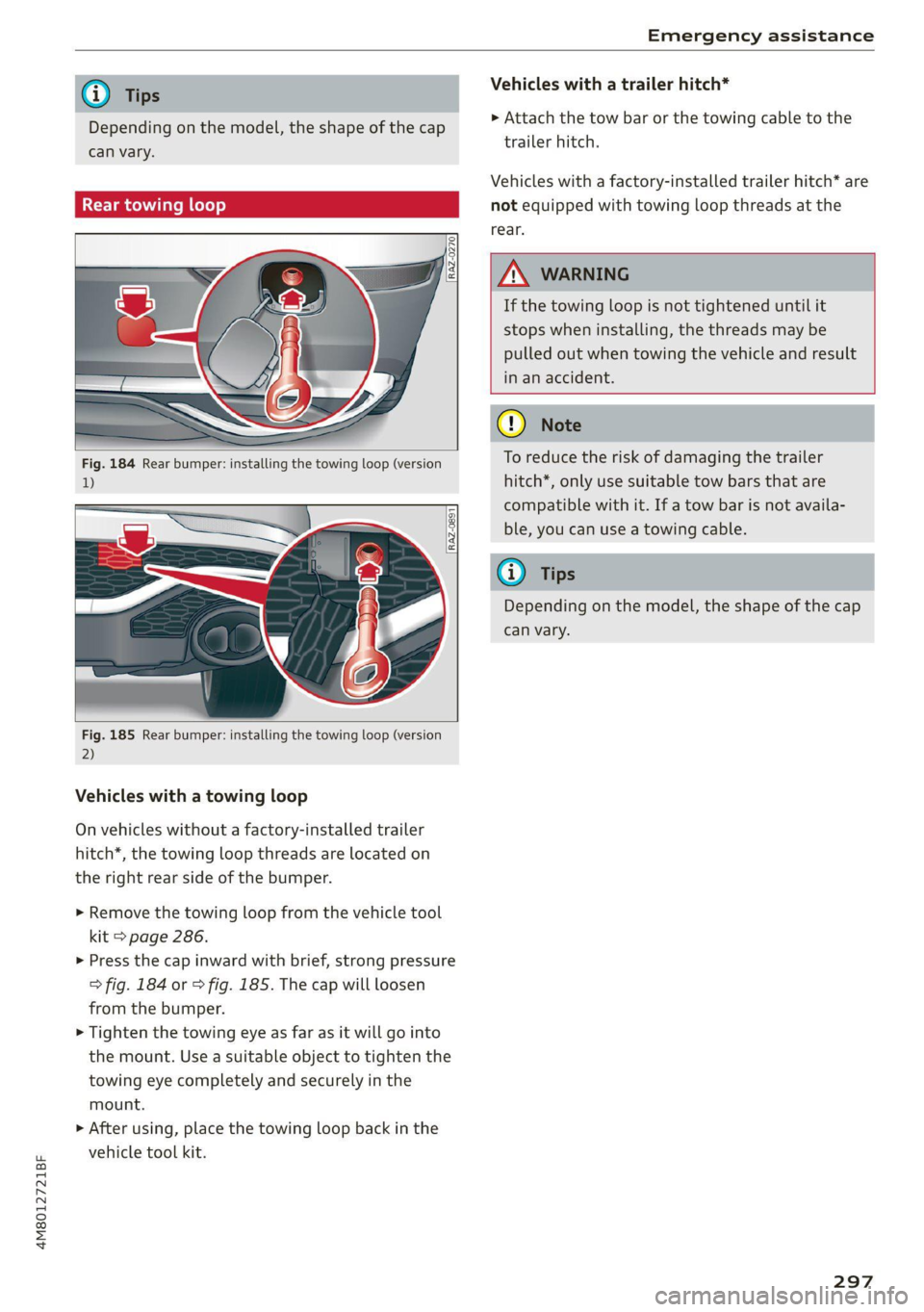
Fig. 184 Rear bumper: installing the towing loop (version
1)
Fig. 185 Rear bumper: installing the towing loop (version
2)
Vehicles with a towing loop
On vehicles without a factory-installed trailer
hitch*, the towing loop threads are located on
the right rear side of the bumper.
>» Remove the towing loop from the vehicle tool
kit > page 286.
> Press the cap inward with brief, strong pressure
> fig. 184 or > fig. 185. The cap will loosen
from the bumper.
> Tighten the towing eye as far as it will go into
the mount. Use a suitable object to tighten the
towing eye completely and securely in the
mount.
>» After using, place the towing loop back in the
vehicle tool kit.
Vehicles with a trailer hitch*
> Attach the tow bar or the towing cable to the
trailer hitch.
Vehicles with a factory-installed trailer hitch* are
not equipped with towing loop threads at the
rear.
ZX WARNING
If the towing loop is not tightened until it
stops when installing, the threads may be
pulled out when towing the vehicle and result
in an accident.
® Note
To reduce the risk of damaging the trailer
hitch*, only use suitable tow bars that are
compatible with it. If a tow bar is not availa-
ble, you can use a towing cable.
GG Tips
Depending on the model, the shape of the cap
can vary.
297
Page 303 of 332
4M8012721BF
Fuses and bulbs
Fuse panel (a) (black) Fuse panel (2) (black)
8 |Upper/lower display 10 | Front belt tensioner on driver's side
9 |Instrument cluster Luggage compartment lid central locking,
10 | DVD drive 11 | fuel filler door, luggage compartment cov-
11 | Light switch, switch panels Sf
12 [Steering column electronics 12 |Luggage compartment lid control module
13 | Volume control Fuse panel (2) (red)
14 |MMI Infotainment system control module No. | Equipment
15 | Steering column adjustment 1 | Rear climate control system blower
16 | Steering wheel heating 2 |Sound-amplifier
3 | Exhaust treatment, sound actuator
Fuse assignment 4 |Rear climate control system control panel
ST 5 | Right trailer hitch light
6 | Trailer hitch positioning motor
7 |Trailer hitch release
8 |Left trailer hitch light
9 |Trailer hitch socket
10 |Allroad sport differential
11 | Exhaust treatment
12 |Driver’s side rear safety belt tensioner
Fuse panel @) (brown)
No. | Equipment
Driver assistance systems control module
2. |Audi phone box
« : E -| a fl r al i] " f E 3 Front seat electronics, right lumbar sup-
{ | aE ] | port
- 4 |Side assist
6 |Tire pressure monitoring system
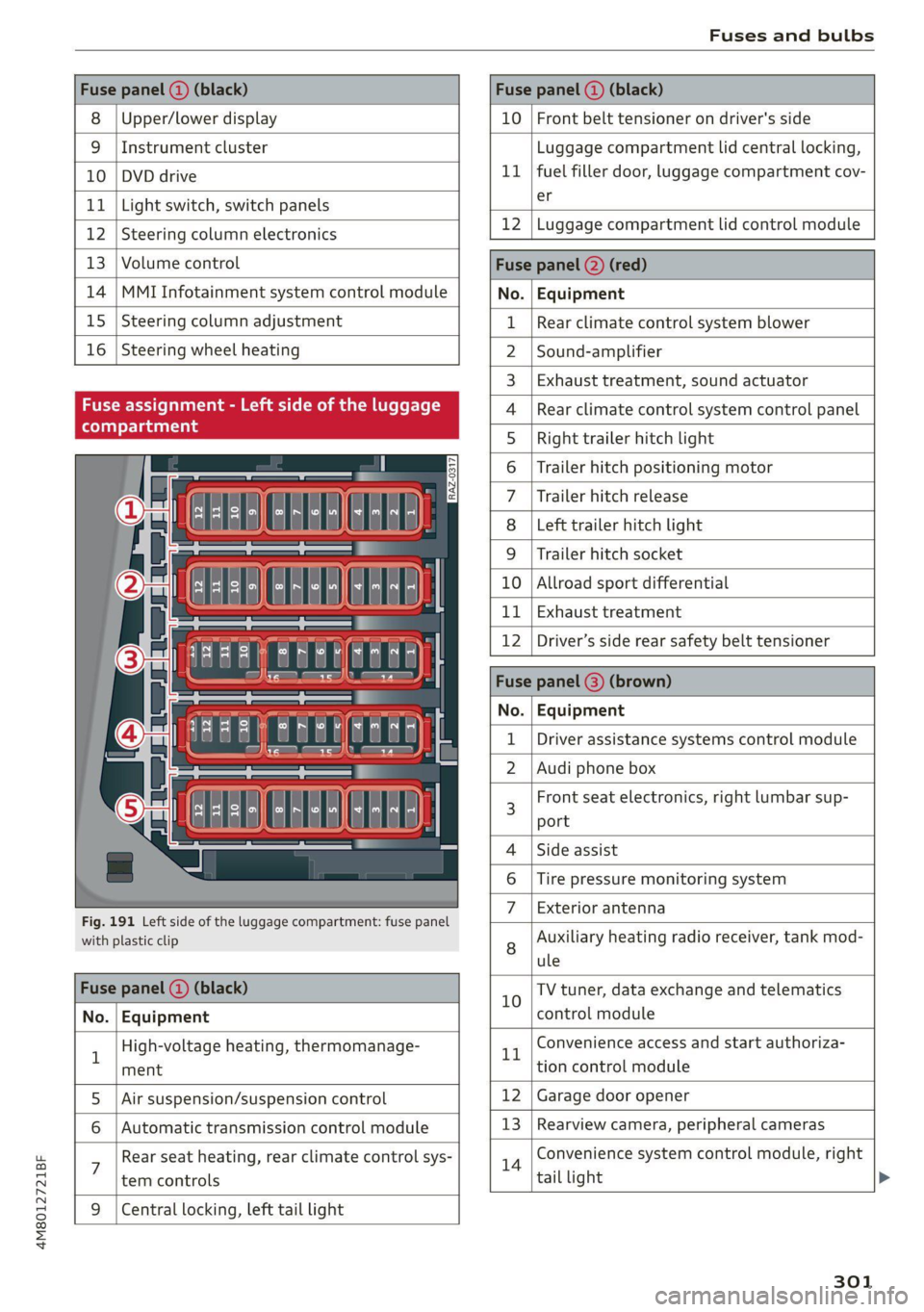
Fig. 191 Left side of the luggage compartment: fuse panel 7 | Bxeharanitenina
with plastic clip 8 Auxiliary heating radio receiver, tank mod-
ule
Fuse panel (@) (black) 10 TV tuner, data exchange and telematics
No. | Equipment control module
1 High-voltage heating, thermomanage- rt Convenience access and start authoriza-
ment tion control module
5. |Air suspension/suspension control 12 | Garage door opener
6 | Automatic transmission control module 13 | Rearview camera, peripheral cameras
: Rear seat heating, rear climate control sys- 14 Convenience system control module, right
tem controls tail light
9 |Central locking, left tail light
301
Page 316 of 332
Technical data
(er) Feb a(t)
Fuel tank 22.5 gal (85 liters)
Windshield and headlight washer system* 6.3 qt (6 liters)
A/C system refrigerant oil
The exact type and amount of refrigerant oil in
the A/C system is specified on the sticker on the
refrigerant compressor.
Refrigerant oil 110/140 g® +/-10g
@) The specifications depend on vehicle equipment.
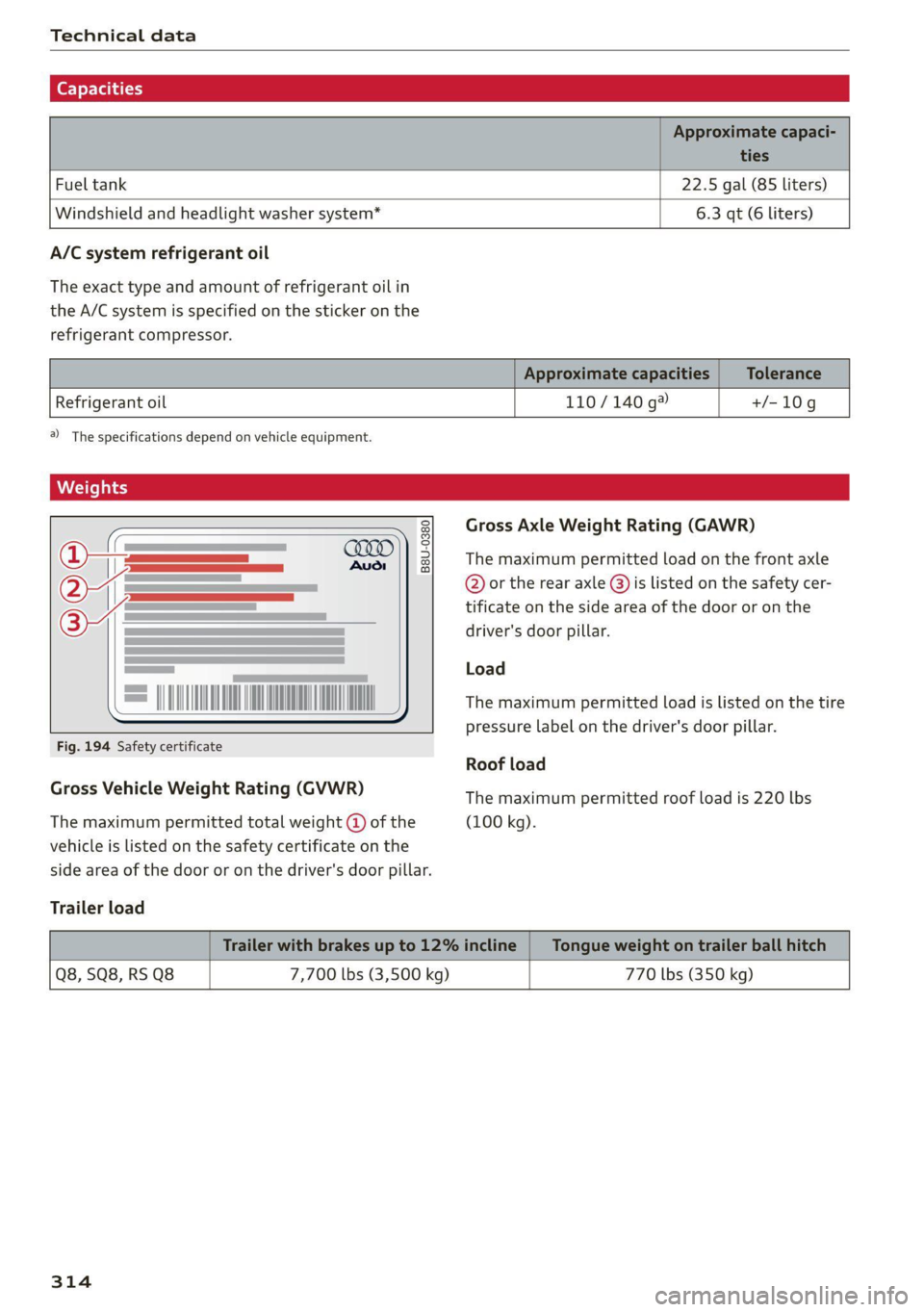
Weights
Gross Axle Weight Rating (GAWR)
The maximum permitted load on the front axle
@ or the rear axle @) is listed on the safety cer-
tificate on the side area of the door or on the
driver's door pillar.
B8U-0380
Load
The maximum permitted load is listed on the tire
pressure label on the driver's door pillar.
Fig. 194 Safety certificate
Roof load
Gross Vehicle Weight Rating (GVWR) The maximum permitted roof load is 220 lbs
The maximum permitted total weight @ of the (100 kg).
vehicle is listed on the safety certificate on the
side area of the door or on the driver's door pillar.
Trailer load
Q8, SQ8, RS Q8 7,700 lbs (3,500 kg) 770 lbs (350 kg)
314
Page 325 of 332
4M8012721BF
Parking aids. + csssce x2 esemne oo encase ve enmuate ¥ ¥ 159
Adjusting the volume.............0005 161
Automatic activation.................. 160
Cleaning the sensors and camera........ 281
Deactivating rear cross-traffic assist. ... . 166
Park.assist plus; < - eses ss eee% ss eeaes es 170
Parking:aid plus « cisvie s & coe 6 soos ao wre 159
Parking space search.................. 167
Peripheral cameras................-4. 162
Rearview cametaies . 2 sccm so ewan vo exe y 162
Remote controlled parking............. 173
Switching off maneuver assist.......... 179
Trailerview's 2 ssn sees 2 o meow oo eee 2 ¥ 163
Parking and maneuvering............... 159
Parking brake
refer to Electromechanical parking brake. 106
Parking lightSivn « s mew ¢ o mews o ewney 3 ween a SL
Parking lock emergency release.......... 100
Partition Wetec s = ems sv seme s s meen ob eee 86
Pass-through...........2--..0 eee eee ee 86
Pedals. .... 2.2... cece eee eee eee eee 99
Pedestrian detection................04. 131
Perchlorate ....... 0... cee eee eee 308
Performance/torque display
refer to Sport displays.................. 15
Peripheral cameras.............--000-- 162
Phone
Connecting a second mobile device...... 182
Disconnecting a mobile device.......... 183
Sete S crnics ao serene «meme « w anene © memes w 188
Phonebook
refer to Directory.............0 eee ae 186
PIN
4-digit myAudi PIN..............-..00- 32
PROLCCUONica « s wou + & wiseu s & vaewe ¢ ¥ cows 33
Playback (media) « « sscs sv sees se eee ve es 223
Podcast
refer to Online radio............6% 216,217
Polishing iss + « ccavusys @ cqees @ © meres +e Rees eee 282
POUlUtane Titers oss x = saeays & 2 emus x = eee a 90
Power closing (doors)..........seeeeeeeee 35
Power sourceS........-.-0-0-0 eee 82,222
Power window malfunction............... 46
Power windows...........--.0 eee eee eee 46
Malfunctions « < seas ss saws ¢ 2 eee de eee 46
Predictive control.............0..00000- 141
Predictive messages...............- 99,136
pre sense
refer to Audi presense................ 149
Presentation mode...............-.005- 211
Presets
Radio... 2... 2. eee eee 215
Presets list
feferto Presets. «= isas teresa veieas ce 215
Pressure
Tire pressure monitoring system.... 275,276
THRs. oo sowie oo ceusie © 6 arene © 8 aoe we meee 266
Profilespietures siswin x + scausm a 3 aimesm © 0 omawene eH 32
Progressive StESTING’s ¢ & mews ¢ x wows ¢ y news ¢ 114
Protectinng:cs < = saves ¢ = saree & © eewie +s owes 282
Pyrotechnic elements............-...0- 308
Q
QGUSUERO's sas « 5 Nees 5 EGS, eB Eo HaeeR 115
Selective wheel torque control.......... 116
R
Radio’: = «wes e s secu ss ween 5 s weree © ¥ eee = 212
Radio text. ....... cece eee eee eee 215
Station list... 00... . eee eee eee 212
Radio communications equipment........ 310
Radio equipment.............. 0c eee eee 310
Radio Standards Specification (RSS)....... 311
Railseanrion’s «ssw 2 women ae ones: ao mcm 2 © a 112
Rain/light sensor
Headlights ......... 0.0... ce eee ee eee §1
Intermittent mode (windshield wipers) .... 57
Random
Fefer to Shute: « 2 gems = 2 gems = noes 3s Fe 225
RAnGe’s « sane se neue 5 & mem 5 y ae GB ee 16
Reading lights................00. eee eee 54
Rear cross-traffic assist............000.. 166
Rear lid
refer to Luggage compartment lid........ 43
Rear lowering.......... 00.0 e cece eee eee 85
Rear seats... 0... eee cece eee 65
Rearview camera...... 0.0.2... 0 ee ee eee 162
Rear window defogger............-..0--- 92
Rear wiper blades
Changing ......... 0. cece ee eee eee eee 59
ClOaNiNG :: « s sees ¢ s ees 4 e een vo eee se oe 59