steering wheel AUDI Q8 2021 Owner´s Manual
[x] Cancel search | Manufacturer: AUDI, Model Year: 2021, Model line: Q8, Model: AUDI Q8 2021Pages: 332, PDF Size: 118.76 MB
Page 274 of 332

Wheels
ZA\ WARNING
Wheel bolts that are tightened or repaired in-
correctly can become loose and result in loss
of vehicle control, which increases the risk of
an accident. For the correct tightening specifi-
cation, see > page 291, Finishing.
— Always keep the wheel bolts and the threads
in the wheel hub clean and free of grease.
— Only use wheel bolts that fit the rim.
— Always have damaged rims repaired by an
authorized Audi dealer or authorized Audi
Service Facility. Never repair or disassemble
rims yourself, because this increases the risk
of an accident.
Loose wheel warning
Applies to: vehicles with loose wheel warning
Within the limits of the system, the loose wheel
warning in the instrument cluster warns you if
one or more wheels are loose.
Using the ABS sensors, the loose wheel warning
system compares the vibration characteristics of
the individual tires. If one or more wheels are
loose, it will be indicated in the instrument clus-
ter display with the & indicator light and a mes-
sage. If only one wheel is affected, the location
of that wheel will be indicated.
Messages
fi Wheel bolts loose. Please safely stop the ve-
hicle and check all wheel bolts!
Loose wheel warning for at least one wheel > A\.
Check the wheel bolts on all wheels with the
wheel wrench (vehicle tool kit). Have the tighten-
ing specification checked as soon as possible with
a torque wrench. Drive carefully until then. For
the correct tightening specification, see
=> page 291, Finishing.
fl Wheel assessment active. Please continue
driving carefully
After this message appears and you have checked
the wheel bolts, the assessment phase begins
when the vehicle is in motion. This may take sev-
eral minutes.
272
fi Loose wheel warning: malfunction! See
owner's manual
There is a system malfunction. Drive immediately
to an authorized Audi dealer or authorized Audi
Service Facility to have the malfunction repaired.
Z\ WARNING
Wheel bolts that are tightened incorrectly can
become loose and result in loss of vehicle con-
trol, which increases the risk of an accident.
— If a message appears, reduce your speed im-
mediately and avoid any hard steering or
braking maneuvers. Stop as soon as possible
and check the wheel bolts.
— Check your wheels for damage. Have the
damaged wheels checked and/or replaced
immediately by an authorized Audi dealer or
authorized Audi Service Facility.
— Under certain conditions (such as a sporty
driving style, winter conditions, or unpaved
roads), the message may be delayed.
— The driver is responsible for ensuring that
the wheels are attached correctly.
(i) Tips
— The loose wheel warning system can also
stop working when there is an ESC malfunc-
tion.
— Using snow chains may result in a system
malfunction.
Winter tires significantly improve the vehicle's
handling when driving in winter conditions. Be-
cause of their construction (width, compound,
tread pattern), summer tires provide less traction
on ice and snow.
> Use winter tires on all four wheels.
> Only use winter tires that are approved for your
vehicle.
> Please note that the maximum permitted
speed may be lower with winter tires > A\ in
General information on page 256. An author-
ized Audi dealer or authorized Audi Service Fa-
cility can inform you about the maximum per-
mitted speed for your tires.
Page 278 of 332
Wheels
minute and then stays on, there is system mal-
function. Try to store the correct tire pressures
= page 276. Insome cases, you must drive for
several minutes after storing the pressures until
the indicator light turns off. If the indicator light
does turn off or turns on again after a short peri-
od of time, drive to an authorized Audi dealer or
authorized Audi Service Facility immediately to
have the malfunction corrected.
ZA\ WARNING
— If the tire pressure indicator appears in the
display, reduce your speed immediately and
avoid any hard steering or braking maneu-
vers. Stop as soon as possible and check the
tires and their pressure.
— The driver is responsible for maintaining the
correct tire pressure. You must check the
tire pressure regularly.
— Under certain conditions (such as a sporty
driving style, winter conditions, or unpaved
roads), the tire pressure monitoring system
indicator may be delayed.
(i) Tips
— The tire pressure monitoring system can al-
so stop working when there is an ESC mal-
function.
— Using snow chains may result in a system
malfunction.
— The tire pressure monitoring system in your
Audi was calibrated with “Audi Original
Tires” > page 263. Audi recommends using
these tires.
Storing tire pressures
Applies to: vehicles with Tire Pressure Monitoring System in-
dicator
If the tire pressure changes or a tire is replaced,
it must be confirmed in the MMI.
> Before storing the tire pressures, make sure the
tire pressures in all four tires meet the speci-
fied values and are adapted to the load
=> page 266.
> Switch the ignition on.
> Applies to MMI: Select on the home screen: VE-
HICLE > Settings & Service > Tire pressure
276
monitoring > Store tire pressure > Yes, store
now.
@) Tips
Do not store the tire pressures if snow chains
are installed.
Tire pressure monitoring
system
(1) General notes
Each tire, including the spare (if provided),
should be checked monthly when cold and inflat-
ed to the inflation pressure recommended by the
vehicle manufacturer on the vehicle placard or
tire inflation pressure label. (If your vehicle has
tires of a different size than the size indicated on
the vehicle placard or tire inflation pressure la-
bel, you should determine the proper tire infla-
tion pressure for those tires).
As an added safety feature, your vehicle has been
equipped with a tire pressure monitoring system
(TPMS) that illuminates a Low tire pressure tell-
tale when one or more of your tires is significant-
ly under-inflated. Accordingly, when the low tire
pressure telltale illuminates, you should stop and
check your tires as soon as possible, and inflate
them to the proper pressure. Driving ona signifi-
cantly under-inflated tire causes the tire to over-
heat and can lead to tire failure. Under-inflation
also reduces fuel efficiency and tire tread life,
and may affect the vehicle's handling and stop-
ping ability.
Please note that the TPMS is not a substitute for
proper tire maintenance, and it is the driver's re-
sponsibility to maintain correct tire pressure,
even if under-inflation has not reached the level
to trigger illumination of the TPMS low tire pres-
sure telltale.
Your vehicle has also been equipped with a TPMS
malfunction indicator to indicate when the sys-
tem is not operating properly. The TPMS mal-
function indicator is combined with the low tire
pressure telltale. When the system detects a
malfunction, the telltale will flash for approxi-
mately one minute and then remain continuously >
Page 280 of 332
Wheels
The specified tire pressure is the last tire pressure
that was stored > page 278.
Note that the tire pressure also depends on the
temperature of the tire. The tire pressure increas-
es as the engine becomes warmer while driving.
Z\ WARNING
Read and follow the important information
and notes > page 277.
@) Tips
The tire pressure or temperature is not dis-
played while the vehicle is stationary and in
adaptation mode. Dashes --.-- are shown in
place of the pressure and temperature.
OB iw sete ot
Applies to: vehicles with tire pressure monitoring system
If the @ indicator light turns on, the tire pres-
sure is too low compared to the specified pres-
sure. Check and store the tire pressure(s) the
next time it is possible > page 278.
® Flat tire! Safely stop vehicle. Please check all
tires and store pressures in MMI
If the indicator light turns on and the message
appears, the tire pressure has reached a critical
level compared to the specified pressure. Avoid
unnecessary steering and braking maneuvers.
Adapt your driving style to the situation. Stop as
soon as possible and check the tire(s). If it is pos-
sible to continue driving, see an authorized Audi
dealer or authorized Audi Service Facility immedi-
ately and have your tire(s) repaired or replaced.
Z\ WARNING
Read and follow the important information
and notes > page 277.
278
Storing new tire pressures
Applies to: vehicles with tire pressure monitoring system
The tire pressure specifications must be stored
correctly for the tire pressure monitoring system
to function reliably.
It is always necessary to store the tire pressures
when the tire pressures are modified, for exam-
ple due to a change in load or when new sensors
are installed.
> Before storing the tire pressures, make sure the
tire pressures of all four tires meet the speci-
fied values and are adapted to the load
=> page 266, fig. 168. Only correct and store
the pressure in tires whose temperature is ap-
proximately the same as the ambient tempera-
ture. If the temperature of the tire is higher
than the ambient air temperature, the tire
pressure must be increased approximately
3 PSI (0,2 bar) above the value on the sticker.
> Switch the ignition on.
> Applies to MMI: Select on the home screen: VE-
HICLE > Settings & Service > Tire pressure
monitoring > Store tire pressure > Yes, store
now.
> If the changed tire pressures are not displayed
on the MMI, drive the vehicle for approximately
10 minutes so that the sensor signal from the
wheels is received again.
During this adaptation phase, --.-- is displayed
for the pressure and temperature and the tire
pressure monitoring system is only partially
available. It only provides a warning if one or
more tire pressures is below the minimum per-
mitted specified pressure.
@ Tire pressure: wheel change detected. Please
check all tires and store pressures in MMI
If the indicator light turns on and the message
appears, the system has detected that the loca-
tion of the sensors has changed due to a wheel
replacement, or new sensors have been installed.
Store the new tire pressures.
ZA WARNING
Read and follow the important information
and notes > page 277.
Page 298 of 332
Emergency assistance
Preparations
> Only secure the towing cable or tow bar at the
designated towing loops > page 296,
=> page 297.
> Make sure the towing cable is not twisted. Oth-
erwise it could disconnect from the towing loop
while towing.
> Switch the emergency flashers on in both
vehicles > page 53. However, do not do this if it
prohibited by law.
Towing vehicle (front)
> Only start to drive when the towing cable is
taut.
> Press the brake pedal very carefully.
> Avoid sudden braking or driving maneuvers.
Vehicle being towed (rear)
> Make sure the ignition is switched on so that
the steering wheel is not locked and so that you
can use the turn signals, the horn, and the
windshield wipers if needed > /\.
> Switching it off before the vehicle has stopped
may impair the function of the brake booster
and power steering. You would then need to
use more force to steer and brake the vehicle.
> Release the parking brake > page 106.
> Select the “N” selector lever position.
> Make sure the towing cable is always taut.
Z\ WARNING
— Never tow a vehicle using a tow bar or tow-
ing cable if the vehicle does not have electri-
cal power.
— If the vehicle runs out of power while it is
being towed, stop towing the vehicle imme-
diately and consult an authorized Audi deal-
er or qualified repair facility.
296
Front towing loop
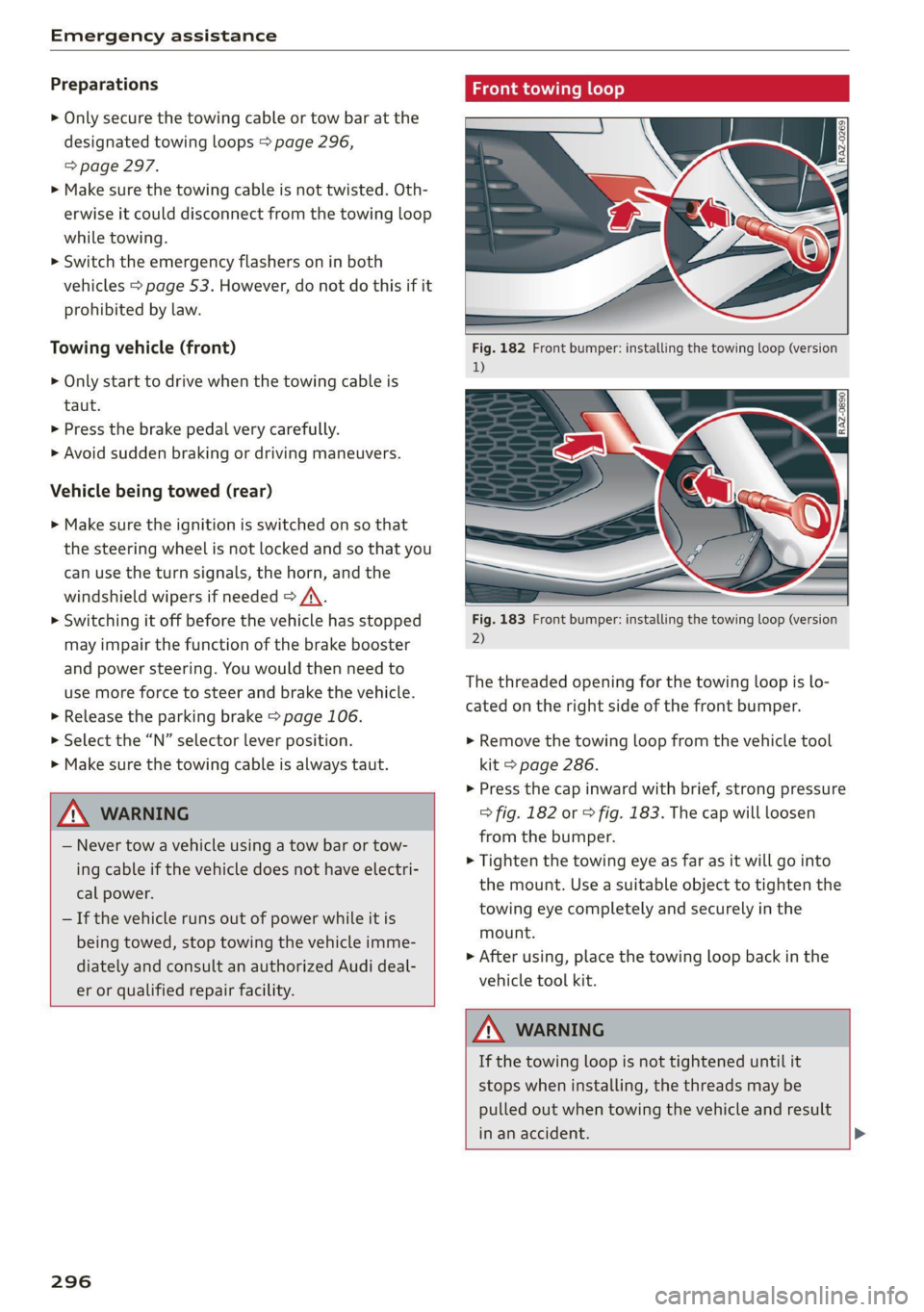
Fig. 182 Front bumper: installing the towing loop (version
1)
Fig. 183 Front bumper: installing the towing loop (version
2)
The threaded opening for the towing loop is lo-
cated on the right side of the front bumper.
» Remove the towing loop from the vehicle tool
kit > page 286.
>» Press the cap inward with brief, strong pressure
> fig. 182 or > fig. 183. The cap will loosen
from the bumper.
> Tighten the towing eye as far as it will go into
the mount. Use a suitable object to tighten the
towing eye completely and securely in the
mount.
> After using, place the towing loop back in the
vehicle tool kit.
ZA\ WARNING
If the towing loop is not tightened until it
stops when installing, the threads may be
pulled out when towing the vehicle and result
in an accident. >
Page 302 of 332
Fuses and bulbs
Compressor | 13 | Left headlight
Audi music interface, USB input
4
5 |Engine mount 15 | USB input
6 |Windshield washer system control module
7 LisioTnieNe panel Nas | Equipinent
8 | Climate control system blower T | Ant-theté dlaunsystem
9 |Driver assistance systems control module :
2 | Engine control module
E UL
10. | Emergency 'callsystem 3 | Front seat electronics, lumbar support
11 | Engi
ngine start 4 |Automatic transmission selector lever
Di 5 |Horn
No. | Equipment 6 | Parking brake
1 |Front seat heating 7 |Diagnostic interface
2 |Windshield wipers 8 | Roof electronics control module
3 | Left headlight electronics 9 |48 V drivetrain generator
4 |Panoramic glass roof 10 | Airbag control module
5 |Left front door control module Electronic Stabilization Control (ESC), An-
Il | ‘
6 |Sockets ti-Lock Braking System (ABS)
7 | Right rear door control module 12 | Diagnostic connection, light/rain sensor
9 | Right headlight electronics 13 | Climate control system
10 Windshield washer system/headlight 14 | Right front door control module
washer system control module 15 | Climate control system compressor
11 | Left rear door control module
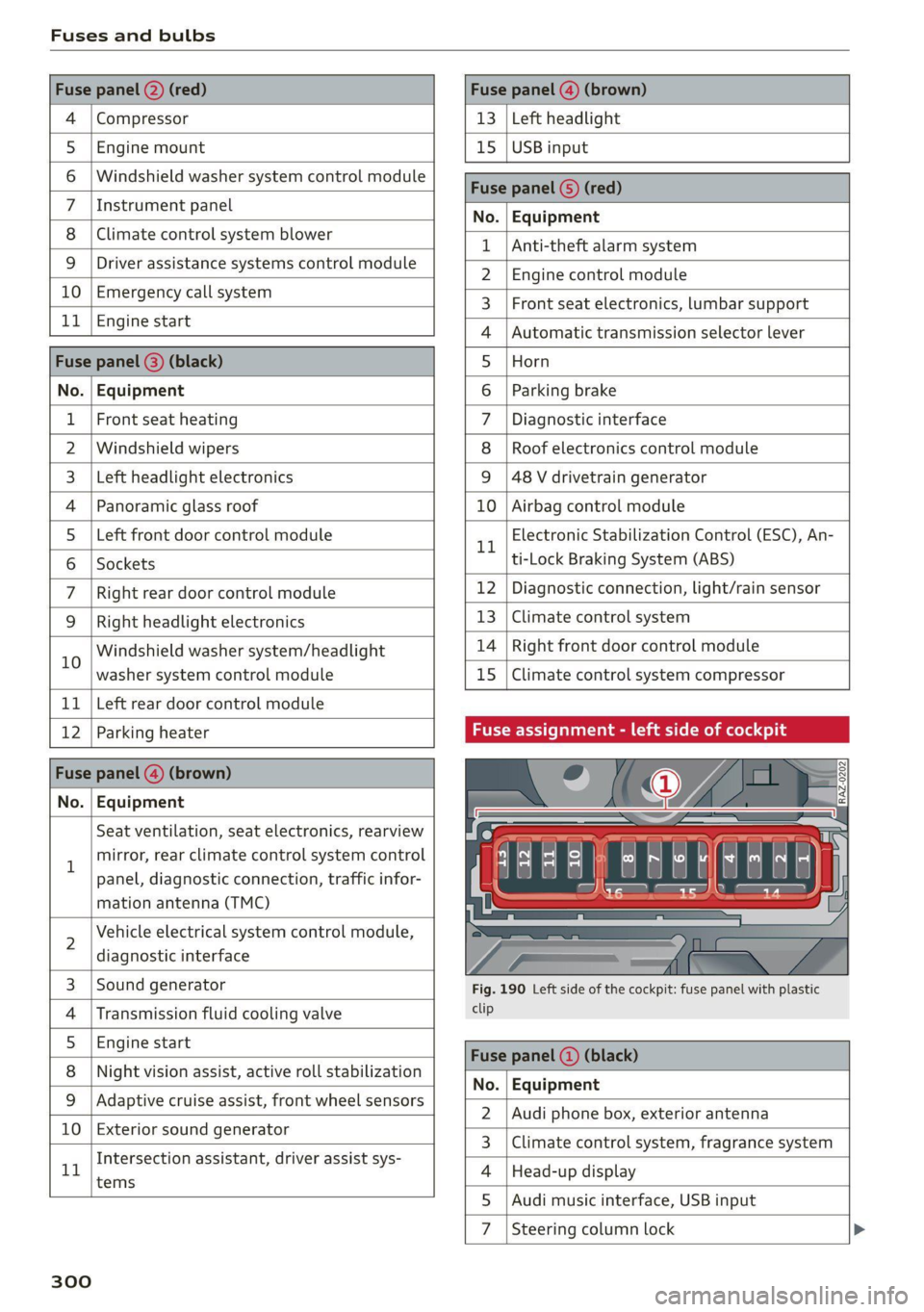
12 | Parking heater Fuse assignment - left side of cockpit
No. | Equipment
Seat ventilation, seat electronics, rearview
1 mirror, rear climate control system control
panel, diagnostic connection, traffic infor-
mation antenna (TMC)
2 Vehicle electrical system control module,
diagnostic interface
3 |Sound generator Fig. 190 Left side of the cockpit: fuse panel with plastic
4 | Transmission fluid cooling valve ete
5 |Engine start
8 | Night vision assist, active roll stabilization 5
No. | Equipment
9 |Adaptive cruise assist, front wheel sensors - -
2. |Audi phone box, exterior antenna
10 | Exterior sound generator 5
3 | Climate control system, fragrance system
Intersection assistant, driver assist sys- .
11 4 |Head-up display
tems
5
7d
Steering column lock
300
Page 303 of 332
4M8012721BF
Fuses and bulbs
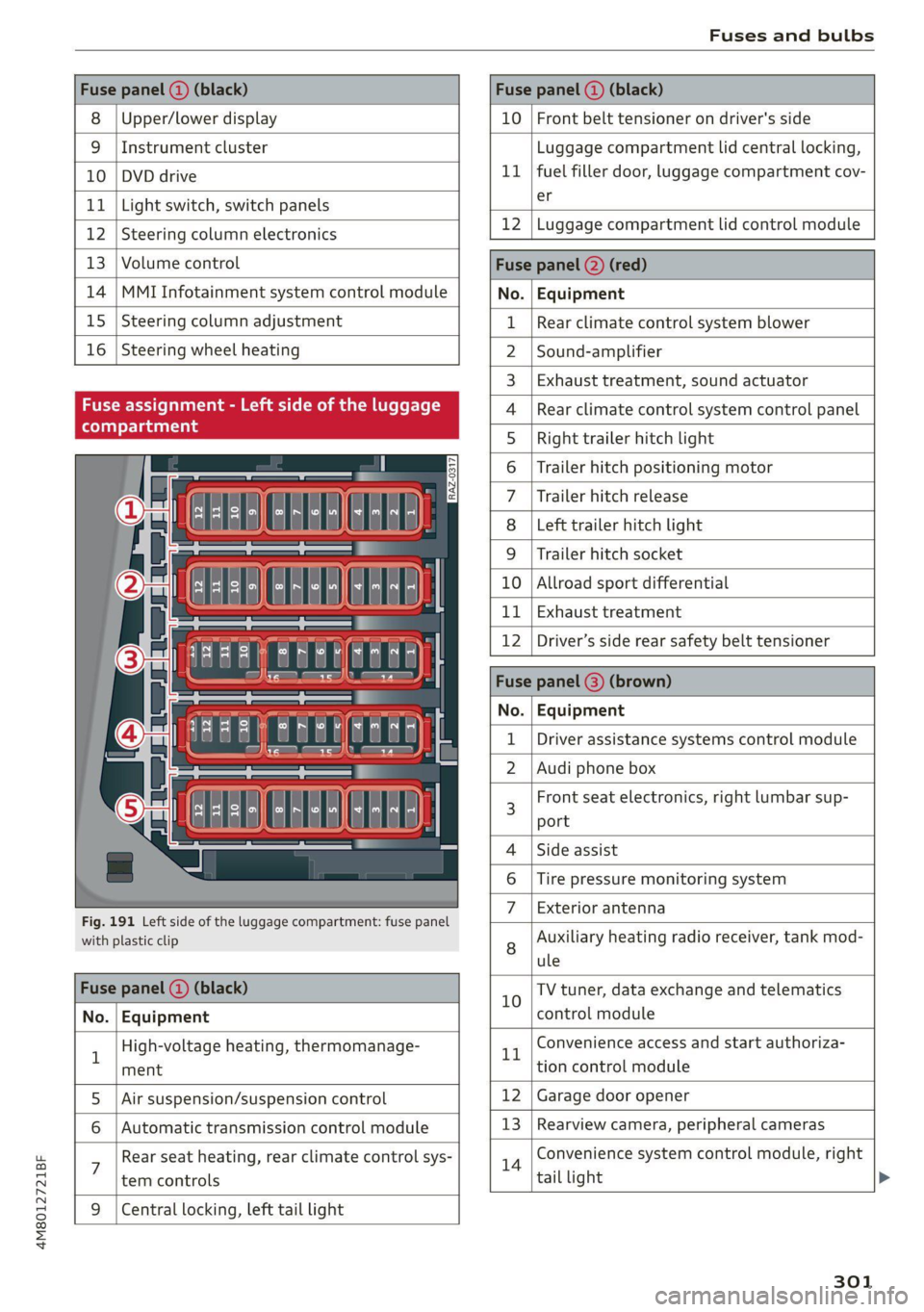
Fuse panel (a) (black) Fuse panel (2) (black)
8 |Upper/lower display 10 | Front belt tensioner on driver's side
9 |Instrument cluster Luggage compartment lid central locking,
10 | DVD drive 11 | fuel filler door, luggage compartment cov-
11 | Light switch, switch panels Sf
12 [Steering column electronics 12 |Luggage compartment lid control module
13 | Volume control Fuse panel (2) (red)
14 |MMI Infotainment system control module No. | Equipment
15 | Steering column adjustment 1 | Rear climate control system blower
16 | Steering wheel heating 2 |Sound-amplifier
3 | Exhaust treatment, sound actuator
Fuse assignment 4 |Rear climate control system control panel
ST 5 | Right trailer hitch light
6 | Trailer hitch positioning motor
7 |Trailer hitch release
8 |Left trailer hitch light
9 |Trailer hitch socket
10 |Allroad sport differential
11 | Exhaust treatment
12 |Driver’s side rear safety belt tensioner
Fuse panel @) (brown)
No. | Equipment
Driver assistance systems control module
2. |Audi phone box
« : E -| a fl r al i] " f E 3 Front seat electronics, right lumbar sup-
{ | aE ] | port
- 4 |Side assist
6 |Tire pressure monitoring system
Fig. 191 Left side of the luggage compartment: fuse panel 7 | Bxeharanitenina
with plastic clip 8 Auxiliary heating radio receiver, tank mod-
ule
Fuse panel (@) (black) 10 TV tuner, data exchange and telematics
No. | Equipment control module
1 High-voltage heating, thermomanage- rt Convenience access and start authoriza-
ment tion control module
5. |Air suspension/suspension control 12 | Garage door opener
6 | Automatic transmission control module 13 | Rearview camera, peripheral cameras
: Rear seat heating, rear climate control sys- 14 Convenience system control module, right
tem controls tail light
9 |Central locking, left tail light
301
Page 317 of 332
4M8012721BF
A
A/C cooling mode..........-. eee eee eee ee
A/C system refrigerant oil...............
Acceleration measurement..............
Accelerator pedal...............--00 000s
also refer to Accelerator pedal...........
AccessorieS.... 0... 0.00. eee eee
Active lane assist
refer to Lane departure warning.........
refer to Lane guidance................
Adaptive cruise assist................04.
Cleaning the sensors......... 0.0.0.0 005
Adaptive cruise control
Predictive control..............000005
Adaptive dampers « sve « « savece ae scare 6 0 oe
Adaptive speed assist
refer to Adaptive cruise assist..........
Adjusting the air distribution.............
Adjusting the brightness.................
Adjusting the sound................0005
Adjusting the temperature...............
Adjusting the vents ccs <= csws + © sews +o oer
Adjusting the volume............. eee eee
Adjusting the volume (announcements) ... .
Adjusting the welcome sound............
Airbag system... 2.2... eee eee
AIPSUSPONSION ix o © aowees « 2 mines + omnes 5, v0
Alarm system
refer to Anti-theft alarm system..........
Alignment pin (changing the wheel).......
All-weather lights...............-..00005
All-wheel steering.............---00005
ALUS@aSOntineSies. « 3 ssasess «x aimee a & iwesane sw a8
All wheel drive
refer to quattro.............0 0. eee
Amazon Alexa integration
Media playback................00000.
Operating « « seen s » ewes se eee G s FeeE Ys BOS
AMI
refer to Audi music interface...........
Android Auto
refer to Audi smartphone interface......
Anti-lock braking system................
Anti-Slip Regulation 0.642 5 eccs «sense ees
Anti-theft alarm system...............05.
Anti-theft wheel bolts...............0... 289
Apple CarPlay
refer to Audi smartphone interface...... 231
Aspect ratio
VIdCO eee eee eee eee eee 225,.227
ASR
refer to Anti-Slip Regulation............ 116
Audi adaptive light...............-.0000- 51
Audi connect
refer to CONnNect ; «= = sass ss sees ss eee ee ae 192
Audidrive'selecticy, « + scum oz scum « x pewe yoo 111
Audi music interface...............2.-- 222
Audio files............. 0000 c cece eee eee 223
Audi phone box...........0.- 00 eee eee 183
Audi presense....... 00... cee eee eee 149
Messages ........... 0.0. e eee eee eee 153
Audi pre sense front.............-...0-- 150
Audi side assist
refer to Side assist. ........ 0... cece eee 153
Audi smartphone interface.............. 231
Legalinformation.................005 236
Audi virtual cockpit
refer to Instrument cluster.............. 12
AUTO
Automatic headlights................4. 51
Climate control system.............0005 91
Auto Lock (central locking) ............... 35
Automatic climate control system
refer to Climate control system.......... 90
Automatic luggage compartment lid.... 43,44
Automatic transmission............-.0005 97
Parking lock emergency release......... 100
Automatic wipe/wash system............. 57
Average consumption................... 16
Average speed..........-. 00. cece eee ee 16
B
Bag hooks ........ 0.0. e eee eee eee eee 83
Band
refer to Frequency band............... 212
Battery
Charging (12 Volt vehicle battery)....... 253
Vehicle battery (12 Volt)............... 2511,
Winter operation (12 Volt vehicle battery) . 252
Blinds
refer to Panoramic glass roof............ 47
315
Page 321 of 332
4M8012721BF
Index
External voice operation................. 29
F
Factory default settings
Multi Media Interface................. 234
EASE OUTS sissses ow snaawee 0 x sons #9 seme a 0 onennns 201
FAVORITOS! & o cowsms w 6 cman 6 8 semua & wexees & renee 22
Bluetooth. .............. 0... eee eee 236
NaVIG@EION:: « + swe 9 o eee 5 ¢ oem & e eee 202
Telephone wwe «x cain © aesee e+ ence oo eee 186
Federal Communications Commission (FCC) . 311
File formats (media drives).............. 228
FOg (WINdOWS)ixw: 5 2 came y 5 anew ay aeew 5 2 Re 92
Folding the rearseats...............0005 86
Footwell temperature.............2.0005 93
For the sake of the environment
Disposing of engine oil................ 247
FUeLIRG!s © anecsns so answers & v annum © ¥ seems WH avose 239
Leaks... i eee eee eee eee 243
Fragrance... ... ee eee eee eee 92,93
Free text search
Media....... cee eee eee eee ee 227
R&GiOiss = = seus = = saupe & = ems 4 neoRE ee 214
also refer to Intelligent search.......... 201
Freeze protection
Coolant... .. 0. eee eee eee 248
Windshield washer system............. 254
Frequency band..........-..00 eevee ee 212
also refer to Frequency band........... 212
Front center armrest ....... 000. cece ee eee 65
Front collision warning
refer to Audi pre sense front............ 149
Front passenger’s seat adjustment
PRON. « ssweece xo aceane wo axevene ao coenaie w 6 ace 65
Rear... eee eee eee 65
Front wiper blades
ChanGinG’s + x same sy eames ¢ a eae ¢ HER Fe 58
Cleaning « « cvs sv even oe enn oe ence oo 58
FUGls sce ¢ x cage x 2 eee 7 o we Ye eee ee 238
TAGAIEIVES «scones x 5 sures @ 2 sxenene © 8 ommrane oa ot 239
Current consumption................... 16
Fueldisplay sec: = s sees ey seen sy eee ge es 12
Fuel-tank. capacity’: « scsi oo cise a 0 caves « 314
Gasoline
Reducing fuel consumption............ 102
Fueling
Fuel filler door..... 0.0... cece eee eee ee 239
Fuel filler door emergency release....... 241
Fueltankcapacity'. « 5 con es cone a wanna « 314
Functions on demand...............0.4. 194
Functions that require a license.......... 194
also refer to Functions on demand....... 194
G
Garage door opener............--0ee eee 48
GarMeNthOokS scesiiss sv cevevee oo ances o a wees 9 0 2 83
GaSOlING cy « x wares & 2 meee = 2 eee 4 ¢ eee 4 8 238
Additives ...... 0... cece eee eee 239
Gasoline mixture ...............0000ee 238
GAWR
refer to Gross Axle Weight Rating (GAWR) . 314
Gears... eee 97
Glossary of tire and loading terminology... 259
Glove compartment..............000 eee 83
G meter
refer to Sport displays.................. 15
Gross Axle Weight Rating (GAWR)........ 314
Gross Vehicle Weight Rating (GVWR)...... 314
GVWR
refer to Gross Vehicle Weight
Rating (GVWR) « ssope « 2 wecne 2 2 ceuee & 2 ces 314
H
Hanastrees « « asms = eevee § = netR se HOR Se 182
Hatids Free Profiles « 2 swcas x x agus ¢ 2 ems 2 182
Head-up display
AGjUSUING was +» ences 3 ¢ swe yo ees oy eee = 27
Adjusting the brightness................ 55
Operating...............0 0. cece eee 27
Headlight range control................05 51
Headlights
ClOSNiNG’s = = cams ¢ 5 eas 7 o Seas tS ee Ea: 281
Headlight range control................ 51
Washer system... 1.2... 00. e cee ee eee 57
Washer system (filling washer fluid)... . . 254
Head restraints
ACIUSEINGisyes x = sewas 3 2 gas x & eewR = # aR x 67
Removing and installing................ 67
Heated rear window .........000 sees eeeeen 92
Heated steering wheel.................0. 93
319
Page 323 of 332
4M8012721BF
Index
Software:licensesi. « seins ss asros v0 ania © a 236
Version information.............-.00- 236
License plate bracket................0.. 310
Lifting points (vehicle jack).............. 290
Light/rain sensor
Headlights ............. 0.0 e eee eee ee 51
Intermittent mode (windshield wipers).... 57
Lighting
EXteriO?'s sees oo neem oo een 2 2 eon 2 ee 51
TAGE HOR so scans o 6 siaenve © wn sunctne ew axenene 6 0 « 54
LIQWES sscssia es seem ao waver 2 2 aeesiue @ ¥ arenie © ore 51
Listening to music
referto Media..................- 220, 223
LOAM) scssaree 1 « senor sc « saute st m seviwen mo stenoses 314
Localiusensss + + sean 2 0 ncawaws a o sesvew s avanawe ov ite 32
Locking and unlocking
By remote control..............-.00005 40
Using the lock cylinder; sass s saan a 2 nea 38
With the convenience key............... 40
Low beam headlights.................... 51
Lowering the rear of the vehicle........... 85
LTE
refer to Exterior antenna.............. 184
Luggage compartment.................. 83
Came Flea ensians x « escacn a «cnc we remo 6 ro 87
Cover (manual) ............-----.-5005 84
GOVEr (POWER) « sews « x meus x ¢ eae 5 eS Fe 85
Increasing the size.......... eee eee eee 86
Power SOUrCES ... 1. ee eee eee eee 82
also refer to Luggage compartment...... 83
Luggage compartment lid
Closing buttom:s « «csc eo secwsns = aeauans vo see 43
General information................00. 42
Mechanically unlocking...............-. 45
Openingiand Closings ss mais a & wea s & oe 43
Opening and closing with foot motion..... 44
Power opening and closing.............. 43
Lumbar support.............-.0002-000 63
M
Maintenance ........ 6c eee eee 308
Maintenance intervals.................5 254
Malfunction Indicator Lamp (MIL)........ 241
Maneuverassist sissies <3 cuces 2 3 somes 2 3 savers a 178
Manual shitting: «wees 2s ceos a ¢ eww so een 99
Map
Changing the scale.............0-0005 203
Display’: wasn x 2 warn s ¢ mews se BewE s 2 OS 205
Operating’. « & ssw ¥ sncasan ¥ wawens av memes a x 2 204
Setting the destination................ 203
MAP
refer to Message Access Profile......... 189
Map preview............0..0..0 eee eee 203
Map update............ cece ee eee eee 208
MYAUGLAPD = newer = : saws s 2 eam 2g gee x = 208
ONLINE & arises 2s sewre8e swans ao eRe ow imaUNm 208
USB connection............-..000005- 208
Massage function...............-000000) 63
Front... 2... ec ee 64
Mechanical key..... 0.00.00. 0c eee eee ee 39
Media... .... 0... cece eee eee ee eee 220, 223
DrivVGSiss ¢ = ness ¢ # Beas ¢ 8 HHS + AER at Bee 220
Supported formats.................-- 228
Media-center’. « = sew » ¢ swas x seme 2 x sete 224
Memory functiones: « s sees = ees ve een ce 71
Menu language
refer to Setting the language........... 233
Menu Pathisies « » sows x 2 wees © y eae 2 e emi es 19
Message Access Profile...........-..... 189
MessageS....... 22.00. ce eee eee eee eee 189
Mild hybrid drive system..........-...0- 102
Mirror compass... ... 02.0... e eee eee eee 60
Mirrors
Adjusting exterior mirrors............... 55
DIMMING « = ews & 2 cows xo cen + ees + Bere 56
NAINTEYEIMITNOR®. uss 2 < csename on asete # 9 anes © 57
MMI
refer to Multi Media Interface........... 20
Mobile device
referto Telephone ...........--eeeeee: 181
Mobile device reminder signal............ 185
Mountain passes......... 0. c ee eee aes 108
Mountain roads..............0 0000000 108
Multifunction steering wheel
Buttons ....... 2... eee eee 13,31
Operating’: = « sees = ssw so pee ae deem oe we 13
Programming buttons.................. 31
Voice recognition system............... 28
321
Page 324 of 332
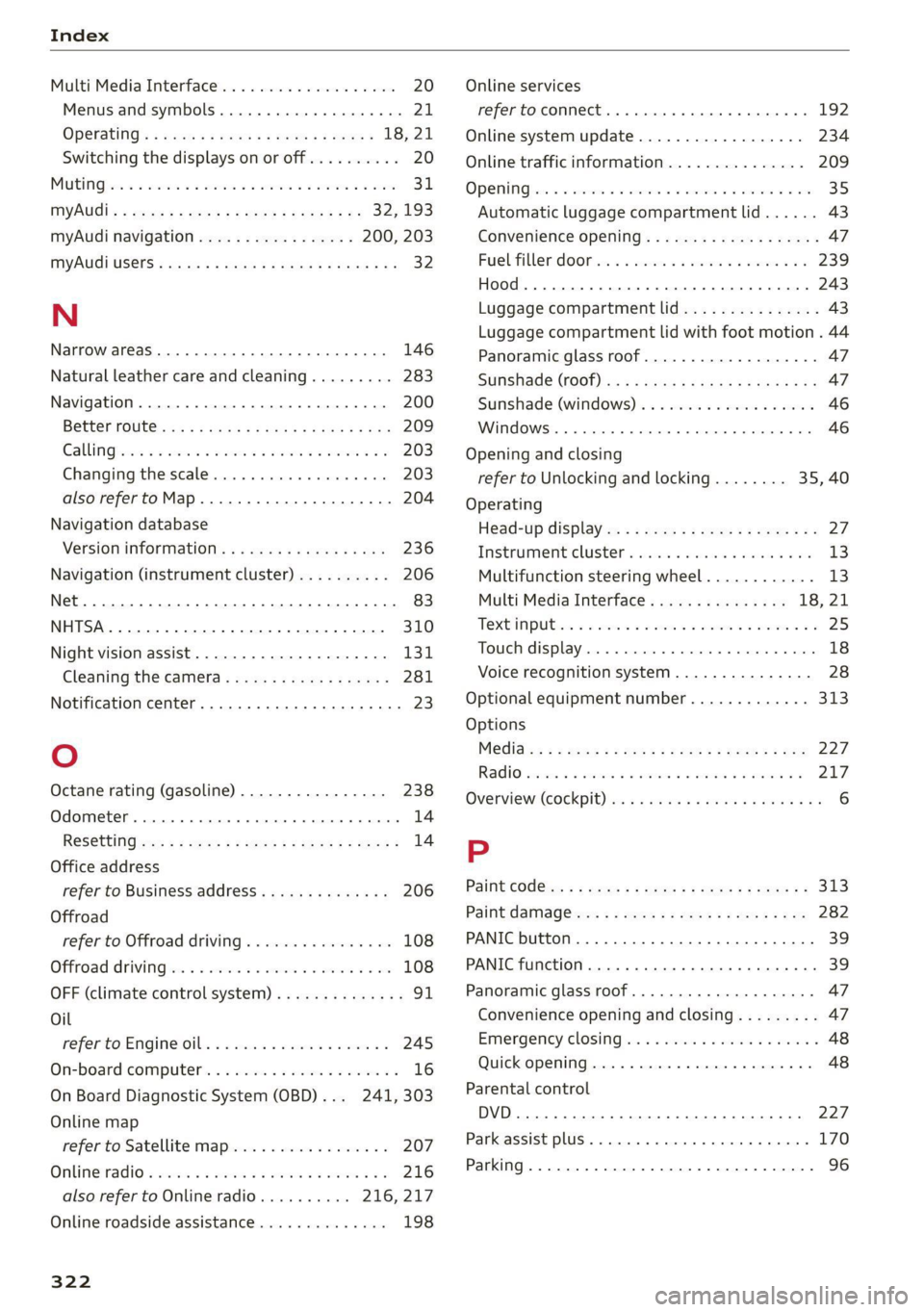
Index
Multi Media Interface...............0005 20
Menus and symbols.............000-008 21
OPGrAtiNG's + ease x x eee ee Kae s 2 BemE o 18,21
Switching the displays on or off.......... 20
MUEING ies: 2 secon © a women & eee ooo oN Foo eae 31.
MYAUGI 5 = ees ss pews so pews s eames ee 32,193
myAudi navigation................. 200, 203
MYAUGI USERS ¢ sicts ss caus a x ens ds Bema sa: 32
N
Narrow areaS.... 22... cece eee eee 146
Natural leather care and cleaning......... 283
Navigation. ..............0..0..0.000. 200
BetteRhOUt@aas 2 x wean s a sana s age & s a 209
CallinGiesnis ¢ = scene v awe ov ween ee wm 8 oe 203
Changing the scale.............00000e 203
also refertoMap...........--.0e ee eee 204
Navigation database
Version information.............00005 236
Navigation (instrument cluster) .......... 206
Ns 83
SY, 310
Night vision assist...............-..0004 131
Cleaning the camera...............4.- 281
Notification center. ....... 0... cee eee eee 23
Oo
Octane rating (gasoline)................ 238
Odometer... .... cece eee eee eee 14
ReS@ttinGssssx « = sees ¢ ¢ ees 3 ieee ss res 14
Office address
refer to Business address.............. 206
Offroad
refer to Offroad driving................ 108
Offroad
driving ees = ¢ swwn 2 2 wen 2 2 were so wee 108
OFF (climate control system) ............-. 91
Oil
refer to Engine Oils: «sw s vases owen 2 245
On-board computer. .......5-.0. 00 eee ee 16
On Board Diagnostic System (OBD)... 241, 303
Online map
refer to Satellite map...............05 207
ONLINE RADIO « swcomss «2 sooness 6 w sevens wo ERE oo 216
also refer to Online radio.......... 216, 217
Online roadside assistance.............. 198
322
Online services
refer toconnect.........e eee eee eee 192
Online system update.................. 234
Online traffic information............... 209
OPEN Geers so ceseons 3 v cevvans ov sumsees & 2 sume Woe ORE 35
Automatic luggage compartment lid...... 43
Convenience opening...............0085 47
Fuel filler:dOOP ss: ics cane so eae oe eas ooo 239
HOOd .... cece eee eee 243
Luggage compartment lid............... 43
Luggage compartment lid with foot motion . 44
Panoramic glass roof.............2-200. 47
Sltishiade (OT) ss i s cows 4 c teen se ree ei 47
Sunshade (Windows): s «sso so ieee oo sossan 46
Windows..... 02.00.00. cece eee ee eee 46
Opening and closing
refer to Unlocking and locking........ 35,40
Operating
Head-up display.................00000. 27
InstruMeNt ClUster s sions & eines & wave ae ove 13
Multifunction steering wheel............ 13
Multi Media Interface............... 18,21
TEXtIN PUB iss 3 2 wien 3 wens a = acer os EM 6 eo 25
Touch display.......... 0.00 eee eee eee 18
Voice recognition system............... 28
Optional equipment number............. 313
Options
MeGidiwe = » zemy s meme ¢ eee « 5 ee et 227
R@GIO sxisacs 3 smisans @ o amivens & 0 orewaun 2 0 aera 8 217
Overview (cockpit) «6 cies ce cece sce nees eee 6
P
Paint COd@z»: = » saws x 2 wee sy eee a 2 ee 313
Paint damad@ws« z = sem es ewe se eee es oe 282
PANIC button. ..............-.0..00000 39
PANIC function... 0.0.0... c cece eee eee eee 39
Panoramic glass roof..............00000- 47
Convenience opening and closing......... 47
Emergency closing..........sceeseeeees 48
Quick opening................ eee eae 48
Parental control
DVD... eee eee eee 227
Park assist plus. ........ 0.0000 e eee eee 170
Parking ..... 0.6... cee cece eee ee 96