air suspension AUDI Q8 2021 Owner´s Manual
[x] Cancel search | Manufacturer: AUDI, Model Year: 2021, Model line: Q8, Model: AUDI Q8 2021Pages: 332, PDF Size: 118.76 MB
Page 4 of 332
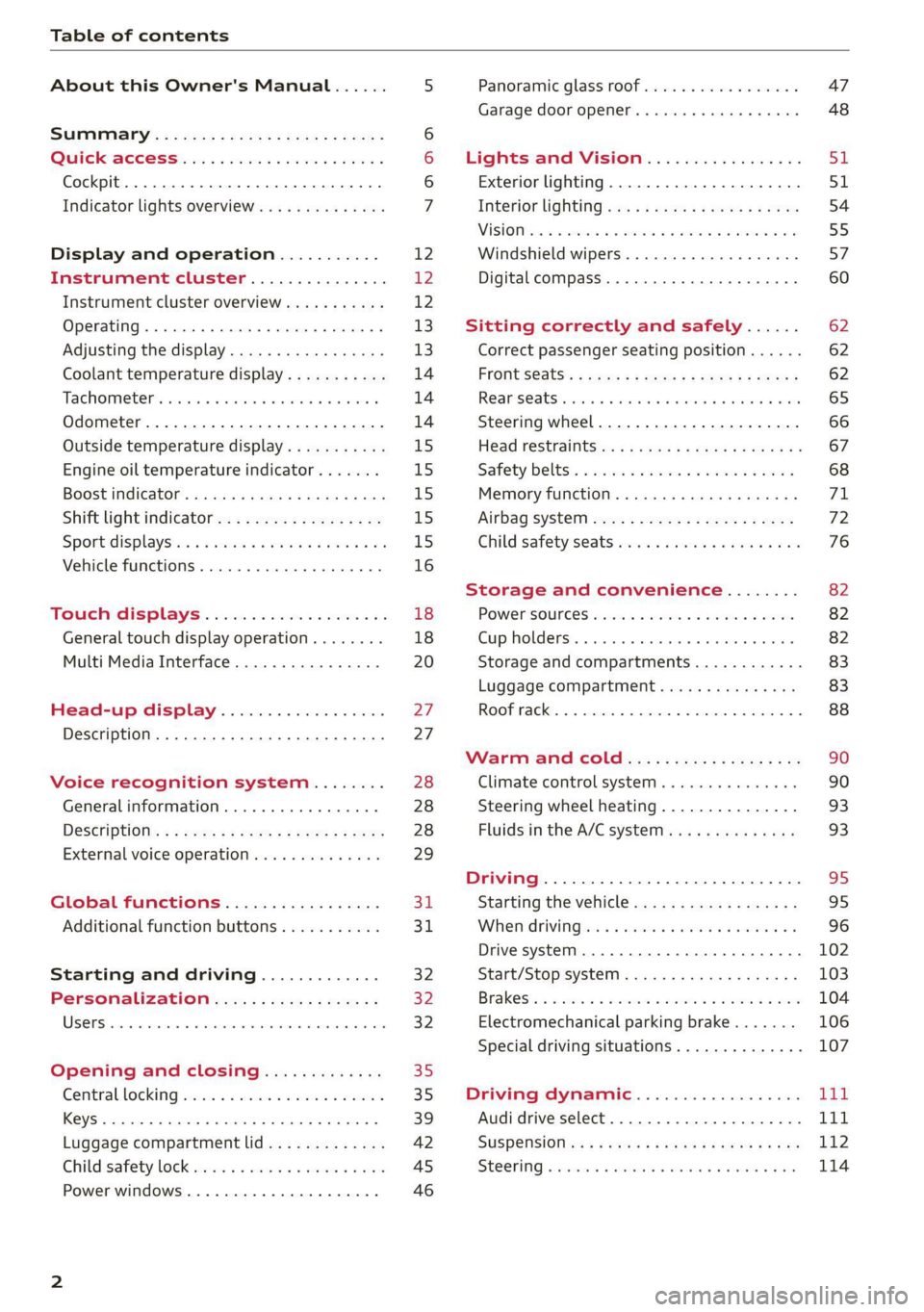
Table of contents
About this Owner's Manual......
SUMIMAry: < = exe : eens: Seen cs sens
QutckeaeCe ssh: «i esis se ois a eaves @
Cockpit. ...... 0... eee eee eee eee
Indicator lights overview...........4..
Display and operation...........
Instrument cluster...............
Instrument cluster overview...........
Operating. ecccuse w+ were oo wens oo ayes 9 ¥
Adjusting the display.................
Coolant temperature display...........
Tachometer’ series i ewe so snes ¥ & ome
Odometer.............. cee eee eee ee
Outside temperature display...........
Engine oil temperature indicator.......
Boost indicator...............0--000.
Shift light indicator..................
Sportidisplaystens « scwne x » eum os vomew «02
Vehicle functions ..............00000.
TOUCKHAISPLAYS « esis 6 6 sccm 6 x wees
General touch display operation........
Multi Media Interface................
Head-up display..................
Description............0.. ee cee eee
Voice recognition system........
General information..............00.
DESGriptiOns « = seen ¢ = seme xs eee st eee
External voice operation..............
Global functions.................
Additional function buttons...........
Starting and driving.............
Personalization..................
Opening and closing.............
Central locking) sani x x swasien © x sponae 2 aaaonor
Keys... eee
Luggage compartment lid.............
Childisafety lock seis 2 « sere ¥ © were 3 ¢ overs
Power windows............000eeeeee
NOD
OO
12 12 12
13
13
14 14 14
15
15
15
15
15)
16 18
18
20
27
27 28 28 28
29
3d:
31
32 32
32
35 35
39
42 45
46
Panoramic glass roof................. 47
Garage door opener..........--.00 eee 48
Lights and Vision................. 51
Exterior lighting...................4. 51
Interior liQhting ss =e aves ss eews so eos 54
ViSIOMsn « 3 ses 3 3 ema oo wena vo ae © ove 55
Windshield wipers.............-..45- 57
Digital compass.............-.-0000- 60
Sitting correctly and safely...... 62
Correct passenger seating position...... 62
Frontseats:: » ssw. « ¢ sews & » saws +s ewe < 62
Rear SOats cravina so suamie si sxomare va aueens 8 a ana 65
Steering wheel..............--000005 66
Head restraints ss = ¢ sao xs eee xo pews ee 67
Safety belts:. scscce ss cmsne a eee o & were 68
Memory function...............00005 71
Airbag SySt€M eves 2s eeen es pean ce ees 72
Child safety'seats wos cs eva. wemwe + ees 76
Storage and convenience........ 82
POWEPSOUICES sess ce wives 2 2 erecem a a eee 82
Cup holders. ... 0.2.00... c eee eee eee 82
Storage and compartments............ 83
Luggage compartment............... 83
ROOF TAGKE. 5 2 cxcnoes «x cecwece = at sammie = = omeween @ 88
Warm and Coles: « ecee ss ene esis 90
Climate control system............... 90
Steering wheel heating............... 93
Fluids in the A/C system. .........0065 93
Driving .............. 0.0... eee eee 95
Starting the vehicle...............0.0. 95
When driving isis ss iovsvie se aerswce oo anes oe 96
Drive system... 2.2... ee eee eee eee 102
Start/Stop system .........ee cece eee 103
BrakeS's so isemi 2 wane w aman a 2 oer as ie 104
Electromechanical parking brake....... 106
Special driving situations.............. 107
Driving: dynamic. . « sic. 6 6 see a 6 se Ld
Audi drive select..................00. Tay
SUSPENSION es « + exes ¢ ¢ eres +o ees vv eae 112
SUECOMIING 6 vessse oo csisweue io & stone 6 a toma ww Bs 114
Page 10 of 332
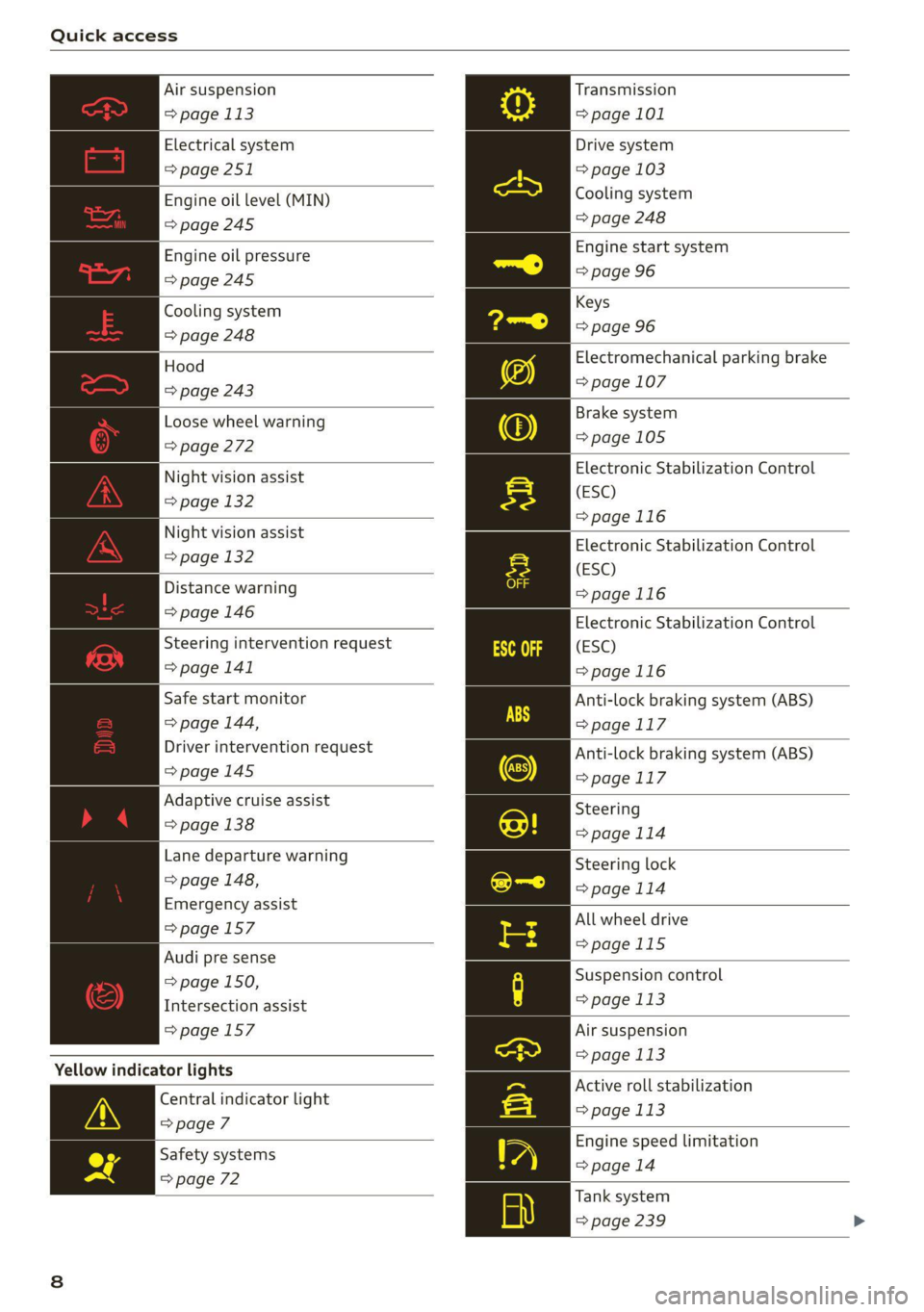
Quick access
Air suspension
=> page 113
Electrical system
=> page 251
Engine oil level (MIN)
=> page 245
Engine oil pressure
=>page 245
Cooling system
=> page 248
Hood
=> page 243
Loose wheel warning
=> page 272
Night vision assist
=> page 132
Night vision assist
=> page 132
Distance warning
=> page 146
Steering intervention request
=> page 141
Safe start monitor
=> page 144,
Driver intervention request
=>page 145
Adaptive cruise assist
=> page 138
Lane departure warning
=> page 148,
Emergency assist
=>page 157
Audi pre sense
= page 150,
Intersection assist
=> page 157
Yellow indicator lights
Central indicator light
=> page 7
Safety systems
=> page 72
Transmission
=> page 101
Drive system
=> page 103
Cooling system
=> page 248
Engine start system
=> page 96
Keys
=> page 96
Electromechanical parking brake
=> page 107
Brake system
=>page 105
Electronic Stabilization Control
(ESC)
=>page 116
Electronic Stabilization Control
(ESC)
=>page 116
Electronic Stabilization Control
(ESC)
=>page 116
Anti-lock braking system (ABS)
=>page 117
Anti-lock braking system (ABS)
=> page 117
Steering
>page 114
Steering lock
=> page 114
All wheel drive
=>page 115
Suspension control
=> page 113
Air suspension
= page 113
Active roll stabilization
=> page 113
Engine speed limitation
=> page 14
Tank system
=> page 239
Page 12 of 332
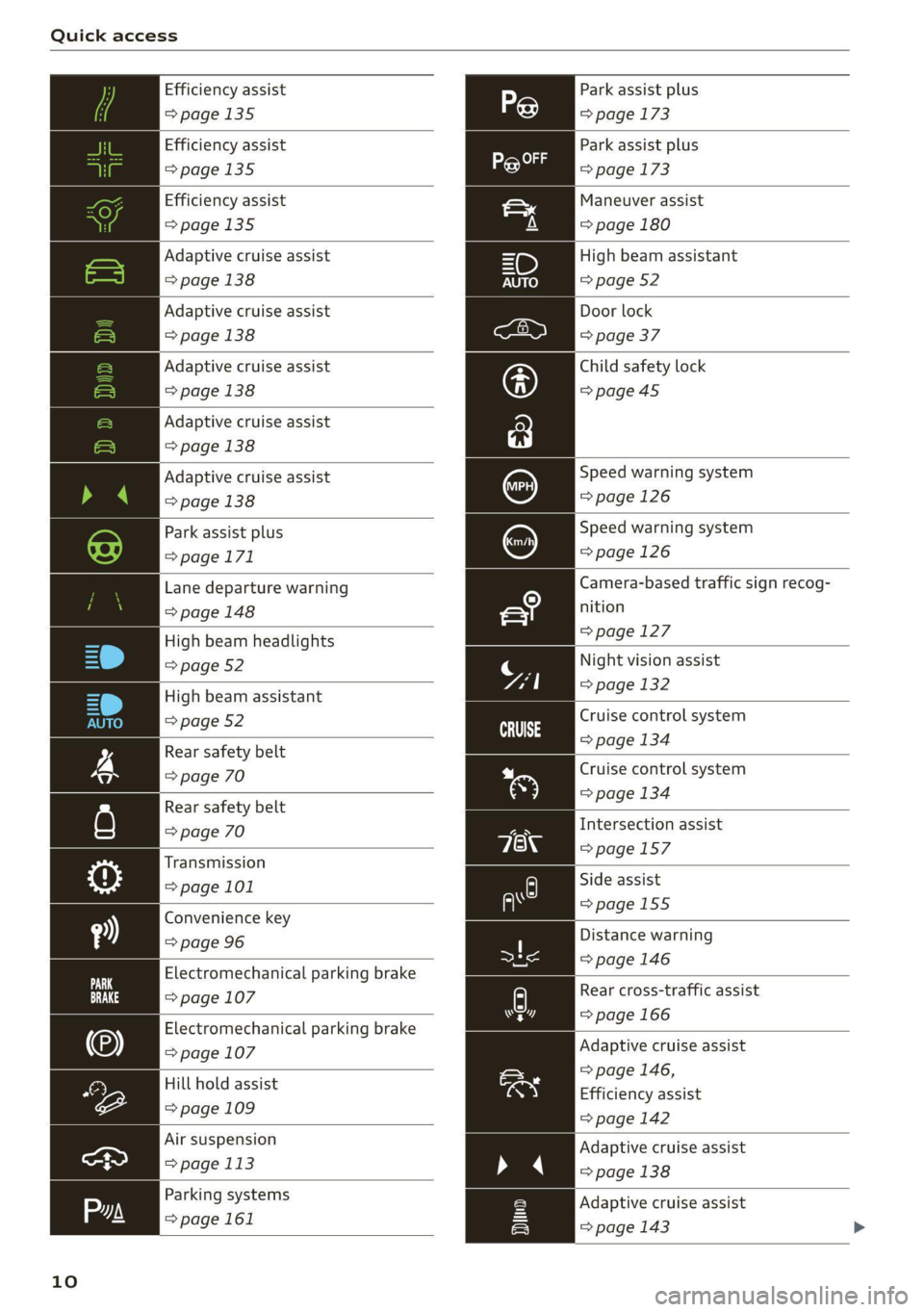
Quick access
Efficiency assist
>page 135
Efficiency assist
=>page 135
Efficiency assist
>page 135
Adaptive cruise assist
=>page 138
Adaptive cruise assist
=> page 138
Adaptive cruise assist
=>page 138
Adaptive cruise assist
=> page 138
Adaptive cruise assist
=> page 138
Park assist plus
=>page 171
Lane departure warning
=> page 148
High beam headlights
=> page 52
High beam assistant
=> page 52
Rear safety belt
=> page 70
Rear safety belt
=> page 70
Transmission
=> page 101
Convenience key
=> page 96
Electromechanical parking brake
=> page 107
Electromechanical parking brake
=> page 107
Hill hold assist
=> page 109
Air suspension
=> page 113
Parking systems
=>page 161
10
Park assist plus
=> page 173
Park assist plus
=> page 173
Maneuver assist
=> page 180
High beam assistant
=> page 52
Door lock
=> page 37
Child safety lock
=>page45
Speed warning system
=>page 126
Speed warning system
=> page 126
Camera-based traffic sign recog-
nition
=> page 127
Night vision assist
=> page 132
Cruise control system
=> page 134
Cruise control system
=> page 134
Intersection assist
=>page 157
Side assist
=>page 155
Distance warning
=> page 146
py Rear cross-traffic assist
hers => page 166
Adaptive cruise assist
=> page 146,
Efficiency assist
=> page 142
Adaptive cruise assist
» 4 > page 138
Adaptive cruise assist
=> page 143 >
Page 87 of 332
4M8012721BF
Storage and convenience
> To pull the luggage compartment cover out,
hold the handle @ on the cover and pull it to-
ward the rear of the vehicle until it locks into
place audibly at the ends of the guide rails 2).
> To retract the luggage compartment cover, lift
it lightly and guide it slowly by hand toward the
front of the vehicle without letting it retract
quickly.
> To remove the luggage compartment cover,
pull both levers (3) firmly in the direction of the
arrow and remove the cover upward.
> To install the luggage compartment cover,
place the cover in the mounts on the side trim
panels on the left and right side.
> Push the cover downward until it clicks into
place.
lg gage compartment [coy ees
Applies to: vehicles with power luggage compartment cover
Qs
Z
Fig. 71 Luggage compartment: retracted cover (power)
Observe the safety precautions > page 83.
If you open the luggage compartment lid, the
power luggage compartment cover will move in-
to position @ or Q).
> You can also operate the power luggage com-
partment cover manually. To do this, slowly
guide the cover by hand into position @ or 2)
without letting it move quickly.
> To remove the luggage compartment cover,
bring it into position @, pull the lever @)
=> page 84, fig. 70 firmly in the direction of the
arrow, and remove the cover upward.
> To install the luggage compartment cover,
place the cover in the mounts on the side trim
panels on the Left and right side.
D In certain countries.
> Push the cover downward until it clicks into
place.
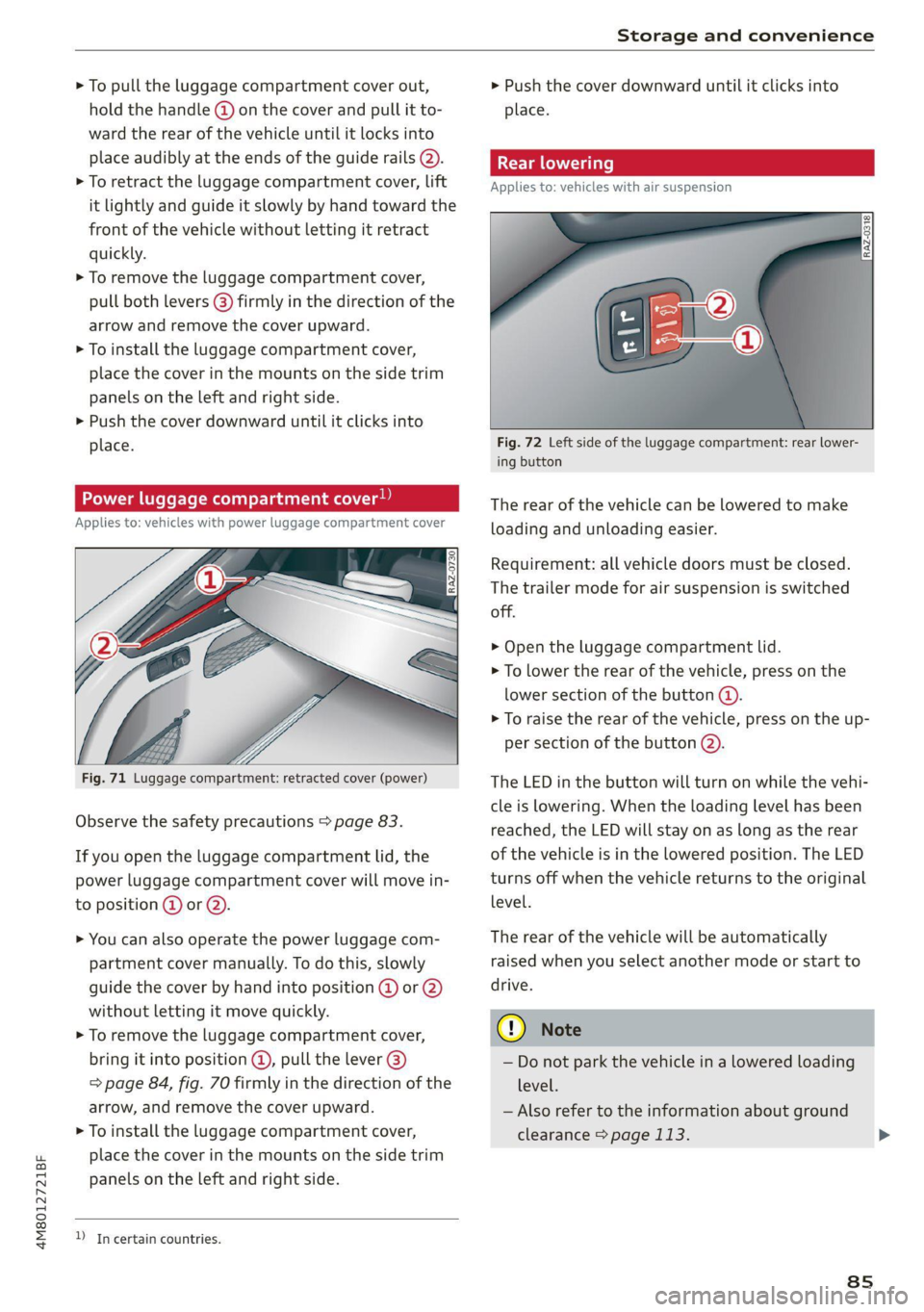
Applies to: vehicles with air suspension
Fig. 72 Left side of the luggage compartment: rear lower-
ing button
The rear of the vehicle can be lowered to make
loading and unloading easier.
Requirement: all vehicle doors must be closed.
The trailer mode for air suspension is switched
off.
> Open the luggage compartment lid.
> To lower the rear of the vehicle, press on the
lower section of the button @).
> To raise the rear of the vehicle, press on the up-
per section of the button @).
The LED in the button will turn on while the vehi-
cle is lowering. When the loading level has been
reached, the LED will stay on as long as the rear
of the vehicle is in the lowered position. The LED
turns off when the vehicle returns to the original
level.
The rear of the vehicle will be automatically
raised when you select another mode or start to
drive.
©) Note
— Do not park the vehicle in a lowered loading
level.
— Also refer to the information about ground
clearance > page 113.
8s
Page 113 of 332
4M8012721BF
Driving dynamic
Driving dynamic
Audi drive select
Introduction
Applies to: vehicles with Audi drive select
Drive select makes it possible to experience dif-
ferent types of vehicle characteristics in one vehi-
cle. With different driving modes, the driver can
switch the setting, for example from sporty to
comfortable. This allows you to adjust the set-
tings to your personal preferences. This makes it
possible to combine settings such as a sporty
drivetrain setting with comfortable steering.
Selecting an Audi drive select mode
Applies to: vehicles with Audi drive select
The size button is located above the selector lever
in the center console.
> Press the left or right arrow key until the de-
sired mode appears in the MMI. Or:
> Applies to MMI: Select on the home screen: VE-
HICLE > Audi drive select.
You can change the driving mode when the vehi-
cle is stationary or while driving. If traffic per-
mits, briefly remove your foot from the accelera-
tor pedal after changing modes so that the mode
you have selected will be activated for the drive
system.
The following modes may be available depending
on the equipment:
offroad - Provides assistance when driving off-
road. The vehicle will be raised to the second-
highest level using the air suspension*. The ESC
will be restricted and the hill descent assist* will
be activated. The vehicle will exit this mode after
the ignition is switched off.
allroad - Provides balanced vehicle handling. The
vehicle will be raised to the second-highest level
using the air suspension*.
comfort - Provides a comfort-oriented vehicle
setup and is suited for long drives on highways.
auto - Provides an overall comfortable yet dy-
namic driving feel and is suited for everyday use.
dynamic - Gives the driver a sporty driving feel
and is suited to a sporty driving style. The “S”
driving program is selected.
Individual - Provides the option for personalized
vehicle settings. Press ¥ to configure the mode
=> page 111, Individual settings.
G) Tips
When the ignition is being switched on, indi-
vidual systems, such as the drive system, will
be reset to a balanced setting. Select the cur-
rent mode again to attain its full configura-
tion.
Selecting RS mode
Applies to: RS models
In RS models, there are two individual adjustable
RS modes instead of the individual mode.
Selecting the mode
> Press the fase button on the multi-function
steering wheel to switch between the RS modes
and the last selected Audi drive select mode.
Or:
> Applies to MMI: Select on the home screen: VE-
HICLE > Audi drive select.
Adjusting the mode
> Applies to MMI: Select on the home screen: VE-
HICLE > Audi drive select.
> Press to configure the respective RS mode
= page 111, Individual settings.
Individual settings
Applies to: vehicles with Audi drive select
The equipment in your vehicle will determine
which settings you can adjust.
Drive
The drive system will react to accelerator pedal
moves more quickly or in a more balanced man-
ner. The shift points are placed in higher or lower
speed ranges.
111
>
Page 114 of 332
Driving dynamic
Depending on the setting, the drive power at the
rear axle will be distributed with the sport differ-
ential* to be more sporty or moderate
=>page 115.
In RS models, the sport differential is adjusted
using a separate menu item.
Steering
The power steering will adapt. Light steering is
suitable for long trips on highways or smooth
driving around curves, for example.
Suspension
The suspension adjusts to be tighter or more
comfort-oriented when it comes to compensat-
ing for uneven spots on the road.
Based on the selected setting, the air suspen-
sion* will adjust the ground clearance and the ac-
tive roll stabilization* will provide various de-
grees of compensation for vehicle movements.
Engine sound
The engine sound adapts and can be subtle to
sporty. In the automatic setting, the engine
sound depends on the selected driving program.
quattro with sport differential
Applies to: RS models
Depending on the setting, the drive power at the
rear axle will be distributed with the sport differ-
ential* to be more sporty or moderate
=>page 115.
ESC
Applies to: RS models
The ESC sport mode can be activated. Also refer
to the important information regarding driving
with ESC limited > page 116.
Suspension
CET aN mer) t cd
Applies to: vehicles with suspension control
The adaptive dampers are an electronically-con-
trolled damping system. The firmness of the sus-
pension will adapt to the driving conditions and
the driving situation. The settings depend on the
selected Audi drive select* mode.
112
Air suspension
Applies to: vehicles with air suspension
The air suspension is an electronically-controlled
suspension and leveling system. The firmness of
the suspension will adapt to the driving condi-
tions and the driving situation. The system balan-
ces out changes in load. The vehicle level will also
adapt gradually to the vehicle speed in order to
reduce the wind resistance at high speeds and in-
crease the ground clearance at low speeds. The
settings depend on the selected Audi drive se-
lect* mode.
Displaying the vehicle level
> Applies to MMI: Select on the home screen: VE-
HICLE > Audi drive select.
The filled-in boxes represent the current vehicle
level. The more boxes that are filled in, the high-
er the ground clearance. The box that corre-
sponds with the current vehicle level will flash
while the vehicle is lifting or lowering. The target
level is highlighted in color.
Raising the vehicle
> Applies to MMI: Select on the home screen: VE-
HICLE > Audi drive select.
> Press Raise to reach the highest vehicle level
and thus the maximum ground clearance.
> Press Lower to lower the vehicle down again.
The Audi drive select* mode will be changed if
necessary when the vehicle is raised.
The vehicle will lower at speeds of approximately
20 mph (30 km/h) and below. This function may
only be used temporarily when increased ground
clearance is necessary. It is not intended for long
drives.
@) Note
— Also refer to the information about ground
clearance > page 113.
— When transporting the vehicle on a road
carrier, rail carrier, ship carrier, or other car-
rier, it may only be secured at the running
surfaces of the tires (circumference). Secur-
ing the vehicle at the axle components, sus-
pension struts, or towing eyes is not
Page 115 of 332
4M8012721BF
Driving dynamic
permitted because the pressure in the air
suspension struts can change during trans-
port. The vehicle might not be secured suffi-
ciently if this happens.
Active roll stabilization
Applies to: vehicles with active roll stabilization
The active roll stabilization enhances the air sus-
pension with an electromechanically-controlled
suspension system. It influences targeted rolling
movements when driving on curves and during
fast swerving maneuvers. The settings depend on
the selected Audi drive select* mode.
Ground clearance
The vehicle height and clearance can be influ-
enced by the following factors:
— Change in temperature
— Change in load
— Change to the Audi drive select* mode
— Lifting and lowering via the air suspension*
— Lower the rear* of the vehicle
ZA WARNING
To reduce the risk of injury, make sure no one
gets pinched when the vehicle level is chang-
ing, for example when cleaning the under-
body or the wheel housings.
@) Note
Always make sure there is enough clearance
above and below the vehicle. This is especially
important for entrances with height restric-
tions, for example, before driving into under-
ground garages. You could also scrape the
ground when driving over the edges of curbs
or on steep ramps, which could damage your
vehicle.
Messages
Bair suspension: malfunction! You may con-
tinue driving slowly at max. XX mph (km/h)
There is a malfunction. Driving stability may be
limited. Drive to an authorized Audi dealer or au-
thorized Audi Service Facility immediately. Do not
drive faster than the speed given in the message.
B Air suspension: malfunction! You can contin-
ue driving. Speed limited to max. XXX
There is a malfunction. Driving stability may be
limited. Drive to an authorized Audi dealer or au-
thorized Audi Service Facility immediately. The
maximum speed has been limited.
B Air suspension: malfunction! Safely stop ve-
hicle. Steering and ground clearance limited
There is a malfunction. Do not continue driving.
Secure the vehicle against rolling before exiting
the vehicle > page 96. Avoid turning the steering
wheel, because the vehicle ground clearance may
be so low that turning the steering wheel could
result in damage to the wheels and wheel hous-
ings.
BA Active roll stabilization: malfunction! Limit-
ed stability. See owner's manual
There is a heavy load on the vehicle electrical sys-
tem or the roll stabilization. The roll stabilization
functions have already been switched off tempo-
rarily. Driving stability is reduced. Continue driv-
ing with caution.
If the indicator light does not turn off after a
long period time and after switching the ignition
off and on, drive to an authorized Audi dealer or
authorized Audi Service Facility immediately to
have the malfunction corrected. Otherwise, con-
ditions such as an uneven road surface can lead
to vehicle damage.
6 | Suspension: malfunction! You can continue
driving
There is a malfunction. See an authorized Audi
dealer or authorized Audi Service Facility for as-
sistance.
EB Air suspension: vehicle too low. Limited
ground clearance
The vehicle ground clearance is very low. Wait un-
til the air suspension system has restored normal
ground clearance. Have an authorized Audi dealer >
113
Page 116 of 332
![AUDI Q8 2021 Owner´s Manual Driving dynamic
or authorized Audi Service Facility repair the mal-
function immediately if the indicator light does
not turn off after a significant period of time.
|<] Air suspension: malfunc](/img/6/40264/w960_40264-115.png "AUDI Q8 2021 Owner´s Manual Driving dynamic
or authorized Audi Service Facility repair the mal-
function immediately if the indicator light does
not turn off after a significant period of time.
|<] Air suspension: malfunc")
Driving dynamic
or authorized Audi Service Facility repair the mal-
function immediately if the indicator light does
not turn off after a significant period of time.
|<] Air suspension: malfunction! Please contact
Service
There is a malfunction. The driving stability may
be limited and the ground clearance may be low.
See an authorized Audi dealer or authorized Audi
Service Facility for assistance.
Audi drive select: automatic suspension low-
ering. See owner's manual
The vehicle level is adjusted to the setting stored
for the active personal profile > page 32.
Audi drive select: automatic suspension lift.
See owner's manual
The vehicle level is adjusted to the setting stored
for the active personal profile > page 32.
Steering
Electromechanical steering supports the driver's
steering movements by electronically adapting
the power steering depending on the vehicle
speed. The settings depend on the selected Audi
drive select* mode.
Progressive steering
Applies to: vehicles with progressive steering
The driving dynamic and driving stability are in-
creased by the steering ratio based on the steer-
ing wheel angle. The steering is very direct when
the steering wheel angle is sharp, and indirect
when the angle is low. This enables comfortable
maneuvering and a precise steering response at
higher driving speeds.
All-wheel steering
Applies to: vehicles with all-wheel steering
Additional steering ability at the rear axle im-
proves the driving dynamic and stability. At low
speeds, the rear wheels are steered in the oppo-
site direction from the front wheels to reduce the
turning radius. At high speeds, steering the rear
wheels in the same direction as the front wheels
114
improves the vehicle response and driving stabili-
ty.
a Steering: malfunction! Please stop vehicle
The power steering may have failed. Adapt your
driving style immediately to compensate for the
fact that it may be more difficult to turn the
steering wheel, and stop your vehicle in a safe lo-
cation as soon as possible. Do not continue driv-
ing. See an authorized Audi dealer or authorized
Audi Service Facility for assistance.
a Steering: malfunction! Please stop vehicle.
Pay attention to distance at side
The rear axle steering may have failed. More
space on the road may be needed at the side of
the vehicle, and the turning radius may be much
larger. Slow down immediately, and stop your ve-
hicle as soon as possible in a safe location with
enough space at the sides of the vehicle. Do not
continue driving. See an authorized Audi dealer
or authorized Audi Service Facility for assistance.
BS Steering: malfunction! Please stop vehicle
There is a malfunction in the electronic steering
lock. You cannot turn the ignition on. Secure the
vehicle against rolling before exiting the vehicle
= page 96. Do not tow your vehicle because it
cannot be steered. See an authorized Audi dealer
or authorized Audi Service Facility for assistance.
a Steering: malfunction! You can continue
driving
There is a malfunction in the steering system.
Steering may be more difficult or more sensitive.
Adapt your driving style. Have the steering sys-
tem checked immediately by an authorized Audi
dealer or authorized Audi Service Facility. Please
note that the red indicator light may turn on af-
ter restarting the engine. Do not continue driving
if it does.
a Steering: malfunction! Adapt driving style.
Larger turning radius
The rear axle steering may have failed. The vehi-
cle will have a larger turning radius, and the sta-
bility when driving around curves will be
Page 121 of 332
4M8012721BF
Trailer towing
in the trailer correctly will help to achieve this
weight. Having the tongue weight too low affects
the vehicle's handling.
You can determine the tongue weight using a
tongue weight scale, a bathroom scale, or a pub-
lic weigh station, for example.
The permitted tongue weight of your vehicle can
be found in the vehicle documentation or in
=> page 314.
Load distribution
Poor cargo load and distribution can negatively
impact vehicle handling. Load the trailer based
on the following criteria as much as possible:
— Store objects in the vehicle luggage compart-
ment, if possible. The vehicle should always
carry the heaviest possible load and the trailer
should have the lightest possible load.
— Distribute the load in the trailer so that the
heavy objects are as close to the axle as possi-
ble.
— Secure objects so that they do not slide.
— Utilize the maximum permitted tongue weight
if possible.
Tires
Set the tire pressure on your vehicle for a “full
load”; see the tire pressure sticker > page 266. If
necessary, also adjust the tire pressure on the
trailer according to the manufacturer's specifica-
tions.
The trailer and the vehicle should be equipped
with winter tires when driving in winter tempera-
tures.
Outside mirrors
If you cannot see the traffic behind the trailer
with the standard exterior mirrors, then you
must attach additional exterior mirrors. Adjust
them so you have a sufficient visibility behind
you.
Exterior lighting
Follow the legal regulations for lighting on your
trailer that are applicable in the country where
you are operating the vehicle. Contact an author-
ized Audi dealer or authorized Audi Service Facili-
ty for more information.
Before you start driving, check all lighting equip-
ment on the trailer while it is hitched to the vehi-
cle.
The headlight range control automatically ad-
justs the light range of the headlights.
Safety chains
Make sure the safety chains are correctly applied
when pulling a trailer. The chains should hang
enough so that the trailer can drive around
curves. However, they must not touch the
ground.
Air suspension
Applies to: vehicles with air suspension
The Audi drive select* comfort mode > page 111
must be selected before you adjust the tongue
weight on the trailer and hitch the trailer >,
> page 113.
The air suspension trailer mode must be switched
on.
Applies to MMI: select on the home screen: VE-
HICLE > Settings & Service > Air suspension:
trailer.
Switch trailer mode off again when you are no
longer towing a trailer.
For vehicles with a factory-installed trailer hitch,
the air suspension trailer mode will automatically
switch on if you connect the trailer connector to
the socket.
When using rear carrier systems that are mount-
ed directly on the trailer hitch ball head, you can
also switch trailer mode off manually.
If you must drive on roads that are in poor condi-
tion, you can raise the vehicle again after hitching
the trailer or after adjusting the tongue weight
> page 113.
You can also increase ground clearance by select-
ing the Audi drive select* offroad or allroad
modes > page 111.
119
Page 122 of 332

Trailer towing
Vehicle levels below the values set in the comfort
level will no longer be available, even if you are
lowering the vehicle manually.
ZA\ WARNING
Applies to: vehicles with air suspension
— Never turn off trailer mode while driving
when a trailer is hitched, because then the
restrictions for controlling the vehicle level
will be turned off.
— Driving with a trailer on unpaved roads when
the vehicle is raised may change the vehicle
handling. Adapt your speed.
— Note that the vehicle will lower automatical-
ly at certain speeds if you have lifted the ve-
hicle manually.
©) Note
— Applies to: vehicles with air suspension: Se-
lect the Audi drive select* comfort mode.
Otherwise, the tongue load specified for
your vehicle will no longer be applicable.
— Attachments retrofitted on the vehicle may
cause damage, especially on the trailer
hitch ball head. In cases of damage, have
the function checked by an authorized Audi
dealer or authorized Audi Service Facility.
G) Tips
— Block the wheels with chocks when parking
on inclines if the trailer is loaded.
— Audi recommends having the vehicle in-
spected between the inspection intervals if
you tow a trailer frequently.
— Avoid driving with a trailer during the vehi-
cle break-in period.
Driving with a trailer
Driving with a trailer requires extra caution.
Speed
Adhere to the legal speed limits. Follow the legal
regulations that are applicable in the country
where you are operating the vehicle.
As the speed increases, the driving stability of
the trailer decreases. Therefore you should not
120
exceed the maximum legal speed limit when
there are unfavorable road, weather, and/or wind
conditions. This especially applies when driving
downhill.
Hill
When you start driving uphill or downhill, trailers
may tilt or sway sooner than when driving ona
level surface. If small swaying movements have
already occurred, you can stabilize the trailer by
firmly braking immediately. Never attempt to
“straighten out” the trailer by accelerating.
Downshift before driving on hills to utilize the en-
gine braking effect > A\.
Brakes
When using a trailer with overrun brakes, first
brake gently then quickly. This reduces the risk of
jerking while braking if the trailer wheels lock up.
Engine coolant temperature
Pay attention specifically to the coolant tempera-
ture display when there are high outside temper-
atures, and when driving on long inclines
=> page 14. Shift to a higher gear in a timely man-
ner.
Z\ WARNING
Constant braking causes the brakes to over-
heat and can substantially reduce braking per-
formance, increase braking distance, or cause
complete failure of the brake system.