light AUDI Q8 2021 Owner´s Manual
[x] Cancel search | Manufacturer: AUDI, Model Year: 2021, Model line: Q8, Model: AUDI Q8 2021Pages: 332, PDF Size: 118.76 MB
Page 4 of 332
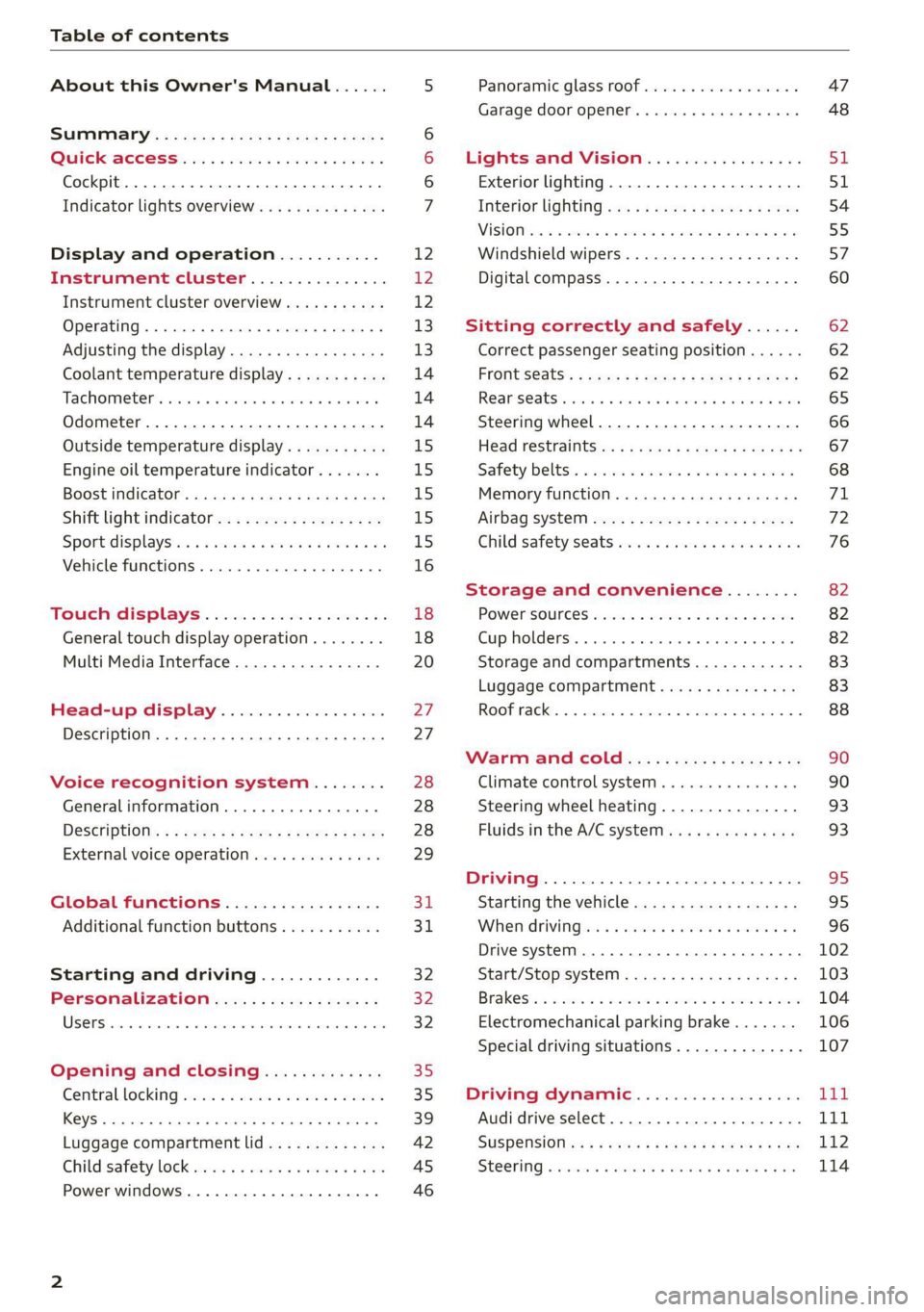
Table of contents
About this Owner's Manual......
SUMIMAry: < = exe : eens: Seen cs sens
QutckeaeCe ssh: «i esis se ois a eaves @
Cockpit. ...... 0... eee eee eee eee
Indicator lights overview...........4..
Display and operation...........
Instrument cluster...............
Instrument cluster overview...........
Operating. ecccuse w+ were oo wens oo ayes 9 ¥
Adjusting the display.................
Coolant temperature display...........
Tachometer’ series i ewe so snes ¥ & ome
Odometer.............. cee eee eee ee
Outside temperature display...........
Engine oil temperature indicator.......
Boost indicator...............0--000.
Shift light indicator..................
Sportidisplaystens « scwne x » eum os vomew «02
Vehicle functions ..............00000.
TOUCKHAISPLAYS « esis 6 6 sccm 6 x wees
General touch display operation........
Multi Media Interface................
Head-up display..................
Description............0.. ee cee eee
Voice recognition system........
General information..............00.
DESGriptiOns « = seen ¢ = seme xs eee st eee
External voice operation..............
Global functions.................
Additional function buttons...........
Starting and driving.............
Personalization..................
Opening and closing.............
Central locking) sani x x swasien © x sponae 2 aaaonor
Keys... eee
Luggage compartment lid.............
Childisafety lock seis 2 « sere ¥ © were 3 ¢ overs
Power windows............000eeeeee
NOD
OO
12 12 12
13
13
14 14 14
15
15
15
15
15)
16 18
18
20
27
27 28 28 28
29
3d:
31
32 32
32
35 35
39
42 45
46
Panoramic glass roof................. 47
Garage door opener..........--.00 eee 48
Lights and Vision................. 51
Exterior lighting...................4. 51
Interior liQhting ss =e aves ss eews so eos 54
ViSIOMsn « 3 ses 3 3 ema oo wena vo ae © ove 55
Windshield wipers.............-..45- 57
Digital compass.............-.-0000- 60
Sitting correctly and safely...... 62
Correct passenger seating position...... 62
Frontseats:: » ssw. « ¢ sews & » saws +s ewe < 62
Rear SOats cravina so suamie si sxomare va aueens 8 a ana 65
Steering wheel..............--000005 66
Head restraints ss = ¢ sao xs eee xo pews ee 67
Safety belts:. scscce ss cmsne a eee o & were 68
Memory function...............00005 71
Airbag SySt€M eves 2s eeen es pean ce ees 72
Child safety'seats wos cs eva. wemwe + ees 76
Storage and convenience........ 82
POWEPSOUICES sess ce wives 2 2 erecem a a eee 82
Cup holders. ... 0.2.00... c eee eee eee 82
Storage and compartments............ 83
Luggage compartment............... 83
ROOF TAGKE. 5 2 cxcnoes «x cecwece = at sammie = = omeween @ 88
Warm and Coles: « ecee ss ene esis 90
Climate control system............... 90
Steering wheel heating............... 93
Fluids in the A/C system. .........0065 93
Driving .............. 0.0... eee eee 95
Starting the vehicle...............0.0. 95
When driving isis ss iovsvie se aerswce oo anes oe 96
Drive system... 2.2... ee eee eee eee 102
Start/Stop system .........ee cece eee 103
BrakeS's so isemi 2 wane w aman a 2 oer as ie 104
Electromechanical parking brake....... 106
Special driving situations.............. 107
Driving: dynamic. . « sic. 6 6 see a 6 se Ld
Audi drive select..................00. Tay
SUSPENSION es « + exes ¢ ¢ eres +o ees vv eae 112
SUECOMIING 6 vessse oo csisweue io & stone 6 a toma ww Bs 114
Page 5 of 332
4M8012721BF
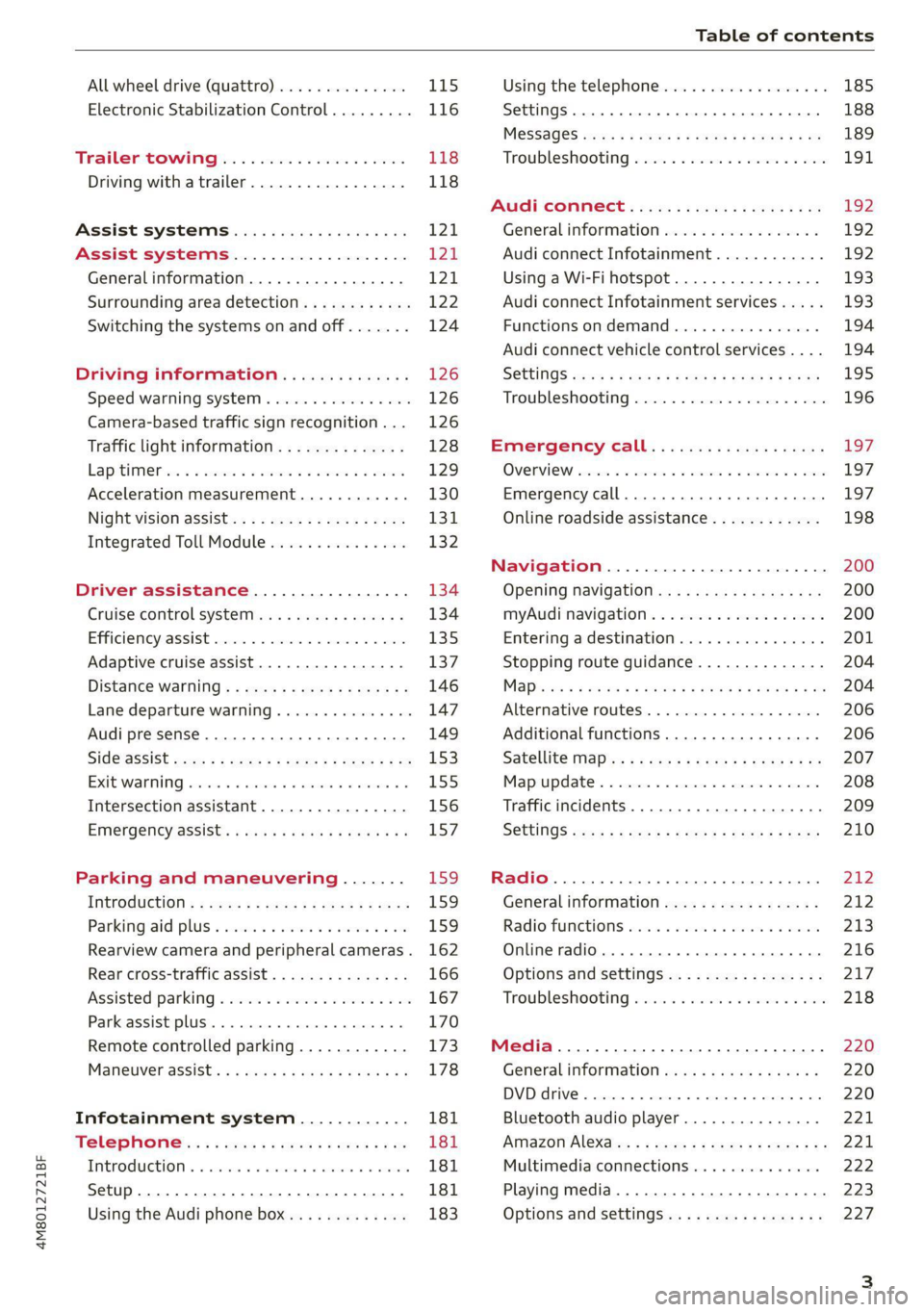
Table of contents
All wheel drive (quattro).............. 115
Electronic Stabilization Control......... 116
TrailersQow tigi cece a 6 eens 4 o eaees 118
Driving with atrailer................. 118
Assist systems................... 1241
Assist systems................... 121
General information. . 121
Surrounding area detection............ 122
Switching the systems on and off....... 124
Driving information.............. 126
Speed warning system................ 126
Camera-based traffic sign recognition... 126
Traffic light information.............. 128
Lapetime rion + 3 scans oo sess a ¥ soweene 6 stain 129
Acceleration measurement............ 130
Nightivision aSSisti=x = «wm : > ase e s eon 131
Integrated Toll Module............... 132
Driver assistance................. 134
Cruise control system............00-5 134
Efficiency assist.............02.-000. 135
Adaptive cruise assist................ 137
Distance warning ..............00005. 146
Lane departure warning............... 147
Audi presense...........0 cece eee 149
Sid@vassist sews: = s sexs = 2 sews & e Ae & ne 153
EXE Warning sowsea so ccvena vo aseoa wo eons ao 155
Intersection assistant................ 156
EMiergency assists: « eswy wave a ¥ ware a Fi 157
Parking and maneuvering....... 159
ThitrOdUCtiON « s sees ¢ = sees 5 ¢ sere ge ees 159
Parking‘aid plus « sissies avis oe aretes so aoe 159
Rearview camera and peripheral cameras. 162
Rear cross-traffic assist............... 166
Assisted
parking..............---00 ee 167
Park assist plus..............000000- 170
Remote controlled parking............ 173
ManetVEraSSistt: « + aswu sx nowy ¢ wasn a ¢ g 178
Infotainment system............ 181
Telephone.............. cece eee 181
TMEROGUCTION « & cess wo wcinase we a oraeni ow awenaie 181
Setup... 2.2... cee eee eee eee 181
Using the Audi phone box............. 183
Using the telephone.................. 185
SettingS 00... . cece cee eee eee eee 188
MOSSAGES cours « s eauu § 2 eueeS Fo EGE FE BS 189
Troubleshooting sic ss wes oe ween es owe 191
Audi CONNECE : «6: = i e665 st ees so 192
General information................. 192
Audi connect Infotainment............ 192
Using a Wi-Fi hotspot 193
Audi connect Infotainment services..... 193
Functions on demand................ 194
Audi connect vehicle control services.... 194
SOttingS sews + 9 cae ¥ eee ¥ perms we pee 195
Troubleshooting..............--.0005 196
Emergency call................... 197
OVERVIEW. secs. 6 x sxcvers 6 emutes @ a eavaens vw ame
Emergency call
Online roadside assistance............ 198
Navigation.....................05. 200
Opening navigation.................. 200
myAudi navigation................00. 200
Entering adestination..............0- 201
Stopping route guidance.............. 204
Mapes & 5 saves © 2 saws yo sme @ & Hew 2 2 Be 204
Alternative routes................04. 206
Additional functions...............0-- 206
Satellite Map’s + 6 gare = cama a e weep os oe 207
Mapreipdates » cmos + x sre: «2 anes aw onnens 208
Traffic incidents.............. 000 eee 209
SOtuiNGS wows ¢ « eeen ¢ nae 2 Bees doe 210
Radio........ 0... eee eee ee 212
Generalinformation................. 212
Radio functions sss < eins 2 + wen 3 6 eacern 213
Online radio... .... eee eee eee 216
Options and settings................. 217
Troubleshooting wisi « s wen» 6 eae o + wae 218
Media................. 0c cece eee 220
General information................. 220
DVD drive...... 0... eee eee eee 220
Bluetooth audio player............... 221
Amazon Alexa..........-.:se eee ee eee 221
Multimedia connections.............. 222
Playing media..............00. 0.0 ee 223
Options and settings................. 227
Page 9 of 332
4M8012721BF
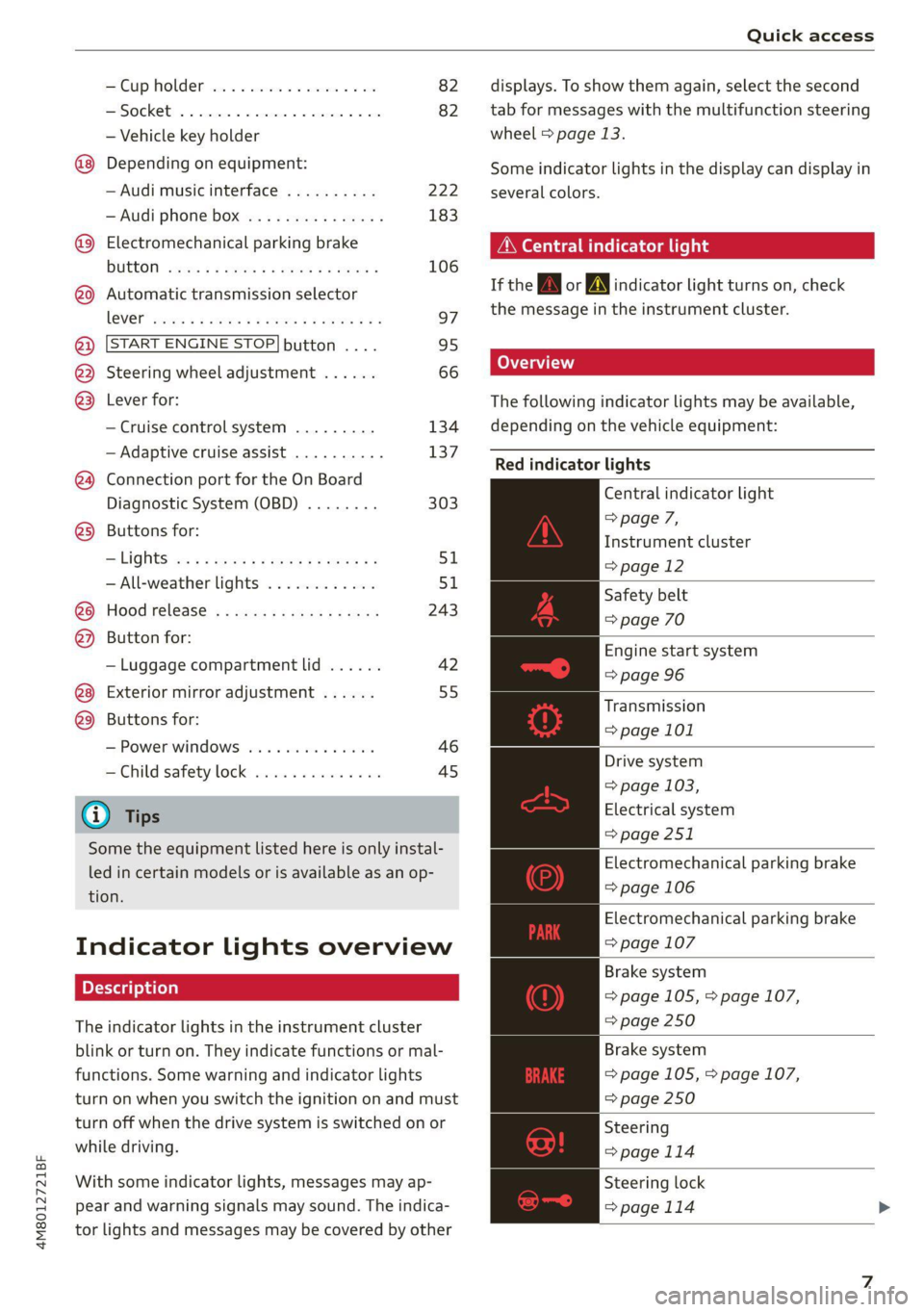
Quick access
Cup holden asce es cscvene wv omens x v oe 82
ESOGKE « 2 santice wm aconens we < emommiee © osm 82
— Vehicle key holder
Depending on equipment:
— Audi music interface .......... 222
—Audi phone box ............... 183
@® Electromechanical parking brake
BUERON sese ¢ eevee ¢ x mew © 2 pee 4 106
@9 Automatic transmission selector
EVER” scowp: « 2 gave & o eee Go eee Ee 97
@) [START ENGINE STOP] button .... 95
@) Steering wheel adjustment ...... 66
@3) Lever for:
— Cruise control system ......... 134
— Adaptive cruise assist .......... 137
@4 Connection port for the On Board
Diagnostic System (OBD) ........ 303
@5) Buttons for:
LIQHts: as 5 2 sacs 5 2 eqws 3 o ees ss 51
—All-weather lights ............ 51
@8 Hood release ..............002. 243
@2 Button for:
— Luggage compartment lid ...... 42
Exterior mirror adjustment ...... 55
@9) Buttons for:
— Power windows ......... 00005 46
—Child safety lock .............. 45
G) Tips
Some the equipment listed here is only instal-
led in certain models or is available as an op-
tion.
Indicator lights overview
The indicator lights in the instrument cluster
blink or turn on. They indicate functions or mal-
functions. Some warning and indicator lights
turn on when you switch the ignition on and must
turn off when the drive system is switched on or
while driving.
With some indicator lights, messages may ap-
pear and warning signals may sound. The indica-
tor lights and messages may be covered by other
displays. To show them again, select the second
tab for messages with the multifunction steering
wheel > page 13.
Some indicator lights in the display can display in
several colors.
Peer ele tela his
If the A\| or AN] indicator light turns on, check
the message in the instrument cluster.
Coad)
The following indicator lights may be available,
depending on the vehicle equipment:
Red indicator lights
Central indicator light
=> page 7,
Instrument cluster
=>page 12
Safety belt
=> page 70
Engine start system
=> page 96
Transmission
=> page 101
Drive system
=> page 103,
Electrical system
=> page 251
Electromechanical parking brake
=> page 106
Electromechanical parking brake
=> page 107
Brake system
=> page 105, > page 107,
= page 250
Brake system
=> page 105, > page 107,
=> page 250
Steering
=>page 114
Steering lock
=>page 114
Page 10 of 332
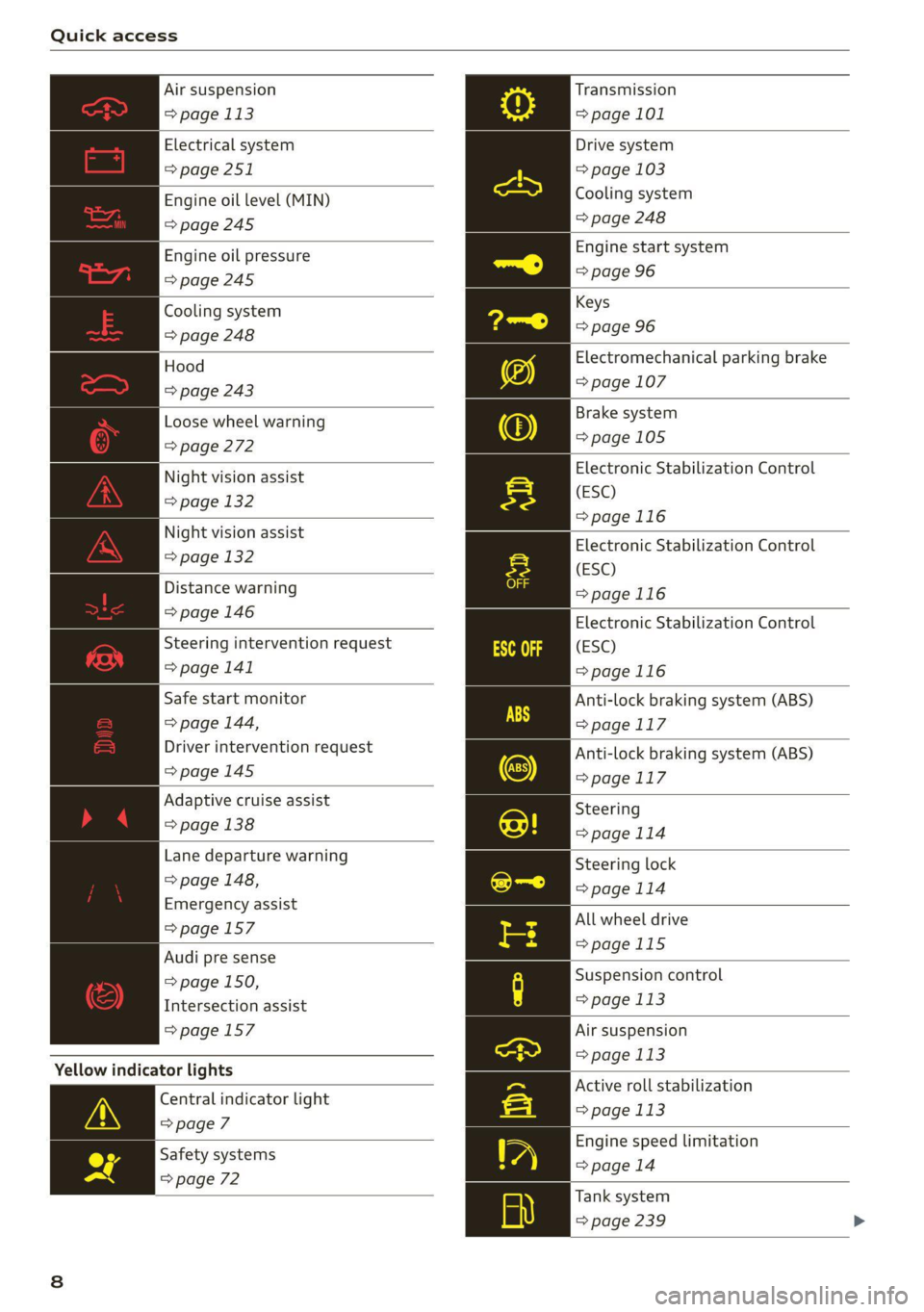
Quick access
Air suspension
=> page 113
Electrical system
=> page 251
Engine oil level (MIN)
=> page 245
Engine oil pressure
=>page 245
Cooling system
=> page 248
Hood
=> page 243
Loose wheel warning
=> page 272
Night vision assist
=> page 132
Night vision assist
=> page 132
Distance warning
=> page 146
Steering intervention request
=> page 141
Safe start monitor
=> page 144,
Driver intervention request
=>page 145
Adaptive cruise assist
=> page 138
Lane departure warning
=> page 148,
Emergency assist
=>page 157
Audi pre sense
= page 150,
Intersection assist
=> page 157
Yellow indicator lights
Central indicator light
=> page 7
Safety systems
=> page 72
Transmission
=> page 101
Drive system
=> page 103
Cooling system
=> page 248
Engine start system
=> page 96
Keys
=> page 96
Electromechanical parking brake
=> page 107
Brake system
=>page 105
Electronic Stabilization Control
(ESC)
=>page 116
Electronic Stabilization Control
(ESC)
=>page 116
Electronic Stabilization Control
(ESC)
=>page 116
Anti-lock braking system (ABS)
=>page 117
Anti-lock braking system (ABS)
=> page 117
Steering
>page 114
Steering lock
=> page 114
All wheel drive
=>page 115
Suspension control
=> page 113
Air suspension
= page 113
Active roll stabilization
=> page 113
Engine speed limitation
=> page 14
Tank system
=> page 239
Page 11 of 332
4M8012721BF
Quick access
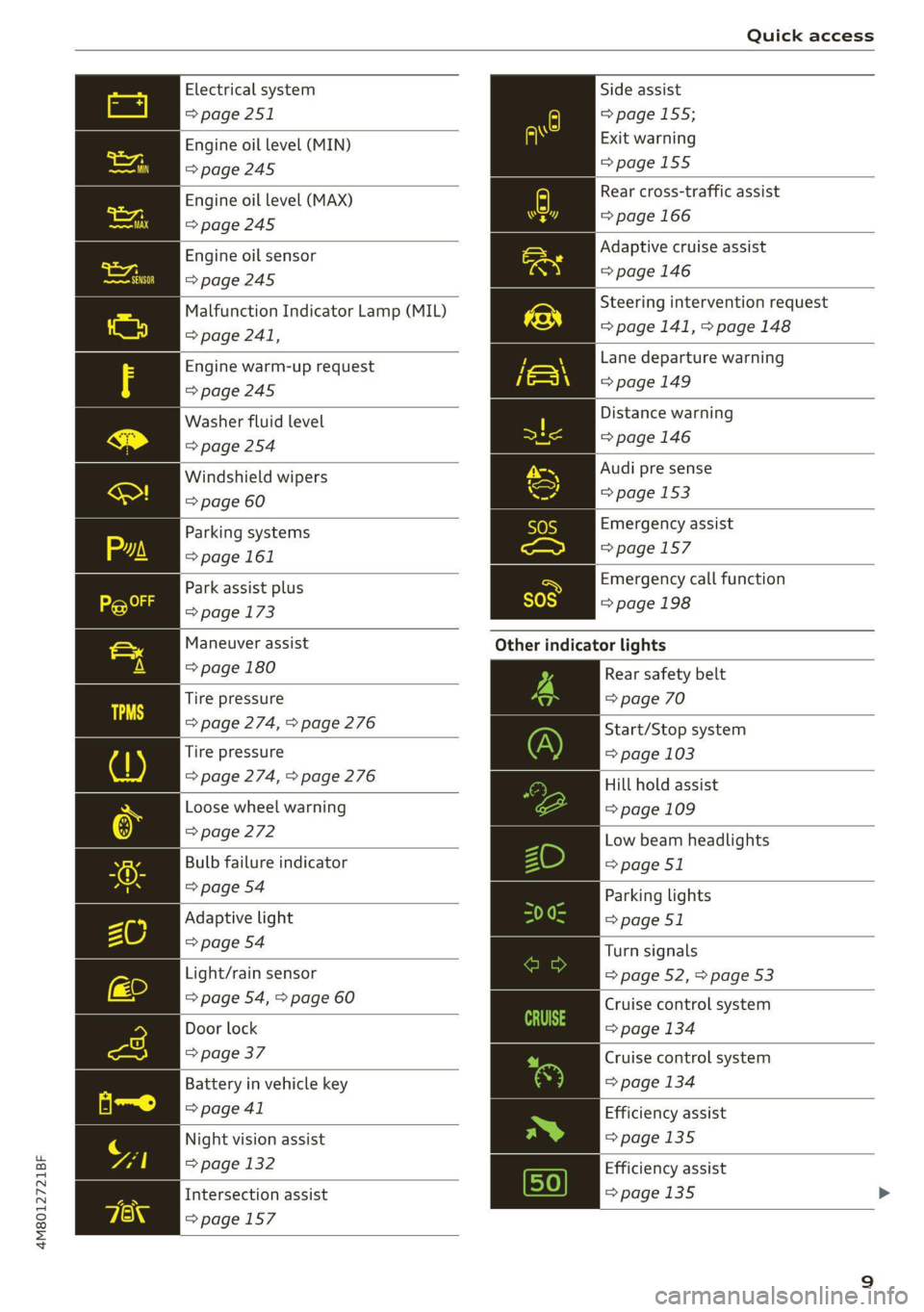
Electrical system
=> page 251
Engine oil level (MIN)
=>page 245
Engine oil level (MAX)
=> page 245
Engine oil sensor
=>page 245
Malfunction Indicator Lamp (MIL)
> page 241,
Engine warm-up request
=> page 245
Washer fluid level
=> page 254
Windshield wipers
=> page 60
Parking systems
=> page 161
Park assist plus
=> page 173
Maneuver assist
=> page 180
Tire pressure
=> page 274, > page 276
Tire pressure
=> page 274, > page 276
Loose wheel warning
=> page 272
Bulb failure indicator
=> page 54
Adaptive light
=> page 54
Light/rain sensor
=> page 54, > page 60
Door lock
=> page 37
Battery in vehicle key
> page 41
Night vision assist
=> page 132
Intersection assist
>page 157
Side assist
=> page 155;
Exit warning
=page 155
Rear cross-traffic assist
=> page 166
Adaptive cruise assist
=>page 146
Steering intervention request
=> page 141, > page 148
Lane departure warning
=>page 149
Distance warning
=> page 146
Audi pre sense
=> page 153
Emergency assist
=>page 157
Emergency call function
=>page 198
Other
indicator lights
Rear safety belt
=> page 70
Start/Stop system
= page 103
Hill hold assist
= page 109
Low beam headlights
=> page 51
Parking lights
=> page 51
Turn signals
=> page 52, > page 53
Cruise control system
=> page 134
Cruise control system
=> page 134
Efficiency assist
=>page 135
Efficiency assist
=>page 135 >
Page 12 of 332
Quick access
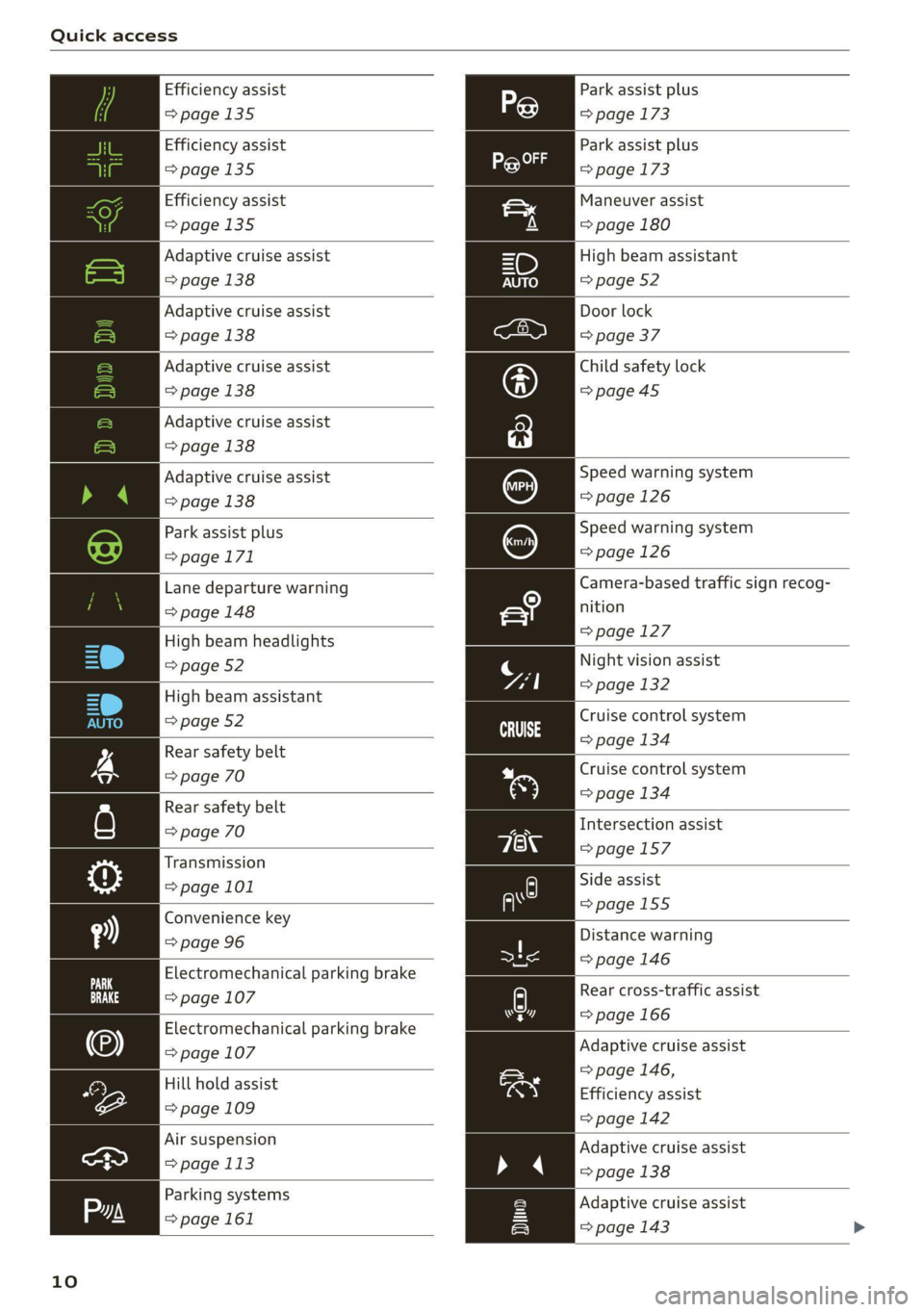
Efficiency assist
>page 135
Efficiency assist
=>page 135
Efficiency assist
>page 135
Adaptive cruise assist
=>page 138
Adaptive cruise assist
=> page 138
Adaptive cruise assist
=>page 138
Adaptive cruise assist
=> page 138
Adaptive cruise assist
=> page 138
Park assist plus
=>page 171
Lane departure warning
=> page 148
High beam headlights
=> page 52
High beam assistant
=> page 52
Rear safety belt
=> page 70
Rear safety belt
=> page 70
Transmission
=> page 101
Convenience key
=> page 96
Electromechanical parking brake
=> page 107
Electromechanical parking brake
=> page 107
Hill hold assist
=> page 109
Air suspension
=> page 113
Parking systems
=>page 161
10
Park assist plus
=> page 173
Park assist plus
=> page 173
Maneuver assist
=> page 180
High beam assistant
=> page 52
Door lock
=> page 37
Child safety lock
=>page45
Speed warning system
=>page 126
Speed warning system
=> page 126
Camera-based traffic sign recog-
nition
=> page 127
Night vision assist
=> page 132
Cruise control system
=> page 134
Cruise control system
=> page 134
Intersection assist
=>page 157
Side assist
=>page 155
Distance warning
=> page 146
py Rear cross-traffic assist
hers => page 166
Adaptive cruise assist
=> page 146,
Efficiency assist
=> page 142
Adaptive cruise assist
» 4 > page 138
Adaptive cruise assist
=> page 143 >
Page 14 of 332

Instrument cluster
Instrument cluster
Instrument cluster overview
12/5/2019
2800 mi 210 mi
RTO Pad
Fig. 2 Instrument cluster overview (Audi virtual cockpit)
Depending on the vehicle equipment, the follow- @ Tips
ing items may appear in the instrument cluster:
— You can select the units used for tempera-
@ Display .
. ture, speed, and other measurements in the
— Engine coolant temperature -E . . 14 :
: Infotainment system > page 233.
@ left dial — Speeds are displayed in mph (miles per
~ Tachometer ......... 1.05.04. 14 hour) or km/h (kilometers per hour).
Tab
area ....... 6. sees eee eee ee 13 — If there is a malfunction in the instrument
Genitiralzarea yan ss ance oo sauise 0 0 13 cluster, DEF will appear in the trip odometer
Status line (one or two lines) display. Have the malfunction corrected as
Right dial soon as possible.
— Certain instrument cluster content can also
be displayed in the head-up display*
=> page 27.
— Convenience display
FueblevelEd) « = secsaw « a secsise vo wena © 239
Right additional display with speed-
ometer
Left additional display with:
—Gear .. eee eee eee eee eee 97
— Audi drive select mode ......... 111
©8®
©OO8®O
©
ZX WARNING
If there is a severe malfunction in the instru-
ment cluster, the display may turn off. The /\|
indicator light may also turn on. Stop the ve-
hicle safely. See an authorized Audi dealer or
authorized Audi Service Facility for assistance.
12
Page 15 of 332
4M8012721BF
Instrument cluster
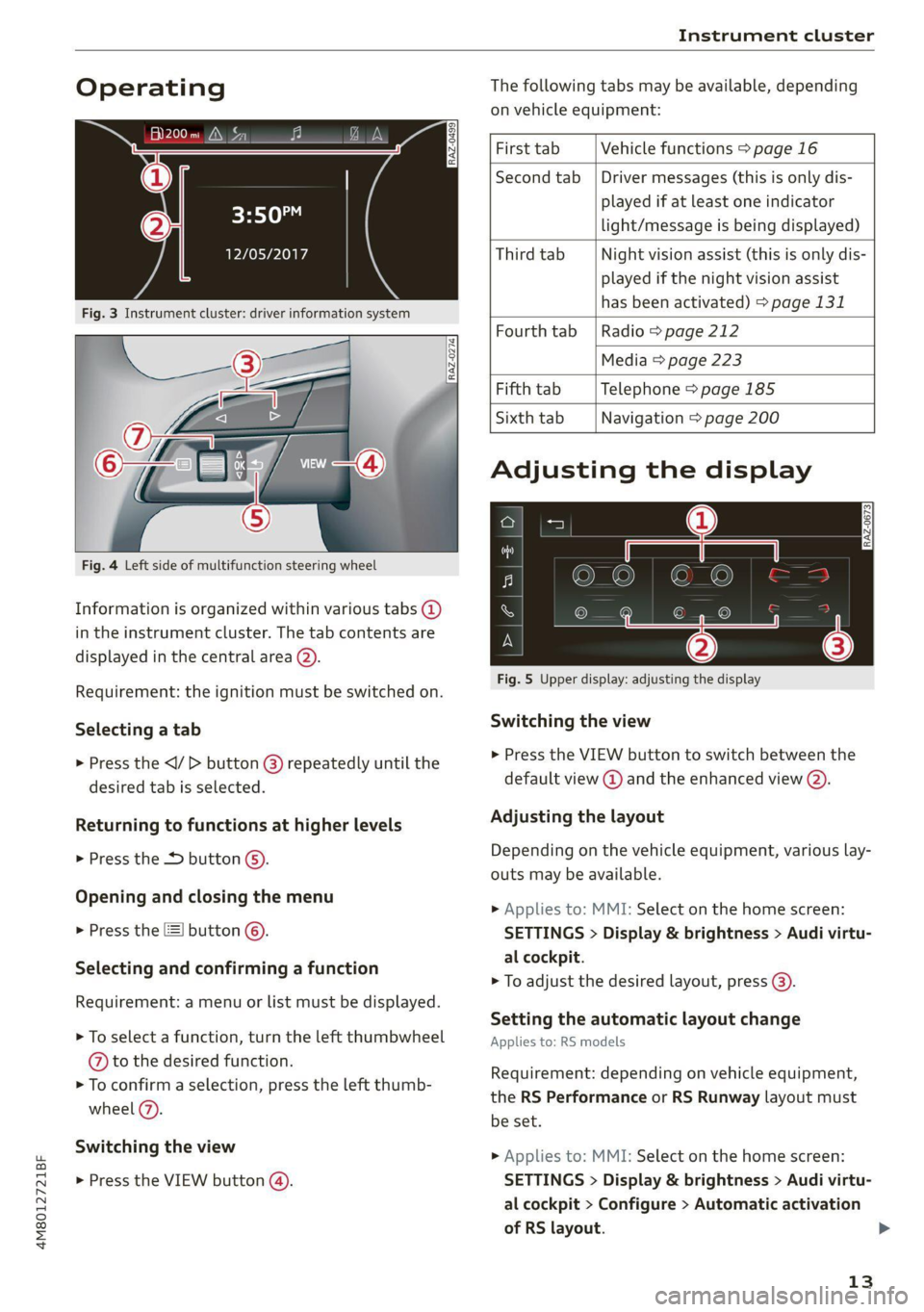
Operating The following tabs may be available, depending
on vehicle equipment:
First tab Vehicle functions > page 16
Second tab | Driver messages (this is only dis-
played if at least one indicator -5QPM
ce light/message is being displayed)
12/05/2017 Third tab Night vision assist (this is only dis-
played if the night vision assist
has been activated) > page 131
Fourth
tab |Radio > page 212
Media > page 223
Fifth tab Telephone > page 185
Sixth tab Navigation > page 200
Fig. 3 Instrument cluster: driver information system
Adjusting the display
=I eR S| >| nN x ec
Fig. 4 Left side of multifunction steering wheel
Information is organized within various tabs @)
in the instrument cluster. The tab contents are
displayed in the central area (2).
i Bad P Fig. 5 Upper display: adjusting the display
Requirement: the ignition must be switched on.
Selecting a tab Switching the view
> Press the VIEW button to switch between the > Press the
® default view @ and the enhanced view (2). desired tab is selected.
Returning to functions at higher levels Adjusting the layout
> Press the + button 6). Depending on the vehicle equipment, various lay-
outs may be available.
Opening and closing the menu
P 9 9 > Applies to: MMI: Select on the home screen:
> Press the [=] button ©). SETTINGS > Display & brightness > Audi virtu-
al cockpit.
Selecti d firmi functi
erecting ane’ confirming a function > To adjust the desired layout, press @).
Requirement: a menu or list must be displayed.
Setting the automatic layout change
> To select a function, turn the left thumbwheel Applies to: RS models
@ to the desired function.
> To confirm a selection, press the left thumb-
wheel (7).
Switching the view
Requirement: depending on vehicle equipment,
the RS Performance or RS Runway layout must
be set.
>» Applies to: MMI: Select on the home screen:
> Press the VIEW button @). SETTINGS > Display & brightness > Audi virtu-
al cockpit > Configure > Automatic activation
of RS layout. >
13
Page 16 of 332

Instrument cluster
Depending on vehicle equipment, the RS Per-
formance or RS Runway layout will be automati-
cally set when switching into the RS modes
=>page 111.
Adjusting the additional display
Depending on the vehicle equipment, the addi-
tional displays that can be selected may vary.
» Applies to: MMI: Select on the home screen:
SETTINGS > Display & brightness > Audi virtu-
al cockpit > Configure.
> Select the desired additional display.
Reducing the display
Depending on the vehicle equipment, you can
hide the central area in the instrument cluster.
> Select on the instrument cluster: vehicle func-
tions tab > [=] button > Reduced display.
Coolant temperature
display
The coolant temperature display @) > page 12
only functions when the ignition is switched on.
To reduce the risk of engine damage, please ob-
serve the following notes about the temperature
ranges.
Cold range
If only the LEDs at the bottom of the gauge turn
on, the engine has not reached operating tem-
perature yet. Avoid high engine speeds, full accel-
eration, and heavy engine loads.
Normal range
The engine has reached its operating tempera-
ture once the LEDs up to the center of the gauge
turn on. If the g indicator light in the instru-
ment cluster display turns on, the coolant tem-
perature is too high > page 248.
@) Note
— Auxiliary headlights and other accessories in
front of the air intake impair the cooling ef-
fect of the coolant. This increases the risk of
the engine overheating during high outside
temperatures and heavy engine load.
14
— The front spoiler also helps to distribute
cooling air correctly while driving. If the
spoiler is damaged, the cooling effect will
be impaired and the risk of the engine over-
heating will increase. See an authorized
Audi dealer or authorized Audi Service Fa-
cility for assistance.
Tachometer
The tachometer (2) 9 page 12 displays the engine
speed in revolutions per minute (RPM). The be-
ginning of the red zone in the tachometer indi-
cates the maximum permissible engine speed for
all gears once the engine has been broken in. Be-
fore reaching the red zone, you should shift into
the next higher gear, select the "D" or "S" selec-
tor lever position, or remove your foot from the
accelerator pedal.
Engine speed limitation
If the BA indicator light turns on, the engine will
be automatically limited to the RPM displayed in
the instrument cluster. This will protect the en-
gine components, for example during a cold start
or from overheating.
The engine speed limitation is deactivated if you
release the accelerator pedal while the engine is
at normal operating temperature.
If the engine speed limitation was activated by
an engine control malfunction, the By indicator
light also turns on. Make sure the engine speed
does not go above the speed displayed, for exam-
ple when downshifting. Drive to an authorized
Audi dealer or authorized Audi Service Facility im-
mediately to have the malfunction corrected.
C) Note
The needle in the tachometer may only be in
the red area of the gauge for a short period of
time before there is a risk of damaging the
engine. The location where the red zone be-
gins varies depending on the engine.
Odometer
The trip odometer and odometer are displayed in
the status bar G) > page 12.
Page 17 of 332
4M8012721BF
Instrument cluster
The trip odometer shows the distance driven
since it was last reset. It can be used to measure
short distances. The odometer shows the total
distance that the vehicle has been driven.
Resetting the trip odometer
> Select on the instrument cluster: vehicle func-
tions tab > | button > Reset mi.
@) Tips
Distances are displayed in mi (miles) or km
(kilometers).
Outside temperature
display
The outside temperature is displayed in the sta-
tus bar ©) > page 12.
If your vehicle is stationary or if you are driving at
very low speeds, the temperature displayed in
the instrument cluster may be slightly higher
than the actual temperature outside due to heat
radiating from the engine.
At temperatures below 41 °F (+5 °C), a snowflake
symbol appears in front of the temperature dis-
play > A\.
ZA\ WARNING
Do not assume the roads are free of ice based
on the outside temperature display. Be aware
that there may be ice on roads even when the
outside temperature is around 41 °F (+5 °C)
and that ice can increase the risk of accidents.
Engine oil temperature
indicator
Depending on the vehicle equipment, the engine
oil temperature 7 may be indicated by a bar in
the instrument cluster.
> Open the vehicle functions tab and switch to
the enhanced view > page 13.
When engine oil temperatures are low, the dis-
play --- °F (--- °C) appears in the instrument clus-
ter. The engine has reached its operating temper-
ature when the engine oil temperature is be-
tween 176 °F (80 °C) and 248 °F (120 °C) under
normal driving conditions. The engine oil temper-
ature may be higher if there is heavy engine load
and high temperatures outside. This is not a
cause for concern as long as the E or = indica-
tor lights do not turn on.
Boost indicator
Applies to: vehicles with boost indicator
Depending on vehicle equipment, the current en-
gine load (meaning the current boost pressure)
may be indicated by a bar in the instrument clus-
ter.
> Open the vehicle functions tab and switch to
the enhanced view > page 13.
Shift light indicator
Applies to: RS models
The shift light indicator informs the driver when
the RPM limit is reached.
> Select the RS Performance or RS Runway lay-
out if necessary > page 13.
The shift light indicator is displayed with green,
yellow and red ranges in the upper areas of the
tachometer. The shift light indicator will blink red
when approaching the engine speed limit. Shift
to the next highest gear at the right time.
Sport displays
Applies to: RS models
Various sport displays, such as a G meter or tire
pressure indicator, may be available depending
on vehicle equipment.
Opening sport displays in the instrument
cluster
> Select in the instrument cluster: Vehicle func-
tions tab > =| button > Sport displays.
> Turn the left thumbwheel on the multifunction
steering wheel until the desired sport display
appears in the instrument cluster.
Opening sport displays in the MMI
> Applies to MMI: Select on the home screen: VE-
HICLE > RS monitor.
15
>