parking brake AUDI Q8 2021 Owner´s Manual
[x] Cancel search | Manufacturer: AUDI, Model Year: 2021, Model line: Q8, Model: AUDI Q8 2021Pages: 332, PDF Size: 118.76 MB
Page 4 of 332
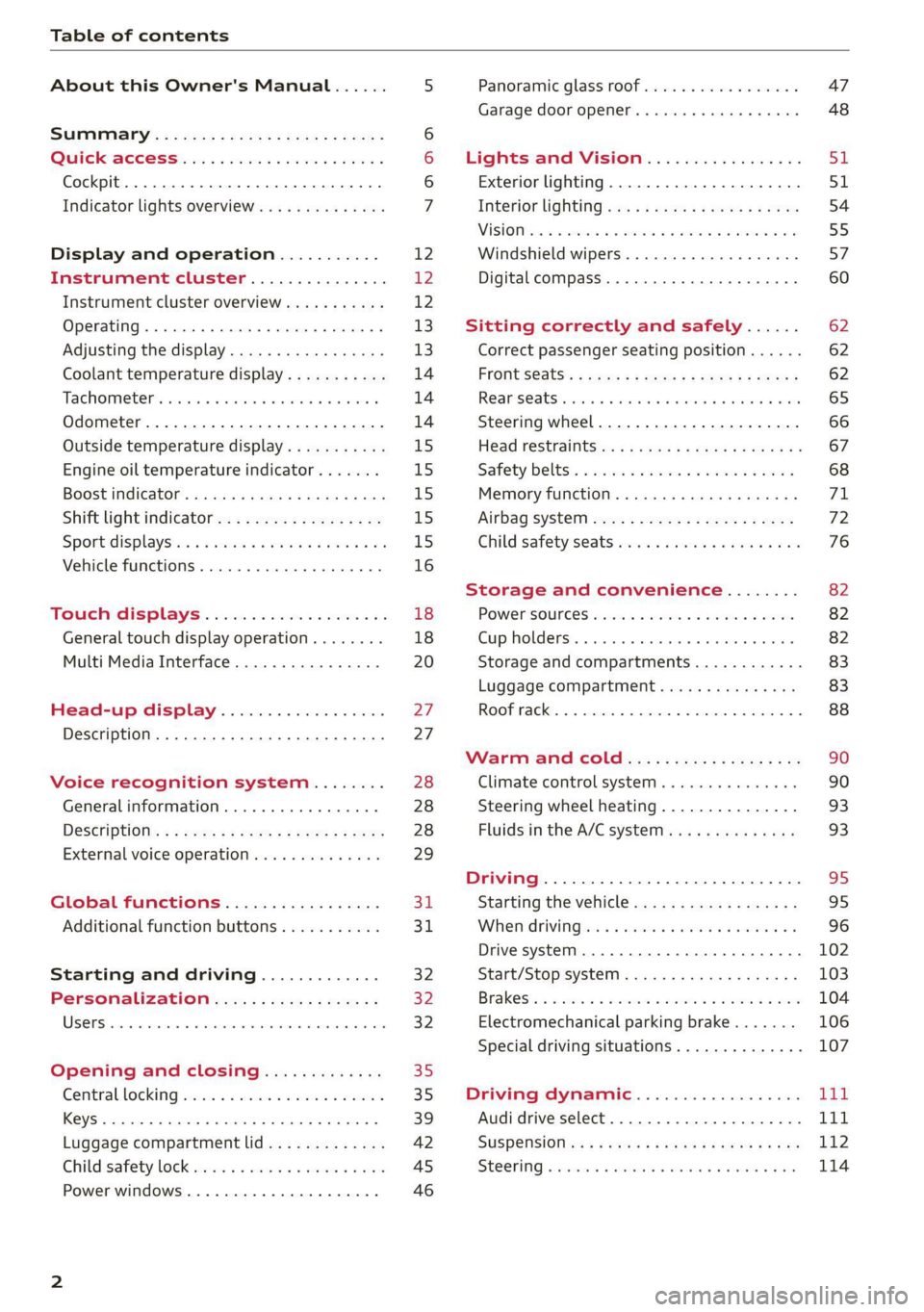
Table of contents
About this Owner's Manual......
SUMIMAry: < = exe : eens: Seen cs sens
QutckeaeCe ssh: «i esis se ois a eaves @
Cockpit. ...... 0... eee eee eee eee
Indicator lights overview...........4..
Display and operation...........
Instrument cluster...............
Instrument cluster overview...........
Operating. ecccuse w+ were oo wens oo ayes 9 ¥
Adjusting the display.................
Coolant temperature display...........
Tachometer’ series i ewe so snes ¥ & ome
Odometer.............. cee eee eee ee
Outside temperature display...........
Engine oil temperature indicator.......
Boost indicator...............0--000.
Shift light indicator..................
Sportidisplaystens « scwne x » eum os vomew «02
Vehicle functions ..............00000.
TOUCKHAISPLAYS « esis 6 6 sccm 6 x wees
General touch display operation........
Multi Media Interface................
Head-up display..................
Description............0.. ee cee eee
Voice recognition system........
General information..............00.
DESGriptiOns « = seen ¢ = seme xs eee st eee
External voice operation..............
Global functions.................
Additional function buttons...........
Starting and driving.............
Personalization..................
Opening and closing.............
Central locking) sani x x swasien © x sponae 2 aaaonor
Keys... eee
Luggage compartment lid.............
Childisafety lock seis 2 « sere ¥ © were 3 ¢ overs
Power windows............000eeeeee
NOD
OO
12 12 12
13
13
14 14 14
15
15
15
15
15)
16 18
18
20
27
27 28 28 28
29
3d:
31
32 32
32
35 35
39
42 45
46
Panoramic glass roof................. 47
Garage door opener..........--.00 eee 48
Lights and Vision................. 51
Exterior lighting...................4. 51
Interior liQhting ss =e aves ss eews so eos 54
ViSIOMsn « 3 ses 3 3 ema oo wena vo ae © ove 55
Windshield wipers.............-..45- 57
Digital compass.............-.-0000- 60
Sitting correctly and safely...... 62
Correct passenger seating position...... 62
Frontseats:: » ssw. « ¢ sews & » saws +s ewe < 62
Rear SOats cravina so suamie si sxomare va aueens 8 a ana 65
Steering wheel..............--000005 66
Head restraints ss = ¢ sao xs eee xo pews ee 67
Safety belts:. scscce ss cmsne a eee o & were 68
Memory function...............00005 71
Airbag SySt€M eves 2s eeen es pean ce ees 72
Child safety'seats wos cs eva. wemwe + ees 76
Storage and convenience........ 82
POWEPSOUICES sess ce wives 2 2 erecem a a eee 82
Cup holders. ... 0.2.00... c eee eee eee 82
Storage and compartments............ 83
Luggage compartment............... 83
ROOF TAGKE. 5 2 cxcnoes «x cecwece = at sammie = = omeween @ 88
Warm and Coles: « ecee ss ene esis 90
Climate control system............... 90
Steering wheel heating............... 93
Fluids in the A/C system. .........0065 93
Driving .............. 0.0... eee eee 95
Starting the vehicle...............0.0. 95
When driving isis ss iovsvie se aerswce oo anes oe 96
Drive system... 2.2... ee eee eee eee 102
Start/Stop system .........ee cece eee 103
BrakeS's so isemi 2 wane w aman a 2 oer as ie 104
Electromechanical parking brake....... 106
Special driving situations.............. 107
Driving: dynamic. . « sic. 6 6 see a 6 se Ld
Audi drive select..................00. Tay
SUSPENSION es « + exes ¢ ¢ eres +o ees vv eae 112
SUECOMIING 6 vessse oo csisweue io & stone 6 a toma ww Bs 114
Page 9 of 332
4M8012721BF
Quick access
Cup holden asce es cscvene wv omens x v oe 82
ESOGKE « 2 santice wm aconens we < emommiee © osm 82
— Vehicle key holder
Depending on equipment:
— Audi music interface .......... 222
—Audi phone box ............... 183
@® Electromechanical parking brake
BUERON sese ¢ eevee ¢ x mew © 2 pee 4 106
@9 Automatic transmission selector
EVER” scowp: « 2 gave & o eee Go eee Ee 97
@) [START ENGINE STOP] button .... 95
@) Steering wheel adjustment ...... 66
@3) Lever for:
— Cruise control system ......... 134
— Adaptive cruise assist .......... 137
@4 Connection port for the On Board
Diagnostic System (OBD) ........ 303
@5) Buttons for:
LIQHts: as 5 2 sacs 5 2 eqws 3 o ees ss 51
—All-weather lights ............ 51
@8 Hood release ..............002. 243
@2 Button for:
— Luggage compartment lid ...... 42
Exterior mirror adjustment ...... 55
@9) Buttons for:
— Power windows ......... 00005 46
—Child safety lock .............. 45
G) Tips
Some the equipment listed here is only instal-
led in certain models or is available as an op-
tion.
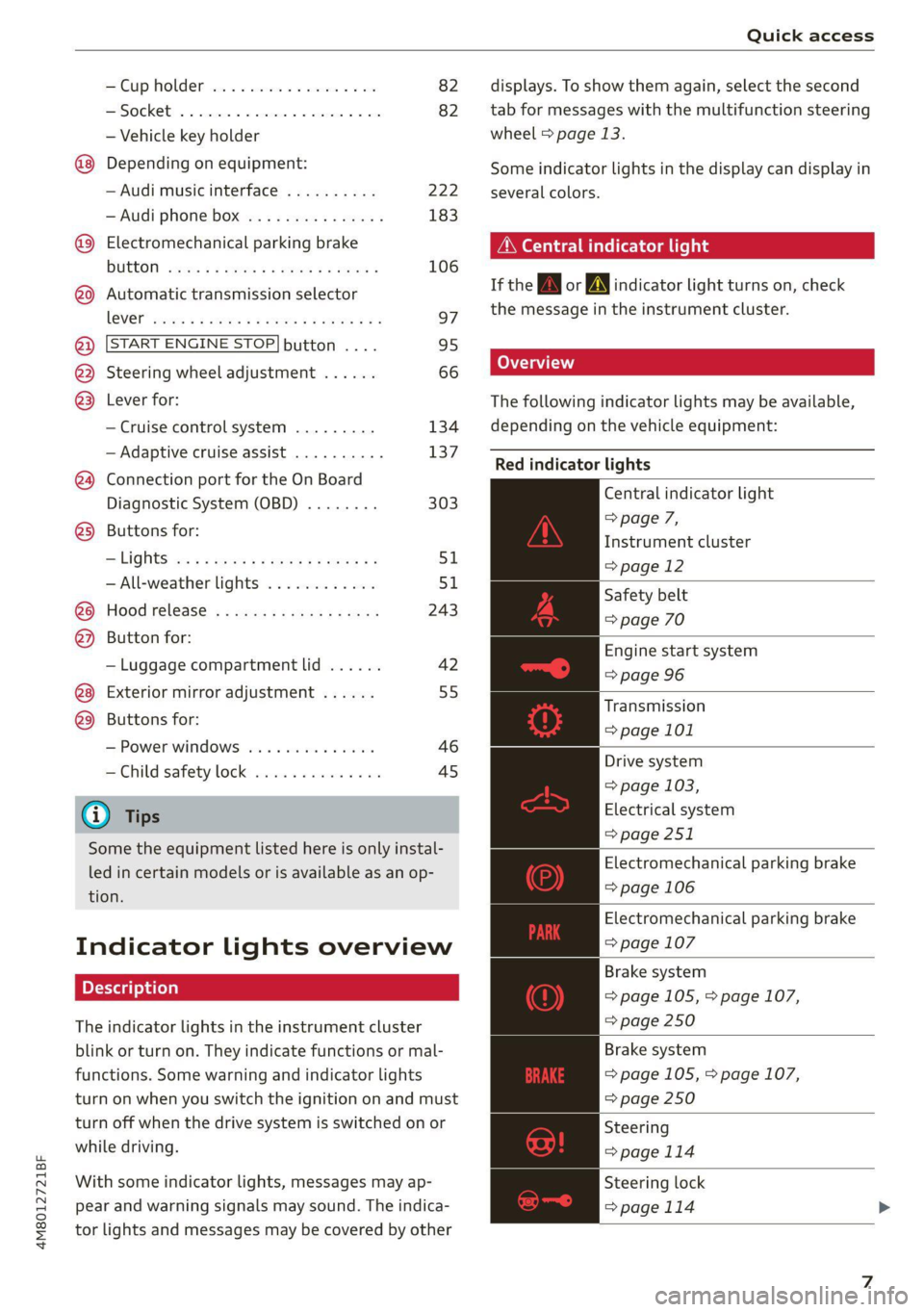
Indicator lights overview
The indicator lights in the instrument cluster
blink or turn on. They indicate functions or mal-
functions. Some warning and indicator lights
turn on when you switch the ignition on and must
turn off when the drive system is switched on or
while driving.
With some indicator lights, messages may ap-
pear and warning signals may sound. The indica-
tor lights and messages may be covered by other
displays. To show them again, select the second
tab for messages with the multifunction steering
wheel > page 13.
Some indicator lights in the display can display in
several colors.
Peer ele tela his
If the A\| or AN] indicator light turns on, check
the message in the instrument cluster.
Coad)
The following indicator lights may be available,
depending on the vehicle equipment:
Red indicator lights
Central indicator light
=> page 7,
Instrument cluster
=>page 12
Safety belt
=> page 70
Engine start system
=> page 96
Transmission
=> page 101
Drive system
=> page 103,
Electrical system
=> page 251
Electromechanical parking brake
=> page 106
Electromechanical parking brake
=> page 107
Brake system
=> page 105, > page 107,
= page 250
Brake system
=> page 105, > page 107,
=> page 250
Steering
=>page 114
Steering lock
=>page 114
Page 10 of 332
Quick access
Air suspension
=> page 113
Electrical system
=> page 251
Engine oil level (MIN)
=> page 245
Engine oil pressure
=>page 245
Cooling system
=> page 248
Hood
=> page 243
Loose wheel warning
=> page 272
Night vision assist
=> page 132
Night vision assist
=> page 132
Distance warning
=> page 146
Steering intervention request
=> page 141
Safe start monitor
=> page 144,
Driver intervention request
=>page 145
Adaptive cruise assist
=> page 138
Lane departure warning
=> page 148,
Emergency assist
=>page 157
Audi pre sense
= page 150,
Intersection assist
=> page 157
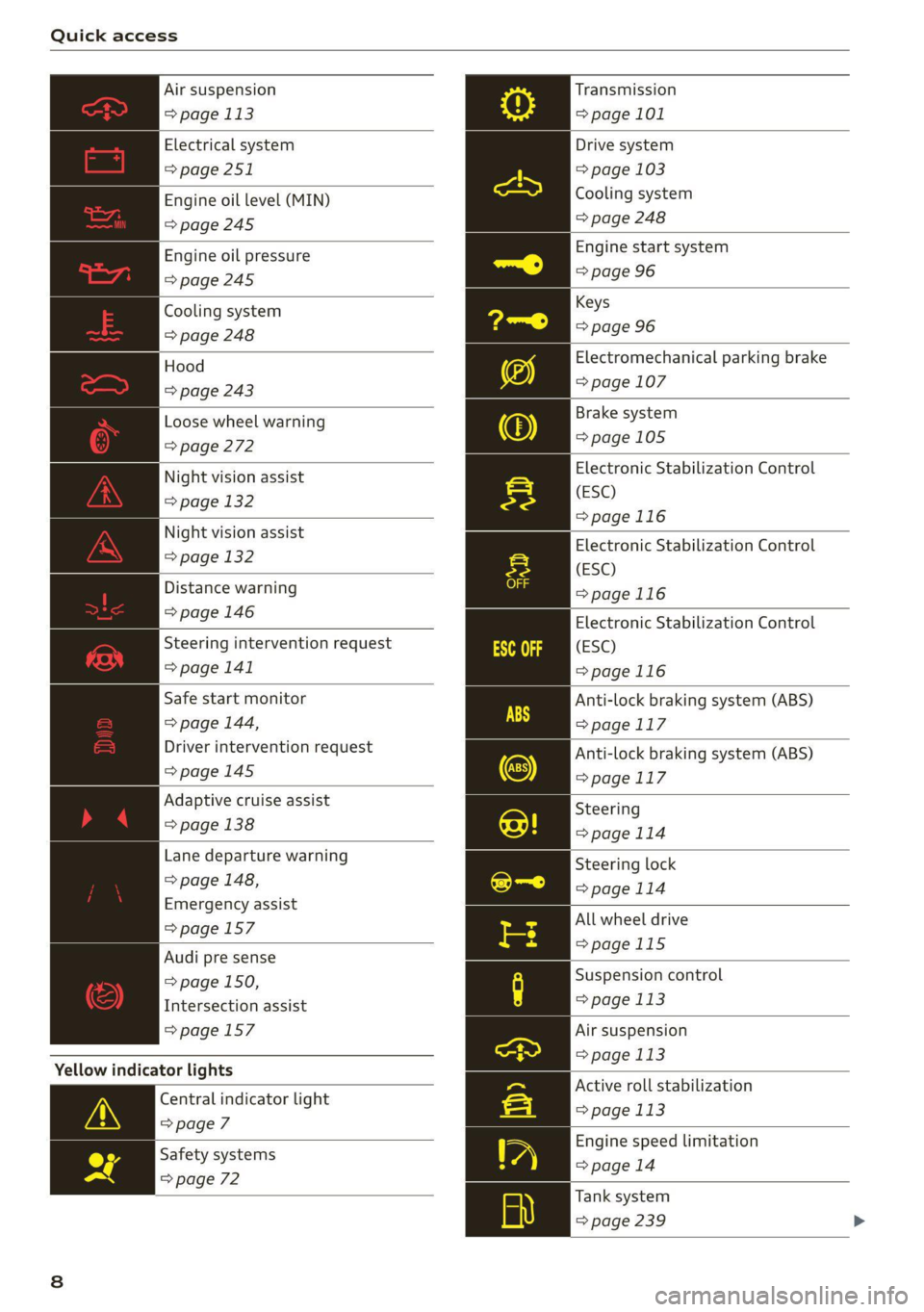
Yellow indicator lights
Central indicator light
=> page 7
Safety systems
=> page 72
Transmission
=> page 101
Drive system
=> page 103
Cooling system
=> page 248
Engine start system
=> page 96
Keys
=> page 96
Electromechanical parking brake
=> page 107
Brake system
=>page 105
Electronic Stabilization Control
(ESC)
=>page 116
Electronic Stabilization Control
(ESC)
=>page 116
Electronic Stabilization Control
(ESC)
=>page 116
Anti-lock braking system (ABS)
=>page 117
Anti-lock braking system (ABS)
=> page 117
Steering
>page 114
Steering lock
=> page 114
All wheel drive
=>page 115
Suspension control
=> page 113
Air suspension
= page 113
Active roll stabilization
=> page 113
Engine speed limitation
=> page 14
Tank system
=> page 239
Page 12 of 332
Quick access
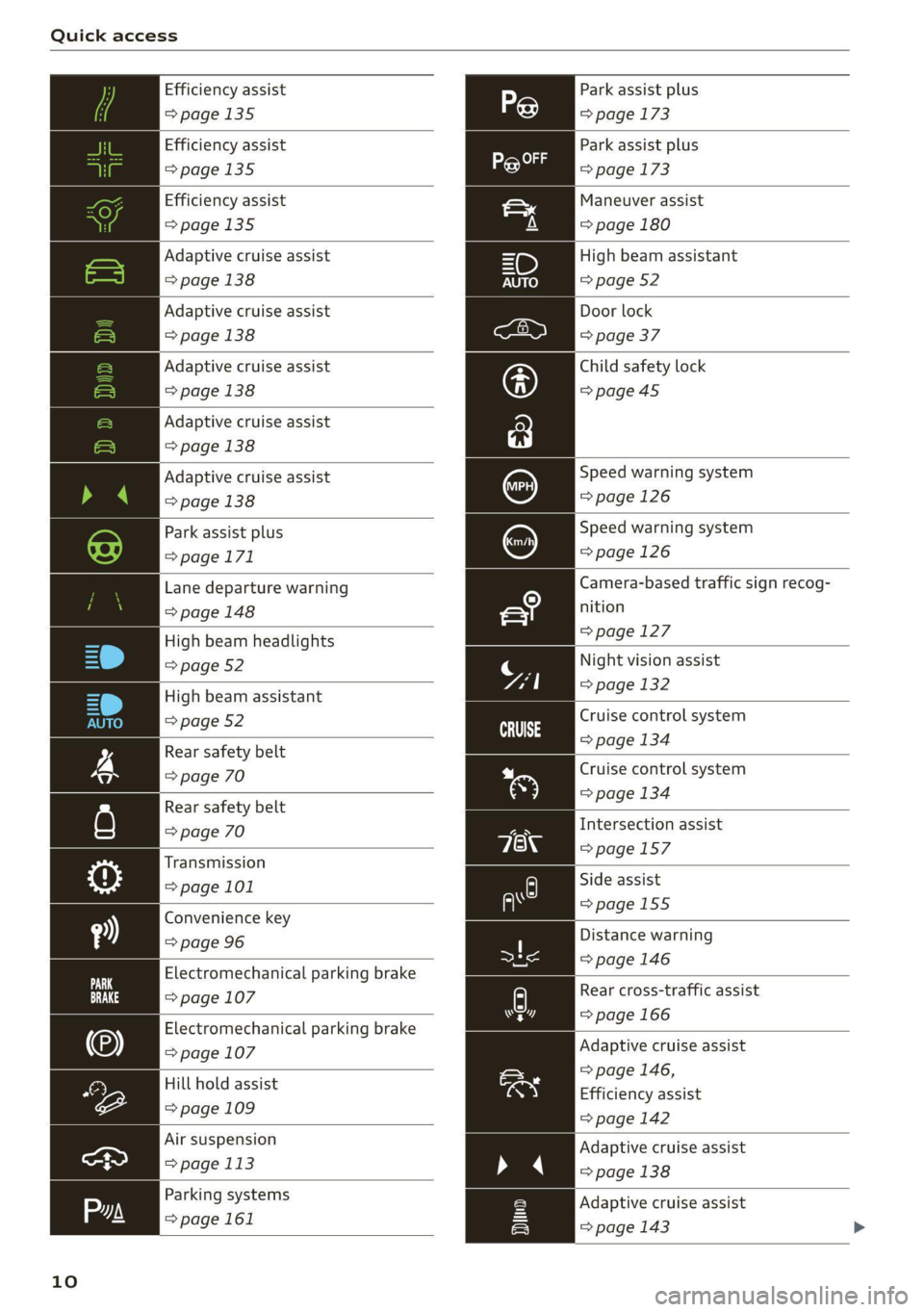
Efficiency assist
>page 135
Efficiency assist
=>page 135
Efficiency assist
>page 135
Adaptive cruise assist
=>page 138
Adaptive cruise assist
=> page 138
Adaptive cruise assist
=>page 138
Adaptive cruise assist
=> page 138
Adaptive cruise assist
=> page 138
Park assist plus
=>page 171
Lane departure warning
=> page 148
High beam headlights
=> page 52
High beam assistant
=> page 52
Rear safety belt
=> page 70
Rear safety belt
=> page 70
Transmission
=> page 101
Convenience key
=> page 96
Electromechanical parking brake
=> page 107
Electromechanical parking brake
=> page 107
Hill hold assist
=> page 109
Air suspension
=> page 113
Parking systems
=>page 161
10
Park assist plus
=> page 173
Park assist plus
=> page 173
Maneuver assist
=> page 180
High beam assistant
=> page 52
Door lock
=> page 37
Child safety lock
=>page45
Speed warning system
=>page 126
Speed warning system
=> page 126
Camera-based traffic sign recog-
nition
=> page 127
Night vision assist
=> page 132
Cruise control system
=> page 134
Cruise control system
=> page 134
Intersection assist
=>page 157
Side assist
=>page 155
Distance warning
=> page 146
py Rear cross-traffic assist
hers => page 166
Adaptive cruise assist
=> page 146,
Efficiency assist
=> page 142
Adaptive cruise assist
» 4 > page 138
Adaptive cruise assist
=> page 143 >
Page 98 of 332
Driving
— If the engine has been under heavy load for
an extended period of time, heat builds up
in the engine compartment after the engine
is switched off and there is a risk of damag-
ing the engine. For this reason, let the en-
gine run at idle for approximately two mi-
nutes before shutting it off.
G) Tips
— Brief noises are normal when starting and
stopping the vehicle and are no cause for
concern.
— For up to 10 minutes after stopping the en-
gine, the radiator fan may turn on again au-
tomatically or it may continue to run, even if
the ignition is switched off.
— It may not be possible to start the vehicle in
extremely low temperatures.
— Power will be fully available once the engine
is at operating temperature.
Messages
= Engine start system: malfunction! Please
contact Service
Do not switch the ignition off because you may
not be able to switch it on again. Drive to an au-
thorized Audi dealer or authorized Audi Service
Facility immediately to have the malfunction cor-
rected.
FJ Engine start system: malfunction! Please
contact Service
There is a malfunction in the engine start system.
Drive immediately to an authorized Audi dealer
or authorized Audi Service Facility to have the
malfunction repaired.
| Remote control key: key not detected. Is the
key
still in the vehicle?
The vehicle key was removed from the vehicle
while the engine is running. If the vehicle key is
no longer in the vehicle, you cannot switch the ig-
nition on or start the engine once you stop it. You
also cannot lock the vehicle from the outside.
Remote control key: hold back of key
against the designated area. See owner's man-
ual
96
The battery in the vehicle key may be drained or
there may be a malfunction. To start the vehicle,
you must also hold the vehicle key against the lo-
cation shown ?) > page 95, fig. 83.
If the malfunction remains, drive immediately to
an authorized Audi dealer or authorized Audi
Service Facility to have the malfunction correct-
ed.
When driving
Starting to drive, stopping, and parking
Starting from a stop
> Press and hold the brake pedal.
> Start the engine.
> Select a gear.
> Release the parking brake.
> Release the brake pedal. The vehicle may roll.
» Press the accelerator pedal to accelerate.
Securing the vehicle against rolling
Secure your vehicle to prevent it from rolling be-
fore exiting the vehicle.
> Set the parking brake.
> Select the “P” selector lever position.
> If parking on a steep road, turn the steering
wheel so that your vehicle will roll against the
curb in case it should start to move.
If one of these measures is not possible, for ex-
ample because there is no vehicle power, you
must secure your vehicle against rolling using ad-
ditional measures.
> Only park the vehicle on a level surface.
> Use suitable objects to block the front and rear
wheels.
Set the parking brake before selecting the “P” se-
lector lever position. This prevents too much
stress from being placed on the locking mecha-
nism when parking on a steep surface.
ZA WARNING
— Always set the parking brake when leaving
your vehicle, even if for a short period of >
Page 99 of 332
4M8012721BF
Driving
time. If the parking brake is not set, the ve-
hicle could roll away, increasing the risk of
an accident.
— Do not leave your vehicle unattended while
the engine is running, because this increases
the risk of an accident.
— If the parking brake is set, it can release au-
tomatically when the accelerator pedal is
pressed. To reduce the risk of an accident,
do not inadvertently press the accelerator
pedal and always shift into “P” when the ve-
hicle is stopped.
— If you leave the vehicle, switch the ignition
off and take the key with you. This is espe-
cially important when leaving persons or an-
imals in the vehicle. Otherwise, the vehicle
could start unintentionally, the parking
brake could release, or electronic equipment
could activate, which increases the risk of an
accident.
— No persons or animals should be left in a
locked vehicle. Locked doors make it more
difficult for emergency workers to enter the
vehicle, which puts lives at risk.
— If you do not begin driving immediately af-
ter releasing the brake pedal, your vehicle
may begin to roll backward. Press the brake
pedal
or set the parking brake immediately.
@) Note
If you have to stop on an incline, always press
the brake pedal to hold the vehicle in place to
reduce the risk of the vehicle rolling back-
ward. Do not try to hold the vehicle in place
by pressing and holding the accelerator pedal.
The transmission can overheat, which increas-
es the risk of damage.
Hill hold assist
If you take your foot off of the brake pedal when
driving on hills, the braking force will be held for
several seconds. At that time, you can start driv-
ing without the vehicle rolling backward.
Requirement: the driver's door must be closed,
the engine must be on, and the vehicle must be
traveling uphill.
> To activate hill hold assist, press and hold the
brake pedal for several seconds while the vehi-
cle is stationary.
ZA\ WARNING
— If you do not begin driving immediately af-
ter releasing the brake pedal, your vehicle
may begin to roll backward. Press the brake
pedal
or set the parking brake immediately.
— The hill hold assist cannot hold the vehicle
on inclines in every scenario (for example,
on slippery or icy ground).
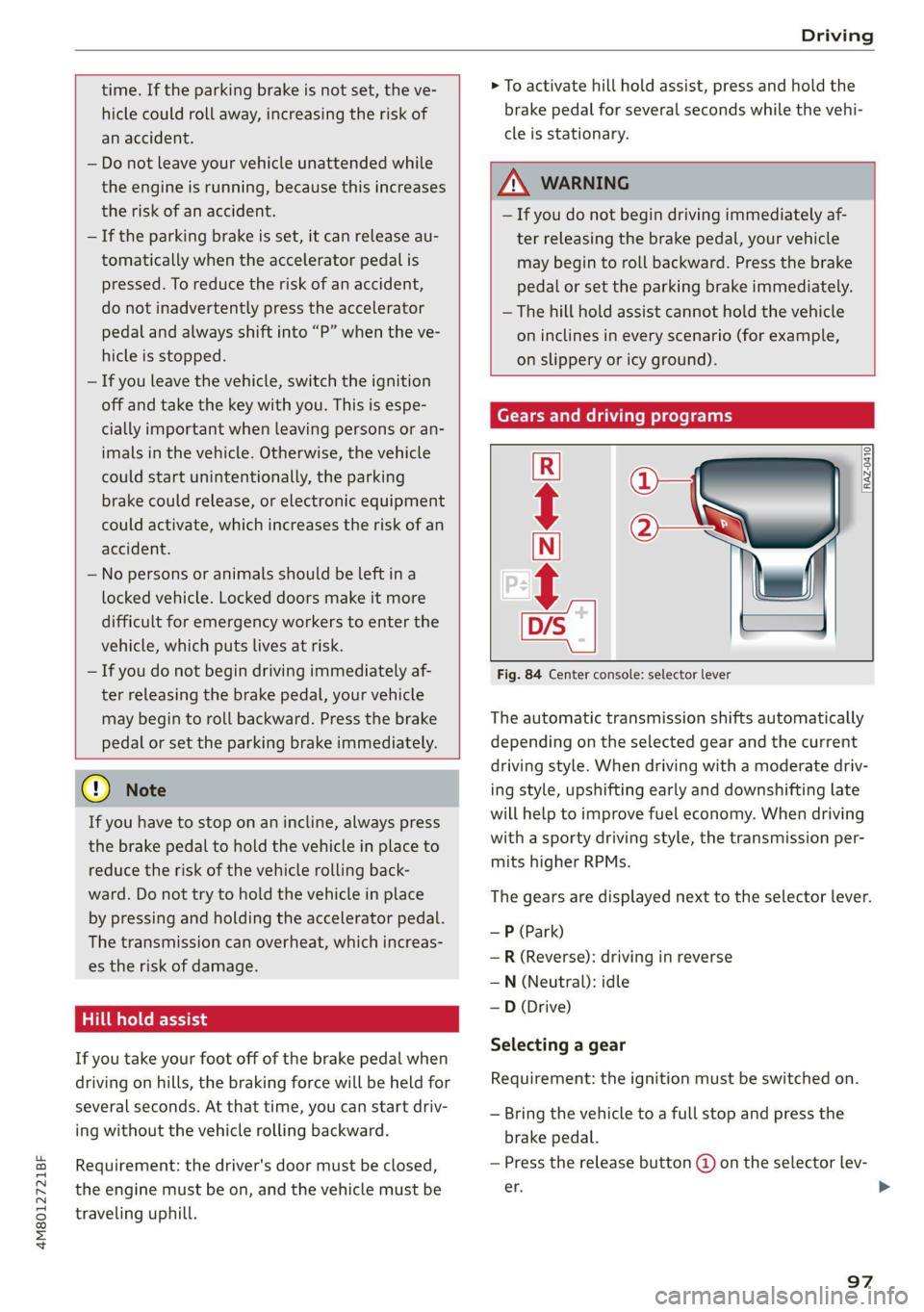
Gears and driving programs
@
(2
[RAZ-0410)
R
t
N
tT.
Fig. 84 Center console: selector lever
The automatic transmission shifts automatically
depending on the selected gear and the current
driving style. When driving with a moderate driv-
ing style, upshifting early and downshifting late
will help to improve fuel economy. When driving
with a sporty driving style, the transmission per-
mits higher RPMs.
The gears are displayed next to the selector lever.
—P (Park)
—R (Reverse): driving in reverse
—N (Neutral): idle
— D (Drive)
Selecting a gear
Requirement: the ignition must be switched on.
— Bring the vehicle to a full stop and press the
brake pedal.
— Press the release button @ on the selector lev-
er. >
97
Page 100 of 332
Driving
—To select the nearest gear, move the selector
lever forward or back until you feel the first
pressure point.
—To skip a gear (for example, move from “D” to
“R”), move the selector lever past the pressure
point in the desired direction.
— The label next to the selector lever for the se-
lected gear will light up.
“N” (Neutral) gear
In the “N” gear, power is not transmitted to the
driving wheels. Use the “N” gear in a car wash
(with conveyor belts), for example.
If you unintentionally select “N” while driving
(faster than 1 mph (2 km/h)), you can also shift
back to “D” without pressing the brake pedal.
For safety reasons, the vehicle cannot be locked
when the transmission is in the "N” gear.
“Pp” (Park) gear
Requirement: the ignition must be switched on.
The vehicle is secured from rolling away by the
parking lock when in the “P” gear.
— Bring the vehicle to a full stop and press the
brake pedal.
— Press the “P” button (2) on the selector lever.
— The “P” next to the selector lever will light up.
“P” engages automatically if you switch the en-
gine off while the “D” or “R” gear is selected. If
you switch the engine off in “N”, “P” will engage
automatically after approximately 30 minutes.
If you want to switch to another gear from “P”,
the engine must be running.
If you cannot shift out of “P”, for example be-
cause the vehicle has no power, you may need to
use the emergency release for the parking lock
=> page 100.
Selecting the driving program
Various driving programs can be selected when in
the “D” gear. The programs influence when the
transmission shifts and how the accelerator ped-
al responds.
The selected driving program is displayed in the
instrument cluster.
98
—D (Drive): normal driving mode
—S (Sport): sporty driving mode
If you select the dynamic mode in Audi drive se-
lect*, the “S” driving program will be activated.
When the ignition is switched off, the driving pro-
gram may be reset to “D”.
To switch between the current driving program
and “S”, push the selector lever toward the rear.
ZA\ WARNING
— Before you start driving, check if the label
for the desired selector lever position next
to the selector lever is lit up.
— Secure the vehicle against rolling before ex-
iting the vehicle > page 96.
— Power is still transmitted to the wheels
when the engine is running at idle. To pre-
vent the vehicle from “creeping”, you must
keep your foot on the brake in all selector
lever positions (except "P" and "N") when
the engine is running.
— To reduce the risk of an accident, do not
press the accelerator pedal when changing
gears if the vehicle is stationary and the en-
gine is running.
— Never select the “R" or "P” gears while driv-
ing. Doing so could cause an accident.
— The vehicle can roll even if the ignition is
switched off.
(i) Tips
If you shift between “D” and “R” within one
second, you do not need to press the brake
pedal. This makes it possible to “rock” if it is
stuck, for example.
Page 102 of 332

Driving
ZA\ WARNING
The driving wheels could spin and the vehicle
could swerve on slick or slippery road surfaces
when using kick-down, which increases the
risk of an accident.
Launch Control
Applies to: RS models
Launch Control provides the best possible accel-
eration when starting from a stop.
Requirements
— The engine must be at operating temperature.
—The steering wheel must not be turned.
— Start/Stop system* must be deactivated
=> page 103.
— ESC must be limited > page 116.
— Driving program “S” > page 98 or the dynamic
Audi drive select* mode must be selected
> page 111.
Using Launch Control
— Press the brake pedal with your left foot and
hold it all the way down for at least one second.
— With the brake pedal pressed, press the accel-
erator pedal all the way down with your right
foot at the same time.
— Once the engine reaches a constant speed, re-
move your foot from the brake pedal.
Once the vehicle has started moving, reactivate
the ESC so that it is fully functional.
Z\ WARNING
Only use Launch Control when road and traffic
conditions allow it and other road users will
not be endangered or impacted by your driv-
ing and the vehicle's acceleration. The driving
wheels could spin and the vehicle could
swerve, especially on slick or slippery road
surfaces, which increases the risk of an acci-
dent.
C) Note
When accelerating using Launch Control, all
vehicle components are subject to heavy
loads. This can result in increased wear.
100
G) Tips
After accelerating using the Launch Control,
the temperature of some vehicle components
may increase greatly. If that happens, the
function will not be available for a few mi-
nutes to reduce the risk of damage. After a
cool-down period, Launch Control will be
available again.
Parking lock emergency release
@
B4M-0189
@
Fig. 87 Footwell: releasing the parking lock using the
emergency release
The emergency release is located under the floor
mat on the driver's side. Read and follow the im-
portant instructions about towing > page 295.
Releasing the parking lock using the
emergency release
» Secure the vehicle against rolling > page 96.
> Pry the cover off at one of the openings using
the screwdriver from the vehicle tool kit
=> page 286.
> Insert the socket wrench from the vehicle tool
kit into the opening.
» Turn the socket wrench clockwise (4) until it
stops and press it downward @) until it locks in-
to place.
>» Leave the socket wrench inserted.
Resetting the parking lock
> Grasp the socket wrench with both hands and
carefully pull it upward to remove.
> Install the cover.
Page 104 of 332
Driving
There is a malfunction in the "P" button on the
selector lever. The “P” gear is automatically en-
gaged when you turn off the engine. Drive to an
authorized Audi dealer or authorized Audi Service
Facility immediately to have the malfunction cor-
rected.
fs} Danger of rolling away! P not possible.
Please apply parking brake
— The parking lock was released using the emer-
gency
release > page 100. Or:
— The parking lock can no longer be engaged.
Drive to an authorized Audi dealer or author-
ized Audi Service Facility immediately to have
the malfunction corrected. Secure the vehicle
against rolling before exiting the vehicle
> page 96.
Move selector lever to automatic position
The transmission has switched out of tiptronic
mode. Switch back to automatic mode with the
selector lever > page 99.
Drive system
A new vehicle must be broken in within the first
1,000 miles (1,500 km) so that all moving parts
work smoothly together, which helps to increase
the service life of the engine and other drive com-
ponents.
Do not drive higher than two-thirds of the maxi-
mum permitted engine RPM during the first 600
miles (1,000 km) and do not use full accelera-
tion. The engine can be increased RPM gradually
during the next 300 miles (500 km).
Conventional and mild hybrid drive system
Applies to: vehicles with a conventional drive system or a mild
hybrid drive system
Vehicles with a conventional or mild hybrid drive
system are powered by a combustion engine. It
uses fuel to recover energy.
Vehicles with a mild hybrid drive system have ad-
ditional battery technology.
102
aire (alee Madey neat iN ede (Tue A
driving
Your driving style greatly influences the amount
of fuel and energy consumed, the environmental
impact, and the wear on the engine, brakes, and
tires. Note the following information for efficient
and environmentally-conscious driving:
— Turn off electrical equipment that is not need-
ed, for example seat heating*.
— Anticipate upcoming traffic situations while
driving to avoid unnecessary acceleration and
braking.
— Avoid driving at high speeds.
— Avoid adding extra weight to the vehicle if pos-
sible, for example by not leaving roof racks or
bike racks installed when they are not needed.
— Make sure the tire pressure is correct.
— Have maintenance performed regularly on the
vehicle.
— Do not let the engine run while the vehicle
parked.
— Do not drive with winter tires during the summ-
er.
— Use the Start/Stop system.
— Utilize the engine braking effect.
— Avoid driving short distances when possible.
(i) Tips
The amount of noise produced by the vehicle
can increase significantly when driving with a
sporty style. Show respect to others around
you and the environment with the way you op-
erate your vehicle, especially at night.
Sees
Your vehicle is equipped with an intelligent ener-
gy management system for distributing electrici-
ty. This significantly improves the starting ability
and increases the vehicle battery life.
@ Tips
—If you drive short distances frequently, the
vehicle battery may not charge enough
while driving. As a result, convenience func-
tions for electrical equipment may be tem-
porarily unavailable.
Page 105 of 332

4M8012721BF
Driving
— The vehicle battery will gradually drain if
the vehicle is not driven for long periods of
time, or if electrical equipment is used
when the engine is not running. To ensure
that the vehicle can still be started, the
electrical equipment will be limited or
switched off.
IC Te lt
B Drive system: malfunction! Safely stop vehi-
cle
There is a malfunction in the drive system. The
brake booster and the power steering may stop
working. Stop the vehicle immediately or as soon
as possible and do not continue driving. Secure
the vehicle against rolling before exiting the vehi-
cle > page 96. Have the problem corrected by an
authorized Audi dealer or authorized Audi Service
Facility.
B Drive system: malfunction! Please contact
Service
There is a malfunction in the drive system. Drive
slowly to an authorized Audi dealer or authorized
Audi Service Facility to have the malfunction cor-
rected.
Start/Stop system
Applies to: vehicles with Start/Stop system
The Start/Stop system can help increase fuel
economy and reduce CO2 emissions.
In Start/Stop mode, the engine shuts off auto-
matically when stopped, for example at a traffic
light. If certain conditions are met, the engine
may stop before the vehicle has come to a com-
plete stop. If you press the accelerator pedal
when this happens, the engine will start and driv-
ing power will be transmitted.
The ignition and important assist systems such
as the brake booster will remain available during
the Stop phase. The engine will restart automati-
cally when needed.
The Start/Stop system is automatically activated
once
the ignition is switched on.
Switching the Start/Stop system off and on
The & button is located above the selector lever
in the center console. The LED in the button turns
on when the function is switched off.
> Press & to switch the system on or off.
If you switch the system off during a Stop phase,
the engine will start again automatically.
Basic requirements
— The driver's door and hood must be closed.
—"P","N", or "D" must be engaged.
— The steering wheel must not be turned far in ei-
ther direction.
— The vehicle must have driven faster than 2 mph
(3 km/h) since the last time it stopped.
— The vehicle is not in trailer mode.
@) Note
Always switch the Start/Stop system off when
driving through water > page 103.
G) Tips
— Depending on the driving situation, the en-
gine may already stop when coasting before
the vehicle has come to a complete stop.
— Ifyou select the "D" position after shifting
into reverse, the vehicle must be driven fast-
er than 6 mph (10 km/h) in order for the
Start/Stop system to become active again.
This makes it possible to maneuver without
stopping the engine.
Stopping and starting the engine
Applies to: vehicles with Start/Stop system
> Press and hold the brake pedal until the vehicle
has stopped. The @) indicator light appears in
the instrument cluster once the engine stops
automatically.
> The engine starts again when you remove your
foot from the brake pedal. The indicator light
turns off.
If the parking brake is set, the engine will only
start again when the accelerator pedal is pressed. >
103