audio AUDI R8 COUPE 2020 User Guide
[x] Cancel search | Manufacturer: AUDI, Model Year: 2020, Model line: R8 COUPE, Model: AUDI R8 COUPE 2020Pages: 308, PDF Size: 82.41 MB
Page 131 of 308
4S1012721BA
Audi connect
Data connection settings
Using the Data connection settings menu, you
can set when the system should connect to the
Internet. The Internet connection disconnects
automatically once the requested Audi connect
Infotainment service no longer requires any data.
— Connection setup: you can select when a data
connection should be established.
— Audi connect (MMI): when this function is
switched on, a data connection is automatically
established in order to use Audi connect Info-
tainment services.
— Wi-Fi devices: when this function is switched
on, you can allow or deny Internet connections.
Connection settings
The connection is configured automatically based
on the SIM card being used. The following values
can be changed. You can obtain more information
from your cell phone service provider.
— APN: the access point depends on the cell
phone service provider and is assigned auto-
matically.
— User name: your cell phone service provider as-
signs the user name for your online profile.
— Password: your cell phone service provider as-
signs the password for your online profile.
TX WARNING
Always follow the information found in > AV
in General information on page 124.
C) Note
Always follow the information found in >@ in
General information on page 124.
@) Tips
For more information on roaming charges,
contact your cell phone service provider.
Applies to: vehicles with Wi-Fi hotspot
Requirement: the ignition must be switched on.
> Select: [MENU] button > Telephone > right con-
trol button > Wi-Fi settings.
Depending on the country and the vehicle equip-
ment, the following functions may be available:
Wi-Fi
When the function is switched on, the MMI's Wi-
Fi hotspot is active and Wi-Fi devices can be con-
nected to the hotspot.
Network key
The
Wi-Fi connection between the MMI and your
Wi-Fi device is encrypted. You can change the fol-
lowing information if needed.
— Access point (SSID): Wi-Fi hotspot name.
— Password: a random password was set in the
MMI at the factory. The password can be
changed. The encryption method requires a
password to be at least eight characters long.
Choose a secure password.
— Visible to others: you can switch the visibility
of the Wi-Fi hotspot on or off.
Network search
A list of available Wi-Fi networks in your area is
displayed.
Connection to personal hotspot
The MMI Wi-Fi hotspot is activated. An MMI In-
ternet connection to a personal Wi-Fi hotspot
(such as a smartphone) can be established. For
additional information, see > page 125.
ZA WARNING
Always follow the information found in > AV
in General information on page 124.
@) Note
Always follow the information found in >@ in
General information on page 124.
@ Tips
In vehicles without Audi connect Infotain-
ment, the use of the Wi-Fi hotspot is only
possible for the Wi-Fi audio player*. A data
connection to the Internet cannot be estab-
lished.
129
Page 133 of 308
4S1012721BA
Navigation
Navigation
Opening navigation
ild you like to drive
yh
Home address
ation
Yes : ne il, (D) A
@-: John Smith
aI
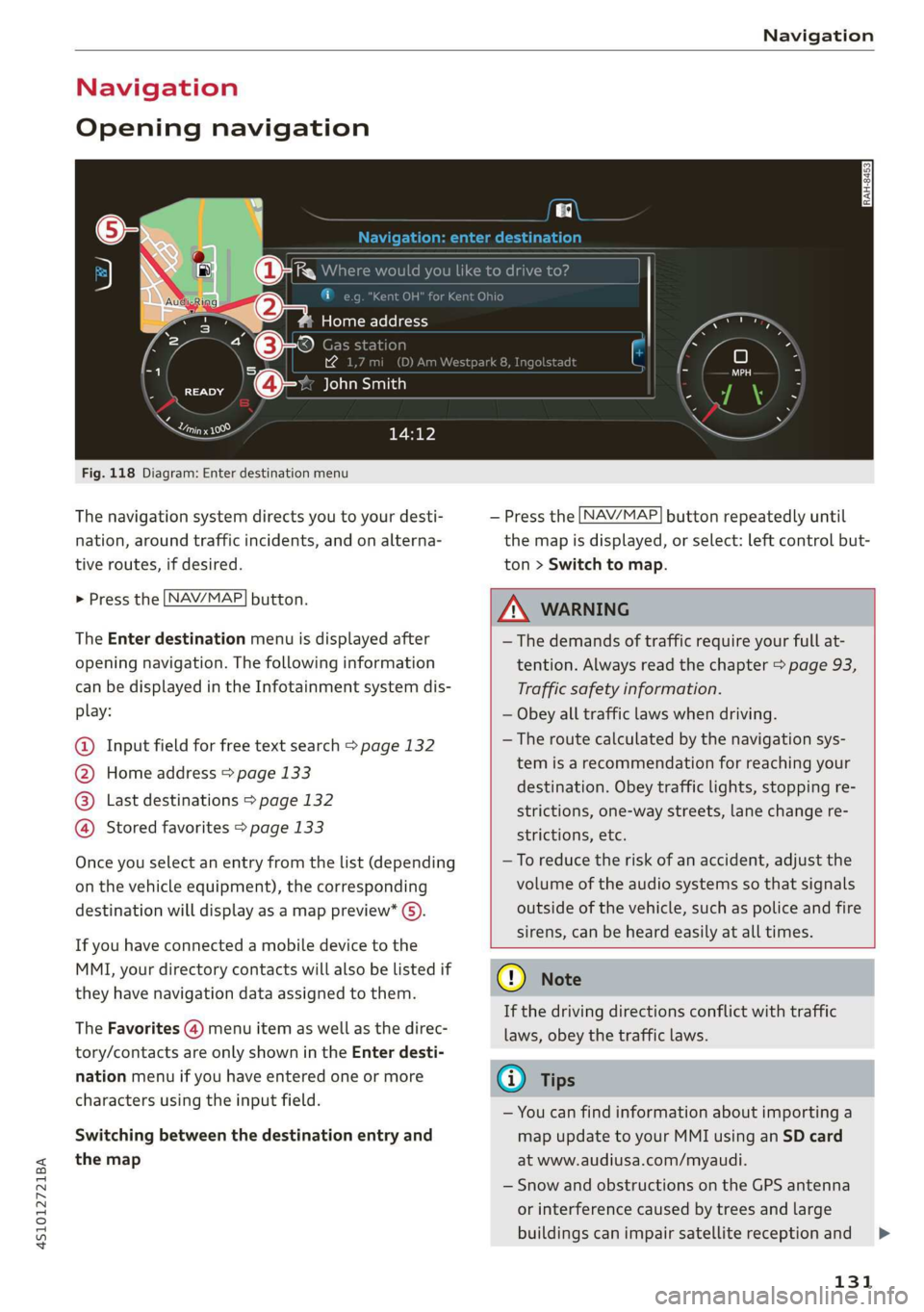
Fig. 118 Diagram: Enter destination menu
The navigation system directs you to your desti-
nation, around traffic incidents, and on alterna-
tive routes, if desired.
> Press the [NAV/MAP| button.
The Enter destination menu is displayed after
opening navigation. The following information
can be displayed in the Infotainment system dis-
play:
@ Input field for free text search > page 132
@ Home address > page 133
@® Last destinations > page 132
@ Stored favorites > page 133
Once you select an entry from the list (depending
on the vehicle equipment), the corresponding
destination will display as a map preview* ().
If you have connected a mobile device to the
MMI, your directory contacts will also be listed if
they have navigation data assigned to them.
The Favorites (4) menu item as well as the direc-
tory/contacts are only shown in the Enter desti-
nation menu if you have entered one or more
characters using the input field.
Switching between the destination entry and
the map
— Press the [NAV/MAP] button repeatedly until
the map is displayed, or select: left control but-
ton > Switch to map.
Z\ WARNING
—The demands of traffic require your full at-
tention. Always read the chapter > page 93,
Traffic safety information.
— Obey all traffic laws when driving.
—The route calculated by the navigation sys-
tem is a recommendation for reaching your
destination. Obey traffic lights, stopping re-
strictions, one-way streets, lane change re-
strictions, etc.
—To reduce the risk of an accident, adjust the
volume of the audio systems so that signals
outside of the vehicle, such as police and fire
sirens, can be heard easily at all times.
@) Note
If the driving directions conflict with traffic
laws, obey the traffic laws.
G) Tips
— You can find information about importing a
map update to your MMI using an SD card
at www.audiusa.com/myaudi.
— Snow and obstructions on the GPS antenna
or interference caused by trees and large
buildings can impair satellite reception and
131
Page 152 of 308
Media
Media
Introduction
There are various media drives and connections
available in the MMI. For example, you can play
audio/video files from the Jukebox or connect
your mobile device to the Audi music interface
and operate it through the MMI.
Notes
Media and format restrictions: the MMI (includ-
ing the SD card reader and the USB storage de-
vice connection) was tested with a variety of
products and media on the market. However,
there may be cases where individual devices or
media and audio/video files may not be recog-
nized, may play only with restrictions, or may not
play at all.
Digital Rights Management: please note that
the audio/video files are subject to copyright pro-
tection.
The media drives do not play files that are pro-
tected by DRM and that are identified with the
symbol fi.
Data security: never store important data on SD
cards, the Jukebox, CDs/DVDs or mobile devices.
Audi AG is not responsible for damaged or lost
files and media.
Loading times: the more files, folders, or play-
lists that are on a storage medium, the longer it
will take to load the audio/video files. Audi rec-
ommends using storage media that only contain
audio/video files. To decrease the time it takes to
load audio/video files, create subfolders (for ex-
ample, for the artist or album). The loading time
will also increase when importing files.
Additional information: when playing, audio
files are automatically displayed with any addi-
tional information that is stored (such as the ar-
tist, track and album cover). If this information is
not available on the storage medium, the MMI
will check the Gracenote metadata database.
150
However, in some cases, the additional informa-
tion may not be displayed.
Restricted functionality: reset the Media set-
tings to the factory default settings if functional-
ity is restricted > page 168.
Reset the Jukebox to the factory default settings
if functionality is restricted > page 168.
For information about the properties of support-
ed media and file formats, see > page 162.
@) Note
Always follow the information found in >@ in
General information on page 124.
CD/DVD operation
CD/DVD and format restrictions: the functionali-
ty of individual storage media may be limited due
to the variety of blank CDs/DVDs available and
the various capacities. Audio CDs or video DVDs
with copy protection, CDs/DVDs that do not con-
form to the standard, and multisession CDs may
have limited playback or may not play at all. Audi
recommends finalizing the recording process
when creating multisession CDs. Multisession
DVDs are not supported.
Using CDs/DVDs, the CD drive or the DVD drive:
to ensure correct, high-quality playback and to
prevent damage to the drive or disc reading er-
rors, always store CDs/DVDs in a protective
sleeve and do not expose them to direct sunlight.
Do not use:
— Damaged, dirty or scratched CDs/DVDs
— Single CDs/DVDs with 3 in (8 cm) diameter
— CD/DVDs that are not round
— CDs/DVDs with labels
— Protective rings
— Cleaning CDs
Thermal protection switch: CD/DVD playback
may be temporarily unavailable if outside tem-
peratures
are extremely hot or cold. A thermal
protection switch is installed to protect the
CD/DVD and the laser.
Laser devices: laser devices are divided into safe-
ty classes 1 to 4 in accordance with DIN IEC 76 >
Page 153 of 308
4S1012721BA
Media
(CO) 6/VDE 0837. The various types of audio
equipment installed conform to safety class 1.
The laser uses so little power or is shielded so
there is no danger when it is used correctly.
Media drives
SD card reader
RAH-7103
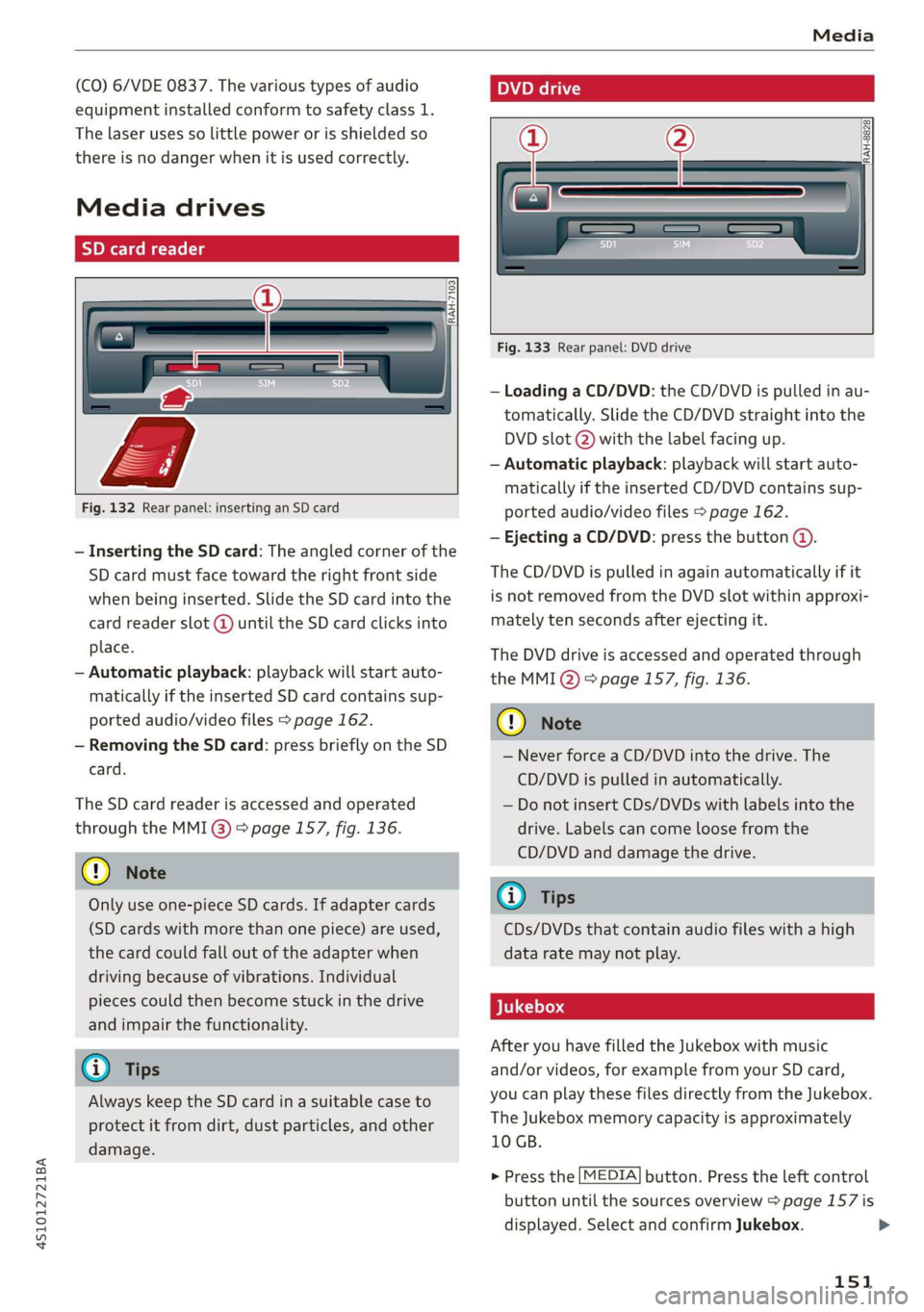
Fig. 132 Rear panel: inserting an SD card
— Inserting the SD card: The angled corner of the
SD card must face toward the right front side
when being inserted. Slide the SD card into the
card reader slot (@ until the SD card clicks into
place.
— Automatic playback: playback will start auto-
matically if the inserted SD card contains sup-
ported audio/video files > page 162.
— Removing the SD card: press briefly on the SD
card.
The SD card reader is accessed and operated
through the MMI @) > page 157, fig. 136.
@ Note
Only use one-piece SD cards. If adapter cards
(SD cards with more than one piece) are used,
the card could fall out of the adapter when
driving because of vibrations. Individual
pieces could then become stuck in the drive
and impair the functionality.
@ Tips
Always keep the SD card in a suitable case to
protect it from dirt, dust particles, and other
damage.
Poel
RAH-8828}
Fig. 133 Rear panel: DVD drive
— Loading a CD/DVD: the CD/DVD is pulled in au-
tomatically. Slide the CD/DVD straight into the
DVD slot @) with the label facing up.
— Automatic playback: playback will start auto-
matically if the inserted CD/DVD contains sup-
ported audio/video files > page 162.
— Ejecting a CD/DVD: press the button @.
The CD/DVD is pulled in again automatically if it
is not removed from the DVD slot within approxi-
mately ten seconds after ejecting it.
The DVD drive is accessed and operated through
the MMI Q) 8 page 157, fig. 136.
C) Note
— Never force a CD/DVD into the drive. The
CD/DVD is pulled in automatically.
— Do not insert CDs/DVDs with labels into the
drive. Labels can come loose from the
CD/DVD and damage the drive.
@) Tips
CDs/DVDs that contain audio files with a high
data rate may not play.
After you have filled the Jukebox with music
and/or videos, for example from your SD card,
you can play these files directly from the Jukebox.
The Jukebox memory capacity is approximately
10 GB.
> Press the [MEDIA] button. Press the left control
button until the sources overview > page 157 is
displayed. Select and confirm Jukebox.
151
>
Page 154 of 308
![AUDI R8 COUPE 2020 User Guide Media
Adding files to the Jukebox
— Press the [MEDIA] button. Press the left control
button until the sources overview > page 157 is
displayed. Select one of the following sources
to copy to](/img/6/57639/w960_57639-153.png "AUDI R8 COUPE 2020 User Guide Media
Adding files to the Jukebox
— Press the [MEDIA] button. Press the left control
button until the sources overview > page 157 is
displayed. Select one of the following sources
to copy to")
Media
Adding files to the Jukebox
— Press the [MEDIA] button. Press the left control
button until the sources overview > page 157 is
displayed. Select one of the following sources
to copy to the Jukebox: SD card, CD-ROM, DVD-
ROM, USB storage device.
Requirement: the media center (for example,
tracks, albums) must be open.
— Selecting an entry: select an entry from the
media center. Select: right control button >
Copy to jukebox > This entry or Entire list.
Requirement: the playlist must be open. See
=> page 159.
— Selecting a track: select the track that is cur-
rently playing. Select: right control button >
Copy to jukebox > This track or Entire album or
This artist.
Requirement: a video file must be playing.
— Select: right control button > Copy to jukebox.
The copying process begins. The status of the
copying process is shown in the MMI.
— Hiding the importing process: select and con-
firm Continue copying in background. The im-
porting process is hidden.
— Canceling the importing process: select and
confirm Cancel copying, or remove the source
that is being imported. Files already copied re-
main.
Requirement: the copying process must be active
in the background.
— Showing the copying process: select: right
control button > Copying in progress.
When importing, the audio files are automatical-
ly sorted into the media center categories based
on the stored additional information > page 158.
The copied video files are stored in the media
center under the Videos category.
Playing the Jukebox
Requirement: the Jukebox must contain audio/
video files > page 152, Adding files to the Juke-
box.
) Not in the Playback view.
152
The Jukebox is accessed and operated through
the MMI @) & page 157, fig. 136.
Displaying Jukebox memory capacity
Select: right control button > Jukebox memory
capacity. Information about the Jukebox memory
capacity and the number of stored tracks is dis-
played.
Deleting tracks from the Jukebox!)
Requirement: the Jukebox must contain audio/
video files.
— Deleting an entry: select an entry from the
Jukebox media center. Select: right control but-
ton > Delete from jukebox > This entry or En-
tire list.
— The status of the deleting process is shown in
the MMI. Jukebox playback stops during the de-
leting process and starts again automatically
once the deletion is complete.
() Note
Do not import audio/video files when the en-
gine is turned off because this will drain the
vehicle battery.
@) Tips
— Tracks from audio CDs cannot be imported
to the Jukebox for legal reasons.
— Files that have already been imported are
automatically recognized and cannot be
copied to the Jukebox again.
— It is not possible to play audio/video files in
the DVD drive while importing them.
— The Jukebox does not provide an export
function due to legal reasons.
— Files or tracks without additional stored in-
formation are listed as Unknown. Audi rec-
ommends adding additional information
(such as ID3 tags) to audio files.
— Reset the Jukebox to the factory default set-
tings when selling your vehicle > page 168.
Page 155 of 308
4S1012721BA
Media
Bluetooth audio player
With the Bluetooth audio player, you can play
music wirelessly from your Bluetooth-capable de-
vice (such as a cell phone) through the MMI.
Requirement: the vehicle must be stationary and
the ignition must be switched on. The Bluetooth
settings will open on your mobile device during
the connection setup. The Bluetooth function and
visibility of the MMI > page 169 and mobile de-
vice must be switched on. The Bluetooth audio
player > page 169 must be switched on in the
MMI.
— Connecting a Bluetooth player: press the
MEDIA] button. Press the left control button
until the sources overview is displayed. Select
and confirm Bluetooth audio player ©)
=> page 157, fig. 137.
—If necessary, select and confirm, Not connected
> Connect Bluetooth audio player. The Blue-
tooth device search starts. Follow the instruc-
tions in the MMI.
— Select and confirm the desired Bluetooth device
from the list. The MMI generates a PIN for the
connection.
— Select and confirm Yes.
— Enter the PIN for connecting on your Bluetooth
device, or if the PIN is already displayed on your
Bluetooth device, confirm it on the Bluetooth
device. The time allowed for entering the PIN is
limited to approximately 30 seconds.
The media is started and operated through the
mobile device or the MMI, depending on the de-
vice being used.
@) Tips
— Check for any connection requests on your
Bluetooth device.
— Multiple Bluetooth audio players can be
connected to the MMI, but only one mobile
device can be active.
— Bluetooth protocols AVRCP (1.0/1.3/1.4)
and A2DP are supported.
— Note the volume setting on your Bluetooth
device. Audi recommends setting your mo-
bile device to the maximum volume when
using it as a Bluetooth audio player.
— The supported media functions (such as
shuffle) depend on the Bluetooth device be-
ing used.
— For more information on supported devices,
visit www.audiusa.com/bluetooth or con-
tact an authorized Audi dealer or authorized
Audi Service Facility.
Wi-Fi audio player
Using the Wi-Fi audio player media source on the
MMI, you can connect and operate your Wi-Fi-ca-
pable media player (such as a smartphone) to
wirelessly play music from your media player li-
brary. The media player is connected through the
vehicle's Wi-Fi hotspot. A UPnP Server app or an
integrated UPnP/DLNA server on your media
player is required to access your media player Li-
brary.
Requirement: the Wi-Fi function on your media
player must be switched on. The myAudi app or
an UPnP server app is installed on your media
player or your media player has an integrated
UPnP/DLNA server.
— Connecting a media player: press the [MEDIA
button. Press the left control button until the
sources overview > page 157 is displayed. Se-
lect and confirm Wi-Fi audio player (7)
=> page 157, fig. 137.
—If necessary, select and confirm Wi-Fi turned
off > Turn on Wi-Fi to activate Wi-Fi in the
MMI. Select Wi-Fi settings, if necessary. Select
the same settings on the wireless media player
that are used for the Wi-Fi hotspot.
— Starting the Wi-Fi audio player: Start the
myAudi app or an UPnP server app, or allow
media sharing on your device.
Operating the media player: the media player is
operated through the MMI.
— Press the left control button repeatedly until
the Folders menu item appears. Select and con-
firm Folders.
— Playing music from the media player: select
and confirm Media center.
Web radio: see > page 154.
153
Page 156 of 308
Media
ZA WARNING
— As the driver, do not allow usage of the Wi-
Fi hotspot to distract you from driving, as
this could increase the risk of an accident.
— It is only safe to use tablets, laptops, mobile
devices and other similar devices when the
vehicle is stationary because, like all loose
objects, they could be thrown around the in-
side of the vehicle in a crash and cause seri-
ous injuries. Store these types of devices se-
curely while driving.
— Do not use any Wi-Fi devices within range of
the airbags while driving. Also read the
warnings in the chapter > page 187.
@ Note
Always follow the information found in >@ in
General information on page 124.
@) Tips
— The Wi-Fi connection is reconfigured when
inserting or removing the mini SIM card in
the SIM card reader*. There may be a tem-
porary interruption in audio playback, de-
pending on the media player.
— Always read the chapter > page 124, Audi
connect.
— Please note that a Wi-Fi connection does
not automatically make it possible to use
the Internet. For additional information,
see > page 124.
— To avoid interruptions during playback, de-
activate the power saving function on the
media player or connect it to a charger.
— The loading times for the audio data depend
on the media player used and the number of
files
that it contains.
—A maximum of 2,000 entries per directory
are displayed in the MMI.
— Songs downloaded for offline use using mu-
sic streaming services are stored on your
mobile device (such as a smartphone) and
may be DRM protected. The Wi-Fi audio
player will not play DRM protected files.
— Contact an authorized Audi dealer or au-
thorized Audi Service Facility for additional
information on the Wi-Fi audio player.
154
Online media and
Internet radio
Applies to: vehicles with Audi connect
You can playback and operate various online me-
dia services and Internet radio using the MMI.
> Press the [MEDIA] button. Press the left control
button until the sources overview > page 157,
fig. 137 is displayed.
Applies to: online media and Internet radio usage
Requirement:
— The myAudi app must be installed and open on
your mobile device.
— You must be logged in to your myAudi account
in the myAudi app and you must have selected
your vehicle.
— The Wi-Fi function on the mobile device and on
the MMI must be switched on.
—If necessary, check in the connection manager
=> page 168 if the mobile device you connected
is selected under the MMI connect app ().
—The MMI must be connected to the network.
— The symbol for the Online media* source
= page 157, fig. 137 is shown in the MMI.
Applies to: online media usage
Additional requirement:
— A supported online media service must be avail-
able in the country where the vehicle is being
operated.
— You must have an account with a supported on-
line media service.
— Depending on the online media service, you
may need to install and open an app on your
mobile device.
Starting Online media
— Press the [MEDIA] button. Press the left control
button until the sources overview > page 157 is
displayed.
— Select and confirm an online media service.
Starting Internet radio
— Press the [MEDIA] button. Press the left control
button until the sources overview > page 157 is
displayed.
— Select and confirm Internet radio. The Internet
radio browser or the last station that was play-
ing is shown.
Page 159 of 308
4S1012721BA
Media
approximately 70% of the maximum vol-
ume.
— Functionality is not guaranteed for mobile
devices that do not conform to the USB 2.0
specification.
— USB hubs are not supported.
— Some versions of the iPod such as the iPod
shuffle cannot be connected to the USB
adapter
for devices with Apple Dock connec-
tor. Connect these devices using a AUX con-
nector cable.
— Video playback through the Audi music in-
terface is only supported if the connected
device is recognized as a USB storage device
(for example a USB stick). Apple devices and
MTP devices (such as smartphones) are not
recognized as USB storage devices.
— iPod or iPhone malfunctions also affect the
operation of the MMI. Reset your iPod or
iPhone if this happens.
— For important information on operating
your iPod or iPhone, refer to the user guide
for the device. Audi recommends updating
the iPod or iPhone software to the latest
version.
— For more information about the Audi music
interface and supported devices, check the
Audi database for mobile devices at www.
audiusa.com/mp3 or contact an authorized
Audi dealer or authorized Audi Service Fa-
cility.
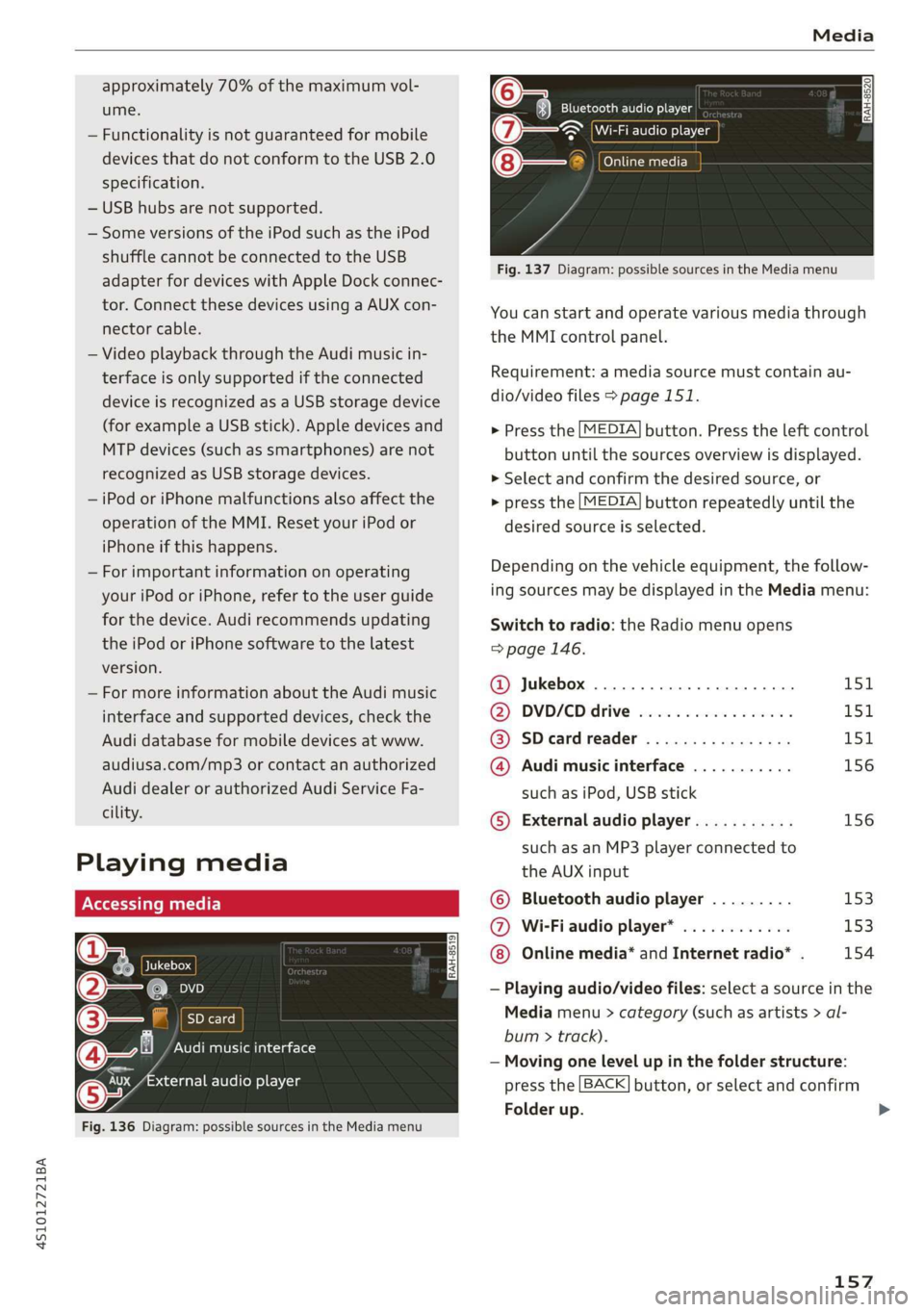
Playing media
@ Jukebox
@—e an
©— SD card
@Q— Audi music interface
aa audio player
Fig. 136 Diagram: possible sources in the Media menu
Bluetooth audio player
~ Wi-Fi audio player
@— Online media
a
Fig. 137 Diagram: possible sources in the Media menu
You can start and operate various media through
the MMI control panel.
Requirement: a media source must contain au-
dio/video files > page 151.
> Press the [MEDIA] button. Press the left control
button until the sources overview is displayed.
> Select and confirm the desired source, or
> press the [MEDIA] button repeatedly until the
desired source is selected.
Depending on the vehicle equipment, the follow-
ing sources may be displayed in the Media menu:
Switch to radio: the Radio menu opens
=> page 146.
@ Jukebox ..................000. 151
@ DVD/€D drive esse 2 2 cscs es wees L5SiL
@ SDeardreader ................ 151
@ Audi music interface ........... 156
such as iPod, USB stick
© External audio player........... 156
such as an MP3 player connected to
the AUX input
© Bluetooth audio player ......... 153
@ Wi-Fiaudio player* ............ 153
Online media* and Internet radio* . 154
— Playing audio/video files: select a source in the
Media menu > category (such as artists > al-
bum > track).
— Moving one level up in the folder structure:
press the [BACK] button, or select and confirm
Folder up.
157
Page 160 of 308
Media
— Selecting the previous/next track/chapter)):
Press the On/Off knob for the MMI control pan-
el briefly to the left KK or to the right Pel.
— Fast-forwarding and rewinding audio/video
files: press and hold the On/Off knob on the
MMI control panel to the left Kd or right Pol for
a longer time.
— Pausing or resuming playback: press the
On/Off knob on the MMI control panel briefly.
G@) Tips
— You can scroll through long lists quickly by
turning the control knob quickly. The scroll-
ing speed depends on the number of list en-
tries.
— For safety reasons, the video image is only
displayed when the vehicle is stationary. On-
ly the sound from the video plays while driv-
ing.
o.° 2
Naa a)
(4) fl Atbums
[ale
Fig. 138 Example: USB stick categories
i Beep
Orn oli
RAH-8518
8) apie ee
Nie (=fol-)
Fig. 139 Example: USB stick categories
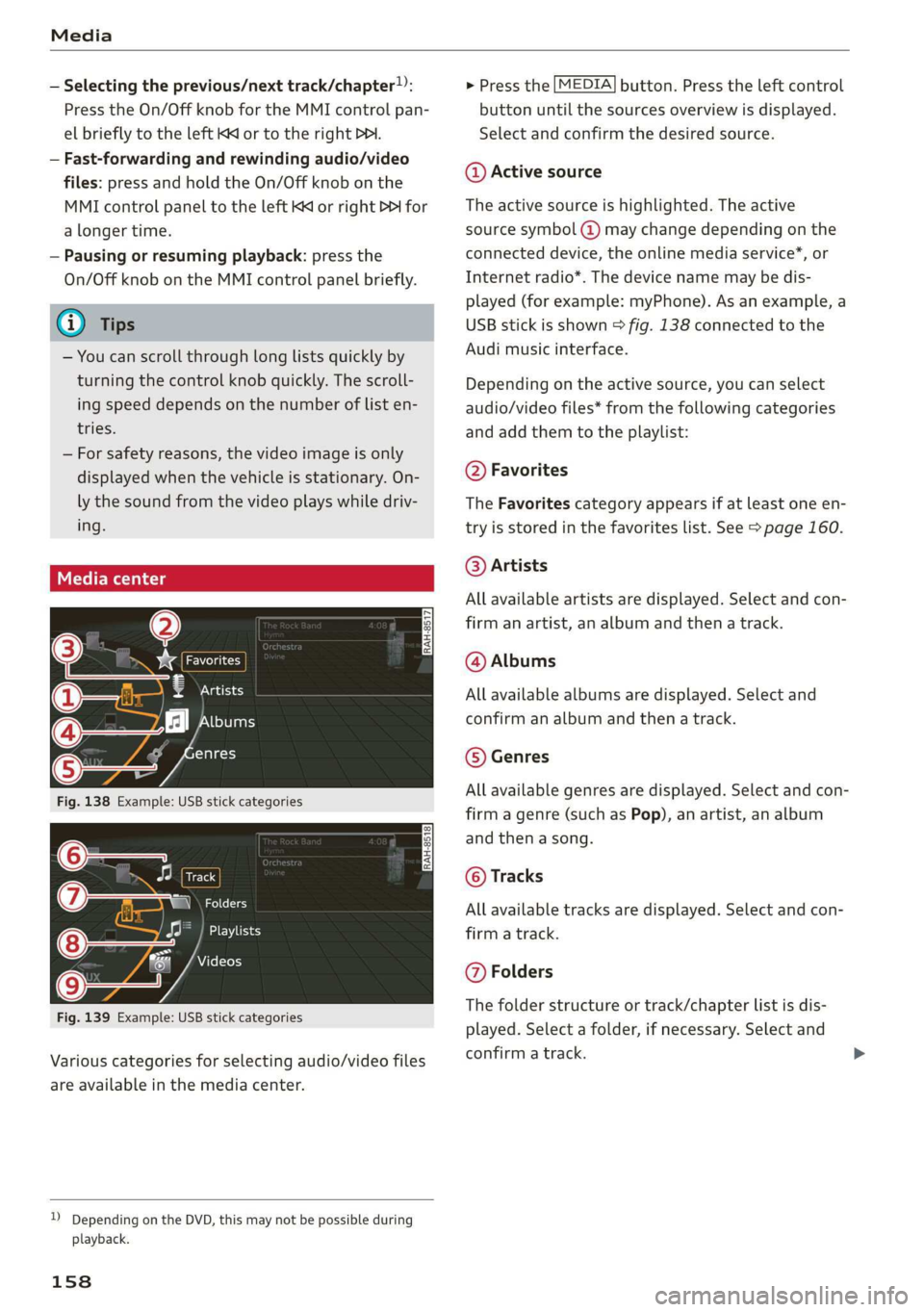
Various categories for selecting audio/video files
are available in the media center.
)) Depending on the DVD, this may not be possible during
playback.
158
> Press the [MEDIA] button. Press the left control
button until the sources overview is displayed.
Select and confirm the desired source.
@ Active source
The active source is highlighted. The active
source symbol @) may change depending on the
connected device, the online media service*, or
Internet radio*. The device name may be dis-
played (for example: myPhone). As an example, a
USB stick is shown > fig. 138 connected to the
Audi music interface.
Depending on the active source, you can select
audio/video files* from the following categories
and add them to the playlist:
@ Favorites
The Favorites category appears if at least one en-
try is stored in the favorites list. See > page 160.
@ Artists
All available artists are displayed. Select and con-
firm
an artist, an album and then a track.
@ Albums
All available albums are displayed. Select and
confirm an album and then a track.
© Genres
All available genres are displayed. Select and con-
firm a genre (such as Pop), an artist, an album
and then a song.
© Tracks
All available tracks are displayed. Select and con-
firm a track.
@ Folders
The folder structure or track/chapter list is dis-
played. Select a folder, if necessary. Select and
confirm a track.
Page 161 of 308
4S1012721BA
Media
Playlists
All available playlists from the source and the
smart playlists are displayed. Select and confirm
a playlist and then a track.
Smart playlists:
— Last played tracks: the last tracks played in the
selected source are displayed.
— Most played: the most played songs in the se-
lected source are displayed.
— 5 stars to 1 star: tracks from the selected
source are displayed according to their rating.
— Unrated: all files from the selected source
without rating information (for example, in the
ID3 tag) are displayed.
© Videos
All available video files are displayed. Select and
confirm a video file.
@) Tips
— Only the categories supported by the medi-
um are available. For example, CD/DVD-
ROM tracks cannot be selected with catego-
ries such as Artists, Albums or Genres.
With an iPod (source: Audi music interface
= page 155), the Podcasts, Audio books
and Composers categories are also availa-
ble.
— For safety reasons, the video image is only
displayed when the vehicle is stationary. On-
ly the sound from the video plays while driv-
ing.
— When synchronizing a portable device with
"Cloud“ services, playlists may display incor-
rectly
in the MMI. Use the media center in
the device.
ct -mey aaa]
(2) aia
g Leal ast 1ale}
13] Rock Band
RAH-8524
[se
@-» latest
Rock Banc
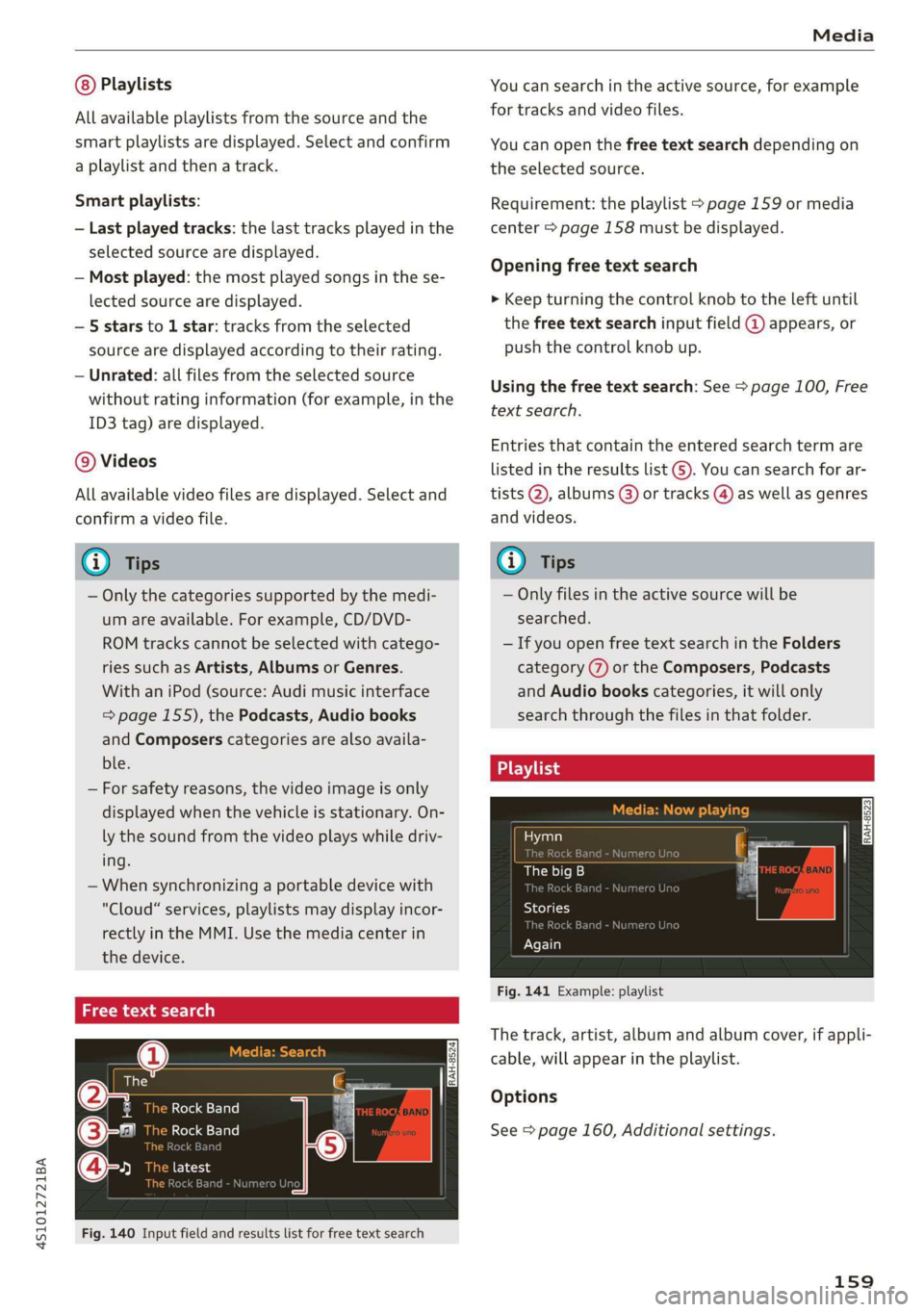
Fig. 140 Input field and results list for free text search
You can search in the active source, for example
for tracks and video files.
You can open the free text search depending on
the selected source.
Requirement: the playlist > page 159 or media
center > page 158 must be displayed.
Opening free text search
> Keep turning the control knob to the left until
the free text search input field @ appears, or
push the control knob up.
Using the free text search: See > page 100, Free
text search.
Entries that contain the entered search term are
listed
in the results list @). You can search for ar-
tists @, albums @) or tracks @) as well as genres
and videos.
(i) Tips
— Only files in the active source will be
searched.
— If you open free text search in the Folders
category (7) or the Composers, Podcasts
and Audio books categories, it will only
search through the files in that folder.
ae ts
Hymn
The big B
i kB
Sola
Dasha
Again
Fig. 141 Example: playlist
The track, artist, album and album cover, if appli-
cable, will appear in the playlist.
Options
See > page 160, Additional settings.
159