battery AUDI R8 COUPE 2020 User Guide
[x] Cancel search | Manufacturer: AUDI, Model Year: 2020, Model line: R8 COUPE, Model: AUDI R8 COUPE 2020Pages: 308, PDF Size: 82.41 MB
Page 64 of 308
![AUDI R8 COUPE 2020 User Guide Driving
This message appears when you press the
START ENGINE STOP] button while driving.
Engine start system: malfunction! Please con-
tact Service
The engine automatic start system](/img/6/57639/w960_57639-63.png "AUDI R8 COUPE 2020 User Guide Driving
This message appears when you press the
START ENGINE STOP] button while driving.
Engine start system: malfunction! Please con-
tact Service
The engine automatic start system")
Driving
This message appears when you press the
START ENGINE STOP] button while driving.
Engine start system: malfunction! Please con-
tact Service
The engine automatic start system has a mal-
function.
Drive immediately to an authorized Au-
di dealer or authorized Audi Service Facility to
have the malfunction repaired. To start the en-
gine, press and hold the [START ENGINE STOP
button.
Remote control key: hold back of key
against the designated area. See owner's man-
ual
This message appears if there is no convenience
key inside the vehicle or if the system does not
recognize the key. The convenience key may not
be recognized, for example, if it is covered by an
object that disrupts the signal (such as a brief-
case), or if the key battery is weak. Electronic de-
vices such as cell phones can also interfere with
the signal.
To still be able to start or stop the engine, see
=> page 62, Starting the engine when there is a
malfunction.
B Remote control key: key not detected. Is the
key
still in the vehicle?
The B indicator light turns on and this message
appears if the convenience key was removed from
the vehicle when the engine was running. If the
convenience key is no longer in the vehicle, you
cannot switch the ignition on or start the engine
once you stop it. You also cannot lock the vehicle
from the outside.
Please press the brake pedal
This message appears if you do not press the
brake pedal when starting the engine.
Please select N or P
This message appears when starting or stopping
the engine if the selector lever is not in the "N" or
"P" position. The engine will not start/stop.
62
Starting the engine when there is a
area d ea)
It may not be possible to start the engine under
certain circumstances, for example, if the bat-
tery in the vehicle key is drained, if interference is
affecting the key or if there is a system malfunc-
tion.
2 3
9
db + a
Fig. 70 Steering column/remote control key: starting the
engine if there is a malfunction
As long as the message ?) Remote control key:
hold back of key against the designated area.
See owner's manual is displayed, you can emer-
gency start your vehicle.
> Press the brake pedal.
> Press the [START ENGINE STOP] button.
> Hold the master key in the location indicated in
the illustration ?) © fig. 70. The engine will
start.
> If the engine does not automatically start,
press the [START ENGINE STOP] button again.
(i) Tips
You can view the message again by pressing
the [START ENGINE STOP] button.
Start/Stop system
Applies to: vehicles with Start/Stop system
The Start/Stop system can help increase fuel
economy and reduce CO2 emissions.
In Start/Stop mode, the engine shuts off auto-
matically when the vehicle is stopped, such as at
a traffic light. The ignition remains switched on
during this stop phase. The engine will restart
automatically when needed.
Page 66 of 308

Driving
— When you stop and the Start/Stop system
turns the engine off, the ignition remains
on. Make sure the ignition is switched off
before you leave the vehicle or else the bat-
tery could drain.
General information
Applies to: vehicles with Start/Stop system
Starting and stopping the engine automat-
ically
The system checks if certain conditions are met
before and during the Stop phase, and deter-
mines if the engine stops and how long it re-
mains stopped. For example, if power usage is
high, the engine will not be stopped. Along with
other conditions, the following factors influence
the automatic engine start or stop:
— Environmental conditions (slopes, inclines, ele-
vation, temperature)
— Battery (charge status, temperature, power us-
age)
— Engine temperature
— Assist systems
— Driving behavior
Depending on the engine, the indicator light
may appear if the engine is not stopped.
Ignition is switched off automatically
To prevent the vehicle battery from draining, the
ignition will switch off automatically under the
following conditions:
— If the vehicle has already been driven
— If the Start/Stop system has stopped the en-
gine
— If the driver's door is opened
—If the driver's safety belt is unbuckled
— If the brake pedal is not pressed
— If the vehicle is stationary
In this case, the parking lights switch on in place
of the low beams and the message Side marker
lights will switch off automatically in 30 mi-
nutes. See owner's manual appears in the Info-
tainment system display. The side marker lights
will switch off after approximately 30 minutes or
when you lock the vehicle.
64
If the Start/Stop system has not turned off the
engine or if you have switched the Start/Stop sys-
tem off manually, the ignition will not be auto-
matically switched off and the engine will contin-
uetorun>A.
ZX WARNING
To reduce the risk of poisoning, never allow
the engine to run in confined spaces.
@ Tips '
If you select the “D”, “N” or “S” gear after
shifting into reverse, the vehicle must be driv-
en faster than 6 mph (10 km/h) in order for
the engine to switch off again.
Manually switching the Start/Stop system
ame emo
Applies to: vehicles with Start/Stop system
If you do not wish to use the system, you can
switch it off manually.
S g
2 § £
g z
Fig. 72 Center console: Start/Stop system button
> To switch the Start/Stop system off/on manual-
ly, press the || button. The LED in the button
turns on when the system is switched off.
G@) Tips
If you switch the system off during a Stop
phase, the engine will start again automati-
cally.
Page 93 of 308
4S1012721BA
Intelligent Technology
faster than 85 mph (140 km/h). Drive immedi-
ately to an authorized Audi dealer or authorized
Audi Service Facility to have the malfunction re-
paired. The color of the indicator light depends
on the vehicle speed.
ZA WARNING
Driving at higher speeds without the rear
spoiler deployed can impair handling charac-
teristics, making the vehicle harder to control.
— Always make sure that the spoiler is de-
ployed when driving at speeds over 85 mph
(140 km/h). If the rear spoiler warning/indi-
cator light in the instrument cluster comes
on, the rear spoiler may not have deployed.
— Never drive at speeds higher than 85 mph
(140 km/h) if the spoiler is not deployed.
Have the spoiler inspected as soon as possi-
ble by an authorized Audi dealer or qualified
workshop.
— Always obey speed limits and other traffic
laws.
— Hot air from the engine compartment can
escape through the rear spoiler when it is
open and it could burn you.
ZA\ WARNING
Improper operation of the rear spoiler can
cause crushing injuries.
— Always make sure that nobody, especially
children, is in the way when the rear spoiler
is deployed or retracted.
©) Note
— Never push on the vehicle on the rear spoil-
er. This could cause damage.
— To prevent damage to the rear spoiler do
not lean or place anything on it.
—To reduce the risk of damage, only operate
the rear spoiler manually when the engine
compartment lid is closed and the moving
parts for the rear spoiler are not blocked.
G@) Tips
Clean the rear spoiler compartment every 2 to
3 months. To function correctly, the rear
spoiler must be free of ice, snow and leaves.
Energy management
Your vehicle is equipped with an intelligent ener-
gy management system for distributing electrici-
ty. This significantly improves the starting ability
and increases the vehicle battery life.
(i) Tips
— If you drive short distances frequently, the
vehicle battery may not charge enough
while driving. As a result, convenience func-
tions for electrical equipment may be tem-
porarily unavailable.
— The vehicle battery will gradually drain if
the vehicle is not driven for long periods of
time, or if electrical equipment is used
when the engine is not running. To ensure
that the vehicle can still be started, the
electrical equipment will be limited or
switched off.
Notice about data
recorded by the Event
Data Recorder and
vehicle control modules
Event Data Recorder
This vehicle is equipped with an Event Data Re-
corder (EDR). The main purpose of an EDR is to
record, in certain crash or near crash-like situa-
tions, such as an airbag deployment or hitting a
road obstacle, data that will assist in understand-
ing how a vehicle's systems performed. The EDR
is designed to record data related to vehicle dy-
namics and safety systems for a short period of
time, typically 30 seconds or less. The EDR in this
vehicle is designed to record such data as:
— How various systems in your vehicle were oper-
ating;
— Whether or not the driver and passenger safety
belts were buckled/fastened;
— How far (if at all) the driver was depressing the
accelerator and/or brake pedal; and,
— How fast the vehicle was traveling.
These data can help provide a better understand-
ing of the circumstances in which crashes and
91
>
Page 96 of 308
Multi Media Interface
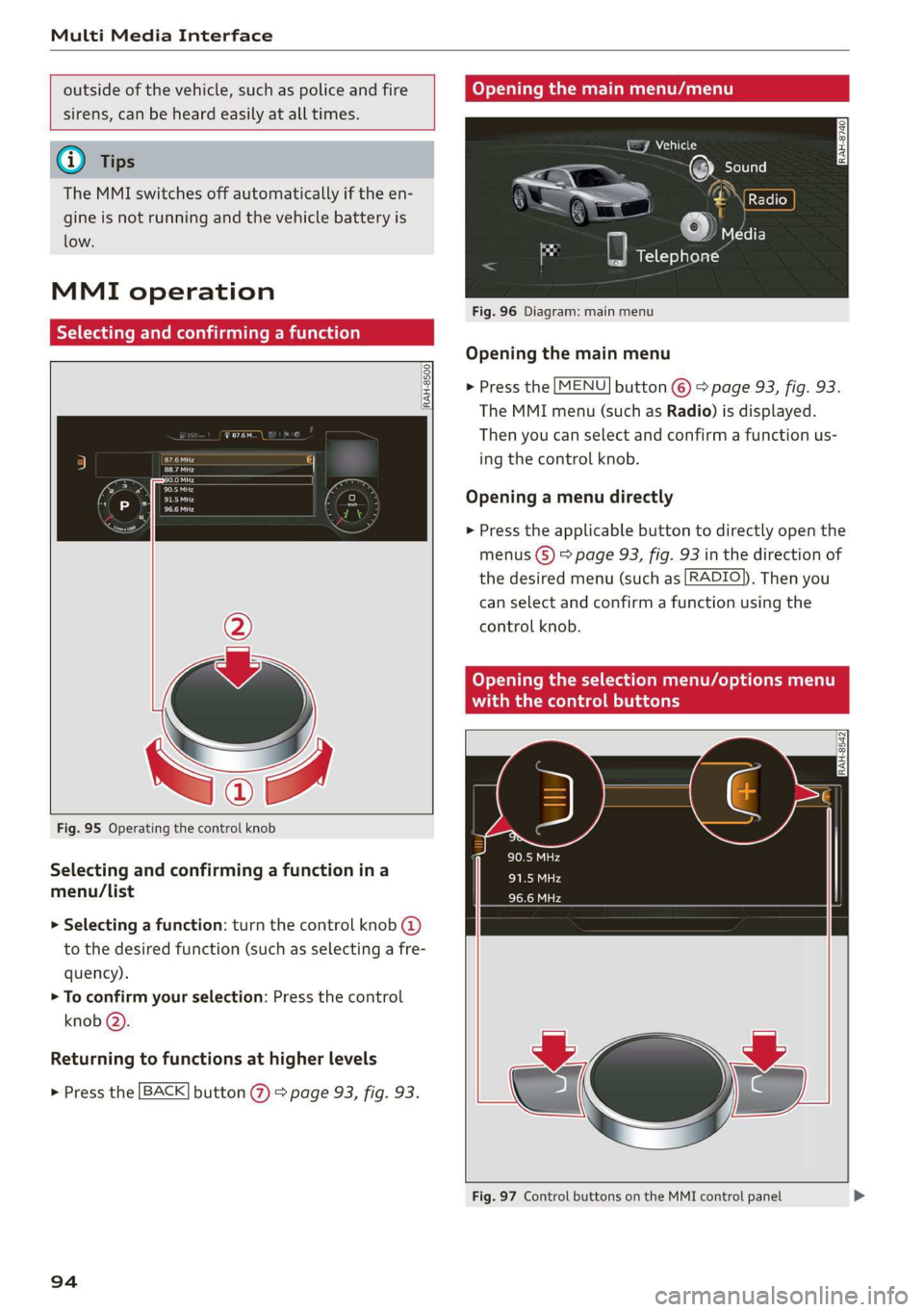
outside of the vehicle, such as police and fire Opening the main menu/menu
sirens, can be heard easily at all times.
: (7 Vehicle
@ Tips 7 ©) Sole ae)
The MMI switches off automatically if the en- A —— CN peers
gine is not running and the vehicle battery is i 7 ©
JAS elF) low. ”
a Telephone
MMI operation
Selecting and confirming a function
Fig. 96 Diagram: main menu
Opening the main menu
> Press the [MENU] button © > page 93, fig. 93.
RAH-8500
The MMI menu (such as Radio) is displayed.
Then you can select and confirm a function us-
Baa ing the control knob. Cra
Opening a menu directly Pa
> Press the applicable button to directly open the
menus (S) > page 93, fig. 93 in the direction of
the desired menu (such as [RADIO]). Then you
can select and confirm a function using the
control knob.
Opening the selection menu/options menu
with the control buttons
Fig. 95 Operating the control knob
Selecting and confirming a function in a
menu/list
> Selecting a function: turn the control knob @)
to the desired function (such as selecting a fre-
quency).
> To confirm your selection: Press the control
knob @).
Returning to functions at higher levels
> Press the [BACK] button %) ° page 93, fig. 93.
Fig. 97 Control buttons on the MMI control panel
94
Page 114 of 308
Telephone
secondary phone. You can be reached in your ve-
hicle through both cell phones.
The first connected cell phone is displayed as the
primary phone in the MMI. The second cell phone
is connected as the secondary phone.
The directory from the connected primary phone
will always be displayed. If you would like to use
the directory from the secondary phone, you
must switch the primary and secondary phone
=> page 112.
Connecting a cell phone as the primary
phone
Connect your cell phone to the MMI via Blue-
tooth. The first connected cell phone is displayed
as the Primary phone in the MMI.
See > page 110, Connecting a cell phone using
Bluetooth.
Connecting a cell phone as the secondary
phone
Requirement: a cell phone must be connected to
the MMI as the primary phone.
Select: [MENU] button > Telephone > right con-
trol button > Connect secondary telephone.
See > page 110, Connecting a cell phone using
Bluetooth.
Example: you have connected your business cell
phone to the MMI as the primary phone and your
private cell phone as the secondary phone. To be
able to call contacts from your private cell phone
directory, you must switch the primary and sec-
ondary phone, since the directory from the pri-
mary phone is always displayed.
Switching the primary and secondary phone
Requirement: a primary phone and a secondary
phone must be connected.
Select: [MENU] button > Telephone > right con-
trol button > Switch primary and second. phone.
Gi) Tips
— Please note that only the directory from the
primary phone is always displayed.
112
— You can see if a cell phone is connected as
the primary phone or secondary phone in
the Connection manager > page 168.
— The device name of the connected primary
phone is shown in the Telephone menu
(such as myPhone).
— If the primary phone does not connect auto-
matically to the MMI when the ignition is
switched on, for example because it is out
of the vehicle range or the Bluetooth func-
tion is switched off, then a previously paired
secondary phone is automatically connected
as the primary phone.
— You can send and receive messages on your
primary phone as well as on your secondary
phone > page 114, fig. 111. You do not
need to switch your primary phone and sec-
ondary phone for this.
— You can also make your connected cell
phone the default phone by selecting Set as
default telephone in the Connection man-
ager > page 169.
Using the Audi phone
box
Applies to: vehicles with Audi phone box
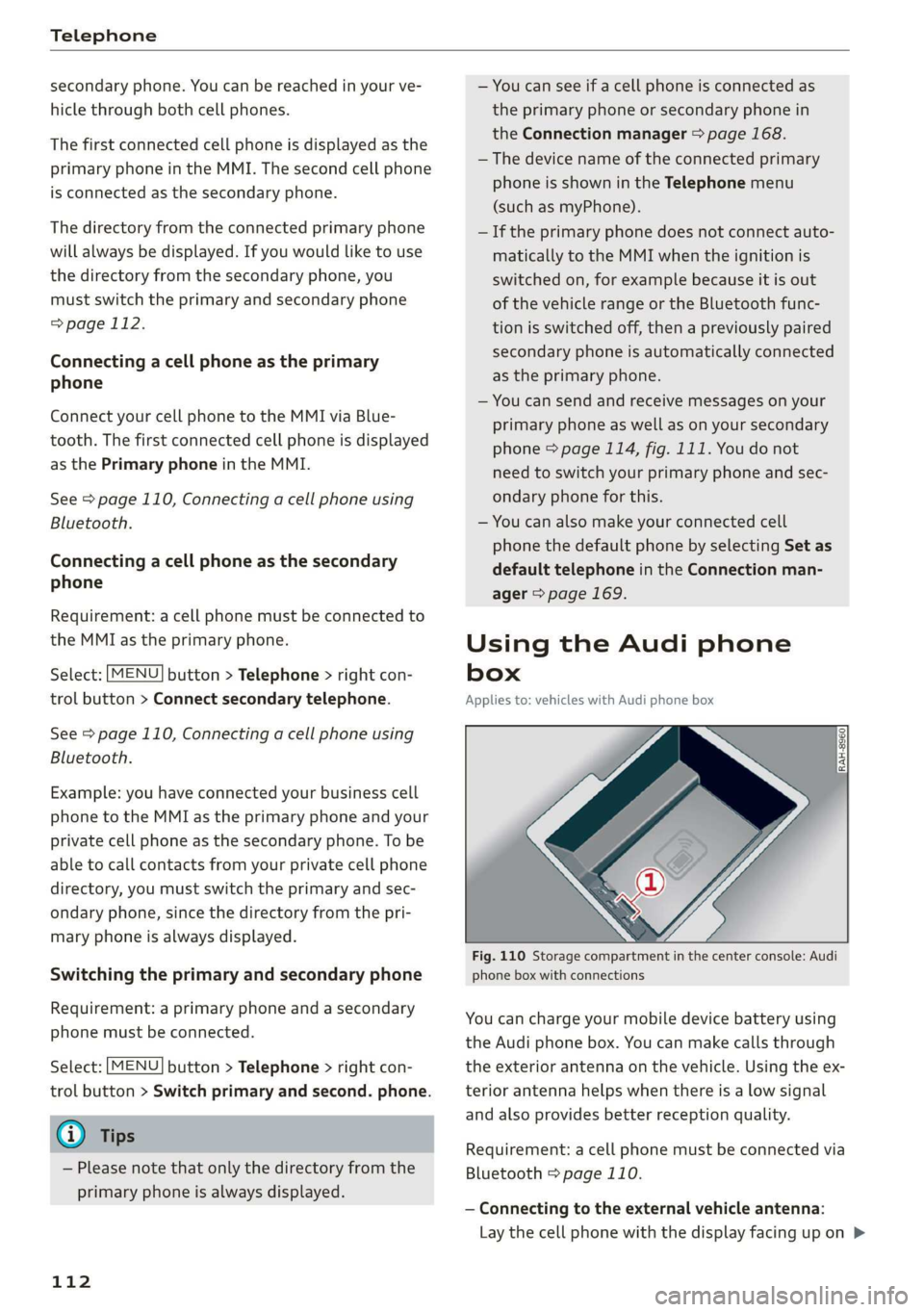
Fig. 110 Storage compartment in the center console: Audi
phone box with connections
You can charge your mobile device battery using
the Audi phone box. You can make calls through
the exterior antenna on the vehicle. Using the ex-
terior antenna helps when there is a low signal
and also provides better reception quality.
Requirement: a cell phone must be connected via
Bluetooth > page 110.
— Connecting to the external vehicle antenna:
Lay the cell phone with the display facing up on >
Page 154 of 308
![AUDI R8 COUPE 2020 User Guide Media
Adding files to the Jukebox
— Press the [MEDIA] button. Press the left control
button until the sources overview > page 157 is
displayed. Select one of the following sources
to copy to](/img/6/57639/w960_57639-153.png "AUDI R8 COUPE 2020 User Guide Media
Adding files to the Jukebox
— Press the [MEDIA] button. Press the left control
button until the sources overview > page 157 is
displayed. Select one of the following sources
to copy to")
Media
Adding files to the Jukebox
— Press the [MEDIA] button. Press the left control
button until the sources overview > page 157 is
displayed. Select one of the following sources
to copy to the Jukebox: SD card, CD-ROM, DVD-
ROM, USB storage device.
Requirement: the media center (for example,
tracks, albums) must be open.
— Selecting an entry: select an entry from the
media center. Select: right control button >
Copy to jukebox > This entry or Entire list.
Requirement: the playlist must be open. See
=> page 159.
— Selecting a track: select the track that is cur-
rently playing. Select: right control button >
Copy to jukebox > This track or Entire album or
This artist.
Requirement: a video file must be playing.
— Select: right control button > Copy to jukebox.
The copying process begins. The status of the
copying process is shown in the MMI.
— Hiding the importing process: select and con-
firm Continue copying in background. The im-
porting process is hidden.
— Canceling the importing process: select and
confirm Cancel copying, or remove the source
that is being imported. Files already copied re-
main.
Requirement: the copying process must be active
in the background.
— Showing the copying process: select: right
control button > Copying in progress.
When importing, the audio files are automatical-
ly sorted into the media center categories based
on the stored additional information > page 158.
The copied video files are stored in the media
center under the Videos category.
Playing the Jukebox
Requirement: the Jukebox must contain audio/
video files > page 152, Adding files to the Juke-
box.
) Not in the Playback view.
152
The Jukebox is accessed and operated through
the MMI @) & page 157, fig. 136.
Displaying Jukebox memory capacity
Select: right control button > Jukebox memory
capacity. Information about the Jukebox memory
capacity and the number of stored tracks is dis-
played.
Deleting tracks from the Jukebox!)
Requirement: the Jukebox must contain audio/
video files.
— Deleting an entry: select an entry from the
Jukebox media center. Select: right control but-
ton > Delete from jukebox > This entry or En-
tire list.
— The status of the deleting process is shown in
the MMI. Jukebox playback stops during the de-
leting process and starts again automatically
once the deletion is complete.
() Note
Do not import audio/video files when the en-
gine is turned off because this will drain the
vehicle battery.
@) Tips
— Tracks from audio CDs cannot be imported
to the Jukebox for legal reasons.
— Files that have already been imported are
automatically recognized and cannot be
copied to the Jukebox again.
— It is not possible to play audio/video files in
the DVD drive while importing them.
— The Jukebox does not provide an export
function due to legal reasons.
— Files or tracks without additional stored in-
formation are listed as Unknown. Audi rec-
ommends adding additional information
(such as ID3 tags) to audio files.
— Reset the Jukebox to the factory default set-
tings when selling your vehicle > page 168.
Page 158 of 308
Media
ONC mata le)
Applies to: vehicles with Audi music interface
RAH-8345|
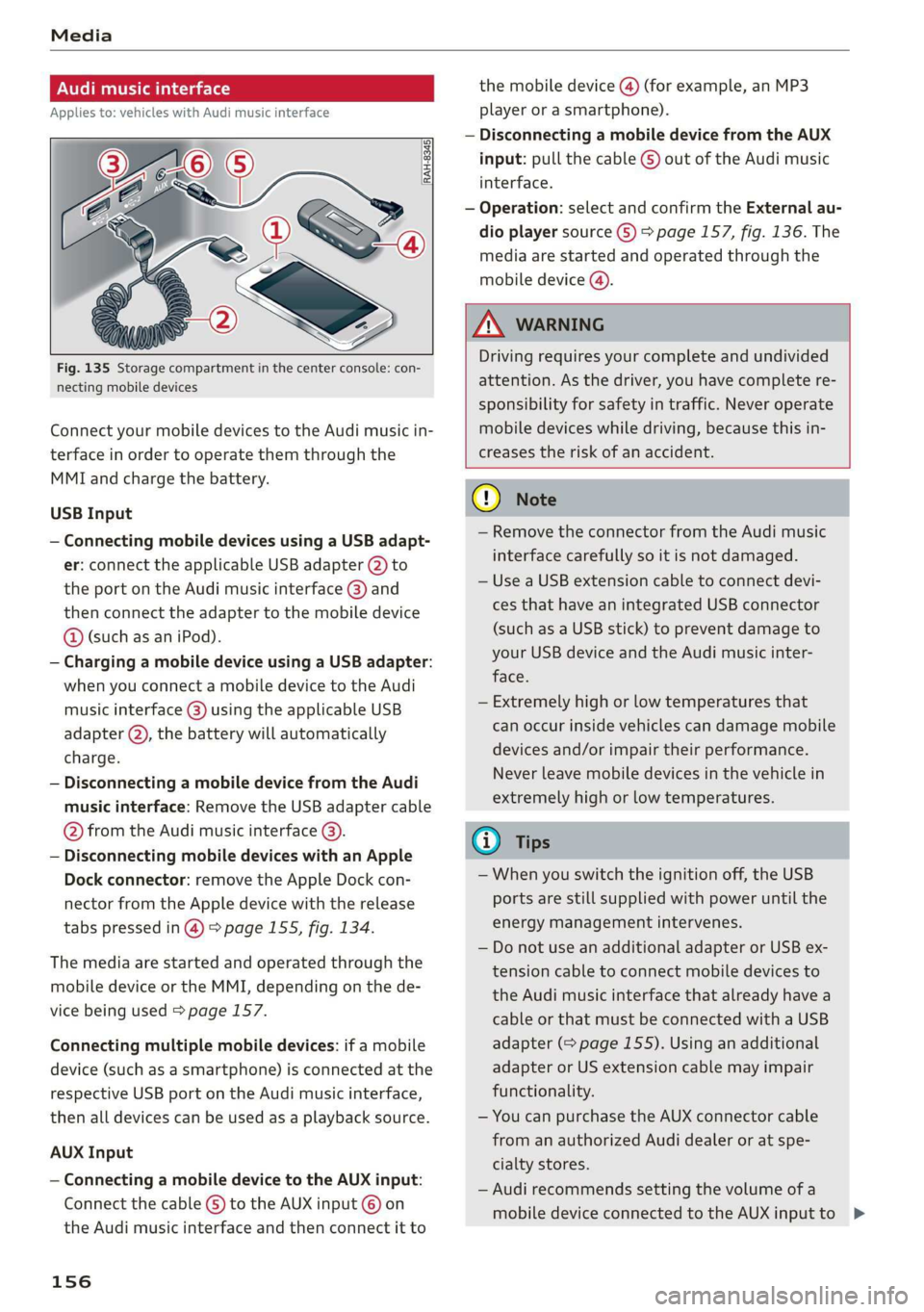
Fig. 135 Storage compartment in the center console: con-
necting mobile devices
Connect your mobile devices to the Audi music in-
terface in order to operate them through the
MMI and charge the battery.
USB Input
— Connecting mobile devices using a USB adapt-
er: connect the applicable USB adapter @) to
the port on the Audi music interface @) and
then connect the adapter to the mobile device
@ (such as an iPod).
— Charging a mobile device using a USB adapter:
when you connect a mobile device to the Audi
music interface @) using the applicable USB
adapter @), the battery will automatically
charge.
— Disconnecting a mobile device from the Audi
music interface: Remove the USB adapter cable
@ from the Audi music interface @).
— Disconnecting mobile devices with an Apple
Dock connector: remove the Apple Dock con-
nector from the Apple device with the release
tabs pressed in @) > page 155, fig. 134.
The media are started and operated through the
mobile device or the MMI, depending on the de-
vice being used > page 157.
Connecting multiple mobile devices: if a mobile
device (such as a smartphone) is connected at the
respective USB port on the Audi music interface,
then all devices can be used as a playback source.
AUX Input
— Connecting a mobile device to the AUX input:
Connect the cable G) to the AUX input © on
the Audi music interface and then connect it to
156
the mobile device @) (for example, an MP3
player or a smartphone).
— Disconnecting a mobile device from the AUX
input: pull the cable G) out of the Audi music
interface.
— Operation: select and confirm the External au-
dio player source G) > page 157, fig. 136. The
media are started and operated through the
mobile device (@).
Z\ WARNING
Driving requires your complete and undivided
attention. As the driver, you have complete re-
sponsibility for safety in traffic. Never operate
mobile devices while driving, because this in-
creases the risk of an accident.
(1) Note
— Remove the connector from the Audi music
interface carefully so it is not damaged.
— Use a USB extension cable to connect devi-
ces that have an integrated USB connector
(such as a USB stick) to prevent damage to
your USB device and the Audi music inter-
face.
— Extremely high or low temperatures that
can occur inside vehicles can damage mobile
devices and/or impair their performance.
Never leave mobile devices in the vehicle in
extremely high or low temperatures.
@) Tips
— When you switch the ignition off, the USB
ports are still supplied with power until the
energy management intervenes.
— Do not use an additional adapter or USB ex-
tension cable to connect mobile devices to
the Audi music interface that already have a
cable or that must be connected with a USB
adapter (= page 155). Using an additional
adapter or US extension cable may impair
functionality.
— You can purchase the AUX connector cable
from an authorized Audi dealer or at spe-
cialty stores.
— Audi recommends setting the volume of a
mobile device connected to the AUX inputto >
Page 166 of 308
Media
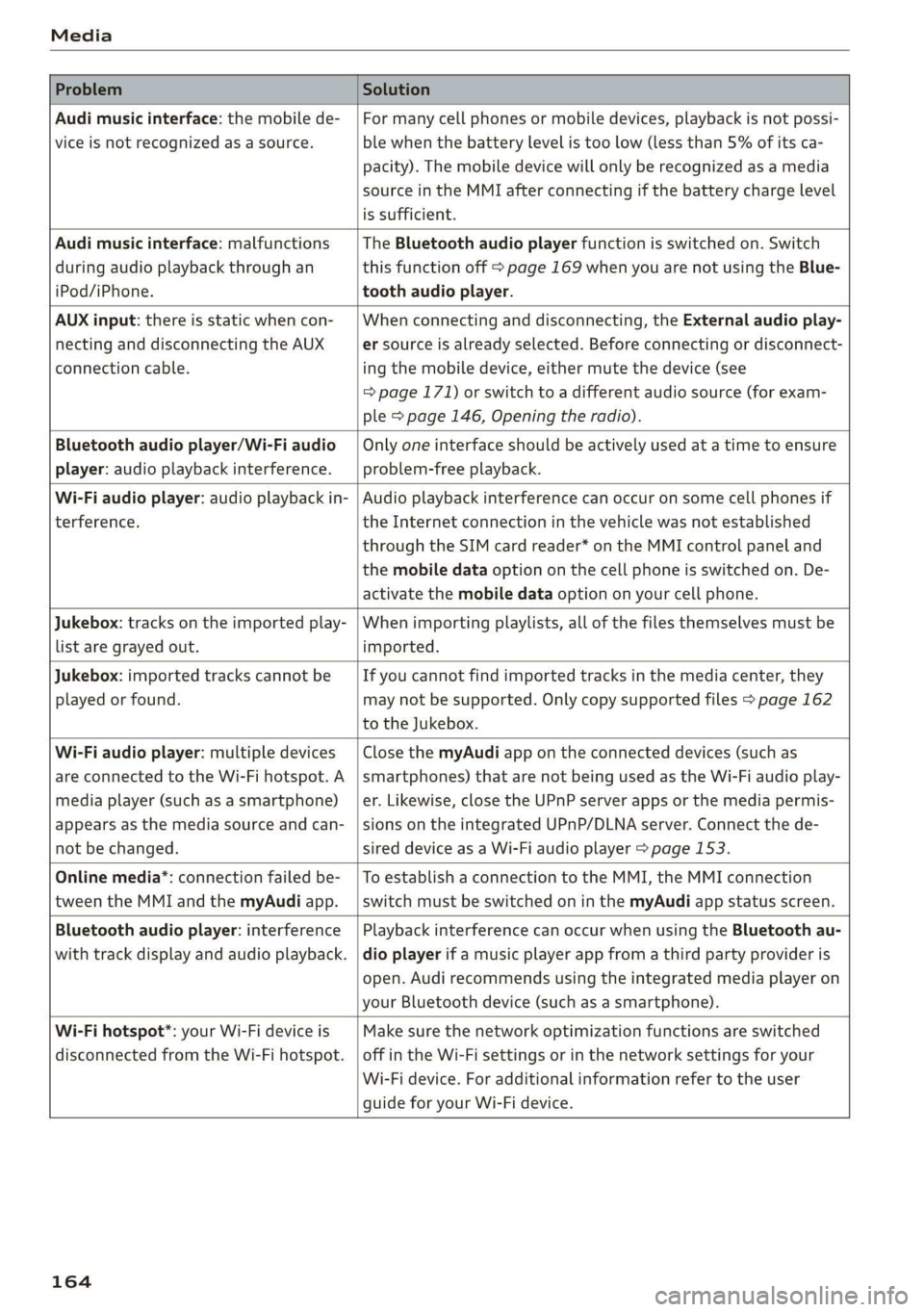
Problem Solution
Audi music interface: the mobile de-
vice is not recognized as a source.
For many cell phones or mobile devices, playback is not possi-
ble when the battery level is too low (less than 5% of its ca-
pacity). The mobile device will only be recognized as a media
source in the MMI after connecting if the battery charge level
is sufficient.
Audi music interface: malfunctions
during audio playback through an
iPod/iPhone.
The Bluetooth audio player function is switched on. Switch
this function off > page 169 when you are not using the Blue-
tooth audio player.
AUX input: there is static when con-
necting and disconnecting the AUX
connection cable.
When connecting and disconnecting, the External audio play-
er source is already selected. Before connecting or disconnect-
ing the mobile device, either mute the device (see
=> page 171) or switch to a different audio source (for exam-
ple > page 146, Opening the radio).
Bluetooth audio player/Wi-Fi audio
player: audio playback interference.
Only one interface should be actively used at a time to ensure
problem-free playback.
Wi-Fi audio player: audio playback in-
terference.
Audio playback interference can occur on some cell phones if
the Internet connection in the vehicle was not established
through the SIM card reader* on the MMI control panel and
the mobile data option on the cell phone is switched on. De-
activate the mobile data option on your cell phone.
Jukebox: tracks on the imported play-
list are grayed out.
When importing playlists, all of the files themselves must be
imported.
Jukebox: imported tracks cannot be
played or found.
If you cannot find imported tracks in the media center, they
may not be supported. Only copy supported files > page 162
to the Jukebox.
Wi-Fi audio player: multiple devices
are connected to the Wi-Fi hotspot. A
media player (such as a smartphone)
appears as the media source and can-
not be changed.
Close the myAudi app on the connected devices (such as
smartphones) that are not being used as the Wi-Fi audio play-
er. Likewise, close the UPnP server apps or the media permis-
sions on the integrated UPnP/DLNA server. Connect the de-
sired device as a Wi-Fi audio player > page 153.
Online media*: connection failed be-
tween the MMI and the myAudi app.
To establish a connection to the MMI, the MMI connection
switch must be switched on in the myAudi app status screen.
Bluetooth audio player: interference
with track display and audio playback.
Playback interference can occur when using the Bluetooth au-
dio player if a music player app from a third party provider is
open. Audi recommends using the integrated media player on
your Bluetooth device (such as a smartphone).
Wi-Fi hotspot*: your Wi-Fi device is
disconnected from the Wi-Fi hotspot.
Make sure the network optimization functions are switched
off in the Wi-Fi settings or in the network settings for your
Wi-Fi device. For additional information refer to the user
guide for your Wi-Fi device.
164
Page 168 of 308
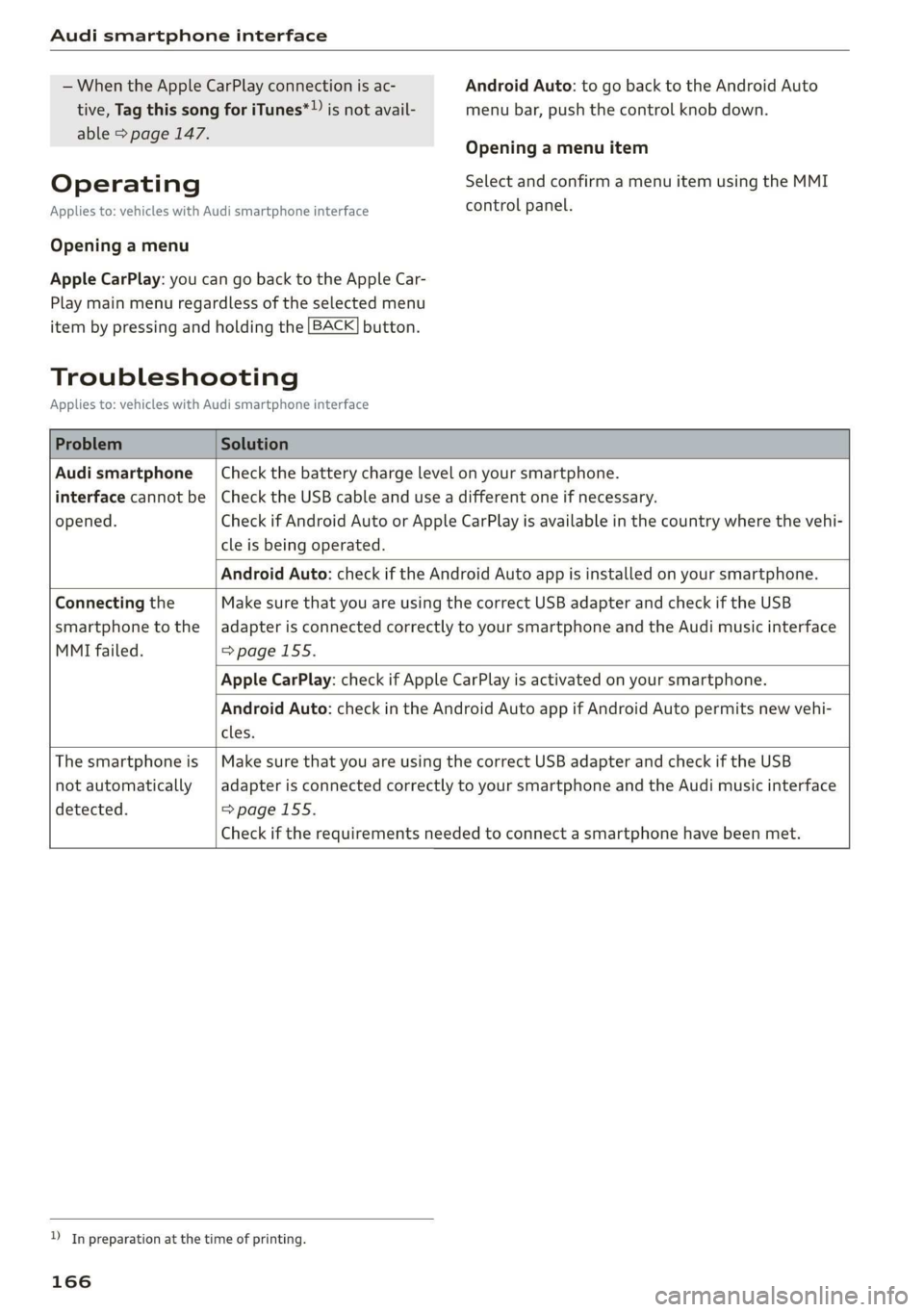
Audi smartphone interface
— When the Apple CarPlay connection is ac- Android Auto: to go back to the Android Auto
tive, Tag this song for iTunes*» js not avail- menu bar, push the control knob down.
able > page 147.
Operating
Opening a menu item
Select and confirm a menu item using the MMI
Applies to: vehicles with Audi smartphone interface control panel.
Opening a menu
Apple CarPlay: you can go back to the Apple Car-
Play main menu regardless of the selected menu
item by pressing and holding the [BACK] button.
Troubleshooting
Applies to: vehicles with Audi smartphone interface
Problem Solution
Audi smartphone
interface cannot be
opened.
Check the battery charge level on your smartphone.
Check the USB cable and use a different one if necessary.
Check if Android Auto or Apple CarPlay is available in the country where the vehi-
cle is being operated.
Android Auto: check if the Android Auto app is installed on your smartphone.
Connecting the
smartphone to the
MMI failed.
Make sure that you are using the correct USB adapter and check if the USB
adapter is connected correctly to your smartphone and the Audi music interface
=> page 155.
Apple CarPlay: check if Apple CarPlay is activated on your smartphone.
Android Auto: check in the Android Auto app if Android Auto permits new vehi-
cles.
The smartphone is
not automatically
detected.
Make sure that you are using the correct USB adapter and check if the USB
adapter
is connected correctly to your smartphone and the Audi music interface
=> page 155.
Check if the requirements needed to connect a smartphone have been met.
D_ In preparation at the time of printing.
166
Page 204 of 308
Airbag system
have not been specifically approved by Au-
di.
— Never use additional seat cushions that
cover the areas where the side airbags in-
flate.
— Damage to the original seat covers or to
the seam in the area of the side airbag
module must always be repaired immedi-
ately by an authorized Audi dealer.
— The airbag system can deploy only once. Af-
ter
an airbag has been deployed, it must be
replaced with new replacement parts de-
signed and approved especially for your Audi
model version. Replacement of complete
airbag systems or airbag components must
be performed by qualified workshops only.
Make sure that any airbag service action is
entered in your Audi Warranty & Mainte-
nance booklet under AIRBAG REPLACEMENT
RECORD.
— For safety reasons in severe accidents, the
alternator and starter are separated from
the vehicle battery with a pyrotechnic circuit
interrupter.
— Work on the pyrotechnic circuit interrupter
must only be performed by a qualified
technicians who have the experience, in-
formation and special tools necessary to
perform the work safely.
— If the vehicle or the circuit interrupter is
scrapped, all applicable safety precautions
must be followed.
Orme Mar eel e ce)
Airbag performance
Changing the vehicle's suspension system can
change the way that the Advanced Airbag System
performs in a crash. For example, using tire-rim
combinations not approved by Audi, lowering the
vehicle, changing the stiffness of the suspension,
including the springs, suspension struts, shock
absorbers etc. can change the forces that are
measured by the airbag sensors and sent to the
electronic control unit. Some suspension changes
can, for example, increase the force levels meas-
ured by the sensors and make the airbag system
deploy in crashes in which it would not deploy if
202
the changes had not been made. Other kinds of
changes may reduce the force levels measured by
the sensors and prevent the airbag from deploy-
ing when it should.
Z\ WARNING
Changing the vehicle's suspension including
use of unapproved tire-rim combinations can
change Advanced Airbag performance and in-
crease the risk of serious personal injury in a
crash.
— Never install suspension components that
do not have the same performance charac-
teristics as the components originally instal-
led on your vehicle.
— Never use tire-rim combinations that have
not been approved by Audi.
Knee airbags
Description of knee airbags
The knee airbag system can provide supplemen-
tal protection to properly restrained front seat
occupants.
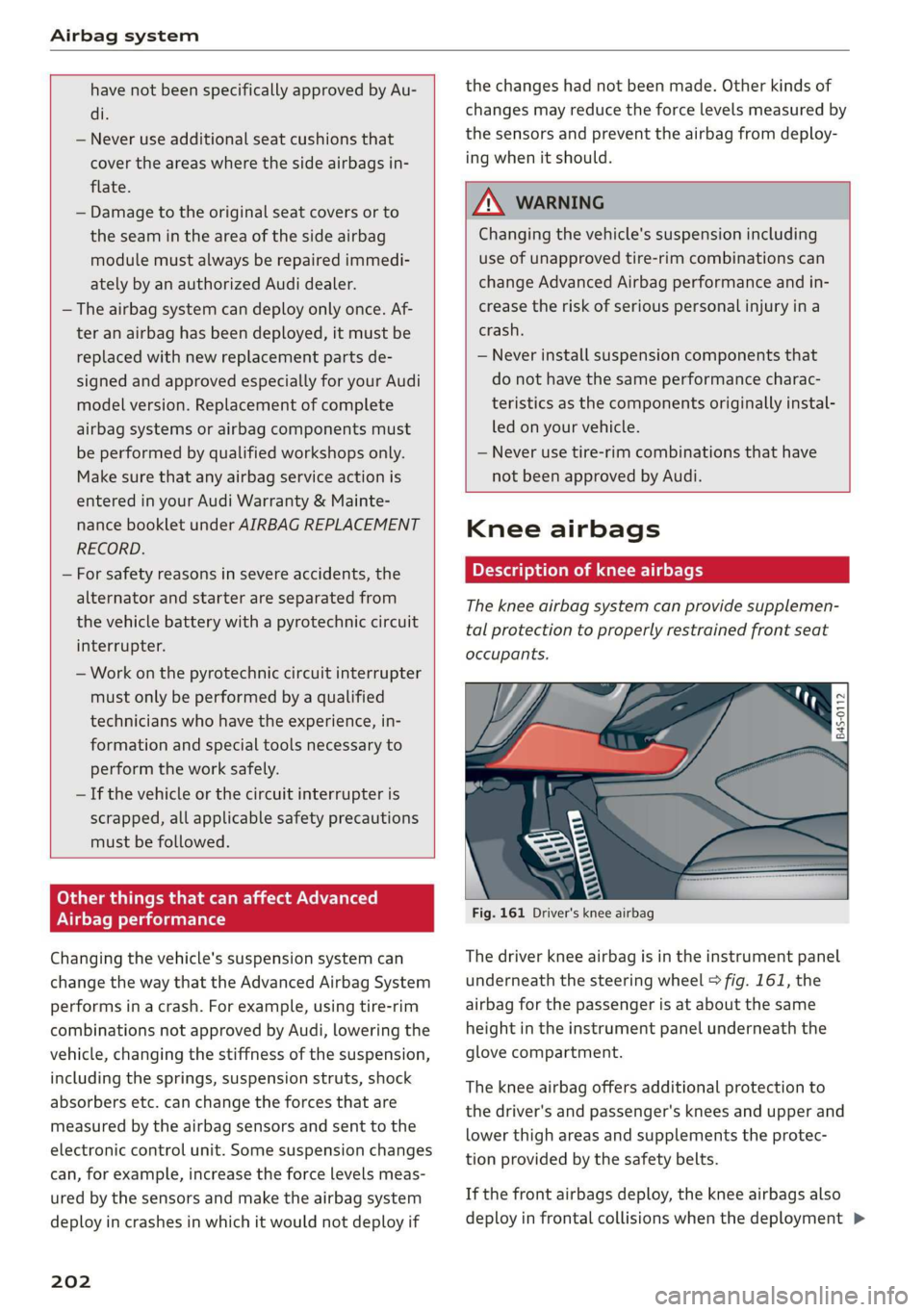
Fig. 161 Driver's knee airbag
The driver knee airbag is in the instrument panel
underneath the steering wheel > fig. 161, the
airbag for the passenger is at about the same
height in the instrument panel underneath the
glove compartment.
The knee airbag offers additional protection to
the driver's and passenger's knees and upper and
lower thigh areas and supplements the protec-
tion provided by the safety belts.
If the front airbags deploy, the knee airbags also
deploy in frontal collisions when the deployment >