change time AUDI R8 COUPE 2020 User Guide
[x] Cancel search | Manufacturer: AUDI, Model Year: 2020, Model line: R8 COUPE, Model: AUDI R8 COUPE 2020Pages: 308, PDF Size: 82.41 MB
Page 162 of 308
Media
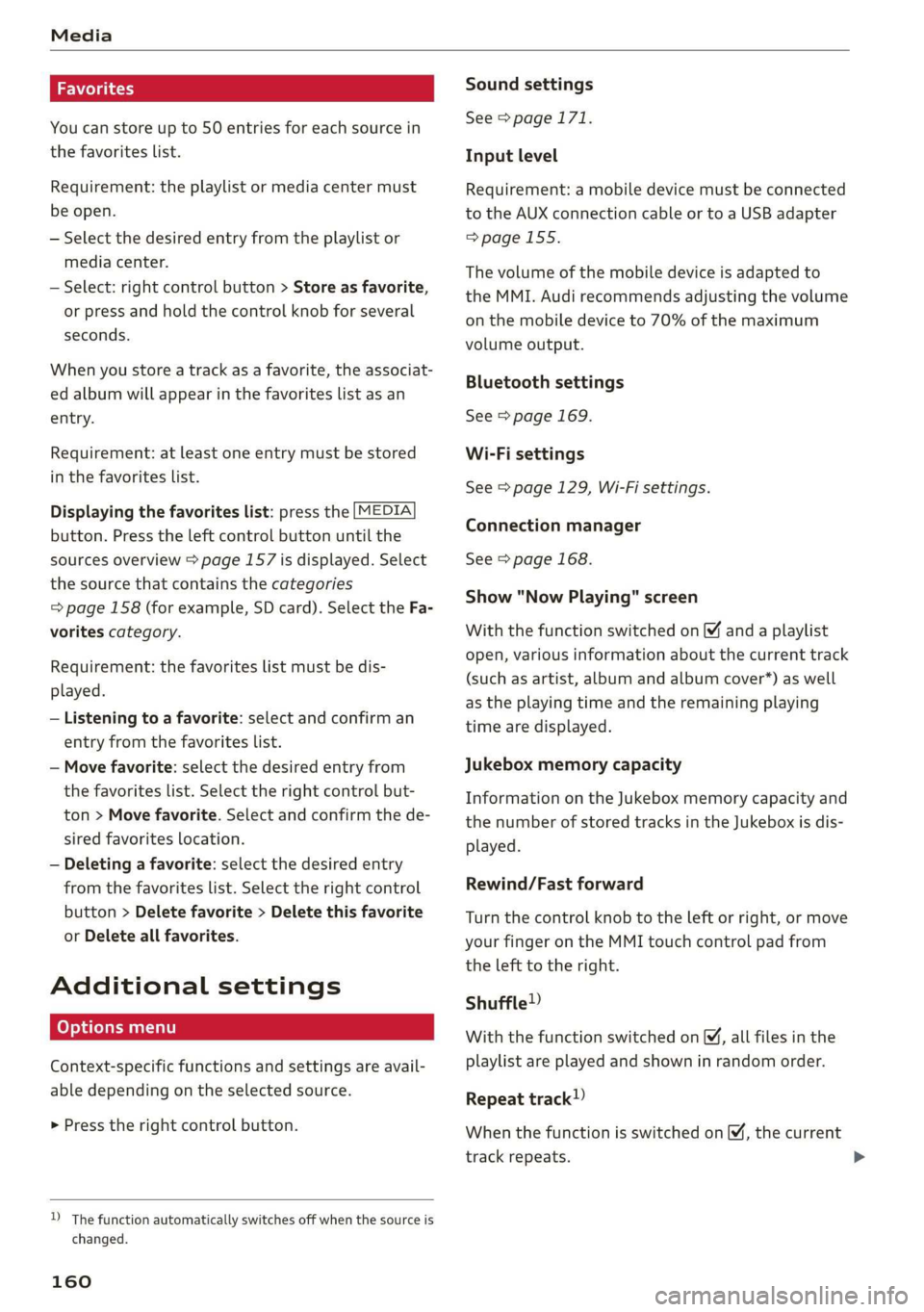
You can store up to 50 entries for each source in
the favorites list.
Requirement: the playlist or media center must
be open.
— Select the desired entry from the playlist or
media center.
— Select: right control button > Store as favorite,
or press and hold the control knob for several
seconds.
When you store a track as a favorite, the associat-
ed album will appear in the favorites list as an
entry.
Requirement: at least one entry must be stored
in the favorites list.
Displaying the favorites list: press the [MEDIA
button. Press the left control button until the
sources overview > page 157 is displayed. Select
the source that contains the categories
=> page 158 (for example, SD card). Select the Fa-
vorites category.
Requirement: the favorites list must be dis-
played.
— Listening to a favorite: select and confirm an
entry from the favorites list.
— Move favorite: select the desired entry from
the favorites list. Select the right control but-
ton > Move favorite. Select and confirm the de-
sired favorites location.
— Deleting a favorite: select the desired entry
from the favorites list. Select the right control
button > Delete favorite > Delete this favorite
or Delete all favorites.
Additional settings
Context-specific functions and settings are avail-
able depending on the selected source.
> Press the right control button.
D_ The function automatically switches off when the source is
changed.
160
Sound settings
See > page 171.
Input level
Requirement: a mobile device must be connected
to the AUX connection cable or to a USB adapter
=>page 155.
The volume of the mobile device is adapted to
the MMI. Audi recommends adjusting the volume
on the mobile device to 70% of the maximum
volume output.
Bluetooth settings
See > page 169.
Wi-Fi settings
See > page 129, Wi-Fi settings.
Connection manager
See > page 168.
Show "Now Playing" screen
With the function switched on ¥ and a playlist
open, various information about the current track
(such as artist, album and album cover*) as well
as the playing time and the remaining playing
time are displayed.
Jukebox memory capacity
Information on the Jukebox memory capacity and
the number of stored tracks in the Jukebox is dis-
played.
Rewind/Fast forward
Turn the control knob to the left or right, or move
your finger on the MMI touch control pad from
the left to the right.
Shuffle»)
With the function switched on, all files in the
playlist are played and shown in random order.
Repeat track)
When the function is switched on M, the current
track repeats.
Page 166 of 308
Media
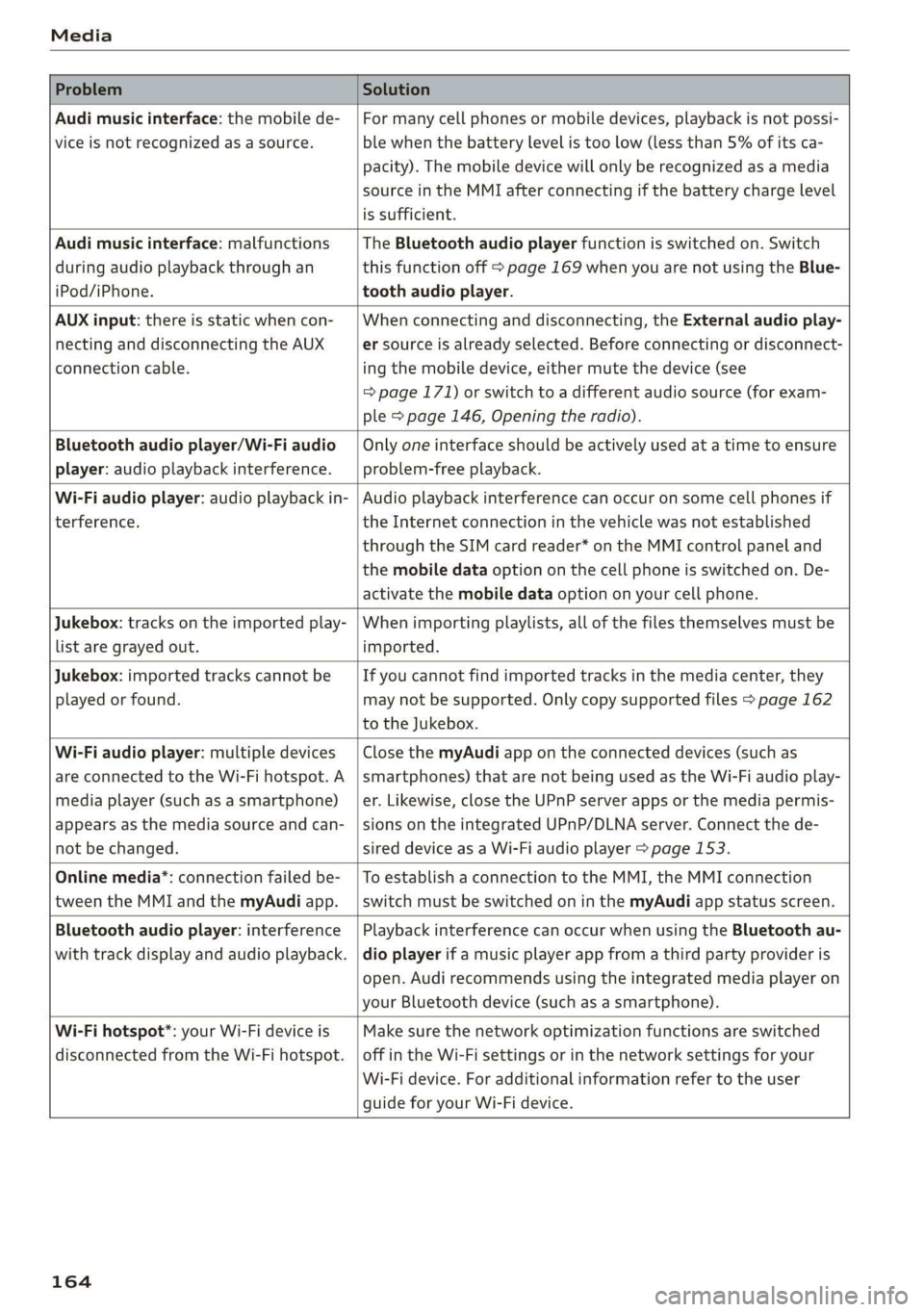
Problem Solution
Audi music interface: the mobile de-
vice is not recognized as a source.
For many cell phones or mobile devices, playback is not possi-
ble when the battery level is too low (less than 5% of its ca-
pacity). The mobile device will only be recognized as a media
source in the MMI after connecting if the battery charge level
is sufficient.
Audi music interface: malfunctions
during audio playback through an
iPod/iPhone.
The Bluetooth audio player function is switched on. Switch
this function off > page 169 when you are not using the Blue-
tooth audio player.
AUX input: there is static when con-
necting and disconnecting the AUX
connection cable.
When connecting and disconnecting, the External audio play-
er source is already selected. Before connecting or disconnect-
ing the mobile device, either mute the device (see
=> page 171) or switch to a different audio source (for exam-
ple > page 146, Opening the radio).
Bluetooth audio player/Wi-Fi audio
player: audio playback interference.
Only one interface should be actively used at a time to ensure
problem-free playback.
Wi-Fi audio player: audio playback in-
terference.
Audio playback interference can occur on some cell phones if
the Internet connection in the vehicle was not established
through the SIM card reader* on the MMI control panel and
the mobile data option on the cell phone is switched on. De-
activate the mobile data option on your cell phone.
Jukebox: tracks on the imported play-
list are grayed out.
When importing playlists, all of the files themselves must be
imported.
Jukebox: imported tracks cannot be
played or found.
If you cannot find imported tracks in the media center, they
may not be supported. Only copy supported files > page 162
to the Jukebox.
Wi-Fi audio player: multiple devices
are connected to the Wi-Fi hotspot. A
media player (such as a smartphone)
appears as the media source and can-
not be changed.
Close the myAudi app on the connected devices (such as
smartphones) that are not being used as the Wi-Fi audio play-
er. Likewise, close the UPnP server apps or the media permis-
sions on the integrated UPnP/DLNA server. Connect the de-
sired device as a Wi-Fi audio player > page 153.
Online media*: connection failed be-
tween the MMI and the myAudi app.
To establish a connection to the MMI, the MMI connection
switch must be switched on in the myAudi app status screen.
Bluetooth audio player: interference
with track display and audio playback.
Playback interference can occur when using the Bluetooth au-
dio player if a music player app from a third party provider is
open. Audi recommends using the integrated media player on
your Bluetooth device (such as a smartphone).
Wi-Fi hotspot*: your Wi-Fi device is
disconnected from the Wi-Fi hotspot.
Make sure the network optimization functions are switched
off in the Wi-Fi settings or in the network settings for your
Wi-Fi device. For additional information refer to the user
guide for your Wi-Fi device.
164
Page 167 of 308
4S1012721BA
Audi smartphone interface
Audi smartphone
interface
Setup
Applies to: vehicles with Audi smartphone interface
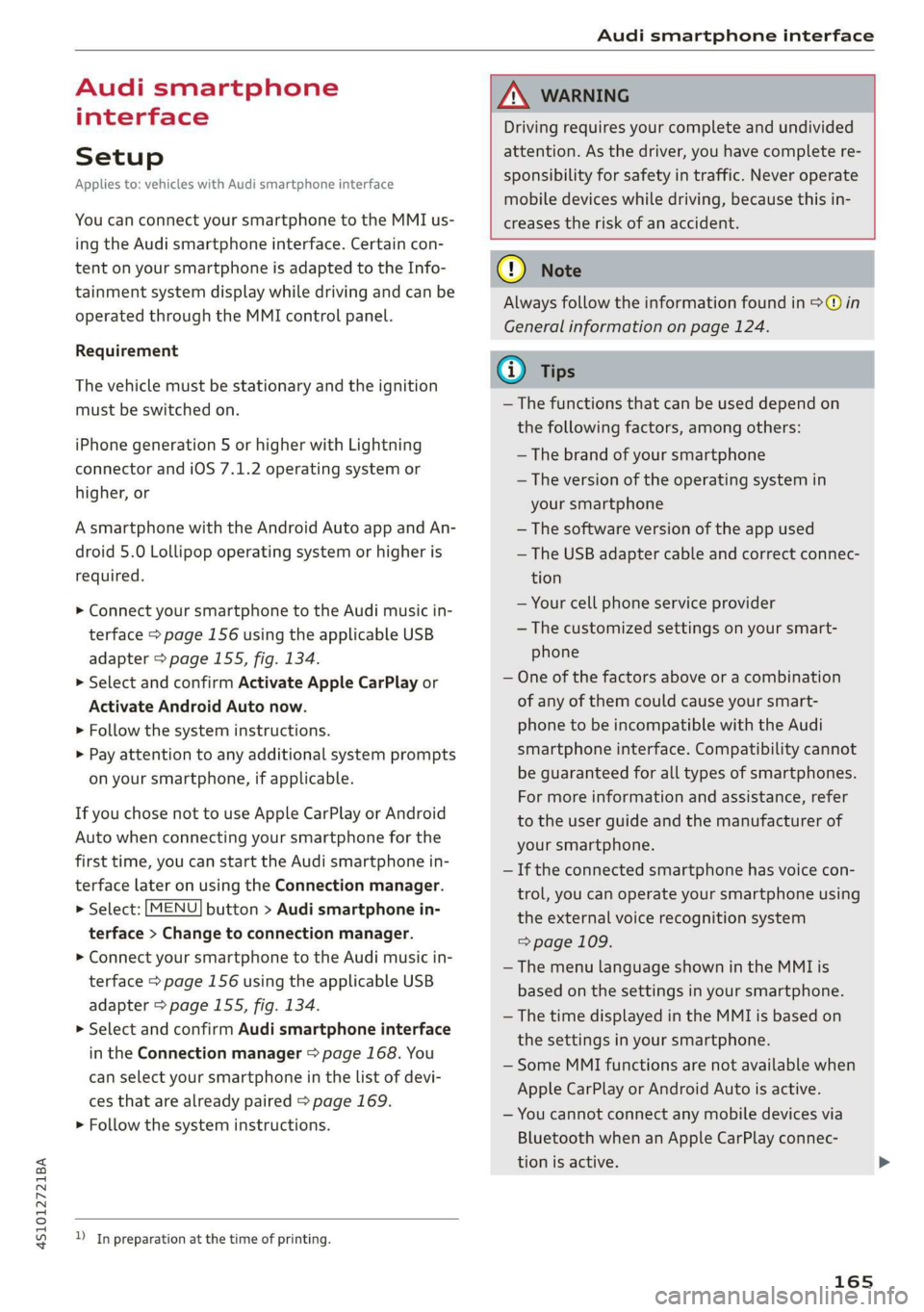
You can connect your smartphone to the MMI us-
ing the Audi smartphone interface. Certain con-
tent on your smartphone is adapted to the Info-
tainment system display while driving and can be
operated through the MMI control panel.
Requirement
The vehicle must be stationary and the ignition
must be switched on.
iPhone generation 5 or higher with Lightning
connector and iOS 7.1.2 operating system or
higher, or
A smartphone with the Android Auto app and An-
droid 5.0 Lollipop operating system or higher is
required.
> Connect your smartphone to the Audi music in-
terface > page 156 using the applicable USB
adapter > page 155, fig. 134.
> Select and confirm Activate Apple CarPlay or
Activate Android Auto now.
> Follow the system instructions.
> Pay attention to any additional system prompts
on your smartphone, if applicable.
If you chose not to use Apple CarPlay or Android
Auto when connecting your smartphone for the
first time, you can start the Audi smartphone in-
terface later on using the Connection manager.
> Select: [MENU] button > Audi smartphone in-
terface > Change to connection manager.
> Connect your smartphone to the Audi music in-
terface > page 156 using the applicable USB
adapter > page 155, fig. 134.
> Select and confirm Audi smartphone interface
in the Connection manager > page 168. You
can select your smartphone in the list of devi-
ces that are already paired > page 169.
> Follow the system instructions.
ZA WARNING
Driving requires your complete and undivided
attention. As the driver, you have complete re-
sponsibility for safety in traffic. Never operate
mobile devices while driving, because this in-
creases the risk of an accident.
) In preparation at the time of printing.
@) Note
Always follow the information found in >@ in
General information on page 124.
@ Tips
— The functions that can be used depend on
the following factors, among others:
—The brand of your smartphone
~The version of the operating system in
your smartphone
— The software version of the app used
— The USB adapter cable and correct connec-
tion
— Your cell phone service provider
— The customized settings on your smart-
phone
— One of the factors above or a combination
of any of them could cause your smart-
phone to be incompatible with the Audi
smartphone interface. Compatibility cannot
be guaranteed for all types of smartphones.
For more information and assistance, refer
to the user guide and the manufacturer of
your smartphone.
— If the connected smartphone has voice con-
trol, you can operate your smartphone using
the external voice recognition system
=> page 109.
— The menu language shown in the MMI is
based on the settings in your smartphone.
— The time displayed in the MMI is based on
the settings in your smartphone.
— Some MMI functions are not available when
Apple CarPlay or Android Auto is active.
— You cannot connect any mobile devices via
Bluetooth when an Apple CarPlay connec-
tion is active.
165
Page 169 of 308
![AUDI R8 COUPE 2020 User Guide 4S1012721BA
System settings
System settings
Setting the date and
time
You can set the clock time manually or using the
GPS.
> Select: [MENU] button > Settings > left control
button > MMI](/img/6/57639/w960_57639-168.png "AUDI R8 COUPE 2020 User Guide 4S1012721BA
System settings
System settings
Setting the date and
time
You can set the clock time manually or using the
GPS.
> Select: [MENU] button > Settings > left control
button > MMI")
4S1012721BA
System settings
System settings
Setting the date and
time
You can set the clock time manually or using the
GPS.
> Select: [MENU] button > Settings > left control
button > MMI settings > Date & time, or
>» Select: [MENU] button > Vehicle > left control
button > Vehicle settings > Date & time.
Automatic setting
When this function is switched on ¥, the time
and date are automatically set.
Time
Requirement: the Automatic setting must be
switched off.
Press the control knob. You can set the Time
manually by turning and pressing the control
knob.
Date
Requirement: the Automatic setting must be
switched off.
Press the control knob. You can set the Date
manually by turning and pressing the control
knob.
Time zone
When selecting the appropriate time zone, a
sampling of countries in this zone will be listed.
Automatic time zone*
When this function is switched on ¥, the time
will automatically adjust to the corresponding
time zone.
Time format
If you select 24h, the clock will display, for exam-
ple, 13:00. If you select AM/PM, the clock will
display, for example, 1:00 PM.
D_ The Qi standard makes it possible to charge your mobile
device wirelessly.
Date format
If you select DD.MM.YYYY, the date display will
show, for example, 31.08.2017. If you select
MM/DD/YYVY, the date display will show, for ex-
ample, 08/31/2017. If you select YYYY-MM-DD,
the date display will show, for example,
2017-08-31.
MMI settings
> Select: [MENU] button > Settings > left control
button > MMI settings.
Language
You can change the display language as well as
the language for the voice guidance and voice
recognition system.
The number of languages available depends on
the market.
Measurement units
The following measurement units can be set de-
pending on availability: Speed, Distance, Tem-
perature, Fuel consumption, Volume, Pressure.
Mobile device reminder signal
Applies to: vehicles with Audi phone box
Requirement: your cell phone must be Qi-capa-
ble ) or connected to the Audi music interface @
with a USB adapter cable > page 112, fig. 110.
When the device reminder signal is switched on,
you will be notified that your mobile device is still
in the Audi phone box when you leave the vehicle.
You can select between Spoken cue, Signal tone
and Off.
Mobile device reminder signal volume: you can
adjust the reminder signal volume by turning the
control knob.
Switch off pop-up: when the function is switched
on [M, the messages in the Infotainment system
display regarding the charging status of your cell
phone in the Audi phone box are hidden. The re-
minder not to forget your cell phone when leav-
ing the vehicle is likewise switched off.
167
Page 172 of 308
System settings
for the MMI to be visible to other devices. Se-
lect Invisible for the MMI to not be visible to
other devices. However, it is still possible to es-
tablish a Bluetooth connection with paired de-
vices when the visibility is switched off. Select
Off to turn visibility off. Then a Bluetooth con-
nection is not possible.
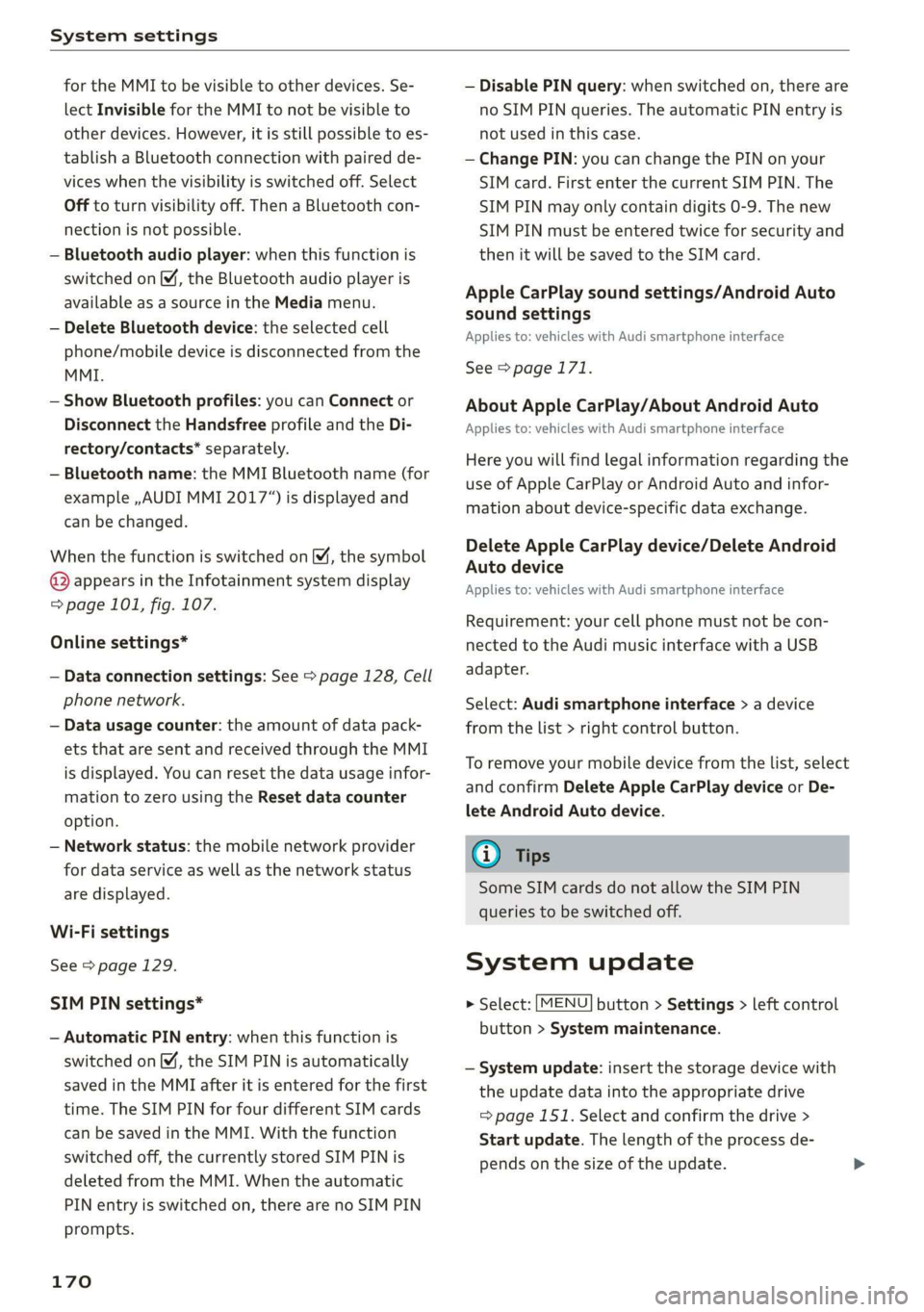
— Bluetooth audio player: when this function is
switched on , the Bluetooth audio player is
available as a source in the Media menu.
— Delete Bluetooth device: the selected cell
phone/mobile device is disconnected from the
MMI.
— Show Bluetooth profiles: you can Connect or
Disconnect the Handsfree profile and the Di-
rectory/contacts* separately.
— Bluetooth name: the MMI Bluetooth name (for
example ,AUDI MMI 2017“) is displayed and
can be changed.
When the function is switched on [M, the symbol
© appears in the Infotainment system display
=> page 101, fig. 107.
Online settings*
— Data connection settings: See > page 128, Cell
phone network.
— Data usage counter: the amount of data pack-
ets that are sent and received through the MMI
is displayed. You can reset the data usage infor-
mation to zero using the Reset data counter
option.
— Network status: the mobile network provider
for data service as well as the network status
are displayed.
Wi-Fi settings
See > page 129.
SIM PIN settings*
— Automatic PIN entry: when this function is
switched on , the SIM PIN is automatically
saved in the MMI after it is entered for the first
time. The SIM PIN for four different SIM cards
can be saved in the MMI. With the function
switched off, the currently stored SIM PIN is
deleted from the MMI. When the automatic
PIN entry is switched on, there are no SIM PIN
prompts.
170
— Disable PIN query: when switched on, there are
no SIM PIN queries. The automatic PIN entry is
not used in this case.
— Change PIN: you can change the PIN on your
SIM card. First enter the current SIM PIN. The
SIM PIN may only contain digits 0-9. The new
SIM PIN must be entered twice for security and
then it will be saved to the SIM card.
Apple CarPlay sound settings/Android Auto
sound settings
Applies to: vehicles with Audi smartphone interface
See > page 171.
About Apple CarPlay/About Android Auto
Applies to: vehicles with Audi smartphone interface
Here you will find legal information regarding the
use of Apple CarPlay or Android Auto and infor-
mation about device-specific data exchange.
Delete Apple CarPlay device/Delete Android
Auto device
Applies to: vehicles with Audi smartphone interface
Requirement: your cell phone must not be con-
nected to the Audi music interface with a USB
adapter.
Select: Audi smartphone interface > a device
from the list > right control button.
To remove your mobile device from the list, select
and confirm Delete Apple CarPlay device or De-
lete Android Auto device.
G) Tips
Some SIM cards do not allow the SIM PIN
queries to be switched off.
System update
> Select: [MENU] button > Settings > left control
button > System maintenance.
— System update: insert the storage device with
the update data into the appropriate drive
= page 151. Select and confirm the drive >
Start update. The length of the process de-
pends on the size of the update.
Page 173 of 308
4S1012721BA
System settings
— Reset driver installation: the selected media
driver package is reset to the settings at the
time of delivery.
— Version information: information on the MMI
software version and the navigation database*
software version is displayed. The Software in-
formation function also provides information
on the software contained in the MMI and the
licensing agreement.
Sound settings
The sound distribution and volume of the MMI
can be adjusted individually. The settings depend
on the vehicle equipment.
> Select: [MENU] button > Sound > left control
button > Entertainment.
Treble/Bass
You can adjust the Treble and Bass settings by
turning the control knob. The changed settings
only apply for the audio source that is active at
the time. This allows you to adjust the sound set-
tings for each audio source separately.
Balance/fader* (sound focus)
— Adjusting the sound distribution to the left or
right: press the control knob. Turn the control
knob to the left or right to the desired position.
— Adjusting the sound distribution to the front
or rear*: press the control knob again. Turn the
control knob to the left or right to the desired
position.
— Adjusting the sound distribution using the
MMI touch: move your finger on the MMI touch
control panel in the desired direction.
Sound effects*
Select and confirm a Focus setting:
— All: all speakers in the vehicle are active (sym-
metrical sound distribution).
— Front: only the speakers in the front of the ve-
hicle are active.
Speed dependent volume control
You can adjust how much the volume changes to
compensate for noise inside the vehicle by turn-
ing the control knob.
Volume settings
Adjusting the volume
The volume of an audio source or a system mes-
sage (for example, from the voice recognition
system) can be adjusted directly while the sound
is playing using the On/Off knob.
— Increasing or decreasing the volume: turn the
On/Off knob @) > page 93, fig. 94 to the right
or left.
—
Muting or pausing: press the On/Off knob
briefly, or turn the On/Off knob to the left until
the Mute symbol appears. An active audio/
video source is stopped.
—Unmuting or resuming: press the On/Off knob
briefly or turn the On/Off knob to the right.
ZA\ WARNING
Adjust the volume of the audio system so that
signals from outside the vehicle, such as po-
lice and fire sirens, can be heard easily at all
times.
G) Tips
The volume is automatically adjusted to a pre-
set level when the MMI is switched on.
Adjusting the system volume
> Select: [MENU] button > Sound > left control
button.
Telephone
Mute telephone: messages and ringtones are set
to mute.
Ringtone: see = page 122, Ringtone and volume
settings.
Ringtone volume: you can adjust the volume of
the selected ringtone by turning the control
knob.
Message volume: you can adjust the volume of
the notification for an incoming text message by
turning the control knob.
171
Page 200 of 308
Airbag system
than he or she actually is. The change in
electric capacitance because of such objects
can cause the passenger front airbag to be
turned on when it should be off, or can
cause the airbag to work in a way that is dif-
ferent from the way it would have worked
without objects on the seat.
— Always make sure that there is nothing on
the front passenger seat that will cause the
capacitive passenger detection system in
the seat to signal to the Airbag System that
the seat is occupied by a person when it is
not, or to signal that it is occupied by some-
one who is heavier than the person actually
sitting on the seat. The presence of an ob-
ject could cause the passenger front airbag
to be turned on when it should be off, or
could cause the airbag to work in a way that
is different from the way it would have
worked without the object on the seat.
ZA\ WARNING
The fine dust created when airbags deploy can
cause breathing problems for people with a
history of asthma or other breathing condi-
tions.
—To reduce the risk of breathing problems,
those with asthma or other respiratory con-
ditions
should get fresh air right away by
getting out of the vehicle or opening win-
dows or doors.
— If you are in a collision in which airbags de-
ploy,
wash your hands and face with mild
soap and water before eating.
— Be careful not to get the dust into your eyes,
or into any cuts or scratches.
— If the residue should get into your eyes,
flush them with water.
198
Monitoring the
Advanced Airbag System
Airbag monitoring indicator light
Two separate indicators monitor the function of
the Advanced Airbag System: the ka light and
the PASSENGER AIR BAG OFF #; ON @ light.
The Advanced Airbag System as well as the side
airbags with ejection mitigation features (includ-
ing the electronic control unit, sensors and sys-
tem wiring) are all monitored continuously to
make sure that they are functioning properly
whenever the ignition is on. Every time you turn
on the ignition, the airbag system indicator light
ka will come on for a few seconds (function
check).
The system must be inspected when the
indicator light Ba:
— does not come on when the ignition is switched
on,
— does not go out a few seconds after you have
switched on the ignition, or
— comes on while driving.
If an airbag system malfunction is detected, the
indicator light will come on to serve as a constant
reminder to have the system inspected immedi-
ately.
If a malfunction occurs that turns the front air-
bag on the passenger side off, the PASSENGER
AIR BAG OFF #; light will come on and stay on
whenever the ignition is on.
ZA\ WARNING
An airbag system that is not functioning prop-
erly cannot provide supplemental protection
in a frontal crash.
— If the airbag indicator light > page 17
comes when the vehicle is being used, have
the system inspected immediately by your
authorized Audi dealer. It is possible that
the airbag will inflate when it is not sup-
posed to, or will not inflate when it should.
Page 202 of 308
Airbag system
met, be sure to check the light regularly to make
certain that the PASSENGER AIR BAG OFF 3;
light stays on continuously whenever the ignition
is on. If the PASSENGER AIR BAG OFF %; light
does not appear on and does not stay on all the
time, stop as soon as it is safe to do so and
— reactivate the system by turning the ignition off
for more than 4 seconds and then turning it on
again;
— remove and reinstall the child restraint. Make
sure that the child restraint is properly installed
and that the safety belt for the front passenger
seat has been correctly routed through the
child restraint as described in the child restraint
manufacturer's instructions;
— make sure that the convertible locking retractor
on the safety belt for the front passenger seat
has been activated and that the safety belt has
been pulled tight.
— make sure that no electrical device (such as a
laptop, CD player, electronic games device,
power inverter or seat heater for child seats) is
placed or used on the front passenger seat if
the device is connected to the 12-volt socket or
the cigarette lighter socket;
— make sure that no seat heater has been retrofit-
ted or otherwise added to the front passenger
seat;
— make sure that nothing can interfere with the
safety belt buckles and that they are not ob-
structed;
— make sure that there are no wet objects (such
as a wet towel) and no water or other liquids on
the front passenger seat cushion.
If the PASSENGER AIR BAG OFF 3; light still
does not come on...
If the PASSENGER AIR BAG OFF 3%; light still
does not come on and does not stay on continu-
ously (when the ignition is switched on),
— take the child restraint off the front passenger
seat and have the airbag system inspected by
your Audi dealer immediately.
The PASSENGER AIR BAG OFF 3; light
should NOT come on...
The PASSENGER AIR BAG OFF %; light should
NOT come on when the ignition is on and an adult
200
is sitting in a proper seating position on the front
passenger seat. If the PASSENGER AIR BAG OFF
#; light comes on and stays on while driving, un-
der these circumstances, make sure that:
— the adult on the front passenger seat is proper-
ly seated on the center of the seat cushion with
his or her back up against the backrest and the
backrest is not reclined,
— the adult is not taking weight off the seat by
holding on to the passenger assist handle
above the front passenger door or supporting
their weight on the armrest,
— the safety belt is being properly worn and that
there is not a lot of slack in the safety belt web-
bing,
— there are no aftermarket seat covers or cush-
ions or other things (such as blankets) on the
front passenger seat that might cause the ca-
pacitive passenger detection system to miscal-
culate electrical capacitance.
Me eT eae toleol g)
monitoring the Advanced Airbag System
ZX WARNING
— If the status of the Advanced Airbag System
has changed while the vehicle is moving, the
PASSENGER AIR BAG OFF 7; ON @ light
blinks for about 5 seconds to catch the driv-
er's attention. If this happens, always stop
as soon as it is safe to do so and check the
steps described above.
— If the PASSENGER AIR BAG OFF %; light
does not go off when an adult who is not
very small is sitting on the front passenger
seat after taking the steps described above,
have the airbag system inspected by your
authorized Audi dealer before transporting
anyone on the front passenger seat.
ZA WARNING
An airbag system that is not functioning prop-
erly cannot provide supplemental protection
in a frontal crash.
— If the airbag indicator light > page 17
comes when the vehicle is being used, have
the system inspected immediately by your
Page 203 of 308
4S1012721BA
Airbag system
authorized Audi dealer. It is possible that
the airbag will inflate when it is not sup-
posed to, or will not inflate when it should.
ZA WARNING
If the front airbag inflates, a child without a
child restraint, or in a rearward-facing child
safety seat, or in a forward-facing child re-
straint that has not been properly installed
will be seriously injured and can be killed.
— If you must install a rearward-facing child
seat on the front passenger seat because of
exceptional circumstances and the PASSEN-
GER AIR BAG OFF #%; light does not appear
and stay on, have the airbag system inspect-
ed by your Audi dealer.
— If, in exceptional circumstances, you must
install a forward-facing child restraint on
the front passenger seat, always move the
seat into its rearmost position in the seat's
fore and aft adjustment range, as far away
from the airbag as possible. The backrest
must be adjusted to an upright position.
Make sure that the PASSENGER AIR BAG
OFF %; light comes on and stays on all the
time whenever the ignition is switched on.
Z\ WARNING
If the PASSENGER AIR BAG OFF %; light does
not go out when an adult is sitting on the
front passenger seat after taking the steps
described above, have the airbag system in-
spected by your Audi dealer before transport-
ing anyone on the front passenger seat.
@) Tips
If the capacitive passenger detection system
determines that the front passenger seat is
empty, the frontal airbag on the passenger
side will be turned off, and the PASSENGER
AIR BAG OFF 3%; light will stay on.
Repair, care and disposal of the airbags
Parts of the airbag system are installed at many
different places on your Audi. Installing, remov-
ing, servicing or repairing a part in an area of the
vehicle can damage a part of an airbag system
and prevent that system from working properly
in acollision.
There are some important things you have to
know to make sure that the effectiveness of the
system will not be impaired and that discarded
components do not cause injury or pollute the
environment.
Z\ WARNING
Improper care, servicing and repair proce-
dures can increase the risk of personal injury
and death by preventing an airbag from de-
ploying when needed or deploying an airbag
unexpectedly:
— Never cover, obstruct, or change the steer-
ing wheel horn pad or airbag cover or the in-
strument panel or modify them in any way.
— Never attach any objects such as cup holders
or telephone mountings to the surfaces cov-
ering the airbag units.
— For cleaning the horn pad or instrument
panel, use only a soft, dry cloth or one mois-
tened with plain water. Solvents or cleaners
could damage the airbag cover or change
the stiffness or strength of the material so
that the airbag cannot deploy and protect
properly.
— Never repair, adjust, or change any parts of
the airbag system.
— All work on the steering wheel, instrument
panel, front seats or electrical system (in-
cluding the installation of audio equipment,
cellular telephones and CB radios, etc.)
must be performed by a qualified technician
who has the training and special equipment
necessary.
— For any work on the airbag system, we
strongly recommend that you see your au-
thorized Audi dealer or qualified workshop.
— Never modify the front bumper or parts of
the vehicle body.
— Always make sure that the side airbag can
inflate without interference:
— Never install seat covers or replacement
upholstery over the front seatbacks that
201
Page 215 of 308
4S1012721BA
Child safety
NeW icelai eel ias-le meee Maal Cele)
Your vehicle is equipped with a front “Advanced
Airbag System” in compliance with United States
Federal Motor Vehicle Safety Standard (FMVSS)
208, as well as Canada Motor Vehicle Safety
Standard (CMVSS) 208 as applicable at the time
your vehicle was manufactured.
The Advanced Airbag system in your vehicle has
been certified to meet the “low-risk” require-
ments for 3- and 6-year old children on the pas-
senger side and small adults on the driver side.
The low risk deployment criteria are intended to
reduce the risk of injury through interaction with
the airbag that can occur, for example, by being
too close to the steering wheel and instrument
panel when the airbag inflates. In addition, the
system has been certified to comply with the
“suppression” requirements of the Safety Stand-
ard, to turn off the front airbag for infants up to
12 months who are restrained on the front pas-
senger seat in child restraints that are listed in
the Standard.
Even though your vehicle is equipped with an Ad-
vanced Airbag system, a child should always ride
in the seat properly restrained for its age and
size. The airbag on the passenger side makes the
front seat a potentially dangerous place for a
child to ride. The front seat is not the safest place
for a child in a forward-facing child safety seat. It
can be a very dangerous place for an infant or a
larger child in a rearward-facing seat.
The vehicle's Advanced Airbag System has a ca-
pacitive passenger detection system in the front
passenger seat cushion that can detect the pres-
ence of a baby or a child ina child restraint sys-
tem on this seat.
The capacitive passenger detection system regis-
ters the changes that result in an electrical field
when a child, a child restraint, and a baby blanket
are on the front passenger seat. The change in
the measured capacitance due to the presence of
a child, a child restraint, and a baby blanket on
the front passenger seat is related to the child re-
straint system resting on the seat. The measured
capacitance of a child restraint system varies de-
pending on the type of system and specific make
and model.
The electrical capacitance of the various types,
makes, and models of child restraints specified
by the U.S. National Highway Traffic Safety Ad-
ministration (NHTSA) in the relevant safety
standard are stored in the Advanced Airbag Sys-
tem control unit together with the capacitances
typical of infants and a 1-year old child. When a
child restraint is used on the front passenger seat
with a typical 1 year-old infant, the Advanced Air-
bag System compares the capacitance measured
by the capacitive passenger detection system
with the data stored in the electronic control
unit.
Ce CMe ee aha acl a Tig ey- le)
system
Regardless of the child restraint that you use,
make sure that it has been certified to meet Safe-
ty Standards and has been certified by its manu-
facturer for use with an airbag. If in exceptional
circumstances you must use it on the front pas-
senger seat, carefully read all of the information
on child safety and Advanced Airbags and heed
all of the applicable WARNINGS. Make certain
that the child and child restraint are correctly rec-
ognized by the capacitive passenger detection
system in the front passenger seat, that the front
passenger airbag is turned off, and that the air-
bag status is always correctly signaled by the
PASSENGER AIR BAG OFF #; light.
Many types and models of child restraints have
been available over the years, new models are in-
troduced regularly incorporating new and im-
proved designs and older models are taken out of
production. Child restraints are not standardized.
Child restraints of the same type typically have
different
weights and sizes and different “foot-
prints”, the size and shape of the bottom of the
child restraint that sits on the seat, when they
are installed on a vehicle seat. These differences
make it virtually impossible to certify compliance
with the requirements for advanced airbags with
each and every child restraint that has ever been
sold in the past or will be sold over the course of
the useful life of your vehicle.
213