mirror AUDI R8 COUPE 2020 User Guide
[x] Cancel search | Manufacturer: AUDI, Model Year: 2020, Model line: R8 COUPE, Model: AUDI R8 COUPE 2020Pages: 308, PDF Size: 82.41 MB
Page 86 of 308
Parking aid
front of the vehicle swings out more than
the rear of the vehicle. Maintain plenty of
distance so that an exterior mirror or a cor-
ner of the vehicle does not collide with any
obstacles.
Scare Rie meal
Applies to: vehicles with rearview camera
Switching on
> Shift into reverse, or
> Press the Pt button in the center console
=> page 82, fig. 84. A short confirmation tone
sounds and the LED in the button turns on.
Switching off
> Drive faster than 6 mph (10 km/h), or
> Press the Pa button, or
> Switch the ignition off.
G) Tips
— The visual display in the left part of the dis-
play should help you detect the critical vehi-
cle areas.
— You can change the volume of the signals
and the display > page 84.
Perpendicular parking
Applies to: vehicles with rearview camera
This view may be used when parking in a garage
or ina parking space.
(3)
4. Look! Safe to move?
Fig. 89 Infotainment system: aiming at a parking space
84
ds. Look! Safe to move?
Fig. 90 Infotainment system: aligning the vehicle
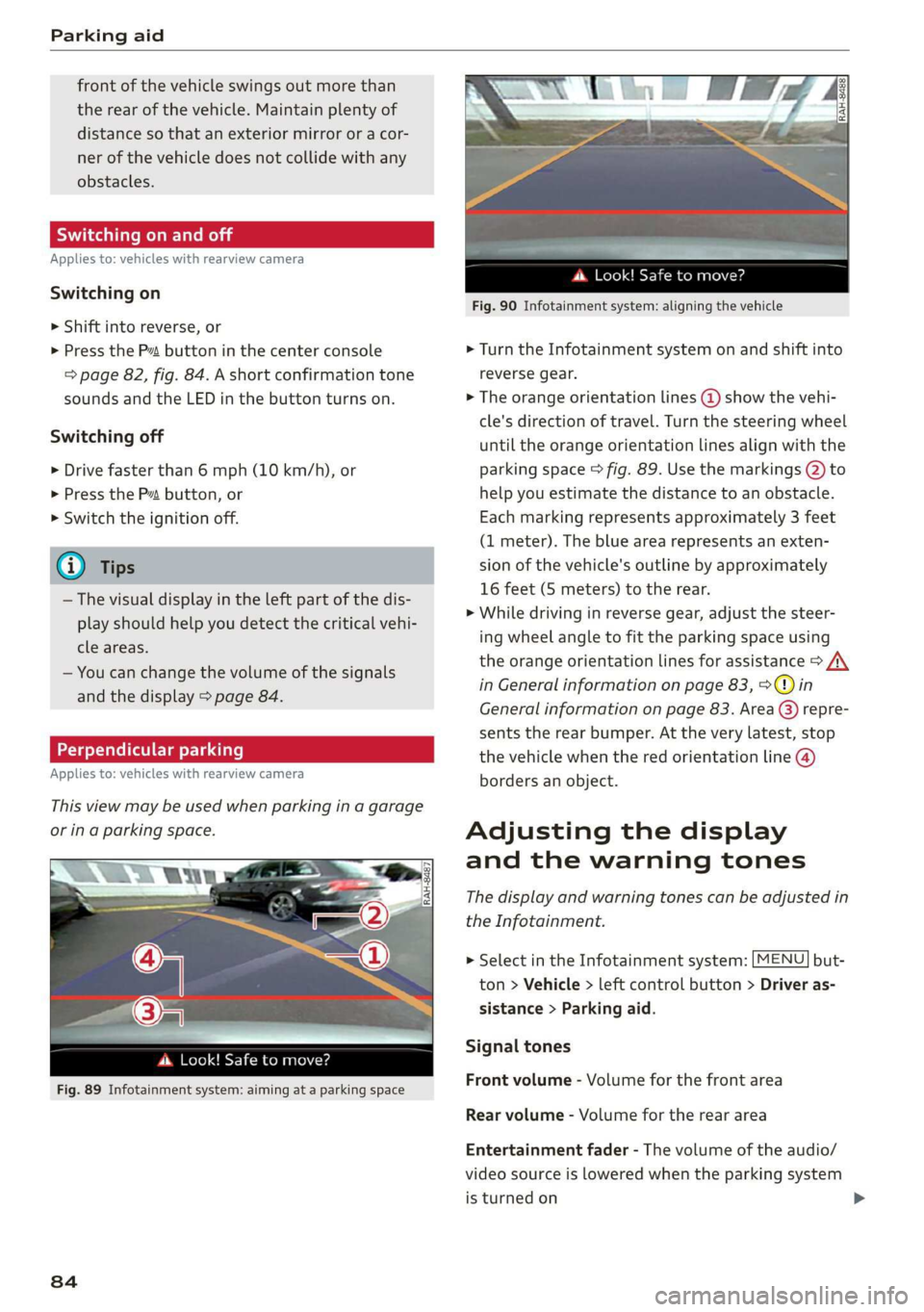
> Turn the Infotainment system on and shift into
reverse gear.
> The orange orientation lines @ show the vehi-
cle's direction of travel. Turn the steering wheel
until the orange orientation lines align with the
parking space > fig. 89. Use the markings @ to
help you estimate the distance to an obstacle.
Each marking represents approximately 3 feet
(1 meter). The blue area represents an exten-
sion of the vehicle's outline by approximately
16 feet (5 meters) to the rear.
> While driving in reverse gear, adjust the steer-
ing wheel angle to fit the parking space using
the orange orientation lines for assistance > A\
in General information on page 83, >@) in
General information on page 83. Area () repre-
sents the rear bumper. At the very latest, stop
the vehicle when the red orientation line @
borders an object.
Adjusting the display
and the warning tones
The display and warning tones can be adjusted in
the Infotainment.
> Select in the Infotainment system: [MENU] but-
ton > Vehicle > left control button > Driver as-
sistance > Parking aid.
Signal tones
Front volume - Volume for the front area
Rear volume - Volume for the rear area
Entertainment fader - The volume of the audio/
video source is lowered when the parking system
is turned on
Page 175 of 308
4S1012721BA
Safe driving
Safe driving
Basics
SER Nails mali
Please remember - safety first!
The individual safety features of your vehicle can
work together as a system to help protect you
and
your passengers in a wide range of accidents.
These features cannot work as a system if they
are not always correctly adjusted and correctly
used.
This chapter contains important information,
tips, instructions and warnings that you need to
read and observe for your own safety, the safety
of your passengers and others. We have summar-
ized here what you need to know about safety
belts, airbags, child restraints as well as child
safety. Your safety is for us priority number 1. Al-
ways observe the information and warnings in
this section - for your own safety as well as that
of your passengers.
The information in this section applies to all
model versions of your vehicle. Some of the fea-
tures described in this sections may be standard
equipment on some models, or may be optional
equipment on others. If you are not sure, ask
your authorized Audi dealer.
ZA WARNING
— Always make sure that you follow the in-
structions and heed the WARNINGS in this
Manual. It is in your interest and in the in-
terest of your passengers.
— Always keep the complete Owner's Litera-
ture in your Audi when you lend or sell your
vehicle so that this important information
will always be available to the driver and
passengers.
— Always keep the Owner's literature handy so
that you can find it easily if you have ques-
tions.
Important things to do before driving
Safety is everybody's job! Vehicle and occupant
safety always depends on the informed and care-
ful driver.
For your safety and the safety of your passenger,
before driving always:
> Make sure that all lights and signals are operat-
ing correctly.
> Make sure that the tire pressure is correct.
> Make sure that all windows are clean and afford
good visibility to the outside.
> Secure all luggage and other items carefully
=> page 54, > page 54.
> Make sure that nothing can interfere with the
pedals.
> Adjust seat and mirrors correctly for your
height.
> Make sure to use the right child restraint cor-
rectly to protect children > page 211, Child
safety.
> Sit properly in your seat and make sure that
your passenger do the same © page 50, Front
seats.
> Fasten your safety belt and wear it properly. Al-
so instruct your passenger to fasten his safety
belt properly > page 180.
What impairs driving safety?
Safe driving is directly related to the condition of
the vehicle, the driver as well as the driver’s abili-
ty to concentrate on the road without being dis-
tracted.
The driver is responsible for the safety of the ve-
hicle and all of its occupants. If your ability to
drive is impaired, safety risks for everybody in the
vehicle increase and you also become a hazard to
everyone else on the road > /\. Therefore:
> Do not let yourself be distracted by passenger
or by using a cellular telephone.
> NEVER drive when your driving ability is im-
paired (by medications, alcohol, drugs, etc.).
> Observe all traffic laws, rules of the road and
speed limits and plain common sense.
> ALWAYS adjust your speed to road, traffic and
weather conditions.
173
>
Page 268 of 308
Care and cleaning
ZA WARNING
—To reduce the risk of accidents, only wash
the vehicle when the ignition is off and fol-
low the instructions from the car wash oper-
ator.
—To reduce the risk of cuts, protect yourself
from sharp metal components when wash-
ing the underbody or the inside of the wheel
housings.
— After washing the vehicle, the braking effect
may be delayed due to moisture on the
brake rotors or ice in the winter. This in-
creases the risk of an accident. The brakes
must be dried with a few careful brake appli-
cations.
©) Note
— If you wash the vehicle in an automatic car
wash, you must retract the extendable rear
spoiler* if necessary, and fold the exterior
mirrors in to reduce the risk of damage.
Power folding exterior mirrors* must only
be folded in and out using the power folding
function.
—To reduce the risk of paint damage, do not
wash the vehicle in direct sunlight.
—To reduce the risk of damage, do not wash
decorative decals* with a pressure washer.
—To reduce the risk of damage, do not wash
the power top with a pressure washer.
—To reduce the risk of damage to the surface,
do not use insect removing sponges, kitchen
sponges, or similar items.
— When washing matte finish painted vehicle
components:
—To reduce the risk of damage to the sur-
face, do not use polishing agents or hard
wax.
— Never use protective wax. It can destroy
the matte finish effect.
— Do not place any stickers or magnetic
signs on vehicle components painted with
matte finish paint. The paint could be
damaged when the stickers or magnets
are removed.
(*) For the sake of the environment
Only wash the vehicle in facilities specially de-
signed for that purpose. This will reduce the
risk of dirty water contaminated with oil from
entering the sewer system.
Cleaning and care information
When cleaning and caring for individual vehicle
components, refer to the following tables. The
information contained there is simply recommen-
dations. For questions or for components that
Exterior cleaning
are not listed, consult an authorized Audi dealer
or authorized Audi Service Facility. Also follow
the information found in > A.
Component Situation Solution
Windshield wiper | Deposits Soft cloth with glass cleaner > page 48
blades
Headlights/ Deposits Soft sponge with a mild soap solution®
Tail lights
Sensors/ Deposits Sensors: soft cloth with solvent-free cleaning solution
Camera lenses Camera lenses: soft cloth with alcohol-free cleaning solu-
tion
Snow/ice Hand brush/solvent-free de-icing spray
Wheels Road salt Water
Brake dust Acid-free special cleaning solution >
266
Page 271 of 308
4S1012721BA
Care and cleaning
— Wheels
— Never use any paint polish or other abra-
sive materials.
— Damage to the protective layer on the
rims, such as stone chips or scratches,
must be repaired immediately.
— Camera lenses
— Never use warm or hot water to remove
snow or ice from the camera lens. This
could cause the lens to crack.
— Never use abrasive cleaning materials or
alcohol to clean the camera lens. This
could cause scratches and cracks.
— Power top
— Remove bird droppings immediately.
— Never use gasoline, spot remover, ben-
zene, paint thinner or other solvents to re-
move.
— Door windows
— Remove snow and ice on windows and ex-
terior mirrors with a plastic scraper. To re-
duce the risk of scratches, move the scra-
per only in one direction and not back and
forth.
— Never remove snow or ice from door win-
dows and mirrors using warm or hot water
because this could cause cracks to form.
—To reduce the risk of damage to the rear
window defogger, do not apply any stick-
ers on the heating wires on the inside of
the window.
— Decorative parts and trim
— Never use chrome care or cleaning prod-
ucts.
— Paint
—To reduce the risk of scratches, the vehicle
must be free of dirt and dust before pol-
ishing or waxing.
—To prevent paint damage, do not polish or
wax the vehicle in direct sunlight.
—To reduce the risk of paint damage, do not
polish away rust spots.
— Remove cosmetics and sunscreen immedi-
ately because they could damage the
paint.
— Decorative decals
—To reduce the risk of damage, do not use
any rough powder or abrasive cleaning
products.
— To reduce the risk of damage, do not pol-
ish decorative decals that have a matte or
printed finish.
— Due to the risk of damage, do not use an
ice scraper to remove snow and ice on win-
dows with decorative decals on them.
— Instrument cluster
— Make sure that the instrument cluster is
switched off and has cooled off before
cleaning it.
— The instrument cluster and the trim sur-
rounding it must not be cleaned with dry
cleaning methods because they could get
scratched.
— Make sure no fluids enter the spaces be-
tween the instrument cluster and the
trim, because that could cause damage.
— Controls
— Make sure that no fluids enter the con-
trols, because this could cause damage.
— Safety belts
— Do not remove the safety belts to clean
them.
— Never clean safety belts or their compo-
nents with chemicals or with corrosive flu-
ids or solvents and never allow sharp ob-
jects to come into contact with the safety
belts. This could cause damage to the belt
webbing.
— If there is damage to the webbing, the
connections, the retractors, or the buck-
les, have them replaced by an authorized
Audi dealer or authorized Audi Service Fa-
cility.
— Textiles, artificial leather, and Alcantara
— Never treat artificial leather or Alcantara
with leather care products, solvents, floor
polish, shoe polish, spot remover, or simi-
lar products.
— Have a cleaning specialist remove stub-
born stains to reduce the risk of damage.
— Never use steam cleaners, brushes, hard
sponges, etc. when cleaning.
269
Page 284 of 308
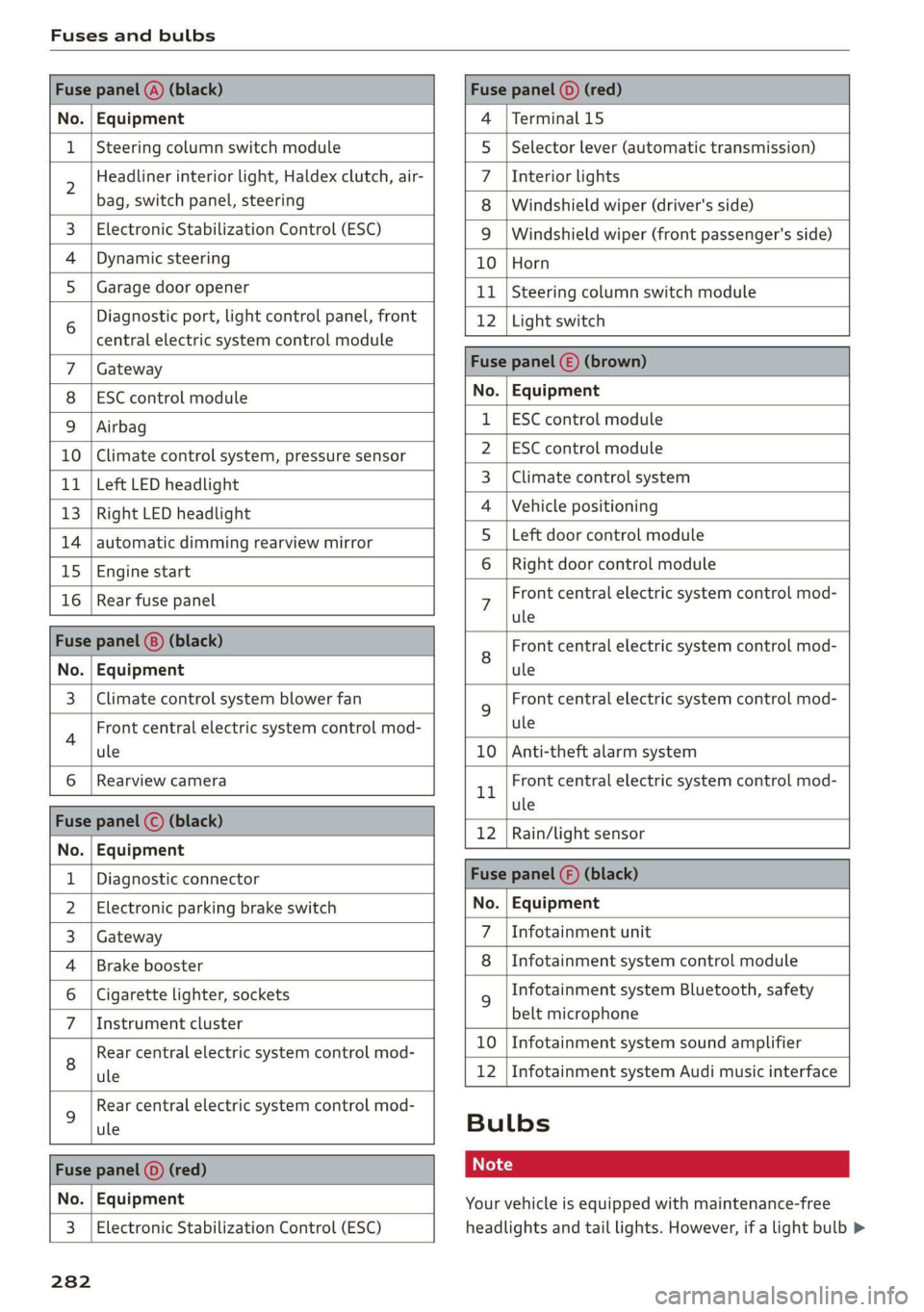
Fuses and bulbs
Fuse panel @) (black) Fuse panel © (red)
No. | Equipment 4 |Terminal 15
1 |Steering column switch module 5 |Selector lever (automatic transmission)
2 Headliner interior light, Haldex clutch, air- 7 |Interior lights
bag, switch panel, steering 8 | Windshield wiper (driver's side)
3. | Electronic Stabilization Control (ESC) 9 | Windshield wiper (front passenger's side)
4 |Dynamic steering 10 |Horn
5_| Garage door opener 11 | Steering column switch module
6 Diagnostic port, light control panel, front 12 | Light switch
central electric system control module —
Gateway Fuse panel () (brown)
ESC control module No. | Equipment
Airbag 1 |ESC control module
10 | Climate control system, pressure sensor 2_|ESC control module
11 | Left LED headlight 3 | Climate control system
13 |Right LED headlight 4 |Vehicle positioning
14 | automatic dimming rearview mirror 5_ Left door control module
15 |Engine start 6 |Right door control module
16 | Rear fuse panel 7 Front central electric system control mod-
ule
Fuse panel (@) (black) 8 Front central electric system control mod-
No. | Equipment ule
3 | Climate control system blower fan 9 Front central electric system control mod-
4 Front central electric system control mod- ule
ule 10 | Anti-theft alarm system
6 |Rearview camera 1 Front central electric system control mod-
- ule
nue pene) sBisch 12 |Rain/light sensor
No. | Equipment
1 | Diagnostic connector Fuse panel () (black)
2 | Electronic parking brake switch No. | Equipment
3 | Gateway 7 \Infotainment unit
4 |Brake booster 8 |Infotainment system control module
6 | Cigarette lighter, sockets 9 Infotainment system Bluetooth, safety
7 |Instrument cluster belt microphone
Rear central electric system control mod- £0 | Infotainment:system:sound amplifier
8 ule 12 | Infotainment system Audi music interface
9 Rear central electric system control mod-
ule Bulbs
Fs panel © ed ot
No. | Equipment Your vehicle is equipped with maintenance-free
3 | Electronic Stabilization Control (ESC) headlights and tail lights. However, if a light bulb >
282
Page 291 of 308
4S1012721BA
Technical data
Technical data
Identification data
Vehicle identification label
XXXXX AX = X= AXXX XXX XK
vor KX x XXXXXXXX
XXX. XXX
XX XXXXXXX XX. XX XX
XXX KW XXX
XXXX XXX XXX
YL XXKK XXX XX
5RW
1BA
B4H-0800
FAHRZG. - IDENT - NR.
VEHICLE - IDENT - NO,
[Tye /1yPE
‘MOTORKB. / GETR. KB.
ENG. CODE / TRANS. CODE
LACKNR. / INNENAUSST.
PAINT NO./ INTERIOR
(M.- AUST. / OPTIONS
EOA 7D5 4UB 6XM 5SG
2EH
JOZ 1LB 1AS
3FC 5MU 7X1
FOA 9G3 OG7 OYH OJF
TL6 3KA 8EH U1A X9B QZ7
1xXW 803 908 824 D2D
7176 CV7 7KO 4X3 2K2
3L4 4KC 3Y0 413
1SA 7GB Q1A
aaa
5D2
4GQ
XX. X XX. XXX. X_—XXXK
WV
Fig. 211 Vehicle identification label
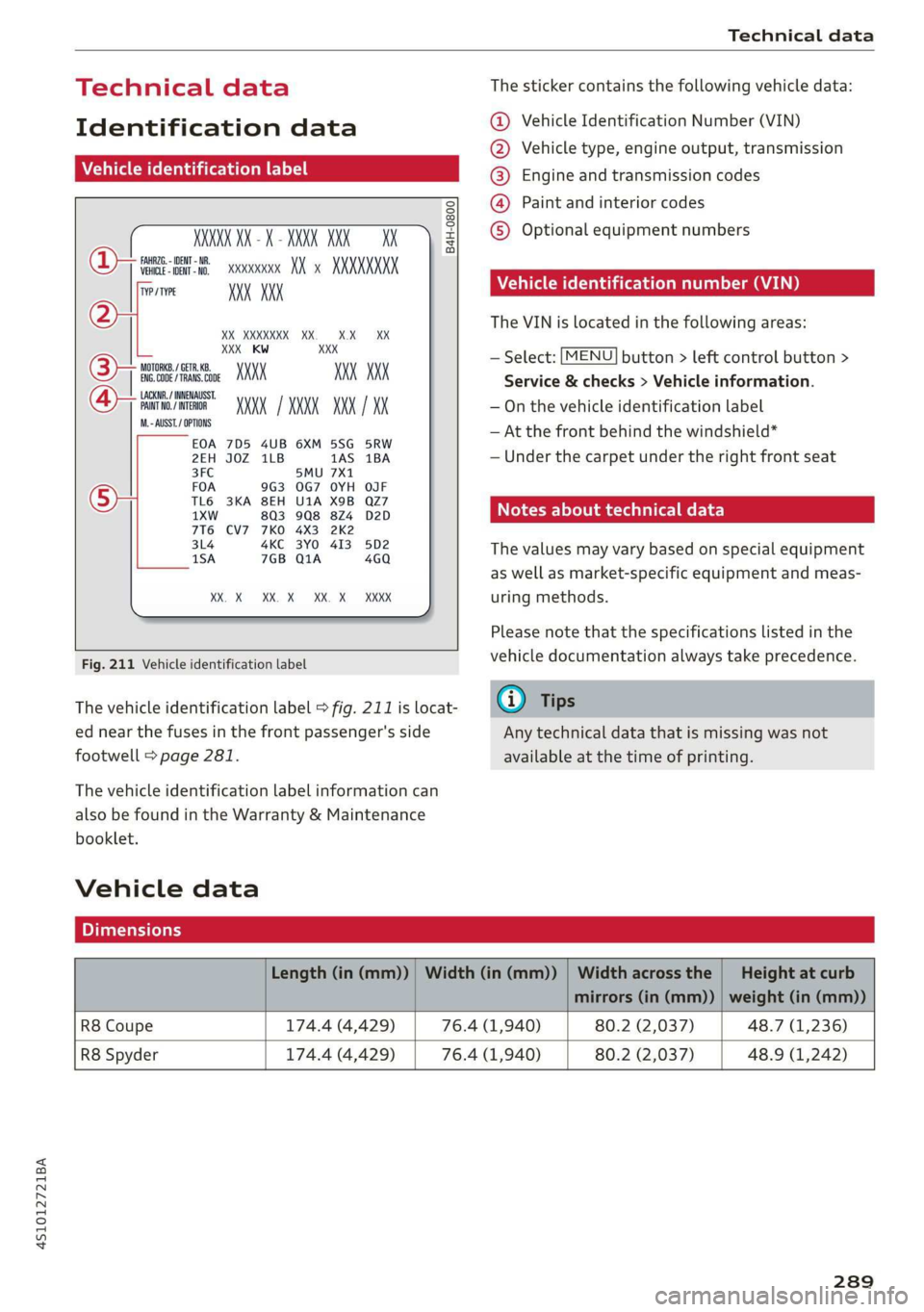
The vehicle identification label > fig. 211 is locat-
ed near the fuses in the front passenger's side
footwell > page 281.
The vehicle identification label information can
also be found in the Warranty & Maintenance
booklet.
Vehicle data
The sticker contains the following vehicle data:
@® Vehicle Identification Number (VIN)
@ Vehicle type, engine output, transmission
® Engine and transmission codes
@) Paint and interior codes
© Optional equipment numbers
Vehicle identification number (VIN)
The VIN is located in the following areas:
— Select: [MENU] button > left control button >
Service & checks > Vehicle information.
— On the vehicle identification label
— At the front behind the windshield*
— Under the carpet under the right front seat
Notes about technical data
The values may vary based on special equipment
as well as market-specific equipment and meas-
uring methods.
Please note that the specifications listed in the
vehicle documentation always take precedence.
G) Tips
Any technical data that is missing was not
available at the time of printing.
Length (in (mm)) | Width (in (mm)) | Width across the | Height at curb
mirrors (in (mm)) | weight (in (mm))
R8 Coupe 174.4 (4,429) 76.4 (1,940) 80.2 (2,037) 48.7 (1,236)
R8 Spyder 174.4 (4,429) 76.4 (1,940) 80.2 (2,037) 48.9 (1,242)
289
Page 295 of 308

4S1012721BA
Child restraints
Where can I get additional information
about child restraints and their use?..... 224
Child Safety: + < sce ss wees so hea vB eas ee 211
Important safety instructions for using child
safety seats. 6.6... ... cece eee eee eee 214
Tether anchors............0.00000000- 223
Tetherstraps sco « ¢ sien 3 & secs s ¥ cares 223
Child safety seats ........ 0... cee eee eee 216
BoOstenseatsiin. i a scum a a smvcone a sansom a oe 218
Convertible child seats................ 217
How do I properly install a child safety seat
in my-vehicle? . « ses x 2 snes +o wren oo woes 214
Infant seats ........... 0... e cree 216
Safety instructions.............-..00- 214
SOGUMING a x saves 3 & smasais 3 & inasons © 0 aweuane 6 swans 220
ClaSSiGVIEW:: s & nea s x news os nee ys eR a BE 13
GLEAMING) cuss = & meme & & teee so RewE Fe ORS Ee 265
Cleaning/removing ice from windows...... 267
Cleaning Alcantara.............-.00000. 268
Cleaning artificial leather............... 268
Cleaning carbon components........ 267, 268
Cleaning controls..............00 eee ee 268
Cleaning decorative parts andtrim........ 267
Cleaning displays w5. 0. cvs eres eee 268
Cleaning exhaust tail pipes.............. 267
Cleaning plastic parts.................. 268
GleaniNG His’: « = wee x » seme ss eee ss ews 266
Cleaning seat covers.............022005 268
Cleaning textiles................00000. 268
Cleaning the Audi virtual cockpit.......... 268
Cleaning the instrument cluster.......... 268
Cleaning the tail lights................6. 266
Cleaning the wind deflector............. 267
Climate control system (automatic)........ 57
Driverselectinn. © + sosvine ss samen suarecs 2 «sain 78
hot esis: = a move 2 wewanes v euceews ae cece oe aRENTO 167
Closing
Convenience closing..............-.... 29
Engine compartment lid............... 231
Luggage compartment lid............... 27
WINGOWS « seosvos o » range soem » © nese oo vere 28
Cockpit (overview) « « coca © + cen + seuss a © eomawoe 6
Color number's « sess ss masse sv eee we ew 289
Coming home iss: « wer 2s mews so eee ov wee 44
Commands (voice recognition system) ..... 104
GOMPAartMeENtsiin. 5 v cesses sv cswssne 6 a ermewce w 6 e008 53
Compass inthe mirror...............000- 49
Compliance: « « seas 5 = caes so eae oo caw a 287
Conference call vais so cease cows se cows ve 115
CONMGCE sas go sews so hele & one & ews ea Be 124
Data: Privactyrocs = 0 wiwew + eon mo name «6% eae 130
Infotainment.......... 0. eee eee 124
Infotainment services..............00. 126
Connection manager............--00 eee 168
Connections
referto Media...........-...0-0- 150, 157
Connection settings.................... 168
Consumer information...............00 284
Consumption (fuel) ..............0 eee aes 15
GOMEAGES «. cneseins os smannce © oxaneae x eects wo 6 santas 120
Additional directory................0.. 169
IMPOrtiNG/EXPOFtING wea sv mows +» new « ¢ 121
Memory:capacity cis . 2 evine s s swine + oxsnins 122
Searching ........ 6.6.05. 120
Showing details..............--..+--- 121
Storing
as destination................. 137
Control DUCCOMS sie x x secs vs mane ¥ anes vo 13)
Control buttons (operating the MMI)....... 94
Control knob with joystick function......... 97
Convenience key.........-.-0e eee eee eee 22
Tndicator light o sscccs so sais oo wan 2 6 woman s 61
Unlocking and locking..............0005 24
Convenience opening and closing
Setting......... 0.0.00. 29
Windows’: » sews » 2 mews 2 x saues 4 2 enw a 2 29
Convertible child safety seats............ 217
Convertible locking retractor
ACtIVALING iin + 2 cai 5 2 nae + on wo eeesEK 221,
Deactivating............ 0. eee eee eee ee 222
Using to secure a child safety seat....... 221
Cooling mMode........ ee eee eee eee eee 87
Cooling system
Adding coolant.................. 237, 238
COOlANE cers. os wersna s senses @ somes oe Me 236
Coolant level checking
Coolant temperature indicator........... 10
Indicator light « sic ss crew ae owen ee eee 17
Grosshainsis « s wann x ¥ caw + nen ws eee ¥ oe 133
Cruise control systeM.... 0... eseee eee euee 74
CUP Holdersiiss ss sees s ¢ ees ss ees se ee 9 53
Current fuel consumption................ 14
293
Page 296 of 308

Index
D
Data Privacy..................0.00000. 130
Data recorder............ 0. eee eee eee ee 91
DAES snes = wasn = 9 sme © camen & « areKeee w 6 ose 167
Date display’ « sciscce os somes =o ansuene 2 a annua 0 « 167
Daytime running lights...............0-. 40
Declaration of compliance............... 287
Defrosting (windows) .................045 58
DEF (instrument cluster)................- 10
Deluxe automatic climate control
refer to Climate control system (automatic) . 57
Determining correct load limit........... 258
Digital COMPASS seies sc oes ce eee a ee eG ee 49
Digital Rights Management.............. 150
Dimensions. ............ 0.0 c ee eee eae 289
Dimming the rearview mirror............. 46
Directory
refer to ContactS............ eee eee ee 120
Disposal. ... 2.0.00... cee cece eee eee 284
Distance driven.......... 0.0.00 c eee eee 14
Doors
Mechanically unlocking and locking....... 26
Driver information system..............4. 12
On-board computer..............2.-00. 14
SWITCHING VIEWS « scsi a & onesies oo semen & eure 13
Driver information systems
EMOrGyZCONSUIMENS orcs. 1 & coswsee 6 5 coerce» > omnes LS
Drives
refer to Media...............0.0- 150, 157
Drive select. ........ 00... cece eee eee eee 78
Driving safely........... 0... eee eee eee 173
Driving through water................0-- 59
Driving times: 5 «esas so case s warn 6 ceacew vse 14
Driving tips
Efficient driving...............00000005 59
Driving track cvsiess x x scones x a cneniens a ¥ exevane ©» anew 67
Dust filter
refer to Pollutant filter..............0.. 56
DVD drive (media drives)................ 151
Dynamicisteering « wasn «x mens ¢ waneasne © meres a 89
Dynamic volume
refer to System volume............0005 171
294
E-mail..................00000000 0 eee 118
Economical route.................00005 138
EDL
refer to Electronic Differential Lock....... 86
Electrical system... .. cee eee eee eee 240
Electromechanical parking brake.......... 65
Electronic Differential Lock............... 86
Electronic immobilizer .............00204. 22
Electronic stabilization control (ESC) ....... 86
Sport mode... .... eee eee eee 87
Electronic Stabilization Control (ESC)
Indicator light.............. eee eee ee
Emergency assistance
Emergency braking function.............. 65
Ermergency faster « coins a « xen a « wmunn x x 44
Emergency operation
DOOrs 0. cee eee eee 26
Engine compartment lid............... 231
Luggage compartment lid............... 28
Power top...........0 0. eee ee eee eee 35
Emissions control system..............- 228
EMErgy CONSUMERS ir. & wicesoves & esau as sess oo Ls
Energy Managements «sce ccc as ene as 91
Engine
Breakingin.......... 0... cee eee eee eee 59
Coolant... 6. cee cece eee 236
JUMPp'’Starting « 2 sew, = + sees + e eee 9 caw 277
Start/StopisyStemn s. scsoxse » @ saace a o oseuns w o oe 62
Starting. .............. 00... eee 60, 61
Starting and stopping..............000. 61
Engine compartment
Lid emergency release .............005- 231
Opening and closing the engine compart-
MENCUG s ewe x 2 sees 2 5 eee ¢ 9 eR Fs ee 231
OVERVIEW’: seems. « a cowses wo roeuos oo mea + 0 oe 232
Safety precautions..............000005 229
Engine compartment lights............... 45
Engine control (indicator light)............ 19
Engine data
refer to Sport displays.................. 1S
Engine oil
Adding ........ 0... c cece eee eee eee 233
CHANGING: s = wevem & ous a e neuee & ee 235
Checking oil level..........-...-. 233, 234
Consumption...........02-00 eee 233, 234
Page 297 of 308
4S1012721BA
Index
Indicator light cscs x = somens + a meee «2 meee < 233
Replacement interval..............00. 243
Temperature indicator...............005 15
Engine Start/Stop mode
refer to Start/Stop system.............. 64
Enhanced View save 2s cence 2s qeew s sees ¢ oe 13
Entering characters/numbers (speller) ...... 99
Entering letters (speller)...............05 99
Environment
Unleaded gasoline................205. 226
ESC
refer to Electronic Stabilization
Control (ESC)...............0..0 0c eee 86
ESP
refer to Electronic Stabilization
Control.(ES€).« » swam «2 saws 4 2 moe xo eet 86
Event Data Recorder (EDR) wv... eeu. ss eves 31
EXterior liQhting’s s sass ¢ 2 sues § ¢ wane 3 2 cae 40
Exterior mirrors
AGjUStING ws = ¢ sons 2 = news 2 o paws Fe eee ee 45
DIMMING « ccseess «0 ssenams x oi cements + enetome © season 46
Folding settings.................00 eee 25
Heating « sews « = ees x eg eo eee gs eee AS
External voice operation................ 109
FE
Factory default settings (MMI)........... 168
Fastening
Booster seats. « «ssc ss news 4 o ere x oe 218
Convertible child safety seats........... 217
Infant seats
Fast forwarding and rewinding (audio/video
FIG) cw & = wees y e ewes 2 e eee Fy ees oe eS 157
Fast forwarding (audio/video file)......... 157
Fastroute............... 0.00.0 e eee 138
Favorites
MO@did:: : seems ¢ 3 aazns x 5 BaeeS 4 E RES En ew 160
Navigation © ssa « 2 snes 3 0 ous © a sees 3 133
Telephone ........ 0.0... cece eee eee 116
Federal Communications Commission (FCC) . 287
File formats (media drives) .............. 162
Floor mats s:ccss sx cts a pecs @ 2 cae eo eres 177
Fog lights/rear fog light(s)............... 40
Foot pedals: ¢ 2e0: se sews se sees so eee eee 176
Footwell lighting...............0..- eee 45
For the sake of the environment
Disposing of engine oil................ 235
FUGLING: < = sews 2 2 wows ¢ 8 eee go eee Fe 227
LO AKS hose 2 wecsanisos & ayewees zw wane wx ewer Se ome 230
Free:textiseareh svcsiue o svscime v sawn 2 2 omen a 100
Mei ai. «5 cesses oo: enesone 0 sccenm «mvs 9 6 sexe 159
Navigation.................0..00000- 132
ReGiO yay x» wise 5 x amuse 4 2 seven & e eeu 6 146
Telephone......... 0.0... c eee eee eee 120
Freeze protection
Coolant...... 2... ee eee eee eee 236
Frequency band................... 146, 148
also refer to Frequency band........... 146
Front airbags
DeSCriptiOnis: : sac ss eee « x eee sp eee 191
How they works «esos 6 o suse « 0 saesns © 0 0 196
Frontal collisions and the laws of physics... 181
Front lid
refer to Luggage compartment lid........ 27
Front seats
Adjusting... 0.0... 0.0 e eee eee eee eee 175
Child restraints in the front seat......... 188
alsovreferto Seats esses ss emer vs enone ve ewe 50
RUC his & souroes
Additives. ............ 000. e eee eee eee 227
Current fuel consumption............... 15
FUCUQaUGC esr: ce omen x eee ea eres ve 10, 12
Fuel tank capacity. ........ cee eee 290
Gasoline... 0... eee eee eee 226
InGicator light » saw ¢ « weww 2» mows sa mewn & 19
Saving fuel...... 2.0... eee eee eee ee 78
Saving fuel consumption................ 59
Fueling
FUCL GAUGE is 3 s woes s & wees «2 oe se eee 12
Fueltankeapacity's « 5 soc es eeu e wane ae 290
Opening the fuel filler door............ 227
Fuses
Assignment...........-.0-.0-00- eee 281
Replacing « mswe ¢ x wows = anew 9 ¢ wea 8 e we 281
G
GALA
refer to Speed dependent volume control. 171
Garage:door opener cies ss wae o win so ween o 29
GarmenthOoks secs s occ & o ewes ¢ e ewes eae 54
295
Page 298 of 308
Index
Gasoline eevee se cuscne oo eancece vw esmate vw atecone vs 226
Additives... 0.0... cc cece eee eee 227
Gasoline MIXtUIe weiss s eecew s Hew ss pee 226
GAWR
refer to Gross Axle Weight Rating (GAWR) . 290
Global commands (voice recognition sys-
TEM) 2. eee ee eee 105
Glossary of tire and loading terminology... 246
GLOVEIEOMPAFEMENE sci: os oie 2 oe amo wo He 54
G meter
refer to Sport displays...............00- 15
Gross Axle Weight Rating (GAWR)........ 290
Gross Vehicle Weight Rating (GVWR) ...... 290
GVWR
refer to Gross Vehicle Weight
Rating (GVWR)...............0000 08s 290
H
Handsfree... .... eee eee eee eee 110
Headlight range control system (indicator
light)... 0... eee ee 19
Headlights............. 0... eee eee eee 42
GClEaniNG's 5 2 ques « = wae xe aew@E « aEM Fa Re 266
Washersystems: cscs x © ecm oo erevee 2 v eave 47
Heated
Exterior mirrors... 2.0... 0.00.0 e eee eee 45
Rear WinGOW ss ¢ 5 seas 2 5 meng ¢ hee a 3 eee 58
SEAS: cs wees © a meses © oH wo OOS Te EUS 6 58
Washer nozzles........... 00s eee ee eee 47
Hexagonal socket..........sceeeeveeeee 271
High beams
Assistant... 2.0.00... 2c eee ee eee 43
Hill hold assist... 00... eee eee eee eee 66
also refer to Hill hold assist............. 66
Home address...........0-0000005 133, 136
HomeLink
refer to Garage door opener............. 29
HOM... eee eee eee 6
Hotspot
referto Wi-Fi s = seas = 2 eos + oes 129, 153
How many airbags does my vehicle have?.. 194
How safety belt pretensioners work....... 185
I
Ignition (indicator light)................. 18
296
Imbalance (wheels) ...........00.. 00005 252
Immobilizer
refer to Electronic immobilizer........... 22
Important things to do before driving..... 173
Importing and exporting (contacts) ....... 12r
Improperly worn safety belts............ 185
Indicator lights’: « ees s x mew 5 < caw 5 oes oe 7
AIfbag SYSTEM sere 2 2 sumnene 5 onomee = 0) epee 199
PASSENGER AIR BAG...........--.005- 199
Infant seats... 00... cece eee eee 216
Input
Using the MMI touch...............-.4. 95
Using the spellen scies ¢ ¢ cea ss pees enews 99
Input level (media) ...........-.-..000- 160
Inspection interval..............020-00. 243
Installing child safety seats
Safety Delts's « wisu s x weve « » sever x e eau 2 220
Installing the upper tether strap on the an-
GHOPAQGE wiccess «x weavece ov emcee eo ewe woe emer ¥ 224
Instrumenticluster is « . sisns ss ower a 0 vee 0 10
Messages ........... 0.00. c eee eee eee 16
Operating’: < = ases x s eewe < o eee ZF Sanas Zo 12
Service interval display................ 243
Switching tabS....... eee ee eee eee 12
Instruments
Adjusting the lighting.................. 45
Interior lighting............. eee eee eee 45
Intermittent (windshield wipers).......... 47
Internet
refer toconnect..............ee ee eee 124
Internet radio...... 2.0.0.0 eee eee eee eee 154
iPod
refer to Audi music interface....... 155,156
J
Joystick function (MMI) .................. 97
Jukebox... eee eee eee Isl
Jump starting ......... 20... eee eee eee 277
K
ee 22
Convenience opening and closing......... 29
Key notirecognized acon s » sews & x amie 2 oe 62
Key:replacementiccs co cess a 6 cctrin «nse oo 22
Mechanical key.............0--005. 22, 23