steering wheel AUDI R8 COUPE 2020 User Guide
[x] Cancel search | Manufacturer: AUDI, Model Year: 2020, Model line: R8 COUPE, Model: AUDI R8 COUPE 2020Pages: 308, PDF Size: 82.41 MB
Page 67 of 308
4S1012721BA
Driving
Messages in the instrument cluster display
Applies to: vehicles with Start/Stop system
Start/stop system: deactivated. Please start
engine manually
This message appears when specific conditions
are not met during a Stop phase. The Start/Stop
system will not be able to restart the engine. The
engine must be started with the
START ENGINE STOP] button.
Start/stop system: malfunction! Function
unavailable. Please contact Service
There is a malfunction in the Start/Stop system.
Drive the vehicle to an authorized Audi dealer or
authorized Service Facility as soon as possible to
have the malfunction corrected.
Electromechanical
parking brake
The ©) switch is located under the selector lever
in the center console.
Your vehicle is equipped with an electromechani-
cal parking brake. The parking brake is designed
to prevent the vehicle from rolling unintentional-
ly and replaces the hand brake.
Setting/manually releasing the parking
brake
> Pull the @) switch to set the parking brake. The
LED in the switch turns on. The Zw (USA mod-
els)/[@) (Canada models) indicator light also
turns on in the instrument cluster display.
> To release the parking brake manually, press
the brake or accelerator pedal while the igni-
tion is switched on and press the ©) switch at
the same time. The LED in the button and the
indicator light in the display turn off.
Releasing the parking brake automatically
Requirement: The driver's door must be closed.
> To start driving and release the parking brake
automatically, press the accelerator pedal as
usual.
In addition to releasing the parking brake auto-
matically, other convenience and safety functions
are available when you start driving > page 66,
Starting to drive.
Emergency braking function
You can use the emergency braking function in an
emergency situation, or if the standard brakes
are malfunctioning or the pedal is obstructed.
> Pull and hold the ©) switch.
>» As soon as you release the (©) switch or acceler-
ate, the braking stops.
Pulling and holding the ©) switch while driving
the vehicle activates the emergency braking func-
tion. The hydraulic brake system will brake all
four wheels. The braking effect is similar to heavy
braking > A\.
To reduce the risk of activating the emergency
braking by mistake, a warning tone (buzzer)
sounds when the ©) switch is pulled. Emergency
braking stops as soon as the ©) switch is released
or the accelerator pedal is pressed.
Parking
> Press the brake pedal to stop the vehicle.
> Pull the ©) switch to set the parking brake.
> Select the "P" selector lever position.
> Turn the engine off > /\.
> Turn the steering wheel when parking on in-
clines so that the wheels will roll into the curb
if the vehicle starts moving.
ZA WARNING
— If a gear is engaged while the vehicle is sta-
tionary and the engine is running, do not
press the accelerator pedal inadvertently.
Otherwise, the vehicle will start to move im-
mediately and this could result in an acci-
dent.
— Emergency braking should only be used in
an emergency, when the when the standard
brake pedal is malfunctioning or obstructed.
During emergency braking, your vehicle will
brake similar to heavy braking. ESC and the
associated components (ABS, ASR, EDL) can-
not overcome the laws of physics. In corners
and when road or weather conditions are
bad, a full brake application can cause the
65
Page 72 of 308
Driving
transmission, because it is not lubricated
under those circumstances > page 278,
Towing.
— The transmission can overheat and be dam-
aged under certain driving and traffic condi-
tions such as frequent starts, creeping for a
long time, or stop-and-go traffic. When the
fs} or i] indicator light turns on, stop the
vehicle at the next opportunity and let the
transmission cool > page 72.
G) Tips
For safety reasons, the parking brake only re-
leases automatically when the driver's door is
closed.
Launch Control Program
The Launch Control Program enables maximum
acceleration.
Requirement: the engine and transmission must
be at operating temperature and the steering
wheel must not be turned. The performance
mode* must be selected or dynamic mode must
be selected in Audi drive select.
> With the engine running, press the |SOFF] but-
ton briefly one time).
> Press the brake pedal firmly with your left foot
and hold it all the way down for at least 1 sec-
ond.
> Press the accelerator pedal down completely at
the same time until the engine reaches a high
RPM that remains constant and the message
appears Launch control program: activated ap-
pears.
> Remove your left foot from the brake.
ZA WARNING
— Always adapt your driving to the traffic flow.
— Only use Launch Control when road and traf-
fic conditions allow it and other drivers will
D_ The ESC light turns on and stays on, and the message Sta-
bilization control (ESC): sport. Warning! Limited stabili-
ty appears temporarily in the Infotainment system to indi-
cate that the system was deactivated.
70
not be endangered or impacted by your driv-
ing and the vehicle's acceleration.
— Please note that the drive wheels can spin
and the vehicle can break away when ESC
sport mode is switched on, especially when
the road is slippery.
— Once the vehicle has started moving, press
the |[& OFF] button briefly to turn the ESC
sport mode off again.
G@) Tips
— The transmission temperature may increase
significantly after using the launch control
program. If that happens, the program may
not be available for a few minutes. It will be
available again after a cool-down period.
— When accelerating using the launch control
program, all vehicle parts are subject to
heavy loads. This can lead to increased wear.
Page 78 of 308
Assist systems
Applies to: vehicles with cruise control system
ICRUISE| / §) Speed control system: currently un-
available. See owner's manual
If the indicator light turns on and this message
appears, the cruise control system has been deac-
tivated. There is a temporary malfunction, for ex-
ample the brakes are overheating. Switch the
cruise control system on again later.
Lap timer
Lap timer
You can measure and analyze lap times with the
lap timer in the display. The time is measured in
minutes, seconds and 1/10 seconds. With lap
times longer than 60 minutes, the hour is also
shown and the display of 1/10 seconds is re-
moved.
The time measurement on an individual lap ends
after 99 hours 59 minutes and 59 seconds. A new
lap starts automatically after that.
The measurement ends after a maximum of 30
laps. You can then evaluate the lap times or start
a new time measurement.
You can control the lap timer using the controls
on the multifunction steering wheel > page 76.
ZA\ WARNING
Your focus should always be on driving your
vehicle safely. As the driver, you have com-
plete responsibility for safety in traffic. Only
use the functions such as the lap timer in such
a way that you always maintain complete con-
trol over your vehicle in all traffic situations.
G) Tips
You can retrieve information from the trip
computer while the lap timer stopwatch is
running.
76
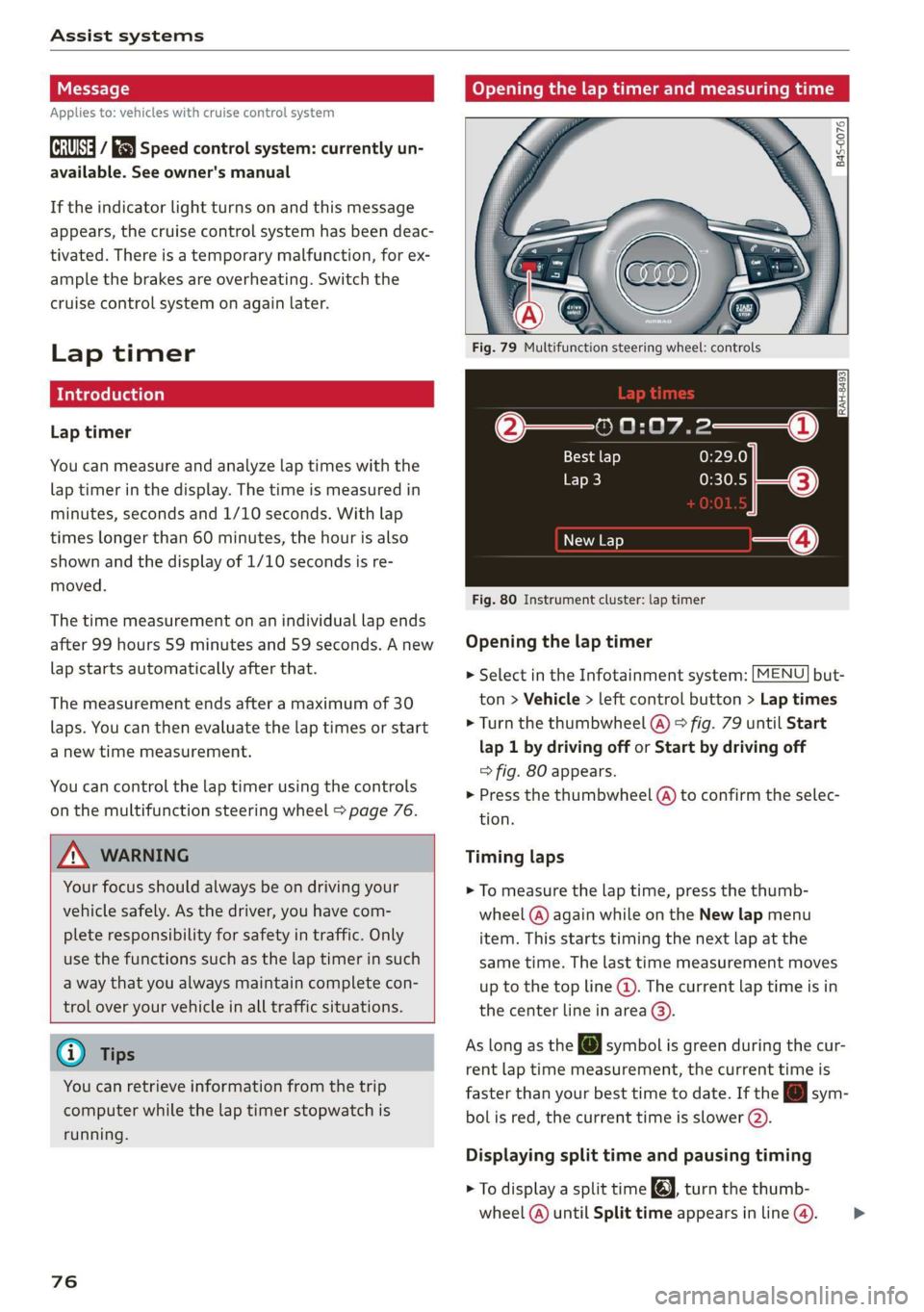
Opening the lap timer and measuring time
B4S-0076
Fig. 79 Multifunction steering wheel: controls
@—» 0:07.2——_@
Best lap 0:29.0
To} 0:30.5
New Lap
Fig. 80 Instrument cluster: lap timer
Opening the lap timer
> Select in the Infotainment system: [MENU] but-
ton > Vehicle > left control button > Lap times
> Turn the thumbwheel @) ° fig. 79 until Start
lap 1 by driving off or Start by driving off
=> fig. 80 appears.
> Press the thumbwheel (a) to confirm the selec-
tion.
Timing laps
> To measure the lap time, press the thumb-
wheel @) again while on the New lap menu
item. This starts timing the next lap at the
same time. The last time measurement moves
up to the top line @). The current lap time is in
the center line in area @).
As
long as the [J symbol is green during the cur-
rent lap time measurement, the current time is
faster than your best time to date. If the @ sym-
bolis red, the current time is slower (@).
Displaying split time and pausing timing
> To display a split time @, turn the thumb-
wheel (@) until Split time appears in line @). >
Page 79 of 308
4S1012721BA
Assist systems
Press the thumbwheel (@) to confirm the selec-
tion. The split time appears for approximately
10 seconds in area @). The timing of the cur-
rent lap continues.
If you would like to insert a pause fi immediate-
ly after the split time, first press the thumbwheel
@ to confirm the menu item Reset values with
OK.
> To insert a pause, turn the thumbwheel @) until
Pause appears in line (). Press the thumbwheel
@ to confirm the selection. The pause symbol
Hl appears in area.
> To continue timing, press the thumbwheel (@).
If timing is paused, you can continue it later even
if you switch the ignition off.
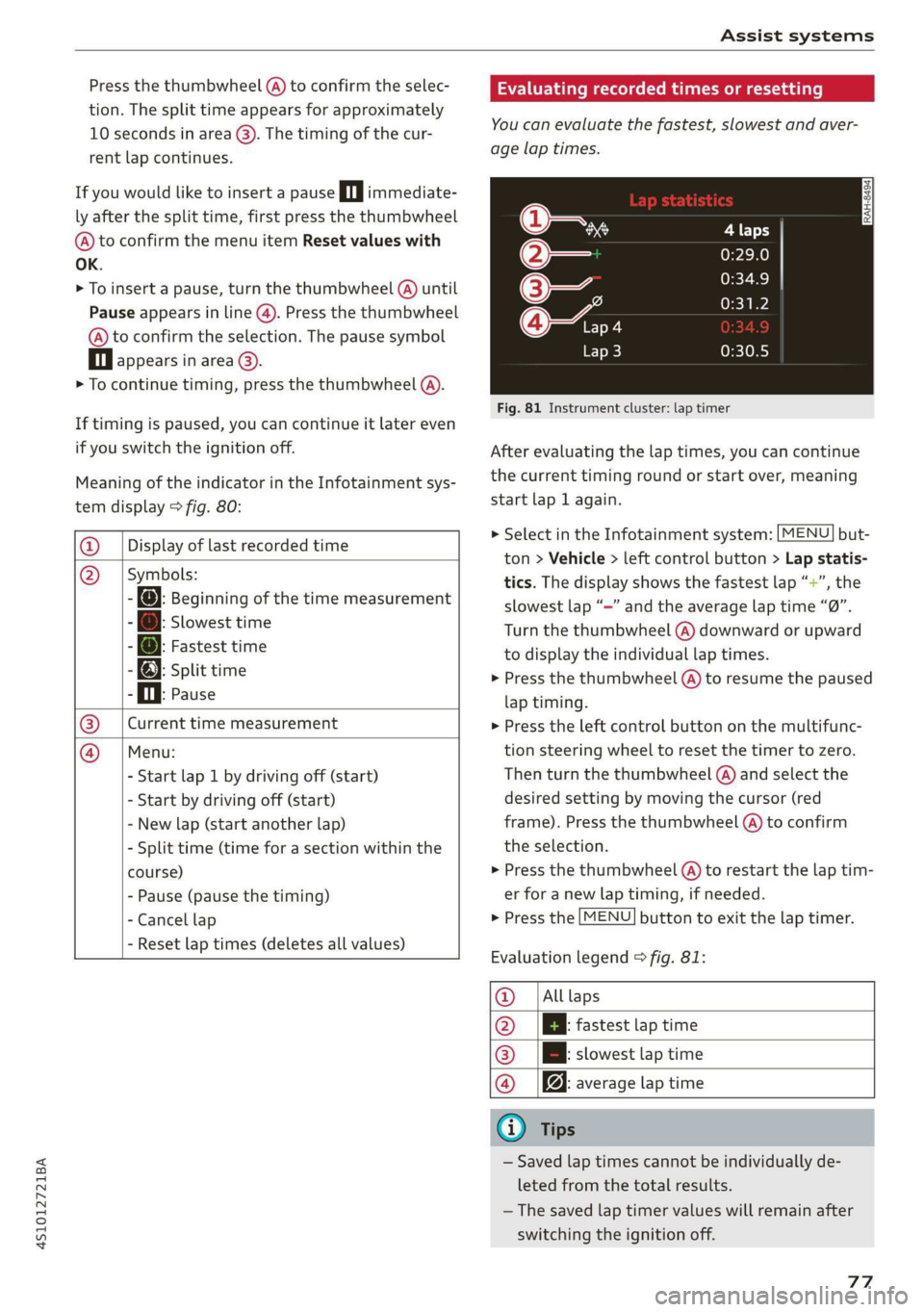
Meaning of the indicator in the Infotainment sys-
tem display > fig. 80:
@ _| Display of last recorded time
@_ |Symbols:
- fo): Beginning of the time measurement
: Slowest time
: @: Fastest time
- @; split time
P i. Pause
Current time measurement
Menu:
- Start lap 1 by driving off (start)
- Start by driving off (start)
- New lap (start another lap)
- Split time (time for a section within the
course)
- Pause (pause the timing)
- Cancel lap
|
- Reset lap times (deletes all values)
Evaluating recorded times or resetting
You can evaluate the fastest, slowest and aver-
age lap times.
Fig. 81 Instrument cluster: lap timer
After evaluating the lap times, you can continue
the current timing round or start over, meaning
start lap 1 again.
> Select in the Infotainment system: [MENU] but-
ton > Vehicle > left control button > Lap statis-
tics. The display shows the fastest lap “+”, the
slowest lap “—” and the average lap time “0”.
Turn the thumbwheel (@) downward or upward
to display the individual lap times.
> Press the thumbwheel () to resume the paused
lap timing.
» Press the left control button on the multifunc-
tion steering wheel to reset the timer to zero.
Then turn the thumbwheel @) and select the
desired setting by moving the cursor (red
frame). Press the thumbwheel @) to confirm
the selection.
> Press the thumbwheel (@) to restart the lap tim-
er for a new lap timing, if needed.
> Press the [MENU] button to exit the lap timer.
Evaluation legend © fig. 81:
@_ |Alllaps
@ |[EBl fastest tap time
@® | slowest lap time
@ |f@ average lap time
G) Tips
— Saved lap times cannot be individually de-
leted from the total results.
—The saved lap timer values will remain after
switching the ignition off.
77
Page 80 of 308
Assist systems
Audi drive select (drive
settings)
Drive select makes it possible to experience dif-
ferent types of vehicle characteristics in one vehi-
cle. The driver can select from four modes: Com-
fort, Auto, Dynamic and Individual using the
ssa button on the steering wheel or through the
Infotainment system to switch between a sporty
and a comfortable driving mode, for example. In
the Individual mode, the settings can be adjust-
ed to your personal preferences. This makes it
possible to combine settings such as a sporty en-
gine setting with light steering.
Z\ WARNING
Using Audi drive select incorrectly can lead to
collisions, other accidents and serious inju-
ries.
The vehicle setup in each mode depends on the
vehicle's features.
Engine and automatic transmission
Depending on the mode, the engine and auto-
matic transmission respond more quickly or in a
more balanced manner to accelerator pedal
movements.
Suspension control (Audi magnetic ride)*
The suspension control uses sensors to record in-
formation regarding steering movements, brak-
ing and acceleration operations by the driver, as
well as information about the road surface, driv-
ing speed, and load. With drive select, you can
adjust the suspension control to sporty (dynam-
ic), comfortable (comfort) or balanced (auto).
Steering
The power steering adapts. Indirect steering that
moves easily as in comfort mode is especially
suited to long drives on a highway. The dynamic
mode provides sporty, direct steering.
78
Torque distribution*
The all wheel drive distributes the drive power to
the rear axle based on the situation. The distribu-
tion of power varies depending on the selected
mode from moderate (Comfort) to sporty (Dy-
namic). The goal is a high level of agility and abil-
ity to accelerate on curves. The vehicle is very re-
sponsive to steering.
Engine sound
The engine sound adapts to the current mode
and can be subtle to sporty.
@ Tips
In some models, the maximum vehicle speed
can only be reached in the auto and dynamic
modes.
Selecting the driving mode
You can choose between comfort, auto, dynamic
and individual.
io
):
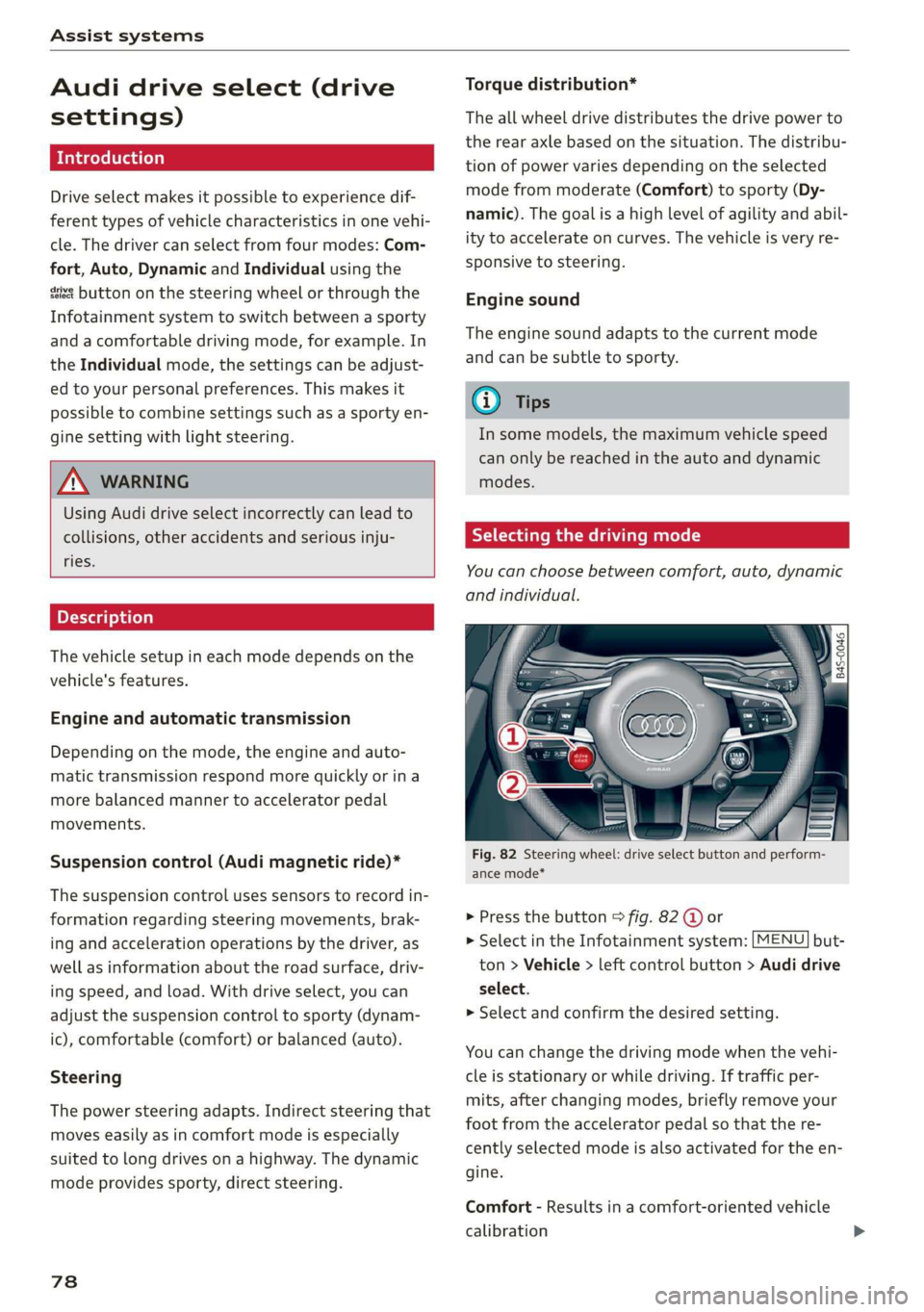
Fig. 82 Steering wheel: drive select button and perform-
ance mode*
> Press the button > fig. 82 @ or
> Select in the Infotainment system: [MENU] but-
ton > Vehicle > left control button > Audi drive
select.
> Select and confirm the desired setting.
You can change the driving mode when the vehi-
cle is stationary or while driving. If traffic per-
mits, after changing modes, briefly remove your
foot from the accelerator pedal so that the re-
cently selected mode is also activated for the en-
gine.
Comfort - Results in a comfort-oriented vehicle
calibration
Page 81 of 308
4S1012721BA
Assist systems
Auto - Provides an overall comfortable yet dy-
namic driving feel and is suited for everyday use.
Dynamic - Gives the driver a sporty driving feel
and is suited to a sporty driving style.
Individual - > page 79.
Setting the driving program
Depending on the driving mode selected, you can
select additional driving programs with the selec-
tor lever.
D/M - Driving forward
When the transmission is in the D/M position, it
can be operated either in the D normal mode or
in the M manual mode. To engage the M manual
mode, move the selector lever into the tiptronic
gate
or use the shift paddles. You can only select
the M selector lever position when D is engaged.
To engage D from the M selector lever position,
move the selector lever out of the tiptronic gate
to D/S or tap it once toward the rear > A\ in Se-
lecting a selector lever position on page 68. To
shift from N to D when traveling at speeds below
2 mph (2 km/h), press the brake pedal and shift
into the D position > A\ in Selecting a selector
lever position on page 68.
S/MS - Driving forward
When the transmission is in the S/MS position, it
can be operated either in the S sport mode or in
the MS manual mode. To engage the MS manual
mode, move the selector lever into the tiptronic
gate
or use the shift paddles. You can only select
the MS selector lever position when S is engaged.
To engage S from the MS selector lever position,
move the selector lever out of the tiptronic gate
to D/S or tap it once toward the rear > A\ in Se-
lecting a selector lever position on page 68. To
shift from N to S when traveling at speeds below
2 mph (2 km/h), press the brake pedal and shift
into the S position > A in Selecting a selector
lever position on page 68.
M Performance - Driving forward
The transmission can be operated in the MS
mode when the selector Lever is in the M posi-
tion. To engage the manual “MS” performance
mode, press the performance mode button on
the steering wheel.
Performance mode
Applies to: vehicles with performance mode
The vehicle is configured in performance mode
for sporty driving.
The suspension setting, engine and transmission
characteristics change when driving in perform-
ance mode. It is switched on or off with the per-
formance mode button on the steering wheel.
Road conditions
Using the knob > page 78, fig. 82 2), you can op-
timize the vehicle settings for the current road
conditions (such as wet roads).
ZA WARNING
Please note that the stabilization functions
provided by the ESC and the ASR are limited
when performance mode is switched on. To
reduce the risk of sliding, only switch per-
formance mode on when your driving abilities
and the traffic situation permit.
Adjusting the Individual mode
You can adjust the vehicle settings to your personal preferences.
> Press the sist button > Individual > right con-
trol button, or
> Select in the Infotainment system: [MENU] but-
ton > Vehicle > left control button>Audi drive
select
> Individual > right control button
After you have closed the settings, you will auto-
matically drive in the Individual* mode.
The equipment in your vehicle will determine
which settings you can adjust. The following ta-
ble gives an overview of the characteristics.
79
>
Page 85 of 308

4S1012721BA
Parking aid
Rearview camera
Introduction
Applies to: vehicles with rearview camera
B8V-0629
Fig. 86 Diagram: lines to aid in parking
The rearview camera helps you to park or maneu-
ver using the orientation lines.
General information
Applies to: vehicles with rearview camera
B4s-0090
Fig. 87 Principle of operation: Area covered (@) and area
not covered (2) by the rearview camera.
Fig. 88 Vehicle rear: rearview camera component location
The rearview camera is located above the rear li-
cense plate bracket. Make sure that the lens for
the parking system > fig. 88 is not covered by de-
posits or any other obstructions because this can
impair the function of the parking system. For in-
formation on cleaning, see > page 265.
The rearview camera coverage area includes (4)
> fig. 87. Only this area is shown in the Infotain-
ment display. Objects that are in area @), which is
not covered, are not displayed.
ZA WARNING
— Always read and follow the applicable warn-
ings > A in Introduction on page 81.
— If the position and the installation angle of
the rearview camera was changed, for exam-
ple after a collision, do not continue to use
the system for safety reasons. Have it
checked by an authorized Audi dealer or au-
thorized Audi Service Facility.
— Only use the rearview camera to assist you if
it shows a good, clear picture. For example,
the image may be affected by the sun shin-
ing into the lens, dirt on the lens, or if there
is a malfunction.
— Use the rearview camera only if the engine
compartment lid is completely closed. Make
sure any objects you may have mounted on
the luggage compartment lid do not block
the rearview camera.
— The camera lens enlarges and distorts the
field of vision. The object appears both al-
tered and inaccurate on the screen.
—Incertain situations, people or objects in
the display appear closer or farther away:
— For objects that do not touch the ground,
such as the bumper of a parked vehicle, a
trailer hitch or the rear of a truck. Do not
use the orientation lines in this case.
— If driven from a level surface onto an in-
cline, or a downward slope.
— If driven toward protruding objects.
— If the vehicle is carrying too much load in
the rear.
@) Note
— Always read and follow the applicable warn-
ings >@ in Introduction on page 81.
— The orange-colored orientation lines in the
Infotainment display show the vehicle path
based on the steering wheel angle. The
83
>
Page 86 of 308
Parking aid
front of the vehicle swings out more than
the rear of the vehicle. Maintain plenty of
distance so that an exterior mirror or a cor-
ner of the vehicle does not collide with any
obstacles.
Scare Rie meal
Applies to: vehicles with rearview camera
Switching on
> Shift into reverse, or
> Press the Pt button in the center console
=> page 82, fig. 84. A short confirmation tone
sounds and the LED in the button turns on.
Switching off
> Drive faster than 6 mph (10 km/h), or
> Press the Pa button, or
> Switch the ignition off.
G) Tips
— The visual display in the left part of the dis-
play should help you detect the critical vehi-
cle areas.
— You can change the volume of the signals
and the display > page 84.
Perpendicular parking
Applies to: vehicles with rearview camera
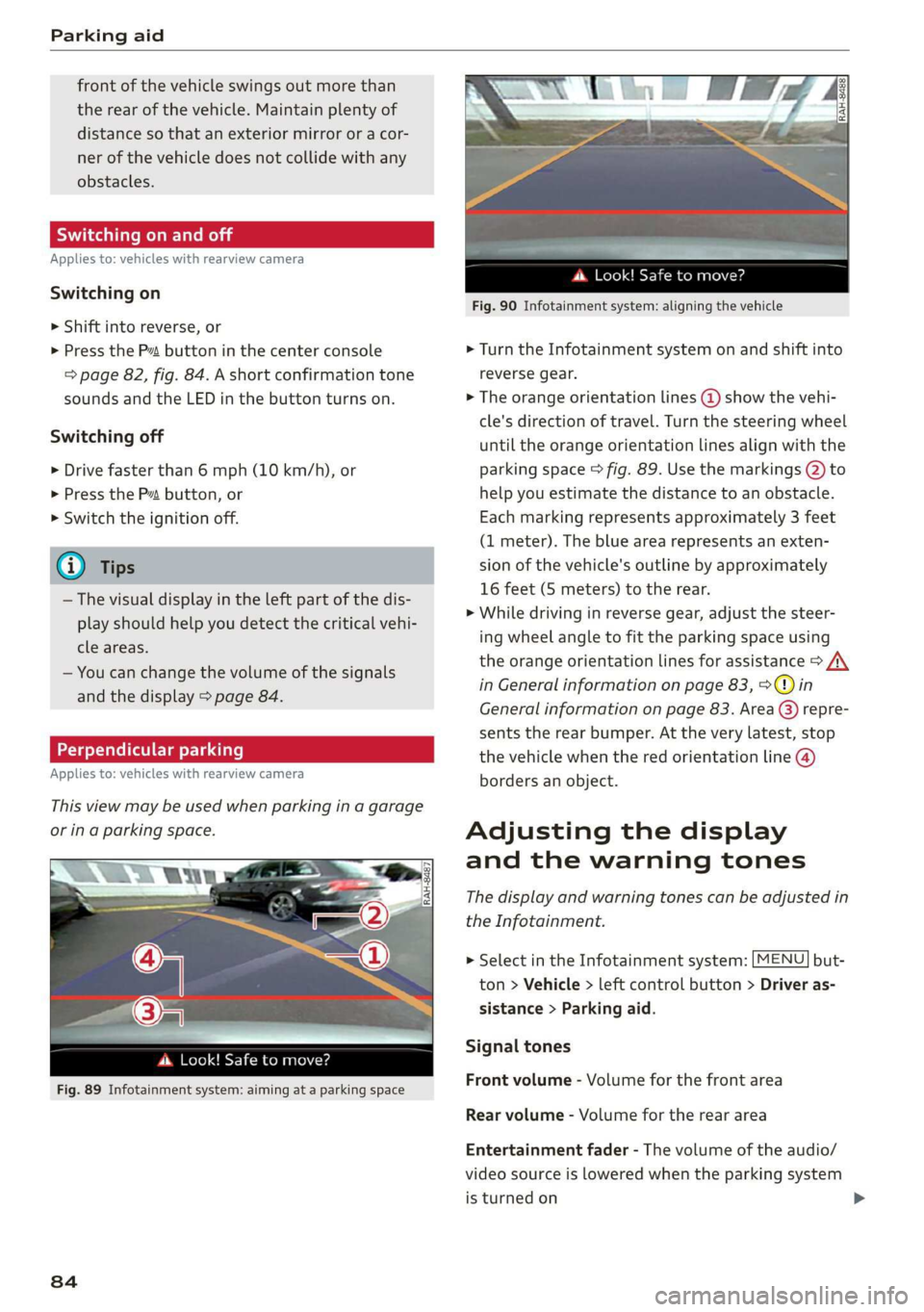
This view may be used when parking in a garage
or ina parking space.
(3)
4. Look! Safe to move?
Fig. 89 Infotainment system: aiming at a parking space
84
ds. Look! Safe to move?
Fig. 90 Infotainment system: aligning the vehicle
> Turn the Infotainment system on and shift into
reverse gear.
> The orange orientation lines @ show the vehi-
cle's direction of travel. Turn the steering wheel
until the orange orientation lines align with the
parking space > fig. 89. Use the markings @ to
help you estimate the distance to an obstacle.
Each marking represents approximately 3 feet
(1 meter). The blue area represents an exten-
sion of the vehicle's outline by approximately
16 feet (5 meters) to the rear.
> While driving in reverse gear, adjust the steer-
ing wheel angle to fit the parking space using
the orange orientation lines for assistance > A\
in General information on page 83, >@) in
General information on page 83. Area () repre-
sents the rear bumper. At the very latest, stop
the vehicle when the red orientation line @
borders an object.
Adjusting the display
and the warning tones
The display and warning tones can be adjusted in
the Infotainment.
> Select in the Infotainment system: [MENU] but-
ton > Vehicle > left control button > Driver as-
sistance > Parking aid.
Signal tones
Front volume - Volume for the front area
Rear volume - Volume for the rear area
Entertainment fader - The volume of the audio/
video source is lowered when the parking system
is turned on
Page 88 of 308
Intelligent Technology
Intelligent Technology
Electronic stabilization
control (ESC)
Electronic Stabilization Control (ESC) supports
driver safety. It reduces the risk of slipping and
improves driving stability. ESC detects critical sit-
uations such as the vehicle oversteering and un-
dersteering or the wheels are spinning. The
brakes are applied or the engine torque is re-
duced in order to stabilize the vehicle. When the
ESC engages, the B indicator light blinks in the
instrument cluster.
The following systems are integrated in the ESC:
Anti-lock braking system (ABS)
ABS prevents the wheels from locking when brak-
ing. The vehicle can still be steered even during
hard braking. Apply steady pressure to the brake
pedal. Do not pump the pedal. A pulsing in the
brake pedal indicates that the system is acting to
stabilize the vehicle.
Brake assist system
The brake assist system can decrease braking dis-
tance. It increases braking power when the driver
presses the brake pedal quickly in emergency sit-
uations. You must press and hold the brake pedal
until the dangerous situation is over.
Anti-Slip Regulation (ASR)
ASR reduces drive power when the drive wheels
begin spinning and adapts the power to the road
conditions. This makes it easier to start, acceler-
ate and drive up hills.
Electronic Differential Lock (EDL)
The EDL applies the brakes to wheels that are
slipping and transfers the drive power to the oth-
er wheels. This function is not available at higher
speeds.
In extreme cases, EDL automatically switches off
to keep the brake on the braked wheel from over-
heating. The vehicle is still functioning correctly.
86
EDL will switch on again automatically when con-
ditions have returned to normal.
Power steering
The ESC can also support vehicle stability
through steering.
Selective wheel torque control
Selective wheel torque control is used when driv-
ing on curves. Braking is targeted toward the
wheels on the inside of the curve as needed. This
allows more precise driving in curves.
Automatic post-collision braking system
The automatic post-collision braking system can
help to reduce the risk of sliding and of addition-
al collisions after an accident. If the airbag con-
trol module detects a collision above a certain ve-
hicle speed, the vehicle is braked by the ESC.
The vehicle does not brake automatically if one of
the following occurs:
— The driver presses the accelerator pedal
—The braking force generated by the pressed
brake pedal is greater than the braking force
that would be initiated by the system
— The ESC, the brake system, or the vehicle elec-
trical system is not functioning
ZA WARNING
— The ESC and its integrated systems cannot
overcome the limits imposed by natural
physical laws. This is especially important on
slippery or wet roads. If the systems begin
acting to stabilize your vehicle, you should
immediately alter your speed to match the
road and traffic conditions. Do not let the in-
creased safety provided tempt you into tak-
ing risks. This could increase your risk of a
collision.
— Please note the risk of a collision increases
when driving fast, especially through curves
and on slippery or wet roads, and when driv-
ing too close to objects ahead. There is still
a risk of accidents because the ESC and its
integrated systems cannot always prevent
collisions.
Page 91 of 308
4S1012721BA
Intelligent Technology
reduce the risk of injury, do not place your
foot under the brake pedal.
@) Note
— Never let the brakes “rub” by pressing the
pedal lightly when braking is not actually
necessary. This can cause the brakes to over-
heat and increases braking distance and
causes wear.
— Before driving on long stretches with steep
hills, reduce the vehicle speed and shift to a
lower gear to use the engine braking effect.
This reduces the load on the brakes. If you
need to brake additionally, brake in intervals
and not continuously.
G) Tips
— If you retrofit your vehicle with a front spoil-
er, wheel covers or similar items, make sure
that the air flow to the brakes is not ob-
structed. Otherwise the brake system can
overheat.
— Also refer to the information about brake
fluid > page 239.
Steering
Electromechanical steering supports the driver's
steering movements by electronically adapting
the power steering depending on the vehicle
speed. The settings depend on the selected Audi
drive select* mode.
Dynamic steering
Applies to: vehicles with dynamic steering
The driving dynamic and driving stability are in-
creased by the steering ratio based on the speed.
At reduced speeds, steering is direct in order to
provide agile steering behavior and keep the
steering effort as minimal as possible when the
driver is maneuvering the vehicle. This sets the
steering to be less sensitive at higher speeds in
order to provide improved vehicle control.
Messages
a Steering: malfunction! Please stop vehicle
The power steering may have failed. Adapt your
driving style immediately to compensate for the
fact that it may be more difficult to turn the
steering wheel, and stop your vehicle in a safe lo-
cation as soon as possible. Do not continue driv-
ing. See an authorized Audi dealer or authorized
Audi Service Facility for assistance.
a Steering: malfunction! You can continue
driving
There is a malfunction. Steering may be more dif-
ficult or more sensitive. Adapt your driving style.
Have the steering system checked immediately
by an authorized Audi dealer or authorized Audi
Service Facility. Please note that the red indicator
light may turn on after restarting the engine. Do
not continue driving if it does.
Dynamic steering: correcting steering wheel
Position
The steering is reinitializing. The steering wheel
will move easily after starting the vehicle. Reiniti-
alization might be necessary if the steering wheel
was moved while the engine was switched off.
The display turns off if the initialization was suc-
cessful.
@) Tips
— If there is a malfunction, the steering wheel
may be crooked when driving straight.
—Ifthe a or Ee indicator light only stays on
for a short time, you may continue driving.
All wheel drive (quattro)
Applies to: vehicles with all wheel drive
In all wheel drive, all four wheels are powered.
General information
In all wheel drive, the driving power is divided be-
tween all four wheels. This happens automatical-
ly depending on your driving behavior as well as
the current road conditions. Also see > page 86,
Electronic stabilization control (ESC).
The all wheel drive concept is designed for high
engine power. Your vehicle is exceptionally pow-
erful and has excellent driving characteristics
both under normal driving conditions and on >
89