warning light AUDI R8 COUPE 2020 Owner's Manual
[x] Cancel search | Manufacturer: AUDI, Model Year: 2020, Model line: R8 COUPE, Model: AUDI R8 COUPE 2020Pages: 308, PDF Size: 82.41 MB
Page 65 of 308
4S1012721BA
Driving
The Start/Stop system is automatically activated
once
the ignition is switched on.
Basic requirements for Start/Stop mode
— The driver's door must be closed.
— The driver's seat belt much be fastened.
— The engine compartment lid must be closed.
— The vehicle must have driven faster than 2 mph
(4 km/h) since the last time it stopped.
Z\ WARNING
— Never turn off the engine before the vehicle
has come to a complete stop. Switching it
off before the vehicle has stopped may im-
pair the function of the brake booster and
power steering. You would then need to use
more force to steer and brake the vehicle.
The fact that you cannot steer and brake as
usual may increase the risk of accidents and
serious
injuries.
— If you leave the vehicle, switch the ignition
off and take the vehicle key with you. This
applies particularly when children remain in
the vehicle. Otherwise the children could
start the engine or operate electrical equip-
ment such as power windows.
—To reduce the risk of injuries, make sure that
the Start/Stop system is turned off when
working in the engine compartment
=> page 64.
©) Note
Always switch the Start/Stop system off when
driving through water > page 64.
Stopping/starting the engine
Applies to: vehicles with Start/Stop system
eo Ss
2 db t a
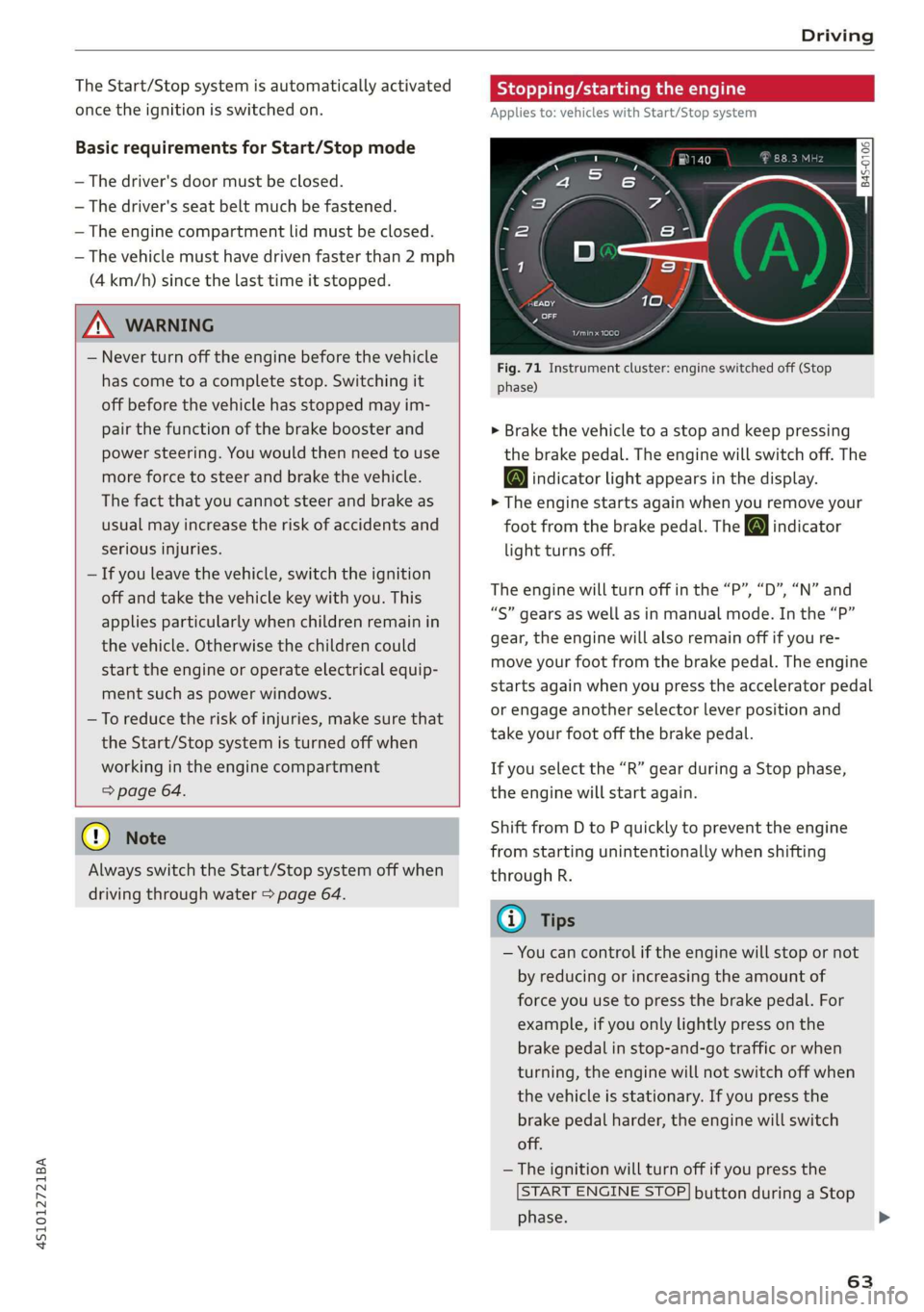
Fig. 71 Instrument cluster: engine switched off (Stop
phase)
> Brake the vehicle to a stop and keep pressing
the brake pedal. The engine will switch off. The
@ indicator light appears in the display.
> The engine starts again when you remove your
foot from the brake pedal. The o indicator
light turns off.
The engine will turn off in the “P”, “D”, “N” and
“S” gears as well as in manual mode. In the “P”
gear, the engine will also remain off if you re-
move your foot from the brake pedal. The engine
starts again when you press the accelerator pedal
or engage another selector lever position and
take your foot off the brake pedal.
If you select the “R” gear during a Stop phase,
the engine will start again.
Shift from D to P quickly to prevent the engine
from starting unintentionally when shifting
through R.
@) Tips
— You can control if the engine will stop or not
by reducing or increasing the amount of
force you use to press the brake pedal. For
example, if you only lightly press on the
brake pedal in stop-and-go traffic or when
turning, the engine will not switch off when
the vehicle is stationary. If you press the
brake pedal harder, the engine will switch
off.
— The ignition will turn off if you press the
START ENGINE STOP] button during a Stop
phase.
63
>
Page 66 of 308

Driving
— When you stop and the Start/Stop system
turns the engine off, the ignition remains
on. Make sure the ignition is switched off
before you leave the vehicle or else the bat-
tery could drain.
General information
Applies to: vehicles with Start/Stop system
Starting and stopping the engine automat-
ically
The system checks if certain conditions are met
before and during the Stop phase, and deter-
mines if the engine stops and how long it re-
mains stopped. For example, if power usage is
high, the engine will not be stopped. Along with
other conditions, the following factors influence
the automatic engine start or stop:
— Environmental conditions (slopes, inclines, ele-
vation, temperature)
— Battery (charge status, temperature, power us-
age)
— Engine temperature
— Assist systems
— Driving behavior
Depending on the engine, the indicator light
may appear if the engine is not stopped.
Ignition is switched off automatically
To prevent the vehicle battery from draining, the
ignition will switch off automatically under the
following conditions:
— If the vehicle has already been driven
— If the Start/Stop system has stopped the en-
gine
— If the driver's door is opened
—If the driver's safety belt is unbuckled
— If the brake pedal is not pressed
— If the vehicle is stationary
In this case, the parking lights switch on in place
of the low beams and the message Side marker
lights will switch off automatically in 30 mi-
nutes. See owner's manual appears in the Info-
tainment system display. The side marker lights
will switch off after approximately 30 minutes or
when you lock the vehicle.
64
If the Start/Stop system has not turned off the
engine or if you have switched the Start/Stop sys-
tem off manually, the ignition will not be auto-
matically switched off and the engine will contin-
uetorun>A.
ZX WARNING
To reduce the risk of poisoning, never allow
the engine to run in confined spaces.
@ Tips '
If you select the “D”, “N” or “S” gear after
shifting into reverse, the vehicle must be driv-
en faster than 6 mph (10 km/h) in order for
the engine to switch off again.
Manually switching the Start/Stop system
ame emo
Applies to: vehicles with Start/Stop system
If you do not wish to use the system, you can
switch it off manually.
S g
2 § £
g z
Fig. 72 Center console: Start/Stop system button
> To switch the Start/Stop system off/on manual-
ly, press the || button. The LED in the button
turns on when the system is switched off.
G@) Tips
If you switch the system off during a Stop
phase, the engine will start again automati-
cally.
Page 67 of 308
4S1012721BA
Driving
Messages in the instrument cluster display
Applies to: vehicles with Start/Stop system
Start/stop system: deactivated. Please start
engine manually
This message appears when specific conditions
are not met during a Stop phase. The Start/Stop
system will not be able to restart the engine. The
engine must be started with the
START ENGINE STOP] button.
Start/stop system: malfunction! Function
unavailable. Please contact Service
There is a malfunction in the Start/Stop system.
Drive the vehicle to an authorized Audi dealer or
authorized Service Facility as soon as possible to
have the malfunction corrected.
Electromechanical
parking brake
The ©) switch is located under the selector lever
in the center console.
Your vehicle is equipped with an electromechani-
cal parking brake. The parking brake is designed
to prevent the vehicle from rolling unintentional-
ly and replaces the hand brake.
Setting/manually releasing the parking
brake
> Pull the @) switch to set the parking brake. The
LED in the switch turns on. The Zw (USA mod-
els)/[@) (Canada models) indicator light also
turns on in the instrument cluster display.
> To release the parking brake manually, press
the brake or accelerator pedal while the igni-
tion is switched on and press the ©) switch at
the same time. The LED in the button and the
indicator light in the display turn off.
Releasing the parking brake automatically
Requirement: The driver's door must be closed.
> To start driving and release the parking brake
automatically, press the accelerator pedal as
usual.
In addition to releasing the parking brake auto-
matically, other convenience and safety functions
are available when you start driving > page 66,
Starting to drive.
Emergency braking function
You can use the emergency braking function in an
emergency situation, or if the standard brakes
are malfunctioning or the pedal is obstructed.
> Pull and hold the ©) switch.
>» As soon as you release the (©) switch or acceler-
ate, the braking stops.
Pulling and holding the ©) switch while driving
the vehicle activates the emergency braking func-
tion. The hydraulic brake system will brake all
four wheels. The braking effect is similar to heavy
braking > A\.
To reduce the risk of activating the emergency
braking by mistake, a warning tone (buzzer)
sounds when the ©) switch is pulled. Emergency
braking stops as soon as the ©) switch is released
or the accelerator pedal is pressed.
Parking
> Press the brake pedal to stop the vehicle.
> Pull the ©) switch to set the parking brake.
> Select the "P" selector lever position.
> Turn the engine off > /\.
> Turn the steering wheel when parking on in-
clines so that the wheels will roll into the curb
if the vehicle starts moving.
ZA WARNING
— If a gear is engaged while the vehicle is sta-
tionary and the engine is running, do not
press the accelerator pedal inadvertently.
Otherwise, the vehicle will start to move im-
mediately and this could result in an acci-
dent.
— Emergency braking should only be used in
an emergency, when the when the standard
brake pedal is malfunctioning or obstructed.
During emergency braking, your vehicle will
brake similar to heavy braking. ESC and the
associated components (ABS, ASR, EDL) can-
not overcome the laws of physics. In corners
and when road or weather conditions are
bad, a full brake application can cause the
65
Page 71 of 308
4S1012721BA
Driving
— The vehicle can roll even if the ignition is
switched off.
— Power is still transmitted to the wheels
when the engine is running at idle. To pre-
vent the vehicle from “creeping”, you must
keep your foot on the brake in all selector
lever positions (except "P" and "N") when
the engine is running.
— Before opening the engine compartment lid,
select the "P" selector lever position and set
the parking brake. This reduces the risk of
an accident. Always read and follow the ap-
plicable warnings > page 229, General in-
formation.
@ Tips
If you accidentally select "N" while driving,
take your foot off the accelerator pedal and
wait for the engine to slow down to idle be-
fore selecting "D" or "S".
Starting the engine
> The Por N position must be selected.
Starting from a stop
> Press and hold the brake pedal.
> Start the engine > page 60.
> Press the locking button @ on the selector lev-
er and select the D/S or R position > page 67.
> Wait a moment until the transmission shifts.
You will notice a slight movement when the
gear engages.
> Release the brake pedal and press the accelera-
tor pedal > A\.
Various convenience functions are available for
starting on hills > page 66.
Stopping temporarily
> Press the brake pedal to stop the vehicle, for
example at a traffic light. Do not press the ac-
celerator pedal when doing this.
> To prevent the vehicle from rolling when you
start driving, set the parking brake when stop-
ping on steep hills > A\ and >@).
> The parking brake will release automatically
and the vehicle will start moving once you press
the accelerator pedal.
Stopping or parking
If the selector lever is not in the "P" position
when you open the driver’s door, the vehicle
could roll.
> Press and hold the brake pedal > A\.
> Set the parking brake.
> To select the "P" selector lever position, press
the "P" button (2) on the selector lever
=> page 67, fig. 73.
Under certain conditions, such as driving in the
mountains, it may be helpful to switch to manual
mode temporarily to adapt to the driving condi-
tions manually > page 71.
On hills, activate the parking brake first and then
shift into the "P" position. This prevents too
much stress from being placed on the locking
mechanism.
ZA WARNING
— Do not press the accelerator pedal when
changing the selector lever position while
the vehicle is stationary and the engine is
running. This could result in a crash.
— To reduce the risk of an accident, never se-
lect the "R" or "P" positions while driving.
— Do not inadvertently press the accelerator
pedal when the vehicle is stationary. Other-
wise the vehicle will start to move immedi-
ately, even if the parking brake is set. This
could result in a crash.
@) Note
— When stopping on an incline, do not try to
hold the vehicle in place by pressing the ac-
celerator pedal while a driving gear is se-
lected. This can cause the automatic trans-
mission to overheat and can damage it. Set
the parking brake or press the brake pedal
to prevent the vehicle from rolling.
— Allowing the vehicle to roll when the engine
is stopped while the selector lever is in the
"N" position will damage the automatic
69
>
Page 72 of 308
Driving
transmission, because it is not lubricated
under those circumstances > page 278,
Towing.
— The transmission can overheat and be dam-
aged under certain driving and traffic condi-
tions such as frequent starts, creeping for a
long time, or stop-and-go traffic. When the
fs} or i] indicator light turns on, stop the
vehicle at the next opportunity and let the
transmission cool > page 72.
G) Tips
For safety reasons, the parking brake only re-
leases automatically when the driver's door is
closed.
Launch Control Program
The Launch Control Program enables maximum
acceleration.
Requirement: the engine and transmission must
be at operating temperature and the steering
wheel must not be turned. The performance
mode* must be selected or dynamic mode must
be selected in Audi drive select.
> With the engine running, press the |SOFF] but-
ton briefly one time).
> Press the brake pedal firmly with your left foot
and hold it all the way down for at least 1 sec-
ond.
> Press the accelerator pedal down completely at
the same time until the engine reaches a high
RPM that remains constant and the message
appears Launch control program: activated ap-
pears.
> Remove your left foot from the brake.
ZA WARNING
— Always adapt your driving to the traffic flow.
— Only use Launch Control when road and traf-
fic conditions allow it and other drivers will
D_ The ESC light turns on and stays on, and the message Sta-
bilization control (ESC): sport. Warning! Limited stabili-
ty appears temporarily in the Infotainment system to indi-
cate that the system was deactivated.
70
not be endangered or impacted by your driv-
ing and the vehicle's acceleration.
— Please note that the drive wheels can spin
and the vehicle can break away when ESC
sport mode is switched on, especially when
the road is slippery.
— Once the vehicle has started moving, press
the |[& OFF] button briefly to turn the ESC
sport mode off again.
G@) Tips
— The transmission temperature may increase
significantly after using the launch control
program. If that happens, the program may
not be available for a few minutes. It will be
available again after a cool-down period.
— When accelerating using the launch control
program, all vehicle parts are subject to
heavy loads. This can lead to increased wear.
Page 75 of 308
4S1012721BA
Driving
Parking lock emergency release
9 2
Ss Ss
db z a
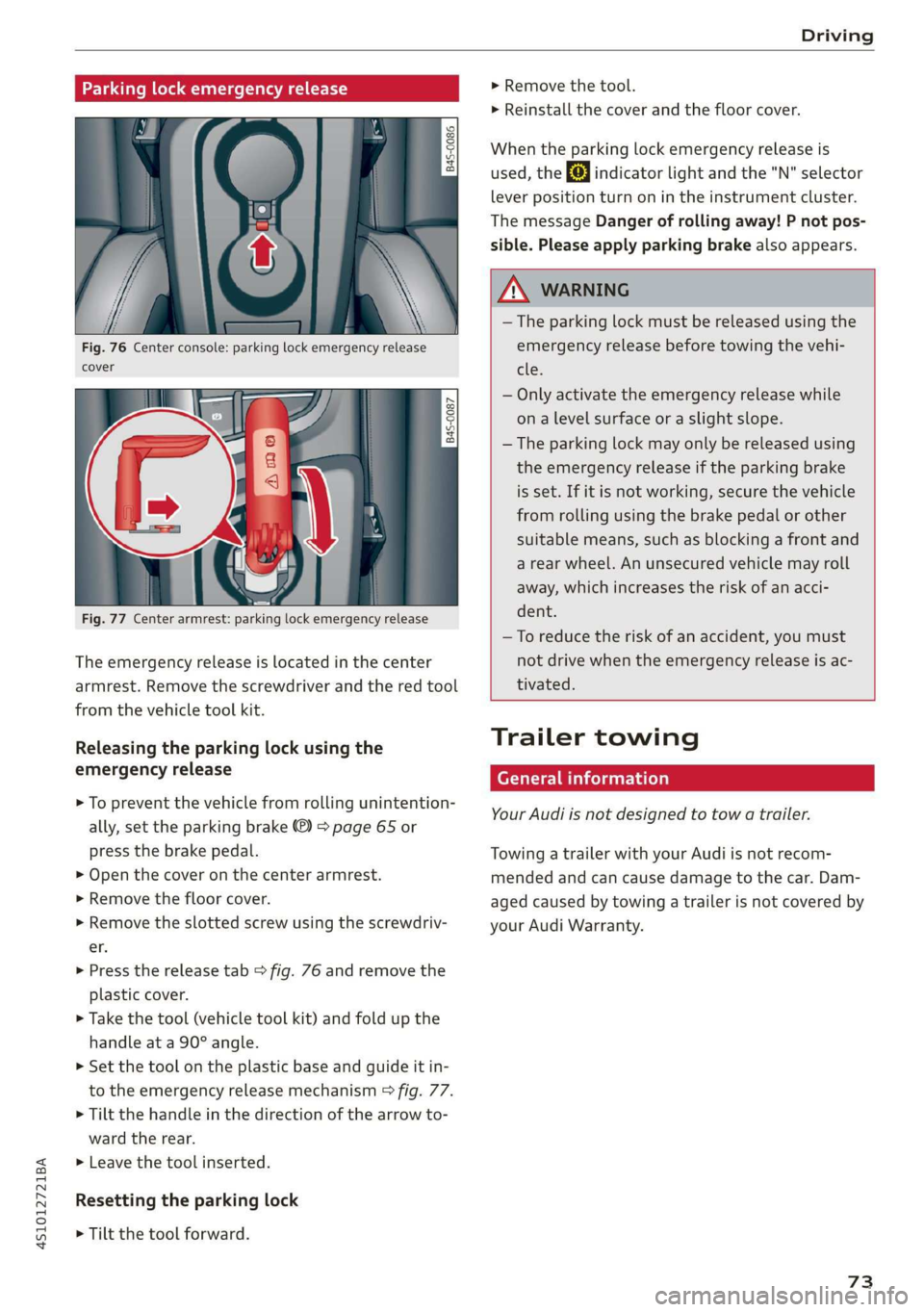
Fig. 76 Center console: parking lock emergency release
cover
[845-0087
|
Fig. 77 Center armrest: parking lock emergency release
The emergency release is located in the center
armrest. Remove the screwdriver and the red tool
from the vehicle tool kit.
Releasing the parking lock using the
emergency release
> To prevent the vehicle from rolling unintention-
ally, set the parking brake ®) > page 65 or
press the brake pedal.
> Open the cover on the center armrest.
> Remove the floor cover.
> Remove the slotted screw using the screwdriv-
er.
> Press the release tab > fig. 76 and remove the
plastic cover.
> Take the tool (vehicle tool kit) and fold up the
handle at a 90° angle.
>» Set the tool on the plastic base and guide it in-
to the emergency release mechanism > fig. 77.
> Tilt the handle in the direction of the arrow to-
ward the rear.
>» Leave the tool inserted.
Resetting the parking lock
> Tilt the tool forward.
> Remove the tool.
> Reinstall the cover and the floor cover.
When the parking lock emergency release is
used, the fs] indicator light and the "N" selector
lever position turn on in the instrument cluster.
The message Danger of rolling away! P not pos-
sible. Please apply parking brake also appears.
ZA WARNING
— The parking lock must be released using the
emergency release before towing the vehi-
tle.
— Only activate the emergency release while
ona level surface or a slight slope.
— The parking lock may only be released using
the emergency release if the parking brake
is set. If it is not working, secure the vehicle
from rolling using the brake pedal or other
suitable means, such as blocking a front and
a rear wheel. An unsecured vehicle may roll
away, which increases the risk of an acci-
dent.
—To reduce the risk of an accident, you must
not drive when the emergency release is ac-
tivated.
Trailer towing
General information
Your Audi is not designed to tow a trailer.
Towing a trailer with your Audi is not recom-
mended and can cause damage to the car. Dam-
aged caused by towing a trailer is not covered by
your Audi Warranty.
73
Page 76 of 308
Assist systems
Assist systems
Speed warning system
Applies to: vehicles with speed warning system
The speed warning system helps you to stay be-
low a specified maximum speed that can be set,
changed or deleted in the Infotainment system.
The speed warning system warns you if you are
exceeding the maximum speed that you have set.
A warning tone will sound as soon as your speed
exceeds the stored value slightly. The ow in-
dicator light and a message will appear in the in-
strument cluster display at the same time. The
bbe) indicator light and the message turn off if
the speed falls back below the stored maximum
speed.
Setting a threshold is recommended if you would
like to be reminded when you reach a certain
maximum speed. Situations where you may want
to do so include driving in a country with a gener-
al speed limit or if there is a specified maximum
speed for winter tires.
Setting the warning threshold
> Select in the Infotainment system: [MENU] but-
ton > Vehicle > left control button > Driver as-
sistance > Speed warning > Manual.
G) Tips
Regardless of the speed warning system, you
should always monitor your speed using the
speedometer and make sure you are following
the legal speed limit.
Cruise control system
Applies to: vehicles with cruise control system
The cruise control system assists the driver in
maintaining a constant speed above approxi-
mately 15 mph (20 km/h). The system maintains
the desired speed by braking and accelerating.
74
Z\ WARNING
— Always pay attention to the traffic around
your vehicle when the cruise control system
is in operation. As the driver, you are always
responsible for controlling your vehicle
speed and the distance between your vehicle
and
other vehicles.
— For safety reasons, cruise control should not
be used in the city, in stop-and-go traffic, on
winding roads, and when road conditions are
poor (such as ice, fog, gravel, heavy rain,
and conditions that could lead to hydroplan-
ing), because this increases the risk of an ac-
cident.
— Switch the cruise control off temporarily
when driving in turning lanes, highway exits,
or in construction zones.
—To reduce the risk of an accident, you should
only resume the stored speed if it is suitable
for the current traffic conditions.
() Note
Before driving downhill a long distance on a
steep hill, decrease your speed and select a
lower gear. This makes use of the engine brak-
ing effect and reduces the load placed on the
brakes.
G) Tips
The brake lights turn on when the brakes are
applied automatically.
Switching the system on
Applies to: vehicles with cruise control system
BFV-0220
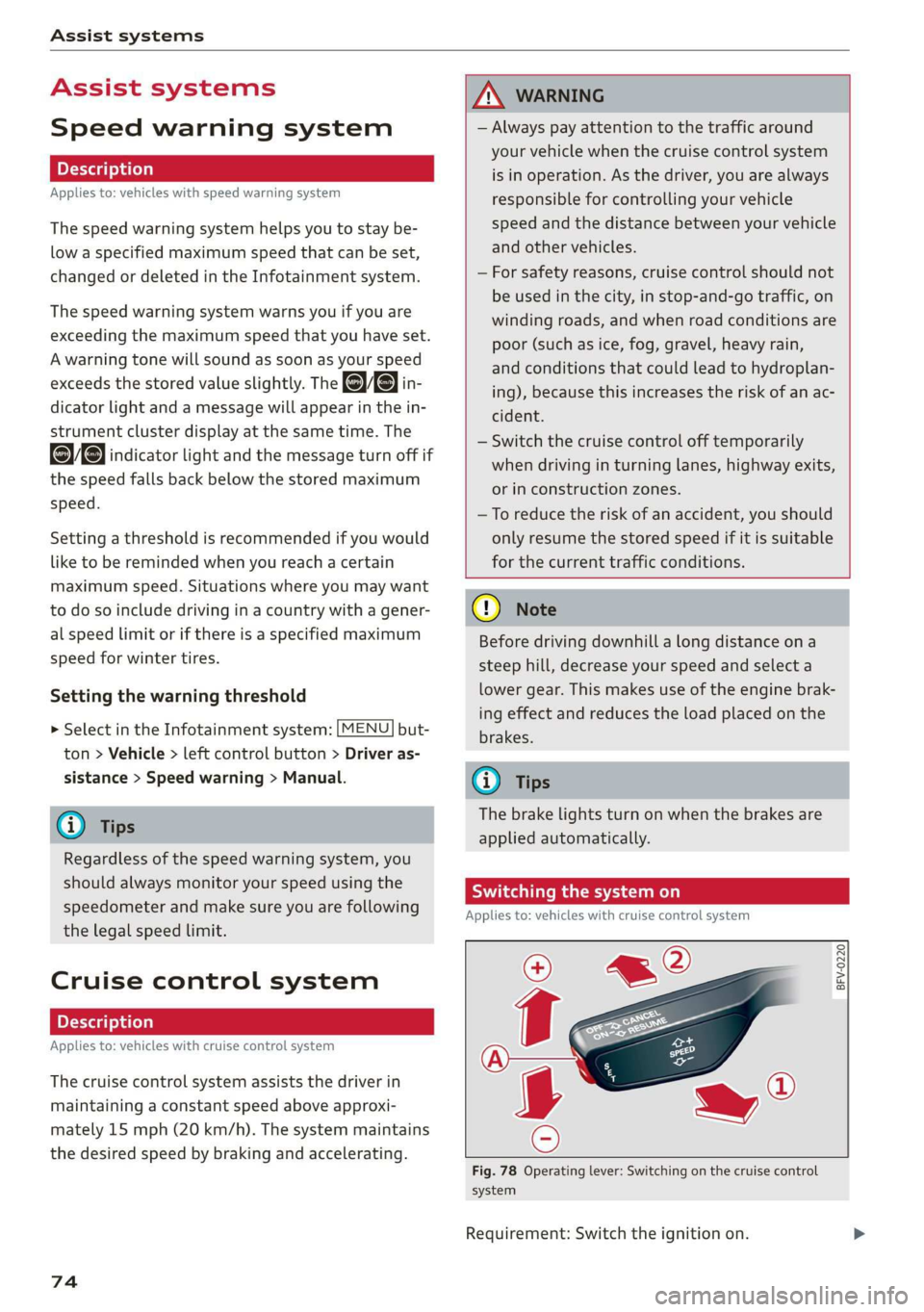
Fig. 78 Operating lever: Switching on the cruise control
system
Requirement: Switch the ignition on.
Page 77 of 308
![AUDI R8 COUPE 2020 Owners Manual 4S1012721BA
Assist systems
> To switch the system on, pull the lever toward
you to position @).
The Gig or (§] indicator light and the corre-
sponding message will appear in the instrument](/img/6/57639/w960_57639-76.png "AUDI R8 COUPE 2020 Owners Manual 4S1012721BA
Assist systems
> To switch the system on, pull the lever toward
you to position @).
The Gig or (§] indicator light and the corre-
sponding message will appear in the instrument")
4S1012721BA
Assist systems
> To switch the system on, pull the lever toward
you to position @).
The Gig or (§] indicator light and the corre-
sponding message will appear in the instrument
cluster.
Z\ WARNING
If the brakes are malfunctioning (for example,
overheating) while the cruise control system
is switched on, it may shut off automatically.
Preselecting or activating a cruise control
ry ey-t-fe)
Applies to: vehicles with cruise control system
When the vehicle is stationary, you can preselect
the cruise control speed or activate the speed
while driving.
Requirement: the system must be switched on.
> To preselect a cruise control speed when the ve-
hicle is stationary, tap the lever toward @)/G)
=> page 74, fig. 78.
> To activate the cruise control speed, pull the
lever toward position @ while driving, or
> To set the current driving speed as the cruise
control speed, press the button () on the lever.
The active cruise control speed is indicated with
the ICRUISE| or BS indicator light in the instrument
cluster.
Changing the cruise control speed
Applies to: vehicles with cruise control system
> To increase or decrease the cruise control speed
in small increments, tap the lever up to the
first level toward @/@) > page 74, fig. 78.
> To increase or decrease the cruise control speed
in larger increments, tap the lever up to the
second level toward @)/G).
> To increase or decrease the cruise control speed
continuously, tap and hold the lever at the first
or second level toward (#)/G).
Overriding or deactivating the cruise
control speed
Applies to: vehicles with cruise control system
You can override or deactivate the cruise control
system. When you deactivate the system, your
cruise control speed will be stored and you can
resume that speed.
Requirement: the system must be switched on
and activated.
Overriding
> To temporarily override the cruise control
speed, press the accelerator pedal.
> Once you release the accelerator pedal, the sys-
tem will adjust back to the stored cruise control
speed.
If you override the cruise control system for a
long period of time, the cruise control system
will be deactivated. The indicator light is dis-
played and the cruise control speed will be saved.
Deactivating
> To deactivate the cruise control speed, press
the lever toward @) (not locked into place)
=> page 74, fig. 78.
> Press the brake pedal.
ZA WARNING
Resting your foot on the accelerator pedal
could override the cruise control. This will pre-
vent braking interventions by the system.
Sita ke
Applies to: vehicles with cruise control system
When you switch the system off completely, the
cruise control speed will be deleted.
Requirement: the system must be switched on.
> To switch the system off, press the lever toward
@ (locked into place) > page 74, fig. 78, or
> Switch the ignition off.
75
Page 78 of 308
Assist systems
Applies to: vehicles with cruise control system
ICRUISE| / §) Speed control system: currently un-
available. See owner's manual
If the indicator light turns on and this message
appears, the cruise control system has been deac-
tivated. There is a temporary malfunction, for ex-
ample the brakes are overheating. Switch the
cruise control system on again later.
Lap timer
Lap timer
You can measure and analyze lap times with the
lap timer in the display. The time is measured in
minutes, seconds and 1/10 seconds. With lap
times longer than 60 minutes, the hour is also
shown and the display of 1/10 seconds is re-
moved.
The time measurement on an individual lap ends
after 99 hours 59 minutes and 59 seconds. A new
lap starts automatically after that.
The measurement ends after a maximum of 30
laps. You can then evaluate the lap times or start
a new time measurement.
You can control the lap timer using the controls
on the multifunction steering wheel > page 76.
ZA\ WARNING
Your focus should always be on driving your
vehicle safely. As the driver, you have com-
plete responsibility for safety in traffic. Only
use the functions such as the lap timer in such
a way that you always maintain complete con-
trol over your vehicle in all traffic situations.
G) Tips
You can retrieve information from the trip
computer while the lap timer stopwatch is
running.
76
Opening the lap timer and measuring time
B4S-0076
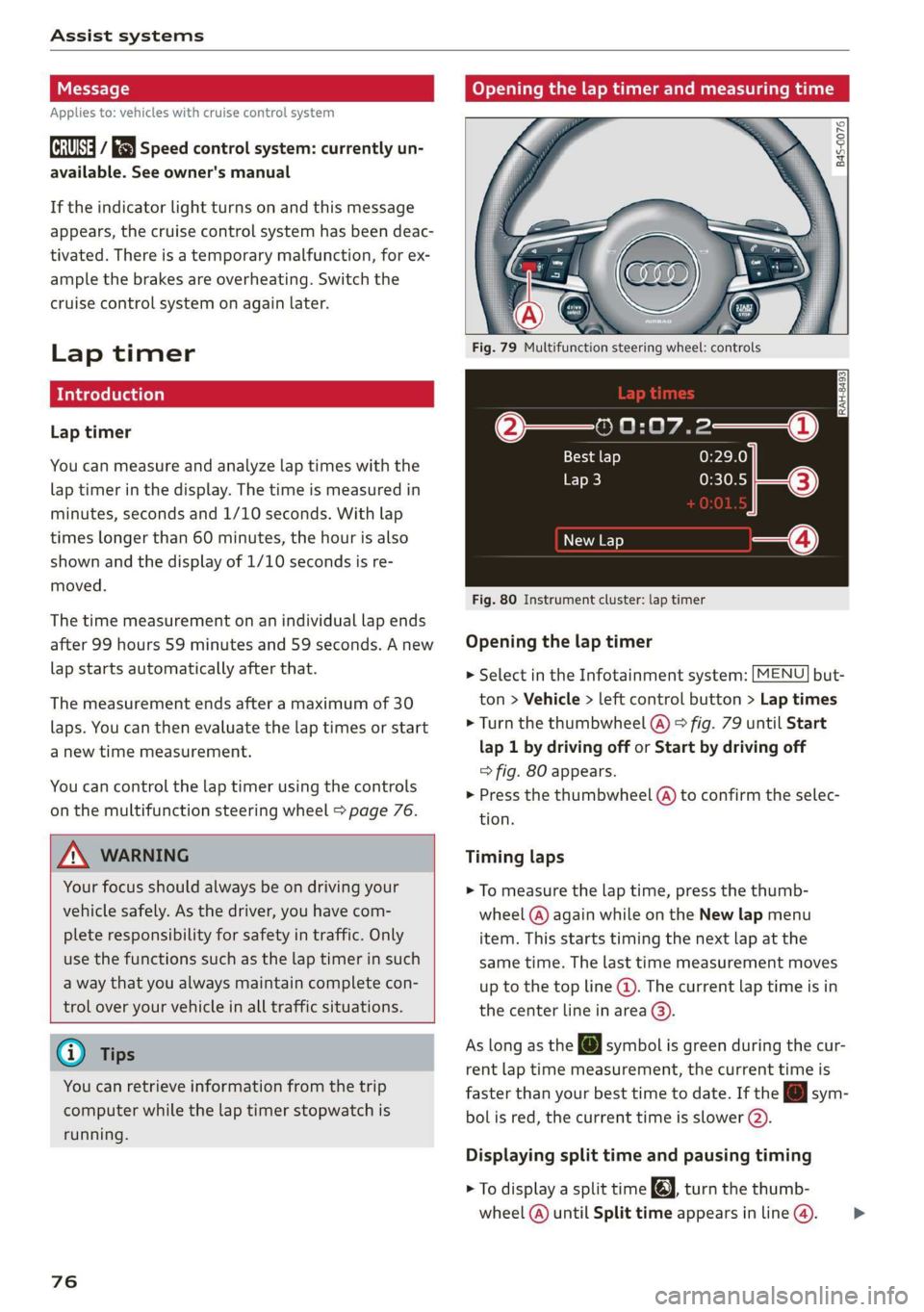
Fig. 79 Multifunction steering wheel: controls
@—» 0:07.2——_@
Best lap 0:29.0
To} 0:30.5
New Lap
Fig. 80 Instrument cluster: lap timer
Opening the lap timer
> Select in the Infotainment system: [MENU] but-
ton > Vehicle > left control button > Lap times
> Turn the thumbwheel @) ° fig. 79 until Start
lap 1 by driving off or Start by driving off
=> fig. 80 appears.
> Press the thumbwheel (a) to confirm the selec-
tion.
Timing laps
> To measure the lap time, press the thumb-
wheel @) again while on the New lap menu
item. This starts timing the next lap at the
same time. The last time measurement moves
up to the top line @). The current lap time is in
the center line in area @).
As
long as the [J symbol is green during the cur-
rent lap time measurement, the current time is
faster than your best time to date. If the @ sym-
bolis red, the current time is slower (@).
Displaying split time and pausing timing
> To display a split time @, turn the thumb-
wheel (@) until Split time appears in line @). >
Page 80 of 308
Assist systems
Audi drive select (drive
settings)
Drive select makes it possible to experience dif-
ferent types of vehicle characteristics in one vehi-
cle. The driver can select from four modes: Com-
fort, Auto, Dynamic and Individual using the
ssa button on the steering wheel or through the
Infotainment system to switch between a sporty
and a comfortable driving mode, for example. In
the Individual mode, the settings can be adjust-
ed to your personal preferences. This makes it
possible to combine settings such as a sporty en-
gine setting with light steering.
Z\ WARNING
Using Audi drive select incorrectly can lead to
collisions, other accidents and serious inju-
ries.
The vehicle setup in each mode depends on the
vehicle's features.
Engine and automatic transmission
Depending on the mode, the engine and auto-
matic transmission respond more quickly or in a
more balanced manner to accelerator pedal
movements.
Suspension control (Audi magnetic ride)*
The suspension control uses sensors to record in-
formation regarding steering movements, brak-
ing and acceleration operations by the driver, as
well as information about the road surface, driv-
ing speed, and load. With drive select, you can
adjust the suspension control to sporty (dynam-
ic), comfortable (comfort) or balanced (auto).
Steering
The power steering adapts. Indirect steering that
moves easily as in comfort mode is especially
suited to long drives on a highway. The dynamic
mode provides sporty, direct steering.
78
Torque distribution*
The all wheel drive distributes the drive power to
the rear axle based on the situation. The distribu-
tion of power varies depending on the selected
mode from moderate (Comfort) to sporty (Dy-
namic). The goal is a high level of agility and abil-
ity to accelerate on curves. The vehicle is very re-
sponsive to steering.
Engine sound
The engine sound adapts to the current mode
and can be subtle to sporty.
@ Tips
In some models, the maximum vehicle speed
can only be reached in the auto and dynamic
modes.
Selecting the driving mode
You can choose between comfort, auto, dynamic
and individual.
io
):
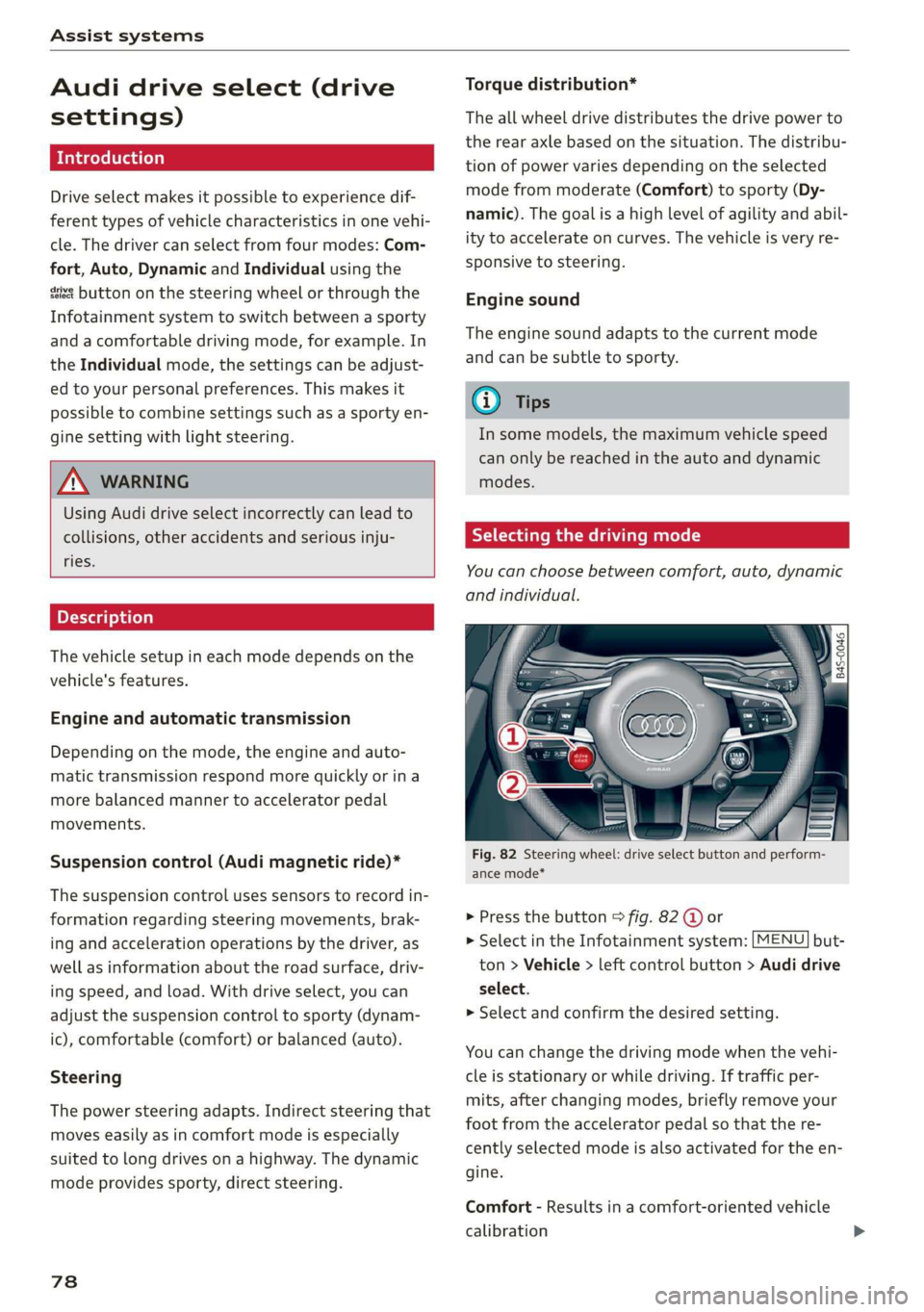
Fig. 82 Steering wheel: drive select button and perform-
ance mode*
> Press the button > fig. 82 @ or
> Select in the Infotainment system: [MENU] but-
ton > Vehicle > left control button > Audi drive
select.
> Select and confirm the desired setting.
You can change the driving mode when the vehi-
cle is stationary or while driving. If traffic per-
mits, after changing modes, briefly remove your
foot from the accelerator pedal so that the re-
cently selected mode is also activated for the en-
gine.
Comfort - Results in a comfort-oriented vehicle
calibration