parking brake AUDI R8 COUPE 2020 Owners Manual
[x] Cancel search | Manufacturer: AUDI, Model Year: 2020, Model line: R8 COUPE, Model: AUDI R8 COUPE 2020Pages: 308, PDF Size: 82.41 MB
Page 4 of 308
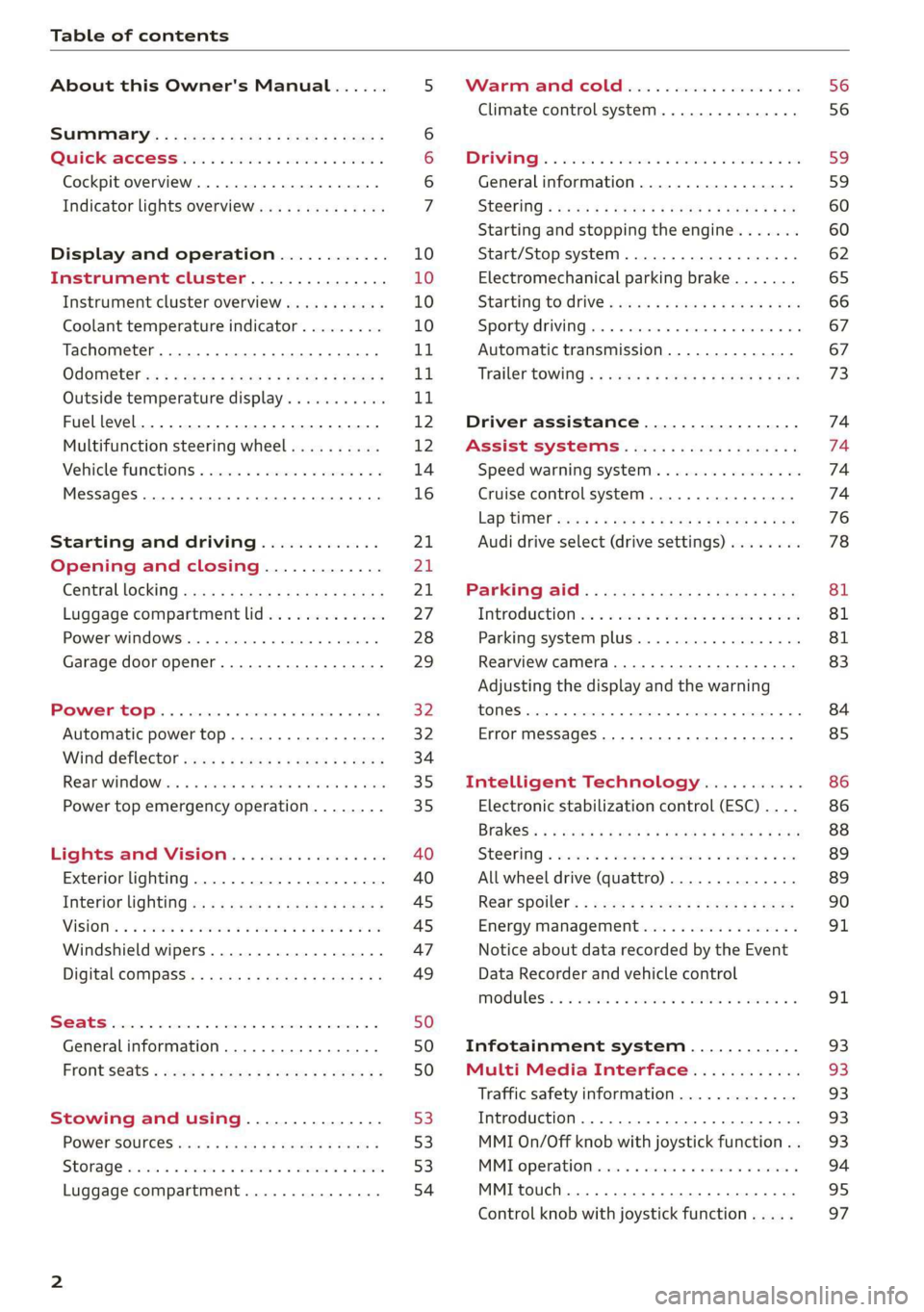
Table of contents
About this Owner's Manual......
SUMIMALY: ; « ss6% : osen ss sean cs poe s
Quick ACCESS ki... ose bs ees ae ees
Cockpit overview.............-000005
Indicator lights overview...........0.
Display and operation............
Instrument cluster...............
Instrument cluster overview...........
Coolant temperature indicator.........
Tachometer.......... 0.0 eee eee eee
Odometer as = s eee = seen ge zee a tows e
Outside temperature display...........
Fuellevel............20..0.000200005
Multifunction steering wheel..........
Vehicle TuUNCtionS « esivrs s «scene vo sonine vo
MessageS ... 0... eee eee eee
Starting and driving.............
Opening and closing.............
Central locking 2.2% ieee seven a eevee
Luggage compartment lid.............
Power windows.............0.00 0005
Garage door opener..........---..0--
POWER EOPE: « «cece 0 csv « o semiens 6 0 eens
Automatic power top.................
Wind deflector oces « eges sv sees se ees
Rear wind OW iar es cs
Lights and Vision.................
Exterior lighting...................4.
Interior Ughtingcs « ¢ cean a cas cs ews 5
VISIONS « & comes oo man a 8 eee a a oa 3 oe
Windshield wipers...................
Digital compass.............0.-00 00
Stowing and using...............
POWerSOUTECES saa + gasem x 2 were oe wees
SEONAGE waver cv mamas a 6 maven ¥ 9 ane wv ERE
Luggage compartment...............
NOD
OO
12 12
14
16
21 21 21
27
28
29
32 32
34
35 35
40
40
45
45
47 49
50 50 50
53 53 53
54
Warnmmiameicolheicss «ssc x 6 sees ow vee
Climate control system............00.
DRIVING: & tacos 6 2 maemo e eae 0 x iano 4
Generalinformation.................
Steering « secu s ¢ rams 3 i ees FP ew Fe He
Starting and stopping the engine.......
Start/Stop system...............000.
Electromechanical parking brake.......
Starting tod rive « seus ¢ 2 eww a v aes sw oe
Sporty driving............ eee eee eee
Automatic transmission..............
Trailer towing « « cscs ss swans v ones 6 srs
Driver assistance.................
Assist systems................0..
Speed warning system...............-
Cruise control system................
LAptINIen wes + x eogn x woe 5 sR ee BOS
Audi drive select (drive settings)........
PA@FKING AIG): © access & eons s & cerns 2 ¢ Sa
INEROMUEHION ei: <2 ccswoe 2 siswinn oe wie 4 aries
Parking system plus.............-.00.
Rearview camera
Intelligent Technology...........
Electronic stabilization control (ESC) ....
SC@OMIING @ sxsicue ao ereses so cases wv oR ev OS
All wheel drive (quattro) ..............
Rear spoilers = ses « z sass s ¢ ees a F ews
Energy management.................
Notice about data recorded by the Event
Data Recorder and vehicle control
Infotainment system............
Multi Media Interface............
Traffic safety information.............
Introduction............. 0.000022 0 ee
MMI On/Off knob with joystick function . .
MMT Operations» « exis » + anvcene « w scree ¥
MMI touch.......... 0.0 cece eee eee ee
Control knob with joystick function... ..
56
59
59,
60 60
62
65
66 67 67
73
74 74 74 74
76
78
81
81
81
83
84
85
86
86
88
89
89 90
91
91 93 93 93 93 93
94
95
97
Page 9 of 308
4S1012721BA
Quick access
©OOOCOO
9
©
OGOOOOOOOOOD
OO
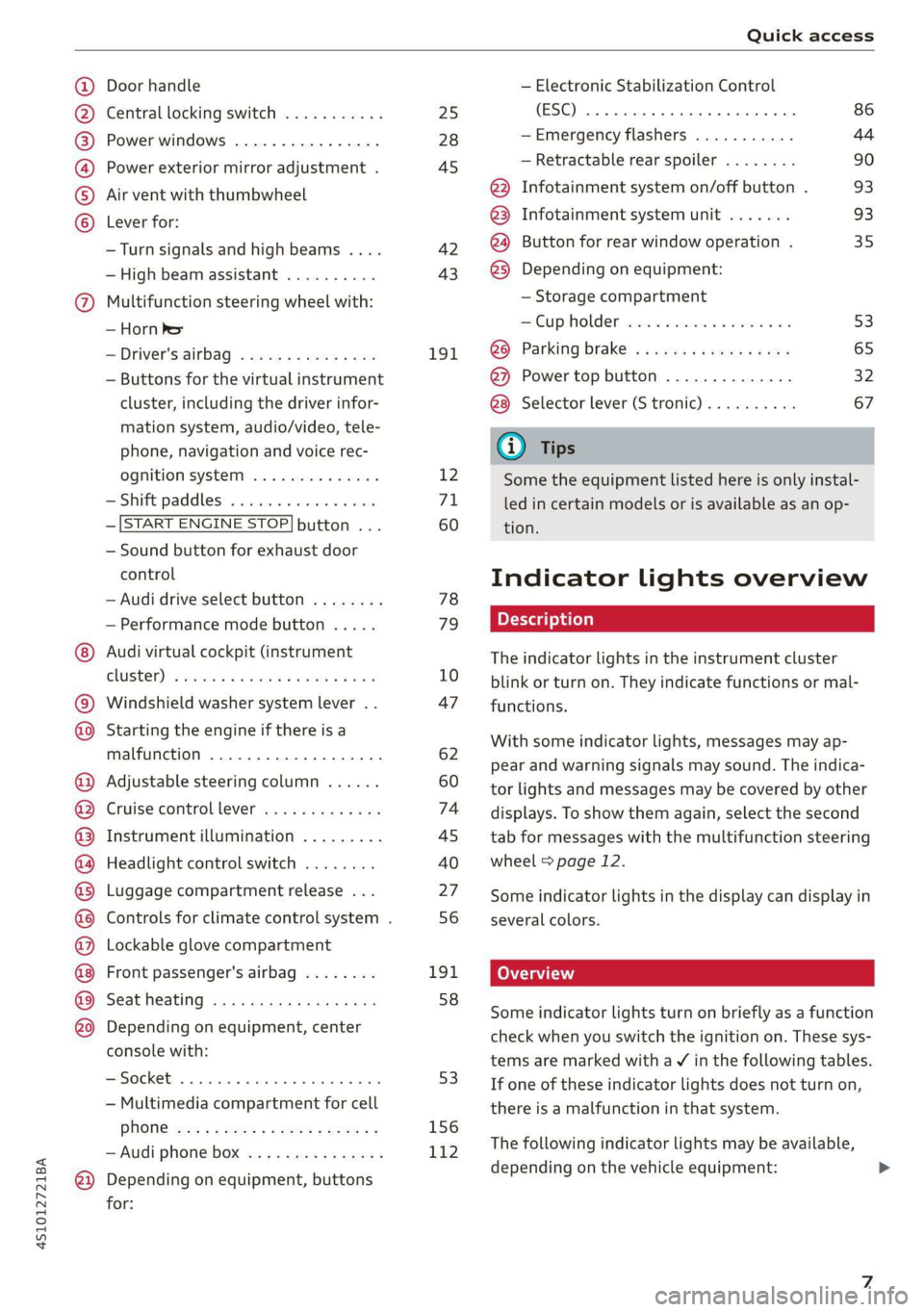
Door handle
Central locking switch ...........
Power windows ................
Power exterior mirror adjustment .
Air vent with thumbwheel
Lever for:
—Turn signals and high beams ....
— High beam assistant ..........
Multifunction steering wheel with:
— Horn he
— Driver's airbag ...............
— Buttons for the virtual instrument
cluster, including the driver infor-
mation system, audio/video, tele-
phone, navigation and voice rec-
OQNITION SYSTEM woe ss sees vs ees
— Shift paddles ................
—[START ENGINE STOP] button ...
— Sound button for exhaust door
control
— Audi drive select button ........
— Performance mode button .....
Audi virtual cockpit (instrument
GCLUSTEL): « woe oo wane ¢ & wees + eee
Windshield washer system lever ..
Starting the engine if there is a
malfunction ................00.
Adjustable steering column ......
Cruise controllever .............
Instrument illumination .........
Headlight control switch ........
Luggage compartment release ...
Controls for climate control system .
Lockable glove compartment
Front passenger's airbag ........
Seat heating ...........2.5e0e
Depending on equipment, center
console with:
— Multimedia compartment for cell
PHONE wn < o memes s 2 eee y eer es
— Audi phone box ...............
Depending on equipment, buttons
for:
25
28
45 42 43
191
12
71
60 78
79
10
47
62
60
74
45
40
27 56
191.
58
53
156
112
— Electronic Stabilization Control
(ESC) 2. eee eee eee eee 86
—Emergency flashers ........... 44
— Retractable rear spoiler ........ 90
@) Infotainment system on/off button . 93
@3 Infotainment system unit ....... 93
@4 Button for rear window operation . 35
@3) Depending on equipment:
— Storage compartment
Cup holden wssois so esesscs oo omens vo 53
@® Parking brake ..............04. 65
@) Power top button .............. 32
Selector lever (S tronic).......... 67
G@) Tips
Some the equipment listed here is only instal-
led in certain models or is available as an op-
tion.
Indicator lights overview
The indicator lights in the instrument cluster
blink or turn on. They indicate functions or mal-
functions.
With some indicator lights, messages may ap-
pear and warning signals may sound. The indica-
tor lights and messages may be covered by other
displays. To show them again, select the second
tab for messages with the multifunction steering
wheel > page 12.
Some indicator lights in the display can display in
several colors.
CO Tati
Some indicator lights turn on briefly as a function
check when you switch the ignition on. These sys-
tems are marked with a V in the following tables.
If one of these indicator lights does not turn on,
there is a malfunction in that system.
The following indicator lights may be available,
depending on the vehicle equipment:
Page 10 of 308
Quick access
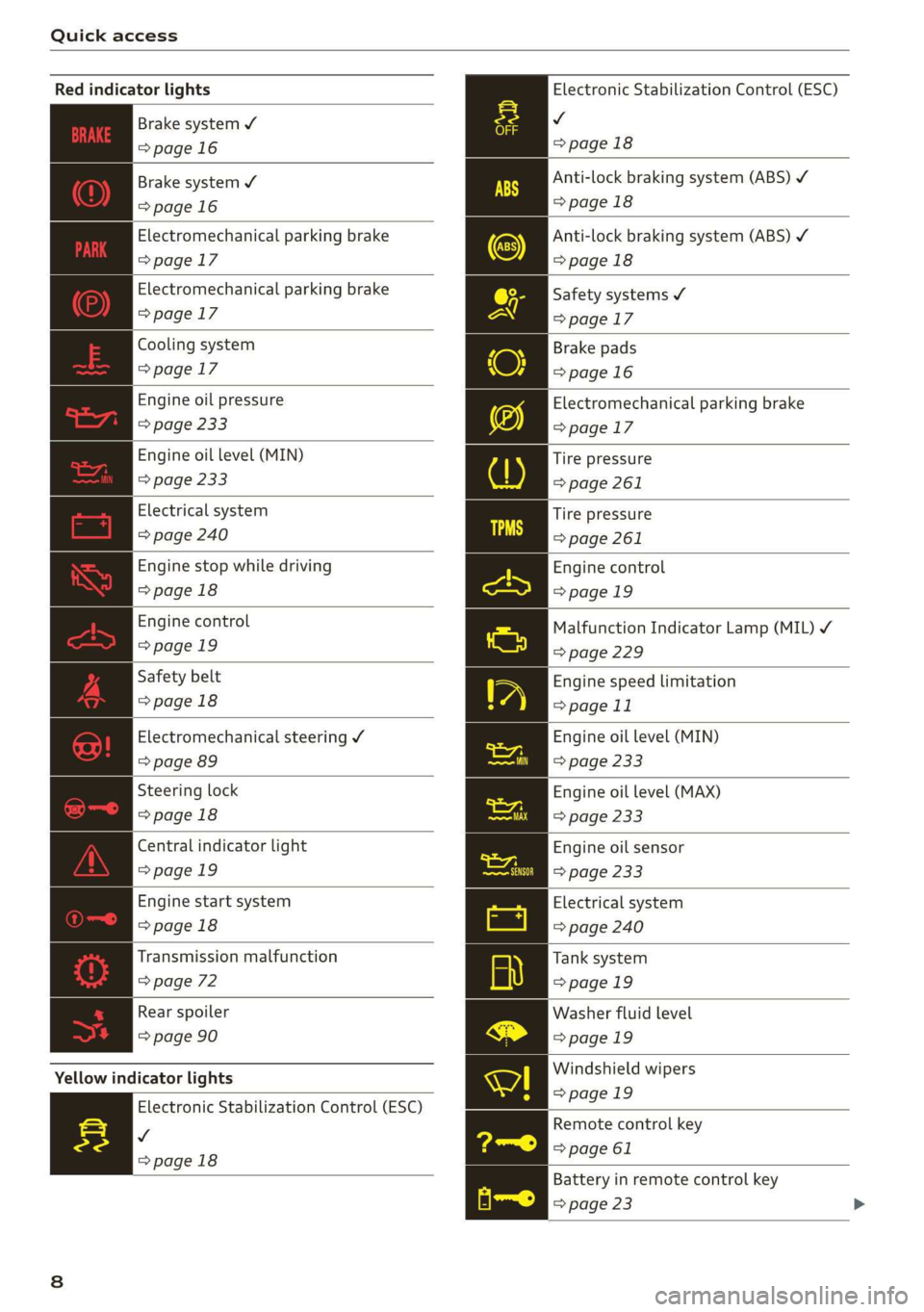
Electronic Stabilization Control (ESC)
v
=>page 18
Red indicator lights
Brake system ¥
=>page 16
Anti-lock braking system (ABS) ¥
>page 18
Anti-lock braking system (ABS) ¥
>page 18
Safety systems ¥
Brake system 4
=>page 16
Electromechanical parking brake
=>page 17
Electromechanical parking brake
=> page 17 =>page 17
Cooling system Brake pads
=>page 17 = page 16
Engine oil pressure
=> page 233
Engine oil level (MIN)
=> page 233
Electrical system
=> page 240
Engine stop while driving
>page 18
Engine control
>page 19
Safety belt
>page 18
Electromechanical parking brake
>page 17
Tire pressure
> page 261
Tire pressure
> page 261
Engine control
>page 19
Malfunction Indicator Lamp (MIL) ¥
=> page 229
Engine speed limitation
> page 11
ra Electromechanical steering V Engine oil level (MIN)
=> page 89 => page 233
eS Steering lock Engine oil level (MAX)
=>page 18 => page 233
Central indicator light Engine oil sensor
=>page 19 => page 233
Engine start system Electrical system
=>page 18 => page 240
Transmission malfunction Tank system
=> page 72 =>page 19
Rear spoiler Washer fluid level
=> page 90 =>page 19
Windshield wipers
Yellow indicator lights
>page 19
Electronic Stabilization Control (ESC)
v
=>page 18
Remote control key
=> page 61
Battery in remote control key
=> page 23
Page 11 of 308
4S1012721BA
Quick access
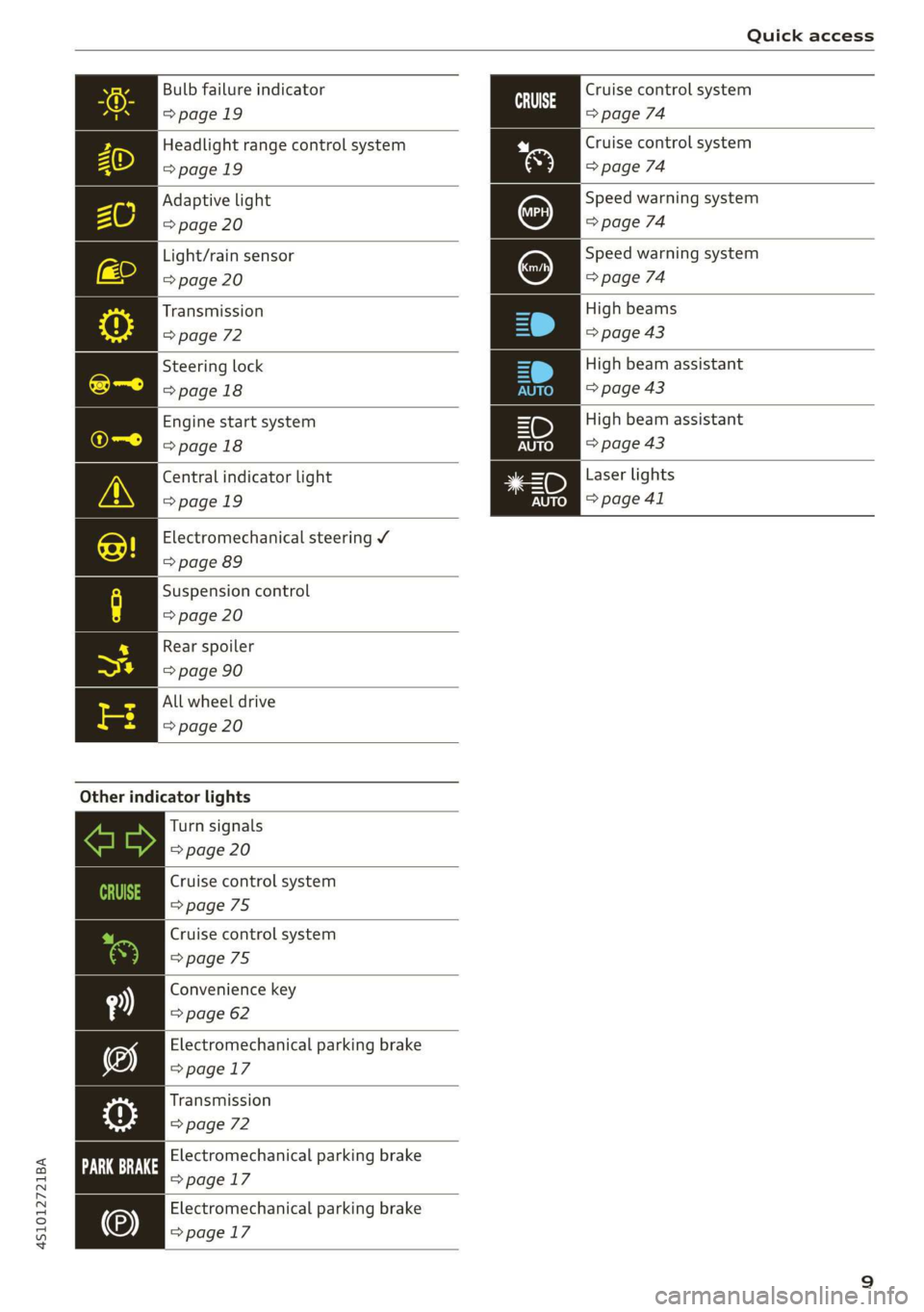
Bulb failure indicator
>page 19
Headlight range control system
=>page 19
Adaptive light
=> page 20
Light/rain sensor
=> page 20
Transmission
=> page 72
Steering lock
=>page 18
Engine start system
>page 18
Central indicator light
>page 19
Electromechanical steering V
=> page 89
Suspension control
=> page 20
Rear spoiler
=> page 90
All wheel drive
=> page 20
Other indicator lights
Turn signals
=> page 20
Cruise control system
=>page 75
Cruise control system
=> page 75
Convenience key
=> page 62
Electromechanical parking brake
=>page 17
Transmission
=> page 72
Electromechanical parking brake
>page 17
Electromechanical parking brake
=> page 17
Cruise control system
=> page 74
Cruise control system
=> page 74
Speed warning system
=> page 74
Speed warning system
(Ss) => page 74
High beams
=> page 43
High beam assistant
=> page 43
=D High beam assistant
=> page 43
Laser lights
=> page 41
Page 18 of 308

Instrument cluster
Accessing the sport displays in the additional
display
> Select on the multifunction steering wheel:
right control button > Additional display.
> Select the desired additional display.
G meter*
The G meter displays the longitudinal and lateral
acceleration. The maximum values that are
reached are stored and displayed when the vehi-
cle is stationary.
> To reset the stored values, select on the multi-
function steering wheel: right control button >
Reset values.
Engine data*
The engine data displays the current power and
torque.
Tire pressure monitoring system*
The tire pressure monitoring system displays the
current tire pressures and temperature. Also see
= page 261, Tire pressure monitoring system.
Messages
BRAKE/@)/‘C} Brake system
If this indicator light turns on, there is a malfunc-
tion in the brake system.
GG @ Brakes: stop vehicle and check brake
fluid level
Stop the vehicle and check the brake fluid level.
See an authorized Audi dealer or authorized Audi
Service Facility for assistance.
Ga / @ Warning! No brake booster function
If the brake booster is not working, you have to
use much more force when braking the vehicle.
See an authorized Audi dealer or authorized Audi
Service Facility for assistance.
BRE / ) Brakes: malfunction! Safely stop ve-
hicle
If the indicator light turns on and this message
appears, there is a malfunction in the brake sys-
tem.
16
1f BES / Gana B also turn on, there is a mal-
function in the ABS, ESC, and braking distribu-
tion.
Do not continue driving. See an authorized Audi
dealer or authorized Audi Service Facility for as-
sistance > A\.
GG /o Parking brake: malfunction! Safely
stop vehicle. See owner's manual
— If the indicator light and the message appear
when the vehicle is stationary or after switch-
ing the ignition on, check if you can release the
parking brake. If you cannot release the parking
brake, see an authorized Audi dealer or author-
ized Audi Service Facility. If you can release the
parking brake and the message still appears,
see an authorized Audi dealer or authorized Au-
di Service Facility immediately to have the mal-
function corrected.
— If the indicator light and message appear while
driving, the hill start assist or emergency brak-
ing function may be malfunctioning. It may not
be possible to set the parking brake or release
it once it has been set. Do not park your vehicle
on hills. See an authorized Audi dealer or au-
thorized Audi Service Facility for assistance.
The fe) indicator light turns on when the brake
pads are worn. Drive to an authorized Audi dealer
or authorized Audi Service Facility immediately to
have the brake pads checked.
Applies to: USA models: The fe} indicator light
turns on together with the IBRAKE| indicator light.
ZA WARNING
— If the brake fluid level is below the MIN
marking, it can impair the braking effect and
driving safety, which increase the risk of an
accident. Do not continue driving. See an au-
thorized Audi dealer or authorized Audi
Service Facility for assistance.
— If the brake system indicator light turns on
together with the ABS and ESC indicator
lights, the ABS/ESC regulating function may
be malfunctioning. Functions that stabilize
the vehicle are no longer available. This
could cause the rear of the vehicle to
swerve, which increases the risk that the >
Page 19 of 308

4S1012721BA
Instrument cluster
vehicle will slide. Drive carefully to the near-
est authorized Audi dealer or authorized Au-
di Service Facility and have the malfunction
corrected.
Electromechanical parking
If the Zi / © indicator light turns on, the
parking brake has been set.
Zin A © Parking brake: warning! Vehicle
parked too steep
If the indicator light blinks and the message ap-
pears, there is not enough braking power to se-
cure the vehicle. The brakes have overheated. The
vehicle could roll away, even on a small incline.
gw Parking brake: malfunction! Please contact
Service
There is a malfunction in the parking brake. Drive
immediately to an authorized Audi dealer or au-
thorized Audi Service Facility to have the mal-
function repaired.
EG / (G) Parking brake: warning! Vehicle
parked too steep
There
is not enough braking force to hold the ve-
hicle in place. The brakes have overheated. The
vehicle could roll away, even on a small incline.
aE / {@) Parking brake: applied
If this message appears, press the brake pedal
first and then release the parking brake if neces-
sary.
G) Tips
For additional information on the parking
brake, see > page 65.
ete CT
& Turn off engine and check coolant level. See
owner's manual
The coolant level is too low.
Stop driving and switch the engine off. Check the
coolant level > page 236.
— If the coolant level is too low, add coolant
=> page 237. Only continue driving once the in-
dicator light turns off.
& Coolant temperature: too high. Let engine
run while vehicle is stationary
Let the engine run at idle for a few minutes to
cool off, until the indicator light turns off.
— If the indicator light does not turn off, do not
continue driving the vehicle. See an authorized
Audi dealer or authorized Audi Service Facility
for assistance.
Z\ WARNING
— Never open the engine compartment lid if
you can see or hear steam or coolant escap-
ing from the engine compartment. This in-
creases the risk of burns. When you no Lon-
ger see or hear steam or coolant escaping,
you may open the engine compartment with
caution.
— The engine compartment in any vehicle can
be a dangerous area. Stop the engine and al-
low it to cool before working in the engine
compartment. Always follow the informa-
tion found in > page 229, General informa-
tion.
@) Note
Do not continue driving if the Bg indicator
light turns on as this increases the risk of en-
gine damage.
EMT
The Ea indicator light monitors the safety sys-
tems.
Safety system
If the ka indicator light turns on or blinks, there
is a malfunction in a safety system.
Drive to an authorized Audi dealer or authorized
Audi Service Facility immediately to have the
malfunction corrected.
17
Page 37 of 308
4S1012721BA
Power top
AN WARNING
— Do not use the wind deflector to secure car-
go.
—To reduce the risk of an accident, pay atten-
tion to traffic when installing the wind de-
flector.
(i) Tips
— The wind deflector works best when all of
the windows are rolled up while driving.
—To prevent mildew, do not store the wind
deflector when it is damp.
Rear window
Applies to: vehicles with extendable rear window
oO oS
8 a + a
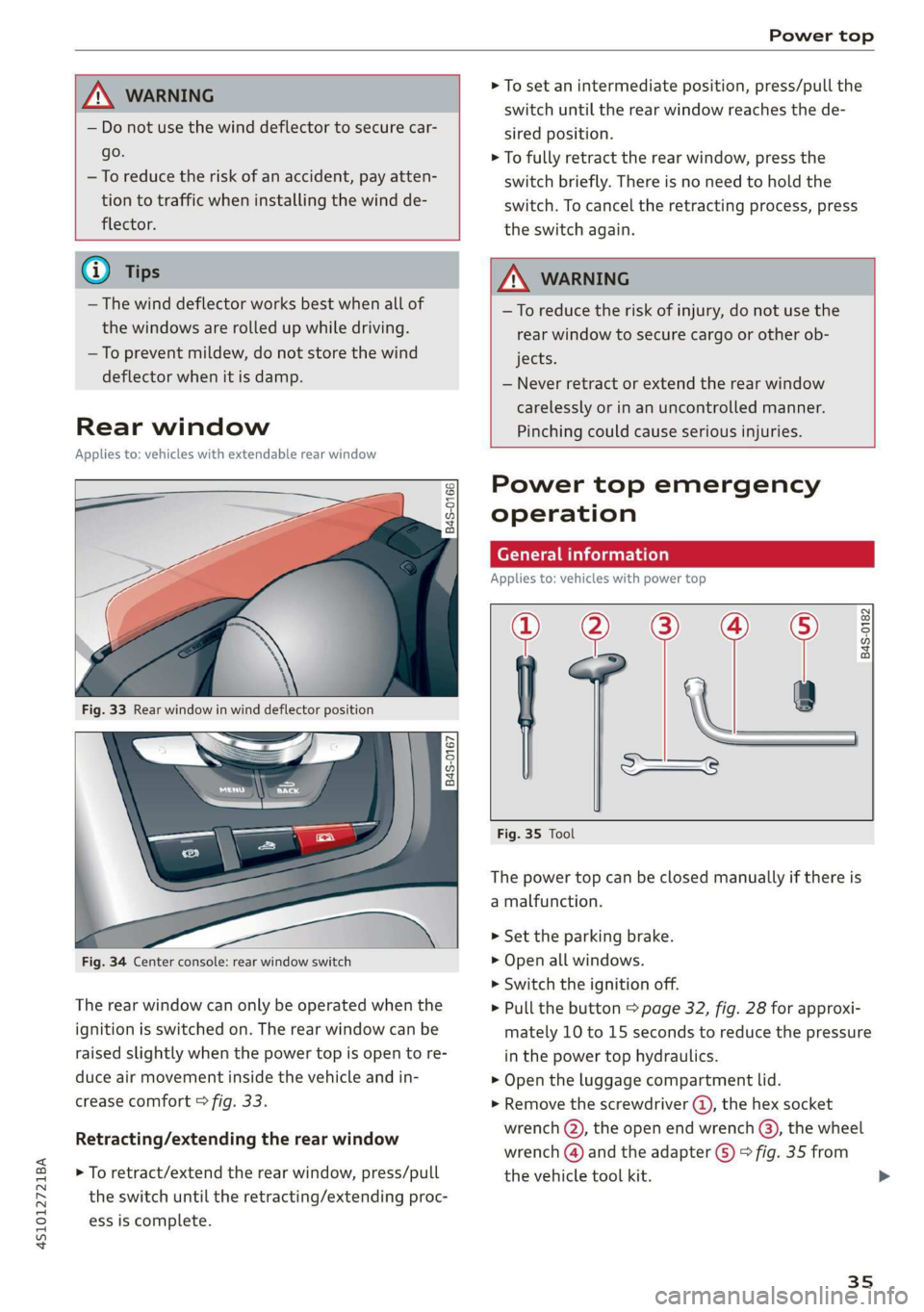
Fig. 33 Rear window in wind deflector position
|
848-0167]
Fig. 34 Center console: rear window switch
The rear window can only be operated when the
ignition is switched on. The rear window can be
raised slightly when the power top is open to re-
duce air movement inside the vehicle and in-
crease comfort © fig. 33.
Retracting/extending the rear window
> To retract/extend the rear window, press/pull
the switch until the retracting/extending proc-
ess is complete.
> To set an intermediate position, press/pull the
switch until the rear window reaches the de-
sired position.
> To fully retract the rear window, press the
switch briefly. There is no need to hold the
switch. To cancel the retracting process, press
the switch again.
ZA WARNING
—To reduce the risk of injury, do not use the
rear window to secure cargo or other ob-
jects.
— Never retract or extend the rear window
carelessly or in an uncontrolled manner.
Pinching could cause serious injuries.
Power top emergency
operation
General information
Applies to: vehicles with power top
a
| 9
——s
Fig. 35 Tool
B4S-0182
The power top can be closed manually if there is
a malfunction.
> Set the parking brake.
> Open all windows.
> Switch the ignition off.
> Pull the button > page 32, fig. 28 for approxi-
mately 10 to 15 seconds to reduce the pressure
in the power top hydraulics.
> Open the luggage compartment lid.
> Remove the screwdriver ®, the hex socket
wrench (Q), the open end wrench (3), the wheel
wrench () and the adapter (5) > fig. 35 from
the vehicle tool kit.
35
Page 66 of 308

Driving
— When you stop and the Start/Stop system
turns the engine off, the ignition remains
on. Make sure the ignition is switched off
before you leave the vehicle or else the bat-
tery could drain.
General information
Applies to: vehicles with Start/Stop system
Starting and stopping the engine automat-
ically
The system checks if certain conditions are met
before and during the Stop phase, and deter-
mines if the engine stops and how long it re-
mains stopped. For example, if power usage is
high, the engine will not be stopped. Along with
other conditions, the following factors influence
the automatic engine start or stop:
— Environmental conditions (slopes, inclines, ele-
vation, temperature)
— Battery (charge status, temperature, power us-
age)
— Engine temperature
— Assist systems
— Driving behavior
Depending on the engine, the indicator light
may appear if the engine is not stopped.
Ignition is switched off automatically
To prevent the vehicle battery from draining, the
ignition will switch off automatically under the
following conditions:
— If the vehicle has already been driven
— If the Start/Stop system has stopped the en-
gine
— If the driver's door is opened
—If the driver's safety belt is unbuckled
— If the brake pedal is not pressed
— If the vehicle is stationary
In this case, the parking lights switch on in place
of the low beams and the message Side marker
lights will switch off automatically in 30 mi-
nutes. See owner's manual appears in the Info-
tainment system display. The side marker lights
will switch off after approximately 30 minutes or
when you lock the vehicle.
64
If the Start/Stop system has not turned off the
engine or if you have switched the Start/Stop sys-
tem off manually, the ignition will not be auto-
matically switched off and the engine will contin-
uetorun>A.
ZX WARNING
To reduce the risk of poisoning, never allow
the engine to run in confined spaces.
@ Tips '
If you select the “D”, “N” or “S” gear after
shifting into reverse, the vehicle must be driv-
en faster than 6 mph (10 km/h) in order for
the engine to switch off again.
Manually switching the Start/Stop system
ame emo
Applies to: vehicles with Start/Stop system
If you do not wish to use the system, you can
switch it off manually.
S g
2 § £
g z
Fig. 72 Center console: Start/Stop system button
> To switch the Start/Stop system off/on manual-
ly, press the || button. The LED in the button
turns on when the system is switched off.
G@) Tips
If you switch the system off during a Stop
phase, the engine will start again automati-
cally.
Page 67 of 308
4S1012721BA
Driving
Messages in the instrument cluster display
Applies to: vehicles with Start/Stop system
Start/stop system: deactivated. Please start
engine manually
This message appears when specific conditions
are not met during a Stop phase. The Start/Stop
system will not be able to restart the engine. The
engine must be started with the
START ENGINE STOP] button.
Start/stop system: malfunction! Function
unavailable. Please contact Service
There is a malfunction in the Start/Stop system.
Drive the vehicle to an authorized Audi dealer or
authorized Service Facility as soon as possible to
have the malfunction corrected.
Electromechanical
parking brake
The ©) switch is located under the selector lever
in the center console.
Your vehicle is equipped with an electromechani-
cal parking brake. The parking brake is designed
to prevent the vehicle from rolling unintentional-
ly and replaces the hand brake.
Setting/manually releasing the parking
brake
> Pull the @) switch to set the parking brake. The
LED in the switch turns on. The Zw (USA mod-
els)/[@) (Canada models) indicator light also
turns on in the instrument cluster display.
> To release the parking brake manually, press
the brake or accelerator pedal while the igni-
tion is switched on and press the ©) switch at
the same time. The LED in the button and the
indicator light in the display turn off.
Releasing the parking brake automatically
Requirement: The driver's door must be closed.
> To start driving and release the parking brake
automatically, press the accelerator pedal as
usual.
In addition to releasing the parking brake auto-
matically, other convenience and safety functions
are available when you start driving > page 66,
Starting to drive.
Emergency braking function
You can use the emergency braking function in an
emergency situation, or if the standard brakes
are malfunctioning or the pedal is obstructed.
> Pull and hold the ©) switch.
>» As soon as you release the (©) switch or acceler-
ate, the braking stops.
Pulling and holding the ©) switch while driving
the vehicle activates the emergency braking func-
tion. The hydraulic brake system will brake all
four wheels. The braking effect is similar to heavy
braking > A\.
To reduce the risk of activating the emergency
braking by mistake, a warning tone (buzzer)
sounds when the ©) switch is pulled. Emergency
braking stops as soon as the ©) switch is released
or the accelerator pedal is pressed.
Parking
> Press the brake pedal to stop the vehicle.
> Pull the ©) switch to set the parking brake.
> Select the "P" selector lever position.
> Turn the engine off > /\.
> Turn the steering wheel when parking on in-
clines so that the wheels will roll into the curb
if the vehicle starts moving.
ZA WARNING
— If a gear is engaged while the vehicle is sta-
tionary and the engine is running, do not
press the accelerator pedal inadvertently.
Otherwise, the vehicle will start to move im-
mediately and this could result in an acci-
dent.
— Emergency braking should only be used in
an emergency, when the when the standard
brake pedal is malfunctioning or obstructed.
During emergency braking, your vehicle will
brake similar to heavy braking. ESC and the
associated components (ABS, ASR, EDL) can-
not overcome the laws of physics. In corners
and when road or weather conditions are
bad, a full brake application can cause the
65
Page 68 of 308
Driving
vehicle to skid or the rear end to swerve,
which increases the risk of an accident.
— If the power supply fails, you cannot set the
parking brake once it is released. In this
case, park the vehicle on level ground and
secure it by placing the selector lever in the
"P" position. See an authorized Audi dealer
or authorized Audi Service Facility for assis-
tance.
— If you leave the vehicle, switch the ignition
off and take the vehicle key with you. This
applies particularly when children remain in
the vehicle. Otherwise children could start
the engine, release the parking brake or op-
erate electrical equipment such as power
windows, which increases the risk of an acci-
dent.
— No one should remain in the vehicle when it
is locked - especially children. Locked doors
make it more difficult for emergency work-
ers to get into the vehicle, which puts lives
at risk.
@) Note
Do not leave your vehicle unattended while
the engine is running, because this increases
the risk of an accident.
@) Tips
When stopping at a traffic signal or stopping
in city traffic, you can set the parking brake
manually. The vehicle does not have to be
held with the brake pedal. The parking brake
eliminates the tendency to creep when a se-
lector lever position is engaged. As soon as
you press the accelerator pedal, the parking
brake releases automatically and the vehicle
starts to move > page 66.
G@) Tips
— Occasional noises when the parking brake is
set and released are normal and are not a
cause for concern.
— The parking brake goes through a self-test
cycle at regular intervals when the vehicle is
stopped. Any noises associated with this are
normal.
66
— If there is a power failure, the parking brake
will not set if it is released, and it will not
release if it is set > A\. See an authorized
Audi dealer or authorized Audi Service Fa-
cility for assistance.
Starting to drive
Various convenience and safety functions may be
available when the vehicle begins driving, de-
pending on vehicle equipment.
Starting on hills with the parking brake set
Requirement: the driver's door must be closed.
> To start driving comfortably when on a hill, set
the parking brake and begin driving as usual.
The braking force of the parking brake does not
release automatically until the wheels build up
enough driving force.
Starting on hills with hill hold assist
Hill hold assist makes it easier to start on hills.
Requirement: the driver's door must be closed
and the engine must be running.
> To activate hill hold assist, press and hold the
brake pedal for several seconds. The vehicle
must be facing uphill.
After releasing the brake pedal, the braking pow-
er is maintained briefly > A\ to prevent the vehi-
cle from rolling back when starting. This allows
you to begin driving more easily.
Z\ WARNING
Applies to: vehicles with hill hold assist
— If you do not begin driving immediately or
the engine stalls after releasing the brake
pedal, your vehicle may begin to roll back-
ward. Press the brake pedal or set the park-
ing brake immediately.
— The intelligent technology of hill hold assist
cannot overcome the limitations imposed by
natural physical laws. The increased comfort
offered by hill hold assist should not cause
you to take safety risks. >