headlights AUDI R8 SPYDER 2012 Owners Manual
[x] Cancel search | Manufacturer: AUDI, Model Year: 2012, Model line: R8 SPYDER, Model: AUDI R8 SPYDER 2012Pages: 236, PDF Size: 59.24 MB
Page 10 of 236
8 Instruments and warning/indicator lights
Instruments and warning/indicator Lights
Instruments
Instrument cluster and controls
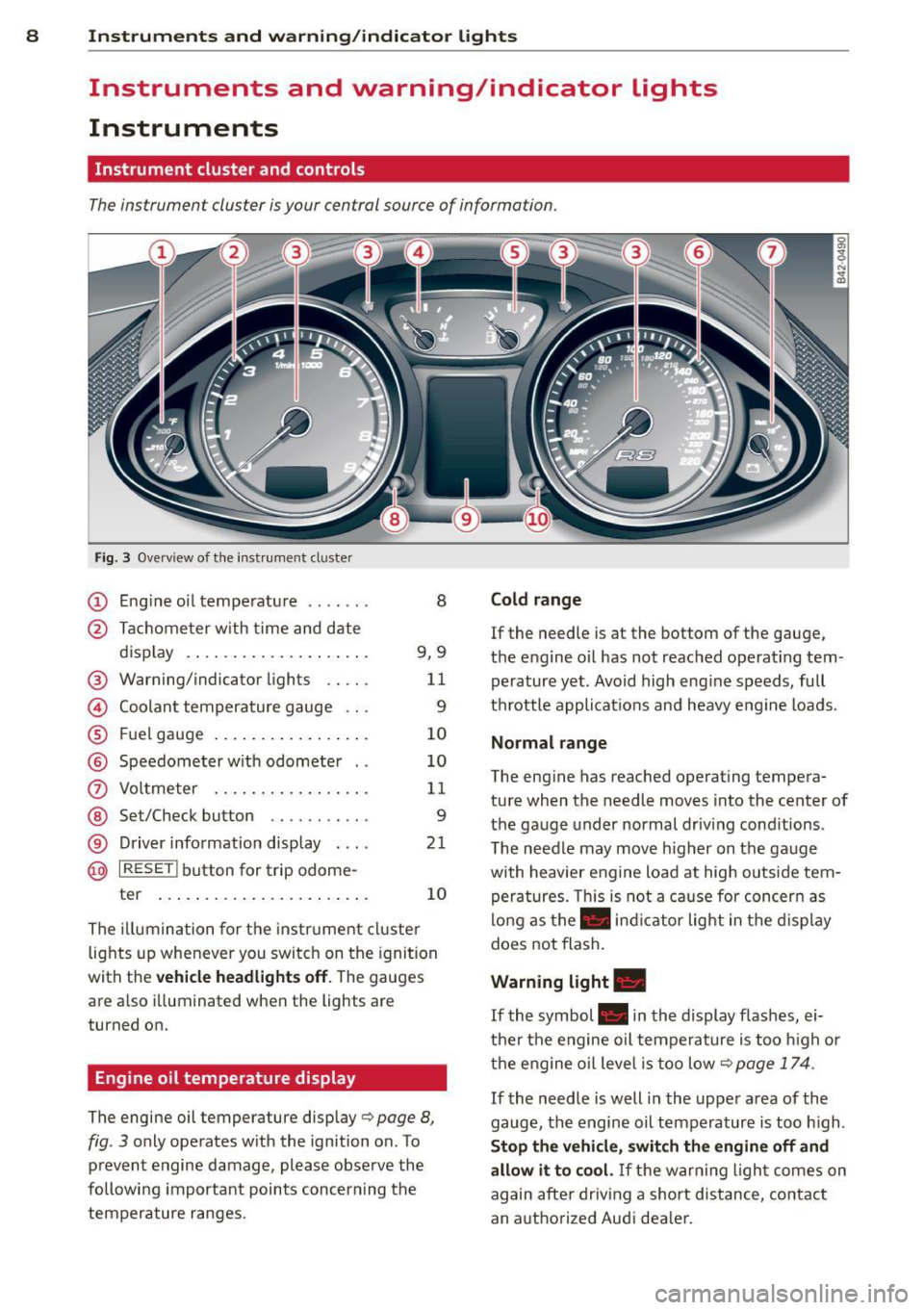
The instrument cluster is your central source of information.
Fig. 3 Overv iew of the inst rument cluster
(D Eng ine oil temperature . . . . . . . 8
@ Tachometer with time and date
display . . . . . . . . . . . . . . . . . . . . 9, 9
® Warning/indicator lights . . . . . 11
© Coolant temperature gauge . . . 9
® Fuel gauge........... .... .. 10
@ Speedometer w ith odometer . . 10
(i) Voltmeter . . . . . . . . . . . . . . . . . 11
@ Set/Check button . . . . . . . . . . . 9
® Driver information display . . . . 21
@ I RESET ! button for trip odome-
ter . . . . . . . . . . . . . . . . . . . . . . . 10
The illumination for the instrument cluster
lights up whenever you switch on the ignition
with the
vehicle headlights off. The gauges
are also illuminated when the lights are
turned on.
Engine oil temperature display
The engine oil temperature display Q page 8,
fig. 3 only operates with the ignition on . To
prevent engine damage, please observe the
following important points concerning the
temperature ranges.
Cold range
If the needle is at the bottom of the gauge,
the engine oil has not reached operat ing tem
perature yet . Avoid high engine speeds, full
throttle applicat ions and heavy engine loads .
Normal range
The engine has reached operating tempera
ture when the needle moves into the center of
the gauge under normal driving conditions .
The needle may move higher on the gauge
with heavier engine load at high outs ide tem
peratures. This is not a cause for concern as
long as the . indicator light in the display
does not flash.
Warning light .
If the symbol . in the display flashes, ei
ther the engine oil temperature is too high or
the engine o il level is too low
Q page 174 .
If
the needle is well in the upper area of the
gauge, the engine oil temperature is too high .
Stop the vehicle, switch the engine off and
allow it to cool.
If the warning l ight comes on
again after driving a short distance, contact
an authorized Audi dea ler.
Page 14 of 236

12 Instrum ent s and w arn ing /indic ato r light s
Safety belt
•
Check engine oil level
¢page 14
¢page 18
ii
Generator./
Engine oil sensor malfunction
¢page 14
¢page 18 '
D
Engine oil pressure too low
•
Battery voltage too h igh or too low
¢page 14
¢page 18
Engine coolant level too low/
II
Low fuel level
engine coolant temperature too
¢page 18
high¢ page 15
m
Windshield washer fluid level low
Yellow indicator lights ¢ page 18
Yellow symbols indicate a priority 2 ma lfunc-
~:)
Defective light bulb
tion -Warning!
¢page 18
11
Convertib le top ope ration
•
USA model s: Defective brake light
¢page 15
¢page 18
I]
Electronic Stability Control (ESC) ./
6
Canada models: Defective brake
¢page 16 light¢ page 18
-
I
Electronic Stab ility Control (ESC) ./
m
Light/rain sensor defe ctive (a utomat-
¢ page 16 ic headlights)* defective ¢ page 19
~ USA models: anti-lock brake system
(ABS) ./ defective ¢ page 16
B
Audi magnetic ride
¢page 19
•
Canada model s: anti-lock brake sys-
E
Rear spoiler./
tern (ABS)./ de fec tive ¢
page 16
¢page 19
•
Worn brake pads
~
USA model s: Speed warning 1
¢page 17
¢page29
g
Tire pressu re too low
•
Canada models : Speed warning 1
¢page 201
¢page29
I Tire pressure monitoring system
~
USA models: Speed warning 2 111115' 200
¢ page
¢page29
rm
Electronic power con trol ./
Canada models : Speed warning 2 ¢page 17
•
¢page29
B
USA models: Malfunction Indicator
Lamp (MIL)¢
page 17 Selector lever defective*
No reverse gear*
g
Canada models: Ma lfunction lndica-¢page 19
tor Lamp (MIL) ¢ page 17 ffl;O Clutch is overheating*
.,
Engine speed limitation* ¢page 19
¢page 17
R
Gearbox malfunction*
¢page 19
Page 21 of 236
Instruments and warning/indicator lights 19
Contact your authorized Audi dealer for assis
tance if necessary.
@ Tips
The brake light switch is only inspected as
pa rt of the functional check after the en
gine is started.
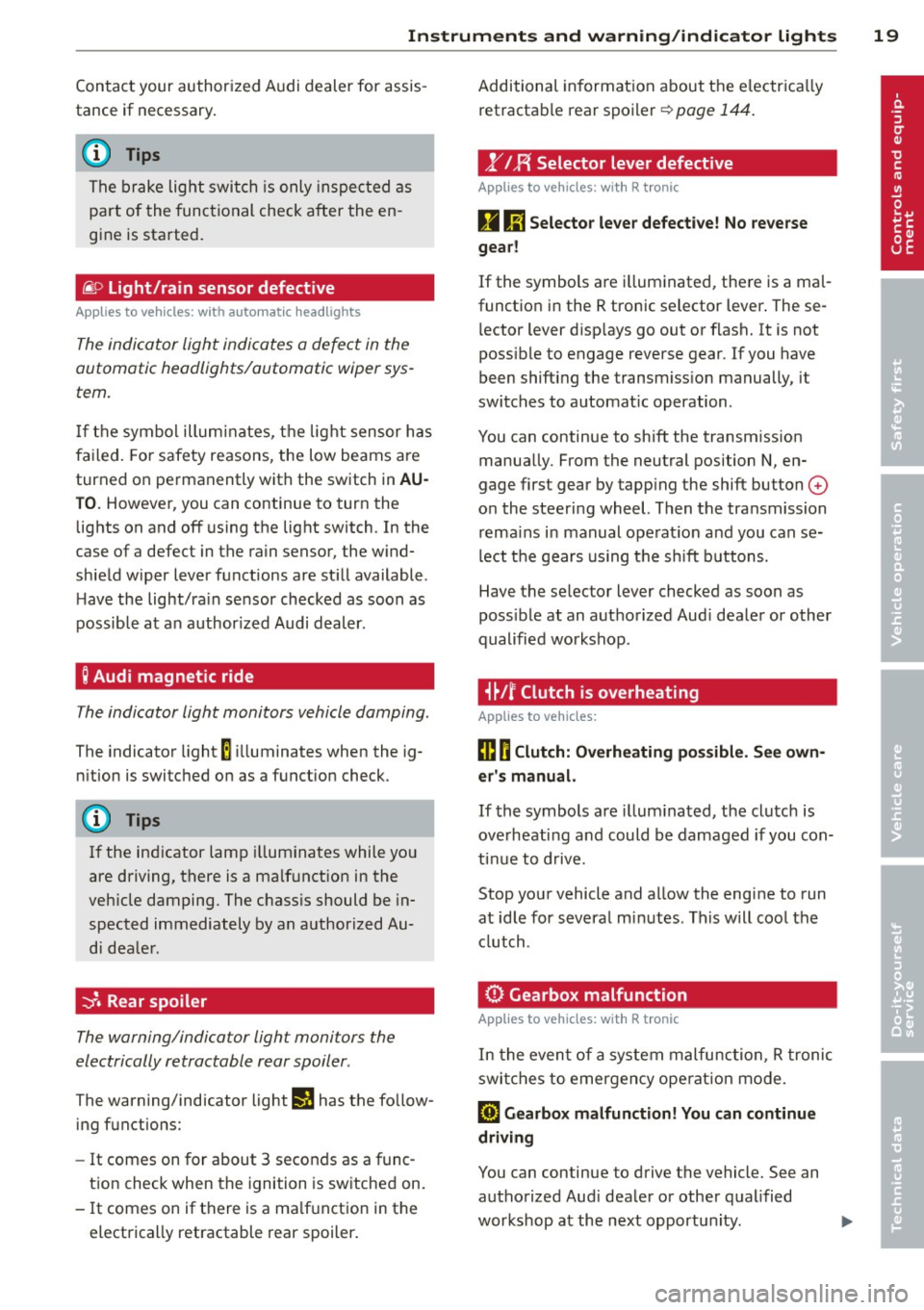
@ Light/rain sensor defective
Applies to vehicles: with automatic headlights
The indicator light indicates a defect in the
automatic headlights/automatic wiper sys
tem.
If the symbol illum inates, the light sensor has
failed. For safety reasons, the low beams are
turned on permanently with the switch in
AU
TO. However, you can continue to turn the
lights on and off using the light switch. In the
case of a defect in the rain sensor, the wind
shield wiper lever functions are still available .
H ave the light/ra in sensor checked as soon as
possible at an author ized Audi dealer.
; Audi magnetic ride
The indicator light monitors vehicle damping.
The indicator light E ill uminates when the ig
nition is switched on as
a function check.
(D Tips
If the ind icator lamp illuminates while you
are driving, there is a malfunct ion in the
veh icle damping. The chass is should be in
spected immediately by an authorized Au
di dealer.
-:;J. Rear spoiler
The warning/indicator light monitors the
electrically retractable rear spoiler .
The warning/indicator light Ii! has the follow
ing functions:
-It comes on for about 3 seconds as a func
t ion check when the ignition is switched on.
- It comes on if there is a ma lfunction in the
electrically retractable rear spoiler . Additional
information about the electr ica lly
retractable rear spoiler
r:;, page 144.
,.YI F{ Selector lever defective
Applies to vehicles : with R tronic
g Ii] Selector lever defective! No reverse
gear!
If the symbols are i lluminated, there is a mal
function in the R tronic selector lever . These
l ector lever d isp lays go out or flash. It is not
poss ible to engage reverse gear. If you have
been shifting the transm iss ion manually, it
switches to automat ic operation.
You can continue to shift the transmission manually. From the neutral position N, en
gage first gear by tapp ing the shift button
0
o n the steering wheel. Then the transmission
remains in manual operat ion and you can se
lect the gears using the s hift buttons.
Have the selector lever checked as soon as
poss ible at an authorized Aud i dealer or other
qualified workshop .
i~Jf Clutch is overheating
Applies to vehicles:
ffl O Clutch: Overheating possible. See own
er's manual.
If the symbols are i llum inated, the clutch is
ove rheating and could be damaged if you con
tinue to drive.
Stop your vehicle and allow the engine to run
at idle for several m inutes . This w ill cool the
clutch.
0 Gearbox malfunction
App lies to vehicles: wit h R tro nic
In the event of a system malfunction, R tronic
switches to emergency ope rat ion mode.
[O) Gearbox malfunction! You can continue
driving
You can continue to drive the vehicle. See an authorized Aud i dealer or other qualified
workshop at the next opportun ity . ..,.
Page 51 of 236
Clear vision Lights
Switching the headlights on/off
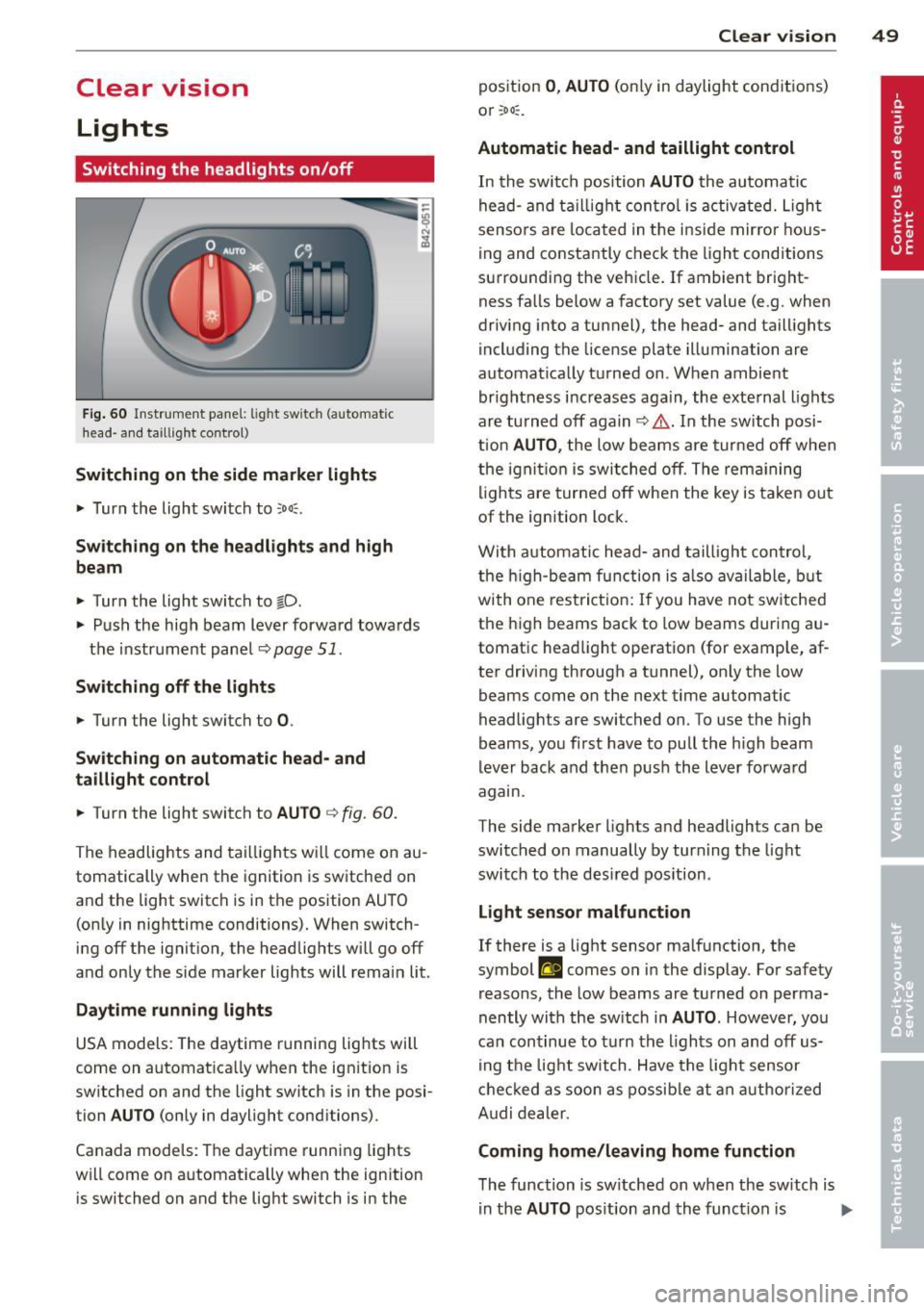
Fig. 60 Instr ume nt pa nel: lig ht sw itc h (automat ic
head· a nd taill ig ht control)
Switching on the side marke r lights
"' Turn the light switch to ::oo:.
Switching on the headlights and high
beam
"' Turn the light switch to tD.
.,. Push the high beam lever forward towa rds
t h e instrument pane l
Q page 51.
Switching off the lights
.,. Turn the light switch to 0.
Switching on automatic head- and
taillight control
.,. Turn the light switch to AU TO Q fig . 60 .
The headlig hts and tai lligh ts w ill come on au
tomatically when the ignition is sw itche d on
and the light switch is in the position AU TO
(on ly in nig httime conditions). When switch·
ing off the ignit io n, the headlig hts wi ll go off
and only the side marker lights will remai n lit.
Daytime running lights
USA models: The daytime r unning lig hts will
come on a utomat ica lly when the ig nition is
sw itched on and the light switch is in the posi·
tion
AUTO (only in daylight conditions).
Canada models : Th e daytime runni ng lights
will come on a utomat ically when the ignition
is switched on and the light switch is in the
Clear vi sion 49
position 0 , AUTO (on ly in daylight cond itions)
o r ;oo :.
Automatic head- and taillight control
In the swi tc h p osition AUTO the au tomati c
he ad- and t aillight con tro l is activ ated. Ligh t
senso rs ar e lo cated in t he i nside mirro r hous
ing and co nstantly chec k the light cond itions
su rroundi ng the vehicle. If ambient bright
ness fa lls below a factory set value (e .g. when
dr iv ing into a tu nnel), the head- and taill ights
i ncl uding the license plate illuminati on are
automat ica lly t urned on . When ambient
brightness i ncreases aga in, the exte rnal ligh ts
ar e turned off aga in
q &. . In the switch posi
t ion
AUTO , the low beams are tur ned off when
t h e ign ition is swi tched o ff. Th e rem aining
li gh ts are turned off when the key is ta ke n out
of the ignition lock.
W it h a utomat ic head- and taill igh t con trol,
the h igh-be am fu nction is also ava ilable , bu t
with one rest ric t ion : If you have not sw itche d
the h igh beams back to low beams during a u
tomat ic head light operat ion (for examp le, af
ter driving through a tunnel), on ly the low
beams come on the next time automatic
headlig hts are switched on. To use the high
beams, yo u fi rst have to pull the h igh beam
lever back and then push the lever forwa rd
agam .
The side ma rke r lights a nd headlights ca n be
sw itc hed on manually by turn ing the light
swi tc h to the des ired pos ition .
Light sensor malfunction
If there is a light sensor ma lfunction, the
symbol
El comes on in the display . For safety
reasons, the low beams are tu rned on perma
nently with t he sw itch in
AUTO . However , you
can con tinue to tu rn the lights on and off us
in g t he light switch . Have t he ligh t sensor
c h eck ed as soon a s possib le a t an au thori zed
A udi dealer.
Coming home/leaving home function
The function is sw itched on w hen the sw itch is
i n the
AUTO pos ition and th e funct ion is liJJ,,
Page 52 of 236
50 Clear vision
shown as active in the driver information
system.
The
coming home function illuminates the
area around the vehicle when the ignition is
switched off and the driver 's door is opened.
The length of time the lights rema in on can be
set in the menu display
(Lights> Exterior
lights > coming home) .
The leaving home function illuminates the
area around the vehicle when unlocking it.
.&_ WARNING
-Never use daytime running lights to see
where you are going. They are not bright enough and will not let you see far
enough ahead for safety, especially at dusk or when it is dark . Be aware of
changes in outside light conditions when
you are driving and respond by switching on your low beams.
- Automatic head- and taillight control is
only intended to assist the driver. This
feature does not relieve the driver of his
responsibility to check the headlights
and to turn them on manually according
to the current light and visibility condi
tions. For example, fog and rain cannot
be detected by the light sensors. Conse
quently, always switch the headlights on
under these weather conditions and
when driving in the dark .
- Crashes can happen when you cannot see
the road ahead and when you cannot be
seen by other motorists .
-Always turn on the headlights so that you can see ahead and so that others can see your car from the back.
- Please observe legal regulations when
using the lighting systems described .
@ Tips
-Always observe the specific local regula
tions for your area when to use your lights .
- Turn on low beams as evening ap
proaches or in conditions of poor visibili
ty. -
Do not attach stickers to the windshield
in front of the sensors as this can disable
the automatic head- and taillight control
and the automatic glare-dimming of the
rearview mirror(s)*.
- If you remove the ignition from the igni
tion lock while the headlights are still
on, a buzzer will sound as long as the
driver's door is open to remind you to
turn off the lights .
- In the AUTO mode, the low beams are
turned off when the ignition is turned
off . The remaining lights are turned off
when the key is taken out of the ignition.
- In cool or damp weather conditions the
headlights may fog over temporarily on
the inside .
- The critical factor is the temperature
difference between the interior and the
exterior of the headlight lens.
- With the main beams switched on, the
light-emitting area will be free of con
densation after a short time , however
the edges of the glass may still be fog
ged .
- This physical phenomenon has no ef
fect on the life of your vehicle's l ight
ing system .
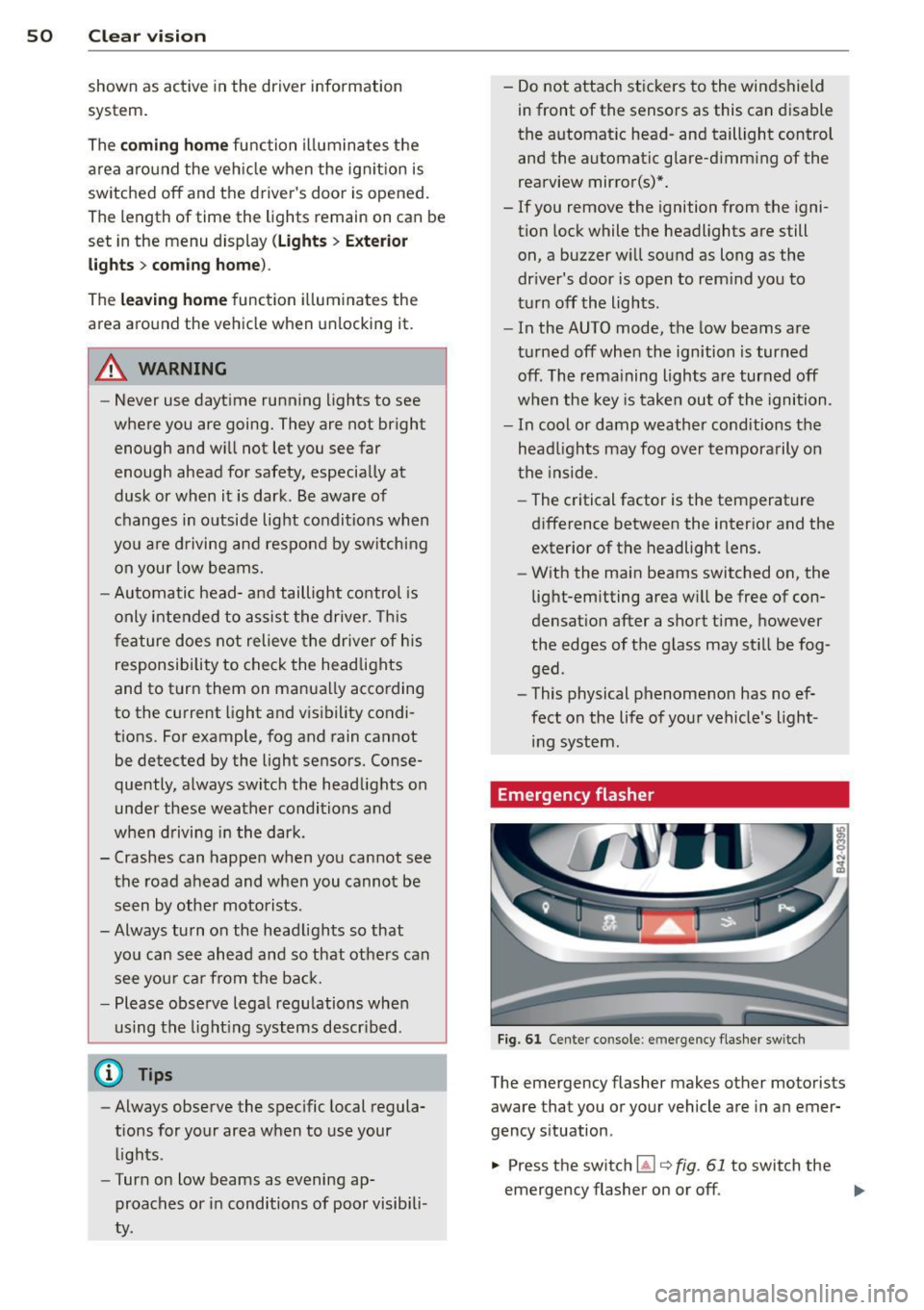
Emergency flasher
Fig. 61 Center console: em erge ncy flasher sw itc h
The emergency flasher makes other motorists
aware that you or your vehicle are in an emer
gency situa tion.
... Press the switch ~
Q fig. 61 to switch the
emergency flasher on or off .
ll>
Page 54 of 236
52 Clear vis ion
Interior lights
Interior lights
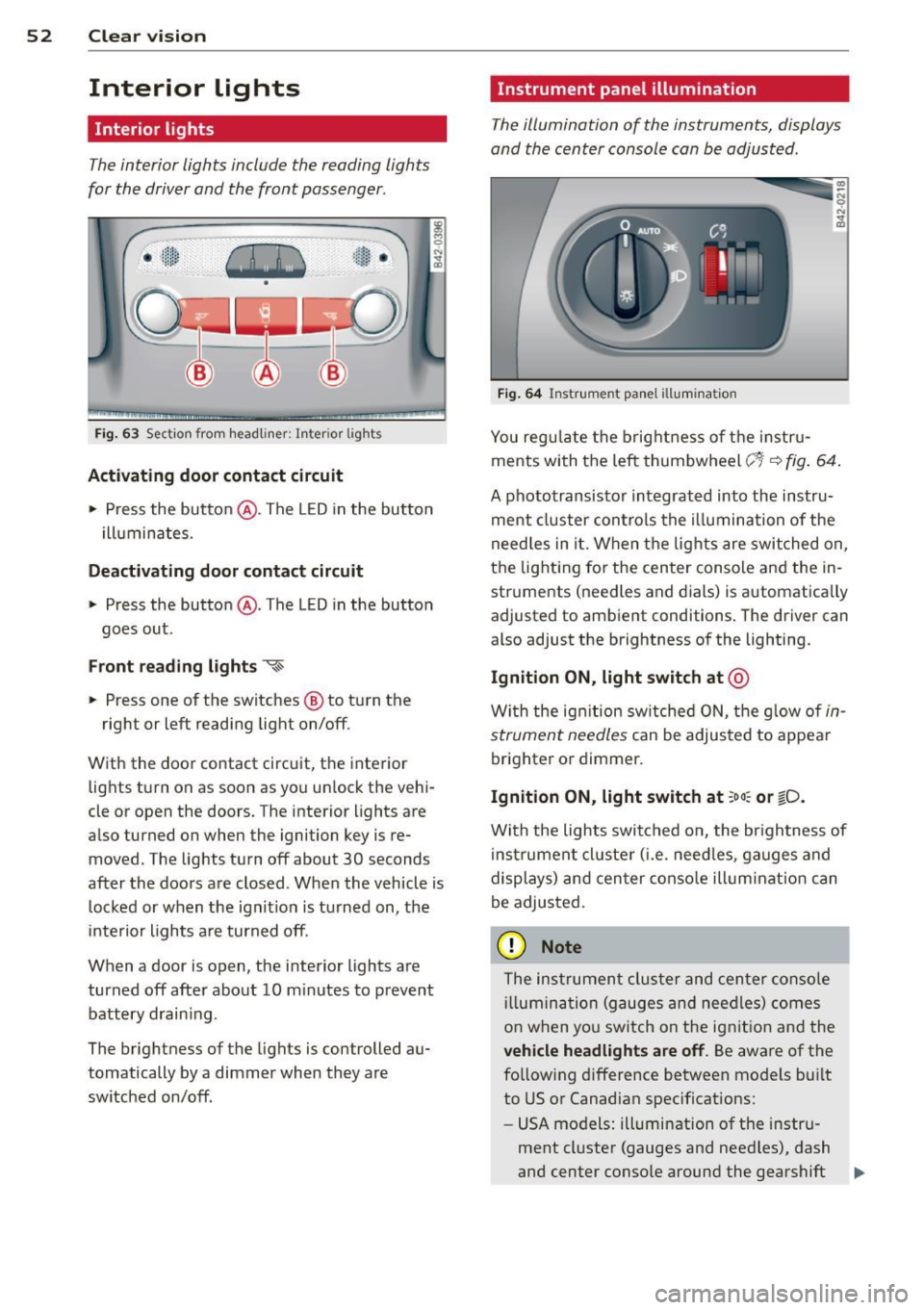
The interior lights include the reading lights
for the driver and the front passenger .
-
,-i.-,-,n--;)
"' "' "' 0
•
Fi g. 63 Section from headliner: I nterior l ights
Acti vating door contact circuit
• Press the button @. The LED in the button
i lluminates.
Deactivating door c ontact circu it
• Press the button @. The LED in the button
goes out .
Front re ad ing lights ~
• Press one of the switches @ to turn the
right or left reading light on/off.
With the door contact circuit, the interior lights turn on as soon as you unlock the vehi
cle or open the doors. The interior lights are
also turned on when the ignition key is re moved. The lights turn off about 30 seconds
after the doors are closed . When the vehicle is
locked or when the ignit io n is tu rned on, the
inte rior lights a re turned off.
When a door is open, the interior lights are
turned off after about 10 m inutes to prevent
battery drain ing.
The brightness of the lights is controlled au
tomatically by a dimmer when they are
switched on/off .
Instrument panel illumination
The illumination of the instruments, displays
and the center console can be adjusted .
Fig . 6 4 Instrument pa nel illuminat ion
You reg ulate the brightness of t he instr u
ments with the left thumbwheel
c;~-~ fig . 64 .
A phototransisto r integrated into the instru
ment cluster controls the illumina tion of the
need les in it. When the lights are switched on,
the lighting for the center conso le and the in
struments (needles and dials) is automatically
adjusted to ambient conditions . The driver can
also adjust the brightness of the lighting.
Ignition ON, light switch at @
With the ign ition sw itched O N, the g low of in
strument needles
can be adjusted to appear
brighter or dimmer.
Ignition ON, light switch at ;oo : or ~D.
With the lights switched o n, the br ightness of
instrumen t cluster ( i.e . need les, ga uges and
displays) and cen ter conso le illum inat ion can
be adjusted.
(D Note
The instrumen t cluster and cen ter conso le
ill umin ation (gauges and nee dles) comes
o n when yo u sw itch on the ignit io n and the
veh icle headlights are off . Be aware of the
fo llowing difference between models bui lt
to US or Canadian specifications:
- USA models: illumination of the instru
ment cl uster (gauges and need les), dash
and center conso le around the gearshift .,.
Page 55 of 236
lever is controlled by a light sensor locat
ed in the instrument panel. The instru
ment pane l illumination will a utomat i
cally become dimmer as the daylight
fades away and eventually will go o ut
completely when outside light is ve ry
low. T his is to rem ind you, the drive r, to
switch on the headlights before it gets
too dark.
- Canada models: instrument panel i llum i
nat io n w ill stay b right regard less of the
i n tens ity of amb ien t lig ht. Always be
aware o f ch anges in outside light con di
tions wh ile you are driving. Resp ond in
time to fading daylight by t urning the
l ight sw itch to position
io (or "A UTO" if
your car is equ ipped with this feature) to
turn on your headlights.
Luggage compartment light
The light is located on the right side of the
luggage compartment .
These lights come on automatica lly when the
front lid is opened. The lig hts turn off auto
mat ica lly if the lid is left open for more then
10 minutes.
Sun visors
CJ
C • -·-·--·,
~
-----____ ,,_
~ --·----"-------.. ----
~ ---- s;i~~~j
.---~~·-·oiiiiiii------------1
Fig. 6 5 Sun v isor
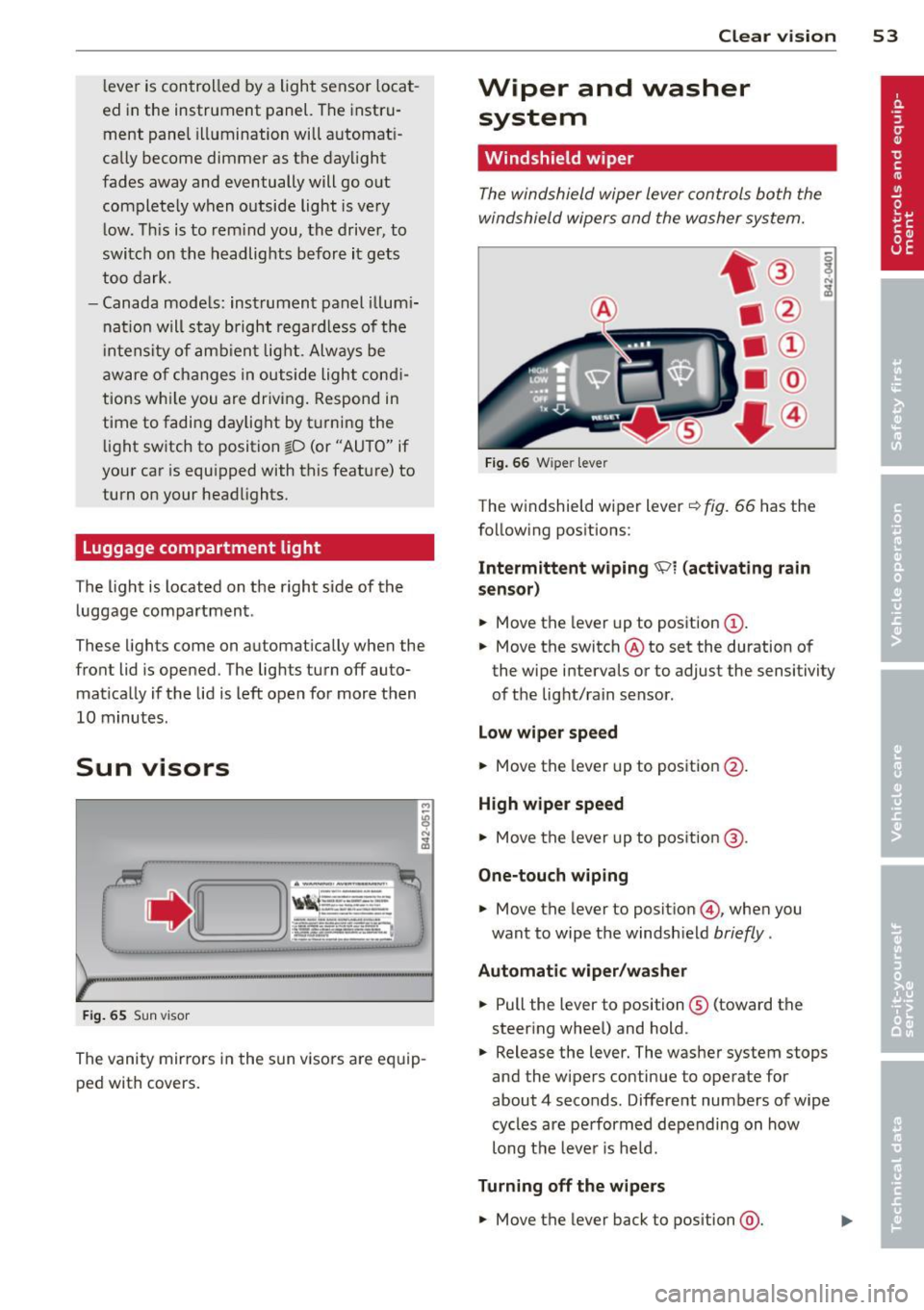
The vanity mir rors in the sun v isors are eq uip
ped with covers.
Clear vi sion 5 3
Wiper and washer
system
Windshield wiper
The windshield wiper lever controls both the
windshield wipers and the washer system.
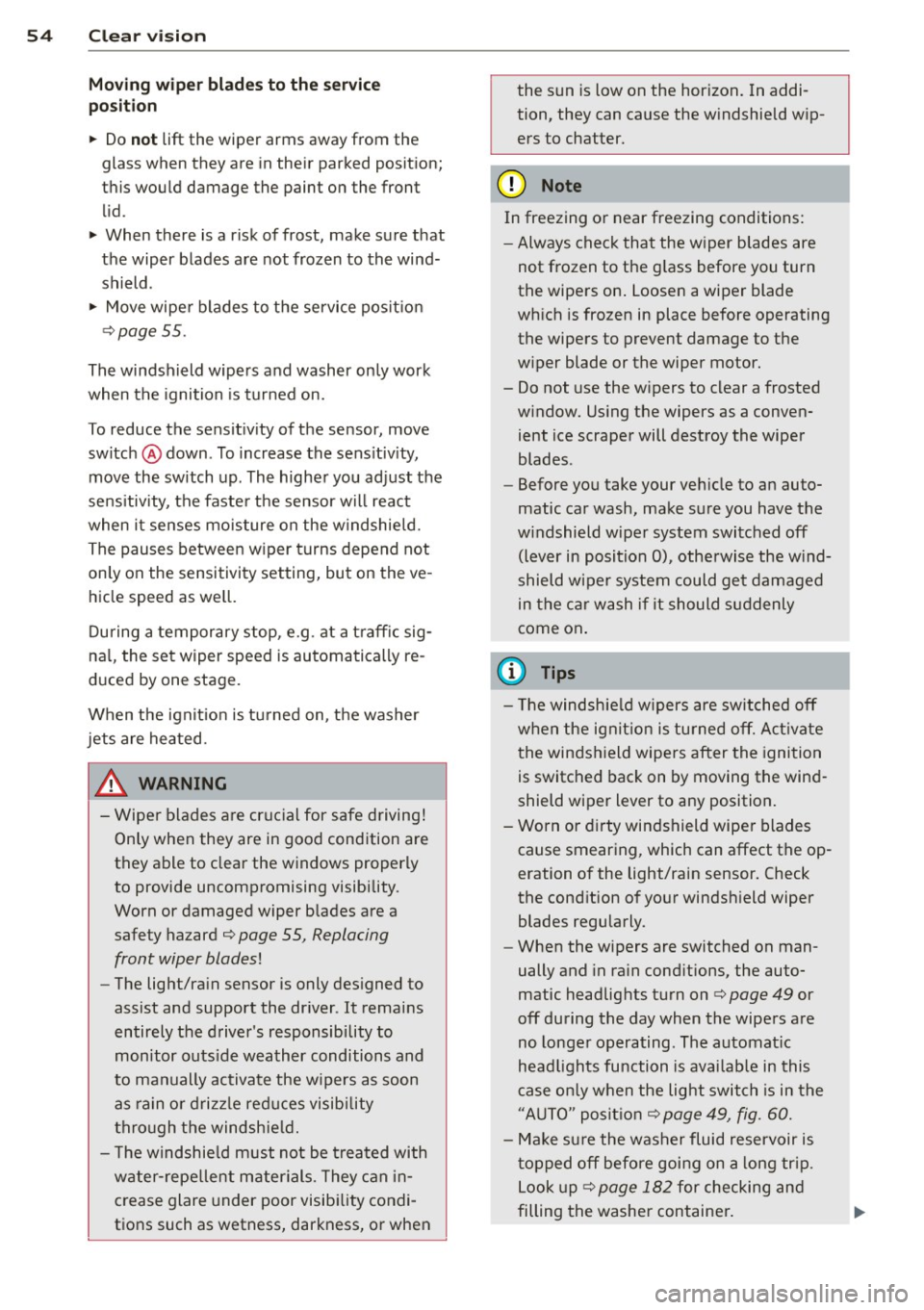
Fi g. 6 6 W iper leve r
The w indshield wiper lever¢ fig. 66 has the
follow ing pos itions:
Intermittent wiping 'Pl (activating rain
sen sor)
.,. Move the lever up to position (D .
.,. Move the switch @ to set the duration of
the wipe intervals or to adjust the sensitivity
of the light/rain sensor .
Low wiper speed
.,. Move the lever up to position @.
High wiper speed
.,. Move the lever up to pos ition @.
One-touch wiping
.,. Move the lever to positio n @, when you
want to wipe the windsh ield
briefly .
Automatic wip er/ washer
.,. Pull the lever to position ® (toward the
steering whee l) and hold .
.,. Release the lever. The washer system stops
and the wipers continue to operate for
about 4 seconds. Different numbers of wipe
cycles are pe rformed depending on how
long t he leve r is he ld.
Turning off the w ipe rs
.,. Move the lever back to position @.
Page 56 of 236
54 Clear vis ion
Moving w ip er blade s to th e service
po sit ion
.. Do not lift the wiper arms away from the
glass when they are in their parked position;
this would damage the paint on the front
lid .
.. When there is a risk of frost, make sure t hat
the wiper blades are not frozen to the wind shield .
.. Move wipe r blades to the service pos it ion
¢page 55.
The windshield wipers and washer on ly work
when the ignition is turned on.
To reduce the sensit iv ity of the sensor, move
switch @down . To increase the sens itiv ity,
move the switch up. The higher you adjust the
sens itivity, the faste r th e sensor will react
when i t senses moisture on the w indshield.
The pauses between w iper t urns depend not
only on the sensitivity setting, but on the ve
hicle speed as well.
Du ring a temporary stop, e.g . at a t raff ic sig
na l, the set wipe r speed is automatically re
duced by one stage.
When the igni tion is tu rned on, the washer
jets are heated.
_& WARNING
- Wipe r blades a re cruc ial for safe driving!
Only when they are in good condition are
they able to clear the windows properly
to provide uncompromising visibility.
Worn or damaged wiper blades are a safety hazard ¢
page 55, Replacing
front wiper blades!
- The light/ra in sensor is only des igned to
assist and support the dr iver .
It remains
entirely the driver 's responsibility to
mon itor outs ide weather conditions and
to manually activate the w ipers as soon
as rain o r dri zz le red uces visibi lity
thro ugh the windshie ld.
- T he windshie ld must not be treated with
water-repe llent materials. They can in
crease glare under poor visib ility condi
tions such as wetness, darkness, or when the s
un is low on the horizon . In addi
tion, they can cause the w indshield w ip
ers to chatter .
(D Note
In freezing or near freezing conditions:
- Always check that the wiper blades are
not frozen to the g lass before you turn
the wipers on . Loosen a wiper blade
which is frozen in place before operating
the wipers to prevent damage to the
w iper blade or the wiper motor.
- Do not use the w ipers to clear a frosted
window. Us ing the wipers as a conven
ient ice scraper will destroy the wiper
blades .
- Before you take your veh icle to an auto
matic car wash, make sure you have the
w indshield w iper system switched off
(lever in position 0), otherwise the w ind
shield w iper system could get damaged
in the car wash if it should suddenly
come on .
(D Tips
-The windshie ld w ipers are switched off
when the ignit ion is turned off. Act ivate
t he winds hield wipers after the ignition
is switched back on by moving the wind
shield wiper lever to any position.
- Worn or dirty windshield wipe r blades
cause smearing, which can affect the op
eration of the light/rain sensor . Check
the cond ition of your windsh ield wiper
blades regularly.
- When the wipers are switched on man
ually and in ra in cond itions, the auto
matic headlights turn on¢
page 49 or
off during the day when the wipers are
no longer operating . The automat ic
head lights fu nction is avai lab le in this
case on ly w hen the light switch is in the
"A UTO" posit ion¢
page 49, fig. 60.
- Make su re the washer fluid reservoir is
t opped off before goi ng on a long tr ip.
Look up ¢
page 182 for checking and
filling the washe r container .
Page 58 of 236
56 Clear vis ion
In stall ing t he wiper blade
.,. Place the rounded end of the wiper onto the
end of the w iper arm in the
op pos ite direc
tion to the arrow @
c:::> fig. 68 .
.,. Squeeze the corrugation on the wiper until
you hear it click in the wiper arm .
.,. Fold the wiper arm back onto the wind
shield .
.,. Switch the ignition on and move the wiper
lever down briefly
c:::> page 53, fig . 66 . The
wipe r will move back to the park position.
_& WARNING
- Clean yo ur wiper blades regularly w ith a
windshield washer solution to prevent
streaking. If the wiper blades are very
dirty, for examp le with insects, carefu lly
clean the w iper blades with a sponge or a
soft brush.
- For your safety, you should replace the
wiper blades once or twice a year. See
your authorized Aud i dealer for replace
ment blades.
(D Note
- The w iper blades may only be changed
c:::> page 55 in the service position! Other
wise, you r isk damaging the paint on the
front lid or the windsh ield wiper motor .
- To prevent damage to the wiper system:
-Always loosen blades which a re fro zen
to the windshield before operating
w ipers.
- Do not use gasoline, kerosene, paint
t hinner, or o ther solvents on or near
the wipe r blades .
- Do not attempt to move the wipers by
hand.
{D) Tips
The front wiper blades are different
lengths; the blade o n the dr ive r's side is
longer.
Mirrors
Dimming the mirrors
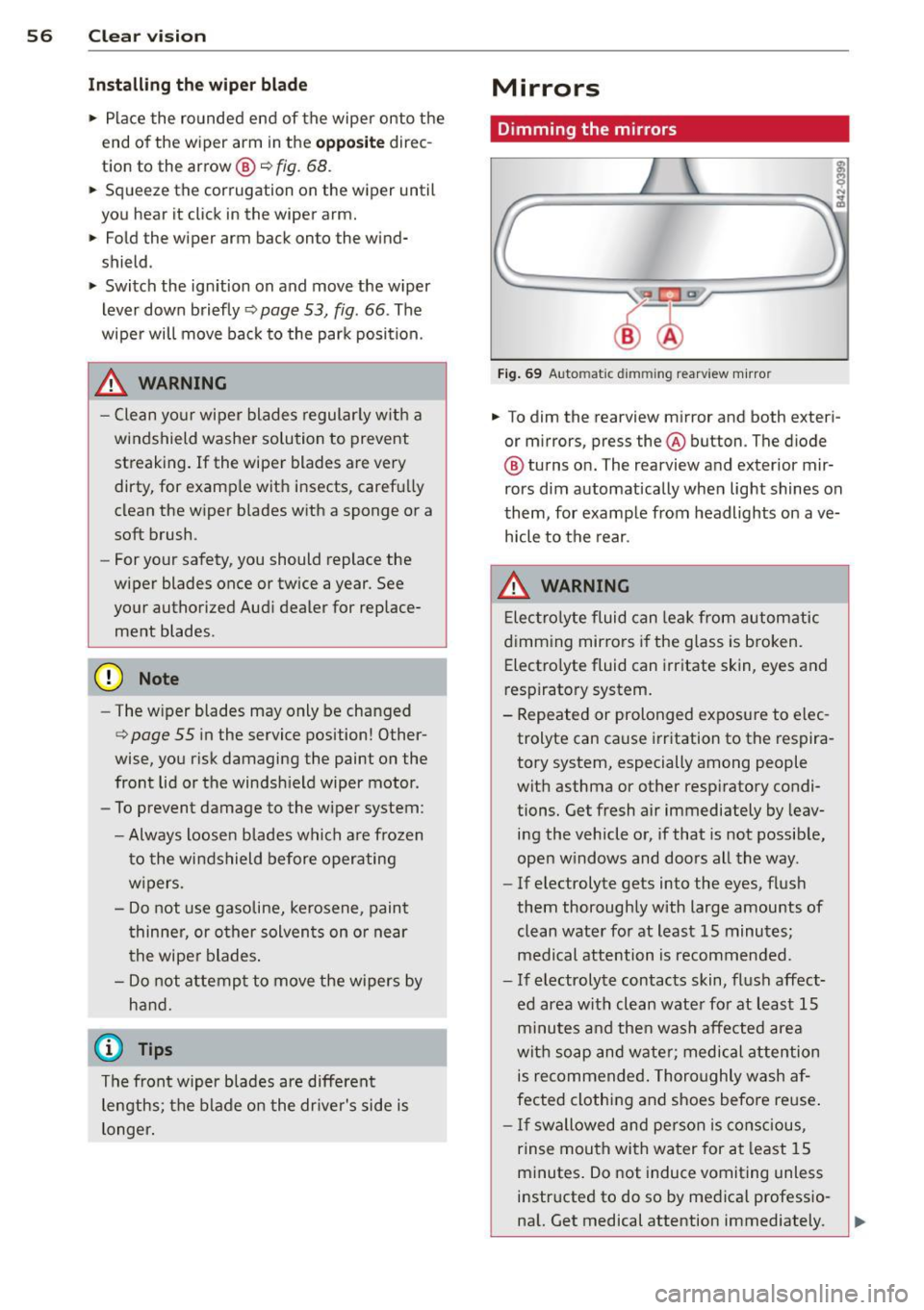
Fig . 69 Auto matic dimming rearview m irro r
.,. To dim the rearview mirror and both exteri
or m irrors, press the@ button . The diode
@ turns on. The rearview and exterior mir
rors dim automatically when light shines on
them, for example from headlights on ave
h icle to the rear .
_& WARNING
-
Elec tro lyte fluid can lea k from automatic
dimming mirrors i f the glass is b roken.
Electro lyte fluid can irritate skin, eyes and
respiratory system.
- Repeated or prolonged exposure to e lec
trolyte can cause i rr itation to the respira
tory system , especially among people
with asthma or other respiratory condi
tions. Get fresh air immediately by leav
ing the vehicle or, if that is not possib le,
open w indows and doors all the way .
- If electrolyte gets into the eyes, flus h
them thoroughly with large amou nts
of
clean water for at least 15 minutes;
medical attention is recommended.
- If electrolyte contacts skin, fl ush affect
ed area with clean wate r fo r at least 15
minutes and then wash affe cted area
wit h soap and wate r; medical attention
is recommended. Thoro ughly wash af
fected clothing and shoes before reuse .
- If swallowed and person is consc ious,
rinse mouth with water for at least 15
minutes . Do not induce vomiting unless
instructed to do so by medical professio na l. Get medical attention immediately.
Page 73 of 236
Ignition on @
Afte r switch ing the ignition on, the needles
move all the way up and then down .
I f it is difficult to turn the key afte r you have
i nse rted it into the ignit ion lo ck, tur n the
steer ing whee l back and forth. This will take
the load off the steering lock mechanism and
you will be able to turn the key freely and start the engine .
Starting the engin e@
In th is position the engine starts. While the
engine is start ing, the power s upply to the
headlights and other e lectrica l consumers is
temporari ly interrupted to conserve battery
pow er. Aft er the engine has started, release
the key and it will return to posit ion @.
Before the starter can be operated again the
key must be turned back to position@. The
non -repe at lock prevents you from damaging
the starter when the engine is runn ing .
A WARNING
-Never remove the key from the ign ition
lock whi le the vehicle is moving. The
steering wheel will lock causing loss of control.
- If you have to leave your veh icle -even
for just a m in ute - always remove the ig
nition key and take it with you. This is es
pecially important if you a re going to
leave c hildren behind in the vehicle. The
children co uld start the engine or use
other vehicle controls . Unsupervised use
of vehicle controls (for example, power
windows) can cause serious personal in
jur ies .
If the vehicle battery has been disconnect
ed and then reconnected, then you m ust
leave the key in pos ition @for abo ut 5
seconds before you can start the engine.
On th e ro ad 71
Starting the engine
The engine can only be started with your orig
inal Audi key.
On vehicles with R tronic *, the engine can be
start ed in the ne utra l position N and in each
gea r (1 - 6 and R).
.. Set the park ing brake ¢,&. .
.. On vehicles with man ua l transmission *,
fu lly depress the clutch pedal.
.. Press and hold the brake pedal.
.. Turn the ignition key to pos it ion ®
¢ page 70, fig. 82 - do not depress the gas
pedal when starting the engine .
.. Let go of the key as soon as the engine
starts - the sta rter must not cont inue to
r u n. On ve hicles w ith R t ro ni c, selec t gea r
posi tion N .
A cold engine may at first be loud afte r it has
been sta rted. This is due to the hydraulic
valves bu ild ing up the oil press ure . Thi s is nor
mal and no need for concern.
If the engine does not start immediately, stop
tryi ng after 10 seconds and then try to restart
the engine abou t 30 seconds later.
A WARNING
- Never start or let the eng ine run in a con
fined or enclosed area . Exha ust fumes
from the engine contain carbon monox
ide, a co lor less and odorless gas. Carbon
mo nox ide ca n be fatal if inhaled.
- Never leave the engine idling unattend
ed. An unattended veh icle with a runn ing
engine poses a danger of personal injury
or theft .
- With the engine r unning and a gear en
gaged, you have to hold the veh icle w ith
the foot brake .
(D Note
- Avoid h igh engine speeds, fast accelera
tion or heavy engine loads while the en
gine is still cold. This could damage the
eng ine .