radio AUDI R8 SPYDER 2014 Owners Manual
[x] Cancel search | Manufacturer: AUDI, Model Year: 2014, Model line: R8 SPYDER, Model: AUDI R8 SPYDER 2014Pages: 244, PDF Size: 61.06 MB
Page 22 of 244
20 Driver information system
Driver information
system
Introduction
The Driver information display inside the in
strument cluster provides you, the driver ,
with important information.
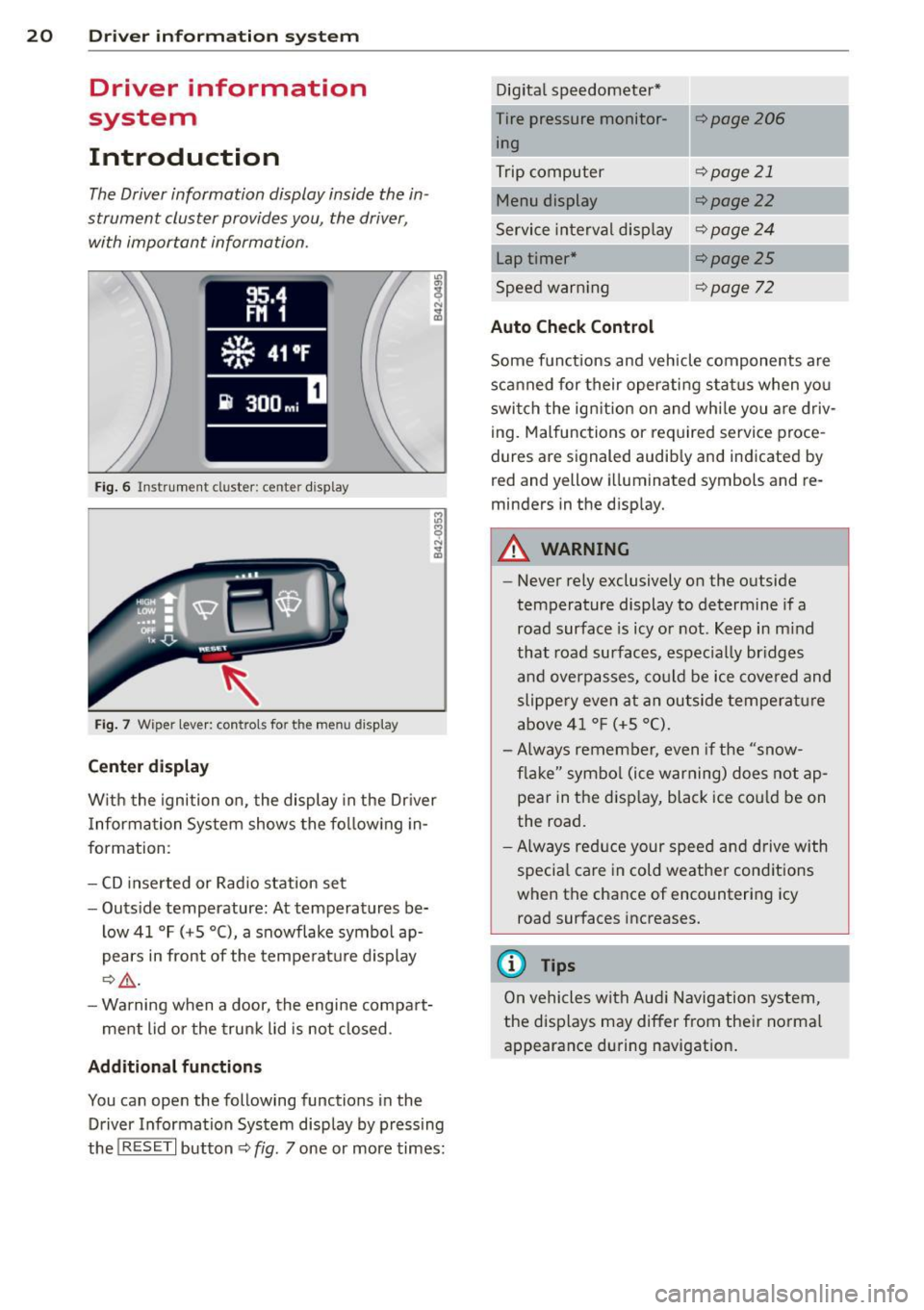
Fig. 6 In strum en t cl ust er: center display
Fig. 7 W iper le ver: c on trols fo r the menu disp lay
Center display
W ith the ignition on, the display in the Dr iver
I nformation System shows the following in
formation :
- CD inserted or Radio station set
- Outside temperature: At temperatures be-
low 41 °F ( +S °C), a snowflake symbol ap
pears in front of the temperature display
¢.&_ .
-Warning when a door, the engine compart-
ment lid or the trunk lid is not closed .
Additional functions
You can open the following function s in the
Driver Information System disp lay by pressing
the
! R ESE T I button ¢ fig. 7 one or more times: Digital
speedometer*
Tire pressure monitor ing
Trip computer
Menu display
Service interval display
Lap timer*
Speed warn ing
Auto Check Control
¢page206
¢page 21
¢ page22
¢page24
¢page25
¢page 72
Some functions and vehicle components are
scanned for their operating status when you
switch the ign ition on and whi le you are driv
ing. Malfunctions or required service proce
dures are signaled audib ly and indicated by
red and y ellow illuminated symbols and re
m inders in the display.
A WARNING
--
- Never rely exclusively on the outside
temperature display to determine if a
road surface is icy or not . Keep in mind
that road surfaces, espec ially br idges
and overpasses, could be ice covered and
slippery even at an outside temperature
above 41 °F (+S °C).
- Always remember, even if the "snow
flake" symbol (ice warning) does not ap
pear in the display, black ice cou ld be on
the road.
-Always reduce your speed and drive with
specia l care in cold weather conditions
when the chance of encountering icy road surfaces increases.
@ Tips
On vehicles with Aud i Navigation system,
the displays may differ from their normal
appearance during navigation.
Page 31 of 244
Master key with remote control
The remote control allows you to lock or un
lock the vehicle electronically .
The transmitter and battery are located in the
head of the remote control. The receiver is lo
cated inside the vehicle. The maximum effec
tive range depends on several things . Remem
ber, if the battery is wea k, the effective range
decreases.
If you need to replace the remote control, or if
you need to have it repaired, you must see
your author ized Audi dealer. Only then can
you use the key again.
(D Tips
- If the ignition is sw itched on, the remote
control system is deactivated .
- The remote control system can be affect ed by other systems operating in the
same frequency range close to the vehi
cle, such as mobi le telephones, televi
sion broadcasting stations, etc.
- Fo r De clarat ion of Compliance to United
Sta tes FCC and Indus try Canada regula
tions ¢
page 230.
Master key battery replacement
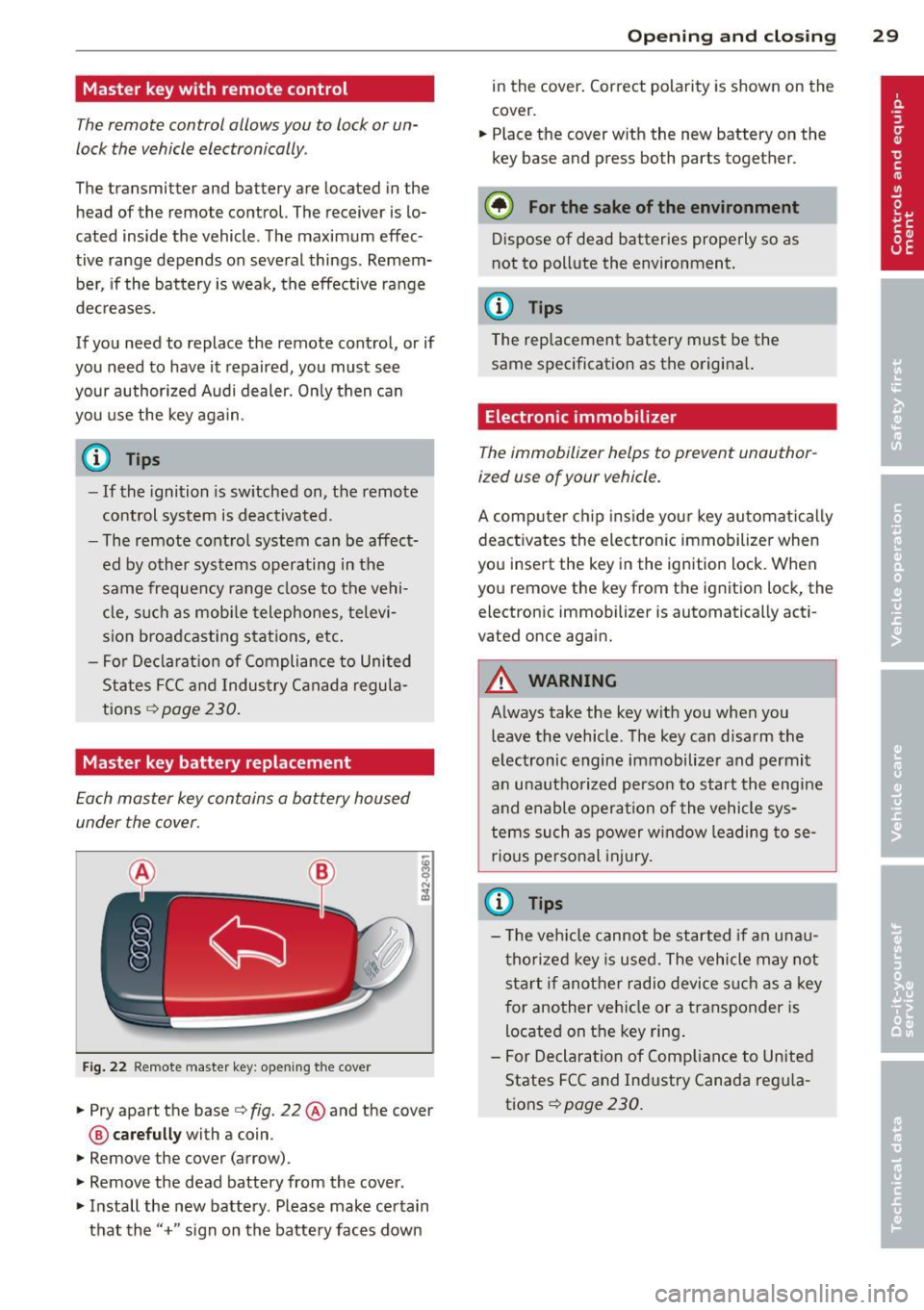
Each master key contains a battery housed
under the cover .
Fig . 22 Remote master key: opening the cover
.. Pry apart the base¢ fig. 22@and the cover
@ care full y with a coin .
.,. Remove the cover (arrow) .
.,. Remove the dead battery from the cover .
.. Install the new battery . Please make certain
that the" +" sign on the batte ry faces down
Op enin g an d clos ing 29
in the cover . Correct polarity is shown on the
cover .
.. Place the cover with the new battery on the
key base and press both parts together .
@ For the sake of the env ironment
Dispose of dead batteries properly so as
not to pollute the environment.
(D Tips
The replacement battery must be the
same specification as the origina l.
Electronic immobilizer
The immobilizer helps to prevent unauthor
ized use of your vehicle.
A computer chip ins ide your key automatica lly
deactivates the electron ic immobilizer when
you insert the key in the ign ition lock. When
you remove the key from the ignition lock, the
electronic immobilizer is automatically acti
vated once again.
A WARNING
---
Always take the key with you when you leave the vehicle. The key can disarm the
electronic engine immobilizer and permit
an unauthorized person to start the engine
and enable operation of the vehicle sys
tems such as power w indow leading to se
rious pe rsonal injury.
(D Tips
- T he ve hicle cannot be started if an unau
thorized key is used. The vehicle may not
start if another radio device s uch as a key
for another vehicle or a transponder is
located on the key ring .
- For Declaration of Compliance to United
States FCC and Industry Canada reg ula
tions¢
page 230 .
Page 34 of 244
32 Opening and clo sing
@ Tips
- The remote control key is automatica lly
deactivated when the ignition is sw itch
ed on.
- The operation of the remote contro l key
can be temporarily disrupted by interfer
ence from transmitters in the vicinity of
the vehicle work ing in the same frequen
cy range (e.g. a cell phone, radio equip
ment) .
- In order to make sure the locking func
tion is working, you shou ld always keep
you r eye on the vehicle to make sure it is
proper ly locked.
- Do not use the remote control if you are
i ns ide the car, otherwise you may unin
tentiona lly lock the vehi cle, and then you
would set off the anti-theft alarm when
you try to start the engine or open a
door . In case this happens anyhow, push
the un lock button @.
- Use the panic funct ion only if you are in
an emergency situation.
Resetting the remote control
The remote control must be reset if the vehi
cle does not unlock .
• Pres s the unlock button ffi on the remo te
control.
• Manua lly unlock the drive r's door lock with
the mechanical key within 30 seconds.
• Press e ither the lock-
ffi or the unlock @ but
ton to complete the reset sequence.
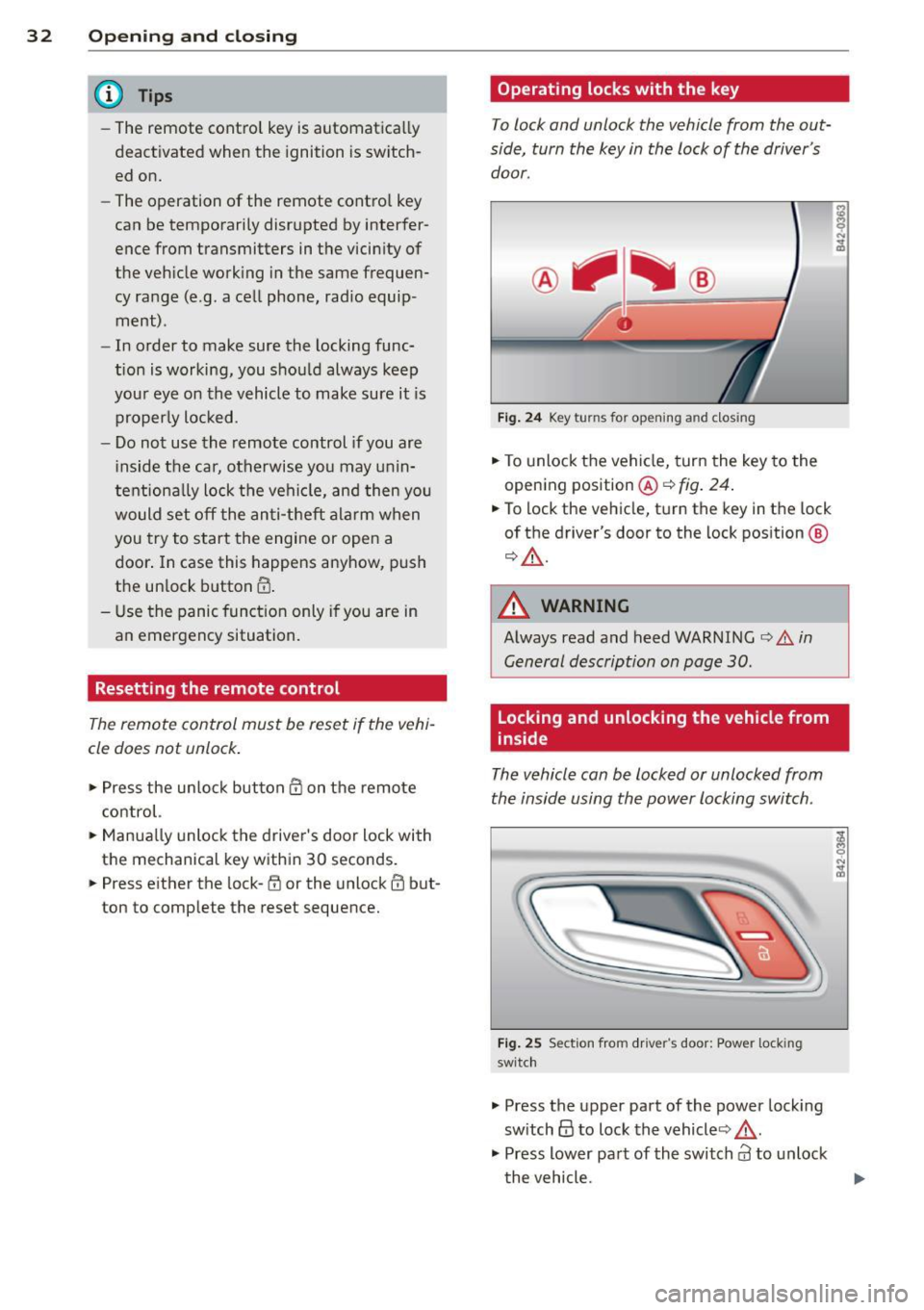
Operating locks with the key
To lock and unlock the vehicle from the out
side, turn the key in the lock of the driver's
door.
F ig . 24 Key turns for opening and dosing
• To unlock the vehicle, turn the key to the
opening position@¢
fig. 24 .
• To lock the vehicle, tu rn the key in the lock
of the driver's door to the lock pos ition @
¢ .&.-
A WARNING
=
Always read and heed WARNING¢.&. in
General description on page 30 .
Locking and unlocking the vehicle from
inside
The vehicle can be locked or unlocked from
the inside using the power locking switch .
Fig . 25 Sect ion fro m driver's door: Power locking
switc h
• Press the upper part of the power lock ing
sw itch@ to lock the vehicle ¢_&. .
• Press lower pa rt of the switch
al to unlock
t he vehicle.
-
Page 93 of 244
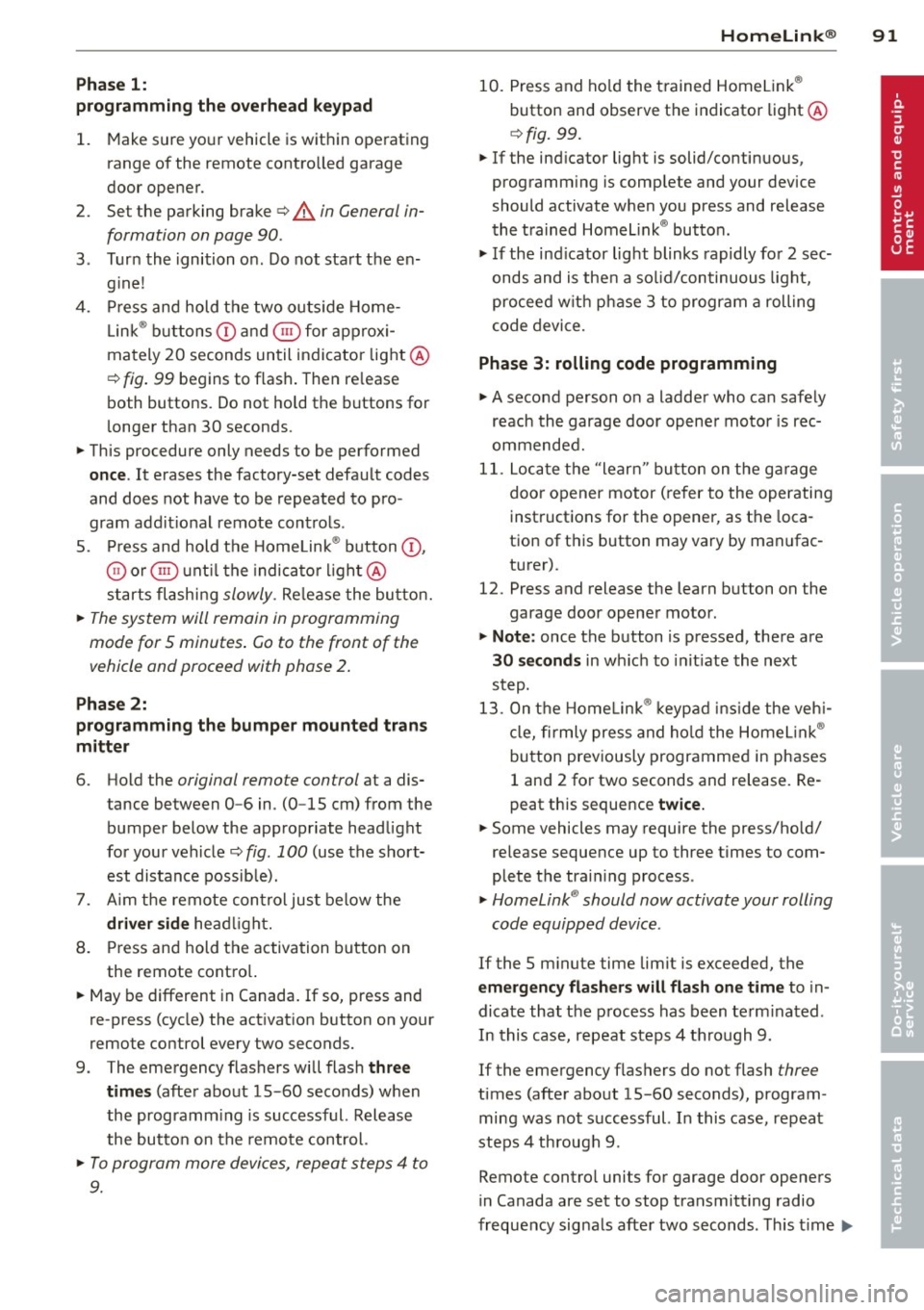
Phase 1:
p rogramming the overhead keypad
1. Make sure your vehicle is wit hin operating
range of the remote contro lled garage
door opener .
2. Set the parking brake
q A in General in
formation on page 90 .
3. Turn the ignition on . Do not start the en
gine!
4. Press and hold the two outs ide Home
Link ® buttons
(D and @for approxi
mately 20 seconds until indicator light@
c:!;> fig. 99 begins to flash. Then re lease
both buttons. Do not ho ld the buttons for
longer than 30 seconds .
.,. This procedure only needs to be performed
once . It erases the factory-set default codes
and does not have to be repeated to pro
gram addit ional remote controls .
S . Press and hold the Home Link ® button
(D ,
® or @ until the indicato r light @
starts flashing
slowly . Release the button.
.,. The system will remain in programming
mode for 5 minutes . Co to the front of the
vehicle and proceed with phase 2 .
Phase 2:
programming the bumper mounted trans
mitter
6. Hold the original remote control at a dis
tance between 0 -6 in . (0 -15 cm) from the
bumper below the appropriate headlight
for your vehicle
c:!;> fig. 100 (use the short
est distance possible).
7. A im the remote con trol just below the
driver side headlight.
8. Press and hold the activation button on
the remote control.
.,. May be different in Canada.
If so, press and
re-press (cycle) the act ivation button on your
remote control every two seconds.
9 . The emergency flashers will flash
three
times
(after about 15-60 seconds) when
the programm ing is successful. Release
the butto n on the remote control.
.,. To program more devices, repeat steps 4 to
9.
Homelin k® 91
10. Press and hold the trained Homelink ®
button and observe the indicator light @
qfig. 99.
.,. If the ind icator light is solid/continuous,
programm ing is complete and your device
should activate when you press and release
the trained Homelink ® button .
.,. If the ind icator light blinks rapidly for 2 sec
onds and is then a solid/continuous light,
proceed w ith phase 3 to program a rolling
code device.
Phase 3: rolling code programming
.,. A second person o n a ladder who can safely
reach the garage door opener motor is rec
ommended .
11. Locate the "learn" button on the gar age
door opener motor (re fer to the operating
instructions for the opener, as the loca
tion of t his button may vary by manufac
turer) .
12 . Press and release the learn button on the
garage door opener motor .
.,. Note : once the button is pressed, there are
30 seconds in which to initiate the next
step.
13. On the Home link® keypad inside the vehi
cl e, firmly press and hold the Homelink®
button prev iously programmed in phases
1 and 2 for two seconds and release . Re
peat this sequence
twice.
.,. Some vehicles may require the press/hold/
release sequence up to three times to com
plete the train ing process .
.,. Homelink ® should now activate your rolling
code equipped device.
If the 5 m inute time limit is exceeded, the
emergency flashers will flash one time to in
dicate that the process has been term inated .
In this case, repeat steps 4 through 9.
If the emergency flashers do not flash
three
times (after about lS-60 seconds), program
ming was not successful. In this case, repeat
steps 4 through 9 .
Remote contro l units for garage door openers
in Canada are set to stop transmitting radio
frequency signals after two seconds. This time ..,.
Page 94 of 244
92 Homelin k®
may not be sufficient for the Homelink ® sys
tem to learn the radio frequency signal. Per
form all other steps as described above .
Operating the Homelink ® transmitter
The HomeLink ® transmitter works in the
some manner as the original hondheld re
mote control that come with the system.
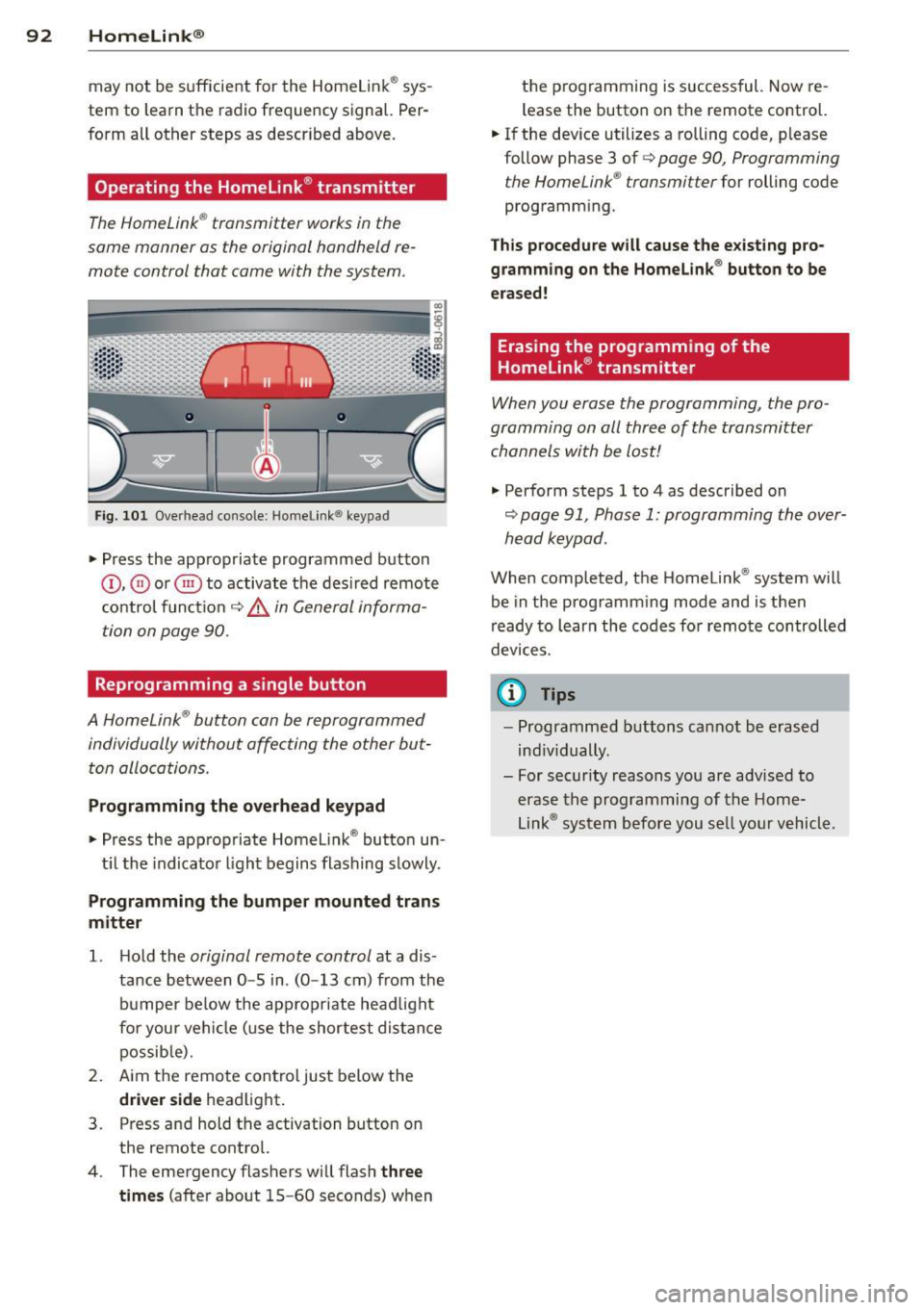
Fig. 101 Ove rhead conso le: Home link ® keypad
.,. Press the appropriate programmed button
(D , ® or @) to activate the des ired remote
control funct ion
c::> &, in General informa
tion on page 90.
Reprogramming a single button
A Homelink ® button can be reprogrammed
individually without affecting the other but ton allocations.
Programming the o verhead k eypad
.,. Press the appropriate Homelink ® button un -
t il the indicator light begins flashing slowly .
Programmin g the bumper mounted tran s
m itter
1. H old the original remote control at a dis
tance between
0 -5 in . (0 -13 cm) from the
bumper below the appropriate head light
for your vehicle (use the shortest distance possib le).
2. Aim the remote control just below the
d riv er side headlight .
3 . Press and hold the activation button on
the remote control.
4 . The emergency flashers will flash
th ree
time s
(after about 15-60 seconds) when the p
rogramming is successful. Now re
l ease the button on the remote control.
.,. If the device utilizes a rolling code, please
follow phase 3 of
c::> page 90 , Programming
t he HomeLink ® transmi tter
for rolling code
programm ing .
Th is p ro cedu re will c ause the e xisting pro
gr amm in g on the Homelink ® button to be
era sed!
Erasing the programming of the
Homelink ® transmitter
When you erase the programming , the pro
gramming on all three of the transmitter
channels with be lost!
.,. Perform steps 1 to 4 as described on
c:::;, page 91, Phase 1: programming the over
head keypad .
When completed , the Homelink ® system will
be in the programming mode and is then
r eady to learn the codes fo r remote controlled
devices.
© Tips
- Programmed buttons cannot be erased
ind iv idually .
- For security reasons you are advised to erase the programming of the Home
Link ® system before you se ll your vehicl e .
Page 126 of 244
124 Airbag sys te m
years and younger, a lways ride proper ly
restrained for their age and s ize.
- If you must install a rearward facing
child safety seat on the front passenger
seat because of exceptional circumstan
ces and the
P ASS ENGER AIR BAG OFF
light does not appear and stay on have
the a irbag system inspected by your Audi
dealer.
-A tight tether or other strap on a rear ward-fac ing child restra int attached to
the front passenger seat can put too much pressure on the weight-sens ing
mat in the seat and register mo re weight
than is actually on the seat. The heavier
weight registered can make the system
work as though an ad ult were on the seat
and dep loy the Advanced Airbag when it
must be suppressed caus ing serious or
even fatal injury to the child.
- If, in exceptional circumstances, you
must install a forward-facing child re
straint on the front passenger seat, a l
ways move the seat into its rearmost po
sit ion in the seat's fo re and aft adjust
ment range, as far away from the airbag
as possib le. The backrest m ust be adjus t
ed to an upr ight position. Make sure that
the
PASSENGER AIR BAG OFF light
comes on and stays on all the t ime when
ever the ignition is switched on.
A WARNING
- If the PASSENGER AIR BAG OFF light
does not go out when an adult is sitting
on the front passenge r seat afte r taking
the steps described above, have the air bag system inspected by your Audi deal
er before transpor ting anyone on the
front passenger se at.
(D Tips
If the weight-sensing mat in the front pas
senger seat detects an empty seat, the
front airbag on the passenge r side will be
turned off, and
PASSENGER AIR BAG OFF
w ill stay on.
-
Repair, care and disposal of the airbags
Pa rts of the airbag system are i nstalled at
many diffe rent p laces o n your Aud i. Insta llin g,
removi ng, servicing or repa iring a part in an
area of the veh icle can damage a part of an
airbag system and prevent that system from
working properly in a coll is ion.
T he re a re some important t hings yo u have to
know to make sure that the effectiveness o f
t h e system wi ll not be impaired and that dis
carded components do not cause injury or pol
l ute the environment.
A WARNING
Improper care, serv ic ing and repair proce
du res can increase the risk of personal in
j u ry and death by prevent ing an a irbag
from deploying when needed or dep loying
an a irbag une xpec tedly:
- Never cover, obst ruct, or change the
steer ing whee l horn pad or ai rbag cover
or the in st rument panel or mod ify them
in any way .
- Never attach any objects s uch as c up
holders or telephone mountings to the
sur faces covering the a irbag un its.
- For cle aning the horn pad or instr ument
panel, use only a soft, dry clo th or one
moistened with pla in water. Solvents o r
cleaners could damage the airbag cover
or change the st iffness or strength of the
material so that the airbag cannot de
p loy and protect properly.
- Never repair, adjust, or change any parts
of the a irbag system.
- All work on the steering wheel, instru
ment panel, front seats or e lectr ica l sys
tem (including the installation of audio
equ ipment, cellu lar telep hones and CB
radios, etc.) must be performed by a
qualified technic ian who has the training
and specia l equipment ne cessary.
- For any wo rk on the airbag system, we
strongly recommend that you see your
author ized Audi dealer or qualified work-
shop. ..,.
Page 153 of 244
than is being generated and ensures an optimal state of charge for the battery.
@ Tips
- But even energy management cannot
negate the limits o f physics. Consider
that the power and life of a battery are
limited.
- If starting ability is threatened, you are
i nformed by a warning
¢ page 151,
Driver notification in the instrument
cluster display.
What you should know
The highest priority is given to maintaining
starting capability.
The battery is severely taxed in short-distance
driving, in city traffic and during the co ld time
of year. Abundant e lectrical energy is re
quired, but only a litt le is generated. It is also
cr itical if the engine is not runn ing and electri
cal components are turned on. In th is in
stance energy is being consumed but none is
be ing gene rated.
It is in precisely these situations that you w ill
notice energy management actively regulat
in g the distribution of energy .
Vehicle stands for an extended period
If you do not drive your vehicle over a period
of several days or weeks, electrical compo
nents are gradually cut back or switched off.
This reduces energy consumption and main
tains sta rting capab ility over a longer per iod.
Take into consideration that when you unlock
your veh icle, some convenience functions,
such as the remote key or power seat adjust
ment, may not be available . The convenience
functions will be ava ilable again whe n you
turn on the igni tion and star t the eng ine.
With the engine turned off
If you listen to the radio, for example, with
the eng ine turned off, the battery is being dis
charged .
Intellig ent technolog y 151
If starting capability is jeopardized d ue to en
ergy consumption, a message appears in the
drive r information d isplay .
You have to start t he engine to charge the
batte ry .
With the engine running
Although electrical energy is generated when
the ve hicl e is being driven, t he battery can be
come disc harged. This happens mostly when
li ttle energy is being generated and a great
deal consumed and the battery's state of
c h arge is not optimal.
T o b ring the energy ba lance back into equili
br ium, consumers which requ ire espec ially
large amounts of energy are temporari ly cut
back or switched off . Heating systems in pa r
ticu lar require a great deal of energy. If you
notice, for example, that the heated seats* or
the heated rear window are not heating, they
have been temporarily cut back or switched
off . These systems w ill be available again as
soon as the ene rgy balance has been restored.
You w ill also notice that engine id le speed has
been increased slightly . Th is is normal and not
a cause for concern . By increas ing engi ne idle
speed the additional energy required is gene r
ated and the battery is charged.
Driver notification in the instrument
cluster display
If battery power drops into the range where it
can limit the ability of the engine to start, this
is shown in the instrument cluster display
with the following driver message:
(•) Low battery charge: battery will be
charged while driving
T his not ificat ion reminds yo u that the start ing
capability of the engine may be limited . As
soon as you sta rt driving again, the battery
will be recharged and the not ificat ion w ill go
out. •
•
Page 158 of 244
156 Cleaning and protection
Cleaning and protect ion
General information
Regular core preserves vehicle value .
Regular and correct care will contribute to
maintaining the beauty and value of your
Audi. Furthermore, good care may be a condi
tion for substant iat ing a warranty claim
should corrosion damage or pa int defects oc
cur.
Your authorized Audi R8 dealer has a variety
of
dedicated vehicle-care products. Please
make sure you apply them correctly .
.8, WARNING
-Cleaning agents may be poisonous. Keep
them out of the reach of children.
- Heed all caution labels.
- Always read directions on the container
before using any product . Follow the di
rect ions carefu lly.
- Most chemical cleaners are concentrated
and have to be diluted.
- Use spot removing fluids only in well
ventilated areas.
- Do not use gasoline, kerosene, d iesel
fuel, nail pol ish remover or other volatile
fluids. They may be toxic, flammable or
haza rdous in other ways. Do not wash,
wax or dry the vehicle with the ignit ion
on or the engine running.
- Do not clean the undersides of chassis,
fenders, wheel covers, etc. without pro
tecting your hands and arms. You may cut yourse lf on sharp-edged metal parts.
- Moisture and ice on brakes may impair
braking efficiency¢
page 146, General
information .
Test the brakes carefully
each time you wash the vehicle.
@ For the sake of the environment
Select only environmentally friend ly clean
ing products . Leftover cleaning products
should not disposed of in the household
waste.
Care of exterior
Washing your vehicle
T he longer i nsect remains, bird dropp ings,
tree res in , road and indust rial dust, tar, soot
part icles, road salt, and other aggressive de
posits remain on the vehicle surface, the more
lasting their destructive effect will be . High
temperatures, for example from intense sun
li ght, intens ify the corrosive effect.
After the end of winter road salting, the un
derside of the vehicle should be thoroughly
washed .
Automatic car washes
Before going through an automatic car wash,
yo u should take the usual precautions (closing
the windows). If your vehicle has special ac cessories -e.g . spoilers, radio antenna -it is
best to speak to the operator of the car wash
c:> (D .
Only use car washes where the vehicle re
mains stationary and the cleaning equipment
moves aro und the vehicle while washing and
drying . It is not possib le to use car washes
where the vehicle is moved forward on a con
veyer
c:> ,& .
It is preferab le to wash your vehicle in a
brush less carwash .
Washing with a power washer
When washing yo ur vehicle with a power
washer, be sure to follow the operating in
structions for the power washer . This applies
particularly to the
pressure and the spraying
distance.
Maintain sufficient distance from
soft materials such as rubber hoses, sound
deaden ing mater ial, and the parking aid sen
sors* that are located in the front or rear
bumper .
Do not use washers with
a rotating jet or a
nozzle spraying
a high pressure jet of water in
any case. ..,.
Page 163 of 244
You should also clean the inside of the win
dow g lass at regular intervals.
The cloth or chamois used on paint s urfaces
contains wax res idue. Use a separate clo th or
chamo is to dry the window glass.
Cl eaning the rear window
Aud i recommends cleaning the window us ing
a soft cotto n cloth and water mixed with
cleaning solution or window cleaner
(1: 1 mix
ture) . To avoid streaks, do not wipe the win
dow dry with paper towels.
D o not use any clean ing so lutions that conta in
ammonia, acids , silicone or fluo ride or clean
e rs that are abrasive or cou ld cause scratches .
Do not use any alkaline cleaning solutions.
A WARNING
- The windshie ld must not be treated with
water-repellent materials. They can in
crease glare under poor visib ility condi
t ions such as wetness, darkness, or when
the sun is low on the horizon. In addi
t ion, they can cause the windshield wip
ers to chatter.
- Always read and heed all WARNINGS and
other information
r:::> page 156.
(D Note
-Never use warm or hot water to remove
snow and ice from windows and mirrors.
This could cause the glass to c rack.
- To prevent damage to the wires of the
rear defogger, do not place any adhesive
stickers on the inside of the rear window
ove r the wires.
- To he lp prevent di rt from scratching the
window, always scrape in a forward d i
r ection - pus hing the scraper away from
you - never back and fo rth.
Wheels
Regular care is required to preserve the deco
rative appearance of the wheels . Road sa lt
and b rake dust must be washed off regu larly
or the wheels wi ll be damaged.
Cleaning and protec tion 16 1
Use only specia l acid -free cleaning agents. You
can find proper wheel cleaner at authorized
Audi dealers and specia lty stores . Do not leave
the cleaner on the whee ls longer than speci
fied. Wheel cleaners containing acid can dam
age the surface of the w heel bo lts .
Pa int polish or other abrasive materials must
not be used when caring for wheels. If the
protective coat ing has been damaged, from
stones for example, touch up the damage as
soon as possible .
A WARNING
-Moisture and ice on brakes may affect
brak ing eff ic iency -
c:::> page 146, General
information.
T est the bra kes ca re fully af
ter each vehicle wash .
- Always read and heed a ll WAR NINGS and
the information¢
page 156.
Exhaust tail pipes
-
Road salt and other corrosive materials wi ll
damage the material in the exhaust tail pipes
if they are not cleaned regularly . Do not clea n
the tail pipes with wheel cleaner, pa int polish,
chrome polish or other abras ive cleaners.
Clean the tail pipes with car care products
that are suitable for stainless steel.
Your authorized Audi dea ler can provide clean
ing products that have been tested and ap
proved for your vehicle.
Care of interior
Radio-/Navigation* display
T he disp lay may be cleaned with a soft cloth
and commercially-avai lab le "LCD cleaner".
The cloth should be coated lightly with the
cleaning so lution when cleaning the disp lay.
Q) Note
To prevent scratches, only clean the dis
play when it is dry .
•
•
Page 192 of 244
190 Tire s and wheel s
-Never mount used tires on yo ur vehicle if
yo u are not sure of their "previous histo
ry." Old used tires may have been dam
aged even though the damage cannot be
seen that can lead to sudden t ire failure
and loss of vehicle control.
- If you notice unusual vibration or if the
vehicle pulls to one side when driving, al
ways stop as soon as it is safe to do so
and check the wheels and tires for dam
age.
(D Note
Please note that summer and winter tires
are designed for the cond itions that are
Glossary of tire and loading terminology
Accessory weight
means the comb ined we ight (in excess of
those standard items which may be rep laced)
of au toma tic tra nsmission, power steer ing,
power brakes, power windows, power seats,
radio, and heater, to the extent that these
items are availab le as factory -installed equip
ment (whether installed or not) .
Aspect ratio
means the ratio of the he ight to the w idth of
the tire in percent . Numbers of 55 or lower in
dicate a low sidewall for improved steering re
sponse and better overall handling on dry pavement .
Bead
means the part of the ti re that is made of
steel wires, wrapped or reinforced by ply cords
and that is shaped to fit the rim.
Bead s eparation
means a b reakdown of the bond between
components in the bead.
Cord
means the strands forming the plies in the
tire . typ
ica l in those seasons . Audi recommends
using winter tires during the winter
months . Low temperatures signif icant ly
decrease the e lasticity of summer tires,
which affects tract ion and brak ing ability.
If summer tires are used in very co ld tem
peratures, cracks ca n form on the tread
bars, res ulting in permanent tire damage
that can cause loud driving no ise and un
balan ced t ires. Audi is not responsible for
th is type of damage .
Cold tire inflation pre ssure
means the t ire p ressure recommended by the
vehicle manufacturer fo r a tire of a des ignated
s ize that has not bee n driven for more than a
coup le of miles (k ilometers) at low speeds in
the three hour period before the tire pressure
is measured or adjusted.
Curb weight
means the we ight of a motor ve hicle w ith
standard equipment including the max imum
capacity of fuel, oil, and coolant, air condi
tioning and additional weight of optiona l
equipment.
E x tra load tire
means a t ire designed to ope rate a t higher
loads and at highe r inflation p ressu res than
the corresponding standard tire. Extra load
tires my be identified as "XL", "xl", "EXTRA
LOAD", or "RF" on the sidewall.
Gross A xle Weight Rating ("GAWR ")
means the load -carry ing capacity of a s ingle
axle system , measured at the tire-ground in
terfaces.
Gr oss Vehicle Weight Rating ("GVWR ")
means the maximum total loaded we ight of
t h e vehi cle. .,.