steering AUDI R8 SPYDER 2015 User Guide
[x] Cancel search | Manufacturer: AUDI, Model Year: 2015, Model line: R8 SPYDER, Model: AUDI R8 SPYDER 2015Pages: 232, PDF Size: 58.36 MB
Page 77 of 232
.... N
l'
N "1: .... I.O
"' N
"' ....
heavy loads. This can result in increased
wear .
- The Launch Control Program only funct ions
when the parking brake is released and the
vehicle speed is less than 3 mph (5 km/h).
S tronic
Description
Applies to vehicles: with S tronic
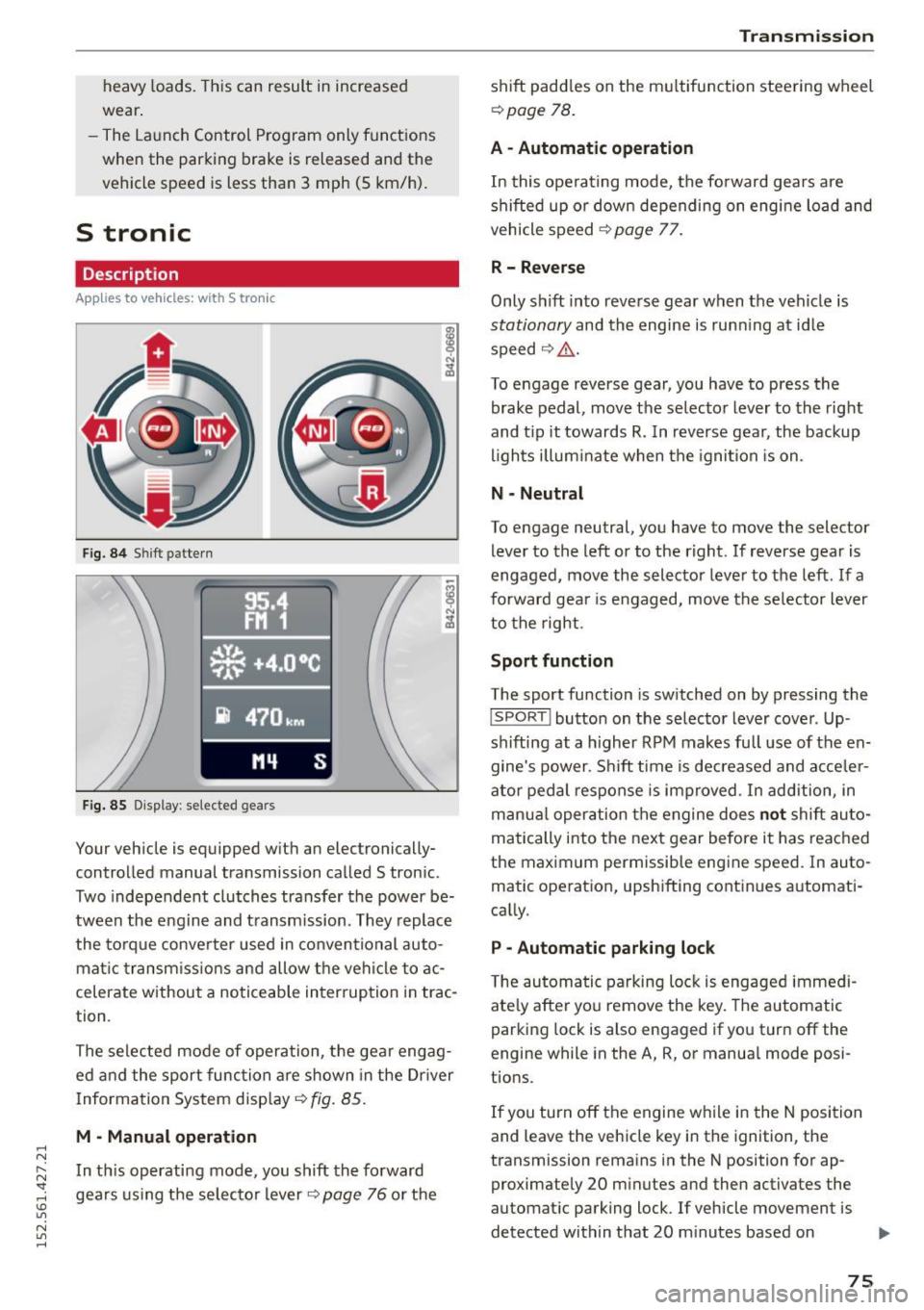
Fig. 84 Shift pattern
Fig. 85 Display : selected gea rs
Your vehicle is equipped with an electronically
controlled manual transmission called S tronic .
Two independent clutches transfer the power be
tween the eng ine and transmission. They replace
the torque converter used in conventional auto
mat ic transmissions and allow the vehicle to ac
celerate without a noticeable interruption in trac
tion .
The selected mode of operation, the gear engag ed and the sport function are shown in the Dr iver
Information System display ¢
fig. 85.
M -Manual operation
In this operating mode, you shift the forward
gears using the selector lever
r=>v page 76 or the
Transmission
shift paddles on the multifunction steering wheel
¢ page 78.
A - Automatic operation
In this operating mode, the forward gears are
shifted up or down depending on engine load and
vehicle speed
¢ page 77.
R- Reverse
Only s hift into reverse gear when the vehicle is
stationary and the engine is runn ing at idle
speed ¢
Li')...
To engage reverse gear, you have to press the
brake pedal, move the selector lever to the right
and t ip it towards
R. In reverse gear, the backup
lights illuminate when the ignition is on .
N -Neutral
To engage neutral, you have to move the selector
lever to the left or to the right . If reverse gear is
engaged,
move the selector lever to the left . If a
forward gea r is engaged, move the selector lever
to the right.
Sport function
The sport function is switched on by pressing the
I SPORT ! button on the selector lever cover . Up
shifting at a higher RPM makes full use of the en
gine's power . Shift time is decreased and acceler
ator pedal response is improved . In addition, in
manua l operation the engine does
not shift au to
matically into the next gear before it has reached
the maximum permissible engine speed. In auto
matic operation, upshifting continues automati
cally.
P -Automatic parking lock
The automatic parking lock is engaged immedi
ately after you remove the key. The automatic
parking lock is also engaged if you turn off the
engine while in the A, R, or manual mode posi
tions .
If you turn off the engine while in the N position
and leave the vehicle key in the ignition, the
transmission remains in the N position for ap proximately 20 minutes and then activates the
automatic parking lock . If vehicle movement is
detected within that 20 minutes based on
IIJI.
75
Page 79 of 232
..... N
r-N "': ..... \!) ..,.,
N ..,., .....
(D Note
If you must stop on an incline, always hold
the vehicle in p lace with the foot brake to pre
vent it from rolling back. Do not try to prevent the vehicle from rolling back when the gear is
engaged by increasing speed, as this may
damage the clutch.
Automatic mode
Applies to vehicles: with S tronic
St arting fro m a stop
"' Press and hold the brake pedal.
"' Tap the se lector lever towards A.
"' Re lease the brake pedal and press the accelera-
tor pedal
¢ ,&. in Manual mode on page 76.
Under certain circumstances (driving in the
mounta ins for example), it can be beneficia l to
switch temporarily to the manual shift program
¢
page 76 in order to adjust the gear ratios to
driving conditions
manually.
Kick-down
Applies to vehicles: with S tronic
When you depress the accelerator pedal beyond
the resistance point, S tronic downsh ifts into a
lower gear, depending on vehicle speed and en
g ine rpm. It shifts up into the next higher gear
once the maximum specified engine RPM is reached . Exception: you have activated the sport
function.
.&, WARNING
Please note that the wheels could spin on
slic k or slippery roads when kick-down is ac
tive.
l) Market -spec ifi c
-
Tra nsm issio n
Launch control program
Applies to vehicles: with S tronic
The Launch Control Program enables maximum
acceleration.
Requirement: The engine must be at operat ing
temperature and the steering wheel must not be
turned.
"' With the engine running, press the
I!]!
!ESC OFFjll button one time . The Ill indicator
light and the message
ESC S port - Cau tion!
Limi ted stabil ity! appears in the driver infor
mation system display.
"' Press the brake pedal with your left foot and
hold it down.
"' Engage a gear.
"' Press the
I SPORT ! button on the selecto r lever
cover.
"' Press the accelerator pedal at the same time
with your right foot unti l the engine has
reached a constant speed.
"' Remove your left foot from the brake¢.&_ .
A WARNING
--
- Always adapt your dr iving to the traffic flow.
- Only use the Launch control program when
road and traffic cond itions allow it and oth
er drivers will not be endangered or both
ered by your driving and the vehicle's accel
eration.
- Please note that the driving wheels can spin
and the vehicle can b reak away when ESC is
sw itched off, espec ial ly when the road is
slippery .
- Once you have accelerated, you sho uld
sw itch the ESC back on by pressing the
[fil
but ton.
(D Tips
- The tra nsmission temperature may increase
signif icant ly afte r using the Launch Contro l
Program. If that happens, the program may
not be availab le for a few minutes . It wi ll be
available again after a cool-down period .
77
Page 80 of 232
Transmission
-When acce le rat ing using the Launch Cont ro l
program, all vehicle pa rts are subject to
heavy loads. T his can result in increased
wear.
Steering wheel with shift paddles
App lies to veh icles: with S tron ic
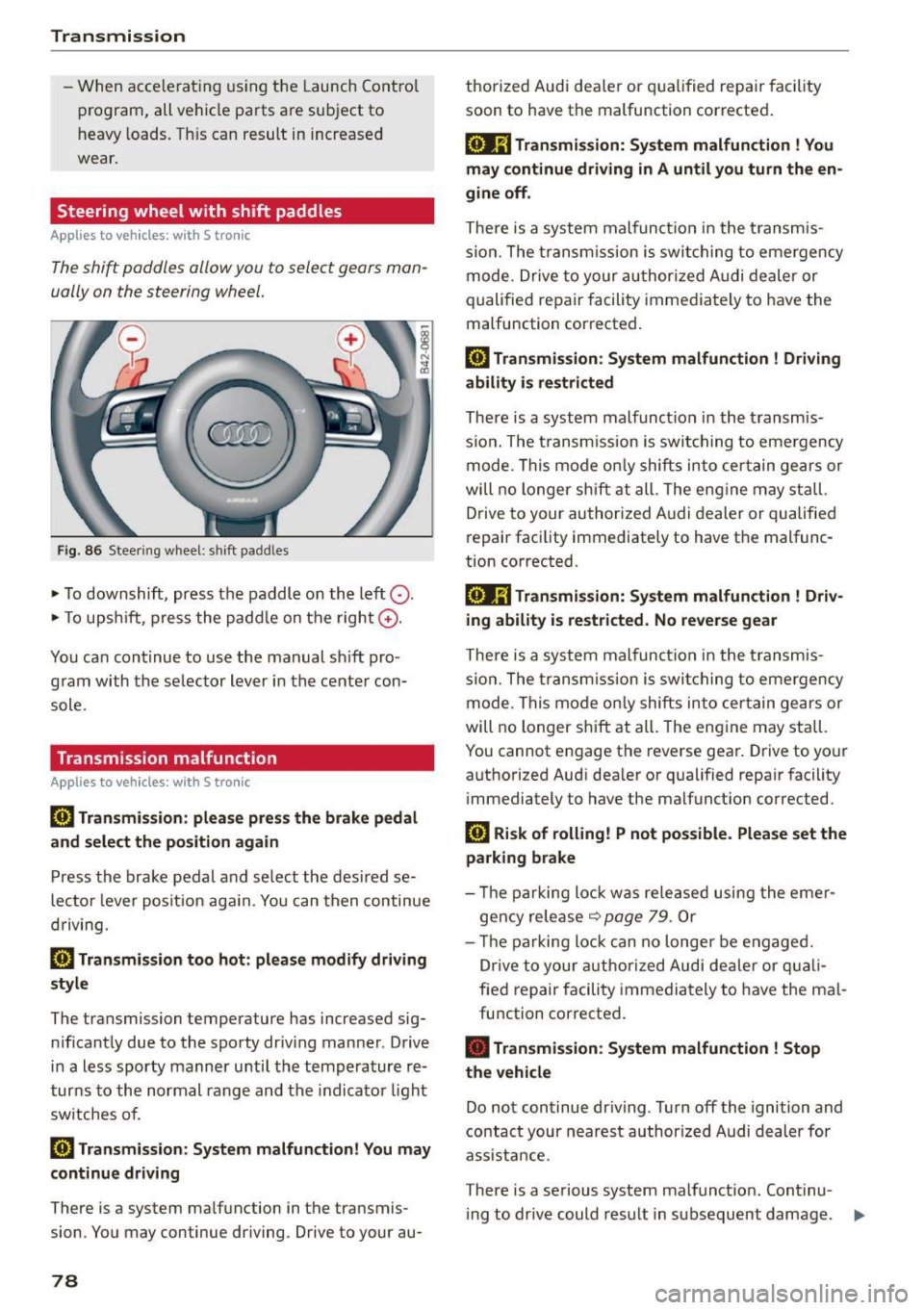
The shift paddles allow you to select gears man
ually on the steering wheel.
F ig . 8 6 Steer ing w heel: shi ft padd les
• To downshift, press t he paddle on the left 0 -
• To upsh ift, p ress the padd le on the right G) .
You ca n continue to use the manual s hift pro
g ram with the se lector lever in the cente r con
sole.
Transmission malfunction
Applies to vehicles : with S tro nic
l'§J Transmis sion : please press the brake pedal
and select the position again
Press th e brake pedal a nd se lect the desi red se
lec to r l eve r pos it io n aga in. Yo u can then continue
d riving.
[O] Transmission too hot: please modify driving
style
The transmission temperature has increased sig n ificant ly due to the spo rty dr iv ing man ner . Drive
i n a less sporty manner u nti l t h e temperature re
t ur ns to the normal rang e and the indicator light
sw itches of.
[i1 Transmi ssion : System malfunction! You may
continue driving
There is a system ma lfunction in the transmis
sion . You may continue driving. Drive to your au-
78
thorized Audi dea ler or q ua lif ied repa ir facility
soon to have the malfunction corrected .
[o.Jij Transmission: Sy stem malfunction ! You
may continue driving in A until you turn the en
gine off .
There is a system malfunc tion i n the trans mis
s io n. The tran sm iss ion i s swi tchi ng to eme rgency
mode. Drive to your author ized A udi dealer or
q ualified repair facili ty imme diate ly to have the
malfunction corrected.
l'§J Transmission : System malfunction ! Driving
ability is restricted
There is a system malfunct ion in the t ransmis
s io n. The t ransm iss ion is swit ching to eme rgency
m ode. Thi s mo de onl y shifts in to ce rtain ge ars or
will no l onger shi ft at all. The eng ine may st all.
D rive to your au thori zed A udi dealer or qualified
repair fac ility immediately to have t he malfunc
tion corrected.
[oJ;j Transmission: System malfunction ! Driv
ing ability is restricted. No reverse gear
There is a system malfun ction i n the trans mis
s ion . The tran sm iss ion i s swi tchi ng t o em ergency
mode. T his mode o nly shifts in to cer tain gears or
will no longer shift at all . The eng ine may stall.
You cannot e ngage the reverse gea r. Drive to yo ur
aut ho rized Aud i dea ler or q ualified repa ir facility
i mmediately t o have the malfunct ion corrected.
[i1 Risk of rolling! P not pos sible. Please set the
parking brake
- Th e parking lo ck was re le ase d using the eme r
gency rele ase
~ page 7 9 . O r
- Th e parking lo ck can no l onge r be engage d.
Dr ive t o your authoriz ed Audi de aler or q uali
fie d repair f acili ty immedia tely to have the ma l
fu nction cor rected.
• Transmission : System malfunction ! Stop
the vehicle
Do no t con tinue dr iving . Tur n off the ignition and
contact your nea rest author ized Audi d eal er for
ass ista nce.
There is a serious system malfunct ion. Continu -
i ng to dr ive could result in s ubsequent damage. .,.
Page 85 of 232
.... N
l'
N "1: .... I.O
"' N
"' ....
Reverse parking
Applies to vehicles: with parking system advanced
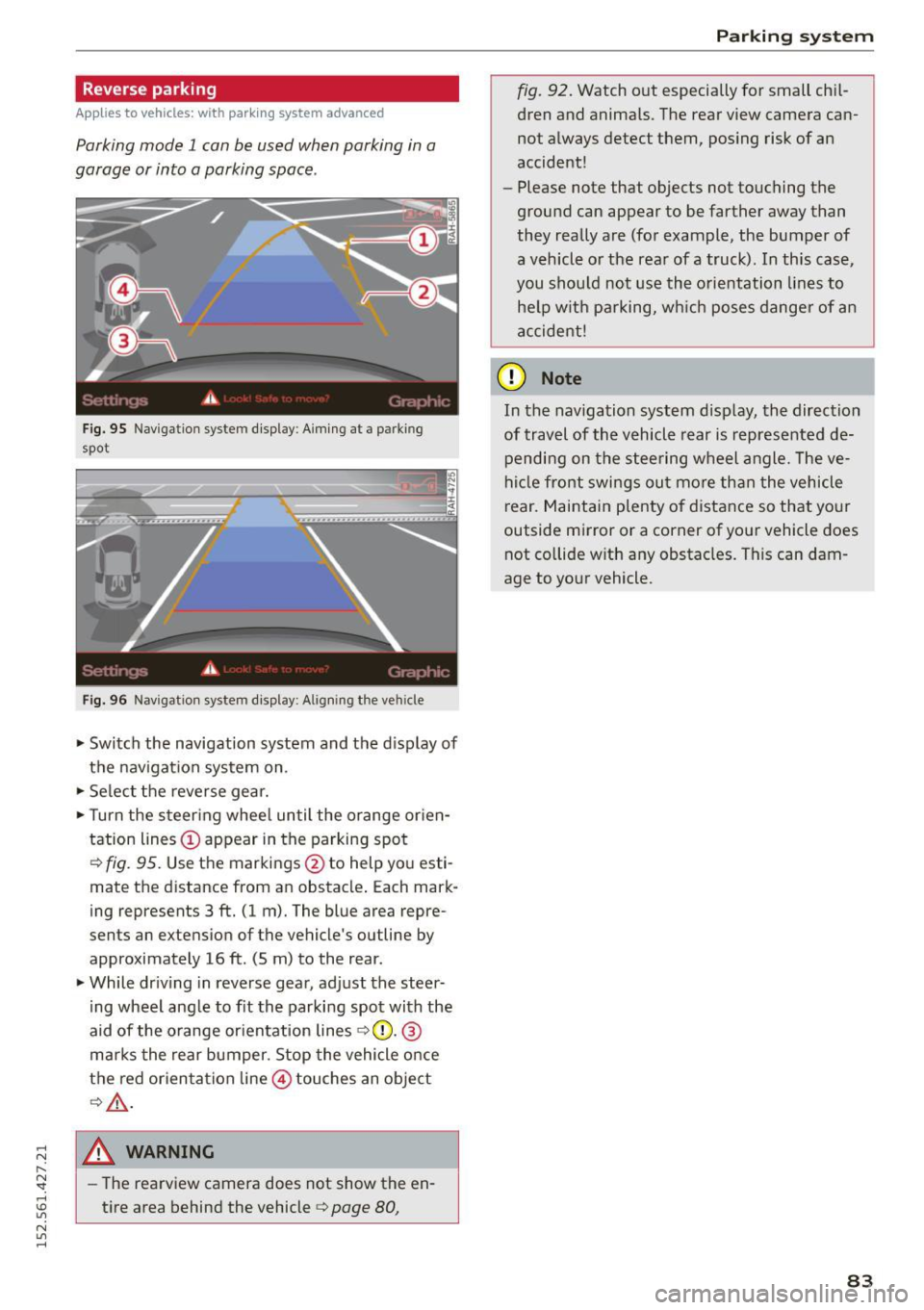
Parking mode 1 can be used when parking in a
garage or into a parking space .
Fig. 95 Navigation system display : Aiming at a p arkin g
spot
Fig. 96 Naviga tion sy ste m display: Al ig ni ng t he ve hicle
"'Switch the navigation system and the display of
the navigation system on.
"'Select the reverse gear.
"'Turn the steering wheel until the orange orien
tation lines(!) appear in the parking spot
c> fig. 95. Use the markings @to help you esti
mate the distance from an obstacle. Each mark
ing represents 3
ft. (1 m). The blue area repre
sents an extension of the vehicle's outline by
approximately 16
ft. (5 m) to the rear .
"'While driving in reverse gear, adjust the steer
ing wheel angle to fit the parking spot with the
aid of the orange orientation lines
c> 0 . ®
marks the rear bumper. Stop the vehicle once
the red orientation line@ touches an object
¢&, .
_& WARNING
-The rearview camera does not show the en
tire area behind the vehicle
c> page 80,
Parking system
fig. 92. Watch out especially for small chil
dren and animals. The rear view camera can
not always detect them, posing risk of an
accident!
- Please note that objects not touching the
ground can appear to be farther away than
they really are (for example, the bumper of
a vehicle or the rear of a truck). In this case,
you should not use the orientation lines to
help with parking, which poses danger of an
accident!
(D Note
In the navigation system display, the direction
of travel of the vehicle rear is represented de pending on the steering wheel angle. The ve
hicle front swings out more than the vehicle
rear. Maintain plenty of distance so that your
outside mirror or a corner of your vehicle does
not collide with any obstacles. This can dam
age to your vehicle.
83
Page 86 of 232
Parking system
Parallel parking
Applies to vehicles: with parking system advanced
Use parking mode 2 to help you parallel park
along the side of a street.
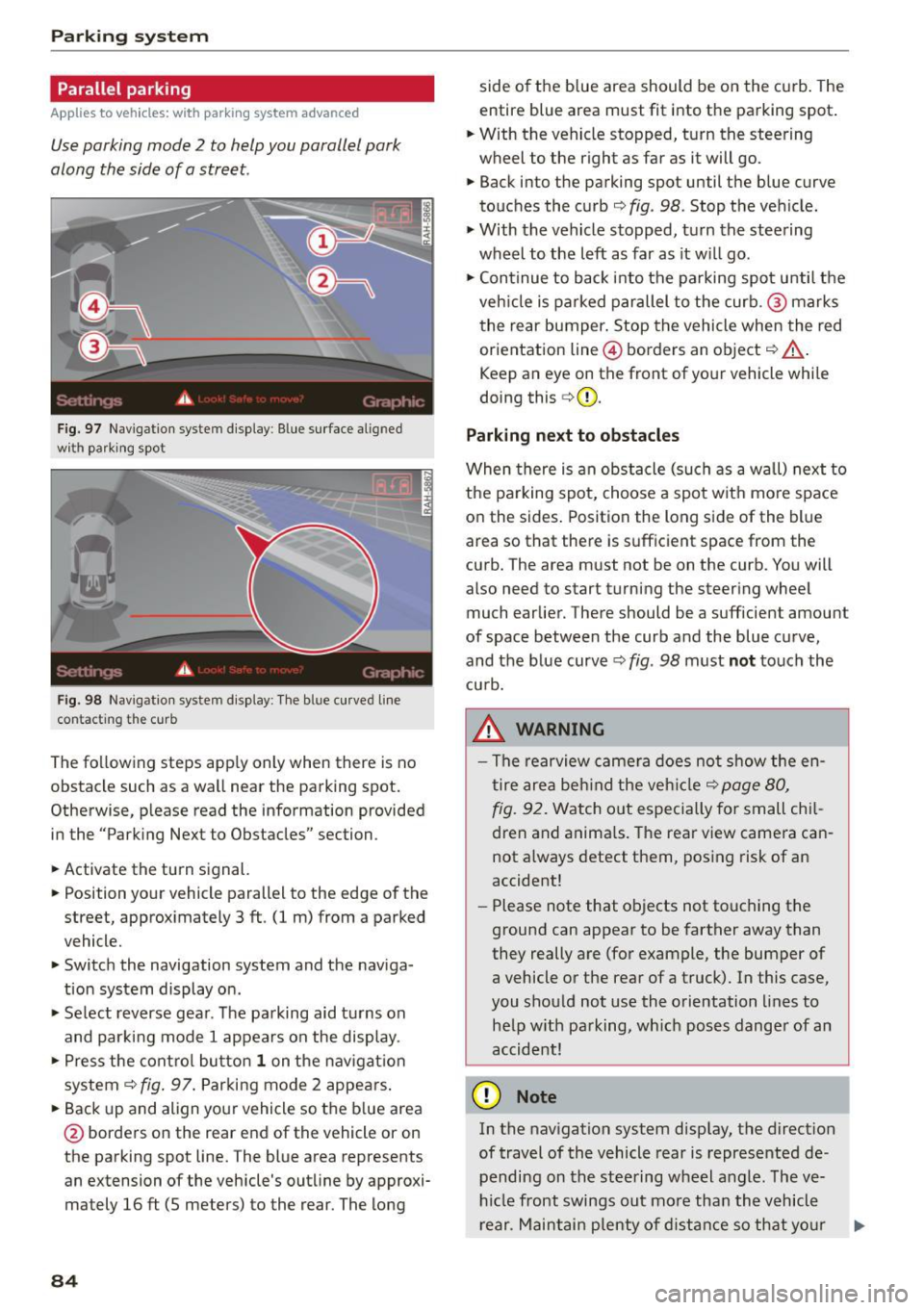
Fig . 97 Na vigation system d isplay : Blue sur face aligned
wit h parking spot
0
-
Fig. 98 Navigatio n system display: The blue cu rved line
contacting the curb
The following steps app ly only when there is no
obstacle such as a wall near the parking spot.
Otherwise, please read the information provided
in the "Parking Next to Obstacles" section .
• Activate the turn signal.
• Position your vehicle parallel to the edge of the
street, approximately 3 ft . (1 m) from a parked
vehicle.
" Switch the navigation system and the naviga
tion system display on .
• Se lect reverse gear. The parking aid t urns on
and parki ng mode 1 appears on the display.
• Press the control button
1 on the navigat ion
system
9fig . 97. Parking mode 2 appears.
•B ackup and align your vehicle so the blue area
@ borde rs on the rear end of the vehicle or on
the parking spot line. The blue area represents
an extension of the vehicle's outline by approxi
mately 16 ft (5 meters) to the rear. The long
84
side o f the b lue area should be on the curb . The
entire blue area must fit into the parking spot .
"W ith the vehicle stopped, turn the steering
wheel to the right as far as it will go.
• Back into the parking spot until the blue curve
touches the curb
9 fig . 98. Stop the veh icle .
" With the vehicle stopped, turn the steering
wheel to the left as far as it wi ll go .
• Con tinue to back into the parking spot until the
veh icle is parked parallel to the curb .@ marks
the rear bumper. Stop the vehicle when the red
orientation line@ borders an object
9 ,&.
Keep an eye on the front of yo ur vehicle while
doing this
c> (D.
Parking next to obstacles
When there is an obstacle (such as a wall) next to
the parking spot, choose a spot with more space
on the sides . Position the long side of the blue
area so that there is sufficient space from the
curb. The area must not be on the curb . You will
also need to start turning the steering wheel
much earlier. There should be a sufficient amoun t
of space between the curb and the blue curve,
and the blue curve¢
fig. 98 must not touch the
cu rb.
_& WARNING
- The rearview camera does not show the en
tire area behind the vehicle
c> page 80,
fig .
92. Watch out especially for small chil
dren and animals. Th e rear view camera can
not a lways detect them, posing risk of an
accident!
- Please note that objects not touching the
ground can appear to be farther away than
they really are (for example, the bumper of
a vehicle or the rear of a truck). In this case,
you should not use the orientation lines to
he lp with parking, wh ich poses danger of an
accident!
(D Note
In the navigation system disp lay, the direction
of travel of the vehicle rear is represented de
pending on the steering wheel angle. The ve
hicl e front swings out more than the vehicle
rear . Maintain plenty of distance so that your
lllJ,,
Page 88 of 232
Driving Sa fel y
Driving Safely
General notes
Safe driving habits
Please remember -safety first!
This chapter contains important information,
tips, instructions and warnings that you need to
read and observe for your own safety, the safety
of your passengers and others. We have summar
ized here what you need to know about safety
be lts, airbags, chi ld restraints as well as child
safety. Your safety is for us
priority number 1 . Al
ways observe the informat ion and warn ings in
t his section - for your own safety as well as for
that of your passengers.
The information i n this section applies to all
model ve rsions of your vehicle . Some of the fea
t ures des cribed in this sect ion may be standard
equipment on some models, or may be optional
eq uipment on others . If you are not sure, ask
your author ized Audi dealer.
A WARNING
-Make certain that you fo llow the instruc
t ions and heed the WARNINGS in this Man
ual. It is in your interest and in the interest
of your passengers .
- Always keep the complete owner's literature
in your Audi when you lend or se ll you r vehi
cle so that this important information will
always be ava ilable to the driver and passen
gers.
- Always keep the owner's literature handy so
that you can find it easily if you have ques
ti ons.
Safety equipment
The safety features are part of the occupant re
straint system and work together to help reduce
the risk of injury in a wide variety of occident si t
uations.
Your safety and the safety of yo ur passengers
should not be left to chance. Advances in tec h
nology have made a var iety of f eatures av ailable
to help re duce the r isk of inj ury in an accident.
86
The following is a listing o f just a few o f the safe
ty features in yo ur Audi:
- sophis tica ted s afety be lts for drive r and a ll pas-
senger sea ting pos itions,
- safety belt p rete nsio ners,
- front airbags,
- knee airbags,
- side airbags in the seats
- adjustab le head restraints,
- adjustab le steering column .
These ind iv idual safety featu res can wor k togeth
er as a sys tem to he lp pro tect you a nd your pas
sengers in a wide range of accidents . These fea
tures cannot work as a system if th ey are not al
ways proper ly adjusted and prope rly used!
Safety i s everyb ody' s re sponsibilit y!
Important things to do before driving
Safety is everybody's job! Vehicle and occupant
safety always depends on the informed and care
ful driver.
Fo r you r safety and the safety of your passen
gers,
before driving always:
.,. Make sure that all lights and signals are operat
ing correctly .
.,. Make sure that the tire pressu re is co rrect.
.,. Ma ke s ure that all w indows are clean and affo rd
good visibility to the outs ide.
.,. Secure a ll luggage and o ther items caref ully
r=;,page 59 .
.,. Make s ure that nothing can interfere with the
pedals.
.,. Adjust front seat, head restraint and mirrors
correctly for your height.
.,. Instruct passengers to adjust the head re
straints according to the ir height .
.,. Make su re to use the r ight child restraint cor
rec tly to p rotect ch ild ren
r=;, page 122, Child
Safety.
.,. Sit p roperly in your seat and ma ke su re that
your passengers do the same
c::> page 56, Gen
eral recommendations.
.,. Fasten your safety belt and wear it properly. A l
so instruct your passengers to fasten their safe
ty belts proper ly
c::> page 95 .
Page 89 of 232
.... N
l'
N "1: .... I.O
"' N
"' ....
What impairs driving safety?
Safe driving is directly related to the condition of
the vehicle, the driver as well as the driver's abili
ty to concentrate on the road without being dis
tracted.
The driver is respons ible for the safety of the ve
h icle and all of its occupants . If your ability to
d rive is impaired, safety r isks for everybody in the
ve hicle increase and you also become a hazard to
everyone else on the road ¢A -Therefore:
• Do not let yourself be distracted by passengers
or by us ing a cell ular te lephone.
• NEV ER dr ive when your dr iv ing ability is im
paired (by medicat ions, alcohol, dr ugs, e tc.).
• Observe all traffic laws, ru les of the road and
speed limits and plain common sense.
• ALWAYS ad just your speed to road, traffic and
weather conditions.
• Take frequent breaks on long trips. Do not drive
for more than two hours at a stretch .
• Do NOT drive when you are t ired, under pres
sure or when you are stressed .
A WARNING
Impaired driving safety increases the risk of
ser ious personal in ju ry and death whenever a
vehicle is being used.
Proper occupant seating
positions
Proper seating position for the driver
The proper driver seating position is important
for safe, relaxed driving.
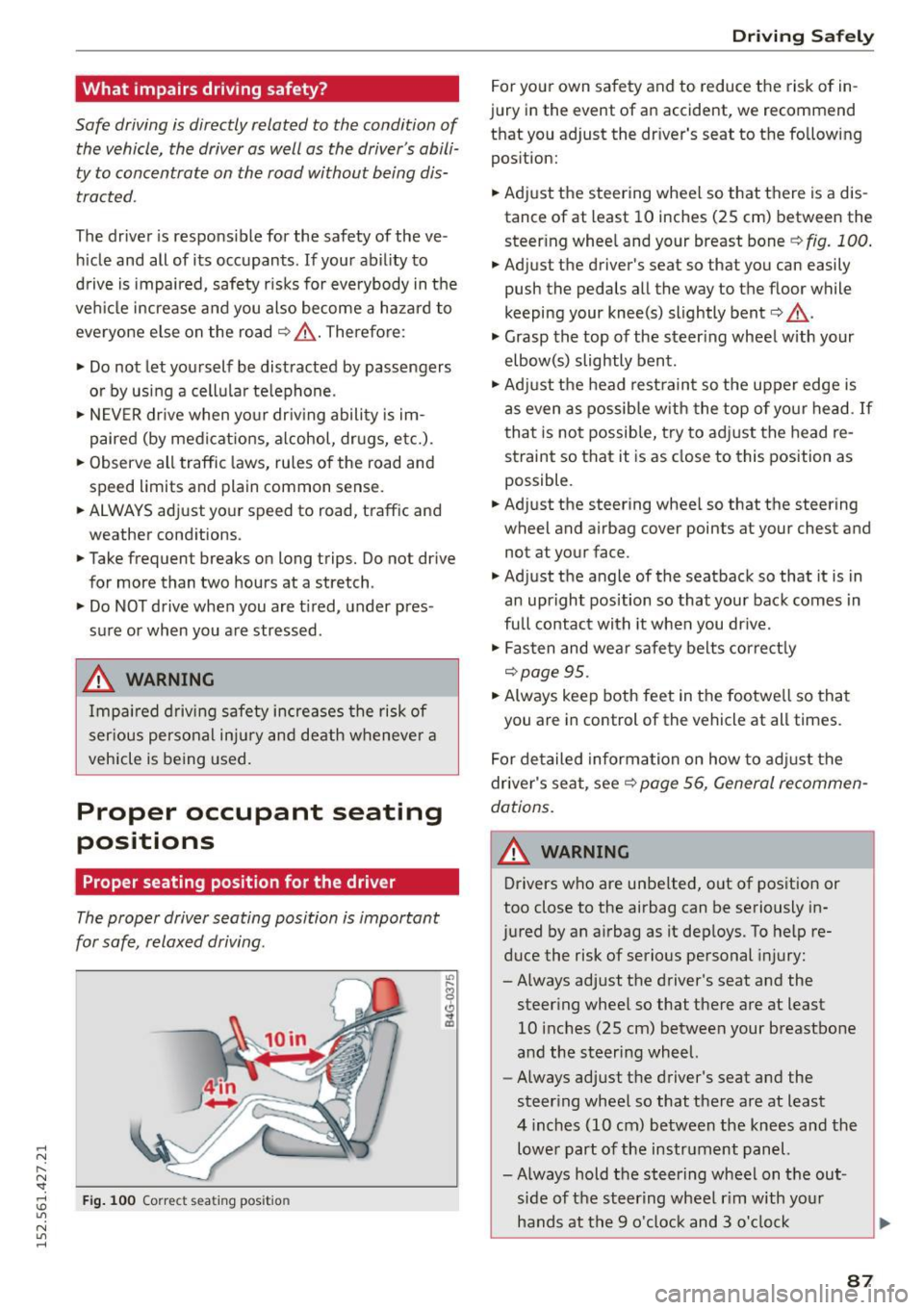
F ig. 10 0 Correct seating position
.
Driving S afely
For yo ur own sa fety and to reduce the risk of in
jury in the event of an accident, we recommend
that you adjust the dr iver's seat to the following
pos ition:
• Adjust the steering wheel so that there is a dis
tance of at least 10 inches (25 cm) between the
steer ing whee l and your breast bone
¢ fig. 100 .
• Adjust the driver's seat so that you can easily
push the pedals all the way to the floor while
keeping your knee(s) slightly bent<=>
A .
• Grasp the top of the steer ing whee l with your
elbow(s) slightly bent .
• Adjust the head rest rain t so the upper edge is
as even as possib le w it h t he top of yo ur head.
If
that is no t possib le, try to ad just the head re
straint so that it is as close to this pos ition as
possible .
• Adjust the steering wheel so that the steering
wheel and airbag cover points at your chest and
not at your face .
• Adjust the angle of the seatback so that it is in
an upr ight position so that you r bac k comes in
full contact with it when you dr ive.
• Fas ten and wear safe ty belts corre ct ly
<=>page 95.
• Always keep both feet in the footwe ll so that
you are in control of the vehicle at all times.
For detailed inform ation on how to adj ust the
driver's seat, see¢
page 56, General recommen
dations.
A WARNING
-Drivers who are unbelted, o ut of position or
too close to the airbag can be seriously in
jured by an airbag as it dep loys. To help re
duce the risk of serious personal injury:
- Always adj ust the driver 's seat and the
steer ing whee l so that there are at least
10 i nches (25 cm) between your breastbo ne
and the steering wheel.
- Always adjust the driver 's seat and the
steer ing whee l so that there are at least
4 inches (10 cm) between the knees and the
lowe r part of the instrument panel.
- Always hold the steering wheel on t he out
side of the steer ing wheel r im with yo ur
hands at the 9 o 'clock and 3 o'clock
87
Page 90 of 232
Driving Safely
positions to help reduce the risk of personal
injury if the driver's airbag inflates.
- Never hold the steering wheel at the
12 o'clock position or with your hands at
other positions inside the steering wheel
rim or on the steering wheel hub. Holding
the steering wheel the wrong way can cause
serious injuries to the hands, arms and head
if the driver's airbag inflates
- Pointing the steering wheel toward your
face decreases the ability of the supplemen
tal driver's airbag to protect you in a colli
sion.
-Always sit in an upright position and never
lean against or place any part of your body
too close to the area where the airbags are
located.
- Before driving, always adjust the front seats
and head restraints properly and make sure
that all passengers are properly restrained.
- Never adjust the seats while the vehicle is
moving. Your seat may move unexpectedly
and you could lose control of the vehicle.
- Never drive with the backrest reclined or
tilted far back! The farther the backrests are
tilted back, the greater the risk of injury due
to incorrect positioning of the safety belt and improper seating position.
- Children must always ride in child seats
¢page 122. Special precautions apply
when installing a child seat on the front pas
senger seat
¢page 102.
Proper seating position for the front
passenger
The proper front passenger seating position is
important for safe, relaxed driving .
For your own safety and to reduce the risk of in
jury in the event of an accident, we recommend
that you adjust the seat for the front passenger
to the following position:
.. Adjust the angle of the seatback so that it is in
an upr ight position and your back comes in full
contact with it whenever the vehicle is moving .
.,. Adjust the head restraint so the upper edge is
as even as possible with the top of your head. If
88
that is not possible, try to adjust the head re
straint so that it is as close to this position as
possible
¢ page 89.
.. Keep both feet flat on the floor in front of the
front passenger seat.
.. Fasten and wear safety belts correctly .
For detailed information on how to adjust the
front passenger's seat, see
¢ page 56, General
recommendations.
A WARNING
Front seat passengers who are unbelted, out
of position or too close to the airbag can be
seriously injured or killed by the airbag as it
deploys. To help reduce the risk of serious per
sonal injury:
- Passengers must always sit in an upright po
sition and never lean against or place any
part of their body too close to the area
where the airbags are located.
- Passengers who are unbelted, out of posi
tion or too close to the airbag can be seri
ously injured by an airbag as it deploys with
great force in the blink of an eye.
-Always make sure that there are at least 10 inches (25 cm) between the front pas
senger's breastbone and the instrument panel.
- Always make sure that there are at least
4 inches (10 cm) between the front passen
ger's knees and the lower part of the instru ment panel.
- Each passenger must always sit on a seat of
their own and properly fasten and wear the
safety belt belonging to that seat.
- Before driving, always adjust the front pas
senger seat and head restraint properly.
- Always keep your feet on the floor in front
of the seat. Never rest them on the seat, in
strument panel, out of the window, etc. The
airbag system and safety belt will not be
able to protect you properly and can even in
crease the risk of injury in a crash .
- Never drive with the backrest reclined or
tilted far back! The farther the backrests are
tilted back, the greater the risk of injury due
~
Page 98 of 232
Safety belts
Why safety belts?
Frontal collisions and the law of physics
Frontal crashes create very strong forces for peo
ple riding in vehicles .
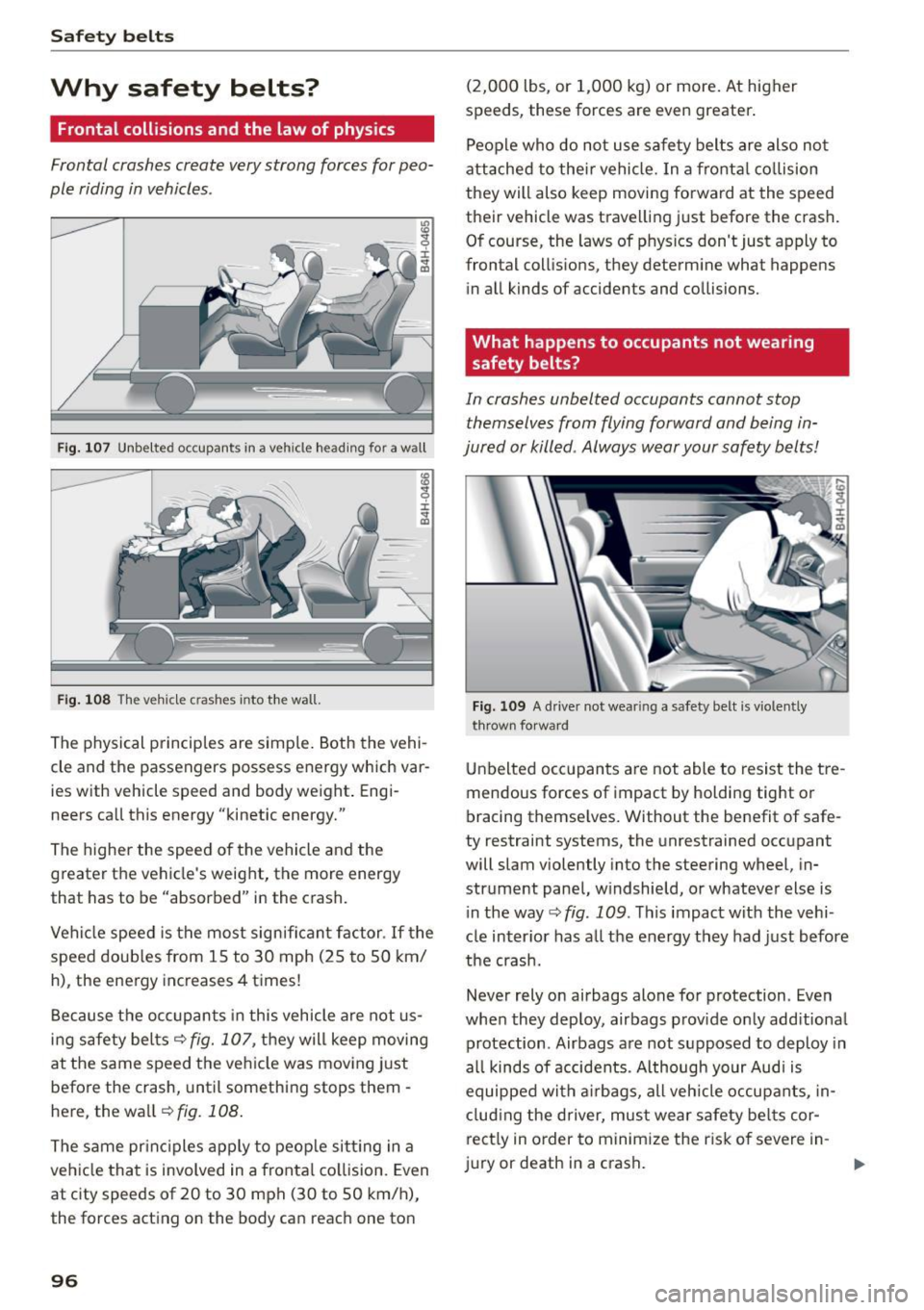
Fig. 107 Unbelted occupants in a veh icle heading for a wall
Fig. 108 The vehicle c rashes into the wall.
The physical principles are simple. Both the vehi
cle and the passengers possess energy which var
ies w ith vehicle speed and body weight . Engi
neers call this energy "kinetic energy."
The higher the speed of the vehicle and the
greater the vehicle's weight, the more energy
that has to be "absorbed" in the crash.
Vehicle speed is the most significant factor. If the
speed doubles from 15 to 30 mph (25 to 50 km/
h), the energy increases 4 times!
Because the occupants in this vehicle are not us
ing safety belts
c::> fig. 107, they will keep moving
at the same speed the vehicle was moving just
before the crash, until something stops them -
here, the wall
¢ fig. 108 .
The same principles apply to people sitting in a
vehicle that is involved in a frontal collision. Even
at c ity speeds of 20 to 30 mph (30 to SO km/h),
the forces acting on the body can reach one ton
96
(2,000 lbs, or 1,000 kg) or more. At higher
speeds, these forces are even greater.
People who do not use safety belts are also not
attached to their vehicle. In a frontal collision
they will also keep moving forward at the speed
their vehicle was travelling just before the crash.
Of course, the laws of phys ics don't just apply to
frontal collis ions, they determine what happens
in all kinds of accidents and collisions.
What happens to occupants not wearing
safety belts?
In crashes unbelted occupants cannot stop
themselves from flying forward and being in
jured or killed . Always wear your safety belts!
Fig. 109 A drive r not wea ring a safety belt is v io lently
t hrown forward
Unbelted occupants are not able to resist the tre
mendous forces of impact by holding tight or
bracing themselves. Without the benefit of safe
ty restraint systems, the unrestrained occupant
will slam violently into the steering wheel, in
strument panel, w indshield, or whatever else is
i n the way
c::> fig . 109 . This impact with the vehi
cle inter ior has all the energy they had just before
the crash.
Never rely on airbags alone for protection. Even
when they deploy, airbags provide only add itional
protection . Airbags are not supposed to deploy in
all kinds of accidents . Although your Audi is
equipped with airbags, all vehicle occupants, in
cluding the driver, must wear safety belts cor
rect ly in order to minimize the r isk of severe in-
jury or death in a c rash.
ll-
Page 104 of 232
Airbag syste m
Airbag system
Important things to know
Importance of wearing safety belts and
sitting properly
Airbags are only supplemental restraints . For
airbags to do their job , occupants must always
properly wear their safety belts and be in a prop
er seating position.
For your safety and the safety of your passen
gers, before driving off, always:
.,. Adjust the dr iver's seat and steering wheel
proper ly ¢
page 87,
.,. Adjust the front passenger's seat properly
¢ page 88,
.,. Wear safety be lts proper ly ¢ page 9 7,
.,. Always properly use the proper child restra int
to protect children ¢
page 122.
In a collision airbags must inflate within the b link
of an eye and with cons iderable force. The sup
plemental a irbags can cause injuries if the driver
or the front seat passenger are not seated prop
erly . Therefore in order to help the airbag to do
its job, it is important, both as a dr iver and as a
passenger to sit properly at all times.
By keep ing room between your body and the
steer ing wheel and the front of the passenger
compartment, the airbag can inflate fully and
comp lete ly and provide supp lemental p rotec tion
in certa in fronta l co llisions ¢
page 87, Proper oc
cupant seating positions . For details on the oper
ation of the seat adjustment controls¢
page 57.
It's especially important t hat childre n are p roper
ly res trained
¢ page 122.
There is a lot that the driver and the passenger
can and must do to help the ind iv idual safety fea
tures insta lled i n your Aud i work together as a
system.
Proper seat ing pos ition is important so that t he
front airbag on the dr iver side can do its job . If
you have a p hys ica l impairment o r condition that
p revents you from sitt ing p roperly on the driver
seat with the safety be lt properly fastened and
102
reaching the pedals, or if you have concerns with
regard to the function or operatio n of the Ad
vanced Airbag System, please contact your a u
thori zed Audi dea ler or qua lified workshop, or
call Audi Customer Re lations at 1-800-822-2834
for poss ible modifications to your vehicle .
When the airbag system dep loys, a gas generator
will fill the airbags, break open the padded cov ers, and inflate between the steering wheel and
the driver and between the instrument panel and
the front passenger . Th e airbags w ill deflate im
med iate ly after deployment so that the front oc
cupants can see t hrough the w indshield aga in
without i nte rruption .
All of th is takes place in the blink of an eye , so
fast that many people don't even realize that the
a irbags have deployed. The airbags also inflate
with a grea t deal of force and nothing sho uld be
i n the ir way when they dep loy. Front a irbags in
combination with properly worn safety belts s low
down and limit the occ upant's forward move
ment . T ogether they he lp to prevent the driver
and passenger from hitt ing parts of the inside
the ve hicle while reducing the forces ac ting on
the occupant during the crash . In this way they
help to reduce the risk of injury to the head and
upper body in the crash. A irbags do not protect
the arms o r the lowe r parts of the body.
Both front a irbags w ill not inflate in all fronta l
collisions. The t rigge ring of the a irbag system de
pends on the veh icle deceleration rate caused by
the coll is ion a nd registe red by the elec tronic con
trol uni t. If th is rate is below the reference val ue
programmed into the contro l unit , the airbags
will not be t rigge red , even thoug h the car may be
badly damaged as a result of t he collisio n. Vehi
cle damage, repair costs or even the lack of vehi
cle damage is not necessarily an indication of
whether an a irbag should infla te or not .
It is not possib le to define a range of vehicle
speeds that w ill cover every possib le kind and an
gle of impact that will always trigger the a irbags,
s ince the circums tances w ill vary considerably be
tween one collision and another . Important fac
tors include, for example, the natu re (ha rd or
soft) of the object wh ic h the car hits, the angle of
i mpact, vehicle speed , etc. The front airbag s will .,.