warning AUDI R8 SPYDER 2015 Workshop Manual
[x] Cancel search | Manufacturer: AUDI, Model Year: 2015, Model line: R8 SPYDER, Model: AUDI R8 SPYDER 2015Pages: 232, PDF Size: 58.36 MB
Page 69 of 232
..... N
r-N "': ..... \!) 1.1"1
N 1.1"1 .....
leave your vehicle . This makes vehicle theft even
more difficu lt
c::> & .
Ign ition on @
After switching the ignition on, the needles move
all the way up and then down.
If it is difficult to turn the key after you have in
serted it into the ign ition lock, turn the steering
wheel back and forth. This w ill take the load off
the steering lock mechanism and you will be able
to turn the key freely and start the engine.
Starting the engine @
In this position the engine starts . Wh ile the en
g ine is starting, the power supply to the head
l ights and other elect rical consume rs is tempo ra
ri ly inte rrupted to conserve battery power . After
the engine has started, re lease the key and it will
return to position @.
Before the sta rter can be opera ted again the key
m ust be t urned back to position (!). The
n on-re
pe at lo ck
prevents you from damaging the start
er when the engine is running .
A WARNING
-Never remove the key from the ignition lock
wh ile the vehicle is mov ing. The steer ing
wheel will lock causing loss of control.
- If you have to leave your vehicle - even for
just a min ute - a lways remove the ignit ion
key and take it with you. This is espec ially
important if you are going to leave ch ildren
behind in the veh icle . The ch ildren could
start the engine o r use other veh icle con
t ro ls. Unsuperv ised use of vehicle controls
( f or example, power windows) can c ause se
rious persona l injuries .
@ Tips
If the veh icle battery has been d isconnected
and then reconnected, then yo u m ust leave
t he key in posit ion @ for abou t 5 seconds be
fore you can start the engine .
On the road
Starting and stopping
the engine
Starting the engine
The engine can only be started with your original
Audi key.
On vehicles with S tronic*, the engine can be
sta rted in the neutra l position N and in each gear
(1 - 7 and R).
.,. Set the park ing brake
c::> .&_ .
.,. On veh icles with manual transmiss ion*, fully
dep ress the clutch peda l.
.,. Press and hold the bra ke peda l.
.,. Tu rn the ignition key to posit ion @
c::> page 66,
fig. 77 -do not depress the gas pedal when
starting the engine.
.,. Let go of the key as soon as the engine starts -
the starter m ust not cont inue to run. On
veh ides with S tronic, se lect gear position N .
A cold engine may at first be loud afte r it has
been started. This is due to the hydraulic valves
building up the oil pressure. This is normal and
no need for concern .
If the engine does not start immediately, stop
trying after 10 seconds and then try to restart
the engine about 30 seconds later .
A WARNING
--
-Never start or let the eng ine run in a con
f ined or enclosed area. Exhaust fumes from
the eng ine contain carbon mo noxide, a co l
o rl ess and odo rless gas. Carbon monoxide
can be fatal if i nhaled .
- Never leave the engine id ling unattended .
A n unattended ve hicl e w ith a running en
g in e poses a dange r of pe rsonal inj ury or
theft .
- W ith the engine r unning and a gear engag
ed, you have to ho ld the vehicle wi th the
foot b rake .
(D Note
-Avo id h igh engine speeds, fast acceleration
o r heavy engi ne loads whi le the engine is
st il l c old . T his could d amage t he engine.
67
Page 70 of 232
On the road
- The engine cannot be started by pushing or
towing the vehicle .
@I For the sake of the environment
To avoid unnecessary eng ine wear and to re
duce exhaust emissions , do not let your vehi
cle stand and warm up. Be ready to drive
off
immediately after starting your vehicle.
Stopping the engine
On vehicle s wi th S tron ic*, the engine can be
turned
off in the neutral position N and in each
gear (1 -7 and R) .
.. Tu rn the ignition key to posit ion (!) co
page 66,
fig. 77 .
A WARNING
- Never turn off the engine until the vehicle
has come to a complete stop .
- The brake booster and servotronic only work
when the eng ine is running . W ith the igni
t ion turned
off , you have to apply more force
when steering or braking. Since you cannot
steer and stop normally , this can lead to ac
c idents and serious injuries .
(D Note
-If the engine has been under heavy load for
an extended period of time, heat builds up
i n the eng ine compartment after the engine
i s switched
off -there is a r isk of damag ing
the engine . A llow the engine to continue to
run at id le for a short time or drive until it
has coo led down before you turn it off
q page 73.
-If the engine has been under heavy load for
an extended period of time, it can become
extremely hot . You should not park your ve
hicle over easily combustible objects or
areas (e .g . grass or leaves) . There is a risk of
starting a fire .
{!) Tips
After the engine has been switched off, the ra
diator fan can continue to run for up to 10 m i
nutes - even w ith the ignition switched
off . It
68
can also switch on again after some time if
the coo lant temperature rises as the result of
heat bu ildup or if the engine compartment is
heated by the sun's rays and the engine is hot .
Parking brake
Parking brake
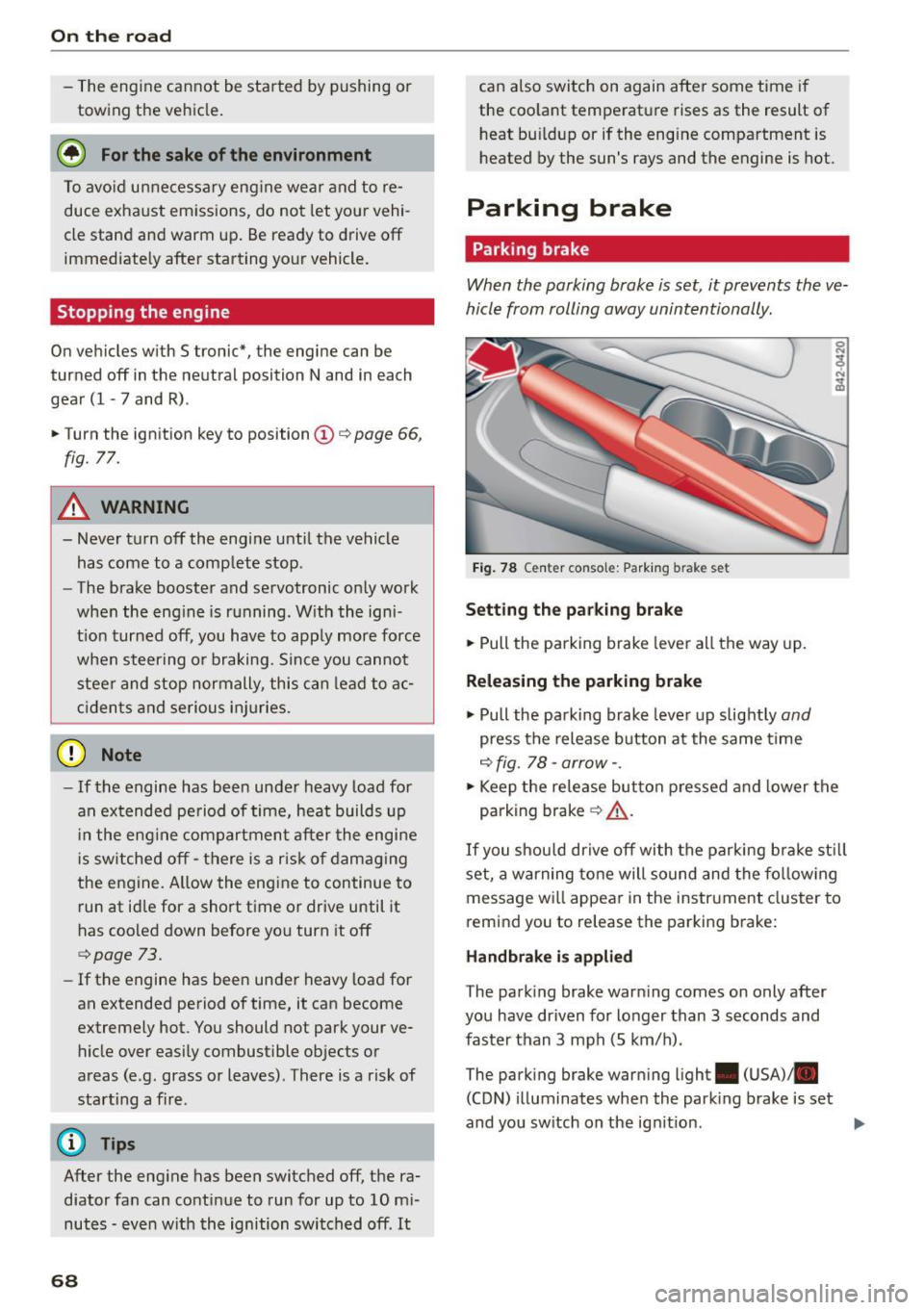
When the parking brake is set, it prevents the ve
hicle from rolling away unintentionally.
Fig . 78 C ente r co nsol e: Park ing bra ke set
S etting th e pa rking brak e
.. Pull th e parking brake lever all the way up.
Releasing the p arkin g brake
.. Pull the parking brake lever up slightly and
press the release button at the same time
c::> fig . 78 -arrow- .
.. Keep the release button pressed and lower the
parking brak e
q &_.
If you shou ld drive off with the parking bra ke st ill
set, a warning tone will sound and the fo llow ing
message wi ll appear in the instrument cluster to
r e mind you to release the parking brake:
H and brake i s appli ed
T he park ing brake warn ing comes on only after
you have driven for longer than 3 seconds and
faster than 3 mph (5 km/h) .
The parking brake warning ligh t. (USA)/ .
(CON) illuminates whe n the park ing brake is set
and you sw itch on the ign it ion .
Page 71 of 232
..... N
r-N "': ..... \!) ..,.,
N ..,., .....
A WARNING
-=
Always release t he parkin g brake completely.
A part ially engaged brake will over heat th e
rear brakes, reduce their effect iveness and
cause excess ive wear. This could lead to brake
fai lure and an accident.
([) Note
Only after the ve hicle has come to complete
stop, sho uld you firmly set the parking brake
and move the gearshift lever into a gear.
Parking
Parking
~ Stop t he vehicle using the brake pedal.
~ Set the parking b ra ke firmly.
~ Swi tch off the engine.
~ Move t he se lecto r lever into the P pos ition ( au
tomatic t ransmis sion )
or move the gearshift
lever into 1st . gear
(manual transmission )
c:>.&_ .
~ When on incl ines or declines, turn the steering
whee l so that t he vehicle w ill roll into the curb
if it beg ins to move .
A WARNING
This is how yo u can reduce the risk of in jury
w hen leav ing you r vehicle.
-
- Never park the vehicle whe re it ca n come i n
co ntact wi th dry g rass, spilled fuel or a ny
other flammable mater ials.
- Never allow anyone - especially small chi l
dre n -to remai n in t he vehicle when it is
locked. Locke d doors ma ke i t mo re d iff icult
for rescuers to access the passenger com
partment in the event of an emergency .
Dange r to life!
- Never leave c hildren unsupervised in the ve
hicle. C hildren cou ld re lease the par king
brake or move the gearshift lever out of
gear. The vehicle could sta rt to roll away and
cause an accident .
- No matter what the season is, the tempera
ture in a parked veh icle can reach dangerous
levels.
On th e road
Starting on hills
Applies to vehicles: wit h hill ho ld assist
Hill ho ld assist makes it eas ier to sta rt on hills.
The system is activated when the brake peda l is
depressed
for a few seconds .
After releasing the brake pedal, the b rake power
is he ld for a
brief moment to prevent the vehicle
from rol ling back when starting . At this time, you
can eas ily beg in to move your vehicle.
A WARNING
- I f you did not begin moving imme diate ly af
ter re leasi ng the b ra ke peda l, unde r ce rtain
cir cumstan ces, the vehicle w ould beg in to
roll bac kward. Depress t he brake pe dal im
mediately or engage the hand brake.
- Should t he e ngine sta ll, dep ress the brake
pe dal immed iately or enga ge the hand
b rake.
- I n or der to preven t the vehicle from roll ing
back unintentionally when s tarting in s top
and-go traffic, keep the brake pe dal de
pressed for a few seconds before driving off.
(D Tips
You can find o ut if yo ur vehicle is eq uipped
wi th "Hill hold ass ist" at an autho riz ed Au di
d ealersh ip.
Speed warning system
Speed warning system
The speed warning system helps you to keep your
driving speed below a set speed limit .
The speed warn ing system warns the driver if he
exceeds a previously stored max imum speed. A
warning tone will sound as soon as the veh icle
speed exceeds the set speed by about
3 mph
(3 km/h) . At the same t ime, a warning symbo l
appea rs i n the display .
The speed warn ing system has
two warn ing
thre sholds
tha t function independe ntly of each
othe r and t hat have somewhat d iffe rent pu rpos
es:
69
Page 72 of 232
On the road
Speed warning 1 lGJ /laJ
speed while you are driving. This setting wi ll re
main in effect until you turn off the ignition, as
suming that you have not changed or reset the
setting .
The speed warning symbo l
lDJ/[f] (Canada mod
els) in the warning
1 display appears when you
exceed the maximum speed. It goes out when
the speed falls below the stored maximum
speed.
The speed warning symbo l will also go out if the
speed
exceeds the stored maximum speed by
more than about
25 mph (40 km/h) for at least
10 seconds. The stored maximum speed is delet
ed.
Sett ing speed warning 1
¢ page 70.
Speed warning 2 lCl/lDJ
want to be reminded of a certain speed, for ex
ample when you are trave ling in a country that
has a general maximum speed limit, or if you do
not want to exceed a specified speed for winter
tires.
The speed warning 2 symbol
lCIJ(a1 (Canada
models) appears in the disp lay when you exceed
the stored speed limit. Unlike warning 1, it will
not go out until the vehicle speed drops be low
the stored speed limit.
Sett ing speed warning 2
¢ page 70.
@ Tips
Even though your vehicle is equipped with a
speed warning system, you should still watch
the speedometer to make sure you are not
driving faster than the speed limit.
70
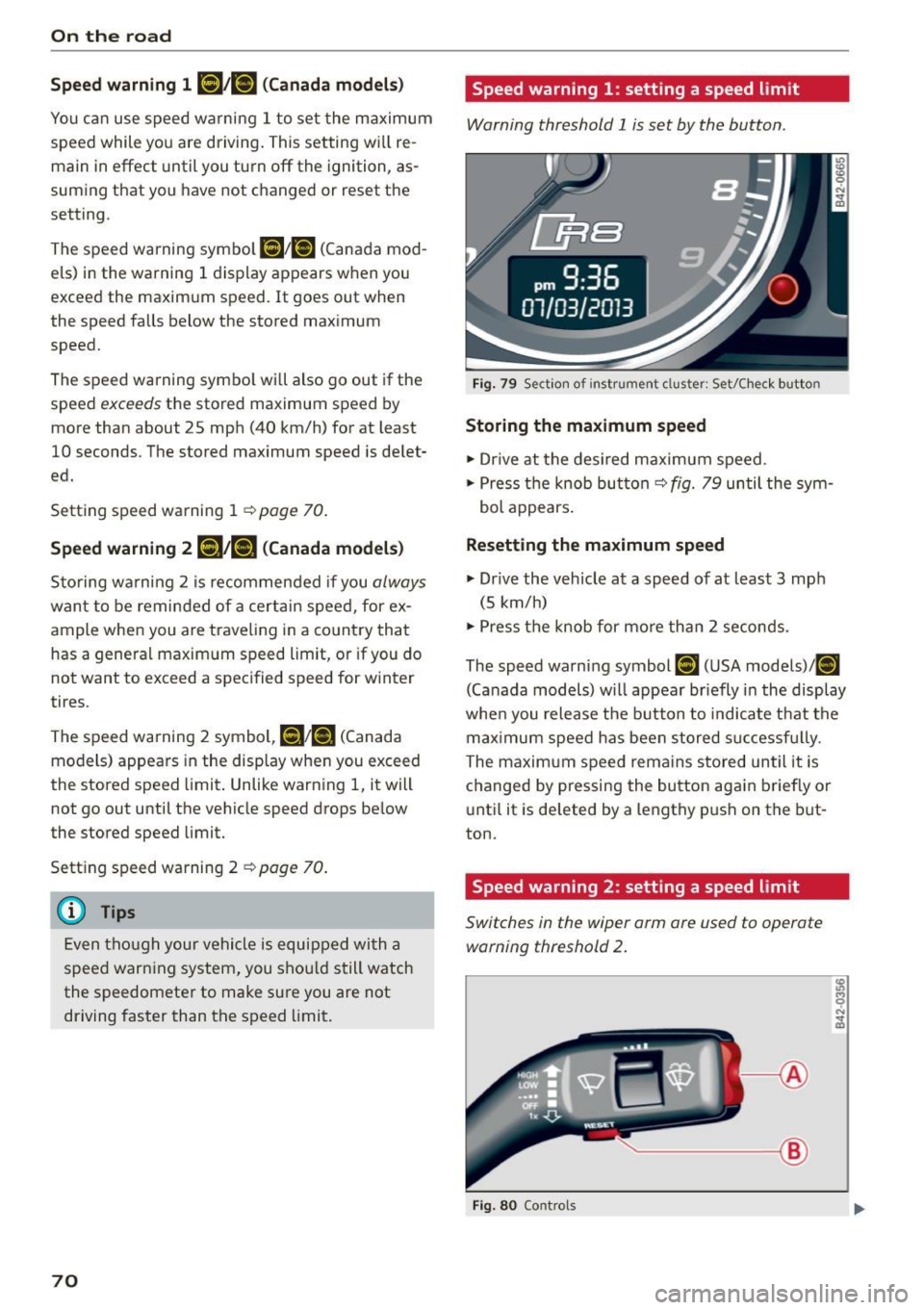
Speed warning 1: setting a speed limit
Warning threshold 1 is set by the button .
Fig. 79 Section of instrument cluster: Set/C hec k button
Storing the maximum speed
.,. Dr ive at the desired maximum speed .
.,. Press the knob butto n
c::> fig. 79 until the sym
bol appears.
Resetting the maximum speed
.,. Dr ive the vehicle at a speed of at least 3 mph
(5 km/h)
.,. Press the knob for more than 2 seconds .
The speed warning symbol
[IH (USA models)/ (01
(Canada models) w ill appear br iefly in the display
when you release the button to indicate that the
max imum speed has been stored s uccessfu lly.
The maximum speed rema ins stored until it is
changed by pressing the button again briefly or
until it is deleted by a lengthy push on the but
ton.
Speed warning 2: setting a speed limit
Switches in the wiper arm ore used to operate warning threshold 2 .
~--®
Fig. 80 Controls
Page 73 of 232
.... N
l'
N "1: .... I.O
"' N
"' ....
To store maximum speed
•Turnoff the ignit ion.
• Briefly press the button in the instrument clus
ter
9 page 70, fig. 79. The odometer and the
digital clock are now illuminated.
• Press the button for at least 2 seconds. The cur
rently stored maximum speed appears in the
display
or the crossed out symbol for warning
threshold 2, if no maximum speed was set pre
viously.
• Press the function selector sw itch in the wiper
lever @r=>
fig. 80 up or down to change the set
val ue. Values run up or down in steps of 6 mph
(10 km/h).
To delete maximum speed
•Turnoff the ignition .
• Briefly press the button in the instrument clus
ter
9 page 70, fig. 79 . The odometer and the
digital clock are now illum inated.
• Press the button for at least 2 seconds. The cur
rently stored maximum speed appears in the
display.
• Press the
iRESETI button in the wiper lever @
r:=> fig. 80 until the crossed out speed warning
symbol for warning threshold 2 appears in the
display.
A few seconds after the adjustment is completed,
the illumination for the odometer and the digital
clock w ill go out.
@ Tips
This warning threshold can also be controlled
through the trip computer
r=> page 23, Navi
gating the menu.
On the road
Cruise control
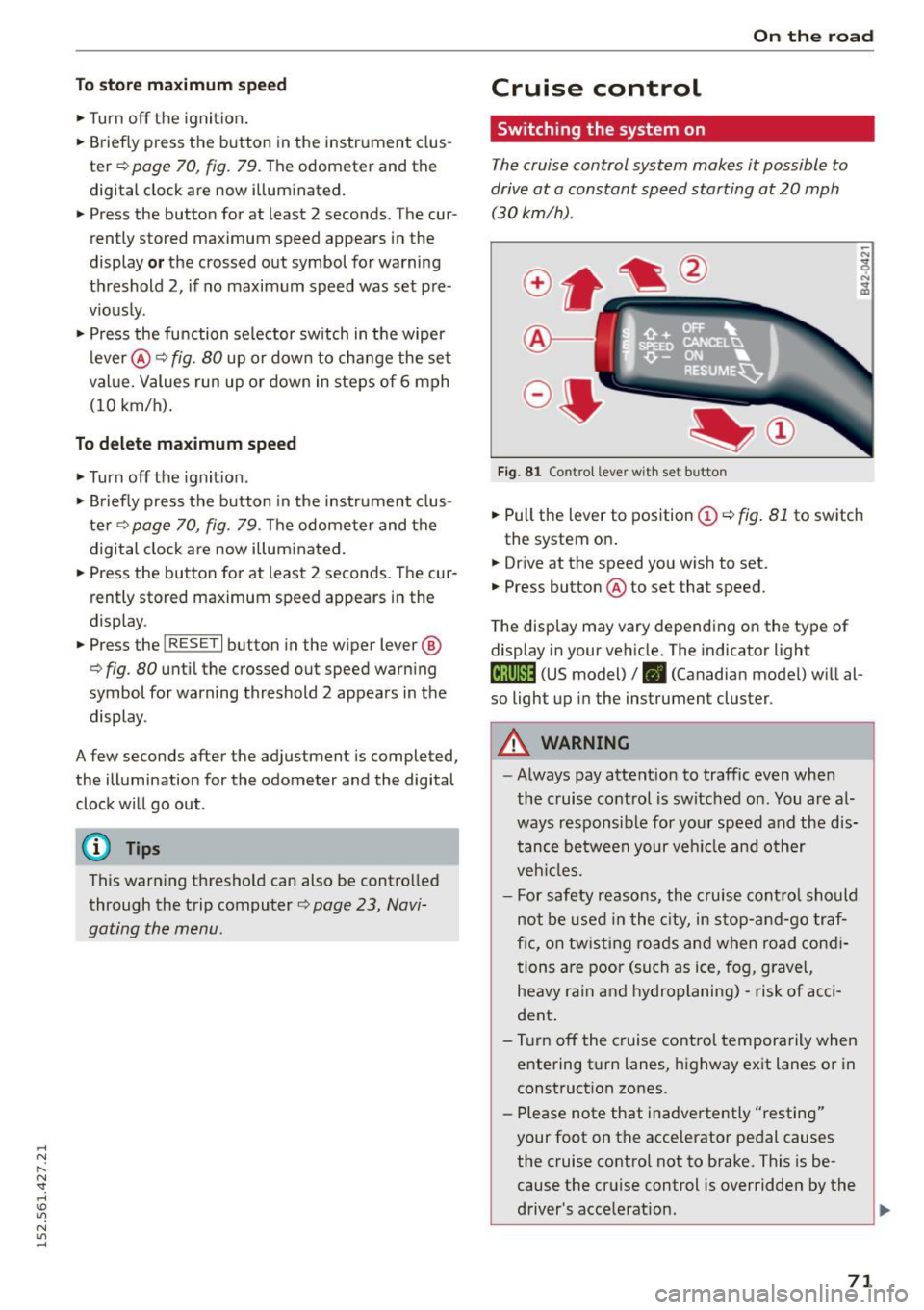
Switching the system on
The cruise control system makes it possible to
drive at a constant speed starting at 20 mph (30kmlh).
Fig. 81 Contro l lever with set button
• Pull the lever to position (Dr=> fig . 81 to switch
the system on .
• Drive at the speed you wish to set.
• Press button @to set that speed.
The display may vary depending on the type of
display in your vehicle. The indicator light
(lj;jl)~i~ (US model)/ . (Canadian model) will al
so light up in the instrument cluster.
A WARNING
--
-Always pay attention to traffic even when
the cruise control is switched on. You are al
ways responsible for your speed and the dis
tance between your veh icle and other
veh icles.
- For safety reasons, the cruise control should
not be used in the city, in stop-and -go traf
fic, on twisting roads and when road condi
tions are poor (such as ice, fog, gravel,
heavy rain and hydroplaning) -risk of acci
dent .
- T urn off the cruise control temporarily when
entering turn lanes, highway exit lanes or in
construction zones.
- Please note that inadvertently "resting"
your foot on the accelerator pedal causes
the cruise control not to brake. This is be
cause the cruise control is overridden by the
driver's acce lerat ion.
71
Page 74 of 232
On the road
@ Tips
-Vehicles with manua l transmission: You can
attain the set speed only if the currently en
gaged gear a llows it and the engine is not
stressed. Shifting to a h igher or lower gear
promptly will allow the engine to run
smoothly.
- The cruise control cannot maintain a con
stant speed when driving downhill. The ve
hicle will accelerate under its own weight .
Downshift to a lower gea r or use the brakes
to slow down.
Changing speed
.. Press lever in the 0 or O direction¢ page 71,
fig .
Bl to increase or decrease your speed .
.. Re lease the lever to save that speed .
You ca n also press the accelera tor pedal down to
increase your speed, e.g . if you want to pass
someone . The speed you saved earlier will re
sume as soon as you release the accelerator ped
al.
If , however, you exceed your saved speed by
S mph
(10 km/h) for longer than S minutes , the
cruise control will turn off temporarily. The sym
bol will go out but the saved speed will be re
tained.
Presetting your speed
You can preset your desired speed while the vehi
cle is not moving .
.. Turn on the ignition .
.. Pull lever into position@¢
page 71 , fig . Bl .
.. Press the lever in the 0 or O direction to in-
crease or decrease your speed .
.,. Release the lever to save that speed .
This function makes it possible, for example, to
save the speed you want before driving on the
highway. Once on the highway, activate the cruise
control by pulling the lever toward @.
72
Switching the system off
Temporary deactivation
.. Press the brake pedal, or
.. Keep the clutch pedal pressed down longe r, or
.,. Press the lever into position @(not clicked into
place)
¢page 71, fig. Bl, or
.. Drive for longer than 5 minutes at more than
S mph
(10 km/h) above the stored speed .
Switching off completely
.,. Press lever into position @(clicked into place),
or
.. Switch the ignition off.
The system retains the saved speed if you deacti
vate the cruise control temporarily. To resume
the saved speed, release the brake or clutch ped
al and pull the lever to pos ition @.
Switch ing the ignition off erases the saved speed.
.&_ WARNING
You should only return to the saved speed if it
is not too fast for the current traffic condi
tions -risk of an accident!
Audi magnetic ride
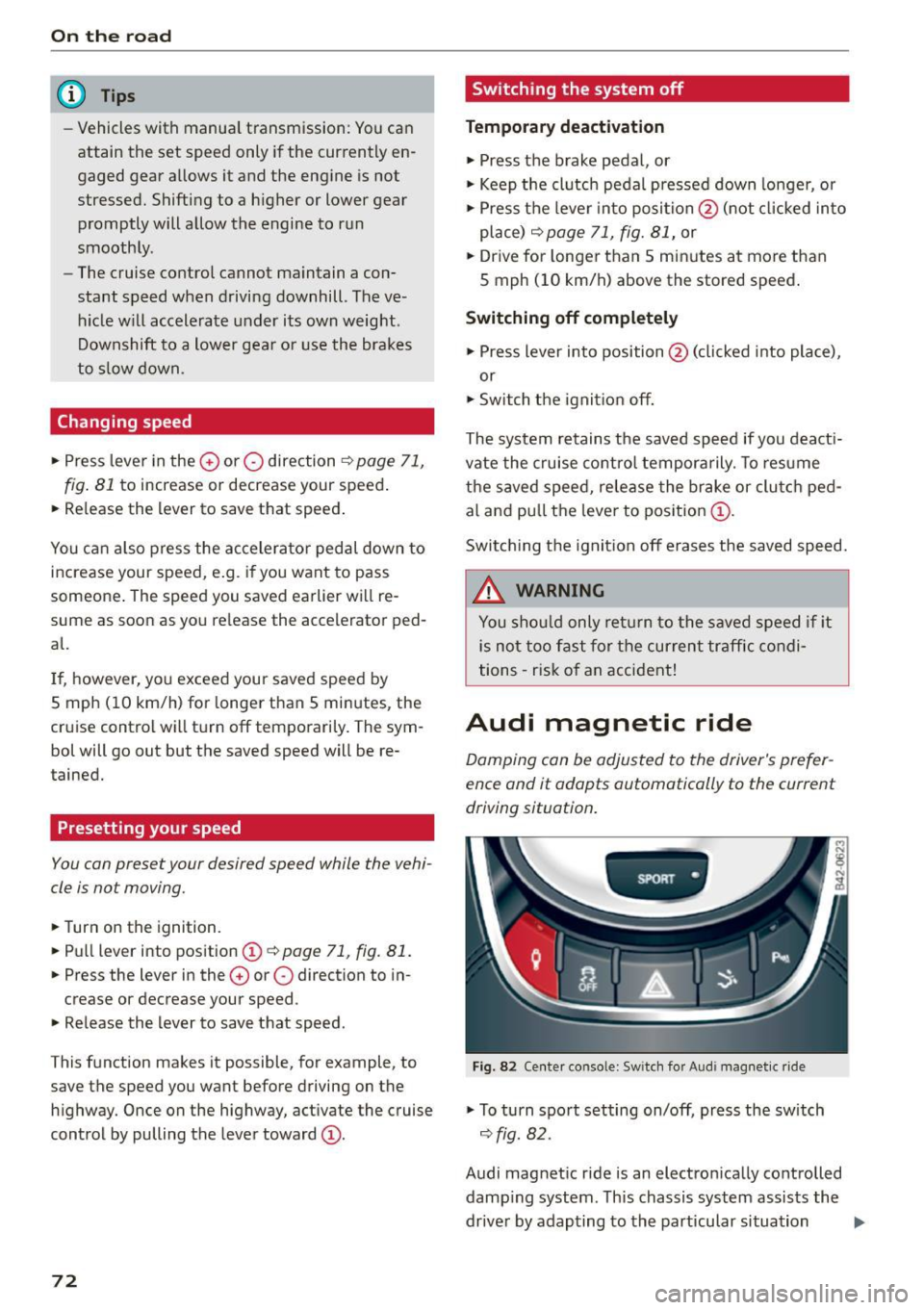
Damping can be adjusted to the driver's prefer
ence and it adapts automatically to the current
driving situation .
SPORT •
Fig. 82 Center console: Sw itch for Audi magnet ic ride
.,. To turn sport setting on/off, press the sw itch
¢ fig. 82.
Audi magnetic ride is an electronically controlled damp ing system . This chassis system assists the
driver by adapting to the particular situation
liJI,
Page 75 of 232
throug h im perce ptib le contro l processes . The
damping provides individua l modulation of
damping forces. For example, with damping
characterist ics set to prov ide greater comfort,
damping is set somewhat harder for a brief peri
od only as requ ired, when round ing a curve and
when braking .
Standard setting
Select the standard sett ing if you prefer a sus
pension setting emphasi zing comfort.
Sport s etting
Select the sport setting if you prefe r a spor ty sus
pension setting. The LED in the button
[l] comes
on to indicate sport setting .
@ Tips
The warning/indicato r ligh t R in the instr u
ment cluster comes on in the event of a mal
function. Drive to the closest a uthorized Audi
dea ler as soon as possible and have the mal
function repaired.
Sporty driving
Warming up and cooling down
B y care fully warming up and cooling down you r
veh icle, you can he lp ensure tha t it is not over
stressed unnecessarily du ring sporty driving.
W hen warming up , the veh icle is driven a t a max
i mum eng ine speed of 6 000 R PM
(Vl O engine) or
70 00 RPM (V8 engine) in order to raise the en
g ine oi l tempe ratu re to a minimum of 140 °F
(60 °() . The tires also only reach the ir full road
h olding capability once they have warmed up.
The cooling fan can continue to run in you r vehi
cle after the engine is switched off . However,
d riving the vehicle to cool it down is part icu larly
important. During sporty driving, the engine and
brakes, the exhaust system, and the transmission
all become extremely hot . Before you park the
ve hicle, you should dr ive it for a few m iles/kilo-
~ mete rs a t light load in the low rpm range to al-
~ low i t to cool down. "': ,...., \!) 1.1'1
N 1.1'1 ,....,
On th e road
Driving on a track
Befo re you take your veh icle o ut on a track, en
s u re th at i t is in perfe ct condi tion. Fo r ex ample ,
yo u should chec k the tire trea d an d the bra ke
pads . It is bes t to inc rease tire pressu re by about
0 .3 bar.
W hen dr iving on a track , oil consump tion may be
somewhat higher than in "norma l" ope rat ion
¢ page 159 .
You should definitely inspec t your ve hicle afte r
s u bje cting it to seve re condi tions. Are the br ake
pads OK? Is there any thing unusua l about the
t ir es, including the inner and outer sidewalls (e .g.
tread , blistering)? A re the air intakes free of
l eaves and tire dust? Is the o il level OK?
Your a uth orized Audi dea ler or q ua lified wor k
sho p will be happy to underta ke an inspection be
fore and after use on the race track .
A WARNING ._
Some race tracks (e.g. steeply banked turns)
may affect the response of t he ESC.
(D Tips
- Review the t rack requ irements and condi
tions befo re you sta rt driv ing.
- W hen d riven on a race track, all vehicle
parts are severe ly stressed. This can result
in increased wear .
73
Page 76 of 232
Transmission
Transmission Manual transmission
Gearshift lever
Applies to vehicles: with manua l transmission
The clutch pedal must be depressed all the way
before you can start the engine .
The manual transmission in your Audi is equipped
with an
interlock-feature.
• Depress the clutch pedal all the way.
• Start the engine with the gearshift lever in Neu
tral and the clutch pedal depressed.
(D Note
Always depress the clutch pedal fully when
changing gears. Do not hold the vehicle on a
hill with the clutch pedal partially depressed.
This may cause premature clutch wear or
damage.
(D Tips
- Resting your hand on the gearshift lever
knob while driving will cause premature
wear in the transmission.
- The back-up lights go on when you shift into
Reverse with the ignition on.
Gearshift pattern (6-speed manual
transmission)
App lies to vehicles: with 6-speed manual transmission
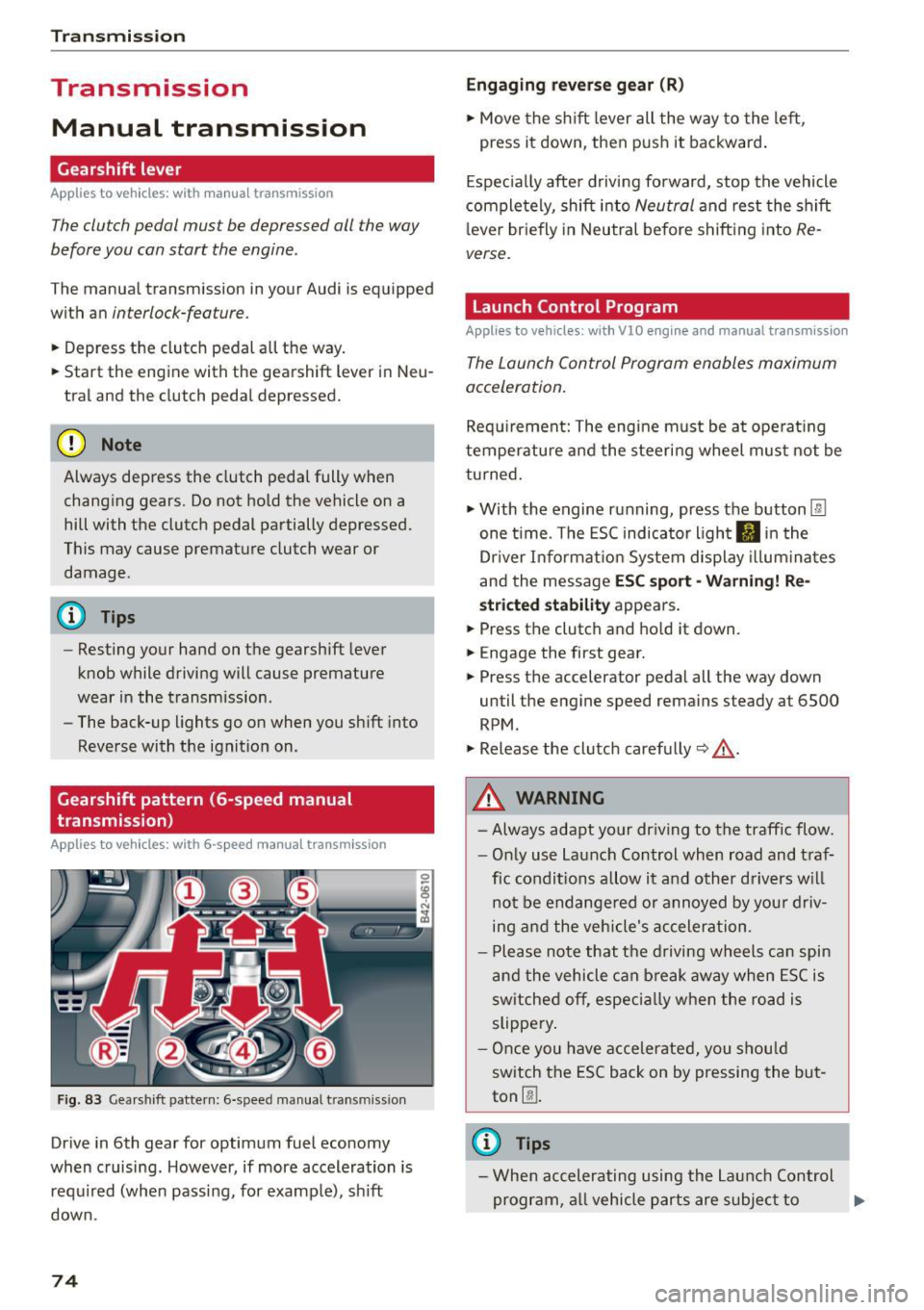
Fig. 83 Gearshift pattern: 6-speed manual transm iss ion
Drive in 6th gear for optimum fuel economy
when cruising. However, if more acceleration is
required (when passing, for examp le), sh ift
down.
74
Engaging reverse gear (R)
• Move the shift lever all the way to the left,
press it down, then push it backward.
Especially after driving forward, stop the vehicle
completely, shift into
Neutral and rest the shift
l ever briefly in Neutral before shifting into
Re
verse.
Launch Control Program
Applies to vehicles : wit h VlO engin e and manual t ra nsmissio n
The Launch Control Program enables maximum
acceleration.
Requirement: The engine must be at operat ing
temperature and the steering wheel must not be
turned.
• With the engine running, press the button
l:fil
one time. The ESC indicator light II in the
Dr iver Informat ion System display illum inat es
and the message
ESC sport -Warning! Re
stricted stability appears .
• Press the clutch and hold it down.
• Engage the first gear.
• Press the accelerator pedal all the way down
until the engine speed remains steady at 6500
RPM .
• Release the clutch carefully~,&. .
A WARNING
- Always adapt your driving to the traffic flow.
- Only use Launch Control when road and traf-
fic conditions allow it and other drivers will
not be endange red or annoyed by your driv
ing and the vehicle's acceleration .
- Please note that the driving wheels can spin
and the vehicle can break away when ESC is
sw itched off, especially when the road is
slippery .
- Once you have accelerated, you should
switch the ESC back on by pressing the but
ton
00 .
(D Tips
- When accelerating using the Launch Control
program, all vehicle parts are subject to .,..
Page 78 of 232
Transmi ssio n
rotation of the whee ls, then the time wi ll in
crease a ccording ly .
A WARNING
- If a gear is engaged when the vehicle is sta
tionary, the acce lerator must not be pressed
inadvertently under any circumstances. Oth
erwise the vehicle will immed iately start to
move - sometimes even if the park ing brake
is f irmly applied.
- Before you or other persons open the engine compartment l id and work on a running en
gine, select neutral pos it ion
N and firmly
apply the handbra ke. Always read and fol
low the app licab le warn ings¢
page 155,
Working in the engine compartment.
@ Tips
- If you accidenta lly shifted into N w hile d riv
i ng, you can engage a gear in the normal
way using the selecto r lever.
- An indicator light i s displayed if a malfunc
tion occurs while in S tronic. Refer to
~page 78.
Manual mode
App lies to veh icles: w ith 5 tro nic
S tronic allows the driver to shift gears man ua lly.
Starting from a stop
.,. Press and ho ld the brake pedal.
.. Move the selecto r leve r to the left.
.. Tap the se lec tor lever forwa rd
0 -
.. Re lease the brake pedal and press the accelera -
tor pedal ¢ .&,. .
Shifting
.,. To shift up, tap the selector lever fo rward 0 -
.,. To shift down, t ap the sele ctor lever to the re ar
o.
Stopp ing temporarily
.,. Press the brake pedal to prevent the vehicle
from moving, for examp le at traff ic lights .
Par king
.. Press and ho ld the brake pedal¢.&,. .
76
.. Activate the parking brake .
.. Turn off the ignition and remove the key .
Stopping on an incline
.,. Always keep the vehicle stat ionary using the
foot brake to prevent it from " rolling back"
¢ .&,. . D o not try to p revent the vehicle from
"ro lling back" when a gear is engaged by in
creasing engine speed.
.. Activate the parking brake.
Starting on a hill
.. With a gear engaged, remove your foot from
the brake, accelerate and slowly release the
parking brake.
When acce lera ting, S tronic sh ifts i nto the nex t
gear in gea rs 1, 2, 3, 4, 5 and 6 shor tly befo re
the maximum permissib le engine speed is
r eached.
If you have se lec ted a lower gear than the current
one, S tron ic w ill shift down only when the engine
will not be ove r-revved.
You can switch to a utomat ic operation at any
time
¢ page 77.
A WARNING
-
- Never leave your vehicle with the engine
ru nning while in gear. If you must leave yo ur
vehicle with the engine r unning, set the
parking brake firmly and engage neutral
N .
- With the engine r unning and a gear engag
ed, you have to ho ld the vehicle with the
foot brake .
- Do not accelerate when you sh ift gears with
the vehicle stationary and the engine run ning.
- Before driving down a steep slope, reduce
your speed and sh ift into a lower gear with S
tronic.
- Do not ride the bra kes or press the bra ke
pedal too often or too long. Constant brak
ing causes the brakes to overheat and sub
stantially reduces brak ing performance, in
creases braking d istance or causes comp lete
fa ilu re of the brake system. ..,.
Page 79 of 232
..... N
r-N "': ..... \!) ..,.,
N ..,., .....
(D Note
If you must stop on an incline, always hold
the vehicle in p lace with the foot brake to pre
vent it from rolling back. Do not try to prevent the vehicle from rolling back when the gear is
engaged by increasing speed, as this may
damage the clutch.
Automatic mode
Applies to vehicles: with S tronic
St arting fro m a stop
"' Press and hold the brake pedal.
"' Tap the se lector lever towards A.
"' Re lease the brake pedal and press the accelera-
tor pedal
¢ ,&. in Manual mode on page 76.
Under certain circumstances (driving in the
mounta ins for example), it can be beneficia l to
switch temporarily to the manual shift program
¢
page 76 in order to adjust the gear ratios to
driving conditions
manually.
Kick-down
Applies to vehicles: with S tronic
When you depress the accelerator pedal beyond
the resistance point, S tronic downsh ifts into a
lower gear, depending on vehicle speed and en
g ine rpm. It shifts up into the next higher gear
once the maximum specified engine RPM is reached . Exception: you have activated the sport
function.
.&, WARNING
Please note that the wheels could spin on
slic k or slippery roads when kick-down is ac
tive.
l) Market -spec ifi c
-
Tra nsm issio n
Launch control program
Applies to vehicles: with S tronic
The Launch Control Program enables maximum
acceleration.
Requirement: The engine must be at operat ing
temperature and the steering wheel must not be
turned.
"' With the engine running, press the
I!]!
!ESC OFFjll button one time . The Ill indicator
light and the message
ESC S port - Cau tion!
Limi ted stabil ity! appears in the driver infor
mation system display.
"' Press the brake pedal with your left foot and
hold it down.
"' Engage a gear.
"' Press the
I SPORT ! button on the selecto r lever
cover.
"' Press the accelerator pedal at the same time
with your right foot unti l the engine has
reached a constant speed.
"' Remove your left foot from the brake¢.&_ .
A WARNING
--
- Always adapt your dr iving to the traffic flow.
- Only use the Launch control program when
road and traffic cond itions allow it and oth
er drivers will not be endangered or both
ered by your driving and the vehicle's accel
eration.
- Please note that the driving wheels can spin
and the vehicle can b reak away when ESC is
sw itched off, espec ial ly when the road is
slippery .
- Once you have accelerated, you sho uld
sw itch the ESC back on by pressing the
[fil
but ton.
(D Tips
- The tra nsmission temperature may increase
signif icant ly afte r using the Launch Contro l
Program. If that happens, the program may
not be availab le for a few minutes . It wi ll be
available again after a cool-down period .
77