clutch AUDI R8 SPYDER 2015 Owners Manual
[x] Cancel search | Manufacturer: AUDI, Model Year: 2015, Model line: R8 SPYDER, Model: AUDI R8 SPYDER 2015Pages: 232, PDF Size: 58.36 MB
Page 61 of 232
.... N
l'
N "1: rl I.O
"' N
"' ....
and damage your vehicle's electronic
equipment or stain the upholstery, etc.
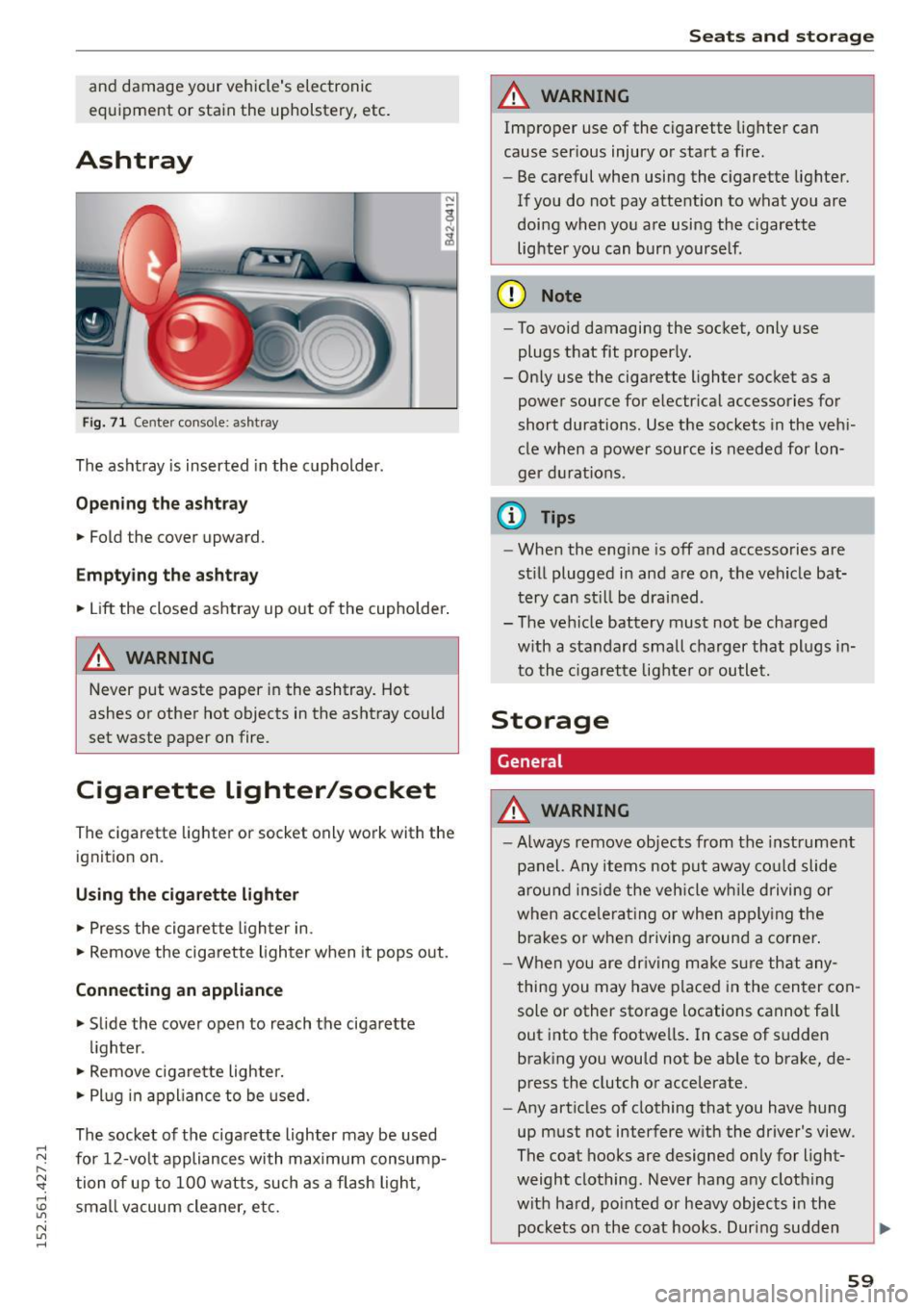
Ashtray
F ig . 71 Cen te r co nsole: ash tray
The ashtray is inserted in the cupholder.
Opening the a shtra y
• Fold the cover upward.
Emptying the ashtray
• Lift the closed ashtray up out of the cupholder .
A WARNING
-
Never put waste paper in the ashtray. Hot
ashes or other hot objects in the ashtray could
set waste paper on fire.
Cigarette lighter/socket
The cigarett e lighter o r socket only work with the
ignit ion on.
Using the cigar ett e lig hter
• Press the cigarette lighter in .
• Remove the cigarette ligh ter when it pops out.
Conn ecting an appliance
• Slide the cover open to reach the cigarette
lighter .
• Remove cigare tte lighte r.
• Pl ug in appliance to be used.
The socket of the cigarette lighter may be used
for 12-volt appliances with maximum consump· tion of up to 100 watts , such as a flash light,
small vacuum cleaner, etc.
Seats and storage
A WARNING
-Improper use of the cigarette lighter can
cause ser ious injury o r start a f ire.
- Be careful when using the c igarette Lighter.
If you do not pay attention to what you are
doing when you are using the cigarette
lighter you can bur n yourse lf .
(D Note
- To avoid damaging the socket, only use
plugs that fit proper ly.
- Only use the cigarette lighter socket as a power source for e lectr ical accessories for
short durations. Use the sockets in the veh i
cle when a power source is needed for lon·
ger d urat ions .
(i} Tips
-When the eng ine is off and accessories are
st ill plugged in and are on, the vehicle bat·
tery can st il l be drained .
- The vehicle battery must not be charged
with a standard small charger that plugs in
to the c igarette lighte r or outlet.
Storage
General
A WARNING
=
- Always remove objects from the instrument
panel. Any items not put away co uld slide
around ins ide the veh icle w hile driving or
when accele rating o r when app ly ing the
brakes or when driving around a corner .
- When you are dr iv ing make s ure that any
thing you may have placed in the center con
sole or other storage locations cannot fa ll
out into the footwe lls. I n case of sudden
braking you would not be ab le to brake, de
press the clutch or accelerate.
- Any articles of clothing that you have hung
up must not interfere with the driver's view .
The coat hooks are designed only for light·
weight clothing . Never hang any clothing
with ha rd, po inted or heavy objects i n the
pockets on the coat hooks. Dur ing sudden ..,.
59
Page 69 of 232
..... N
r-N "': ..... \!) 1.1"1
N 1.1"1 .....
leave your vehicle . This makes vehicle theft even
more difficu lt
c::> & .
Ign ition on @
After switching the ignition on, the needles move
all the way up and then down.
If it is difficult to turn the key after you have in
serted it into the ign ition lock, turn the steering
wheel back and forth. This w ill take the load off
the steering lock mechanism and you will be able
to turn the key freely and start the engine.
Starting the engine @
In this position the engine starts . Wh ile the en
g ine is starting, the power supply to the head
l ights and other elect rical consume rs is tempo ra
ri ly inte rrupted to conserve battery power . After
the engine has started, re lease the key and it will
return to position @.
Before the sta rter can be opera ted again the key
m ust be t urned back to position (!). The
n on-re
pe at lo ck
prevents you from damaging the start
er when the engine is running .
A WARNING
-Never remove the key from the ignition lock
wh ile the vehicle is mov ing. The steer ing
wheel will lock causing loss of control.
- If you have to leave your vehicle - even for
just a min ute - a lways remove the ignit ion
key and take it with you. This is espec ially
important if you are going to leave ch ildren
behind in the veh icle . The ch ildren could
start the engine o r use other veh icle con
t ro ls. Unsuperv ised use of vehicle controls
( f or example, power windows) can c ause se
rious persona l injuries .
@ Tips
If the veh icle battery has been d isconnected
and then reconnected, then yo u m ust leave
t he key in posit ion @ for abou t 5 seconds be
fore you can start the engine .
On the road
Starting and stopping
the engine
Starting the engine
The engine can only be started with your original
Audi key.
On vehicles with S tronic*, the engine can be
sta rted in the neutra l position N and in each gear
(1 - 7 and R).
.,. Set the park ing brake
c::> .&_ .
.,. On veh icles with manual transmiss ion*, fully
dep ress the clutch peda l.
.,. Press and hold the bra ke peda l.
.,. Tu rn the ignition key to posit ion @
c::> page 66,
fig. 77 -do not depress the gas pedal when
starting the engine.
.,. Let go of the key as soon as the engine starts -
the starter m ust not cont inue to run. On
veh ides with S tronic, se lect gear position N .
A cold engine may at first be loud afte r it has
been started. This is due to the hydraulic valves
building up the oil pressure. This is normal and
no need for concern .
If the engine does not start immediately, stop
trying after 10 seconds and then try to restart
the engine about 30 seconds later .
A WARNING
--
-Never start or let the eng ine run in a con
f ined or enclosed area. Exhaust fumes from
the eng ine contain carbon mo noxide, a co l
o rl ess and odo rless gas. Carbon monoxide
can be fatal if i nhaled .
- Never leave the engine id ling unattended .
A n unattended ve hicl e w ith a running en
g in e poses a dange r of pe rsonal inj ury or
theft .
- W ith the engine r unning and a gear engag
ed, you have to ho ld the vehicle wi th the
foot b rake .
(D Note
-Avo id h igh engine speeds, fast acceleration
o r heavy engi ne loads whi le the engine is
st il l c old . T his could d amage t he engine.
67
Page 74 of 232
On the road
@ Tips
-Vehicles with manua l transmission: You can
attain the set speed only if the currently en
gaged gear a llows it and the engine is not
stressed. Shifting to a h igher or lower gear
promptly will allow the engine to run
smoothly.
- The cruise control cannot maintain a con
stant speed when driving downhill. The ve
hicle will accelerate under its own weight .
Downshift to a lower gea r or use the brakes
to slow down.
Changing speed
.. Press lever in the 0 or O direction¢ page 71,
fig .
Bl to increase or decrease your speed .
.. Re lease the lever to save that speed .
You ca n also press the accelera tor pedal down to
increase your speed, e.g . if you want to pass
someone . The speed you saved earlier will re
sume as soon as you release the accelerator ped
al.
If , however, you exceed your saved speed by
S mph
(10 km/h) for longer than S minutes , the
cruise control will turn off temporarily. The sym
bol will go out but the saved speed will be re
tained.
Presetting your speed
You can preset your desired speed while the vehi
cle is not moving .
.. Turn on the ignition .
.. Pull lever into position@¢
page 71 , fig . Bl .
.. Press the lever in the 0 or O direction to in-
crease or decrease your speed .
.,. Release the lever to save that speed .
This function makes it possible, for example, to
save the speed you want before driving on the
highway. Once on the highway, activate the cruise
control by pulling the lever toward @.
72
Switching the system off
Temporary deactivation
.. Press the brake pedal, or
.. Keep the clutch pedal pressed down longe r, or
.,. Press the lever into position @(not clicked into
place)
¢page 71, fig. Bl, or
.. Drive for longer than 5 minutes at more than
S mph
(10 km/h) above the stored speed .
Switching off completely
.,. Press lever into position @(clicked into place),
or
.. Switch the ignition off.
The system retains the saved speed if you deacti
vate the cruise control temporarily. To resume
the saved speed, release the brake or clutch ped
al and pull the lever to pos ition @.
Switch ing the ignition off erases the saved speed.
.&_ WARNING
You should only return to the saved speed if it
is not too fast for the current traffic condi
tions -risk of an accident!
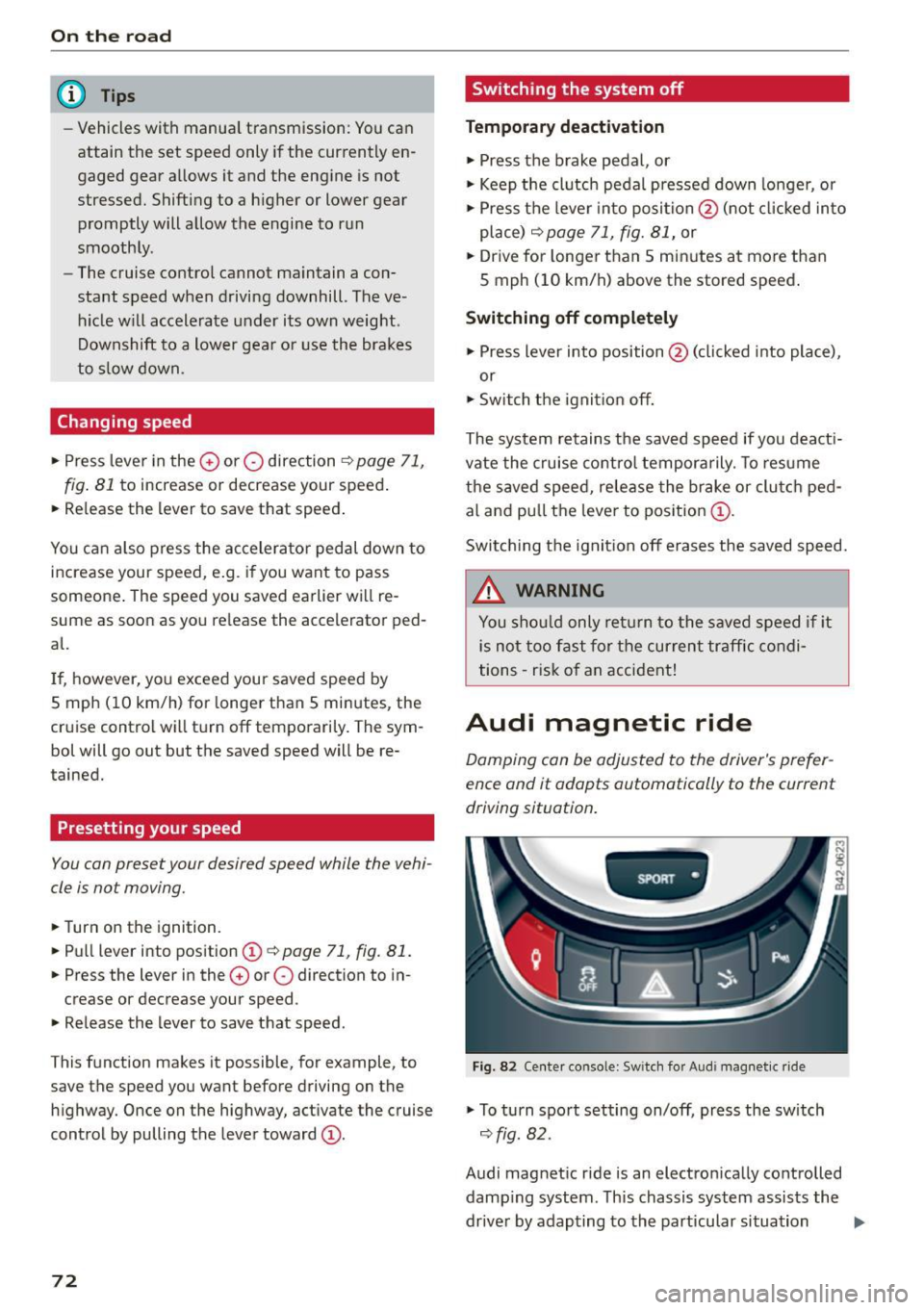
Audi magnetic ride
Damping can be adjusted to the driver's prefer
ence and it adapts automatically to the current
driving situation .
SPORT •
Fig. 82 Center console: Sw itch for Audi magnet ic ride
.,. To turn sport setting on/off, press the sw itch
¢ fig. 82.
Audi magnetic ride is an electronically controlled damp ing system . This chassis system assists the
driver by adapting to the particular situation
liJI,
Page 76 of 232
Transmission
Transmission Manual transmission
Gearshift lever
Applies to vehicles: with manua l transmission
The clutch pedal must be depressed all the way
before you can start the engine .
The manual transmission in your Audi is equipped
with an
interlock-feature.
• Depress the clutch pedal all the way.
• Start the engine with the gearshift lever in Neu
tral and the clutch pedal depressed.
(D Note
Always depress the clutch pedal fully when
changing gears. Do not hold the vehicle on a
hill with the clutch pedal partially depressed.
This may cause premature clutch wear or
damage.
(D Tips
- Resting your hand on the gearshift lever
knob while driving will cause premature
wear in the transmission.
- The back-up lights go on when you shift into
Reverse with the ignition on.
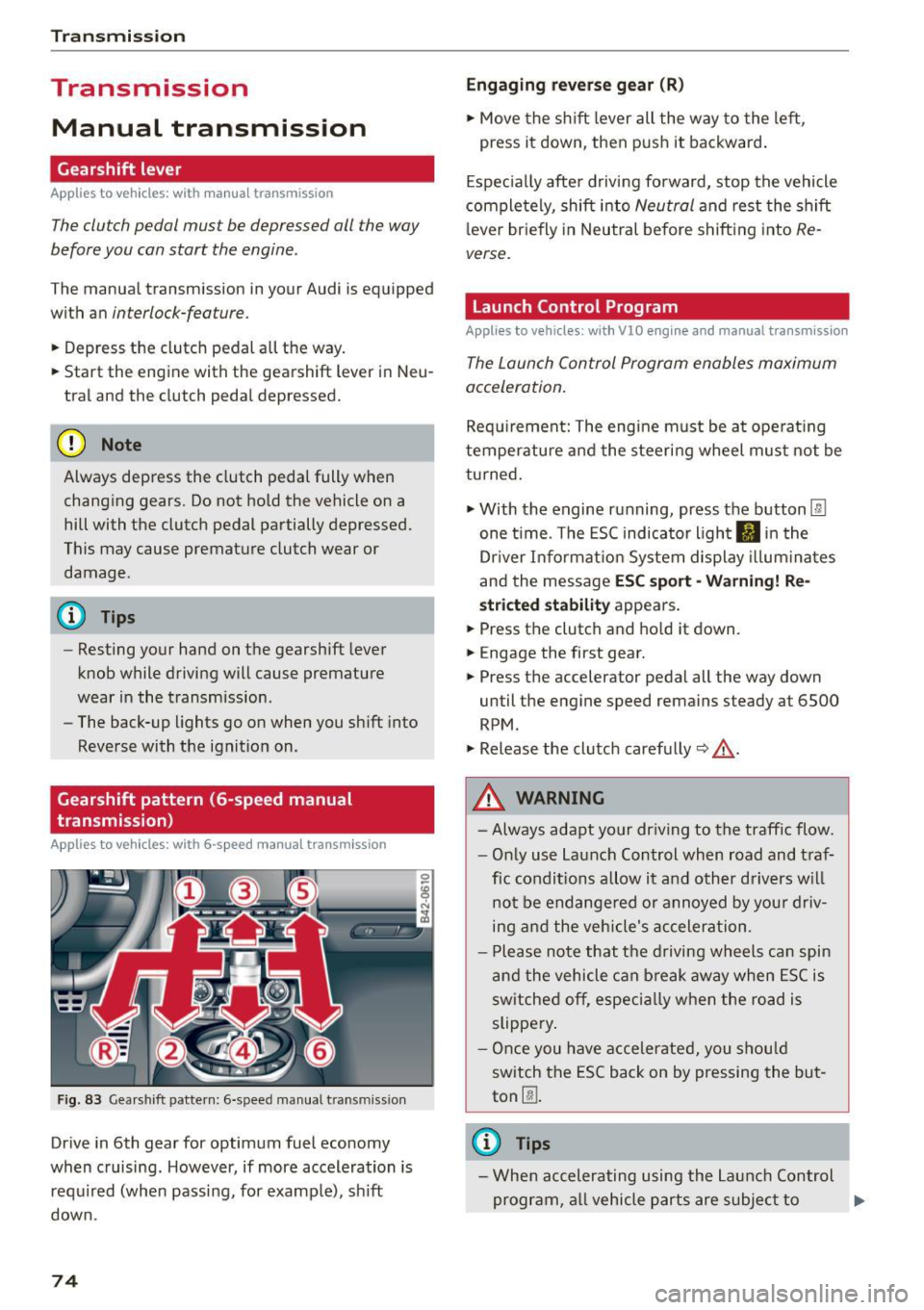
Gearshift pattern (6-speed manual
transmission)
App lies to vehicles: with 6-speed manual transmission
Fig. 83 Gearshift pattern: 6-speed manual transm iss ion
Drive in 6th gear for optimum fuel economy
when cruising. However, if more acceleration is
required (when passing, for examp le), sh ift
down.
74
Engaging reverse gear (R)
• Move the shift lever all the way to the left,
press it down, then push it backward.
Especially after driving forward, stop the vehicle
completely, shift into
Neutral and rest the shift
l ever briefly in Neutral before shifting into
Re
verse.
Launch Control Program
Applies to vehicles : wit h VlO engin e and manual t ra nsmissio n
The Launch Control Program enables maximum
acceleration.
Requirement: The engine must be at operat ing
temperature and the steering wheel must not be
turned.
• With the engine running, press the button
l:fil
one time. The ESC indicator light II in the
Dr iver Informat ion System display illum inat es
and the message
ESC sport -Warning! Re
stricted stability appears .
• Press the clutch and hold it down.
• Engage the first gear.
• Press the accelerator pedal all the way down
until the engine speed remains steady at 6500
RPM .
• Release the clutch carefully~,&. .
A WARNING
- Always adapt your driving to the traffic flow.
- Only use Launch Control when road and traf-
fic conditions allow it and other drivers will
not be endange red or annoyed by your driv
ing and the vehicle's acceleration .
- Please note that the driving wheels can spin
and the vehicle can break away when ESC is
sw itched off, especially when the road is
slippery .
- Once you have accelerated, you should
switch the ESC back on by pressing the but
ton
00 .
(D Tips
- When accelerating using the Launch Control
program, all vehicle parts are subject to .,..
Page 77 of 232
.... N
l'
N "1: .... I.O
"' N
"' ....
heavy loads. This can result in increased
wear .
- The Launch Control Program only funct ions
when the parking brake is released and the
vehicle speed is less than 3 mph (5 km/h).
S tronic
Description
Applies to vehicles: with S tronic
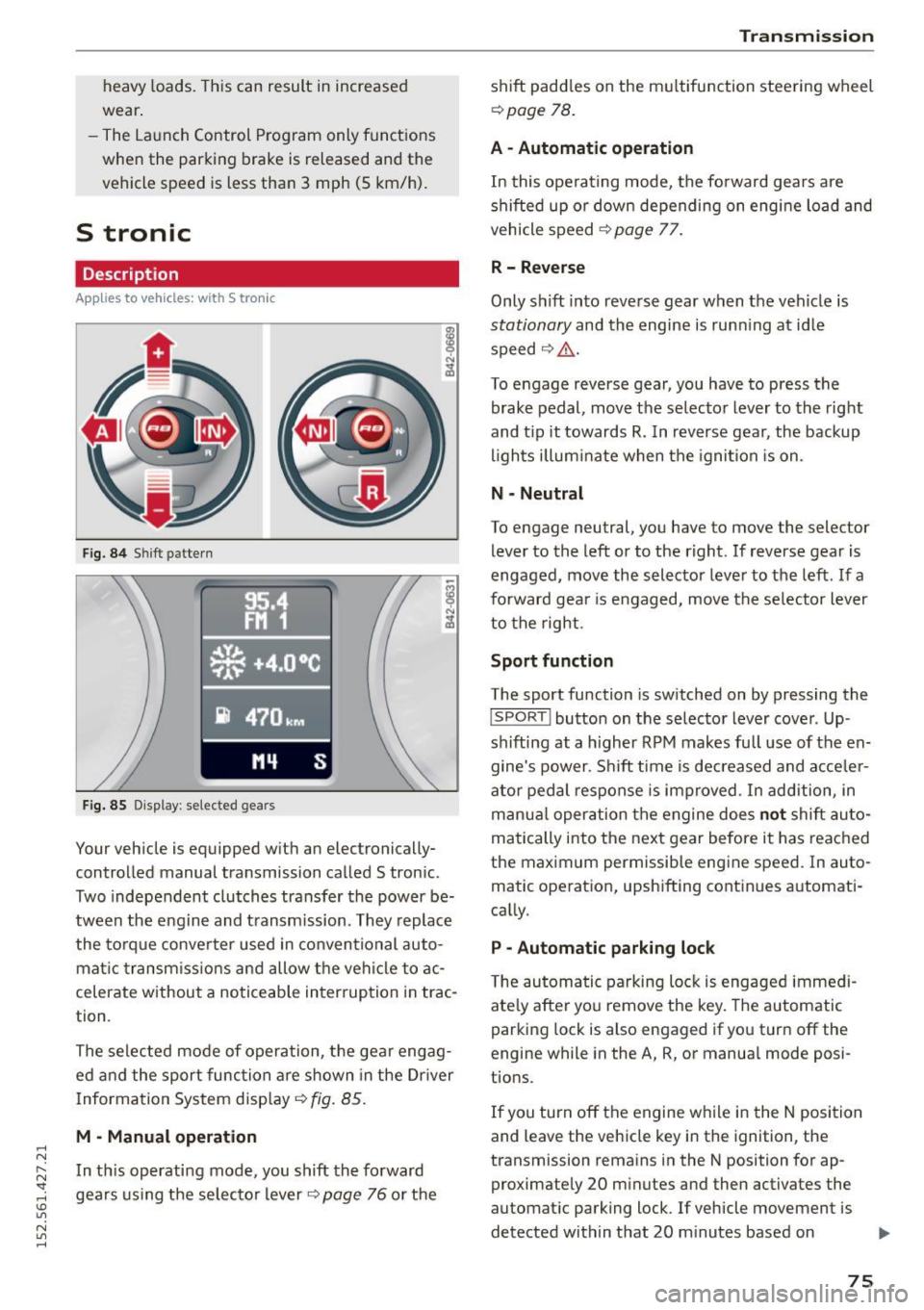
Fig. 84 Shift pattern
Fig. 85 Display : selected gea rs
Your vehicle is equipped with an electronically
controlled manual transmission called S tronic .
Two independent clutches transfer the power be
tween the eng ine and transmission. They replace
the torque converter used in conventional auto
mat ic transmissions and allow the vehicle to ac
celerate without a noticeable interruption in trac
tion .
The selected mode of operation, the gear engag ed and the sport function are shown in the Dr iver
Information System display ¢
fig. 85.
M -Manual operation
In this operating mode, you shift the forward
gears using the selector lever
r=>v page 76 or the
Transmission
shift paddles on the multifunction steering wheel
¢ page 78.
A - Automatic operation
In this operating mode, the forward gears are
shifted up or down depending on engine load and
vehicle speed
¢ page 77.
R- Reverse
Only s hift into reverse gear when the vehicle is
stationary and the engine is runn ing at idle
speed ¢
Li')...
To engage reverse gear, you have to press the
brake pedal, move the selector lever to the right
and t ip it towards
R. In reverse gear, the backup
lights illuminate when the ignition is on .
N -Neutral
To engage neutral, you have to move the selector
lever to the left or to the right . If reverse gear is
engaged,
move the selector lever to the left . If a
forward gea r is engaged, move the selector lever
to the right.
Sport function
The sport function is switched on by pressing the
I SPORT ! button on the selector lever cover . Up
shifting at a higher RPM makes full use of the en
gine's power . Shift time is decreased and acceler
ator pedal response is improved . In addition, in
manua l operation the engine does
not shift au to
matically into the next gear before it has reached
the maximum permissible engine speed. In auto
matic operation, upshifting continues automati
cally.
P -Automatic parking lock
The automatic parking lock is engaged immedi
ately after you remove the key. The automatic
parking lock is also engaged if you turn off the
engine while in the A, R, or manual mode posi
tions .
If you turn off the engine while in the N position
and leave the vehicle key in the ignition, the
transmission remains in the N position for ap proximately 20 minutes and then activates the
automatic parking lock . If vehicle movement is
detected within that 20 minutes based on
IIJI.
75
Page 79 of 232
..... N
r-N "': ..... \!) ..,.,
N ..,., .....
(D Note
If you must stop on an incline, always hold
the vehicle in p lace with the foot brake to pre
vent it from rolling back. Do not try to prevent the vehicle from rolling back when the gear is
engaged by increasing speed, as this may
damage the clutch.
Automatic mode
Applies to vehicles: with S tronic
St arting fro m a stop
"' Press and hold the brake pedal.
"' Tap the se lector lever towards A.
"' Re lease the brake pedal and press the accelera-
tor pedal
¢ ,&. in Manual mode on page 76.
Under certain circumstances (driving in the
mounta ins for example), it can be beneficia l to
switch temporarily to the manual shift program
¢
page 76 in order to adjust the gear ratios to
driving conditions
manually.
Kick-down
Applies to vehicles: with S tronic
When you depress the accelerator pedal beyond
the resistance point, S tronic downsh ifts into a
lower gear, depending on vehicle speed and en
g ine rpm. It shifts up into the next higher gear
once the maximum specified engine RPM is reached . Exception: you have activated the sport
function.
.&, WARNING
Please note that the wheels could spin on
slic k or slippery roads when kick-down is ac
tive.
l) Market -spec ifi c
-
Tra nsm issio n
Launch control program
Applies to vehicles: with S tronic
The Launch Control Program enables maximum
acceleration.
Requirement: The engine must be at operat ing
temperature and the steering wheel must not be
turned.
"' With the engine running, press the
I!]!
!ESC OFFjll button one time . The Ill indicator
light and the message
ESC S port - Cau tion!
Limi ted stabil ity! appears in the driver infor
mation system display.
"' Press the brake pedal with your left foot and
hold it down.
"' Engage a gear.
"' Press the
I SPORT ! button on the selecto r lever
cover.
"' Press the accelerator pedal at the same time
with your right foot unti l the engine has
reached a constant speed.
"' Remove your left foot from the brake¢.&_ .
A WARNING
--
- Always adapt your dr iving to the traffic flow.
- Only use the Launch control program when
road and traffic cond itions allow it and oth
er drivers will not be endangered or both
ered by your driving and the vehicle's accel
eration.
- Please note that the driving wheels can spin
and the vehicle can b reak away when ESC is
sw itched off, espec ial ly when the road is
slippery .
- Once you have accelerated, you sho uld
sw itch the ESC back on by pressing the
[fil
but ton.
(D Tips
- The tra nsmission temperature may increase
signif icant ly afte r using the Launch Contro l
Program. If that happens, the program may
not be availab le for a few minutes . It wi ll be
available again after a cool-down period .
77