remote control AUDI RS5 CABRIOLET 2013 User Guide
[x] Cancel search | Manufacturer: AUDI, Model Year: 2013, Model line: RS5 CABRIOLET, Model: AUDI RS5 CABRIOLET 2013Pages: 286, PDF Size: 71 MB
Page 99 of 286

Audi adaptive cruise control and braking guard 97
~---~-Distance 3: This setting corre
sponds to a distance of 164 feet/SO meters
when traveling at 62 mph (100 km/h), or a
time interval of 1.8 seconds .
~----~ Distance 4: This setting corre
sponds to a distance of 210 feet/64 meters
when traveling at 62 mph (100 km/h), or a
time interval of 2.3 seconds .
A WARNING
Following other vehicles too closely in
creases the risk of collisions and serious
personal injury.
- Setting short distances to the traffic
ahead reduces the time and distance
available to bring your vehicle to a safe
stop and makes it
even more necessary
to pay close attention to traffic.
-Always obey applicable traffic laws, use
good judgment, and select a safe follow
ing distance for the traffic, road and
weather conditions .
¢j) Tips
- Distance 3
is set automatically each time
you switch the ignition on.
- Your standard settings are automatically
stored and assigned to the remote con
trol key being used.
Setting the driving program
Applies to vehicles: with Audi adaptive cruise control
Depending on the selected driving program
and distance, driving behavior when accelerat
ing will
vary from dynamic to comfortable.
Setting the driving program for vehicles
without Audi drive select*
~ In the radio/MMI*, select: !CAR !funct ion
button >
Adaptive cruise control > Driving
prog.
> comfort, standard or dynamic. Or
~ Select : !CARI function button> Car systems*
control button > Driver assist > Adaptive
cruise control
> Driving program* > Com
fort, Standard
or Dynamic. Setting the driving mode for vehicles with
Audi drive select*
Refer to
¢ page 105.
(D Tips
Your settings are automatically stored and
assigned to the remote control key being
used.
Request for driver intervention
Applies to vehicles : with Audi adaptive cruise contro l
Fig. 112 Instrument d uster: request for drive r inte r
ve ntion
In certain situations, the system will prompt
you to take action. This could happen, for ex
ample, if braking by the adaptive cruise con
trol system is not enough to maintain enough
distance to the vehicle ahead.
The instrument cluster will warn you about
the danger ¢
fig. 112:
-A red vehicle is pictured in the display.
- The text
DISTANCE! appears in the status
bar.
- The red indicator light
I blinks .
- In addition, a warning tone sounds .
Page 101 of 286

Audi adaptive cru ise control and brakin g guar d 99
-Always remember that the radar sensor
for the braking guard works only within
defined detection and range limits that
may prevent the proper detection of oth
er vehicles.
- The radar sensor's function and range
can be reduced by rain, snow and heavy
spray. Moving vehicles up ahead may not be promptly detected or may not be de
tected at al l.
- Reflective surfaces includ ing crash barr i
ers or tunnel ent ran ces may impair the
function of the radar sensor.
- You can cance l the braking that is initiat
ed by the system by braking yourself, by
accelerating noticeab ly or by swerving.
- Bra king guard error messages
<> page 99.
- Keep in mind that braking guard can
brake unexpectedly . Always secure any
ca rgo or objects that you are transport
i ng to reduce the risk of d amage or in
ju ry.
Settings in the radio/MM!
Applies to vehicles: with Audi adaptive cruise co ntrol
~ Se lect: ICARI f u nction button> Car system s*
control button > Dri ver assist > Audi brak
ing guard .
Or
~ Select : I CARI funct ion button > A udi braking
guard .
System -
Switch Audi braking g uard On and
Off . When you switch the ignition on, the
message
Aud i braking guard off appears if
the system is sw itched off .
Early warning -The distance and app roac h
warn ings in the display can be switched
On /
Off .
(D Tips
-Your settings are automatically stored
and ass igned to the remote control key
being used at the t imes the settings are
made. -
If you switch the sport mode on, braking
guard switches off automatically
<> page 178.
- Switch braking guard off when you a re
loading the vehicle onto a vehicle carrier,
t rain, ship or other type of transporta
t ion. This can prevent undesired warn
ings from the braking gua rd system.
Messages
App lies to vehicles : wit h Aud i adapt ive c ruise contro l
Braking guard : Off
This driver message appears if the system is
turned off via the radio/MMI *. Otherwise, if
the system is turned off, the informat ion ap
pears every t ime shortly after the start of the
trip.
B raking guard : Activated
T h is dr iver message appears if sharp b rake
pressure was applied due to an acu te warning.
•••
Three white dots appear if a sett ing cannot be
selected w ith the operating lever. For exam
ple, this happens if you want to raise/lower
the speed even though there was no previous
ly saved speed.
ACC: Sensor blocked
This message appears if the sensor v iew is ob
structed, for examp le by leaves, snow, heavy
spray or d irt . Clean the sensor<>
page 92,
fig . 103 .
ACC: not a vailable
T he dr iver mess age appears if there is a mal
function . The adaptive cruise contro l turns off .
A chime sounds as a reminder. Have the sys
tem checked by an authorized Aud i dea ler or
authori zed Aud i Service Fac ility.
ACC: una vailable
T he driver message appears if, for example,
the b ra ke tempe rat ure is too hig h. T he ad ap
t ive cr uise con tro l is temporar ily u nava ilable.
A chime sounds as a reminder .
Page 105 of 286

Have your authorized Audi dealer or au
thorized Audi Service Facility check their
function.
@ Tips
- If the window glass in the driver's door
or front passenger's door has been tint
ed, the display in the exterior mirror may be misinterpreted .
- For Declaration of Compliance to United
States FCC and Industry Canada regula
tions
¢ page 267.
Activating and deactivating
Applies to vehicles: with Audi side assist
Fig. 118 Drive r's d oor : Sid e ass ist bu tton
.. Press the button ¢.&. in General informa
tion on page 102
to switch the system on/
off . The LED in the button turns on when
side assist is switched on.
Adjusting the display brightness
Applies to vehicles: with Audi side assist
The signal brightness can be set in the radio
orMMI* .
.. Select : ICARI function button> Audi side as
sist.
.. Select : I CARI function button > Car systems*
control button > Driver assist > Audi side
assist.
The display brightness adjusts automatically
to the brightness of the surroundings, both in
the information and in the warning stage. In
very dark or very bright surroundings, the dis play is already set to the minimum or maxi
mum level by the automatic adjustment. In
Audi side assist 103
such cases, you may notice no change when
adjusting the br ightness, or the change may
only be noticeable once the surroundings
change.
Adjust the brightness to a level where the dis
play in the information stage will not disrupt
your view forward. If you change the bright
ness, the display in the exterior mirror will
briefly show the brightness level in the infor
mation stage. The brightness of the warning
stage is linked to the brightness in the infor
mation stage and is adjusted along with the
information stage adjustment.
(D Tips
- Side assist is not active while you are
making the adjustment.
- Your settings are automatically stored
and assigned to the remote control key
being used.
Driver messages
Applies to vehicles: wit h Aud i side ass ist
If side assist switches off by itself, the LED in
the button turns off and a message will ap
pear in the instrument cluster display:
Audi side assist unavailable: Sensors blocked
The radar sensors' vision is affected . Do not
cover the area in front of the sensors with bike
wheels, stickers, dirt or other objects. Clean
the area in front of the sensors, if necessary
¢page 101, fig . 117.
Audi side assist: Currently unavailable
Side assist cannot be switched on temporarily
because there is a malfunction (for example,
the battery charge level may be too low) .
Audi side assist: System fault!
The system cannot guarantee that it will de
tect vehicles correctly and it is switched off.
The sensors have been displaced or are faulty.
Have the system checked by an authorized
Audi dealer or authorized Audi Service Facility
soon.
Page 115 of 286

(D Note
-In the MMI display, the direction of trav
el of the vehicle rear is represented de
pending on the steering wheel angle.
The vehicle front swings out more than
the vehicle rear. Maintain plenty of dis
tance from an obstacle so that your out
side mirror or a corner of your vehicle
does not collide with any obstacles -dan
ger of accident!
- Remember to maintain sufficient clear
ance from the curb to avoid damaging
the wheel rims.
(j) Tips
The left or right orientation lines and sur
faces will be displayed, depending on the
turn signal being used.
Adjusting the display and warning tones
Applies to vehicles: with parking system (rear, with rear
view camera)
The display and warning tones are adjusted in
the radio or MM!*.
.. Select : I CARI function button > Parking sys·
tern.
Or
.. Select: ~I C~A~R~I function button > Car systems*
control button> Driver assist> Parking aid.
Display
- Off -when the parking system is switched
off, only audible signals are given.
- On -when the parking system is switched
on, the picture from the rear view camera is
displayed.
Warning tones
- Rear volume -
rear sensor volume
-Rear frequency -rear sensor frequency
-Music volume while parking -when the
parking system is switched on, the volume
of the active audio source is lowered.
The newly adjusted value is briefly heard from
the signal generator. The settings are auto matically stored and assigned to the remote
control key.
Park assist 113
A WARNING
- Always make sure that the volume and
frequency of the warning tones is adjust
ed so that you can easily hear the acous
tic distance signal even if the radio is
playing, the air-conditioner blower is on
High or there is a high level of outside
noise.
- Check the settings whenever someone
else has driven the vehicle before you.
@ Tips
- The warning tones can also be adjusted
directly from the rear view camera im
age. Simply press the Settings* control
button.
- Changed settings are activated when
parking assist is switched on again.
Error messages
Applies to vehicles: with parking system (rear, with rear
view camera}
If a warning tone is audible for about five sec
onds when you turn on the ignition, there is a
malfunction in the system. Have the problem
corrected by your authorized Audi dealer.
Keep the sensors in the rear bumper clean and
free from ice so that the acoustic park assist
system can function properly.
Page 116 of 286

114 Homelin k®
Homelink ®
Universal remote
control
Description
Applies to vehicles: with Homelink
The HomeLink universal remote control can
be programmed with the remote control for
devices that are already present.
W ith Home Link, you can control devices such
as the garage door, security systems, house lights, etc. comfortably from the inside of you
vehicle.
Homelink makes it possible for you to replace
three d iffe rent remote controls from dev ices
in your home with one universal remote. This
feature works for most garage door and exte
rior door motor signals. Programming the in
div idual remote control for your remote con
trol takes place near the center of the radiator
grille. There is a control module attached at
this location .
A one -time programm ing of the sensor must
be performed before you are able to use sys
tems with Home link. If the system does not
activate after performing the one-time pro
gramm ing, check whether the system uses a
rolling code
q page 117 for vehicles without
the MMI*.
& WARNING
-
- Never use the Homelink ® transmitter
with any garage door opener that does
have not the safety stop and reverse fea
ture as required by federa l safety stand
ards. This includes any garage door open
er model manufactured before April 1,
1982.
- A garage door opener which cannot de
tect an object, signaling the door to stop
and reverse does not meet current feder
al safety standards. Using a garage door
opener without these features increases
risk of serious injury or death. -
For safety reasons never release the
parking brake or start the engine while
anyone is standing in front of the vehicle.
- A garage door or an estate gate may
sometimes be set in motion when the
Homelink ® remote control is being pro
grammed. If the device is repeatedly ac
tivated, this can overstrain motor and
damage its e lectrical components - an
overheated motor is a fire hazard!
- To avo id possib le injuries or property
damage, please always make absolutely
certain that no persons or objects are lo
cated in the range of motion of any
equipment being operated.
(D Tips
- If you would li ke more information on
Homel ink ®, where to purchase the
Homel ink ® compatib le products, or
would like to purchase the Homelink ®
Home Lighting Package, please call toll
free: 1-800-355-3515.
- For Declaration of Compliance to United
States FCC and Industry Canada regula
tions¢
page 267.
- For security reasons, we recommend that
you clear the programmed buttons be
fore selling the vehicle.
Operation
Applies to vehicles: wit h Ho meli nk
Fig. 131 Headl iner: controls
Requirement : The buttons must be program-
med ¢
page 115 or¢ page 116 . II>
Page 117 of 286
.. To open the garage door, press the p rog ram
med button . The LED® will light up or
flash.
.. To close the garage door, press the button
again.
@ Tips
To open the garage door, press the button,
but do not press it for longer ten seconds
or the Homeli nk modu le w ill switch to
programming mode.
Programming the transmitter (version A)
A pp lies to vehicles : wit h Homelink a nd MMI
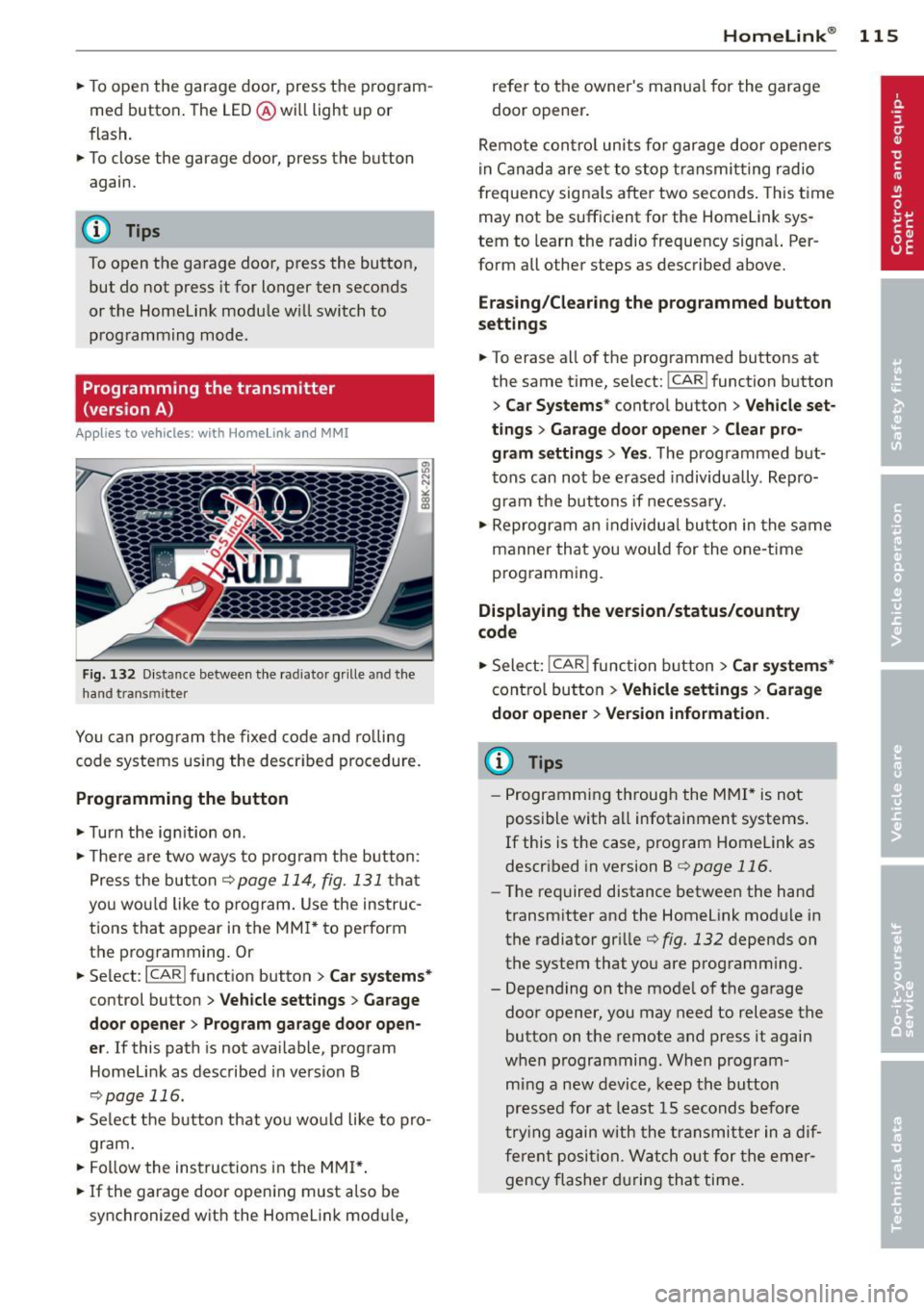
Fig. 132 D istance between t he radia tor grille and t he
hand transmitter
You ca n program the fixed code and ro lling
code systems us ing the described procedure.
Programming the button
.. Turn the ign it ion on .
.. The re a re two ways to prog ram the button:
Press the but ton
¢page 114, fig. 131 that
you wou ld like to program. Use the instruc
tions that appear in the MM I* to perform
the p rogramming. Or
.. Select :
I CARI function button > C ar system s*
control button > Vehicle sett ings > Garage
door opene r> Program garage door open ·
er .
If this path is not ava ilable, program
Homelink as described in vers ion B
¢page 116.
.. Se lect the b utton that you wo uld like to pro
gram.
.. Fol low the instructions in the MMI* .
.. If the garage door open ing must a lso be
synchronized wit h the Homelink mod ule,
Homelink ® 115
refer to the owner's manua l for the garage
door opener .
Remote con tro l units fo r garage door opene rs
in Canada are se t to stop transmit ting radio
frequency signa ls after two seconds . This t ime
may not be sufficient for the Home Link sys
tem to learn the radio frequency signal. Per
form all other steps as described above.
Erasing/Cl earing th e programmed button
s etting s
.. To erase all of the programmed buttons at
the same time, select:
I CAR! function button
> Car Sy stems * contro l button > Vehicle set ·
tings > Garag e door open er > Clear pro·
gr am settings > Yes .
The programmed but
tons can not be erased individua lly . Repro
gram the buttons if necessary .
.. Reprogram an individua l button in the same
manner that you would for the one-time
programming .
Displaying the version /status /country
code
.. Select: !CAR ! function b utton > C ar sy stem s*
cont ro l button > Vehicle setting s > Garage
door opener > Version information .
(D Tips
-Programming through the MMI* is not
possible with a ll infotainment systems .
If this is the case, program Homelink as
descr ibed in version B ¢
page 116.
-The required distance betwee n the hand
transm itter and the Homelink module in
the radiator grille¢
fig. 132 depends on
the system that you are programm ing .
- Depend ing on the mode l of the garage
door opener, you may need to release the
button on the remote and press it again
when programming. When program
m ing a new device, keep the button
pressed for at least 15 seconds before
t ry ing again with the transmit ter in a dif
ferent position. Watch o ut for the emer
gency flasher during tha t time .
Page 118 of 286

116 Homelink®
Programming the transmitter
(version B)
Applies to vehicles: with Homelink
Fig. 133 Distance between t he rad iator grille and the
hand transm itter
P rogramming: phase 1 on th e control unit
1. Sw itch on the ign it ion (do not start the
engine) .
2. Press and hold both of the outer Home
Link buttons
¢ page 114, fig. 131 unti l
the LED @turns off completely (about
20
seconds). Th is procedure clears the stand
ard codes that were set at the factory and
does not need to be repeated again to
p rogram the other buttons .
3 . Briefly press the Homelink button that
you would like to prog ram .
4. Wai t unti l the LED @ beg ins to blin k
q uickly. The Homelink module wi ll now
remain in learning mode for
5 minutes .
5. Now stand in front of your vehicle with
the original hand transmitter for the ga
rage door opener or for the device that
you would like to allocate to the Home
Link button .
P rogramming: pha se 2 on the radiator
gr ille
6 . Hold the orig inal hand transmitter some
what towa rds the center of your vehicle's
r adiato r grille ¢
fig. 133 .
7. Now activate (p ress) the hand transmit
ter.
8 . Pay attention to the tu rn signals fo r your
vehicle when activating the hand trans
mitter . If the emergency flashers blink
three times, the programming was suc
cessful. If the emergency flasher only blinks one time, the S minute time limit for the adaptation has expired or the pro
gramming was unsuccessful. Repeat the
programming from step 3 on the controls
or select another distance from the radia
tor grille.
9 . If the garage door or other devices still
fail to be activated w it h the HomeL ink
control buttons after programming is
comple ted, it is possib le tha t these sys
tems mig ht be work ing with a roll ing code
instead of the normal f ixed code .
A Roll
ing code pro gramming must be per
formed
¢ page 117 .
Program the remaining two buttons accord ing
to the instructions mentioned above . Begin
similarly with the 3rd step if the program
ming connection was successful for the first
button.
Remote contro l units for garage door openers
in Canada are set to stop transmitting radio
frequency signa ls after two seconds. This time
may not be suffic ient for the Homelink sys
tem to learn the radio frequency signa l. Per
form all other steps as described above.
E rasing the button s
.,. Switch on the ignition (do not start the en
gine).
.,. Press and hold both of the outer buttons un
til the LED @turns off completely (about
20 seconds) to erase all of the buttons si
multaneously .
.. Programmed buttons cannot be erased ind i
vidua lly. Reprogram the buttons if necessa
ry .
Reprogramming the buttons
.. Switch on the ignition (do not start the en
gine) .
.. To reprogram an individua l button, press
and hold the b utton until the L ED@starts
to f lash quickly (after abo ut ten seconds).
Release the button immedia tely. The Home
Link module will now remain in learning
mode for 5 minutes.
.,. Continue with step 5.
Page 119 of 286
@ Tips
-Programming using the Homelink but
tons is not possible with all infotainment
systems. If this is the case, program Homelink as described in version A
<=> page 115.
-The required distance between the hand
transmitter and the Homelink module in
the radiator grille<=>
fig. 133 depends on
the system that you are programming.
- Depending on the model of the garage
door opener, you may need to release the
button on the remote and press it again
when programming. When program
ming a new device, keep the button
pressed for at least 15 seconds before
trying again with the transmitter in a dif
ferent position. Watch out for the emer gency flasher during that time.
Programming the rolling code
App lies to vehicles: with Home link
Additionally, a rolling code programming for
the Homelink universal remote control is re
quired for some systems.
Identifying the rolling code
"'Press the previously programmed Homelink
button again and hold it down.
"'Look at the LED@<=>
page 114, fig. 131. If
the LED blinks quickly, the features, such as
the garage door opener, are equipped with
the rolling code.
"'Program the rolling code as follows:
Activating the garage door opener motor
unit
"'Locate the setting button on the garage
door opener motor unit. The exact location
and color of the button may vary depending
on the garage door opener manufacturer .
"'Press the setting button on the garage door
opener motor unit (usually this will activate
a "setting light display" on the motor unit).
Now you will have about
30 seconds time to
perform the HomeLink button programming
on the controls.
Homelink® 11 7
Programming on the controls
"'Press the Home Link button that was already
programmed and hold for two seconds.
"'To end rolling code programming , press and
hold the Home link button for two seconds
again.
"'The Homelink button may need to be press
ed a third time to end the adjustment proce
dure for some garage door openers .
After the controls have been programmed, the garage door opener should recognize the
Homelink signal and operate when the Home
Link button is pressed . Now you may program
the other buttons as needed .
(D Tips
- Programming the rolling code can be
performed quicker and more easily with
the help of a second person.
- If difficulties should arise when pro
gramming the rolling code, consult the
operating instructions for the garage
door opener or other devices for possible
solutions.
Page 269 of 286

Technical Modifications
Our guidelines must be complied with when technical modifications are made .
Always consult an authorized Aud i dealer be
fore starting work on any modifications.
This will he lp ensure that vehicle function,
performance and safety are not impaired
¢ .&. .
Attempting to work on electronic components
and the software used with them can cause
malfunctions. Beca use of the way electronic
components are interconnected with each
other, such malfunctions can also have an ad
verse affect on other systems that are not di
rectly involved . Th is means that you r isk both
a substantial reduction in the operational
safety of you r vehicle and an inc reased wea r of
vehi cle parts¢ _&..
Author ized Audi dealers w ill perform th is
wo rk in a professiona l and competent ma nner
or, in spec ial cases, refer you to a p rofessional
company that specializes in such mod ifi ca
tions .
_& WARNING t= -
Improper repairs and modifications can
change the way vehicle systems wo rk and
cause se rious personal injury.
0 Note
If emergency repairs must be perfo rmed
elsewhere, have the ve hicle examined by
an authorized A udi dealer as soon as possi
ble.
Con sumer In formation 267
Declaration of
Compliance, Telecom
munications and
Electronic Systems
Radio Frequency Devices and Radiocommuni
cation Equipment User Manual Notice.
The manufact urer is not responsib le for any
radio or TV interference caused by unauthor
ized modifications to this equipment.
Device s
The following devices each comply wi th FCC
Part 15 .19, FCC Part 15.2 1 and RSS -Gen Iss ue
1:
- Adaptive cr uise con trol*
- Conven ience key*
- Side assist*
- Cell phone package*
- Electron ic immobilizer
- Homelink ® universal remote control *
- Remote control key
FCC Part 15.19
This device complies with part 15 of the FCC
Ru les . Operation is subject to the fo llow ing
two conditions:
(1) This device may not cause harmful i nter
ference, and
(2) this device must accept any interference
received, including interference that may
cause undes ired operation .
FCC Part 15 .21
CAUTION:
Changes or mod ificat ions no t expressly ap
proved by the pa rty responsible fo r compli
ance could void the user's aut hority to operate
the eq uipment .
RSS-Gen Issue 1
Operation is sub ject to the fo llow ing two con
di tions :
(1) this device may not ca use inte rference,
and
•
•
Page 272 of 286

270 Index
Automatic climate control Air vents ... ............... .. .... .. 71
Operation . . . . . . . . . . . . . . . . . . . . . . . . . 70
Setup . .. ............... .. .. .... .. 72
Automatic power top ....... .. .. .... .. 42
Automatic transmission . . . . . . . . . . . . . . . 85
Emergency release . . . . . . . . . . . . . . . . . . 91
Removal lock (ignition key) . .. .. .. .. . . 74
S tron ic .. .... ........... .. .. .... .. 85
also refer to S tron ic transmission ..... 85
Automatic wipers .............. .. .. .. 57
Auto Safety Hotline ................. 126
Average speed . . . . . . . . . . . . . . . . . . . . . . . 25
Avoid damaging the vehicle . . . . . . . . . . . 184
B
Battery . . . . . . . . . . . . . . . . . . . . . . . 17,217
Battery location inside the luggage com-
partment .. ............... .. .... . 218
Charging . .. ..... ........... ... .. . 219
Important warnings when working on
the battery . .............. ... .. ... 218
Jump starting . ........... .... .... . 255
L ow . .. .. ............... .. .. .... . 182
Replacing the battery .............. 221
State of charge . . . . . . . . . . . . . . . . . . . . 182
Winter operation .......... ... .... . 217
Working on the battery .... .. .. .. .. . 218
Before driving ... .......... .. .. .. .. . 118
Belt positioner .. .... ...... .. .. .. .. . 132
Blended gasoline .................. . 202
Blower (automatic climate cont rol) . . . . . . 71
Body cavity sealing ......... .. .. .... . 196
Booster seats .............. ... .... . 166
Brake fluid Changing the brake fluid ....... .. .. . 217
Check ing the brake fluid level . .. .. .. . 216
Reservoir .. ............. .. .. .. .. . 216
What is the cor rect brake fluid level? .. 216
What should I do if the brake fluid warn-
ing light comes on? ........ ... .. .. . 216
Brake system .............. .. .. .... . 216
Anti-lock braking system . .. .. .. .... .. 19
Brake assist system ....... .. .. .. .. . 176
Brake fluid ............... ... .... . 216
Brake fluid specifications for refill and re
placement . . . . . . . . . . . . . . . . . . . . . . . 217 Brake light defective .
. . . . . . . . . . . . . . . 21
Brake power assist unit .......... ... 178
Brakes ... ... .. .. .. .............. . 178
Ceramic brakes . .. ............. .... 178
Electromechanical parking brake . .... . 79
Warning/indicator lights ............. 15
Worn brake pads symbol . . . . . . . . . . . . . 20
Braking Emergency braking function ..... .. .. . 81
braking guard . .. . .. ............ .. .. . 92
Messages ..... .. .. .............. .. 99
Settings . . . . . . . . . . . . . . . . . . . . . . . . . . 99
Break-in period .. .. ... .......... .. .. 184
Tires ... .. .. .. .. .. ... ........ .. .. 184
Bulbs ...... .. .. .. .. ........... .... 254 C
California Proposition 65 Warning ... .. 208
Battery specific . . . . . . . . . . . . . . . . . . . 219
Capacities . ..... .. .. .............. . 263
Car care ...... .. .. .. ...... ..... .. .. 189
Interior . . . . . . . . . . . . . . . . . . . . . . . . . . 196
Plastic and vinyl .. ............. .... 194
Care of exterior .. .. ............. .... 189
Cargo area
refer to Luggage compartment... 67, 124
Catalytic converter . ............. .... 185
Center armrest . . . . . . . . . . . . . . . . . . . . . . 64
Central locking .... ................ .. 31
Central locking switch ............... 35
Convenience key .. ............. ..... 35
Remote contro l key . . . . . . . . . . . . . . . . . 34
Ceramic brake rotors New brake pads .. ................ . 178
Certification .. .. .. .......... ...... . 267
Changing a flat tire ................. . 245
Changi ng a wheel ... .............. .. 245
Changing engine oil ............... .. 213
Chassis Undercoating .... ................ . 196
Checking Engine coolant level .............. .. 214
Checking tire pressure ..... ...... .. .. 228