radio AUDI RS5 CABRIOLET 2013 Owner's Manual
[x] Cancel search | Manufacturer: AUDI, Model Year: 2013, Model line: RS5 CABRIOLET, Model: AUDI RS5 CABRIOLET 2013Pages: 286, PDF Size: 71 MB
Page 101 of 286

Audi adaptive cru ise control and brakin g guar d 99
-Always remember that the radar sensor
for the braking guard works only within
defined detection and range limits that
may prevent the proper detection of oth
er vehicles.
- The radar sensor's function and range
can be reduced by rain, snow and heavy
spray. Moving vehicles up ahead may not be promptly detected or may not be de
tected at al l.
- Reflective surfaces includ ing crash barr i
ers or tunnel ent ran ces may impair the
function of the radar sensor.
- You can cance l the braking that is initiat
ed by the system by braking yourself, by
accelerating noticeab ly or by swerving.
- Bra king guard error messages
<> page 99.
- Keep in mind that braking guard can
brake unexpectedly . Always secure any
ca rgo or objects that you are transport
i ng to reduce the risk of d amage or in
ju ry.
Settings in the radio/MM!
Applies to vehicles: with Audi adaptive cruise co ntrol
~ Se lect: ICARI f u nction button> Car system s*
control button > Dri ver assist > Audi brak
ing guard .
Or
~ Select : I CARI funct ion button > A udi braking
guard .
System -
Switch Audi braking g uard On and
Off . When you switch the ignition on, the
message
Aud i braking guard off appears if
the system is sw itched off .
Early warning -The distance and app roac h
warn ings in the display can be switched
On /
Off .
(D Tips
-Your settings are automatically stored
and ass igned to the remote control key
being used at the t imes the settings are
made. -
If you switch the sport mode on, braking
guard switches off automatically
<> page 178.
- Switch braking guard off when you a re
loading the vehicle onto a vehicle carrier,
t rain, ship or other type of transporta
t ion. This can prevent undesired warn
ings from the braking gua rd system.
Messages
App lies to vehicles : wit h Aud i adapt ive c ruise contro l
Braking guard : Off
This driver message appears if the system is
turned off via the radio/MMI *. Otherwise, if
the system is turned off, the informat ion ap
pears every t ime shortly after the start of the
trip.
B raking guard : Activated
T h is dr iver message appears if sharp b rake
pressure was applied due to an acu te warning.
•••
Three white dots appear if a sett ing cannot be
selected w ith the operating lever. For exam
ple, this happens if you want to raise/lower
the speed even though there was no previous
ly saved speed.
ACC: Sensor blocked
This message appears if the sensor v iew is ob
structed, for examp le by leaves, snow, heavy
spray or d irt . Clean the sensor<>
page 92,
fig . 103 .
ACC: not a vailable
T he dr iver mess age appears if there is a mal
function . The adaptive cruise contro l turns off .
A chime sounds as a reminder. Have the sys
tem checked by an authorized Aud i dea ler or
authori zed Aud i Service Fac ility.
ACC: una vailable
T he driver message appears if, for example,
the b ra ke tempe rat ure is too hig h. T he ad ap
t ive cr uise con tro l is temporar ily u nava ilable.
A chime sounds as a reminder .
Page 105 of 286

Have your authorized Audi dealer or au
thorized Audi Service Facility check their
function.
@ Tips
- If the window glass in the driver's door
or front passenger's door has been tint
ed, the display in the exterior mirror may be misinterpreted .
- For Declaration of Compliance to United
States FCC and Industry Canada regula
tions
¢ page 267.
Activating and deactivating
Applies to vehicles: with Audi side assist
Fig. 118 Drive r's d oor : Sid e ass ist bu tton
.. Press the button ¢.&. in General informa
tion on page 102
to switch the system on/
off . The LED in the button turns on when
side assist is switched on.
Adjusting the display brightness
Applies to vehicles: with Audi side assist
The signal brightness can be set in the radio
orMMI* .
.. Select : ICARI function button> Audi side as
sist.
.. Select : I CARI function button > Car systems*
control button > Driver assist > Audi side
assist.
The display brightness adjusts automatically
to the brightness of the surroundings, both in
the information and in the warning stage. In
very dark or very bright surroundings, the dis play is already set to the minimum or maxi
mum level by the automatic adjustment. In
Audi side assist 103
such cases, you may notice no change when
adjusting the br ightness, or the change may
only be noticeable once the surroundings
change.
Adjust the brightness to a level where the dis
play in the information stage will not disrupt
your view forward. If you change the bright
ness, the display in the exterior mirror will
briefly show the brightness level in the infor
mation stage. The brightness of the warning
stage is linked to the brightness in the infor
mation stage and is adjusted along with the
information stage adjustment.
(D Tips
- Side assist is not active while you are
making the adjustment.
- Your settings are automatically stored
and assigned to the remote control key
being used.
Driver messages
Applies to vehicles: wit h Aud i side ass ist
If side assist switches off by itself, the LED in
the button turns off and a message will ap
pear in the instrument cluster display:
Audi side assist unavailable: Sensors blocked
The radar sensors' vision is affected . Do not
cover the area in front of the sensors with bike
wheels, stickers, dirt or other objects. Clean
the area in front of the sensors, if necessary
¢page 101, fig . 117.
Audi side assist: Currently unavailable
Side assist cannot be switched on temporarily
because there is a malfunction (for example,
the battery charge level may be too low) .
Audi side assist: System fault!
The system cannot guarantee that it will de
tect vehicles correctly and it is switched off.
The sensors have been displaced or are faulty.
Have the system checked by an authorized
Audi dealer or authorized Audi Service Facility
soon.
Page 109 of 286

Park assist
Parking system
Applies to vehicles: with pa rking system plus/pa rking sys
tem (rear, with rear vi ew camera)
The parking system may be used for parking
or maneuvering .
Depending on yo ur vehicle's equipment, va ri
ous parking a ids w ill help yo u when park ing
and maneuve ring .
The
parking sy stem plus ass ists yo u when
pa rking by audib ly and vi sually indi ca ti ng ob
jects de tected
in front of a nd behind the vehi
cle
~p age 107.
For the parking system (rear , with rear view
c amera ),
the rear acoust ic par k assis t sys tem
i s in tegrated in the rear of t he ve hicl e and the
rear view came ra is integ rated in the rear lid
~ page 110. The parking system ( rear, with
rear view came ra) uses ultrasonic sensors to
determ ine the distance of the vehicle from a
detected obstacle. There are a total of four
se nsors located on the rear bumper (two i n
the m iddle and two on t he sides) .
A WARNING
Make sure the sensors are no t covered by
st icke rs, d eposits or any other obst ruc
ti on s as i t m ay im pair the sensor function.
For i nfo rmation on clean ing, re fer to
~ page 193
Parking system plus
Description
Applies to vehicles: with p ark ing system p lus
Audi parking system plus provides audio and
visual signals when parking.
Sensors are located in the front and rear
b umpers. If these detect an obstacle, visual
and audible s ignals warn you . The range at
which t he sensors beg in to measure is approx
imately:
front side
3 ft (0.9 0 m)
center 4 ft (1.20 m)
rea r side
cent er
Park assist 107
2 ft (0.60 m)
5.2 ft (1.60
m)
The cl ose r you get to t he obs tacle , the shorte r
the inte rva l between the audi ble signals.
A
continuous to ne sounds when the obstacle is
l ess than approximately
1 ft (0.30 m) away .
Do not continue dr iving farther!
If the distance to an obstacle stays t he same,
the volume of the distance signa l chime is
gradua lly reduced afte r a bout
4 seconds (does
not affect the contin uous signa l tone) .
Switching on/off
Applies to vehicl es: with parking system plus
Fig. 1 21 Cente r co nso le: P •.I. butto n
Fig. 122 Infotainment : vi su al d istance display
Switching on
.,. Sw itch the radio/MM I * on .
.. Shift into reverse or
.,. Press the
p,,1 A bu tton in the cente r co nsole
~ fig. 121 . A short confirma tion tone
so unds and t he
LED in the but to n t urns on .
Switching off
.,. Dr ive forward faster than 6 mph (10 km/h),
or
II>
Page 115 of 286

(D Note
-In the MMI display, the direction of trav
el of the vehicle rear is represented de
pending on the steering wheel angle.
The vehicle front swings out more than
the vehicle rear. Maintain plenty of dis
tance from an obstacle so that your out
side mirror or a corner of your vehicle
does not collide with any obstacles -dan
ger of accident!
- Remember to maintain sufficient clear
ance from the curb to avoid damaging
the wheel rims.
(j) Tips
The left or right orientation lines and sur
faces will be displayed, depending on the
turn signal being used.
Adjusting the display and warning tones
Applies to vehicles: with parking system (rear, with rear
view camera)
The display and warning tones are adjusted in
the radio or MM!*.
.. Select : I CARI function button > Parking sys·
tern.
Or
.. Select: ~I C~A~R~I function button > Car systems*
control button> Driver assist> Parking aid.
Display
- Off -when the parking system is switched
off, only audible signals are given.
- On -when the parking system is switched
on, the picture from the rear view camera is
displayed.
Warning tones
- Rear volume -
rear sensor volume
-Rear frequency -rear sensor frequency
-Music volume while parking -when the
parking system is switched on, the volume
of the active audio source is lowered.
The newly adjusted value is briefly heard from
the signal generator. The settings are auto matically stored and assigned to the remote
control key.
Park assist 113
A WARNING
- Always make sure that the volume and
frequency of the warning tones is adjust
ed so that you can easily hear the acous
tic distance signal even if the radio is
playing, the air-conditioner blower is on
High or there is a high level of outside
noise.
- Check the settings whenever someone
else has driven the vehicle before you.
@ Tips
- The warning tones can also be adjusted
directly from the rear view camera im
age. Simply press the Settings* control
button.
- Changed settings are activated when
parking assist is switched on again.
Error messages
Applies to vehicles: with parking system (rear, with rear
view camera}
If a warning tone is audible for about five sec
onds when you turn on the ignition, there is a
malfunction in the system. Have the problem
corrected by your authorized Audi dealer.
Keep the sensors in the rear bumper clean and
free from ice so that the acoustic park assist
system can function properly.
Page 117 of 286
.. To open the garage door, press the p rog ram
med button . The LED® will light up or
flash.
.. To close the garage door, press the button
again.
@ Tips
To open the garage door, press the button,
but do not press it for longer ten seconds
or the Homeli nk modu le w ill switch to
programming mode.
Programming the transmitter (version A)
A pp lies to vehicles : wit h Homelink a nd MMI
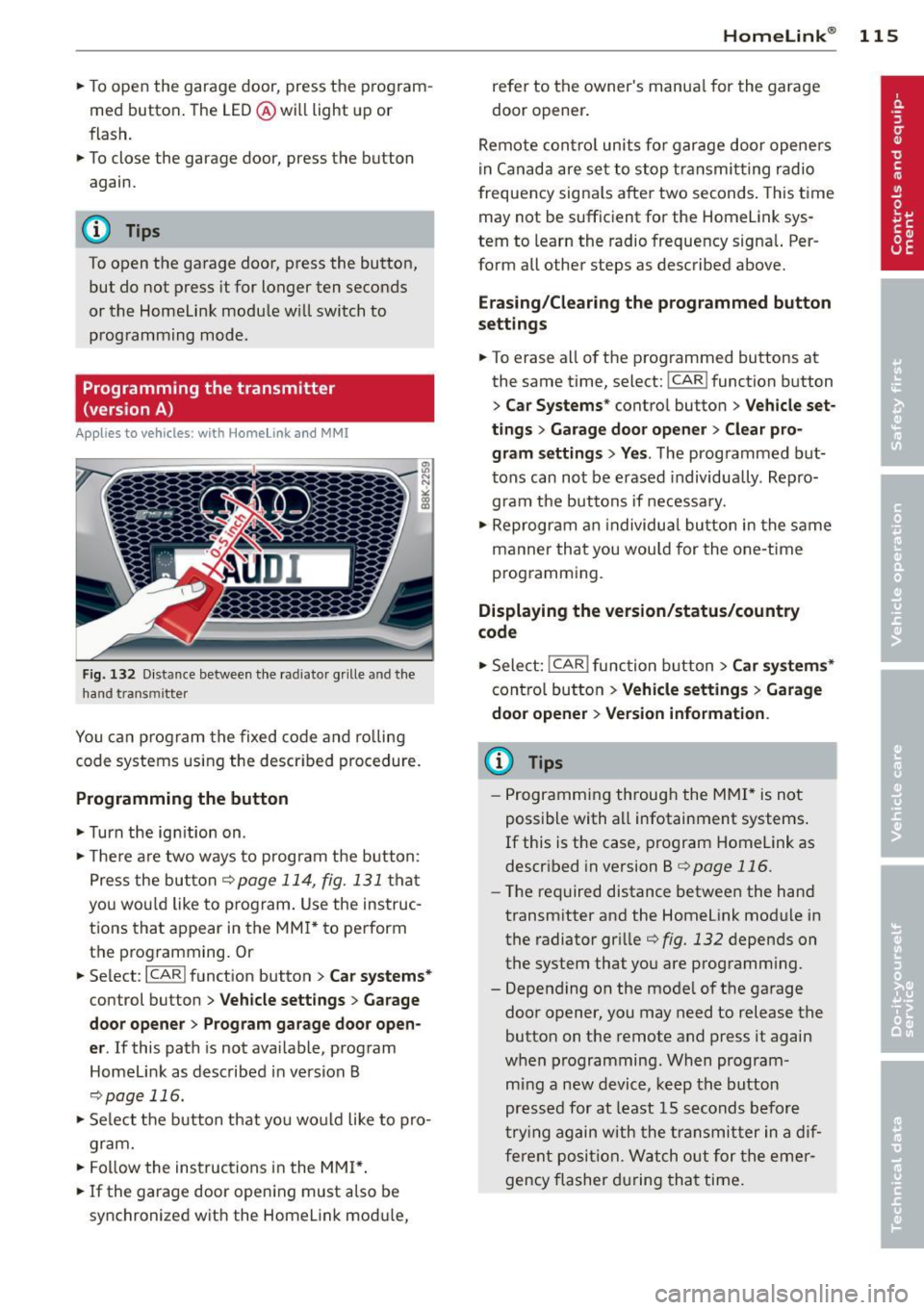
Fig. 132 D istance between t he radia tor grille and t he
hand transmitter
You ca n program the fixed code and ro lling
code systems us ing the described procedure.
Programming the button
.. Turn the ign it ion on .
.. The re a re two ways to prog ram the button:
Press the but ton
¢page 114, fig. 131 that
you wou ld like to program. Use the instruc
tions that appear in the MM I* to perform
the p rogramming. Or
.. Select :
I CARI function button > C ar system s*
control button > Vehicle sett ings > Garage
door opene r> Program garage door open ·
er .
If this path is not ava ilable, program
Homelink as described in vers ion B
¢page 116.
.. Se lect the b utton that you wo uld like to pro
gram.
.. Fol low the instructions in the MMI* .
.. If the garage door open ing must a lso be
synchronized wit h the Homelink mod ule,
Homelink ® 115
refer to the owner's manua l for the garage
door opener .
Remote con tro l units fo r garage door opene rs
in Canada are se t to stop transmit ting radio
frequency signa ls after two seconds . This t ime
may not be sufficient for the Home Link sys
tem to learn the radio frequency signal. Per
form all other steps as described above.
Erasing/Cl earing th e programmed button
s etting s
.. To erase all of the programmed buttons at
the same time, select:
I CAR! function button
> Car Sy stems * contro l button > Vehicle set ·
tings > Garag e door open er > Clear pro·
gr am settings > Yes .
The programmed but
tons can not be erased individua lly . Repro
gram the buttons if necessary .
.. Reprogram an individua l button in the same
manner that you would for the one-time
programming .
Displaying the version /status /country
code
.. Select: !CAR ! function b utton > C ar sy stem s*
cont ro l button > Vehicle setting s > Garage
door opener > Version information .
(D Tips
-Programming through the MMI* is not
possible with a ll infotainment systems .
If this is the case, program Homelink as
descr ibed in version B ¢
page 116.
-The required distance betwee n the hand
transm itter and the Homelink module in
the radiator grille¢
fig. 132 depends on
the system that you are programm ing .
- Depend ing on the mode l of the garage
door opener, you may need to release the
button on the remote and press it again
when programming. When program
m ing a new device, keep the button
pressed for at least 15 seconds before
t ry ing again with the transmit ter in a dif
ferent position. Watch o ut for the emer
gency flasher during tha t time .
Page 118 of 286

116 Homelink®
Programming the transmitter
(version B)
Applies to vehicles: with Homelink
Fig. 133 Distance between t he rad iator grille and the
hand transm itter
P rogramming: phase 1 on th e control unit
1. Sw itch on the ign it ion (do not start the
engine) .
2. Press and hold both of the outer Home
Link buttons
¢ page 114, fig. 131 unti l
the LED @turns off completely (about
20
seconds). Th is procedure clears the stand
ard codes that were set at the factory and
does not need to be repeated again to
p rogram the other buttons .
3 . Briefly press the Homelink button that
you would like to prog ram .
4. Wai t unti l the LED @ beg ins to blin k
q uickly. The Homelink module wi ll now
remain in learning mode for
5 minutes .
5. Now stand in front of your vehicle with
the original hand transmitter for the ga
rage door opener or for the device that
you would like to allocate to the Home
Link button .
P rogramming: pha se 2 on the radiator
gr ille
6 . Hold the orig inal hand transmitter some
what towa rds the center of your vehicle's
r adiato r grille ¢
fig. 133 .
7. Now activate (p ress) the hand transmit
ter.
8 . Pay attention to the tu rn signals fo r your
vehicle when activating the hand trans
mitter . If the emergency flashers blink
three times, the programming was suc
cessful. If the emergency flasher only blinks one time, the S minute time limit for the adaptation has expired or the pro
gramming was unsuccessful. Repeat the
programming from step 3 on the controls
or select another distance from the radia
tor grille.
9 . If the garage door or other devices still
fail to be activated w it h the HomeL ink
control buttons after programming is
comple ted, it is possib le tha t these sys
tems mig ht be work ing with a roll ing code
instead of the normal f ixed code .
A Roll
ing code pro gramming must be per
formed
¢ page 117 .
Program the remaining two buttons accord ing
to the instructions mentioned above . Begin
similarly with the 3rd step if the program
ming connection was successful for the first
button.
Remote contro l units for garage door openers
in Canada are set to stop transmitting radio
frequency signa ls after two seconds. This time
may not be suffic ient for the Homelink sys
tem to learn the radio frequency signa l. Per
form all other steps as described above.
E rasing the button s
.,. Switch on the ignition (do not start the en
gine).
.,. Press and hold both of the outer buttons un
til the LED @turns off completely (about
20 seconds) to erase all of the buttons si
multaneously .
.. Programmed buttons cannot be erased ind i
vidua lly. Reprogram the buttons if necessa
ry .
Reprogramming the buttons
.. Switch on the ignition (do not start the en
gine) .
.. To reprogram an individua l button, press
and hold the b utton until the L ED@starts
to f lash quickly (after abo ut ten seconds).
Release the button immedia tely. The Home
Link module will now remain in learning
mode for 5 minutes.
.,. Continue with step 5.
Page 153 of 286

There are some important things you have to know to make sure that the effectiveness of
the system will not be impaired and that dis
carded components do not cause injury or pol
lute the environment.
A WARNING
Improper care, servicing and repair proce
dures can increase the risk of personal in
jury and death by preventing an airbag from deploying when needed or deploying an airbag unexpectedly:
- Never cover, obstruct, or change the
steering wheel horn pad or airbag cover
or the instrument panel or modify them
in any way.
- Never attach any objects such as cu
pholders or telephone mountings to the
surfaces covering the airbag units.
- For cleaning the horn pad or instrument
panel, use only a soft, dry cloth or one
moistened with plain water. Solvents or
cleaners could damage the airbag cover
or change the stiffness or strength of the
material so that the airbag cannot de
ploy and protect properly.
- Never repair, adjust, or change any parts
of the airbag system.
- All work on the steering wheel, instru
ment panel, front seats or electrical sys
tem (including the installation of audio
equipment, cellular telephones and CB
radios, etc.) must be performed by a
qualified technician who has the training
and special equipment necessary.
- For any work on the airbag system, we
strongly recommend that you see your
authorized Audi dealer or qualified work
shop.
- Never modify the front bumper or parts
of the vehicle body.
- Always make sure that the side airbag
can inflate without interference:
- Never install seat covers or replace
ment upholstery over the front seat
backs that have not been specifically
approved by Audi.
Airbag system 151
-Never use additional seat cushions that
cover the areas where the side airbags
inflate.
- Damage to the original seat covers or
to the seam in the area of the side air
bag module must always be repaired
immediately by an authorized Audi
dealer.
- The airbag system can be activated only
once. After an airbag has inflated, it
must be replaced by an authorized Audi
dealer or qualified technician who has
the technical information, training and
special equipment necessary.
- The airbag system can be deployed only
once. After an airbag has been deployed, it must be replaced with new replace
ment parts designed and approved espe
cially for your Audi model version. Re placement of complete airbag systems
or airbag components must be per
formed by qualified workshops only.
Make sure that any airbag service action
is entered in your Audi Warranty
& Main
tenance booklet under
AIRBAG REPLACE
MENT RECORD.
- In accidents when an airbag is deployed,
the vehicle battery separates the alterna
tor and the starter from the vehicle elec
trical system for safety reasons with a
pyrotechnic circuit interrupter.
- Work on the pyrotechnic circuit inter
rupter must only be performed by a
qualified dealer - risk of an accident!
- If the vehicle or the circuit interrupter
is scrapped, all applicable safety pre
cautions must be followed.
{® For the sake of the environment
Undeployed airbag modules and preten
sioners might be classified as Perchlorate Material -special handling may apply, see
www.dtsc .ca.gov/hazardouswaste/per-
ch lorate. When the vehicle or parts of the
restraint system including airbag modules
safety belts with pretensioners are scrap ped, all applicable laws and regulations
must be observed. Your authorized Audi .,..
•
•
Page 185 of 286
functions will be available again when you
switch on the ignition and start the engine.
With the engine turned off
If you listen to the radio, for example, with
the eng ine turned off or use othe r MM I fu nc
tions, the battery is being discha rged.
I f starting capability is jeopardized due to en
e rgy consumpt ion, the fo llow ing warning ap
pears in the MMI disp lay :
Plea se start the eng ine soon or th e sys tem
w ill b e turn ed off .
The warning ind icates that the system will be
turned off automatically after 3 m inutes . If
you wish to cont inue us ing the functions , you
have to start the engine.
With the engine running
Although electrical energy is generated when
the vehicle is be ing driven, the battery can be
come discharged . Th is happens mostly when
little energy is be ing generated and a great
deal consumed and the battery's state of
charge is no t optimal.
To br ing the energy balance back into equili
b rium, consumers which require especially
l arge amounts of energy are tempo rarily cut
back or swit ched off. Heating systems in par
ticular requ ire a g reat dea l o f energy. If you
notice, fo r example, that the heated seats* or
the heated rear window are not heating, they have been temporari ly cut back or switched
off. These systems will be ava ilab le again as
soon as the energy balance has been restored.
You will a lso notice that engine idle speed has
been increased slightly . This is norma l and not
a cause for concern . By increasing engine idle
speed the add itiona l energy required is gener
ated and the battery is charged.
Int ellig ent technolog y 183
•
•
Page 214 of 286
212 Checking and filling
Checking the engine oil level
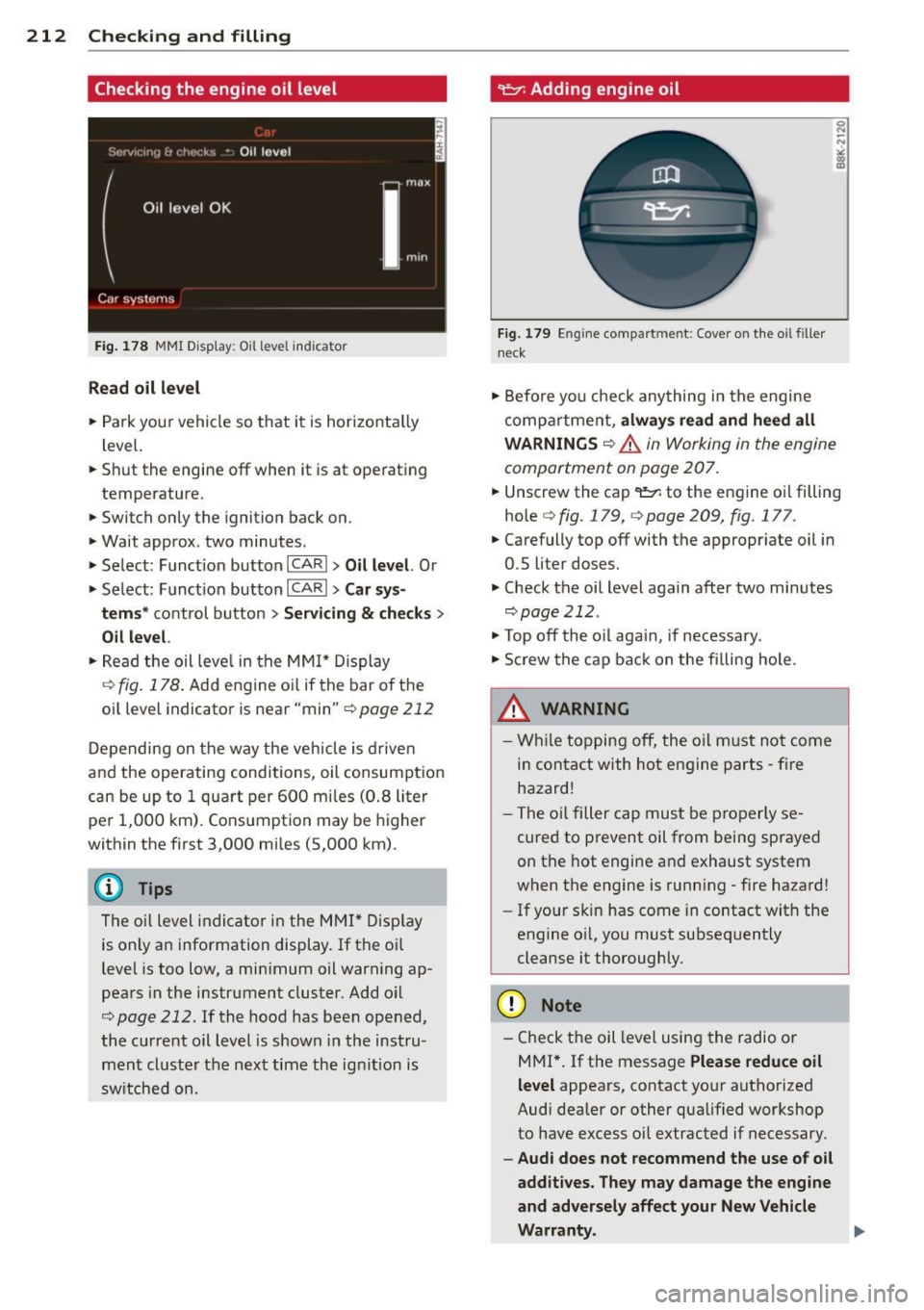
Fig. 178 MMI Display: Oil level in dicator
Read oil level
.. Park your vehicle so that it is horizontally
lev el.
.. Shut the engine off when it is at operating
temperature.
• Switch only the ignition back on.
• Wait approx. two minutes.
> Select: Function button ICARI > Oil level. Or
> Select: Function button ICAR I > Car sys-
tems *
control button > Servicing & checks >
Oil level.
.. Read the oil level in the MMI* Display
¢
fig. 178. Add engine oil if the bar of the
oil level indicator is near "min"¢
page 212
Depending on the way the vehicle is driven
and the operating conditions, oil consumption
can be up to 1 quart per 600 miles (0.8 liter
per 1,000 km). Consumption may be higher
within the first 3,000 miles (5,000 km).
The oil level indicator in the MMI* Display
is only an information display. If the oil
level is too low, a minimum oil warning ap
pears in the instrument cluster. Add oil
¢
page 212. If the hood has been opened,
the current oil level is shown in the instru
ment cluster the next time the ignition is
switched on.
~ Adding engine oil
Fig. 179 Engine compartment: Cover on the oil filler
n ec k
• Before you check anything in the engine
compartment,
always read and heed all
WARNINGS
¢ .A in Working in the engine
compartment on page 207 .
.. Unscrew the cap '1:::1: to the engine oil filling
hole
q fig. 179, q page 209, fig. 177.
.. Carefully top off with the appropriate oil in
0.5 liter doses.
.. Check the oil level again after two minutes
qpage212.
• Top off the oil again, if necessary.
• Screw the cap back on the filling hole .
.8_ WARNING
- While topping off, the oil must not come
in contact with hot engine parts -fire
hazard!
- The oil filler cap must be properly se
cured to prevent oil from being sprayed
on the hot engine and exhaust system
when the engine is running -fire hazard!
- If your skin has come in contact with the
engine oil, you must subsequently
cleanse it thoroughly.
(D Note
- Check the oil level using the radio or
M Ml*.
If the message Please reduce oil
level
appears, contact your authorized
Audi dealer or other qualified workshop
to have excess oil extracted if necessary.
- Audi does not recommend the use of oil
additives. They may damage the engine
and adversely affect your New Vehicle
Warranty. .,..
Page 222 of 286

220 Check ing and filling
Al ways read and h eed all WARNING S below
¢ A and ¢ A in Working on the bottery on
page 218.
.,. Turn off the ignit ion and a ll elect rical con
sumers .
.,. Make sure the area is well venti lated when
yo u charge the battery.
.,. Open the engine hood ¢
page 207.
.,. Open the cover on the positive pole
¢ fig . 183 .
.,. Connect the charger connectors accord ing to
the instructions to the
j ump sta rt bolt s.
(Bolts under the cover= "positive" , Bolts
with hex head= "negative") .
.,. Only now plug the mains lead for the charg
ing equipment into the wall outlet and turn
it on ¢.&_ .
.,. Ma ke sure the ch arging rat e is not ov er
30 amp s/14. 8 Volt.
.,. When the battery is fully charged: Turn the
charging equ ipment off and remove the
mains lead from the wall outlet .
.,. Now remove the clamps for the charg ing
equipment.
.,. Close the cover on the posit ive po le.
.,. Close the hood
¢ page 207.
A discharged batte ry can freez e at tempera
tures of on ly 32 ° F (0 °C). A llow a frozen bat
tery to thaw completely before attempt ing to
charge it¢
A . Howeve r, we recommend not
using a thawed battery again because the bat
tery cas ing can be cracked d ue to ice forma
tion and can leak battery acid.
Batt ery charging (Ma ximum cha rging rate
of 30 amp s/14 .8 Volt)
When charging at low voltages (e.g . w ith a
tr ickle ch arger ), the battery cables do not
have to be d isconnected first. The battery
caps should
not be opened when charging a
battery .
It is not necessary to remove the battery from
the luggage compartment.
Fa st chargin g th e batt ery (cha rging rate
ab ove 14.8 V olt s)
For technical reasons do not use a battery
charger that uses voltage greater than 14.8
Volts to charge your vehicle's battery.
A WARNING
= -
Charging a battery can be dangerous .
-Always follow the operating instructions
provided by the battery charger manu
facturer when charg ing your battery .
- Never charge a frozen battery. It may ex
plode because of gas trapped in the ice.
Allow a frozen battery to thaw out f irst .
- Do not reuse batteries wh ich were fro
zen. The battery housing may have
cracked and weakened when the battery
froze.
- Charge the battery in a well ventilated area. Keep away from open flame or elec
tr ica l spark. Do not smoke. Hydrogen gas
generated by the battery is explos ive .
- To reduce the danger of explosion, never
connect or d isconnect charger cab les
while the charger is ope rat ing .
- Fast charging a battery is dangerous and
should only be attempted by a compe
tent techn ic ian wi th the proper equip
ment.
- Battery acid that may sp ill dur ing cha rg
ing should be washed off wi th a solut ion
of warm water and baking soda to neu
tralize the ac id.
(D Note
Neve r use a fast charger as a booster to
start the eng ine. Th is w ill seriously dam
age sensitive e lectronic components, such
as contro l units, re lays, radio, etc., as well
as the battery charger.