parking AUDI RS5 CABRIOLET 2013 Owners Manual
[x] Cancel search | Manufacturer: AUDI, Model Year: 2013, Model line: RS5 CABRIOLET, Model: AUDI RS5 CABRIOLET 2013Pages: 286, PDF Size: 71 MB
Page 4 of 286
2 Table of contents Vehicle literature .. .. .. .. .. ... .
5
About this Owner's Manual . . . 6
Controls and equipment .. ... .
Ins truments and controls .. . .
General illus tration .... ... .. .. ... .
Instruments and warning /
indicator lights ........ .. .. .. . .
I ns truments . .. .. ..... ... .. .. ... .
War ning/ indi cator lights ... .. ... .. .
Driver information d isplay .. . .
I ntroduct ion . .. .. ..... ... .. .. ... .
Trip computer .. .. ..... ... .. .. ... .
Service interval d isp lay .... .. .. ... .
Eng ine oil temperature indicator ... .
Lap timer .. ........ ..... .. ... .. .
On -Board Diagnostic system (OBD) .. .
Opening and closing .... .. .. . .
Power locking system .. ... .. .. .. . .
R ear lid .. .. ................ ... . .
P owe r win dows . ...... ... .. .. ... .
Va let par king . ......... .. .. .. .. . .
Power top .. .. ...... .... ... .. . .
Autom atic power top ...... .. .. ... .
W ind defle cto r ......... .. .. .. .. . .
P owe r top emergency operation
Clear vision .............. .. ... .
L ights . .. .. .. . .......... .. .. .. . .
I n ter ior lights .. .. ..... ... .. .. ... .
V 1s1on ...... .. .. ..... ... .. .. ... .
W iper and washer system . ... ... .. .
Dig ita l compass ............ .. ... .
Seats and storage ... .. .. .. ... .
General recommendat ions . .. .. .. . .
Front seats ... ........... .. .. ... .
H ead restraints . ......... .... .. . .
Seat memo ry ............. ... .. . .
As htray .. .. ... .... .... .. .. .. .. . .
C igarette lig hte r .......... .. .. .. . .
St orage ...... ........... ....... . 8
8
8
10
1
0
13
24
2 4
25
27
28
28
29
31
31
37
39
4 0
42
42
46
47
52
52
55
5 5
57
59
61
61
62
64
64
65
66
66
Lugg age compartmen t . . . . . . . . . . . . 6 7 Warm and cold
... .. ..... .... . .
Climate co ntrols . ... ... ..... ... .. .
On the road ... .. ... ..... ... .. .
Stee ring . ..... .. ... .. ..... .... . .
Ign it io n lock ..... .. .... .... ... .. .
Convenience key .. ... .......... .. .
Driver messages ................. .
E lectromechanical parking brake . .. .
Speed warning sys tem .. .. ... ... .. .
Cru ise cont ro l .. .. ............... .
Transm ission .. ..... ......... . .
S · ® tronrc .. ... ... ............... .
Audi adaptive cruise control and braking guard .......... . .
I n troduc tion ... .. ... .. .. ... ..... .
Genera l informa tion ......... .. .. .
A udi adaptive cruise cont rol ..... .. .
A udi braking gua rd ..... .... ... .. .
Messages ..... .. .. ... ..... ... .. .
Audi side assist ............ .. .
L ane change ass istant
69
69
74
74
74
77
78
79
81
82
8 5
85
92
92
9 2
94
98
99
101
101
Audi drive select . . . . . . . . . . . . . . 104
D riving set tings . . . . . . . . . . . . . . . . . . 104
Park assist . . . . . . . . . . . . . . . . . . . . . 107
Parking sys tem . . . . . . . . . . . . . . . . . . . 10 7
Parking system plu s . . . . . . . . . . . . . . . 107
Pa rking system (rear, with rear view
camera) . . . . . . . . . . . . . . . . . . . . . . . .
108
Homelink ® . . . . . . . . . . . . . . . . . . . . 114
U niversa l remote contro l..... ... .. . 114
Safety fir st . . . . . . . . . . . . . . . . . . . . 118
Driving Safely . . . . . . . . . . . . . . . . . 118
Genera l notes . . . . . . . . . . . . . . . . . . . . 118
Proper occupant seating positions . . . 119
Driver and passenger s ide footwe ll . . . 123
Pedal a rea . . . . . . . . . . . . . . . . . . . . . . . 123
Stow ing luggage .... .. .. ... ..... . 124
Repo rting Safety Defe cts . . . . . . . . . . . 12 6
Active rollove r pro te ction sy st em . . . . 1 27
Page 8 of 286
6 About this Owner's Manual
This owner's manua l contains important infor
mation, tips, suggestions, and warnings for
the use of your veh icle.
Make sure that this owner's manua l is always
located in the vehicle. This is especia lly impor
tant if you allow other people to drive the ve
h icle, or if you sell it.
This owner's manua l descr ibes the
equipment
range
specified for this mode l at the editoria l
deadline date. Some of the equipment descri
bed here will on ly be available at a later date,
or only in specific markets.
Some sections in this owner's manua l do not
apply to a ll vehicles . In that case, the
range of
applicability
is g iven at the beginn ing of the
section, e.g., "Applies to vehicles: with ad
vanced parking system". In addition, optional
or vehicle -specific equipment is indicated by
a n aster isk
" *" .
Illustrations may be different from those in
your vehicle, and are intended to be viewed as
a basic guide .
You will find a
table of contents at the begin
n ing of this book, which disp lays all topics de
scribed in this manual in order of appearance.
You will find an alphabetical
index at the end
of this book .
All
directions , such as "left", "right", "front",
''back", are relative to the direct ion of travel.
* Optional or vehicle-specific equipment
.,.. This section continues on the next page.
® Registered trademarks are identified with
a®. If this symbol is missing, it is no guar
antee that the terms can be used free ly .
~ &. Cross-reference to a "WARN ING!" with-
in a section. For indication w ith a page num
ber, the corresponding "WARNING!" can be
found outside of the section .
A WARNING
Text with this symbol contains important
information on safety and how to reduce
the risk of personal injury or death.
(D Note
Text with this symbo l draws your attention
to potentia l sources of damage to your ve
hicle.
@) For the sake of the environment
Text with this symbo l contains information
abo ut the environment and how you can
help protect it.
{!) Tips
Text with this symbo l contains specia l tips
and other information about gett ing the
most out of your vehicle and its features.
Page 11 of 286

CD
@
®
©
®
®
Door handle
Power locking sw it ch
Memory buttons (dr iver's seat)
Button for side ass ist
A ir outlets
Control leve r for :
- Turn signal and high beam
0 Multi-function steering wheel
with:
- Horn
- Driver's airbag ...... ... .. .
- Audio/video , telephone and
navigation buttons
- Rocker switches for tiptron ic
operation .... .... ... .... .
@ ISETI button .... ....... .... .
® Instrument cluster ......... .
@ Reset button for trip odometer
@ Switches for:
- Windsh ield wiper/washer .. .
- Trip computer ............ .
- Lap -Timer ............ ... .
@ Ignition lock ... .... ... .... .
@ Adju stable steer ing column
@ Control lever for:
- Cruise contro l ....... ... .. .
- adaptive cruise cont ro l ... .. .
@ Instrument lighting .... .. .. .
@ Release lever for the engine
hood .. .. .... .. .. .. ....... .
@ Data Link Connector for On
Board Diagnost ics (OBD II) . .. .
35
64
101
53
14 1
89
11
10
12
57
25
28
74
74
82
92
55
207
29
@ Lig ht switch . . . . . . . . . . . . . . . . 52
@ Adjuster control fo r outside mi r-
rors . . . . . . . . . . . . . . . . . . . . . . 55
@ Power window switches . . . . . . 39
@ Radio-Disp lay or MM I-Disp lay
@ Depending on options:
- Radio system
- CD changer
@ Emergency flasher . . . . . . . . . . 54
@ Glove compartment ( lockable) 6 7
@ Front passenger's a irbag . . . . . 141
Instrument s and control s 9
@ Depending on options, switches
for :
- drive select .. .. . .. ... ... . . 104
- Electron ic Stabili zation Con-
trol ...... .. .. . ... ...... .
- parking sy stem ....... .... . 176
107
@ Deluxe automat
ic cl imate con-
t ro l .... .. .. .. ........... . .
69
@ Se lector lever for automatic
transmission .. .... ........ .
85
@) Ashtray with cigarette lighter 65
@ Depending on options:
- MMI control console or
- drive select . . . . . . . . . . . . . . . 104
- Electronic Stabili zation Con-
trol button . . . . . . . . . . . . . . . 176
- parking system . . . . . . . . . . . . 107
@ Central power w indow swi tch
@ Power top switc h . . . . . . . . . . . . 44
@ I S T AR T ENGINE S TOPI button 77
§) Electromechanical parking
brake . . . . . . . . . . . . . . . . . . . . . 79
(D Tips
- Some of the equipment or features
show n in the general illustration may be
standard equ ipment on your vehicle or
may be opt ional equ ipment depending
on your model. Always as k yo ur au thor
ized Audi dea ler if you have a quest ion
about your ve hicle .
- Ope rat ion of the Multi Med ia In terface
(MMI) is described in a separa te manua l.
Page 15 of 286
Instrument s and warnin g/indic ator ligh ts 13
(D Note
Never run the tank completely dry! An ir
reg ular supply of fuel can cause eng ine
m isfiring and fuel could enter into the ex
haust system. The catalyt ic converter
could the n overheat and be damaged .
Warning/indicator
Lights
Description
The indicator lights in the instrument cluster
blink or turn on . They indicate functions or
malfunct ions ¢,&. .
Messages may appear with some indicator
lights. A warning signal will sound at the
same time . The messages disappear again af
ter a short t ime . To display a message again ,
pressthelSE T!button
¢ page 11. If severa l
malfunc tions occu r, each of the indica to r/
warn ing lamps will be d isplayed in succession
for abo ut two seconds at a time .
Some ind icators lights in the disp lay can turn
on in several colors.
_& WARNING
- F ailure to heed warning lights and o ther
impor tant vehicle info rmation may result
in serious persona l injury o r vehicle dam
age.
- Whenever sta lled or stopped for repair,
move the vehicle a safe distance off the
road, stop the engine, and turn on the
eme rgency flasher¢
page 54.
-The e ngine compartment of any motor
vehicle is a potentially hazardous area.
Before you check anything in the engine
compartment, stop the engine and let it
cool down. Always exercise extreme cau
t ion when wor king under the hood
¢ page 200, Engine compartment
(D Tips
Ma lfunctions or faults w ill be identified ei
ther with a red symbo l (pr io rity 1 -Dan- ger!) or with a yellow symbol (prio
rit y 2 -
Warning).
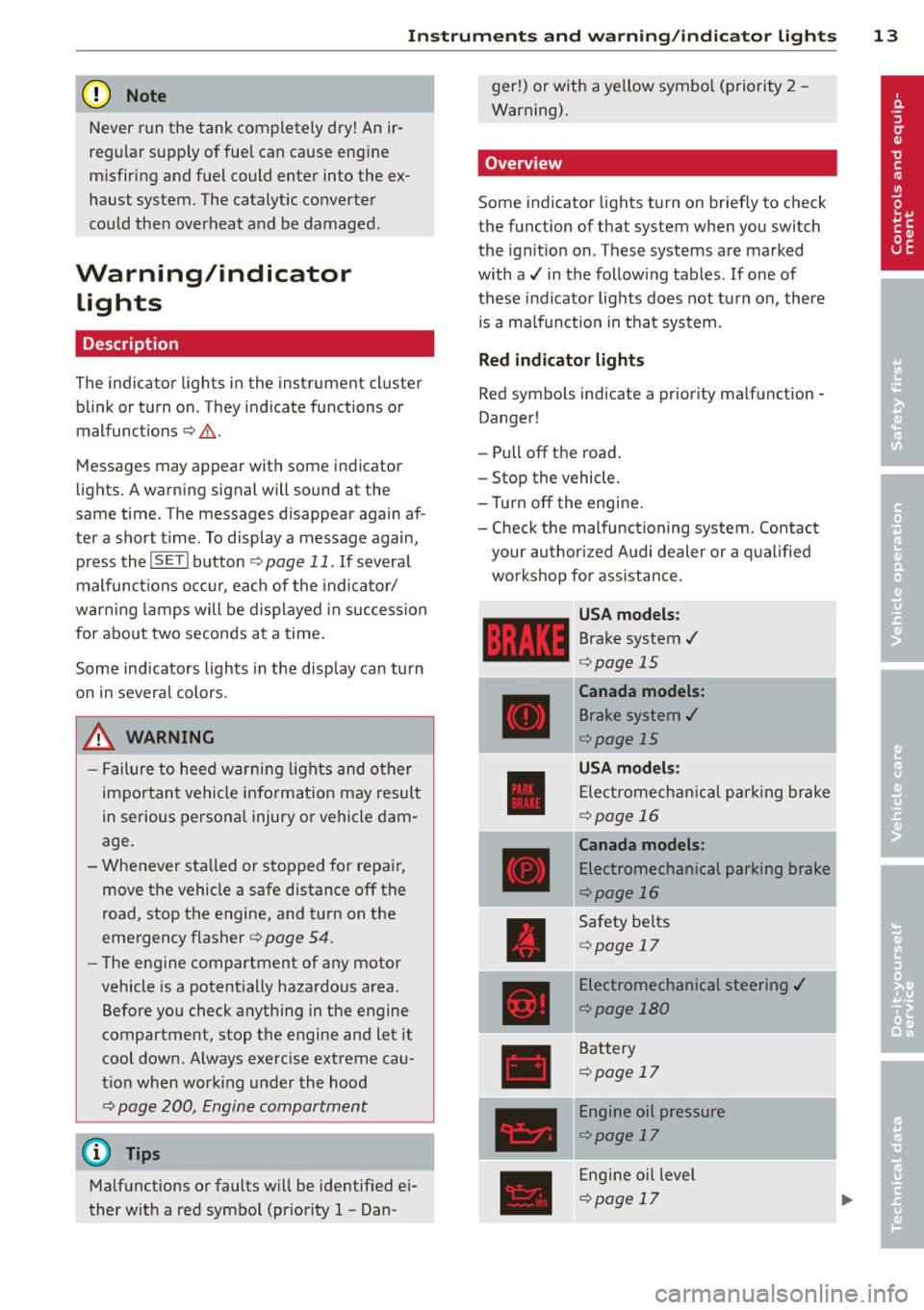
' Overview
Some indicator lights t urn on briefly to check
the function of that system when you switch
the ignit ion on . These systems are marked
with a../ in the fo llow ing tables . If one of
these indicator lights does not tu rn on, there
i s a ma lf u nct ion in that system.
Red indicator lights
Red symbo ls indicate a prior ity ma lfunction -
Danger!
- Pull off the road .
- Stop the vehicle.
- Tur n off the engi ne.
- Check t he malfunc tioning system. Contac t
your author ized A udi dealer or a q ualified
workshop for assistance.
USA models :
Brake system../
¢page 15
----~r~
Canada models:
Brake system ../
¢page 15
USA mod els :
Elec tromech anical parki ng br ake
¢ page 16
Canada models:
Electromechanical parking brake
¢page 16
Safety be lts
¢ page 17
Electromechanical steering ../
¢page 180
Battery
¢page 17
Engine oil pressure
¢page 17
Eng ine oil level
¢page 17
Page 16 of 286

14 Instrum ent s and w arn ing /indic ato r light s
Engine cooling system
r:::;,page 18
Steering column lock
r:::;, page 18
Ignition lock
r:::;,page 18
USA mod els:
Speed warning system
r:::;, page 81
Canada models :
Speed warning system
r:::;,page81
Adapt ive cru ise control./
r:::;, page 94
Yellow ind ic a tor lights
Ye llow symbols indicate a priority 2 ma lfunc
tion -Warning!
•
I
ESC OFF
m
ll!fJ
Power top operation
r:::;, page43
Electronic Stabilization Control
(ESC) ,/
r:::;, page 19
Electronic Stabilization Control ( E SC) ./
r:::;,page 19
Electronic Stabilization Control
(ESC)
r:::;,page 176
USA mod els :
Anti-lock braking system (ABS)
defective ,/
r:::;, page 19
Canada model s:
Anti-lock braking system (ABS)
defective ,/
r:::;,page 19
USA models :
Safety systems ./
r:::;,page20
Canada models :
Safety systems ,/
r:::;,page20
•
•
[I]
.,,,~,
~
•
Im
-
•
•
-
ml
II
•
m
!I
-
!!
l:J
E
II
Worn brake pads
r:::;, page20
Electromechanical parking brake
r:::;, page
79
I
Tire pressure monitoring
system./
r:::;, page 241
Tire pressure monitor ing system
r:::;, page2 41
Electronic power control./
r:::;, page 20
Malfunction indicator Lamp
(MI L),/
r:::;, page 2 0
Engine speed limitation
r:::;, page21
Engine oi l level
r:::;,page 17
Eng ine oi l sensor
r:::;, page 21
Battery
r:::;, page 17
Tank system
r:::;, page 21
Windshield washer fluid level
r:::;,page 21
Windshie ld w ipers
r:::;, page 21
Remote control key
r:::;, page
7 7
"
Battery in remote control key
r:::;, page33
Defective light bulb warning
r:::;, page 21
Rear fog light(s)*
r:::;, page 21
Headlight range control
r:::;, page 22
Page 17 of 286

Instrument s and warnin g/indic ator ligh ts 15
ml
adaptive light *
¢page22
m
Light-/rain sensor*
¢page22
-
Ill
Sport differential*
¢page 22
m
Ignition lock
¢page22
Ill
Steering column lock
¢page 18
Et·D
Electromechanical steering,
dynamic steering *./
¢page 180
•
Transmission ¢ page 90
m
Transmission ¢ page 90
Other indicator light s
1111
Turn signals
ii ¢page22
CRUISE
•
Pl
-
I
•
USA models: Cruise control
¢page82
Canada model s: Cruise control
¢page82
Adaptive cruise control*
¢page94
-Adaptive cruise control*
¢page94
High beam
¢page 53
BRAKE /((f) ) Brake system
The light illum inates when the ignition is
switched on. It goes out after the engine has
been started. Th is indicates that the brake
warn ing light is functioning properly.
If the brake warning light doe s not light up
when the engine i s cranking , the re m ay be a malfunction in the elect
rical system . In thi s
ca se, contact your Audi deale r.
If the brake system wa rn ing/ indicator light
tu rns o n, there is a b ra ke sys tem ma lfunction .
1111 (USA model s)/. (Canada model s)
Stop ve hicle and check brake fluid lev el
If the indicator light turns on and the mes
sage appears, proceed as follows:
.,. Pull off the road.
.,. Stop the vehicle.
.,. Turn off the engine .
.,. Check the b rake fluid level¢
page 216 .
.,. Contact your nearest authorized repair fa-
cility if necessa ry.
W arning! Fault in brake system . Contact
d ealer
If the ABS indicator light E (USA models)/
Ii] (Canada mode ls), the ESC ind icator light
J.i) and the brake system indicator light
1111 ( U SA mode ls)/ . (Canada mode ls) tur n
o n and the message appears, the ABS, ESC
and braking distr ibut ion are not working¢,&..
Carefully drive to your author ized Audi dealer
immediately to have the malfunct ion correct
ed ¢& .
1111 (USA models )/. (Canada models)
Parking brake system fault! See owner 's
manual
- If the ind icator light and the message ap
pear
when stationary or after switch ing the
ignition on ,
check if you can release the
parking brake . Afte r releasing the parking
brake, carefully d rive to your author ized
Audi dea le r i mmediately to have the ma l
function corrected. If yo u cannot release the
parking brake, see k professiona l assistance .
- If the ind icator light and the message ap
pea r
while driving , the emergency b ra ki ng
function may not be avail able.
It may not be
possible to set the par king brake or release
it once it has been set. Seek professiona l as-
sistance. ..,.
Page 18 of 286

16 Instrum ent s and w arn ing /indic ato r light s
(US A models): If t he warning light 1111 and
the warning light
E+J appear toget her, imme
di ate ly contact your authorize d Aud i dea ler or
qua lified workshop to have all brake pa ds in
spected
¢ page 20.
When the li ght comes on, an audib le warning
signal is also given .
.&_ WARNING
-Always observe the warni ngs in
¢ page 200, Engine compartment, be
fore opening the hood and checking the
brake flu id.
- Driv ing with low brake fluid is a safety
hazard. Stop the car and get professional
assista nee.
- USA models: If the 1111 warn ing light,
the
G1 warning light and the (i1!B warn
ing light come on together, the rea r
wheels co uld lock up first unde r hard
braking. Rear wheel lock-up can cause
loss of vehicle con trol and an accident.
Have your vehicle repaired immediately
by you r authorized Aud i dea ler or a quali
fied workshop. Drive slowly and avoid
sudden, hard brake applications.
- Canada models: If the brake warning
light •• the
DJ warn ing light and the
ABS warning light
ti] come on together,
the rear wheels could lock up first under
hard braking. Rear wheel lock-up can
cause loss of vehicle control and an acc i
dent. Have yo ur vehicle repaired immed i
a tely by your authori zed A udi dealer or a
qualifie d workshop. Dr ive slowly and
avo id sudden, hard brake applicat ions.
- If the brake warning/indicator light does
not go out afte r a few seconds and the
par king brake is released, or lights up
whi le you are driving, the fluid level in
the brake fluid reservoir is too low. If you believe that it is safe to do so, proceed
immediately at low speed to the nearest
authorized Audi dealer or qualified repair
facility and have the brake system in spected. -
Always keep in mind that after severa l
brake applications, you will need greater
pressure on the brake pedal to stop your
veh icle. Do not rely on strained brakes to
respond with max imum s topping powe r
in critical s ituations . You must allow for
increased braking dis tan ces. The extra
d istance u sed up by fading br akes could
lead to an acciden t.
:l~ /(® ) Electromechanical parking brake
The warning/indicator light monitors the
electromechanical parking brake.
If the indicato r light . (USA models)/ .
(Canada mode ls) turns on, the pa rking brake
was set. If the pa rking brake is set when the
ignition is off, the indicator light turns off a f
te r abo ut 20 seconds .
The wa rning/indicator lig ht wi ll go out when
the pa rking brake is re leased.
• (USA models ) /. (Can ada models) Cau
tion: Vehicle parked too steep
If the indicator light b links and the message
appears, there is not enough braking power to
keep the vehicle from rolling . The brakes have
overheated . The vehicle cou ld roll away eve n
o n a sma ll incline .
Press brake pedal to release parking brake
To release the parking b rake, press the brake
peda l and press the button(®) or start dr iving
with starting assist at the same time
¢ page 80.
Please relea se p arking brake
To re lease the par king brake manually , p ress
the b rake peda l and press the button<®> at
the same time. The pa rking brake on ly re leas
es automatically if the driver's safety be lt is
fastened.
Iii Parkin g brake!
If the Iii indicator light t urns on and th is
message appears, the re is a parking b rake
malfunction. D rive to your au thori zed A udi
Page 34 of 286

32 Opening and clo sing
- If the power locking system should ma l
function, you can lock the driver's door us ing the mechanical key
c:> page 36.
- If the power locking system should fail,
you can sti ll open the fue l tank flap in an
emergency
c:> page 205.
- You are we ll advised not to keep valua
bles inside an unattended vehicle, visib le
or not. Even a properly locked vehicle
cannot provide the security of a safe.
- If the LED in the upper edge of the driv
er's door panel comes on for abo ut 30
seconds after t he vehicle is locked, there
i s a ma lfunction in the power locki ng or
the anti-theft warning system. Have the
malfunction corrected by an author ized
A udi dealersh ip or qua lified repai r fac ili
ty.
Key set
F ig . 18 Key set
@ Remote cont rol key with mechanical
key
You can centrally lock and unlock your vehicle
and start the engine with the master key with
remo te con trol. A mec hanical key is integ rat
ed i n the master key
c:> page 33 .
@ Emergency key
The emergency key is not intended for con
stant use.
It should on ly be used in an emer
gen cy, fo r example, in place of the ign ition key
cc> page 7 6. Keep it in a s afe p lace and do
not ca rry it on your key ring .
Key replacement
If you lose a key, contact you r authorized Audi
dealer immed iate ly to have the
Lost key disa
bled. Be sure to bring all your keys with you .
Number of keys
You can chec k the number of assigned keys to
yo ur vehicle
c:> page 11. This allows you to
make su re you have re ceived all of the keys
when you purchase a used vehicle.
Data in the master key
D uring d riving, s ervice and maintenance-rele
vant data is continuously stored on your mas
te r k ey. Your Aud i service adviser can read out
t hi s data and tell you abo ut the work yo ur
ve
hicle needs . This applies also to vehicles with
convenience key*.
Personal comfort settings
If two people use one veh icle, it i s r ecom
men ded that e ach person alw ays uses "t heir
own" maste r key. When the ignition is tu rne d
off or when the vehicle is locked, personal
convenience setti ngs for the following sys
tems are stored and assigned to the remote
master key.
- Climate contro l
- Powe r lock ing system
- Seat memory *
- Parking system*
- Adapt ive cru ise control*
- Side assist*
- Drive se lect*
T he s to red settings are au toma tically recalled
whe n you unlock the vehicle, when yo u open
t h e doors or w hen you t urn on t he ignitio n.
A WARNING
-Do not leave your vehicle unattended
wit h the key in the ignition lock. Entry by
unaut horized persons co uld endanger
you or result in theft or damage the vehi
cle.
- Do not leave ch ildren unattended in the
veh icle, especially with access to vehicle
Page 42 of 286
40 Opening and clo sing
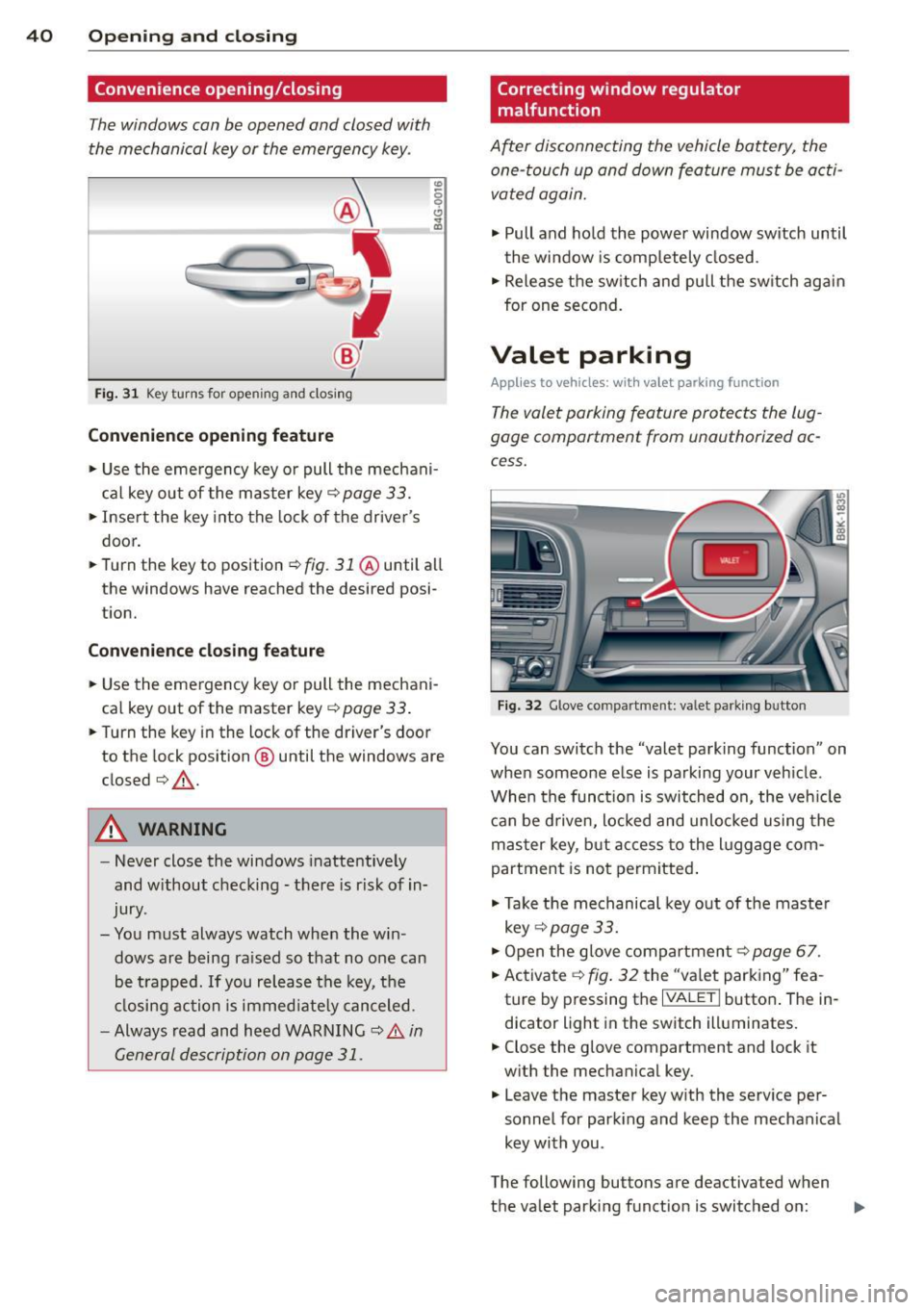
Convenience opening/closing
The windows can be opened and closed with
the mechanical key or the emergency key.
@
' ~-~
® '
Fig . 31 Key turns for open ing an d clos ing
Conv eni ence open ing fe ature
"' 0 0 0
" m
• Use the eme rgency key or pull the mechani
cal key out of the master key¢
page 33.
• Inse rt the key into the lock of the driver's
door.
• Turn the key to position~
fig. 31 @until all
the windows have reached the desired posi
t ion.
Con venience clo sing f eature
• Use the emergency key or pull the mechani
cal key out of the master key¢
page 33 .
• Turn the key in the lock of the dr iver's door
to the lock position @ until the windows are
closed¢ &.
A WARNING
-Never close the windows inattentive ly
and w ithout checking -there is risk of in
jury.
- You must always watch when the win dows are being ra ised so that no one can
be t rapped. If you release the key, the
closing action is immed iate ly canceled.
- Always read and heed WARNING ¢
A in
General description on page 31.
Correcting window regulator
malfunction
After disconnecting the vehicle battery, the
one-touch up and down feature must be activated again.
• Pull and ho ld the power window switch until
the window is completely closed.
• Release the sw itch and pull the switch again
for one second.
Valet parking
App lies to vehicles: wit h va le t parking function
The valet parking feature protects the lug
gage compartment from unauthorized ac
cess.
F ig . 32 Glove compartme nt: valet parking button
You can switch the "valet parking function" on
when someone else is parking your veh icle .
When the funct io n is switched on, the veh icle
can be d riven, locked and unlocked using the
master key, but access to the l uggage com
partment is not permitted .
• Take the mechanical key out of the maste r
key ¢
page 33.
• Open the glove compartment¢ page 67.
• Activate ¢
fig. 32 the "va let parking" fea
ture by p ressing the
I VALET I button . The in
dicator light in the switch illuminates.
• Close the glove compartment and lock it
w ith the mechanical key .
• Leave the master key w ith the serv ice pe r
sonnel for park ing and keep the mechanical
key with you .
The following buttons are deactivated when
the valet parking function is switched on: ..,_
Page 43 of 286
-1<=>1 button on the master key
- Handle in the rear lid
When the valet parking feature is act ivated,
the message
Val et par king activat ed appears
i n the ins trument cluster display when you
switch the ignition on. Opening and clo
sin g 41