cruise control AUDI RS5 CABRIOLET 2015 User Guide
[x] Cancel search | Manufacturer: AUDI, Model Year: 2015, Model line: RS5 CABRIOLET, Model: AUDI RS5 CABRIOLET 2015Pages: 284, PDF Size: 69.56 MB
Page 95 of 284
Audi adaptive cruise control and braking guard 93
shown in the tachometer @and is also
shown briefly in the display @¢
fig. 108 .
Switching Audi adaptive cruise control off
~ Push the lever away from you into position
@ until it clicks into place. The message
ACC off appears.
@ Indicator lights
II-Adaptive cru ise control is switched on.
No vehicles are detected up ahead. The stored
speed is ma intained.
• -A moving vehicle is detected up ahead.
The adaptive cruise control system regulates
the speed and distance to the moving vehicle
ahead and acce lerates/brakes automatica lly.
• -When automatic braking is not able to
keep enough distance to a previously detected
mov ing vehicle up ahead, you must take con
trol and brake¢
page 95, Request for driver
intervention.
© Display
If adaptive cruise control is not shown in the
d isplay, you can call it up with the
I RESET I
button ¢ page 23.
Based on the symbols in the d isplay, you can
determine if the system is maintaining a dis
tance to the vehicle ahead and what that dis
tance is.
No vehicle -No vehicle ahead was detected.
White vehicle -A vehicle ahead was detected .
Red vehicle -Prompt for the driver to take ac
tion
~ page 95.
Both arrows on the scale © indicate the dis
tance to the vehicle ahead . No ar row appears
when the vehicle is on an open road and there
is no object ahead . If an object is detected
ahead, the arrow moves on the scale.
The green zone on the scale shows the stored
distance. For information on changing the
~ stored distance, refer to~ page 94. If the
a: ~ distance selected is too close or may soon be-
rl I.O
"' rl
"' rl
come too close, the arrows move into the red
zone on the scale .
A WARNING
Improper use of the adaptive cruise con
trol can cause collisions, other accidents
and serious personal injuries.
- Pressing the
!SET ! button when driv ing at
speeds below 20 mph (30 km/h), w ill au
tomatically accelerate the vehicle to
20 mph (30 km/h), which is the mini
mum speed that can be set.
@ Tips
-If you switch the ignit ion or the adaptive
cruise control off, the set speed is erased
from the system memory.
- The electronic stab ilizat ion control (ESC)
and the anti-slip-regulat ion (ASR) are au
tom atica lly turned on when the adaptive
cruise control is turned on. Both systems
cannot be turned off if the adaptive
cruise control is turned on .
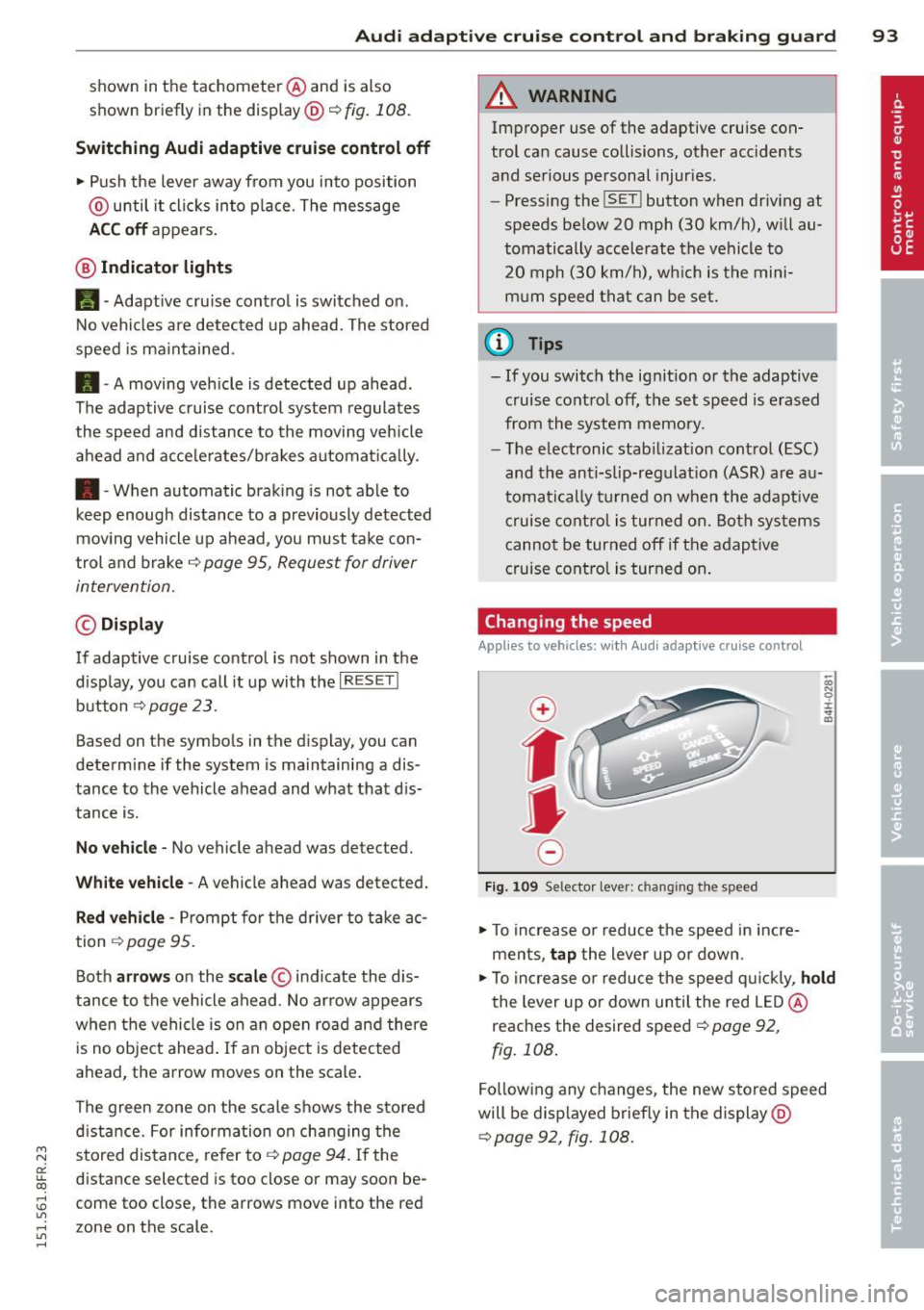
Changing the speed
Applies to vehicles: with Aud i adapt ive cru ise control
0
f
jJ
0
Fig. 109 Selector lever: ch ang ing the speed
~ To increase or reduce the speed in incre
ments,
tap the lever up or down.
-0:, N 0 ± ... a)
~ To increase or reduce the speed quickly, hold
the lever up or down until the red LED@
reaches the desired speed ¢
page 92,
fig. 108.
Following any changes, the new stored speed
will be displayed briefly in the display@
~page 92, fig. 108.
Page 96 of 284
94 Audi adaptive cruise control and braking guard
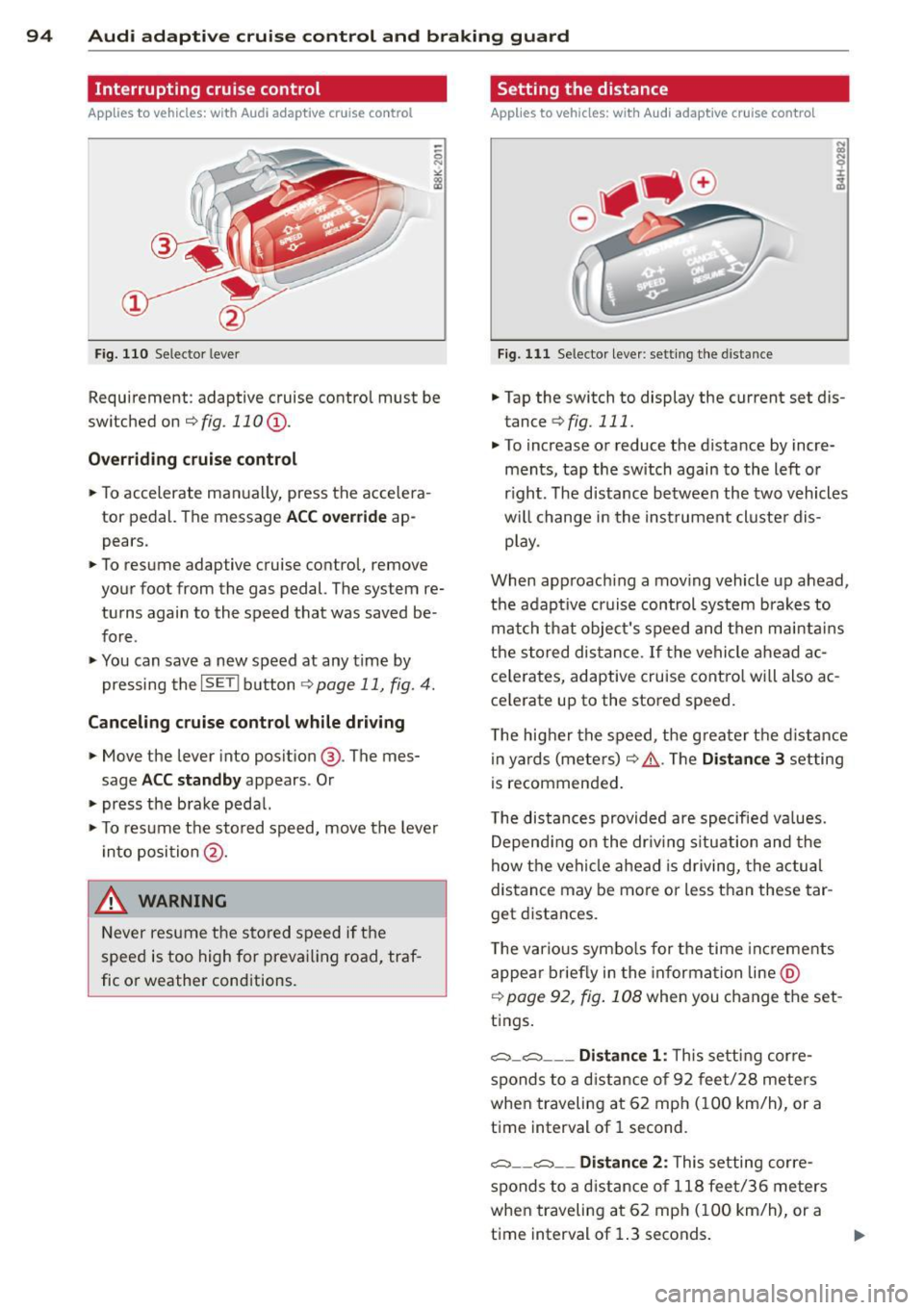
Interrupting cruise control
Applies to vehicles: with Audi adaptive cruise control
Fig. 110 Selector leve r
Requirement : adaptive cruise contro l must be
switched on
¢fig.110 (i).
Overriding cruise control
.. To accelerate ma nually, press the accelera
tor pedal. The message
ACC override ap
pears .
.. To resume adaptive cruise control, remove
your foot from the gas pedal. The system re
turns again to the speed that was saved be
fore .
.. You can save a new speed at any time by
pressing the
I SETI button ¢ page 11, fig. 4.
Canceling cruise control while driving
.. Move the lever into posit ion @. The mes
sage
ACC standby appears . Or
.. press the brake pedal.
.. To resume the stored speed, move the lever
into position @.
&_ WARNING
Never resume the stored speed if the
speed is too high for prevailing road, traf
fic or weather cond itions.
Setting the distance
Applies to vehicles: wit h Audi adapt ive cr uise contro l
Fig. 111 Selector lever : sett ing the distance
.. Tap the switch to display the current set dis
tance
¢ fig. 111 .
.. To increase or reduce the distance by incre
ments, tap the switch again to the left or
r ight. The distance between the two vehicles
w ill change in the instrument cluster dis
play .
When approach ing a moving vehicle up ahead,
the adaptive cruise control system brakes to
match that object's speed and then maintains
the stored dis tance. If the vehicle ahead ac
ce le rates, adaptive cruise control will also ac
ce lerate up to the stored speed.
T he higher the speed, the greater t he distance
in yards (meters)
c:::> /1.. Th e Distan ce 3 setting
is recommended .
T he distances provided are specified va lues .
Depending on the driv ing situation and the
how the veh icle ahead is driving, the actual
distance may be more or less than these tar
get distances.
T he various symbols for the time inc reme nts
appear briefly in the information line @
¢ page 92, fig. 108 when you change the set
tings.
c::::,_c::::, ___ Distance 1: Th is setting corre-
sponds to a distance of 92 feet/28 meters
when traveling at 62 mph (100 km/h), or a
time interval of 1 second.
c::::, __ c::::, __ Distance 2: This setting corre
sponds to a distance of 118 feet/36 meters
when traveling at 62 mph (100 km/h), or a
time interval of 1.3 seconds.
Page 97 of 284
"' N
a: LL co
rl I.O
"' rl
"' rl
Audi adaptive cruise control and braking guard 95
~--- ~-Di stance 3: This setting corre
sponds to a distance of 164 feet/SO meters
when traveling at 62 mph (100 km/h), or a
time interva l of 1.8 seconds .
~---- ~ Distance 4: This setting corre
sponds to a distance of 210 feet/64 meters
when traveling at 62 mph (100 km/h), or a
time interva l of 2.3 seconds .
A WARNING
Following other vehicles too closely in
creases the risk of collisions and serious
personal injury.
- Setting short distances to the traffic
ahead reduces the time and distance
available to br ing your vehicle to a safe
stop and ma kes it
even more necessary
to pay close attention to traffic.
- Always obey applicable traffic laws, use
good judgment, and select a safe follow
ing distance for the traffic, road and
weather conditions .
¢j) Tips
- Distance 3
is set automatically each time
you switch the ignition on.
- Your standa rd settings are automatically
stored and assigned to the remote con
trol key being used.
Setting the driving program
Applies to vehicles: with Audi adaptive cruise control
Depending on the se lected driv ing program
and distance, driving behavior when accelerat
ing will
vary from dynamic to comfortab le .
Setting the driving program for vehicles
without Audi drive select*
~ In the radio/MMI*, select: !CAR !funct ion
button >
Adaptive cruise control > Driving
prog .
> comfort, standard or dynamic. Or
~ Select: !CARI function button> Car systems*
control button > Driver assist > Adaptive
cruise control
> Driving program* > Com
fort, Standard
or Dynamic. Setting the driving mode for
vehicles with
Audi drive select*
Refer to ¢ page 103.
(D Tips
Your settings are automatica lly stored and
assigned to the remote control key being
used.
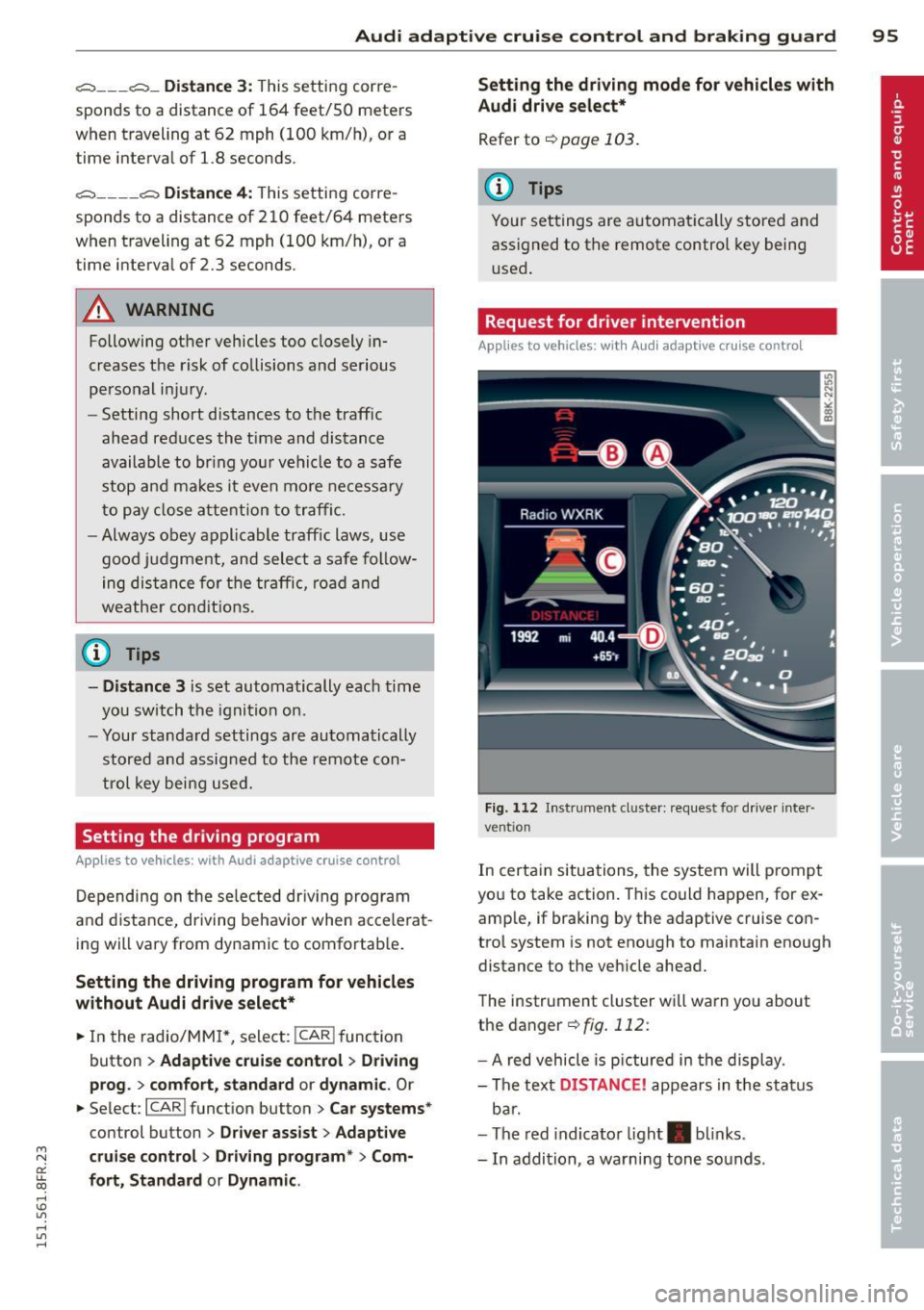
Request for driver intervention
Applies to vehicles : with Audi adaptive cruise contro l
Fig. 112 Instrument d uste r: request for drive r inte r
ve ntion
In certain situations, the system will p rompt
you to take action. This could happen, for ex
amp le, if braking by the adaptive cruise con
trol system is not enough to maintain enough
distance to the vehicle ahead.
The instrument cluster will warn you about
the danger ¢
fig. 112:
-A red vehicle is pictured in the display.
- The text
DISTANCE! appears in the status
bar.
- The red indicator light . blinks.
- In addition, a warning tone sounds .
Page 98 of 284

96 Audi adaptive cruise control and braking guard
Audi braking guard
Descript ion
Applies to vehicles: with Audi adaptive cru ise control
Fig . 11 3 Instrumen t cl uste r: approach warn ing
Braking guard uses a radar sensor. It also
functions within the limits of the system
when adaptive cruise cont ro l is switched off .
What can Audi braking guard do? When detected i n time, the system ca n assess
situations when a vehicle ahead brakes sud
denly or if your own veh icle is traveling at a
hi gh speed and approachi ng a ve hicle up
a head that is moving more slowly . Brak ing
guard does not react if i t can not detect the
situation.
The system advises you of various situations :
- The distance warning is given if you are too
close to t he vehicle ahead for a long time . If
the vehicle ahead b rakes sharply, you w ill
not be ab le to avoid a c oll is io n. The indicator
li ght . i n the disp lay comes o n.
- The approach warning is given when a de
tected vehicle up ahead in your lane is mov i ng much more slowly tha n you are or if it
brakes sha rply . W hen th is w arning is given,
i t may only b e possib le to avoid a collision
b y swerving or braking s harply . Th e in dicator
l igh t. and indic ator in the di sp la y w ill
warn you about the danger
i:> fig . 113. Yo u
will a lso hear a n acoustic signa l.
I f yo u do not reac t fas t enoug h or do not reac t
a t all to the situ ation , Br aking gu ard will i n-
ll This is not ava ilable in some co untri es .
tervene by b rak ing and the message braking
guard intervention will appea r.
- If a coll is ion is imm inent, the sys tem wi ll
fi rst provi de an acute warning by br iefly an d
sharply a pplying the brakes.
- If you do not re act to the acu te w arn ing,
bra king g uard can brake w it hi n the lim its of
the system . T his red uces the vehicle speed
in the event of a collision .
- At speeds un der 20 m ph (3 0 km/h), t he sys
tem can initiate a comp lete deceleration
short ly before a co llision
ll .
- If the bra king g uard senses that yo u are not
bra king hard enough w hen a co llision is im
m inent, it can inc rease the brak ing force.
Which functions can be controlled?
You can swi tch braki ng gu ard and t he dis
tance/ap proa ch warn ing on or off in the rad io
o r MM I
r:!;>page 97, Settings in the radio/
MMI.
A WARNING
-Lack of attention can cause collisions, oth
er accidents and serio us pe rsonal injuries.
The braking gua rd is an assist system and
ca nnot preve nt a collision by itself. The
dr ive r must alway s intervene. Th e dr ive r is
al ways res po nsib le fo r braking a t the co r
r e ct ti me.
- Always pay clos e attent io n t o traffic,
eve n when the br aking gu ard is swi tched
o n . B e rea dy t o int erve ne and be re ad y to
t ake com plete control w he never nece ssa
ry. Always keep the safe and legal dis
tance between your ve hicle an d veh icles
up ahead.
- Braking gua rd wo rks within limits and
will not res po nd outside the system lim
its, for examp le w hen approachi ng a
sto pped veh icle o r stationary o bstacle
(end of a traffic jam or ve hicle that has
b roken dow n in t ra ffi c).
Page 99 of 284

M N
er
u..
co ,...., \!) 1.1'1 ,...., 1.1'1 ,....,
Audi adaptive cru ise control and brakin g guar d 97
-Always remember that the radar sensor
for the braking guard works only within
defined detection and range limits that
may prevent the proper detection of oth
er vehicles.
- The radar sensor's function and range
can be reduced by rain, snow and heavy
spray. Moving vehicles up ahead may not be promptly detected or may not be de
tected at al l.
- Reflective surfaces includ ing crash barr i
ers or tunnel ent ran ces may impair the
function of the radar sensor.
- You can cance l the braking that is initiat
ed by the system by braking yourself, by
accelerating noticeab ly or by swerving.
- Bra king guard error messages
<> page 97.
-Keep in mind that braking guard can
brake u nexpectedly . Always secure any
ca rgo or objects that you are transport
i ng to reduce the risk of d amage or in
ju ry.
Settings in the radio/MM!
Applies to vehicles: with Audi adaptive cruise co ntrol
~ Se lect: ICARI f u nction button> Car system s*
control button > Dri ver assist > Audi brak
ing guard .
Or
~ Select : I CARI funct ion button > A udi braking
guard .
System -
Switch Audi braking g uard On and
Off . When you switch the ignition on, the
message
Aud i braking guard off appears if
the system is sw itched off .
Early warning -The distance and app roac h
warn ings in the display can be switched
On /
Off .
(D Tips
-Your settings are automatica lly stored
and ass igned to the remote control key
being used at the t imes the settings are
made. -
If you restrict or sw itch off the ESC, the
braking gua rd also switches itself off
<> page 173.
-Switch braking guard off when you a re
loading the vehicle onto a vehicle carrier,
train, ship or other type of transporta
tion. This can prevent undesired warn
ings from the braking guard system.
Messages
App lies to vehicles : wit h Audi ada ptive c ruise contro l
Braking guard : Off
This driver message appears if the system is
turned off via the radio/MMI *. Otherwise, if
the system is turned off, the informat ion ap
pears every t ime shortly after the start of the
trip.
The driver message a lso appears if the system
is not ava ilable d ue to a malfunct ion or if the
ESC is not switched
on <> page 173. If this is
the case, the system w ill not prov ide warnings
about a poss ible collision.
Braking guard : Acti vated
T h is dr iver message appears if sharp b rake
pressure was applied due to an acute warning.
•••
Three white dots appear if a sett ing cannot be
selected w ith the operating lever . For exam
ple, this happens if you want to raise/lower
the speed even thoug h there was no previous
l y saved speed.
ACC: S ensor blo cked
This message appears if the sensor v iew is ob
structed, for examp le by leaves, snow, heavy
spray or d irt. Clean the sensor<>
page 90,
fig. 103 .
ACC: not a vailable
The driver message appears if there is a mal
functio n. The adaptive cruise contro l tu rns off .
A chime sounds as a reminder . Have the sys
tem checked by an authori zed Aud i dea ler or
authorized Aud i Service Fac ility.
ACC: unavailable ll-
Page 100 of 284
98 Audi adaptive cruise control and bra king guard
The driver message appears i f, for example,
the brake temperature is too high. The adap
tive cruise control is temporar ily unavailab le .
A chime sounds as a reminder.
Shift lever position!
The drive r message appears if the selecto r lev
e r i s shifted to the N position. The adaptive
cr uise con trol is not available while in this po
sition .
Stabilization control (ESC )
This message appears if the electronic stabili
zation control (ESC) is taking action to stabi
lize the vehicle. The adapt ive cruise control
turns off. A chime sounds as a reminde r.
Speed too low
This message appears if the current speed is
too low
to set or to maintain the des ired
speed.
The speed being saved must be at least
20 mph (30 km/h) . The cruise control is
turned off for speeds lower than 12 mph
(20 km/h). The adapt ive cruise control re
mains turned on for speeds above 95 mph
(150 km/h) (overr ide) . It will stab ilize again at
95 mph (150 km/h) when the driver takes his
foot off of the gas pedal.
Parking brake!
The driver message appears when the park ing
brake is activated. Adaptive cru ise contro l is
turned off . A chime sounds as a reminder.
Page 104 of 284

102 Audi drive select
Audi drive select
Driving settings
Introduction
App lies to vehicles: with Audi drive select
Drive select provides the possib ility to exper i
e nce diffe ren t types of vehi cle sett ings in o ne
ve hicl e. For ins tance, us ing t he three
Com
fort , Auto and Dynamic modes, the driver can
switch from a sporty to a comfortab le drivi ng
mode with the press of a b utton.
A ddit ionally, in veh icles wi th MM I*, the vehi
cle setup for
Individual* mode can be c us
tom ized by you . This makes it possib le to
comb ine settings such as a sporty engine tun
ing with comfortable steering.
A WARNING
Improper use of the A udi d rive select can
cause collisions , ot her acc idents and se ri
ous pe rsonal injury .
Description
Applies to vehicles: with Audi drive select
The vehicle setup in each mode depends on
the veh icle's features . However, the engin e,
automa tic t ransmissio n and s teeri ng a re a l
ways involved.
-
Engine and automatic transmission
Depending on the mode , the e ng ine and the
automatic t ransm ission respond quicke r or i n
a more ba la nced manne r to a cce le rator pedal
move ments. In t he sporty dynam ic mode, the
a ut om at ic t ra nsmissio n shifts at h igher R PMs.
The engine sound is ad justed by open ing or
clos ing t he exhaust doors for the respective
mode .
Steering
The stee ring ada pts in te rms of stee ring effort
an d steer ing ra tios. In direc t steer ing t hat
moves easi ly, like the stee ring in comfort
mode , is best su ite d to long dr ives on a high
way. In contrast, dynam ic mode p rov ides
sporty, d irect steering. T
he following app lies to veh icles with dynamic
stee ring *: the steering rat io chan ges base d on
vehicle speed in order to ma inta in optim um
steering effort for the driver at all times. This
sets the steering to be less sens itive at higher
speeds in o rder to provide improved vehicle
co ntrol. At r educed speeds, howeve r, s teer ing
is mo re d irect in o rder to k eep th e stee ring ef
fo rt as minima l as poss ible whe n the drive r is
mane uveri ng the veh icle. At low and ave rage
s p eeds, dynamic steering ad dit iona lly pro
vides more responsive stee ring pe rformance .
Sport differential*
As a compone nt of the all whee l dr ive system
(qua ttro)
~ page 1 76 , the sp ort differential*
distributes the d riving power to the rear axle
depen ding on the si tuatio n. The dis trib ution
of power var ies depending on the mode se
l ected . The goal is a high level of agility and
ability to accelerate on curves . The vehicle is
very respons ive to steering.
Audi adaptive cruise control*
T he be hav io r when accelera ting can be adjus t
ed from comfortab le to sporty, de pendi ng on
t h e d rive select mode . Adaptive cru ise contro l
also responds to the driv ing behavior o f the
vehicle ahead in a more conservative or sporty man ner .
Engine sound*
The so und of the eng ine is adapte d to these
l ected mode and ranges from s ubt le to sporty .
(!) Tips
-In some mo dels, the maximum vehicle
spee d can only be reac hed in the
Auto
and Dynamic mo des .
- Selecting the
Dynamic mo de res ults in
sporty shifti ng cha racte ristics . T he 5
gear position engages aut omatically.
- In ve hicl es that have dynamic stee rin g* ,
operating noise is heard when start ing or
stopping the engine. This does not indi
cate a problem.
Page 105 of 284

"' N
a: LL co
rl I.O
"' rl
"' rl
Selecting the driving mode
Applies to vehicles: with Audi drive select
You can choose between Comfort , Auto , Dy
namic
and Indi vidua l* modes .
Fig. 1 19 Ce nter co nsole: Con tro l for Aud i d ri ve se lect
F ig . 120 MM I* : A udi drive se lect
,.. To set the mode, press the ~:i.l'c1 button
9 fig. 119 multiple t imes until the desired
mode is displayed in the instrument cluster.
Or
Adjusting the Individual mode
Appl ies to vehicles: wit h MMI and Audi drive select
Audi dri ve sele ct 103
,.. In the MMI*, select : ICARI function button >
Comfort , Au to , D ynamic or Indi vidual *.
In vehicles without the MMI*, the r:i.rc'i button
is found underneat h the selector lever .
You can change the driving mode whe n the ve
hicle is stationary or wh ile driving. If traffic
permits, after changing modes, briefly take
you r foot off the acce le rator pedal so that the
recently selected mode is a lso activated for
the engine and transmission .
Comf ort -prov ides a comfort-orie nted ve hicle
setup and is suited for long drives on high
ways .
Auto -provides an overall comfor table ye t dy
nam ic dr iving feel and is suited for every day
u se.
D ynamic -gives the driver a sporty d riving
feel and is suited to a spo rty dr iv ing style.
Ind ividual * -¢ page 103 .
A WARNING
Pay attention to traffic when operating
drive sele ct to prevent potential risk of an
accident.
-
You can personally specify the vehicle setup in the MMI".
,.. Select the ICAR I function button > Set indi
v idu al
control button . Once you select the
menu, you will automatically drive in the
i n
di vidual
mode .
System s Comfort
Engin e/Transmi ssion
ba lanced
S te ering comfortable
Dynamic st e ering * comfortable/ind ire ct
Spo rt d ifferent ial* balanced
Adaptiv e cruise c ontrol * comfortable
Engin e sound * subtle The equipment in your vehicle will determine
which sett
ings you can adjust. The following
table prov ides an overview of the characteris
t ics of each driving mode.
Auto Dynamic
balanced sporty
balanced sporty
balanced/direct sporty/direct agile sporty
balanced sporty
subtle sporty
Page 175 of 284

"' N
a: LL co
rl I.O
"' rl
"' rl
Intelligent technology 173
Switching on/off
ESC turns on automatically when you start the engine .
ton
The ESC is designed to function in levels. De
pending on the level that is selected, the sta
b ili zat ion function of the ESC is limited or
switched off. The amount of stab ilizat ion con
trol will differ depend ing on the level.
The following situations are exceptions where
it may be useful to switch on sport mode to
allow the whee ls to spin:
-·-- ; .. _ j __ , ' j ----- -~~ ......... ----
Fig. 167 Version B: upper cente r console,~ OFF bu t
ton
- Rocking the vehicle to free it when it is stuck
- Dr iving in deep snow o r on loose ground
- Dr iving with snow chains
Sport mode on ESC/ASR off Sport mode off or
ESC/ASR on
Behavior
The ESC and ASR stabiliza- The stabilization funct ion The full stabilization func-
tion funct ions are lim ited is not ava ilable
c::> .& . ESC tion of the ESC and ASR is
c::> _& . and ASR are switched off. available again.
Operation Press the I.!> OF FI button Press and hold the I~ OF FI Press the I.!> OFF j button
briefly. button longer than 3 sec- again.
onds.
Indicator II turns on. fl and Ifill•];~ turn on. II turns off or II and
lights If il•lH turn off.
Driver mes- Stabilization control Stabilization control Stabilization control
sages (ESC): Sport. Warning! (ESC): off. Warning! Re- (ESC): On
Restricted stability stricted stability
_& WARNING
You should only switch sport mode on o r
switch ESC/ASR off if your driving abilities
and road conditions perm it.
-
- There is no vehicle stabilization when
ESC/ASR are switched off.
- The stabilization function is limited
when sport mode is sw itched on. The
driv ing whee ls cou ld spin and the vehicle
could swerve, especially on slick or slip
pery road surfaces.
@ Tips
ESC/ASR cannot be switched off or spo rt
mode cannot be switched on when cru ise
control or adaptive cruise control* is
switched on.
Page 273 of 284

M N
er
u..
co ,...., \!) 1.1'1 ,...., 1.1'1 ,....,
Child safety . ... .... .... ... .. .. .. ... 152
Convertible locking retractor . ... .. .. . 162
Important safety instructions for using
chi ld safety seats .................. 155
Important things to know when driv ing
with children ..................... 152
Instal ling a child restraint us ing the
L ATC H system ................... .. 168
L ower ancho rages ........ .. .. .. .. . 167
M ounti ng and releas ing the ancho rage
hook . ..... .. .. ... ..... ... .. .. ... 168
Ch ild safety seats .... ... ... .. .. .. .. . 158
Booste r seats ..................... 160
Conve rtible c hild seats ............. 159
Conver tible locking retrac tor .. .. .. .. . 16 2
D anger o f using c hild restra ints in the
fro nt sea t . . . . . . . . . . . . . . . . . . . . . . . . 132
H ow do I properly install a child safety
seat in my vehicle? ........ .. .. .. .. . 155
Infant seats . . . . . . . . . . . . . . . . . . . . . . 158
Install ing .. ............. .... .. ... 162
LATCH system ................... .. 168
Safety instructions . ......... .. .. .. . 155
Unused safety belts on the rear seat .. 157
Cigarette lighter . . . . . . . . . . . . . . . . . . . . . 65
Cle aning .......................... 184
Climate controls . . . . . . . . . . . . . . . . . . . . . 69
Climate control system Automatic recirculation . . . . . . . . . . . . . . 72
synchron iz ing ............ .... .. .... 72
Clock ..... .. .. ... .. ..... ... .. .. .... 12
Closing Powe r windows . . . . . . . . . . . . . . . . . . . . 38
C losing/opening
at t he lock cylinder ........ .. .. .. .. .. 35
by remote contro l ..... ..... .. .. .. .. 33
with the cen tral locking switch . . . . . . . . 34
with the convenience key . . . . . . . . . . . . . 34
Cold tire inflat ion pressure ... .. .. .. .. . 217
Com ing home ............. .... .. .. .. 52
Compass in the mirror ................ 58
Compliance . ... ... ..... ... .. .. .. ... 267
Consume r In fo rmat ion . . . . . . . . . . 120, 264
Contact ing N HTSA .................. 120
Controls Cleaning ... .. .... .... ... .. .. .. ... 187
Inde x 271
Convenience key
Indicator lights .. .. . ... .... ... .. .. . 77
Starting engine (START EN GINE STOP
button) ... .. .. .. ................. . 76
Stopping the engine (START ENGINE
S TOP button) . . . . . . . . . . . . . . . . . . . . . . 77
Switch ing on ignit ion ... .. ... ..... .. . 76
u nlocking/locking .................. 34
Convenience opening/clos ing
C onvertib le child sa fe ty se ats
Convertib le locking retractor 39
159
Activati ng .............. .......... 164
Deact ivat ing . .. .. .... ........... .. 164
U si ng to secu re a child safety seat 1.6 2, 16 4
Coolant system .. .. ............... .. 201
Cooling mode (automatic climate control) 70
Cooling System Expansion tank . .. ................. 202
Cornering light .. .. ................. . 51
Cruise cont ro l
Changi ng speed .... . .. ..... ... .. .. . 82
Presetting your speed ... .... ... .. .. . 82
Switching off .. .. .... ............. . 82
Swit ching on . .. .. .. ............... . 81
Cruising range . . . . . . . . . . . . . . . . . . . . . . . 24
(upholder .. .. .. .. .. . .. .... ...... .. . 65
D
Data recorder . . . . . . . . . . . . . . . . . . . . . . 170
Date disp lay . ... .... . ... ...... ... .. . 12
Dayt ime runn ing lights . . . . . . . . . . . . 51, 52
Declarat ion of compliance
Adaptive cruise control ............. 267
Audi side ass ist .. .. . .. .. ... ..... .. 267
Cell phone package ................ 267
Convenience key ................... 267
El ectronic immob ilizer . ......... .. .. 267
Homeli nk unive rsal remote con trol . .. 267
Remote con tro l key .. .. ..... ... .. .. 267
Decorat ive pa rts/tr im
Cleaning . . . . . . . . . . . . . . . . . . . . . . . . . 186
Defective light bu lb warning ........... 21
Defrost ing (windows) ............ .... . 71
Determ ining correct load limit ....... . 226
Digital cloc k . . . . . . . . . . . . . . . . . . . . . . . . 12
Digi tal compass . . . . . . . . . . . . . . . . . . . . . 58
•
•