brake AUDI RS5 CABRIOLET 2015 Owner's Manual
[x] Cancel search | Manufacturer: AUDI, Model Year: 2015, Model line: RS5 CABRIOLET, Model: AUDI RS5 CABRIOLET 2015Pages: 284, PDF Size: 69.56 MB
Page 83 of 284

"' N
a: LL co
rl I.O
"' rl
"' rl
.. Press the !SET ! button in the instrument
panel display
9 fig. 93 for 1 second.
Resetting the maximum speed
.. Drive the vehicle at a speed of at least
3 mph (5 km/h)
.. Press the
!SE T! button for mo re than 2 sec-
onds.
The . (USA models) /. (Canada models)
speed warning symbol will appear briefly in
the display when you release the
!SE TI button
to indicate that the maximum speed has been
stored successfully.
The maximum speed remains stored until it is
changed by pressing the
!SETI button again
briefly or until it is de leted by a lengthy push
on the button.
Speed warning 2: setting a speed limit
The radio or MMI* control unit is used to set,
change or delete warning threshold
2 .
.. Se lect : ICAR I function button> Instrument
clu ster > Speed warning.
Or
.. Select : I CARI function button > Car systems*
control button > Driver assist > Speed warn
ing.
Warning threshold 2 can be set in the speed range starting from 20 mph to 150 mph (30
km/h to 240 km/h). Settings can each be ad
justed in intervals of 6 mph (10 km/h).
On the road 81
Cruise control
Switching on
The cruise control system makes it possible to
drive at a constant speed starting at
20 mph
(30 km/h) .
0
f
~
0
Fig. 94 Contro l lever w ith pus h-b utton
Fig. 95 Display: Se lected speed
.. Pull the lever to position (!)¢ fig. 94 to
sw itch the system on.
.. Drive at the speed to be controlled .
.. Press button @to set that speed.
a,
~ 0 er a, a,
The sto red speed and the green symbol
cij;(i)~1j (US mode l)/ Iii (Canadian model) are
shown in the display¢
fig. 95. The display
may vary, depending on the type of display in
your vehicle.
The speed is kept constant by modifying en
gine power or through an active brake inter
vention.
A WARNING
- Always pay attention to the traffic
around you when the cruise control is in
operation . You are always responsible for
your speed and the distance between
your veh icle and other vehicles . .,,.
Page 84 of 284

82 On the road
-For reasons of safety, cruise contro l
should not be used in the city, in stop
and-go traff ic, on twisting roads and
when road conditions are poor (such as
ice, fog, gravel, heavy rain and hydro
planing) - risk of accident .
- Turn off the cruise control temporar ily
when ente ring turn lanes, highway exit
lanes or in construction zones.
- Please note that inadvertently "rest ing"
yo ur foot on the accelerator peda l causes
the cruise control not to brake. This is
because the cr uise con trol is overridden
by the d river 's acce lerat ion.
- If a bra ke system malfunction such as
overheat ing occurs when the cru ise con
tro l system is sw itched on, the braking
function in the system may be switched
off. The othe r cruise control f unctions re
ma in active as long as the indicator light
@;rn~i~ (US models) !lB (Canadian mod
els) is on.
The brake lights illuminate as soon as the brakes apply automatically.
Changing speed
.,. To increase/decrease the speed in incre
me nts, tap the lever in the
0 10 d irection
q page 81, fig . 94 .
.,. To increase/decrease the speed qu ickly, hold
the leve r in the
010 direction unti l the de
s ired speed is d isplayed.
You can also press the accelerator pedal down
to increase your speed, e.g. if you want to
pass someone. The speed yo u saved earl ier
will resume as soon as you let off of the accel
erator pedal.
I f, however, you exceed your saved speed by
6 mph ( 10 km/h) for longe r than 5 m in utes,
the cruise cont ro l w ill be turned off tempo ra
rily. The green symbol in the display turns
white. The saved speed remains the same.
Presetting your speed
You can preset your desired speed while the
vehicle is not moving .
.,. Switch on the ign ition.
.,. Pull lever into position
(D q page 81,
fig . 94 .
.,. Press the lever in the 0 or 0 direction to
increase or decrease your speed .
.,. Release the lever to save that speed .
This function makes it poss ible, for example,
to save the speed you want before dr iving on
the h ighway. Once on the h ighway, act ivate
the cr uise control by pulling the lever toward
(D .
Switching off
Temporary d eacti vat ion
.,. Press the b rake pedal , or
.,. Press the lever into position @(not clicked
into place)
q page 81, fig. 94, or
.,. Dr ive for longer than 5 m inutes at more
than 6 mph (10 km/h) above the stored speed.
S w itching off complete ly
.,. Press lever into position @(clicked into
p lace), or
.,. Switch the ignit ion off.
The speed you saved will be retained if the cruise control has been switched off tempora
rily . To resume the saved speed, let up on the
brake and pull the lever to posit ion
(D .
Switching the ignition off erases the saved
speed.
A WARNING "'---
You shou ld only return to the saved speed
if it is not too fast for the current traffic
conditions - r isk of an accident!
Page 85 of 284
M N
er
u..
co ,...., \!) 1.1"1 ,...., 1.1"1 ,....,
Transmission S tronic
Introduction
The automat ic transm iss ion is controlled elec
tronically. The transmiss ion upshifts or down
shifts automatically depend ing on which drive
p rogram is se lected.
When a
moderate driving sty le is used, the
transmission selects the most econom ica l
d riving mode.
It w ill then change up early and
de lay the downshifts to g ive better f uel econ
omy .
The transmis sion swi tches to a sporty mode
after a k ick-down or when the dr iver uses a
sporty driving sty le characterized by quick ac
celerator peda l movements, heavy accelera
tion, frequent changes in speed and traveling
at the maximum speed.
If desired, the drive r can a lso se lect the gears
manually ( tiptronic mode ) ~ page 87.
The S tronic is a dual-clut ch tra nsmission.
P ower is transfe rred using two clutches that
work independently from one another . They
rep lace the torq ue converter used in conven
tional automatic transmiss ions and allow the
vehicle to accelerate without a noticeable in
terruption in traction.
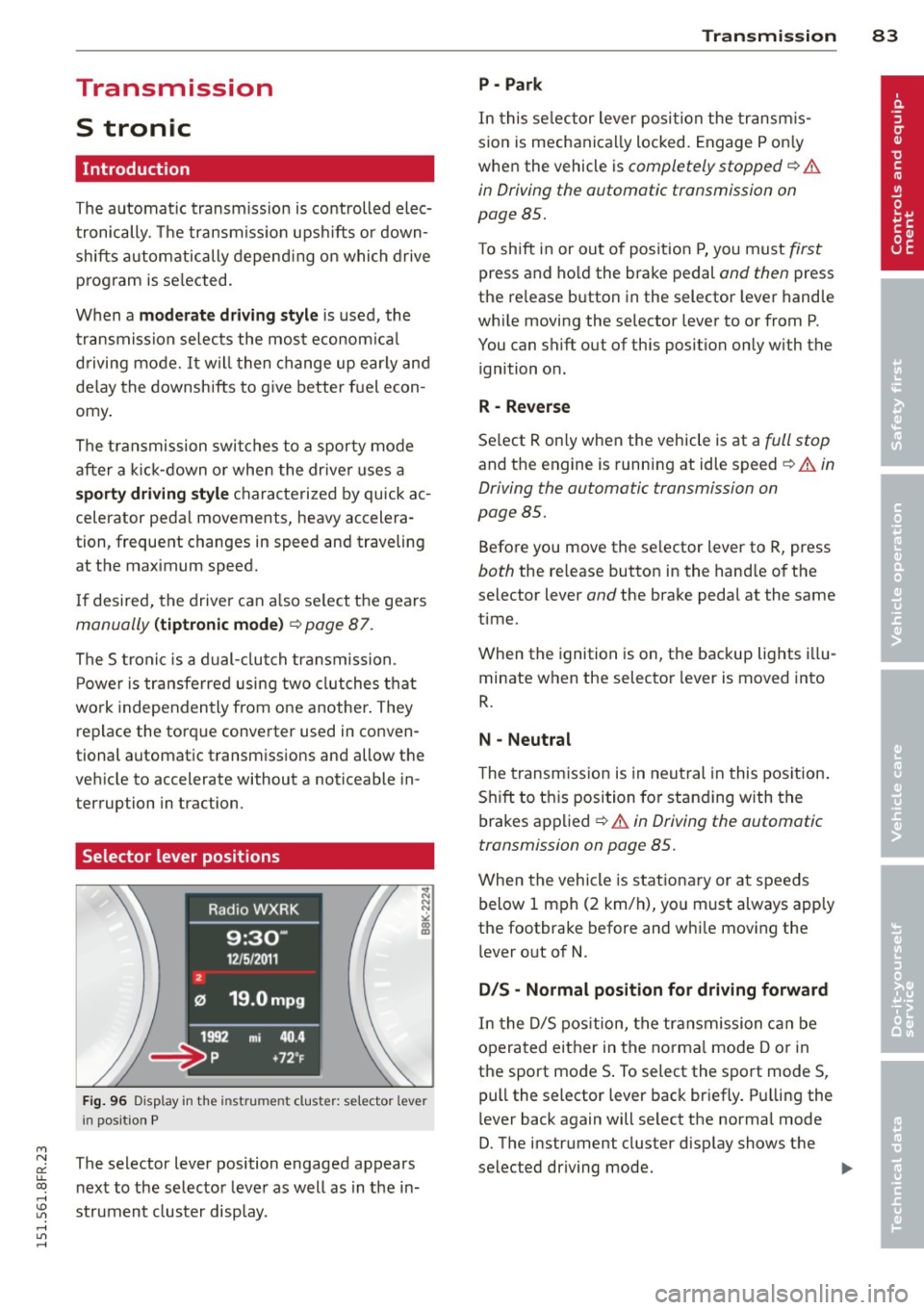
Selector lever positions
F ig. 96 Display in the instrument cluster: se lector lever
in pos itio n P
The selector lever position engaged appears
n ext to the selector leve r as well as in the in
strument cluster display.
Tran sm iss ion 83
P -Park
In this se lector lever posi tion the transm is
s ion is mechanica lly locked. Engage P on ly
when the vehicle is
completely stopped~&.
in Driving the automatic transmission on
page 85.
T o shift in or out of pos it ion P, yo u must first
press and ho ld the brake pedal and then press
the re lease button in the selector leve r hand le
whi le moving the selector lever to or from P.
You can shift out of this position only with the ignition o n.
R - Reverse
Se lect R on ly when the veh icle is at a full stop
and t he engine is running at idle speed~.&. in
Driving the automatic transmission on
page 85.
Before you move the se lector lever to R, press
both the re lease button in the hand le o f the
selector lever
and the brake pedal at the same
time.
When the ignition is on, the backup lights illu
minate when the selector lever is moved into
R.
N -Neutral
The transmiss ion is in neu tral in this pos ition .
S hift to t his position fo r standing with the
brakes app lied
~ .&. in Driving the automatic
transmission on page 85.
When the vehicle is stat iona ry or a t speeds
below 1 mph (2 km/h), yo u must always app ly
the footbrake before and whi le mov ing the
l ever o ut of
N.
DIS -Normal posit ion for driving forward
In the D/S pos it ion, t he tr ansmission c an be
operated either in the norma l mode D or in
the sport mode S . To select the sport mode S,
pull the selector lever back briefly. P ulling the
l ever back again will se lect the norma l mode
D. The instr ument cluster disp lay shows the
selected driving mode. ..,_
Page 86 of 284
84 Transmi ssion
In the no rm al m ode D, the transmission auto
matica lly selects the suitab le gear ratio. It de
pends on eng ine load, veh icle speed and driv
ing style.
Select the
s p or t mode S for spo rty driving.
The vehicle makes full use of the eng ine 's
power. Shifting may become noticeab le when
accelerating.
When the vehicle is stationary or at speeds
be low 1 mph (2 km/h), you must always apply
the foot brake before and while mov ing the
lever to D/S out of N.
A WARNING
Read and follow all WARNINGS c> .&. in
Driving the automatic transmission on
page 85 .
(D Note
-
Coasting downh ill with the transmission in
N and the engine not running w ill result in
damage to the automatic transmiss ion
and possibly t he catalyt ic converter .
(D Tips
-On vehicles with drive select*, you can
adjust the sporty shift characteristics in
the
Dynamic d riving mode.Swill appear
i n the instrum ent cluster disp lay instead
ofD.
- If you accidentally select N whil e driv ing ,
take your foot off the acce le rator pedal
i mmedia tely and wait fo r the engine to
s low down to idle be fore se lecting D/S.
- If there is a power failure, the se lector
l ever will not move out of t he P posi tion.
The eme rgency release can be used if
th is happens<=>
page 89.
Automatic Shift Lock {ASL)
The Automatic Shift Lock safeguards you
against accidentally shifting into a forward or
the reverse gear and causing the vehicle to
move unintentionally.
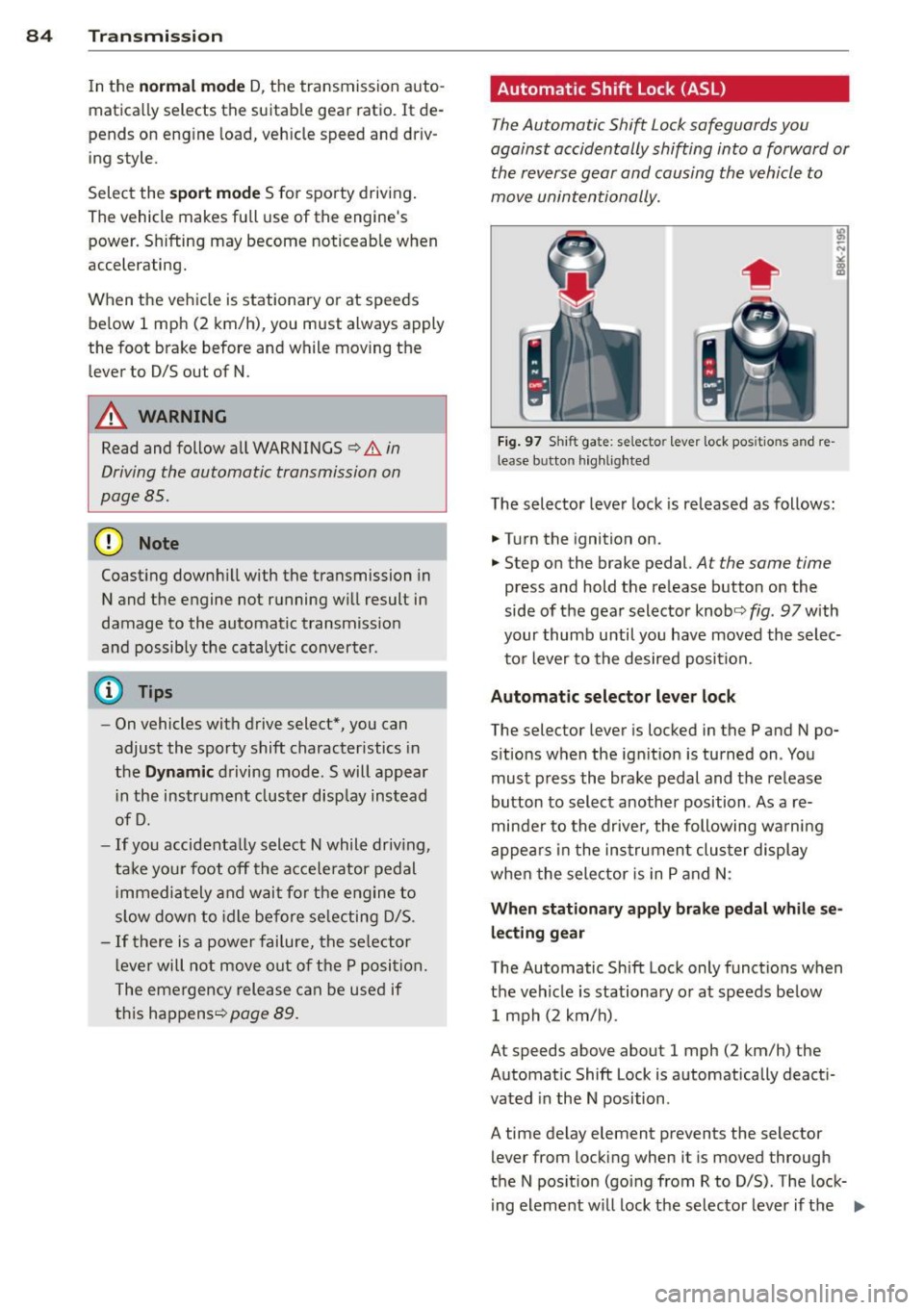
Fi g. 9 7 Shi ft ga te : se lecto r le ver lock pos itio ns and re
lease b utto n hig h lighted
The selector lever lock is released as follows:
.. Turn the ignition on .
.. Step on the brake pedal.
At the same time
press and hold the release button on the
side of the gear selector knob<=>
fig. 97 with
your thumb until you have moved the selec
to r lever to the desired position.
Automatic selector leve r lock
The selector lever is locked in the P and N po
s itions w hen the ign ition is turned on . You
must p ress the brake pedal and t he release
button to select anothe r position . As a re
minde r to the drive r, the following wa rni ng
appea rs in the in strumen t clus ter di splay
when the sele ctor is in P and N:
When stationar y apply brak e pedal while se
lecting gear
The Automatic Shift Lock only funct ions when
t h e veh icle is stationary or at speeds be low
1 mph (2 km/h) .
At speeds above about 1 mph (2 km/h) the
Automat ic Shift Lock is automatically deact i
vated in the N position .
A time delay element prevents the selector lever from locking when it is moved through
the N pos it ion (go ing from R to D/S) . The lock
ing element w ill lock the selecto r leve r if t he
Ill>
Page 87 of 284
"' N
a: LL co
rl I.O
"' rl
"' rl
lever is left in N (Neutral) for more t han ap
prox imately 2 seconds, without the b rake ped
a l being pressed .
Release button
The release b utton on the selec tor leve r pre
ve nts the leve r from bei ng accide ntally s hifte d
i n to ce rtain positions. Depen ding on the direc
tion of the shift, the se lector lever locks at d if
ferent positions. The positions are h ighlighted
in the ill ustration
c!> fig . 97.
Ignition key safety interlock
The key canno t be removed from the igni tion
un less the se lector lever is in the P park posi
tion . When the ignition key is remove d, the
se lecto r lever wi ll be locked in the P pos ition.
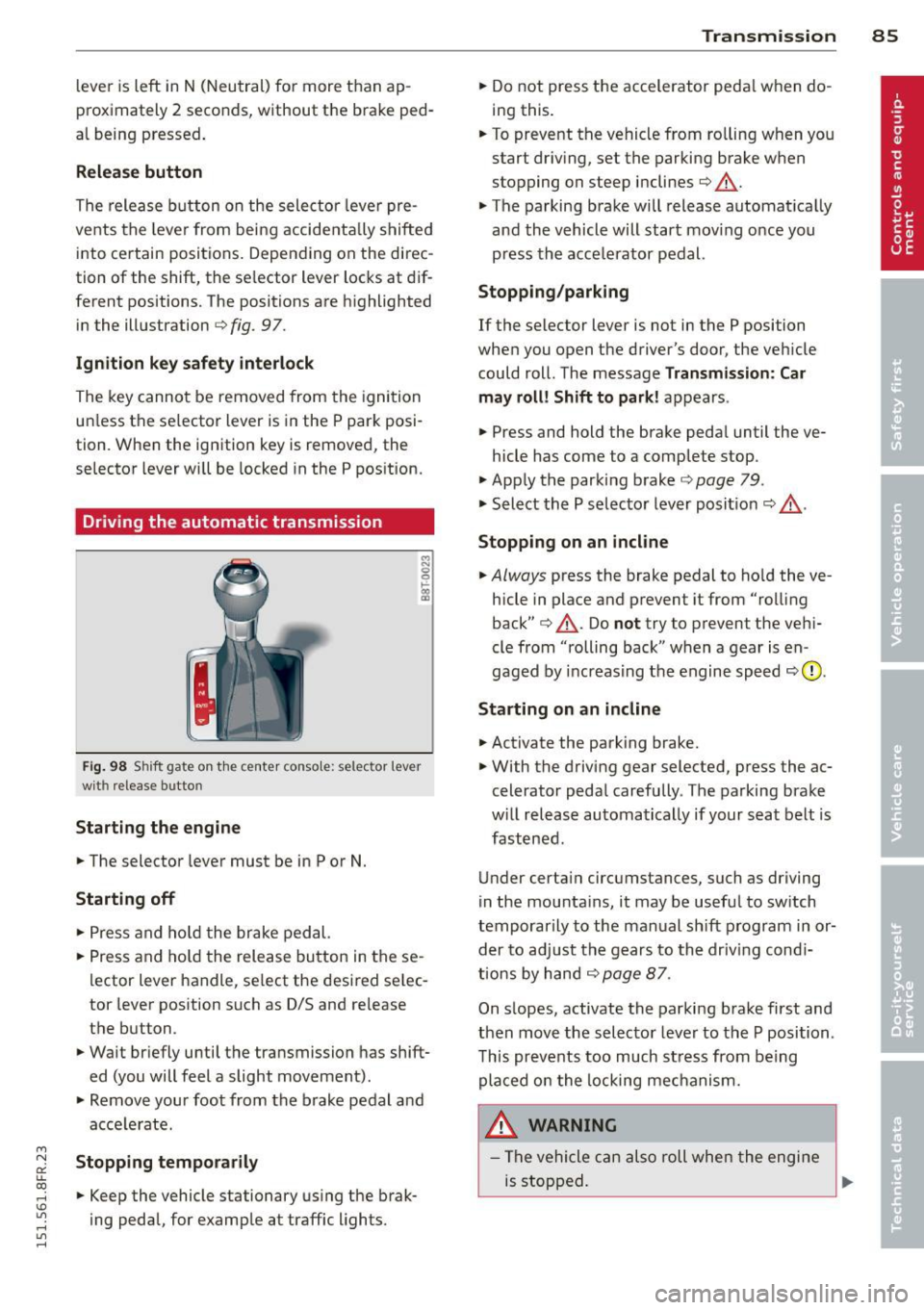
Driving the automatic transmission
F ig. 98 S hift gate o n th e ce nte r conso le: selector lever
wit h release bu tton
Starting the engine
.. The selector leve r must be in P or N.
Starting off
.. Press a nd ho ld t he brake ped al.
.. Press and ho ld the release bu tton in these
l ector lever handle, se lect the desi red se lec
tor leve r pos ition such as D/S and re lease
t h e b utton.
.. Wait br iefly u ntil t he transmission has shift
ed (you will feel a slight movement).
.. Remove your foot from the b rake pedal a nd
acce le rate.
Stopping temporarily
.. Keep the vehicle stationary us ing the brak
ing peda l, for e xamp le at traffic lights.
Transm ission 85
.. Do not press the accelerator peda l w hen do
ing this .
.. To preve nt t he vehicle from ro lling when yo u
start dr iv ing, set the parking b rake w hen
stopping on steep inclines
c!> _&. .
.. The parking brake will release automat ica lly
an d the vehicle will start mov ing o nce you
p ress th e acce lerator pedal.
Stopping/parking
If the selector lever is not in the P position
whe n you open the driver's door , the veh icle
could roll . The message
Transmission: Car
may roll! Shift to park! ap pears .
.. Press and hold the brake peda l until the ve-
hicle has come to a comp lete stop .
.. App ly t he park ing brake
co page 79 .
.. Select the P selec to r lever posit io n
co _&. .
Stopping on an incline
.. Always press the brake pedal to ho ld the ve
hicle in place and prevent it from "ro lling
back"
co _&. . Do not try to p revent the ve hi
cle from "rolling back" when a gear is en
gaged by increas ing t he engine spee d co (!).
Starting on an incline
.. Activate the parking brake .
.. With t he driving gear selected, p ress the ac
celerato r peda l carefully . The parking brake
w ill rel ease au toma tically if your sea t belt is
fast ene d .
U nder certa in circumstances, such as driving
in the mounta ins, i t may be usefu l to sw itch
t emporar ily to the man ual sh ift program in or
d er to adju st the gears to th e d riv in g con di
ti ons by ha nd
co page 87 .
On s lopes, activate the parki ng b rake first and
t hen move the s electo r leve r to the P posi tion .
T his pr eve nts t oo much st ress from be ing
p la ced o n the locking me chani sm .
&_ WARNING
- Th e vehicle c an als o roll whe n the engi ne
is s topped .
~
Page 88 of 284
86 Transmission
-Unintended vehicle movement can cause
serious injury .
- Never leave your vehicle with the engine
running while in gear. If you must leave
your vehicle when the engine is running,
activate the parking brake and move the
selector lever to P .
- Power is still transmitted to the wheels
when the engine is running at idle. To
prevent the vehicle from "creeping", you
must keep your foot on the brake when
the engine is running and the selector
lever is in D/S or R or "tiptronic" mode is
selected.
- Do not press the accelerator pedal when
changing the selector lever position
while the vehicle is stationary and the
engine is running.
- Never shift into
R or P while driving.
- Before driving down a steep slope, re-
duce your speed and shift into a lower
gear with "tiptronic".
- Do not ride the brakes or press the brake
pedal too often or too long when driving
down a hill. Constant braking causes the
brakes to overheat and substantially re
duces braking performance, increases
braking distance or causes complete fail
ure of the brake system.
- To prevent the vehicle from rolling back
when stopping on inclines, always hold it
in place with the brake pedal or parking
brake .
- Never hold the vehicle on an incline with
a slipping clutch . The clutch opens auto
matically when it becomes too hot from
the overload . An indicator lamp
l'§J illu
minates and a driver message appears
Q page 88 when the clutch is overload
ed.
- If the engine must remain running, never
have any driving position engaged when
checking under the hood. Make sure the
selector lever has securely engaged and
is locked in P with the parking brake set
Q page 195. Otherwise, any increase in
engine speed may set the vehicle in mo- tion
, even with the parking brake ap
plied.
@ Note
- When stopping on an incline, do not try
to hold the vehicle in place by pressing
the accelerator pedal while a driving gear is selected. This can cause the transmis
sion to overheat and can damage it. Acti
vate the parking brake or press the brake
pedal to prevent the vehicle from rolling .
- Allowing the vehicle to roll when the en
gine is stopped and the selector lever is
in N will damage the transmission be
cause it is not lubricated under those cir
cumstances.
(D Tips
For safety reasons, the parking brake is re
leased automatically only when the driv
er's safety belt is engaged in the buckle.
Hill descent control
The hill descent control system assists the
driver when driving down declines.
Hill descent control is activated when these
lector lever is in D/S and you press the brake
pedal. The transmission automatically selects
a gear that is suitable for the incline. Hill de
scent control tries to maintain the speed ach
ieved at the time of braking, within physical
and technical limitations. It may st ill be nec
essary to adjust the speed with the brakes.
Hill descent control switches off once the de
cline levels out or you press the accelerator
pedal.
On vehicles with the cruise control system*
Q page 81 , hill descent control is also activat
ed when the speed is set.
A WARNING -
Hill descent control cannot overcome
physical limitations, so it may not be able
to maintain a constant speed under all
Page 89 of 284
"' N
a: LL co
rl I.O
"' rl
"' rl
conditions. Always be ready to apply the
brakes.
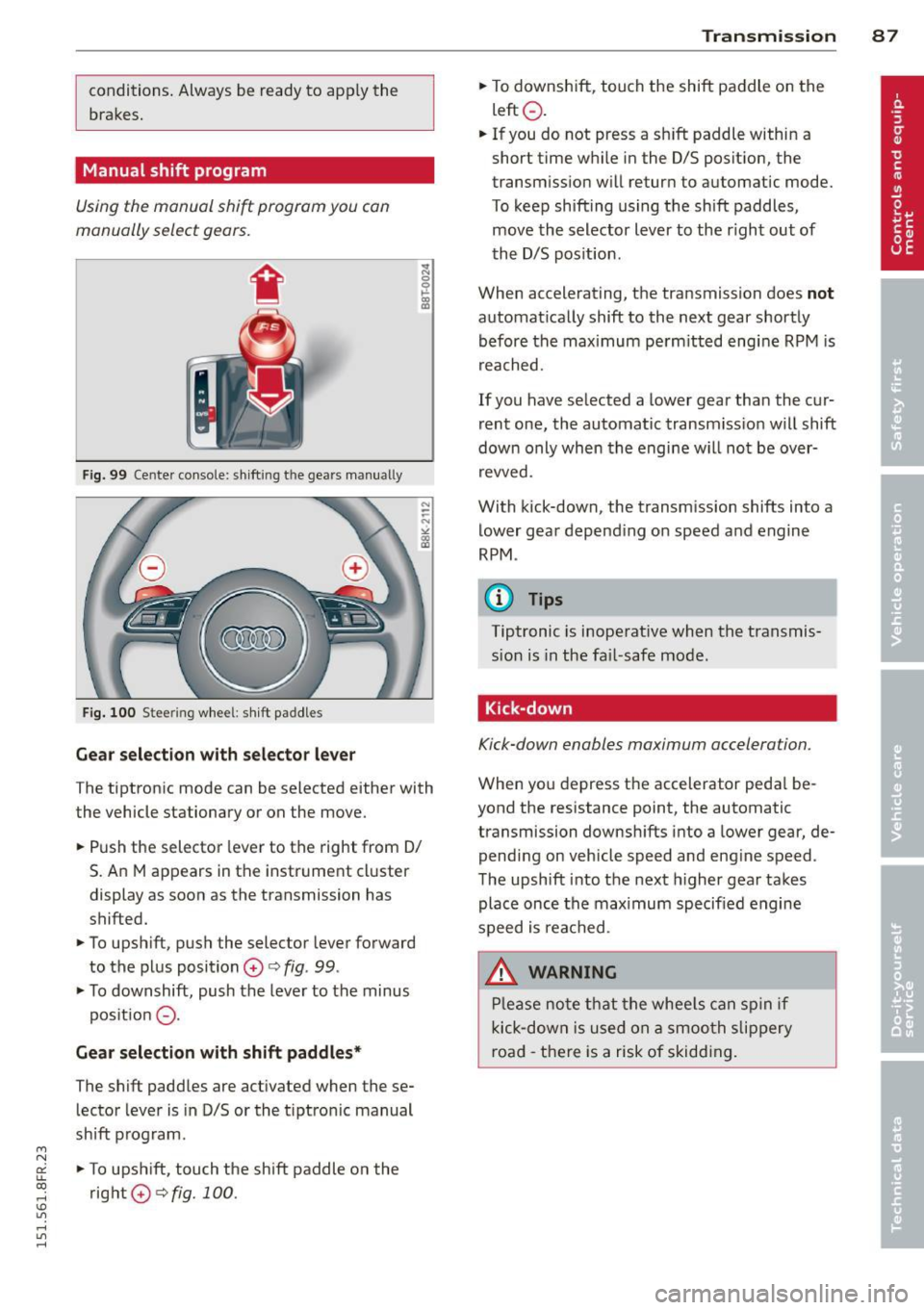
Manual shift program
Using the manual shift program you can
manually select gears.
Fig. 99 Ce nter console: shift ing t he gea rs manually
Fig. 100 Stee ring wheel: shift paddles
Gear selection with selector lever
The tiptronic mode can be selected either with
the vehicle stationary or on the move.
.. Push the selector lever to the right from 0/
5. An M appears in the instrument cluster
display as soon as the transmission has
shifted.
.. To upshift, push the selector lever forward
to the plus position
0 c:> fig. 99 .
.. To downshift, push the lever to the minus
pos ition
0 -
Gear selection with shift paddles*
The shift paddles are activated when these
lector lever is in 0/5 or the t iptron ic manual
shift program.
.. To upshift, touch the shift paddle on the
right
0 c:> fig. 100. Transmission 87
.. To downshift, touch the shift paddle on the
left
0 .
.. If you do not press a sh ift paddle within a
short time while in the 0/5 position, the
transmission will return to automatic mode.
To keep shifting using the shift paddles,
move the selector lever to the r ight out of
the 0/5 position .
When accelerating, the transmission does
not
automatically shift to the next gear shortly
before the max imum pe rm itted engine RPM is
reached.
If you have selected a lower gear than the cur
rent one, the automatic transmission will shift
down only when the engine w ill not be over
revved.
With kick-down , the transm ission shifts into a
lower gear depend ing on speed and engine
RPM .
(D Tips
Tiptronic is inoperat ive when the transmis
sion is in the fail-safe mode .
, Kick-down
Kick-down enables maximum acceleration.
When you depress the accelerator peda l be
yond the resistance point, the automatic
transmission downshifts into a lower gear, de
pending on vehicle speed and eng ine speed .
The upshift into the next higher gear takes
place once the max imum specified engine
speed is reached .
.&_ WARNING
Please note that the whee ls can spin if
kick-down is used on a smooth slippery
road -there is a risk of skidding.
-
Page 90 of 284

88 Transmi ssion
Launch Control Program
Th e Launch Cont rol Program provides the
best accel eration possible when starting from
a st op .
R equirement : The engine must be at operat
i n g t emp eratur e and the steering wheel must
not be turned .
.,. Press the
I~ O FFI button c:> page 173 while
the engine is running. The
II ind icator light
i lluminates in the instrument cluster and
Stabilization control (ESC ): Sport . Warn
ing! Re stricted sta bility
appea rs in the dr iv
er information system d isplay.
.,. Move the selec tor lever to the D/S pos ition
to select sport mode (S) or select the
dy
nami c
driving mode in drive select*
c:> page 103.
... Press the brake peda l strongly with your left
foot and hold it down for at least 1 second.
.,. At the same t ime, press the accelerator ped
al down complete ly w ith your r ight foot un
t il t he engine reaches and maintains a h igh
RPM .
.,. Remove you r foot from the brake pedal
withi n S seconds
c:> &, .
&_ WARNING
-Always adapt you r driving to the traffic
flow .
- O nly use the Launch Control Program
when road and traffic con dit ions allow it
and other dr ivers will not be endangered
o r annoyed by yo ur dr iv ing and t he vehi
cle's acce lerat ion.
- Please note that the driving wheels can spin and the vehicle can break away
w hen sport mode is sw itched on, espe
c ially when the road is slippery .
- Once yo u have accelerated, yo u should
switch sport mode off by pressing the
I~ O FF I but ton .
(D Tips
- The transm ission temperat ure may in
crease significantly after using the Launch Control Program . If that hap- pens, the p
rog ram may not be availab le
for a few minutes . It will be available
again after a cool-down period .
- When accelerating using the La unch
Cont ro l program, a ll vehicle parts are
subject to heavy loads. Th is can result in
increased wear.
Transmission malfunction
['1 Transmission: Pre ss brake pedal and se
lect gear again .
Press the bra ke peda l and select the desired
selector lever position again. You ca n then
co ntinue driving .
['1 Transmission overheating: Please drive
conservatively.
T he transmiss ion temperat ure has inc reased
s ignificantly due to the sporty d riving manner .
Drive in a less sporty manner until the tem
perature returns to the normal range and the
indicator light switches of.
ID T ransmission malfunction: You can con
tinue driving
T he re is a sys tem malfunc tion in the transm is
sion . You may continue driving .
Drive to yo ur
autho rized Audi deale r or qualified repair fa
c ility soon to have the ma lfunction corrected.
['1 Transmis sion malfun ction : Limited driv
ing functionality
T he re is a system malfunction in the t ransm is
s io n. The transm ission is swi tching to emer
gency mode. This mo de on ly shifts in to cer
ta in gears o r will no longer shift at al l. The en
gine may sta ll. Drive to your authorized Audi
dealer or qualified repair facility immediately
to have t he malfunction corrected.
('1 ffl Transmi ssion malfunction: No reverse
You can continue driving
T he re is a sys tem mal func tion in the t ransm is
s io n. The transm iss ion is swi tch ing to eme r
gency mode. This mode on ly shifts into cer -
tain gears o r will no longer shift at all . The en
gine may sta ll. You cannot engage the
reverse liJJ,
Page 92 of 284

90 Audi adaptive cruise control and braking guard
Audi adaptive cruise
control and braking
guard
Introduction
App lies to vehicles: with Audi adaptive cruise co ntrol
The adaptive cruise control system assists the
driver by regulating vehicle speed and helping
to maintain a set distance to the vehicle
ahead, within the limits of the system .
If the
system detects a moving vehicle up ahead,
adaptive cruise control can brake and then ac
celerate your vehicle. This he lps to make driv
ing more comfortable on long highway
stretches.
The braking guard system can warn you about
an impending collision and initiate braking
maneuvers
c:::> page 96.
Adaptive cruise control and braking guard
have technical limitations that you must
know, so please read this section carefully, un
derstand how the system works and use them
properly at all times.
General information
General information
Applies to vehicles: with Audi adaptive cruise co ntrol
Fig. 103 Front of the vehicle: Position of radar senso r
The area that contains the radar sensor
c:::> fig. 103 must never be cove red by stickers
or other objects or obstructed with dirt, in
sects, snow or i ce that will interfere with the
adaptive cruise control system and braking
guard. For information on cleaning, refer to
c:::> page 184. The same applies for any modifi
cations made in the front area . T
he function of the adaptive cruise cont rol
system and braking guard is limited under
some condit ions:
- Objects can only be detected when they are
within sensor range
c:::>page 92, fig . 106.
-The system has a limited ability to detect
objects that are a short d istance ahead, off
to the side of your vehicle or moving into
your lane.
- Some kinds of vehicles are hard to detect;
for examp le motorcycles, vehicles with high
ground clearance or overhanging loads may
be detected when it is too late or they may
not be detected at all.
- When driving through curves
c:::> page 91.
-Stat ionary objects c:::> page 91 .
A WARNING
-
Always pay attention to traffic when adap-
tive cruise contro l is switched on and brak
ing guard is active. As the driver, you are
still respons ible for starting and for main
tain ing speed and distance to other ob
jects. Braking guard is used to assist you.
The driver must always take action to avoid
a col lision. The driver is always responsible
for braking at the correct time.
- Im proper use of adaptive cruise con trol
can cause collisions, other accidents and
serio us personal injury.
- Never let the comfor t and convenience
that adaptive cruise control and braking
guard offer distract you from the need to
be alert to traffic conditions and the
need to remain in full control of your ve
h icle at a ll times,
- Always remember that the adaptive
cru ise contro l and brak ing guard have
lim its -they will not s low the vehicle
down or maintain the set distance when
you drive towards an obstacle or some
thing on or near the road that is not
mov ing, such as vehicles stopped in a
traffic jam, a stalled or disabled vehicle.
If registered by the radar sensor, vehicles
or obsta cles that are not moving can
trigger a co llision warning and if
Page 93 of 284

"' N
a: LL co
rl I.O
"' rl
"' rl
Audi adapt ive crui se c ontrol an d bra kin g guard 91
confirmed by the video camera, an acute
collision warning.
- For safety reasons, do not use adaptive
cruise control when driving on roads with
many curves, when the road surface is in
poor condition and/or in bad weather
(such as ice, fog, gravel, heavy rain and
hydroplan ing). Using the system under
these conditions cou ld result in a co lli
sion.
- Switch adaptive cruise control off tempo rar ily when driving in turning lanes, on
expressway exits or in cons truction
zones. This prevents the vehicle from ac celerating to the set speed when in these
situations.
- The adaptive cr uise control system wi ll
not brake by itse lf if you p ut your foot on
the accelerator pedal. Doing so can over
ride the speed and distance regulation .
- When approaching stationary objects
such as stopped traff ic, adaptive cruise
control will not respond and braking
guard w ill have limited function.
- The adaptive cruise control system and
braking guard do not react to people, an
ima ls, objects crossing the road or on
coming objects.
- The function of the radar sensor can be
affected by reflective objects such as
guard rails, the entrance to a tunnel,
heavy rain or ice.
- Never follow a ve hicle so closely that you
cannot stop your vehicle safely. The
adaptive cruise cont ro l cannot slow or
brake the veh icle safely when you follow
ano ther veh icle too closely. Alway s re
member that the automatic braking
function cannot bring the vehicle to a sudden or emergency stop under these
condit ions.
- To prevent unintended operation, always
switch ACC off when it is not being used.
(D Note
The sensor can be disp laced by impacts or
damage to the bumper, whee l housing and
underbody . That could affect the adaptive cruise control
system and braking g uard.
Have your authorized Audi dea ler or au
thorized Audi Service Facility chec k their
funct ion.
In curves
App lies to vehicles: with A ud i ada ptive c ruise contro l
F ig . 1 04 Examp le : driv ing into a curve
When driving into a curve ¢ fig. 104 and out
of a curve, the adaptive cru ise contro l may re
act to a vehicle in the next lane and app ly the
brakes. You can override or prevent the brak
ing by pressing the accelerator pedal briefly.
Stationary objects
Applies to vehicles: wit h Audi adapt ive cr uise contro l
F ig . 1 05 Examp le: objec t chang ing la n es and stat ion
a ry object
The adaptive cruise control system only reacts
to objects that a re mov ing or that the system
has a lready detected as moving . For examp le,
if a ve hicl e@ , which has already been detec t
ed by the adaptive cru ise con trol , turns or
changes lanes and another stationa ry vehicle
@ is located in front of that vehicle, the sys
tem will not react to the stationary vehicle.