lock AUDI RS5 CABRIOLET 2015 Owner's Manual
[x] Cancel search | Manufacturer: AUDI, Model Year: 2015, Model line: RS5 CABRIOLET, Model: AUDI RS5 CABRIOLET 2015Pages: 284, PDF Size: 69.56 MB
Page 47 of 284

"' N
a: LL co
rl I.O
"' rl
"' rl
Variable power top storage bay
Fig . 39 Luggage compartment: t he var iab le power top
storage bay is lowe red
F ig . 40 Luggage compart men t: eme rgency release lev
er for the variab le power top storage bay
The variab le power top sto rage bay lowers au
tomatically when the power top opens. To re
duce the risk of damage, make sure there are
no frag ile objects within the storage bay's
range of motion.
Rai sing the power top storage bay
.,. Press the trim in the direction of the ar row
to raise the va riab le powe r top storage bay
c>fig. 39.
Lowe ring the power top storage bay
manually (emergency operation)
.,. Open the left s ide trim and press the re lease
lever d own to lower the variable power top
storage bay¢
fig. 40.
The variable power top storage bay can be
ra ised when the
power top is closed . This pro
vides more cargo space in the luggage com
pa rtment.
The
opened power top i s stored in the storage
bay and protected. The power top bay cannot
be ra ised when the power top is open. The car
go area in the luggage compartment is small-
Power top 45
er w hen the powe r top is open than when it is
closed.
Messages
Convertible top Please close t runk
T his mess age ap pears in the instrument cl us
te r display if the l uggage compa rtment lid is
not closed when operating the power top .
Close the luggage compartment lid.
Convertible top storage box not lowered.
Please remove obstacle
T his message ap pears when t he power top
storage bay is not lowere d when opening the
p ower top . If the p owe r top s to rage bay is
blocked by objects in the luggage com part
ment, remove the ob jects that are in the way.
If the power top storage bay is still not low
ered automatically, y ou can lower it manually
<=> page 45.
Convertible top Cannot be used
Th is mes sage ap pears if the power top ca nnot
o pen or close a utomat ically because of safety
r easons or if there is a malfunction. The fol
low ing ca uses are possible:
- Vehicle speed too high: Th e autom atic pow
er top is deactivate d for safety reasons i f the
veh icle speed is too high. Red uce the vehicle
speed an d try closing/opening the power
top again .
-Battery voltage too low: The automatic
power top is deact ivated if the bat tery
char ge level is too low. You can open/close
the power top again after starting the en
gi ne.
- Rollover protect ion act ive: If the power top
runs continuously for a long period of t ime,
th e overload protection will activate for ap
prox imately 15 to 30 minutes. You can
open/close th e powe r top again afte r that
¢ _& .
-Malfunction: Failur e of syst em compone nts
is o ne pos sib le cause fo r malfun ction. The
power t op can be opera ted ma nually
¢page 47. ~
Page 48 of 284

46 Power top
Conv ertible top not secure
This message appears and a warn ing tone
sounds if the power top is no t comp letely
closed/open and the veh icle speed is above
50 km/h . Reduce the vehicle speed and try
closing/opening the power top again.
.&_ WARNING
Never drive when the power top is not
locked correctly . The w ind from dr iv ing
could cause the power top to open. T his
can result in injuries a nd damage to the
veh icle.
Wind deflector
Applies to vehicles: with wind deflecto r
The wind deflector reduces turbulence in the
passenger compartment and makes driving more comfortable.
F ig. 41 Rear of the vehicle: insert ing the win d deflec
t o r
(1 )
Fig. 42 Rear of the vehicle: insert ing the wind deflec
to r (2)
The wind de fle ctor is loca ted in the luggage
compartment in a storage bag* or under the
cargo floo r cove r.
Inserting and positioning the wind
defl ector
" Open the rea r door on the passenger's side.
" Remove the wind def lector from the lug-
gage compartment and fold it apart once.
The wind def lector is installed in the correct
position when the long side is toward the
front and the wind deflector frame is at the
top.
"I nsert both p ins on the wind deflector @
¢
fig. 41 on the driver's si de in t he mounts
in the s ide trim.
" Fold the handle @upward and lift the cen
ter of the wind deflector up slight ly @
¢fig. 42.
" Guide the wind deflector into the mounts on
the passenger's side @and press lig htly in
the center of the w ind deflector ® until the
handle locks in place.
" Raise the wind deflector comp letely .
Removing the wind deflector
" Fold t he wind def lector frame back.
" Fold the handle @¢
fig. 41 upward and lift
the cente r of the w ind deflector up slightly
@ ¢fig . 42.
" Remove the wind deflector from the mounts
in the s ide trim on the p asse nger side.
" Pull the w ind deflec to r out of the moun ts on
the dr iver side and lift it o ut.
" Fold the wind deflector together and store it
securely .
.&_ WARNING
-
- Do not use the wind deflector to sec ure
cargo.
- Be careful when installing so you do not
pinch your f ingers.
- Pay attention to traffic when instal ling
the wind deflector. Insta ll th e wind de
f lector from the s ide of the vehicle that
is farthest from traffic.
(D Note
Do not lean aga inst the vehicle when in
stalling the wind deflector . Hard objects
and decorat io ns on clothing such as be lt
buckles can scratch the pa int.
Page 49 of 284

"' N
a: LL co
rl I.O
"' rl
"' rl
@ Tips
-The wind deflector works best when a ll
of the windows are rolled up wh ile driv
i ng.
- Only store the wind def lector in the stor
age bag* when it is dry.
Power top emergency
operation
General information
The power top can be closed manually if there
is a malfunction.
~ Set the parking brake.
~ Open the windows.
~ Switch the ign ition off.
~ To reduce pressure in the powe r top hydraul
ics, pull the<¾, button for approximately 10
to 15 seconds ¢
page 43, fig. 36.
Only close the powe r top manually in an emer
gency . Have a second person help you. Drive
to an authorized Audi dealer or authorized re
pa ir facility immediately to have the malfunc
tion corrected.
A WARNING
-There is a risk of p inching your hands or
injuring othe r people during all steps in
the power top emergency operation
process.
- Make sure all w indows are open during
emergency operation.
- Do not hold the power top supports or
other moving parts.
- Never drive when the power top is not
locked correctly. The wind from driving
cou ld cause the power top to open . This
can result in injur ies and damage to the
vehicle.
@ Tips
The vehicle headliner is not clipped in and
the power top compartment cover is not
locked after using the power top emergen
cy operation procedure. Drive to an author- Power top 4
7
ized Audi dealer or authorized repair facili
ty immediately to have the malfunction
corrected .
Step 1: Releasing the power top storage
bay lid
Fig. 43 Luggage compartment: re lease lever
Fig. 44 Luggage compartment: side trim
~ Open the luggage compartment lid.
~ Reach with your finger into the gap behind
the trim near the center of the vehicle
¢fig. 43.
~ Press the release lever down to release the
power top compartment cover .
~ Open the left side trim and press the yellow
lever in the direction of the arrow¢
fig. 44.
~ Remove the emergency re lease key (hex key)
from the left side trim @ ¢
fig. 44.
~ Open the right side tr im and press the ye l
low lever in the direction of the arrow.
Page 50 of 284
48 Power top
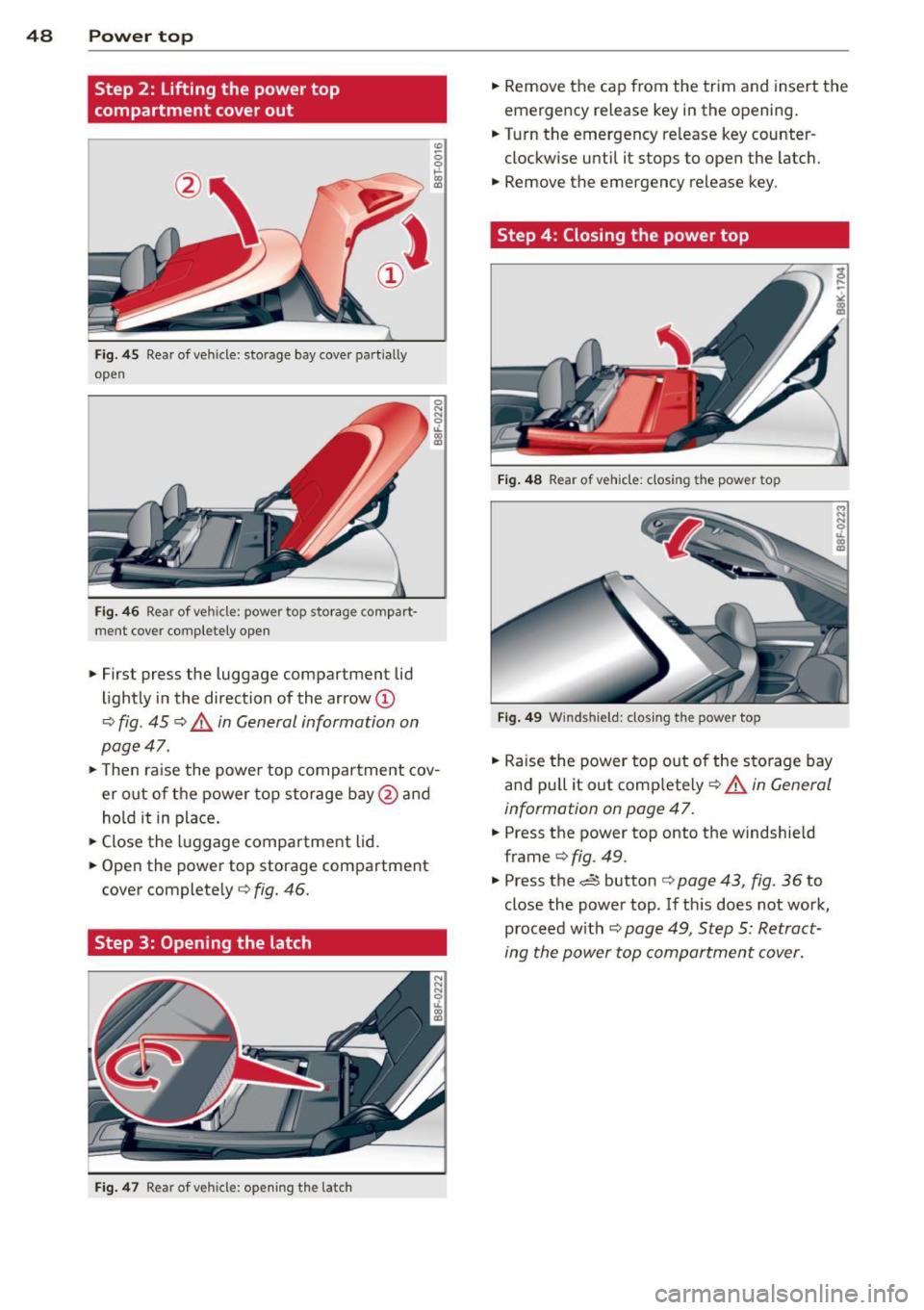
Step 2: Lifting the power top
compartment cover out
Fig. 45 Rear of vehicle: storage bay cover partially
open
Fi g. 46 Rear of veh icle: power top storage compart
ment cover completely open
""First press the luggage compartment lid
li ghtly in the direction of the arrow
(D
¢ fig . 45 ¢.&. in General information on
page 47 .
""The n ra ise the powe r top compar tment cov
er out of the power top storage bay @and
hold it in place .
"" Close the luggage compartment lid.
"" Open the power top storage compartment
cover complete ly¢
fig. 46.
Step 3: Opening the latch
F ig. 4 7 Rear of veh icle: opening the latch
"" Remove the cap from the trim and insert the
emergency release key in the opening .
"" Turn the emergency re lease key counter
clockw ise until it stops to open the latch.
"" Remove the emergency release key.
Step 4: Closing the power top
Fig . 4 8 Rear of vehicle: closing the power top
Fig . 4 9 Wind shie ld: closing the power top
"" Raise the power top out of the storage bay
and pull it out comp letely¢
A in General
information on page 47.
"" Press the power top onto the windshie ld
frame ¢
fig. 49.
.. Press the~ button ¢ page 43, fig. 36 to
close the power top. If th is does not work,
proceed w ith
¢ page 49, Step 5: Retract
ing the power top compartment cover.
Page 51 of 284

"' N
a: LL co
rl I.O
"' rl
"' rl
Step S: Retracting the power top
compartment cover
Fig. 50 Rear of vehicle: retracting the power top com·
partment cover
O> 0 ,._ ~
"' O> ID
• Raise the rear of the power top and hold it in
place
(D ¢ &. in General information on
page 47.
• Slide the power top compartment cover for
ward @ until it reaches the end position .
Release the power top.
Step 6: Locking the power top
Fig. 51 Inside of the power top: locking the power top
• Insert the emergency release key into the
opening
¢ page 48, fig. 47.
• Turn the emergency release key clockwise
until it stops to lock the power top.
• Remove the emergency release key and in
stall the cap in the opening .
@ Tips
Make sure the locking mechanisms are
locked securely .
Power top 49
Step 7: Loosening the headliner
Fig. 52 Rear w indow : loosen ing the right side of the
h ead liner
Fig. 53 Rear window: head liner partially loosened
,._ 0 ,._ ~
"' O> m
Perform the following steps at the rear of the
vehicle on both sides of the power top.
• To loosen the headliner, raise the rear of the
power and pull on the yellow loop
c:> fig. 52
with the emergency release key.
• Continue pulling on the loop to loosen the
headliner around the rear window (approxi
mately 30 cm)
¢ fig. 53.
Step 8 : Securing the latch
Fig. 54 Rear of the power top: securing the latch
Lock the latch on both sides of the vehicle.
Page 52 of 284

50 Power top
• Pull the power top headline r to the side in
the area by the rear head restraints
¢ fig. 54.
• Insert the short end of the emergency re
lease lever in the yellow sleeve on the power
top support ¢
fig. 54 .
• Turn the emerge ncy release key in the direc
t ion of the arrow @ unt il the support is
locked .
• Put the emergency release key away @
¢ page 47, fig . 44.
Page 54 of 284

52 Clear vis ion
@ Tips
- The light sensor* for headlight control is
located in the rear view m irror mount.
You should therefore not apply any st ick
ers to the windsh ield in this area in order
to prevent malfunctions or failures.
- Some exterior lighting functions can be
adjusted
¢page 52.
- When you remove your key from the igni
tion while the vehicle's lights are turned
on, a buzzer sounds as long as the driv
er's door is open .
- In cool or damp weather, the ins ide of
the headlights, turn signals and tail lights can fog over due to the tempera
ture difference between the inside and
outside. They will clea r shor tly after
switching them on. This does not affect
the service life of the lighting.
- In the even t of a light sensor malfunc
tion, the driver is no tified in the instru
ment cluster disp lay¢
page 22.
Turn signals and high beam lever
The lever operates the turn signals, the high
beams and the headlight flasher .
Fig. 56 Tu rn s ig na l and hig h beam lever
Turn sign als ¢i ¢
The turn signals activate when you move the
l ever into a turn s ignal pos ition when the ign i
tion is switched on.
(D -right turn signal
@-left tur n signa l
The turn s ignal blinks three times if you just
tap the lever .
High be ams and headlight flasher [D
Move the lever to the correspon ding posit io n:
@ -high beams on
@ -high beams off or headlight flasher
The indicator light
ii in the instrument cl us
te r turns on .
Notes on thes e features
-The turn signals on ly wor k w ith the ignition
t ur ned on. The indicator ligh ts
Ct or a in
the instrument cluster also blink.
- After you have turned a co rner, the turn s ig
na l switches off au toma tically .
- The
high beam works on ly w hen the head
lights a re on. The ind icator ligh t
II in the
instrument cluster illuminates when the
high beams are on .
- The
headlight flasher works o nly as long as
you ho ld the lever -even if there a re no
lights switched on . The indicator light
II in
the instrument cluster illuminates when you
use the headlight flasher.
A WARNING
--
Do not use the h igh beam or headlight
flasher if you know that these could blind
oncom ing traffic.
Adjusting exterior lighting
The functions ore selected in the radio or
MMI" .
.,. Select: !CARI function button> Exte rior
light ing .
Or
.,. Select: !CARI function button > Car systems *
control button > Vehicle s etting s> Exterior
lighting .
Coming home (light when leav ing car }*,
Leav ing home (light when unlocking car )*
The coming home function illuminates the
area around the vehicle when the ignition is
switched off and th e dr ive r's door is open ed.
Depend ing on veh icle equ ipment, the function
can be switched on and off or the length of
time the lig hts remain on* can be ad justed . ..,.
Page 55 of 284

"' N
a: LL co
rl I.O
"' rl
"' rl
The leavin g home function i lluminates the
area around the vehicle when unlock ing it.
T his function can be switched on and off.
The
c o ming h om e and lea ving home func
tions on ly operate when it is dark and the
light switch is in the AUTO posit ion
¢ page 51 , fig. 55.
Auto headlight s*
When the light switch is in the A UTO
¢ page 51 position, the switch-on po int of the
lights can be changed in the automatic driving
light function.
Daytime running lights
USA m odel s:
You can switch the dayt ime run
ni ng lights
on and o ff .
Canada mod els:
The function cannot be
turned off .
It is activated a utomat ica lly each
time the ignition is switched on.
Travel mode*
T he headlight beam is asymmetrical. This pro
v ides stronger illum ination on the s ide of the
road on wh ich you are driving .
If you are driv
i ng in a country that d rives on the opposite
side of the road from your own country, th is
will cause glare for on coming drivers. To pre
vent glare:
- Trave l mode must be selected in vehicles
with Xenon headlights*.
- In veh icles with halogen headlights, ce rtain
areas of the head light lenses must be cov
ered with wate rproof adhesive covers that
prevent light from passing thro ugh. For
more informat ion, please see your author
i z ed Audi dea ler or author ized repa ir faci lity .
(D Tips
When trave l mode is activated, a display in
the driver information system indicates
this each time you switch the ignit io n on.
Clear vi sion 5 3
Emergency flashers
Fig. 5 7 Center co n sole : em erge ncy flasher sw itc h
The emergency flashers makes other moto
rists aware that you or your vehicle are in an
emergency situation .
.. Press the switch
Gil ¢ fig. 57 to turn the
emergency flashers on or off .
When the emergency f las hers are on, all four
turn s ignals b link at the same time. The turn
s ignal indicator lights .
1B in the instru
ment cluster, as well as the light in the emer
gency flasher switch ~ blink likewise.
You can indicate a lane change or a tu rn w hen
the emergency flashers are switched on by us
ing the turn signal lever. The emergency flash
ers stop temporarily .
T he emergency flashers also work when the
ign it ion is turned off .
T he emergency flashers w ill turn on a utomat i
ca lly if yo u are in an accident where the airbag
has deployed.
(D Tips
You sho uld turn on the emergency f lashers
when:
- yo u are the last veh icle standing in a t raf
fic jam so that any other vehi cles coming
can see you, or whe n
- your vehicle has bro ken down or you are
in an eme rgency s ituation, or when
- yo ur vehicle is be ing towed by a tow
truck or if you are tow ing another vehicle
beh ind you.
Page 60 of 284

58 Clear vis ion
• Se lect : I CAR ! function button > Car sys tems*
control button > S erv ici ng & check s > Wiper
s e rv ice po sition
> O n/ Off .
Removing the wip er blade
• Lift the w indshield w iper arm up from the
windshield.
• Press the locking knob
(D c::> fig . 65 on the
wiper blade . Hold the wiper blade firm ly.
• Remove the wiper blade in the direction of
the arrow.
Attach ing th e wip er blade
• Install the new wiper blade in the retainer
on the wiper arm@ until you hear it click in
to place on the wiper arm .
• Place the wiper arm back on the windshield.
• Turn the service position off.
_& WARNING
-
For your safety, you should replace the
w iper blades once or tw ice a year . See your
authorized Audi dealer for rep lacement
blades.
(D Note
- The windshield wiper blades must only
be replaced when in the service position!
Otherwise, you risk damaging the paint
on the hood or the w indshield wiper mo
tor.
- You should not move yo ur vehicle or
press the w indshie ld w iper lever when
t h e wiper arms are folded away from the
windsh ield. The w indshield w ipers would
move back into the ir original position
and could damage the hood and wind
shield.
- To he lp prevent damage to the wiper sys
tem, a lways loosen blades which are fro
zen to the windsh ield before operat ing
wipers.
- To he lp prevent damage to wiper blades ,
do not use gasoline, kerosene, pa int
th inner, or othe r solvents on or near the
wiper blades . -
To help prevent damage to the wiper
arms or other components, do not at
tempt to move the wipers by hand.
(D Tips
- Commercial hot waxes applied by auto
matic car washes affect the how easily
the glass surface can be cleaned .
- Yo u can also use the service position, for
example, if you want to protect the
windshield from icing by using a cover.
Digital compass
Switching the compass on and off
Applies to vehicles: with digita l compass
The compass direction is shown in the rear
view mirror .
Fig. 66 Rearv iew mirr or: Digita l compass act ivated
• To swi tch the compass on or off, press and
hold the button @until the compass dis
p lay in the mirror
c::> fig . 66 appears or disap
pears.
T he digita l compass on ly works when t he igni
tion is o n. The directions are indicated with
abbreviations :
N (north), NE (northeast), E
(east), SE (southeast), S (south), SW (south
west) ,
W (west), NW (northwest).
(D Tips
To prevent inaccurate compass readings,
do not bring any remote contro ls, e lectr i
ca l devices or metallic objects near the
mirro r.
Page 65 of 284
"' N
a: LL co
rl I.O
"' rl
"' rl
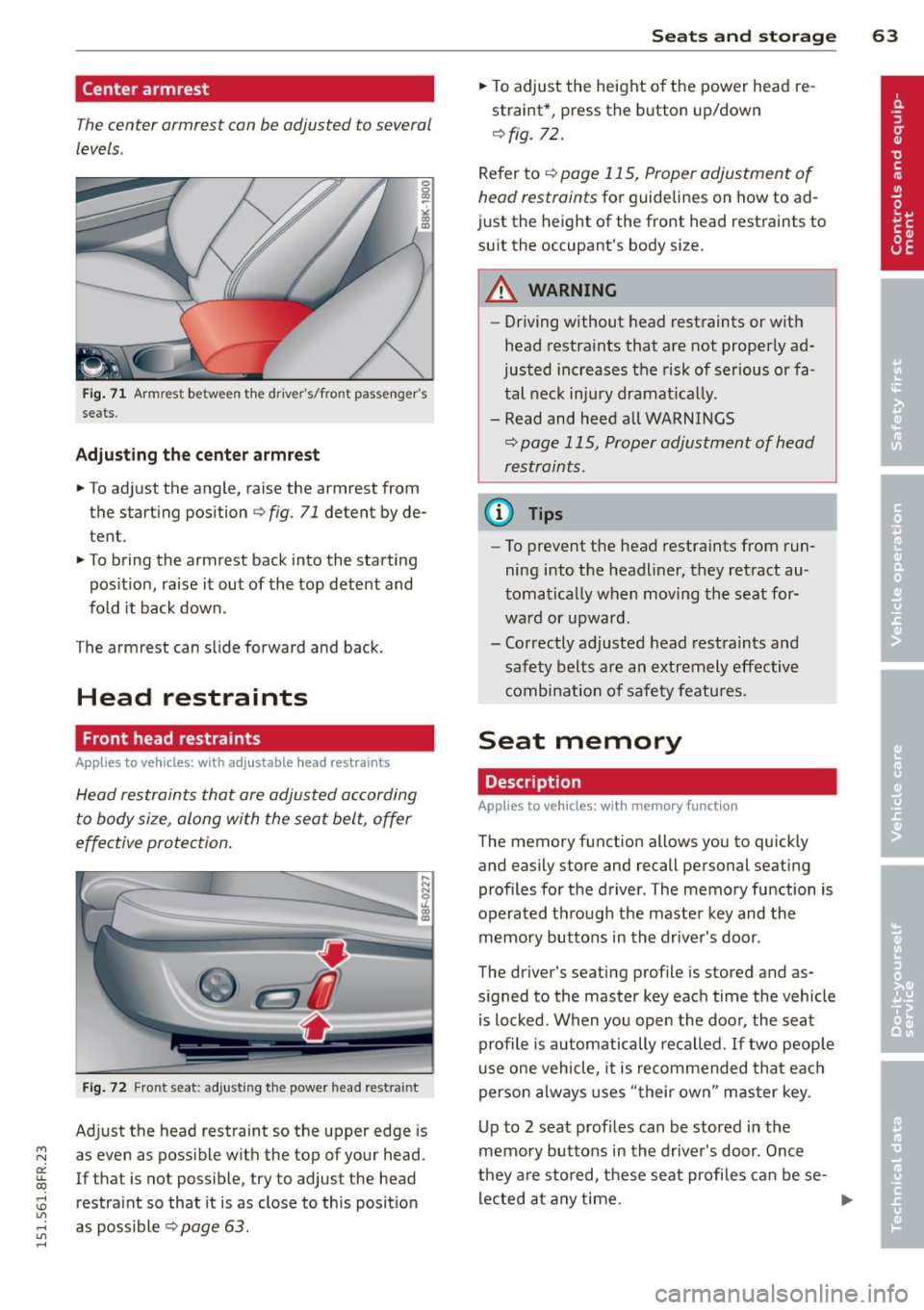
Center armrest
The center armrest can be adjusted to several
levels .
Fig. 71 Armrest between t he drive r's/front passenger's
seats.
Adjusting the center armrest
.. To adjust the angle, raise the armrest from
the starting position
r=:> fig. 71 detent by de
tent.
.. To bring the armrest back into the starting
pos ition, raise it out of the top detent and
fold it back down.
The arm rest can slide forward and back .
Head restraints
Front head restraints
Applies to vehicles: with ad justable head restraints
Head restraints that are adjusted according
to body size, along with the seat belt, offer
effective protection.
....
::::=;~~-..:.:::::~ I
Fig . 72 Fro nt seat: adjusting the power head restra int
Adjust the head restraint so the upper edge is
as even as possible with the top of your head.
If that is not possible, try to adjust the head
restra int so that it is as close to this position
as poss ible r=:>
page 63 .
Seats and storage 63
.. To adjust the height of the power head re
straint*, press the button up/down
<=:> fig. 72.
Refer to <=:> page 115, Proper adjustment of
head restraints
for guidelines on how to ad
just the height of the front head restraints to
suit the occupant's body size.
A WARNING
- Driving without head restraints or with
head restraints that are not properly ad
justed increases the risk of serious or fa
tal neck injury dramat ically.
- Read and heed all WARNINGS
<=:> page 115, Proper adjustment of head
restraints .
@ Tips
-To prevent the head restraints from run
ning into the headliner, they retract au
tomatically when moving the seat for
ward or upward.
- Correctly adjusted head restraints and
safety belts are an extremely effective
combinat ion of safety features.
Seat memory
Description
App lies to vehicles: wit h memo ry function
-
The memory fun ction allows you to quickly
and easily store and recall personal seating
profiles for the driver. The memory function is
operated t hrough the master key and the
memory buttons in the driver's door .
The driver's seating profile is stored and as
signed to the master key each time the vehicle
is locked. When you open the door, the seat
profile is automatically recalled . If two peop le
use one vehicle, it is recommended that each
person always uses "their own " master key.
Up to 2 seat profiles can be stored in the
memory buttons in the driver's door . Once
they a re stored, these seat profiles can be se-
lected at any time.
IJII,-