warning lights AUDI RS5 CABRIOLET 2015 Owner's Manual
[x] Cancel search | Manufacturer: AUDI, Model Year: 2015, Model line: RS5 CABRIOLET, Model: AUDI RS5 CABRIOLET 2015Pages: 284, PDF Size: 69.56 MB
Page 80 of 284

78 On the road
This message appears if the master key is re
moved from the vehicle with the engine run
n ing.
If the master key is no longer in the ve
h icle, you cannot switch on the ignition after
stopping the engine and you also cannot start
the eng ine again . Moreover, you can not lock
the veh icle from the outside w ith the key.
Shift to P otherwise vehicle can roll away .
Doors do not lock if lever is not in
P.
This message appears for safety reasons
a long w ith a warning signa l. It appears if the
selector lever for the automat ic transm iss ion
is not in the P position when sw itch ing off the
ignition . Move the selector lever to the P pos i
tion, othe rwise the ve hicle is not secured
against rolling away . You also cannot lock the
vehi cle using the locking bu tton* on the door
han dle or using the remote key.
Convenience key defective! Use ignition lock
This message appears if the eng ine must be
started or stopped using the ignition key and
not the
I STAR T ENGIN E ST OP ! button .
Electromechanical
parking brake
Operation
The electromechanical parking brake replaces
the hand brake.
F ig. 92 Cen te r console: Parking brake
.., Pull on the switch @ c.> fig. 92 to apply the
parking brake. The indicator lights in the
switch and. (USA models)/. (Cana-
da models) in the instrument cluste r ill umi
nate. ..,
With the ignition switched on, step on the
brake peda l or the accelerator pedal and
press the switch @ at the same time to re
lease the parking brake . The indicator lights
in the switch and. (USA mode ls)/ . (Can
ada models) in the instrument cluster go
out.
Your vehicle is equipped with an electrome chanical parking brake. The parking brake is
designed to prevent the veh icle from rolling
u nintentionally and replaces the hand brake.
In add ition to the normal functions of a tradi
t ional hand brake, the electromechanical
parking brake provides various convenience
and safe ty funct ions .
When starting from rest
-The integral start ing ass ist helps you when
driving by automatically releasing the park
ing brake
c> page 79, Starting from rest .
- When start ing o n inclines, the starting as
sist prevents the vehicle from unintentional
ly rolling back. The braking force of the
pa rking brake is not released until suffic ient
driving force has been bui lt up at the
wheels.
Emergency brake function
An emergency brake ensures that the veh icle
can be slowed down even i f the normal brakes
fail ¢ page 79, Emergency braking.
A WARNING
If a drive rang e is engaged with the vehicle
stationary and the engine running, yo u
must in no instance accelerate carelessly.
Otherwise the vehi cle wi ll start to move
immediately -risk of an accident.
(0 Tips
-If the parking brake is applied with the
ign ition switched off, the ind icator lights
in the switch and - (USA models) .
(Canada mode ls) in the instrument clus
ter will go out after a certain period of
time.
Page 84 of 284

82 On the road
-For reasons of safety, cruise contro l
should not be used in the city, in stop
and-go traff ic, on twisting roads and
when road conditions are poor (such as
ice, fog, gravel, heavy rain and hydro
planing) - risk of accident .
- Turn off the cruise control temporar ily
when ente ring turn lanes, highway exit
lanes or in construction zones.
- Please note that inadvertently "rest ing"
yo ur foot on the accelerator peda l causes
the cruise control not to brake. This is
because the cr uise con trol is overridden
by the d river 's acce lerat ion.
- If a bra ke system malfunction such as
overheat ing occurs when the cru ise con
tro l system is sw itched on, the braking
function in the system may be switched
off. The othe r cruise control f unctions re
ma in active as long as the indicator light
@;rn~i~ (US models) !lB (Canadian mod
els) is on.
The brake lights illuminate as soon as the brakes apply automatically.
Changing speed
.,. To increase/decrease the speed in incre
me nts, tap the lever in the
0 10 d irection
q page 81, fig . 94 .
.,. To increase/decrease the speed qu ickly, hold
the leve r in the
010 direction unti l the de
s ired speed is d isplayed.
You can also press the accelerator pedal down
to increase your speed, e.g. if you want to
pass someone. The speed yo u saved earl ier
will resume as soon as you let off of the accel
erator pedal.
I f, however, you exceed your saved speed by
6 mph ( 10 km/h) for longe r than 5 m in utes,
the cruise cont ro l w ill be turned off tempo ra
rily. The green symbol in the display turns
white. The saved speed remains the same.
Presetting your speed
You can preset your desired speed while the
vehicle is not moving .
.,. Switch on the ign ition.
.,. Pull lever into position
(D q page 81,
fig . 94 .
.,. Press the lever in the 0 or 0 direction to
increase or decrease your speed .
.,. Release the lever to save that speed .
This function makes it poss ible, for example,
to save the speed you want before dr iving on
the h ighway. Once on the h ighway, act ivate
the cr uise control by pulling the lever toward
(D .
Switching off
Temporary d eacti vat ion
.,. Press the b rake pedal , or
.,. Press the lever into position @(not clicked
into place)
q page 81, fig. 94, or
.,. Dr ive for longer than 5 m inutes at more
than 6 mph (10 km/h) above the stored speed.
S w itching off complete ly
.,. Press lever into position @(clicked into
p lace), or
.,. Switch the ignit ion off.
The speed you saved will be retained if the cruise control has been switched off tempora
rily . To resume the saved speed, let up on the
brake and pull the lever to posit ion
(D .
Switching the ignition off erases the saved
speed.
A WARNING "'---
You shou ld only return to the saved speed
if it is not too fast for the current traffic
conditions - r isk of an accident!
Page 87 of 284
"' N
a: LL co
rl I.O
"' rl
"' rl
lever is left in N (Neutral) for more t han ap
prox imately 2 seconds, without the b rake ped
a l being pressed .
Release button
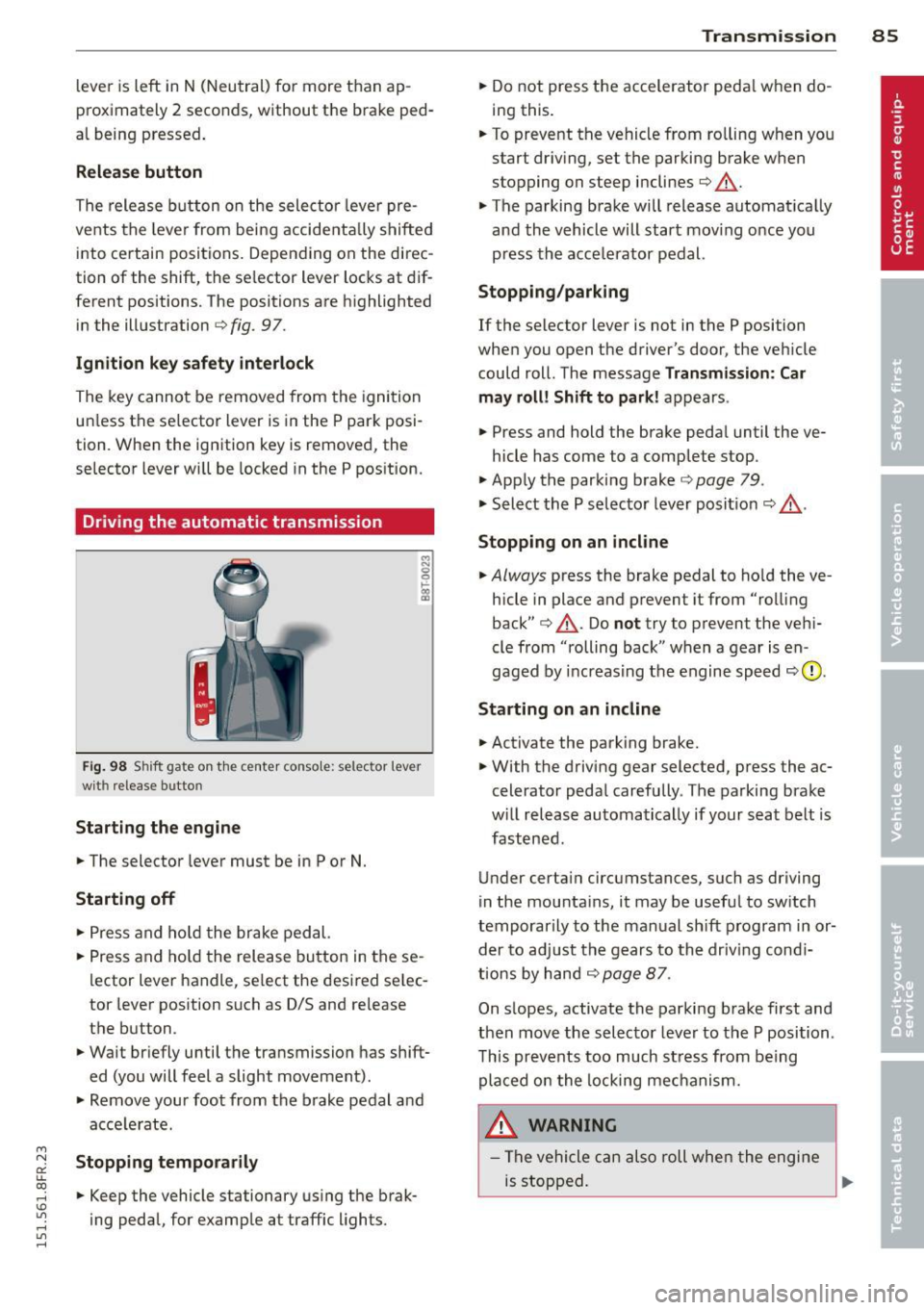
The release b utton on the selec tor leve r pre
ve nts the leve r from bei ng accide ntally s hifte d
i n to ce rtain positions. Depen ding on the direc
tion of the shift, the se lector lever locks at d if
ferent positions. The positions are h ighlighted
in the ill ustration
c!> fig . 97.
Ignition key safety interlock
The key canno t be removed from the igni tion
un less the se lector lever is in the P park posi
tion . When the ignition key is remove d, the
se lecto r lever wi ll be locked in the P pos ition.
Driving the automatic transmission
F ig. 98 S hift gate o n th e ce nte r conso le: selector lever
wit h release bu tton
Starting the engine
.. The selector leve r must be in P or N.
Starting off
.. Press a nd ho ld t he brake ped al.
.. Press and ho ld the release bu tton in these
l ector lever handle, se lect the desi red se lec
tor leve r pos ition such as D/S and re lease
t h e b utton.
.. Wait br iefly u ntil t he transmission has shift
ed (you will feel a slight movement).
.. Remove your foot from the b rake pedal a nd
acce le rate.
Stopping temporarily
.. Keep the vehicle stationary us ing the brak
ing peda l, for e xamp le at traffic lights.
Transm ission 85
.. Do not press the accelerator peda l w hen do
ing this .
.. To preve nt t he vehicle from ro lling when yo u
start dr iv ing, set the parking b rake w hen
stopping on steep inclines
c!> _&. .
.. The parking brake will release automat ica lly
an d the vehicle will start mov ing o nce you
p ress th e acce lerator pedal.
Stopping/parking
If the selector lever is not in the P position
whe n you open the driver's door , the veh icle
could roll . The message
Transmission: Car
may roll! Shift to park! ap pears .
.. Press and hold the brake peda l until the ve-
hicle has come to a comp lete stop .
.. App ly t he park ing brake
co page 79 .
.. Select the P selec to r lever posit io n
co _&. .
Stopping on an incline
.. Always press the brake pedal to ho ld the ve
hicle in place and prevent it from "ro lling
back"
co _&. . Do not try to p revent the ve hi
cle from "rolling back" when a gear is en
gaged by increas ing t he engine spee d co (!).
Starting on an incline
.. Activate the parking brake .
.. With t he driving gear selected, p ress the ac
celerato r peda l carefully . The parking brake
w ill rel ease au toma tically if your sea t belt is
fast ene d .
U nder certa in circumstances, such as driving
in the mounta ins, i t may be usefu l to sw itch
t emporar ily to the man ual sh ift program in or
d er to adju st the gears to th e d riv in g con di
ti ons by ha nd
co page 87 .
On s lopes, activate the parki ng b rake first and
t hen move the s electo r leve r to the P posi tion .
T his pr eve nts t oo much st ress from be ing
p la ced o n the locking me chani sm .
&_ WARNING
- Th e vehicle c an als o roll whe n the engi ne
is s topped .
~
Page 95 of 284
Audi adaptive cruise control and braking guard 93
shown in the tachometer @and is also
shown briefly in the display @¢
fig. 108 .
Switching Audi adaptive cruise control off
~ Push the lever away from you into position
@ until it clicks into place. The message
ACC off appears.
@ Indicator lights
II-Adaptive cru ise control is switched on.
No vehicles are detected up ahead. The stored
speed is ma intained.
• -A moving vehicle is detected up ahead.
The adaptive cruise control system regulates
the speed and distance to the moving vehicle
ahead and acce lerates/brakes automatica lly.
• -When automatic braking is not able to
keep enough distance to a previously detected
mov ing vehicle up ahead, you must take con
trol and brake¢
page 95, Request for driver
intervention.
© Display
If adaptive cruise control is not shown in the
d isplay, you can call it up with the
I RESET I
button ¢ page 23.
Based on the symbols in the d isplay, you can
determine if the system is maintaining a dis
tance to the vehicle ahead and what that dis
tance is.
No vehicle -No vehicle ahead was detected.
White vehicle -A vehicle ahead was detected .
Red vehicle -Prompt for the driver to take ac
tion
~ page 95.
Both arrows on the scale © indicate the dis
tance to the vehicle ahead . No ar row appears
when the vehicle is on an open road and there
is no object ahead . If an object is detected
ahead, the arrow moves on the scale.
The green zone on the scale shows the stored
distance. For information on changing the
~ stored distance, refer to~ page 94. If the
a: ~ distance selected is too close or may soon be-
rl I.O
"' rl
"' rl
come too close, the arrows move into the red
zone on the scale .
A WARNING
Improper use of the adaptive cruise con
trol can cause collisions, other accidents
and serious personal injuries.
- Pressing the
!SET ! button when driv ing at
speeds below 20 mph (30 km/h), w ill au
tomatically accelerate the vehicle to
20 mph (30 km/h), which is the mini
mum speed that can be set.
@ Tips
-If you switch the ignit ion or the adaptive
cruise control off, the set speed is erased
from the system memory.
- The electronic stab ilizat ion control (ESC)
and the anti-slip-regulat ion (ASR) are au
tom atica lly turned on when the adaptive
cruise control is turned on. Both systems
cannot be turned off if the adaptive
cruise control is turned on .
Changing the speed
Applies to vehicles: with Aud i adapt ive cru ise control
0
f
jJ
0
Fig. 109 Selector lever: ch ang ing the speed
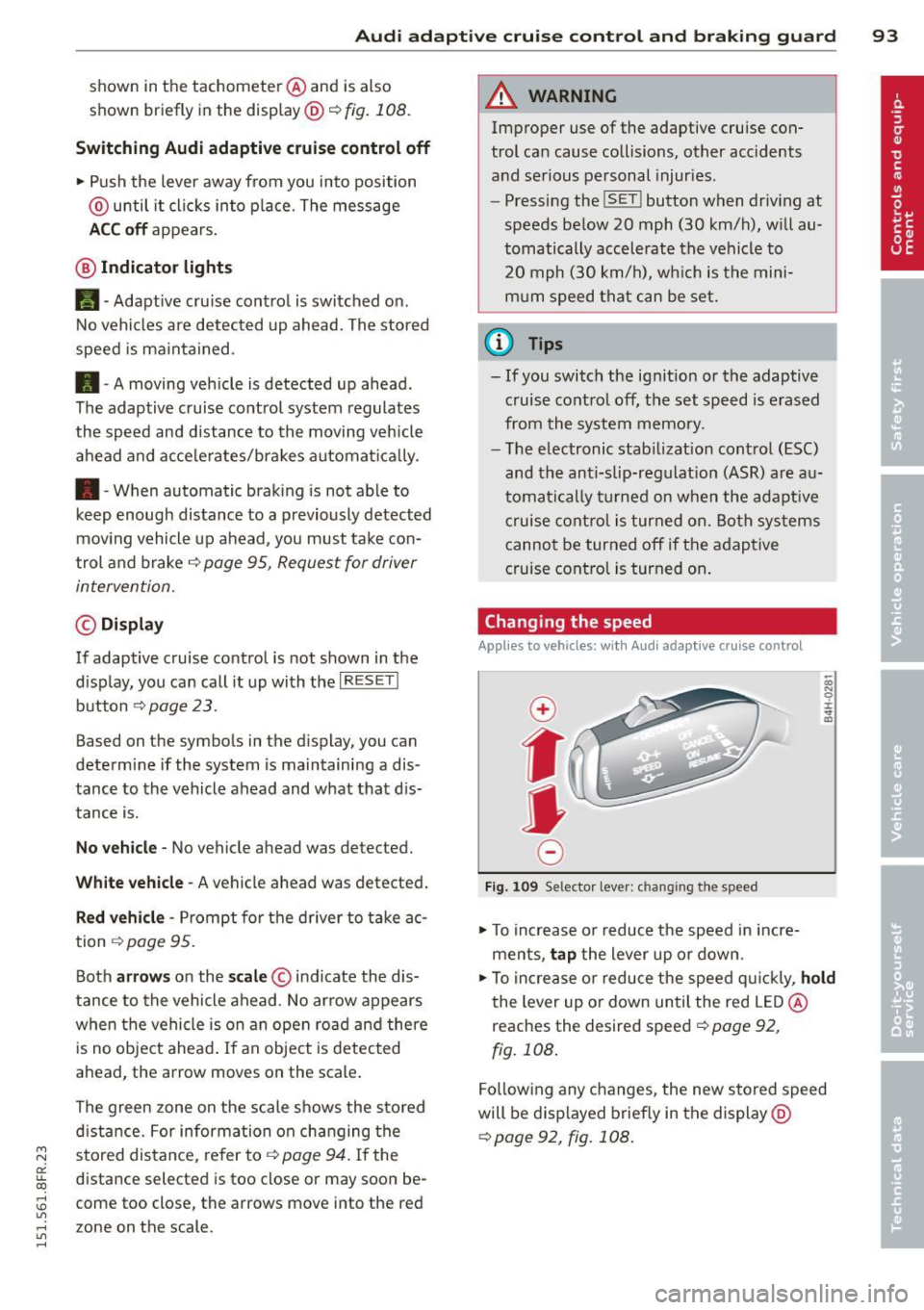
~ To increase or reduce the speed in incre
ments,
tap the lever up or down.
-0:, N 0 ± ... a)
~ To increase or reduce the speed quickly, hold
the lever up or down until the red LED@
reaches the desired speed ¢
page 92,
fig. 108.
Following any changes, the new stored speed
will be displayed briefly in the display@
~page 92, fig. 108.
Page 114 of 284
112 Driving Saf ely
Driving Safely
General notes
Safe driving habits
Please remember -safety first!
This chapter contains important information,
tips, instructions and warnings that you need
to read and observe for your own safety, the
safety of your passengers and others . We have
summarized here what you need to know
about safety belts, a irbags, ch ild restra ints as
well as child safety. Your safety is for us
priori
ty number 1.
Always observe the info rmat ion
and warn ings in th is sect ion -fo r yo ur own
safety as well as that of your passengers .
The information in this se ction app lies to all
model ve rsions of your veh icle . Some of the
feat ures described in this sec tions may be
standard equipment on some models, or may
be optional equipment on others . If you are
not sure, ask your authorized Audi dealer.
A WARNING
- Always make sure that you follow the in
struct ions and heed the WARNINGS in
this Manual. It is in your interest and in
the inte rest of you r passengers.
- Always keep the complete Owner's Liter
ature in your Audi when you lend or sell
your vehicle so that this important info r
mation will always be ava ilable to the
dr iver and passengers.
- Always keep the Owner's literature handy
so that you can find i t eas ily if you have
ques tions.
Safety equipment
The safety features are part of the occupant
restraint system and work together to help
redu ce the risk of injury in a wide variety of
accident situations.
Your safety and the safety of your passenge rs
should not be left to chance. Advances in
technology have made a varie ty o f fea tures
avai la bl e to he lp re duce the risk of injury in an accident
. The following is a list of just a few of
the safety features in your Audi:
- sophis tic ated s afety be lts fo r drive r and a ll
passenger sea ting pos it ions,
- be lt fo rce limi ters fo r the front seats,
- belt p retensioners for the seats,
- head restra ints for each seating posit io n,
- front airbags,
- side airbags in the front seats,
- specia l LATCH anchorages for child re -
straints,
- adj ustab le steering column .
T hese ind iv idual safety features, can wo rk to
ge ther as a system to he lp p rotect you and
yo ur passengers in a w ide r ange of acci dents .
T hese features canno t work as a system i f
they a re not always correct ly adjusted and co r
rect ly used.
Safety i s everybody's responsibility!
Important things to do before driving
Sofety is everybody's job! Vehide ond occu
pant safe ty alw ays depends on the informed
and careful driver.
F o r yo ur safe ty and the safety of your passen
gers,
before driving alwa ys:
" Make su re t hat all lights and signa ls are op
erati ng correctly .
" Ma ke sur e that the t ire p ressu re is co rrect.
" Ma ke su re t hat all windows are clean and af
ford good v isibili ty to the outs ide.
" Secure all luggage and other items caref ully
¢page 65.
"Ma ke su re that nothing can interfere with
the pedals.
" Adjust front seat, head restraint and mirrors
correctly fo r your height .
" Inst ruct passe ngers to adjust the head re
straints according to the ir height .
" Ma ke sur e to use the r igh t chi ld res traint
correctly to p rotect children ¢
page 15 2,
Child Safety .
"Sit prope rly in your seat and ma ke sure t hat
your passengers do the same ¢
page 60,
Seats and storage. ..,
Page 175 of 284

"' N
a: LL co
rl I.O
"' rl
"' rl
Intelligent technology 173
Switching on/off
ESC turns on automatically when you start the engine .
ton
The ESC is designed to function in levels. De
pending on the level that is selected, the sta
b ili zat ion function of the ESC is limited or
switched off. The amount of stab ilizat ion con
trol will differ depend ing on the level.
The following situations are exceptions where
it may be useful to switch on sport mode to
allow the whee ls to spin:
-·-- ; .. _ j __ , ' j ----- -~~ ......... ----
Fig. 167 Version B: upper cente r console,~ OFF bu t
ton
- Rocking the vehicle to free it when it is stuck
- Dr iving in deep snow o r on loose ground
- Dr iving with snow chains
Sport mode on ESC/ASR off Sport mode off or
ESC/ASR on
Behavior
The ESC and ASR stabiliza- The stabilization funct ion The full stabilization func-
tion funct ions are lim ited is not ava ilable
c::> .& . ESC tion of the ESC and ASR is
c::> _& . and ASR are switched off. available again.
Operation Press the I.!> OF FI button Press and hold the I~ OF FI Press the I.!> OFF j button
briefly. button longer than 3 sec- again.
onds.
Indicator II turns on. fl and Ifill•];~ turn on. II turns off or II and
lights If il•lH turn off.
Driver mes- Stabilization control Stabilization control Stabilization control
sages (ESC): Sport. Warning! (ESC): off. Warning! Re- (ESC): On
Restricted stability stricted stability
_& WARNING
You should only switch sport mode on o r
switch ESC/ASR off if your driving abilities
and road conditions perm it.
-
- There is no vehicle stabilization when
ESC/ASR are switched off.
- The stabilization function is limited
when sport mode is sw itched on. The
driv ing whee ls cou ld spin and the vehicle
could swerve, especially on slick or slip
pery road surfaces.
@ Tips
ESC/ASR cannot be switched off or spo rt
mode cannot be switched on when cru ise
control or adaptive cruise control* is
switched on.
Page 177 of 284

M N
er
u..
co ,...., \!) ..,.,
,...., ..,., ,....,
Brake lining w ear sta tus
Brake lining we ar may be che cked by visual in
spection of the condition of the brake pads
through the openings in the whee l. If neces
sary, the wheel may be remove d for this in
spection
c> page 244, Changing a wheel.
.&_ WARNING
- New brake pads do n't have the best sto p
ping power and must be "broken-in" dur
ing the init ial 100 to 1 50 m iles (150 to
200 k ilometers) of normal city driving.
T he break-in period can be considerably
longer for veh icles with ceram ic br ake ro
tors*. You can compensate for this by pressing the brake pedal more firmly.
T his also applies later when new pads are
installed .
- You should perform braking maneuvers
for the purpose of cleaning the brake
system on ly if road condit ions permit.
Other road users must not be put at r isk -
you may cause an acc ident!
- Before descending a steep grade, reduce
speed and shift transmiss ion into a lower
gear or lower driving range. Do not ride
the brakes or hold the pedal down too
long or too ofte n. This cou ld cause the
brakes to get hot and d imin ish b raking
efficiency.
- Do not "r ide the brakes" by resting your
foot on the pedal when you do not inte nd
t o brake. Th is may cause the b rakes to
overheat, prema ture wear and inc reased
stopping distance .
- Under certa in climat ic and operating
conditions such as passing through wa
ter, driving in heavy rain or after wash ing
the vehicle, the effectiveness of the brakes can be reduced. In winter, ice can
accumulate on the brake pads, linings,
discs and drums. Carefully apply brakes
for a test. Brakes will dry and ice coat ings will be cleaned off after a few ca re
ful brake applications.
- Driv ing fo r an extended pe riod of time on
salt-covered roads w ithout using you r
Intellig ent technolog y 175
brakes can a lso affect braking efficiency .
Clean off accum ulated salt coating from
brake discs and pads with a few careful
brake applications.
- If you damage the front spoiler, or if you
install a different spoiler , be sure the air
f low to the front brakes is not obstruct
ed. Otherw ise the brake system could
overheat reducing t he effectiveness of
the entire brake system.
- Failure of one b rake circuit will impa ir
the braking capab ility result ing in an in
creased s topping distance. Avoid driving
the vehicle and have it towed to the near
est a utho rized Audi dea le r or q ualified
workshop.
- Never let the vehi cle roll to a stop with
the engine shut off.
- If the b ra ke booste r is no t working, the
brake peda l must be p ressed considera
b ly harder to make up for the lack of
booster assistance .
Electro-mechanical
power assist, dynamic
steering
The electro-mechanical power assist helps
the driver when steering.
Power steer ing adapts electronically based on
t he ve hicl e speed.
Indicator lights and messages
• Steering defect ive! Do not drive vehicle!
If this indicator light turns on and stays on
and this message appears, the power steer ing
may have failed.
Do
not continue driving. See your authorized
Audi dealer or a qualified repair facility for as
s istance.
E!'Y D ynamic stee ring: System fault! You can
continue dri ving
If the indica tor ligh t turns on and the mes-
sage appears, the stee ring may be more diffi
cu lt to move o r more sensit ive than usual. The ..,.
•
•
Page 180 of 284

178 Intelligent technology
operate, such as the inter ior lights or the
power seat adjustment. The convenience
functions will be ava ilable again when you
switch on the ignit ion and start the engine.
With th e engine turn ed off
If yo u listen to the radio, for example, with
the engine turned off or use other MMI fu nc
tions, the battery is being discharged .
I f sta rting capabi lity is jeopa rdized due to en
e rgy consumpt ion, the fo llowing warning ap
pears in the MMI display:
Please start the eng ine soon or th e syste m
will be turned off .
The warning ind icates that the system will be
turned off automatically after 3 m inutes. If
you wish to con tinue us ing t he functions, you
have to s tart the engi ne.
With the engine running
A lthough electrical energy is generated when
the veh icle is be ing dr iven, the battery can be
come discharged . T his happens most ly when
little energy is be ing generated a nd a great
deal consumed and the battery 's state o f
charge is no t optima l.
To br ing the energy balance back into equili
b rium, consumers which require especially
l arge amo unts of energy are tempo rari ly cut
back or switched off. Heating sys tems in par
ticular require a great dea l of energy . If you
notice, for example, that the heated seats* or
the heated rear window are not heating, they have been temporar ily cut back or switched
off. These systems will be ava ilable again as
soon as the energy ba lance has been restored.
You will a lso notice that engine idle speed has
been increased slightly. This is norma l and not
a cause for concern . By increasing engine idle
speed the add itiona l energy required is gener
ated and the batte ry is charged .
Page 184 of 284

182 Driving and en vironm ent
Avoid full throttle
Driving at moderate speeds saves fuel and
improves your mileage .
"'Try and keep well below your car 's max imum
speed.
Accelerating gently reduces fuel consump
tion, engine wear, and does not disturb the
environment. F ue l consumption, exhaust emissions and en
g ine no ise increase d isproportionately at high
speeds. If you dr ive at approximately three
quarters of top speed, fuel consumption will be reduced by one half. Never dr ive faster
than the posted speed limit and weather con
d itions permit .
Reducing unnecessary idling
Even when your car is just idling it burns up
fuel.
"'Shut the engine off when you are not dr iv ing
the vehicle .
"'Do not warm up the veh icle by letting the
engine run at idle .
It makes sense to shut
off the e ngine in traff ic
jams, when waiting for trains to pass at ra il
road crossings , or at traff ic lights that have
l ong wa its on red. Turning the engine
off fo r
just
30-40 seconds saves more fue l than is
bu rned s tarting the eng ine again .
It takes a long time for the engine to warm up
fu lly when it is running at idle . Howeve r, wear
and nox ious em issions are especially high
when the engine is warming up. So you should
drive away as soon as you start the engine and
avoid running at high rpms while the engine is
still warming up .
([) Note
Do not leave engine idling unattended af
ter starti ng . If warning lights should come
on to indicate improper operation, they
wou ld go unheeded. Extended idling also
produces heat, which cou ld result in over- heating o
r othe r damage to the ve hicle or
other property .
Regular maintenance
A badly tuned engine unnecessarily wastes a
lot of fuel.
"' Have your ve hicle serviced at reg ular in ter -
vals.
By having your veh icle regu la rly serviced by an
a utho rized Aud i dea le r helps to ensure that it
runs properly and econom ic all y. The cond it ion
of your veh icle not on ly affe cts its safety and
ability to ho ld its va lue, it a lso affects
fuel
con sumption .
Check your oil ea ch time you fill your tank.
The amount of o il used is re lated to engine
load and speed .
It is normal for the oil consumption of a new
engine to reach its lowest value after a certa in
mileage has bee n driven.
You must drive your veh icle about 3,000 m iles
(5,000 kilometers) before you can properly
assess oil consumpt ion.
This also app lies to fue l cons umption and en
gine output.
(D Note
- Have your vehicle maintained proper ly
and in accordance with the service rec
ommendations in your Warranty
& Main
tenance booklet. Lack of proper ma inte
nance as well as improper use of the ve
hicle will impair the function of the
em iss ion contro l system and cou ld lead
to damage.
- Do not alter or remove any component of
the Emission Control Sys tem unless ap
proved by the manufacture r.
- Do not alte r or remove any device, such
a s hea t sh ie lds, swi tches, ig nitio n w ires,
valves, which are designe d to p rotec t
your vehicle's Emission Control System
and other impo rtant vehicle compo
nents .
Page 200 of 284

198 Checking and filling
Using the proper engine oil is important for
the functionality and service life of the en
gine. Your engine was factory-filled with a
high-quality oil which can usually be used
throughout the entire year.
0 Note
Your Limited New Vehicle Warranty does
not cover damage or malfunctions due to
failure to follow recommended mainte
nance and use requirements as set forth in
the Audi Owner's Manual and Warranty
&
Maintenance booklet.
- Use only a high quality engine oil that ex
pressly complies with the Audi oil quality
standard specified for your vehicle's en
gine . Using any other oil can cause seri
ous engine damage.
- Do not mix any lubricants or other addi
tives into the engine oil. Doing so can
cause engine damage.
If you need to add oil and there is none
available that meets the Audi oil quality
standard your engine requires, you may
add a total of no more than 0.5 quart/liter
of a high-quality "synthetic"oil that meets
the following specifications.
- Vehicles with gasoline engine: ACEA A3
or API SM with a viscosity grade of
SAE 0W-30, SAE SW-30 or SAE SW-40.
- For more information about engine oil
that has been approved for your vehicle, please contact either your authorized
Audi dealer or Audi Customer Relations
at 1 (800) 822-2834 or visit our web site
at www.audiusa .com or
www .audicanada .ca .
Engine oil consumption
The engine in your vehicle depends on an ade
quate amount of oil to lubricate and cool all
of its moving parts.
In order to provide effective lubrication and
cooling of internal engine components, all in
ternal combustion engines consume a certain amount of oil. Oil consumption varies from
engine to engine and may change significantly
over the life of the engine. Typically, engines
with a specified break-in period (see
¢ page 179) consume more oil during the
break -in period than they consume after oil
consumption has stabilized.
Under normal conditions, the rate of oil con
sumption depends on the quality and viscosity
of the oil, the RPM (revolutions per minute) at
which the engine is operated, the ambient
temperature and road conditions . Further fac
tors are the amount of oil dilution from water
condensation or fuel residue and the oxida
tion level of the oil. As any engine is subject to
wear as mileage builds up, the oil consump
tion may increase over time until replacement of worn components may become necessary.
With all these variables coming into play, no
standard rate of oil consumption can be es
tablished or specified. There is no alternative
to regular and frequent checking of the oil lev el, see
Note.
If
the yellow engine oil level warning symbol
El in the instrument cluster lights up, you
should check the oil level as soon as possible
¢ page 199. Top off the oil at your earliest
convenience
¢ page 199.
A WARNING
--
Before you check anything in the engine
compartment, always read and heed all
WARNINGS¢
& in Working in the engine
compartment on page 195.
{(D Note
Driving with an insufficient oil level is like
ly to cause severe damage to the engine .
(D Tips
- The oil pressure warning display. is
not an indicator of the oil level. Do not
rely on it. Instead, check the oil level in
your engine at regular intervals, pref erably each time you refuel, and always
before going on a long trip. .,.