mirror AUDI RS5 CABRIOLET 2015 Owners Manual
[x] Cancel search | Manufacturer: AUDI, Model Year: 2015, Model line: RS5 CABRIOLET, Model: AUDI RS5 CABRIOLET 2015Pages: 284, PDF Size: 69.56 MB
Page 56 of 284

54 Clear vis ion
Interior lights
Front /rear interior lights
Fig . 58 Fro nt headliner : interior lig htin g con tro ls
Fig. 59 R ear headlin er: r ear rea ding lights
@ Interio r ligh ts
Press the button ®· T he LED in the button il
lum inates.
I f the LED illum inates, the interior lighti ng is
controlled automatically .
@ Front /rear r eading li ghts
To turn a reading light on/off , press the but
ton~ ~
fig. 58 or ~ fig. 59 .
Instrument illumination
The basic brightness of the illumination for
the instruments, the center console and the
display can be adjusted .
Fig . 60 Ins trument ill umin atio n
.,. Press the knob to re lease it .
.,. Turn the knob toward"-" or"+" to reduce or
increase the brightness .
.,. Press the knob aga in to return it to its origi
nal posit ion.
(!') Tips
The instrument i llumination (for dials and
needles) lights on when the ignition is
switched on and the vehicle lights are
turned off . As the daylight fades, the illu
mination of the dia ls likewise dims auto
matically and wi ll go out completely when
the ou tside light is very low. This feature is
meant to rem ind you to sw itch on the
headlights when ou tside light conditions
become poor .
Vision
Adjusting the exterior mirrors
Fig . 6 1 Forwar d se ct io n of drive r's armr est: powe r mir
r o r contro ls
Page 57 of 284

"' N
a: LL co
rl I.O
"' rl
"' rl
Turn the knob to the desired position:
Q/ P -In this position , you can adjust the
driver's and front passenger's exterior mirrors by turning the knob in the desired direction.
(ijjl -The mirrors are heated depending on the
outside temperature.
Passenger exterior mirror tilt function*
To help you see the curb when backing into a parking space, the surface of the mirror tilts
slightly . The knob must be in the P posit ion
for this to happen .
You can adjus t the tilted mirror sur face by
turning the knob in the desired direction .
When you move out of reverse and into anoth
er gear, the new mirror position is stored and
assigned to the key you are using.
T he mirror goes back into its original position
once you drive forward faster than 9 mph (15 km/h) or switch the ignition off .
_& WARNING
Curved mirror surfaces (convex or spheri
cal*) increase your field of view. Remem
ber that vehicles or other objects will ap
pear smaller and farther away than when
seen in a flat mirror. If you use this mirror
to estimate distances of following vehicles
when changing lanes, you could estimate
incorrectly and cause an accident .
(D Note
- If you wash the vehicle in an automatic
car wash, you must fold the exterior mir
rors in to reduce the risk of damage to
the mirrors.
{!) Tips
- The exterior mirror settings are stored
with the memory function*
c:> page 63.
-If there should be a malfunction in the
electrical system, you can still adjust the
exterior mirrors by pressing the edge of
the mirror.
.
Clear vision 55
Dimming the mirrors
N
~
><
~===~=======~ ~
Fig. 62 Auto matic dimmin g rearv iew mirro r*
Manual dimming rearview mirror
.,. Pull the lever on the bottom of the mirror
back .
Automatic dimming rearview mirror*
.,. Press the button @c:>
fig. 62. The indicator
light @ turns on . The rearview and exterior*
mirrors dim automatically when light shines
on them, for example from headlights on a
vehicle to the rear .
_& WARNING
-
Electrolyte fluid can leak from automatic
dimming mirrors if the glass is broken .
Electrolyte fluid can irritate skin, eyes and
respiratory system.
- Repeated or prolonged exposure to elec
trolyte can cause irritation to the respira
tory system, especially among people
with asthma or other resp iratory condi
tions . Get fresh air immediately by leav
ing the vehicle or, if that is not possible,
open windows and doors all the way.
- If electrolyte gets into the eyes, flush
them thoroughly with large amounts of clean water for at least 15 minutes;
medical attention is recommended.
- If electrolyte contacts skin, flush affect
ed area with clean water for at least 15
minutes and then wash affected area
with soap and water; medical attention
is recommended. Thoroughly wash af
fected clothing and shoes before reuse .
.
Page 58 of 284

56 Clear vision
-If swallowed and person is conscious,
rinse mouth with water for at least 15
minutes. Do not induce vomiting unless
instructed to do so by medical professio
nal. Get medical attention immediately.
d) Note
Liquid electrolyte leaking from broken mir
ror glass will damage any plastic surfaces
it comes in contact with. Clean up spilled
electrolyte immediately with clean water
and a sponge.
@ Tips
- Switching off the dimming function of
the inside rear view mirror also deacti
vates the automatic dimming function of
the exterior mirrors.
-Automatic dimming for the mirror only
operates properly if the light striking the inside mirror is not hindered by other ob
jects.
- The automatic dimming mirrors do not
dim when the interior lighting is turned
on or the reverse gear is selected.
Sun visors
1--~---'
Fig. 63 Driver's side: sun visor
The sun visors for the driver and passenger
can be pulled out of their brackets in the cen
ter of the vehicle and turned towards the
doors @.
The mirror light switches on when the cover over the vanity mirror@ opens.
Wiper and washer
system
Switching the windshield wipers on
Fig. 64 W indshield w iper lever
Move the windshield wiper lever to the corre
sponding position:
@ -Windshield wiper off
@ -Interval mode. To extend/shorten the
wiper intervals, move the switch@ to the
left/right. In vehicles with a rain sensor* the
wipers turn on in the rain once the vehicle
speed exceeds approximately 2 mph (4 km/h).
The higher the sensitivity of the rain sensor* is
set (switch @ to the right), the earlier the
windshield wipers react to moisture on the
windshield. In some models, you can switch
rain sensor mode off and switch intermittent
mode on in the MMI*. Select:
!CARI function
button
> Car systems* control button > Driver
assist
> Rain sensor . In intermittent mode,
you can adjust the interval time using the@
switch.
@ -Slow wiping
@ -Fast wiping
@-Single wipe
® -Clean the windshield. To eliminate water
droplets, the windshield wiper performs one
afterwipe operation after several seconds
while driving . You can switch this function off
by moving the lever to position ® within 10
seconds of the afterwipe operation. The after
wipe function is reactivated the next time the
ignition is switched on.
Page 60 of 284

58 Clear vis ion
• Se lect : I CAR ! function button > Car sys tems*
control button > S erv ici ng & check s > Wiper
s e rv ice po sition
> O n/ Off .
Removing the wip er blade
• Lift the w indshield w iper arm up from the
windshield.
• Press the locking knob
(D c::> fig . 65 on the
wiper blade . Hold the wiper blade firm ly.
• Remove the wiper blade in the direction of
the arrow.
Attach ing th e wip er blade
• Install the new wiper blade in the retainer
on the wiper arm@ until you hear it click in
to place on the wiper arm .
• Place the wiper arm back on the windshield.
• Turn the service position off.
_& WARNING
-
For your safety, you should replace the
w iper blades once or tw ice a year . See your
authorized Audi dealer for rep lacement
blades.
(D Note
- The windshield wiper blades must only
be replaced when in the service position!
Otherwise, you risk damaging the paint
on the hood or the w indshield wiper mo
tor.
- You should not move yo ur vehicle or
press the w indshie ld w iper lever when
t h e wiper arms are folded away from the
windsh ield. The w indshield w ipers would
move back into the ir original position
and could damage the hood and wind
shield.
- To he lp prevent damage to the wiper sys
tem, a lways loosen blades which are fro
zen to the windsh ield before operat ing
wipers.
- To he lp prevent damage to wiper blades ,
do not use gasoline, kerosene, pa int
th inner, or othe r solvents on or near the
wiper blades . -
To help prevent damage to the wiper
arms or other components, do not at
tempt to move the wipers by hand.
(D Tips
- Commercial hot waxes applied by auto
matic car washes affect the how easily
the glass surface can be cleaned .
- Yo u can also use the service position, for
example, if you want to protect the
windshield from icing by using a cover.
Digital compass
Switching the compass on and off
Applies to vehicles: with digita l compass
The compass direction is shown in the rear
view mirror .
Fig. 66 Rearv iew mirr or: Digita l compass act ivated
• To swi tch the compass on or off, press and
hold the button @until the compass dis
p lay in the mirror
c::> fig . 66 appears or disap
pears.
T he digita l compass on ly works when t he igni
tion is o n. The directions are indicated with
abbreviations :
N (north), NE (northeast), E
(east), SE (southeast), S (south), SW (south
west) ,
W (west), NW (northwest).
(D Tips
To prevent inaccurate compass readings,
do not bring any remote contro ls, e lectr i
ca l devices or metallic objects near the
mirro r.
Page 61 of 284
"' N
a: LL co
rl I.O
"' rl
"' rl
Adjusting the magnetic zone
Applies to vehicles: with digital compass
The magnetic zone must be adjusted correctly
for the compass to read accurately .
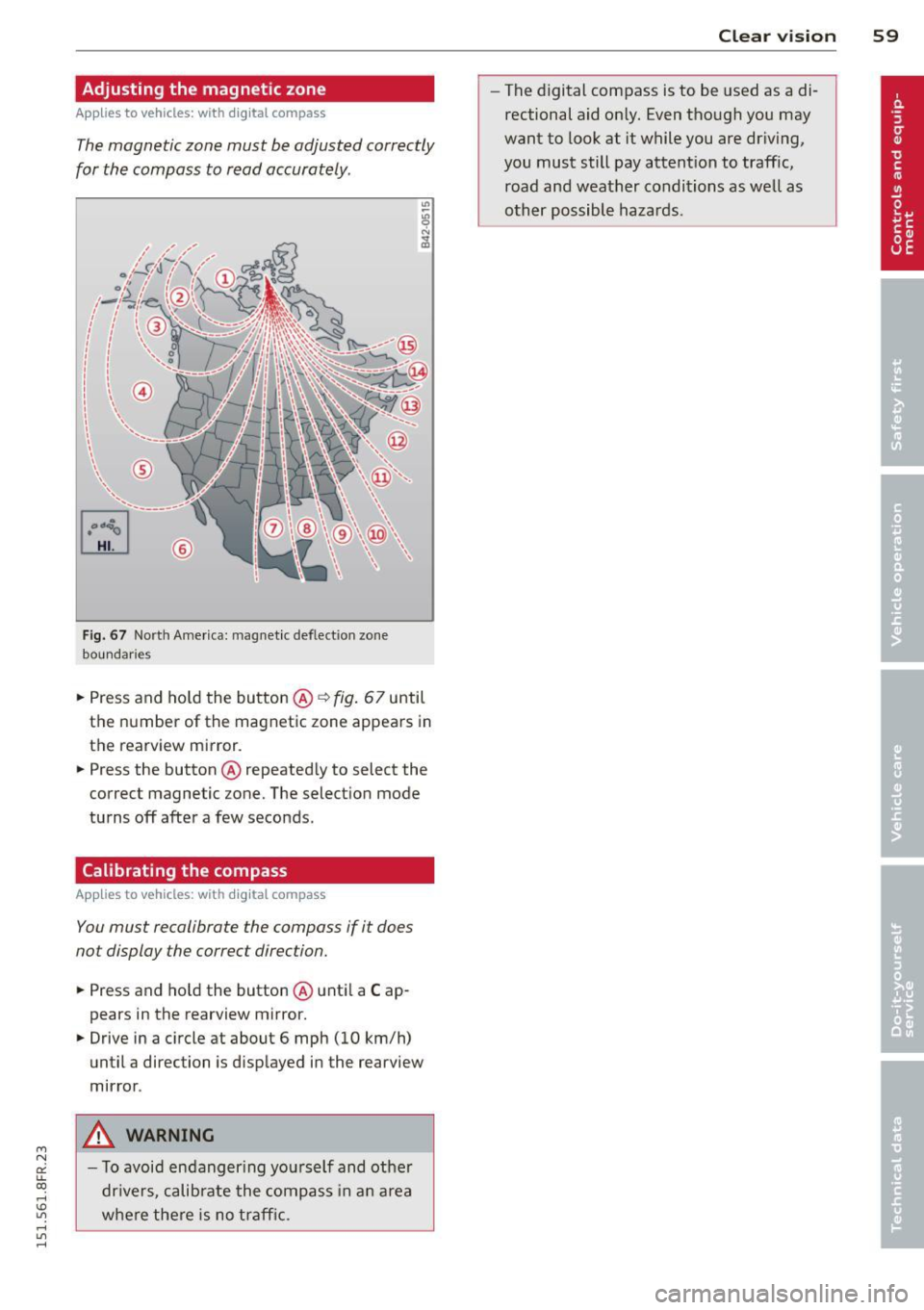
Fig. 67 North America: magnet ic def lect ion zone
bounda ries
.. Press and ho ld the button @ ~fig. 67 until
the number of the magnetic zone appears in
the rearv iew mirror .
.. Press the button @repeated ly to select the
correct magnetic zone. The select io n mode
turns off after a few seconds.
Calibrating the compass
Applies to vehicles: with digital compass
You must recalibrate the compass if it does
not display the correct direction .
.. Press and ho ld the button @unti l a C ap
pears in the rearview mirror .
.. Drive in a circle at about 6 mph (10 km/h)
until a direction is disp layed i n the rearview
mirror .
&, WARNING
- To avoid endang ering yo urse lf and other
dr ivers, calib rate the compass in a n area
w he re there is no traff ic. Clear vi
sion 59
- The digital compass is to be used as a di
rectional aid on ly. Even though you may
want to look at it while you are dr iving,
you must still pay attent ion to traffic,
road and weather conditions as we ll as
other possible hazards.
Page 66 of 284

64 Seats and storage
In addition to the driver 's seat settings, you
can also store and access the exterior mirror
ad justment settings* using the remote con
trol key or memory button.
Remote control key
Applies to vehicles: with seat memory
To assign the driver's seat settings to the re
mote contro l key when locking the vehicle, the
function must be activated in the radio or
MMI*
• Se lect :
I CAR I funct ion button> Seat adj ust
ment
> Dri ver's se at > Remote c ontrol k ey >
on .Or
• Se lect :
,..,I Cc-cAc-cRc-, 1 funct ion button > Car system s*
control button > Vehicle setting s > Seats >
Driv er' s s eat > Remot e cont rol key > On .
(D Tips
If you do not want another d river's set
tings to be assigned to the remote key,
sw itch off the memory function us ing the
rad io or MMI* or the
!ON/OFF I button
c:::>page 64.
Memory buttons
App lies to vehicles: with seat memory
Fig. 73 Driver 's door: memory functio n buttons
The memo ry but tons are located in the dr iv
e r's door .
Switching the memory function on /off
• Press the ION/O FF I button to switch the
memo ry fu nction on/off. The word
OFF
li ghts up when the memory funct io n is
swit ched off. Seat profi les are neither stored
nor recalled .
Storing a s eat p rofile
• Press the ISET I button. When the word SET
lights up, the memory is ready to store set
tings.
• Press a memory button
dII or [Ii) briefly . A
tone confirms that the settings were stored.
Acces sing a seat profile
• If the driver's door is open and the ignition
is switched off, press the memory button.
• If the driver's door is closed or the ignition is
switched on, press and ho ld the memory
button until the seat adjustment is com
plete .
A WARNING
-For safety reasons ., the seat setting can
only be recalled when the vehicle is sta
tionary -ot herwise you ris k having an ac
cident.
- I n an emergency the recall proced ure can
be cancelled by p ressing the
ION/OFF I
sw itch or by tapping the memory bu t
ton s.
Ashtray
Fig. 7 4 Center console : ashtray
Opening /cl osi ng
• To open the ashtray, slide the cover up
c:::> fig. 74.
• To close the ashtray, press down on the cov
er.
Emptying the ashtray
• To remove the insert, s lide the latch to the
right
c:::> fig. 74 -arrow- . ..,_
Page 101 of 284

"' N
a: LL co
rl I.O
"' rl
"' rl
Audi side assist Lane change assistant
Description
Applies to vehicles: with Audi side assist
Fig. 114 Sensor dete ction ra n ge
Fig. 115 Disp la y on the exterio r mirro r
Side assist he lps you mon itor your blind spot
and traffic behind you r veh icle. With in the
limits of the system, it warns you about
vehicles that are coming closer or that are
traveling w ith you within sensor range
(D
c::, fig . 114 : if a lane change is class ified as crit
ical, the display@ in the exterior mirror
c::>
fig. 115 turns on.
The display in the left exterior mirror provides
assistance when making a lane change to the
le ft, while the display in the right exterior mir
r or provides assistance when making a lane
change to the right.
Information stage
As long as you do not activate the turn signal,
side assist
informs you about vehicles that are
detected and classified as crit ical. The display
in the respective mirror turns on, but is d im.
Audi side assist 99
The display remains dim intentionally in the
information stage so that your view toward
the front is not disturbed .
Warning stage
If you activate the turn signal, side assist
warns you about vehicles that are detected
and classified as critical. The display in the re
spective mirror blinks brightly . If this hap
pens, check traff ic by glanc ing in the rearview
mirror and over your shoulder
c::> A in General
information on page 100 .
@ Tips
-You can adjust the brightness of the dis
play @c::>
page 101.
General information
Applies to vehicles: with A ud i side ass ist
®
®
©
Fig. 116 D riving s it u atio ns
Fig . 117 Rea r of th e ve hicl e: pos it io n of the senso rs
Page 102 of 284

100 Audi side assist
Side assist functions at speeds above approxi
mately 19 mph (30 km/h).
@ Vehicles that are approaching
In certain cases, a vehicle will be classified as
cr itica l for a lane change even if it is still
somewhat far away . The faster a vehicle ap
proaches, the sooner the display in the exteri
or mirror will turn on.
@ Vehicles traveling with you
Vehicles traveling with you are indicated in the
exterior m irror if they are classified as critica l
for a lane change. All vehicles detected by
side assist are indicated by the time they en
ter your "blind spot", at the latest.
© Vehicles left behind
If you slowly pass a vehicle that side assist has
detected (the difference in speed between the
vehicle and your vehicle is less than 9 mph
(15 km/h)), the disp lay in the exterior mirror
turns on as soon as the vehicle enters your blind spot.
The display will not turn on if you quickly pass
a vehicle that side assist has detected (the dif
ference in speed between the vehicle and your
vehicle is greater than 9 mph (15 km/h)).
Functional limitations
The radar sensors are designed to de tect the
l eft and right adjacent lanes when the road
lanes are the normal width. In certain situa
tions, the display in the exterior mirror may
turn on even though there is no vehicle locat
ed in the area that is critical for a lane change.
For example:
- if the lanes are narrow or if your are driving
on the edge of your lane. If this is the case,
the system may have detected the vehicle in
another lane that is
not adjacent to your
current lane.
- if you are driving through a curve. Side assist
may react to a veh icle that is one lane over
from the adjacent lane.
- if side assist reacts to other objects (such as
high or displaced guard ra ils). -
In poor weather conditions . The side assist
functions are limited.
Do not cover the rada r sensors
~ fig. 117 with
stickers, deposits, bicycle wheels or other ob
jects, because this will affect the function . For
information on cleaning, refer to ¢
page 184.
A WARNING
-
-Always pay attention to traffic and to the
area around your vehicle. Side assist can
not replace a driver's attention. The driv
er alone is always responsible for lane
changes and similar dr iving maneuvers .
- Improper reliance on the side assist sys
tem can cause coll is ions and serious per
sonal injury:
- Never rely on ly on side assist when
changing lanes.
- Always check rear view mirrors to make
sure that it is safe to change lanes.
- Side assist cannot detect all vehicles un
der all conditions- danger of accident!
- Please note that side assist indicates
there are approaching vehicles, or
vehicles in your blind spot, only after
your vehicle has reached a driving speed
of at least 19 mph (30 km/h).
- In certain sit uations, the system may not
function or its function may be limited.
For example:
- if vehicles are approach ing or being left
behind ve ry quickly. The d isp lay may
not turn on in time.
- in poor weather conditions such as
heavy rain, snow or heavy mist.
- on very wide lanes, in tight curves or if
there is a rise in the road surface.
Vehicles in the adjacent lane may not
be detected because they are outside
of the sensor range .
([) Note
The sensors can be displaced by impacts or
damage to the bumper, wheel housing and
u nderbody. This can affect the system. .,..
Page 103 of 284

"' N
a: LL co
rl I.O
"' rl
"' rl
Have your authorized Audi dealer or au
thorized Audi Service Facility check their
function.
@ Tips
- If the window glass in the driver's door
or front passenger's door has been tint
ed, the display in the exterior mirror may be misinterpreted .
- For Declaration of Compliance to United
States FCC and Industry Canada regula
tions
¢ page 267.
Activating and deactivating
Applies to vehicles: with Audi side assist
Fig. 118 Drive r's d oor : Sid e ass ist bu tton
.. Press the button ¢.&. in General informa
tion on page 100
to switch the system on/
off . The LED in the button turns on when
side assist is switched on.
Adjusting the display brightness
Applies to vehicles: with Audi side assist
The signal brightness can be set in the radio
orMMI* .
.. Select : ICARI function button> Audi side as
sist.
.. Select : I CARI function button > Car systems*
control button > Driver assist > Audi side
assist.
The display brightness adjusts automatically
to the brightness of the surroundings, both in
the information and in the warning stage. In
very dark or very bright surroundings, the dis play is already set to the minimum or maxi
mum level by the automatic adjustment. In
Audi side assist 101
such cases, you may notice no change when
adjusting the br ightness, or the change may
only be noticeable once the surroundings
change.
Adjust the brightness to a level where the dis
play in the information stage will not disrupt
your view forward. If you change the bright
ness, the display in the exterior mirror will
briefly show the brightness level in the infor
mation stage. The brightness of the warning
stage is linked to the brightness in the infor
mation stage and is adjusted along with the
information stage adjustment.
(D Tips
- Side assist is not active while you are
making the adjustment.
- Your settings are automatically stored
and assigned to the remote control key
being used.
Driver messages
Applies to vehicles: wit h Aud i side ass ist
If side assist switches off by itself, the LED in
the button turns off and a message will ap
pear in the instrument cluster display:
Audi side assist unavailable: Sensors blocked
The radar sensors' vision is affected . Do not
cover the area in front of the sensors with bike
wheels, stickers, dirt or other objects. Clean
the area in front of the sensors, if necessary
¢ page 99, fig. 117 .
Audi side assist: Currently unavailable
Side assist cannot be switched on temporarily
because there is a malfunction (for example,
the battery charge level may be too low) .
Audi side assist: System fault!
The system cannot guarantee that it will de
tect vehicles correctly and it is switched off.
The sensors have been displaced or are faulty.
Have the system checked by an authorized
Audi dealer or authorized Audi Service Facility
soon.
Page 114 of 284
112 Driving Saf ely
Driving Safely
General notes
Safe driving habits
Please remember -safety first!
This chapter contains important information,
tips, instructions and warnings that you need
to read and observe for your own safety, the
safety of your passengers and others . We have
summarized here what you need to know
about safety belts, a irbags, ch ild restra ints as
well as child safety. Your safety is for us
priori
ty number 1.
Always observe the info rmat ion
and warn ings in th is sect ion -fo r yo ur own
safety as well as that of your passengers .
The information in this se ction app lies to all
model ve rsions of your veh icle . Some of the
feat ures described in this sec tions may be
standard equipment on some models, or may
be optional equipment on others . If you are
not sure, ask your authorized Audi dealer.
A WARNING
- Always make sure that you follow the in
struct ions and heed the WARNINGS in
this Manual. It is in your interest and in
the inte rest of you r passengers.
- Always keep the complete Owner's Liter
ature in your Audi when you lend or sell
your vehicle so that this important info r
mation will always be ava ilable to the
dr iver and passengers.
- Always keep the Owner's literature handy
so that you can find i t eas ily if you have
ques tions.
Safety equipment
The safety features are part of the occupant
restraint system and work together to help
redu ce the risk of injury in a wide variety of
accident situations.
Your safety and the safety of your passenge rs
should not be left to chance. Advances in
technology have made a varie ty o f fea tures
avai la bl e to he lp re duce the risk of injury in an accident
. The following is a list of just a few of
the safety features in your Audi:
- sophis tic ated s afety be lts fo r drive r and a ll
passenger sea ting pos it ions,
- be lt fo rce limi ters fo r the front seats,
- belt p retensioners for the seats,
- head restra ints for each seating posit io n,
- front airbags,
- side airbags in the front seats,
- specia l LATCH anchorages for child re -
straints,
- adj ustab le steering column .
T hese ind iv idual safety features, can wo rk to
ge ther as a system to he lp p rotect you and
yo ur passengers in a w ide r ange of acci dents .
T hese features canno t work as a system i f
they a re not always correct ly adjusted and co r
rect ly used.
Safety i s everybody's responsibility!
Important things to do before driving
Sofety is everybody's job! Vehide ond occu
pant safe ty alw ays depends on the informed
and careful driver.
F o r yo ur safe ty and the safety of your passen
gers,
before driving alwa ys:
" Make su re t hat all lights and signa ls are op
erati ng correctly .
" Ma ke sur e that the t ire p ressu re is co rrect.
" Ma ke su re t hat all windows are clean and af
ford good v isibili ty to the outs ide.
" Secure all luggage and other items caref ully
¢page 65.
"Ma ke su re that nothing can interfere with
the pedals.
" Adjust front seat, head restraint and mirrors
correctly fo r your height .
" Inst ruct passe ngers to adjust the head re
straints according to the ir height .
" Ma ke sur e to use the r igh t chi ld res traint
correctly to p rotect children ¢
page 15 2,
Child Safety .
"Sit prope rly in your seat and ma ke sure t hat
your passengers do the same ¢
page 60,
Seats and storage. ..,