sport mode AUDI RS5 CABRIOLET 2015 Owners Manual
[x] Cancel search | Manufacturer: AUDI, Model Year: 2015, Model line: RS5 CABRIOLET, Model: AUDI RS5 CABRIOLET 2015Pages: 284, PDF Size: 69.56 MB
Page 16 of 284
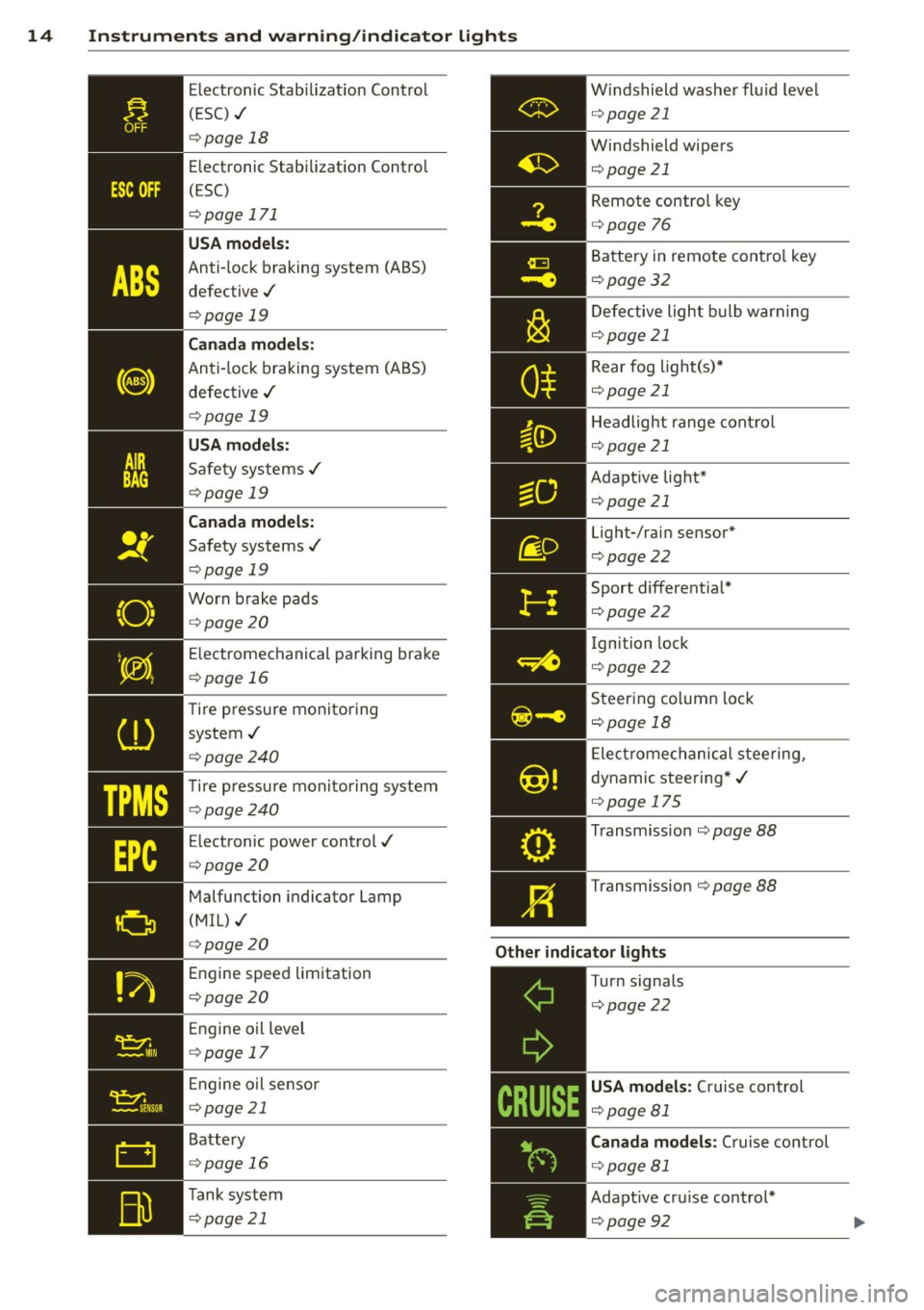
14 Instruments and warning/indicator lights
TPMS
Electronic Stabilization Control
( ES C) ./
¢page 18
Electronic Stabilization Control
(ESC)
¢ page 171
USA models:
Anti-lock braking system (ABS)
defective ./
¢ page 19
Canada models:
Anti-lock braking system (ABS)
defective ./
¢ page 19
USA models:
Safety systems ./
¢page 19
Canada models:
Safety systems ./
¢ page 19
Worn brake pads
¢ page 20
E lectromechanical parking brake
¢ page 16
T ire pressu re monitoring
system ./
¢ page240
Tire pressure mon itoring system
¢page240
Electronic power control./
¢ page20
Malfunction indicator Lamp
(MIL) ./
¢ page 20
Engine speed limitation
¢ page20
Engine oil leve l
¢ page 17
Engine oil sensor
¢page 21
Battery
¢ page 16
Tank system
¢ page 21 Windshield
washer fluid level
¢ page21
Windshield wipers
¢page21 Remote control key
¢page
76
Battery in remote control key
¢page32
Defective light bulb warning
¢page21
Rear fog light(s)*
¢page21
Headlight range control
¢page 21
Adapt ive light*
¢page21
Light-/rain sensor*
¢page22
Sport differentia l*
¢page22
Ignition lock
¢ page22
Steering column lock
¢page 18
Electromechanical steering,
dynamic steering*./
¢ page 175
Transm ission ¢page 88
Transm ission ¢page 88
Other indicator lights
-------------
Turn signals
¢page22
USA models : Cru ise control
¢page 81
Canada models : Cruise control
¢ page81
Adapt ive cru ise control*
¢page92
Page 85 of 284
M N
er
u..
co ,...., \!) 1.1"1 ,...., 1.1"1 ,....,
Transmission S tronic
Introduction
The automat ic transm iss ion is controlled elec
tronically. The transmiss ion upshifts or down
shifts automatically depend ing on which drive
p rogram is se lected.
When a
moderate driving sty le is used, the
transmission selects the most econom ica l
d riving mode.
It w ill then change up early and
de lay the downshifts to g ive better f uel econ
omy .
The transmis sion swi tches to a sporty mode
after a k ick-down or when the dr iver uses a
sporty driving sty le characterized by quick ac
celerator peda l movements, heavy accelera
tion, frequent changes in speed and traveling
at the maximum speed.
If desired, the drive r can a lso se lect the gears
manually ( tiptronic mode ) ~ page 87.
The S tronic is a dual-clut ch tra nsmission.
P ower is transfe rred using two clutches that
work independently from one another . They
rep lace the torq ue converter used in conven
tional automatic transmiss ions and allow the
vehicle to accelerate without a noticeable in
terruption in traction.
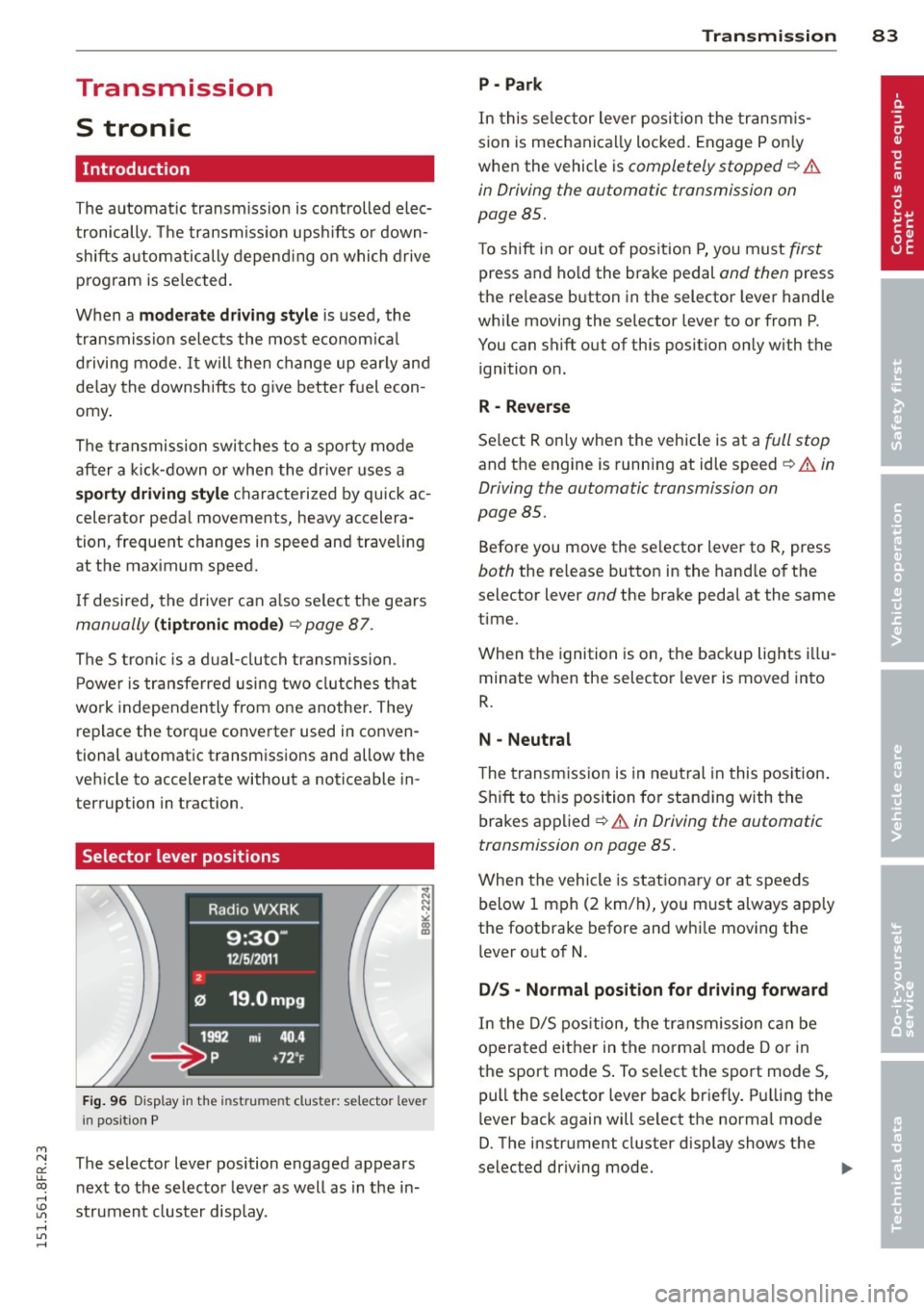
Selector lever positions
F ig. 96 Display in the instrument cluster: se lector lever
in pos itio n P
The selector lever position engaged appears
n ext to the selector leve r as well as in the in
strument cluster display.
Tran sm iss ion 83
P -Park
In this se lector lever posi tion the transm is
s ion is mechanica lly locked. Engage P on ly
when the vehicle is
completely stopped~&.
in Driving the automatic transmission on
page 85.
T o shift in or out of pos it ion P, yo u must first
press and ho ld the brake pedal and then press
the re lease button in the selector leve r hand le
whi le moving the selector lever to or from P.
You can shift out of this position only with the ignition o n.
R - Reverse
Se lect R on ly when the veh icle is at a full stop
and t he engine is running at idle speed~.&. in
Driving the automatic transmission on
page 85.
Before you move the se lector lever to R, press
both the re lease button in the hand le o f the
selector lever
and the brake pedal at the same
time.
When the ignition is on, the backup lights illu
minate when the selector lever is moved into
R.
N -Neutral
The transmiss ion is in neu tral in this pos ition .
S hift to t his position fo r standing with the
brakes app lied
~ .&. in Driving the automatic
transmission on page 85.
When the vehicle is stat iona ry or a t speeds
below 1 mph (2 km/h), yo u must always app ly
the footbrake before and whi le mov ing the
l ever o ut of
N.
DIS -Normal posit ion for driving forward
In the D/S pos it ion, t he tr ansmission c an be
operated either in the norma l mode D or in
the sport mode S . To select the sport mode S,
pull the selector lever back briefly. P ulling the
l ever back again will se lect the norma l mode
D. The instr ument cluster disp lay shows the
selected driving mode. ..,_
Page 86 of 284
84 Transmi ssion
In the no rm al m ode D, the transmission auto
matica lly selects the suitab le gear ratio. It de
pends on eng ine load, veh icle speed and driv
ing style.
Select the
s p or t mode S for spo rty driving.
The vehicle makes full use of the eng ine 's
power. Shifting may become noticeab le when
accelerating.
When the vehicle is stationary or at speeds
be low 1 mph (2 km/h), you must always apply
the foot brake before and while mov ing the
lever to D/S out of N.
A WARNING
Read and follow all WARNINGS c> .&. in
Driving the automatic transmission on
page 85 .
(D Note
-
Coasting downh ill with the transmission in
N and the engine not running w ill result in
damage to the automatic transmiss ion
and possibly t he catalyt ic converter .
(D Tips
-On vehicles with drive select*, you can
adjust the sporty shift characteristics in
the
Dynamic d riving mode.Swill appear
i n the instrum ent cluster disp lay instead
ofD.
- If you accidentally select N whil e driv ing ,
take your foot off the acce le rator pedal
i mmedia tely and wait fo r the engine to
s low down to idle be fore se lecting D/S.
- If there is a power failure, the se lector
l ever will not move out of t he P posi tion.
The eme rgency release can be used if
th is happens<=>
page 89.
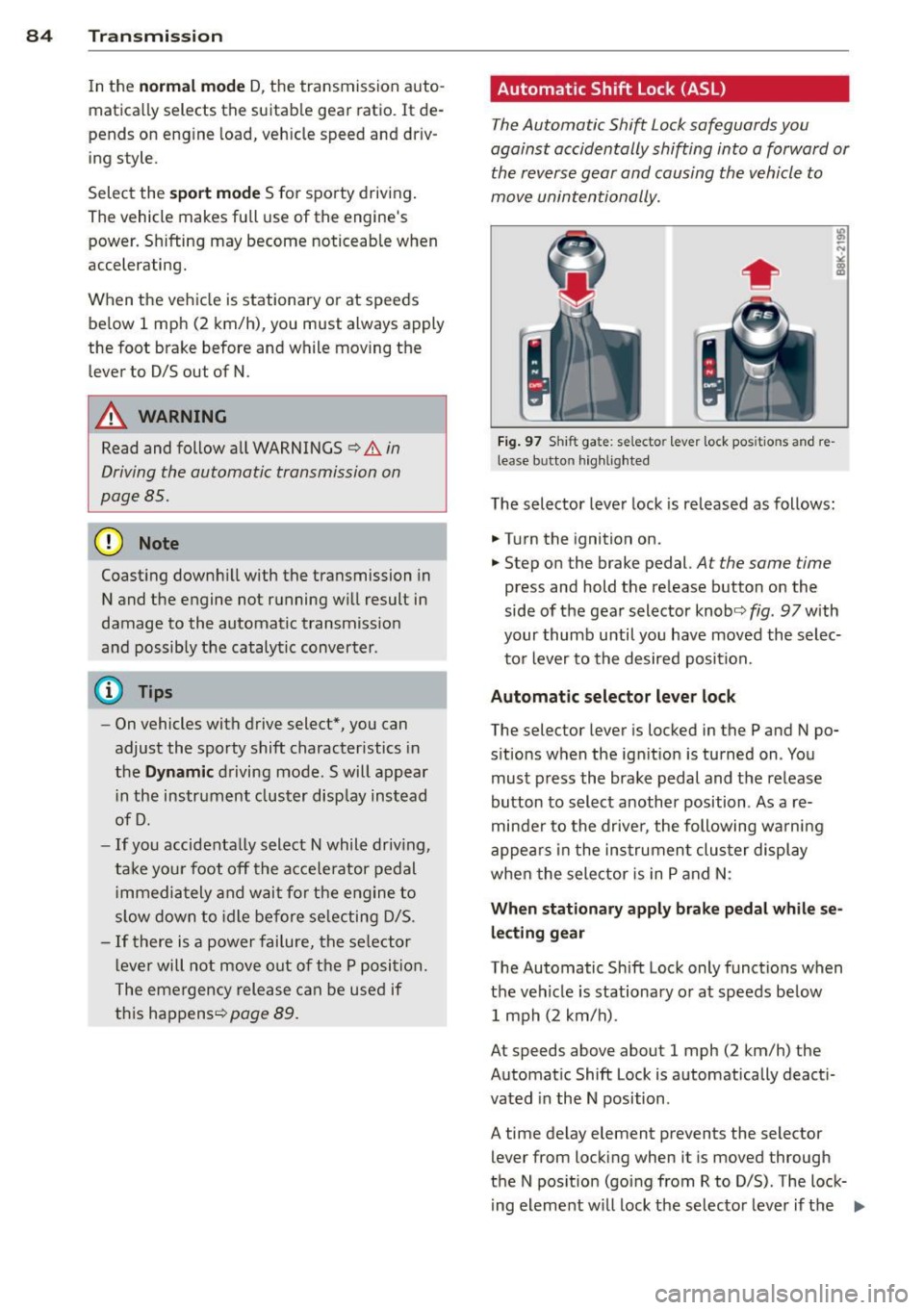
Automatic Shift Lock {ASL)
The Automatic Shift Lock safeguards you
against accidentally shifting into a forward or
the reverse gear and causing the vehicle to
move unintentionally.
Fi g. 9 7 Shi ft ga te : se lecto r le ver lock pos itio ns and re
lease b utto n hig h lighted
The selector lever lock is released as follows:
.. Turn the ignition on .
.. Step on the brake pedal.
At the same time
press and hold the release button on the
side of the gear selector knob<=>
fig. 97 with
your thumb until you have moved the selec
to r lever to the desired position.
Automatic selector leve r lock
The selector lever is locked in the P and N po
s itions w hen the ign ition is turned on . You
must p ress the brake pedal and t he release
button to select anothe r position . As a re
minde r to the drive r, the following wa rni ng
appea rs in the in strumen t clus ter di splay
when the sele ctor is in P and N:
When stationar y apply brak e pedal while se
lecting gear
The Automatic Shift Lock only funct ions when
t h e veh icle is stationary or at speeds be low
1 mph (2 km/h) .
At speeds above about 1 mph (2 km/h) the
Automat ic Shift Lock is automatically deact i
vated in the N position .
A time delay element prevents the selector lever from locking when it is moved through
the N pos it ion (go ing from R to D/S) . The lock
ing element w ill lock the selecto r leve r if t he
Ill>
Page 90 of 284

88 Transmi ssion
Launch Control Program
Th e Launch Cont rol Program provides the
best accel eration possible when starting from
a st op .
R equirement : The engine must be at operat
i n g t emp eratur e and the steering wheel must
not be turned .
.,. Press the
I~ O FFI button c:> page 173 while
the engine is running. The
II ind icator light
i lluminates in the instrument cluster and
Stabilization control (ESC ): Sport . Warn
ing! Re stricted sta bility
appea rs in the dr iv
er information system d isplay.
.,. Move the selec tor lever to the D/S pos ition
to select sport mode (S) or select the
dy
nami c
driving mode in drive select*
c:> page 103.
... Press the brake peda l strongly with your left
foot and hold it down for at least 1 second.
.,. At the same t ime, press the accelerator ped
al down complete ly w ith your r ight foot un
t il t he engine reaches and maintains a h igh
RPM .
.,. Remove you r foot from the brake pedal
withi n S seconds
c:> &, .
&_ WARNING
-Always adapt you r driving to the traffic
flow .
- O nly use the Launch Control Program
when road and traffic con dit ions allow it
and other dr ivers will not be endangered
o r annoyed by yo ur dr iv ing and t he vehi
cle's acce lerat ion.
- Please note that the driving wheels can spin and the vehicle can break away
w hen sport mode is sw itched on, espe
c ially when the road is slippery .
- Once yo u have accelerated, yo u should
switch sport mode off by pressing the
I~ O FF I but ton .
(D Tips
- The transm ission temperat ure may in
crease significantly after using the Launch Control Program . If that hap- pens, the p
rog ram may not be availab le
for a few minutes . It will be available
again after a cool-down period .
- When accelerating using the La unch
Cont ro l program, a ll vehicle parts are
subject to heavy loads. Th is can result in
increased wear.
Transmission malfunction
['1 Transmission: Pre ss brake pedal and se
lect gear again .
Press the bra ke peda l and select the desired
selector lever position again. You ca n then
co ntinue driving .
['1 Transmission overheating: Please drive
conservatively.
T he transmiss ion temperat ure has inc reased
s ignificantly due to the sporty d riving manner .
Drive in a less sporty manner until the tem
perature returns to the normal range and the
indicator light switches of.
ID T ransmission malfunction: You can con
tinue driving
T he re is a sys tem malfunc tion in the transm is
sion . You may continue driving .
Drive to yo ur
autho rized Audi deale r or qualified repair fa
c ility soon to have the ma lfunction corrected.
['1 Transmis sion malfun ction : Limited driv
ing functionality
T he re is a system malfunction in the t ransm is
s io n. The transm ission is swi tching to emer
gency mode. This mo de on ly shifts in to cer
ta in gears o r will no longer shift at al l. The en
gine may sta ll. Drive to your authorized Audi
dealer or qualified repair facility immediately
to have t he malfunction corrected.
('1 ffl Transmi ssion malfunction: No reverse
You can continue driving
T he re is a sys tem mal func tion in the t ransm is
s io n. The transm iss ion is swi tch ing to eme r
gency mode. This mode on ly shifts into cer -
tain gears o r will no longer shift at all . The en
gine may sta ll. You cannot engage the
reverse liJJ,
Page 104 of 284

102 Audi drive select
Audi drive select
Driving settings
Introduction
App lies to vehicles: with Audi drive select
Drive select provides the possib ility to exper i
e nce diffe ren t types of vehi cle sett ings in o ne
ve hicl e. For ins tance, us ing t he three
Com
fort , Auto and Dynamic modes, the driver can
switch from a sporty to a comfortab le drivi ng
mode with the press of a b utton.
A ddit ionally, in veh icles wi th MM I*, the vehi
cle setup for
Individual* mode can be c us
tom ized by you . This makes it possib le to
comb ine settings such as a sporty engine tun
ing with comfortable steering.
A WARNING
Improper use of the A udi d rive select can
cause collisions , ot her acc idents and se ri
ous pe rsonal injury .
Description
Applies to vehicles: with Audi drive select
The vehicle setup in each mode depends on
the veh icle's features . However, the engin e,
automa tic t ransmissio n and s teeri ng a re a l
ways involved.
-
Engine and automatic transmission
Depending on the mode , the e ng ine and the
automatic t ransm ission respond quicke r or i n
a more ba la nced manne r to a cce le rator pedal
move ments. In t he sporty dynam ic mode, the
a ut om at ic t ra nsmissio n shifts at h igher R PMs.
The engine sound is ad justed by open ing or
clos ing t he exhaust doors for the respective
mode .
Steering
The stee ring ada pts in te rms of stee ring effort
an d steer ing ra tios. In direc t steer ing t hat
moves easi ly, like the stee ring in comfort
mode , is best su ite d to long dr ives on a high
way. In contrast, dynam ic mode p rov ides
sporty, d irect steering. T
he following app lies to veh icles with dynamic
stee ring *: the steering rat io chan ges base d on
vehicle speed in order to ma inta in optim um
steering effort for the driver at all times. This
sets the steering to be less sens itive at higher
speeds in o rder to provide improved vehicle
co ntrol. At r educed speeds, howeve r, s teer ing
is mo re d irect in o rder to k eep th e stee ring ef
fo rt as minima l as poss ible whe n the drive r is
mane uveri ng the veh icle. At low and ave rage
s p eeds, dynamic steering ad dit iona lly pro
vides more responsive stee ring pe rformance .
Sport differential*
As a compone nt of the all whee l dr ive system
(qua ttro)
~ page 1 76 , the sp ort differential*
distributes the d riving power to the rear axle
depen ding on the si tuatio n. The dis trib ution
of power var ies depending on the mode se
l ected . The goal is a high level of agility and
ability to accelerate on curves . The vehicle is
very respons ive to steering.
Audi adaptive cruise control*
T he be hav io r when accelera ting can be adjus t
ed from comfortab le to sporty, de pendi ng on
t h e d rive select mode . Adaptive cru ise contro l
also responds to the driv ing behavior o f the
vehicle ahead in a more conservative or sporty man ner .
Engine sound*
The so und of the eng ine is adapte d to these
l ected mode and ranges from s ubt le to sporty .
(!) Tips
-In some mo dels, the maximum vehicle
spee d can only be reac hed in the
Auto
and Dynamic mo des .
- Selecting the
Dynamic mo de res ults in
sporty shifti ng cha racte ristics . T he 5
gear position engages aut omatically.
- In ve hicl es that have dynamic stee rin g* ,
operating noise is heard when start ing or
stopping the engine. This does not indi
cate a problem.
Page 105 of 284

"' N
a: LL co
rl I.O
"' rl
"' rl
Selecting the driving mode
Applies to vehicles: with Audi drive select
You can choose between Comfort , Auto , Dy
namic
and Indi vidua l* modes .
Fig. 1 19 Ce nter co nsole: Con tro l for Aud i d ri ve se lect
F ig . 120 MM I* : A udi drive se lect
,.. To set the mode, press the ~:i.l'c1 button
9 fig. 119 multiple t imes until the desired
mode is displayed in the instrument cluster.
Or
Adjusting the Individual mode
Appl ies to vehicles: wit h MMI and Audi drive select
Audi dri ve sele ct 103
,.. In the MMI*, select : ICARI function button >
Comfort , Au to , D ynamic or Indi vidual *.
In vehicles without the MMI*, the r:i.rc'i button
is found underneat h the selector lever .
You can change the driving mode whe n the ve
hicle is stationary or wh ile driving. If traffic
permits, after changing modes, briefly take
you r foot off the acce le rator pedal so that the
recently selected mode is a lso activated for
the engine and transmission .
Comf ort -prov ides a comfort-orie nted ve hicle
setup and is suited for long drives on high
ways .
Auto -provides an overall comfor table ye t dy
nam ic dr iving feel and is suited for every day
u se.
D ynamic -gives the driver a sporty d riving
feel and is suited to a spo rty dr iv ing style.
Ind ividual * -¢ page 103 .
A WARNING
Pay attention to traffic when operating
drive sele ct to prevent potential risk of an
accident.
-
You can personally specify the vehicle setup in the MMI".
,.. Select the ICAR I function button > Set indi
v idu al
control button . Once you select the
menu, you will automatically drive in the
i n
di vidual
mode .
System s Comfort
Engin e/Transmi ssion
ba lanced
S te ering comfortable
Dynamic st e ering * comfortable/ind ire ct
Spo rt d ifferent ial* balanced
Adaptiv e cruise c ontrol * comfortable
Engin e sound * subtle The equipment in your vehicle will determine
which sett
ings you can adjust. The following
table prov ides an overview of the characteris
t ics of each driving mode.
Auto Dynamic
balanced sporty
balanced sporty
balanced/direct sporty/direct agile sporty
balanced sporty
subtle sporty
Page 175 of 284

"' N
a: LL co
rl I.O
"' rl
"' rl
Intelligent technology 173
Switching on/off
ESC turns on automatically when you start the engine .
ton
The ESC is designed to function in levels. De
pending on the level that is selected, the sta
b ili zat ion function of the ESC is limited or
switched off. The amount of stab ilizat ion con
trol will differ depend ing on the level.
The following situations are exceptions where
it may be useful to switch on sport mode to
allow the whee ls to spin:
-·-- ; .. _ j __ , ' j ----- -~~ ......... ----
Fig. 167 Version B: upper cente r console,~ OFF bu t
ton
- Rocking the vehicle to free it when it is stuck
- Dr iving in deep snow o r on loose ground
- Dr iving with snow chains
Sport mode on ESC/ASR off Sport mode off or
ESC/ASR on
Behavior
The ESC and ASR stabiliza- The stabilization funct ion The full stabilization func-
tion funct ions are lim ited is not ava ilable
c::> .& . ESC tion of the ESC and ASR is
c::> _& . and ASR are switched off. available again.
Operation Press the I.!> OF FI button Press and hold the I~ OF FI Press the I.!> OFF j button
briefly. button longer than 3 sec- again.
onds.
Indicator II turns on. fl and Ifill•];~ turn on. II turns off or II and
lights If il•lH turn off.
Driver mes- Stabilization control Stabilization control Stabilization control
sages (ESC): Sport. Warning! (ESC): off. Warning! Re- (ESC): On
Restricted stability stricted stability
_& WARNING
You should only switch sport mode on o r
switch ESC/ASR off if your driving abilities
and road conditions perm it.
-
- There is no vehicle stabilization when
ESC/ASR are switched off.
- The stabilization function is limited
when sport mode is sw itched on. The
driv ing whee ls cou ld spin and the vehicle
could swerve, especially on slick or slip
pery road surfaces.
@ Tips
ESC/ASR cannot be switched off or spo rt
mode cannot be switched on when cru ise
control or adaptive cruise control* is
switched on.
Page 222 of 284

220 Tires and wheels
Because technical changes may
be made to vehicle equipment
during the model year, always
compare the tire size designa
tion on the tire pressure label
on your vehicle with the tires on
your vehicle. Make sure that the
tire size information on the ve hicle label is the same as the
size of the tires on the vehicle.
This is especially important if
the vehicle belongs to someone else or you bought the vehicle
with different rims/tires or you
bought the vehicle as a previ
ously owned vehicle.
Remember, your safety and
that of your passengers also de pends on making sure that load
limits are not exceeded . Vehicle
load includes everybody and ev
erything in and on the vehicle.
These load limits are technical
ly referred to as the vehicle's
Gross Vehicle Weight Rating
("GVWR"). The Gross Axle
Weight Rating ("GAWR") is the
maximum load that can be ap
plied at each of the vehicle's
two axles . The Gross Vehicle
Weight Rating and the Gross
Axle Weight Rating are listed on the safety compliance stick- er label located on the driver's
side B-pillar.
The tire pressure
label on your Audi lists the
maximum combined weight of
all of the occupants and lug
gage or other cargo that the ve
hicle can carry. For the location
of the tire pressure label
¢fig. 182.
&_ WARNING
-
Overloading a vehicle can
cause loss of vehicle control,
a crash or other accident, se rious personal injury, and
even death .
-Carrying more weight than
your vehicle was designed to carry will prevent the ve
hicle from handling properly
and increase the risk of a
loss of vehicle control.
-The brakes on a vehicle that has been overloaded may
not be able to stop the vehi
cle within a safe distance.
-Tires on a vehicle that has
been overloaded can fail
suddenly causing loss of
control and a crash.
-Always make sure that the
total load being transported
- including the weight of a
Page 253 of 284
M N
er
u..
co ,...., \!) 1.1'1 ,...., 1.1'1 ,....,
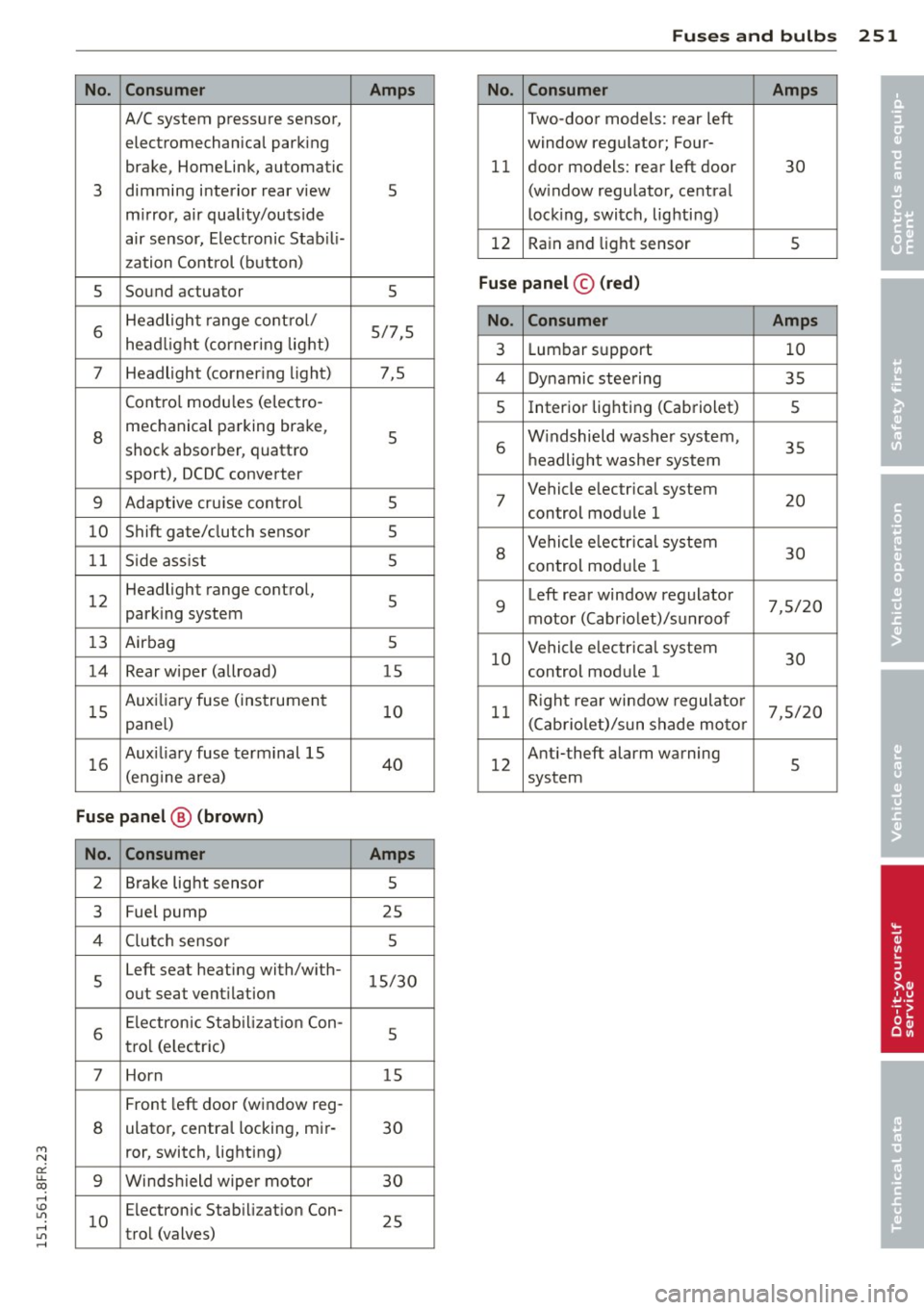
No. Consumer
A/C system pressure sensor,
electromechanical parking
brake, Homelink, automatic
3 dimming interior rear view
m
irror, air quality/outside
air sensor, Electronic Stab ili-
zation Control (button)
5 Sound
actuator
6 Headlight
range cont rol/
head light (cornering light)
7 Headlight (corner
ing light)
Contro l modu les (e lectro-
8 mechanical parking brake,
shock absorber, quattro
sport), DCDC converter
9 Adaptive cru ise contro l
10 Shift gate/clutch
sensor
1 1 Side ass ist
1 2 Headlight range
control,
park ing system
13 Airbag
14 Rear wiper (allroad)
1 5 Auxi
liary fuse (instrument
pane l)
16 Aux
iliary fuse terminal 15
(engine area)
Fuse p anel @ (brown )
No. Con sumer
2 Brake light sensor
3 Fuel
pump
4 Clutc h sensor
5 Left
seat heating with/w ith-
out seat vent ilation
6 Electronic Stab
il iz at ion Con-
tro l (e lectric)
7 Horn
Front left door (window reg-
8 ulator, centra
l locking, mir-
ror, switch, lighting)
9 Winds hield wipe r motor
1 0 Electronic
Stabilizat ion Con-
trol (valves)
Fuses and bulb s 251
Amp s No. Consumer Amps
•
Two-door models: rear left
• window regulator; Four-
11 door models:
rear left door
30
5 (window regulator, central
lock
ing, switch, lighting)
12 Rain and light sensor
5
5
Fuse pan el© (r e d )
5/7,5 No . Consumer Amps
3 Lumbar support 10
7,5 4 Dynamic steering 35
s Interior lighting (Cabriolet)
5
5 6 W
indshield washer system,
35
h eadlight washe r system
5 7 Vehicle electrical
system
20
control module 1
5
5
8
Vehicle e lectr ica l system
30
control module 1
5 9 Left rear window regulator
7,5/20
motor (Cabriolet)/sunroof
5
15 10 Vehicle e
lectrical system
30
control module 1
10 11 R
ight rea r window regulato r
7,5/20
(Cabriolet)/sun shade motor
40 12 Anti-theft
alarm warning
5
system
Amps
5
25 5
15/30
5
15
30
30
25
Page 255 of 284

M N
er
u..
co ,...., \!) 1.1'1 ,...., 1.1'1 ,....,
No. Consumer
5 Electromechanical
parking
brake
6 Electronic damping control
7
Electromechanical parking
brake
8 Rear exterior lighting
9 quattro sport
10 Rear
exterior lighting
1 1 Central locking
12 Termina
l 30
Fu se pa nel © (brown )
No. Con sumer
1 Luggage compartment lid
control module (allroad)
2 1
2-volt socket, cigarette
lighter
3 DCDC
converter path 1
4 DCDC converter path 2,
so und amplifier, radio
6
Right upper cabin heat ing
(Cabr iolet)
7
Electromechanical parking
brake
Right front door (w indow
9 regu lator, central lock ing,
m irror, swit ch, lig hting)
10 Left upper
cabin heating
(Cabriolet)
Two -door models: rear right
window regulator; Four-
11 door mode
ls: rear right door
(window regulator, central
locking, sw itch, lighting)
12 Cell phone prep
Fu se panel © (black )
No. Consumer
1 Right front seat heating
4
MMI
5 Radio
6 Rear view camera
Amp s
5
15
30
30
35
30
20 5
Amp s
30
20
40
30
30
30
30
30
30
5
Amps
15
7,5
5
5
Fu ses and bulb s 253
No. Consumer Amps
7
Rear window heater (all-
30
road)
8 Rear Seat Entertainment 5
Bulbs
Replacing bulbs
For your safety, we recommend that you hove
your authorized Audi dealer replace any bulbs
for you .
It is becoming increasingly more and more
difficult to replace vehicle light bulbs since in
many cases, other parts of the car must first
be removed before you are able to get to the
bulb. This applies especially to the light bulbs
in the front of your car which you can only
reach through the engine compartment.
Sheet metal and bulb holders can have sharp
edges that can cause serious cuts, parts must
be correct ly take n apa rt and then p roperly put
bac k together to he lp p revent breakage of
parts and long te rm damage from water that
can enter housings that have not been p roper
ly re sea led .
Fo r you r safety, we re commend that you have
your autho rized Audi de aler replace any b ulbs
f or you, since your dealer has the proper too ls,
the correct bulbs and the expertise.
Gas disc har ge la mp s (Xenon l ig hts)*:
Due to the high electr ical voltage, have the
bulbs replaced by a qualified techn ic ian .
Head lights w ith Xenon light are identified by
the h igh vol tage sticker.
_&. WARNING
Changing Xenon lamps without the neces
sary equipment can cause serious persona l
injury .
- Bulbs are pressurized and can explode
when being changed. Potential risk of in
jury!
-
•
•