change time AUDI RS5 COUPE 2015 User Guide
[x] Cancel search | Manufacturer: AUDI, Model Year: 2015, Model line: RS5 COUPE, Model: AUDI RS5 COUPE 2015Pages: 254, PDF Size: 64.12 MB
Page 94 of 254

Audi adaptive cruise control and braking guard
Interrupting cruise control
Applies to vehicles: with Audi adaptive cruise control
Fig. 97 Selec tor lever
Requirement : adap tive cruise control must be
switched on
¢ fig . 97 @.
Overriding cruise control
• To accelerate ma nually, press the acce lerator
pedal. The message
ACC override appears .
• To resume adaptive cruise control, remove your
foo t from the gas pedal. The sys tem re turns
again to the speed that was saved before.
• You can save a new speed at any time by press·
ing the
ISETI button r:::;, page 11, fig. 4 .
Canceling cruise control while driving
• Move the lever into position @. The message
ACC standby appears . Or
• press the brake pedal.
• To resume the stored speed, move the lever in
to posit ion
@ .
,& WARNING
Never resume the stored speed if the speed is
too high for prevailing road, traffic or weather
conditions.
92
Setting the distance
Applies to vehicles: with Audi adaptive cruise contro l
Fig. 98 Selecto r lever : set ting the distance
• Tap the swi tch to display the current set dis
tance
r:::;, fig . 98.
• To increase or reduce the distance by incre·
ments, tap the switch again to the left or right .
Th e distance between the two veh icles will
change in the instrument cluster display .
When approaching a mov ing vehicle up ahead,
the adaptive cruise control system bra kes to
match that object's speed and then maintains
the stored distance. If the vehicle ahead acceler
ates, adaptive cruise contro l will also accelerate
up to the stored speed.
The higher the speed, the greater the distance in
yards (meters)
r:::;, A . The Distan ce 3 setting is
recommended.
The distances prov ided are specified va lues . De
pending on the driving situation and the how the
vehicle ahead is driving, the actua l dis tance may
be more or less than these target distances.
The var ious symbols for the time increments ap
pear briefly in the information line@r:::;,
page 90,
fig. 95 when you change the settings.
,::::::,_,::::::, ___ Distance 1: This setting corresponds
to a distance of 92 feet/28 meters when travel
i ng a t 62 mph (100 km/h), or a time interval of 1
second.
c:::::> __ c:::::> __ Distance 2: This setting corresponds
to a distance of 118 feet/36 meters when travel
in g a t 62 mph (100 km/h), or a time int erva l of
1.3 seconds.
Page 100 of 254

Audi side assist
General information
App lies to veh icles: w ith Audi side assis t
®
@
©
Fig. 103 Driving situations
AU Df
Fig. 104 Rear of th e ve hicle: pos it io n of t he sensors
Side assist functions at speeds above approx i
mately 19 mph (30 km/h).
@ Vehicles that are approaching
In certain cases, a vehicle will be classified as
critical for a lane change even if it is still some
what far away. The faste r a vehicle approaches,
the sooner t he d isplay in the exter io r mirro r will
turn on.
@ Vehicles traveling with you
Vehicles traveling w ith you are indicated in the
exterior mirror if they are classified as critical for
a lane change. All vehicles detected by side assist
98
are indicated by the time they enter your "blind
spot", at the latest.
© Vehicles left behind
If you slowly pass a veh icle that side assist has
detected (the difference in speed between the ve
hicle and your vehicle is less than 9 mph (1 S km/
h)), the display in the exterior mirror turns on as
soon as the vehicle enters your blind spot.
T he display will not turn on if you quickly pass a
vehicle that side ass ist has detected (the differ
ence in speed between the vehicle and your vehi
cle is greater than 9 mph (15 km/h)).
Functional limitations
The radar senso rs are designed to detect the left
and right adjacent lanes when the road lanes are
the normal width. In certain situations, the dis
play in the exterior mirror may turn on even
though there is no vehicle located in the area that
i s cr itical for a lane change. For example:
- if the lanes are narrow or if your are dr iving on
the edge of your lane. If thi s is the case, the
system may have detected the vehicle in anoth
er lane that is
not adjacent to your current lane.
- if yo u are driving through a c urve . Side assist
may react to a vehicle that is one lane over from
the adjacent lane.
- if side assist reacts to other objects (such as
high or disp laced guard rails).
- In poor weather conditions . The side assist
functions are limited.
Do not cover the radar senso rs~
fig. 104 with
stickers, deposits, bicycle wheels or other ob
jects, because this will affect the function . For in
format ion on cleaning, refer to~
page 181 .
_& WARNING
-Always pay attention to traffic and to the
area around your veh icle. Side assist cannot
replace a dr iver's attention. The driver alone
is always responsible for lane changes and
sim ilar driv ing maneuvers .
- Improper reliance on the side assist system
can cause collisions and serious personal in-
-
Jury: ~
Page 101 of 254

"' N
0:: loo
rl I.O
"' N
"' rl
-Never rely only on side assist when chang
ing lanes.
- Always check rear view mirrors to make
sure that it is safe to change lanes.
- Side assist cannot detect all vehicles under
all conditions- danger of accident!
- Please note that side assist indicates there
are approaching vehicles, or vehicles in your
blind spot, only after your vehicle has
reached a driving speed of at least 19 mph
(30 km/h).
- In certain situations, the system may not function or its function may be limited. For
example:
- if vehicles are approaching or being left
behind very quickly. The display may not
turn on in time.
- in poor weather conditions such as heavy
rain, snow or heavy mist.
- on very wide lanes, in tight curves or if
there is a rise in the road surface. Vehicles
in the adjacent lane may not be detected
because they are outside of the sensor
range.
(D Note
The sensors can be displaced by impacts or
damage to the bumper, wheel housing and
underbody. This can affect the system. Have
your authorized Audi dealer or authorized
Audi Service Facility check their function.
(!j) Tips
- If the window glass in the driver's door or
front passenger's door has been tinted, the
display in the exterior mirror may be misin
terpreted.
- For Declaration of Compliance to United
States FCC and Industry Canada regulations
¢ page 239.
Audi side assist
Activating and deactivating
App lies to vehic les : wi th Audi s ide ass ist
Fig. 105 Driver 's door : Side ass ist button
" Press the button ¢ A in General information
on page 98 to switch the system on/off. The
LED in the button turns on when side assist is
switched on .
Adjusting the display brightness
App lies to vehicles: wi th Audi s ide ass ist
The signal brightness can be set in the radio or
MM!*.
.,. Select: !CARI function button> Audi side assist.
.,. Select: !CARI function button> Car systems*
control button > Driver assist> Audi side as
sist.
The display brightness adjusts automatically to
the brightness of the surroundings, both in the information and in the warning stage . In very
dark or very bright surroundings, the display is al
ready set to the minimum or maximum level by
the automatic adjustment. In such cases, you
may notice no change when adjusting the bright
ness, or the change may only be noticeable once
the surroundings change.
Adjust the brightness to a level where the display
in the information stage will not disrupt your
view forward. If you change the brightness, the display in the exterior mirror will briefly show the
brightness level in the information stage. The
brightness of the warning stage is linked to the
brightness in the information stage and is adjust
ed along with the information stage adjustment . ..,_
99
Page 103 of 254
Audi drive select Driving settings
Introduction
App lies to vehicles: with Audi drive select
Drive select provides the possibi lity to experience
d ifferent types of vehicle settings in one vehicle.
F or instance, using the three
Comfort, Auto and
Dynamic modes, the driver can switch from a
sporty to a comfortable driving mode with the
press of a button.
Addit ionally, in vehicles with
MM I*, the vehicle
setup for
Individual* mode can be customized by
you. This makes it possib le to combine settings
such as a sporty engine tuning with comfortab le
steering .
A WARNING
-
Improper use of the Audi drive select can
cause collisions, other acc idents and serious
personal injury.
Description
App lies to vehicles: with Audi drive select
The vehicle setup in each mode depends on the
veh icle's featu res . However, the engine, automat
ic transmission and steering are always involved.
Engine and automatic transmission
Depending on the mode, the engine and the au
tomatic transmission respond quicker or in a
more balanced manner to accelerator pedal
movements. In the sporty dynamic mode, the au
tomatic transmission shifts at higher RPMs . Th e
engine sound is adjusted by opening or clos ing
the exhaust doors for the respective mode.
Steering
The steering adapts in te rms of steering effort
and steering ratios . Indirect steering that moves
eas ily, like the steering in comfort mode, is best
suited to long drives on a highway. In contrast,
~ dynamic mode provides sporty, direct steering.
0::
~ The follow ing applies to vehicles with dynamic ,....,
~ steering*: the steering ratio changes based on ve-
~ hicle speed in order to maintain optimum steer -,....,
Audi drive select
ing effort for the driver at all times. This sets the
steering to be less sensitive at higher speeds in
order to provide improved vehicle control. At re
duced speeds, however, steering is more direct in
order to keep the steering effort as minimal as
possible when the driver is maneuvering the vehi
cle. At low and average speeds, dynamic steer ing
additionally provides more responsive steering
performan ce.
Sport differential*
As a component of the all wheel drive system
(quattro)
<=> page 174, the sport differential* dis
tributes the driving power to the rear axle de
pend ing on the s ituation . The distribution of
power varies depending on the mode selected.
T he goal is a high level of agility and ability to ac
ce lerate on curves. The vehicle is very responsive
to steering .
Audi adaptive cruise control*
The behav ior when accelerating can be adjusted
from comfortable to sporty, depending on the
drive select mode. Adaptive cruise control also
responds to the driving behavior of the vehicle
ahead in a more conservative or sporty manner.
Engine sound*
T he sound of the eng ine is adapted to the select
ed mode and ranges from subtle to sporty.
(D Tips
-In some models, the maximum vehicle
speed can only be reached in the
Auto and
Dynamic modes.
- Selecting the
Dynamic mode results in spor
ty shifting characteristics. The S gear posi
tion engages automatically.
- In vehicles that have dynamic steering*, op
erating noise is heard when starting or stop
ping the engine. This does not indicate a
problem .
101
Page 109 of 254

M N
0:: loo ,...., \!) 1./'1
N 1./'1 ,....,
-Always keep your eyes on the vehicle's sur
roundings, us ing the rear view m irror as
well.
- Do not a llow yourse lf to be distracted from
traffic by the rear view camera pictures.
- If the position and the installation ang le of
the camera has changed, for example, after
a rear end collision, do not continue to use
the system for safety reasons. Have it
checked by a qualified dealership.
(D Note
- Low obstacles already signaled by a warning
can d isappear from the system's detection
range as they are approached and will not
continue to be signaled. Objects such as barrier chains, tra ile r draw bars, thin paint
ed ve rtical po les or fences may not be de
tected by the sys tem, posing r isk of dam
age.
- Never use warm or hot water to remove
snow or ice from the rear view c amera lens -
danger of crack fo rmation on the lens!
- When cleaning the lens, never use p roducts
t h at are abr asive.
Switching on/off
Applies to vehicles: with pa rk in g system plus w it h rear view
camera
The rear view camera switches on automatically
together with the acoustic park assist when you
put the vehicle in reverse.
Sw itching on
"' Switch the MMI on and sh ift into reverse or
"' press the
Pw A button in the center console
<=> page 104, fig. 108. A short confirmation
tone sounds and the LED in the button turns
on.
Switching between the rear v iew camera and
optical display
"' Press the G raphic control button®
<=>page 108, fig . 114 to see the opt ica l display .
"' Press the
Rear view control button to see the
rear view camera image.
Parking Syste m
Switching off
"' Dr ive faste r than 6 mp h (10 km/h) , or
"' press the
P111A but ton, or
"' switch off the ignition.
If you press a function bu tton on the MMI con tro l
console, the rear view camera pictu re d isappears .
The rear view camera picture reappears the next
time you park .
A WARNING ,=-
-The MMI d isplay cannot show, or cannot ad
equate ly show, certa in objects (such as
small posts or grating), recesses in the
ground and p rotruding parts on another car.
- Only use the rearview camera to assist you if
it shows a good, clear picture. For examp le,
the image may be affected by t he su n shi n
i n g into the lens, dirt on the lens o r if the re
is a defect.
- Use the rearv iew camera only with the rear
lid compl etely closed . Make sure any objects
you may have mounted on the rear lid do
no t block the re arv iew came ra.
(0 Tips
- The rear view came ra picture is available as
soon as the MMI Disp lay or t he M MI is
sw itched on, o r the start- up phase is com
ple ted .
- T he se nsors m ust be kept clean and free of
snow and ice fo r the pa rk ass ist to operate .
- Yo u can change the volum e and pitch of the
signa ls as well as the d isplay
<=> page 110.
-What appea rs in the display is time-delayed.
107
Page 171 of 254

M N
0:: loo ,...., \!) 1.1"1
N 1.1"1 ,....,
shared, please see your contract with the
wireless telecommunications provider and the
"About Aud i connect" tab in your vehicle's
MMI*:
IMENU I button> Audi connect > About
Audi connect .
Electronic Stabilization
Control (ESC)
Description
ESC helps to improve road holding and vehicle
dynamics to help reduce the probability of skid
ding and loss of vehicle control. It works only
when the engine is running. ESC detects certain
d ifficu lt driving situations, including when the ve
hicle is beginn ing to spin (yaw) out of control and
helps you to get the vehicle back under control by
selectively braking the whee ls, and/or reducing
engine power and prov iding steer ing ass istance
to help hold the vehicle on the driver's intended
course. The indicator light
Bl in the instrument
cluster blinks when ESC is taking action to help
you control the veh icle.
ESC has limitations.
It is important to remember
that ESC cannot overcome the laws of physics. It
will not always be able to help out under all con
ditions you may come up against. For example, ESC may not always be able to help you master
situations where there is a sudden change in the
coefficient of frict ion of the road surface . Whe n
there is a section of dry road that is suddenly cov
ered with water, slush or snow, ESC cannot per
form the same way it wou ld on the dry surface. If
the vehicle hydroplanes (rides on a cushion of wa
ter instead of the road surface), ESC will not be
ab le to he lp you steer the vehicle because contact
with the pavement has been interrupted and the
vehicle cannot be braked or steered . During fast
cornering, particularly on winding roads, ESC
cannot always deal as effectively with difficult
driving situations than at lower speeds. Whe n
tow ing a trailer, ESC is not able to help you regain
con trol as it wou ld if you were no t towing a trail
er .
A lways adjust your speed and dr iving sty le to
road, traffic and weather conditions. ESC cannot
override the vehicle's physical limits, increase the
Smart Technology
available traction, or keep a vehicle on the road i f
road departure is a result of driver inattention.
Instead, ESC improves the possibility of keeping
the vehicle under control and on the road dur ing
extreme maneuvers by using the driver's steering
inputs to help keep the vehicle go ing in the in
tended direction. If you are traveling at a speed
that causes you to run off the road before ESC
can prov ide any assistance, you may not expe ri
ence the benefits of ESC.
ESC is switched on all the time . In certain situa
t ions when you need less traction, you can switch
off ASR by pressing the button
[ru ~ page 170,
fig. 152 or ~page 170, fig . 153. Be sure to
switch ASR on again when you no longer need
less traction.
T he following systems are integrated in the ESC:
Anti-lock braking system (ABS)
ABS prevents the wheels from locking up when braking. The vehicle can still be steered even dur
i ng hard braki ng. Apply steady pressure to the
brake pedal. Do not pump the pedal. A pulsing in
the brake pedal indicates that the system is he lp
ing you to brake the vehicle.
Brake assist system
The brake ass ist system can decrease braking dis
tance . It increases braking power when the driver
presses the brake peda l quickly in emergency sit
u at ions. You must press and hold the brake pedal
until t he situat ion is over. In vehicles with adap
tive cruise control*, the brake assist system is
more sensitive if the distance detected to the ve
hicle ahead is too sma ll.
Anti-slip regulation (ASR)
ASR red uces eng ine power when the drive wheels
begin to spin and adapts the force to the road
conditions. This makes it easier to start, acce le r
ate and drive up hills.
Electronic differential lock (EDL)
T he EDL brakes whee ls that are spinning and
transfers the drive power to the other wheels.
T his function is available up to about 60 mph
(100 km/h).
169
Page 191 of 254
"' N
0:: I-co
rl I.O
"' N
"' rl
Check in g and Fillin g
Engine compartment
Engine compartment
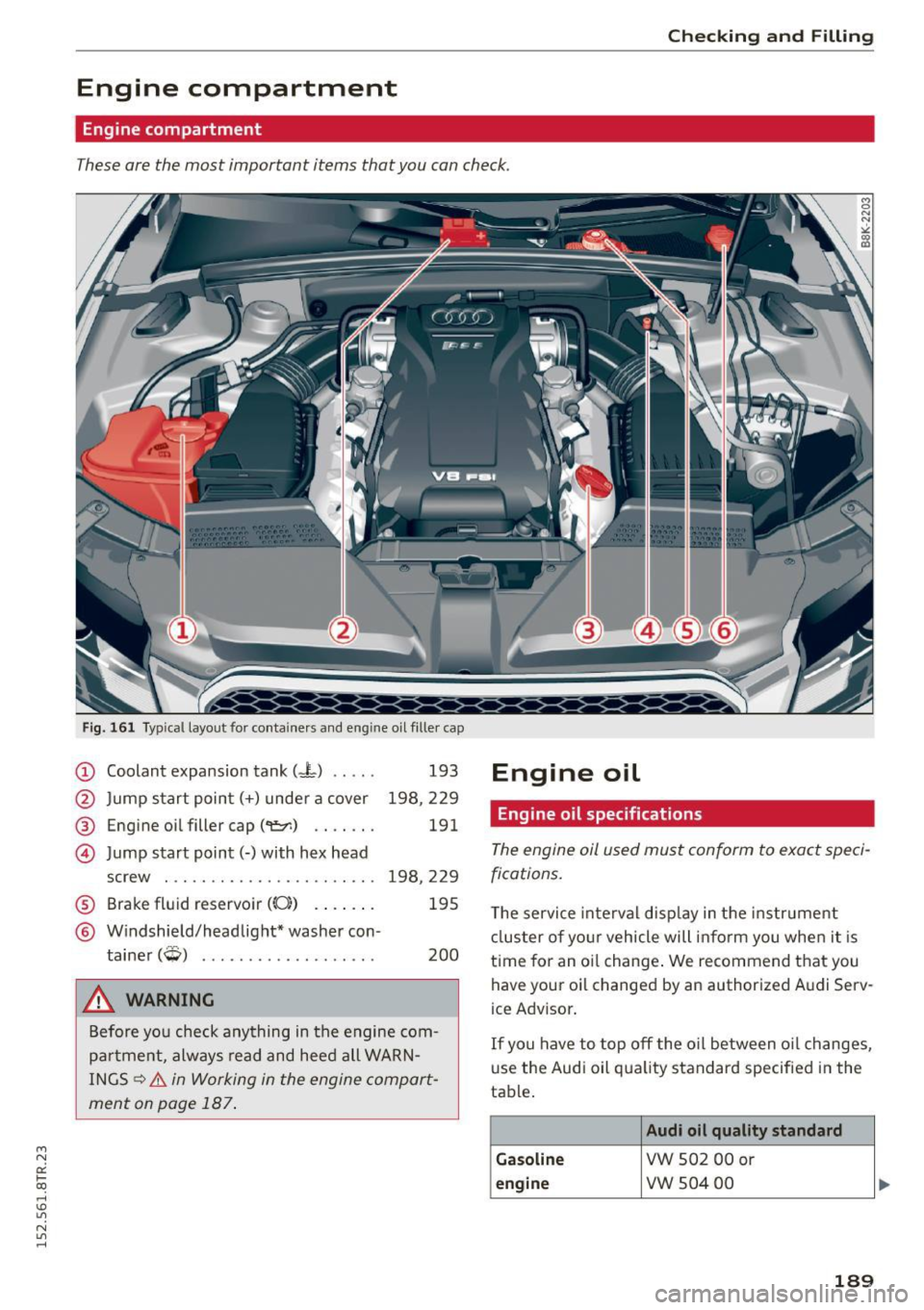
These are the most important items that you can check.
Fig. 161 Typical layout for containers and eng ine oil filler cap
(D Coolant expansion tank (.J-) .. .. .
@ Jump start point(+) under a cover
@ Engine oil filler cap(~) .... .. .
@ Jump start point(-) with hex head
screw . ............... ...... .
® Brake fluid reservoir ((0) .. .. .. .
@ Windshield/headlight* washer con-
tainer
(Q) .................. .
&, WARNING
193
198,229
191
198,229 195
200
Before you check anything in the engine com
pa rtment, always read and heed all WARN
INGS
~ .&. in Working in the engine compart
ment on page 187 .
Engine oil
Engine oil specifications
The engine oil used must conform to exact speci
fications.
T he service interval disp lay in the instr ument
cluster of your vehicle will inform you when it is
time for an oi l change. We recommend that you
have your oil changed by an authorized A udi Serv
ice Advisor .
If you have to top off the o il between o il changes,
use the Audi oil qua lity standard specified in the
table .
Audi oil quality standard
G as oline
VW S02 00 or
eng ine vw 504 00
1 8 9
Page 192 of 254
Checking and F ill in g
Using the proper engine o il is important for the
functionality and service life of the engine. Your
engine was factory-fi lled w ith a high-quality o il
which can usually be used throughout the ent ire
year.
@) Note
Your L imited New Vehicle Warranty does not
cover damage or malfunctions due to failure
to follow recommended ma intenance and use
requ irements as set forth in the Audi Ow ne r's
Manual and Wa rranty
& Ma intenance booklet .
- Use only a high quality eng ine oil t hat ex-
pressly comp lies w ith the Audi o il quality
standard specified for your vehicle's e ngine .
Using a ny other oil can cause se rious engine
damage.
- Do not mix any lubricants o r othe r addit ives
i nto the engine oil. Doing so can cause en
g ine damage.
(D Tips
If you need to add oil and there is none availa
ble that meets the Audi o il quality standard
y o ur eng ine requires, you m ay add a total of
no more than 0.5 quart/li ter o f a h igh-quali ty
"synthet ic"oil that meets the fo llowing speci
fications .
- V ehicles wi th gasoline engine: AC EA A3 o r
API SM with a viscosity grade of SAE 0W- 30,
SAE SW -30 or SAE SW-40 .
- Fo r more informa tion abo ut engine oi l that
has been approved for your vehicle, please
contact either you r a uthorized Aud i dea ler
or Audi Customer Relations at
1 (800) 822-2834 or visit o ur web site at
www .aud iusa.com or www .aud icanada .ca .
Engine oil consumption
The engine in your vehicle depends on an ade
quate amount of oil to lubricate and cool all of
its moving parts .
In order to provide effective lubrication and cool
i n g of in ternal engine components, all interna l
combustion engines consume a certai n amount
of oil. O il consumption var ies from engine to en
g ine and may change significant ly ove r the life of
190
the engine. Typically, eng ines with a specif ied
break-in period (see
¢ page 177) consume mo re
o il dur ing the b reak -in per iod than they consume
after oil consumption has stabili zed.
U nder normal cond itions , the rate of oi l con
s u mption depends on t he qu ality and viscosity of
the oil, the RPM (revolutions per minute) at
which the engine is operated, the ambient tem
perature and road condit ions. Further factors are
the amount of o il di lution from water condensa
tion or fuel residue and the ox idat ion level of the
o il. As any engine is s ubject to wear as mileage
builds up, t he oil consump tion may inc rease ove r
t ime unt il rep lacement of wo rn component s may
become necessary.
With a ll these va riab les coming into p lay, no
sta ndard ra te of oil consumpt ion can be estab
li shed or spe cified . There i s no altern ative to reg
u la r and freq uent checking o f the oil leve l, see
Note .
If the yellow e ngine oi l leve l wa rning symbo l El
in the instr ument cluster lights up, yo u should
chec k the o il level as soon as possible
¢ page 191 . Top off the oil at your ear liest con
venience ¢page 191.
A WARNING
Before you chec k anything in the eng ine com
partment, always read and heed a ll WARN
INGS¢ .&. in Working in the engine compart
ment on page 187 .
@ Note
Driving with an insufficient oi l level is likely to
cause severe damage to the engine.
(D Tips
- The oil pressu re warning display. is not
an indicator of the oil level. Do not rely on
it . Instead, check the oil level in your en
gine at regular intervals, preferably each
time you refuel, and always before going on a long trip.
- If you have the impression yo ur engine con
sumes excessive amounts of oil, we r ecom-
mend that yo u consult an au tho rized Audi .,.
Page 194 of 254
Checking and F ill in g
@ For the sake of the environment
- Under no circumstances can the oil come in
contact with the sewage network or the soil.
- Observe and fo llow lega l regu lations when
disposing of empty oil containers .
Changing the engine oil
We recommend that hove your oil changed by on
authorized Audi dealer or a qualified service sta
tion.
Before you check anything in the engine compa rt
ment,
alway s read and heed all WARNINGS ¢ .&.
in Working in the engine comportment on
page 187.
The engine oil must be changed according to the
i n terva ls specified in yo ur Warranty
& Mainte
nance booklet . This is very important because the
lubricat ing propert ies of o il diminish gradua lly
during normal vehicle use.
Under some circ umstances the engine oi l sho uld
be changed more frequent ly . Change oil more of
ten if you drive most ly short distances, operate
the vehicle in dusty areas or under predom inantly
stop-and-go traffic condit ions, or have your vehi
cle where temperatures rema in below freezi ng
for extended periods.
Detergent addit ives in the o il w ill make fresh oil
look dark after the engine has been running for a
short time. This is normal and is not a reason to
cha nge the oil mo re often than recommended .
Because of the problem of proper disposa l, along
with the special tools and necessary expertise re
qu ired, we stro ngly recommend that you have
your oil changed by an autho rized
Aud i deale r or
a qualif ied se rvice stat ion.
If you choose to change your o il yourself, please
note the fo llowing important information :
A WARNING
To reduce the ris k of persona l inju ry if yo u
must c han ge the engine oil in your ve hicle
yo urself:
- Wea r eye p rotection .
192
-
-To reduce t he risk of burns from hot engine
oil, let the engine coo l down to the touch.
- W hen removing the o il drain p lug with your
fingers, stay as far away as possib le. Always
keep your forearm parallel to the ground to
he lp prevent hot oi l from running down your
arm .
- Dra in the oil into a c ontainer designed for
this purpose, one la rge enough to hold at
least the tota l amount of oil in your engine.
- Engine oil is poisonous. Keep it we ll out of
the reach of chi ld ren .
- Continuous contact w it h used eng ine oi l is
ha rmf ul to your skin. Always protect you r
skin by washi ng oil off tho roughly wi th soap
a nd wate r.
(D Note
Never mix oil additives with your engine oil.
These additives can damage your e ngine and
adverse ly affect your Audi Limited New Vehi
cle Warranty.
@ For the sake of the environment
- Before changi ng your oil, first make su re
you know where you ca n prope rly dispose of
the used oil.
- Always dispose of used eng ine oil properly.
Do not d ump it on garden so il, wooded
areas, in to op en st reams o r down sewage
drai ns.
- Recycle used engi ne oil by taking it to a used
eng ine oi l collect ion fac ility in yo ur area, o r
c ontact a service station.
Cooling system
Coolant '
The engine coolant performs two functions: it
keeps the engine from overheating and it pro
tects the engine from freezing in the winter.
The cooling system is sealed and genera lly re
q u ires little attention.
The cooli ng sys tem has been filled at the f actory
wi th a permanent coolan t which does not need to
be changed. The coolant consists of a mixtu re of
jll,,
Page 198 of 254
Checking and F ill in g
Changing brake fluid
Have the brake fluid changed by an experienced
technician .
Brake fluid absorbs moisture from the a ir. If the
water content in the brake fluid is too high, cor
rosion in the brake system may result after a peri
od of time. The boiling point of the brake fluid
will also dec rease conside rably and dec rease
b ra ki ng perfo rman ce.
Therefore, the brake flu id must be changed
e ve ry
two y ear s.
Always use new b rake fluid wh ic h con
forms to Fede ral Motor Vehicle Standard " FMVSS
1 16 DOT 4".
The brake fluid reservoir can be difficult to reach,
therefo re , we recommend that yo u have the
b rake fluid changed by your authori zed
Audi
dealer . Your dealer has the cor re ct too ls , the
righ t brake fluid an d the know-how to do t his for
you.
A WARNING
- Brake fluid is po isonous. It must be stored
only in the closed orig inal container out of
the reach of children!
- Brake fai lure can result from old o r inappro
pr iate bra ke fluid . Observe these p recau
t ions:
- Use on ly bra ke fluid t hat meets SA E speci
fication
J 17 03 and confo rms to Fede ral
M otor Vehicle S tand ard 116 . Always check
wit h your author ized Audi dea ler to make
sure yo u are using the correct brake f lui d.
The cor rect type of b rake fluid is a lso indi
cated on the bra ke fluid reservo ir.
- The brake fluid m ust be new. Heavy use of
the bra kes can cause a va por l ock if the
brake fluid is left in the system too long.
This ca n ser iously affect the effic iency of
the brakes as we ll as your safety . This
co uld res ult in an accident.
@ Note
Brake f lu id will damage the paint of y our vehi
cle.
196
® For the sake of the environment
Because of t he prob lem of prope r disposal of
brake fluid as well as the special tools re
q uired and the necessary expert ise, we rec
ommend that yo u have the brake f lu id
changed by your autho rized Aud i dea le r.
Battery
General information
Under normal operating conditions, the battery
i n your A ud i does not need any maintenance .
With
high outside temperatures or long dai ly
drives we recommend that you have the e lectro
l yte level checked by an aut horized Aud i dea ler or
qualified workshop . The e lectrolyte leve l should
also be chec ked each time the batte ry is cha rged
¢ page 198.
Have the battery checked when you take your ve
hicle i n for service . You are well adv ised to re
place a battery that is older than 5 years .
With certain types of airbag deployment, the bat
tery is disco nnected from the ve hicle elect rical
system for safety reasons
¢ A in Repair , care
and disposal of the airbags on page 141 .
Disconnecting the battery terminals
Some vehicle functions (power window reg ula
tors, for example) are lost if the battery te rm i
nals are d isconnected . These funct ions have to be
r elearned after the battery t ermina ls are con
nected again . To prevent t his, the battery sho uld
o nl y be disconnected from the ve hicle e lectr ica l
system when absolute ly necessary fo r rep airs.
Vehicles not driven for long periods
If you do not drive your vehicle ove r a period of
several days or weeks, electrical components are gradua lly cut back or sw itched off . T his reduces
energy cons umption and mainta ins start ing ca
pabili ty ove r a longer period¢
page 175.
Some of the convenience funct ions may not ope r
ate, such as the inter ior lights or the power s eat
adjus tment . The conve nien ce f unct io ns w ill be
ava ila ble again when you tu rn on the ig nition an d
star t the eng ine. ..,..