radio AUDI RS5 COUPE 2015 User Guide
[x] Cancel search | Manufacturer: AUDI, Model Year: 2015, Model line: RS5 COUPE, Model: AUDI RS5 COUPE 2015Pages: 254, PDF Size: 64.12 MB
Page 38 of 254
Opening and closing
Once the front passenger's door has been closed,
you cannot open it again from the outside. The
door can be opened from the inside by pulling
the door handle.
A WARNING
Read and follow all WARNINGS¢.& in Gener
al description on page 30.
(D Tips
After the ignition is switched on, the power
locking system switch and the unlocking but
ton for the rear lid~ in the door are ena
bled.
Electronic immobilizer
The immobili zer prevents your vehicle from being
started by unauthorized persons .
Inside the key there is a computer chip . This chip
automatically activates/deactivates the electron ic immobilizer .
Applies to vehicles with ignition lock:
The electronic immobilizer deactivates automati
cally when you insert the remote control key into
the ignition lock.
It activates again automatically
when you remove the remote control key from
the ignition lock.
Applies to vehicles with convenience key:
If the remote control key is located inside the ve
hicle and you press the
! S TAR T ENGINE ST OPI
button, the electronic immobilizer deactivates
automatically . If you swi tch the ignition off and
remove the remote control key from the vehicle,
the electronic immobilizer activates again auto
mat ically.
A WARNING
Always take the key with you when you leave
the vehicle. The key can disarm the electronic
eng ine immobilizer and permit an unauthor
ized person to start the engine and enable op
eration of the vehicle systems such as power
window or power sunroof leading to serious personal injury.
36
@ Tips
- Th e vehicle cannot be started if an unau
thorized key is used. The vehicle may not
start if another radio device such as a key
for another vehicle or a transponder is locat ed on the key ring.
- For Declaration of Compliance to United
States FCC and Industry Canada regulations
¢ page 239 .
Luggage compartment
lid
Opening/closing rear lid
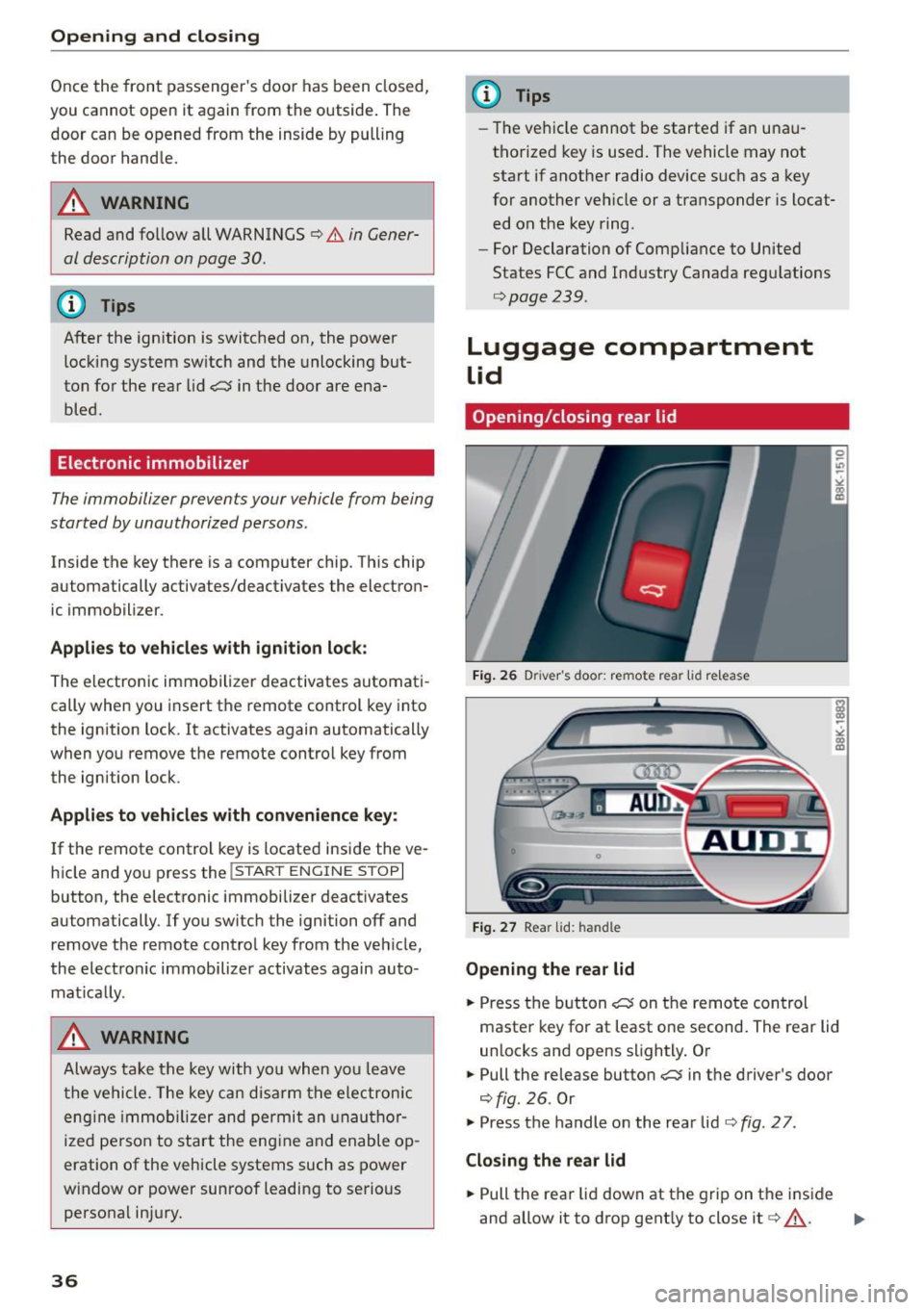
Fig. 26 Driver 's doo r: remote rear lid r elease
Fig. 27 Rear lid: handle
Opening the rear lid
.. Press the button ~ on the remote control
master key for at least one second. The rear lid
unlocks and opens slightly. Or
.. Pull the release button~ in the driver's door
¢fig. 26. Or
.,. Press the handle on the rear lid¢
fig. 27 .
Closing the rear lid
.. Pull the rear lid down at the grip on the inside
and allow it to drop gently to close it¢ .&_ . .,.
Page 45 of 254
Lights and Vision
Exterior Lighting
Switching the lights on and off
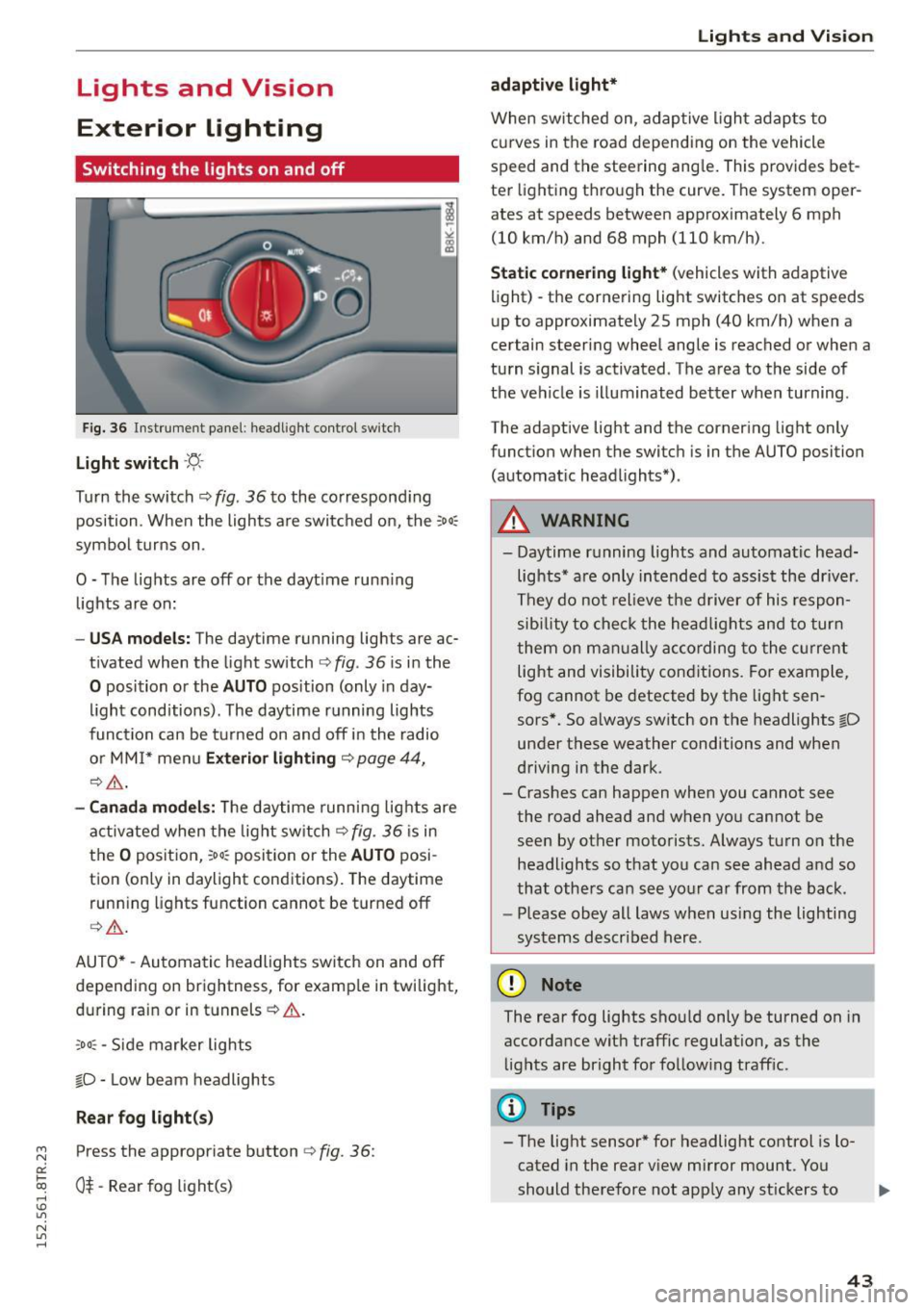
Fig. 36 In str ument pa ne l: h eadligh t contro l sw itc h
Light switch -'f!,-
Turn th e switch ¢ fig. 36 to the co rrespond ing
position . When the lights a re switc hed on, the :
00
:
symbo l turns on .
O -The lights are off or the dayt ime runn ing
lights are on:
- USA models: The day time running lights are ac
t ivated when the light sw itch ¢
fig. 36 is i n the
O position or the AUTO position (only in day
li ght conditions). The daytime r unning lights
func tion can be turned on and off i n the radio
o r MM I* men u
Exteri or lighting ¢ page 44,
¢ ,& .
-Canada model s: Th e daytime runn ing lig hts are
a ctiv ated when the light sw itch
Q fig . 36 is in
t h e
O position, :oo: position or the AUTO posi
tion (only in daylight conditions) . The daytime
run ning lights function cannot be turned off
Q _&. .
AUTO* -Aut omatic headlights switch on and off
de pending on brightness, for examp le in twilight,
during ra in or in tunnels ¢& .
,o o: -Side marker lights
fD -Low beam headlights
Rear fog light (s)
~ Press the appropriate button ¢ fig. 36:
0::
txi 0$-Rear fog light(s) rl I.O
"' N
"' rl
Lights and Vis ion
adaptive light*
When switched on, adap tive ligh t ad apts to
c u rves in the road depend ing on the vehicle
speed and the steering ang le . This provides bet
te r li ght ing t hrough the curve. The system oper
ates at speeds between approximately 6 mph
(10 km/h) and 68 mph (110 km/h).
Static cornering light* (vehicles with adaptive
light) -the corne ring light switches on at speeds
u p to approximate ly 25 mph (40 km/h) when a
certain steering wheel angle is reached or when a
tu rn s ignal is activated. The a rea to the side of
the ve hicle is illuminated bet ter when turning .
The adaptive light and the corner ing light only
funct ion when the switc h is in t he AUTO position
(automat ic head lights*) .
A WARNING
--Daytime r unning lights and automatic head·
lights * are only in tended to assis t the driver .
Th ey do not relieve the d river of his respon
s ibi lity t o check the he ad lig hts and to tur n
t hem on m anually according to the cur ren t
light and visibility con ditions . Fo r ex am ple,
fog cannot be detected by t he lig ht sen
sors*. So a lways switch on the headlights
fD
un der these weather conditions and when
d riving in the dark .
- Cras hes can happen when you cannot see
the road ahead an d when yo u cannot be
seen by other motorists. Always tu rn on the
headlights so that you can see ahead a nd so
that othe rs can see yo ur ca r from the ba ck.
- Please obey all laws when usi ng the lighting
sys tems described her e.
(D Note
The rear fog lights sho uld only be turned on in
accordance wit h traffic regulation, as the
li g hts are bright fo r fo llow ing traff ic.
(D Tips
- The light sensor * for headlight control is l o
cated in the rear v iew mirror mount . You
should therefore not app ly any st ickers to .,.
43
Page 46 of 254
Lights and Vi sion
the windshield in this area in order to pre
vent malf unctions or failures.
- Some exterior lighting functions can be ad
ju sted
r::!> page 44.
-When yo u remove you r key fr om the igni tion
while the vehicle 's lights are turned on, a
b uzzer sounds as long as t he driver's door is
open .
- In cool or damp weather, the ins ide of the
headlights, tur n sig nals and tail lights can
fog over due to the temperat ure difference
between the inside and outside. They w ill
clear s hortly after switching them on. T his
does not affect t he se rvice life of the light
i ng .
- In the event of a light sensor malfunct ion,
the driver is not ified in the i nstr ument clus
ter dis play
r::!> page 21.
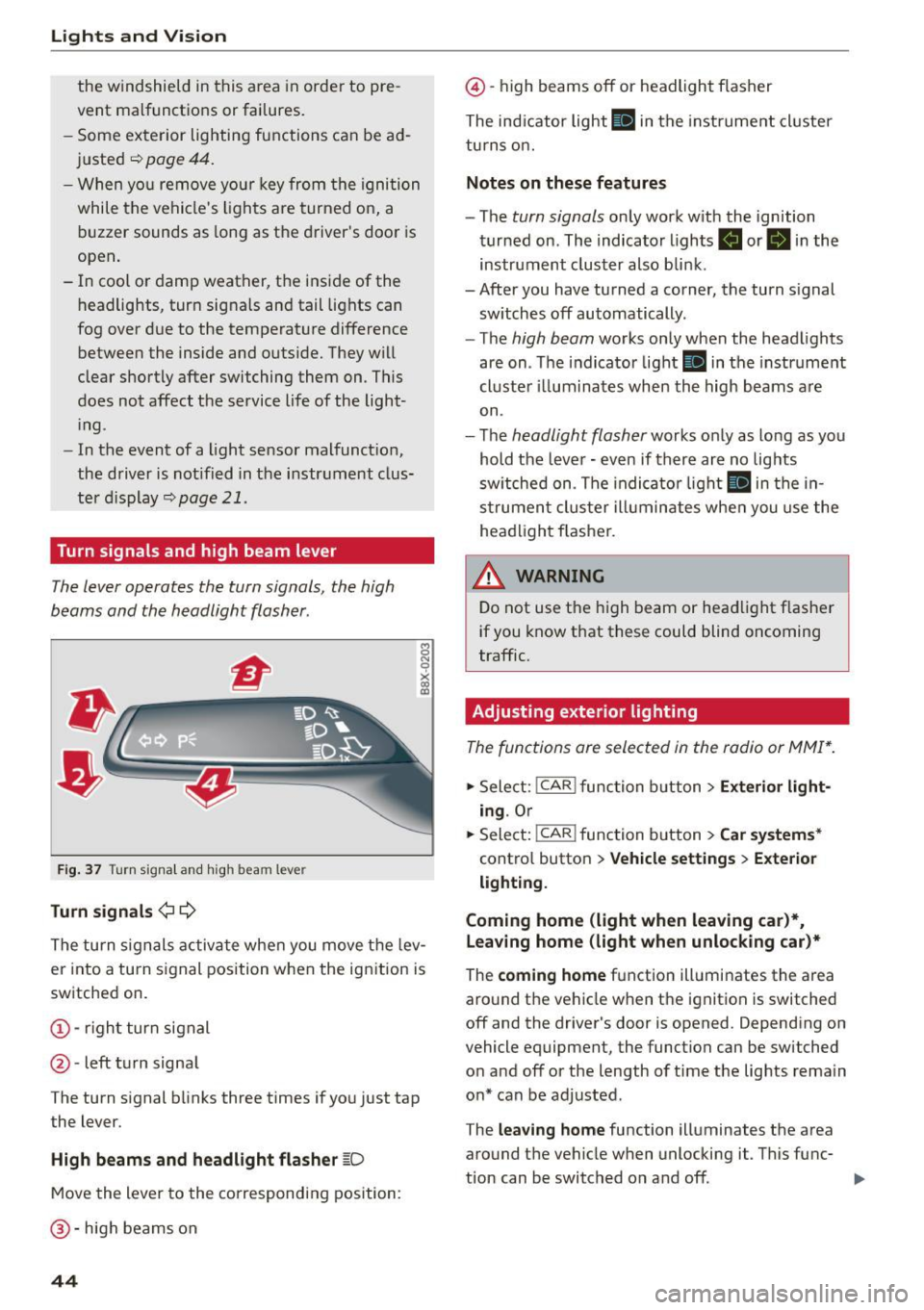
Turn signals and high beam lever
The Lever operates the turn signals , the high
beams and the headlight flasher .
Fig. 37 Tu rn signa l an d hi gh beam lever
Turn signals ¢¢
8 N 0
~ lD
The turn s ignals activa te whe n you move t he lev
er into a turn s ignal position when the ignition is
switched on.
@ -righ t turn signal
@ -left turn signa l
The turn s ignal blinks three times if yo u just tap
the lever.
High beams and headlight flasher ~D
M ove the lever to the correspondin g position:
@-hig h beams on
44
@ -high beams off or headlight f lasher
The ind icator light
II in t he instru ment cl uster
tu rn s on.
Notes on these features
- The turn signals only wor k w ith the ignition
tur ned on . The indicato r lights
B or II in the
instrument cluster also blin k.
-After you have tu rned a corner, the turn signal
sw itches off automatically.
- The
high beam works only when the head lights
are on . Th e indicator light
II in the instr ume nt
cl uste r ill umi nates when the high beams a re
on.
- T he
headlight flasher works o nly as lo ng as yo u
hold the leve r -even if there a re no lig hts
sw itched on . T he indi cato r light
II in the in
s t rume nt clus te r i llumin ates whe n you use the
head light fl asher.
&_ WARNING
D o not use t he h igh beam or hea dlight flashe r
i f you know that these could blind oncoming
traffic.
Adjusting exterior lighting
The func tions ore selected in the radio or MMI* .
.,. Sele ct: I CAR I func tion b utton > Exterior light
ing .
Or
.,. Sele ct : -1 C- A- R~i f unc tion b utton > Car systems *
contro l button > Vehicle setting s > Exterior
lighting.
Coming home (light when leaving car )*,
leaving home (light when unlocking car)*
The coming home f u nction ill umi nates the area
aro und t he veh icle when t he ignit ion is switched
off and the driver's door is opened. Depend ing on
vehicle equipment, the function can be switched
o n and off or the length o f time the lights remain
o n* can be adjusted .
The
leaving home function illuminates t he area
aro und th e vehicle when unlocki ng it. T his func-
t ion can be switched on and off. ..,.
Page 52 of 254
Ligh ts a nd Vi sion
windshield . Switching on the windsh ield
wipers can damage the wiper b lades!
- Prior to using a car wash, the windshield
wiper system m ust be switched
off (lever in
position @). This helps to prevent uninten
tiona l switching on and damage to the
windsh ield wiper system.
@ Tips
- The windshield wipers are switched off
when the ignition is turned off . Activate the
windsh ield wipers after the ignition is
switched back on by moving the windsh ield
wiper lever to any pos it ion.
- Worn or dirty windshield w iper blades result
i n streaking. This can affect the rain sensor*
funct ion. Check your windshield wiper
blades regularly.
- The washer fluid nozzles of the windshield washer system are heated at low tempera
tures when the ignit ion is on.
- When stopp ing temporarily, (e.g . at a traffic
li ght) the set speed of the windsh ield wipers
i s automatically reduced by one speed.
Cleaning windshield wiper blades
Clea n the w indshield wiper blades whe n they be
g in to leave streaks . Use a soft cloth and glass
cleaner to clean the windshield wiper blades .
.,. Place the windshield wipe r a rms in the serv ice
pos ition. Re fer to ~
page 50.
.,. Lift the w iper arm away from the front w indow .
A WARNING
Dirty windshield wiper blades can impair your
view. Th is can lead to acc idents.
so
· Replacing windshield wiper blades
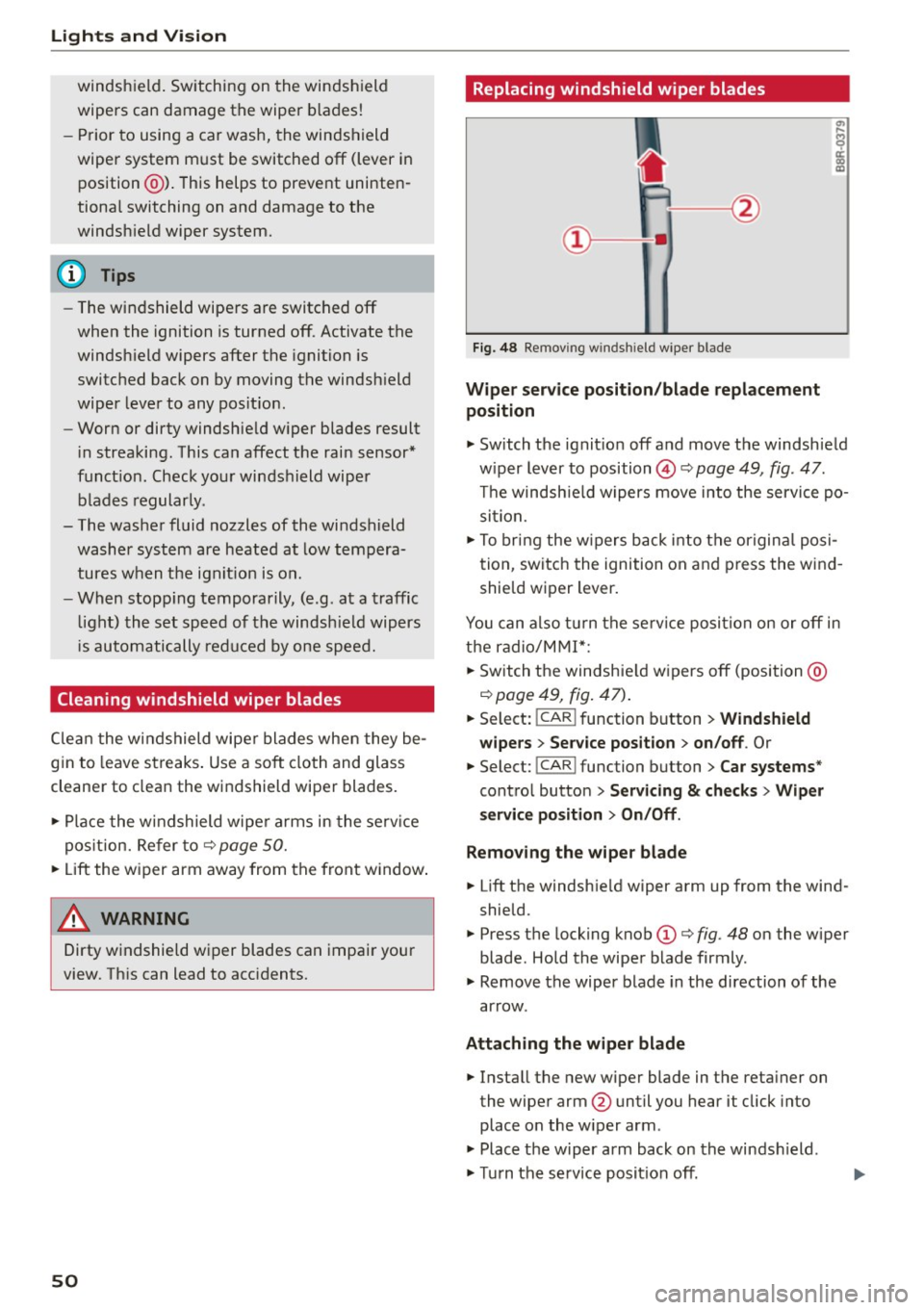
Fig. 48 Re mov ing w in d shi eld w ipe r b lade
Wipe r serv ice po sition /blade replacement
position
.,. Switch the ignit ion off and move the windsh ield
w iper lever to position©~
page 49, fig . 47.
T he windsh ie ld wipers move into the service po
sition.
.,. To bring the w ipers back i nto the origina l posi
tion, switch the ignition on and p ress the w ind
shie ld wiper lever.
You can also turn the se rv ice position on or
off in
the radio/M MI*;
.,. Sw itch the windshie ld w ipers
off (position @
Qpage49, fig. 47) .
.,. Select: !CAR I function button > Windshi eld
wipers
> S er vice position > on /off . Or
.,. Select: !CAR I function button> Car systems "
control button > S ervi cing & checks > Wiper
s ervice po sition
> On/Off .
Removing the wiper bla de
.,. Lift the windshie ld wiper arm up from the wind
shie ld.
.,. Press the locking knob
(D Q fig . 48 on the wiper
blade . Hold the wiper blade firmly .
.,. Remove the wiper blade in the direction of the
ar row.
Attaching the wipe r blade
.,. Install the new wiper blade in the reta iner on
the wiper arm @until you hear it click into
place on the w iper arm .
.,. Place the w iper arm back on the winds hield .
.,. Turn the service posit ion
off.
Page 59 of 254
M N
0:: loo ,...., \!) 1.1'1
N 1.1'1 ,....,
Adjusting the head restr aint s
"'To move the head restraint up, hold it at the
sides with bot h hands and slide it upward until
yo u feel it click into place¢
A.
"'To move the head restraint down, press the
button ®¢
fig. 56 and slide the head restraint
downward.
R emoving th e head re straint s
"' Fold the backrest forward ¢ page 63.
"'Move the head restraint upward as far as it can
go.
"' Press the release @¢
fig. 57 with the mechan
ical key¢
page 32 and the button ® ¢ fig. 56.
Pull the head restraint out of the backrest at
the same time¢,& .
Install ing the head rest raint s
"'Slide the posts on the head restraint down into
the gu ides until you feel the posts click into
place.
"' Press the button®¢
fig. 56 and slide the head
restraint all the way down . You should not be
able to pull the head restraint out of the back
rest.
So that the driver can have a better v iew to the
rear, the head restra ints should be pushed down
completely when the rea r seats are not occupied .
_& WARNING
-Read and heed all WARNINGS¢ page 114,
Proper adjustment of head restraints.
- Only remove the rear seat head restraints
when necessa ry in order to install a chi ld
seat
¢ page 158. Install the head restra int
again immediate ly once the child seat is re
moved . Driving without head restraints or
with head restraints that are not properly adjusted increases the risk of serious or fa
tal neck injury dramatically.
- Vehicles with a pass through in the center console have seat ing for four. The long cen
ter console between the two rear seats is
not a seat ing pos ition. Therefo re, a safety
belt is not provided.
S eat s and stor age
{!) Tips
Correct ly adjusted head restraints and safety
belts are an extremely effective combination
of safety features.
Memory function
Description
Appl ies to vehicles: wi th memo ry fu nct io n
The memory f unct ion allows you to quickly and
easily store and recall personal seating profiles
for the driver . The memory function is operated
t h rough the master key and the memo ry buttons
in the driver 's door.
T he driver's seating p rofile is stored and assigned
to the master key each time the vehicle is locked.
When you open the door, the seat profile is auto matically reca lled. If two people use one vehicle,
it is recommended that each person always uses
"their own" ma ster key.
Up to 2 seat profi les can be stored in the memory
buttons in the driver's door. Once they are stored,
these seat profiles can be selected at any time.
In addition to the driver's seat settings, you can
also store and access the exterior mirror adjust
ment settings* using the remote contro l key or
memory bu tton.
Remote control key
App lies to vehicles: wit h seat memory
To assign the dr iver 's seat settings to the remote
control key when locking the veh icle, the function
must be activated in the radio or MMI*
"' Select:
!CAR I function button> Seat adjust-
ment > Driv er's seat > Remot e con trol k ey
>
on.Or
"' Select :
~ ,c~ A~R~I function button> Car sy stems *
contro l butto n > Vehicle s etting s> Seat s>
Driver 's seat > Remote control key > On .
(D Tips
If you do not want anothe r drive r's sett ings to
be assigned to the remote key, switch
off the
memory function usin g the rad io or MMI * or
the
ION/OF F I button ¢ page 58.
57
Page 70 of 254

Warm and cold
Operation
We recommend pressing the !AU TO ! button and setting the temperature to 72 °F (22 °C).
Fig . 72 Automatic climate control sys tem: control
F ig . 73 3-zone del ux e automat ic climate controt•: controls
Press the buttons to turn the functions on or off.
Use the dials to adj ust the temperature, the
b lo wer speed and the air distribution. The LED in
a button will light up when the function is
switched on. The settings are displayed for a few
seconds in the radio or MMI* display.
In vehicles with a 3-zone deluxe automatic cli
mate control systems*, the driver and front pas
senger side can be adjusted sepa rately. The set
tings are also disp layed in the climate control
system display .
68
I OFFI Switching the climate control system
on/off
The ! OFF ! button switches the climate contro l
system on or off.
It also switches on when you
press the knob. Airflow from outside is blocked
when the cl imate control system is switched off.
IA/C l Switching cooling mode on/off
The air is not cooled and humidity is not removed
when coo ling mode is switched off. This can
cause fog on the windows. The cooling mode is
switched off automatically at low outside tem
peratures.
Page 72 of 254

Warm and cold
th e risk of injury , these individua ls sho uld
not use seat heating.
(D Note
To avo id damage to the heating elemen ts in
the seats, do not kneel on the seats or place
heavy loads on a small a rea of the seat .
Setup
The basic climate control settings can be adjust
ed in the radio or MMI* .
... Se lect : I CAR I f u n ct ion bu tton > A/C con trol b ut
ton. Or
... Se lect : ICAR I f u nction button>
Car sy stems*
control b utton > AC.
Automatic recirculation*
When swi tched o n, a utom atic rec ircula tion con
t rols the recircu lation mode au toma tica lly.
If the
windows fog up, press the
l..i> F RONT I button .
Synchronization*
When sync hron ization is sw itched on, t he same
settings a re applied to bo th t he d river a nd front
p a ssenger, ex cep t fo r the se at hea ting/vent ila
tion *. Synchronization switches off when you ad
just the settings on the front passenger's side.
You ca n also switc h synch ron izat io n on by press
i n g and hold ing the knob on the dr iver' s side.
70
Page 77 of 254
"' N
0:: loo
rl I.O
"' N
"' rl
-For safety reasons, you should always park
your vehicle with the selector lever in P. Oth
erwise, the vehicle could inadvertently roll
away .
- The rad iator fan can continue to run for up
to 10 m inutes even after you have turned
off the engine and removed the ignition key .
The rad iator fan can also turn on aga in if the
engine coolant heats up be cause of intense
s u nlight or heat bui ld-up in the engine com
partment.
- Always ta ke t he key with you wheneve r you
leave your vehicle. Otherwise, the eng ine
cou ld be started or electrical eq uipment
s u ch as the power windows cou ld be operat
ed. This can lead to serious injury.
(D Note
If the e ng ine has been under heavy load for
an extended per iod, heat builds up in the en
gine compartment after the engine is swi tch
ed off -there is a risk of damag ing the engine.
Allow the engine to run at idle for about two
m inutes before switch ing it off.
Driver messages
Ignitio n is on
This message appears and a war ning tone sounds
if you open the driver's door when the ignition is
switched on.
No ke y ide ntifi ed
This message appears when the
I STAR T ENGIN E STOP I button is pressed if t here
i s no master key inside the vehicle o r if the sys
tem does not recogni ze it. For example, the mas
ter key ca nnot be recognized if it is covered by an
object (e .g . alum inum br ie f case) which
screens
the radio signal. Electronic devices such as cell
phones can also interfere w ith the rad io signa l.
Press br ake pedal to sta rt engine
This message appears if you do not press the
b rake peda l to s tart the engine.
Shift to N or P to start engine
Dr ivi ng
This message appears when attempt ing to start
t h e engine if the se lector lever for the automatic
transmission is not in the P or N position. The en
gine can on ly be started w ith the selector in
these positions.
El I s the key in the vehicle?
T his mess age appears if the mas ter key is re
moved from the vehicle wi th the e ngine runn ing .
If the master key is no longer in the ve hicle, you
cannot switch on the ignition after stopping the
engine and you also cannot start the engine
again . Moreover, you cannot lock the vehicle from
t h e outside with the key.
Shift to P otherwise vehicle can roll away . Door s
do not lo ck
if le ve r is not in P.
This message appears for safety reasons along
with a warning signal. It appea rs if the selector
lever for the automatic transmission is not in the
P position when switch ing off the ignition. Move
the selector lever to the P position, otherwise the
vehicle is not secured against rolling away. You
also cannot lock the vehicle us ing the locking
button* on the door handle o r us ing t he remote
key .
Convenience key defe cti ve! Use ign ition lock
This message appears if the engine must be
started or stopped using the ign ition key and not
the
I STAR T ENGINE ST OP ! button.
Electromechanical
parking brake
Operation
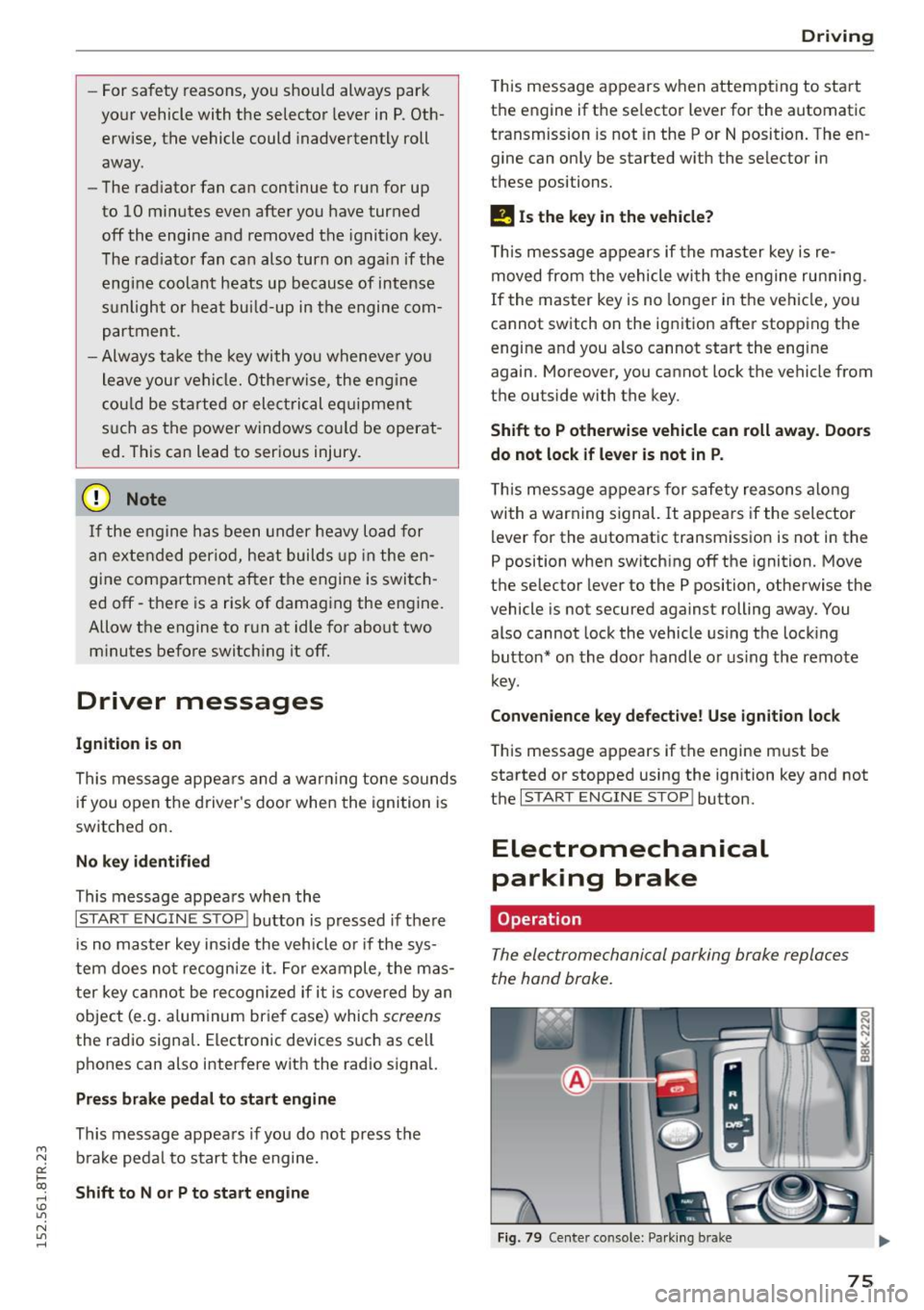
The electromechanical parking broke replaces
the hand broke.
Fig . 79 Center co nso le: Pa rk in g b ra ke
75
Page 80 of 254

Driving
Speed warn ing 2
Sto ring warning 2 is recommended if you always
want to be reminded of a certain speed, for ex
ample when you are trave ling in a co untry that
has a general maximum sp eed limit, or if you do
not want to exceed a specified speed for winter
tires .
The . (USA models) /. (Canada mode ls)
speed warning 2 symbo l appears in the disp lay
when you exceed the stored speed limit. Unlike
warning 1, it will not go out un til the vehicle
speed drops below the stored speed limit .
Sett ing speed warning 2
~ page 78 .
(D Tips
Even though your vehicle is equipped with a
speed warning system, you shou ld still watch
the speedometer to make sure you are not
driving faster than the speed limit.
Speed warning 1: setting a speed limit
Warning threshold 1 is set by the I SETI button .
Fig. 8 0 SET button i n the inst rum ent cluste r
Storing the maximum speed
• Drive at the desired max imum speed.
• Press the
!SET ! button in the instrument panel
display ~
fig. 80 for 1 second .
Res etting the ma ximum speed
• Drive the vehicle at a speed of at least 3 mph
(5 km/h)
• Press the
~ ,s- E- T~ I button for more than 2 seconds .
The . (USA models) /. (Canada mode ls)
speed warning symbol will appear briefly in the
display when you release the
I S ET I button to indi-
78
cate that the maximum speed has been stored
successfully .
The maximum speed rema ins stored until it is
changed by pressing the
I SE T! b utton again b rief
l y or until it is deleted by a lengthy push on the
button.
Speed warning 2: setting a speed limit
The radio or MMI* control unit is used to set,
change or delete warning threshold
2.
• Select: !C A R! function b utton> In strum ent
clust er > Spe ed warnin g.
Or
• Select: !CAR ! function button> Car syste m s*
contro l button > Dri ver a ssist> S peed wa rning.
Warning threshold 2 can be set in the speed
range starting from 20 mph to 150 mph (30 km/
h to 240 km/h). Settings can each be adj usted in
intervals of 6 mph (10 km/h) .
Cruise control system
Switching on
The cruise control system makes it possible to
drive at a constant speed starting at
20 mph (30
km/h) .
Fig. 81 Co ntro l le ve r w ith pus h-b utto n
Fig . 82 D isp lay : Selected speed
a)
8 er a) m
Page 95 of 254

"' N
0:: loo
rl I.O
"' N
"' rl
Audi adaptive cruise control and braking guard
~--- ~-Distance 3: This setting corresponds
to a distance of 164 feet/SO meters when travel
ing at 62 mph (100 km/h), or a t ime interval of
1.8 seconds.
~ ---- ~ Distance 4: This setting corresponds
to a distance of 210 feet/64 meters when trave l
ing at 62 mph (100 km/h), or a t ime interval of
2 .3 seconds.
A WARNING
Following other vehicles too closely increases
the risk of collisions and ser ious personal in
jury.
- Setting short distances to the traffic ahead
reduces the time and distance available to
br ing your vehicle to a safe stop and makes
it even more necessary to pay close atten
tion to traffic.
- Always obey applicable traffic laws, use
good judgment, and select a safe following
distance for the traffic, road and weather
conditions.
¢j) Tips
- Distance 3
is set automatically each time
you switch the ignition on.
- Your standa rd settings are automatically
stored and assigned to the remote control
ke y being used.
Setting the driving program
Applies to vehicles: with Audi adaptive cruise control
Depending on the selected dr iv ing program and
distance, driving behavior when accelerating will
vary from dynamic to comfortab le .
Setting the driving program for vehicles
without Audi drive select*
~ In the radio/MMI*, select: !CAR !function but
ton >
Adaptive cruise control > Driving prog. >
comfort, standard or dynamic . Or
~ Select : !CAR I function button> Car systems*
co ntrol button > Driver assist > Adaptive cruise
control
> Driving program* > Comfort, Stand
ard
or Dynamic . Setting the driving mode for vehicles with
Audi drive
select*
Refer to ¢ page 102.
(D Tips
Your settings are automatical ly stored and as
signed to the remote control key being used.
Request for driver intervention
Applies to vehicles: with Audi adaptive cruise control
Fig. 99 Instrume nt cluster: request fo r drive r in te rvention
In certain situations, the system w ill prompt you
to take action. This could happen, for example, if
braking by the adaptive cruise control system is
not enough to maintain enough distance to the
vehicle ahead.
The instrument cluster will warn you about the danger ¢
fig. 99:
-A red vehicle is pictured in the display.
- The text
DISTANCE! appears in the status bar.
- The red indicator light. blinks.
- In addition , a warni ng tone sounds.
93