center console AUDI RS7 SPORTBACK 2015 Owners Manual
[x] Cancel search | Manufacturer: AUDI, Model Year: 2015, Model line: RS7 SPORTBACK, Model: AUDI RS7 SPORTBACK 2015Pages: 302, PDF Size: 74.76 MB
Page 62 of 302
60 Seats and st o rage
12-volt sockets
Appl ies to vehicles: wit h 12-volt sockets
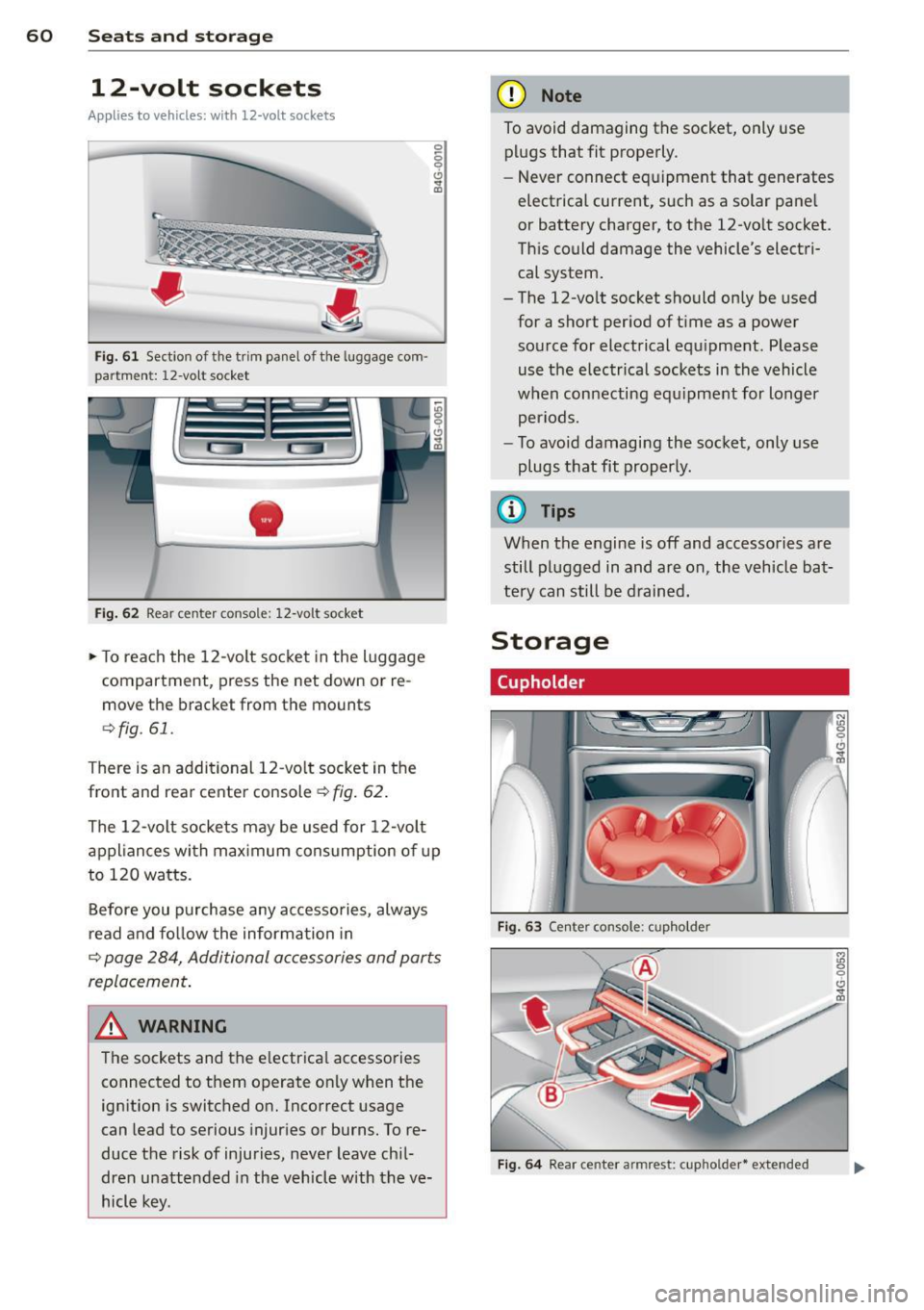
Fig. 61 Sect ion of the trim panel o f th e luggage com ·
par tm ent: 12-vol t so cket
-
Fig. 62 R ear cente r co nso le: 12-vo lt s ocke t
,. To reach the 12-volt socket in the luggage
compartment, press the net down or re
move the bracket from the mounts
¢ fig . 61.
There is an additional 12-vo lt socket in the
front and rear center console~
fig. 62.
0 5 0 6
~
The 12-volt sockets may be used for 12-volt
appliances with maximum consumption of up
to 120 watts.
Before you purchase any accessories, always
read and fo llow the information in
¢ page 284, Additional accessories and parts
replacement .
A WARNING
The sockets and the e lectrical accessories
connected to them operate only when the
ign ition is switched on. Incorrect usage
can lead to serious injur ies or burns. To re·
duce the risk of injuries, never leave chi l
dren unattended in the vehicle w ith the ve
hicle key.
(D Note
To avoid damaging the socket, only use plugs that fit properly.
- Never connect equipment that generates
electrical current, such as a solar pane l
or battery charger, to the 12-vo lt socket.
This could damage the vehicle's electri cal system.
- The 12-volt socket should on ly be used
for a short period of ti me as a power
source for electrical equ ipment . Please
use the electrical sockets in the vehicle
when connecting equ ipment for longer
periods.
- To avoid damaging the socket , only use
plugs that fit properly.
(0 Tips
When the engine is off and accessories are
still plugged in and are on , the vehicle bat
tery can still be drained.
Storage
Cupholder
F ig. 63 Cen ter co ns ole: c upho lde r
Fig. 6 4 Rear ce nter a rmrest: c upho ld er* extend ed
Page 64 of 302
62 Seats and storage
-Compartments* on the back of the front
seat backrests
- Garment hooks on the sides of the pillars in
the rear of the vehicle and in the rear grab
handles
- Compartment in the rear center armrest
- Storage in the trim panels in the luggage
compartment
~ WARNING
-
- Always remove objects from the instru
ment panel. Any items not stored could
slide around inside the vehicle while driv
ing or when accelerating or when apply
ing the brakes or when driving around a
corner.
- When you are driving make sure that
anything you may have placed in the cen
ter console or other storage locations
cannot fall out into the footwells. In case
of sudden braking you would not be able
to brake or accelerate.
-Always keep the lid of the compartment
for (sun)glasses* closed while driving to
reduce the risk of injury during a sudden
braking maneuver or in the event of an
accident.
- Any articles of clothing that you have
hung up must not interfere with the driv
er's view. The coat hooks are designed
only for lightweight clothing. Never hang
any clothing with hard, pointed or heavy
objects in the pockets on the coat hooks.
During sudden braking or in an accident -
especially
If the airbag is deployed -
these objects could injure any passen
gers inside the vehicle.
- To reduce the risk of personal injury in an
accident or sudden stop, always keep the
glove compartment closed while driving.
- Read and follow all WARNINGS
~ page 160, Important safety instruc
tions on the side airbag system.
-Hang clothes in such a way that they do
not impair the driver's vision.
- The coat hooks must only be used for
lightweight clothing. Do not leave any
heavy or sharp edged objects in the pock- ets which may interfere with the side cur
tain airbag deployment and can cause
personal
injury in a crash.
- Do not use coat hangers for hanging
clothing on the coat hooks as this can in
terfere with proper deployment of the side curtain airbags in an accident.
- Do not hang heavy objects on the coat
hooks, as they could cause personal in
jury in a sudden stop.
(D Note
Objects located on the rear shelf that rub
against the rear window could damage the heating wires for the rear window defog-
ger .
Roof rack
Description and mounting locations
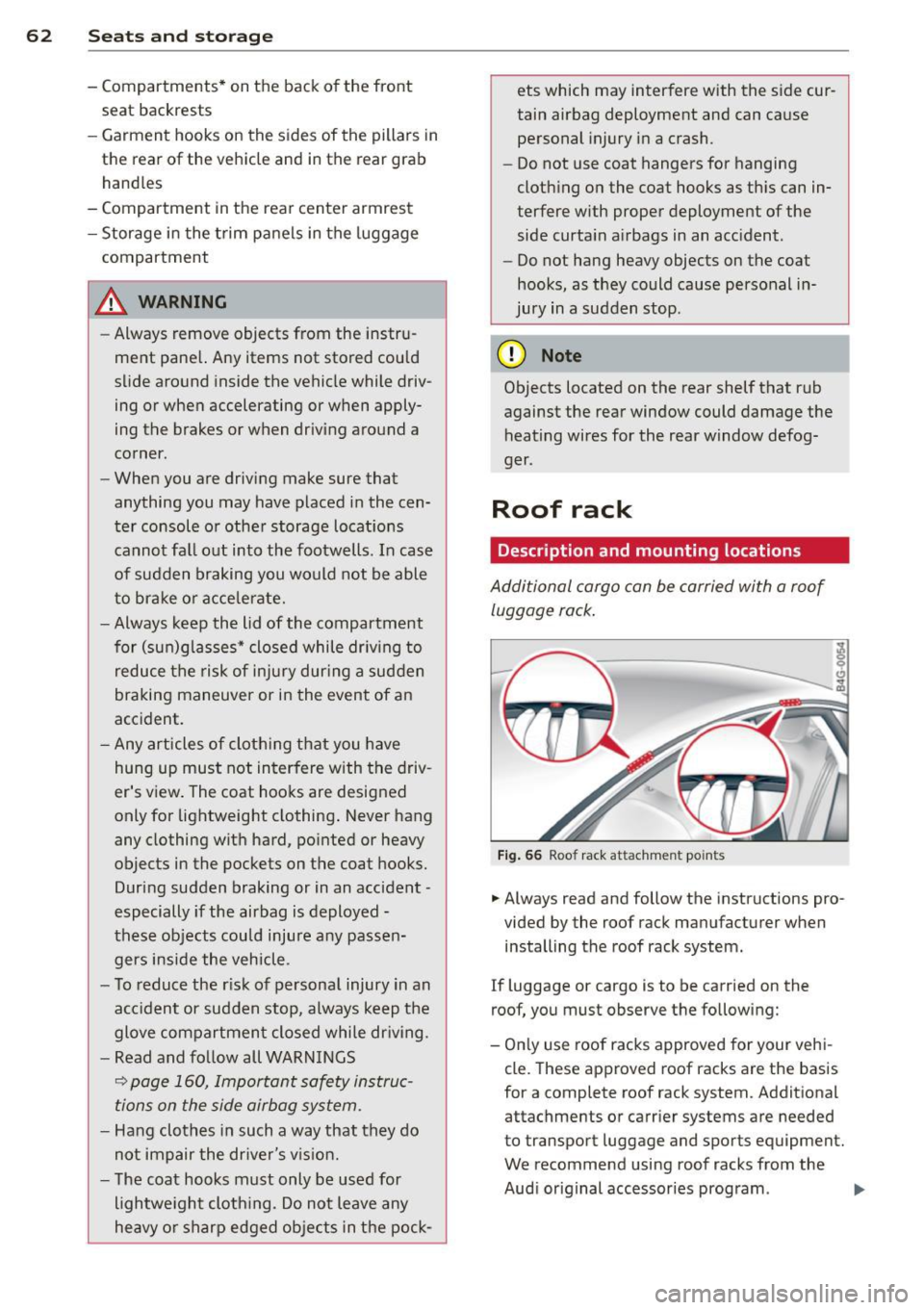
Additional cargo can be carried with a roof
luggage rack.
Fig. 66 Roof rack attachment po ints
... Always read and follow the instructions pro
vided by the roof rack manufacturer when installing the roof rack system.
If luggage or cargo is to be carried on the
roof, you must observe the following:
- Only use roof racks approved for your vehi
cle. These approved roof racks are the basis
for a complete roof rack system. Additional
attachments or carrier systems are needed
to transport luggage and sports equipment.
We recommend using roof racks from the
Audi original accessories program . .,..
Page 73 of 302
M N
0:: <.J 'SI: ,...., \!) 1.1'1 ,...., 1.1'1 ,....,
IAUTO I Switching automatic mode on
Automatic mode ma inta ins a constant tem
perature inside the ve hicle . Air temperature,
airflow and air distribution are controlled au
tomatically.
Adjusting th e temperatur e
Temperatures between 60 °F (+16 °C) and
84 °F ( +28 °C) can be set. O uts ide of this
range,
l o or hi wi ll appear in the climate con
trol system disp lay. At both of these settings,
the climate control system runs continuously
at maximum cooling or heating power. There
is no temperature regu lation.
~ Ad jus ting the airf low
You can adjust the airf low manually to suit
your needs . To have the airf low regulated au
tomatically, press the
I AUTO j button.
li!J Adjusting the air distribut ion
You can manually se lect the vents where the
ai r will flow. To have the air distribution regu
lated automatically, press the
IAUTOI button.
~I~* Adjusting seat heating /
ve ntilat ion *
Pressing the button switches the seat heat
ing/ventilation on at the highest setting ( level
3). The LEDs indicate the heating/ventilation
level. To reduce the heating/venti lation, press
the button again. To switch the seat heating/
ventilation off, press the button repeatedly
until the LED turns off.
After 10 minutes, the seat heating automati
cally switches from leve l 3 to level 2.
l
ed or cleared of condensation as quickly as possib le. The maximum amount of air flows
mainly from the vents below the windshield.
Recirculation mode switches off. The tempera
ture should be set to approximately 72 °F (22
°() .
The IAUTOI button switches the defroster off.
Warm and c old 71
liiii REAR ! Switch ing re ar window he ate r
on /off
The rear window heater only operates when
the engine is running. It switches off auto
matically after 10 to 20 minutes, depending
o n the outside temperature.
To prevent the rear window heater from
switching off automatically, press and ho ld
the
l liiil REARI button for more than 2 seconds.
This remains stored until the ign ition is
switched off .
I SYNC I Sy nch ron izat ion *
When synchronization is switched on, the
same settings are applied to both the driver
and front passenger, except for the seat heat
ing/ventilation*. The rear zone is also
synchronized. Synchronization switches off
when the settings for the front passenger s ide
o r rear are adjusted.
You can also switch synchronization on by pressing and holding a dial. For example, if
you press and hold the d ial on the front pas
senger side, the settings for that s ide are
transfer red to the d river side. The same ap
plies to the rear.
Air vents
You can open or close the center and outer
vents in the cockpit and the vents in the rear
cente r console and doo r pillars us ing the
ridged thumbwheels. The levers adjust the d i
rect ion of the a irflow from the vents.
&_ WARNING
-=
- Do not use the recirc ulation for extended
periods of time . The windows could fog
up since no fresh air can enter the vehi
cle. If the windows fog up, press the air recirculation butto n aga in immediately
to switch off the air recirculation func
tion or se lect defrost.
- Individuals w ith reduced sensitivity to
pa in or temperature could deve lop burns
when using the seat heating function . To
red uce the risk of i njury, these indiv idu-
als sho uld no t use seat heating. ..,.
Page 76 of 302
7 4 On the road
column will continue moving as long as you
are pressing the switch.
There must be at least 10 inc hes (25 cm) be
tween you r chest and the center of the steer
ing whee l.
If you cannot sit more than 10 in
ches (25 cm) from the steering whee l, see if
adaptive equipment is available to help you reach the pedals and increase the distance
from the steer ing wheel.
F or detai led information on how to adjust the
driver's seat, see
<::> page 54 .
In vehicles with the memory f unction* , the
steering column settings are stored together
with the seat position.
A WARNING
Improper use of steering wheel adjust
ment and improper seating position can
cause se rious personal injury.
- Adjust the steer ing whee l column on ly
when the vehicle is not moving to pre
vent loss of veh icle control.
-
- Adjust the driver's seat or steering wheel
so that the re is a min imum of 10 inches
(25 cm) between your chest and the
steering wheel ¢
page 1211 fig. 146. If
you can not maintain this min imum dis
tan ce, the airbag system cannot protect
yo u properly.
- If phys ica l limi tations prevent you from
sitting 10 in ches (25 cm) o r more from
the steering wheel, check with yo ur au
tho rized Aud i dealer to see if adaptive
equipment is availab le .
- If the steering wheel is aligned with you r
face, the supp lemental drive r's airbag
cannot provide as much protect ion in an
acc ident. A lways make sure that the
steering wheel is aligned with your
chest.
- Always hold the steering wheel with your
hands at the 9 o'clock and 3 o'clock posi
t ions to reduce the risk of pe rsonal injury
if the d river 's airbag deploys.
- Never hold the steering whee l at the 12
o'clock posit ion or w ith your hands i nside the steering wheel rim or on the steering
wheel hub. Hold
ing the steer ing wheel
the wrong way can cause serious injuries
to the hands, arms and head if the driv
er 's airbag deploys.
Easy entry feature
Applies to vehicles: with electrically adjustable steering
wheel
The easy entry feature makes it easier to en
ter and exit the vehicle by automatically ad
justing the steering wheel.
.. Select in the MM I: ICARI function button>
(Car )* sys tem s control b utton > V ehicle set
ting s
> Seats > D rive r's seat > Easy entry >
On .
When the easy ent ry feature is turned on, the
steering wheel moves up to the park position
when you switch
off the ignition. After you en
ter the veh icle, the steering wheel moves to
the stored position as soon as you sw itch on
the ignit ion.
Starting and stopping
the engine
Starting the engine
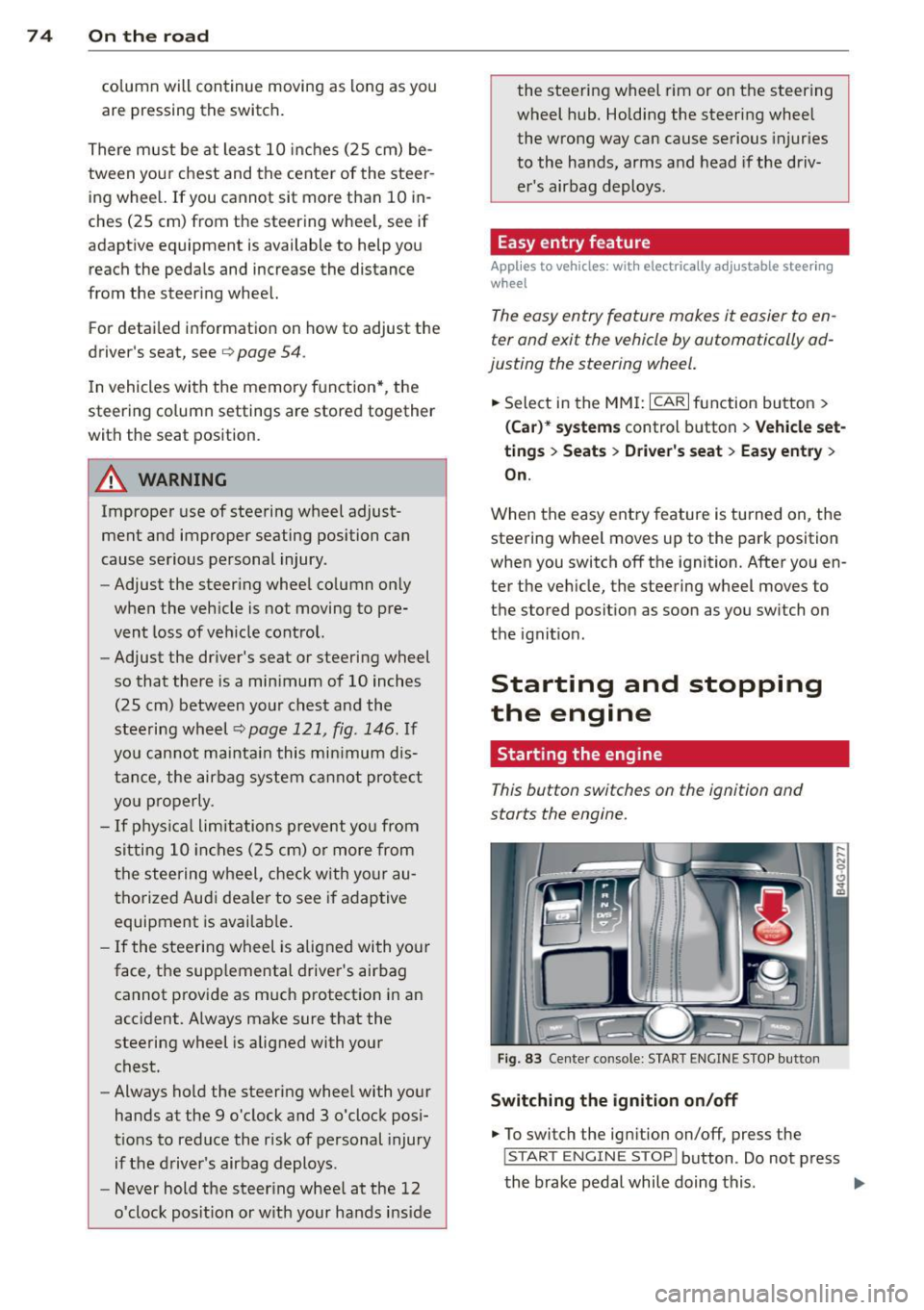
This button switches on the ignition and
starts the engine.
Fig . 83 Center console: S TART ENGINE S TOP butto n
Switching the ign ition on /off
.. To switch the ign ition on/off, press the
I STAR T ENGINE ST OPI button . Do not press
the brake pedal while doing this . .,.
Page 78 of 302
76 On the road
Driver message in the instrument
cluster display
Turn off ignition befor e le a v ing car
This message appears and a warning tone
sounds if yo u open the dr iver's door when the
ignition is switched on.
Press brake p edal to start engin e
This message appears if you press the
I STAR T ENGINE ST OP ! button to start the en
g ine and do not depress the brake pedal. The
engine can on ly be started if the brake pedal
is depressed.
II Is key in th e vehicle ?
If the indicator light turns on and the mes
sage appears, the remote control key was re
moved from the vehicle while the engine was
running. If the ig nit ion key is not in the vehi
cle you w ill not be able to sw itch on the ign i
tion or resta rt the engine after it has been
switched off. You w ill also not be ab le to lo ck
the veh icle from the outside.
Shift to P , otherwise vehicle can roll away .
Doors do not lo ck if lever i s not in P .
This message appears for safety reasons
along w ith an audib le warn ing tone if the P
selector lever posit io n is not engaged when
stopping the engine with the
I STAR T ENGINE ST OP ! button. Select the P se
lec tor lever po sition. Othe rwise the veh icle
could ro ll and it cannot be locked.
II Ke y is n ot r ecogniz ed . Hold ba ck of key
aga in st marked area . Se e owner' s manual.
If the indicator light turns on and th is mes
sage appears, there is a malfunction
c::> page 76.
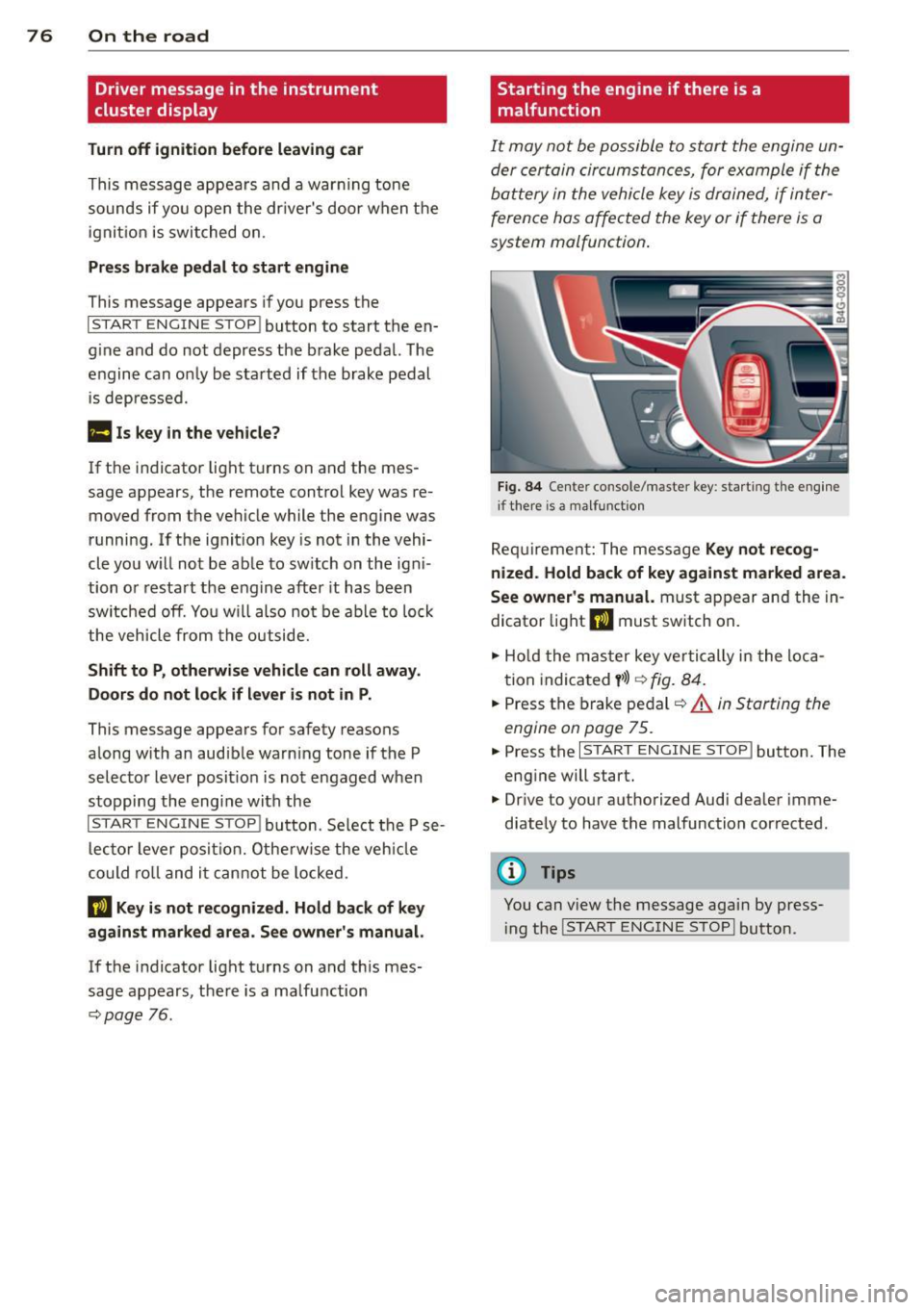
Starting the engine if there is a
malfunction
It may not be possible to start the engine un
der certain circumstances, for example if the
battery in the vehicle key
is drained, if inter
ference has affected the key or if there
is a
system malfunction .
Fig . 8 4 Center console/master key: start ing the eng ine
i f there is a malfunction
Req uirement: The mess age Ke y not r ecog
ni ze d. H old back of ke y again st ma rked are a.
See owne r's manual.
must appear and the in
dicator light
II must sw itch on.
.,. Ho ld the mas ter key vertically in the loca
tion indicated
y >l) r=:> fig. 84 .
.,. Press the brake pedal c::> A in Starting the
engine on page 75 .
... Press the I S TART ENGINE S T OP ! button. The
eng ine will start.
.,. Dr ive to your authorized Audi dealer imme
diately to have the malfunction corrected .
(D Tips
You can view the message again by press
i ng the
I STAR T ENGINE STOP I button.
Page 112 of 302
110 Parking systems
Parking system plus
Description
Applies to vehicles: wit h park ing system p lus
Audi parking system plus provides audio and
visual signals when parking.
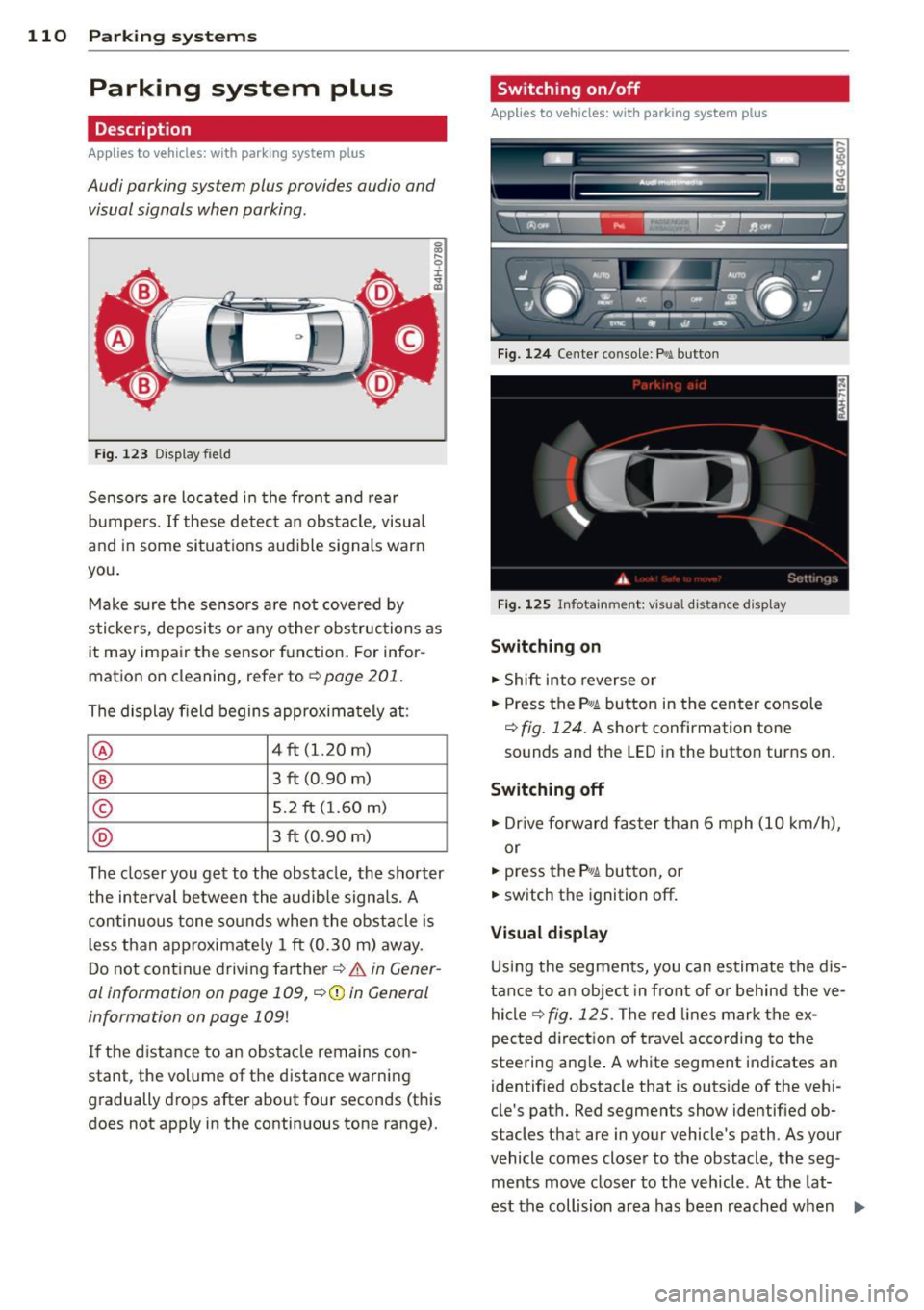
Fig. 123 Display field
Sensors are located in the front and rear
bumpers.
If these detect an obstacle, visual
and in some situations audible signals warn
you.
Make sure the sensors are not covered by
stickers, deposits or any other obstructions as
it may impair the sensor function. For infor
mation on cleaning, refer to
~ page 201.
The display field begins approximately at :
@ 4 ft (1.20 m)
® 3 ft (0.90 m)
© 5.2 ft (1.60 m)
@ 3 ft (0 .90 m)
The closer you get to the obstacle, the shorter
the interval between the audible signals. A
continuous tone sounds when the obstacle is
less than approximately 1 ft (0.30 m) away.
Do not continue driving farther~&.
in Gener
al information on page 109,
~CD in General
information on page 109!
If the distance to an obstacle remains con
stant, the volume of the distance warning
gradually drops after about four seconds (this
does not apply in the continuous tone range).
Switching on/off
Applies to vehicles : w it h park ing system pl us
Fig. 124 Center console :
P.! button
Fig. 125 Infotainment: visual distance d isplay
Switching on
.,. Shift into reverse or
.,. Press the
P"1A button in the center console
~ fig. 124. A short confirmation tone
sounds and the
LED in the button turns on.
Switching off
.. Dr ive forward faster than 6 mph (10 km/h),
or
.,. press the
Pif.lA button, or
.,. switch the ignition off.
Visual display
Using the segments, you can estimate the dis
tance to an object in front of or behind the ve
hicle~
fig . 125 . The red lines mark the ex
pected direction of travel according to the
steering ang le . A wh ite segment indicates an
identified obstacle that is outside of the vehi
cle's path. Red segments show identified ob
stacles that are in your vehicle's path. As your
vehicle comes closer to the obstacle, the seg ments move closer to the vehicle. At the lat-
est the collision area has been reached when ..,.
Page 114 of 302
112 Parking systems
example, after a collision, do not contin
ue to use the system for safety reasons.
Have it checked by your authorized Audi
dealership or authorized repair facility .
- Only use the rear view camera to assist
you if it shows a good, clear picture. For
example, the image may be affected by
the sun shining into the lens, dirt on the
lens or if there is a system fault .
- Use the rear view camera only if the lug
gage compartment lid is completely
closed. Make sure any objects you may
have mounted on the luggage compart
ment lid do not block the rear view cam
era.
- The camera lens enlarges and distorts
the field of vision. The object appears
both altered and inaccurate on the
screen.
- In certain situations, people or objects in the display appear closer or further
away:
- For objects that do not touch the
ground, such as the bumper of a
parked vehicle, a trailer hitch or the
rear of a truck. Do not use the help
lines in this case.
- If driven from a level surface onto an
incline, or a downward slope.
- If driven toward protruding objects.
- If the vehicle is carrying too much load
in the rear.
@ Note
- Always read and follow the applicable
warnings
r:> (D in General information on
page 109.
- The orange colored orientation lines in
the Infotainment display show the vehi
cle path depending on the steering
wheel angle. The front of the vehicle
front swings out more than the rear of
the vehicle. Maintain plenty of distance
so that your outside mirror or a corner of
your vehicle does not collide with any ob stacles.
Switching on/off
Applies to vehicles: with parking system plus with rear
v iew camera
Switching on
.,. Shift into reverse or
.,. press the
P'QA button in the center console
r:>page 110, fig. 124. A short confirmation
tone sounds and the LED in the button turns
on .
Switching between the rear view camera
and optical display
... Press the Graphic control button ®
¢ page 113, fig. 130 to see the optical dis
play .
.,. Press the
Rearview control button to see the
rear view camera image.
Switching off
... Drive forward faster than 6 mph (10 km/h),
or
.,. Press the
P,,1~ button, or
.,. Switch the ignition off.
{D Tips
The visual display in the left part of the
display should help you detect the critical
vehicle areas.
Page 117 of 302
"' N
a:: I.J "". rl I.O
"' rl
"' rl
_& WARNING
-Always read and follow the app licab le
wa rnings ¢.&.
in General information on
page
109 .
-If the posit ion or the instal lation angle
of a camera was changed, after a colli
sion fo r example , do not continue to use
the system for safety reasons. Have it
checked by your authorized Audi dealer
ship.
- Keep in m ind that the image in the dis
play is dis torted if the ex ter ior mir ror
housing has been man ually adjusted.
- Use the
rear mode and the corner view
( re ar)
mode on ly when the luggage com
partment lid is fully closed. Otherwise
the image in the display will be distort
ed.
- The vehicle surroundings are shown us
ing the camera images . The vehicle im
age is shown by the system . Objects and
obstacles above the camera are not dis
played .
- Camera lenses en large and distort the
field of v is ion. The object s appear both
altered and inaccurate on the screen.
(D Note
- Always read and fo llow the applicable
warnings
¢ @ in General information on
page
109 .
- The Infota inment display shows the di
rection in wh ic h the rear of the vehicle is
traveling based on the steering wheel
angle . The front of the veh icle front
swings o ut more than the rear of t he
ve
hicle . Ma intain plenty of distance so that
you r outside mi rror or a corner of you r
vehicle does no t coll ide wi th any obsta
cles.
@ Tips
I f the 8/~/c:;::::s symbol appears in the
disp lay and the respect ive dis play a rea is
grayed out , then the powe r exter io r mir
rors were fo lded in or the driver 's door/
P arking systems 115
front passenger's door/ luggage compart
ment lid was opened.
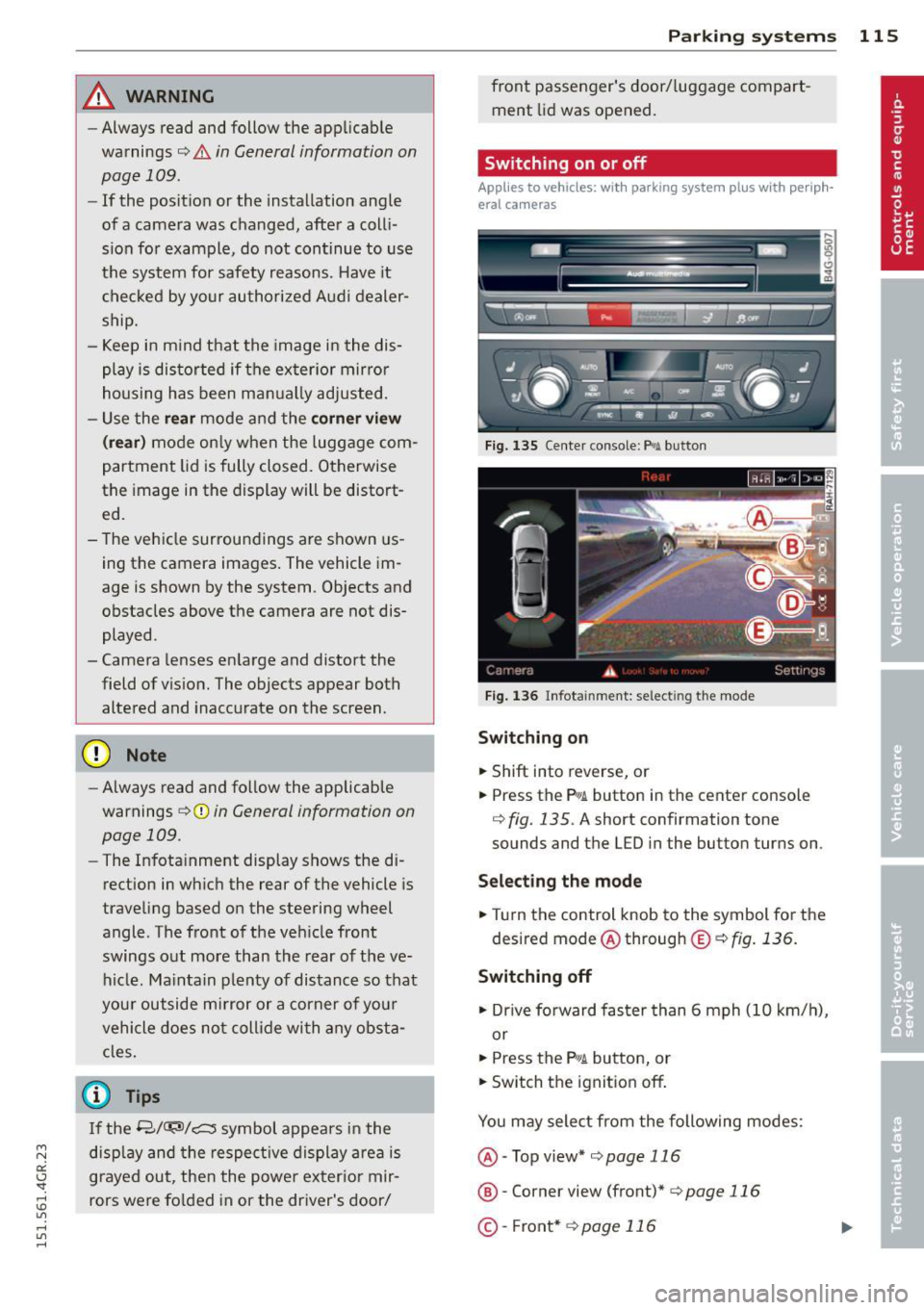
Switching on or off
Applies to veh icles: w ith parking system plus with periph·
era! cameras
Fi g. 135 Ce nter con sole: P>•t button
F ig . 1 36 In fota in m ent: se lect in g th e mode
Switching on
... Shift into reverse, or
... Pre ss th e
p,, ;A button in th e center console
¢
fig . 135 . A sho rt confi rmat ion tone
sounds and the L ED in the bu tton turns on .
Selecting the mode
.,. Turn the control knob to the symbol for the
desired mode @through
®¢fig . 136.
Switching off
.,. Dr ive fo rward faster than 6 mph (10 k m/ h),
or
... Press the
P"IA button, or
... Switch the ignition off .
You may sele ct from the following modes:
@ -Top view*
¢ page 116
@ -Corner view (front)* ¢ page 116
©-Front* ¢ page 116
Page 191 of 302
"' N
a:: I.J "". rl I.O
"' rl
"' rl
Intelligent technolog y 189
Switching on and off
ESC turns on automatically when you start the engine .
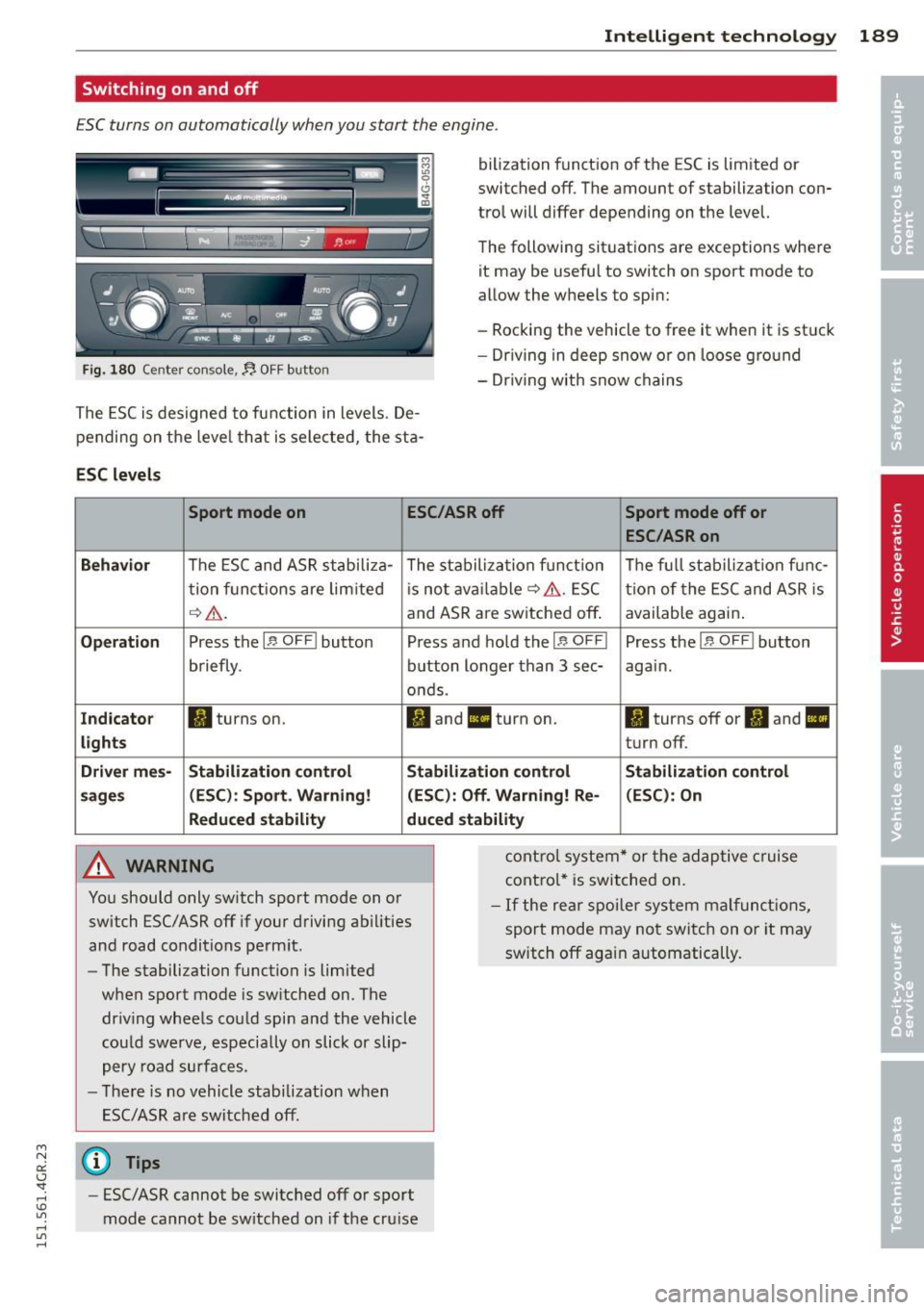
Fig. 180 Center console,:, OFF button
The ESC is designed to function in levels. De
pending on the leve l that is selected, the sta-
ESC levels
bilization function of the ESC is limited or
switched off. The amount of stabilization con
trol will differ depending on the level.
The following situations are exceptions where it may be useful to switch on sport mode to
allow the wheels to spin:
- Rocking the vehicle to free it when it is st uck
- Dr iving in deep snow or on loose g round
- Dr iving with snow chain s
Sport mode on ESC/ASRoff Sport mode off or
ESC /ASRon
Behavi or
The ESC and ASR stabili za- The stabiliza tion f unct ion The f ull stabil iza tion f unc-
tion funct ions are lim ited is no t avai lable~ &.. ESC tion of the ESC and ASR is
~ Lr,. . and ASR are sw itched off .
available again .
Operat ion Press the I~ OF FI button Press and hold the I~ OF FI Press the l.!7-OFFI button
briefly . button longer than 3 sec- again.
ands.
I n dicato r II turns on. II and Ill turn on. II turns off or II and II
lights turn off.
Driver m es- Stabilization control Sta b il iza tion control Stabilization c ontrol
s age s (
ES C): S po rt. Warning ! (ESC): Off. Warning! Re- (ESC ): On
Redu ced stabilit y duced stabilit y
A WARNING
-
cont rol system * or the adaptive cruise
control* is switched on.
Yo u should only sw itch sport mode on or
switch ESC/ASR off if your driving ab ilities
and road conditions perm it.
- The stabilization function is limited
when sport mode is switched on. The
driv ing whee ls could spin and the vehicle
cou ld swe rve, especially on slick or slip
pery road surfaces.
- The re is no vehicle stab ilization w hen
ESC/ASR are switched off.
(D Tips
- ESC/ASR cannot be switc hed off o r sport
mode cannot be sw itched on if the cruise
- If the rear spoi ler system malfunct ions,
sport mode may not switch on o r it may
switch off again automatically.
Page 192 of 302
190 Intelligent technology
Rear spoiler
The rear spoiler improves vehicle handling
and enhances driver control.
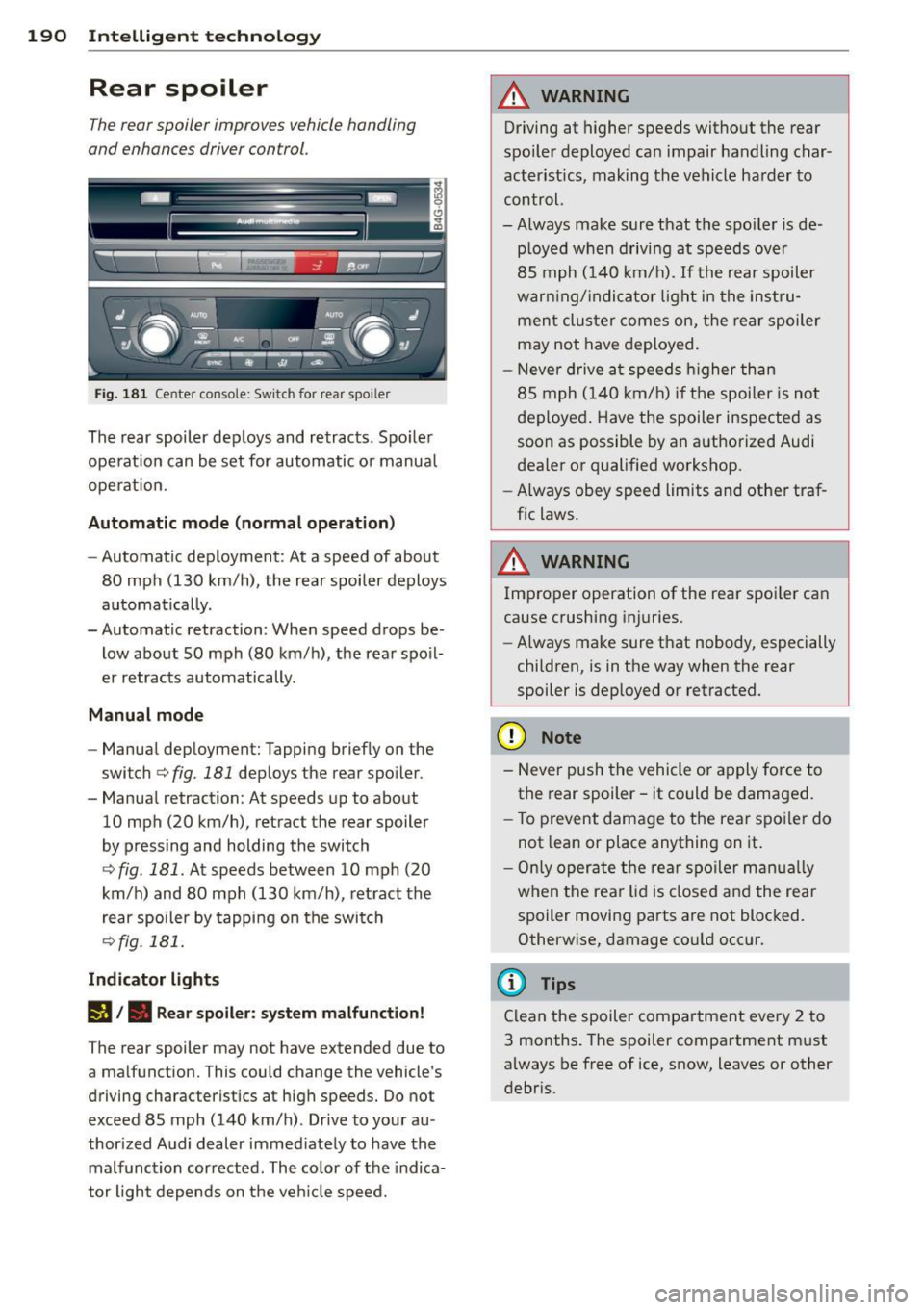
Fig. 181 Center console: Switch for rear spo iler
The rear spoiler deploys and retracts. Spoiler
operation can be set for automatic or manual
operat ion.
Automatic mode (normal operation)
-Automatic deployment: At a speed of about
80 mph (130 km/h), the rear spoiler deploys
automatically.
- Automatic retraction: When speed drops be
low about SO mph (80 km/h), the rear spoil
er retracts automatically.
Manual mode
- Manual deployment: Tapping briefly on the
switch
c:> fig. 181 deploys the rear spoiler .
- Manual retraction: At speeds up to about
10 mph (20 km/h), retract the rear spoiler
by pressing and holding the switch
c:> fig. 181 . At speeds between 10 mph (20
km/h) and 80 mph (130 km/h), retract the
rear spoiler by tapping on the switch
<=?fig. 181.
Indicator lights
I)/. Rear spoiler: system malfunction!
The rear spoiler may not have extended due to
a malfunction. This could change the vehicle's
driving characteristics at high speeds. Do not
exceed 85 mph (140 km/h). Drive to your au
thorized Audi dealer immed iately to have the
malfunction corrected . The co lor of the indica
tor light depends on the veh icle speed.
A WARNING
-Driving at higher speeds without the rear
spoiler deployed can impair handling char
acteristics, making the vehicle harder to
control.
-Always make sure that the spo iler is de
p loyed when driving at speeds over
85 mph (140 km/h) . If the rear spoiler
warn ing/ indicator light in the instru
ment cluster comes on, the rear spoiler
may not have deployed.
- Never drive at speeds higher than
85 mph (140 km/h) if the spoiler is not
deployed. Have the spoiler inspected as
soon as possible by an authorized Audi
dealer or qualified workshop.
- Always obey speed limits and other traf
fic laws.
A WARNING
Improper operation of the rear spoi ler can
cause crushing injuries.
- Always make sure that nobody, especially
children, is in the way when the rear
spoiler is deployed or retracted.
(D Note
- Never push the vehicle or apply force to
the rear spoiler -it could be damaged.
- To prevent damage to the rear spo iler do
not lean or place anything on it.
- Only operate the rear spoiler manually
when the rear lid is closed and the rear
spoiler moving parts are not blocked. Otherwise, damage cou ld occur.
(D Tips
Clean the spoiler compartment every 2 to
3 months. The spoiler compartment must
always be free of ice, snow, leaves or other
debris.