phone AUDI S3 2009 User Guide
[x] Cancel search | Manufacturer: AUDI, Model Year: 2009, Model line: S3, Model: AUDI S3 2009Pages: 324, PDF Size: 76.02 MB
Page 270 of 324
___ T _i_r e_=- p_r_e _ s_ s_ u_r_ e _ m_ o_ n_i_t _o _r_ i _ n .,;:g ::;.._ s_ y=--- s_t _e _m_ * __________________________________________ _
• A wheel sensor or other component may have failed.
• During ini tializat ion the system has detected more tha n 4 wheels
on the vehicle, for example whi le driving next to another car with a
tire pressure monitoring system.
• A wheel change was made but the button
:=:, page 266, fig. 186
was not pressed.
• Audi Genuine Parts were not used for parts replacement .
• If snow chains are being used, system function can be compro
mised due to the shielding properties of the chains.
• The tire pressure monitoring system may not be avai lable
because of a radio malfunction.
• Transmitters with the same frequency, such as radio head
phones in the vehic le or radio equipment, can cause a temporary
disruption of the system through excessive electromagnetic fields .
• Eliminate the interference if possible and then proceed as
follows: Turn off the engine for 20 minutes. Then drive another 10
min. If the warning light comes on again, you shou ld con tact your
authorized Audi dealer immediately to have the prob lem corrected.
• Do not use commercially avai lab le tire sea lants . Otherwise, the
e lectrica l components of the tire pressure monitoring system wi ll
no longer work properly and the sensor for the tire p ressure moni
toring system wil l have to be rep laced by an authorized Audi dealer
or o ther qua lified workshop .•
Certification
This device complies with part 15 of the FCC rules and RSS -210.
Operation is subject to the following conditions:
• this device may not cause harmful interference, and
• this device must accept interference rece ived, including interfer
ence that may cause undesired operation.
The receiver 5WK49069 uses the same schematic, assemb ly, layout
and PCB as 5WK49097 . 5WK49097 is a multi channel receiver and 5WK49069 is a single channe
l receiver . They only differ in : SAW
Filter V1 _4 was changed from A2C00038979 to V1 _2 A2C00032378,
Inductor L5_3 and L6_233nH were changed to L5 _2 and L6 _247nH .
BAND PASS FILTER V3_2 was changed from A2C00038762 to V3_3
A2C00036085. V10 : ATIC75 C1, A2C000029505 was changed to V10 :
ATIC75 C2-Light, A2C000043220 . Q1 14.246MHz A2C00037710 was
changed to Q1 15.27MHz A2C00041280 . The BAND PASS FI LTER V2
is not populated .
These modifica tions were necessary to optimize the characteris tic
of the receiver.
Proof is shown with test report T30739 -00 -00KJ issued by Mikes
Testingpartners GmbH, Ohmstral5e 2-4 , 94342 Strasski rchen that
the receiver is be low the limit .•
Page 285 of 324
_________________________________________________ F_ u_ s_ e_s _ a_n _d_ b_ u _ lb_ s _ __.ffllll
No . Equipm ent
37 Heated seats, front
38 Passe nger s ide power window, front
39 Special function interface
Starter
41 Rear window wiper
42 Windshield wiper (washer pump)
43 Convenience electronics (control module)
44 Trailer control module
45 Trailer control module
Not used
47 Cell phone package (VOA interface)
48 Not used
49 Not used
Au tom atic cir cuit br eake rs: Amps
20
30
5
40
15
15
20
20
15
5
The electric power windows and the electric seat adjusters are protected with circuit breakers which reset automatically after the
circu it overload has been corrected.
[ i J Tip s
• Whenever replacing a fuse, always consult the sticker on the
inside of the fuse panel cover. It contains the most up-to-date infor
mation regarding the fuse arrangement. If in doubt, ask your autho
rized Audi Service advisor.
• Some of the equipment items listed are optiona l or on ly avail
able on certain model configurations. •
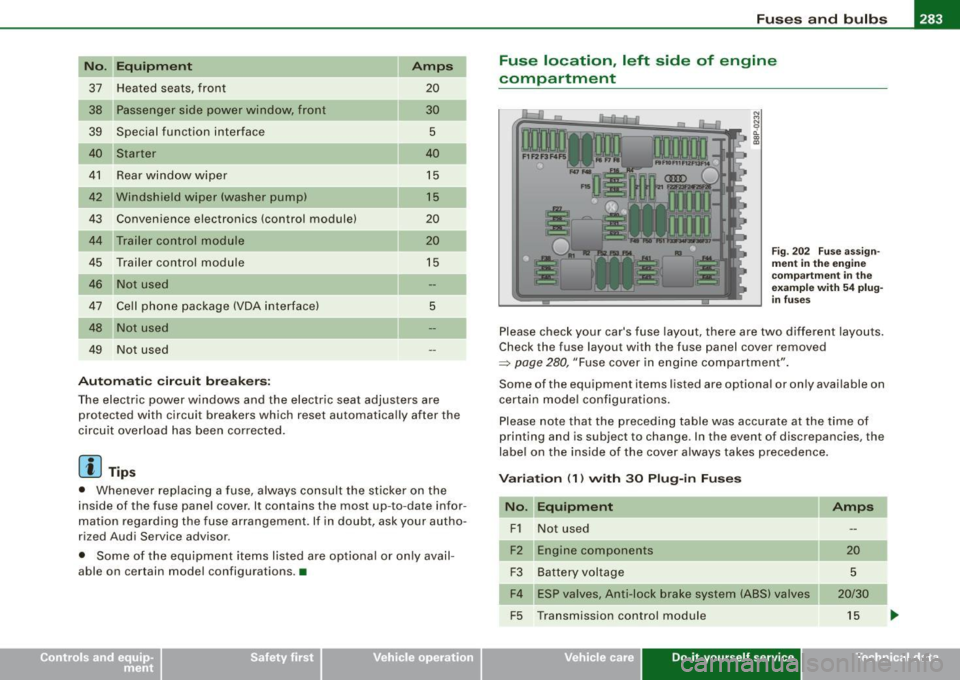
Fuse location , left side of engine
compartment
N M N
~ (X) 0)
Fig . 202 F use ass ign
m ent in th e e ngin e
co mpar tment in th e
e xampl e wit h
54 p lu g
in fu ses
Please check your car's fuse layout, there are two different layouts.
Check the fuse layout with the fuse panel cover removed
~ page 280, "Fuse cover in engine compartment" .
Some of the equipment items listed are optional or on ly available on
certain model configurations.
Please note that the preceding table was accurate at the time of
printing and is subject to change . In the event of discrepancies, the
label on the inside of the cover a lways takes precedence.
V ariation (1 ) with 30 Plu g-in F uses
No . Equipm ent
F1 Not used
Engine components
F3 Battery voltage
F4 ESP v alves, Anti -lock brake system (ABS) valves
F5 Transmission control module
Vehicle care Do-it-yourself service
Amps
20
5
20/30
15
Technical data
Page 286 of 324

IIJII Fuses and bulbs i,.__....;,___;:,,;_,;,,.:_;__;;:_.:.:..:..=-=;____ ______________________ _
No. UEquipment Amps I No. Equipment Amps
F6 Steering wheel electronics, instrument cluster
5 F28
Not used
F7 Transmission control module 30 Fuse assignment in the left-side instrument
F29 50
F8 Navigation system, radio system 15/25 panel (special equipment)
Navigation system, digital radio, cell phone, TV F30 Power supply relay terminal
15 50
F9 equipment 5
F10 Engine control module, main relay 5/10 Variation
(2) with 54 Plug-in Fuses
F11 Not used No. Equipment
Amps
Control module for CAN data transfer (gateway) 5 F1
Vehicle
electrical system control unit (right)
30
F13 Engine control module 15/25 F2
ESP valves, Anti
-lock brake system (ABS) valves
20/30
F14 Ignition coils 20 F3 Not used
F15 Tank diagnosis, oxygen sensor 5/10 F4
Battery voltage
5
F16 Vehicle electrical system control unit (right) 30 F5 Horn
15
F17 Horn
15 F6 Engine components, fuel pump 15
F18 Audio amplifier 30 F7
Not used
F19 Front windshield wiper system 30 F8
Not used
F20 Water return
-flow pump, volume regulator valve F9 Engine components
10
F21 Oxygen sensor, vacuum pump 15 F10
Fuel tank control, mass air flow sensor
10
F22 Clutch pedal switch, brake light switch 5 F11 Oxygen sensors, in front of catalytic converter 10
F23 Engine relays, engine components
5/10/15 F12 Oxygen sensors, behind catalytic converter
10
F24 Engine components, water return-flow pump 10 F13 Automatic transmission
15
F25 Pump (ESP/ABS), ABS valve 30/40 F14 Not used
F26 Vehicle electrical system control unit (left)
30 F15 Water return-flow pump
10
F27 Secondary air pump 40 F16 Volume control valve
20
F17 Steering wheel electronics, instrument cluster
5
F18 Audio amplifier 30
F19 Navigation system, radio system 15/25
Page 287 of 324

_________________________________________________ F_ u_ s_ e_s _ a_n _ d_ b_ u_lb _ s __ ffllll
N "E .
o . qu1pm ent Amps I No. Equ ipment Amps
F20 Navigation system, digital radio, cell phone, TV
5 F44 Not used
equipm ent
F45 Not used
-
F21 Not used F46 Not used
Not used F47 Left-side lighting (electric system control unit)
30
F23 Engine control module, main re lay 10
Pump (ESP/ABS), ABS valve, Anti-lock brake sys-
F48 30/40
F24 Control module for CAN data transfer (gateway) 5 tern (ABS) valves
F25 Not used F49
Not used
Not us ed Not used
F27 Not used F51 Secondary air pump 40
Engine control module 15/25 F52 Power supply relay terminal 15 50
F29 Engine relays, eng ine components 5
F53 Fuse assign
ment in the left -side instrument
50
F30 Not used panel (special equipment)
F3 1 F
ront windshield wiper system
30
F54 Not use d •
F32 Not us ed
F33 Not used
Bulbs
F3 4 Not used
F35 Not used
Replacing light bulbs
F36 Not used F or your safety, we recommend that you have your autho -
rized Audi dealer replace burned out bulbs for you.
Not used
F37
F38 Eng ine components, ta nk diag nosis 10 It is becom ing increasingly more and more difficult to replace
vehic le light bu lbs since in many cases, other parts of the car must
F39 Clutch pedal switch, brake light switch 5 first be removed before you are able to get to the bulb . This applies
F40 Ignition coils 20 especia lly to the light bu lbs i n the front of your car which you can
only reach through the engine compartment .
F41 Not used
F42 Not used Sheet meta
l and bulb holders can have sharp edges t hat ca n cause
serious cuts, and parts must be correctly taken apart and then prop -
F43 Ignit ion coils 30 erly put back together
to he lp prevent breakage of parts and long
...
• Do-it -yourself service
Page 308 of 324
___ C_ o_n_ s_ u_m _ e_ r_ ln_ f_ o _r _m _ a_ t_ i_o _n ______________________________________________ _
These dealers also have the necessary facilities, tools and trained
specialists to install the parts and accessories properly.
& WARNING
Using the wrong spare parts non-approved accessories can cause
serious personal injury.
• Use only accessories expressly approved by Audi and genuine
Audi spare parts
• These parts and accessories have been specially designed to
be used on your vehicle.
• Never install accessories such as telephone cradles or
beverage holders on airbag covers or within the airbag deploy
ment zones. Doing so will increase the risk of injury if airbags are
triggered in an accident!
• Before you check anything in the engine compartment, always
read and heed all WARNINGS=>
page 217.
0 Note
• If items other than genuine Audi spare parts, add -on equipment
and accessory items are used or if repair work is not performed
according to specified methods, this can result in severe damage to
your vehicle's engine and body (such as corrosion) and adversely affect your vehicle's warranty.
• If emergency repairs must be performed elsewhere, have the
vehicle examined by an authorized Audi dealership as soon as
possible.
• The manufacturer cannot be held liable for damage which occurs
due to failure to comply with these stipulations .•
Installing/replacing a sound system
If you wish to install a radio or replace the factory installed radio,
please note the following: The
factory installed radio connectors are designed for genuine
Audi radios. When installing a different radio, difficulties could arise
such as :
- the radio may not fit into the space provided
- the electrical connections may not be compatible
- different connector terminals may be needed .
Therefore, we recommend that you have your authorized Audi
dealer install or replace the radio .
They are the most familiar with the technical features of your
vehicle. They also offer Genuine Audi Radios with the necessary
installation components and instructions.
& WARNING
Improperly installing a radio could cause a short circuit and an
electrical fire. •
Technical Modifications
Our guidelines must be complied with when technical
modifications are made.
Always consult an authorized Audi dealer before starting work on
any modifications.
This will help ensure that vehicle function, performance and safety
are not impaired=> &.
Attempting to work on electronic components and the software
used with them can cause malfunctions. Because of the way elec
tronic components are interconnected with each other, such
malfunctions can also have an adverse affect on other systems that
are not directly involved. This means that you risk both a substantial
reduction in the operational safety of your vehicle and an increased
wear of vehicle parts => & . .,_
Page 309 of 324

_______________________________________________ C _o_ n _ s_u _ m_ e_ r_l_n _f_o _ r_ m_ a_ t _i _o _ n __ PII
Authorized Audi dealers will perform this work in a professional and
competent manner or, in special cases, refer you to a professional
company that specializes in such modifications.
& WARNING
Improper repairs and modifications can change the way vehicle
systems work and cause serious personal injury.
0 Note
If emergency repairs must be performed elsewhere, have the
vehicle examined by an authorized Audi dealership as soon as
possible. •
Declaration of Compliance ,
Telecommunications and Electronic Systems
Radio Frequency Devices and Radiocommunication
Equipment User Manual Notice.
The manufacturer is not responsible for any radio or TV interference
caused by unauthorized modifications to this equipment.
Devices
The following devices each comply with FCC Part 15.19, FCC Part
15.21 and RSS-Gen Issue 1:
• Cell phone package
• Electronic immobilizer
• Homelink® universal remote control
• Remote control key
• Tire pressure monitoring system*
FCC Part 1 5.19
This device complies with part 15 of the FCC Rules. Operation is
subject to the following two conditions:
Controls and equip ment Safety first Vehicle operation
(1)
This device may not cause harmful interference, and
(2) this device must accept any interference received, including
interference that may cause undesired operation.
FCC Part 1 5.21
CAUTION:
Changes or modifications not expressly approved by the party
responsible for compliance could void the user's authority to
operate the equipment.
RSS-Gen Issue 1
Operation is subject to the following two conditions:
(1) this device may not cause interference, and
(2) this device must accept any interference, including interference
that may cause undesired operation of the device. •
Vehicle care Do-it-yourself service Tec hn ica l da ta
Page 313 of 324

Alphab eti ca l ind ex -
-------------=----
Convenience close/open feature
Windows . .... .... .... ... ... ..... . 47
Convertible child safety seats
How do I properly install a convertible
ch ild seat in my vehicle? . ...... .. 175
Safety instructions .. ... .... ... .. . 175
Convertible locking retrac tor
Activating ... ... ... .. ... ... .. .... 181
Deactivating .. .... .... ... ... ..... 182
Using to secure a child safety seat 179, 181
Coolant system . .... .... .... .... ... . 232
Cooling System Expansion tank ... ................ 233
Cornering light .... .... .... .... .... .. 55
Cruise contro l ...................... 113
Changing speed .................. 114
Presetting your speed ... .... .... .. 114
Swi tching off .. ...... .... ... .... . 114
Swi tch ing on .. ...... .... ....... . 113
Warning/indicator lights . ... .. .... .. 14
Cup holder .......................... 92
Cup holders front ......... ...... ...... ..... .. 91
Current fuel mileage .... .... ... .. .. .. . 22
D
Damping
See Audi magnetic ride .. .... .. .... 115
Data .. .... ... ... .. .... .... ... .... . 300
Data recorder ....................... 190
Date display ... .. ... ... .... ... .... .... 9
Controls and equip
ment Safety first
Daytime running lights
.. ... .... .... .. . 54 Driver information system
Daytime running lights (Canada) .. .. ... . 55 Gearshift indicator
..... .. .... .... .. 19
Dec laration of compliance Menu button ..
........ .... ...... .. 25
Ce ll phone package ............... 307 Open door or front lid warning .
.... . 18
Electronic immobilizer ............ 307 Outside temperature display
.... .... 18
Home link® universal remote control 307 Red symbols
...... .... .. . .. .. .... . 28
Remote control key ...... .. .. .... . 307 Setting
... .... .... .... ... .... ..... 26
Tire pressure monit oring system . ... 307 Sound system disp
lay ........ ... .. . 18
Dec laration of conform ity ... .... .... . 268 Trip compu
ter ... .. .... ... .... .... . 22
def yellow symbols .
...... .... .... ..... 29
What does this mean when it appears in Dr
iver seat
t he trip odometer d isplay? .. ...... . 10
See Seating position ... ... .... .... 128
Defective light bulb warning . .......... 33 Driving safely
....................... 126
Defogg ing the windows ... .. .... .... . 10 1 Dup
lica te key . ...... .... ... .... .... .. 35
D efrosting the windows .. ... ..... ... . 101
Defrosting/defogging windows .... .... 104
E
Determining correct load limit . ...... . 252
Elapsed time .. ...... .... ... .... .... . 22
Digita l clock ..... .. .... .... .... ...... . 9
Setting the time ............. ... .. .. 9
Digita l compass . .... ... .... .... .... .. 72 Electrically heated front seats
......... 105
Electro -mechanical power assist . ... 16, 195
Electronic differential lock
Dimensions . ..... ... .... .... .... ... 299
Warning/indica tor lights .... .... .... 16
Dipstick Electronic differential lock (EDU
Reading the dipstick properly ..... . 229
How the system works .... .... .... 191
Direct Shift Gearbox
Emergency release ... .... .... .... 1 23
Distance . .... ... ...... ...... .... .... 23 Elect
ronic immobilizer . ...... .... .. 10, 37
Electro nic power contr ol
EPC warning/indicator light ... .... .. 13
Doors, power locks .. ... .... ..... ... .. 40
Electronic speed limiter ............... 21
Driver information ...... .. .... .... ... . 29
Driver Information System
Menu display . ...... .. .... ..... .. . 23 Electronic Stability Program
...... ... . 190
Electron ic stabil ization program (ESP)
Warning/ind icator lights .... .... .... 13
Emergency flasher Warning/indicator lights .... ...... .. 14
Vehicle operation Vehicle care Do-it-yourself service Technical data