clock AUDI S3 2010 Owners Manual
[x] Cancel search | Manufacturer: AUDI, Model Year: 2010, Model line: S3, Model: AUDI S3 2010Pages: 320, PDF Size: 75.34 MB
Page 10 of 320
Instruments and warning/indicator lights
Instruments and warning/indicator lights
Instruments
Instrument cluster and controls
The ins trum ent cluster is your central source of informa
ti on.
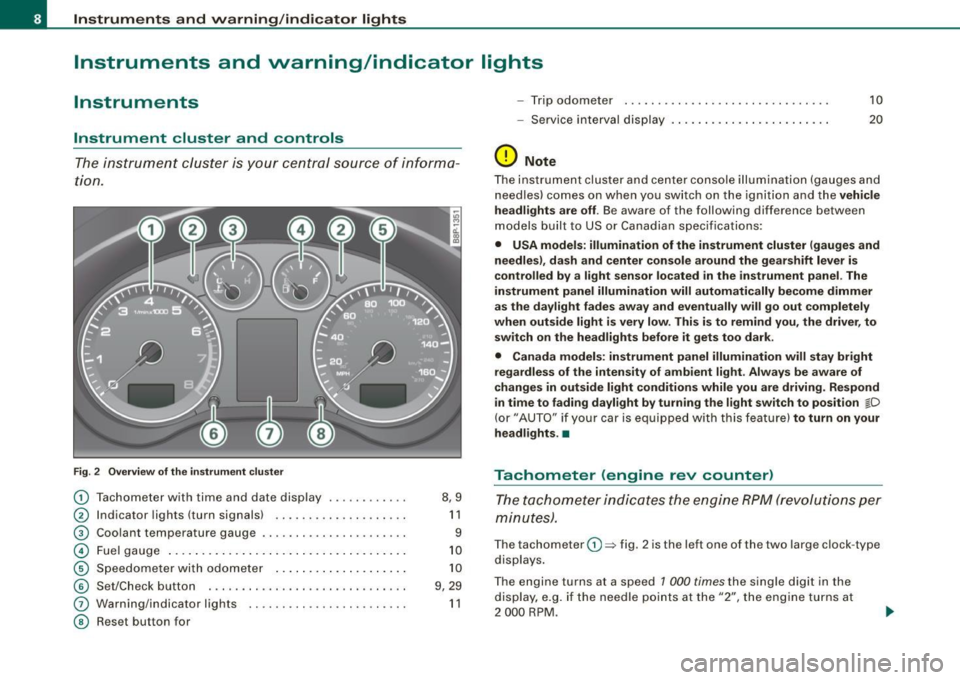
Fig . 2 Overv ie w of th e instrume nt clu ster
0
0
0
©
©
©
G)
©
T achometer with time and date display ......•.....
I ndicator lights (turn signals) ... ....... .... ..... .
Coo lant temperature gaug e .... ... ...... ...... .. .
Fuel gauge .. ... .... .. ...... .... ... ..... ... ... .
S pe edom eter wi th o do met er ..... .... ... .. .. ... .
Se t/Chec k button ..... ... ..... ..... ... ........ .
Warn ing/indicator l ights
Reset but ton for 8,9
1 1
9
1 0
1 0
9 , 29
1 1
- Trip odomete r 10
-Service i nterv al dis play . . . . . . . . . . . . . . . . . . . . . . . . 20
(D Note
The instrument clu ste r and center c onsole i lluminati on (gauge s and
n eedles) comes on w hen you sw itch on the ignit ion and the vehicle
he adl ights are off . Be awa re of the following difference betw een
models built to US or Canad ian specificat io ns:
• USA models : illumination of the instrument cluster (gauges and
needles), dash and center con sole around the gear shift lever is
controlled by a light sensor located in the instrument panel. The
instrument panel illumination will automatically become dimmer
as the daylight fades away and eventually will go out completely
when outside light is very low . This is to remind you, the driver , to
sw itch on the headlights befo re it gets too dark .
• Canada models: instrument panel illumination will stay bright
regardless of the intensit y of ambient light . Always be aware of
changes in outside light conditions while you are driving . Respond
in time to fading dayl ight by turning the light swit ch to position
jD
(or" AUTO" if you r car i s equi ppe d with this feature) to turn on your
headlights . •
Tachometer (engine rev counter)
T h e ta chom eter ind icates the e ngine RPM (revo luti ons pe r
minut es).
The tachom eter 0 => fig . 2 is the left on e of the two large clock -type
dis plays .
The engine turns at a speed 1 000
times the single di git in the
display, e.g . if the needle p oints at the "2", the eng ine t urns at
2 000 RP M.
Page 11 of 320

If the engine RPMs drop below 1 500, you should downshift to the
next lower gear. The red area at the end of the scale indicates
maximum permissible engine RPMs after the break-in period.
Before reaching this area, you should either shift into the next
higher gear or ease your foot off the accelerator pedal .
0 Note
The tachometer needle=> page 8, fig. 2 G) should not move into the
red range. If it does, then only for a very short period of time. You
could damage your engine by driving at high RPM!
<£> For the sake of the environment
Upshifting early saves fuels and reduces engine noise. •
Digital clock with date display
Your vehicle is equipped with a quartz controlled digital
clock.
To set the hour
Fig . 3 Instrument
cluster with: the digital
clock and date
-Pull the knob (hour display flashes) and turn it to the left
or rig ht.
Con tro ls and eq uip
ment
Instruments and warning/indicator lights
To set the minutes
- Pull the button until the minute display flashes.
- Turn the knob to the left or right until the desired setting
appears.
To set the time format (12 or 24-hour display)
- Pull the knob until the time format display flashes.
- Turn the knob to the left or right.
To set the date
-Pull the knob until the day, month or year display flashes.
- Turn the knob to the left or right.
To show or hide the date display
-Pull the knob until the date display flashes.
- Turn the knob to the left or right.
When the date display stops flashing, this means the time and date
have been successfully stored.
With the ignition off, pushing or pulling the Set/Check button
=>
page 8, fig . 2 © -depending on the instrument cluster configu
ration -can turn on the display field lighting for a few seconds. •
Engine coolant temperature gauge
The engine coolant gauge 0 => page 8, fig. 2 only works when the
ignition is on. To prevent damage to your engine, please note the
following important points:
~
Vehicle care I I irechnical data
Page 13 of 320
• USA models -Miles
• Canadian models -Kilometers
Lower odometer
The lower odometer shows the total number of miles (kilometers)
driven .
Upper odometer (trip odometer)
The upper odometer shows the total number of miles (kilometers)
driven since you last reset the odometer back to zero . You can use
this odometer when you want to keep track of how many miles (kilo
meters) you have driven for a single trip or errand. The last digit indi
cates 1/10 of a mile (100 metres). You can set the trip odometer back
to zero by pressing the reset button::::,
page 10, fig. 4.
Malfunction message
If there is a malfunction somewhere in the instrument cluster, dEF
will appear in the trip odometer and will stay on. Contact your
authorized Audi dealer to have the problem corrected.
Immobilizer
When the ignition is switched on , the data on the ignition key are
scanned automatically.
If an unauthorized key was used,
SAFE is displayed continuously in
the odometer display field . The vehicle cannot be operated
=>
page 38.
[ i J Tips
• The digital clock and the odometer are turned on for about 30
seconds when the driver's door is opened .
• When the ignition is turned off, the odometer reading and the
digital clock with date display can be switched on for about
30 seconds by pressing the knob::::, page 8, fig. 2 @. •
Con tro ls and eq uip
ment
Instruments and warning/indicator lights
Warning /indicator lights
Overview
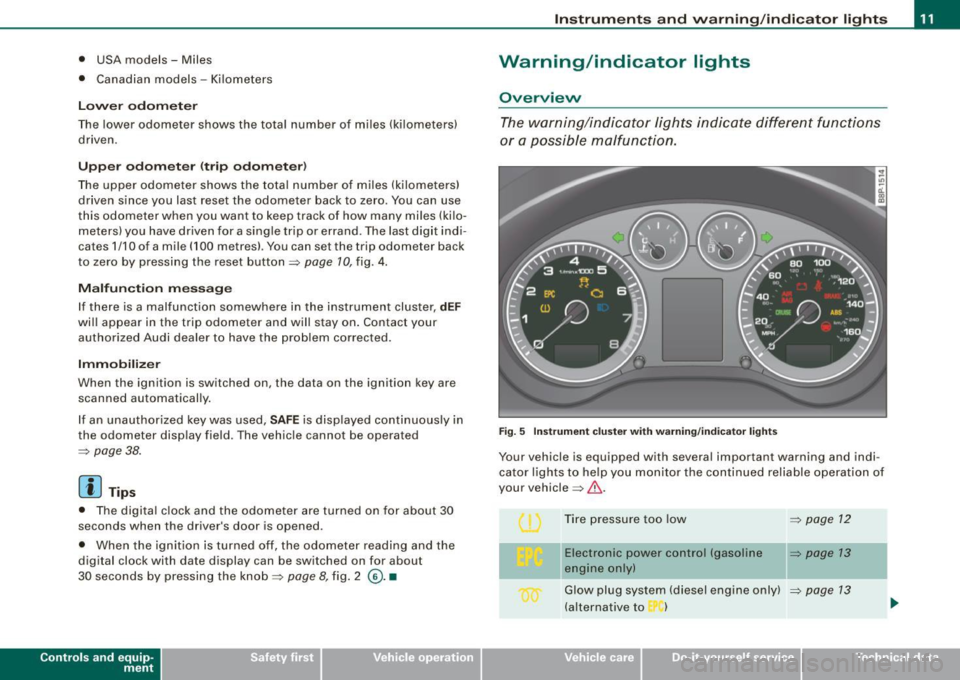
The warning/indicator lights indicate different functions
or a possible malfunction.
Fig. 5 Instrument cluster with warning/indicator lights
Your vehicle is equipped with several important warning and indi
cator lights to help you monitor the continued reliable operation of
your vehicle =>& .
Tire pressure too low
=>
page 12
-
Electronic power control (gasoline => page 13
engine only)
Glow plug system (diesel engine only) ::::,
page 13
(alternative to )
Vehicle care I I irechnical data
Page 26 of 320
Driver informati on displ ay
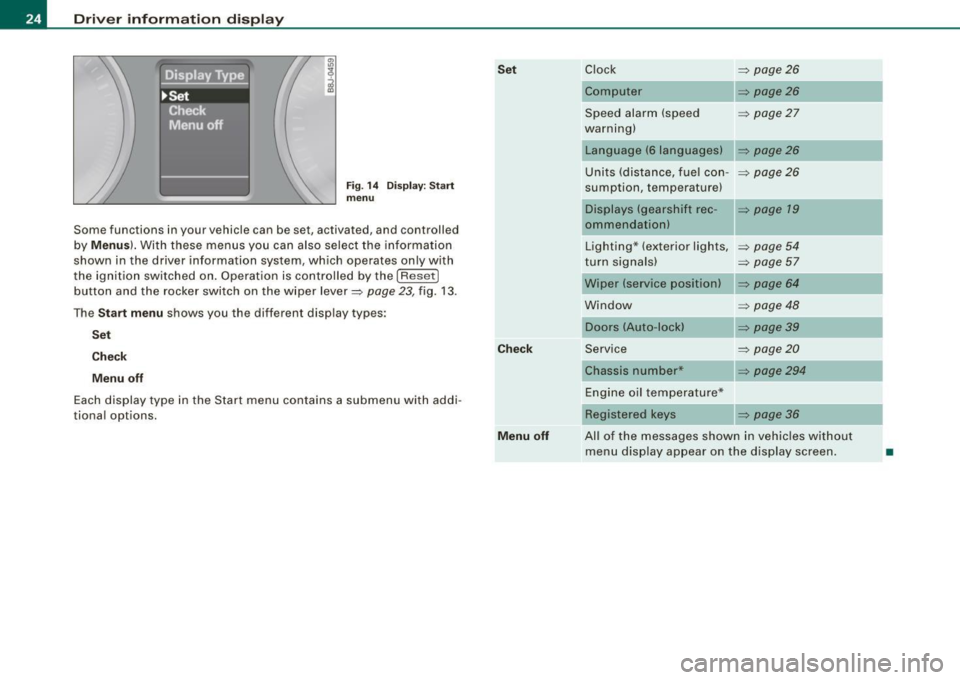
Fig. 1 4 Display : Start
menu
Some func tions in your vehicle can be se t, act iva ted, and cont rolled
by
M enu s). With these menus you can also select the information
shown in the driver information system , which ope rates only with
the ignition switched on. Operation is controlled by the
! R ese t]
button and the rocker switch on the wiper lever=> page 23, fig. 13 .
The
S ta rt m enu shows you the diff erent disp lay types :
Set
C hec k
M enu off
Each display type in the Start menu con tains a submenu with addi
tional options.
Se t
C hec k
M enu off Clock
=> page 26
Computer => page26
Speed alarm (speed => page27
warning)
Language (6 languages)
Units (distance, fuel con- =>
page26
sumption, temperature)
Displays (gearshift rec -
=> page 19
ommendation)
Lighting * (exterior lights,
=>
page 54
turn signals) => page 57
Wiper (service position) => page 64
Window => page 48
Doors (Auto-lock)
Service
=>
page20
Chassis number* => page294
Engine oil temperature*
Registered
keys => page 36
All of the messages shown in vehicles without menu disp lay appear on the display screen.
•
Page 30 of 320
Driver inf ormati on displ ay
- Briefly press the button in t he ins trument cluster
=>
page 27, fig . 19. T he odome ter and the digita l clock are
now illuminated .
- Press the button for at least
2 seconds. The currently
stored maximum speed appears in the display
or the
crossed out symbol for warning threshold
2, if no
maximum speed was set previously .
- Press the function selector switch in the wiper lever @
=>
page 27, fig. 20 up or down to change t he set value .
Values r un up or dow n in steps of
6.2 mph (10 km/h) .
To dele te max imum sp eed
-Turn off the ignition.
- Briefly press the button in t he instrument cluster
=>
page 27, fig . 19. The odometer and the digita l clock are
now illuminated.
- Press the butt on for at least 2 seconds. T he currently
stored maximum speed appears in the display.
- Press the rese t button in the wiper lever @=>
page 27,
fig. 20 unt il the crossed out speed warning symbo l for
warning threshold 2 appears in the display.
A few seconds after the adjustment is comp leted, the i llumination
for the odometer and the digital clock wil l go out .
[ i ] Tip s
This warning threshold can also be controlled through the trip
computer =>
page 25, "Navigating the menu". •
Warnings and symbols
Red symbols
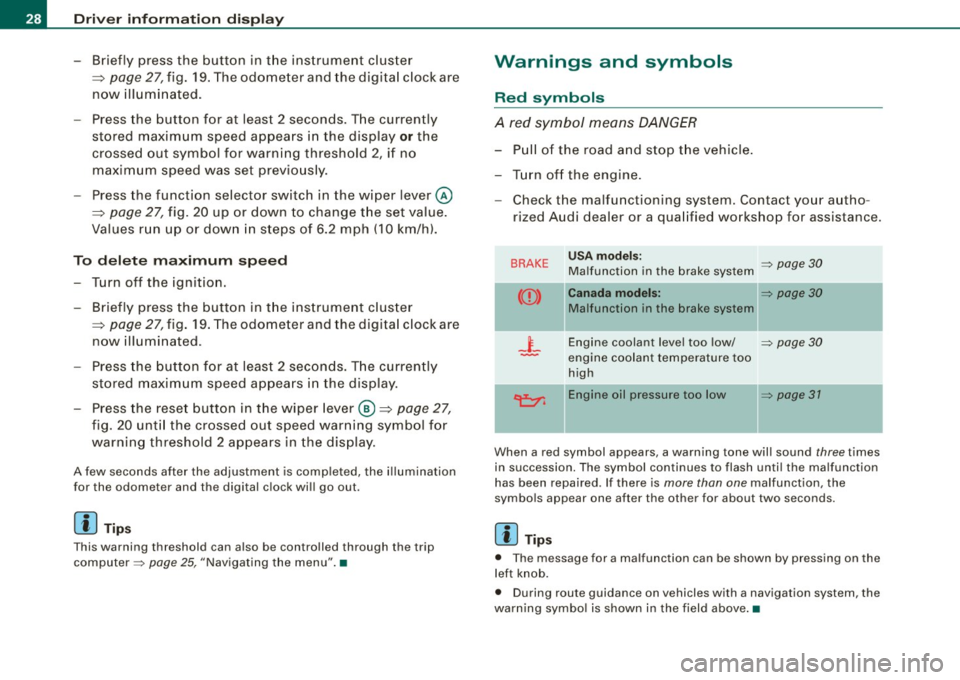
A red symbol means DANGER
-Pull of the r oad and stop t he vehicle .
- Turn o ff the engine .
Check the malfunctioning system. Contact your autho
rized Audi dealer or a qua lified workshop for assistance .
BRAKE USA m odels: => page 30 Ma lfunction in the brake system
CCD > Ca na da m odel s: => page 30
Malfunction in the brake system
_t_ Engine coolant level too low/ => page 30
-engine coolant temperature too
high
~ Engine oil pressure too low => page 37
- --
When a red symbol appears, a warning tone will sound three times
in succession. The symbol continues to flash unti l the malfunction
has been repaired . If there is
more than one malfunction, the
symbols appear one after the other for about two seconds.
[ i ] Tip s
• The message for a malfunction can be shown by pressing on the
left knob.
• During route guidance on vehicles with a navigation system, the
warn ing symbo l is shown in the field above .•
Page 54 of 320

Opening and closing
- Turn the two screws in the light unit in a counter-clock
wise direction to remove=>
page 51, fig. 42.
Pull the light unit out of the headliner by the front end
(arrow) =>
page 51, fig. 43.
Allow the light unit to hang by the wire. •
Applies to vehicles: w ith panoramic s liding sunroof
Closing the open sky roof manually
Fig. 44 Left end face of
the instrument panel:
fuse cover with hand
crank
Fig. 45 Light unit in
the headliner : crank for
emergency operation
You can close the panoram ic sliding sunroof using the hand
crank located on the inside of the fuse box cover.
- Install the flat blade in the screwdriver . - Use the screwdriver to remove the
fuse box cover
=> fig. 44.
- Remove the crank from the fuse box cover.
- Remove the blade from the screwdriver handle.
- Install the end of the screwdriver handle onto the short
side of the crank to help you turn it=> fig. 44
G).
- Push the long end of the crank@=> fig. 45 all the way
into the hexagonal hole@.
- Hold the crank down and turn it with the screwdriver
handle to close the roof.
- Install the light unit first and then the glass. For installa
tion, reverse the removal sequence.
- Return the crank to its location in the fuse box cover
=> fig. 44 and install the cover.
- Have the problem corrected.
[ i ] Tips
• To turn the crank for emergency closing more easily, you should
use the screwdriver handle as an aid. First, remove the screw driver
from the handle, then push the handle onto the crank.
• The crank should be turned slowly; turning it quickly only
increases the effort required. •
Page 107 of 320
___________________________________________________ O _n_ t_h _ e_ r_ o _ a_ d __ llll
On the road
Steering
Adjustable steering wheel
The height and reach of the steering wheel can be
adjusted.
First, adjust the driver's seat correctly.
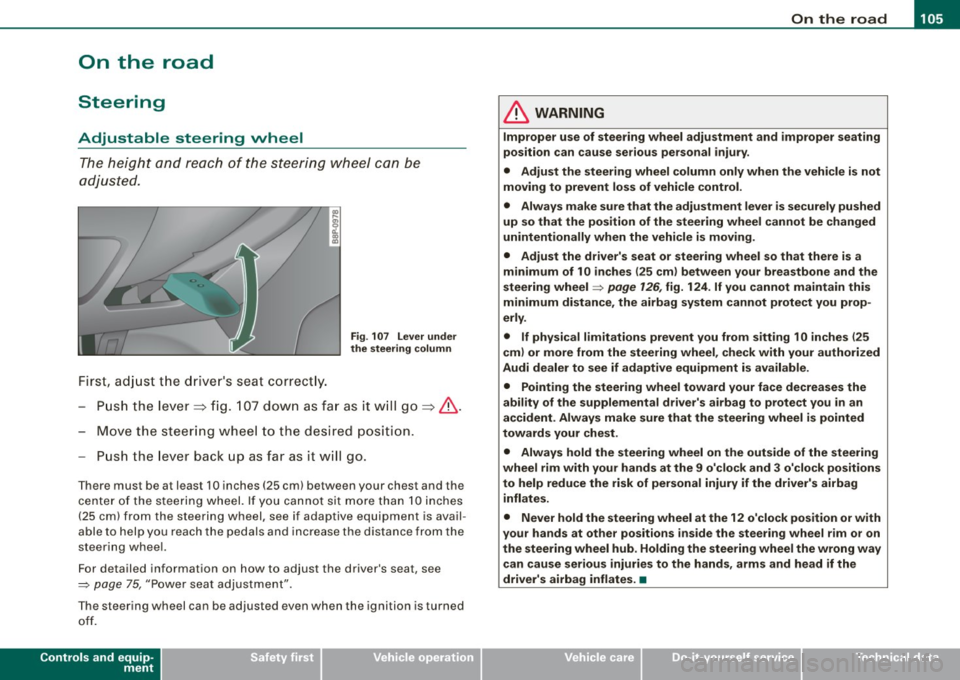
Fig. 107 Lever under
the steering column
-Push the leve r~ fig. 107 down as far as it will go~&.
- Move the steering wheel to the desired positi on.
- Push the leve r back up as fa r as it will go.
There must be at least 10 inches (25 cm) between your chest and the
center of the steering wheel. If you cannot sit more than 10 inches
(25 cm) from the steering wheel, see if adaptive equipment is avail
able to help you reach the pedals and increase the distance from the
steering wheel.
Fo r detailed information on how to adjust the driver 's seat, see
=> page
75, "Power seat adjustment".
T he steering wheel can be adjusted even when the ignition is turned
off.
Controls and equip
ment
& WARNING
Improper use of steering wheel adjustment and improper seating
position can cause serious personal injury.
• Adjust the steering wheel column only when the vehicle is not
moving to prevent loss of vehicle control.
• Always make sure that the adjustment lever is securely pushed
up so that the position of the steering wheel cannot be changed
unintentionally when the vehicle is moving .
• Adjust the driver's seat or steering wheel so that there is a
minimum of 10 inches (25 cm ) between your breastbone and the
steering wheel=> page 126 , fig. 124 . If you cannot maintain this
minimum distance, the airbag system cannot protect you prop
erly .
• If physical limitations prevent you from sitting 10 inches {25
cm ) or more from the steering wheel , check with your authorized
Audi dealer to see if adaptive equipment is available.
• Pointing the steering wheel toward your face decreases the
ability of the supplemental driver's airbag to protect you in an
accident . Always make sure that the steering wheel is pointed
towards your chest.
• Always hold the steering wheel on the outside of the steering
wheel rim with your hands at the 9 o'clock and 3 o'clock positions
to help reduce the risk of personal injury if the driver's airbag
inflates .
• Never hold the steering wheel at the 12 o'clock position or with
your hands at other positions inside the steering wheel rim or on
the steering wheel hub. Holding the steering wheel the wrong way
can cause serious injuries to the hands, arms and head if the
driver's airbag inflates. •
I • •
Page 129 of 320
________________________________________________ D_r_iv _ i _n_ g~ S_ a_ fe_ ly __ !II
& WARNING (continued)
• Always hold the steering wheel on the outside of the steering
wheel rim with your hands at the 9 o'clock and 3 o'clock positions
to help reduce the risk of personal injury if the driver's airbag
inflates.
• Never hold the steering wheel at the 12 o'clock position or with
your hands at other positions inside the steering wheel rim or on
the steering wheel hub. Holding the steering wheel the wrong way
can cause serious injuries to the hands, arms and head if the
driver's airbag deploys .
• Pointing the steering wheel toward your face decreases the
ability of the supplemental driver's airbag to protect you in a colli
sion.
• Always sit in an upright position and never lean against or
place any part of your body too close to the area where the airbags
are located.
• Before driving, always adjust the front seats and head
restraints properly and make sure that all passengers are properly
restrained .
• Never adjust the seats while the vehicle is moving. Your seat
may move unexpectedly and you could lose control of the vehicle .
• Never drive with the backrest reclined or tilted far back! The
farther the backrests are tilted back, the greater the risk of injury
due to incorrect positioning of the safety belt and improper
seating position.
• Children must always ride in child safety seats~
page 167.
Special precautions apply when installing a child safety seat on
the front passenger seat~
page 145. •
Controls and equip ment Safety first
Vehicle operation
Proper seating position for the front
passenger
The proper front passenger seating position is important
for safe, relaxed driving.
For your own safety and to reduce the ris k of injury in the
event of an accident, we recommend that you adjust the
seat for the front passenger to the following pos ition:
- Adjust the angle of the seatback so that it is in an upright
position and your back comes in full contact with it
whenever the vehicle is mov ing.
- Adjust the head restraint so that the upper edge is as
even with the top of your head as possible but not lower
than eye level and so that it is as close to the back of your
head as possible::::;,
page 129.
Keep both feet flat on the floor in front of the front
passenger seat.
- Fasten and wear safety belts correctly::::;,
page 139.
For detailed information on how to adjust the front passenger's
seat, see
~ page 72.
& WARNING
Front seat passengers who are unbelted, out of position or too
close to the airbag can be seriously injured or killed by the airbag
as it unfolds. To help reduce the risk of serious personal injury :
• Passengers must always sit in an upright position and never
lean against or place any part of their body too close to the area
where the airbags are located.
• Passengers who are unbelted, out of position or too close to the
airbag can be seriously injured by an airbag as it unfolds with
great force in the blink of an eye. ..
Vehicle care Do-it-yourself service Technical data
Page 222 of 320

Fuel supply and filling your fuel tank
Your vehicle fuel tank has an on-board refuelling vapor recovery
sys te m. Th is f eat ure he lp s to p re vent f uel vapors from es ca pin g
from the tan k and polluting the environment while you refue l your
vehic le . In ord er to fill t he tank pr ope rly while protec tin g the e nvi
ronm ent, pl eas e follow this refu eling procedur e carefu lly.
& WARNING
Under normal operat ing conditions , never carry additional fuel
containers in your car. Gas canisters and other containers used to
tran sport fuel can be dangerous . Such containers , full or empty ,
may leak and could cause a fire in a collision .
If you must transport
fuel to use for your lawn mower , snow blower , etc ., be very careful
and always observe local and state laws regarding the use , trans
portation and storage of such fuel container s. Make certain the
container meets industry standards (ANSI/ASTM F852 -86).
0 Note
Never drive your vehicle unti l the fue l tank is completely d ry . The
i rre gular supply o f fu el can cause mis firin g. Gaso lin e cou ld en ter
into the exhaust system and damage the catalytic converter. •
Refuelling
The fu el filler fl ap is unlo cke d from a bu tton i n t he driver 's
d oo r.
Fi g. 159 Dr iver' s door :
Unlocking fuel fille r
flap
Fig . 160 Fuel cap
hooked on the opened
fuel filler flap
W hen addin g fuel , th e ign itio n a nd a ny ce llular phon es in
th e ve hicle mu st b e switche d
off.
Taking the fuel cap off
To open t he fue l filler flap, pull t he button~ fig. 1 59 .
Unsc rew fuel filler cap co unter-clock wise an d hang it o n
t h e fuel fille r flap ~ fig. 16 0.
~
Page 223 of 320

Fuel supply and filling your fuel tank -___________ ...:._:......:,_______;::;...a,__ __
•
Refuelling procedure
-Inse rt the fuel nozz le f rom the gaso line pump i nto the
fuel filler neck as fa r as it w ill go.
- Select a medium refue lling rate so that the nozzle
s w itches off automat ica lly wh en the tank is ful l.
Putting the fuel cap back on
- Afte r fillin g yo ur ta nk, twi st the f uel fill er ca p clockwi se
unt il you h ear a de finite cli ck.
- Cl ose the fue l fille r fla p.
To avo id fuel sp illing or evapora tin g from the fuel tan k alwa ys close
f u el filler cap p roper ly an d co mple te ly . A n im prope rly clo sed f uel
fil ler cap may also caus e a m essa ge in th e dr iver in for matio n syst em
or cause the MIL lamp => page 21 to come on.
& WARNING
Improper refueling or handling of fuel can cause fire , explosion
and severe burns .
• Fuel is highly flammable and can cause severe burns and other
injuries .
• Failure to shut the engine off while refueling and /or to insert
the pump nozzle fully into the fuel filler ne ck could cause fuel to
spray out of filler neck or to overflow. Fuel spray and overflowing
fuel can cause a fire .
• Never use a cellular telephone while refueling . The electromag
netic radiation can cause sparks that can ignite fuel vapors and
c ause a fire .
• Never get ba ck into your vehicle while refueling .
If in excep
tional circumstances you must get back in your vehicle while refu
eling , make certain that you close the door and touch metal to
discharge static electricity before touching the filler nozzle again.
& WARNING (continued )
Static electricity can cause sparks that can ignite fuel vapors
released during refueling .
• Never smoke or have an open flame anywhere in or near your
vehicle when refueling or filling a portable fuel container.
• For your safety, we strongly recommend that you do not travel
with a portable fuel container in your vehicle. The container , full or
empty may leak and could cause a fire , especially in a crash .
• If, under e xceptional circumstances , you must transport a
portable fuel container, please observe the following:
-Never fill a portable fuel container while it is anywhere in or
on the vehicle (for example , in the luggage compartment , or on
the trunk). Static electricity can build up while filling and can ignite fuel vapors cau sing a fire.
- Always place a portable fuel container on the ground before
filling.
- Always keep the filler nozzle completely inside the portable
container before and during filling .
- If filling a portable container made of metal , the filler nozzle
must always be in contact with the container. This will help
prevent static electricity from discharging and cause a fire.
- Never spill fuel inside the vehicle or luggage compartment .
Fuel vapors are h ighly flammable.
- Alway s observe local and state /provincial laws regarding the
use , storage and transportation of fuel containers.
- Make certain the fuel container meets industry standards
(ANSI / ASTM F852-86I.
0 Note
• I f any f uel has sp illed onto the car , it shou ld be removed imme
d iate ly to pr event damage to the pa int.
• I f the f uel ta nk ru ns co mplete ly empty in a vehic le wi th a diesel
engine , the ignitio n mus t remain sw itched on for at least 30 seconds .,
Vehicle care
I t •