cruise control AUDI S3 2010 Owners Manual
[x] Cancel search | Manufacturer: AUDI, Model Year: 2010, Model line: S3, Model: AUDI S3 2010Pages: 320, PDF Size: 75.34 MB
Page 4 of 320
Table of contents
Table of contents
Vehicle literature ........ .
About this Owner's Manual ..... ... ...... ....... .
Controls and
equipment ................. .
Instrumen ts and con trols ..... .
Genera l ill ustration ............. .
Ins trumen ts and
warning/indicat or lig hts ....... .
Instruments ... ... ............ . .
Warning/indicator lights ........ .
Driver in fo rma tion disp lay ..... .
Introduction ... .......... ... ... .
On-Board Diagnostic system (OBD)
Trip compute r ................. .
Menu di splay ............ ...... .
Speed warn ing system ...... ... .
Warnings and symbo ls ......... .
Opening and c losi ng .......... .
Keys .............. ... ......... .
Power locking system .......... .
Doors, power locks ............ .
Powe r w indows ... ... .. .... ... .
Panoramic s liding sunroof ...... .
Emergency mechanical c losing for
t he panoram ic slid ing sunroof .. .
Clear v ision .................... .
Lights . ..... ... ... .... ... ... .. .
Interior lights .................. .
Vision ........ ...... ......... . .
4
5
6
7
7
8
8
1 1
18
1 8
21
22
23
26
28
36
36
38
41
47
49
50
53
53
58
60
Wiper and washer system .. .... .
Mirrors ....................... .
Digital compass ............... .
Seats and storage ............ .
General recommendat ions ..... .
Adjust ing front seats manua lly ..
Ad just ing the power seat ...... .
Adjusting the lumbar support .. .
Head restraints ............... .
Cen ter armrest ... ... ... ... ... . .
Rear seats .................... .
Luggage compartment . ...... . .
Roof rack* installation ......... .
Cup ho lders .......... ........ .
As htray ................ ...... .
Cigarette lighter/socket . .• .... ..
Storage .................. ... . .
War m and cold ........... ... . .
Climate controls ....... ... .... .
Electrically heated front seats . . .
On the road ............... ... . .
Steering ...................... .
Ignition lock and ignition switch .
Sta rting and stopping the engine
Par king bra ke ................. .
Starting on hills ... ...... •.... ..
Cruise control .......... .. ..... .
Transm ission
Manual transmission
S tronic transmission ... .. .. ... .
62
67
70
72
7 2
7 3
74
76
7 7
80
80
81
86
89
91
91
92
96
96
104
105
105
106
107
108
1 10
1 10
1 13
1 13
1 14
Safety first ...... ...... .... .
Driving Safe ly ...... .... ... .... .
Genera l notes ...... ........... .
Proper occupant seating pos it ions
Peda l a rea .................... .
S tow ing luggage .......... .... .
Reporting Safety Defects ...•....
Safety belts ................... .
General notes ....... •..........
Why safety be lts? .. ... ..... •....
Safety belts ........... ... .. ... .
Safety belt pretensioners ....... .
Airbag system ................. .
Important things to know ...... .
Front
airbags .. .... ... ...... .. .
Monito ring the Advanced Airbag
System ... ..... ... .. ..... ... .. .
Side a irbags .............. •....
Side curtain airbags ....... •....
C hild Safe ty ................... .
Important thi ngs to know ...... .
Child safety seats ............. .
Insta lling a ch ild safety seat .... .
LA TCH Lower anchorages and
tethers for children ............ .
Add itio nal Information ......... .
Vehicle operation ...... . .
Intel ligent technology . ... .. .. . .
No tice abo ut da ta recorded by
1 2 4
12 4
12 4
126
130
131
133
13 5
135
136
139
143
145
145
149
156
161
16 4
167
167
172
177
180
185
188
188
ve hicle control modules . . . . . . . . . 188
E lect ronic Stabili zation Program
(ESP) . . . . . . . . . . . . . . . . . . . . . . . . . . 188
Page 9 of 320
Instruments and controls
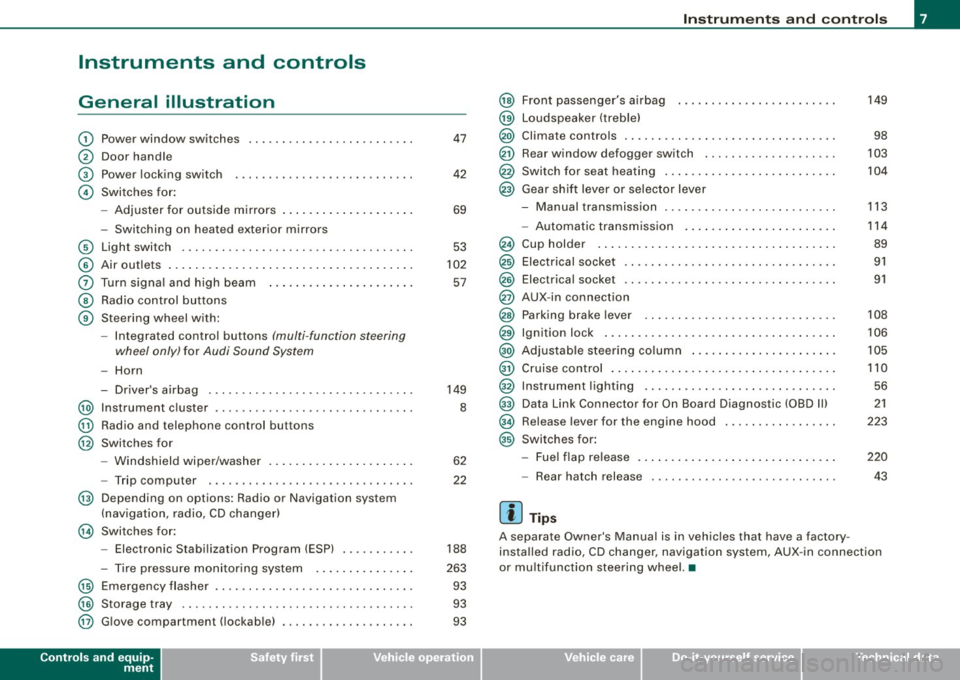
General illustration
G)
0
©
©
Power window switches
Door handle
Power locking switch
Switches for:
- Adjuster for outside mirrors .. ........ ... ...... .
- Switching on heated exterior mirrors
© Light switch .................................. .
© Air outlets .... .... ... .. ............... ........ .
0 Turn signa l and high beam ...... ............. .. .
@ Radio control buttons
@ Steering wheel with:
-Integra ted control buttons (multi -function steering
wheel only) for Audi Sound System
-Horn
- Driver's airbag .............................. .
@ Instrument cluster .................... ...... ... .
@ Radio and telephone control buttons
@ Switches for
- Windshield wiper/washer .... ... .. ...... ... ... .
- Trip computer .... ................... ....... .
@ Depending on options: Radio or Navigation system
(navigation, radio, CD changer)
@ Switches for:
- Electronic Stabilization Program (ESP) .......... .
- Tire pressure monitoring system .. ... .. .... ... .
@ Emergency flasher ............................. .
@) Storage tray .. ... .... ... ... ... .. .. .... ........ .
@ G love compartment ( lockab le) ..... ........ .... .. .
Controls and equip
ment
47
42
69
53
102
57
149
8
62
22
188
263 93
93
93
Instruments and controls
@
@
@
@
@
@
Front passenger's airbag
Loudspeaker (treble)
Climate controls .. ..... .. ..... ........... ...... .
Rear window defogger switch ...... ............ . .
Switch for seat heating .. ...... .... .... ......... .
Gear shift lever or selector lever
M I .. - anua transm1ss1on . ........... ....... .... .. .
- Automatic transmission ... ... ...... .... .... .. .
Cup holder ...... ...... ....... ...... .......... .
Electrical socket ............................... .
Elect rical socket ............................... .
AUX-in connection
Parking brake lever ............................ .
Ignition lock ........ ................ .... ...... .
Adjustable steering column ...... .... .... ..... .. .
Cruise control .. ........ ....... ...... .... ...... .
Instrument lighting ............................ .
Data Link Connector for On Board Diagnostic (OBD Ill
Release lever for the engine hood
Switches for:
- Fuel flap release .......... ...... .... ......... .
- Rear hatch release
[ i ] Tips
149
98
103
104
113
114
89
91
91
108
106
105
110 56
21
223
220
43
A separate Owner's Manual is in vehic les that have a factory
insta lled radio, CD changer, navigation system, AUX -in connection
or multifunction steering wheel. •
I • •
Page 14 of 320

Instruments and warning/indicator lights
El ectronic stabilization p rogram (ESP) =:::> page 13 & WARNING
USA models : =:::> page 14 • Failure to heed warning lights and other important vehicle
Malfunction Indicator lamp (M IU information may result in serious personal injury or vehicle
--damage .
Canada models :
=:::> page 14
Whenever stalled or stopped for repair, move the vehi cle a safe Ma lfunction lnd icto r Lamp ( MIU •
distance off the road , stop the engine , and turn on the emergen cy
_D H igh beam =:::> page 14 flasher =:::> page 56.
-- -• The engine compartment of any motor veh icle is a potentially
¢ Le ft tu rn s ig na l =:::> page 1 4 hazardous area. Before you check anything in the engine compart -
ment , stop the engine and let it cool down . Alway s exer cise
c> Right turn signa l =:::> page 14 extreme caution when working under the engine hood
=:::> page 215, "Engine compartment "
CRUISE
USA models: =:::> page 14 Cruise con trol activate d [ i ] Tips -
R~ Canada models : =:::> page 14 • When a yellow warn ing symbo l appears, one warning tone
Cruise control activated sounds. C heck the function displayed as soon as possible.
-.o. A irbag syst em =:::> page 1 4 • When a red symbol appears, three warning tones sound in v-q
succession . The symbo l continues to flash unti l th e fault has bee n
0 Generator =:::> page 1 4 corrected. •
A v
Safety belt =:::> page 15 Ap plies to vehicles: w it h tire press ure mon ito ring sy stem
BRAKE
USA models :
Tire pressure monitoring system -telltale
=:::> page 15 indicator lamp L Bra ke sy stem , park ing b ra ke set
((D) Canada models : =:::> page 15 The war ning/ind ica tor li ght ap pears in the eve nt of a
Brake system, par king brake set significan t loss of air pressure.
USA models : =:::> page 16 The ' , wa rn in g/ind ica to r lig ht illu min ates fo r a few seconds a fter
Anti -lock bra ke system (ABS)
the ignition is turned on as function check and then goes out.
-Canada models : =:::> page 16 If t he 'symbo l ap pears, press ure i s too low i n at leas t one tire.
Ant i- loc k brake s yst em (ABS) When t he system detects a malfu nct ion, the warn ing/ind icator light
/ ~ E
lectro -mechanica l power assist
=:::> page 1 6 will flash for approximately one minute and then remain continu -
ous ly illum inated. Th is seque nce wi ll cont inue upon subsequent
..
Page 16 of 320
Inst rum ents and w arnin g/indi cat or li ghts
reconnected again . The light should go out after driving a short
distance if the steering wheel is turned slight ly .
For more information about the ESP:::::,
page 188. •
Malfunction Indicator Lamp (MIL)
(USA models )/ (Canada models)
The Malfunction Indicator Lamp (M IU is part of the On-Board Diag
nostic (OBD Ill system . The symbo l lights up when the ignition is
turned on and wi ll turn off after the engine has started and has
sett led at constant id le speed. This indicates that the MIL is working
proper ly .
The warning light il luminates when there is a malfunction in the
engine electronic system. Contact your authorized Audi dealer and have the malfunction corrected.
For more information :::::,
page 21. •
High beam @:D
The ~Dwarning/ indicato r light illuminates when the h igh beams are
on or when you use the headlight flasher. For more information
about using the h ig h beams , see :::::,
page 57. •
Turn signals ¢ Q
The indicator light flashes when you use ei ther turn
signal.
Whenever you use the left¢ or the right ¢ turn signal, the ind icator
light flashes . When you use the emergency flasher, both indicator
lights flash .
If one of the turn signal light bulbs burn out, the turn signal will
flash twice as fast as no rma l.•
Cruise control
CRUISE (USA models) / 0 (Canada models)
The CRUISE warning/indicator light illuminates when the cruise
control is activated. •
Airbag system !_J·
This warning/indicator light monitors the airbag and the
tensioner systems.
The ! .!r warning light illuminates for a few seconds each time you
switch on the ignition.
If the
! !r warning light does not go out, or if it illuminates whi le you
are driving, or if it starts to flash, then there is a ma lfunction some
where in the system . If the light does not illuminate when you
switch on the ignition, this also means there is a malfunction.
& WARNING
If you ha ve a malfunction in the a irbag sy stem , cont act your autho
rized Audi dealer immedi ately. Otherwi se the airba g or the belt
ten sioner may not wor k properl y in an acci dent. •
Generator 0
This warning/indicator light detects a malfunction in the
generator or in the vehicle's electrical system .
The O warning/indicator light illuminates when you switch on the
ignition and must go out after the engine has started.
If the
O warning/indicator light il luminates while you are driving,
you shou ld co ntact your authori zed Aud i dealer . Since the veh icle
battery is discharging, you should switch off any unnecessary elec
trical consumers ( for example, the air conditioner) .•
Page 112 of 320

• ..__O_ n_ t_h _ e_ r_ o_ a_ d ____________________________________________________ _
& WARNING (continued )
• Never allow anyone -especially small children -to remain in the
vehicle when it is locked. Locked doors make it more difficult for
rescuers to access the passenger compa rtment in the event of an
emergency . Danger to life!
• Never leave children unsupervised in the vehicle. Children
could release the parking brake or move the gearshift lever out of
ge ar. The vehicle could start to roll away and cause an ac cident .
• No matter what the season is , the temperature in a parked
vehicle can reach dangerous levels. •
Applies to vehicles: with hill hold assist
Starting on hills
Hill hold assis t mak es it eas ier to star t on h ills .
T he system is activated when the brake peda l is depressed
for a few
seconds .
After releasing the brake pedal, the brake power is held for a brief
moment to pr event the vehicle fr om r olling back whe n star ting . A t
this time, you can easily begin to move your vehicle.
& WARNING
• If you did not beg in moving immediately after releasing the
brake pedal , under certain circumstances , the vehicle would begin
to roll backward . Depress the brake pedal immediately or engage
the hand brake.
• Should the engine stall , depress the brake pedal immediately
or engage the hand brake .
• In order to prevent the vehicle from rolling back unintentionally
when starting in stop -and-go traffic, keep the brake pedal
depressed for a few seconds before driving off.
[ i ] Tips
You can find out if your ve hicle is equ ipped w it h "Hi ll ho ld ass ist" at
an authorized Audi dealershi p.•
Cruise control
Switching the system on
Th e cruise con trol sys tem mak es it possible to dr ive a t a
c onstant spe ed s tartin g at 20 mp h (30 km /h).
Fig . 111 Control lever
with set button
F ig . 112 Display:
Sele cted speed
P ull the le v er to p ositi o n G) => fig. 11 1 to sw itch the
s y st em o n.
Page 113 of 320

----------------------------------------------~O~n~t:.!..h~e::...!..r~o~a~d~ _fflll
-Drive at the speed you wish to set .
- Press button
@ to set that speed.
The disp lay=> page 110, fig . 112 will show the set speed . The
display may vary depending on the type of disp lay in your vehicle .
T he indicator light
CRU ISE (US model)/ f,f (Canadian mod e ll wi ll also
light up in the instrument cluster .
& WARNING
• Alway s pa y att ention to traffic ev en when the crui se contr ol is
s w it ched on . You are al ways respo nsi ble for your spee d and the
di stance between your v ehic le and other ve hicle s.
• For sa fet y reas on s, the crui se contr ol s h o uld not be u sed in the
ci ty , in stop -and -go traffic , on t wis ting road s and when road condi
tion s are po or (s uch a s ic e , fo g, gra vel , he avy ra in and h ydro
planing ) - risk of accident .
• Turn o ff th e cru is e c ont rol tempor arily w hen ente ring tu rn
lanes , highway e xit lan es or in con stru ction zone s.
• Please n ote that in ad vertentl y "res ting " yo ur foot on the a ccel
erator pedal cau se s t he crui se control not to brak e. Thi s is becau se
th e c ruise c ontrol i s overridden by the dri ver's acceler ation .
[ i] Tips
• Vehicles with manual transmission : You can attain the set speed
only if the curren tly engaged gear al lows it and the engine is not
stressed. Shifting to a higher or lower gear promptly will allow the
engine to run smooth ly .
• T he cruise control cannot maintain a constant speed when
driving downhi ll. The vehicle wi ll acce lerate under its own weight .
Downshift to a lower gear or use the brakes to slow down .•
Controls and equip
ment
Changing speed
Press lever in the 0 o r O direction ~ page 110, fig. 111
to increase or dec rease your speed.
- Release the lever to save that speed .
Change speed in increments of 1 mph (1 km/h) by lightly pressing
the lever. If you keep the lever pressed down, you will a lter your
speed in 5 mph (10 km/hl increments .
You can a lso press the acce lerator pedal down to increase your
speed, e.g. if you want to pass someone. The speed you saved
earlier will resume as soon as you release the accelerator pedal.
I f , however, you exceed your saved speed by 5 mph ( 10 km/h) for
longer than 5 minutes, the cruise control will turn off temporarily.
The symbol wi ll go out but the saved speed wi ll be retained. •
Presetting your speed
You can preset your desired speed while the vehicle is not
moving.
Turn on the ignition.
P ull lever into posit ion
G) ~ page 110 , fig. 11 1.
Press the lever in the
0 or O direction to increase or
decrease your speed.
- Release the lever to save that speed .
This function makes it possible, for example, to save the speed you
want before driving on the highway . Once on the highway, activate
the cruise contro l by pulling the lever toward
G) . •
I • •
Page 114 of 320

-On the road --------------------
Switching th
e system off
Temporary deactivation - Press the brake pedal, or
- Keep the clutch pedal pressed down
longer, or
- Press the lever into position
0 (not clicked into place)
=> page 110, fig. 111, or
- Drive for longer than 5 minutes at more than 5 mph
(10 km/h) above the stored speed.
Switching off completely
- Press lever into position@ (clicked into place), or
- Switch the ignition off.
The system retains the saved speed if you deactivate the cruise
control temporarily. To resume the saved speed, release the brake or
clutch pedal and pull the lever to position
(D .
Switching the ignition off erases the saved speed.
& WARNING
You should only return to the saved speed if it is not too fast for
the current traffic conditions -risk of an accident! •
Page 119 of 320

_______________________________________________________ T_ ra_ n_s_ m __ is_s_ io_ n __ ftllll
Stopping on an inclin e
-Always hold the vehicle wit h the foot brake or par king
b rake in order to prevent "rollback"=> &. Do not try to
p reven t the ve hicle fr om rolling back by rewing the
e n gine while it is in ge ar.
Starting on a hill
- Appl y the hand brake firmly.
- Wit h the e ng in e in g ear, g ra du ally a ccel era te an d relea se
the hand bra ke .
The engi ne can only be started with the selector lever in P or N
=>
pa ge 107. At low ambient temperatures (14 °F / -10 °C), it is only
po ss ible to star t the eng ine with the se lec tor lever in P .
Whe n par king on leve l ground, it is su ff ic ient to place the selec to r
lever in P. On a steeply s loping road, you should first apply the
p ark ing bra ke fi rmly and th en place the s elec tor lev er in P . T hi s way,
you do not overload the paw l mechanis m and it is easier to move
t h e s elector lever out of P.
& WARNING
• Never leave your vehicle with the engine running while in gear.
If you must leave your vehicle with the engine running, set the
parking brake and engage the park lock .
• When the engine is running and the transmission is in gear (0 ,
S or R l or in "tiptronic " mode , it is essential that you stop the
vehicle w ith the footbrake . When idl ing , the transmission of power
does not stop completely -the vehicle "creeps ".
• Do not accelerate when you change the selector lever position
with the vehicle stationary and the engine running -risk of an acci
dent!
• Never place the selector lever in the R or N position while the
vehicle is moving - risk of an accident !
Controls and equip
ment
& WARNING (continued )
• If you have to bring your vehicle to a stop while on an incline,
keep the foot brake depressed all the way down so that the vehicle
does not start to roll backward . You should never hold the vehicle
using the clutch pedal if you are going to be stopped on an incline .
If you do , the clutch will start to slip when it overheats caused by
the constant overload. This is dangerous because if the vehicle starts to roll backward , you could cause an accident . If the clutch
should start to slip , you will feel the vehicle "jerk" and the selector
lever display will start blinking .
• Before driving down a steep slope , reduce your speed and shift
into a lower gear w ith "tiptronic ".
• Do not ride the brake s or apply the brake pedal too often or too
long . Constant brak ing causes the brakes to overheat and
substantially reduces braking performance , increases braking
distance or causes complete failure of the brake system . •
Ap plies to vehicl es: with s tr o n ic tra nsmiss ion a nd Hill Descent Ass ist
Hill Descent Assist
Hi ll Desc en t A ssist help s the driver when dr iv in g d own
i n cl ines.
H il l Descent Ass ist is activated b y press ing th e brake wh ile
descending when the selector lever is in D/S . The S tronic transm is
s io n au tomatically s hift s d own to a g ear sui tab le fo r the i nclin e. Hill
Descent Assist attempts to maintain the current vehicle speed when
t he braki ng occ urs, as fa r as physical an d techn ical limi ts al low. It
may be necessary to adjust the speed using the brakes .
H il l Descent Assist switches off when the incline level s out or when
the gas pedal is pressed .
On vehicles with cruise control*=>
page 11 0, Hill Descent Assist is
a lso ac tivated whe n the speed is se t. ..,.
I • •
Page 309 of 320
______________________________________________ A_ l_,_ p _h_ a_ b_e _t_ic _ a _ l _in _ d_e _ x __ lll
Cornering light ..... ... .. ... ..... ... . 55
Cruise contro l ... .... ....... ........ 110
Changing speed . .... ............. 111
Presetting your speed ............. 111
Switching off .... .... .... ... .... . 112
Switching on .... .... .... ....... . 110
Warning /indica tor ligh ts .. .. .... .... 14
Cup holder .. .... ....... .... .. . ...... 90
Cup holders
front ... .... .... .... .... ..... .. ..
89
Current fuel mil eage . ........ ...... .. . 22
D
Data .. ... ... .... .... .... .... ...... 296
Data recorder . ..... .. .. .... .... .... . 188
Date display . ...... ...... ... ... ... .... 9
Daytime running lights ...... .......... 53
Daytime running lights (Canada) .. .. .. . 53
Declaration of compliance
Cell phone package .. ...... .......
302
Elec tronic immobilizer ............ 302
Homelink ® universal remote control 302
Remote control key .. .... .... .... . 302
Tire pressure monitoring system ... 302
Declarat ion of con form ity ..... .. ... .. 267
def
What does this mean when it appears in
the trip odometer display? .... .... .
10
Defective light bulb warning ...... .... . 34
Defogging the windows .......... .... . 99
Defrosting the windows .. .... .... ..... 99
Defrosting /defogging windows .. .... ..
102
Controls and equip ment Safety first
Determining
correct load limit ... .. .. . 251
Diesel engine
Adding engine oil ......... .... ...
231
Changing engine oil ....... ... .... 23 1
Engine oil .... ... .... .... .... .... 231
Diesel fuel .......... .... .... ... .... 218
Diesel particulate filteir ............ 32 , 197
Digital clock .... ... .... .... .... ... .. .. 9
Setting the time ..... ...... ....... .. 9
Digital compass ..... ... .... .... .... ..
70
Dim ensions ........... ........ .... . 295
Dipstick
Reading the dipstick properly . .....
229
Direct Shift Gearbox
Emergency release ..... .. ....
120, 121
Dis tance ....... ....... .... ....... .. . 23
Doors, power locks ... .. .... ...... .... 41
Driver information .................... 29
Driver Information System
Menu d isplay . .... .... .... ... .... .
23
Driver information system
Gearshift indicator .. ... ............
19
Menu button ...... .... ............ 25
Open door or front lid warning . ... .. 18
Outside temperatu ire disp lay . ...... . 18
Red symbols . .... ..... .. .... .... .. 28
Service interval display .... .... .... . 20
Setting ..... .. ...... ......... .... . 26
Sound system display . ....... .... .. 18
Trip compute r ....... ..... .. . .... . 22
yellow symbols .. .... ... ... .. ..... 29
Driver seat
See S eat ing position .. .... .... .... 126
Driving safely . .... .. . .... .... ..... .. 124
Driving through water .... ... .... .... . 196
Duplicate key ............. .... ... .. .. 36
E
Elapsed time ...... ........ .... ... ... 22
Electrically heat ed front seats .... ... .. 104
Electro-mechanica l power assist . ... 16, 193
Electronic diff erential lock
Warning/indicator lights ...... ......
16
Electronic differential lock (EDU
How the system works .... .... ....
189
Electronic immobilizer ....... .... .. 10, 38
Electronic pow er control
EPC warning/indicator light .........
13
Electronic speed limiter .. ... ... .... ... 21
Electronic Stability Program .. .... ... .
188
Electronic stabiliza tion program (ESP)
Warning/indicator lights .... ...... ..
13
Eme rgency flasher
Warning /indicator lights .. .. .... ... .
14
Emergency flashers .. .... ... ... .. .... . 56
Emergency operat ion
panoramic sliding sunroof . .... .... .
50
Rear lid .. .. .. .... ..... .. .... ..... 44
Emergency release for selector lever . . 120,
121
Emergency starting .. .... .... .... .... 285
Emergency towing ...... .... .... .... 288
Vehicle operation Vehicle care Do-it-yourself service Technical data
Page 317 of 320

Alphab eti ca l ind ex -
-------------=----
Tires and vehicle load limits
Tires and wheels 250
Checking tire pressure ..... ... .... 249
Co ld tire inflation pressure ... .. .... 246
D imensions .. .... .... ... .... .... 254
General not es . .... ....... ...... .. 242
G lossary o f tir e and loading termino logy
243
New tires and whee ls ... .. ... .... . 254
Replacing . ...... ... .... .... .... . 255
Snow chains . .... .... .... .... .... 260
T ire pressure monitoring system ... 256
T ires and vehicle load limits .... .... 250
Wheel bo lts . ..... ....... ...... .. 261
Winter tires .. ... ... ........ ...... 259
T ires/Wheels
Low aspect ratio tires . ... .... .... . 26 1
T ire pressure monitoring system 12, 263
Torn or frayed safety belts .... .... ... . 138
T ouch -up paint
Tow ing 208
F ront eyelet ...... .... ... .... .... 289
Rear eyelet . ...... .... ... .... .... 289
T ow truck procedures .... .... .... . 288
Trailer towing . ...... .... ... .... .... 200
Operating instruc tio ns . ...... .... . 201
Techn ical requi remen ts ... ... . 200, 201
Tr aile r towing tips ... .... .... .... . 202
T ransmiss ion
6 -speed . . . . . . . . . . . . . . . . . . . . . . . . . 113
Manual tra nsmission .. ...... .... . 113
S tronic transmiss ion . ... .... .... . 114
Transport Canada .... ... .... .... .... 134
Controls and equip
ment Safety first
T
read Wear Indicator (TWI) .. .. .. .... . 253 w
Trip co mputer ...... .... .... .... ... .. 22
Trip odometer ... ... .... .... .... .... . 10 Warning
light
What does it mean when dEF appears in Tire pressure monitoring system
.... . 35
the trip odometer display? . ....... . 10 Warning lights ... .... .... ... .... ... 8, 11
Turn signals ..... ... .... .... .... .... . 57 Red symbols in the center display ...
. 28
Warning/indicator lights .... .. .... .. 1 4 Ye
llow symbols in the cen ter display . 29
Warning/ind ica tor lights
u Airbag system .... .... ..... .. .... . 1 4
Anti -lock brake system (ABS) ...... .. 16
Unde rc o ating .. .... .. .... .... .... ... 211
Brake system ..... ... .... .... ..... 15
Unfastening safety belts . .... .... .... 142
Cruise control . .... .... ... .... .... . 14
Unidirectiona l ti res ...... .... .... .... 242 Electronic power control
... .... .... . 13
Uniform tire quality gradi ng ... .... ... 258 Electronic stabilization program (ESP) 13
Un locking Engine ma
lfunction (diesel engine) ... 13
Power locking switch . ...... .... ... 42 Generator
.... .... .... ... .... ..... 14
Rear lid .. .... ... .... .... .... .... . 43 G
low plug system .... .... .... .... . 13
Remote control .. .... .... .... .... . 40 High beam
.... ....... .... .... .... 14
Us ing the fold -out key ..... .... .... . 41 Ma
lfu nction Indicator La mp (M IU .... 14
Park ing brake .. ...... .... .... ... .. 15
V Safety belt .. ...... .... .... .... .... 1 5
Tire p ressu re mo nito ring syste m .... . 12
Vanity mirror .... ... .... .... .... .... . 60 Turn signals
...... .... .... .... .... 1 4
Vehic le battery Warranty coverages ...
... ... .... ... . 298
Stationary .... .... ........ .... ... 237 Washer reservoir ..... .... ..... .. .... 240
Vehic le e lec trical system ... .. .... ... .. 14 Washing .. ...... .... .... ... .... .... 204
Vehicle identification .... .... .... .... 294 A
ut omatic car wash . ...... .... ... . 205
Vehic le identification ll abel .. ...... .... 294 by hand
.... ... .. .... .... .... .... 205
Veh icle Ident ification !Number (VIN) .... 294 General
info rmat ion ...... .... ... . 20 4
Vehicle jack . .... .... .... .... ... 268, 274 with a power washer ...
... .... .... 206
Veh ic le l iterature . ...... .... ..... .. .... 4 Wax
ing ...... .... .... ... .... .... ... 207
Vehic le -care products ..... .. ... ... .. . 204 Wear indicator .
............... .... .. 253
Weathers trips . ....... ... .... .... ... 209
Vehicle operation Vehicle care Do-it-yourself service Technical data