radio AUDI S3 2010 Owners Manual
[x] Cancel search | Manufacturer: AUDI, Model Year: 2010, Model line: S3, Model: AUDI S3 2010Pages: 320, PDF Size: 75.34 MB
Page 9 of 320
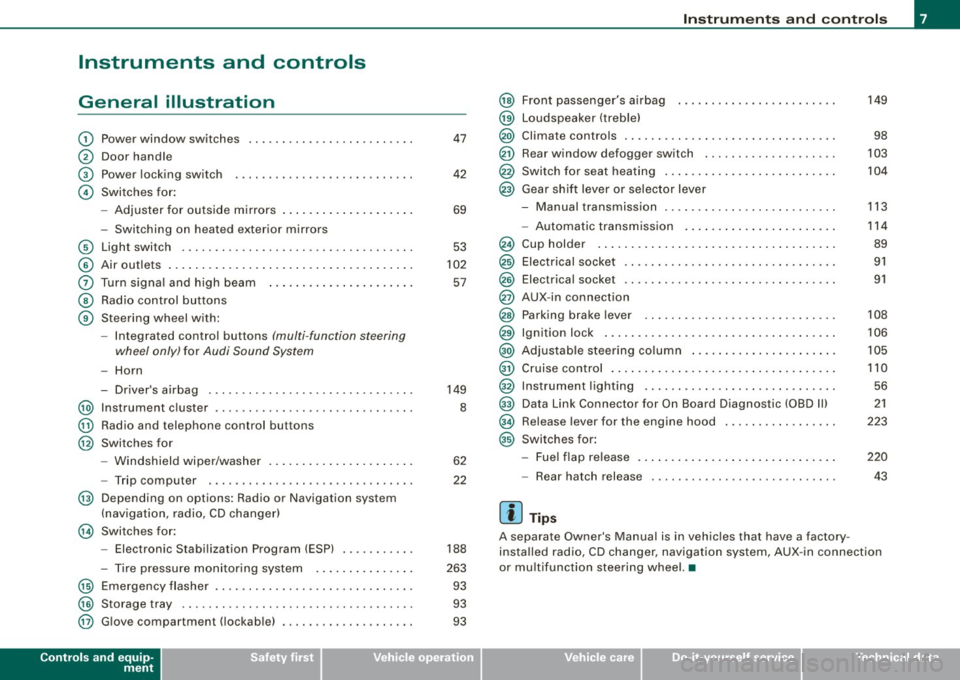
Instruments and controls
General illustration
G)
0
©
©
Power window switches
Door handle
Power locking switch
Switches for:
- Adjuster for outside mirrors .. ........ ... ...... .
- Switching on heated exterior mirrors
© Light switch .................................. .
© Air outlets .... .... ... .. ............... ........ .
0 Turn signa l and high beam ...... ............. .. .
@ Radio control buttons
@ Steering wheel with:
-Integra ted control buttons (multi -function steering
wheel only) for Audi Sound System
-Horn
- Driver's airbag .............................. .
@ Instrument cluster .................... ...... ... .
@ Radio and telephone control buttons
@ Switches for
- Windshield wiper/washer .... ... .. ...... ... ... .
- Trip computer .... ................... ....... .
@ Depending on options: Radio or Navigation system
(navigation, radio, CD changer)
@ Switches for:
- Electronic Stabilization Program (ESP) .......... .
- Tire pressure monitoring system .. ... .. .... ... .
@ Emergency flasher ............................. .
@) Storage tray .. ... .... ... ... ... .. .. .... ........ .
@ G love compartment ( lockab le) ..... ........ .... .. .
Controls and equip
ment
47
42
69
53
102
57
149
8
62
22
188
263 93
93
93
Instruments and controls
@
@
@
@
@
@
Front passenger's airbag
Loudspeaker (treble)
Climate controls .. ..... .. ..... ........... ...... .
Rear window defogger switch ...... ............ . .
Switch for seat heating .. ...... .... .... ......... .
Gear shift lever or selector lever
M I .. - anua transm1ss1on . ........... ....... .... .. .
- Automatic transmission ... ... ...... .... .... .. .
Cup holder ...... ...... ....... ...... .......... .
Electrical socket ............................... .
Elect rical socket ............................... .
AUX-in connection
Parking brake lever ............................ .
Ignition lock ........ ................ .... ...... .
Adjustable steering column ...... .... .... ..... .. .
Cruise control .. ........ ....... ...... .... ...... .
Instrument lighting ............................ .
Data Link Connector for On Board Diagnostic (OBD Ill
Release lever for the engine hood
Switches for:
- Fuel flap release .......... ...... .... ......... .
- Rear hatch release
[ i ] Tips
149
98
103
104
113
114
89
91
91
108
106
105
110 56
21
223
220
43
A separate Owner's Manual is in vehic les that have a factory
insta lled radio, CD changer, navigation system, AUX -in connection
or multifunction steering wheel. •
I • •
Page 20 of 320
Driver informati on displ ay
Driver information display
Introduction
Introduction
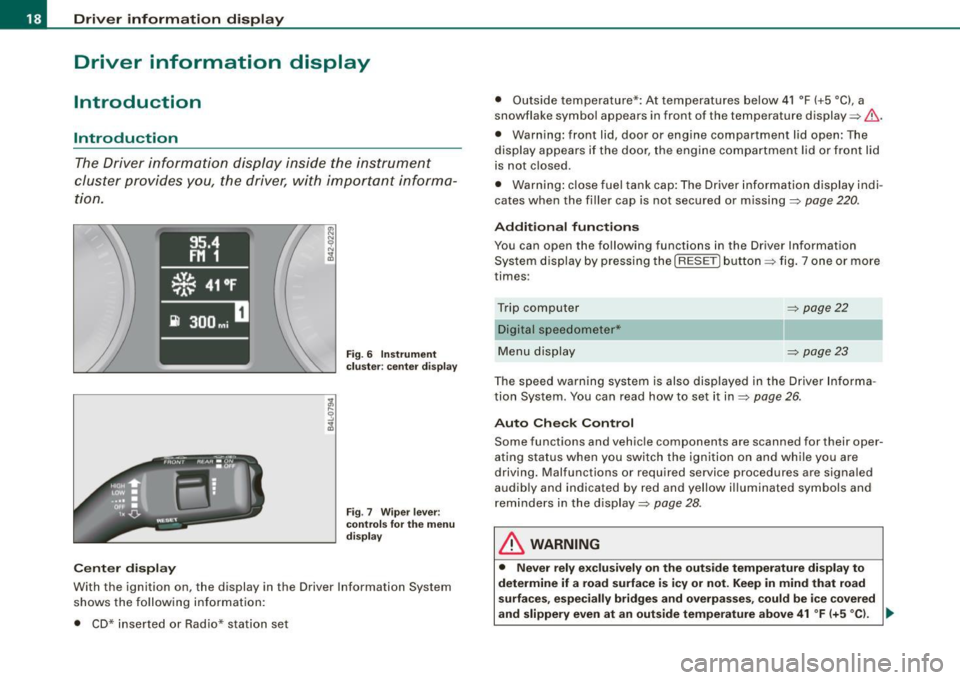
The Driver information display inside the instrument
cluster provides you , the driver, with important informa
tion.
Ce nter d isplay
Fig . 6 Inst rum ent
c lu ster : cente r dis pl ay
Fig .
7 Wiper lever :
co ntrol s for t he m enu
d isp lay
W ith th e ignition on, the displ ay in th e Driver Info rmation System
shows the follow ing information :
• CD* inserted or Radio* station set •
Outside tempe rature *: At temperatures below 41 °F ( +5 °C l, a
snowflake symbol appea rs in front of the temp erature display ~& .
• Warning: front lid , door or engine compartment l id open: The
display appears if the door, the engine compartment lid or front lid
is not closed .
• Warning : close fuel tank cap: The Driver information display indi
cates when the filler cap is not secured or missing~
page 220.
Additional fun ctions
You can open the following fun ctions in the Driver Information
System display by pressing the
I RESE T] button ~ fig. 7 one or more
times :
Trip computer Digital s peedometer*
Menu display
~ page22
~ page23
The speed warning system is also displayed in the Driver Informa
t ion System. You can read how to set it in~
page 26.
Auto Check Con trol
Some functions and vehicle componen ts are scanned for their oper
ating status when you switch the ignition on and wh ile you are
driving. Malfunc tions or required service procedures are signa led
audib ly and indicated by red and yel low illuminated symbols and
rem inders in the display~
page 28 .
& WARNING
• Never rely e xclusivel y on the outside temperature di spla y to
det ermine if a road surface is ic y or not. Keep in mind that road
s urface s, esp ec ia lly bridge s and overp asses, co uld be i ce cove red
and slippery even at an out side t emperatur e above 41 °F (+ 5
°C l. -.,
Page 43 of 320
vehicle working in the same frequency range (e.g. a cell phone, radio equipment).
• In order to make sure the locking function is working, you should
always keep your eye on the vehicle to make sure it is properly
locked .
• Do not use the remote control if you are inside the car, otherwise
you may unintentionally lock the vehicle , and then you would set off
the anti-theft alarm when you try open a door . In case this happens
anyhow, push the unlock bu tton
0 .
• Use the panic function only if you are in an emergency
situation. •
Resetting the remote control
The remote control must be reset if the vehicle does not
unlock.
-Press the unlock button III on the remote control.
- Manually unlock the driver's door lock with the mechan-
ical key within 30 seconds.
- Press either the lock-
!Ti or the unlock CD button to
complete the reset sequence. •
Contro ls and eq uip
ment
Opening and closing
Doors, power locks
Operating the locks vvith the fold-out key
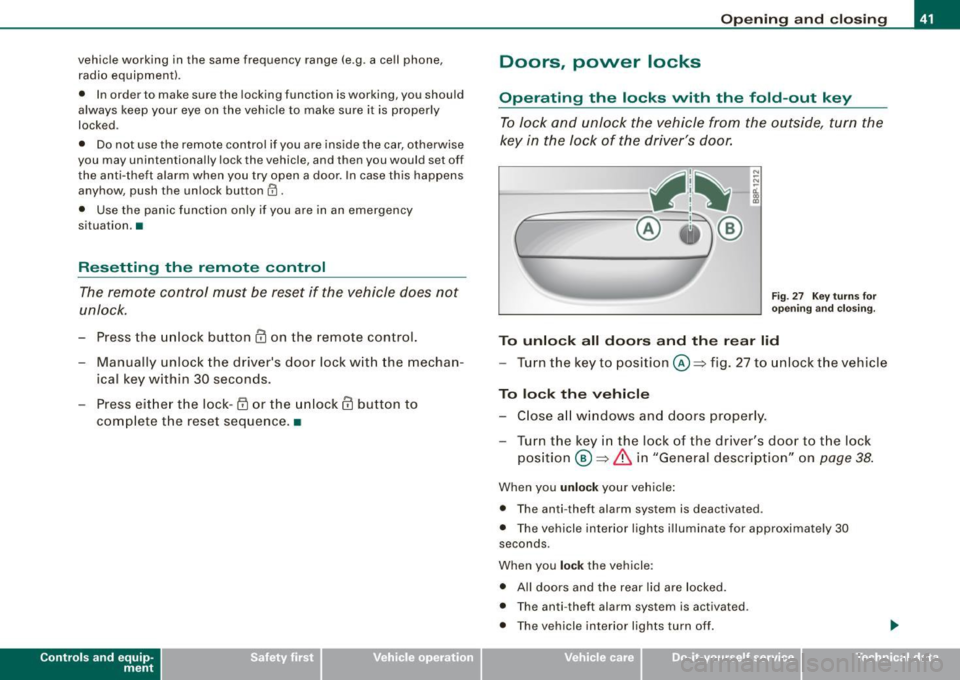
To lock and unlock the vehicle from the outside, turn the
key in the lock of the driver's door.
N
-N
-a:. gi
Fig. 27 Key turns for
opening and closing.
To unlock all doors and the rear lid
-Turn the key to position©=> fig. 27 to unlock the vehicle
To lock the vehicle
-Close all windows and doors properly.
- Turn the key in the lock of the driver's door to the lock
position
® => & in "General description" on page 38.
When you unlock your vehicle:
• The anti- theft alarm system is deactivated .
• The vehicle interior lights illuminate for approximately 30
seconds .
When you
lock the vehicle:
• All doors and the rear lid are locked .
• The anti -theft alarm system is activated .
• The vehicle interior lights turn off.
Vehicle care I I irechnical data
Page 48 of 320

Opening and closing
Anti -theft alarm system
The anti-theft alarm triggers an alarm if anyone attempts
to break int o the vehicle.
Fig. 36 Di ode po sitio n
i n the in str um ent p anel
T he an ti- t heft alarm system triggers an audible alarm and turns on
t he emergency flasher if an unauthorized interference with the
vehic le is sensed by the system .
How is the anti-th eft alarm sy ste m swi tched on ?
The anti-theft alarm system is switched on when you lock th e
dr iver's door manually using the fold -out key, or when you use the
remo te control. The sys tem is activated approximately 30 seconds
af ter the vehicle is locked . The indicator light => fig. 36 starts
flashing rapid ly for 30 seconds and then blinks slowly .
How is th e a nti-theft alarm system swi tch ed off?
The anti-the ft alarm sys tem is switched off wh en you use the remote
control to un lock your vehic le . If you do not open a do or within 30
seconds after you have unlocked with the remote control, the
vehic le will lock itself again auto matically.
If you lock just the driver's door using your key , the front
passenger 's door and the rear lid remain locked.
Wh en will th e anti th eft alarm s yst em b e trigg ered?
When the v ehicle is locked, the alarm system mo nitors and pro tects
the fo llowing parts of the vehicle :
• engine compartment
• l uggage compartment
• doors
• ignition
When the system is activa ted, the alarm will be triggered if one of
the doors, the engine hood or the rear lid are opened , or if the igni
tion is turned on or the radio removed.
The anti-theft alarm system wil l also go off when the battery is
disconnected .
You can also t rigger the alarm by pressing the PANIC button on your
remo te -contro l key . This wi ll a lert other people in case of emer
gency. Press the
PANIC bu tton again t o turn off the alarm.
How i s th e a nti-theft alarm switched off when
triggered?
The alarm system is switched off when you unlock the vehic le using
the remo te -control key o r when the ignition is switched on . The
alarm wi ll also switch itself off when it comes to the end of its cycle .
Emergen cy flashe r
The emergency flasher will b link briefly when the doors, engine
hood and rear lid are properly closed.
If the emergency flashers do not blink, check the doors , engine hood
and rear lid to make sure they are properly closed . If you close a
door, the hood or the rear lid with the anti -theft a larm switched on,
the emergency flashers wil l b link only after you have closed the
door or lid.
[ i ] Tips
Fo r the anti- theft a larm system to function proper ly, make sure a ll
vehic le doors and windows are closed before leaving the vehicle .•
Page 161 of 320

__________________________________________________ A_ i_ r _b _a...; g::- s_ y=--- s_t _e _m __ lffl!III
& W ARNING (continued )
seating position and have the airbag system inspected by your
authorized Audi dealer.
• A tight tether or other str ap on a rearward-fac ing child restr aint
attached to the front pas senger seat can put too much pressure
on the weight-sensing mat in the seat and reg ister more weight
than i s actually on the seat. The heavier weight registered can
make the system work as though an adult were on the seat and
deploy the Advanced Airbag when it must be suppressed causing
s erious or even fatal injury to the child .
• If, in exceptional circumstances , you mu st in stall a forward
fac ing child restra int on the front passenger seat , always move the
seat into its rearmost position in the seat's fore and aft ad just
ment range , as far away from the airbag as possible . The backrest
must be adjusted to an upright position . Make sure that the
PASSENGER AIR BAG OFF light comes on and stay s on all the time
whenever the ignition is switched on .
& WARNING
• If the PASSENGER AIR BAG OFF light does not go out when an
adult is sitting on the front passenger seat after taking the steps
described above, make sure the adult is properly seated and
restrained at one of the rear seating positions .
• Have the airbag system inspected by your authorized Audi
dealer before transporting anyone on the front passenger seat .
[ i ] Tips
If the weight -sensing mat in the front passenger seat detects an
e mp ty seat, the fro nt air b ag on the pa ssenge r sid e will be t urned
off, and the PASSENGER AIR BAG OFF l ight will stay on .
a
Controls and equip
ment Safety first
Vehicle operation
Repair, care and disposal of the airbags
Parts of the airbag system are insta lled at many different places on
your Au di. In stal lin g, re moving, ser vic in g or re pair in g a part in an
area of the vehicle can damage a part of an a irbag system and
pre ven t that system from wo rki ng p rope rly in a co llision .
There are some important things you have to know to make sure
that the effectiveness of the system will not be impai red an d that
d iscarded co mponents do not cause inju ry or po llute t he e nv iron
ment .
& WARNING
Improper care , servicing and repair procedures can increase the
risk of personal injury and death by preventing an airbag from
deploying when needed or deploying an airbag unexpectedly:
• Never cover , obstruct , or change the steering wheel horn pad
or airbag cover or the instrument panel or modify them in any way .
• Never attach any obje cts su ch as cup holders or telephone
mountings to the surfaces covering the airbag units.
• For cleaning the horn pad or instrument panel, use only a soft ,
dry cloth or one moi stened with plain water . Solvents or cleaners
c ould damage the airbag cover or change the stiffness or strength
of the material so that the airbag cannot deploy and protect prop
erly .
• Never repair , adjust , or change any parts of the airbag system.
• All work on the steering wheel , instrument panel , front seats or
electrical system (including the installation of audio equipment ,
c ellular telephones and CB radios , etc .I must be performed by a
qualified technician who has the training and special equipment
necessary .
• For any work on the airbag system , we strongly recommend
that you see your authorized Audi dealer or qualified workshop .
• Never modify the front bumper or parts of the vehicle body .
Vehicle care Do-it-yourself service Technical data
Page 242 of 320

___ C_h_ e_ c_k _in --== g'-- a_n _d_ f_il _li _n ..:::g:::..- ___________________________________________ _
For example, a charging current of 4.5 amps would be used on a
b att ery ra te d at 4 5 Ah. Rate d capacity o f the b attery in you r vehicl e
is liste d on t he batt ery housin g.
The batter y ca ps sho uld
not be o pene d wh en cha rgi ng a battery .
& WARNING
Charging a battery can be dangerous .
• Never charge a frozen battery . It may explode because of gas
trapped in the ice. Allow a frozen battery to thaw out first .
• Do not reuse batteries which were frozen . The battery housing
may have cracked and weakened when the battery froze .
• Charge the battery in a well ventilated area . Keep away from
open flame or electrical spark . Do not smoke . Hydrogen gas gener
ated by the battery is explosive .
• To reduce the danger of explosion , never connect or disconnect
charger cables wh ile the charger is operating .
• Fast charging a battery is dangerous and should only be
attempted by a competent technician with the proper equipment .
• Battery acid that may spill during charging should be washed
off with a solution of warm water and baking soda to neutralize
the acid .
0 Note
• Nev e r use a fast charger as a booster to start the engine. This will
seriously damage sensitive electronic components, such as control
units, re lays, radio, etc ., as wel l as the battery charger .
• T he vehicle may be optio nally equi ppe d wi th a ge l batt ery , w hich
can only be charged at a constant current -limited volta ge. To
prevent damage to the battery and the electronics system, a gel
battery that is connected must u nder no circumstances be cha rged
with a quick charger.
[ i ] Tips
T he ve hicle batte ry m ust no t be ch arged wit h a standard small
charger that p lugs into the cigarette lighter or out let .•
Windshield washer container
Us in g pla in wat er is not adequate for f illing t he wind
shi eld w asher system.
F ig . 172 Engine
compartment : wind
s hield washer fluid
container
T he wind shi eld wash er fluid c onta iner i s l ocat ed o n the
ri ght side of the eng in e compartm ent ~ fig . 172. T he
w ash er fl uid co ntain er is marke d w it h t he symbo l~ is on
i t s c ap.
- Before you c heck a nythi ng in the e ngine co mpartment,
al way s
read and heed all WARNINGS~ & in "W orking
i n th e engin e co mpa rtme nt" on
pa ge 224 .
-Lift t he fill er cap to ngue to ad d washer fluid . Yo u ca n fill
t h e co ntaine r to th e t op .
- Press the ca p back on to the filler neck aft er fi lling t he
conta iner.
You can find the reservoir capa city in the tab le in~ page 296.
Page 269 of 320

__________________________________________ T_i_r e _ p =----r_e _s _ s_ u_ r_e _ m_ o_n_ i_ t _o _r_ i_n -=g =-- s....: y:.... s_ te_ m_ * __ !II
•
• A wheel sensor or other component may have failed.
• During initia lization the system has detected more than 4 wheels
on the vehicle, for example while driving next to another car with a
tire pressure monitoring system.
• A wheel change was made but the button
=> page 265, fig. 179
was not pressed.
• Audi Genuine Parts were not used for parts replacement.
• If snow chains are being used, system function can be compro
mised due to the shielding properties of the chains.
• The tire pressure monitoring system may not be available
because of a radio ma lfunction.
• Transmitters with the same frequency, such as radio head
phones in the veh icle or radio equipment, can cause a temporary
disruption of the system through excessive electromagnetic fields.
• Eliminate the interference if possible and then proceed as
follows: Turn off the engine for 20 minutes. Then drive another 10
min . If the warning light comes on again, you shou ld contact your
authorized Audi dealer immediately to have the problem corrected.
• Do not use commercially available tire sealants. Otherwise, the
e lectrical components of the tire pressure monitoring system will
no longer work properly and the sensor for the tire pressure moni
toring system will have to be replaced by an authorized Audi dealer
or other qualified workshop. •
Certification
This device complies with part 15 of the FCC ru les and RSS -210 .
Operation is subject to the following conditions:
• this device may not cause harmfu l interference, and
• this device must accept interference received, including interfer
ence that may cause undesired operation.
The receiver 5WK49069 uses the same schematic, assemb ly, layout
and PCB as 5WK49097 . 5WK49097 is a multi channe l receiver and 5WK49069 is a single channel receiver
. They only differ in: SAW
Filter V1 _4 was changed from A2C00038979 to V1 _2 A2C00032378,
I nductor L5_3 and L6_233nH were changed to L5 _2 and L6 _247nH.
BAND PASS FILTER V3_2 was changed from A2C00038762 to V3_3
A2C00036085. V10 : ATIC75 C1, A2C000029505 was changed to V10:
ATIC75 C2-Light, A2C000043220 . 01 14.246MHz A2C00037710 was
changed to 01 15.27MHz A2C00041280 . The BAND PASS FILTER V2
is not populated .
These modif ications were necessary to opt imize the characteristic
of the receiver.
Proof is shown with test report T30739 -00 -00KJ issued by Mikes
Testingpartners GmbH, OhmstraP..e 2-4, 94342 Strasskirchen that
the receiver is below the limit .•
Vehicle care I t •
Page 282 of 320

1111.___F_ u_ s _ e_s _ a_n _ d_ b_ u_lb _ s _______________________________________________ _
Equipment Amps No. Equipment Amps
Manual headlight beam adjustment, automatic
14 Electronic Stabilization Program (ESP) (control 10
1
headlight beam adjustment, AFS control mod-10
module), shift gate automatic transmission
ule, engine components, light switch (switch
15 Interior lights, reading lights 10
lighting/illumination), diagnosis socket
Diagnostic connector, rain sensor, air condition-
Automatic transmission, control module for
16 ing (control module), tire pressure monitor dis-10
CAN data transfer (gateway), electro -mechanical
play (control module)
2 steering, shift gate automatic transmission, 10 17 Anti-theft alarm warning system 5 engine relay, fuel tank control unit, engine con -
trol unit, brakes control (ABS), Electronic Stabili-
18 Diagnose Starter 5
zation Program (ESP), Anti -Slip Regulation (ASR) 19 All Wheel Drive 10
3
Airbag 5 20 Not used
!! Air-conditioning (pressure sensor, air quality
sensor), button for Electronic Stabilization Pro -
21 Not used
gram (ESP), Anti-Slip Regulat ion (ASR), tire pres-
22 Blower fan 40
sure monitor display, oil level sensor, back -up 23 Driver's side power window, front 30
4 light switch, front seat heating , parking aid, 5
seat-occupancy recognition (on USA vehicles), 24 Power outlet front 20
garage door opener, automatic mirror dimming, 25 Rear window defogger 30
headlight assistant, heated windshield washer
26 Power outlet in luggage compartment 20 nozzles, air conditioning (control module)
-27 Fuel tank control module, fuel pump 15
5 AFS headlights (left side) 5
AFS headlights (right side) 5 28 Power window, rear 30
7
Not used 29 Not used
Not used
30 Not used
9 Navigation system, radio system 15 31 Not used
10 digital
radio, cell phone, TV equipment 7,5 32 Not used
11 Automa tic mirror dimming, headlight assistan t 10 33 Sliding/pop-up roof 20
Central locking (front doors) 10 34 Not used
13 Central locking (rear doors) 10 35 Not used
36 Lumbar support 10
Page 303 of 320

__________________________________________________ C_ o_ n_ s_ u _m _ e_ r_ l_n _f _o _ r_ m_ a_ t_io _ n __ lJIII
T hese dealers also have the necessary faci lities, too ls and trained
specialists to instal l the parts and accessories proper ly .
& WARNING
Using th e wrong spare p art s non -approved acc essorie s can cau se
d amag e to the vehi cle an d se rious per son al injur y.
• Use onl y accessories ex pr ess ly a ppr oved b y Audi and genuine
Audi sp are part s
• The se p art s a nd accesso ries hav e been speci ally des igned to
be u sed on your vehi cle.
• Nev er in sta ll accesso ries s uch as telephone cradle s or
be verage holder s on airbag cover s or within the airb ag deploy
ment zone s. Doing so w ill in creas e the risk of injury if airb ag s a re
trig gered in an ac cident!
• Before you che ck anything in the en gin e c omp artmen t, alw ays
read and heed all WARNINGS=>
page 215 .
0 Note
• I f items other than genuine Audi spare parts, add -on equipment
and accessory items are used or if repair work is not performed
according to specified methods, this can resu lt in severe damage to
your vehicle's eng ine and body (such as corrosion) and adversely
affect your vehicle's warranty .
• If emergency repairs must be performed elsewhere, have the
vehicle examined by an authorized Audi dea lership as soon as
poss ible.
• The manufacturer cannot be held liable for damage which occurs
due to failure to comply with these stipu lations .•
Installing /replacing a sound system
If you wish to install a radio or replace the factory installed radio ,
please note the following :
Controls and equip
ment Safety first Vehicle operation
The factory insta
lled radio connectors are designed for genuine
Audi radios. When install ing a different radio, difficu lties could arise
such as :
- the radio may not fit into the space provided
- the electrical connections may not be compatible
- different connector terminals may be needed .
Therefore, we recommend that you have your authorized Audi dea ler instal l or replace the radio.
They are the most fami liar with the technical features of your
vehic le . They also offer Genuine Audi Radios with the necessary
installa tion components and instructions .
& WARNING
Improperly in stall ing a r adio could cau se a s hort circ uit and an
el ectr ic a l fir e. •
Technical Modifications
Our guidelines must be complied with when technical
mo difications are made.
Always consult an authorized Audi dea ler b efore starting work on
any modifications.
This will help ensure that vehic le function, perfo rmance and safe ty
are not impaired=> &.
Attempting to work on electronic components and the software used with them can cause malfunctions. Because of the way elec
tronic components are interconnected with each other, such
malfunctions can also have an adverse affect on other systems that
are not directly involved . This means that you risk both a substantial
reduction in the operat ional safety of your vehicle and an increased
wear of vehicle par ts
=> & . .,_
Vehicle care Do-it-yourself service Tec hn ica l da ta
Page 304 of 320

___ C_ o_n_ s_ u_m _ e_ r_ ln_ f_ o _r _m _ a_ t_ i_o _n ______________________________________________ _
Authorized Audi dealers will perform this work in a professional and
competent manner or, in special cases, refer you to a professional
company that specializes in such modifications.
& WARNING
Impr oper r ep airs a nd m odificat io ns ca n cha nge the wa y vehi cle
syst ems w ork and cau se s erious per so na l inju ry.
0 Note
If emergency repairs must be performed elsewhere, have the
vehic le examined by an authorized Audi dealership as soon as
possible. •
Declaration of Compliance ,
Telecommunications and Electronic Systems
Radio Frequency Devices and Radiocommunication
Equipment User Manual Notice.
The manufacturer is not responsib le for any radio or TV interference
caused by unauthorized modifications to this equipment .
Devices
The fol lowing devices each comply with FCC Part 15.19, FCC Part
15.21 and RSS-Gen Issue 1:
• Cell phone package
• Electronic immobi lizer
• Homelink® universal remote control
• Remote contro l key
• Tire pressure monitoring system*
FCC Part 15 .1 9
This device complies with part 15 of the FCC Rules. Operation is
subject to the fo llowing two conditions: (1 l This device may not cause harmful interference, and
(2) this device must accept any interference received, including
interference that may cause undesired operation.
F
CC Part 1 5. 21
CAUTION:
Changes or modifications not expressly approved by the party
responsible for compliance cou ld void the user's author ity to
operate the equipment.
R SS-Gen Iss ue 1
Operation is subject to the following two conditions:
(1) this device may not cause interference, and
(2) this device must accept any interference, including interference
that may cause undesired operation of the device .•