ignition AUDI S3 2011 Owner's Manual
[x] Cancel search | Manufacturer: AUDI, Model Year: 2011, Model line: S3, Model: AUDI S3 2011Pages: 320, PDF Size: 75.79 MB
Page 51 of 320

Power windows
Controls
Fig. 40 Dri ver's door:
power wind ow
swit ches
T he switches are located in the dr iver 's doo r. The front passenger's
door has a own power w indow switch of its own .
T o open/ close If the respective swi tch is pu shed or pulled, the
window will, respectively .
Switches for front door windows
© operates the window in the driver's door .
@ operates the window in the front passenger's door.
Switches for rear windows
© operates the lef t r ear w indow.
@ operates the rig ht rea r window.
Safety switch
® Safety switch for rea r window operat ion .
& WARNING
• Do not leave children unattended in the vehicle, esp ecially with
ac ce ss to vehicle key s. Unsupervi sed use of the keys can re sult in
Con tro ls a nd e quip
m en t Vehicle
OP-eration
Opening and closing
& WARNI NG (continued )
starting of the engine and use of vehicle systems such as power
windows, et c. whi ch could result in seriou s injury.
• Remember -you can still open or clo se the power windows for
about ten minutes after the ignition is swit ched off . Only when
eithe r of the front doors are opened are the powe r windows
s witched off .
• Be ca reful when closing the windows . Chec k to see that no one
is in the way, or serious injury could result!
• Alway s remo ve the ignition key whene ver you leave your
veh icle.
• If you lo ck your vehicle from the out side, no one, e specially
children, should remain in the vehicle .
• Do not stick anything on the windows or the windshield that
may interfere w ith the driver 's field of vision. •
Switches in the driver 's door
The d riv er can operate all windo ws.
In additi on to th e switches i n the driver's d oor, t here is a
separate switch in each door fo r th e po wer wi ndow in that
door~ fig. 40. If the respective switc h is pus hed or p ulled ,
the window will open or c lose. The power window switc hes
have a
two-position function:
Opening the windows
- Push th e switch to th e first stop an d h old it there until the
window has l owere d to the d esired position.
- Push t he swi tch briefly to t he
second stop : the window
wi ll automati ca lly op en all th e way .
Vehicle care Do-it-yourselt service iTechnical data
Page 54 of 320
Opening and closing
Opening manually (manual operation)
- Press the switch (D => page 51, fig. 42, starting from the
"lift position" until the roof has reached the desired posi
tion.
Closing completely
- Press the switch @=> page 51, fig. 42 until the roof is
completely closed=>& .
Closing partially
- Press the switch @=> page 51, fig. 42 until the roof has
reached the desired position =>& . If the roof is almost
closed and you interrupt the operation, the roof opens
automatically to a minimum setting; this is the smallest
possible opening that can be set.
If you pa rk your vehicle in the su n, we recommend that you close the
sun blind . You should especially make certain that the panoramic
sliding sunroof is closed when the sun blind is closed when parked or
if there is a sudden rain shower.
The sun blind has two positions: comp letely open or completely
closed. The sun blind is manually operated.
& WARNING
Never close the panoramic sliding sunroof carelessly or without
watching -the re is a risk of personal injury. For this reason, always
remove the ignition key when leaving the vehicle.
[ i ] Tips
• When you park your vehicle , we generally recommend closing the
panoramic sliding sunroof and the sun blind . •
When the vehicle is parked, a wet roof should be dried lightly with
a soft cloth
before it is opened so that water does not drip into the
interior .
• In an emergency, the panoramic sliding sunroof can be closed
manually=>
page 53, "Emergency mechan ical closing for the
panoramic slidi ng sunroof". •
Appli es to vehicles : wit h pa norami c sli ding s unroo f
Comfort closing
The open roof can also be closed from the outside.
-Hold the key in the driver's door lock in the lock position
until the roof is closed=> &.
& WARNING
Never close the panoramic sliding sunroof carelessly or without
watching -there is a risk of personal injury.•
Page 58 of 320
Clear vision
Clear vision
Lights
Switching the headlights on and off ·"ti-·
!
-ti. ID
panel: light switch
Fig. SO Instrument
panel: Light swit ch
with daytime running
lights (DRL )
The light switch must not be overturned past the stops in
either direction.
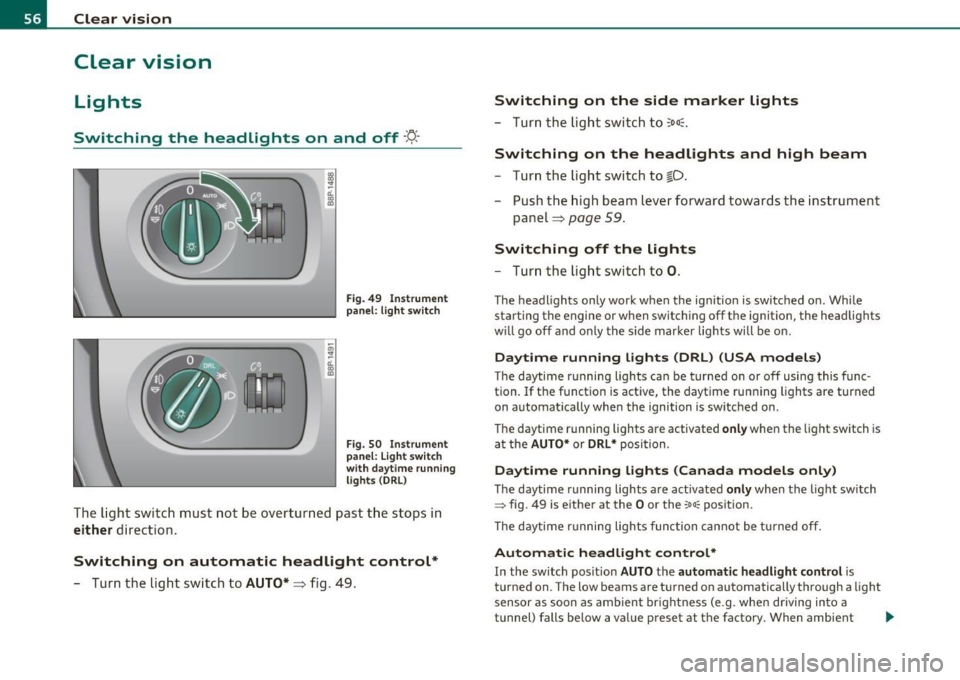
Switching on automatic headlight control*
-Turn the light switch to AUTO* =:> fig. 49.
Switching on the side marker lights
- Turn the light switch to ~oo~.
Switching on the headlights and high beam
-Turn the light switch to io.
Push the high beam lever forward towards the instrument
panel=:>
page 59 .
Switching off the lights
-Turn the light switch to 0.
The headlights only work when the ignition is switched on . While
starting the engine or when switching off the ignition, the headlights
w ill go off and only the side marker lights will be on.
Daytime running lights (DRL) (USA models)
The daytime running lights can be turned on or off using this func
tion. If the function is active, the daytime running lights are turned
on automat ically when the ignition is switched on .
The daytime running lights are activated
only when the light switch is
at the
AUTO* or DRL * position .
Daytime running lights (Canada models only)
The daytime running lights are act ivated only when the light switch
~ fig. 49 is either at the O or the ~oa; position.
The daytime running lights function cannot be turned off.
Automatic headlight control*
In the switch position AUTO the automatic headlight control is
turned on . The low beams are turned on automatically through a light
sensor as soon as ambient brightness (e.g . when driving into a
tunnel) falls below a value preset at the factory. When ambient .,_
Page 59 of 320

brightness increases again, the low beams are turned off again auto
matically =>& .
In the
AUTO position the low beams are switched off automatically
when the ignition is turned off.
Light Sensor Malfunction*
In the event of a light sensor ma lfunct ion, the driver is notified in the
instrument cluster display:
Automatic headlights/automatic wipers defective
For safety reasons the low beams are turned on permanently with t he
switch in
AUTO*. H owever, you can continue to turn the lights on and
off using the light switch. Have the light sensor checked as soon as
possible at a dealership.
Coming home/leaving home function*
The function is sw itched on when the sw itch is in the AUTO* position
and the function is shown as active in the driver information system.
The
coming home funct ion illuminates the area around the vehicle
when the ign it ion is switched
off and the driver's door is opened. The
length of time the lights rema in on can be set in the menu display
( Illumination > Exterior lights > coming home ).
The leaving home function illuminates the area around the vehicl e
when u nlocking it .
& WARNING
• Never use daytime running lights to see where you are going.
They are not bright enough and will not let you see far enough
ahead for safety, especially at dusk or when it is dark. Always
switch on the low beams at dusk or when it is dark.
• Automatic headlights are only intended to assist the driver .
They do not relieve the driver of his respon sibility to check the
headlights and to turn them on manually according to the current
light and visibility conditions. For example, fog and rain cannot be
Controls and equip
ment Safety first
Clear vision
& WARNING
(continued )
detected by the light sensors. So always switch on the headlights
under these weather conditions and when driving
in the dark io.
• Crashes can happen when you cannot see the road ahead and
when you cannot be seen by other motorists.
- Always turn on the headlights so that you can see ahead and
so that others can see your car from the back.
(I) Tips
• With the switch in AUTO front fog lights cannot be turned on in
addition.
• Th e light senso r for headlight control is located in the rear view
mirror mount . Do not apply any stickers to the windshield in this area
to prevent malfunctions or fail ures .
• Some exterior lighting functions can be adjusted in the driver
information system => page 22 ,
• If you remove the ignition from t he ignition lock whi le the head
lights are still on, a buzzer will sound as long as the driver's door is
open to remind you to turn off the lights .
• Always observe the specific local regulat ions for your area as to
when to use your lights.
• With automatic headlights, the high-beam funct ion is also avail
able, but with one restr iction:
If you have not switched the high
beams back to low beams during automatic headlig ht operation (for
example, after driving through a tunnel), only the low beams come
on the next time automatic headlights are switched on . To use the
high beams, you first have to pull the high beam lever back and then
push the lever forwa rd again .
• In cool or damp weather, the inside of the headlights, turn signa ls
and ta il lights can fog over due to the temperature difference
between the inside and outside. They will clear shortly after switching
them on. This does not affect the serv ice life of the light ing . _,,
Vehicle care Technical data
Page 60 of 320
Clear vision
• Frequent use of the coming home/leaving home function for
approaching and departing a vehicle parked in the dark will strain the
battery. This applies particularly if only short distances are drive n
between stops. Occasionally drive longer distances to make sure the
battery is recharged sufficiently .•
Front fog Lights }0
Use the light switch to turn on the front fog lights.
@
Fig . 51 Fog light acti
vation: light switch
position on vehicles
WITHOUT sensor light
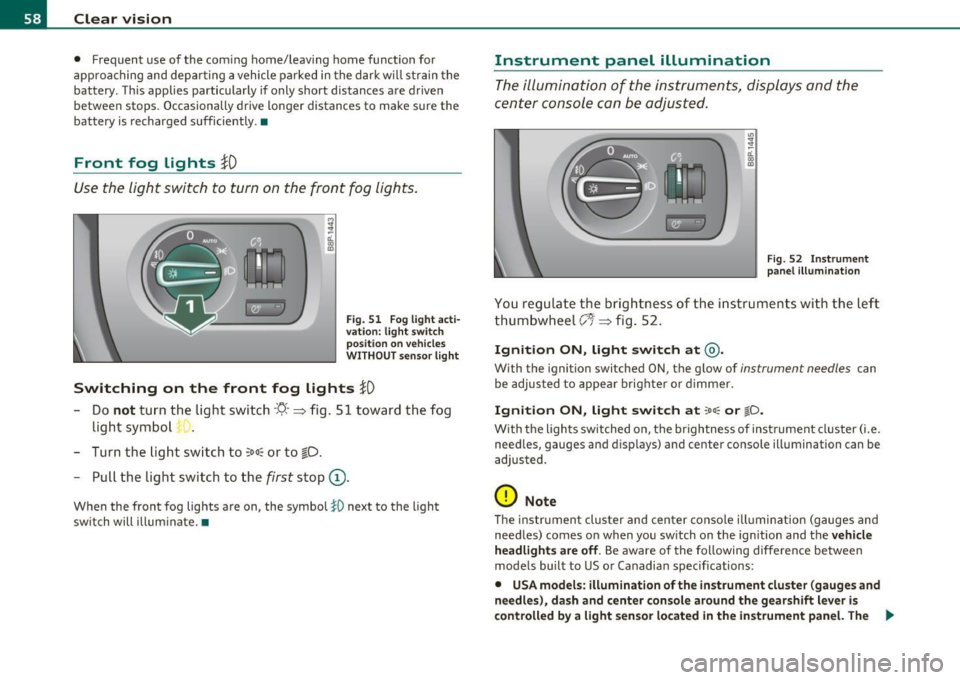
Switching on the front fog lights }D
- Do not turn the light switch·'!'!-· ~ fig. 51 toward the fog
light symbol ".
- Turn the light switch to
~oo~ or to ;D.
- Pull the light switch to the first stop (D.
When the front fog lights are on, the symbol }O next to the light
switch will illuminate. •
Instrument panel illumination
The illumination of the instruments, displays and the
center console can be adjusted.
Fig. 52 Instrument
panel illuminat ion
You regulate the brightness of the instruments with the left
thumbwheel
er ~ fig . 52.
Ignition ON, light switch at@.
With the ignition switched ON, the glow of instrument needles can
be adjusted to appear brighter or dimmer.
Ignition ON, light switch at ;oo; or iD .
With the lights switched on, the brightness of instrument cluster (i.e.
needles, gauges and displays) and center console illumination can be
adjusted.
0 Note
Th e instrument cluster and center console illumination (gauges and
needles) comes on when you sw itch on the ignition and the
vehicle
headlights are off.
Be aware of the following difference between
models built to US or Canadian specifications:
• USA models : illumination of the instrument cluster (gauges and
needles), dash and center console around the gearshift lever is
controlled
by a light sensor located in the instrument panel. The _,,,
Page 63 of 320

Forward dome light off
-Move the switch to position 0. The light will not go on
regardless o f door positio n.
Glove compartment light
Open the glove compartment - the light in t he glove
compartme nt automatically illum inates as long as the
side marker lights or headlights a re on. When you close
the glove compartme nt, the light goes o ff.
With the interior light sw itch at the doo r contact (center) position,
t he forward dome light illum ina tes wheneve r you unlo ck the vehi cle
or open a door . The dome light goes out after approx imately 30
se conds after yo u have closed the door. L ikewise , whe n yo u lock your
vehicle or switc h on the ignition, the dome light goes out.
If yo u leave a door open , the dome light w ill go out after ten minutes
to conserve battery charge .
A dimmer automatically controls the br ightness of the lights when
t hey are swi tched on. •
Contro ls a nd e quip
m en t Vehicle
OP-eration
Clear vision
App lies to veh icles : w ith light packag e
Interior Lights and forward reading Lights
The interior lights include the both reading lights for the
driver and the front passenger .
Fig. 56 Co nt ro l pane l
a bove wind sh ield :
int erior li g ht swi tch es
Light switch ©~ page 60, fig. 5 5 has the fol low ing f unc
t ions:
Door contact activation
- Move the switch to th e center pos ition. The forward dome
light is turned on/off by the co ntac t swi tches o n any of the
doors.
Forward dome light on
- Move the switc h to position I. The fo rward dome light
goes on and stays on regardl ess of door pos it ion.
Forward dome light off
- Move the switc h to position 0. The light will not go on
regard less of door position .
Vehicle care Do-it-yourselt service Technical data
Page 64 of 320
Clear vision Forward reading lights
~
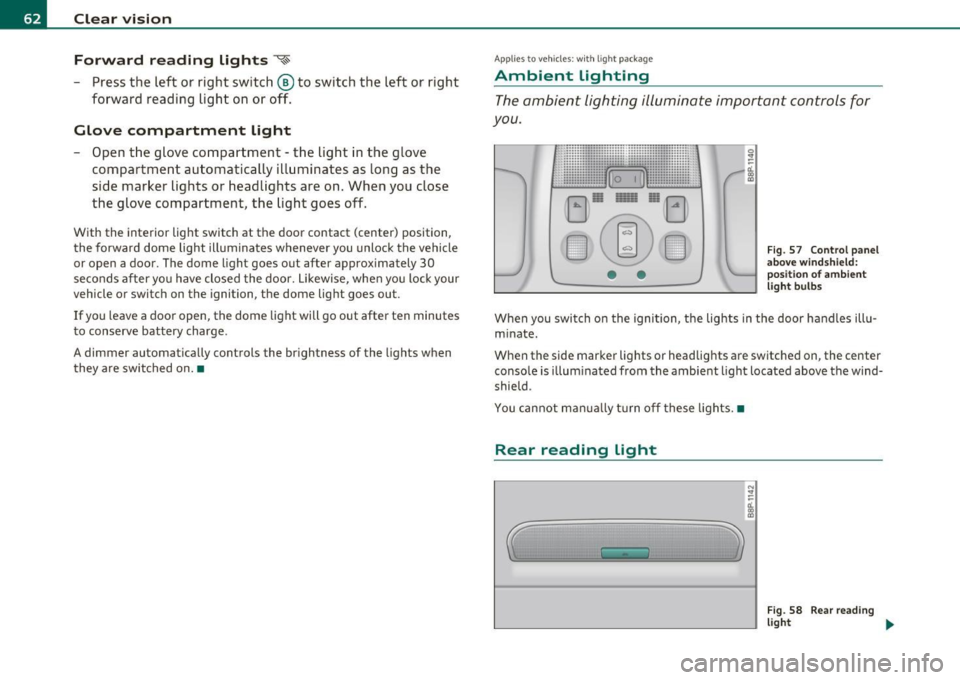
- Press the left or rig ht sw itch ® to switch the left or right
fo rward reading lig ht on or off.
Glove compartment light
Open t he glove compartment - the light in t he g love
compartment automatically illum inates as long as the
si de marker lights or he adlights are on. When you close
the glove compartment, the light goes off.
With the interio r light switch at the door contact (center) position,
t he forward dome light illum ina tes whenever you unlock the vehicle
or open a door . The dome light goes out after approxima tely 30
se co nds after yo u have clo sed the door. L ikew ise, whe n yo u lock your
vehicle or switch on the ignition, the dome light goes out.
If yo u leave a door open, the dome light will go out after ten minutes
to conserve battery charge.
A dimmer automatically controls the brightness of the lights when
t hey are swi tched on. •
Appli es to veh icles : w ith light package
Ambient lighting
The ambient lighting illuminate important controls for
you.
• •
0 !!
-d. .,
"'
Fig . 5 7 Control pan el
a b ove wind shie ld :
p ositi on of am bie nt
l ig ht b ulbs
When you switch on the igni tion, the lights in the door ha nd les illu
m inate .
When the side marker lights or headlights are switched on, the center
conso le is illum inated from the ambient light located above the wind
shield .
You cannot ma nually t urn o ff these lights. •
Rear reading light
'
N !!
-d. .,
"'
Fig . 58 R ea r re ad ing
ligh t ...
Page 66 of 320

Clear vision
Applies to veh icles : w ith automat ically dimm ing inside mirror
Automatically dimming inside mirror
The automatic dimming function can be turned on and
off if required .
Disabling auto dimming
Fig . 60 I nside rea r
v ie w mirror
- Press butt on @ ~ fig . 60 brie fly, -the green indic ator
light ® goes out.
Activating/reactivating auto dimming
- Press button @ briefly, -the green indicator ligh t® goes
on.
Automat ic dimming function
The automatic dimming function is activated every time the ignition
is turned on. The g ree n indicator light is lit to indica te auto d imming
is active.
W hen dimm ing is act ivated, the inside mir ror w ill darke n
automati
cally
in response to the amou nt of light striking the mirror (such as
head lights from rearward approaching vehicles). Even in d imming
mode, the mirror surface turns br ight when:
• the interior light is switched on
• reverse gear is engaged.
& WARNING
Broken glass of automatic dimming mirror can cause electrolyte
fluid leakage . Electrolyte fluid can irritate skin , eyes, and respira
tory system .
• Repeated or p rolonged expo sur e to electrolyte can cau se irrita
tion to the resp iratory system, esp ecially among people with
asthma or other r espiratory conditions. Get fre sh air immediately
by le aving the vehicl e or, if that is not po ssible , open window s and
doors all the wa y.
• If ele ctrolyte gets into the eye s, flush them thoroughly with
large am ount s of clean water f or at lea st 15 minute s; medical
attention is re commended .
• If electrolyte contacts skin , flush affected area with clean
water for at l east 15 minutes and then wash aff ected area with
s oap and water; medical attention is rec ommended . Thoroughly
wash affected clothing and shoe s before reu se.
• If swallowed and person i s con sciou s, rinse mouth with water
for at least 15 minutes. Do not induce vomit ing unle ss instru cted
to do so by medical profe ssional. Get medical attenti on immedi
ate ly .
0 Note
Liquid e lectrolyte leaked from a broken mir ror g lass will damage any
plastic surfaces it comes in contact with. Clean up spi lled electrolyte
immediately with clear wate r and a sponge.
[I) Tips
• Check to make su re t he re are no obje cts preventing light from
reac hing the inside mirror.
• Do not attach any st ick er s to the w indshield in front of the light
sensor, as this would interfere with the a utomatic operation of the
head lights and the a utomat ic dimming of the inside mir ror. •
Page 68 of 320

Clear vision High wiper speed
- Move the lever up to posi tion ® ·
One-touch wiping
- Move the lever to position 0, when you want to wipe the
w indsh ie ld
briefly .
Automatic wiper/washer
-Pull t he lever to posi tion ® (t oward t he s tee ring w heel)
and hold.
- R elease t he lever . T he washer stops and the wipers keep
goi ng for about four seco nds .
Turning off the wipers
- Move the lever bac k to posi tion ®·
The w indshield wipe rs an d washer only wo rk when the igni tion is
tur ned on. If you switch off t he ig nition w ith the winds hield wiper
lever st ill in the inte rval wipe pos it ion and then come back a wh ile
later and drive off , the ra in sensor wi ll reactivate itself after the
vehicle speed has exceeded 4 mph (6 km/ h).
The r ain senso r* is only activated with the wipe r lever set to position
@ . When it starts to rain, the rain sensor will automatically act ivate
t he in term itte nt w ip ing mode .
To red uce the sensit iv ity of the sensor, move sw itch @dow n. To
increase the sensitivity, move the switch up. The higher you adjust the
sensitivity, the faster the sensor will react when it senses moistu re on
the windshield .
Th e rain senso r wipe r inte rvals dep end on the sensi tivi ty set ting a s
well as veh icle speed. During brief stops , wiper motion will ad just in
re lation to the amoun t of rain on the w indshield.
Automatic wiper/was her: To eliminate water droplets, the wind
shield wiper pe rforms one afterwipe operation after severa l secon ds w
hile driv ing. You can switch this funct ion off by moving the lever to
posi tion ® within 10 seco nds of the afterw ipe o per ation . T he afte r
w ipe funct ion is reactivated the next time the ignition is switc h.
When the ignition is turned on, the washer jets are heated *.
& WARNING
• Wiper bl ades are crucial for safe driving! Only when they are in
good condition are they able to cl ear the windows properly to
pro vide uncompromised vi sibility. Worn or damaged wiper bl ade s
are a safety hazard=>
page 69, "Replacing front w iper blades"!
• The light/rain sensor* is only designed to assist and support
the driver. It remains entirely th e driver's responsibility to
monitor outs ide weather condit ions and to manually ac tivate the
wip ers as soon as rain or dr izzle reduces visibility through the
windshield.
• The windshield must not be treated with water-repellent
mater ial s. They can increase glare under poor visibility conditions
such as wetness, darkness, or when the sun is low on the horizon.
In addition , they can cause the windshield wipers to chatter.
0 Note
• In the case of frost, check whether the windshield wiper blades are
fro zen to the windsh ie ld. Switching on t he w indshield wipe rs can
damage the wiper blades!
• Do not use the wipers to clear a frosted w indow . Using the wipe rs
as a convenient ice scraper will destroy the wiper blades.
• Prior to us ing a car was h, the winds hield wiper system must be
sw itched off (lever in posit io n 0). This helps to prevent unintentional
switching on and demage to t he windshield woper sys tem. ..,.
Page 69 of 320
![AUDI S3 2011 Owners Manual (]] Tips
• The w indshield wipers are switched off when the ign ition is tu rned
off . Activate the windshield wipers after the ignition is switched back
on by mov ing the w i](/img/6/57544/w960_57544-68.png "AUDI S3 2011 Owners Manual (]] Tips
• The w indshield wipers are switched off when the ign ition is tu rned
off . Activate the windshield wipers after the ignition is switched back
on by mov ing the w i")
(]] Tips
• The w indshield wipers are switched off when the ign ition is tu rned
off . Activate the windshield wipers after the ignition is switched back
on by mov ing the w indshield wipe r leve r to any pos ition.
• Worn or dirty windshield w iper blades cause smearing, which can
affect the operat io n of the l ight/rain sensor*. Check t he condi tion of
your windshield wiper b lades regularly.
• The rain sensor is part of the inte rval wiping system . Turning off
the ignition will also deactivate the rain sensor. To reactivate the
sensor, switch off the inte rval wiping funct ion, the n switch it back on
again .
• Applies to veh icles with light/ra in sensor: When the w ipers are
switched on manually and in rain conditions, the automatic head
lights* turn on~
page 56, "Switching the headlights on and off ·f!: "
or off during the day when the wipers are no longer operating. The
au tomatic headlights* func tion is available in t his case only when the
light switch is in the "AUTO" position~
page 56, fig. 49.
• Make su re the washe r fl ui d reservoir in the eng ine compartment is
topped off before going on a long trip. Look up::::)
page 243 for
check ing and fill ing t he washer conta iner.
• The wipers only operate with the hood completely closed. •
Contro ls a nd e quip
m en t Vehicle
OP-eration
Clear vision
Rear window wiper cs;J
The wiper lever is also used to operate the rear windo w
w iper and the automatic wiper/ washer function .
Fig . 63 Wi per lev er:
a ct iva ting the rear
w indow wi per an d
w ashe r
The rear window w iper and t he au tomatic wiper/washer func
tions are activated as follows:
Intermittent wiping
- P ush the wipe r lever forward towards the dashboard and
to the
first position ©~ fig. 63 . T he rear window wiper
w ill wipe the win dow approx. every four seco nds.
Automatic wiper/washer function
- Push the wiper lever forward to the second stop, position
0 , and ho ld it there for as long as you want the rear
wiper/washer to operate.
- Release the lever aga in. T he wiper w ill keep run ning for
app rox . four seco nds .
Switching intermittent wiper action off
- Pull the lever a ll the way back to the original posi tion.
Vehicle care Do-it-yourselt service iTechnical data