brakes AUDI S3 2015 User Guide
[x] Cancel search | Manufacturer: AUDI, Model Year: 2015, Model line: S3, Model: AUDI S3 2015Pages: 310, PDF Size: 76.15 MB
Page 93 of 310
....,
N
0 > co
rl I.O
"' ....,
"' rl
.. press the brake peda l.
.. To resume the stored speed, move the lever
into position @.
Inte rrupting crui se contr ol wh en stopped
.. Push the lever away from you into position
@ . The message ACC : s ta ndb y appea rs .
.. To resume cru ise control, press the brake
pedal and pull the lever toward you into po
sit ion @.
A WARNING
It is dangerous to activate cru ise contro l
and resume the stored speed when the
current road, traffic or weather conditions
do not permit th is . This could result in a
crash.
Setting the distance
Applies to vehicles: with Audi adaptive cruise control
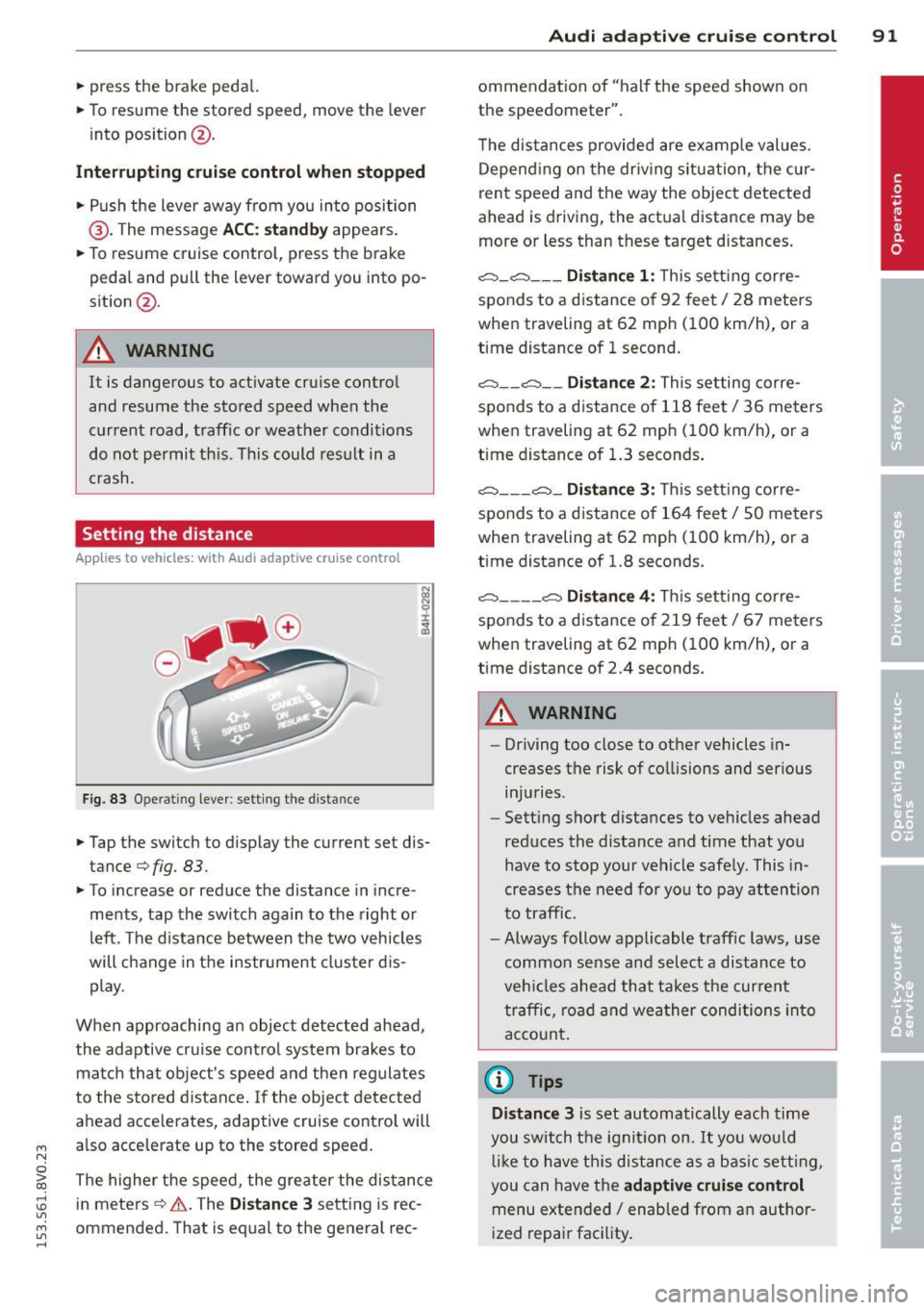
Fig. 83 O perat ing lever : setting the d istance
.. Tap the switch to display the current set dis
tance¢
fig. 83.
.,. To increase or reduce the distance in incre
ments, tap the switch again to the right o r
left . T he d istance between the two vehicles
will change in the instr ument cluster d is
play.
When approaching an object detected ahead ,
the adaptive cru ise cont ro l system brakes to
matc h that object's speed and then regulates
to the stored distance . If the object detected
ahead acce lerates, adaptive cru ise control will
also acce lerate up to the stored speed .
The highe r the speed, the greater the distance
in meters ¢.&. . The
Dist ance 3 sett ing is rec
ommended. That is equal to the general rec -
Audi adapti ve crui se control 91
ommendation of "hal f the speed shown on
the speedometer" .
T he distances provided are examp le values.
Depend ing on the dr iv ing situation, the cur
rent speed and the way the object detected
ahead is driving, the act ual distance may be
more or less than these target d istances .
c::;, _c::::, ___ Distance 1 : Th is sett ing corre-
sponds to a distance o f 92 feet/ 28 meters
when traveling at 62 mph ( 100 km/h), or a
time distance of 1 second.
c::;, __ c::::, __ Distanc e 2: This setting corre
sponds to a distance o f 118 feet/ 36 meters
when traveling at 62 mph ( 100 km/h), or a
time distance of 1.3 seconds .
c::;, ___ c::;,_ Dista n ce 3 : This sett ing corre-
sponds to a distance o f 164 feet/ 50 meters
when traveling at 62 mph ( 100 km/h), or a
t ime distance of 1.8 seconds.
c::;, ____ c::::, Dista n ce 4: T his sett ing corre-
sponds to a distance o f 219 feet/ 67 meters
when traveling at 62 mph ( 100 km/h), or a
time distance of 2.4 seconds.
A WARNING
-
- Driving too close to other vehicles in
creases the risk of co llisions and ser ious
inju ries .
- Sett ing s hort dista nces to veh icles ahead
reduces the distance and time that you
have to stop your vehicle safe ly. This in
creases the need for yo u to pay attention
to traffic.
- Always follow applicable traff ic laws, use
common sense and select a distance to
veh icles ahead that takes the cur ren t
traffic , ro ad and weather conditions into
acco unt .
@ Tips
Distance 3 is set automatically each time
you swi tch the ignit ion on.
It yo u wou ld
l ik e to have th is distance as a b asic setti ng,
you can have the
adaptive crui se cont rol
menu extended/ enabled from an author
i zed repair fac ility .
Page 96 of 310
94 Audi pre sen se
Audi pre sense
Introduction
Applies to vehicles: with Audi pre sense basic or Audi pre
sense front
Within the limits of the system, pre sense ba
sic and pre sense front can initiate steps to
protect vehicle occupants in certain danger
ous situations.
Critical driving situations can be recognized by
the pre sense front v ia a network of differe nt
vehicle systems and can take steps to prepare
the vehicle occupants for a potentia l collision.
The pre sense front works with a radar sensor
and a video came ra* .
It also functions within
the limits of the system when adapt ive cruise
control * is switched off.
General information
General information
App lies to vehicles: with Audi pre sense front or Audi
adaptive cruise control
A WARNING
Also follow the general information found
on
~ page 86, General information.
Audi pre sense basic
Descript ion
Applies to vehicles: with Audi pre sense basic
The function of the pre sense basic is activat
ed at a speed of 20 mph (30 km/h) or higher.
The following functions can be triggered un
der certain conditions within the limits of the
system:
- T ensioning of the safety be lts (for example,
during heavy braking) : The front safety belts
have reversib le be lt pretensioners. If a colli
sion does not occur, the safety belts loosen
s light ly and are ready to trigger again .
- Closing the windows and the sunroof* (for
example, when over- or understeering): The
windows and the sunroof" close until there is only a small gap open. Audi drive select:
The dep loyment time is
adapted in dynamic mode.
A WARNING
-The pre sense basic cannot overcome natu- ral phys ica l laws.
It is a system designed to
assist and it cannot prevent a coll is ion. Do
not let the increased safety provided
tempt you into taking risks. This could in
crease your r isk of a collis ion.
- The system can deploy incorrectly due to system-specific limits .
(D Tips
-Certa in pre sense bas ic functions switch
off when ESC is switched off (sport
mode) or when dr iving in reverse .
- The pre sense bas ic functions may not be
available if there is a ma lfunction in the
ESC system or the a irbag control mod
ule .
- Note that with pre sense bas ic, the rever
sible safety belt pretensioner on the
front passenger 's side deactivates when
the front passenger's a irbag is deactivat
ed.
Audi pre sense front
Description
Applies to vehicles: with Audi pre sense front or Audi
adapt ive cru ise control
Pre sense front informs yo u if the distance to
the vehicle ahead falls below the safe distance
for an extended period of time. It can warn of a possible collision and initiate braking ma
neuvers, within the limits of the system .
When detected in time, the system can assess
dangerous situat ions where an object ahead
brakes suddenly or if your own veh icle is trav
eling at a high speed and approaching an ob
ject that is moving more slow ly . If detection is
not possible, then p re sense fro nt does not re
act.
Page 97 of 310
....,
N
0 > co
rl I.O
"'
Warnings
Applies to vehicles: with Audi pre sense fro nt or Audi
adaptive cruise control
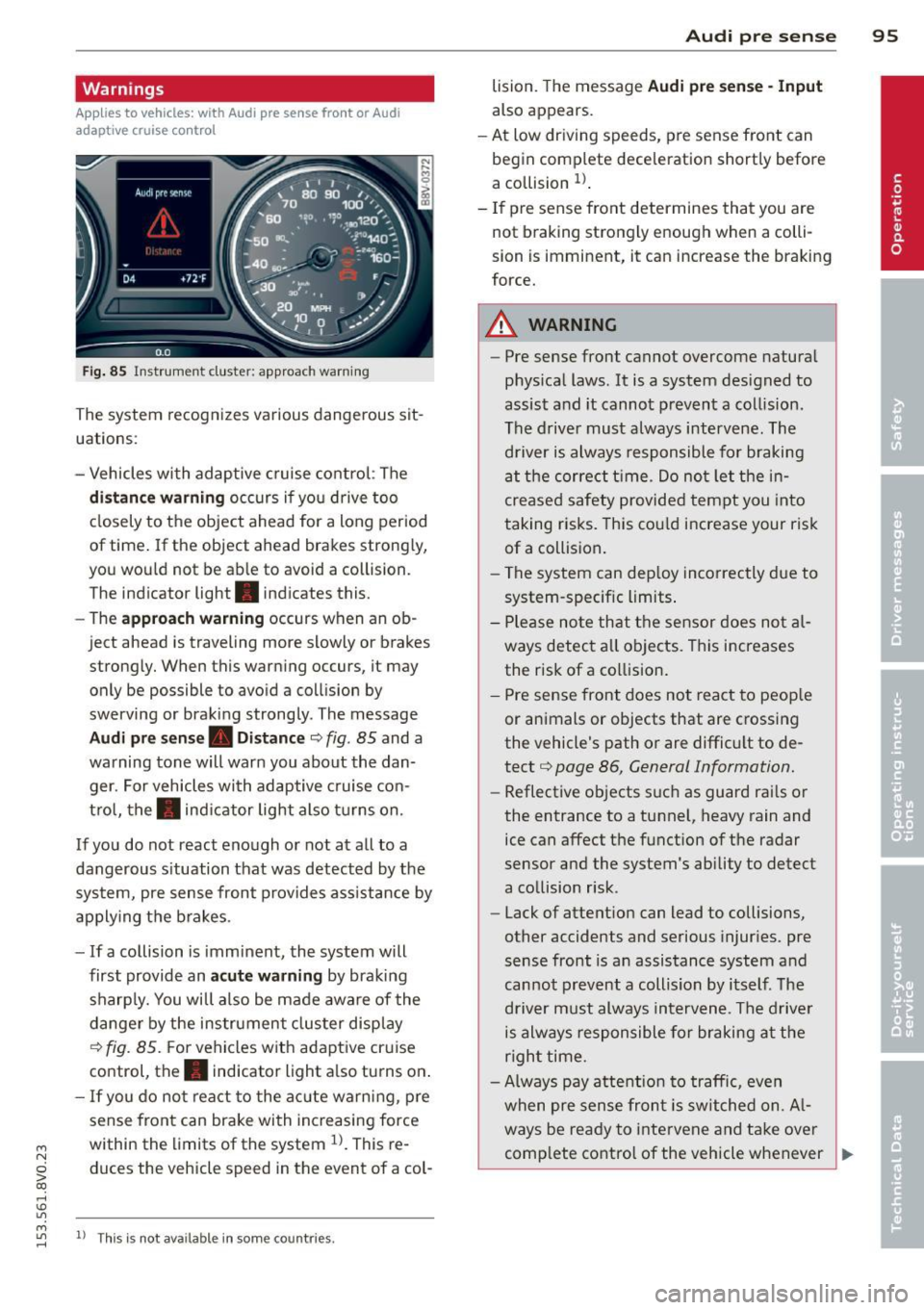
Fig . 85 In strum ent cluste r: approac h warnin g
The system recognizes various dangerous sit
uat ions :
- Vehicles with adaptive cruise control: The
distance warning occurs if you drive too
closely to the object ahead for a long period
of time.
If the ob ject ahead brakes strongly,
you would not be able to avo id a coll ision.
T he indicato r light . indicates this.
- The
approach warning occurs when an ob
ject ahead is traveling mo re slowly o r brake s
strongly. When this warning occurs, it may only be possible to avoid a collision by
swerving or braking strongly. The message
Audi pre sense. Distance c::> fig . 85 and a
warning tone will warn you about the dan ger. For vehicles with adaptive cruise con
trol, the. indicator light also turns on.
If you do not react enough or not at all to a
dangerous s ituation that was detected by the
system, pre sense front provides assistance by
applying the brakes .
- If a collision is imminent, the system will
first provide an
acute warning by braking
sharply. You will also be made aware of the
danger by the instrument cluster display
c::> fig. 85. For vehicles with adaptive cruise
control, the. indicator light also turns on .
-If you do not react to the acute warning, pre
sense front can brake with increasing force
within the limits of the system
l)_ This re
duces the vehicle sp eed in th e event of a col-
....,
"' ll Thi s is no t a vailable in some coun tries . rl
Audi pre sense 95
lision . The message Audi pre sense -Input
also app ears .
- At low driving speeds , pre sense front can
begin complete deceleration shortly before
a collision
l) .
-If pre sense front determines that you are
not braking strongly enough when a colli
sion is imminent, it can increase the braking
force.
A WARNING
--- Pre sense front cannot overcome natural
physical laws.
It is a system designed to
assist and it cannot prevent a collision .
The driver must always intervene. The driver is always responsible for braking
at the correct t ime. Do not let the in
creased safety provided tempt you into
taking risks. This could increase your risk
of a collision.
- The system can deploy incorrectly due to
system-specific limits .
- Please note that the sensor does not al
ways detect all objects . This increases
the risk of a collision.
- Pre sense front does not react to people
or animals or objects that are crossing
the vehicle's path or are difficult to de
tect
c::> page 86 , General Information.
- Reflective objects such as guard rails or
the entrance to a tunnel, heavy rain and
ice can affect the function of the radar
sensor and the system's ability to detect
a collision risk .
- Lack of attention can lead to collisions,
other accidents and serious injuries. pre
sense front is an assistance system and
cannot prevent a collision by itself . The
driver must always intervene . The driver
is always responsible for braking at the
right time.
- Always pay attention to traffic, even
when pre sense front is switched on. Al-
ways be ready to intervene and take over
comp lete control of the vehicle whenever .,.
Page 114 of 310
112 Automatic tran smi ssio n
Stopp ing /p ark ing
If the selector lever is not in the P position
when you open the driver's door, the vehicle
could ro ll. In vehicles with a convenience key*,
the following message appears:
Sh ift to P,
othe rwise veh icle c an roll a way. Door s do not
lock if le ver is not in P.
You will also hear a
warn ing tone.
"' Press and ho ld the brake pedal¢.&_ .
"' Set the parking brake.
"'Se lect the P selector lever pos ition.
St opp ing on an incline
• Always press the brake pedal to hold the ve
hicle in p lace and prevent it from "rolling
back"
¢ .&_ . Do n ot try to prevent the vehi
cle from "roll ing back" when a gear is en
gaged by increasing the eng ine speed
¢ (D.
Starting on an inclin e in vehicl es w it h out
Hill Hold *
"'Set the parking brake.
"' With the driving gear selected, press the ac
celerator pedal carefully . The parking brake
will release automat ically if your safety belt
is fastened.
St arting on an incline i n vehicle s with Hill
Hold*
"' With the driving gear selected, remove your
foot from the brake pedal and press the ac cele rato r pedal ¢
page 82, Hill hold.
Under certain circumstances, (such as driving
in the mountains or towing a tra iler), it may
be usefu l to sw itch temporarily to the manual
shift p rogram in order to adjust the gears to
the dr iving condit ions by hand
¢ page 114.
When parking on a level surface, simply place
the selector lever in the P pos ition. On in
clines , activate the parking bra ke first and
then move the selector lever to the P pos it ion
¢ page 80 . This prevents the locking mecha
nism from being loaded too heavi ly and will
make it easier to move the selector lever out
of the P position.
A WARNING
- The vehicle can roll even when the en
g ine is switched off.
- Unintended vehicle movement can lead
to serious injuries .
- Never leave your vehicle with the engine running while in gear. If you must leave
your veh icle when the engine is running,
set the parking brake and move these
lector lever to the P position .
- Power is still transferred to the wheels
when the engine is runn ing at idle. To
prevent the vehicle from "c reeping", you
must keep you r foot on the brake when
the engine is running and the selector lever is in the D, Sor R position or "tip
tronic" mode is selected . -
-Do not inadvertently press the accelera
tor peda l when the vehicle is stationary.
Otherwise the vehicle wi ll start to move
immediate ly, even if the parking brake is
set. Th is could result in a crash.
- Do not press the accelerator pedal when
changing the se lector lever position
while the veh icle is stationary and the
engine is running.
- Never engage the R or P selector level positions while dr iv ing. It could cause a
crash .
- Before driving down a steep slope, re
duce your speed and shift into a lower
gear with "tiptronic" .
- Do not ride the brakes or press the brake
pedal too often or too long when driving
downhill . Constant braking causes the
brakes to overheat and substantially re
duces braking pe rformance, increases
b rak ing distan ce or causes complete fa il
ure of the brake system.
- I f you must stop on an in cl ine, always
hold the vehicle i n place with the foot
brake or park ing brake to p revent it from
rolling back .
- Never hold the vehicle on an incline with
a slipping clutch . The clutch opens auto
matica lly when it becomes too hot from
Page 115 of 310
M N
0 > co ,...., \!) 1.1'1
M 1.1'1 ,....,
the overload. The ml indicator light
turns on and a message appears
Q page 115 when the clutch is overload
ed .
-If the engine must run while you are
working in the eng ine compartment with
the hood open, make sure a gear is not engaged . T he selecto r leve r must be
firmly in the P pos ition and locked in
pla ce and t he pa rking brake must be set
Qpage217. Otherwise, the veh icle
cou ld beg in moving when the eng ine
speed is high, even with the parking
brake set.
W Note
- When stopping on an incline, do not try
to ho ld the vehicle in place by pressing
the accelerator peda l w hile a dr iving gear
i s selected. This can cause the automatic
transmission to overheat and can dam
age it. Set the parking b rake or press the
brake pedal to p revent the veh icle from
ro lling .
- Allow ing the ve hicle to roll when the en
gine is stopped and the selector lever is
i n the N position will damage the auto
matic transmission beca use it is not lu
b ricated unde r tho se c ircumstances.
- The t ransm ission can overheat and be
damaged under certa in d riving and traf
fi c condition s suc h as frequent s tarts ,
creeping for a long time , or s top-and-go
traff ic. W hen the
ml or . indicator
light turns on, stop the vehicle at the
next oppo rtunity and let the t ransmis
s ion coo l
Qpage 115.
-Allow ing the ve hicle to roll when the en
gine is stopped w ill damage the S tron ic
transmission because it is not lubricated
Q page 282 , Emergency towing with
commercial tow truck .
@ Tips
For safety reasons, the park ing brake re
leases automatically only when the driver's
door is closed and dr iver 's safety belt is
fastened.
Automa tic tran sm iss ion 113
Hill descent control
App lies to vehicles : wi th 5 tronic tra nsmi ssio n
Hill descent control assists the driver when
driving down hills .
Hill descent control is activated when these
l ector lever is in the D or S position and you
press the brake peda l. The transmission auto
matically selects a gear that is suitable for the
i ncl ine. Hill descent cont ro l t ries to ma inta in
t h e speed ac hieved a t the t ime of b raking,
within physic al and tec hnical lim it a tions. If
may sti ll be ne cessa ry to adju st the speed
with t he b rakes . Because hi ll descent control
cannot sh ift down farthe r than 3rd gear, it
may be necessary to sh ift into t iptronic mode
in very steep areas. In this case, shift into 1st
o r 2nd gear in tiptro nic mode to use the en
gine's brak ing force to relieve the brakes .
Hill descent control switches off once the hi ll
levels out or you press the accelerator pedal.
On vehicles with a cruise contro l system*
Q page 83, hill descent control is also activat
ed when the speed is set .
A WARNING
-
Hill descent control cannot overcome
physical lim itations, so it may not be ab le
to maintain a co nsta nt speed unde r all
conditions . A lways be ready to apply the
b rakes .
•
Page 191 of 310
M N
0 > co ,...., \!) 1.1'1
M 1.1'1 ,....,
Smart Technology
Information about
data recorded by
vehicle control
modules
Your vehicle is not equipped with a crash data
recorder. This device is installed by some vehi
cle manufacturers to record data about crash
es so that it can be analy zed later . Crash data
recorders are also called "Event Data Record
ers ( EDR)" .
In some legal jurisdictions, it is not permitted
to access or download data recorded by pre
installed crash data recorders in order to eval
uate a crash without clear consent of the vehi
cle owner .
Your vehicle is not equipped with a crash data recorder. However it does contain a variety of
electronic control modules for various vehicle
systems such as engine function, exhaust
treatment or airbags and safety belts .
These electronic control modules record vehi cle data during normal driving for diagnosis
and repair purposes . The recording capability
of the electronic control modules is limited to
data only- no sound is recorded.
If the control
module detects a system ma lfunction or other
change in status, a very limited amount of da
ta is recorded for an extremely small period of
time . Data that is recorded in such a case may
include vehicle speed, d riving direction, the
load on the brakes and head restraints and
performance in the event of an acciden t or
other change in status . The stored data can
only be read or downloaded with special devi
ces.
Electronic stabilization
control (ESC)
Description
The Electronic Stabilization Control (ESC) con
tr ibutes to driver safety. It reduces the risk of
slipp ing and improves driving stability. ESC
Smart Technolog y 189
detects critical situations such as the vehicle
oversteering and understeering or the wheels
are spinning . The vehicle is stabilized by ap
plying the brakes or reducing engine torque.
Once the ESC is activated, the indicator light
m blinks in the instrument cluster .
The following systems are integrated in the
ESC:
Anti-lock braking system (ABS )
ABS prevents the whee ls from locking when
braking. The vehicle can still be steered even
during hard braking. Apply steady pressure to
the brake pedal. Do not pump the pedal. A
pulsing in the brake peda l indicates that the
system is acting to stabilize the vehicle.
Brake assi st sys tem
The brake assist system can decrease braking
distance. It increases braking power when the
driver presses the brake pedal quickly in emer
gency situations. You must press and hold the brake pedal until the dangerous situation is
over . In vehicles with adaptive cruise control*,
the brake assist system is more sensit ive if the
distance detected to the vehicle ahead is too
small.
Anti-slip regulation (ASR)
ASR reduces engine power when the drive
wheels begin spinning and adapts the force to
the road conditions . This makes it easier to
start , accelerate and dr ive up inclines .
Electronic differential lock (EDL)
The EDL brakes wheels that are spinning and
transfers the drive power to the other drive
wheel or wheels if the vehicle is equ ipped with
all wheel drive*). This function is not available
at higher speeds .
In extreme cases, EDL automatically switches
off to keep the brake on the braked wheel
from overheating . The vehicle is still working
correctly. EDL will switch on aga in automat i
cally when cond itions have returned to nor-
mal. .,..
•
•
•
Page 193 of 310
M N
0 > co ,...., \!) ..,.,
M ..,., ,....,
Smart Technology 191
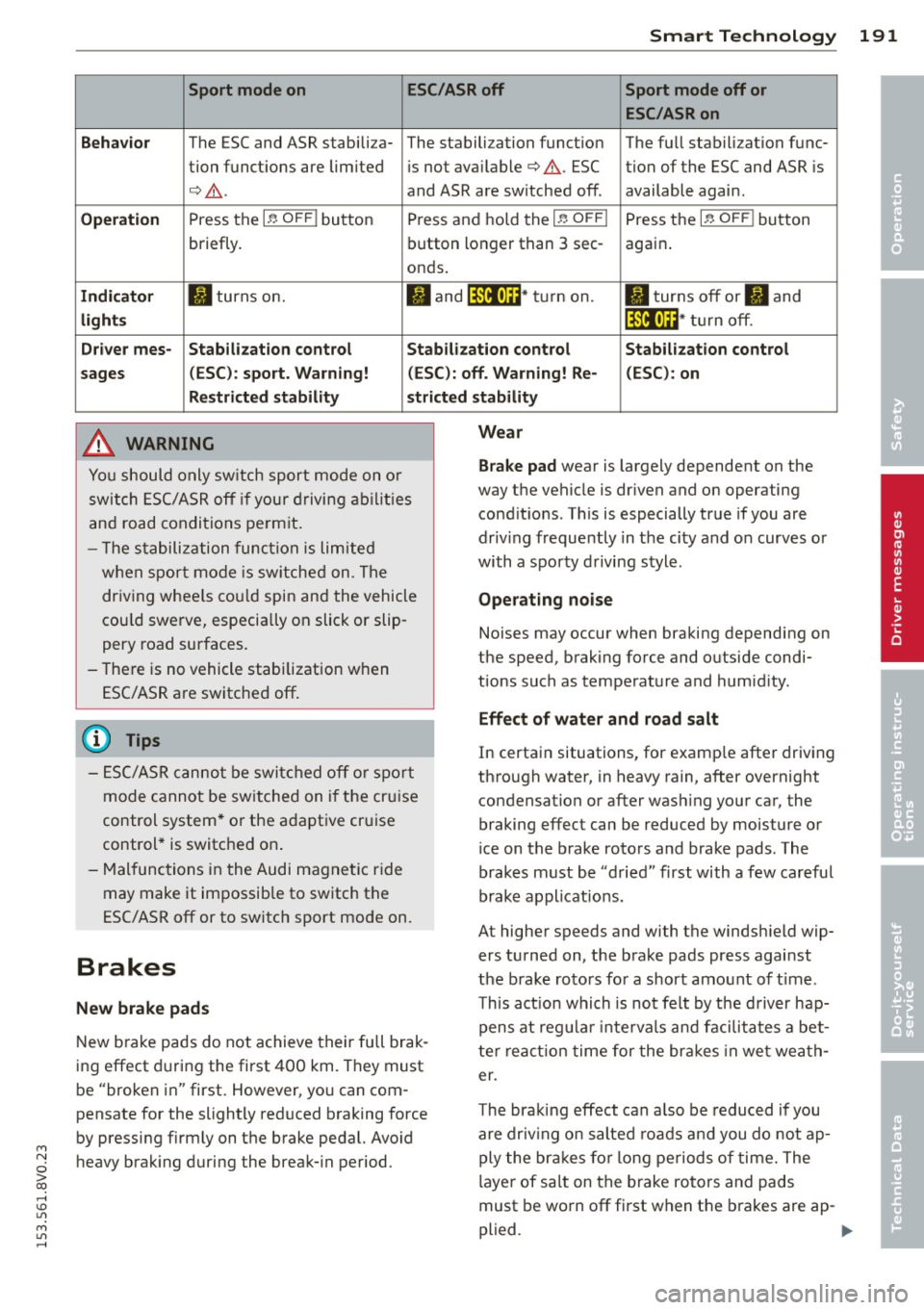
Sport mode on ESC/ASR off Sport mode off or
ESC /ASR on
Behavior
The ESC and ASR stabili za- The sta lbili zation funct ion The fu ll stabili zation f unc-
tion func tions are lim ited is not available¢ .&,.. ESC tion of the ESC and ASR is
¢ .&,. .
and ASR are switched off . available again .
Operation P ress the I~ OFF I button Press and ho ld the I~ OFFI Press the I~ OFF I button
briefly. b
utton lo nger than 3 sec-
again.
onds.
Indi cator II turns on. II and jf'illt)H * tu rn on. II tur ns off or II and
light s jf 'ilftli~ * tur n off.
Driv er mes -Stab ilization control Stab ilization control Stabilization control
sages (ESC ): sport. Warning! (ESC ): off. Warning! Re- (ESC) : on
Restricted stability st ricted stability
_& WARNING
Yo u should o nly sw itch spor t mode on o r
switch ESC/ASR o ff if your driving abilities
and road condi tions pe rm it .
- T he s tabili zation func tion is limited
when sp ort mode is sw itche d on . T he
dr iving w hee ls co uld spin and the vehicle
cou ld swerve, especia lly on slick or slip
pery road surfaces.
- The re is no vehicle stabilization when
ESC/ASR a re switc hed off.
@ Tips
-
- ES C/ASR canno t be swi tched off or spor t
mode cannot be sw itche d on i f the cr uise
control system * or the a daptive cr uise
control * is switc hed on .
- Malfunc tions in the Audi mag net ic r ide
may make it impossib le to sw itch the
ESC/ASR off or to switch sport mode on.
Brakes
New brake pads
New b ra ke pads do not achieve their full brak
i n g effect d uring the first
4 00 km. They must
be "broken in" first. However, yo u can com
pensate for the slightly reduced braking force
by pressing firmly on the brake pedal. Avoid
heavy brak ing duri ng the break- in period.
Wear
Brake pad
wear is largely dependent on the
way the vehicle is driven and on operating
cond it ions . This is especially true if you are
driv ing frequently in the city and on curves or
with a sporty d riving style .
Operating noise
Noises may occur when bra king depending on
the speed, brak ing force and outs ide condi
tions such as temperature and humid ity.
Effect of water and road salt
In certa in situations, for examp le after driv ing
th ro ugh water, in heavy rain, after overnight
condensation or after was hing your car, the
braking effect can be reduced by mois ture or
ice on the brake rotors and brake pads . The
brakes must be "d ried" first with
a few car eful
brake applications .
At higher speeds and with the windsh ield wip
ers turned on, the brake pads press against
the b rake ro to rs fo r a shor t amo unt of t ime .
T h is act ion whi ch is not felt by the driver hap
pens at reg ular intervals and facilita tes a bet
t e r r ea ct ion time for the br ake s in we t wea th
er.
T he bra king effect can a lso be reduced if you
are driv ing o n salted roa ds an d you do not ap
ply the br akes fo r long peri ods of time. The
l aye r of sa lt on the brake rotors and pads
must be wo rn off first when the b rakes are ap -
plied. .,.
•
•
•
Page 194 of 310
192 Smart T echnol ogy
Corro sion
Leaving the vehicle parked for long periods o f
time, low mi leage and avoiding heavy braking
can contribute to corrosion on the brake ro
tors and di rty brake pads.
I f you usually avoid heavy brak ing or if there is
corrosion present, occasiona l heavy braking at
high speeds is recommended to clean the
brake rotors and pads¢,& .
Brake system malfunction
if you notice that the brake pedal t ravel has
suddenly gotten larger, then a brake circuit
may have failed. Drive to your authorized Audi
dealer or qualified repair facility immediately
to hav e the problem corrected . On the way
there, drive with reduced speed and keep in
mind that a long braking distance and in
creased pressure on the brake pedal will be
necessary .
Lo w brake fluid level
When the brake fluid level is low, ma lfunc
tions in the brake system may occur. The
brake fluid level is electronically mon itored.
B rake bo ost er
The brake booster amplifies the pressure you
apply to the brake pedal. It only works when
the engine is running.
A WARNING ,~ ·
- You should only perform braking maneu
vers to clean the brakes when the road
condit ions perm it. Never put others on
the road at risk -never forget the risk of
acc idents!
- On steep slopes, reduce the speed and
select a lower gea r or lowe r selector lev
er position. Drive as litt le as poss ible
w hil e pressing the bra ke peda l and avoid
putt ing you r left foot on the brake pedal
whi le driving . This could cause the brakes
to overheat and impair the efficiency of
the brakes .
- Do not let the brakes "grind" by always
keeping yo ur foot on the brake peda l. This can cause the brakes to overheat
in-
,
crease wear and increase braking dis
tance unnecessarily.
- Certain weather and operating condi
tions such as driving through water, driv
ing in heavy rain or driving after washing
your veh icle can impa ir the effectiveness
of the brakes . In the winter, ice may
bu ild up on the bra ke pads, rotors and
d rums. Che ck these components by b rak
ing caref ully. App lyi ng the br akes care
fu lly several times dries the brakes and
removes ice bui ld-up .
- The eff ic iency of the brakes can also be
impaired by driving for long stretches on roads covered with salt without using the
brakes. Yo u can remove salt deposits
from the brake rotors and pads by care
fully applying the brakes several times.
- If the front spoiler is damaged or you in
stall another spoiler, make sure the front
wheel brakes are ventilated properly.
Otherwise , the brake system could over
heat, wh ic h red uces their effectiveness .
- Failure of a brake circuit impa irs braking
performance, wh ic h increases bra king
d istance . Avoid driving the vehicle and
have it towed it to the nearest author
i z ed A udi dealer or au thorized Aud i Serv
ice Facility .
- Do not let your ve hicle roll w it h the en
g ine switched off unde r any circumstan
ces .
- If the b rake booste r is no t working, you
will have to press much harder on the b rake peda l to compensate for the lack
of the booster.
(D Note
- N ever le t the bra kes "rub" by pressing
t he pedal ligh tly when braking is not
really necessary . This causes the brakes
to overheat and increases braking dis
tance and causes wear .
- Before dr iv ing on a long stretch with
steep s lopes, reduce your speed and shift
to the next lower gear This makes use of
the engine brak ing effect and relieves .,.
Page 195 of 310
M N
0 > co ,...., \!) 1.1'1
M 1.1'1 ,....,
the brakes. If you need to brake addit ion
ally, bra ke in intervals and not continu
ously.
(D Tips
- If the brake boos ter is not wor king, you
must p ress the brake pedal with much
more force t hen no rma l.
- If yo u retrof it your vehicle with a front
s po ile r, wheel covers or similar items,
make sure that the air f low to the front
whee ls is not interrupted. Otherwise the
brake system can become too hot.
Electromechanical
steering
The elec tromechanical steering suppor ts the
driver's s teering movements .
Powe r stee ring adapts electronically based o n
the veh icle speed.
The vehicle still has full stee ring fu nctionality
if the powe r steering fails o r whe n the eng ine
i s stopped (towi ng). To s teer, yo u must app ly
m uc h mo re fo rce than usual.
Indicator lights and messages
• Do not drive vehicle: steering defective
If th is in dicator lig ht tu rns on and stays on
and this message appears, the power steering may have fa iled.
Do
not co ntin u e dr iving . See an autho rize d
Aud i dea ler o r autho rized Aud i Service Fac ility
for assistance.
• Do not drive vehicle: steering defective
There is a malf unct io n in the electro nic steer
in g lo ck. You canno t turn the ign ition on.
Do
not tow your vehicle beca use it ca nnot be
steered. See an autho rized Aud i dea le r or au
thor ized Audi Se rv ice Facility for ass istance.
Ei:-Y Steering malfunction : you can continue
driving
I f the indicator light turns on, the steering
wheel may be more difficult to move or more
Smart Technolog y 193
sensit ive tha n usua l. The stee ring wheel may
also be at a n angle when dr iv ing stra ight .
D rive slowly to you r auth ori zed Audi de aler o r
qualifie d wo rkshop to have the ma lf u ncti on
correc ted.
II Steering lock : sy stem fault! Pl ease con
tact Service
T he re is a malfunction in the elec tronic steer
ing lock .
D rive to an author ized Audi dealer or author
ized Audi Serv ice Facility immediately to have
the malfunc tion corrected.
A WARNING
Have the sys tem ma lf u nction co rrec ted as
soon as po ssible by an aut horiz ed Aud i
d e aler or au thoriz e d Au di Service Fa cili ty,
a s this incr eases the r is k of an acciden t.
(D Tips
If th e . or l~ij indi cator ligh t only s tays
o n for a short t ime , you may con tinue dr iv
i ng.
ALL wheel drive
(quattro)
App lies to vehicles: wi th all wheel drive
In all wheel drive, all four wheels are pow
ered.
General information
In all whee l dr ive, the dr iv ing power is divi ded
between all fo ur whee ls. Thi s happens auto
matically depending on yo ur driv ing behavior
as well as the current road conditions. Refer
to
¢ page 189, Electronic stabilization con
trol (ESC) .
The all wheel drive concept is designed for
high eng ine power. Your veh icle is except ion
a lly powerfu l and has excellent driving charac
te ristics both under normal driv ing cond itions
and on snow a nd ice. Always read and follow
safety precaut ions¢ .&.. ..,.
•
•
•
Page 199 of 310
M N
0 > co ,...., \!) 1.1'1
M 1.1'1 ,....,
Driving and the
environment
The first 1,000 miles (1,500 km) and
afterwards
New engine
The engine needs to be run-in during the first
1,000 miles (1 ,500 km) .
For the fir st 600 mil es
(1,000 kilometers):
.,. Do not use full throttle.
.,. Do not drive at engine speeds tha t are more
than 2/3 of the max imum permitted RPM .
.. Avoid high engine sp eeds .
From 600 to 1,000 mile s (1,000 to
1,500 kilometers):
.. Speeds can gradually be increased to the
max imum pe rm iss ib le road or eng ine speed .
During and after break-in per iod
.,. Do not rev the engine up to high speeds
when it is cold. Th is app lies whether the
transmission is i n N (Ne utra l) or in gear.
After the break- in period
.. Do not exceed maximum engine speed un
der any circumstances.
.,. Upshift into the next higher gear
before
reaching the red area at the end of the tach
ome ter scale
¢ page 10.
During the first few hours of driving, the en
g ine's interna l friction is higher than later
when all the moving parts have been broken
i n. How well this break-i n process is done de
pends to a conside rable extent on the way the
ve hicl e is driven d uring the first 1,0 00 miles
(1, 500 k ilome ters).
(D Note
Extremely h igh engine speeds a re auto
ma tica lly reduced. However, t he se RPM
lim its are pr ogr amme d for an eng ine t hat
is broken in, no t a new engine .
Driving and the environment 197
@) For the sake of the environment
Do not drive with unnecessar ily hi gh en
g ine speeds -upsh ifting ear ly saves f uel,
r educes noise and protects the environ
ment.
New tires
If your vehicle is running on new tires, drive
particularly caref ul for the first 350 miles
(500 kilomete rs) afte r fitt ing.
.&, WARNING
N ew tires tend to be slippery and mus t al
so be "b roken -in" . Be s ure to remember
this dur ing t he f irst 350 m iles (500 kilo
meters) . Bra ke gently . Avoid fo llow ing
closely behind other vehicles or other sit
uations that m ight require sudden, hard
b raking .
New brake pads
Remember that new brake pads do not have a
full brak ing effect dur ing the first 250 m iles
(400 kilomete rs) afte r they a re install ed.
New brake pads have to be "burnished in" be
fo re they have optima l grab¢ .&. .
D uring the brea k-in pe riod, you should avo id
putting severe loads on the brakes. Severe
l oads include , for example, sudden hard brak
i ng, in particular at very h igh speeds or, for
example, on mounta in passes .
.&, WARNING
New b rake pa ds don't have the best stop
p in g p ower a nd must be "b ro ken -in " dur
ing the ini tial 1 00 t o 150 miles (15 0 to
2 00 kilometers) o f no rma l cit y driving . You
can compensate for this by pressing t he
b rake peda l more fi rm ly . This also applies
l ater when new pads are installed.
•
•
•