start stop button AUDI S3 2015 User Guide
[x] Cancel search | Manufacturer: AUDI, Model Year: 2015, Model line: S3, Model: AUDI S3 2015Pages: 310, PDF Size: 76.15 MB
Page 83 of 310
M N
0 > co ,...., \!) ..,.,
M ..,., ,....,
driving force has been built up at the
whee ls.
E mergenc y brake fun ction
An emergency braking funct ions ensures that
the vehicle can be slowed down even if the
normal brakes fail¢ page 82, Emergency
braking function .
A WARNING
-Do not press the accelerator pedal inad
vertent ly when the vehicle is stationary
and the engine is runn ing and a gear is
selected. Otherwise the vehicle will start
to move immediately and could result in a crash .
- If the power supply fa ils, the re leased
park ing brake can no longer engage. In
this case, par k the vehicle on level
ground and secure it by placing the se
lector lever i n the P pos ition. See an au
thori zed Aud i dea ler or a utho rized Aud i
Serv ice Facility for ass istance.
(D Note
I f the . or. (U SA mode ls) /. (Cana
da mode ls) indicato r light in t he instru
ment cluster blinks, there is a mal fun ct ion
in the brake system . Re fer to the detailed
description of the indicator lights
r=:>page 18.
-If the . (USA models) /. (Cana-
da models) or
Iii indicator light turns
on, there is a malfunct ion in the park ing
brake
r=:> page 19.
(D Tips
- If the electromechanical parking brake is
set wh ile the ignition is switched off, the
¢C)'A indicator light in the button and in
the instrument cluster dis- play . (USA models)
I. (Cana-
da models) w ill t urn off afte r a ce rtain
amount of time.
- If dr iver's door is opened while the ign i
tion is switched on, the parking b rake
sets automat ically. This prevents unin
tended ro lling of the vehicle .
Dri vin g 81
-Occasional noises when the pa rking
brake is set and released are normal and
are not a cause for concern.
- When the vehicle is pa rked, the park ing
brake goes through a self -test cycle at
regu lar interva ls. Any no ises assoc iated
w ith this are normal.
- If there is a power fa ilure, the park ing
brake will not set if it is released, and it
w ill not release if it is set
r=;, & . See a n
authorized Audi dealer or autho rized
Audi Service Facility fo r ass ista nce.
Parking
" Press the b rake pedal to stop the veh icle.
" Pull the switch @¢
page 80, fig. 73 to set
t he par king brake.
" Place the se lecto r lever in the P position .
.. Turn the engine off¢
A_.
"Tu rn the steering wheel when parking on in
clines so that the wheels w ill roll into the
curb if the vehicle starts moving.
A WARNING
- Always take the vehicle key w ith you
when leav ing the vehicle, even for a
short pe riod of time. This applies part ic
ularly when children rema in in the veh i
cle . Ot herwise children co uld s tart the
engine, release the pa rking brake o r op
erate electrical equipment such as power
windows, which increases the risk of an
accident.
- No one should remain in the vehicle
when it is locked, especially children.
Loc ked doors make it more difficult for
emergency workers to get into the ve hi
cle, which puts lives at risk.
•
Page 91 of 310
....,
N
0 > co
rl I.O
"' ....,
"' rl
Switching adaptiv e cruis e control off
• Push the lever away from you into position
@ until it clicks into p lace. The message
ACC: off appears.
The stored speed in the L ED line is erased .
@ Indicato r light s
Ill-adaptive cru ise control is switch ed on . No
objects ar e detected ahead. The stored spe ed
is maintained .
B-An object ahead was detected . The adap
tive cruise contro l system regulates the speed
and d istance to the object ah ead and brakes/
accelerates automatica lly.
$ -adaptive cruise contro l is switched on . An
object ahead was detected. Yo ur vehicle re
mains stopped and will not start driving auto
matica lly.
• -The automatic braking is not eno ugh to
maintain a sufficient distance to an ob ject
ahead . Yo u must int ervene ¢
page 92 , R e
quest for driver intervention.
© Instrument cluster display
If adaptive cruise cont ro l is not shown in the
instr ument cluster d isp lay, you can call it up
using the multifunction steering wheel b ut
tons ¢
page 28 .
Based on the g raphics in the display, yo u can
determ ine if the system is maintaining a dis
tance to a vehicle ahead and what that dis
tance to this vehicle is:
N o vehicle -No object ahead was detected .
White vehicl e -An object ahead was detected .
Red vehicle -Request for the driver to take ac
tion ¢
page 92 .
Both arrows on the scale© in dicate the dis
tance to the object ahead. No arrow appears
when the vehicle is on an open road and there
is no object ahead.
If an object is detected
ahead, the arrow moves on the scale.
The green zone on the scale indicates the
store distance. Fo r information on changing
Audi ad apti ve crui se control 89
the distance, refer to r::!> page 91. If the dis
tance selected is exceeded or not reached, the
arrow moves into the red zone on the scale.
_& WARNING
- Using adaptive cru ise contro l incorrectly
can cause collisions, other acc idents and
ser ious inju ries .
- If you press t he
~IS-E T ~I button when driv
ing at speeds below 20 mph (30 km/h),
the vehicle acce lerates automatically up
to 20 mph (30 km/h), wh ich is the mini
m um speed that can be set.
(D Tips
- If you switch the ig nit ion or the adaptive
cruise cont ro l system off, the set speed
is e rased for safety reason .
- The Elect ronic Stabilization Control (ESC)
and Anti-Slip Regulat ion (ASR) both
switch on when the adaptiv e cruis e con
tr ol is swi tched o n. ESC and AS R canno t
be switched off when ad aptive cruise
cont ro l is switched on .
- Wi th t he adap tive c ruise control activat
ed the ESC sport mode cannot be ac tiv at
ed.
Changing the speed
Applies to vehicles: wit h Audi adaptive cru ise control
0
f
JJ
0
Fi g. 81 Operati ng leve r: c ha ngi ng the s pee d
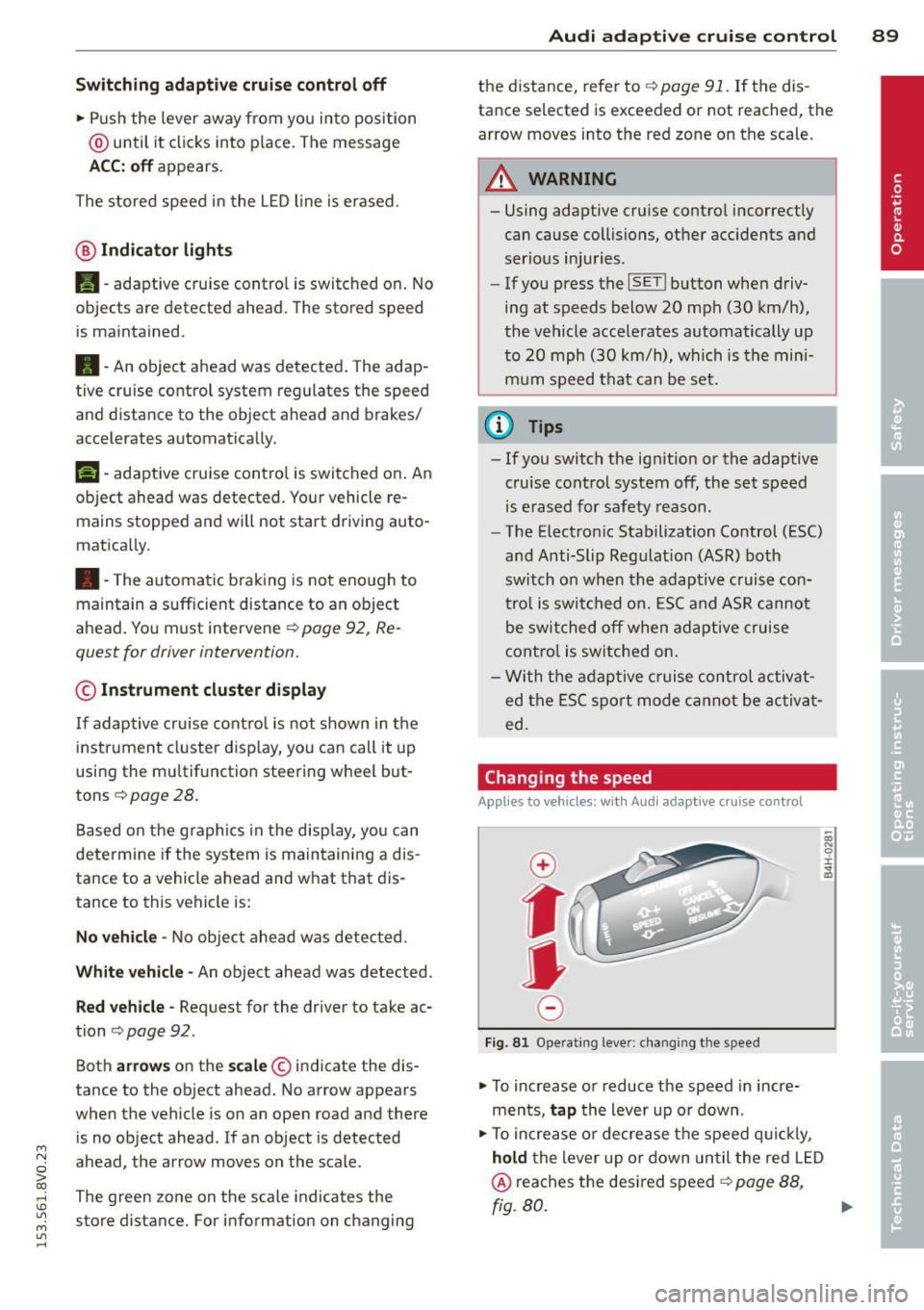
• To increase o r reduce the speed in incre
ments,
tap the lever up o r down .
• To increa se o r de crea se t he speed q uickl y,
hold the lever up or down until the red L ED
@ reaches the desired speed r::!> page 88,
rg. 80. ~
Page 113 of 310
....,
N
ci > co
rl I.O
"' ....,
"' rl
position longer than approximately 2 seconds
when the brake pedal is not pressed.
Interlock button
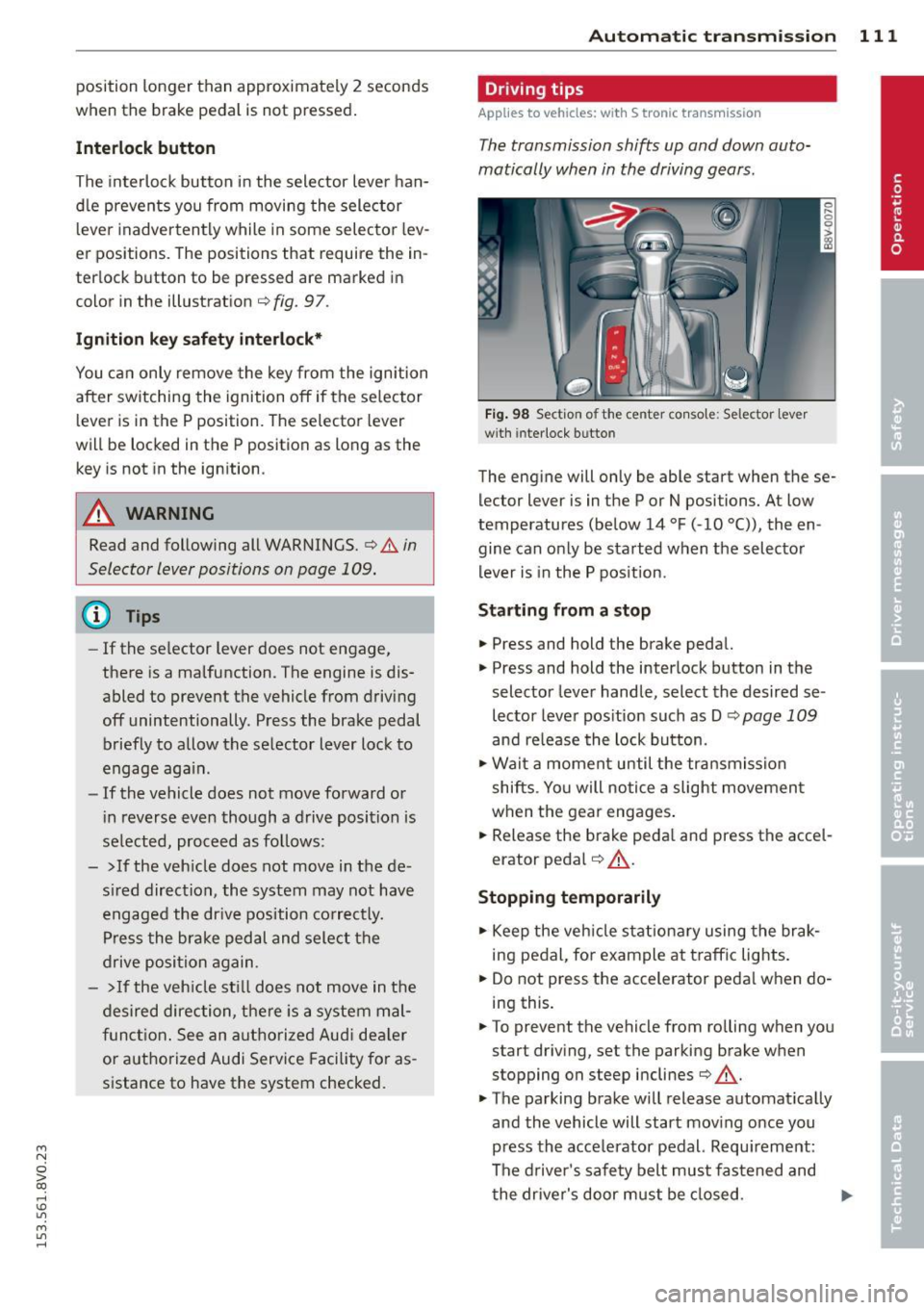
The interlock button in the selector lever han
dle prevents you from moving the selector
l eve r inadvertently while in some selecto r lev
er positions. The positions that require the in
terlock button to be pressed are marked in
color in the illustration
c::;, fig. 97.
Ignition key safety interlock*
You can only remove the key from the ignition
after switching the ignition off if the se lector
lever is in the P position. The selector lever
will be locked in the P position as long as the
key is not in the ignition .
A WARNING
Read and following all WARNINGS. c::;, &. in
Selector lever positions on page 109.
{D) Tips
- If the selector lever does not engage,
there is a malfunction. The engine is dis
abled to prevent the vehicle from driving
off unintentionally . Press the brake pedal
briefly to allow the selector lever lock to
engage again.
- If the vehicle does not move forward or
i n reverse even though a drive position is
se lected, proceed as follows:
- > If the veh icle does not move in the de
sired direction, the system may not have
engaged the dr ive position correctly.
Press the brake pedal and select the
drive position again.
- >If the vehicle still does not move in the
desired direction, there is a system mal
function. See an authorized Aud i dea ler
or authorized Audi Service Facility for as
sistance to have the system checked.
Autom atic transm ission 111
Driving tips
Applies to veh icles: w it h S tronic transm iss ion
T he transmission shifts up and down auto
matically when in the driving gears.
Fig. 98 Section of the center co nsole: Selector lever
w ith interlock b utto n
The engine will only be able start when these
lector lever is in the P or N positions. At low
temperatures (below 14 °F (-10 °C)), the en
gine can only be started when the selector
lever is in the P position.
Starting from a stop
.,. Press and hold the brake pedal.
.,. Press and hold the interlock button in the
selector lever handle, select the desired se
lector lever position such as D
c::;, page 109
and re lease the lock button.
.,. Wait a moment until the transmission
shifts . Yo u will notice a slight movement
when the gear engages.
... Release the brake peda l and press the accel
erator pedal
c::;, .&_ .
Stopping temporarily
.,. Keep the vehicle stationary using the brak
ing pedal, for example at traffic lights.
.,. Do not press the accelerator peda l when do
ing this.
.,. To prevent the vehicle from ro lling when you
start driving, set the parking brake when
stopping on steep inclines
c::;, .&_ .
.,. The parking brake will release automat ically
and the vehicle will start moving once you
press the acce lerator pedal. Requ irement:
The driver's safety belt must fastened and
the driver's door must be closed.
IJll,,
Page 117 of 310
M N
ci > co ,...., \!) ..,.,
M ..,., ,....,
Launch Control-Program
App lies to vehicles: with launch control
The Launch Control Program enables maxi
mum acceleration.
Requirement : The engine must be at operat
ing temperature and the steering wheel must
not be turned .
.. With the engine running, press the
!.$OFFI
button briefly one time 1) .
.. Pull the selector lever back out of the 0/S
position briefly to select the S position, or
press it toward the right into the t ipt ronic
pos ition or select the
d ynamic driv ing mode
i n drive select*
~ page 106.
.. Press the brake peda l firmly with your left
foot and hold it all the way down for at least
1 second.
.. At the same time, press the gas peda l all the
way down with your right foot unti l the en
gine reaches and stays at a high RPM level.
.. Remove your left foot from the brake.
A WARNING
- Always adapt your driving to the traffic
flow.
- Only use Launch Control when road and
t raff ic conditions a llow it and other driv
ers wi ll not be endangered or impacted
by yo ur driving and the veh icle's acceler
a tion.
- Please note tha t the dr ive whee ls can
spin and the vehicle can brea k away
when sport mode is switched on, espe
c ially when the road is sl ippery.
- Once the vehicle has started moving,
press the
I.$ OFF I button br iefly to turn
the sport mode off.
(j) Tips
- The transm ission tempe rat ure may in
crease significantly after using the
l ) In vehicles with a dr iver info rmat ion system, an ESC
light in the in stru m ent cl us ter stays on contin uo usly
and the m essage
Stabilizatio n cont rol (ESC): spor t.
W arning! Restricted stability
appears temporarily.
Automa tic tran sm iss ion 115
Launch Control Program . If that hap
pens, the program may not be availab le
for a few m inutes. It will be ava ilable
again after a cool-down per iod.
- When accelerating using the Launch
Contro l Program, all vehicle parts are
subject to heavy loads. Th is can lead to
increased wear .
Emergency mode
Applies to vehicles: with S tronic transm ission
In the event of a system malfunction, there is
an emergency program.
If all of the selector lever positions are high
li ghted with a light backgro und in the instru
ment cluster d isplay, there is a system mal
funct ion and the S tronic transmission is run
ning in the emergency program . The vehicle
can still be driven in emergency mode, but on
ly w ith reduced speed and not in all gears. In
some cases, the veh icle
c ann ot driv e in re
v e rs e .
(D Note
If the transmission runs in emergency
mode, drive to your author ized Audi dealer
or q ua lified repa ir facil ity immed iate ly to
have the ma lf u nction corrected.
Transmission malfunction
• Tran smiss ion malfuncti on! Please stop
the vehicle and select P
T here is a malfunction in the transmiss ion .
Park the vehicle securely and do not continue
driv ing. See an authorized Audi dealer or au
thorized Audi Service Facility for assistance.
• Tran smi ssion overh eatin g! Plea se stop
the vehicle!
The transm iss io n is too hot and can become
damaged . Stop and let the transmission cool .,.
•
Page 125 of 310
....,
N
0 > co
rl I.O
"' ....,
"' rl
Parallel parking
Applies to vehicles: with parking system p lus wit h rear
view ca mera
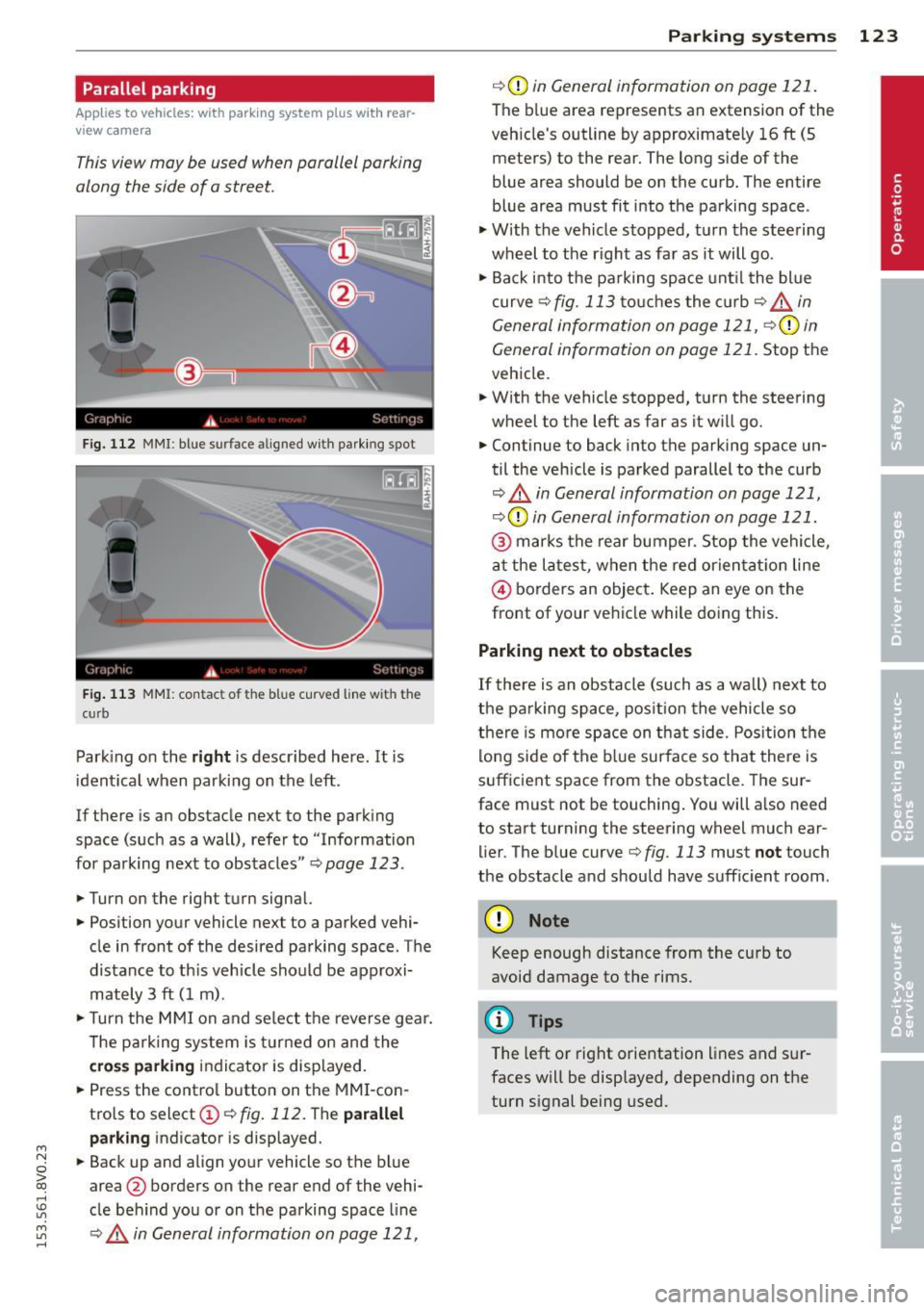
This view may be used when parallel parking
along the side of a street.
Fig. 112 MMI : blue su rface aligned wit h parking spot
Fig. 113 MMI: contac t o f t he b lue curved line w it h th e
c urb
Parking on the right is described here . It is
identical when parking on the left.
If there is an obstacle next to the parking
space (such as a wall), refer to " Information
for parking next to obstacles "¢
page 123.
.. Turn on the right turn signal.
.. Position your vehicle next to a parked vehi
cle in front of the desired parking space . The
distance to th is veh icle should be approxi
mately 3 ft (1 m) .
.. Turn the MMI on and select the reverse gear.
The parking system is turned on and the
cross parking indicator is displayed.
.. Press the control button on the MMI-con
trols to select@¢
fig. 112. The parallel
parking
indicator is displayed .
.. Back up and align your vehicle so the blue
area @ borders on the rear end of the vehi
cle behind you or on the parking space line
¢.&. in General information on page 121,
Parking systems 123
¢(Din General information on page 121.
The blue area represents an extension of the
veh icle's outline by approximate ly 16 ft (5
meters) to the rear. The long side of the
blue area should be on the curb. The entire
blue area must fit into the parking space .
.,. With the vehicle stopped, turn the steering
wheel to the right as far as it will go .
.. Back i nto the parking space unt il the blue
curve
¢ fig. 113 touches the curb¢,&_ in
General information on page 121, ¢(Din
General information on page 121.
Stop the
vehicle .
.. With the vehicle stopped, turn the steering
wheel to the left as far as it w ill go.
.. Continue to back into the parking space un
til the vehicle is parked parallel to the curb
¢ .&. in General information on page 121,
¢ (Din General information on page 121.
@ marks the rear bumper. Stop the vehicle,
at the latest, when the red orientat ion line
© borders an object . Keep an eye on the
front of your vehicle while doing this.
Parking next to obstacles
If there is an obstacle (such as a wall) next to
the parking space, position the vehicle so
there is more space on that side. Position the
lo ng side of the blue surface so that there is
sufficient space from the obstacle . The sur
face must not be touching. You will a lso need
to start turning the steering wheel much ear lier. The blue curve
¢ fig. 113 must not touch
the obstacle and should have sufficient room .
(D Note
Keep enough distance from the curb to
avoid damage to the rims.
@ Tips
The left or right orientation lines and sur
faces will be displayed, depending on the
turn s ignal being used.
Page 299 of 310
M N
0 > co ,...., \!) 1.1'1
M 1.1'1 ,....,
Driver information system ... .. .. .. .. .. 27
Boost ..... .. .. .. .. .... ... .. .. .... 29
CD/radio display ....... ... .. .. .. .. .. 27
Door/rear lid warning ..... .. .. .. .. .. 27
Driver messages . . . . . . . . . . . . . . . . . . . . 14
Efficiency program . . . . . . . . . . . . . . . . . . 29
E ng ine o il temperature indicator .. .. .. 32
I ndicator lights . . . . . . . . . . . . . . . . . . . . 14
L ap time r .. ............... .. .. .. .. 3 2
On- boa rd comp ute r . . . . . . . . . . . . . . . . . 28
Outside tempera ture display . ... .. .. .. 27
Service interval disp lay . ... .. .. .. .. .. 13
Using the multifunction steer ing whee l . 27
Dr iver sea ting posi tion ...... .. .. .. .. . 126
Drive se lect
refer to Audi dr ive se lect . ...... ... .. 106
D riving safe ly . .. .. ..... ... .. .. .. .. . 125
D riving through water . . . . . . . . . . . . . . . 198
Driving time . . . . . . . . . . . . . . . . . . . . . . . . 28
D ust filter
refer to Po llutant filte r . . . . . . . . . . . . . . 68
E
EC O mode ( autom atic clima te control sys -
tem) . ..... .. .. ... .. ..... ... .. .. .... 70
E fficiency program . . . . . . . . . . . . . . . . . . . 29
D escr ipt io n ................. ... ... . 29
Fu el economy messages . . . . . . . . . . . . . 30
O the r equipmen t . . . . . . . . . . . . . . . . . . . 30
Elect rical accessories
refer to Socket . . . . . . . . . . . . . . . . . . . . . 60
Elect romechanical par king brake
refer to Parking brake ..... .. .. .. .. .. 80
E lect romechan ic a l steering .. .. .. .. .. . 193
I ndica tor ligh ts .. ..... ... .. .. .. .. . 193
E lect ron ic diffe rent ial loc k ... .. .. .. .. . 189
I ndicator light . . . . . . . . . . . . . . . . . . . . . 2 2
Electronic immobili zer ...... .. .. .. .. .. 40
also refer to Immobilizer .. .. .. .. .. .. 35
E lect ro nic spee d limiter .. ... .. .. .. .. .. 31
E lect ronic stabilization control (ESC)
I ndicator light . . . . . . . . . . . . . . . . . . . . . 2 2
Sport mode .. ........... .. .. .. .. . 190
Electro nic Stabilization Control (ESC) .. . 189
Eme rgency ass istance ... ... .. .. .. .. . 26 7
E mergency flasher ...... ... .... .. .. .. 47
Inde x 297
Emergency flashe rs
Indicator light ... .. . ... ...... ... .. . 26
Emergency operation Emergen cy bra king f unct ion ..... .. .. . 82
F ron t passenger's door/rear doors .. .. . 41
L uggage compartment lid .... ... .. .. 2 67
Pano rama sunroof . .. .. ..... ... .. .. . 4S
with convenience key . . . . . . . . . . . . . . . . 79
E mergency re lease
F uel fi ller doo r ... .. . .............. 214
S e lector lever . . . . . . . . . . . . . . . . . . . . . 116
Emergency starting ................. 280
Emergency towing . ................. 282
E nergy m anagement ............ .. .. 19 4
Ind icator lig ht ... .. .. .. ...... ... .. . 2 0
E ngine
Coolant ......... .. ............... 225
Pr ewa rm ing (butto n) ............... . 77
P rewarm ing ( key) . .... ........... .. . 74
Star ting with jumper cables .. ... .. .. 2 80
S tar ting (driver messages with conven -
ience key) . . . . . . . . . . . . . . . . . . . . . . . . . 79
Starting (eng ine) . .. ............... . 77
Starting
(key) . . . . . . . . . . . . . . . . . . . . . . 7 4
stopp ing (button) .................. 78
stopp ing (key) . ......... ........... 76
Engine compartment Closing the hood ..... ............. 219
Open ing the ho od ............. .. .. 219
Overview.. .. .. .. ............ 220,221
Safety precautions ... . .. ...... .... . 217
Engine co ntrol (indicato r light) . . . . . . . . . 23
En gine coolant .. .. ................. 225
Radiator fan . .. .. .... ............. 227
Engine o il .. .. .. .. .. . .. .. ..... ... .. 221
adding ......... .. ............... 223
Changi ng ... .. .. .. . .. .... .... .. .. 224
Checking the oi l level ............. .. 22 3
Dip stic k ... .... .. .. . ..... 2 20, 22 1,22 3
Ind icator lig ht . .. .... ........... .. . 20
Oil consumpt ion . ... . .. .. ..... ... .. 2 22
Specificatio n and viscosity .... ... .. .. 221
T emperature indicato r ... .... ... .. .. . 32
U se ...... .. .. .. ................. 223
Engine speed lim itation ( indica to r li gh t) . 24
•
•
•
Page 305 of 310
M N
0 > co ,...., \!) 1.1'1
M 1.1'1 ,....,
Warning/indicator light . ... .. .. .. .. . 135
Worn properly . ... .... ... .. .. .. .. . 137
Safety belt warn ing light ............. 135
Safety central locking ............. .. .. 41
Safety compliance st icker ... .. .. .. .. . 286
Safety equipment . ................ .. 125
Safety features for occupant restraint and
protection . . . . . . . . . . . . . . . . . . . . . . . . . 125
Safety guide lines
Seat adjustment . . . . . . . . . . . . . . . . . . . . 56
Safety instructions for s ide curta in a irbags ............. 168
fo r us ing chi ld safety seats . .. .... .. . 174
for us ing safety be lts ............... 138
M on itoring the Advanced Airbag Sys -
tem ..... .. ... .. .. ..... ... .. .. ... 159
Safety systems ( indicato r light) . .. .. .. .. 2 1
Scheduled ma intenance interval
with driver i nformat ion system ........ 13
Screwdriver . ... .... .. .... ... .. .. ... 268
Seat adjustment Driver's sea t . . . . . . . . . . . . . . . . . . . . . . . 56
Fr ont passenger's se at . . . . . . . . . . . . . . . 5 7
H ead res traints ....... ... .. .. .. .. . 129
Safety guide lines . ..... ... .. .. .. .. .. 56
Seat heat ing .................... .... 72
Seating position Driver . ... . .... ............. .. .. . 126
Front passenger ................... 127
H ow to adjust the front seats ........ 127
I nco rrect seat position .............. 129
Occupa nts .. .... ............. .. .. . 126
Rear passengers .......... .... .. .. . 128
Seats ad justing . . . . . . . . . . . . . . . . . . . . . 57, 58
Folding .. ... .................. .. .. 65
Seats (number) . ........... .. .. .. .. . 135
Selec tive c ataly tic red uction
refer to AdBlue . .. ..... ... .. .. .. .. . 215
Select ive wheel torque control ........ 189
Selector leve r (automatic transmission)
Emergency operation ............... 116
Position . .. .... ............. .. .. . 109
Service and disposal Safety belt pretensioner ... .. .. .. .. . 142
Service interval d isp lay
wi th d river informat ion system ........ 13
Index 303
Setting clock . ....... . .. .. ..... ... .. . 10
Setting date ....... ................. 10
Setting the temperature automat ic climate control system ..... 71
Setting time . ... .. .. . ... ...... ... .. . 10
S ET UP (basic setting) . .............. .. 10
S hi ft padd les (automatic transmission) . 114
S hor t-t erm memory . . . . . . . . . . . . . . . . . . 28
S ide a irbags
Description ....... ........... ..... 163
How they work .... ................ 165
S ide assist ...... ...... ............. 102
Adjusting the brightness ........ .... 104
Cleaning the sensors ........... .. .. 206
Sensor range .. ... ................ 103
switching on and off ............... 104
S ide curtain airbags ................. 166
Description ....................... 166
How they work . .. ................. 168
Safety i nstr uctions .. ............... 168
Sliding/tilting s unroof
refer to Panorama sunroof ........... 44
Snow cha ins .. .. .. .... ........... .. 262
All wheel drive ... .. . .. ... .... ... .. 193
Socket ........ .... ........... ...... 60
Sources of information abo ut child re-
stra ints and their use ................ 188
S peed l imi ter . .. .. ................. . 31
Speedometer . . . . . . . . . . . . . . . . . . . . . . . 27
Speed rating letter code .. ..... ... .. .. 257
Speed warning system ........... .... . 83
Sport mode . .. .. .. .. ............... 190
Star but ton . . . . . . . . . . . . . . . . . . . . . . . . . 28
START ENGI NE S TOP button (conven ience
key) ...... ... .. .... ..... ..... ..... . 77
START ENGINE STOP (convenience key) .. . 78
St arti ng
Hill ho ld . ... .... .. . .. .. ..... ... .. . 82
Start ing from a stop
Hill start assis t ... .... ........... .. . 82
Starting (eng ine)
Automat ic start (button) . . . . . . . . . . . . . 77
Automat ic start (key) . . . . . . . . . . . . . . . . 7 4
Malfunction (button) . . . . . . . . . . . . . . . . 77
Malfunction ( key) .................. . 75
•
•
•