display AUDI S3 2015 Owner's Manual
[x] Cancel search | Manufacturer: AUDI, Model Year: 2015, Model line: S3, Model: AUDI S3 2015Pages: 310, PDF Size: 76.15 MB
Page 73 of 310
M N
0 > co ,...., \!) ..,.,
activates the "eco" mode*1>. I n "eco" mode*,
a ll settings are lowered slightly to save fuel.
When in "eco" mode* ,
eco is shown in the dis
play. To ex it "eco" mode*, press the
!AU TO !
button again .
I• I • I Setting the temperature
The temperature can be adjusted individually
for the driver and front passenger using the
dials . Temperatu res between 60 °F (+16 °C)
and 84 °F (+28 °C) can be set . Outs ide of this
range,
Lo or Hi will appear in the climate con
trol system display. In both settings, the cli mate control runs with constantly at the max
i mum cooling or heating level. The tempera
ture is not regu lated.
Synchronization: By pressing the ! AU TO I but
ton for two seconds , the temperature setting
for the driver is transferred to the front pas
senger's side. This applies a temperature
change to the front passenger's side.
~ Adjusting the blower
To prevent the windows from fogging over,
the blower should always run at a low speed.
You can adj ust the volume of air generated by
the blower to you r preference. To have the
blower regulated automatically, press the
!AU TO! button.
Adjusting the air distribution
The air distribution is adjusted with the~, [Ml
and ~ buttons. To have the air distribution
r eg ulated automatically, press the
!AUTO ! but
ton .
The round air vents in the cockpit are adjusta
ble
~ page 72.
T o keep the w indows from fogging in damp
weather, we recommend opening the side air
vents and tilting them to the side
~ page 72, Adjusting the air vents.
Foot vents are located under the front seats
and adjustable vents on the end of the center
console to heat the rear of the vehicle.
M "' l) This func tio n is not available in all c oun tri es . ,....,
Warm and cold 71
~ Switching the defroster on and off
The w indshield and side windows are defrost
ed or cleared of condensation as quickly as
possible . The maximum amount of air flows
main ly from the vents below the windshield.
Recircu lation mode switches off. The tempera
ture is controlled automatically. In the
[i] set
ting, the
! AIC ! cooling mode sw itches on auto
matically, depending on the outside air tem
perature .
The
! AU TO ! button sw itches the defroster off.
l""'I Switching recirculation mode on and
off
The recircu lation mode can be turned on man
ually or automatically* .
- Switching manual recirculation mode on and
off: Press the~ button. The LED light up
when switched on.
- Automatic* recirculation mode: The recircu
lation mode must be activated in the MMI.
Select: the
I MENU I button >C ar> Systems*
con trol button> AC > Auto recirculation.
The a ir quality sensor that is des igned for
diesel and gasoline exhaust automatically
switches the recirculation mode on or off
depending on the leve l of pollutants in the
outside air .
In recirculation mode, the air inside the vehi
cle is circulated and filtered . This prevents the
unfiltered air outside the vehicle from enter
ing the vehicle interior. We recommend
switching recircu lation mode on when driving
th rough a tunne l or when sitting in traffic
~ .&. .
The 1- 1 button, IAU TO ! or the [i] button
switches rec irc ulation mode off.
The system switches to recirculation mode
whe n driving in reverse when the engine is
cold.
•
Page 81 of 310
....,
N
ci > co
rl I.O
"' ....,
"' rl
-After the engine has been switched off ,
the radiator fan can continue to run for
up to 10 minutes -even with the ignition
switched off . It can also switch on again
after some time if the coolant tempera
ture rises as the result of heat buildup or
if the engine compartment is heated by
the sun's rays and the engine is hot.
(D Note
If the engine has been under heavy load
for an extended period of time, heat builds
up in the engine compartment after the
engine is sw itched off -there is a ris k of
damaging the engine. For this reason, let
the engine run for at idle for approx imate
ly two minutes before shutting it off.
Starting the engine if there is a
malfunction
App lies to vehicles: with conve nience key
It may not b e possibl e to start the engine un
der cer tain circumstances , for example if the
battery in the vehicle key is drained , if inter
ference is affected the key or if there is o sys
tem mo/function.
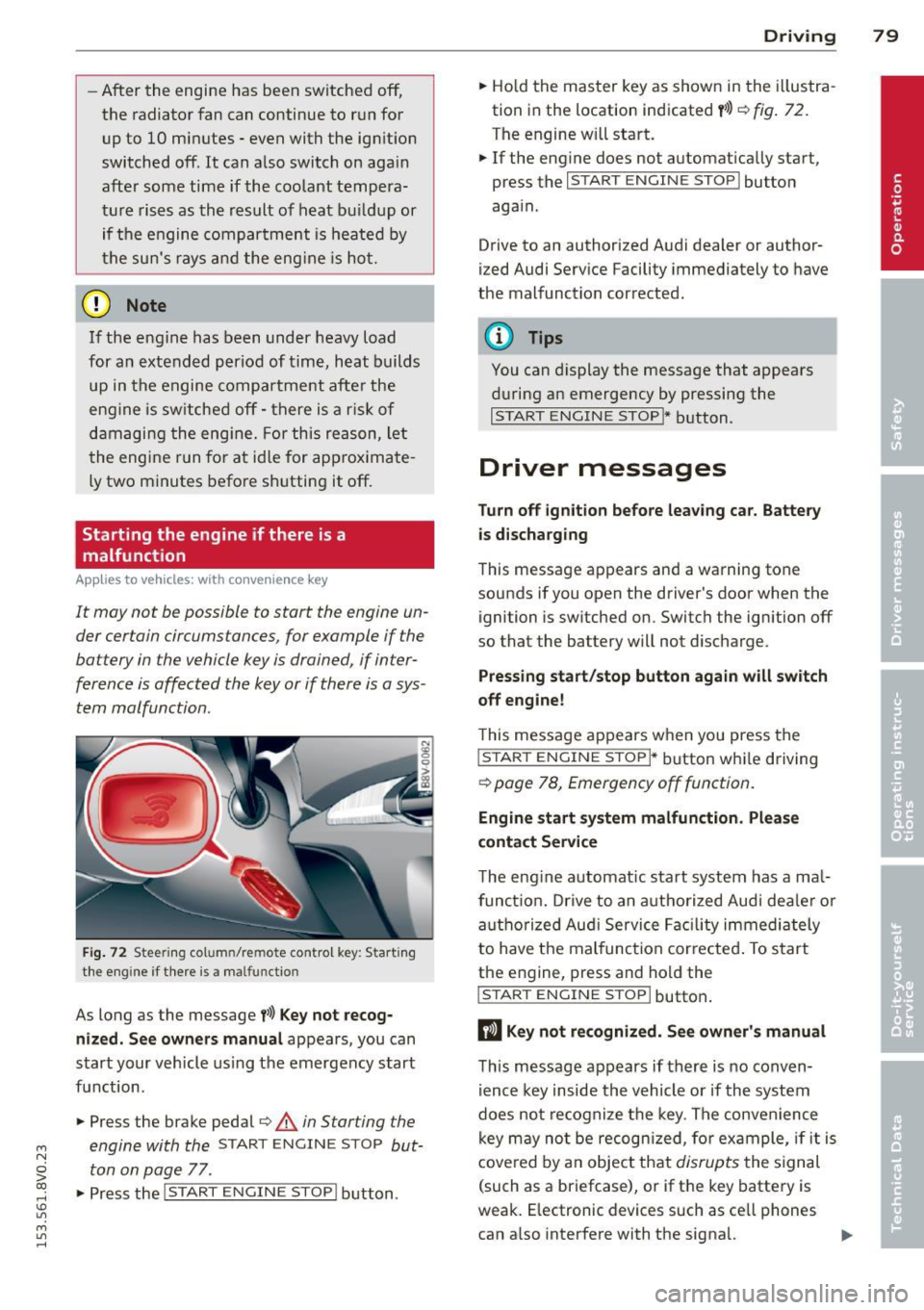
Fig. 72 Steering co lu m n/re mote control key : Start ing
the engine if there is a ma lfunctio n
As long as the message f>l) Key not recog
nized. See owners manual
appears, you can
start your vehicle using the emergency start
function .
"" Press the brake pedal¢.&.
in Starting the
engine with the
START ENGINE STOP but
ton on page
77 .
.,. Press the
j;..,, s=T~A~R=T~-EN~G-I_N_E--ST--OP I button.
Driving 79
""Ho ld the master key as shown in the illustra
tion in the location indicated
y>>) r=) fig. 72.
The engine w ill start.
"" If the engine does not automatically start,
press the
I START ENGINE STOP I button
again .
Drive to an authorized Audi dealer or author
ized Audi Service Facility immediately to have
the malfunction corrected.
(D Tips
You can display the message that appears
during an emergency by pressing the
I START ENGINE STOP!* button.
Driver messages
Turn off ignition before leav ing car. Battery
is discharging
This message appears and a warning tone
sounds if you open the driver's door when the ignition is switched on. Switch the ignition off
so that the battery will not discharge.
Pressing start/stop button again will switch
off engine!
T his message appears when you press the
I STAR T ENGINE S TOPI* button while driving
¢ page 78, Emergency off function .
Engine start system malfunction. Please
contact Service
The engine automat ic start system has a ma l
funct ion. Drive to an authorized Audi deale r or
authorized Aud i Service Facility immediately
to have the malfunction corrected . To start
the engine, press and hold the
I STAR T ENGINE S TOP I button.
DJ Key not recognized. See owner's manual
This message appears if there is no conven
ience key inside the vehicle or if the system
does not recognize the key. The convenience
key may no t be recogn ized, for example, if it is
covered by an object that
disrupts the signal
(such as a briefcase), or if the key battery is
weak. E lectronic devices such as ce ll phones
can a lso interfere with the signal. ..,.
Page 82 of 310
80 Driving
To sti ll be able to start or stop t he engine, re
fer to "Correcting a malfunction"
¢ page 79.
fll Key not in vehicle?
The fll ind icator light tu rns on and this mes
sage appears if the conven ience key was re
moved from t he vehi cle when the engine was
runni ng. If the conven ien ce key is no lo nger in
the vehicle, yo u cannot swi tch the ign ition on
or start the engine on ce yo u stop it . Yo u also
cannot lock the veh icle from the o utside .
Press brake pedal
This message appears if you do not press t he
b rake peda l when starting the engine .
Please engage N or P
This message appears whe n starting or stop
p ing the engine if the se lecto r lever is not in
the Nor
P posit ion. The eng ine will not start/
stop.
Shift to P , otherwise vehicle can roll away.
Doors do not lo ck if lever is not in P
This message appears fo r safe ty rea sons
a long with a wa rning tone. I t ap pears if the
se lecto r lever for the automatic transm iss ion
i s not in the P position when sw itch ing the ig
n it ion off with the
! START ENGINE STOPI*
button . Sh ift the selector lever to t he P posi
tion . O the rwise, the vehicle could ro ll. You al
so cannot lock the vehicle usi ng the locki ng
sensor on the door handl e or us ing the con
ve nien ce key.
Electromechanical
parking brake
Operating
The ele ctromechanical parking brake replaces
t he hand brake.
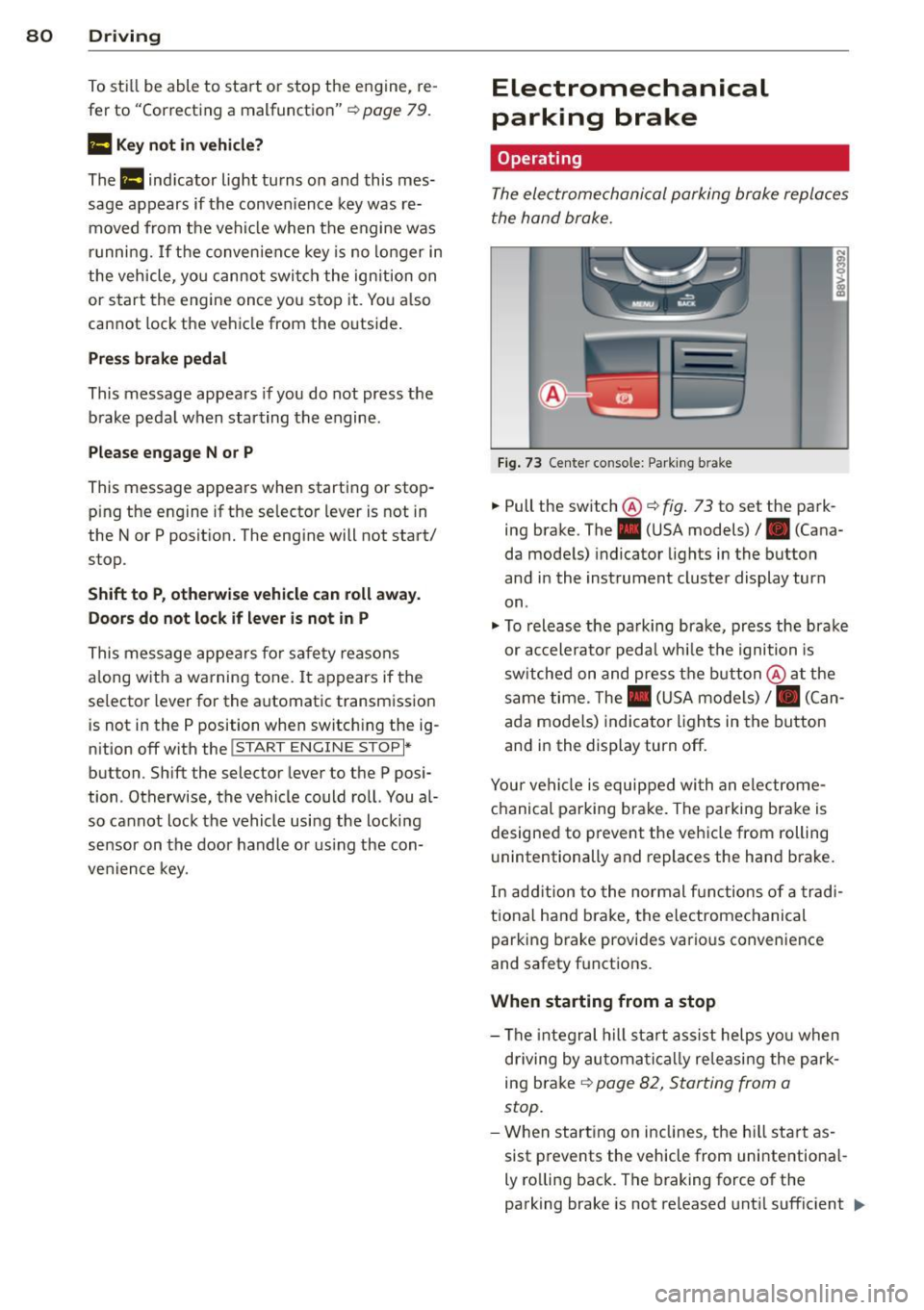
Fi g. 7 3 Center co nsole: Park ing b rake
.,. Pull the switch®¢ fig. 73 to set the park
ing brake. The. (USA m odels)/ . (Cana
da mode ls) indicator lights in the button
and in the instrument cluster display turn
on .
.,. To releas e the pa rking brak e, press the brake
or ac celera to r peda l wh ile the ignition is
sw itched on and pres s th e bu tton @ at the
same time. The . (USA mo dels) /. (Can
ada models) indica to r li gh ts in the bu tton
and i n the display turn off.
Your ve hicle is equipped wi th a n ele ctrome
ch anical parking brake. The parkin g bra ke is
designed to p revent the vehicle from rolling
u nintentionally and replaces the hand brake.
In ad dition to the normal fu nctions o f a tra d i
tio na l han d brake, the e lectromechanical
parking b rake provi des vario us convenience
and safety f unctions .
When starting from a stop
-The integral hill start assist helps yo u when
d riving by au toma tically releasi ng the pa rk
ing brake ¢
page 82, Starting from a
stop.
- W hen start ing o n in clines, t he h ill sta rt as
sist p revents the vehicle from unintentiona l-
ly ro lling back . The braking force of the
parking brake is not released unt il sufficient .,.
Page 90 of 310
88 Audi adaptive cruise control
What can adaptive cruise control do?
The ad aptive cruise co ntrol sys tem uses r ad ar
a nd a video came ra . T he r ada r is subject to
designated system limits ¢
page 86.
On ope n roads w ith no t raff ic, i t fun ctions like
a cruise co ntro l system . Th e stored s peed is
main taine d. When approach ing an object
ahead and the system detects it, the ada ptive
cr uise control system automatically brakes to
match that ob ject's speed and then maintains
the stored d istance. As soon as the system
does not detect an object ahead, adaptive
cru ise control accelerates up to the s to red
speed .
W ith in the lim its of the system, adaptive
cru ise contro l can brake in stop-and-go traff ic
u ntil t he vehicle is stationary and then begin
d riving aga in under certa in conditions
¢ page 90, Driving in stop-and-go traffic.
Which functions can be controlled?
When you sw itch adaptive cruise cont ro l on,
you can set the cur rent speed as the "control
speed" ¢
page 88, Switching on/off .
When driving, you can stop cruise control
¢
page 90 or change the speed ¢ page 89
at any time .
You can a lso adjust the following settings :
- D istan ce
¢page 91
- D riving p rogram ¢ page 92
-Driving mode ¢ page 92
l) Spee d lim it s depe nd o n th e cou ntry and t he s pee dom
e te r.
Switching on/off
Applies to vehicles: wit h Audi adapt ive cr uise contro l
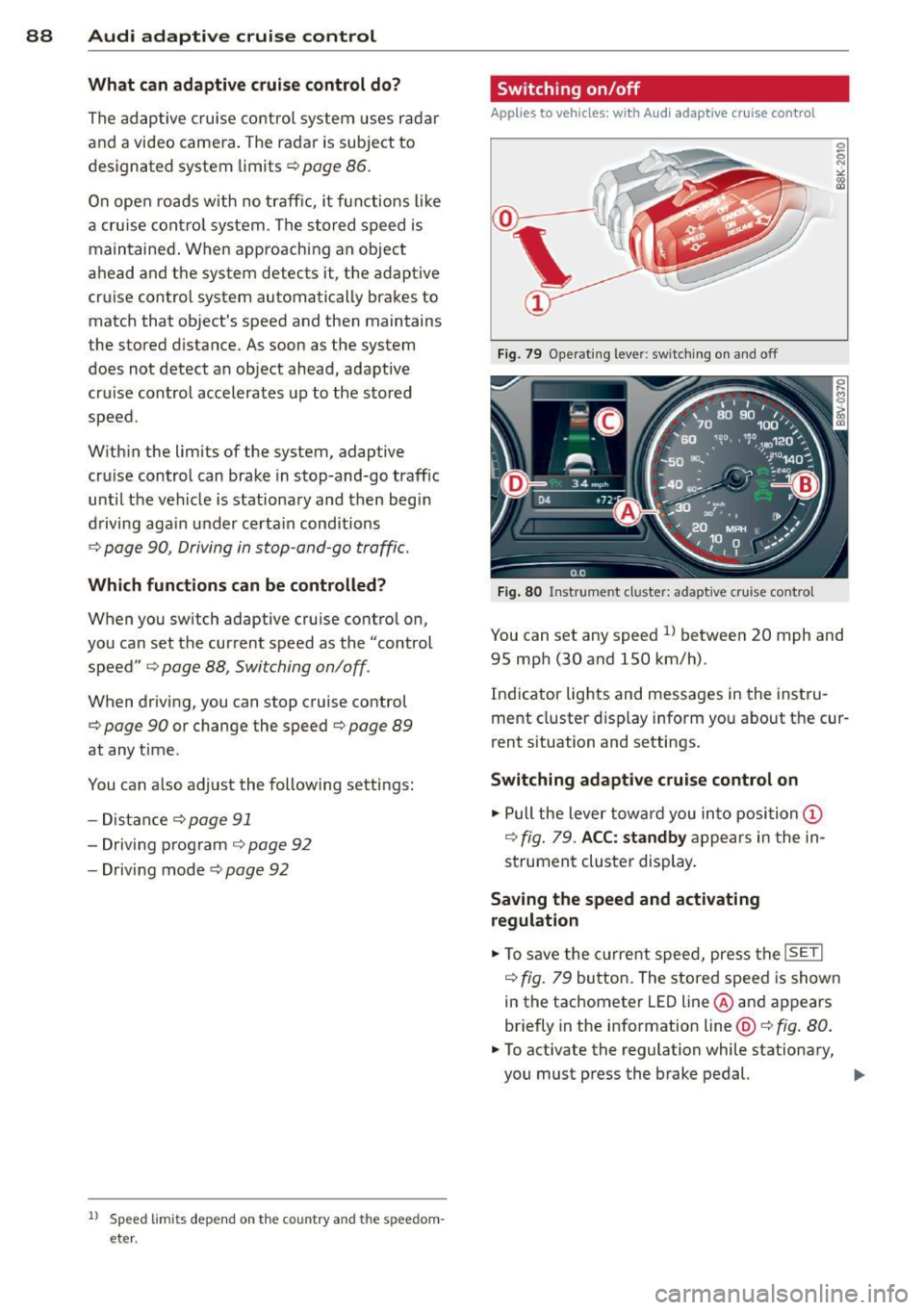
Fig . 79 Opera ting leve r: sw itc hin g on and off
Fig. 80 Instrume nt cluster: adaptive cru ise control
You can set any speed ll betwee n 20 mph and
95 mp h (30 and 150 km/h).
Ind icator lights and messages in the inst ru
me nt cluster d isp lay inform yo u about the cur
rent s ituation and settings.
Switching adaptive cruise control on
.,. Pull the lever tow ard you in to position (D
¢ fig . 79 . ACC: standby a ppears in the in
s trument cluster display.
Saving the speed and activating
regulation
.,. To save the c urre nt spee d, press t he ISETI
¢ fig. 79 bu tto n. The stored speed is show n
in the tachometer LE D line @and appears
briefly in the info rmation line@¢
fig. 80 .
• To activate the regulation while stationary,
you must press the brake pedal.
IJJ,-
Page 91 of 310
....,
N
0 > co
rl I.O
"' ....,
"' rl
Switching adaptiv e cruis e control off
• Push the lever away from you into position
@ until it clicks into p lace. The message
ACC: off appears.
The stored speed in the L ED line is erased .
@ Indicato r light s
Ill-adaptive cru ise control is switch ed on . No
objects ar e detected ahead. The stored spe ed
is maintained .
B-An object ahead was detected . The adap
tive cruise contro l system regulates the speed
and d istance to the object ah ead and brakes/
accelerates automatica lly.
$ -adaptive cruise contro l is switched on . An
object ahead was detected. Yo ur vehicle re
mains stopped and will not start driving auto
matica lly.
• -The automatic braking is not eno ugh to
maintain a sufficient distance to an ob ject
ahead . Yo u must int ervene ¢
page 92 , R e
quest for driver intervention.
© Instrument cluster display
If adaptive cruise cont ro l is not shown in the
instr ument cluster d isp lay, you can call it up
using the multifunction steering wheel b ut
tons ¢
page 28 .
Based on the g raphics in the display, yo u can
determ ine if the system is maintaining a dis
tance to a vehicle ahead and what that dis
tance to this vehicle is:
N o vehicle -No object ahead was detected .
White vehicl e -An object ahead was detected .
Red vehicle -Request for the driver to take ac
tion ¢
page 92 .
Both arrows on the scale© in dicate the dis
tance to the object ahead. No arrow appears
when the vehicle is on an open road and there
is no object ahead.
If an object is detected
ahead, the arrow moves on the scale.
The green zone on the scale indicates the
store distance. Fo r information on changing
Audi ad apti ve crui se control 89
the distance, refer to r::!> page 91. If the dis
tance selected is exceeded or not reached, the
arrow moves into the red zone on the scale.
_& WARNING
- Using adaptive cru ise contro l incorrectly
can cause collisions, other acc idents and
ser ious inju ries .
- If you press t he
~IS-E T ~I button when driv
ing at speeds below 20 mph (30 km/h),
the vehicle acce lerates automatically up
to 20 mph (30 km/h), wh ich is the mini
m um speed that can be set.
(D Tips
- If you switch the ig nit ion or the adaptive
cruise cont ro l system off, the set speed
is e rased for safety reason .
- The Elect ronic Stabilization Control (ESC)
and Anti-Slip Regulat ion (ASR) both
switch on when the adaptiv e cruis e con
tr ol is swi tched o n. ESC and AS R canno t
be switched off when ad aptive cruise
cont ro l is switched on .
- Wi th t he adap tive c ruise control activat
ed the ESC sport mode cannot be ac tiv at
ed.
Changing the speed
Applies to vehicles: wit h Audi adaptive cru ise control
0
f
JJ
0
Fi g. 81 Operati ng leve r: c ha ngi ng the s pee d
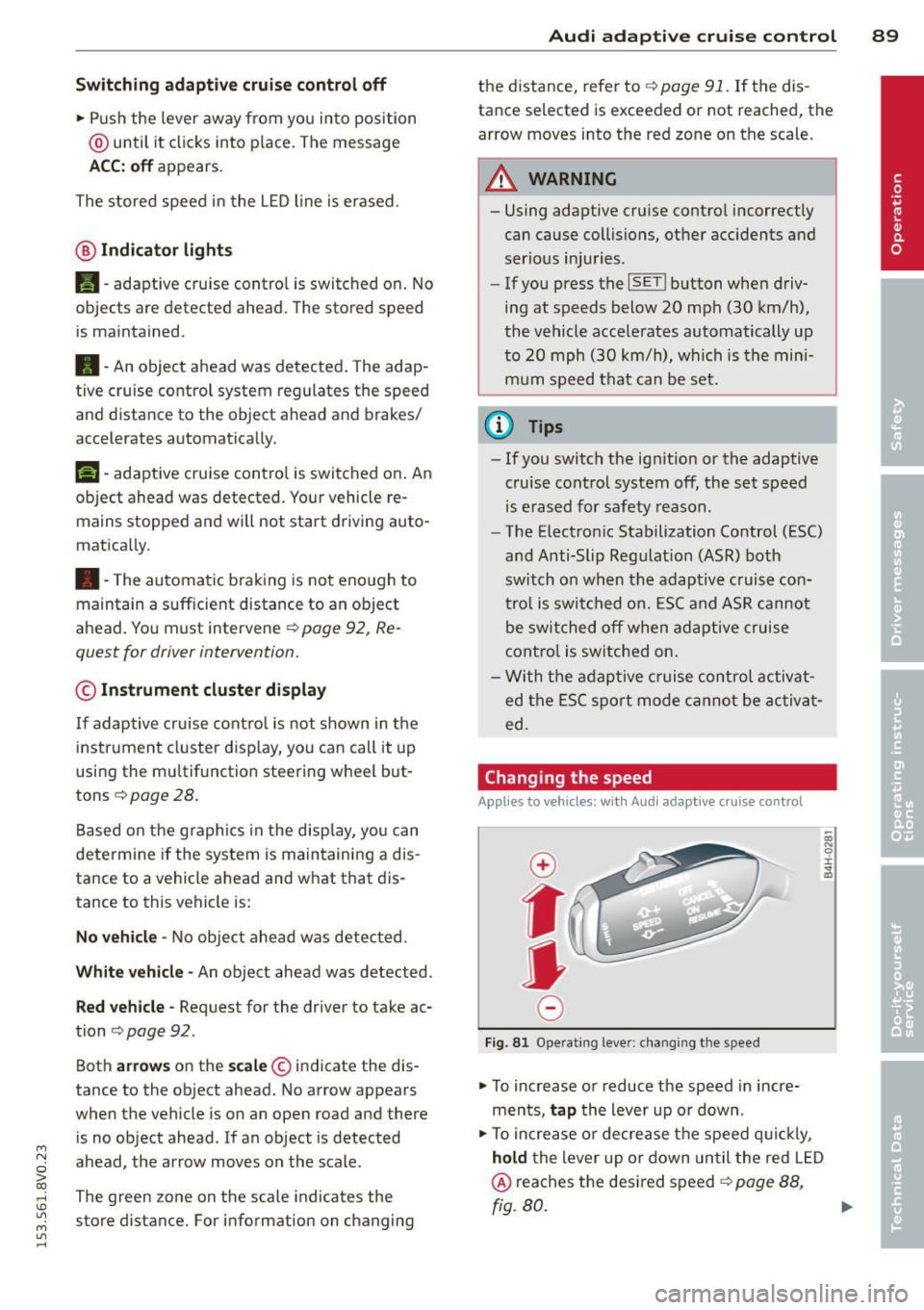
• To increase o r reduce the speed in incre
ments,
tap the lever up o r down .
• To increa se o r de crea se t he speed q uickl y,
hold the lever up or down until the red L ED
@ reaches the desired speed r::!> page 88,
rg. 80. ~
Page 92 of 310
90 Audi adaptive cruise control
After each change, the new stored speed ap
pears briefly in the information line
c::> page 88, fig. 80@.
Driving in stop-and-go traffic
Applies to vehicles: with Audi adaptive cruise control
The adaptive cruise control system assists you
in stop-and-go traffic. If an object that is de
tected ahead stops, your vehicle will brake
and stay at a stop, within the limits of the sys
tem.
Starting with adaptive cruise control
1
l
If you veh icle brakes to a stop because an ob
ject is detected ahead, ACC autom. go ap
pears briefly in the instrument cluster display
Your veh icle is in automat ic start mode.
As long as the message ACC autom. go is dis
played and the object detected ahead starts
to move, your vehicle w ill cont inue driving
c::> & .
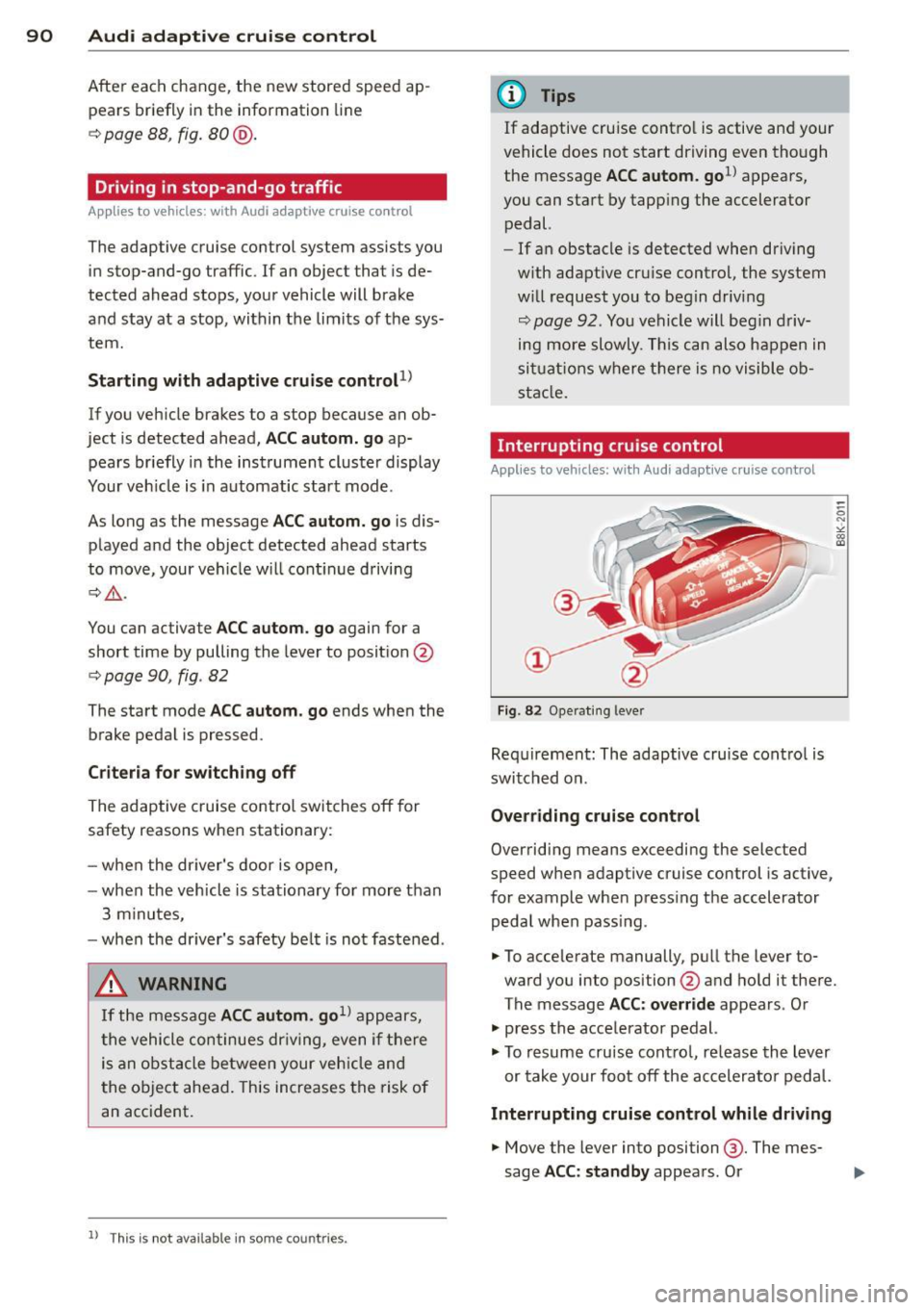
You can activate ACC autom. go again for a
short time by pulling the lever to posit ion @
r::;, page 90, fig . 82
The start mode ACC autom. go ends when the
brake pedal is pressed .
Criteria for switching off
The adaptive c ruise control switches off for
safety reasons when stationary:
- when the dr iver's door is open,
- when the veh icle is stationary for more than
3 minutes,
- when the dr iver's safety be lt is not fastened .
,&. WARNING
If the message ACC autom . go1l appears,
the vehicle continues driving, even if there
is an obstacle between your vehicle and
the object ahead. This increases the risk of
an accident.
ll This is not available in some co un tri es .
(D Tips
If adaptive cruise contro l is active and your
vehicle does not start driving even though
the message ACC autom. go
1l appears ,
you can start by tapp ing the accelerator
pedal.
- If an obstacle is detected when driving
w ith adaptive cru ise control, the system
w ill request you to begin driving
r::;, page 92 . You vehicle will beg in driv
ing more slowly. This can also happen in
situations where there is no visible ob
stacle.
Interrupting cruise control
Applies to vehicles: wit h Aud i adapt ive c ru ise control
Fig. 82 Operating leve r
Requirement: The adaptive cruise cont ro l is
switched on.
Overriding cruise control
Overriding means exceeding the selected
speed when adaptive cruise control is active,
for example when press ing the accelerator
peda l when pass ing.
.. To accelerate manually, pull the lever to
ward you into position @and hold it there.
The message ACC: override appears. Or
.. press the acce lerator pedal.
.. To resume cruise control, release the lever
or take your foot off the accelerator pedal.
Interrupting cruise control while driving
.. Move the lever into position @. The mes
sage ACC: standby appears. Or
Page 93 of 310
....,
N
0 > co
rl I.O
"' ....,
"' rl
.. press the brake peda l.
.. To resume the stored speed, move the lever
into position @.
Inte rrupting crui se contr ol wh en stopped
.. Push the lever away from you into position
@ . The message ACC : s ta ndb y appea rs .
.. To resume cru ise control, press the brake
pedal and pull the lever toward you into po
sit ion @.
A WARNING
It is dangerous to activate cru ise contro l
and resume the stored speed when the
current road, traffic or weather conditions
do not permit th is . This could result in a
crash.
Setting the distance
Applies to vehicles: with Audi adaptive cruise control
Fig. 83 O perat ing lever : setting the d istance
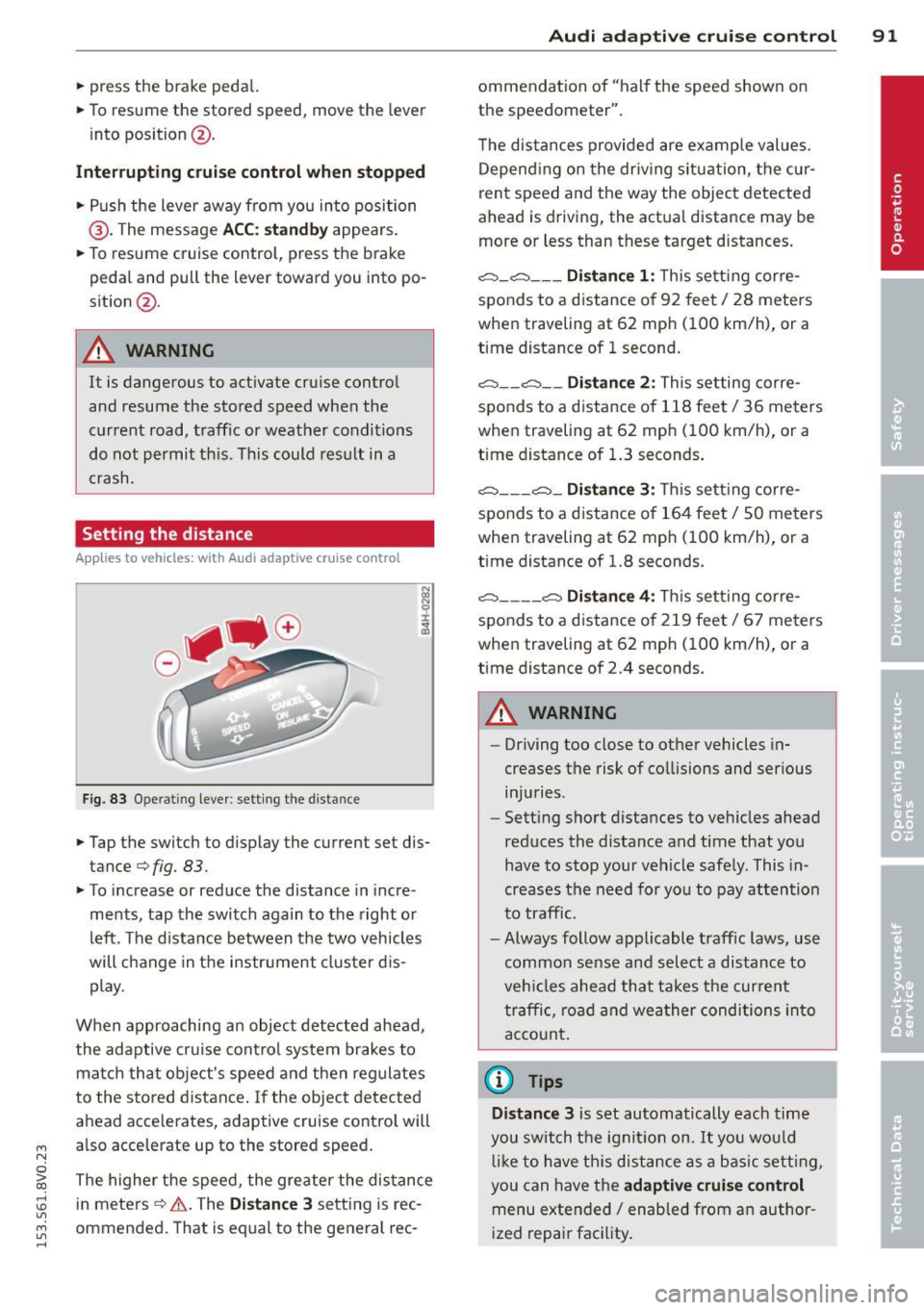
.. Tap the switch to display the current set dis
tance¢
fig. 83.
.,. To increase or reduce the distance in incre
ments, tap the switch again to the right o r
left . T he d istance between the two vehicles
will change in the instr ument cluster d is
play.
When approaching an object detected ahead ,
the adaptive cru ise cont ro l system brakes to
matc h that object's speed and then regulates
to the stored distance . If the object detected
ahead acce lerates, adaptive cru ise control will
also acce lerate up to the stored speed .
The highe r the speed, the greater the distance
in meters ¢.&. . The
Dist ance 3 sett ing is rec
ommended. That is equal to the general rec -
Audi adapti ve crui se control 91
ommendation of "hal f the speed shown on
the speedometer" .
T he distances provided are examp le values.
Depend ing on the dr iv ing situation, the cur
rent speed and the way the object detected
ahead is driving, the act ual distance may be
more or less than these target d istances .
c::;, _c::::, ___ Distance 1 : Th is sett ing corre-
sponds to a distance o f 92 feet/ 28 meters
when traveling at 62 mph ( 100 km/h), or a
time distance of 1 second.
c::;, __ c::::, __ Distanc e 2: This setting corre
sponds to a distance o f 118 feet/ 36 meters
when traveling at 62 mph ( 100 km/h), or a
time distance of 1.3 seconds .
c::;, ___ c::;,_ Dista n ce 3 : This sett ing corre-
sponds to a distance o f 164 feet/ 50 meters
when traveling at 62 mph ( 100 km/h), or a
t ime distance of 1.8 seconds.
c::;, ____ c::::, Dista n ce 4: T his sett ing corre-
sponds to a distance o f 219 feet/ 67 meters
when traveling at 62 mph ( 100 km/h), or a
time distance of 2.4 seconds.
A WARNING
-
- Driving too close to other vehicles in
creases the risk of co llisions and ser ious
inju ries .
- Sett ing s hort dista nces to veh icles ahead
reduces the distance and time that you
have to stop your vehicle safe ly. This in
creases the need for yo u to pay attention
to traffic.
- Always follow applicable traff ic laws, use
common sense and select a distance to
veh icles ahead that takes the cur ren t
traffic , ro ad and weather conditions into
acco unt .
@ Tips
Distance 3 is set automatically each time
you swi tch the ignit ion on.
It yo u wou ld
l ik e to have th is distance as a b asic setti ng,
you can have the
adaptive crui se cont rol
menu extended/ enabled from an author
i zed repair fac ility .
Page 97 of 310
....,
N
0 > co
rl I.O
"'
Warnings
Applies to vehicles: with Audi pre sense fro nt or Audi
adaptive cruise control
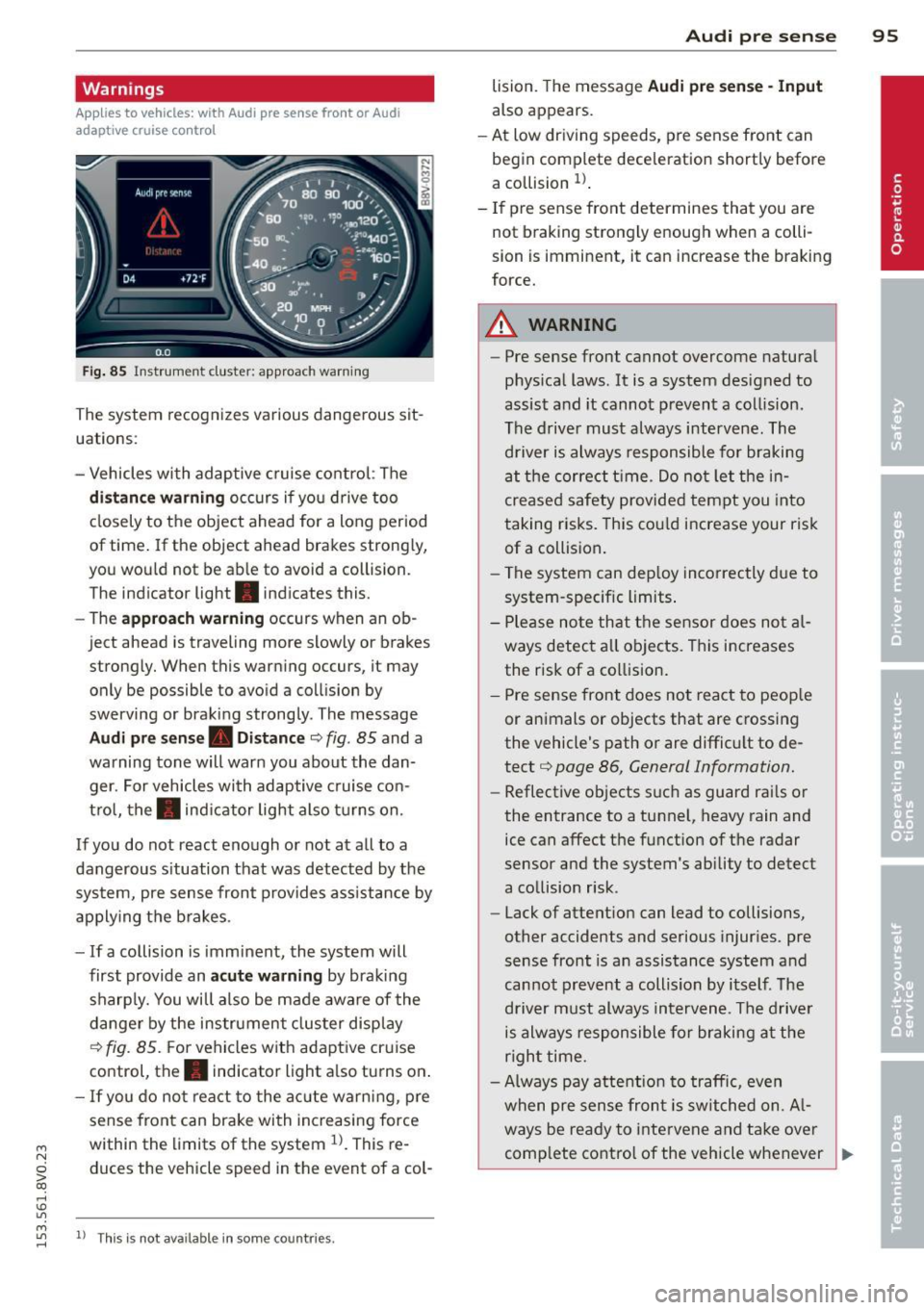
Fig . 85 In strum ent cluste r: approac h warnin g
The system recognizes various dangerous sit
uat ions :
- Vehicles with adaptive cruise control: The
distance warning occurs if you drive too
closely to the object ahead for a long period
of time.
If the ob ject ahead brakes strongly,
you would not be able to avo id a coll ision.
T he indicato r light . indicates this.
- The
approach warning occurs when an ob
ject ahead is traveling mo re slowly o r brake s
strongly. When this warning occurs, it may only be possible to avoid a collision by
swerving or braking strongly. The message
Audi pre sense. Distance c::> fig . 85 and a
warning tone will warn you about the dan ger. For vehicles with adaptive cruise con
trol, the. indicator light also turns on.
If you do not react enough or not at all to a
dangerous s ituation that was detected by the
system, pre sense front provides assistance by
applying the brakes .
- If a collision is imminent, the system will
first provide an
acute warning by braking
sharply. You will also be made aware of the
danger by the instrument cluster display
c::> fig. 85. For vehicles with adaptive cruise
control, the. indicator light also turns on .
-If you do not react to the acute warning, pre
sense front can brake with increasing force
within the limits of the system
l)_ This re
duces the vehicle sp eed in th e event of a col-
....,
"' ll Thi s is no t a vailable in some coun tries . rl
Audi pre sense 95
lision . The message Audi pre sense -Input
also app ears .
- At low driving speeds , pre sense front can
begin complete deceleration shortly before
a collision
l) .
-If pre sense front determines that you are
not braking strongly enough when a colli
sion is imminent, it can increase the braking
force.
A WARNING
--- Pre sense front cannot overcome natural
physical laws.
It is a system designed to
assist and it cannot prevent a collision .
The driver must always intervene. The driver is always responsible for braking
at the correct t ime. Do not let the in
creased safety provided tempt you into
taking risks. This could increase your risk
of a collision.
- The system can deploy incorrectly due to
system-specific limits .
- Please note that the sensor does not al
ways detect all objects . This increases
the risk of a collision.
- Pre sense front does not react to people
or animals or objects that are crossing
the vehicle's path or are difficult to de
tect
c::> page 86 , General Information.
- Reflective objects such as guard rails or
the entrance to a tunnel, heavy rain and
ice can affect the function of the radar
sensor and the system's ability to detect
a collision risk .
- Lack of attention can lead to collisions,
other accidents and serious injuries. pre
sense front is an assistance system and
cannot prevent a collision by itself . The
driver must always intervene . The driver
is always responsible for braking at the
right time.
- Always pay attention to traffic, even
when pre sense front is switched on. Al-
ways be ready to intervene and take over
comp lete control of the vehicle whenever .,.
Page 101 of 310
....,
N
0 > co
Switching on and off
Applies to vehicles: with Audi active lane assist
•
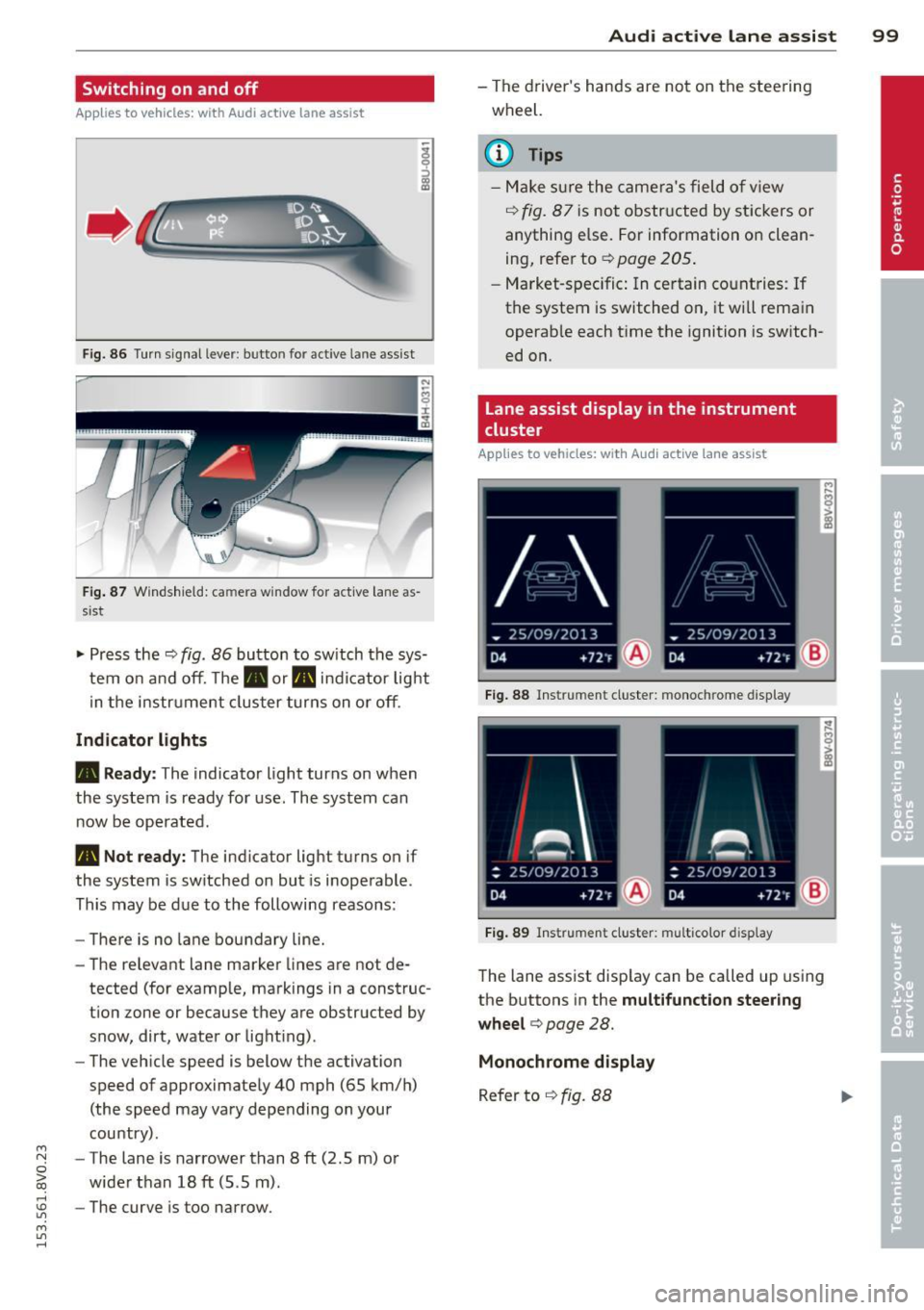
Fig. 86 Turn signal lever: butto n fo r act ive la n e ass ist
Fig. 87 Windsh ield: ca mera w indow for act ive lane as
s is t
.. Press the q fig. 86 button to switch the sys
tem on and off. The . or. indicator light
in the instr ument cluster turns on or off.
Indicator lights
• Ready:
The indicator light turns on when
the system is ready for use. The system can
now be operated .
• Not ready: The indicator light turns on if
the system is switched on but is inoperable.
This may be due to the following reasons:
- There is no lane boundary line.
- The relevant lane marker lines are not de-
tected (for example, markings in a construc
tion zone or because they are obstructed by
snow, dirt, water or light ing) .
- The vehicle speed is below the activation
speed of approximately 40 mph (65 km/h)
(the speed may vary depending on your
country) .
- The lane is narrower than 8
ft (2 .5 m) or
wider than 18
ft (5.5 m).
rl 1.0 -The curve is too narrow.
"' ....,
"' rl
Audi active lane assist 99
-The driver's hands are not on the steering
wheel.
a) Tips
- Make sure the camera's field of view
¢ fig. 87 is not obstructed by stickers or
anything else. For information on clean
ing, refer to
¢ page 205.
- Market-specific: In certain countries: If
the system is switched on, it wi ll remain
operab le each time the ignition is switch
ed on.
lane assist display in the instrument
cluster
Applies to vehicles: with Audi active lane assist
Fig. 88 Instrumen t cluster: monoc hrome d ispl ay
Fig. 89 Instrume nt clust er: mult icolor display
The lane assist display can be called up using
the buttons in the
multifunction steering
wheel ¢
page 28.
Monochrome display
Refer to q fig. 88
Page 102 of 310
100 Audi active lane assist
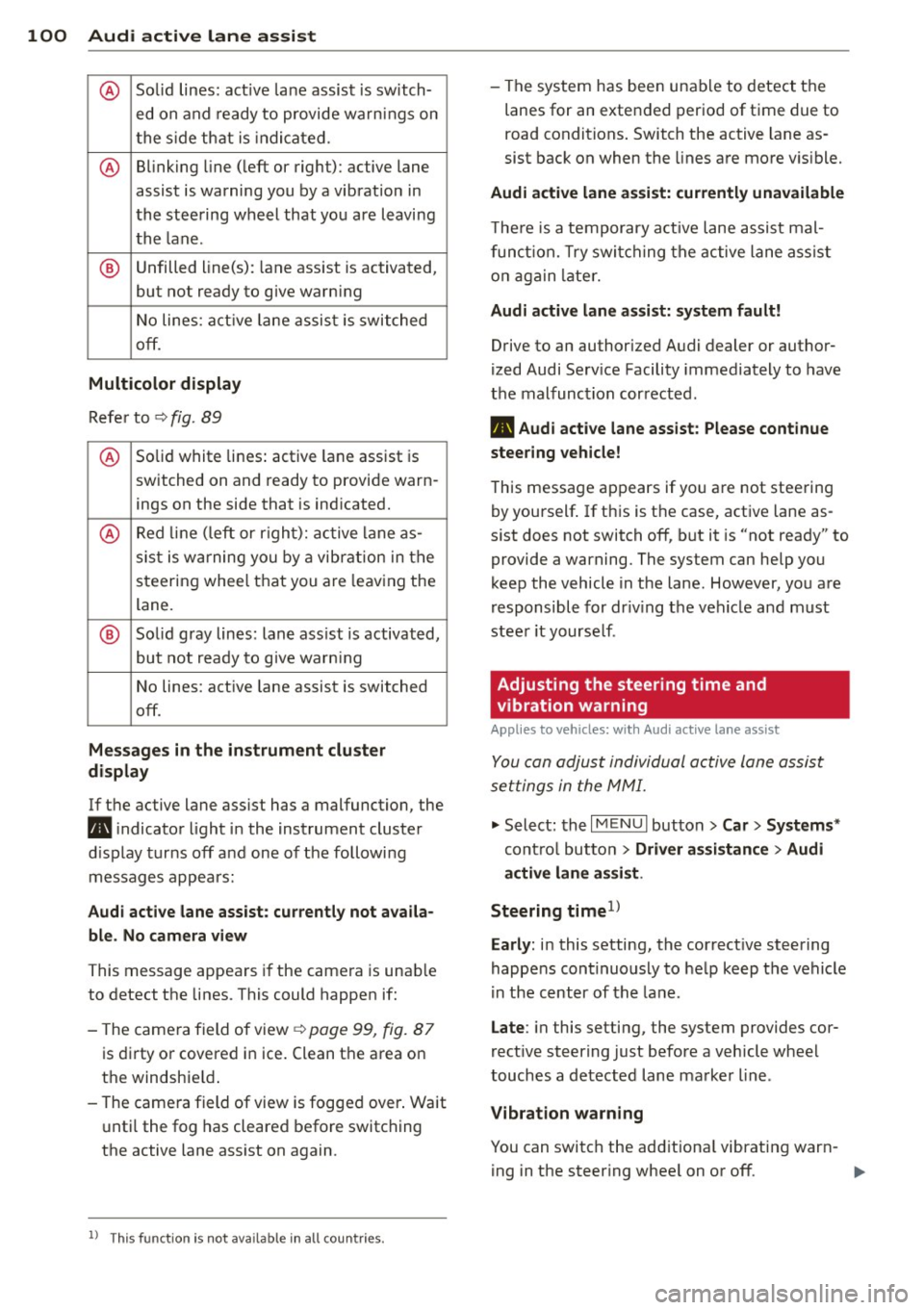
@ So lid lines: act ive la ne assist is sw itch-
ed on and ready to provide wa rn in gs on
t he s ide th at is indica ted.
@ B linking line ( left or right): active lane
assist is warning you by a vibration in
the stee ring wheel that you a re l eaving
th e l ane .
® Unfilled line(s) : lane ass ist is activated,
but not ready to g ive warn ing
N o lines: act ive lane assis t is switche d
off .
Multicolor display
Re fer to ¢ fig. 89
@ Solid white lines : active lane assist is
switched on and ready to provide warn-
ings on the side that is ind icated.
@ Red lin e ( left or r igh t): active lane a s-
sis t is w arning you by a vibr ation in t he
steering whee l that you are leav ing the
lane.
® Solid gray lines: lan e ass ist is activated,
but not ready to give warn ing
N o lines: act ive lane assist is switched
off.
Mes sages in the in strument clu ster
display
If t he active lane ass ist has a malfunction, the
B i ndicato r light in the instrument cluste r
di sp lay tur ns
off a nd one of the followi ng
messag es appears:
Audi active lane ass ist: currently not availa
ble . No camera view
This message appears if the camera is unab le
to detect t he lines . This could happen if :
- The came ra field of view ¢
page 99, fig. 87
is dir ty o r covered i n ice. Clean t he a rea on
t h e windshie ld.
- The came ra field of view is fogged over . Wait
u nti l the fog has cleared before switching
the active lane ass ist on again.
l ) Thi s fun ctio n is not ava ilable in all c ountries.
- The system has bee n una ble to detect the
lanes for an exte nded period of t ime due to
road conditions . Switch the active lane as
sist bac k on when the lines are mo re v is ible.
Audi active lane assi st: currently unavailable
T he re is a te mporary a ctive lane assist mal
f un ction. T ry swi tching the ac tive lane assist
o n a gain later.
Audi active lane assi st: system fault!
Drive to an authorized A udi dealer or author
ized Audi Se rv ice Facility immediately to have
the malfunc tion cor rected .
B Audi active lane assist: Please continue
steering vehicle!
T his messa ge ap pears if yo u are not stee ring
by yourself . If th is is t he case, act ive lane as
s ist does not switch
off, but it is "not ready" to
provide a warning. The system can help you
k eep the vehicle in t he lane . However , yo u are
r esponsible for dr iv ing the veh icle and m ust
stee r it yourse lf .
Adjusting the steering time and
vibration warning
Applies to veh icles: w ith Aud i act ive la ne ass ist
You can adju st individual active lane assist
set tings in the MMI.
.,. Select : the I MENU I but to n > Car > Systems *
contro l butto n > Driver assistance > Audi
active lane assi st.
Steering timel>
Early :
in this setting , the correct ive steering
happens con tinuously to he lp keep the vehicle
i n the cent er of the lane .
Late : in this setti ng, the system provides cor
rect ive steer ing just before a veh icle whee l
touches a de tected lane ma rke r line .
Vibration warning
You can switch the add it iona l vibrating war n-
ing in t he steer ing whee l on or
off . ..,_