cooling AUDI S3 2015 Owners Manual
[x] Cancel search | Manufacturer: AUDI, Model Year: 2015, Model line: S3, Model: AUDI S3 2015Pages: 310, PDF Size: 76.15 MB
Page 5 of 310
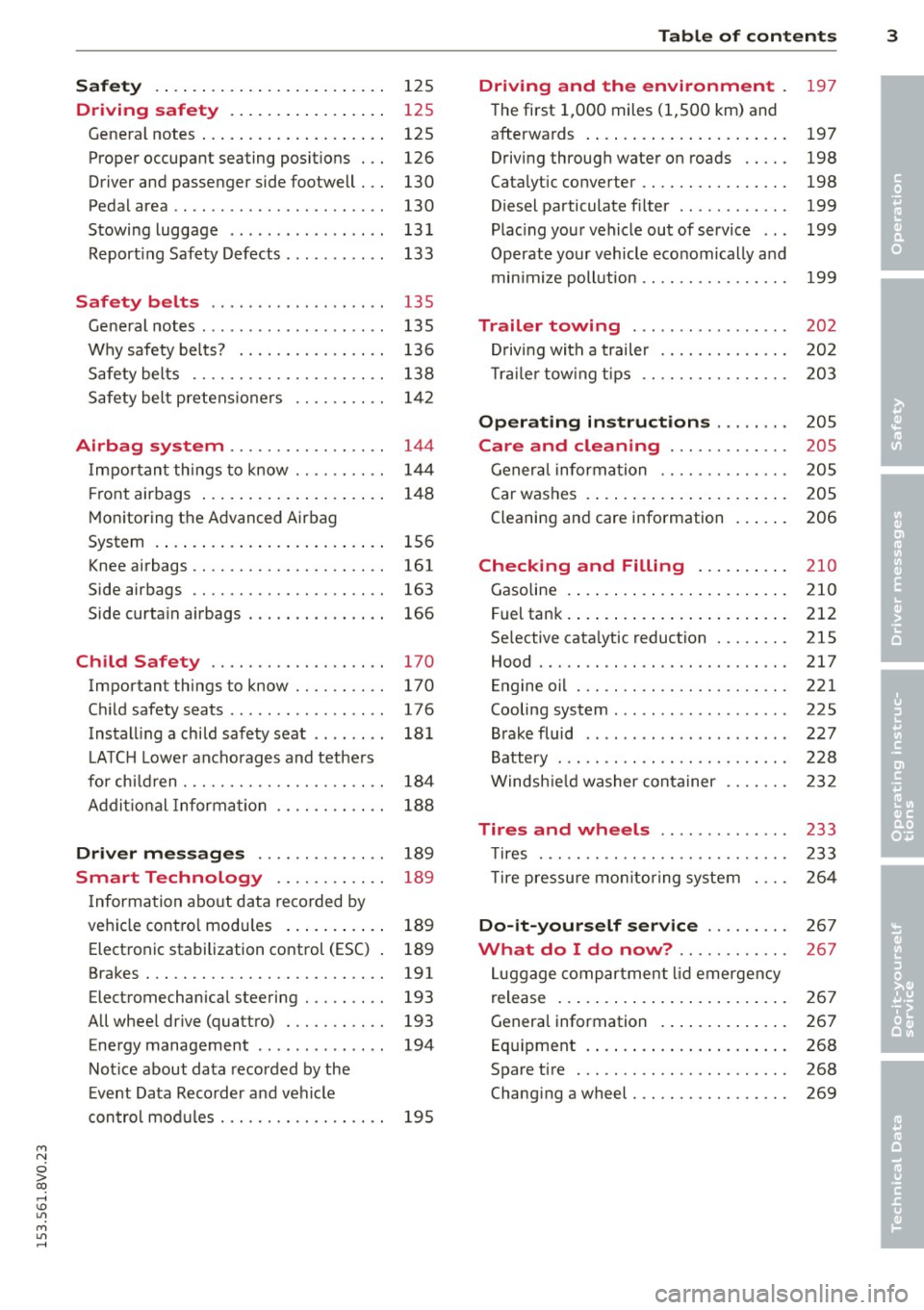
Safety . . . . . . . . . . . . . . . . . . . . . . . . . 125
Driving safety . . . . . . . . . . . . . . . . . 125
General notes . . . . . . . . . . . . . . . . . . . . 125
Proper occupant seating posit ions . . . 126
Driver and passenger side footwell . . . 130
Pedal area . . . . . . . . . . . . . . . . . . . . . . . 130
Stowing luggage . . . . . . . . . . . . . . . . . 131
R eport ing Safety Defects . . . . . . . . . . . 133
Safety belts . . . . . . . . . . . . . . . . . . . 135
General notes . . . . . . . . . . . . . . . . . . . . 135
Why safety bel ts? . . . . . . . . . . . . . . . . 136
Safety belts . . . . . . . . . . . . . . . . . . . . . 138
Safety belt p re tens ioners . . . . . . . . . . 1 42
Airbag system . . . . . . . . . . . . . . . . . 144
I mpor tan t th ings to know . . . . . . . . . . 1 44
Fr ont airbags . . . . . . . . . . . . . . . . . . . . 148
M onitoring the Advanced Airbag
System . . . . . . . . . . . . . . . . . . . . . . . . . 156
Knee airbags . . . . . . . . . . . . . . . . . . . . . 161
Side airbags . . . . . . . . . . . . . . . . . . . . . 163
Side curta in a irbags . . . . . . . . . . . . . . . 166
Ch ild Safety . . . . . . . . . . . . . . . . . . . 170
Important things to know . . . . . . . . . . 170
C hi ld safety seats ............ .... . 176
Install ing a chi ld safety seat . . . . . . . . 18 1
L A TC H L ower ancho rages and tethe rs
fo r ch ild ren . ............. .... .. . .
A ddit io nal Informa tion 184
188
Driver messages
. . . . . . . . . . . . . . 189
Smart Technology . . . . . . . . . . . . 189
I nforma tion abo ut data reco rded by
ve hicl e cont ro l mod ules . . . . . . . . . . . 189
Electron ic stabilization control (ESC) 189
Brakes . . . . . . . . . . . . . . . . . . . . . . . . . . 191
Electromechanical steering . . . . . . . . . 193
All whee l drive (quatt ro) . . . . . . . . . . . 193
Energy management . . . . . . . . . . . . . . 194
Not ice about data recorded by the
E vent Data Reco rder and ve hicle
con tro l mod ules . . . . . . . . . . . . . . . . . . 195
Table of contents 3
Driving and the environment
197
T he first 1,000 miles (1 ,500 km) and
afterwa rds . . . . . . . . . . . . . . . . . . . . . . 197
Driving through wate r on roads . . . . . 198
Catalytic converter . . . . . . . . . . . . . . . . 198
Diesel particulate filter . . . . . . . . . . . . 199
Plac ing you r vehicle ou t of service . . . 199
Operate yo ur v ehicl e economically and
min imi ze poll ution . . . . . . . . . . . . . . . . 199
Trailer towing . . . . . . . . . . . . . . . . . 202
Dr iving wit h a trailer . . . . . . . . . . . . . . 202
T rai le r tow ing t ips . . . . . . . . . . . . . . . . 203
Operating instructions . . . . . . . . 205
Care and cleaning . . . . . . . . . . . . . 205
Gener al infor mation . . . . . . . . . . . . . . 205
Car washes . . . . . . . . . . . . . . . . . . . . . . 205
Cleaning and care information . . . . . . 206
Checking and Filling . . . . . . . . . . 210
Gasoline . . . . . . . . . . . . . . . . . . . . . . . . 210
F uel tank . ... .. .... . ... ...... ... . 212
Se lective cata lytic reduction . . . . . . . . 215
Hood . . . . . . . . . . . . . . . . . . . . . . . . . . . 217
Engine o il . . . . . . . . . . . . . . . . . . . . . . . 221
Cooling system . . . . . . . . . . . . . . . . . . . 225
B rake fluid . . . . . . . . . . . . . . . . . . . . . . 227
Battery . . . . . . . . . . . . . . . . . . . . . . . . . 228
W indsh ie ld washer conta iner 232
Tires and wheels . . . . . . . . . . . . . . 233
T ires . . . . . . . . . . . . . . . . . . . . . . . . . . . 233
T ire pressu re mo nitor ing syste m 2 64
Do-it-yourself service . . . . . . . . . 2 67
What do I do now? . . . . . . . . . . . . 267
L uggage compartment lid emergency
r elease . . . . . . . . . . . . . . . . . . . . . . . . . 267
Genera l information . . . . . . . . . . . . . . 267
Eq uipment . . . . . . . . . . . . . . . . . . . . . . 268
Spare tire . . . . . . . . . . . . . . . . . . . . . . . 268
Changi ng a wheel . . . . . . . . . . . . . . . . . 269
•
•
M a N
0 > co ,...., \!) Ll'I
M Ll'I ,....,
Page 14 of 310
12 Instrum ent s and indicator lamp s
Fuel level
The display@ Q page 10, fig. 3 only works
when the ignition is sw itched on . When the
d isplay has reached the reserve mark, the bot
tom LED wi ll turn red and the
tD indicator
light turns on
Q page 24 . The bottom LED
blinks red when the fue l level is very low .
The on -board computer shows the range
based on the fuel leve l
Q page 2 8, On-board
computer display.
F or the tank capac ity in yo ur vehicle , refer to
the Tec hnical Data
Q page 288.
CJ) Note
Never d rive until the tank is completely
empty. The irregular supp ly of fuel that re
sults from that can cause the engine to
misfire. Uncombusted f uel will then enter
the exha ust system. This can cause over
heating and damage to the catalytic con
verter .
Coolant temperature indicator
In vehicles without a coolant temperature in
d icator , an indicator l ight . will turn on
when the coolant temperature is too h igh
Q page 20. Refer to Q Q) .
The coolant temperature ind icator @
c::> page 10, fig . 3 only works when the ignition
is switched on . T o prevent engine damage, ob
serve the fo llow ing notes about the tempe ra
ture ranges.
Cold range
If only the LEDs at the bottom of the gauge
turn on, the engine has not reached operat ing
temperature yet . Avoid high engine speeds,
fu ll acce le rat ing and heavy engine loads.
Norm al range
The engine has reached its operating temper
ature once the LEDs up to the center of the
gauge turn on under normal driving condi
tions. The L EDs higher up may turn on if the
engine is under heavy load or the o uts ide tern- perature is h
igh. This is not a cause for con
cern as long as th e . indicator light in the
display does not turn on.
Hot range
If the L EDs in the upper area of the disp lay
and the. indicator light in the instrument
cluster disp lay t urn on , the coo lant tempera
ture is too high
c::> page 20.
A WARNING
I-
- Always observe the warn ing in
c::> page 217, before opening the hood
and checking the engine coolant level.
- Never open the eng ine hood if you see or
hear steam, or if you see engine coo lant
dripping from the engine compartment.
You could burn yourse lf . Let the engine
coo l off f irst unti l yo u can no longe r see
or hea r steam or coolan t escap ing.
Q) Note
- In vehicles w ith a boost pressure indica
to r*, this indicator replaces the tempe ra
t ur e display. To promote a long engine
service life, avoiding h igh engine speeds,
full acceleration and he avy eng ine lo ads
during approximately the first 15 m i
nutes when the engine is co ld is recom
mended. The amount of time until the
eng ine is warm depends on the outside
temperat ure. Check the engine oil tem
perature* if necessary.
c::> page 32
- Add itiona l head lights and other compo
nents in front of the air intake impairs
the cooling effect of t he coolant. This in
creases the risk of the engine overheat
ing during high outs ide temperatures
and heavy eng ine load.
- T he front spoiler also he lps to d istr ibute
cooling ai r correctly wh ile driving. If the
spoiler is damaged, the coo ling effect
w ill be imp aired and the risk of the en
gine overhea ting will increase . See an au
thorized Audi dealer or autho rized Audi
Service Facility for assistance . ...,
Page 17 of 310
M N
0 > co ,...., \!) 1.1'1
M 1.1'1 ,....,
or
or
or
or
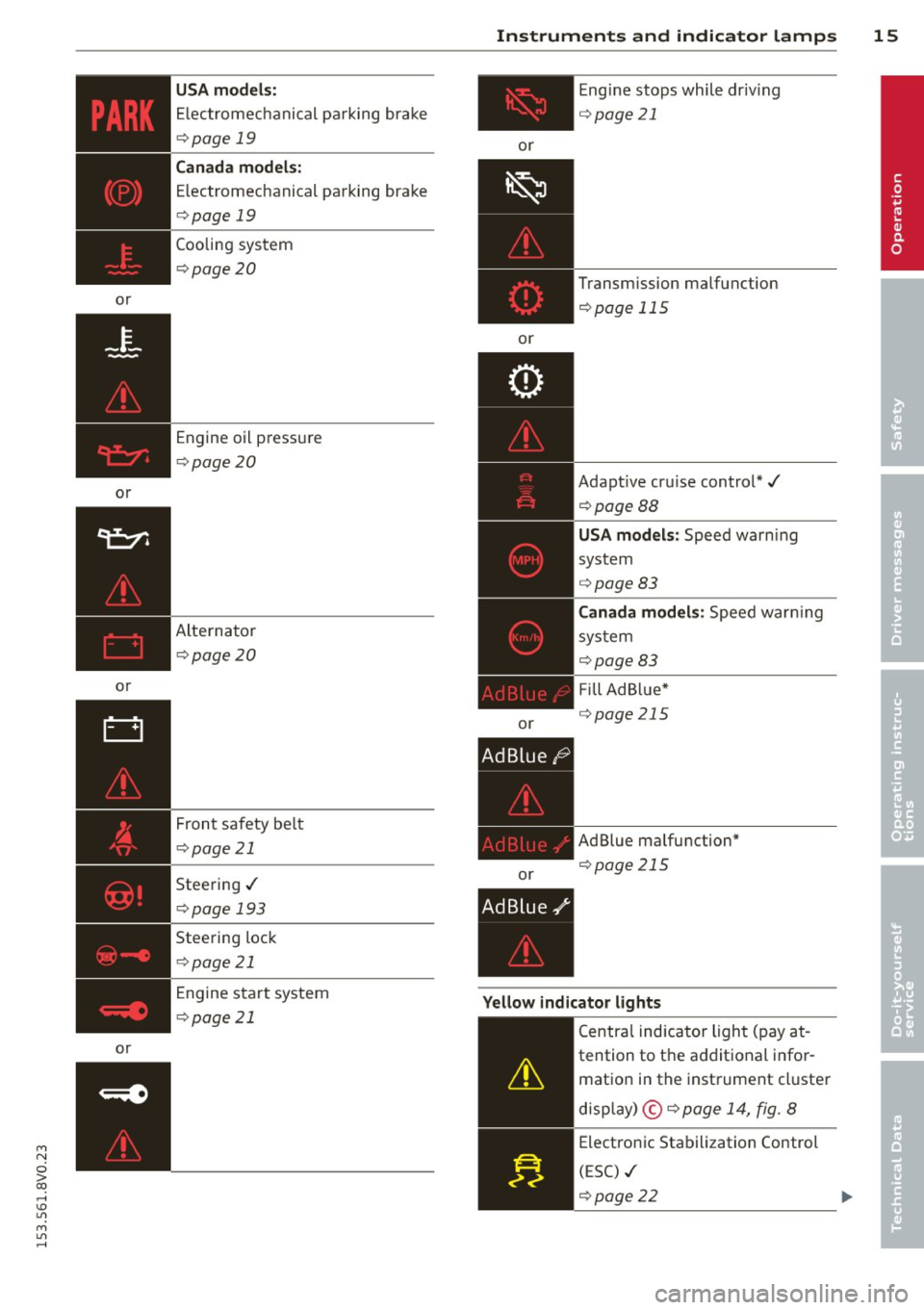
USA models:
Electromechanical parking brake
i:::> page 19
Can ada mode ls:
E lectromechanical parking brake
c::> page 19
Cooling system
c::>page 20
Engine oil pressure
c::>page20
Alternator
~page 20
Front safety be lt
c::> page 21
Steering./
c::>page 193
Steering lock
c::>page 21
Engine start system
c::>page 21
Instrum ent s an d indicator lamp s 15
or
or
or
or E
ngine stops while driv ing
i:::>page 21
Transmission malfunction
c::> page 115
Adaptive cru ise control*./
c::>pageBB
USA mode ls: Speed warn ing
system
c::> page 83
C ana da m odel s: Speed warn ing
sys tem
i:::>page83
F ill Ad Blue*
c::> page 21 S
AdBlue malfunction*
c::> page 215
Yellow indi cato r light s
-------------
Centra l indicator light (pay at -
tention to the additional infor
mation in the instrument cluster
disp lay) ©
c::> page 14, fig. 8
Electronic Stabilization Control
(ESC) ./
c::> page 22
•
Page 22 of 310
20 Instruments and indicator lamps
ltJ;):t :1;034 ( USA model s) / ml (Canada mod
els) Caution : Vehicle parked too steep
When t he i nd ic ator light blinks and th is mes
sage appears, t here is no t eno ugh braking
power to keep the ve hicl e from rolling . The
b rakes have overheate d. The vehicle cou ld roll
away even on a small incline .
ltJ;)i:j;lJ34 ( USA model s) / ml (Canada mod
els) Parking brake is applied
I f t his message appea rs, press t he b rake pedal
fi rst and then re lease the par king brake if nec
essa ry.
@ Tips
F or addit ional info rmation on the pa rk ing
brak e, refer t o¢
page 80.
...L Cooling system
• Switch off engine and check coolant lev
el!
T he coolant leve l is too low or the coolant
temper ature is too high .
D o not cont inue d riving and swi tc h the eng ine
o ff. C hec k the coolant leve l¢
page 225 .
-If the coolant leve l is too low, add coolant
<=> page 226 . O nly con tinue driv ing o nce the
indicator light turns off.
- If the coolant leve l is correct, the problem
may be ca used by a ma lf u nction in the radia
tor fan . D o not cont inue driv ing . See an au
t h o rized Aud i dea le r or a uth o riz ed Aud i
Se rv ic e Fa cili ty for ass ist ance.
• Coolant temperature too high! Let engine
run with vehicle stationary
Let the eng ine run at id le for a few minutes to
coo l down .
A WARNING
- Never op en the hood if you ca n se e or
h ear st ea m or coo la nt escaping from the
eng ine com pa rtm ent. This in cre ases t he
r isk of burn s. Wai t unti l you no longe r
see o r hear steam o r cool ant esca ping.
-
'
- The engine compa rtment in any vehicle
can be a dangerous area. Stop the engine
a nd allow it to cool befo re working in the
e ng ine compartment. A lways foll ow the
info rmation found in
~ page 217, Work
ing in th e engin e compartm ent.
(D Note
Do n ot cont inue dr iv ing if the . indicato r
lig ht tur ns on -this inc reases the r isk o f
engine damage.
"1::::7: Engine oil pressure
• Switch off engine! Oil pres sure too low
St op t he engine and do not cont inue drivi ng.
Check the eng ine oi l level
r=> page 223 .
- If the engine o il level is too low, add eng ine
oil
r=> page 221. Only co nti nu e driving once
the indicator light turns off.
- If the engine o il level is co rrect and the indi
cator light still turns on, turn the eng ine off
and do not cont inue driv ing . See an author
ized Aud i deale r or au tho rized Aud i Service
Facili ty for ass ista nce.
(i) Tips
The oil pressu re war ning is not an oi l level
i ndica to r. For th is reason, c hec k t he o il lev
e l reg ularly .
' 0 Alternator/battery
• Alternator fault: battery is not being
charged
The re is a malfunction in the alternator or th e
vehicle e lectr ica l system .
Drive to an authorized Audi dealer or author
ized Audi Serv ice Facility immediately . Be
ca use the v ehicl e batte ry is drain ing , turn off
all unnecessa ry el ectrical eq uipm ent such as
t h e M MI. See yo ur aut ho rized Aud i de aler o r a
qualifie d repa ir fa cili ty if the b attery ch arge
l evel is too low .
(•) low battery charge: Battery will be
charged while driving
Page 70 of 310
68 Warm and cold
Warm and cold Climate control system
Description
Different systems cou ld be installed.
- manual climate control system* or
- automatic climate control system*
The
climate control system* cools and re
moves humidity from the air in the vehicle in
terior. It is the most effective when the win
dows and panorama sunroof* are closed. If
there is a build-up of heat inside the vehicle,
ventilation can help to speed up the cooling
process . For this reason, the windows and
panorama sunroof can be opened from the
outside .
9 page 43, Convenience opening/
closing
Pollutant filter
T he pollutant filter removes pollutants such
as dust and pollen from the air .
Key recognition
You can store various settings for the manua l
and automatic
climate control system* and
assign them to the key being used .
A WARNING
Poor visibility can lead to accidents.
- For safer driving, keep all windows free
of ice, snow and fog .
- Become familiar as quickly as possible
with the correct use and function of the cl imate control system, especially with
the defrosting and defogg ing funct ion .
- When the temperature is below freezing,
only use the windsh ield washer system
after the w indshield has been warmed by the cl
imate control system . The washer
fluid could freeze on the windshield and
impair visibility.
(D Note
- If you suspect that the climate control
system is damaged, switch the system
off to prevent further damage and have
it checked by an authorized Audi dealer
or authorized Audi Service Facility.
- Repairs to the Audi climate control sys
tem require special technical knowledge
and special tools. See an authorized Audi
dealer or authorized Audi Serv ice Facility .
® For the sake of the environment
Reducing the amount of fuel used also re
duces the amount of pollutants that enter
the air.
(D Tips
- To prevent interference with the heating
and cooling output and to prevent the
w indows from fogging over, the air in
take in front of the windshield must be
free of ice, snow or leaves.
- Condensation from the cooling system*
can dr ip and form a puddle of water un
der the vehicle. This is normal and does
not mean there is a leak.
- T he energy management system may
switch the seat heating* or rear window
defroster off temporari Ly . These systems
are available again as soon as the energy
balance has been restored.
- The flows through the vents under the
rear window. Make sure the openings are
not covered when placing clothing on the
luggage compartment cover.
Page 71 of 310
....,
N
0 > co
rl I.O
"' ....,
"' rl
Climate control system controls
App lies to ve hicles: with manu al cl im ate c ontrol syst em
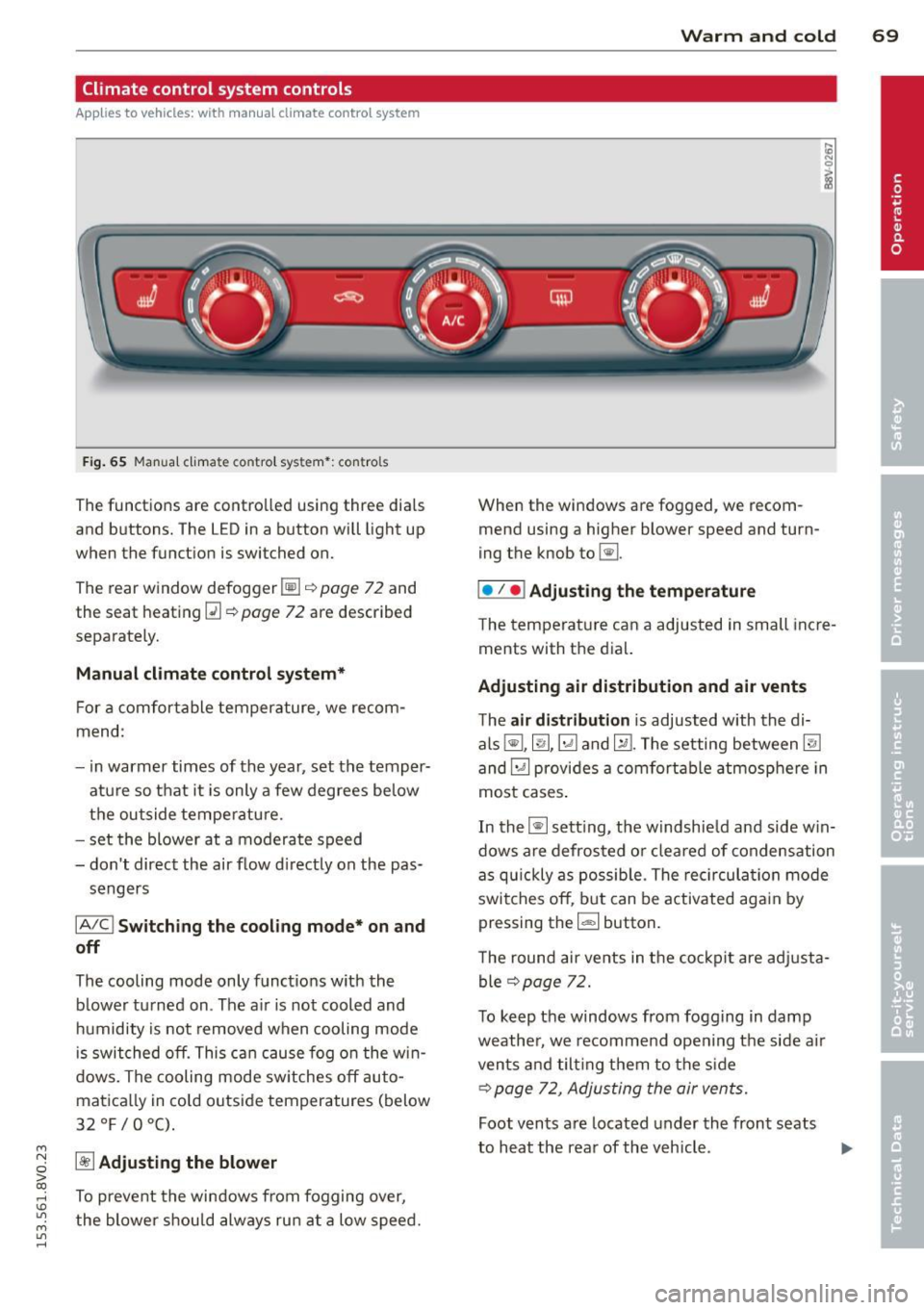
F ig . 65 Man ual cl ima te con tro l sy ste m•: con tro ls
The functions are contro lled using three dia ls
and buttons. The L ED in a button will light up
when the function is switched on.
The rear window defogger~¢
page 72 and
the seat heating~
c::> page 72 are described
separate ly.
Manual climat e control sy stem*
For a comfortable temperature, we recom
mend :
- in warmer times of the yea r, set the temper
atu re so that it is only a few degrees be low
the outside tempe ratu re.
- set the blower at a moderate speed
- don't direct the air flow d irectly on the pas-
sengers
IA/C l Switching the cooling mode* on and
off
The cooling mode only f unct ions w ith the
b lower turned on . The a ir is not cooled and
h umidity is not removed when cooling mode
i s swit ched off. This c an cause fog o n the w in
dows. The cooling mode sw itches off auto
matica lly in co ld outside temperatures (below
32°F/0°C) .
~ Adjusting the blower
To prevent the windows from fogging over,
the blower shou ld always ru n at a low speed .
W arm and cold 69
When the w indows are fogged , we recom
mend using a h igher blowe r speed and tu rn
ing t he knob to~-
I• I • I Adjusting the temperature
T he tempera ture can a adjusted in small inc re
ments with t he dial.
Adjusting air distribution and air vents
The air di stribution is adjusted with the di
als ~'~ .~ and ~-The setting between
@J
and~ provides a comf ort abl e atmosphere in
most cases .
In the~ setting, the windshie ld and side w in
dows are defros ted o r cleared of condensation
as q uickly as possib le . The rec ircul ation mode
switche s off , b ut can be activated aga in by
pressing the
l d;) I button.
T he round air ve nts in t he coc kp it are adj usta
ble
¢ page 72.
T o keep the windows from fogg ing in damp
weathe r, we recomme nd open ing the side a ir
vents and tilt ing them to the s ide
c::> page 7 2 , Adjusting the air vents.
Foot vents a re located under the front seats
to h eat the rear of the veh icle . ...,
Page 72 of 310
70 Warm and cold
1- 1 Sw itching r ecircul ation mode on and
off
In recirculation mode, the air inside the vehi
cle is circu lated and filtered. This prevents the
unfiltered air outside the vehicle from enter ing the vehicle inter ior. We recommend
switch ing recirculation mode on when driving
through a tunnel or when sitt ing in traffic
c::> ,& .
Automatic climate control system controls
App lies to vehicles: with a utomat ic climate contro l system
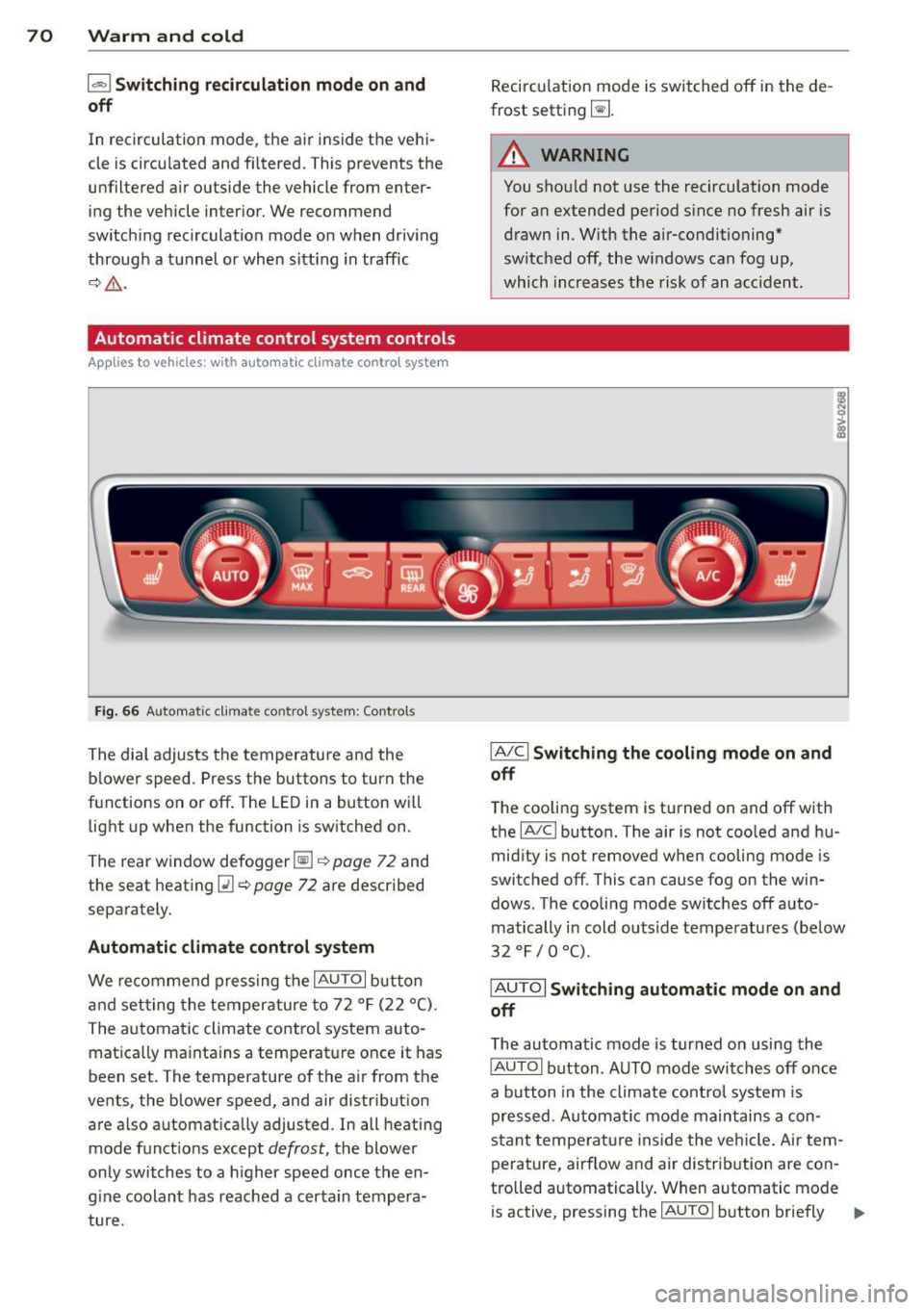
Fig . 66 A ut oma tic cl ima te co ntro l sy ste m: Control s
The dial adjusts the temperature and the
blower speed. Press the buttons to turn the
functions on or off . T he LED in a button w ill
light up when the function is sw itched on .
The rear window defogger~
c::> page 72 and
the seat heating
Q] c::> page 72 are described
separately.
Automatic climate control syst em
We re commend pressing the IAU TO I button
and setting the temperature to 72
° F (22 °() .
The automatic climate control system auto
matica lly ma inta ins a temperature once it has
been set. The temperature of the air from the
vents, the blower speed, and air distribution
are also automat ically adju sted . In all heat ing
mode funct ions except
defrost, the blower
only switches to a h igher speed once the en
g ine coolant has reached a certa in tempera
ture . Recirculation mode is switched off in the de
frost setting ~-
.&_ WARNING
-You shou ld not use the recirculation mode
for an extended period s ince no fresh air is
drawn in. With the air-conditioning*
switched off, the w indows can fog up,
which increases the risk of an acc ident .
IA/ Cl Switching th e cooling mode on and
off
T he cooling system is turned on and off with
the
IA/C l button. The air is not coo led and hu
mid ity is not removed when cooling mode is
switched off . This can cause fog on the win
dows . The cooli ng mode switches off auto
matically i n cold outside temperatu res (be low
32 °F / 0 °() .
IAUTOI Switch ing automatic mode on and
off
The automatic mode is turned on using the
IAUTOI button . AUTO mode switches off once
a b utton in the climate control system is
pressed . Automatic mode maintains a con
sta nt temperature ins ide the ve hicle . Air tem
perature, airflow and air d istribution are con
trolled automatically . When automatic mode
is active, pressing the
IAU TO I button briefly IJJ,-
Page 73 of 310
M N
0 > co ,...., \!) ..,.,
activates the "eco" mode*1>. I n "eco" mode*,
a ll settings are lowered slightly to save fuel.
When in "eco" mode* ,
eco is shown in the dis
play. To ex it "eco" mode*, press the
!AU TO !
button again .
I• I • I Setting the temperature
The temperature can be adjusted individually
for the driver and front passenger using the
dials . Temperatu res between 60 °F (+16 °C)
and 84 °F (+28 °C) can be set . Outs ide of this
range,
Lo or Hi will appear in the climate con
trol system display. In both settings, the cli mate control runs with constantly at the max
i mum cooling or heating level. The tempera
ture is not regu lated.
Synchronization: By pressing the ! AU TO I but
ton for two seconds , the temperature setting
for the driver is transferred to the front pas
senger's side. This applies a temperature
change to the front passenger's side.
~ Adjusting the blower
To prevent the windows from fogging over,
the blower should always run at a low speed.
You can adj ust the volume of air generated by
the blower to you r preference. To have the
blower regulated automatically, press the
!AU TO! button.
Adjusting the air distribution
The air distribution is adjusted with the~, [Ml
and ~ buttons. To have the air distribution
r eg ulated automatically, press the
!AUTO ! but
ton .
The round air vents in the cockpit are adjusta
ble
~ page 72.
T o keep the w indows from fogging in damp
weather, we recommend opening the side air
vents and tilting them to the side
~ page 72, Adjusting the air vents.
Foot vents are located under the front seats
and adjustable vents on the end of the center
console to heat the rear of the vehicle.
M "' l) This func tio n is not available in all c oun tri es . ,....,
Warm and cold 71
~ Switching the defroster on and off
The w indshield and side windows are defrost
ed or cleared of condensation as quickly as
possible . The maximum amount of air flows
main ly from the vents below the windshield.
Recircu lation mode switches off. The tempera
ture is controlled automatically. In the
[i] set
ting, the
! AIC ! cooling mode sw itches on auto
matically, depending on the outside air tem
perature .
The
! AU TO ! button sw itches the defroster off.
l""'I Switching recirculation mode on and
off
The recircu lation mode can be turned on man
ually or automatically* .
- Switching manual recirculation mode on and
off: Press the~ button. The LED light up
when switched on.
- Automatic* recirculation mode: The recircu
lation mode must be activated in the MMI.
Select: the
I MENU I button >C ar> Systems*
con trol button> AC > Auto recirculation.
The a ir quality sensor that is des igned for
diesel and gasoline exhaust automatically
switches the recirculation mode on or off
depending on the leve l of pollutants in the
outside air .
In recirculation mode, the air inside the vehi
cle is circulated and filtered . This prevents the
unfiltered air outside the vehicle from enter
ing the vehicle interior. We recommend
switching recircu lation mode on when driving
th rough a tunne l or when sitting in traffic
~ .&. .
The 1- 1 button, IAU TO ! or the [i] button
switches rec irc ulation mode off.
The system switches to recirculation mode
whe n driving in reverse when the engine is
cold.
•
Page 204 of 310
202 Trailer towing
Trailer towing Driving with a trailer
General information
Your Audi was designed primarily for passen
ger transportation .
If you plan to tow a tra iler, p lease remember
that the addit ional load will affect durab ility,
economy and performance .
T railer towing not on ly places more stress on
the vehicle, it also calls for more concentra
tion from the driver.
F or this reason, always fo llow the operating
and drivi ng i nstr uctions provided and use
common sense.
Technical requirements
Traile r hitch
Use a weight-carrying hitch conforming to the
gross trailer we ight. The hitch must be suita
b le for your veh icle and trailer and mu st be
mounted secure ly on the ve hicle's chassis at a
technically sound location . Use only a trailer
h itch with a removab le ball mount. A lways
check with the tr ailer hitch manu fac tur er to
make sure tha t you are using t he cor rect
hitch.
Do not us e a bumper hitch .
The hitch must be installed in such a way t hat
it does not interfe re with t he impact-absorb
ing bumper syst em . No mod ifications should
be made to the vehi cle exhaust and brake sys
tems . From time to time, check th at a ll hit ch
mo unt ing bo lts remain secure ly fastened.
When you are not towing a trail er, remove the
tra iler hitch ba ll mount. This prevents the
hi tch from causing d amage sho uld your ve hi
cle be str uck from be hind
¢ A .
Trailer brakes
If you r tra ile r is eq uipped w ith a braking sys
tem, check to be su re that it conforms to a ll
r egulat ions . T
he trailer hyd raulic brake system mus t not be
direct ly connected to the vehicle's hydraulic
brake system .
Safety chains
Always use s afety chains be tween your ve hicle
and t he tra ile r.
Trailer lights
Tra ile r li ghts must meet all regulations. Be
su re to c hec k w ith your Audi dea le r fo r cor rect
wiring, swi tches and relays.
Mirrors
If you are unable to see the traffic behind you
u sing the regular o utside m irrors, then you
must insta ll ext ended mirro rs . It is important
t h at you
always have clea r vis io n to the rea r.
,8. WARNING
-
Afte r removing t he trailer hit ch, d o no t
s tore it in yo ur vehicle . In case of sudden
br aking, t he h itch cou ld fly forward an d in
j ur e you or yo ur passengers .
Operating instructions
Maximum traile r weight
A trai le r fo r you r vehicle is limited to a typi cal
class 1 or class 2 trai le r.
Trailer load distribution
B e sure the load in the t ra ile r is held secure ly
i n p lace to p reven t it from shift ing forw ard,
backw ard or sideways.
Never allow a passenger to ride in a trailer
¢ A in Driving instru ctions on page 203.
Engine cooling system
Towing a trailer makes the engine work hard
er . It is impo rtant that the cooling system 's
performance is up to the additional load .
Make su re that the coo ling system has enough
fl uid .
Tire pressure
When towing a trailer, inflate the tires of your
vehicle to t he cold tire pressure listed under
ll>
Page 219 of 310
M N
0 > co ,...., \!) 1.1"1
M 1.1"1 ,....,
~ If there was no Ad Blue left in the tank and a
range of
O mi (0 km) was displayed in the
instrument cluster, switch the ignition on
for about 15 seconds before starting the en gine.
_& WARNING
Ad Blue can irritate the skin, eyes and respiratory system. If there is contact with
the fluid, flush immediately with plenty of
water. Consult a physician if necessary.
(D Note
- Only use Ad Blue that conforms to the standard ISO 22241-1. Do not mix any
additives with the Ad Blue and do not dilute it with water .
- Do not add Ad Blue to the diesel tank or
add diesel fuel to the Ad Blue tank. Mix
ing can lead to damage to the engine
and the Ad Blue tank system. Warranty
does not cover damage caused by this.
- AdBlue attacks surfaces such as painted
vehicle components, plastic and carpet.
Remove the fluid as quickly as possible
with a damp cloth and plenty of cold wa
ter. If the Ad Blue has already crystal lized, use warm water and a sponge .
AdBlue residue that is not removed will
crystallize and can damage the affected
surface .
- Do not store the refill bottle in the vehi cle. If it leaks, the escaping Ad Blue could
damage the vehicle interior.
- Do not allow AdBlue to come into con
tact with clothing . If there is contact
with the fluid, flush immediately with
plenty of water.
@ Tips
- You can obtain refill bottles from an au
thorized Audi dealer or authorized Audi
Service Facility.
- Follow the AdBlue manufacturer's in
structions for use and storage.
Checking and Filling 217
Hood
Working in the engine compartment
Special care is required if you are working in
the engine compartment
For work in the engine compartment such as
checking and filling fluids, there is a risk of
injury, scalding, accidents, and burns. For
this reason, follow all the following listed
warnings and general safety precautions.
The engine compartment is a dangerous
area.
c::> .&. .
_8 WARNING
To reduce the risk of injuries, complete the
following steps before opening the hood:
- Turn the engine off.
- Switch the ignition off.
- Set the parking brake.
- Place the selector lever in the P position.
- Let the engine cool down.
- Never open the hood when you see that
steam or coolant drips from the engine
compartment- there is a danger of burns! Wait until no steam or coolant
flows out .
- Keep children away from the engine com
partment.
- Never spill fluids on a hot engine . These
fluids (such as the freeze protection con
tained in the coolant) can catch fire .
- Avoid short circuits in the electrical sys
tem, especially the battery .
- When working in the engine compart
ment, remember that the radiator fan
can switch on even if the ignition is
switched off, which increases the risk of
personal injury.
- Never open the cap on the coolant ex
pansion tank when the engine is warm.
The cooling system is under pressure.
- To protect your face, hands, and arms
from hot steam or coolant, cover the cap
with a large cloth when opening.
II>-
•
•
•