warning AUDI S3 2016 Owners Manual
[x] Cancel search | Manufacturer: AUDI, Model Year: 2016, Model line: S3, Model: AUDI S3 2016Pages: 328, PDF Size: 81.78 MB
Page 148 of 328
Assist
General information
Applies to veh icles: w ith Audi side assist
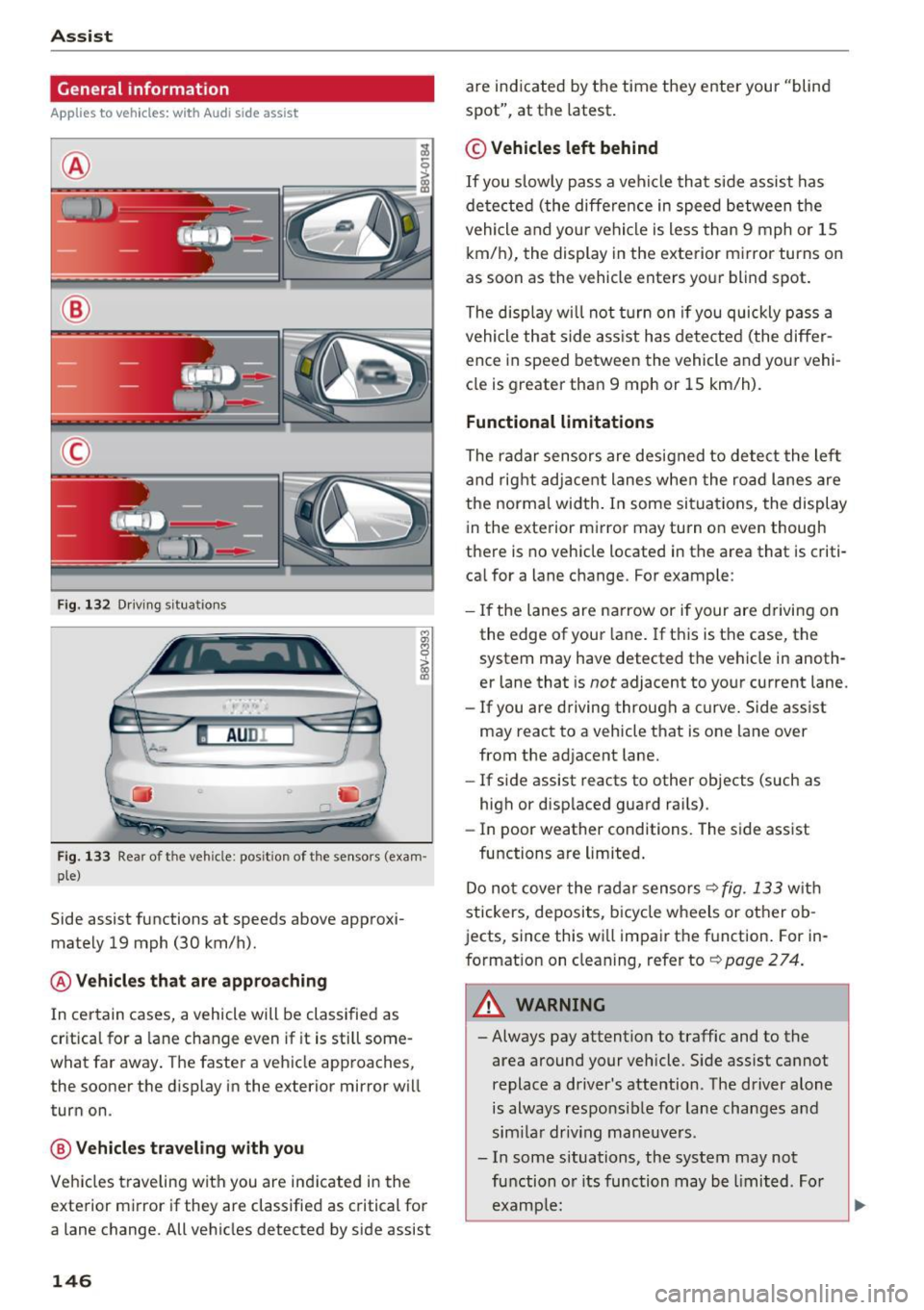
®
@
©
F ig. 132 Driving s itu atio ns
I AU DI
-·
Fig. 133 Rear of the vehicle: pos it ion of the senso rs (exa m·
pie)
Side assist functions at speeds above approxi·
mately 19 mph (30 km/h).
@ Vehicles that are approaching
In certain cases, a vehicle will be classified as
cr itical for a lane change even if it is still some·
what far away . The faster a veh icle approaches,
the sooner the display in the exterior mirror wi ll
turn on.
@ Vehicles traveling with you
Vehicles traveling with you are indicated in the
exterior mirror if they are classified as critical for
a lane change. All vehicles detected by side assist
146
are indicated by the time they enter your "blind
spot", at the latest .
© Vehicles left behind
If you slow ly pass a vehicle that side assist has
de tected (the diffe rence in speed between the
vehicle and your vehicle is less than 9 mph or 15
km/h), the display in the exterior mirror turns on
as soon as the vehicle enters your blind spot.
The display will not turn on if you quickly pass a
vehicle that side ass ist has detected (the differ
ence in speed between the vehicle and your vehi
cle is greater than 9 mph or 15 km/h).
Functional limitations
The radar sensors are designed to detect the lef t
and right adjacent lanes when the road lanes are
the normal width . In some situations, the display
in the exterior mirror may turn on even though
there is no vehicle located in the area that is criti·
cal for a lane c hange. For example:
- If the lanes are narrow or if your are driving on
the edge of your lane . If this is the case, the
system may have detected the vehicle in anoth·
er lane that is
not adjacent to your current lane.
- If you are driving through a curve . Side assist
may react to a vehicle that is one lane over
from the ad jacent lane.
- If side assist reacts to other objects (such as
high or disp laced guard rai ls).
- In poor weather conditions. The side assist
functions are limited.
Do not cover the radar sensors <=?
fig. 133 with
stickers, deposits, bicycle wheels or other ob
jects, since this wi ll impair the function . For in·
formation on cleaning, refer to<=?
page 274.
_& WARNING
-Always pay attention to traffic and to the
area around your vehicle. Side assist cannot
replace a d river's attention. The driver alone
is always respo nsible for lane changes a nd
similar driving maneuvers .
- In some situations, the system may not
function or its function may be limited. For
example:
-
Page 149 of 328
,....,
N
0 > co ,....,
behind very quickly. The display may not
turn on in time.
- In poor weather conditions such as heavy
rain, snow or heavy mist.
- On very wide lanes, in tight curves, or if
there is a rise in the road surface. Vehicles
in the adjacent lane may not be detected
because they are outside of the sensor range.
- Audi side assist cannot detect all vehicles
under all conditions, which can increase the
risk of accidents.
- Please note that side assist only displays ap
proaching vehicles or vehicles in your blind
spot if your vehicle is traveling at least
19 mph (30 km/h).
- In certa in situations, the system may not
work or its function may be limited. For ex
amp le:
- The display may not turn on at the right
time if vehicles are approaching or passing
very quickly.
- In poor weather conditions, such as heavy rain, snow or fog.
- In very wide lanes, in tight curves or when
there are slopes in the roadway, vehicles
in the neighboring lanes may not be de
tected because they are outside of the
sensor range.
(D Note
The sensors can be displaced by impacts or
damage to the bumper, wheel housing and
underbody. This can affect the system. Have
an authorized Audi dealer or authorized Audi
Serv ice Facility check their function .
(Di Tips
-If the window glass in the driver's door or
front passenger's door has been t inted, the
display in the exterior mirror may be misin
terpreted.
- For an explanation on conformity with the
FCC regulations in the United States and the
Industry Canada regu lations, refe r to
r::!> page 309.
Assist
Switching on and off
App lies to vehicles : wi th Audi side ass ist
T he system and be switched on and off in the
MM I*.
"' Select: the I MENU I button> Car> Sys tem s"
control button > Driver a ssistanc e > Audi s ide
a ssis t.
With Off , the system is switched off.
An activated system w ill s ignal every time the ig
nition is switched on by turning the displays in
the exte rior m irro rs on briefly.
Adjusting the display brightness
App lies to vehicles: wi th Audi side ass ist
The display brightness can be adjusted in the
MM!* .
"' Select: the IM ENU I button > Ca r > Sys te m s*
control button > Dri ver assi st a n ce > Au di s ide
a ssis t.
The display br ightness adjusts automatically to
the brightness of the surroundings, both in the
information and in the warning stage. In very
dark or very bright surround ings, the d isp lay is
al ready set to the minimum o r max imum level by
the automatic adjustment. In such cases, you may not ice no change when adjust ing the bright
ness, or the change may only be noticeable once
the surroundings change.
Adjus t the br igh tness to a leve l where the display
in the information stage will not disrupt your
view forward . If you change the brightness, the
display in the exterior mirror will briefly show the
brightness level in the information stage . The
brightness of the warning stage is linked to the
brightness in the information stage and is adjust
ed along with the information stage adjustment .
(D Tips
-Side ass ist is not act ive while you are mak
ing the adjustment.
- Your settings are automatica lly stored and
assigned to the remote control key being
used.
147
Page 150 of 328
Ass is t
Driver messages
Applies to vehicles: with Audi side assist
If the side assist switches off automatically, a
message appears i n the ins trument cluster dis
p lay .
@j Audi side assist : cur rentl y unav ailable No
s en so r vi sion
The radar senso rs ' vision is affected. Do not cover
the area in front of the sensors with b ike wheels,
stickers, dirt or other objects. Clean the area in
front of the sensors, if necessary~
page 146,
fig. 133.
@j Audi side a ssi st : cur rentl y una vailable
Side assist cannot be switched on tempo rar ily be
cause there is a malfunction (for example, the
battery charge level may be too low).
@j Audi side a ssist: System fault!
The system cannot guarantee that it wi ll detect
ve hicles co rrectly and it is switched off. The sen
sors have been d isp laced or are faulty. Have the
system checked by an authorized Audi dea ler or
authorized Audi Service Facility soon.
Audi drive select (drive settings)
Introduction
Applies to vehicles: with Audi drive select
Audi drive select makes it possible to experience
different types of vehicle settings in one vehicle .
The driver can select from three
C omfort , Auto
and Dynamic modes using the r.1:a button in the
center console or the MMI to switch between a
sporty and a comfortable dr iving mode, for ex
ample . In the
In div idual * mode, the vehicle set
tings can be adjusted to your personal preferen
ces. This makes it possible to combine settings
such as a sporty eng ine set ting with smooth
s teer ing .
A WARNING
Using Audi drive select incorrectly can lead to
collisions, othe r accidents and serious inju
ries .
148
· Description
Applies to vehicles: with Audi drive select
The vehicle setup in each mode depends on the
vehicle's features. However, the eng ine and
steering are a lways affected.
Engine and automatic tr ansmiss ion
Depend ing on the mode, the engine and auto
matic transmission* respond more qu ickly or in a
more ba lanced manner to acce lerato r pedal
movements.
Adaptive damper s (Audi magnetic ride )*
The adaptive dampers use sensors to record in
formation regarding steering movements, brak
i ng and acce le ration operations by the dr iver,
r oad su rface, driving speed, and load. W it h Aud i
drive select you can adjust the adaptive dampers
spo rty (dynamic), comfortable (comfort) or ba l
anced (auto).
Steering
The steering adapts in terms of steering ass is
tance. There are d ifferent modes
c;;:> page 149.
Ind irect steering that moves easi ly as in comfort
mode is especia lly suited to long drives on a high
way. The dynamic mode provides sporty, direct
steering .
For vehicles with progress ive steering* the steer
ing performance is more agi le .
Corn ering light *
The cornering light adjusts when driv ing on
cu rves at speeds between 6 mph (10 km/h) and
68 mp h (110 km/h). The pivoting act ion and the
li gh ting are also adapted to the mode.
Adaptive cruise control*
The behavio r whe n accelerating can be adjusted
from comfortable to sporty, depending on the
Audi drive select mode. Adaptive cr uise control
also responds to the dr iving beh avior of the vehi
cle ahead in a more conservative or sporty man-
ner .
1111>
Page 151 of 328
.... N
0 > CX)
rl
"' U"I
rl
"' ....
@ Tips
In some models, the maximum vehicle speed
can only be reached in the auto and dynamic
modes.
Selecting the driving mode
Appl ies to vehicles: with Audi d rive select
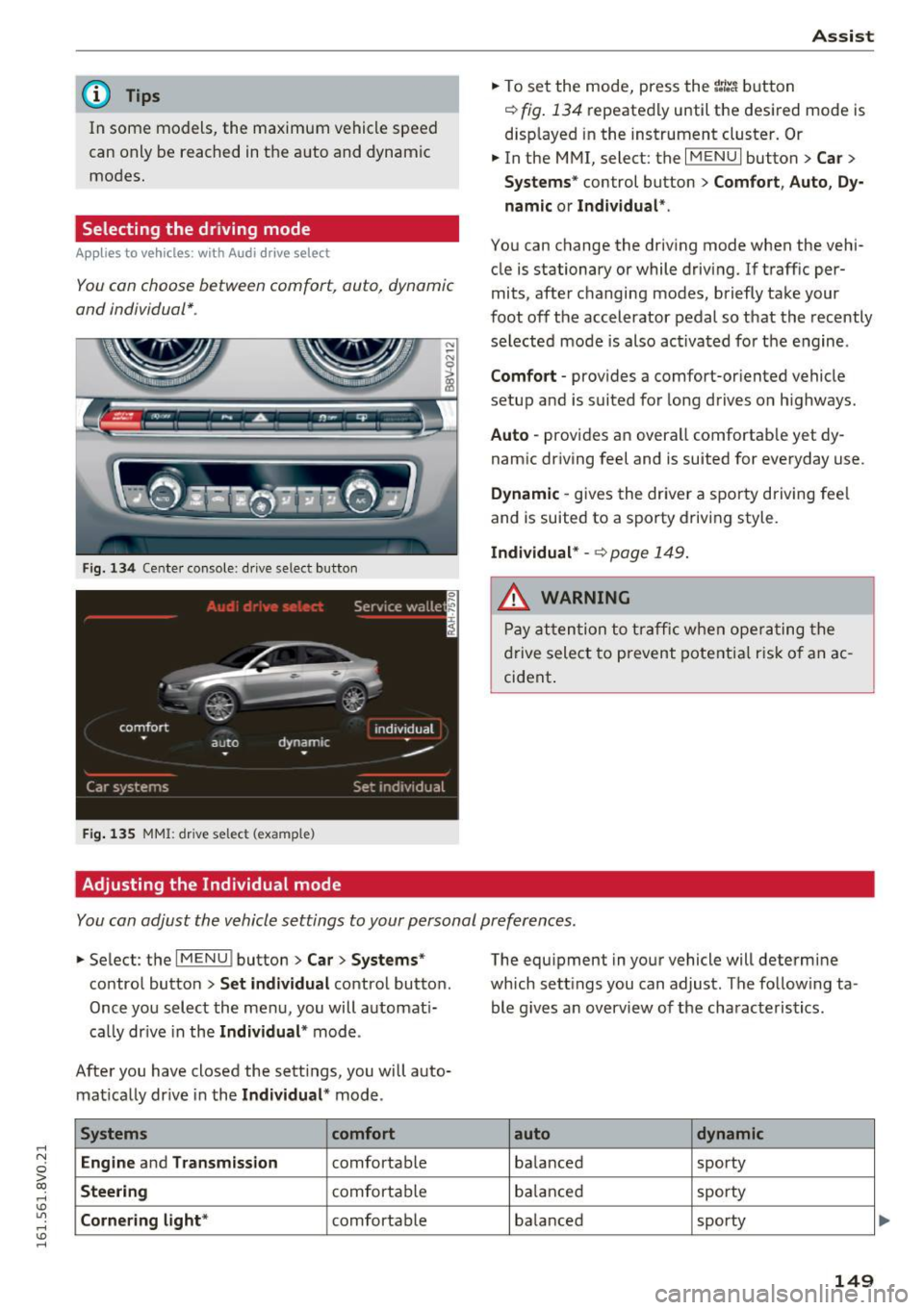
You con choose between comfort, auto, dynamic
and individual* .
Fig. 134 Cente r console : dr ive select button
F ig. 135 MMI: drive select (example)
Adjusting the Individual mode Assist
.,.
To set the mode, press the r:/tc'i button
~ fig. 134 repeatedly until the desired mode is
displayed in the instrument cluster. Or
.,. In the MMI, select: the
I MENU I button > Car >
Systems"
control button > Comfort, Auto, Dy
namic or Individual *.
You can change the driving mode when the vehi
cle is stationary or while driving. If traff ic per
mits, after changing modes, briefly take your
foot off the accelerator pedal so that the recently
selected mode is also activated for the engine .
Comfort -provides a comfort-or iented vehicle
setup and is suited for long drives o n highways.
Auto -provides an overall comfortab le yet dy
namic driving feel and is suited for everyday use .
Dynamic -gives the driver a sporty driving fee l
and is suited to a sporty driving style.
Individual* -~ page 149.
A WARNING
Pay attention to traffic when operating the
drive select to prevent potential risk of an ac
cident .
You can adjust the vehicle settings to your personal preferences .
.,. Select : the IMENU ! button> Car> Systems*
control button > Set individual control button.
Once you select the menu, you will automat i
cally drive in the
Individual * mode.
After you have closed the sett ings, you will auto
matically drive in the
Individual * mode.
Systems comfort
Engine
and Transmission comfortable
Steering comfortable
Cornering light* comfortable The equipment
in your vehicle will determine
which sett ings you can adjust. The follow ing ta
ble g ives an overview of the characteristics .
auto dynamic
balanced sporty
balanced sporty
balanced sporty
149
Page 153 of 328
.... N
0 > co ....
General information
Applies to vehicles: with rear pa rk in g systems/pa rk in g system
p lus/rearv iew camera
Depending on your vehicle's equipment, various
parking aids will help you when parking and ma
neuvering.
The
rear parking system is an audible parking aid
that warns you of obstacles
behind the vehicle
¢page 152.
The parking system plus assists you when park
ing by audibly and visually indicating objects de
tected
in front of and behind the vehicle
¢ page 152.
The rearview camera shows the area behind the
vehicle in the MMI display . This display assists
you when you are cross or parallel parking. The
parking system plus functions are also available
¢ page 153.
A WARNING ,--
- Always look for traffic and check the area
around your vehicle by looking at it directly
as well. The parking system cannot replace
the driver's attention. The driver is always
responsible when entering or leaving a park
ing space and during similar maneuvers.
- Please note that some surfaces, such as
clothing, are not detected by the system .
- Sensors and cameras have blind spots in
which people and objects cannot be detect
ed . Be especially cautious of small children
and animals .
- Always pay attention to the area around the
vehicle -using the rearview mirror, too .
- The sensors can be displaced by impacts or
damage to the radiator grille, bumper,
wheel housing and the underbody . The park
ing system may become impaired as a re
sult. Have an authorized Audi dealer or au
thorized Audi Service Facility check their
function.
- Make sure the sensors are not obstructed by
stickers, deposits or other materials. If they
are the sensor function could be impaired .
I
Parking systems
For additional information on cleaning, re
fer to¢
page 274.
@ Note
-Some objects are not detected or displayed
by the system under certain circumstances:
- Objects such as barrier chains, trailer draw
bars, vertical poles or fences
- Objects above the sensors such as wall ex
tensions
- Objects with specific surfaces or struc
tures such as chain link fences or powder
snow
- If you continue driving closer to a low-lying
object, it may disappear from the sensor
range . Note that you will no longer be
warned about this obstacle.
- The sensors can be displaced by impacts or
damage to the radiator grille, bumper,
wheel housing and the underbody . The
parking system may become impaired as a
result . Have an authorized Audi dealer or
authorized Audi Service Facility check their
function.
(D Tips
- The system may provide a warning even
though there are no obstacles in the cover
age area in some situations, such as:
- certain road surfaces or for long grass .
- external ultrasonic sources e.g. from
cleaning vehicles.
- heavy rain, snow, or thick vehicle exhaust .
- We recommend that you practice parking in
a traffic-free location or parking lot to be
come familiar with the system. When doing
this, there should be good light and weath
er conditions .
- You can change the volume and pitch of the
signals as well as the display¢
page 157.
-What appears in the MMI display is some
what time-delayed.
- The sensors must be kept clean and free of
snow and ice for the park assist to operate .
151
Page 154 of 328
Parking system s
Rear parking system
Description
Applies to veh icles: w ith rear pa rk in g system
The rear parking system is an audible parking
aid.
Descri ption
There is a sensor in the rear bumper cover . If
these detect an obstacle, audible signals warn
you .
Make sure the sensors are not covered by stick
ers, deposits or any other obstructions as it may
impair the sensor function. For information on
cleaning, refer to¢
page 274.
The range at which the sensors begin to measure
is approximately:
Side rear 3 ft (0.90
m)
Side center 5.2 ft (1.60 m)
The closer
you get to the obstacle, the shorter
the interval between the audible signals .
A con
tinuous tone sounds when the obstacle is less
than approximately
1 foot (0.30 meters) away.
Do not continue backing up¢.&.
in General infor
mation on page 151,
¢0 in General information
on page
151!
If the distance to an obstacle remains constant,
the volume of the distance warning gradually drops after about four seconds (this is not apply
in the continuous tone range).
Activ ating
The parking system activates automatically when
the reverse gear is selected. You will hear a brief
confirmation tone.
15 2
Parking system plus
Description
App lies to vehicles: with parking system plus
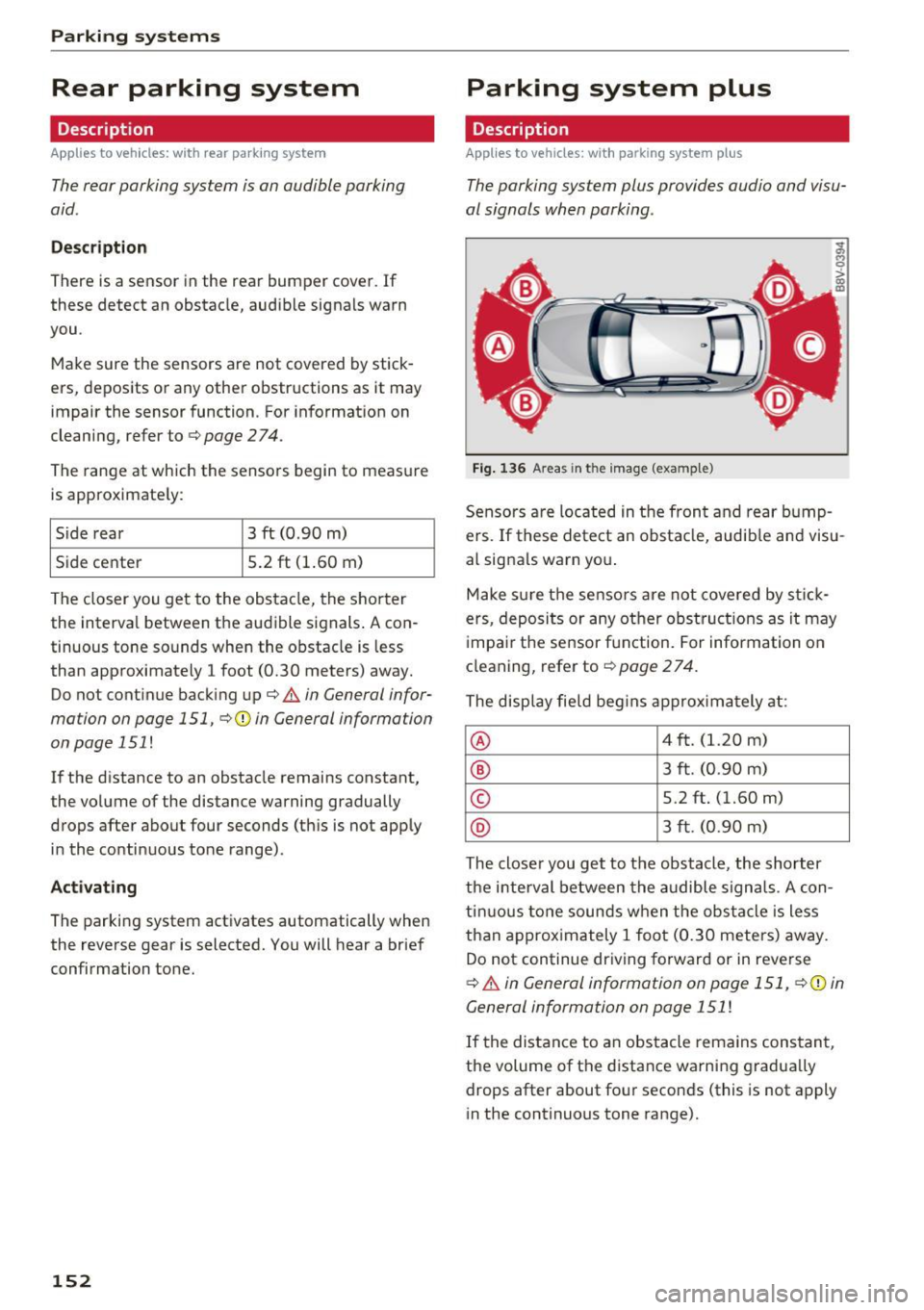
The parking system plus provides audio and visu
al signals when parking .
=
Fig. 136 Areas in t he image (example)
Sensors are located in the front and rear bump
ers. If these detect an obstacle, audible and visu
al signals warn you .
Make sure the sensors are not covered by stick
ers, deposits or any other obstruct ions as it may
impair the sensor function. For information on
cleaning, refer to¢
page 2 74.
The display field begins approx imately at :
® 4 ft. (1.20 m)
® 3 ft. (0.90 m)
© 5.2 ft. (1.60 m)
® 3 ft. (0.90 m)
The closer you get to the obstacle, the shorter
the interval between the audible signals. A con
tinuous tone sounds when the obstacle is less
than approximately 1 foot (0.30 meters) away.
Do not continue driving forward or in reverse
¢.&. in General information on page 151, ¢@) in
General information on page 151
!
If the distance to an obstacle remains constant,
the volume of the distance warning gradually
drops after about four seconds (this is not apply
in the continuous tone range).
Page 156 of 328
Parking system s
General information
Applies to veh icles: w ith park ing system p lus with rearview
camera
F ig . 14 1 Area covered © and area not covered @by the
r earv iew came ra (example)
Fig. 142 Rear lid : locat io n of the rearview camera (exam ·
ple)
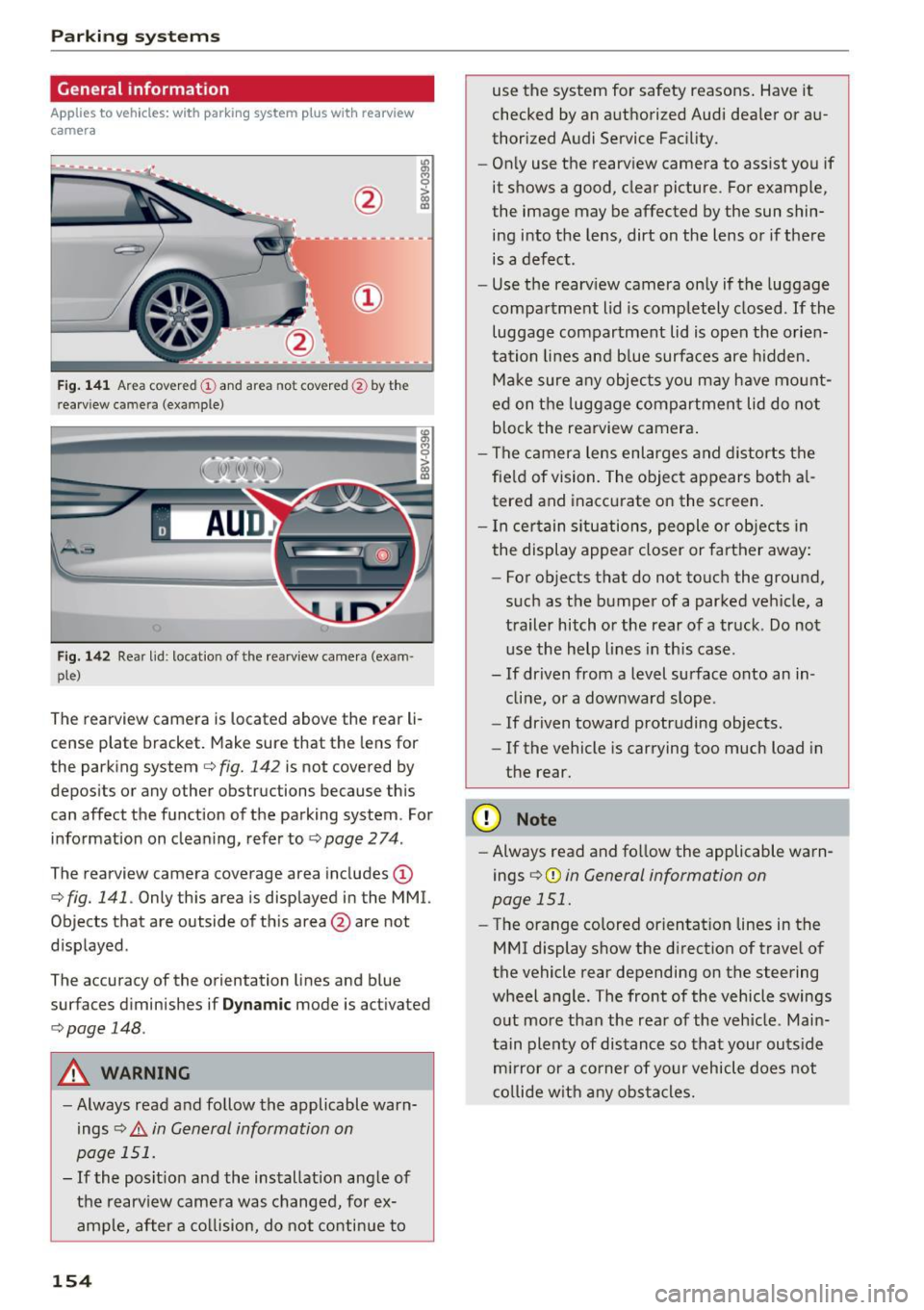
The rearview camera is located above the rear li
cense plate bracket. Make sure that the lens for
the parking system
c.:> fig. 142 is not covered by
depos its or any other obstructions because th is
can affect the function of the parking system . For
information on cleaning, refer to
c.:> page 2 74 .
The rearview camera coverage area includes(!)
c.:> fig. 141. Only this area is displayed in the MMI.
Objects that are outside of th is area @are not
displayed .
The accuracy of the orientation lines and b lue
surfaces d iminishes if
D ynamic mode is activated
¢ page 148.
A WARNING
-Always read and follow the applicable warn
ings
c.:> .&. in General information on
page 151.
- If the posit ion and the installation ang le of
the rearv iew camera was changed, for ex
ample, after a co llision, do not continue to
154
use the system for safety reasons . Have it
checked by an a uthorized Audi dea ler or au
thorized Audi Service Fac ility.
- Only use the rearv iew camera to assist you if
it shows a good, clear picture . For example,
the image may be affected by the sun shin
ing into the lens, dirt on the lens or if there is a defect.
- Use the rearv iew camera on ly if the luggage
compa rtment lid is completely closed.
If the
luggage compartment lid is open the orien
tation lines and b lue surfaces are hidden.
Ma ke sure a ny objec ts you may h ave mo unt
ed on t he luggage compartmen t lid do not
b lock the rearview camera .
- The camera lens enlarges and distorts the
fie ld of vision. The object appears both a l
tered and inaccurate on the screen .
- I n cer tain s itu ations, people or objects in
the display appea r closer or farther away:
- For objects that do not touch the ground,
such as the bumper of a parked vehicle, a
trailer hitch or the rear of a truck . Do not
use the help lines in th is case.
- If dr iven from a level surface onto an in
cline, or a downward slope .
- If driven toward protruding objects.
- If the vehicle is carrying too much load in
the rear .
(D Note
-Always read and fo llow the applicable warn
ings
c.:> (D in General information on
page 151.
- The orange colored orientat ion lines in the
MMI display show the direction of trave l of
the vehicle rear depending on the steering
wheel a ng le . The front of the vehicle swings
o ut more than the rea r of the veh icle. Main
tain plenty of dis tance so that your outs ide
m ir ror or a co rner of your vehicle does not
c o llide w it h any obstacle s.
Page 159 of 328
,....,
N
0 > co ,....,
A ppl ies to vehicles: with parkin g system plus/rearview cam·
era
The display and warning tones con be adjusted in
the MMI.
~ Select: the I MENU ! button >Car > Systems *
control button > Driver assistance > Parking
aid .
Display
On * -
an op tic al d isp lay is shown for the parking
system plus, a rearview camera image is s hown
for parking system plus with rearv iew camera* .
Off -Whe n the par king system is switched off,
only audib le sign als are give n.
Signal tones
Front volume -
volume for the front and side*
a rea
Rear volume -volume for t he rear area
Front frequenc y-frequency for the front and
side * area
Rear frequency -frequency fo r the rear area
Music volume during nav . prompts -the volume
of the a udio/v ideo so urce is lowe red when t he
pa rking system is turned o n.
The new ly selected leve l is demons trated briefly
by the sound generator.
- The warning tones ca n also be adjusted d i
r ec tly from the visua l display or t he rearv iew
cam era image *. Simply pr ess the
Settings
co ntrol bu tton.
- The setti ngs a re auto mat ica lly stored and
ass igned to the remote co ntro l key t hat is in
u se .
Error messages
App lies to vehicles: with par kin g system plus/rearview cam
era
There is an erro r in the system if the LED in the
P111A. button is b linking and you hear a continuous
Parking systems
alarm for a few seconds after sw itch ing on the
par king system or w hen the pa rking system is a l
ready activated. If the error is not cor rected be
fo re you switch off the ignition, the LED in the
Pw ,
button w ill blink the next time you switch on the
park ing system by shifting into reverse.
Parking sy stem plus*
If a sensor is fa ulty, the~ symbol will appear i n
f ront of/behind the vehicle in the MMI display. If
a rear sensor is faulty, only obstacles that are in
areas @and @are shown <=>
page 152, fig. 136.
If a front sensor is fa ulty, only obstacles that are
i n a reas © and @are shown .
Drive to an authorized Audi dealer or authorized
Audi Service Facility immed iate ly to have the
malfu nction corrected.
157
Page 161 of 328
,....,
N
0 > co ,....,
wireless te lecommunications provider and the
"About Aud i connect" tab in your vehicle's
MMI:
! MENUI button> Aud i connect > About
Audi conne ct .
Electronic stabilization
control (ESC)
Description
Electronic Stabilization Control (ESC) supports
driver safety. It reduces the risk of slipping and
improves dr iving stability. ESC detects crit ical sit
uations suc h as the vehicle overstee ring and un
de rs teer ing or the wheels are sp inning. The vehi
cle is s tabilized by app ly ing the brakes or reduc
i ng e ngine torque. Once t he ES C i s ac tiva ted, the
indicator light
DJ b li nks in the instrument clus
ter .
The fol low ing systems are integrated in the ESC:
Anti-lock braking system (ABS)
ABS preve nts the whee ls from lock ing whe n brak
i ng. The vehicle can s till be steered even during
h a rd brak ing. Apply steady press ure to the brake
pedal. Do not pump the pedal. A puls ing in t he
bra ke pedal indica tes th at the system is act ing to
s tabili ze the vehicle.
Brake assist system
The brake assist sys tem can decrease braking dis
tance .
It increases brak ing power when the d rive r
p resses the brake pedal q uic kl y in eme rgency sit
uations. Yo u m ust press and hold the b rake pedal
u nti l the dangero us si tuati on is over. In ve hicles
with adaptive cruise contro l*, the bra ke assist
system is more sensitive if the d istance detected
to the veh icle ahead is too small.
Anti-slip regulation (ASR)
ASR red uces eng ine power when the drive wheels
begin spinning an d adapts the force to the road
conditions. This makes it easie r to sta rt, acceler
ate and drive up inclines .
Intelligent Technology
Electronic differential lock (EDL)
T he ED L brakes wheels t hat are spi nning and
transfe rs the drive power to the o ther dr ive
whee l or wheels if the vehicle is equ ipped with all
whee l drive *). T his function is not available at
higher speeds.
In extreme cases, ED L automat ica lly swi tches off
to keep the b rake o n the braked whee l from over
heating. The vehicle is still working correct ly. ED L
will switc h on again automatically when condi
tions have returned to normal.
Steering recommendation
T he ESC he lps to s tabilize the vehicle by changing
the steering torque.
Selective wheel torque control
Se lective w heel torque con trol is used w hen d riv
i ng on curves. The front whee l on the ins ide of
the curve or both wheels on t he i nsid e of the
c ur ve are braked se lective ly as needed . This al
lows more precise driving in c urves .
Automatic post -collision braking system
T he "Automat ic pos t-collis ion braki ng system"
ca n help to reduce the ris k of sliding and of othe r
collisions af ter an a cciden t. If th e ai rbag cont rol
module detects a collision above a certai n vehicle
speed, the vehicle is brake d by the ESC.
T he veh icle does not br ake au tomatic ally if:
- the dr iver presses the acce lera tor pedal, or
- the braking fo rce generated by the pressed
brake pedal is greater than the b raking force
that would be in itiated by the system, or
- the ESC, the brake system o r the veh icle electri
cal system are not functioning.
A WARNING
- T he ESC and its i nteg rated systems ca nnot
over come the li mits posed by natu ral physi
cal laws. This is espe cially impor tant on slip
pery o r we t roads . If the systems beg in act
ing to stabilize your veh icle, you should im
mediately a lter your speed to match the
road and tra ffic condit ions. Do not let the
increased safety provided tempt you into
159
Page 162 of 328
Inte llig ent Techn olo gy
tak ing risks . This could increase your risk of
a collision.
- Please note the risk of a collision increases
when driving fast, especially through curves
and on slippery or wet roads, and when driv
ing too close to objects ahead. The ESC and
its integrated systems cannot always pre
vent collisions - there is still a r isk of acci
dents!
- Press the accelerator pedal carefully when
accelerating on even, s lippery surfaces such
as ice and snow. The drive wheels can spin
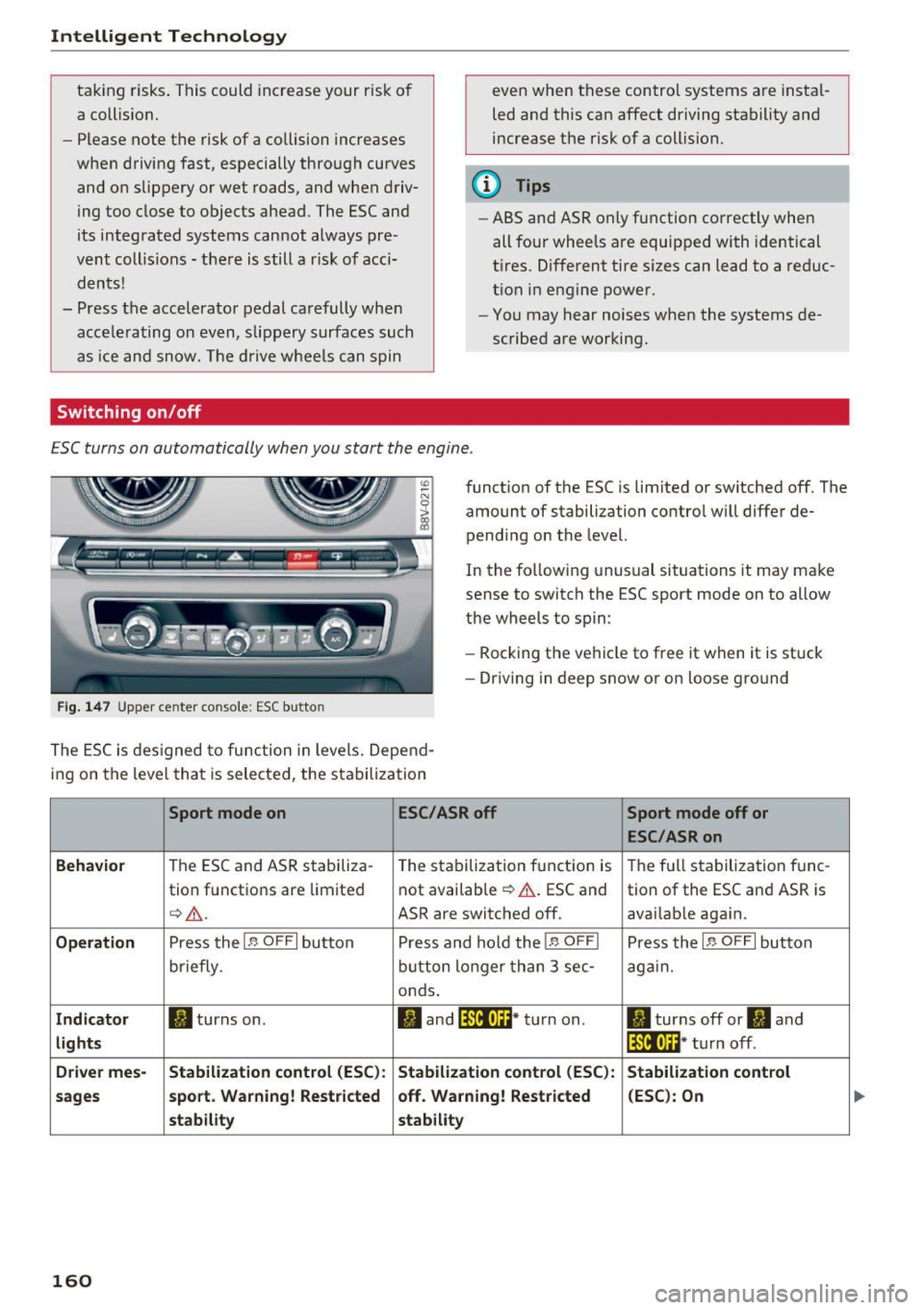
Switching on/off
even when these control systems are instal
led and this can affect dr iving stability and
increase the risk of a collision.
@ Tips
- ABS and ASR only function correctly when
all four wheels are equipped with identical
tires . Different tire sizes can lead to a reduc
t ion in engine power.
- You may hear noises when the systems de
scribed are working.
ESC turns on automatically when you start the engine .
Fig . 1 47 Upper center conso le: ESC butto n
function of the ESC is limited or switched off. The
amount of stabilization contro l will differ de
pending on the level.
In the follow ing unusual situations it may make
sense to switch the ESC sport mode on to allow
the wheels to spin:
- Rocking the vehicle to free it when it is stuck
- Dr iving in deep snow or on loose g ro und
The ESC is des igned to function in levels. Depend
ing on the level that is selected, the stabilization
Sport mode on ESC/ASR off Sport mode off or
ESC /ASR on
Beh avio r
The ESC and ASR stabiliza-
The stabilization function is The full stabilization tune-
tion functions are limited not available
¢ &.
. ESC and
tion of the ESC and ASR is
¢&_ . ASR are switched off. avai lable again.
Operati on Press the I~ OFF I button P ress and hold the I~ OFFI Press the I~ OFFI button
briefly . button longer than 3 sec -again.
onds .
Indicat or II turns on. II and lf11f•lH * turn on . II turns off or II and
lights lf111,n~ · turn off .
Driv e r mes- Stab ilization cont rol (E S C): Stabilization control (ESC ):
Stabilizat ion cont rol
sa ge s s port. Warning ! Re st ric ted off . Warning ! Re stri cted (E
SC ): On
st ability stability
160