stop start AUDI S3 SEDAN 2015 Owner's Manual
[x] Cancel search | Manufacturer: AUDI, Model Year: 2015, Model line: S3 SEDAN, Model: AUDI S3 SEDAN 2015Pages: 282, PDF Size: 71.14 MB
Page 87 of 282
M N
0 > co ,...., \!) ..,.,
..,.,
..,., ,....,
Stopp ing /p ark in g
If the se lector lever is not in the P position when
you open the driver's door, the vehicle cou ld roll.
In vehicles with a convenience key*, the message:
Shift t o P, o ther wis e vehi cle c an roll away .
D oo rs do not lo ck if l ever i s not i n P
appears . You
will also hear a warning tone.
~ Press and ho ld the brake pedal c:> A
~ Set the parking brake.
~ Se lect the P selector lever pos ition.
Stopping on an incline
~ Always press the b rake pedal to hold the vehi
cle in place and prevent it from "rolling back"
c:> A -Do not try to prevent the vehicle from
"rolling back" when a gear is engaged by in
creasing the engine speed
c:> @ .
Starting on an incline in vehicl es without H ill
H old *
~ Set the parking brake.
~ With the driving gear se lected, press the accel
erator pedal carefully. The parking brake releas
es automatically . Requ irement: The door must
be closed .
Starting o n an incline in veh icles with Hill
Hol d*
~ With the driving gear selected, remove your
foot from the brake pedal and press the accel
erator pedal
c:> page 80, Hill hold.
Under certain circumstances, (such as driving in
the mountains or towing a tra iler), it may be use
ful to sw itch temporarily to the manual sh ift pro
gram in order to adjust the gears to the driving
conditions by hand~
page 87.
When parking on a level surface, simply place the
selector lever in the P position. On inclines, acti
vate the parking brake first and then move the
selecto r lever to the P position~
page 78. This
prevents the locking me chanism from being load
ed too heavi ly and wi ll make it easier to move the
selector lever out of the P posit ion .
Aut omatic transm issio n
A WARNING
-The vehicle can roll even when the engine is
sw itched off.
- Unintended vehicle movement can lead to
serious injuries.
- Never leave your vehicle with the engine running while in gear. If you must leave your
veh icle when the engine is running, set the
parking brake and move the selector lever to
the P position.
- Power is still transferred to the wheels when
the eng ine is running at idle. To prevent the
veh icle from "creeping", you must keep your
foot on the brake when the engine is run
n ing and the selec to r l ever is in the D, Sor R
position or "tiptronic" mode is selected .
- Do not inadvertently press the accelera tor
pedal when the vehicle is stationa ry. Other
wise the vehicle will start to move immedi
ately, even if the parking brake is set. This
could res ult in a crash.
- Do not press the accelerator pedal when
changing the se lector lever position while
the vehicle is stationary and the eng ine is
running.
- Never engage the R or P selector level pos i
tions while dr iv ing.
It could cause a crash.
- Before driving down a steep s lope, reduce
your speed and shift into a lower gear with
"t iptronic".
- Do not ride the brakes or press the brake
pedal too often or too long when driving
down a hill. Constant braking causes the
brakes to overheat and substantially re
duces braking performance, increases brak
ing d istance or causes comp lete failure of
the brake system.
- If you must stop on an incline, always hold
the vehicle in place with the foot brake or pa rking brake to prevent it from ro lling
back.
- Never hold the vehicle on an incline with a slipping clut ch. The cl utch opens au tomati
cally when it becomes too hot from the
overload . The
mJ indicator light turns on
and a message appears
c:> page 88 when
the clutch is overloaded .
85
Page 88 of 282
Automatic transmission
-If the engine must run while you are work
ing in the engine compartment with the
hood open, make sure a gear is not engag
ed . The selector lever must be firmly in the
P position and locked in place and the park
ing brake must be set ¢
page 198. Other
wise, the vehicle could begin moving when
the engine speed is high, even with the
parking brake set.
0 Note
- When stopping on an incline, do not try to
hold the vehicle in place by pressing the ac
celerator pedal while a driving gear is se
lected. This can cause the automatic trans
mission to overheat and can damage it. Ac
tivate the parking brake or press the brake
pedal to prevent the vehicle from rolling.
- Allowing the vehicle to roll when the engine
is stopped and the selector lever is in the N
position will damage the automatic trans
mission because it is not lubricated under
those circumstances.
- The transmission can overheat and be dam
aged under certain driving and traffic condi
tions such as frequent starts, creeping for a
long time, or stop-and-go traffic . When the
5] or. indicator light turns on, stop the
vehicle at the next opportunity and let the
transmission cool¢
page 88.
-Allowing the vehicle to roll when the engine
is stopped will damage the S tronic trans
mission because it is not lubricated
¢ page 2 54, Towing with a tow truck.
(D Tips
For safety reasons, the parking brake only re
leases automatically when the driver's door is
closed.
Hill descent control
Applies to veh icles: w ith S tron ic transm ission
The hill descent control system assists the driv
ing when driving down declines.
Hill descent control is activated when the selec
tor lever is in the Dor S position and you press
86
the brake pedal. The transmission automatically
selects a gear that is suitable for the incline. Hill
descent control tries to maintain the speed ach
ieved at the time of braking, within physical and
technical limitations. If may still be necessary to
adjust the speed with the brakes. Because hill de
scent control cannot shift down farther than 3rd
gear, it may be necessary to shift into tiptronic
mode in very steep areas . In this case, shift into
1st or 2nd gear in tiptronic mode to use the en
gine's braking force to relieve the brakes.
Hill descent control switches off once the decline
levels out or you press the accelerator pedal.
On vehicles with a cruise control system*
¢
page 94, hill descent control is also activated
when the speed is set .
&_ WARNING
Hill descent control cannot overcome physical
limitations, so it may not be able to maintain
a constant speed under all conditions. Always
be ready to apply the brakes.
Page 90 of 282
Automatic transmission
Launch Control-Program
Applie s to v ehi cles: w ith launch control
The Launch Control Program enables maximum
acceleration .
Requirement: The engine must be at operating
temperature and t he steering wheel must not be
turned.
.,. With the engine running, press the
!~OFFI but
ton briefly one time
l) .
.,. Pull the selector lever back out of the O/S posi
tion briefly to select the S position, or press it
toward the right into the tiptronic position or
select the
Dynamic driving mode in drive se
lect*
~page 112.
.,. Press the brake pedal firmly with your left foot
and hold it all the way down for at least 1 sec
ond.
.,. At the same time, press the gas pedal all the
way down with your right foot until the engine
reaches and stays at a high RPM level.
.,. Remove your left foot from the brake.
_.&. WARNING
- Always adapt your driving to the traffic flow.
- Only use Launch Control when road and traf-
fic conditions allow it and other drivers will
not be endangered or impacted by your driv
ing and the vehicle's acceleration.
- Please note that the drive wheels can spin
and the vehicle can break away when sport
mode is switched on, especially when the
road is slippery.
- Once the vehicle has started moving, press
the
l .1'3 OFF ! button briefly to turn the sport
mode off.
(D Tips
- The transmission temperature may increase
significantly after using the launch control program. If that happens, the program may
1l In vehicles w ith a d rive r infor matio n syste m, a n ESC light
in t he instrument clus ter s tays o n co ntinuo usly and t he
message
Stabilization control (ESC): sport. Warning! Re·
stricted stability
appears temporarily.
88
not be available for a few minutes. It will be
available again after a cool-down period.
- When accelerating using the launch control
program, all vehicle parts are subject to
heavy loads. This can lead to increased wear.
Emergency mode
App lies to vehicles : wi th S t ro ni c t ra nsmi ssio n
In the event of a system malfunction, there is an
emergency program .
If all of the selector lever positions are highlight
ed with a light background in the instrument
cluster display, there is a system malfunction and
the S tronic transmission is running in the emer
gency program. The vehicle can still be driven in
emergency mode, but only with reduced speed
and not in all gears. In some cases, the vehicle
cannot drive in reverse .
(D Note
If the transmission runs in emergency mode,
drive to an authorized Audi dealer or author
ized Audi Service Facility immediately to have
the malfunction corrected.
Transmission malfunction
• Transmission malfunction! Please stop the
vehicle and select P
There is a malfunction in the transmission. Park
the vehicle securely and do not continue driving.
See an authorized Audi dealer or authorized Audi
Service Facility for assistance.
• Transmission overheating! Please stop the
vehicle!
The transmission is too hot and can become dam
aged. Stop and let the transmission cool with the
engine running (at idle) in the P selector lever po
sition. Then the indicator light and the message
turn off, drive to an authorized Audi dealer or au
thorized Audi Service Facility immediately to have.,.
Page 95 of 282
M N
0 > co ,...., \!) 1.1'1
1.1'1
1.1'1
,....,
Before you actually tow your trailer, practice
turning, stopping and backing up in an area away
from traffic. Keep practicing until you have be
come completely fami liar with the way your ve hi
cle-trailer combination behaves and responds.
Backing up is d iff icu lt and requires practice . Back
i ng up w ith a trailer generally req uires steering
action oppos ite to that when backing up yo ur ve
hi cle without a trailer.
M aintain a g reater distance betwee n your vehicle
and the one in front of yo u. You w ill need more
room to stop. To compensate for the tra iler, you
will need a larger than norma l turning radius.
When passing, remember that yo u cannot acce l
erate as fast as yo u normally would because of
the added load. Make sure you have enough room
to pass. After passing, allow plenty of room for
your trailer before changing lanes again.
Avoid jerky sta rts, sharp turns or rapid lane
changes.
@ Tips
- Do not tow a tra ile r during the break-in peri
od of yo ur vehicle.
- If yo u tow a t railer, you r A udi may require
more frequent ma intenance due to the ex
tra load
~ page 262.
Parking on a slope
Do not park on a slope with a trailer . If it cannot
be avoided, do so only after doing the following:
When parking:
.. Apply the foo t brake .
.. Have someone pla ce chocks under bo th t he ve
hicle and the trailer wheels .
.. With c hocks i n place, s lowly re lease the brakes
u nti l the whee l chocks absorb the load .
.. Turn the wheels towards the c urb .
.. Apply the parking brake .
.. Se lect the P selector lever pos ition.
When restarting after parking :
.. Apply the foot brake .
.. Start the eng ine.
.. Se lect the D/S selector lever posit ion.
Trailer mode
.. Release the pa rking brake and s lowly pull out
an d away from the wheel chocks .
.. Stop and have someone retr ieve the wheel
chocks.
(D Tips
If you move the selector leve r of the automat
i c transm iss ion to P before app ly ing the park
i ng brake and before blocking the wheels, you
may have to use mo re force later to move the
l ever out of the P posit ion.
93
Page 96 of 282
Assist
Assist Electronic speed limiter*
Applies to veh icles: with electronic speed limiter
Your vehicle may be factory equipped with ti res
that are rated for a maximum speed of 130 mph
(210 km/h) . T his is less than the maximum speed
of your vehicle . To reduce the risk of sudden tire
failure and loss of control if the vehicle is operat
ed at excessive speeds, your vehicle also has an
electronic speed limiter. The electronic speed
limiter prevents your vehicle from going faster
than the tir e speed rat ing . For more information
~page 221.
If the engine control unit receives faulty vehicle
road speed signals, the Malfunction Indicator
Lamp (MIL)
¢4 will illuminate . If this occurs,
contact the nearest a utho rized Audi dealer for as
sistance .
A WARNING
Always observe the posted speed limits and
adjust your speed to suit prevailing road, traf
fic and weather conditions . Never drive your
vehicle faster than the maximum speed rating of the tires installed.
Speed warning system
Introduction
The speed warning system helps you to stay un
der a specified maximum speed.
-
The speed warning system warns you if you are
exceeding the maximum speed that you have set .
You will hear a warning tone when your speed ex
ceeds the stored value by approximately 3 mph
(3 km/h) . Th e. (USA models)/. (Canada
models) indicator light and the message
Speed
limit exceeded!
appear in the instrument cluster
disp lay at the same time . The ./. indicator
light turns off when the speed decreases below
the stored maximum speed.
Setting a thresho ld is recommended if you would
like to be reminded when you re ach a certain
maximum speed. Situations where you may want
to do so include driving in a country with a gener-
94
al speed limit or if there is a specified maximum
speed for winter tires.
(D Tips
Regardless of the speed warning system, you
should always monitor your speed using the
speedometer and make sure you are following
the legal speed limit .
Setting the threshold
You can set, change and delete the threshold in
the MMI.
.. Select: the I MENU I button >Car> Systems*
contro l button > Driver assistance > Speed
warning.
You can set any threshold between 20 mph
(30 km/h) and 150 mph (240 km/h) . Settings
can each be adjusted in increments of 6 mph
(10 km/h).
Cruise control system
· Description
Applies to vehicles: with cruise control system
The cruise control system makes it poss ible to
drive at a constant speed starting at 15 mph
(20 km/h).
The speed is kept constant by modify ing engine
power or through an act ive brake intervention.
A WARNING
- Always pay attention to the traffic around
you when the cruise control is in operation.
You are a lways responsible for your speed
and the distance between your vehicle and
other vehicles.
- For reasons of safety, cruise contro l should
not be used in the city, in stop-and-go traf
fic, on winding roads and when road condi tions are poor (such as ice, fog, gravel,
heavy rain and hydroplaning) -you could
have an accident .
- Switch the cruise control off temporarily
when driv ing in turning lanes, highway exits
or in construction zones .
-
Page 99 of 282
....,
N
ci > co
rl I.O
"'
"'
"'
rl
General information
Applies to vehicles: with Audi adaptive cruise control and Audi
pre sense front
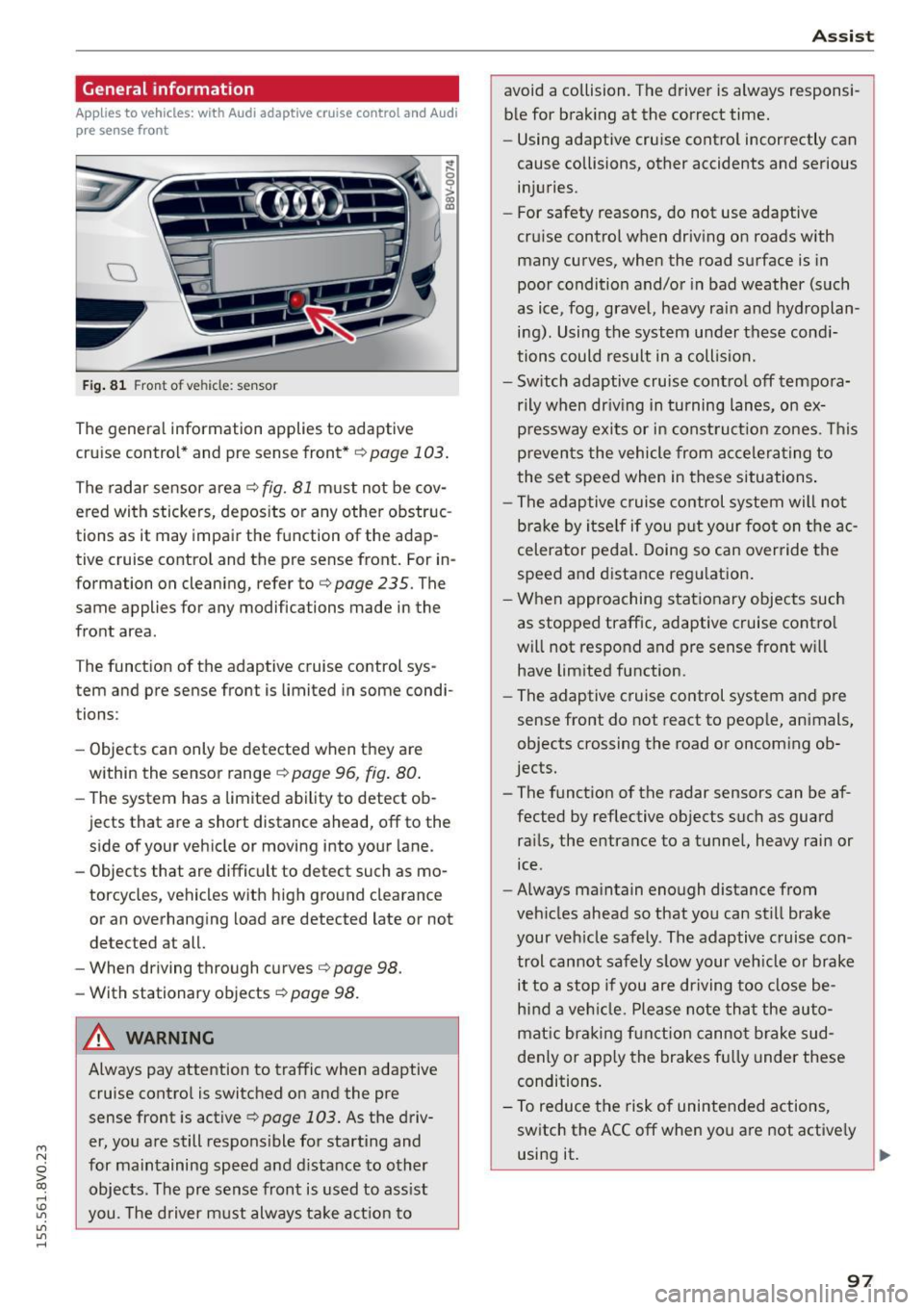
Fig. 81 Front of vehicle: sensor
The general information applies to adaptive
cruise control* and pre sense front*
r::!>page 103.
The radar sensor area r::!> fig. Bl must not be cov
ered with stickers, deposits or any other obstruc
tions as it may impair the function of the adap
tive cruise control and the pre sense front. For in
formation on cleaning, refer tor::!>
page 235. The
same applies for any modifications made in the
front area .
The function of the adaptive cruise control sys tem and pre sense front is limited in some condi
tions :
- Objects can only be detected when they are
within the sensor ranger::!>
page 96, fig. 80.
-The system has a limited ability to detect ob
jects that are a short distance ahead, off to the side of your vehicle or moving into your lane.
- Objects that are difficult to detect such as mo
torcycles, vehicles with high ground clearance
or an overhanging load are detected late or not
detected at all.
- When driving through curves
r=> page 98.
-With stationary objects r::!> page 98.
A WARNING
Always pay attention to traffic when adaptive
cruise control is switched on and the pre
sense front is active
r::!> page 103. As the d riv
er, you are still responsible for starting and
for maintaining speed and distance to other objects. The pre sense front is used to assist
you. The driver must always take action to
Assist
avoid a collision. The driver is always responsi
ble for braking at the correct time.
- Using adaptive cruise control incorrectly can
cause collisions, other accidents and serious
injuries.
- For safety reasons, do not use adaptive
cruise control when driving on roads with
many curves, when the road surface is in
poor condition and/or in bad weather (such
as ice, fog, gravel, heavy rain and hydroplan
ing). Using the system under these condi
tions could result in a collision.
- Switch adaptive cruise control off tempora
rily when driving in turning lanes, on ex
pressway exits or in construction zones. This
prevents the vehicle from accelerating to
the set speed when in these situations.
- The adaptive cruise control system will not
brake by itself if you put your foot on the ac
celerator pedal. Doing so can override the
speed and distance regulation.
- When approaching stationary objects such
as stopped traffic, adaptive cruise control
will not respond and pre sense front will
have limited function.
- The adaptive cruise control system and pre
sense front do not react to people, animals,
objects crossing the road or oncoming ob
jects.
- The function of the radar sensors can be af
fected by reflective objects such as guard
rails, the entrance to a tunnel, heavy rain or
ice.
- Always maintain enough distance from
vehicles ahead so that you can still brake
your vehicle safely. The adaptive cruise con trol cannot safely slow your vehicle or brake it to a stop if you are driving too close be
hind a vehicle. Please note that the auto
matic braking function cannot brake sud
denly or apply the brakes fully under these
conditions.
- To reduce the risk of unintended actions,
switch the ACC off when you are not actively
using it.
~
97
Page 101 of 282
M N
0 > co ,...., \!) 1.1'1
1.1'1
1.1'1
,....,
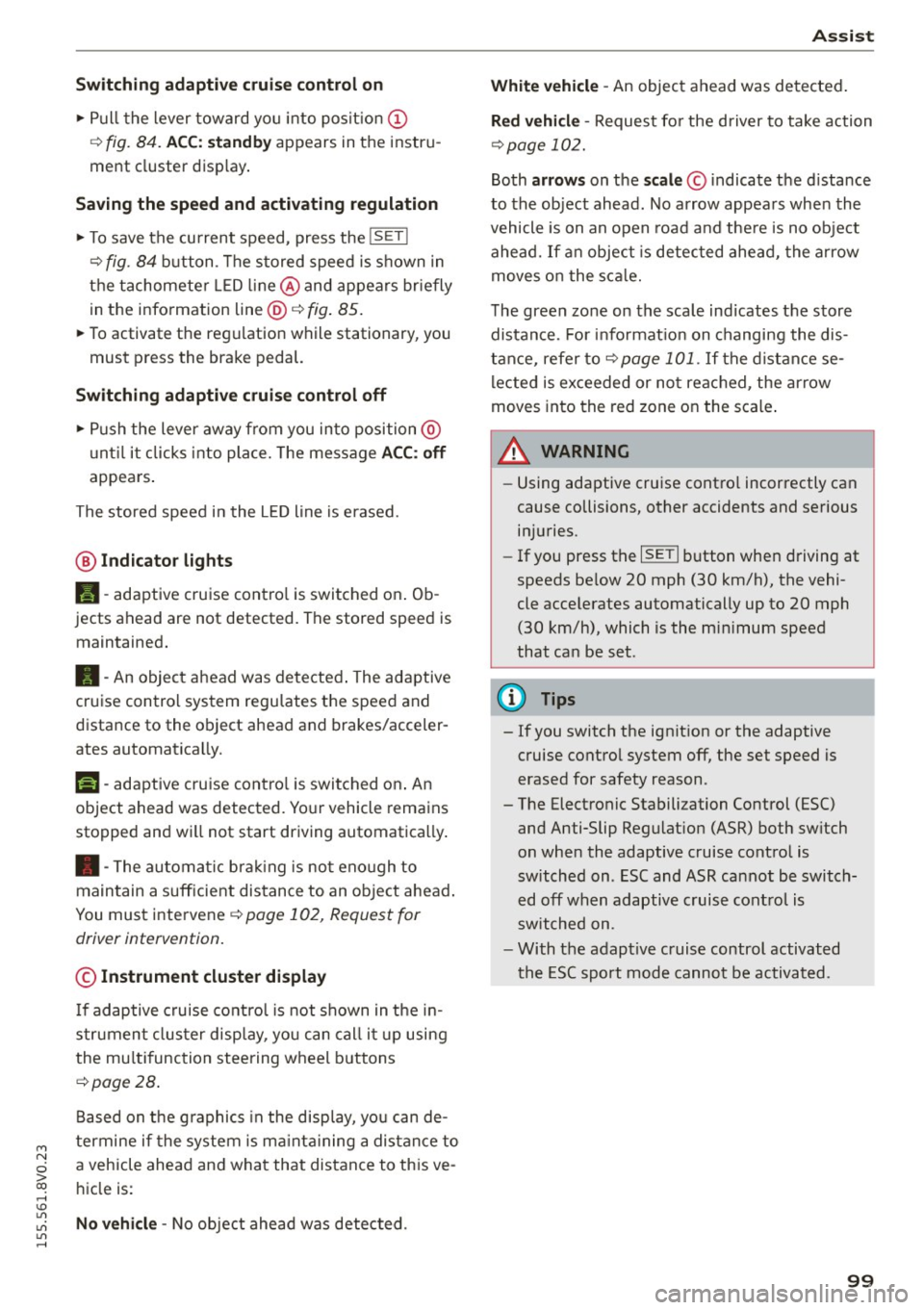
Switching adaptive cruise control on
"'Pull the lever toward yo u into posit ion (!)
¢fig. 84. ACC: sta ndb y appears in the instru
ment cluster disp lay .
Saving the speed and activating regulation
"'T o save the current speed, press the !SETI
¢ fig. 84 button . T he stored speed is s hown in
the tachomete r LED line @and appears briefly
in the information line @¢
fig. 85.
"' To activate the reg ulation while stationary, you
must press the brake pedal.
Sw itching adaptiv e cruise c ontrol off
"' Push the lever away from you into position @
u nt il it clicks into place. The message
ACC : off
appears .
The stored speed in the L ED line is erased.
@ Indicato r light s
II-adaptive cruise contro l is switched o n. Ob
jects ahead are not detected. The stored speed is
maintained.
• -An object ahead was detected . The adaptive
cruise control system regu lates the speed and
d istance to the object ahead and brakes/acceler
ates automatica lly.
f:i -adaptive cru ise contro l is switched o n. An
object ahead was detected. Yo ur vehicle remains
stopped and w ill not start dr iving automatica lly.
• -The automatic brak ing is no t eno ugh to
maintain a sufficient distance to an object ahead .
You must intervene ¢
page 102, Request for
driver intervention.
© Instrument clu ster display
If adaptive cruise control is not shown in the in
strument cluster display, yo u can call i t up using
the mu ltifunc tion steering wheel buttons
¢page 28.
Based on the g raphics in the display, you can de
termine if the system is ma inta ining a distance to
a vehicle ahead and what that dis tance to this ve
h icle is:
No vehi cle -No object ahead was detected .
Ass is t
White vehicle -An object ahead was de tected .
Re d vehi cle -Request fo r the d river to take action
¢page 102.
Both arrows on the scale© indicate the d istance
to the object ahead. No arrow appears when the
vehicle is on an open road and the re is no object
ahead. If a n object is detected ahead, the a rrow
moves on the sca le.
T he green zone on the sca le indicates the store
distance. For i nformat ion on changing the dis
t a nce, refer to ¢
page 101. If the distance se
l ected is ex ceeded or not reached, the arrow
moves into the red zone on the scale .
_& WARNING
-Using adaptive cruise contro l incorrectly can
cause collisions, other accidents and serious in ju ries.
- If you press the
ISETI button when driving at
speeds be low 20 mph (30 km/h), the vehi
cle acce lerates automatically up to 20 mph
(30 km/h), which is the mi nimum speed
that can be set.
{!) Tips
- If you switch the ignit ion or the adaptive
cruise contro l system off, the set speed is
erased for safety reason.
- The Electronic Stabilization Control (ESC) and Anti-Slip Regulat ion (ASR) both sw itch
on when the adaptive cruise contro l is
switched on . ESC and ASR ca nnot be switch
e d off when adaptive c ruise cont ro l is
sw itched on.
- With the adaptive c ruise control activated
the ESC sport mode cannot be activated .
99
Page 102 of 282
Ass is t
Changing the speed
Applies to vehicles: with Audi adaptive cruise control
0
f
•
0
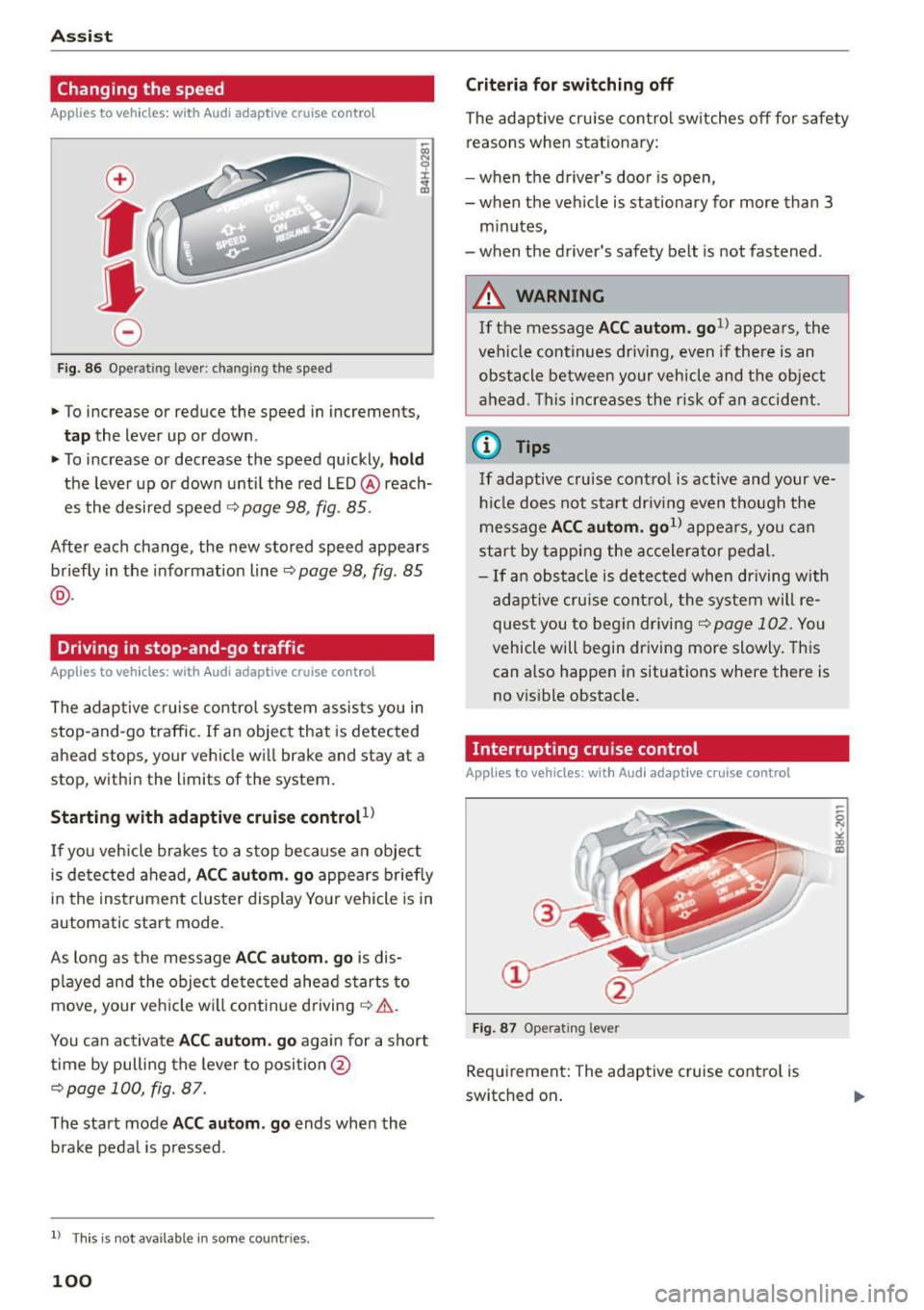
Fig. 86 O pera tin g leve r: chan gin g th e speed
.,. To increase or reduce the speed in increment s,
tap the lever up or down .
.,. To increase or decrease the speed quickly,
hold
the leve r up or down until the red LED @reach
es the desired speed
¢ page 98, fig . 85.
Afte r each change, the new stored speed appears
briefly in the informat ion line ~
page 98 , fig. 85
@ .
Driving in stop-and-go traffic
Applies to vehicles: with Audi adaptive cruise control
The adaptive c ruise co ntrol system assists you in
s top-and-go traffic. If an object that is detected
ahead stops, your vehicle wi ll brake and stay at a
stop, within the limits of the system.
Starting with adaptive cruis e controt1l
If you veh icle brakes to a stop because an object
is de tected ahead,
ACC aut om . go appea rs briefly
in the ins trument cluste r display You r vehicle is in
automatic start mode.
As long as the message
ACC autom. g o is dis
p layed and the object detected ahead s tarts to
move , your veh icle wi ll contin ue driving ~& .
You ca n activate
ACC aut om . go again for a short
time by pulling the lever to position @
¢page 100, fig. 87.
The start mode ACC autom . go ends when the
b rake peda l is pressed .
ll T hi s is no t available i n some c oun tries .
100
Criteria for switching off
The adaptive cru ise contro l sw itches off for safety
reasons when stat ionary:
- when the driver 's doo r is open,
- when t he veh icle is stationary for more than 3
m inutes,
- when t he driver's safety belt is not fastened .
A WARNING
If the message ACC a utom . go1l appea rs, the
vehicle continues driving,
even i f there is an
obstacle between your vehicle and the obje ct
a head . Th is increases the risk of a n accident .
@ Tips
If adaptive cruise cont ro l is active and your ve
h icl e does not s tart dr iv ing even t h ough the
me ssage
ACC autom. go1l appea rs, you c an
start by tappi ng the accelera tor pedal.
- If an obstacle is de tec ted when dr iving with
adaptive cruise cont ro l, the system will re
ques t you to beg in d riving
¢page 102. You
vehicle will begin dr iving more slowly. This
can also happen in situations where there is
no v isible obstacle.
Interrupting cruise control
Applies to vehicles: with Audi adaptive cruise contro l
Fig. 87 O pe ra ting le ver
Requirement: The adaptive cruise cont ro l is
switched on .
Page 105 of 282
M N
0 > co ,...., \!) ..,.,
..,.,
..,., ,....,
llJ ACC off: manu al cont rol!
This message appea rs if the veh icle rolls back
when sta rting on a slight incline, even tho ugh
ACC is active. Press the brake pedal to prevent
the vehicle from rolling or starting to move.
IIJ ACC : engin e speed
This message appears if the driver has not shifted
up or down in time when the adaptive cruise con
trol is braking or accelerating, causing the vehicle
to exceed or to not reach the permitted eng ine
speed. The adapt ive cr uise control turns off. A
chime sounds as a reminder.
•••
Three wh ite dots appear if a setting cannot be se
lected with the operat ing lever . For example, this
happens if adaptive cruise control cannot be act i
vated when stopped because the dr iver has not
fastened the safety belt.
Doo r op en
Adaptive cruise control cannot be switched on
when the vehicle is stationary and the dr iver's
door is open.
Audi pre sense
Introduction
Applies to vehicles: with Audi pre sense bas ic or Audi pre
sense front
W ith in the limits of the system, p re sense basic
and p re sense fro nt can initiate steps to protect
veh icle o ccupants i n certa in dangerous s itua
tions.
Critical driving situat ions can be recognized by
the pre sense front v ia a network of differe nt ve
h icle systems and can take steps to prepare the
veh icle occ upan ts for a po ten tial coll is ion.
The pre sense front wo rks with a radar sensor and
a video camera*. It also functions within t he lim
i ts of the system when adapt ive cr uise con trol* is
sw itched off.
A ss is t
General information
General information
Applies to vehicles: wit h Audi pre sense front or A udi ada ptive
cruise control
_&. WARNING
A lso follow the gene ral info rmation found on
~ page 9 7, General information.
Audi pre sense basic
Description
App lies to vehicles: wit h Aud i pre sense basic
The function of the pre sense basic is activated at
a speed of 20 mph (30 km/h) or higher .
The following functions can be triggered under certain conditions within the limits of the sys
tem:
- Tensioning of the safety belts (for example,
during heavy braking): the front safety belts
have reversible belt pretensioners. If a col lision
does not occur, the safety belts loosen slightly
and are ready to trigger again .
- Closing the windows and the sunroof* (for ex
ample, when over- or understeering): the w in
dows and the sunroof* close until there is only
a small gap open .
Audi drive select: the deployment time is adapt ed in dynam ic mode.
_&. WARNING ~
The pre sense basic cannot overcome natural
physical laws . It is a system des igned to assist
and it cannot p revent a coll ision. Do not let
the increased safety provided tempt you into
taking r is ks. Thi s co uld inc rease your risk of a
collis ion .
- The system can dep loy incorrectly due to
system-specific limits .
(D Tips
-Certa in p re sense bas ic functions switch off
when ESC is switched off (sport mode) o r
w hen driving in reverse. .,.
103
Page 122 of 282
Parking systems
Parallel parking
Applies to veh icles: w ith pa rk in g system p lus w it h rearv iew
camera
This view may be used when parallel parking
along the side of a street .
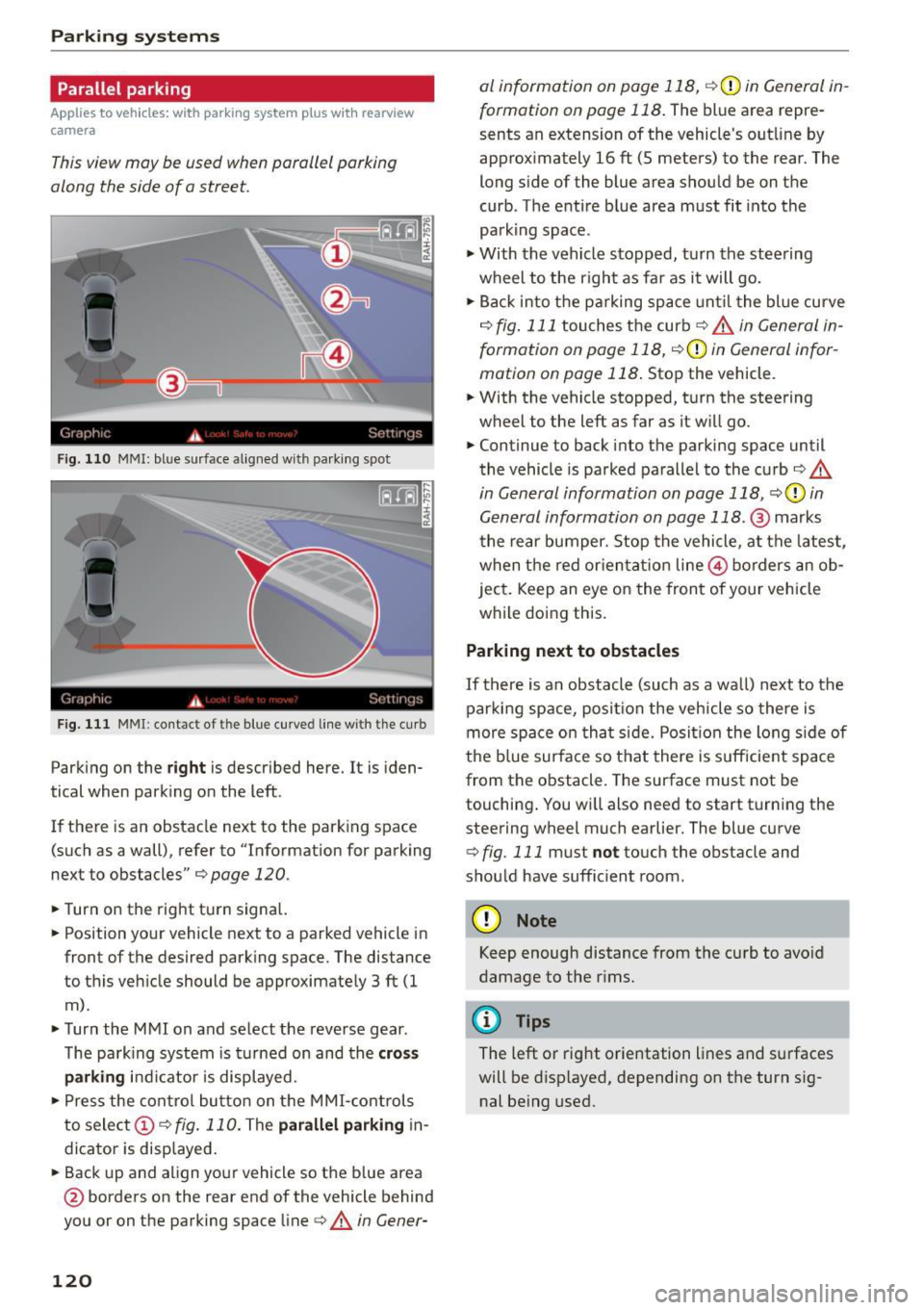
Fig. 110 MMI: blue surface aligned wit h parking spot
Fig. 111 MMI: contact of the blue curved line with the curb
Park ing on the right is described here. It is iden
tical when parking on the left .
If there is an obstacle next to the park ing space
(such as a wall), refer to "Information for parking
next to obstacles" ¢
page 120 .
.,. Turn on the right turn signal.
.,. Position your vehicle next to a parked vehicle in
front of the desired parking space. The distance
to this veh icle should be approximately 3 ft (1
m) .
.,. Turn the MMI on and select the reverse gear .
The park ing system is turned on and the
cross
parking indicator is displayed.
.,. Press the control button on the MMI-controls
to select
(D ¢ fig. 110. The parallel parking in
dicator is displayed .
.,. Back up and al ign your vehicle so the blue area
@ borders on the rear end of the vehicle behind
you or on the parking space line¢.&.
in Gener-
120
al information on page 118, ¢(Din General in
formation on page 118 .
The blue area repre
sents an extension of the vehicle's outline by
approximately 16
ft (5 meters) to the rear. The
long side of the blue area should be on the
curb . The entire b lue area must fit into the
parking space .
.,. With the vehicle stopped, turn the steering
wheel to the right as far as it will go .
.,. Back into the parking space until the blue curve
¢
fig. 111 touches the curb¢.&. in General in
formation on page 118, ¢(Din General infor
mation on page 118.
Stop the vehicle .
.,. With the vehicle stopped, turn the steering
wheel to the left as far as it will go .
.,. Continue to back into the parking space until
the vehicle is parked parallel to the curb¢.&.
in General information on page 118, ¢CI) in
General information on page 118 .@
marks
the rear bumper. Stop the vehicle, at the latest,
when the red orientat ion line @ borders an ob
ject. Keep an eye on the front of your vehicle
while doing this.
Parking next to obstacles
If there is an obstacle (such as a wall) next to the
parking space, position the veh icle so there is
more space on that side. Position the long side of
the blue surface so that there is suff icient space
from the obstacle. The surface must not be
touching . You will also need to start turning the
steering wheel much earlier. The blue curve
¢ fig. 111 must not touch the obstacle and
should have sufficient room .
(D Note
Keep enough distance from the curb to avo id
damage to the rims.
¢j) Tips
The left or right orientation lines and surfaces
will be disp layed, depending on the turn sig
nal being used.