wheel AUDI S3 SEDAN 2015 Owner's Manual
[x] Cancel search | Manufacturer: AUDI, Model Year: 2015, Model line: S3 SEDAN, Model: AUDI S3 SEDAN 2015Pages: 282, PDF Size: 71.14 MB
Page 90 of 282
Automatic transmission
Launch Control-Program
Applie s to v ehi cles: w ith launch control
The Launch Control Program enables maximum
acceleration .
Requirement: The engine must be at operating
temperature and t he steering wheel must not be
turned.
.,. With the engine running, press the
!~OFFI but
ton briefly one time
l) .
.,. Pull the selector lever back out of the O/S posi
tion briefly to select the S position, or press it
toward the right into the tiptronic position or
select the
Dynamic driving mode in drive se
lect*
~page 112.
.,. Press the brake pedal firmly with your left foot
and hold it all the way down for at least 1 sec
ond.
.,. At the same time, press the gas pedal all the
way down with your right foot until the engine
reaches and stays at a high RPM level.
.,. Remove your left foot from the brake.
_.&. WARNING
- Always adapt your driving to the traffic flow.
- Only use Launch Control when road and traf-
fic conditions allow it and other drivers will
not be endangered or impacted by your driv
ing and the vehicle's acceleration.
- Please note that the drive wheels can spin
and the vehicle can break away when sport
mode is switched on, especially when the
road is slippery.
- Once the vehicle has started moving, press
the
l .1'3 OFF ! button briefly to turn the sport
mode off.
(D Tips
- The transmission temperature may increase
significantly after using the launch control program. If that happens, the program may
1l In vehicles w ith a d rive r infor matio n syste m, a n ESC light
in t he instrument clus ter s tays o n co ntinuo usly and t he
message
Stabilization control (ESC): sport. Warning! Re·
stricted stability
appears temporarily.
88
not be available for a few minutes. It will be
available again after a cool-down period.
- When accelerating using the launch control
program, all vehicle parts are subject to
heavy loads. This can lead to increased wear.
Emergency mode
App lies to vehicles : wi th S t ro ni c t ra nsmi ssio n
In the event of a system malfunction, there is an
emergency program .
If all of the selector lever positions are highlight
ed with a light background in the instrument
cluster display, there is a system malfunction and
the S tronic transmission is running in the emer
gency program. The vehicle can still be driven in
emergency mode, but only with reduced speed
and not in all gears. In some cases, the vehicle
cannot drive in reverse .
(D Note
If the transmission runs in emergency mode,
drive to an authorized Audi dealer or author
ized Audi Service Facility immediately to have
the malfunction corrected.
Transmission malfunction
• Transmission malfunction! Please stop the
vehicle and select P
There is a malfunction in the transmission. Park
the vehicle securely and do not continue driving.
See an authorized Audi dealer or authorized Audi
Service Facility for assistance.
• Transmission overheating! Please stop the
vehicle!
The transmission is too hot and can become dam
aged. Stop and let the transmission cool with the
engine running (at idle) in the P selector lever po
sition. Then the indicator light and the message
turn off, drive to an authorized Audi dealer or au
thorized Audi Service Facility immediately to have.,.
Page 95 of 282
M N
0 > co ,...., \!) 1.1'1
1.1'1
1.1'1
,....,
Before you actually tow your trailer, practice
turning, stopping and backing up in an area away
from traffic. Keep practicing until you have be
come completely fami liar with the way your ve hi
cle-trailer combination behaves and responds.
Backing up is d iff icu lt and requires practice . Back
i ng up w ith a trailer generally req uires steering
action oppos ite to that when backing up yo ur ve
hi cle without a trailer.
M aintain a g reater distance betwee n your vehicle
and the one in front of yo u. You w ill need more
room to stop. To compensate for the tra iler, you
will need a larger than norma l turning radius.
When passing, remember that yo u cannot acce l
erate as fast as yo u normally would because of
the added load. Make sure you have enough room
to pass. After passing, allow plenty of room for
your trailer before changing lanes again.
Avoid jerky sta rts, sharp turns or rapid lane
changes.
@ Tips
- Do not tow a tra ile r during the break-in peri
od of yo ur vehicle.
- If yo u tow a t railer, you r A udi may require
more frequent ma intenance due to the ex
tra load
~ page 262.
Parking on a slope
Do not park on a slope with a trailer . If it cannot
be avoided, do so only after doing the following:
When parking:
.. Apply the foo t brake .
.. Have someone pla ce chocks under bo th t he ve
hicle and the trailer wheels .
.. With c hocks i n place, s lowly re lease the brakes
u nti l the whee l chocks absorb the load .
.. Turn the wheels towards the c urb .
.. Apply the parking brake .
.. Se lect the P selector lever pos ition.
When restarting after parking :
.. Apply the foot brake .
.. Start the eng ine.
.. Se lect the D/S selector lever posit ion.
Trailer mode
.. Release the pa rking brake and s lowly pull out
an d away from the wheel chocks .
.. Stop and have someone retr ieve the wheel
chocks.
(D Tips
If you move the selector leve r of the automat
i c transm iss ion to P before app ly ing the park
i ng brake and before blocking the wheels, you
may have to use mo re force later to move the
l ever out of the P posit ion.
93
Page 100 of 282
Assist
(D Note
The sensor can be displaced by impacts or
damage to the bumper, wheel housing and
underbody. The adaptive cruise control and
pre sense front may become impaired as a re
sult. Have an authorized Audi dealer or au
thorized Audi Service Facility check their func
tion.
In curves
Applies to vehicles: with Audi adaptive cruise control and Aud i
pre sense front
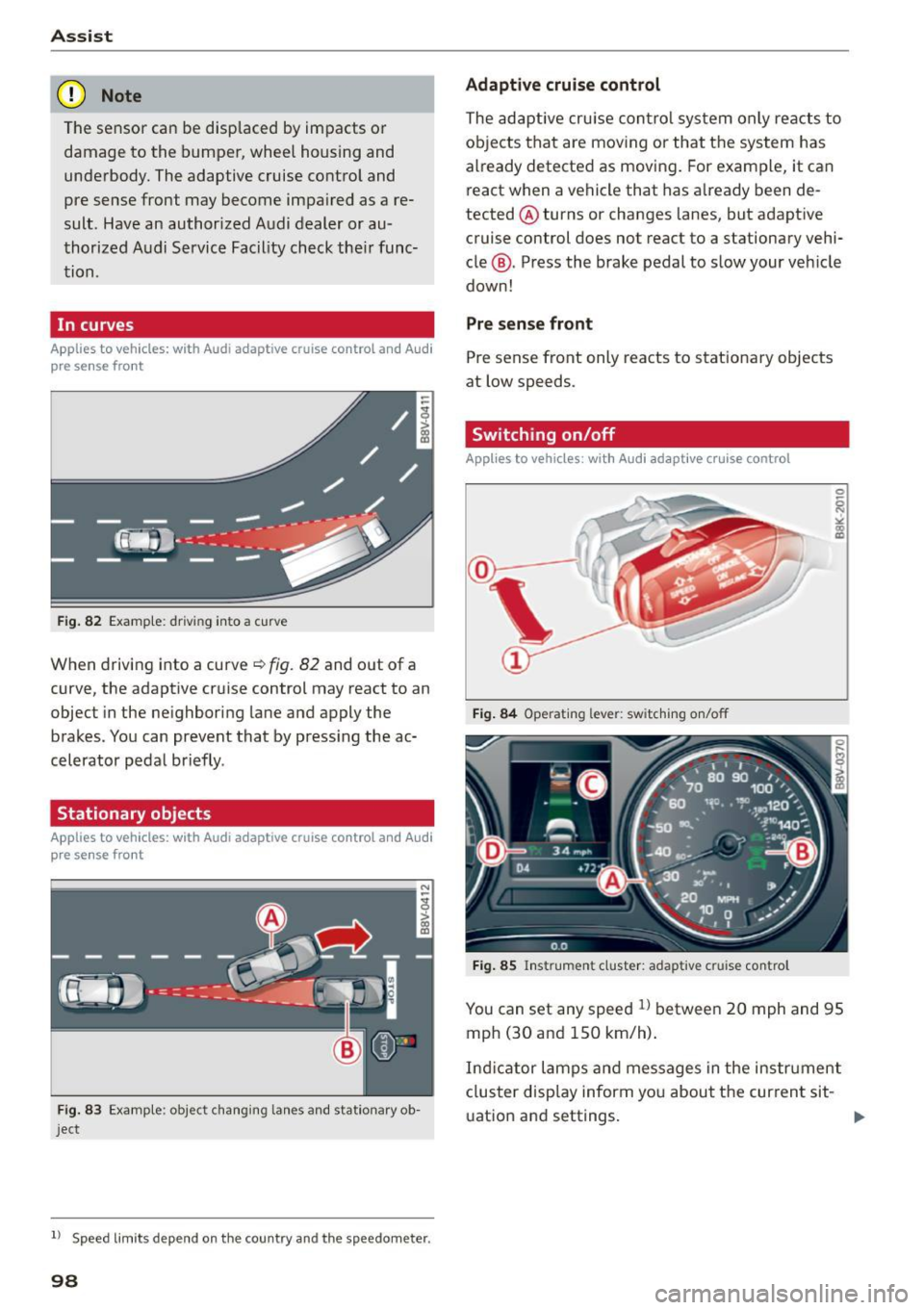
Fig. 82 Example: driving into a curve
When driving into a curve~ fig. 82 and out of a
curve, the adaptive cruise control may react to an
object in the neighboring lane and apply the
brakes. You can prevent that by pressing the ac
celerator pedal briefly .
Stationary objects
Applies to vehicles: with Audi adaptive cruise control and Audi
pre sense front
Fig. 83 Example: object changing lanes and stationar y ob
ject
l l Speed limits depe nd on t he country and the speedo meter .
98
Adaptive cruise control
The adaptive cruise control system only reacts to
objects that are moving or that the system has
already detected as moving. For example, it can
react when a vehicle that has already been de
tected @turns or changes lanes, but adapt ive
cruise control does not react to a stationary vehi
cle @. Press the brake pedal to slow your vehicle
down!
Pre sense front
Pre sense front only reacts to stationary objects
at low speeds.
Switching on/off
Applies to vehicles : with A udi adaptive cruise contro l
Fig. 84 Operating lever: switching on/off
Fig. 85 Instrument cluster: adaptive cruise control
You can set any speed ll between 20 mph and 95
mph (30 and 150 km/h).
Ind icator lamps and messages in the instrument
cluster disp lay inform you about the current sit-
ua tion and settings. ..,
Page 101 of 282
M N
0 > co ,...., \!) 1.1'1
1.1'1
1.1'1
,....,
Switching adaptive cruise control on
"'Pull the lever toward yo u into posit ion (!)
¢fig. 84. ACC: sta ndb y appears in the instru
ment cluster disp lay .
Saving the speed and activating regulation
"'T o save the current speed, press the !SETI
¢ fig. 84 button . T he stored speed is s hown in
the tachomete r LED line @and appears briefly
in the information line @¢
fig. 85.
"' To activate the reg ulation while stationary, you
must press the brake pedal.
Sw itching adaptiv e cruise c ontrol off
"' Push the lever away from you into position @
u nt il it clicks into place. The message
ACC : off
appears .
The stored speed in the L ED line is erased.
@ Indicato r light s
II-adaptive cruise contro l is switched o n. Ob
jects ahead are not detected. The stored speed is
maintained.
• -An object ahead was detected . The adaptive
cruise control system regu lates the speed and
d istance to the object ahead and brakes/acceler
ates automatica lly.
f:i -adaptive cru ise contro l is switched o n. An
object ahead was detected. Yo ur vehicle remains
stopped and w ill not start dr iving automatica lly.
• -The automatic brak ing is no t eno ugh to
maintain a sufficient distance to an object ahead .
You must intervene ¢
page 102, Request for
driver intervention.
© Instrument clu ster display
If adaptive cruise control is not shown in the in
strument cluster display, yo u can call i t up using
the mu ltifunc tion steering wheel buttons
¢page 28.
Based on the g raphics in the display, you can de
termine if the system is ma inta ining a distance to
a vehicle ahead and what that dis tance to this ve
h icle is:
No vehi cle -No object ahead was detected .
Ass is t
White vehicle -An object ahead was de tected .
Re d vehi cle -Request fo r the d river to take action
¢page 102.
Both arrows on the scale© indicate the d istance
to the object ahead. No arrow appears when the
vehicle is on an open road and the re is no object
ahead. If a n object is detected ahead, the a rrow
moves on the sca le.
T he green zone on the sca le indicates the store
distance. For i nformat ion on changing the dis
t a nce, refer to ¢
page 101. If the distance se
l ected is ex ceeded or not reached, the arrow
moves into the red zone on the scale .
_& WARNING
-Using adaptive cruise contro l incorrectly can
cause collisions, other accidents and serious in ju ries.
- If you press the
ISETI button when driving at
speeds be low 20 mph (30 km/h), the vehi
cle acce lerates automatically up to 20 mph
(30 km/h), which is the mi nimum speed
that can be set.
{!) Tips
- If you switch the ignit ion or the adaptive
cruise contro l system off, the set speed is
erased for safety reason.
- The Electronic Stabilization Control (ESC) and Anti-Slip Regulat ion (ASR) both sw itch
on when the adaptive cruise contro l is
switched on . ESC and ASR ca nnot be switch
e d off when adaptive c ruise cont ro l is
sw itched on.
- With the adaptive c ruise control activated
the ESC sport mode cannot be activated .
99
Page 108 of 282
Ass is t
- Switch the pre sense off when you are load
ing the vehicle onto a vehicle carrier, train,
sh ip or other type of transportation. Th is
can prevent undesired warnings from the pre sense system.
Driver messages
Applies to veh icles: w ith Audi p re se nse or Audi adaptive
cruise control
Audi pr e se nse cu rrently un ava ilable. No sens or
v is ion
This message appea rs if the sensor view is ob
s tructed, for example by leaves, snow, heavy
spray or dirt . Clean the sensor¢
page 97, fig. 81.
Audi pre sense : off
This message appears when the ESC is switched
to sport mode, for example¢
page 124.
Audi p re sen se: sys tem fault!
This message appears when the pre sense func
tion is affected. For example, this cou ld be
caused by a faulty sensor.
If the message stays on, d rive to an au thorized
Aud i dea ler or authorized Audi Service Faci lity to
have the malfunction corrected.
Audi active lane assist
Description
Applies to vehicles : with Audi active lane assist
Active lane ass ist detects lane marker lines with
in the limits of the system using a came ra in the
windshie ld. If you are app roach ing a detected
lane marker line and it appears like ly that you
will leave the lane, the system will warn you with
corrective steering . You can override this steering
at any time. If you pass over a line, the steering
wheel will v ibrate light ly. In order for this warn
ing vibrat ion to occur, it must first be switched
on in the MMI. Active lane assist is operable
when the lane marker line is detected on at least one side of the veh icle.
l) T hi s function is not ava ilable in all cou ntri es.
106
The system will not warn you befo re crossing a
l ane marker line if you have activated the turn
s ignal. In this case, it assumes that you are
changing lanes intentionally.
The system is des igned for driving on express
ways and highways and therefore on ly activates
at speeds above approx imately 40 mph (65 km/
h).
A WARNING
-
- The system warns the driver that the vehicle
is leaving the lane using corrective steering .
The driver is always responsible for keeping
the vehicle within the lane.
- The system can help you keep the vehicle in
the lane, but it does not drive by itself.
Al
ways keep you r hands on the steering
wheel.
- Corrective steer ing may not occur in certa in
situa tions, su ch as during heavy braking.
- There may be cases where the camera does
not recognize all lane ma rker lines. Correc
tive stee ring can only take p lace on the side
of the vehicle where lane marker line5 are
detec ted.
- Othe r road structures or obje cts cou ld possi
b ly be identified un intent ionally as lane
marker l ines . As a result, corrective steering
may be unexpected or may not occur .
- The camera view can be restricted, for ex
ample by vehicles driving ahead or by rain,
snow, heavy spray light shining into the
camera or by d irt on the window. This can
result in active lane ass ist not detecting the
lane marker lines or detecting them incor
rectly.
- In certain situat ions where visibility is low,
the vehicle may switch from "early" to "late"
corrective steering
l l.
- Under certain co nditions such as ruts in the
road, an inclined roadway or crosswinds, the
corrective steering a lone may not be enough
to keep the vehicle in the midd le of the lane.
~
Page 109 of 282
....,
N
0 > co
rl I.O
"'
"'
"'
rl
-For safety reasons, act ive lane assist must
not be used when there are poor road and/
or weather conditions such as slippery
roads, fog, gravel, heavy rain, snow and the
potent ial for hydroplaning. Us ing active lane
assist under these conditions may increase
the risk of a crash.
Switching on and off
A ppl ies to vehicles: with Audi ac tive lane assis t
•
Fig. 91 Turn s ignal lever: but ton for active lane assist
Fig. 92 W indsh ield: camera w indow fo r active lane assist
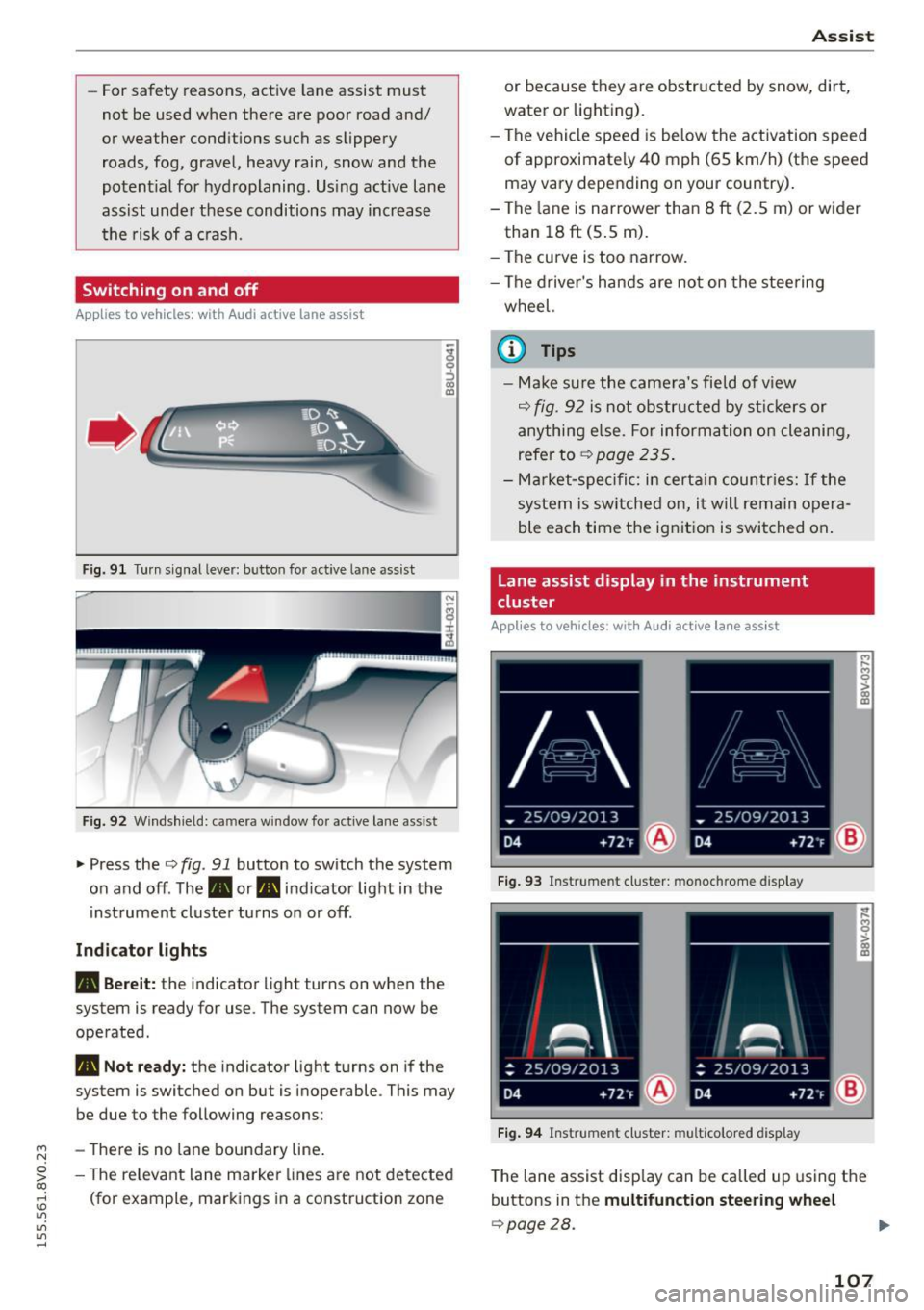
~ Press the Q fig. 91 button to switch the system
on and off. The. or. indicator light in the
inst rument cluster turns on or off.
Ind icat or light s
• Bere it:
the indicator light turns on when the
system is ready for use. The system can now be
operated .
• Not read y: the indicator light turns on if the
system is switched on but is inoperable . This may
be due to the following reasons:
- There is no lane boundary line .
- The re levant lane marke r lines a re not detected
(for example, markings in a construction zone
A ssi st
or because they a re obstr ucted by snow, dirt,
water or lighting).
- The vehicle speed is be low the activation speed
of approximately 40 mph (65 km/h) (the speed
may vary depending on your country) .
- The la ne is nar rower than 8
ft (2.5 m) or wider
than 18
ft (5 .5 m).
- The curve is too narrow.
- The driver's hands are not on the stee ring
wheel.
a) Tips
- Make sure the came ra's field of v iew
Q fig. 92 is not obstr ucted by st ic kers or
anything e lse. For informa tion o n cleaning,
refer to
~ page 235.
-Ma rket -s pe ci fic: i n certa in countr ies: If the
system is sw itched on, i t will remain opera
ble each time the ignit ion is switched on .
Lane assist display in the instrument
cluster
App lies to vehicles: wit h Audi a ctive la ne ass ist
F ig . 93 Instrument cluster: monochrome display
Fi g. 94 Instrument cluster: multicolored display
M
~ > a,
a,
T he lane assist disp lay can be called up us ing the
buttons in the
multifunct ion steering wheel
Q page28.
107
Page 110 of 282
Assist Monochrome display
Refer to¢ fig. 93
® solid lines: active lane ass ist is switched
on and ready to provide warnings on the
side that is ind icated.
® blinking line (left or r ight): active lane as -
sist is warning you by a vibration in the
steering whee l that you are leaving the
lane.
® unfilled line(s): lane assist is activated,
but not ready to give warn ing
no lines: active lane assist is switched off .
Multicolored display
Refer to¢ fig. 94
® solid white lines: active lane assist is
switched on and ready to provide warn-
ings on the side that is indic ated.
® red line (left or rig ht): active lane assist is
warn ing you by a v ibration in the steer ing
wheel that you are leaving the lane .
® solid gray lines: lane assist is activated,
but not ready to give warning
no lines: active lane assist is switched off .
Messages in the instrument cluster display
If the active lane ass ist has a malfunction, the
ra, indicator light in the inst rument cluste r dis
play turns off and one of the following messages
appears:
Audi active lane assist: currently not available.
No camera view
This message appears if the camera is unab le to
detect the lines . Th is could happen if:
- The camera field of view ¢
page 107, fig. 92 is
dirty or cove red in ice . Clean this area on the
windshield.
- The came ra f ield of view is fogged over. Wait
u nt il the fog has cleared before switching the
active lane assist on again.
- The system has been unable to detect the lanes
for an extended period of time due to road con-
l) Thi s fun ctio n is not available in all cou ntri es.
108
ditions. Switch the active lane assist back on
when the lines are more visib le.
Audi active lane assist: Currently unavailable
There is a temporary active lane assist malfunc
tion . Try switching the active lane assist on again
l ate r.
Audi active lane assist: system fault!
Drive to an authorized A udi dealer or authorized
Audi Service Facility immed iate ly to have the
malfunction corrected.
ra, Audi active lane assist: Please continue
steering vehicle!
This message appears if you are not steering by
you rself. If this is the case, active lane assist does
not switch off, but it is "not ready" to provide a
warning. The system can he lp you keep the vehi
cle in the lane. However, you are responsible for
driving the veh icle and must steer it yourse lf.
Adjusting the steering time and vibration
warning
Applies to vehicles: with Audi active lane assist
You can adjust individual active lane assist set
tings in the MMI.
.,. Select: the I MENU I button> Car > Systems *
control button > Driver assistance > Audi active
lane assist .
Steering time
1>
Early: in this setting, the corrective steering hap
pens continuously to help keep the vehicle in the
center of the lane.
Late : in this setting, the system provides correc
tive steering just before a vehicle whee l touches a
detected lane marker line .
Vibration warning
You can switch the additional vibrating warning
i n the steer ing whee l on or off.
II>
Page 112 of 282
Ass is t
General information
App lies to veh icles: w ith Audi side assis t
®
@
©
Fig . 97 D riving s ituat io ns
I AU DI
-·
Fi g. 98 Rear of vehicle: sensor pos itio ns
Side assist functions at speeds above approx i
mately 19 mph (30 km/h).
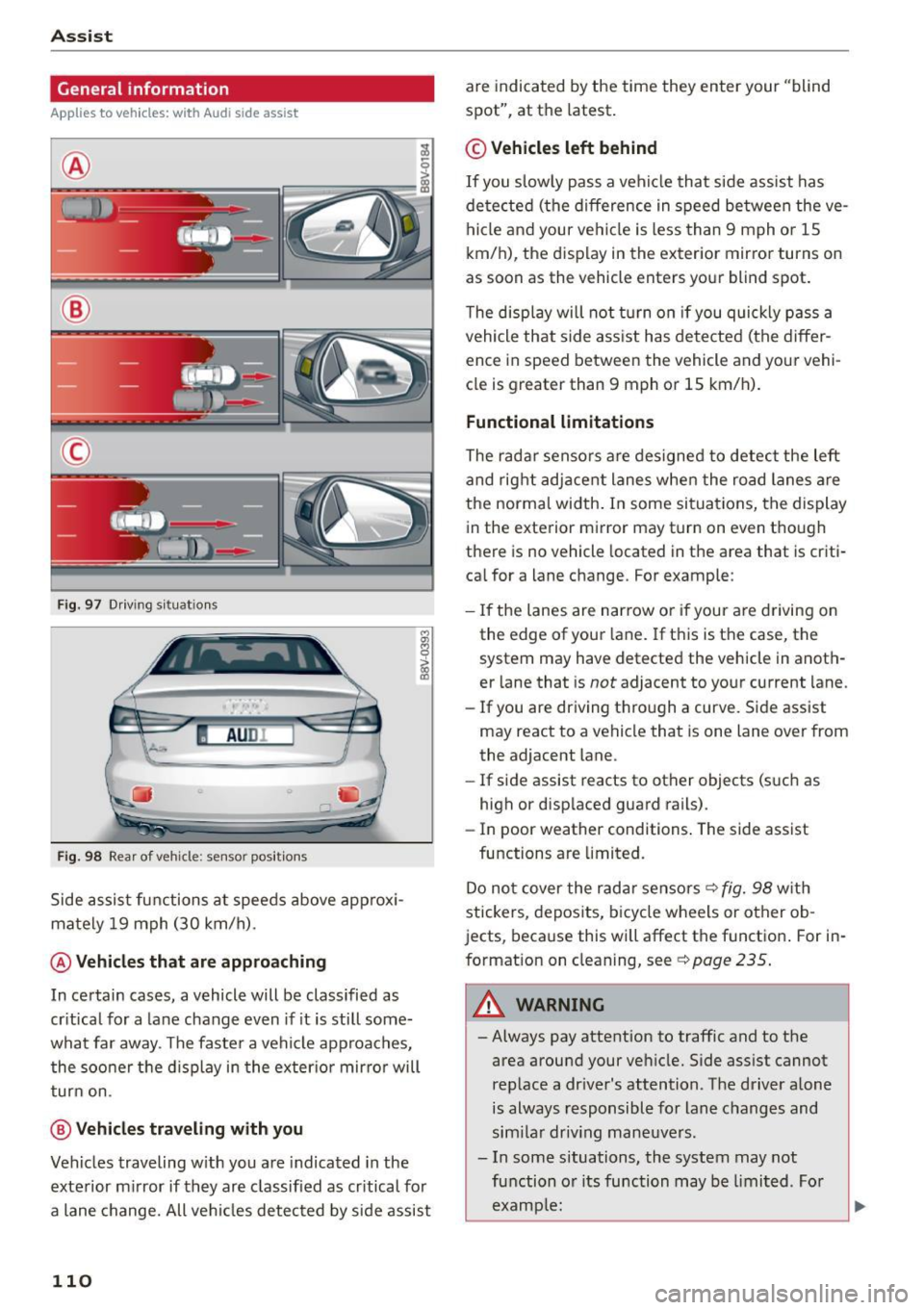
@ Vehicles th at ar e approaching
In certain cases, a vehicle will be classified as
cr itical for a lane change even if it is still some
what far away. The faste r a vehicle approaches,
the soo ner t he d isplay in the exter io r mirro r will
t ur n on.
@ Vehicl es traveling with you
Veh icles traveling w ith you are indicated in the
exte rior m irror if they are classified as cr itical for
a lane change. All ve hicl es detected by side assist
110
are indicated by the time they enter your "blind
spot", at the latest .
© Vehicles left behind
If you slow ly pass a veh icle that side assist has
de tected (the difference in speed be tween the ve
hi cle and your ve hicl e is less than 9 mph o r 1S
km/h), the display in the exterior mirror turns on
as soon as the vehicle enters yo ur blind spot.
T he disp lay will not t urn on if you quickly p ass a
vehicle that side ass ist has de te cted (the differ
ence in speed between the vehicle and your vehi
cle is greater than 9 mph or 1S km/h).
Functional limitations
The radar senso rs are des igned to detect the left
and rig ht adjacent lanes when the road lanes a re
the norma l width . In some si tua tions, the display
in the exterior mirror may turn on even though
there is no vehicle located in the area that is criti
ca l for a lane change. For example:
- If the lanes are nar row o r if your are driving on
the edge of your lane. If t his is t he case, the
system may have detected the vehicle in anoth
er lane that is
not adjacent to yo ur current lane.
- If you are driving t hro ugh a curve. S ide assist
may react to a vehicle that is one lane over from
the adjacent lane.
- If side assist reacts to other objects (s uch as
high or disp laced guard rails) .
- In poor weather conditions . The side assist
functions are limited.
Do no t cover the radar sensors ¢
fig. 98 with
stickers, depos its, bicy cle wheels or other ob
jects, beca use this will affect the function . For in
format ion on cleaning, see
¢ page 235 .
_& WARNING
-Always pay attention to traffic and to the
area around your ve hicle. Side ass ist cannot
rep lace a dr iver's attention. T he driver alone
is always responsible for lane c hanges and
sim ila r driv ing mane uvers .
- In some s ituations, the system may not
fu nction o r its function may be limi ted . Fo r
examp le:
-
Page 113 of 282
M N
0 > co ,...., \!) ..,.,
..,.,
..,., ,....,
-If vehicles are approaching or being left
behind very quickly. The display may not
turn on in time .
- In poor weather conditions such as heavy
rain, snow or heavy mist.
- On very wide lanes, in tight curves, or if
there is a rise in the road surface. Vehicles
in the adjacent lane may not be detected
because they are outside of the sensor range.
- Audi side assist cannot detect all vehicles
under all conditions, which can increase the
risk of accidents .
- Please note that side assist only displays ap
proaching vehicles or vehicles in your blind
spot if your vehicle is traveling at least
19 mph (30 km/h).
- In certain situations, the system may not
work or its function may be limited. For ex
ample:
- The display may not turn on at the right
time if vehicles are approaching or passing
very quickly.
- In poor weather conditions, such as heavy rain, snow or fog.
- In very wide lanes, in tight curves or when
there are slopes in the roadway, vehicles in
the neighboring lanes may not be detect
ed because they are outside of the sensor
range .
(D Note
The sensors can be displaced by impacts or
damage to the bumper, wheel housing and
underbody. This can affect the system. Have
an authorized Audi dealer or authorized Audi
Service Facility check their function .
(Di Tips
-If the window glass in the driver's door or
front passenger's door has been tinted, the
display in the exterior mirror may be misin
terpreted.
- For an explanation on conformity with the
FCC regulations in the United States and the
Industry Canada regulations, refer to
r::!> page 2 65 .
Assist
Switching on and off
App lies to vehicles : wi th Audi side ass ist
The system and be switched on and off in the
MMI*.
"'Select: the I MENU I button> Car> Systems*
control button > Driver assistance> Audi side
assist .
With Off, the system is switched off.
An activated system will signal every time the ig nition is switched on by turning the displays in
the exterior mirrors on briefly.
Adjusting the display brightness
App lies to vehicles: wi th Audi s ide ass ist
The display brightness can be adjusted in the
MM!*.
"'Select: the I MENU I button> Car> Systems*
control button > Driver assistance > Audi side
assist .
The display brightness adjusts automatically to
the brightness of the surroundings, both in the
information and in the warning stage. In very
dark or very bright surroundings, the display is al
ready set to the minimum or maximum level by
the automatic adjustment. In such cases, you
may notice no change when adjusting the bright
ness, or the change may only be noticeable once
the surroundings change.
Adjust the brightness to a level where the display
in the information stage will not disrupt your
view forward. If you change the brightness, the
display in the exterior mirror will briefly show the
brightness level in the information stage . The
brightness of the warning stage is linked to the
brightness in the information stage and is adjust
ed along with the information stage adjustment .
(D Tips
-Side assist is not active while you are mak
ing the adjustment.
- Your settings are automatically stored and assigned to the remote control key being
used.
111
Page 114 of 282
Assist Driver messages
Appl ies to vehicles: with Audi side assist
If the side assist switches off automatically, a
message appears in the instrument cluster dis
p la y.
@j Audi side assist: currently unavailable.
No sensor vision
The radar sensors' vision is affected. Do not cover
the area in front of the sensors with bike wheels,
stickers, dirt or other objects. Clean the area in
front of the sensors, if necessary
r:!> page 110,
fig. 98.
@j Audi side assist: currently unavailable
Side assist cannot be switched on temporarily be
cause there is a ma lfunction (for examp le, the
battery charge level may be too low).
@j Audi side assist: System fault!
The system cannot guarantee that it will detect
veh icles correctly and it is switched off. The sen
sors have been displaced or are faulty. Have the
system checked by an authorized Audi dealer or
authorized Audi Service Facility soon.
Audi drive select (drive
settings)
Introduction
Applies to vehicles: with Audi drive select
Audi drive select makes it possible to experience
different types of vehicle settings in one vehicle.
The driver can select from three
Comfort, Auto
and Dynamic modes using the ~.7l.'i button in the
center console or the MMI to switch between a
sporty and a comfortable driving mode, for ex
ample . In the
individual* mode, the settings can
be adjusted to your personal preferences . This
makes it possib le to combine settings such as a
sporty engine tun ing with light steering .
.,&. WARNING
Using Audi drive select incorrect ly can lead to
collisions, other accidents and serious inju
ries.
112
· Description
Applies to vehicles: with Audi drive se lect
The vehicle setup in each mode depends on the
vehicle's features. However , the eng ine and steer
ing are always affected.
Engine and automatic transmission
Depending on the mode, the engine and auto
matic transmission* respond more qu ickly or in a
more balanced manner to accelerator peda l
movements .
Adaptive dampers (Audi magnetic ride)*
The adaptive dampers use sensors to record in
format ion regarding steer ing movements, brak
ing and acce lerat ion operations by the driver,
road surface, dr iv ing speed, and load. With Audi
drive select you can adjust the adaptive dampers
sporty (dynamic), comfortable (comfort) or bal
anced (auto).
Steering
T he steer ing adapts in terms of steer ing ass is
tance. There a re diffe rent modes
Q page 113.
Indirect steering that moves easily as in comfort
mode is especia lly suited to long drives on a high
way. The dynamic mode provides sporty, direct
steering .
For vehicles with progressive steering* the steer
ing performance is more agi le .
Cornering light*
The cornering light adjusts when driv ing on
curves at speeds between 6 mph (10 km/h) and
68 mph (110 km/h). The pivoting action and the
lig hting are also adapted to the mode.
Adaptive cruise control*
The behavior when accelerating can be adjusted
from comfortable to sporty, depending on the
Audi drive select mode. Adaptive cruise control
also responds to the driving behavior of the vehi
cle ahead in a more conservative or sporty man
ner.