brake AUDI S3 SEDAN 2015 Service Manual
[x] Cancel search | Manufacturer: AUDI, Model Year: 2015, Model line: S3 SEDAN, Model: AUDI S3 SEDAN 2015Pages: 282, PDF Size: 71.14 MB
Page 103 of 282
M N
0 > co ,...., \!) 1.1'1
1.1'1
1.1'1
,....,
Overriding cruise control
Overriding means exceeding the selected speed
when adaptive cruise contro l is active, for exam
p le when pressing the acce lerator pedal when
passing.
"'T o accelerate man ua lly, pull the lever towa rd
you into position @and ho ld it there. The mes
sage
ACC: o ve rride appears . Or
"' press the accelerator peda l.
"' To resume cruise control, release the lever or
take your foot off the acce lerator pedal.
Int errupting c ruis e contr ol w hil e driving
"'Move the lever into position @. The message
ACC: stand by appears. Or
"' press the brake peda l.
"' To resume the stored speed, move the lever in
to posit ion @.
Int errupting c rui se contr ol wh en stopped
"' Push the lever away from you into position @.
The message
ACC: s ta ndby appears.
"' To resume cruise control, press the brake peda l
and pull the lever toward you into position@.
A WARNING
It is dangerous to act ivate cru ise contro l and
resume the stored speed when the current
road, traff ic or weather condit ions do not per
m it this. This could result in a c rash.
Setting the distance
A ppl ies to vehicles: with Audi adaptive cruise co ntrol
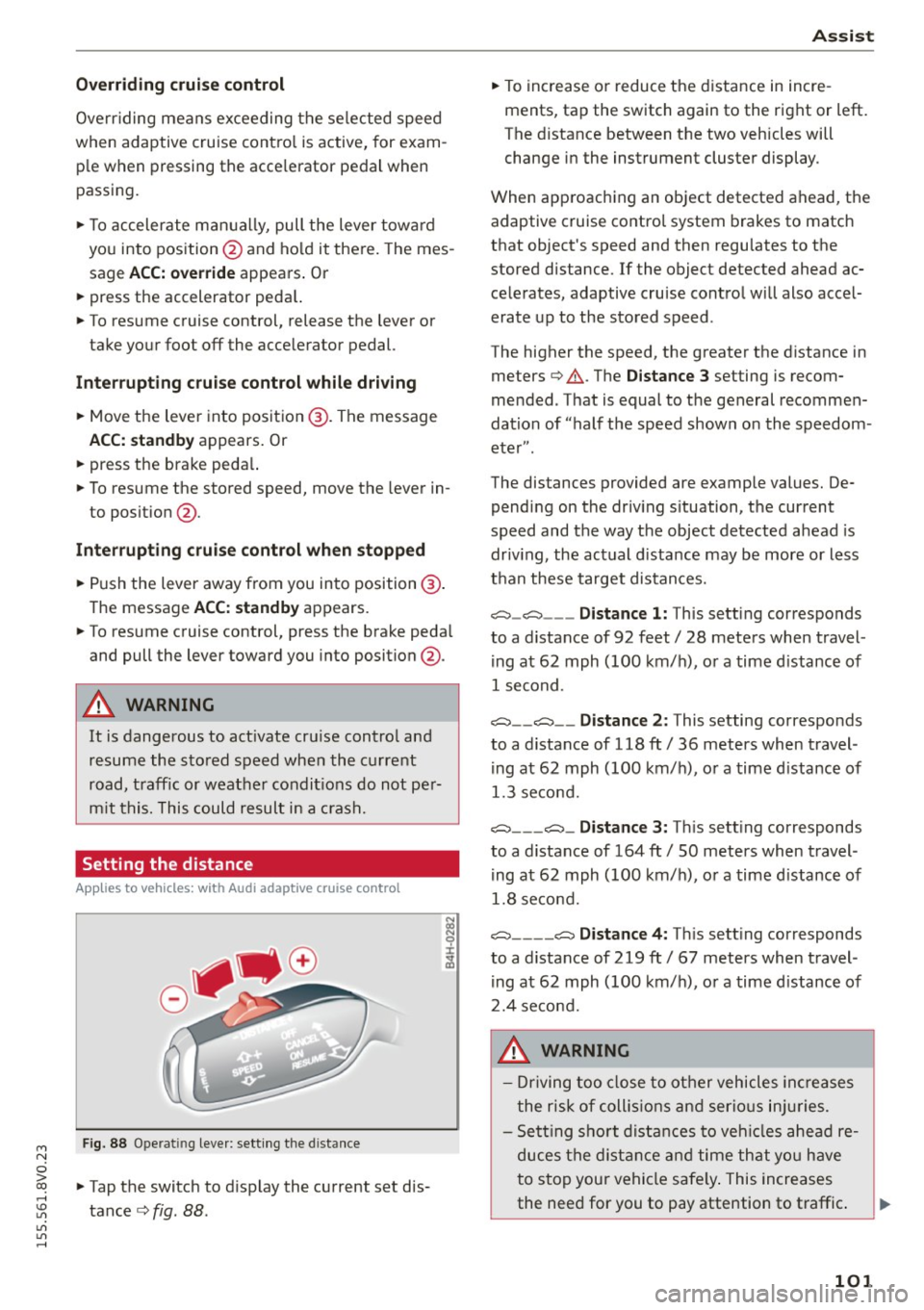
Fig. 88 Ope rat ing leve r: sett ing the d istance
"' Tap the switch to d isplay the current set dis
tance
c> fig. 88 .
Ass is t
"' To increase or reduce the d istance in incre
ments, tap the switch again to the right or left.
The distance between the two vehicles will
change in the instrument cluster display .
When approaching an object detected ahead, the adaptive cruise contro l system brakes to match
that object's speed and then regu lates to the
stored distance. If the object detected ahead ac
celerates, adaptive cruise control will also accel
erate up to the stored speed .
The higher the speed, the greater the distance in meters
c> .&. . The Distanc e 3 setting is recom
mended. That is equal to the general recommen
dation of "half the speed shown on the speedom
eter" .
The distances provided are example values. De pending on the driv ing s ituation, the current
speed and the way the object detected ahead is
driv ing, the actual d istance may be more or less
than these target distances.
c::::::, _c::::::, ___ Distance 1: This setting corresponds
to a distance of 92 feet/ 28 meters when travel
ing at 62 mph (100 km/ h), or a time d istance of
1 second.
c::::::, __ c::::::, __ Distance 2 : This setting corresponds
to a distance of 118 ft/ 36 meters when travel
ing at 62 mph (100 km/ h), or a time d istance of
1.3 second.
c::::::, ___ c::::::,_ Distanc e 3: Th is sett ing corresponds
to a distance of 164 ft/ 50 meters when travel
ing at 62 mph (100 km/ h), or a time d istance of
1.8 second.
c::::::, ____ c::::::, Distance 4: This sett ing corresponds
to a distance of 219 ft/ 67 meters when travel
ing at 62 mph (100 km/h), or a time d istance of
2.4 second.
A WARNING
- Driving too close to other vehicles inc reases
the risk of coll is ions and ser io us in juries.
- Sett ing s ho rt distances to veh icles ahead re
duces the dist ance and time that you have
to stop your vehicle safe ly . This increases
the need for you to pay attention to traffic. .,,.
101
Page 104 of 282
Ass is t
- Always fo llow applicable traffic laws, use
common sense and select a distance to
vehicles ahead that takes the current traffic, road and weathe r cond itions into account.
(D Tips
Distance 3
is set a utomat ica lly each time you
sw itch the ignition on. It you wou ld like to
have this distance as a basic sett ing, you can
have the
adaptive cruise control menu ex
tended
I e nabled from an authorized Aud i
dea le r or a uthorized Audi Service Facility .
Setting the driving program
Applies to vehicles: with Audi adaptive cruise co ntrol
A adaptive cru ise con trol dr iving pr ogram is ad
justable on veh icles w it h out A udi drive selec t*.
• In the MMI, se lect: the
! MENU ! button> Car >
Sy stem s*
cont ro l bu tton > Driver a ssistance >
Adaptive crui se control > Driving program >
Comfort /Standard/Dynamic .
Selecting the driving mode
Applies to veh icles: w ith Audi adaptive cruise co ntrol
The adap tive c ruise control driv ing program is ad
justable for vehicles with Audi
drive select usi ng
the dr iv ing mode.
• Select the des ired driv ing mode
Comfo rt , Auto ,
Dynamic or Individual *
with the knob
¢page 112 .
Request for driver intervention
App lies to veh icles: w ith Audi adaptive cruise co ntrol
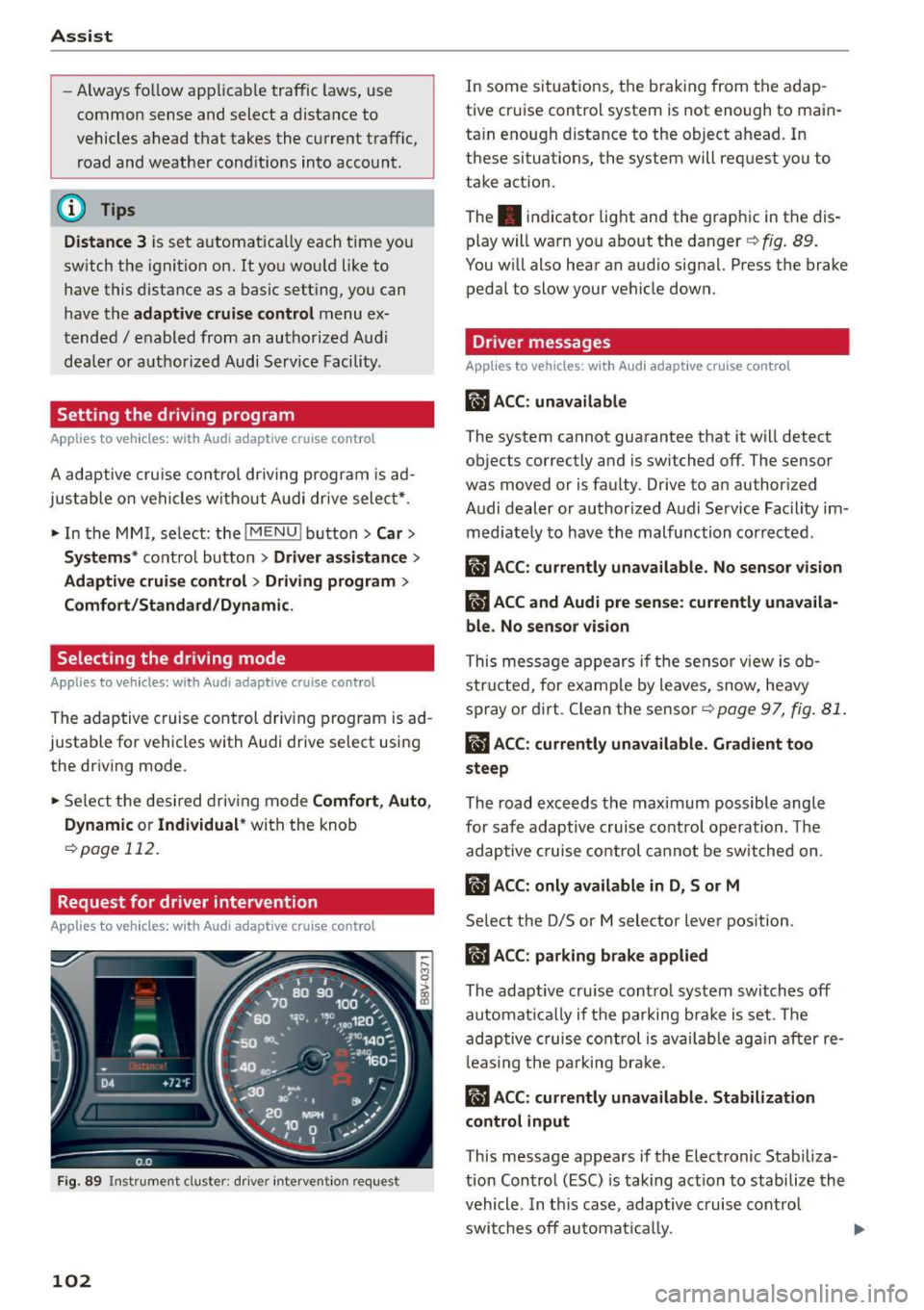
F ig. 89 Instr ument cluste r: d river intervent ion req uest
102
In some situations, the brak ing from the adap
tive cruise control system is not enough to main
ta in enough d istance to the object ahead. In
these situations, the system will request you to
take action.
The . indicator light and the graph ic in the dis
play w ill warn you abo ut the danger ¢
fig. 89 .
You w ill also hear an audio signa l. Press the brake
pedal to slow your vehicle down.
Driver messages
App lies to vehicles: wit h Aud i adapt ive c ru ise contro l
ill ACC: unavailable
The system cannot guarantee that it will detect
objects correctly and is switched off. The sensor
was
moved or is faulty. Drive to an author ized
Audi dealer or authorized Audi Service Fac ility im
med iate ly to have the malfunction corrected.
ill ACC : currently unava ilable . No sensor vision
IIJ ACC and Audi pre sen se : currently unava ila
ble. No sensor vis ion
This mess age appears if the sensor v iew is ob
str ucted, for e xam ple by leaves, snow, heavy
spray or di rt. C lean the sensor-=>
page 97, fig. 81 .
ill ACC: currently unavailable . Gradient too
steep
The road exceeds the max imum possible angle
for safe adaptive c ruise contro l operation . Th e
adap tive cruise co ntrol cannot be switched on .
ill ACC: only available in D, Sor M
Select the D/S or M selector lever pos ition.
II) ACC: parking brake applied
The adaptive cru ise cont ro l system swi tch es off
automat ically if t he parking b ra ke is set . The
ad aptive cruise co ntrol is av ail ab le ag ain after re
l eas ing t he pa rking br ake.
II ACC : currently unavailable. Stabilization
control input
This message appears if the Electronic Stabiliza
tion Control (ESC) is taking act io n to stabilize the
vehicle . In t his case, adaptive c ruise cont rol
swi tches off automat ically.
Page 105 of 282
M N
0 > co ,...., \!) ..,.,
..,.,
..,., ,....,
llJ ACC off: manu al cont rol!
This message appea rs if the veh icle rolls back
when sta rting on a slight incline, even tho ugh
ACC is active. Press the brake pedal to prevent
the vehicle from rolling or starting to move.
IIJ ACC : engin e speed
This message appears if the driver has not shifted
up or down in time when the adaptive cruise con
trol is braking or accelerating, causing the vehicle
to exceed or to not reach the permitted eng ine
speed. The adapt ive cr uise control turns off. A
chime sounds as a reminder.
•••
Three wh ite dots appear if a setting cannot be se
lected with the operat ing lever . For example, this
happens if adaptive cruise control cannot be act i
vated when stopped because the dr iver has not
fastened the safety belt.
Doo r op en
Adaptive cruise control cannot be switched on
when the vehicle is stationary and the dr iver's
door is open.
Audi pre sense
Introduction
Applies to vehicles: with Audi pre sense bas ic or Audi pre
sense front
W ith in the limits of the system, p re sense basic
and p re sense fro nt can initiate steps to protect
veh icle o ccupants i n certa in dangerous s itua
tions.
Critical driving situat ions can be recognized by
the pre sense front v ia a network of differe nt ve
h icle systems and can take steps to prepare the
veh icle occ upan ts for a po ten tial coll is ion.
The pre sense front wo rks with a radar sensor and
a video camera*. It also functions within t he lim
i ts of the system when adapt ive cr uise con trol* is
sw itched off.
A ss is t
General information
General information
Applies to vehicles: wit h Audi pre sense front or A udi ada ptive
cruise control
_&. WARNING
A lso follow the gene ral info rmation found on
~ page 9 7, General information.
Audi pre sense basic
Description
App lies to vehicles: wit h Aud i pre sense basic
The function of the pre sense basic is activated at
a speed of 20 mph (30 km/h) or higher .
The following functions can be triggered under certain conditions within the limits of the sys
tem:
- Tensioning of the safety belts (for example,
during heavy braking): the front safety belts
have reversible belt pretensioners. If a col lision
does not occur, the safety belts loosen slightly
and are ready to trigger again .
- Closing the windows and the sunroof* (for ex
ample, when over- or understeering): the w in
dows and the sunroof* close until there is only
a small gap open .
Audi drive select: the deployment time is adapt ed in dynam ic mode.
_&. WARNING ~
The pre sense basic cannot overcome natural
physical laws . It is a system des igned to assist
and it cannot p revent a coll ision. Do not let
the increased safety provided tempt you into
taking r is ks. Thi s co uld inc rease your risk of a
collis ion .
- The system can dep loy incorrectly due to
system-specific limits .
(D Tips
-Certa in p re sense bas ic functions switch off
when ESC is switched off (sport mode) o r
w hen driving in reverse. .,.
103
Page 106 of 282
Ass is t
- The pre sense basic functions may not be
available if there is a malfunction in the ESC
system or the airbag control module.
- Note that with pre sense basic, the reversi·
ble safety belt pretensioner on the front
passenger's side deact ivates when the front
passenger's airbag is deactivated .
Audi pre sense front
Description
Applies to vehicles: with Audi pre sense front or Audi adaptive
cruise control
Pre sense front informs you if the d istance to the
vehicle ahead falls below the safe distance for a n
extended per iod of time.
It c an warn of a possi·
b le co llision and initiate braking maneuvers,
within the limits of the system.
When detected in time, the system can assess
dangerous situations whe re a n object ahead
b rakes s udden ly or if you r own vehicle is traveling
at a high speed and approaching an object t hat is
moving more s lowly . If detection is not possible ,
then pre sense front does not re act .
Warnings
Applies to vehicles: with Audi pre sense front or Audi adaptive
cruise control
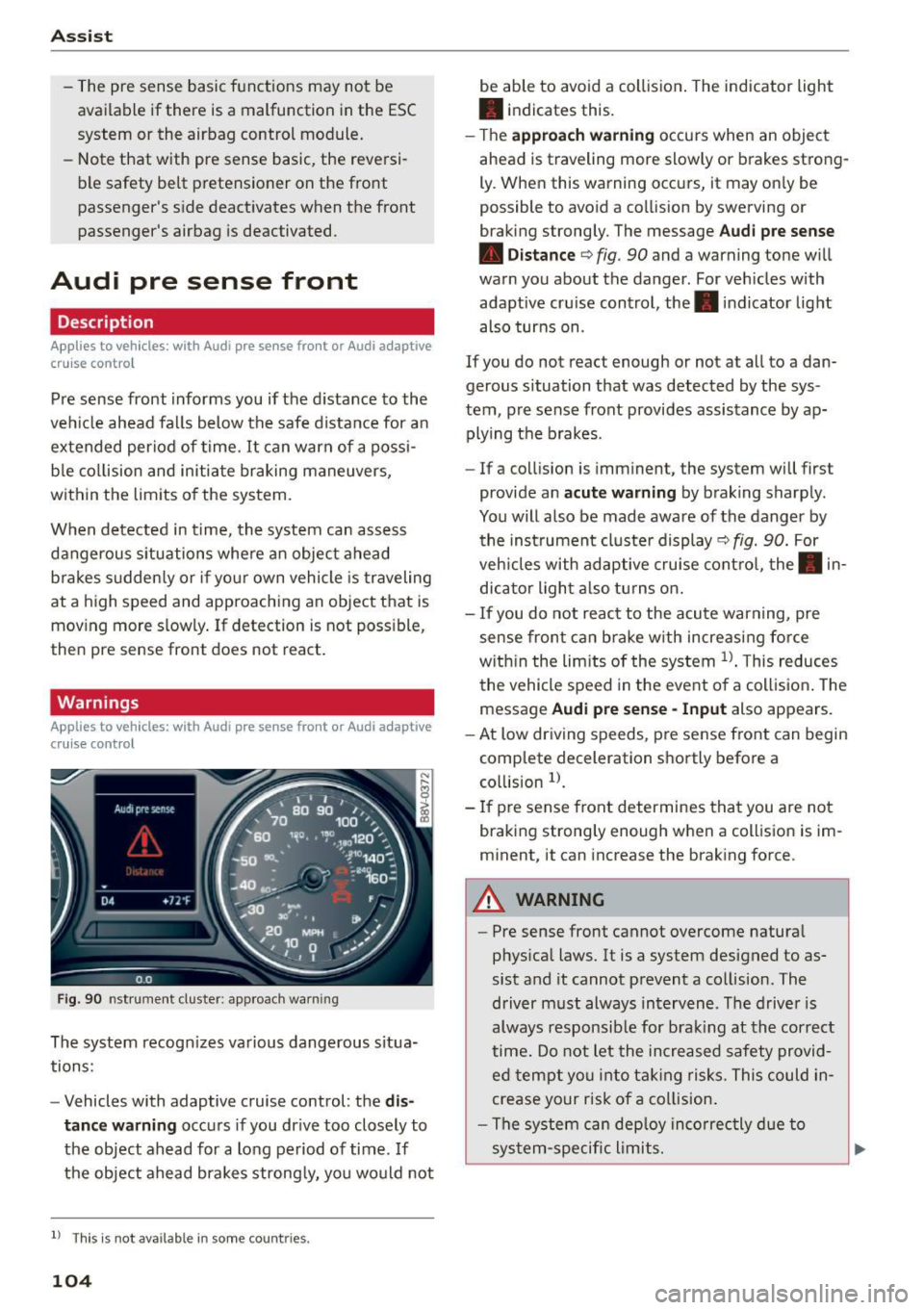
F ig . 90 nst rument clus te r: app roac h warn ing
The system recogn izes va rious dangerous situa
tions:
- Vehicles with adaptive cruise control: the
dis
tanc e warnin g
occurs if you dr ive too closely to
the object ahead for a long period of time .
If
the object ahead brakes strong ly, you would not
l l Thi s is no t ava ilab le i n so me c oun tries .
104
be able to avoid a collision . The indicator light
• indicates th is.
- T he
approach warn ing occurs when an object
ahead is traveling more slowly or brakes strong·
Ly. When this warning occ urs, it may on ly be
possible to avo id a collision by swerving o r
b raking strongly. The me ssage
Audi pre se nse
• Dis tance
q fig. 90 and a warning tone will
warn you about the danger . For veh icles with
adaptive cru ise control, the. indicator light
also turns on.
If you do no t reac t enough or no t at all to a dan
gerous situation that was detected by the sys
tem, p re sense front provides assistance by ap
plying the b rakes .
- If a collision is imm inen t, the system will first
provide a n
acu te warning by braking sharp ly .
You will also be made aware of the danger by the inst rument cluste r display
q fig. 90. For
veh icles with adaptive cru ise cont ro l, the . in
dic ator light a lso tu rns o n.
- If you do not reac t to the acu te warning, pre
sense front ca n brake w ith increasing force
w it hi n the lim its of the system
1> . T his reduces
the vehicle speed in the event o f a collis io n. The
message
Audi pre sense -Input also appears.
- At low driving speeds, pre sense front can begin
complete decelerat ion shortly before a
co llision
l).
- If p re sense front determines that you are not
braki ng strong ly enough when a coll is ion is im·
minent, it can increase the brak ing force .
A WARNING
-
-Pre sense front cannot overcome natura l
phys ica l laws. It is a system designed to as
sist and it cannot prevent a collision. The
driver m ust always intervene . The d river is
always responsib le for brak ing at the correct
time . Do not let the in crea sed safety provid
ed tempt you into ta king risks. This could in
crease your risk of a collision .
- The system can dep loy inco rrec tly d ue to
sys tem-specific l imits.
Page 107 of 282
M N
0 > co ,...., \!) ..,.,
..,.,
..,., ,....,
-Please note that the sensor does not always
detect all objects. This increases the risk of a
collision.
- Pre sense front does not react to people or
animals or objects that are crossing the ve
hicle's path or are difficult to detect
¢ page 97.
-Reflective objects such as guard rails or the
entrance to a tunnel, heavy rain and ice can
affect the funct ion of the radar sensor and
the system's ability to detect a collision risk .
- Lack of attention can lead to collisions, oth
er accidents and serious injuries. pre sense
front is an assistance system and cannot
prevent a collision by itself. The driver must
always intervene . The driver is always re
sponsible for braking at the right time.
- Always pay attention to traffic, even when
pre sense front is switched on . Always be
ready to intervene and take over complete
control of the vehicle whenever it is neces
sary. Always follow traffic laws regarding
maintaining a safe distance between your
vehicle and vehicles ahead.
- pre sense front works within certain limits
and cannot react to situations that are out
side of the system limits, such as when ap
proaching a stationary vehicle or a station
ary obstacle (the end of a traffic jam or ave
hicle that has broken down).
- Always keep in m ind that the radar sensor
for pre sense front only works w ith in de
fined detection zones, which means other
vehicles may not always be detected correct
ly.
- The function and range of the radar sensor
can be impaired by rain, snow and heavy
mist. Vehicles ahead may not be detected
right away, or not detected at a ll.
- Reflective surfaces such as guard rails or en
trances to tunnels may impair the function
of the radar sensor.
(D Note
The sensor can be disp laced by impacts or
damage to the bumper, whee l hous ing and
underbody. The pre sense front sensor can be
damaged by this . Have an authorized Audi
Assist
dealer or authorized Audi Service Facility
check their function.
(D Tips
- You can cancel the braking with increasing
force that is initiated by the system by brak
ing yourself, by acce lerating noticeably or by
swerving .
- For information on driver messages about
pre sense, refer to ¢
page 106.
- Keep in mind that pre sense front can brake
unexpectedly. Always secure any cargo or
objects that you are transporting to reduce
the risk of damage or injury .
- Certain pre sense front functions switch
off
when ESC is switched off (sport mode) or
when driving in reverse.
- The pre sense front functions are not availa
ble if there is a malfunction in the adaptive
cruise control* system
¢page 102 or
¢ page 106.
-Keep in mind that pre sense front can brake
abruptly. Always secure cargo or objects
that you transport to reduce the risk of
damage or injury .
Settings in the Infotainment system
Applies to vehicles : wi th Audi pre sense front or A ud i ada ptive
cruise co ntrol
.,. In the MMI, select: the I MENU I button >C ar>
Systems*
car > Driver assistance > Audi pre
sense .
Switching the system on and off
Audi pre sense (Sys tem): if the system is switch
ed
off, it switches on again automatically once
the ignition is switched on again.
System -Switch Audi pre sense On-Off . With
this, you can switch the prewarning and the brak ing intervention from Audi pre sense on or
off.
Early warning -The distance and approach warn
ings can be switched
On /Off.
(D Tips
-If you restrict or switch off the ESC, the pre
sense also switches itse lf off ¢
page 124 .
105
Page 124 of 282
Intelligent Technology
Intelligent Technology Notice about data
recorded by the Event
Data Recorder and
vehicle control modules
Event Data Recorder
This vehicle is equipped with an Event Data Re
corder (EDR). The main purpose of an EDR is to
record, in certain crash or near crash-like situa
tions, such as an airbag deployment or hitting a
road obstacle, data that will assist in understand
ing how a vehicle's systems performed. The EDR
is designed to record data related to vehicle dy
namics and safety systems for a short period of
time, typically 30 seconds or less. The EDR in this
veh icle is designed to record such data as:
- How various systems in your vehicle were oper
at ing;
- Whether or not the driver and passenger safety
belts were buckled/fastened;
- How far (if at all) the driver was depressing the
acce lerator and/or brake pedal; and,
- How fast the vehicle was traveling.
These data can help provide a better understand
ing of the circumstances in which crashes and in
juries occur. NOTE: EDR data are recorded by your
vehicle only if a non-trivial crash situation occurs;
no data are recorded by the EDR under normal
driving conditions and no personal data (e.g .,
name, gender, age, and crash location) are re
corded. However, other part ies, such as law en
forcement, could combine the EDR data with the
type of personally identify ing data routinely ac
qui red during a crash investigation.
To read data recorded by an EDR, special equip
ment is requ ired, and access to the vehicle or the
E DR is needed. In addition to the vehicle manu
facturer, other parties, such as law enforcement,
that have the specia l equipment, can read the in
formation if they have access to the veh icle or the
EDR.
Some state laws restrict the retrieval or down
loading of data stored by EDRs installed in a vehi
cle for the express purpose of retrieving data af-
122
ter an accident or crash event without the own
er's consent.
Audi will not access the EDR and/or similar data
o r g ive it to others -
- unless the veh icle owner (or lessee if the veh i
cle has been leased) ag rees; or
- upon the official request by the police; or
- upon the order of a court of law or a govern-
ment agency; or
- for the defense of a lawsuit through the judicial
discovery process .
- Audi may also use the data for research about
veh icle operation and safety performance or
provide the data to a third party for research
purposes without identifying the spec ific vehi
cle or information about the identity of its own
er or lessee and only after the recorded vehicle
data has been accessed.
Vehicle control modules
Your vehicle is also equipped with a number of
electronic contro l modules for var ious vehicle
systems, such as engine management, emission
control, airbags, and safety belts.
These electronic control modules record data during normal vehicle operation that may be
needed by trained technicians for diagnostic and
r epair pu rposes. The recording capabil ity of these
modules is lim ited to data (no sound is recorded).
Only a small amount of data is actua lly recorded
over a very limited period of time, or stored when
a system fau lt is detected by a contro l modu le.
Some of the data stored may relate to vehicle
speed, direction, or brak ing, as well as restraint
system use and performance in the event of a
crash. Stored data can also only be read and
down loaded w ith specia l equipment that is di
r ect ly connected to the vehicle.
(D Tips
Your vehicle may be equipped with Audi con
nect. Your use of certain Audi connect fea
tures requires wireless se rv ic es that are pro
v id ed by a third party wireless telecommuni
cations provider. For details regarding how in
formation obtained through Audi connect is
collected, processed, transmitted, used, and ..,..
Page 125 of 282
M N
0 > co ,...., \!) 1.1"1
1.1"1
1.1"1
,....,
shared, please see your contract with the
wireless telecommunications provider and the
"About Aud i connect" tab in your vehicle's
MMI: ! MENUI button> Audi connect > About
Audi connect .
Electronic stabilization
control (ESC)
Description
The E lectronic Stabilization Contro l (ESC) reinfor
ces driver safety. It reduces the risk of slipping
and improves driving stability. ESC detects criti
cal s ituations such as the vehicle oversteering
and understeering or the wheels a re spinning.
The vehicle is stabilized by applying the brakes or
reducing engine torque. Once the ESC is activat
ed, the indicator light
DJ blinks in the instru
ment cluster.
The fol low ing systems a re integrated in the ESC:
Anti-lock braking system (ABS)
ABS prevents the wheels from locking when brak
i ng. The vehicle can still be steered even during
hard braking . Apply steady pressure to the brake
pedal. Do not pump the pedal. A pulsing in the
brake pedal ind icates that the system is acting to
stabilize the vehicle .
Brake assist system
The brake assist system can decrease braking d is
tance . It increases braking power when the driver
presses the brake pedal quickly in emergency s it
uations. You must press and hold the brake pedal
unti l the dangerous sit uation is ove r. In vehicles
with adaptive cruise control *, the brake assist
system is more sensit ive if the distance detected
to the vehicle ahead is too small.
Anti-slip regulation (ASR)
ASR reduces engine power when the drive whee ls
begin spinning and adapts the force to the road
conditions. This makes it easier to start, acceler
ate and drive up inclines.
Intelligent Technology
Electronic differential lock (EDL)
The EDL brakes whee ls that are spinning and
trans fers the drive power to the other drive wheel
or whee ls if the vehicle is equipped with all wheel
drive*). This function is not available at higher
speeds.
In extreme cases, EDL automatically switches off
to keep the brake on the braked wheel from over
heating. The vehicle is still working correct ly. EDL
will switch on again automatically when condi
tions have returned to normal.
Steering recommendation
The ESC helps to stabilize the vehicle by changing
the steering torque .
Selective wheel torque control
Selective wheel torque control is used when dr iv
i ng on curves. The front wheel on the inside of
the curve o r both wheels on the inside of the
curve are braked selectively as needed . This al
lows more precise driving in curves .
Automatic post-collision braking system
The "Automat ic post -collision braking system"
can help to reduce the ris k of sliding and of other
collisions after an accident. If the airbag control
module detects a collision above a certain vehicle
speed, the vehicle is braked by the ESC.
T he vehicle does not brake automatically if:
- the driver presses the accelerator pedal, or
- the braking force generated by the pressed
brake pedal is greater than the brak ing force
that would be initiated by the system, or
- the ESC, the brake system or the vehicle electr i
cal system are not funct ion ing .
A WARNING
-The ESC and its integrated systems cannot
overcome the limits posed by natural phys i
cal laws. This is especially important on slip
pery or wet roads .
If the systems begin act
ing to stabilize your vehicle, you should im-
mediately a lter your speed to match the ..,.
123
Page 127 of 282
M N
0 > co ,...., \!) 1.1'1
1.1'1
1.1'1
,....,
A WARNING
You should only switch sport mode on or switch ESC/ASR off if your driving ab ilities and
road condit ions perm it.
- The stabilization function is limited when
sport mode is switched on. The dr iving
wheels could sp in and the veh icle could
swerve, especially on slick or slippery road
surfaces.
- There is no vehicle stabilization when ESC/
ASR are switched off.
(D Tips
- ESC/ASR cannot be switched off or sport
mode cannot be sw itched on if the cru ise
control system* or the adapt ive cruise con
trol* is switched on.
- Malfunctions in the Audi magnetic r ide may
make it impossible to sw itch the ESC/ASR
off or to switch spo rt mode o n.
Brakes
New brake pads
New brake pads do not achieve their full braking
effect during the first 250 mi (400 km). They
must be "broken in" f irst. Howeve r, you can com
pensate for the slightly reduced braking force by
press ing firmly on the b rake pedal. Avoid heavy
braking during the break -in period.
Wear
Brake pad wear is large ly dependent on the way
the veh icle is d riven and on operating co nditions.
This is especially t rue if you are driving frequent ly
in the city and on cu rves or with a sporty driving
style.
Operating noise
Noises may occur when braking depending on the
speed, b rak ing force and o utside conditions s uch
as tempe rat ure and h umid ity.
Effect of water and road s alt
In certain situat ions, for example after driving
throug h wate r, in heavy ra in, after overn ight con
densat ion or afte r wash ing you r car, the braking
In te llig ent T echnolog y
effect can be reduced by moisture or ice on the
brake rotors and brake pads . The brakes must be
"dried" first with a few careful brake applications.
At higher speeds and with the windsh ield wipers
turned on, the brake pads press against the b rake
rotors for a short amount of time . This action
wh ich is not felt by the driver happens at regular
intervals and facilitates a better reaction t ime for
the brakes in wet weather.
The braking effect can a lso be reduced if you are
driv ing on salted roads and you do not apply the
brakes for long periods of time. The layer of salt
on the brake rotors and pads must be worn off
first whe n the brakes a re applied .
Corro sio n
Leav ing the ve hicle parked for long periods of
t ime, low mileage and avoiding heavy braking can
contribute to corros ion on the brake rotors and
dirty brake pads.
If you usua lly avoid heavy b raking or if there is
corrosion present, occas ional heavy braking at
high speeds is recommended to clean the brake
rotors and pads¢,&.
Brake sy stem malfunct ion
if you notice that the b rake pedal travel has sud
denly gotten larger, then a brake circ uit may have
failed. Drive to an authorized Audi dealer or au
thori zed Audi Service Facility immediately to have
the problem cor rected. On the way there, dr ive
with reduced speed and keep in mind that a long
braking distance and increased pressu re on the
brake pedal will be necessa ry.
Low br ake fluid level
When the brake f lu id level is low, malfunct ions in
the brake system may occur. The brake flu id leve l
is electronically mon itored.
Brake boo ste r
The brake booster amplifies the pressure yo u ap
ply to the brake peda l.
It only works when the en-
gine is running.
IJ>
125
Page 128 of 282
Intelligent Technology
& WARNING
-New brake pads do not achieve their full
braking effect during the first 250 mi
(400 km). They must be "broken in" first .
However, you can compensate for the slight·
ly reduced braking force by pressing firmly
on the brake pedal. Avoid heavy braking dur·
ing the break-in period.
- Alway apply the brakes for the purpose of
cleaning the brake system when road and
traffic conditions permit. You must not en·
danger other road users. This increases the
risk of an accident.
- On steep slopes , reduce the speed and se
lect a lower gear or lower selector lever po·
sition. Drive as little as possible while press· ing the brake pedal and avoid putting your
left foot on the brake pedal while driving.
This could cause the brakes to overheat and impair the efficiency of the brakes .
- Do not let the brakes "grind" by always
keeping your foot on the brake pedal. This
can cause the brakes to overheat, increase
wear and increase braking distance unneces·
sarily.
- Certain weather and operating conditions
such as driving through water, driving in
heavy rain or driving after washing your
ve·
hide can impair the effectiveness of the
brakes. In the winter, ice may build up on
the brake pads, rotors and drums. Check
these components by braking carefully. Ap·
plying the brakes carefully several times
dries the brakes and removes ice build-up .
- The efficiency of the brakes can also be im·
paired by driving for long stretches on roads
covered with salt without using the brakes.
You can
remove salt deposits from the brake
rotors and pads by carefully applying the
brakes several times.
- If the front spoiler is damaged or you install
another spoiler, make sure the front wheel
brakes are ventilated properly . Otherwise,
the brake system could overheat, which re·
duces their effectiveness.
- Failure of a brake circuit impairs braking
performance, which increases braking dis·
126
tance. Avoid driving the vehicle and have it
towed it to the nearest authorized Audi
dealer or authorized Audi Service Facility .
- Never let the vehicle roll while the engine is
stopped because this increases the risk of an
accident .
-If the brake booster is not working, you will
have to press much harder on the brake ped·
al to compensate for the lack of the booster .
(D Note
-Never let the brakes "rub" by pressing the
pedal lightly when braking is not really nee·
essary. This causes the brakes to overheat
and increases braking distance and causes
wear .
- Before driving on a long stretch with steep
slopes, reduce your speed and shift to the
next lower gear This makes use of the en·
gine braking effect and relieves the brakes .
If you need to brake additionally, brake in
intervals and not continuously.
(D Tips
-If the brake booster is not working, you
must press the brake pedal with much more
force then normal.
- If you retrofit your vehicle with a front spoil·
er, wheel covers or similar items, make sure
that the air flow to the front wheels is not
interrupted. Otherwise the brake system
can become too hot.
Electromechanical
steering
The electromechanical steering supports the
driver's steering movements .
Power steering adapts electronically based on
the vehicle speed.
T he vehicle still has full steering functionality if
the power steering fails or when the engine is
stopped (towing). To steer, you must apply much
more force than usual.
Indicator lights and messages
• Do not drive vehicle: steering defective
Page 137 of 282
M N
0 > co ,...., \!) 1.1'1
1.1'1
1.1'1
,....,
-never sit on the edge of the seat
- never si t sideways
- never lea n out the w indow
- never p ut yo ur feet out the window
- never put yo ur feet on the instrument panel
- never rest your feet on the seat cushion or back
of the seat
- never ride in the footwe ll
- never ride in the cargo area
&_ WARNING
Improper seat ing positions increase the risk
of serious personal injury and death whenever
a vehicle is be ing used.
- Always make sure that all vehicle occupants
stay in a proper seating position and are
properly restrai ned whenever the vehicle is
being used.
Driver's and front
passenger's footwell
Important safety instructions
App lies to vehicles: with knee airb ags
&_ WARNING
Always ma ke sure that the knee a irbag can in
flate without interference. Objects between
yourself and the airbag can increase the r isk
of injury in an accident by interfering with the
way the airbag deploys or by being pushed in to you as the airbag deploys.
- No persons (chi ldren) or animals should ride
in the footwe ll in front of the passenger
seat.
If the airbag dep loys, this can result in
serious or fatal injuries.
- No objects of any kind shou ld be carried in
the footwe ll area in front of the dr iver's or
passenger's seat. Bulky objects (shopp ing
bags, for example) can hamper or prevent
proper deployment of the airbag . Small ob
jects can be th rown thro ugh the vehicle if
the a irbag deploys and injure you o r you r
passengers.
Dr ivin g s afet y
Pedal area
Pedals
The pedals must always be free to move and
must never be interfered with by a floor mat or
any other object.
Make sure that a ll peda ls move freely without in
terference and that nothing prevents them from
r eturning to the ir original positions.
Only use f loor mats that leave the pedal area free
and can be secured with floor mat fasteners.
If a brake circ uit fa ils, increased brake pedal trav
el is required to bring the vehicle to a full stop.
&_ WARNING
--
Pedals that cannot move free ly can cause loss
of vehicle control and increase the risk of ser i
ous injury .
- Never p lace any objects in the driver's foot
well. An object could get into the pedal area
and interfere with pedal function. In case of
sudden braking o r an accident, you would
not be able to b rake or accelera te!
- Always make sure that nothing can fall or
move into the d river 's footwell.
Floor mats on the driver side
Always use floor mats that can be securely at
tached to the floor mat fasteners and do not in
terfere with the free movement of the pedals.
.. Make sure that the floor mats are properly se
cured and cannot move and inte rfere with the
pedals
~ A .
Use only floor mats that leave the pedal area un
obstructed and that are firmly secured so that
they cannot sl ip out of position . You can obta in
s ui table floor mats from your authorized Aud i
Dealer .
Floor mat fasteners are insta lled in your Audi.
Floor mats used in yo ur vehicle must be attached
to these fasteners. Properly securing the floor .,..
13 5