air condition AUDI S3 SEDAN 2017 User Guide
[x] Cancel search | Manufacturer: AUDI, Model Year: 2017, Model line: S3 SEDAN, Model: AUDI S3 SEDAN 2017Pages: 400, PDF Size: 67.32 MB
Page 136 of 400
Assistance systems
-Due to the interlinking of various vehicle sys
tems, critica l driving situations can be detected
by
pre sense basic and measures for preventa
tive occupant protection are can be initiated.
-The pre sense front uses the data from the ra
dar sensors and calcu lates the probability of an
accident
c> page 127. An impending collision
with vehicles can be detected within the limits
of the system . In this case, the system warns
the driver visually, acoustically and with a jerk
on the brakes if necessary. If needed, it can i ni
tiate a partia l or full dece le rat ion to reduce the
collision speed o r to avoid the coll ision unde r
ce rtain c ircumstances. In conjunction with pre
sense basic, the front safety belts are also re
versib ly tensioned when needed . The pre sense
front is also active when adaptive cruise con
trol* is sw itched off.
.,&. WARNING
Also follow the general instructions found in
c> .&. in General information on page 127.
(i) Tips
-Certain pre sense functions switch off when
driving in reverse.
-The pre sense functions may not be availa ble if there is a malfunction in the ESC sys
tem or the airbag contro l module.
-Note that the reversible belt tensioner on
the front passenger's side deactivates when
the front passenger's a irbag is deactivated .
-Switch the pre sense off when you are not
us ing public streets or when loading the ve
hicle onto a vehicle carr ier, train, ship or
other type of transportation. This can pre
vent an undes ired intervention from the pre
sense system.
Audi pre sense basic
Description
Applies to: veh icles with Audi pre sense basic
The pre sense basic funct ions are activated at a
speed of approximately 20 mph (30 km/h) or h igher.
134 The following
functions can be triggered under
certain conditions within the limits of the sys
tem:
-Tensioning of the safety bel ts (for examp le,
during heavy braking): the front safety belts
have reversib le be lt tensioners. If a collision
does not occur, the safety belts loosen slightly
and are ready to trigger aga in.
-Initiating the closing of the windows and the
panorama glass roof* (for examp le when un
der- or oversteering).
Audi drive select* : the trigger times are adjusted
depending on the mode selected.
Audi pre sense front
· Description
Applies to: vehicles with Audi pre sense front
Within the limits of the system and depending
on the situation and speed, pre sense front can
warn you about impending collisions with sta
tionary, stopped, and moving vehicles and ini
tiate appropriate braking measures.
If detection is not possib le, then pre sense front
does not react.
The following func tions trigger in conjunction
with pre sense basic at corresponding vehicle
speeds :
-Reversible tens ion ing of the front safety belts.
-Closing the windows and panorama glass roof*.
Warnings and braking
Applies to: vehicles with Audi pre sense front
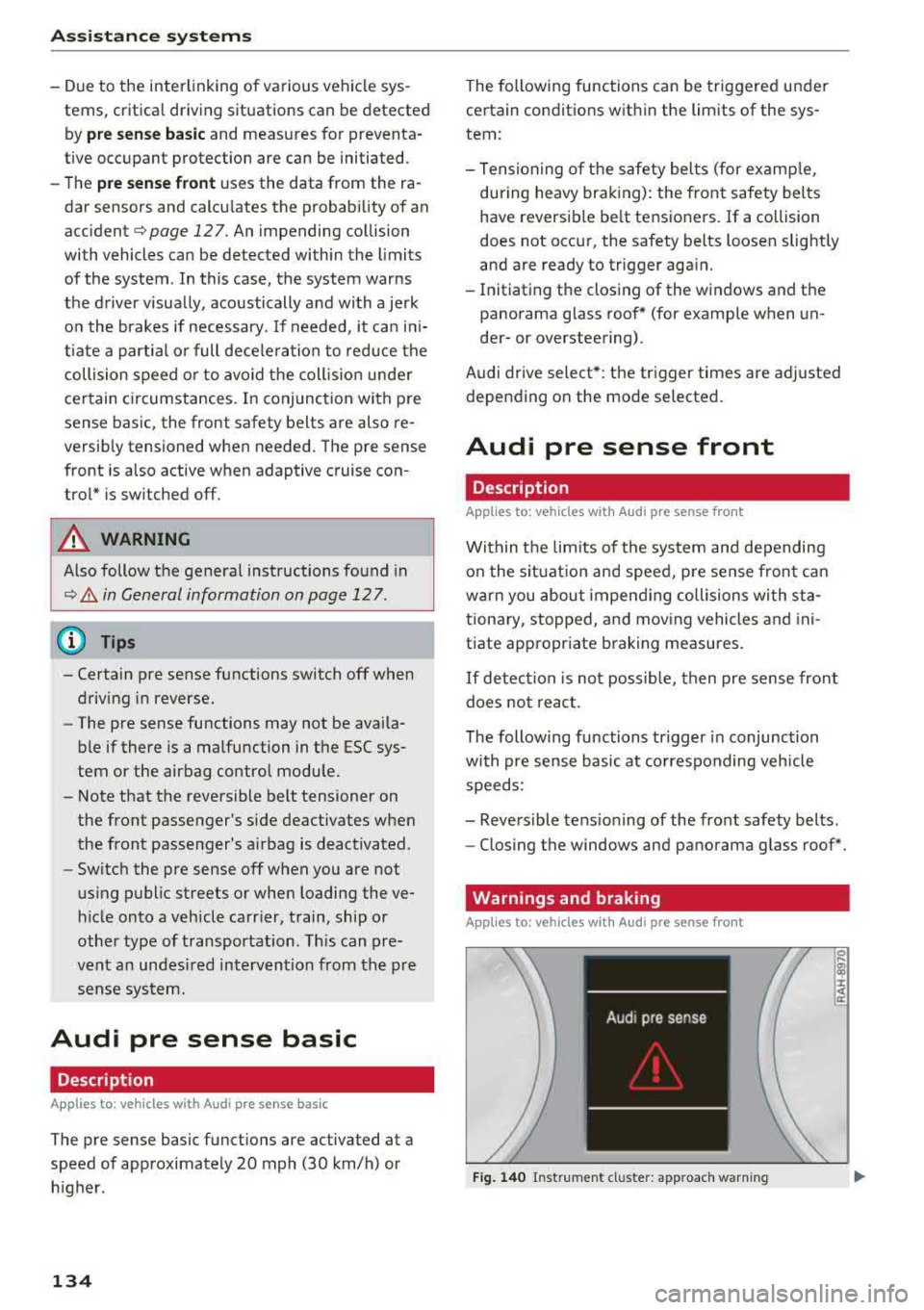
Fig. 140 Instrument cluster: approach warning
0
;
::c
Page 142 of 400
Assistance systems
warn you about detected vehicles that it has clas
sified as critical.
@ Tips
You can adjust the brightness on of the dis
play on the rearview mirror¢
page 141.
General information
App lies to: ve hicles w ith Audi side assist
@
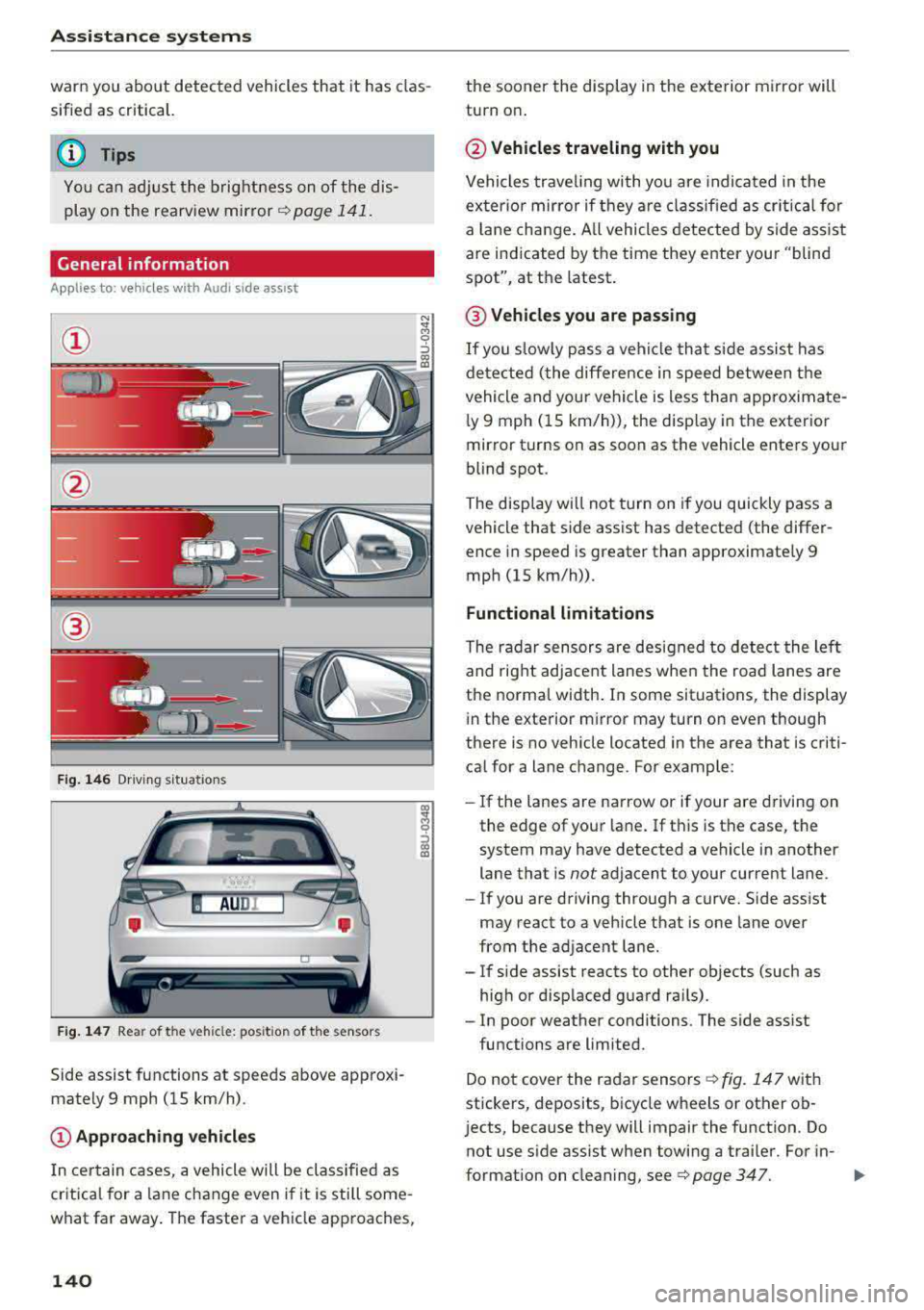
Fig. 146 Driving s it u ations
Fig. 147 Rear of the veh icle: pos it ion of the sensors
Side assist functions at speeds above approxi
mately 9 mph (15 km/h) .
@Approaching vehicles
In certain cases, a vehicle will be classified as
critical for a lane change even i f it is still some
what far away. The faster a vehicle approaches,
140
the sooner the display in the exterior mirror will
turn on .
@Vehicles traveling with you
Vehicles traveling with you are indicated in the
exter ior mirror if they are classified as critical for
a lan e change . All vehicles detected by side assist
are indicated by the time they enter your "blind
spot", at the latest .
@ Vehicles you are passing
If you slow ly pass a vehi cle that side assist has
detected (the differe nce in speed between the
vehicle and your vehicle is less than approximate
l y 9 mph (15 km/h)), the disp lay in the exterior
mirror turns on as soon as the vehicle enters your
blind spot.
The display wi ll not turn on if you quickly pass a
vehicle that side assist has detected (the differ ence in speed is greater than approximate ly 9
mph (15 km/h)) .
Functional limitations
The radar sensors are designed to detect the lef t
and right adjacent lanes when the road lanes are
the normal width . In some situations, the display
in the exterior m irror may turn on even though
there is no vehicle located in the area that is criti
ca l for a lane change. For example:
- If the lanes are narrow or if your
are dr ivin g on
the edge of your lane. If this is the case, the
system may have detected a vehicle in another
lane that is
not adjacent to your cur rent lane.
- If you are driving through a curve. Side ass ist
may react to a vehicle that is one lane over
from the adjacent lane.
- If side assist reacts to other objects (such as
high or displaced guard ra ils).
- In poor weather conditions. The side ass ist
functions are limited.
Do not cover the radar
sensors ¢ fig. 147 with
stickers, deposits, bicycle wheels or other ob
j ects, because they will impair the function. Do
not use s ide assist when towing a trai ler. For in-
format ion on cleaning,
see ¢ page 347. .,..
Page 148 of 400
Parking systems
Parking systems
General information
A ppl ies to: ve hicles w ith parking system plus/rearview cam
era
Depending on your vehicle's equipment , various
parking aids will help you when parking and ma
neuvering.
The
parking system plus assists you when park
ing by audibly and visually indicating objects de
tected
in front of and behind the vehicle
¢page 147.
The rearview camera shows the area behind the
vehicle in the Infotainment system display. This display assists you when you are cross or parallel parking. The parking system plus functions are
also available ¢
page 148.
A WARNING
-
-Always look for traffic and check the area
around your vehicle by looking at it directly
as well. The parking system cannot replace
the driver's attention. The driver is always
responsible when entering or leaving a park
ing space and during similar maneuvers .
-Please note that some surfaces, such as
clothing, are not detected by the system .
-Sensors and cameras have blind spots in
which people and objects cannot be detect
ed . Be especially cautious of small children
and animals .
-Always pay attention to the area around the
vehicle -us ing the rearview mirror, too.
-The sensors can be displaced by impacts or
damage to the radiator grille, bumper,
wheel housing and the underbody . The park
ing system may be impaired as a result.
Have an authorized Audi dealer or author
ized Audi Service Facility check their func
tion .
(D Note
-Some objects are not detected or displayed
by the system under certain circumstances:
-objects such as barrier chains, trailer draw
bars, vertical poles or fences
146
-objects above the sensors such as wall ex
tensions
-objects with certain surfaces or structures
such as chain link fences or powder snow
-If you continue driving closer to a low ob
ject, it may disappear from the sensor range. Note that you will no longer be
warned about this obstacle.
-Keep enough distance from the curb to re
duce the risk of damage to the rims.
(D Tips
-T he system may provide a warning even
though there are no obstacles in the cover age area in some situations, such as:
-certain road surfaces or when there is tall
grass .
-external ultrasonic sources such as from
cleaning vehicles.
-in heavy rain, snow, or thick vehicle ex
haust.
-We recommend that you practice parking in
a traffic-free location or parking lot to be
come familiar with the system . When doing
this, there shou ld be good light and weath
er conditions.
-You can change the volume and pitch of the
signals as well as the display¢
page 150.
-What appears in the infotainment display is
somewhat time-delayed .
-The sensors must be kept clean and free of
snow and ice for the parking aid to operate .
Page 149 of 400
Parking system plus
Description
Applies to: vehicles with parking system plus
Parking system plus provides audio and visual
signals when parking.
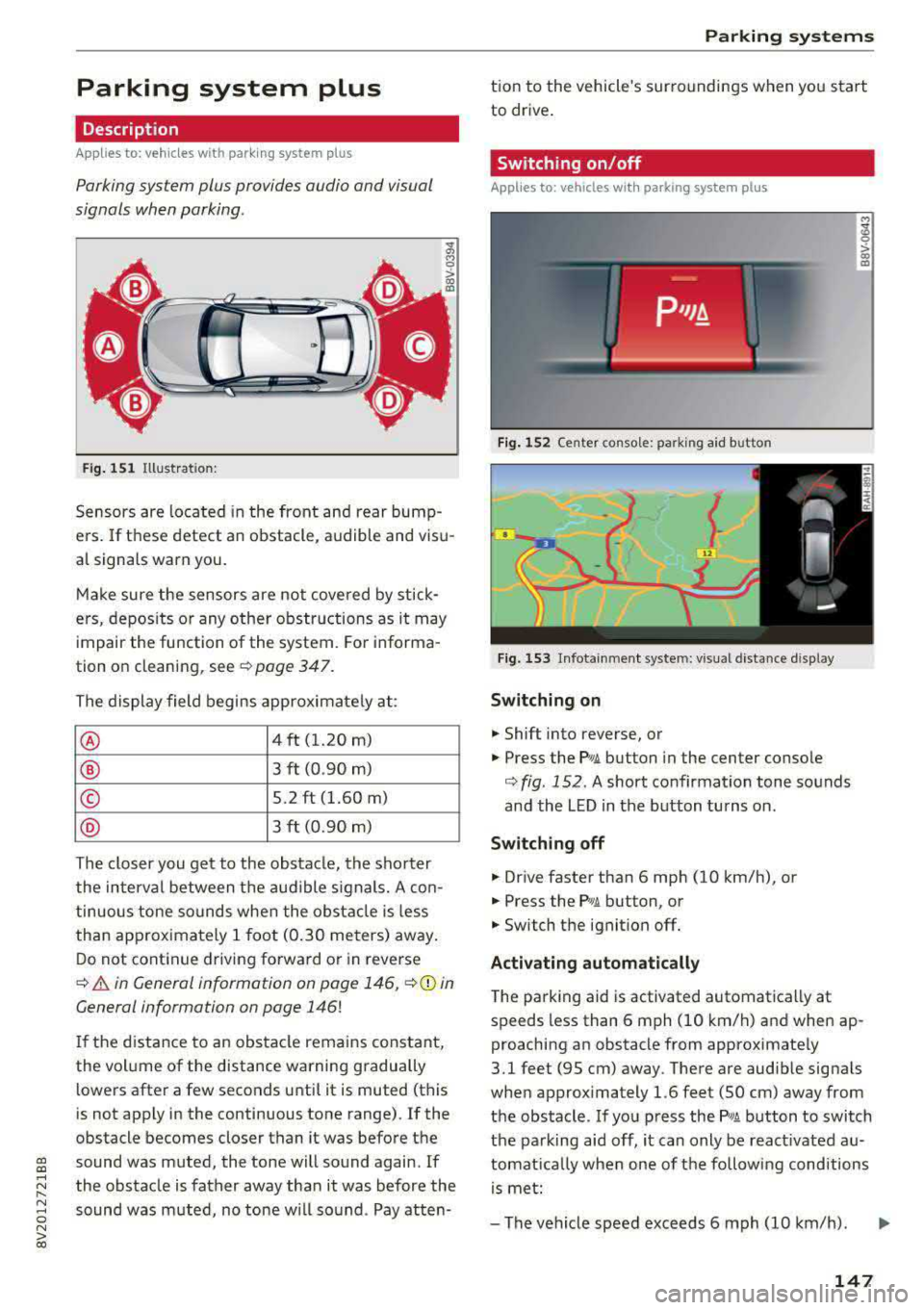
Fig. 151 Illustrat ion:
Sensors are located in the front and rear bump
e rs. If these detect an obstacle, audible and visu
al signa ls warn you.
Make sure the sensors are not covered by stick
ers, deposits or any other obstructions as it may
impair the function of the system. For informa
tion on cleaning, see
¢ page 347.
The display field begins approximately at:
® 4 ft (1.20 m)
® 3 ft (0.90 m)
© 5.2 ft (1.60 m)
® 3 ft (0.90 m)
The closer you get to the obstacle, the shorter
the interval between the audible signals. A con
tinuous tone sounds when the obstacle is less
than approximately 1 foot (0.30 meters) away.
Do not continue driving forward or in reverse
¢ & in General information on page 146, ¢0 in
General information on page 146!
If the distance to an obstacle remains constant,
the volume of the distance warning gradually
lo wers after a few seconds until it is muted (this
is not apply in the continuous tone range).
If the
obstacle becomes closer than it was before the
gi sound was muted, the tone will sound again. If
~ the obstacle is father away than it was before the
~ sound was muted, no tone will sound . Pay atten-o N > 00
Parking systems
tion to the vehicle's surroundings when you start
to drive.
Switching on/off
Applies to: vehicles with parking system plus
Fig. 152 Ce nter console: park ing aid b utton
Fig. 153 Infota inmen t system: visual distance display
Switching on
.,. Shift into reverse, or
.,. Press the P•1A button in the center console
¢ fig. 152 . A short confirmation tone sounds
and the LED in the button turns on.
Switching off
.,. Drive faster than 6 mph (10 km/h), or
.,. Press the Pwi button, or
.,. Switch the ignit ion off.
Activating automatically
The parking aid is activated automatically at
speeds less than 6 mph (10 km/h) and when ap
proaching an obstacle from approximately
3.1 feet (95 cm) away. There are audib le signa ls
when approximately 1.6 feet (50 cm) away from
the obstacle. If you press the
P wA button to switch
the parking aid off, it can only be react ivated
au
tomat ica lly when one of the following conditions
is met:
-The vehicle speed exceeds 6 mph (10 km/h).
147
Page 156 of 400
Intelligent Technology
- Never let the vehicle roll while the engine is
stopped beca use this increases the risk of an
acc ident.
@ Note
- Never let the brakes "rub" by pressing the
pedal light ly when bra king is not actually
necessary. This causes the brakes to over
h eat and inc reases bra king d istance and
causes wear .
- Befo re dr iv ing on a long stretch w ith steep
s lopes, red uce your speed a nd shift to the
next lower gear This makes use of t he en
g ine bra king effect a nd relieves the b rakes.
If you need to bra ke a dd it iona lly, bra ke in
in te rv a ls and no t conti nuou sly.
@ Tips
- If the brake booste r is no t wo rking , you
must pr ess the brake pedal wi th much more
f orc e th an norma l.
- If you re trofit you r vehicle with a front spoil
e r, whee l cove rs o r similar ite ms, m ake sure
that the air flow to the front wheels is not
i n te rrupt ed. Ot he rw ise the bra ke sys tem
ca n become too hot.
Electromechanical
steering
The electromechanical steering supports the
driver's steering movements.
Powe r steering adapts electronically based on
the vehicle speed.
Indicator lights and messages
• Do not dr ive vehicle: steering defective
If thi s in dicator light t urns o n and stays o n and
this message appears, t he power s teer ing may
h a ve fa iled.
Stop the veh icle in a safe locat io n as soon as pos
sib le. Do
not continue driving. See an author ized
Aud i deale r or auth o riz ed Au di Serv ice F acility fo r
assis tance.
l~ij Steering: malfunction! You can continue
driving
154 I
f the indica to r li gh t turns on, the s teering w hee l
may be more difficult to move or more sens itive
t h an usua l. The steer ing whee l may a lso be at an
angle when driving straight.
Drive slowly to an a uth o rized Audi dea ler or au
thorized Audi Serv ice Facility to have the mal
funct ion corrected .
(D Tips
If t h e . or £-y.ij in dicator light on ly s tays on
fo r a short time, yo u may continue driving.
All wheel drive (quattro)
App lies to : vehicles wi th all w heel drive
In oil wheel drive, oil four wheels ore powered .
General information
In all wheel drive, the dr iv ing power is divided be
tween all fou r whee ls . This happens autom atic al
l y depending on yo ur driv ing beh avior as we ll as
the cur rent road conditions . Also see
c:> page 151, Electronic Stabilization Control
(ESC).
The all whee l drive concep t is designed for high
engine power. Yo ur vehicle is exce ptiona lly pow
erfu l and has excellent driving cha racteristics
both under normal driving conditions and on
snow and ice. A lways read and follow safety pre
cautions
c:> .&. .
Winter t ires
By using all whee l drive, your veh icle has goo d
forward motion with standard tires in winter con
dit ions. However, using w inter or all season t ires
o n
all four wheels in the winter is recommended,
because th is w ill imp rove the
braking effect .
Snow chains
If there are s now chain laws, snow cha ins m ust
also be used on veh icles with all wheel drive
c:> page 342, Snow chains.
Replacing tires
Fo r vehicles wi th a ll w hee l drive, o nly wheels wi th
the same rol ling circ umfe rence sho uld be used .
Avoid using tires with different tread depths
c:> page 335, New tires or wheels. IJI>
Page 158 of 400
Intelligent Technology
and at cold times of the year. A lot of energy is
used but little is generated. It is also critical
when the engine is not running but electrical
equipment is switched on. In this case, energy is
used but none is generated.
In situations like this, energy management will
actively regulate the distribution of energy.
Long periods without use
If you do not drive your vehicle for several days or
weeks, electrical equipment is gradually scaled
back or switched off. This reduces energy use and
ensures the vehicle will be able to start after long
periods of time. Some convenience functions
such as opening with the remote control key may not be available. These convenience functions
will be available again once you switch the igni tion on and start the engine.
With the engine switched off
The vehicle battery will drain if you use Infotain
ment functions such as listening to the radio
while the engine is switched off.
If the vehicle's ability to start may be impaired by
the energy use, a message will appear in the In
fotainment system display. The message indi
cates that the system will switch off automatical ly soon . If you would like to continue using the
functions, you must start the engine.
With the engine running
Although electrical energy is generated while
driving, the vehicle battery can drain . This can
happen if little energy is generated but much is
used, and the charge level of the vehicle battery
is not optimal.
To restore the balance of energy, components that require large amounts of energy are temporar ily scaled back or switched off. Heating sys
tems in part icular require a great deal of energy .
If you notice, for example, that the seat heating*
or rear window defogger is not working, then it
has been temporarily reduced or switched off.
These systems are available again as soon as the
energy supply has been restored .
In addition , you may notice that the idle speed
has slightly increased. That is normal and no
156
cause for concern . By increasing the idling speed,
the additional required energy will be generated
and the vehicle battery will be charged.
Notice about data
recorded by the Event
Data Recorder and
vehicle control modules
Event Data Recorder
This vehicle is equipped with an Event Data Re
corder (EDR). The main purpose of an EDR is to
record, in certain crash or near crash-like situa
tions, such as an airbag deployment or hitting a road obstacle, data that will assist in understand
ing how a vehicle's systems performed . The EDR
is designed to record data related to vehicle dy
namics and safety systems for a short period of
time, typically 30 seconds or less. The EDR in this
vehicle is designed to record such data as:
- How various systems in your vehicle were oper
ating;
- Whether or not the driver and passenger safety
belts were buckled/fastened;
- How far (if at all) the driver was depressing the
accelerator and/or brake pedal; and,
- How fast the vehicle was traveling.
These data can help provide a better understand
ing of the circumstances in which crashes and in
juries occur. NOTE: EDR data are recorded by your
vehicle only if a non-trivial crash situation occurs;
no data are recorded by the EDR under normal
driving conditions and no personal data (e.g .,
name, gender, age, and crash location) are re
corded . However, other parties, such as law en
forcement, could combine the EDR data with the
type of personally identifying data routinely ac
quired during a crash investigation .
To read data recorded by an EDR, special equip
ment is required, and access to the vehicle or the
EDR is needed . In addition to the vehicle manu
facturer, other parties, such as law enforcement,
that have the special equipment, can read the in
formation if they have access to the vehicle or the EDR.
~
Page 197 of 400
CXl CXl .... N r--N .... 0 N > 00
Wi-Fi hotspot
Applies to: vehicles with Wi-Fi hotspot
You con use the MMI as a Wi-Fi hotspot to con
nect up to eight Wi-Fi devices to the Internet. While driving, restricted use of unsecured, light,
small wireless devices is only possible from the
rear of the vehicle.
Requirement: the ignition must be switched on.
• Select: I MENU I button > Tele ph one> right con-
trol button >
Wi -F i s ettin gs.
The follow ing settings can be modified:
Wi-Fi
The MMI Wi-F i hotspot is deactivated at the fac
tory . Switch the Wi-Fi hotspot to
H otsp ot before
establishing a connection between your vehicle
and your W i- Fi dev ice.
- On : the MMI Wi-Fi hotspot is active and visible
to other devices . You can connect your Wi-Fi
device with the MMI.
- Off: the MMI W i-F i hotspot is deactivated . An
I n ternet connection fo r Wi-Fi devices is not
poss ible.
_& WARNING
- T o reduce the risk of an accident, use the
Audi connect In fotainment services with a
Wi-Fi hotspot only in the rear seat when the
vehicle is in motion, or on ly when the vehi
cle is stationary.
- It is only safe to use tab lets, laptops, mo
bile devices and other similar devices when
the vehicle is stationary because, like all loose objects, they could be thrown around
the ins ide of the vehicle in a crash and cause
serious injur ies. Store these types of devices
securely while driving.
- Do not use any w ireless devices on the front
seats w ith in range of the a irbags while driv
ing. Also read the warn ings in the chapter
~page 271, Front airbags.
- As the driver, do not allow usage of the Wi
Fi hotspot to dist ract you from driving, as
this could increase the risk of an accident .
-
Audi conn ect ( Inf ota inm ent )
(D Note
-Under some conditions, certain mobile devi
ces and operating systems may automati
cally switch from your vehicle's Wi-Fi hot
spot to the device's mobile data connection.
In that event , standard text and data usage
rates would apply wh ile the device's mobile
data connection is in use. Please refer to
documentation provided by your mobile de
vice's manufacture and your data carrier for details, related terms and privacy state
ment.
- You a re responsib le for all precautions tak
en for data protection, anti -virus protection
and protection against loss of data on mo
bile devices that are used to access the In
ternet through the Wi-Fi hotspot.
(D Tips
- In vehicles without Audi connect (Infotain
ment)*, the use of the Wi-Fi hotspot is only
possible for the W i-Fi audio player*. A data
connect ion to the Internet cannot be estab
lished.
- For add itional information about the Audi
connect Infotainment services, visit
ww w.a udiusa.c o m /aud iconn ect .
Configuring the data
connection
Applies to: vehicles with Audi connect (Infotainment)
The data connection for Audi connect Infotain
ment services is pre-configured at the factory.
However, if a configuration should be necessary,
you con adjust the following settings.
• Select: ! MENU I button> right control button>
Connecti on manag er.
• Select: right control button > Online setti ngs >
Data c onnec tion setting s.
Using the Data co nnection settin gs menu, you
can set when an Internet connection should be
made . T he Internet connection disconnects auto
matically once the requested Audi connect Info
tainment service no longer requires any data.
The following options can be selected:
195
Page 250 of 400
Driving safety
• Make sure to use the right child restraint cor
rectly to protect children
c::> page 292, Child
saf ety .
• Sit properly in your seat and make sure that
your passengers do the same
c::> page 61, Fron t
seats .
• Fasten your safety belt and wear it properly . Al
so instruct your passengers to fasten their safe
ty belts properly
c::> page 258 .
What impairs driving safety?
Safe driving is directly related to the condition of
the vehicle, the driver as well as the driver 's abili
ty to concentrate on the road without being dis
tracted .
The driver is responsible for the safety of the ve
hicle and all of its occupants. If your ability to
drive is impaired, safety risks for everybody in the
veh icle increase and you also become a hazard to
everyone else on the road
c::> ,&. . Therefore :
• Do not let yourself be distracted by passengers
or by using a cellular telephone .
• NEVER drive when your driv ing ability is im
pa ired (by med ications, alcohol, drugs, etc .).
• Observ e all traffic laws, rules of the road and
speed limits and plain common sense .
• ALWAYS adjust your speed to road, traffic and
weather conditions .
• Take frequent breaks on long trips . Do not drive
for more than two hours at a stretch .
• Do NOT drive when you are tired, under pres
sure or when you are stressed .
.&, WARNING
Impaired driving safety increases the risk of
serious personal injury and death whenever a
vehicle is being used.
248
.
Correct passenger
seating positions
Proper seating position for the driver
The proper driver seating position is important
for safe, relaxed driving.
Fig. 222 Correct seating pos it ion
For your own safety and to reduce the risk of in
jury in the event of an ac cident, we recommend
that you adjust the driver's seat to the following position :
• Adjust the driver's seat so that you can easily
push the pedals all the way to the floo r while
keeping your knee(s) slightly bent
c:> .&_ .
• Adjust the angle of the seatback so that it is in
an upright position so that your back comes in
full contact with it when you dr ive.
• Adjust the steering wheel so that there is a d is
tance of at least 10 inches (25 cm) between the
steering wheel and your breast bone
r::!) fig. 222.
If not possible, see your authorized Audi deal
e rship about adaptive equipment.
• Adjust the steering wheel so that the steering
wheel and airbag cover points at your chest and
not at your face .
• Grasp the top of the steering wheel with your
elbow(s) slightly bent.
• For adjustable head restraints: Adjust the head
restraint so the upper edge is as even as possi
ble with the top of your head. If that is not pos
sible, try to adjust the head restraint so that it
is as close to this position as possible. Move the
head restraint so that it is as close to the back
of the head as possible .
• Fasten and wear safety belts correctly
c::> page 262 . .,.
Page 256 of 400
Driving safety
-Close the power top*,
- Open all air outlets in the instrument pan-
el,
- Switch off the air recirculation,
- Set the fresh air fan to the highest speed.
.&, WARNING
-
Always make sure that the doors, all win
dows, the power roof*, the power top* and
the rear lid are securely closed and locked to
reduce the risk of injury when the vehicle is
not being used.
- After closing the rear lid, always make sure
that it is properly closed and locked.
- Never leave your vehicle unattended espe cially with the rear lid left open. A child
could crawl into the vehicle through the lug
gage compartment and close the rear lid be
coming trapped and unable to get out. Be
ing trapped in a vehicle can lead to serious
personal injury.
- Never let children play in or around the vehi
cle.
- Never let passengers ride in the luggage
compartment. Vehicle occupants must al
ways be properly restrained in one of the ve
hicle's seating positions.
(D Tips
- Air circulation helps to reduce window fog
ging . Stale air escapes to the outside
through vents in the trim panel. Be sure to
keep these slots free and open.
- The tire pressure must correspond to the load. The tire pressure is shown on the tire
pressure label. The tire pressure label is lo
cated on the driver's side B-pillar. The tire
pressure label lists the recommended cold
tire inflation pressures for the vehicle at its
maximum capacity weight and the tires that
were on your vehicle at the time it was man ufactured. For recommended tire pressures
for normal load conditions, please see chap ter
c:> page 336.
254
· Tie-downs
The luggage compartment is equipped with four
tie-downs to secure luggage and other items .
Use the tie-downs to secure your cargo properly
c:> page 253, Loading the luggage compartment .
In a collision, the laws of physics mean that even
smaller items that are loose in the vehicle will
become heavy missiles that can cause serious in
jury . Items in the vehicle possess energy which
vary with vehicle speed and the weight of the
item . Vehicle speed is the most significant factor .
For example, in a frontal collision at a speed of
30 mph (48 km/h), the forces acting on a 10-lb
(4 .5 kg) object are about 20 times the normal
weight of the item. This means that the weight
of the item would sudden ly be about
200 lbs. (90 kg). You can imagine the injuries
that a 200 lbs. (90 kg) item flying freely through
the passenger compartment could cause in a col
lision like this.
.&, WARNING
Weak, damaged or improper straps used to
secure items to tie-downs can fail during hard
braking or in a collision and cause serious per
sonal injury.
- Always use suitable mounting straps and
properly secure items to the tie-downs in
the luggage compartment to help prevent
items from shifting or flying forward as dan
gerous missiles.
- When the rear seat backrest is folded down, always use suitable mounting straps and properly secure items to the tie-downs in
the luggage compartment to help prevent
items from flying forward as dangerous
missiles into the passenger compartment.
- Never attach a child safety seat tether strap
to a tie-down.
-
Page 269 of 400
CXl CXl .... N ,.__
N .... 0 N > 00
Airbag system
Important information
Importance of wearing safety belts and
sitting properly
Airbags are only supplemental restraints. For
airbags to do their job, occupants must always
properly wear their safety belts and be in a prop er seating position.
For your safety and the safety of your passen
gers, before driving off, always :
.,. Adjust the driver's seat and steering wheel
properly
9 page 248,
.,. Adjust the front passenger's seat properly
¢page 249,
.,. Wear safety belts properly ¢ page 261,
.,. Always properly use the proper child restraint
to protect children ¢
page 292.
In a collision, airbags must inflate within the
blink of an eye and with considerable force. The
supplemental airbags can cause injuries if the
driver or the front seat passenger is not seated
properly. Therefore in order to help the airbag to
do its job, it is important, both as a driver and as
a passenger to sit properly at all times.
By keeping room between your body and the
steering wheel and the front of the passenger
compartment, the airbag can inflate fully and
completely and provide supplemental protection in certain frontal
collisions ¢ page 248, Correct
passenger seating positions .
For details on the
operation of the seat adjustment controls
¢page 61.
It's especially important that children are proper
ly restrained
¢page 292.
There is a lot that the driver and the passengers
can and must do to help the individual safety fea
tures installed in your Audi work together as a
system.
Proper seating position is important so that the
front airbag on the driver side can do its job. If
you have a physical impairment or condition that prevents you from sitting properly on the driver
seat with the safety belt properly fastened and
Airbag system
reaching the pedals, or if you have concerns with
regard to the function or operation of the Ad
vanced Airbag System, please contact your au
thori zed Audi dealer or qualified workshop, or
call Audi Customer Relations at 1-800-822-2834
for possible modifications to your vehicle.
When the airbag system deploys, a gas generator
will fill the airbags, break open the padded cov ers, and inflate between the steering wheel and
the driver and between the instrument panel and
the front passenger. The airbags will deflate im
mediately after deployment so that the front oc
cupants can see through the windshield again
without interruption.
All of this takes place in the blink of an eye, so
fast that many people don't even realize that the airbags have deployed. The airbags also inflate
with a great deal of force and nothing should be
in their way when they deploy. Front airbags in
combination with properly worn safety belts slow
down and limit the occupant's forward move
ment . Together they help to prevent the driver
and front seat passenger from hitting parts of
the inside of the vehicle while reducing the forces
acting on the occupant during the crash . In this
way they help to reduce the risk of injury to the
head and upper body in the crash. Airbags do not
protect the arms or the lower parts of the body.
Both front airbags will not inflate in all frontal
collisions . The triggering of the airbag system de
pends on the vehicle deceleration rate caused by
the collision and registered by the electronic con
trol unit . If this rate is below the reference value
programmed into the control unit, the airbags
will not be triggered, even though the car may be badly damaged as a result of the collision. Vehi
cle damage, repair costs or even the lack of vehi
cle damage is not necessarily an indication of
whether an airbag should inflate or not.
Since the circumstances will vary considerably between one collision and another, it is not possi
ble to define a range of vehicle speeds that will
cover every possible kind and angle of impact
that will always trigger the airbags . Important
factors include, for example, the nature (hard or
soft) of the object which the car hits, the angle of
impact, vehicle speed , etc. The front airbags will
II>
267