brakes AUDI S3 SEDAN 2017 User Guide
[x] Cancel search | Manufacturer: AUDI, Model Year: 2017, Model line: S3 SEDAN, Model: AUDI S3 SEDAN 2017Pages: 400, PDF Size: 67.32 MB
Page 130 of 400
Assistance systems
In curves
Applies to: vehicles with Audi adaptive cruise contro l/Audi pre
sense front
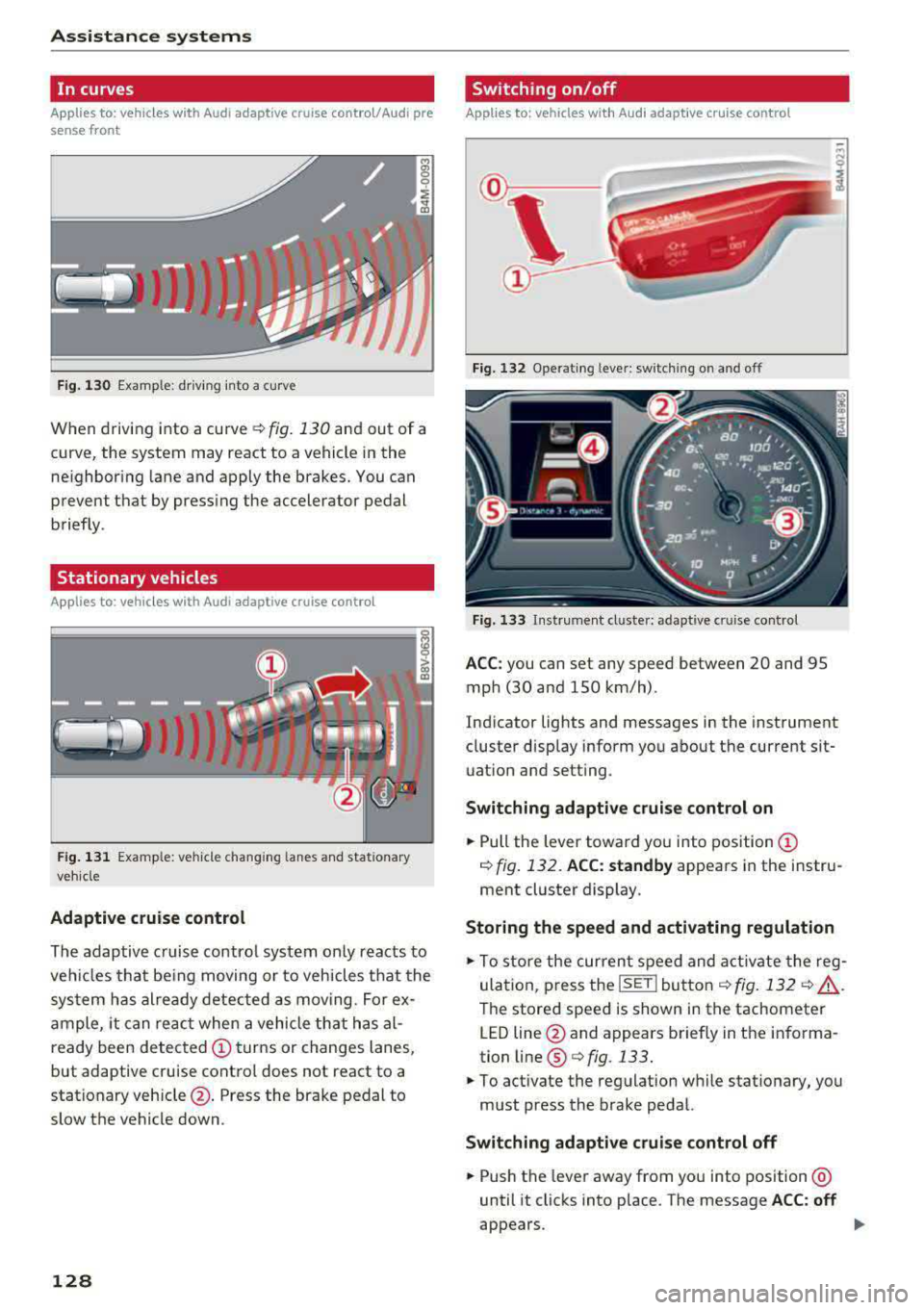
Fig . 130 Example: dr iv ing into a curve
When driving into a curve r:!;> fig. 130 and out of a
curve, the system may react to a vehicle in the
ne ighbor ing lane and apply the brakes. You can
prevent that by pressing the accelerator pedal briefly .
Stationary vehicles
Applies to: vehicles with Audi adaptive cruise control
))))
Fig. 131 Example: veh icle changing lanes and stationary
veh icle
Adaptive cruise control
The adaptive cruise control system only reacts to
ve hicl es that being moving or to vehicles that the
system has already detected as moving. For ex
ample, it can reac t when a vehicle that has al
ready been detected
@turns or changes lanes,
but adaptive cruise control does not react to a
stationary vehicle @. Press the brake pedal to
slow the vehicle down.
128
Switch ing on /off
Applies to: vehicles with Audi adaptive cruise control
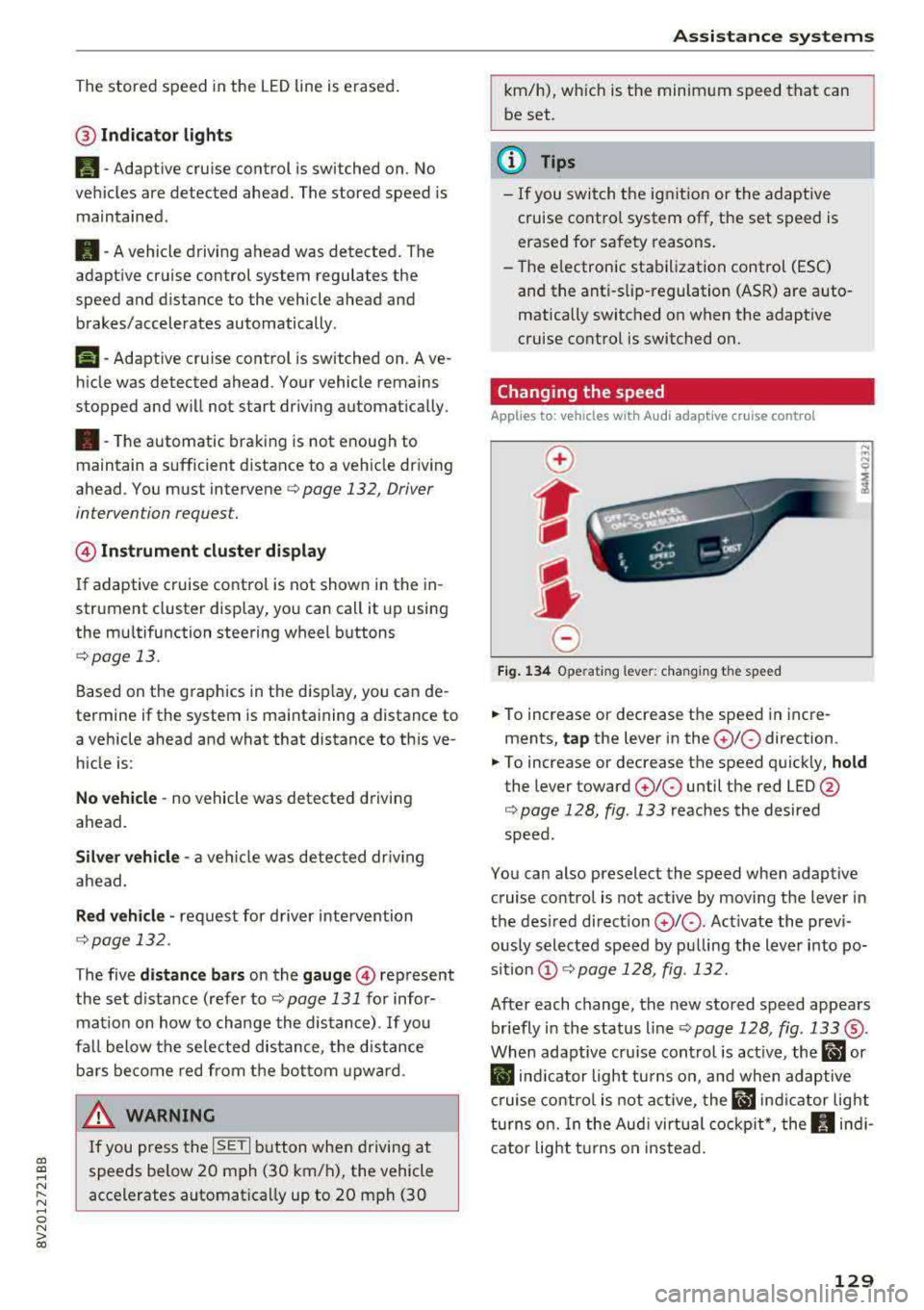
Fig. 132 Ope rating leve r: sw itching on and o ff
Fig. 133 Instrument cl uste r: ad apt ive c ruise contro l
ACC: you can set any speed between 20 and 95
mph (30 and 150 km/h) .
Indicator lights and messages in the instrument
cluster disp lay inform you about the current sit
uation and setting .
Switching adaptive cruise control on
.,. Pull the lever toward you into position@
¢ fig. 132. ACC: standby appears in the instru
ment cluster display.
Storing the speed and activating regulation
.,. To store the current speed and activate the reg
ulation, p ress the
ISE TI button ¢ fig. 132 r:!;> .&,.
The stored speed is shown in the tachometer
LED line @and appears briefly in the informa
tion line ®
Q fig. 133.
.,. To activate the regulation while stationary, you
must press the brake pedal.
Switching adaptive cruise control off
.,. Push the lever away from you into position @
until it clicks into place . The message ACC: off
appears .
Page 131 of 400
a, a, ..... N
" N ..... 0 N > 00
The stored speed in the LED line is erased.
@ Indicator lights
It -Adaptive cruise control is switched on. No
vehicles are detected ahead. The stored speed is
maintained .
B-A vehicle driving ahead was detected. The
adaptive cruise control system regulates the
speed and distance to the vehicle ahead and
brakes/accelerates automatically.
r51 -Adaptive cruise control is switched on. Ave
hicle was detected ahead. Your vehicle remains
stopped and will not start driv ing automat ically.
•-The automatic braking is not enough to
maintain a sufficient distance to a veh icle driving
ahead. You must intervene
c::> page 132, Driver
intervention request.
@ Instrument cluster display
I f adaptive cruise control is not shown in the in
strument cluster display, yo u can call it up using
the mu ltifunction steering wheel buttons
c::> page 13.
Based on the g raphics in the disp lay, you can de
termine if the system is maintaining a distance to
a vehicle ahead and what that distance to th is ve
hicle is:
No vehicle -no vehicle was detected driving
ahead.
Silver vehicle -a veh icle was detec ted dr iv in g
ahead .
Red vehicle -request for driver intervention
<=:>page 132 .
The five distance bars on the gauge © represent
the set d istance (refer to
c::> page 131 for infor
mat ion on how to change the distance) .
If you
fal l below the selected distance, the distance
bars become red from the bottom upward.
A WARNING
If you press the !SETI button when driving at
speeds below 20 mph (30 km/h), the vehicle
accelerates automatically up to 20 mph (30
Assistance systems
km/h), which is the minimum speed that can
be set.
(D Tips
-If you switch the ignition or the adaptive
cruise control system off, the set speed is
erased for safety reasons .
-The e lectronic stabilization control (ESC)
and the anti-slip -regulation (ASR) are auto
matically switched on when the adaptive
cruise control is switched on.
Changing the speed
Applies to: vehicles with Audi adaptive cruise control
0
f
J
0
Fig. 134 Operat ing lever: changing the speed
.. To increase or decrease the speed in incre
ments,
tap the lever in the 0 10 direction .
.. To increase or decrease the speed quickly, hold
the lever toward 010 until the red LED @
c::> page 128, fig. 133 reaches the desired
speed.
You can also preselect the speed when adaptive cruise control is not active by moving the lever in
the desired direction
0 10 . Act ivate the previ
ously selected speed by pulling the lever into po
s ition
@ c::> page 128, fig . 132.
After each change, the new stored speed appears
briefly in the status line
c::> page 128, fig. 133 ®·
When adaptive cru ise control is active, the ill or
• indicator light turns on, and when adaptive
cruise control is not active, the
ill ind icator light
turns on. In the Audi virtual cockpit*, the
II indi
cator light t urns on instead.
129
Page 133 of 400
a, a, ..... N
" N ..... 0 N > 00
Inte rr upting crui se control while driving
• Move the lever into posit ion @. The message
AC C: standb y appears. Or
• press the brake pedal.
• To resume the stored speed, move the lever in
to position
@ .
In te rrupting crui se contr ol when stopped
• Push the lever away from you into position @.
The message
A CC: sta ndb y appears.
• To resume cruise control, press the brake pedal
and pull the lever toward you into position @.
A WARNING
It is dangerous to activate cruise control and
resume the stored speed when the current
road, traffic or weather conditions do not per
m it this . This inc reases the risk of an acc ident.
Setting the distance
Applies to: vehicles with Audi adaptive cruise contro l
,
0
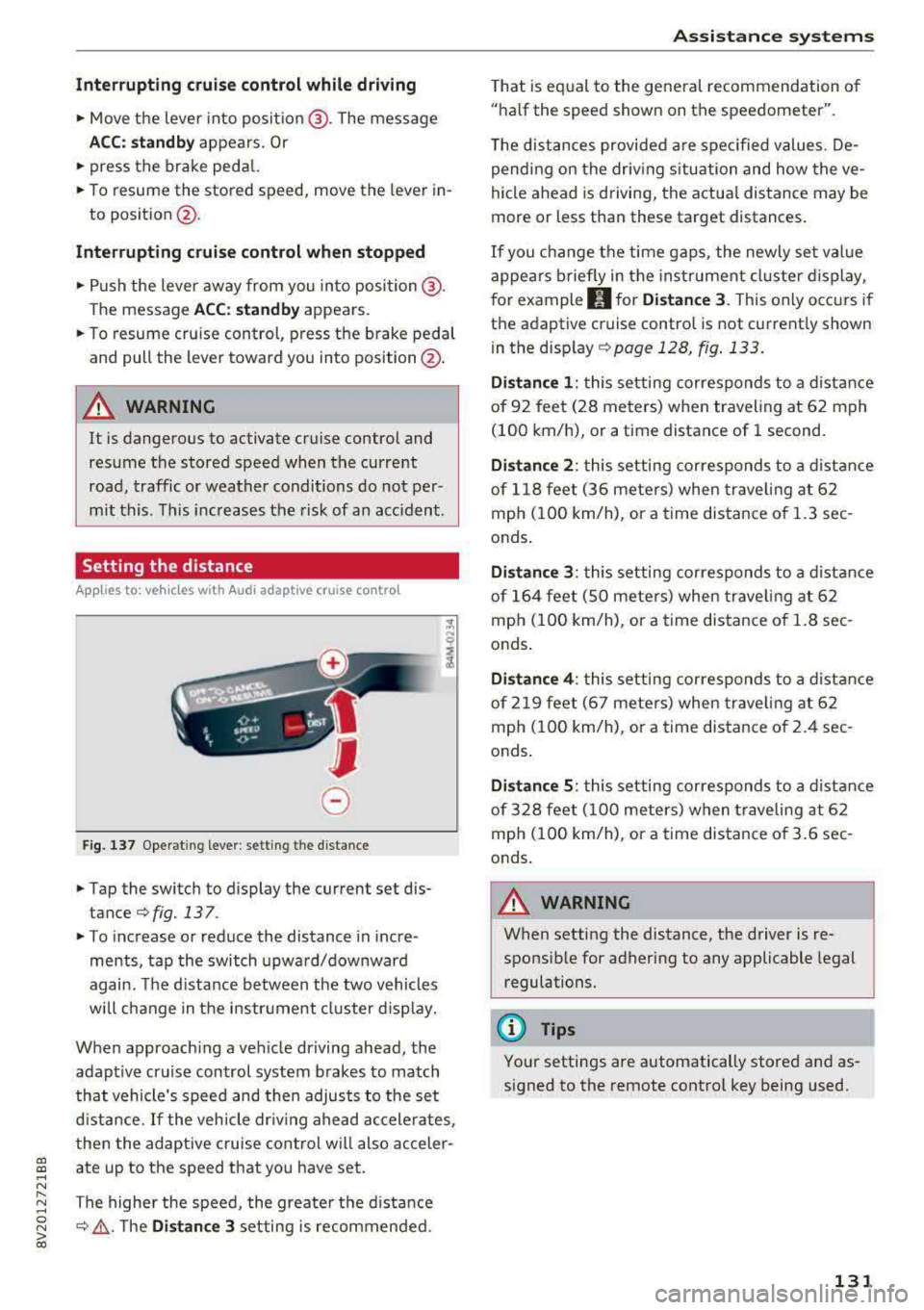
Fig. 137 Operat ing lever : setting the d istance
• Tap the switch to display the current set dis
tance
¢fig. 137 .
• To increase or reduce the distance in incre
ments, tap the switch upward/downward
again. The d istance between the two vehicles
wi ll change in the instr ument cluster d isp lay.
When approach ing a vehicle driving ahead, the
adapt ive cruise control system brakes to match
that vehicle's speed and then adjusts to the set
d istance.
If the vehicle dr iv ing ahead ac celerates,
then the adaptive cruise control wi ll also acceler
ate up to the speed that you have set.
The higher the speed, the greate r the d ista nce
¢ &, .T he Di stan ce 3 setting is recommended.
A ss is ta nce syst ems
That is equal to the general recommendation of
"ha lf the speed shown on the speedometer".
T he distances provided a re specified values. De
pend ing on the driv ing s ituation and how the ve
hicle ahead is d riving, the actua l distance may be
more or less than these target distances.
If you change the time gaps, the newly set value
appea rs briefly in the instrument cl uster d isplay,
f or example
II for Di stan ce 3 . This only occurs if
the adaptive cruise contro l is not current ly shown
i n the display ¢
page 128, fig. 133.
Dista nce 1 : this setting corresponds to a distance
of 92 feet (28 meters) when traveling at 62 mph
(100 km/h), or a time distance of 1 second.
Di stance 2 : this setting corresponds to a dist ance
of 118 feet (36 mete rs) when traveling at 62
mph (100 km/h), or a time distance of 1.3 sec
onds .
Distance 3: this setting corresponds to a distance
of 164 feet (SO mete rs) when traveling at 62
mph (100 km/h), or a time distance of 1.8 sec
onds .
Distance 4 : this setting corresponds to a dist ance
of 219 feet (67 mete rs) when traveling at 62
mph (100 km/h), or a time distance of 2.4 sec
onds .
Distance 5 : this setting corresponds to a distance
of 328 feet (100 meters) when traveling at 62
mph (100 km/h), or a time distance of 3.6 sec
onds .
A WARNING
-
When setting the distance, the driver is re -
sponsible for adhering to any applicable legal
regulations.
(D Tips
Your settings are automatically stored and as
signed to the remote control key being used.
131
Page 136 of 400
Assistance systems
-Due to the interlinking of various vehicle sys
tems, critica l driving situations can be detected
by
pre sense basic and measures for preventa
tive occupant protection are can be initiated.
-The pre sense front uses the data from the ra
dar sensors and calcu lates the probability of an
accident
c> page 127. An impending collision
with vehicles can be detected within the limits
of the system . In this case, the system warns
the driver visually, acoustically and with a jerk
on the brakes if necessary. If needed, it can i ni
tiate a partia l or full dece le rat ion to reduce the
collision speed o r to avoid the coll ision unde r
ce rtain c ircumstances. In conjunction with pre
sense basic, the front safety belts are also re
versib ly tensioned when needed . The pre sense
front is also active when adaptive cruise con
trol* is sw itched off.
.,&. WARNING
Also follow the general instructions found in
c> .&. in General information on page 127.
(i) Tips
-Certain pre sense functions switch off when
driving in reverse.
-The pre sense functions may not be availa ble if there is a malfunction in the ESC sys
tem or the airbag contro l module.
-Note that the reversible belt tensioner on
the front passenger's side deactivates when
the front passenger's a irbag is deactivated .
-Switch the pre sense off when you are not
us ing public streets or when loading the ve
hicle onto a vehicle carr ier, train, ship or
other type of transportation. This can pre
vent an undes ired intervention from the pre
sense system.
Audi pre sense basic
Description
Applies to: veh icles with Audi pre sense basic
The pre sense basic funct ions are activated at a
speed of approximately 20 mph (30 km/h) or h igher.
134 The following
functions can be triggered under
certain conditions within the limits of the sys
tem:
-Tensioning of the safety bel ts (for examp le,
during heavy braking): the front safety belts
have reversib le be lt tensioners. If a collision
does not occur, the safety belts loosen slightly
and are ready to trigger aga in.
-Initiating the closing of the windows and the
panorama glass roof* (for examp le when un
der- or oversteering).
Audi drive select* : the trigger times are adjusted
depending on the mode selected.
Audi pre sense front
· Description
Applies to: vehicles with Audi pre sense front
Within the limits of the system and depending
on the situation and speed, pre sense front can
warn you about impending collisions with sta
tionary, stopped, and moving vehicles and ini
tiate appropriate braking measures.
If detection is not possib le, then pre sense front
does not react.
The following func tions trigger in conjunction
with pre sense basic at corresponding vehicle
speeds :
-Reversible tens ion ing of the front safety belts.
-Closing the windows and panorama glass roof*.
Warnings and braking
Applies to: vehicles with Audi pre sense front
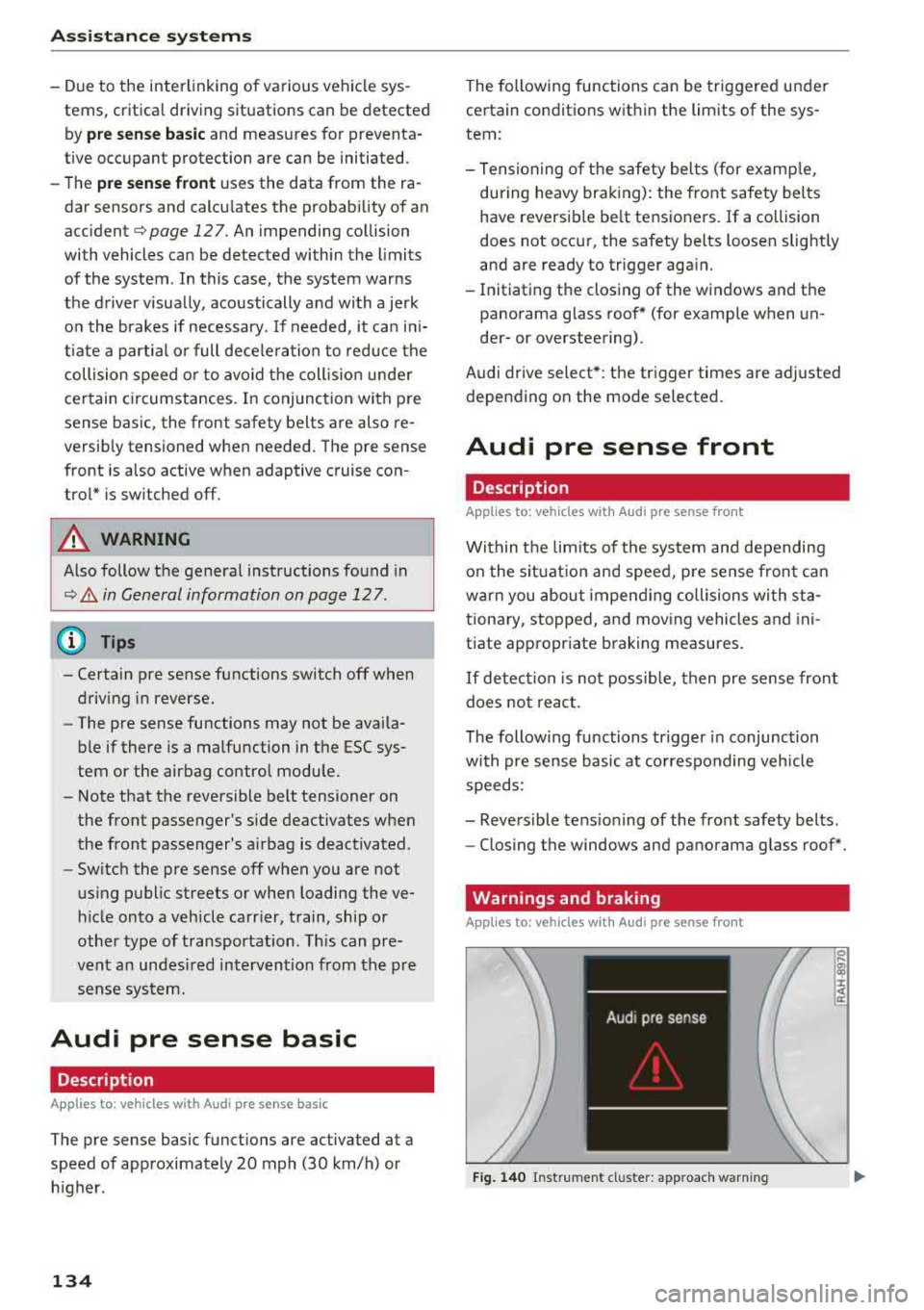
Fig. 140 Instrument cluster: approach warning
0
;
::c
Page 137 of 400
CXl CXl .... N r--N .... 0 N > 00
Ea rl y warning /a cut e warning
The system can prov ide v is u al and aud ible warn
ings when dangerous situations are detected.
The
earl y wa rning may occur if:
- a vehicle d riving ahead brakes strongly,
- your vehicle is traveling at speeds between ap-
prox imately 20 to 50 mph (30 to 85 km/h) and
it approaches a stationary veh icle.
- your vehicle is trave ling at speeds between ap
prox imately 20 to 155 mph (30 to 250 km/h)
and it approaches a vehicle that is clearly t rav
eling more slowly o r a veh icle in your direction
of travel that is stopped.
When t his warning occurs, it may on ly be poss i
b le to avoid a collision by swerv ing or b raking
strong ly. The message
Aud i pre sens e.
¢ fig . 140 and a warning tone will warn you
about the danger .
If there is an impending collision with vehicles,
there will a lso be an
acute warning in the form of
sharp braking. If you do not react to the acute
warn ing, pre sense front can brake with increas
ing force within the limits of the system. This re
duces the vehicle speed in the event of a coll i
sion.
Automatic d ecel erati on
Depending on the speed , pre sense front can de
c elerate automat ically
shortly before a collision:
- i f there are s tat ionary vehicles whe n you are
traveling at speeds up to approximately 28 mph (45 km/h).
- if there are vehicles driving or stopped ahead
when you are traveling at speeds up to approxi
mately 155 mph (250 km/h) .
Automatic braking force inc rease
I f pre sense front determines that you are no t
b raking st rongly enough when a collision is imm i
nent, it can increase the b raking force, depending
on the situation and speed.
- i f there are stationary vehicles whe n you are
t raveling at speeds up to approximately 50
mph (85 km/h) .
A ss ista nce sys te m s
- if there are vehicles d riving or stopped ahead
when you are traveling at speeds up to approxi mate ly 155 mph (250 km/h).
A WARNING "--
Pre sense front cannot overcome the laws of
physics. It is a system designed to ass ist and
i t cannot prevent a collision in every c ircum
stance. The driver must always intervene. The
d river is always respons ible for braking at the
cor rect time. Do not let the increased safety
p rovided tempt you into ta king risks. This
could increase your risk of a collis ion .
- Keep in mind th at pre sense front can pro
vide warn ings or b rake unexpected ly. Al
ways secure any cargo or objects that yo u
are transporting to reduce the risk of dam
age or injury.
- The system can dep loy incorrectly due to
system-specific limits.
- Please note that the sensor does not a lways
detect a ll objects . T hi s increases the risk of
a co llision.
- Pre sense front does not react to vehicles traveling toward you in the same lane, to peop le, groups of people, anima ls, objects
that are crossing the road, or objects that are difficult to
detect¢ &. in General infor
mation on page 12
7.
A WARNING
"---
Pre sense front may be restricted or not avail
able i n the follow ing example s ituations:
- if there a re other ref lective objects nearby,
such as guard ra ils or vehicles.
- when dr iv ing into a tunnel.
- in heavy fog, ra in, spray or snow.
- if the radar sensor is di rty, covered in ice,
damaged, or covered .
- in curves .
- if the ESC was restri cted or sw itched off.
(£) Note
The sensor can be displaced by impacts or
damage to the bumper, wheel housing and u nderbody. Pre sense front ca n be impaired
135
Page 144 of 400
Ass is tance sy stems
Rear cross-traffic assist
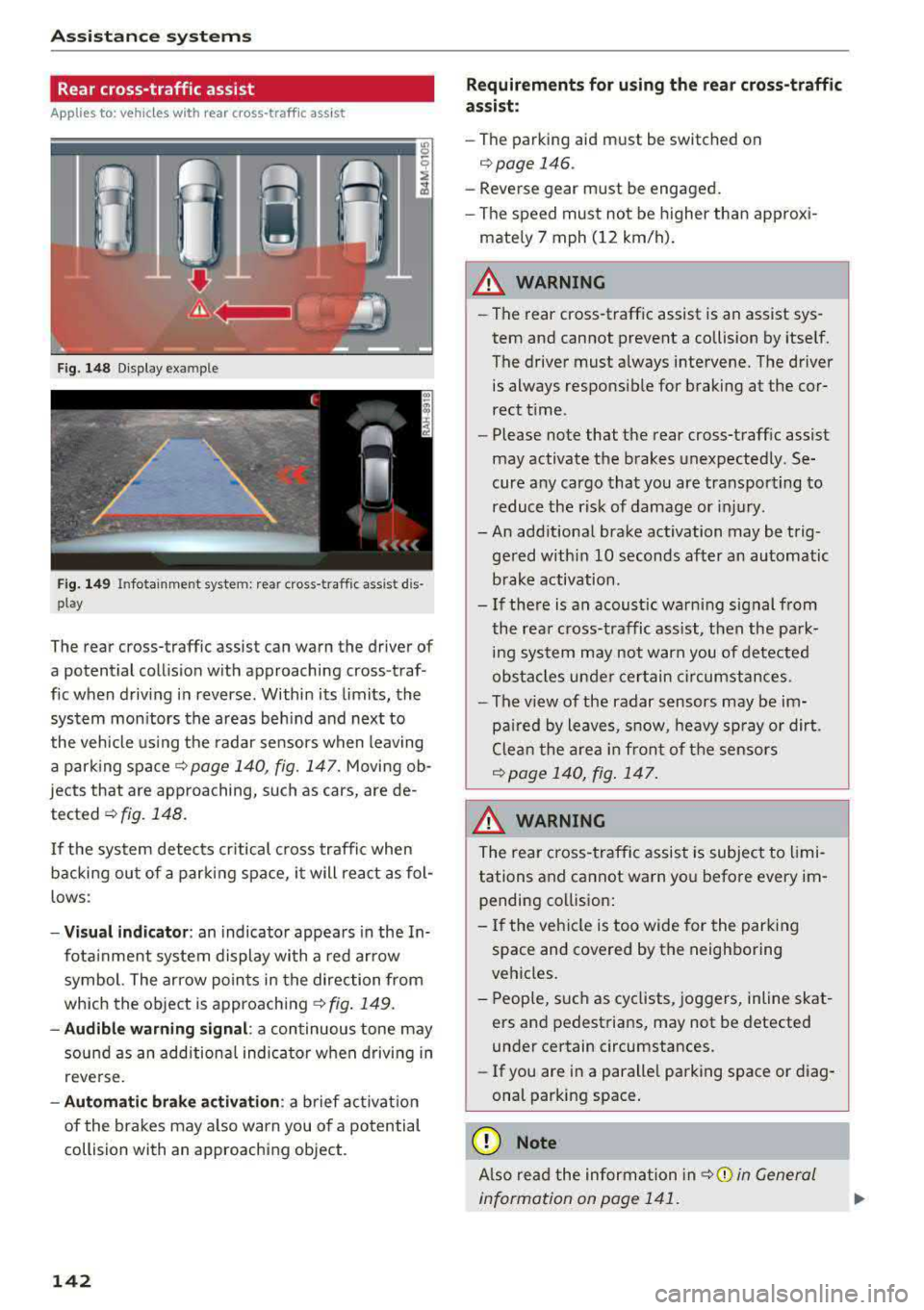
Applies to: ve hicles w ith rear cross -traff ic ass ist
F ig. 148 D isp lay example
F ig. 149 Infotainment system: rear cross-traffic assist dis
play
The rear cross-traffic assist can warn the driver of
a potential collis ion with approaching cross-traf
fic when driving in reverse. Within its limits, the
system mon itors the areas beh ind and next to
the vehicle using the radar sensors when leaving
a park ing spa cer::!.>
page 140, fig. 147. Moving ob
jects that are approaching, such as cars, are de
tected
r::!.>fig. 148.
If the system detects cr itical c ross traffic when
backing ou t of a par king space, it will rea ct as fol
lows:
- Vi sual indicator : an indicator appea rs in the In
fota inment system display wi th a red arrow
symbol. The ar row po ints in the direction from
which the object is approach ing
r::!.> fig . 149.
- Audible warning signal : a continuous tone may
sound as an addition al indicator when driving in
reve rse.
- Automatic brak e activation : a brief act ivat io n
of the brakes may a lso warn you of a potential
collision with an approaching object.
142
Requir ements for using the r ear cross -traffic
as sist :
-The parking aid m ust be switched on
c>page 146.
-Reverse gear must be engaged.
- The speed must not be higher than approxi -
mate ly 7 mph (12 km/h) .
A WARNING
-The rear cross-t raffic assist is an assist sys
tem and cannot prevent a collision by itself.
The driver must always intervene. The driver is always responsib le for braking at the cor
rect t ime.
- Please note that the rear cross-traff ic assist
may activate the brakes unexpected ly. Se
cure any cargo that you are transpo rting to
reduce the r isk of damage or injury.
- An add itiona l brake activation may be trig
ge red w ithi n
10 seconds after an automatic
brake activation.
- If there is an acoust ic warning signal from
the rea r cross-traffic assist, t hen the park
ing sys tem may not warn you of detected
obs ta cl es u nde r certain circumstances.
- The v iew of the radar sensors may be im
pa ired by leaves, sn ow, heavy sp ray or dirt.
Clea n the area in fron t of t he sensors
r::!.> page 140, fig . 147.
A WARNING
T he rear cross- traffic assist is subject to limi
tations and cannot warn yo u before every im
pending co llision:
- If the veh icle is too wide for the park ing
space and covered by the neighboring
veh icles.
- People, such as cyclists, joggers, in line skat
ers a nd pedest rians, may not be detected
under certain circumstances.
- If you are in a paralle l parking s pace or d iag
onal park ing space .
(D Note
Also read the information in r::!.> 0 in General
information on page 1 41.
Page 145 of 400
@ Tips
-You can cance l the automatic brake activa
tion w ith increasing bra king fo rce if you ap
ply the brakes y ourse lf or accelerate cons id
erab ly.
- In some sit uations, rea r cross-traffic assist
may warn yo u even if there is no cross traffic
i n a cr itical a rea , for examp le w hen back ing
i nto a parki ng space or ma neuver ing.
- The rea r cross-traffic ass ist also switches off
whe n you switch off the ESC.
- The rea r cross traffic assist switches on and
off thro ugh the pa rking aid
qpage 146.
- The system is not available when towin g a
trailer.
Messages
A ppl ies to: ve hicles with Audi side assist
If t he side assist switches off automatically, a
message appea rs in the ins trumen t clus ter dis
pl ay.
@j Aud i side assist: System fault!
The system can not guarantee that it wi ll detect
ve hicles co rrectly and it has switched off. The
sensors have been moved o r are faulty. Have t he
system checked by an authorized Audi dea ler or
author ized Audi Service Facility soon .
@j Audi side assist: currently unavailable. No
sensor vision
@j Audi side assist: currently unavailable. Sen
sor vision restricted due to surroundings . See
owner 's manual
The radar senso r vis io n i s im paire d. Do not cove r
the area i n front of t he senso rs with bike wheels,
stickers, dirt o r othe r objects. C lean the area in
fron t of t he senso rs, if necessary
q page 140,
fig. 147.
@j Audi side assist: currently unavailable
S ide assis t cann ot be swi tched o n at thi s time be
c a use t here is a mal func tion (fo r ex amp le, the
~ ba ttery ch arge level may be too low) .
....
~ @j Audi side assist: unavailable in towing mode
....
~ @j Audi side assist: unavailable in towing mode
00
Assistance systems
Sid e ass ist swi tches off automatically a fter a
s h ort time when a factory -insta lled tra ile r h itch
i s connected to the e lectrica l connecto r on the
t railer . T here is no gua rantee the system will
switch off when using a retrofitted trailer h itch.
Do not use side assist when tow ing a trailer .
Ill Rear parking aid : obstacle detection restrict
ed
T he rea r cross -tra ffic ass is t is not available. Ei
t h er th e ESC is sw itched off, or the rada r senso rs
may be cove red by a bike rack, st icke rs, leaves,
snow o r other objects. Switch the ESC on, or
clean the area in front of the senso rs if necessa ry
q page 140, fig . 147. If t his message continues
to be displayed , dr ive immed ia tely to a n author
iz ed Audi dea ler or author ized Audi S ervic e Facili
ty to ha ve the m alfunc tion re paire d.
Audi drive select
Introduction
Applies to : vehicles wit h Audi drive se lec t
Audi dr ive select makes it poss ible to experience
diffe rent types of vehicle settings in one vehicle.
T he dr iver can select from three modes,
Comfort ,
Auto
and Dynamic , using t he r:;~, bu tton in the
c en te r c onsole o r by usin g the Info ta in m ent sys
te m. T hi s a llow s yo u t o swi tch between a sporty
and a com fo rt ab le driv ing mode, fo r ex am ple. In
t h e
Individual* mode , the settin gs ca n be adjus t
ed to yo ur persona l preferences . T his makes it
p oss ible to com bine settings such as a spo rty en
gine setting with light steer ing.
Description
App lies to : vehicles wi th Audi drive se lect
The veh icle set up i n eac h mode depends on the
vehicle's features. However, the eng ine a nd
stee ring are always affec ted .
Engine and automatic transmission
Depend ing on the mode, the engine an d auto
matic transm ission* respond more q uickly o r in a
more ba la nced manner to acce lerato r pedal
movements . In the sporty dynam ic mode, th e
t ransm iss io n shifts at higher spe ed ranges .
..,.
143
Page 153 of 400
CXl CXl .... N ,.__
N .... 0 N > 00
Intelligent Technology Electronic Stabilization
Control (ESC)
Description
Electronic Stabilization Control ( ESC) supports
driver safety . It reduces the risk of slipping and
improves dr iving stability. ESC detects critica l sit
uations such as the vehicle oversteering and un
dersteer ing or the wheels are spinning. The vehi
cle is stabilized by apply ing the brakes or reduc
ing engine torque . When the ESC engages, the
G1 indicato r light b links in the instrume nt clus
ter.
The follow ing systems are integrated in the ESC:
Anti-loc k bra king system (ABS)
ABS prevents the whee ls from locking when brak
ing. The vehicle can still be steered even during
hard brak ing. Apply steady pressure to the brake
pedal. Do not pump the pedal. A pulsing in the
b rake pedal indicates that the system is act ing to
stabilize the vehicle .
Brake a ssist system
The brake assist system can decrease braking dis
tance. It increases brak ing power when the driver
presses the brake pedal quick ly in emergency sit
uations . You must press and hold the brake pedal
u nti l the dangerous sit uat io n is ove r. In veh icles
with adaptive cr uise contro l*, the bra ke assist
s ys tem is more sensitive if t he d istance detec ted
to the veh icle dr iv ing ahe ad is too small.
Anti -slip regulation (ASR)
ASR reduces eng ine power when the drive wheels
begin spinning and adapts the force to the road
conditions . This makes i t eas ie r to sta rt, acceler
ate and dr ive up hill s.
Electronic differential lock (EDL )
The EDL applies the brakes to a wheel that starts
spinning and transfers t he drive power to the
other driving wheel or wheels ( if the veh icle is
eq uipped w ith all whee l dr ive*) . T his function is
n o t available at higher speeds.
Intellig ent Technology
In extreme cases, ED L automat ica lly switches off
to keep the brake o n the braked whee l from over
heating. The veh icle is still working correct ly. EDL
will switch on again automatically when condi
t ions have returned to normal.
Ste ering recommendation
The ESC he lps to s tabilize the vehicle by changing
the steering torque.
Select ive wheel torque control
Se lective wheel to rque cont rol is used w hen driv
i ng on curves. The fron t whee l on the inside of
the curve or bo th wheels on the i nside of the
c u rve are braked se lective ly as needed . This al
l ows more precise driving in c urves.
Automatic post-collision braking system
T he "automat ic pos t-collision braking system"
c an help to reduce the risk of sliding an d of addi
tiona l co llisions a fter an acciden t. If the ai rbag
contro l modu le detects a co llision above a certain
vehicle speed, the veh icle is bra ked by the ESC.
T he vehicle does not bra ke autorn,;1tically if;
- t he dr ive r presses the acce le rator pedal, or
- the ESC, the brake system or the veh icle elect ri-
cal system are not functioning .
A WARNING
-The ESC and its integ rated systems cannot
overcome the lim its imposed by natura l
phys ic al laws. This is especially important
on sli ppery or wet roads . If the sy stems be
gin acting to stabilize your vehicle, you
should immediately alter your speed to
match the road and traffic conditions. Do
not let the inc reased safety provided tempt
you into taking risks. This could increase
your r isk of a coll is ion.
- Please n ote the r isk of a coll is ion increases
when dr iv ing fast, especially t hrough curves
a nd on slippery or wet roads, and when dr iv
ing too close to objects ahead. The ESC and
its integrated systems ca nnot always pre
vent collisions
-there is st ill a ris k of ac ci-
dents!
..,.
151
Page 155 of 400
CXl CXl .... N ,.__
N .... 0 N > 00
-There is no vehicle stabilization when ESC/
ASR are switched off.
(D Tips
-ESC/ASR cannot be switched off or sport
mode cannot be switched on if the cruise
control system * or the adaptive cruise con
tro l* is sw itched on.
-Malfunctions in the Audi magnetic ride *
may make it imposs ible to switch the ESC/
ASR off or to switch sport mode on.
Brakes
New brak e pad s
New brake pads do not achieve their full braking
effect during the first 2S0 mi (400 km) . They
must be "broken in" f irst. However, you can com
pensate for the slightly reduced braking force by
pressing firmly on the brake pedal. Avoid heavy
braking during the break-in per iod.
Wear
B rake pad
wear depends largely on the way the
veh icle is driven and on operat ing cond itions.
This is especially true if you are driving frequently
in the c ity and on curves or with a sporty driving
style.
Operat ing no ise
Noises may occur when braking depending on the
speed, braking force and outs ide cond itions such
as temperature and humidity .
Effect of wat er and road salt
In certain situations, for example after driving
through water, in heavy rain, after overnight con
densation or after washing your car, the braking
effect can be reduced by moisture or ice on the brake rotors and brake pads . The brakes must be
"dr ied" first w ith a few careful brake applica
tions .
At higher speeds and with the windsh ield wipers
turned on, the brake pads press against the brake
rotors for a short amount of time. Th is action,
which is not felt by the d river , happens at regular
Intellig ent Technology
interva ls and ensures a better reaction time for
the brakes in wet weather.
T he brak ing effect ca n also be reduced if yo u are
driv ing on sal ted roads and yo u do not app ly the
brakes for long per iods o f time. The layer o f salt
on the brake rotors and pads must be worn off
first when the brakes are applied.
Corrosion
Leav ing the veh icle pa rked for long periods of
time, low mileage and avoiding heavy b raking
can contribute to corrosion on the brake roto rs
and to dirty brake pads .
If you usua lly avoid heavy bra king or if there is
corrosion present, occasiona l heavy brak ing at
high speeds is recommended to clean the brake
rotors and
pads ¢,& .
Brake system malfunction
If you notice that the bra ke pedal travel has sud
denly inc re ased, then a br ake circuit in the dua l
c ircuit b rake system may have malfunctioned.
Drive to an authorized Audi dealer or authorized
Audi Service Facility immediate ly to have the
problem corrected. On the way there, drive with
reduced speed and keep in mind that you will
need a longer distance to stop and you will need
to press the brake pedal harder.
L o w bra ke fluid le ve l
When the brake fluid level is low, malfunctions in
the brake system may occur. The brake fluid level is electronically monitored.
Brake bo oster
The brake boos ter amplifies the p ressure you ap
ply to the brake pedal. It on ly operates whi le the
engine is running or when the ignition is switched
on (p lug-in hybrid dr ive*) .
A WARNING
-Only app ly the brakes for the purpose of
cleaning the brake system when road and
traffic cond itions permit. You must not en
danger other road users. This increases the
risk of an accident.
153
Page 156 of 400
Intelligent Technology
- Never let the vehicle roll while the engine is
stopped beca use this increases the risk of an
acc ident.
@ Note
- Never let the brakes "rub" by pressing the
pedal light ly when bra king is not actually
necessary. This causes the brakes to over
h eat and inc reases bra king d istance and
causes wear .
- Befo re dr iv ing on a long stretch w ith steep
s lopes, red uce your speed a nd shift to the
next lower gear This makes use of t he en
g ine bra king effect a nd relieves the b rakes.
If you need to bra ke a dd it iona lly, bra ke in
in te rv a ls and no t conti nuou sly.
@ Tips
- If the brake booste r is no t wo rking , you
must pr ess the brake pedal wi th much more
f orc e th an norma l.
- If you re trofit you r vehicle with a front spoil
e r, whee l cove rs o r similar ite ms, m ake sure
that the air flow to the front wheels is not
i n te rrupt ed. Ot he rw ise the bra ke sys tem
ca n become too hot.
Electromechanical
steering
The electromechanical steering supports the
driver's steering movements.
Powe r steering adapts electronically based on
the vehicle speed.
Indicator lights and messages
• Do not dr ive vehicle: steering defective
If thi s in dicator light t urns o n and stays o n and
this message appears, t he power s teer ing may
h a ve fa iled.
Stop the veh icle in a safe locat io n as soon as pos
sib le. Do
not continue driving. See an author ized
Aud i deale r or auth o riz ed Au di Serv ice F acility fo r
assis tance.
l~ij Steering: malfunction! You can continue
driving
154 I
f the indica to r li gh t turns on, the s teering w hee l
may be more difficult to move or more sens itive
t h an usua l. The steer ing whee l may a lso be at an
angle when driving straight.
Drive slowly to an a uth o rized Audi dea ler or au
thorized Audi Serv ice Facility to have the mal
funct ion corrected .
(D Tips
If t h e . or £-y.ij in dicator light on ly s tays on
fo r a short time, yo u may continue driving.
All wheel drive (quattro)
App lies to : vehicles wi th all w heel drive
In oil wheel drive, oil four wheels ore powered .
General information
In all wheel drive, the dr iv ing power is divided be
tween all fou r whee ls . This happens autom atic al
l y depending on yo ur driv ing beh avior as we ll as
the cur rent road conditions . Also see
c:> page 151, Electronic Stabilization Control
(ESC).
The all whee l drive concep t is designed for high
engine power. Yo ur vehicle is exce ptiona lly pow
erfu l and has excellent driving cha racteristics
both under normal driving conditions and on
snow and ice. A lways read and follow safety pre
cautions
c:> .&. .
Winter t ires
By using all whee l drive, your veh icle has goo d
forward motion with standard tires in winter con
dit ions. However, using w inter or all season t ires
o n
all four wheels in the winter is recommended,
because th is w ill imp rove the
braking effect .
Snow chains
If there are s now chain laws, snow cha ins m ust
also be used on veh icles with all wheel drive
c:> page 342, Snow chains.
Replacing tires
Fo r vehicles wi th a ll w hee l drive, o nly wheels wi th
the same rol ling circ umfe rence sho uld be used .
Avoid using tires with different tread depths
c:> page 335, New tires or wheels. IJI>