instrument cluster AUDI S3 SEDAN 2017 User Guide
[x] Cancel search | Manufacturer: AUDI, Model Year: 2017, Model line: S3 SEDAN, Model: AUDI S3 SEDAN 2017Pages: 400, PDF Size: 67.32 MB
Page 24 of 400
Cockpit overview
App lies to: vehicles w ith Audi virtual cockpit
-Di splaying navigation during active route
guidance :
select and confirm Map* / Arrow
view *
-Starting route guidance to the stored home
addres s:
if necess ary, firs t selec t an d con firm
Can cel route guidance an d then Favorite s >
Home address.
-Canceling active route guidance : sele ct: r ight
contro l bu tton
> Cancel route guidance.
Additional settings
Applies to: vehicles with Audi virtual cockpit
-Se lect : rig ht contro l bu tto n > desired entry .
Depending on t he vehicle eq uipment and the
fu nction selected, the following add itional set
tings may be possible:
- Map display Qpage 211
- Map colors ¢ page 211
-Map orientation ¢ pa ge 2 11
- Automatic zoom ¢ page 21 2
Navigation view with route guidance
started
Applies to: vehicles w ith navigation system and Audi virtual
cockpit
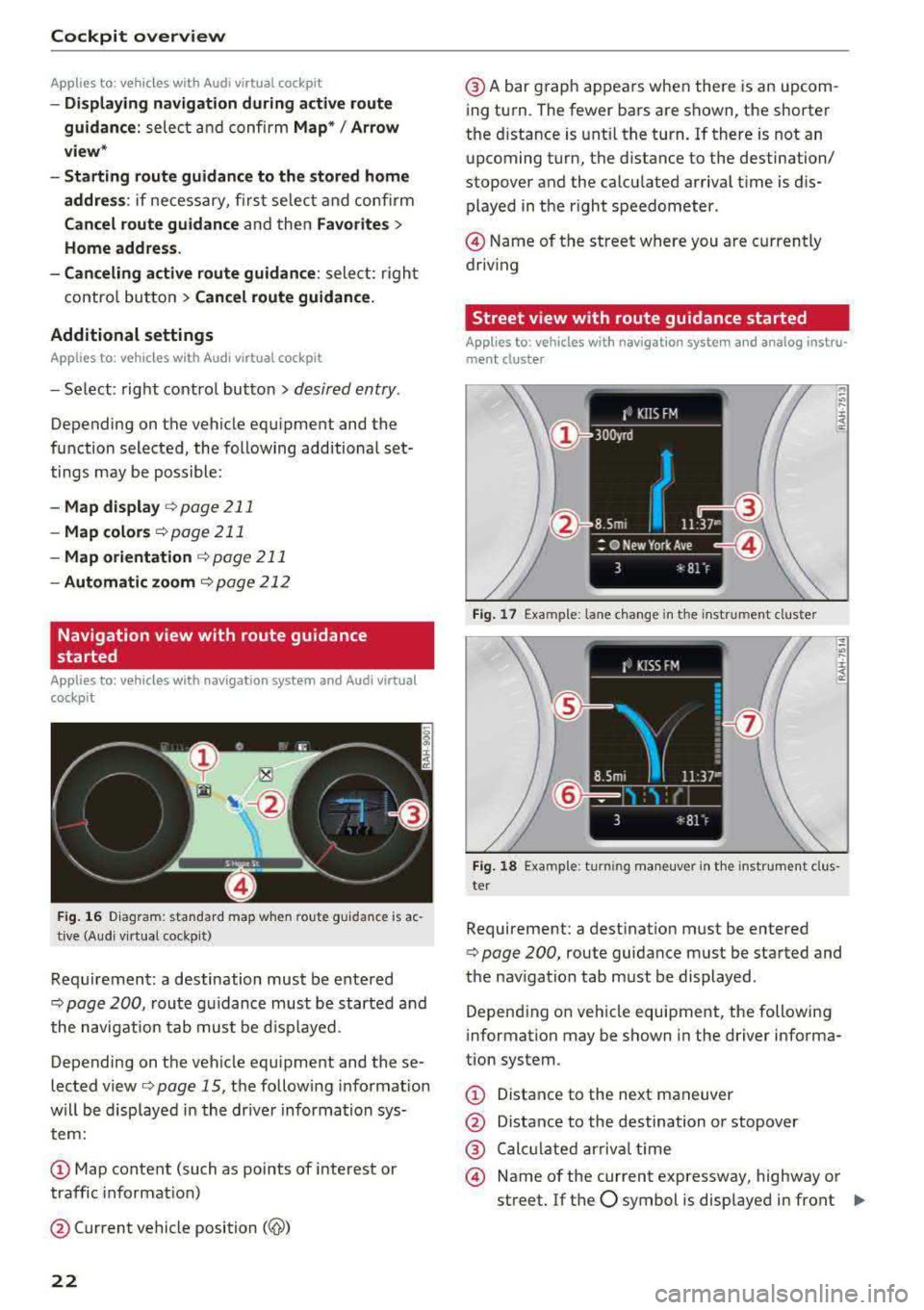
F ig. 16 D iagram: standard ma p w he n ro ute guida nce is ac
tive (Aud i v ir tu al cockp it)
Re qui rement: a destination must be ente red
¢
page 200, r ou te g uidance must be started a nd
the navigat ion tab mus t be d isp layed.
Depending on the veh icle equ ipment and these
lected view ¢
page 15, th e follow ing i nformat io n
w ill be disp laye d in t he dr ive r informa tion sys
tem :
CD Map conte nt (such as points of i nterest or
traffic info rmat io n)
@ Current vehicle position
(@)
22
@A bar g raph ap pea rs whe n there is an upcom
i ng tu rn . The fewer bars are s hown, t he shorte r
the d istance is unt il the turn . If there is not an
u pcoming t urn, the distance to the destination/
stopover and the calcu lated arriva l t ime is dis
played in t he right speedometer .
@ Name of the street w here you are c urrently
driv ing
Street view with route guidance started
Applies to : vehicles with navigat ion system and analog instru
ment cluster
Fig. 17 Example: lane c han ge i n the instrument cluste r
Fig. 18 Example: turning m an euver in th e in st rume nt cl us·
ter
Requirement: a dest inat io n m ust be entered
¢ page 200, route guidance m ust be started and
the nav igation tab m ust be displayed .
Depend ing on veh icle equipment, the following
i nformat ion may be shown in the driver informa
tion system .
CD Distance to the ne xt ma neuver
@ Distance to the destination o r stopover
@ Cal cula ted a rr iv al ti me
@ Name of the current expressway, highway o r
street. If the
O symbol is displayed in front IJI,
Page 26 of 400
Cockpit over view
(D LC). The DLC is located to the rig ht o f the hood
release
¢ fig. 19 .
Your author ized Audi dealer or a qualified service
s ta tion can interpret the code and perform the
necessary repair.
A WARNING
Do not use the diagnostic connector for per
sonal use. Incorrect usage can cause malfunc
tions, which can increase the risk of a colli
sion!
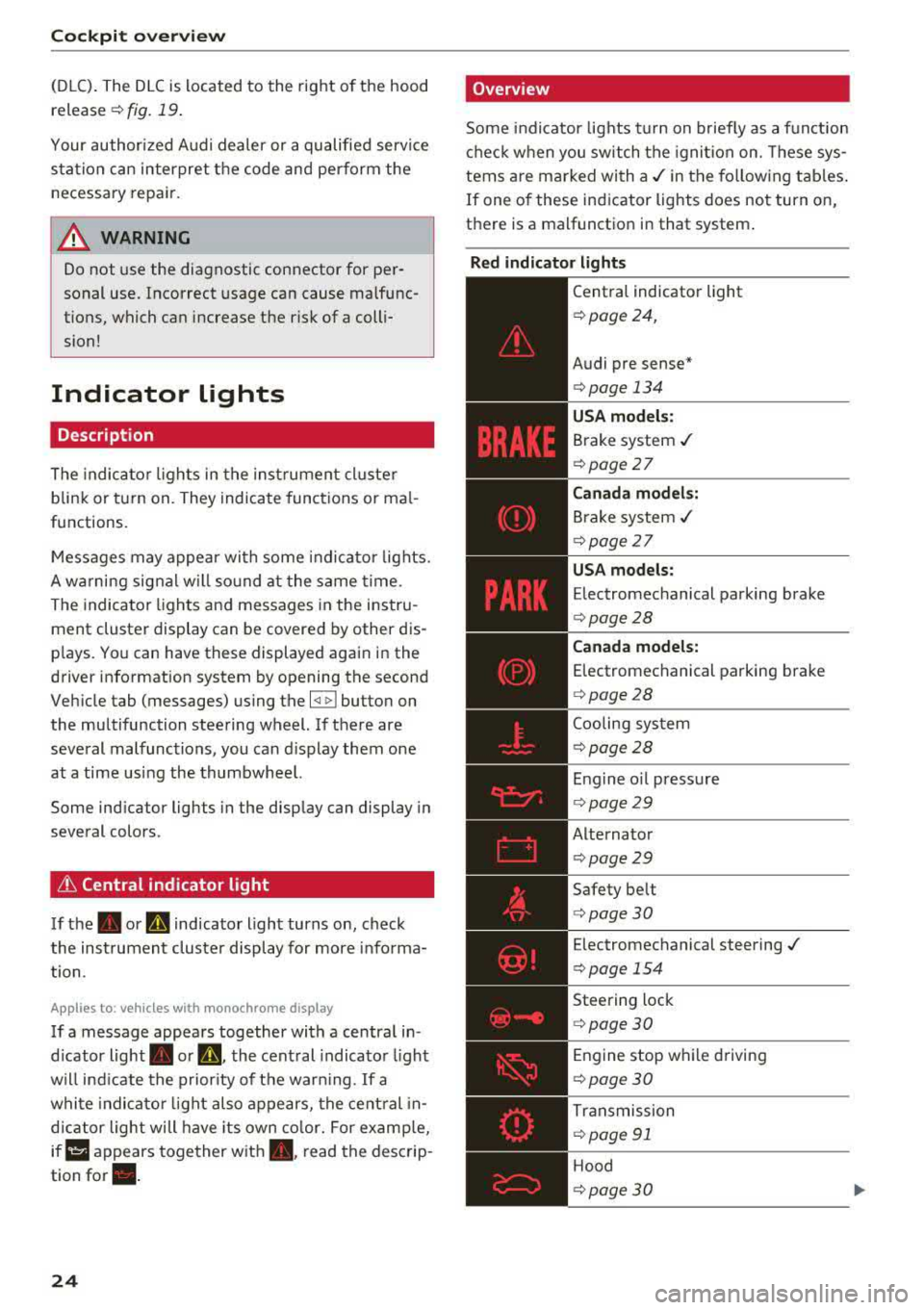
Indicator Lights
Description
The indica to r lights in the inst rument cluste r
blink or t urn on. They indicate funct ions or ma l
functions .
-
Messages may appea r wi th some indi cato r lights.
A wa rning signal w ill so und at the same time.
The indicator ligh ts and messages in the instru
ment cluster display can be covered by other dis
p lays. Yo u can have these displayed again in the
drive r information system by opening the second
Veh icle tab (messages) using the
l <1 ~ I button on
the multifunction steering wheel. If there are
several malfunctions, you can d isplay them one
at a time us ing the thumbwhee l.
Some ind icator lights in the display can display in
several colors .
& Central indicator light
If the. or mi indicator light turns on, check
the instrument cluster display for more info rma
tion .
App lies to: ve hicles w ith monochro me display
If a message appears together with a central in
d icator light . or
Q. the central indicato r ligh t
will ind icate the prior ity of t he war ning . If a
whi te indicato r light also appears, the cent ral in
d ica tor light will have its own co lor. For e xamp le,
ir ii :ippears together w ith . , read the descrip
tion
for •.
24
'Overview
Some indicator lights t urn on b riefly as a f unction
c h eck when you switch the ignition on. These sys
tems are marked wi th
a ,/ in the fo llow ing tab les .
If one of these indicator lights does not turn on,
there is a malfunctio n in that system .
Red indicator light s
--------------
Central indicator light
¢ page 24,
Audi pre sense *
¢page 134
USA model s:
Brake system ./
¢ page 27
Canada models:
Brake system ,/
¢page 27
USA models:
Electromechanical parking brake
¢ page28
Canada model s:
E lectromechanical parking brake
¢ page28
Coo ling system
¢ page28
Engine o il press ure
¢ page29
Alternator
¢page29
Safety be lt
¢ page30
Electromechanical steering ./
¢ page 154
Steering lock
¢page 30
Engine stop w hile driving
¢ page 30
Tr ansmission
¢ page 91
Hood
¢page30
Page 43 of 400
Child safety lock
App lies to: ve hicles wit h m echan ica l ch ild sa fety locks
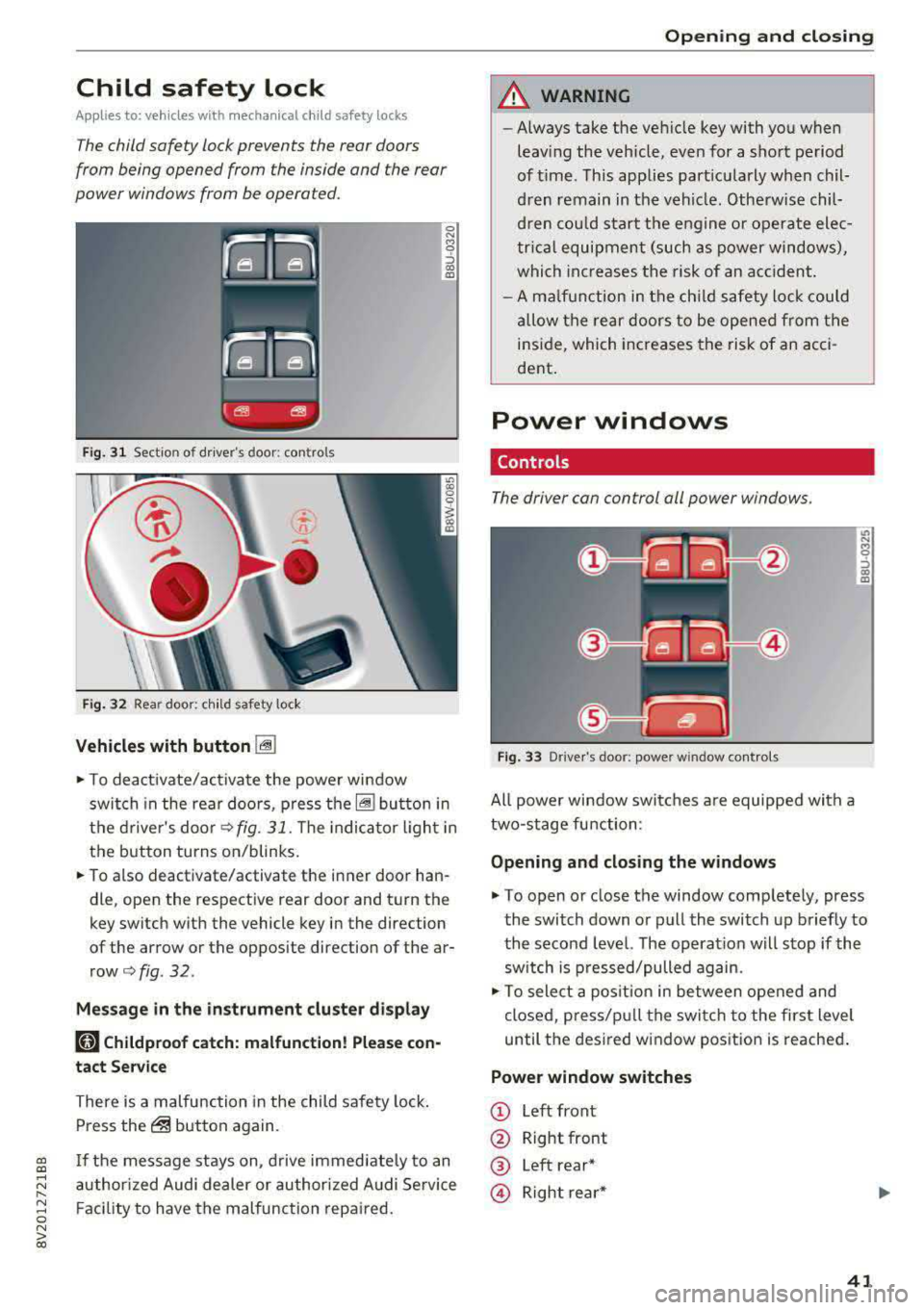
The child safety lock prevents the rear doors
from being opened from the inside and the rear
power windows from be operated.
F ig. 31 Section of d river's door: co ntro ls
Fi g. 32 Rear door: c hild safety lock
Vehicles with button I@
0 N M 0 ::, a, !D
~ To deact ivate/ac tivate the powe r wi ndow
switch in the rea r doo rs, p ress
t h e~ bu tton in
the d rive r's
doo r¢ fig. 31. The in dica to r li ght in
the button turns on/blinks.
~ To a lso deactivate/activate the i nner door han
dle, open the respective rear door and t urn the
key switch w ith the vehicle key in the direction
of the arrow or the opposite direction of the ar
row¢
fig. 32 .
Message in the instrument cluster di splay
181 Childproof catch: malfunction! Please con
tact Se rvice
There is a malfunction in the child safety lock .
Press
the@ but ton again.
gi If the message stays on, d rive immed ia te ly to an
;::: a uthor ized Audi de aler or author ized A udi Se rvice
" ~ F aci lity to have the malfunc tion repa ired. 0 N > 00
Open ing and closing
A WARNING
--
- Always take the ve hicle key with yo u when
leav ing the veh icle, even for a sho rt period
of t ime. This applies part icularly when chil
d ren remain in the vehi cle. Otherw is e chil
d re n co uld s tar t th e eng ine o r opera te ele c
t ric al equipment (such as power windows),
whi ch in cr ease s the risk of an a ccident .
- A m alfu nction in the ch ild saf ety lock cou ld
al low t he re a r doors to be ope ned fr om the
i n si de, which incre ases the risk of an acci
dent .
Power windows
Controls
The driver con control oil power windows .
Fig. 3 3 Dr ive r's door: power w indow contro ls
All powe r win dow swi tc h es a re equipped with a
two-stage fu nction:
Opening and closing the w indows
It> N
8 ::, a, !D
~ To open o r close the window comp letely, press
the switch down or pull the switch up briefly to
the second level. The operat ion will s top if the
sw itch is p ressed/pulled again.
~ To sele ct a pos it io n in between opened and
close d, press/p ull the swi tch t o the first level
until t he des ired w indow pos ition is reache d.
Power window switches
CD Left front
@ Right front
® Left rear*
© Right re ar *
41
Page 46 of 400
Power top
Power top
Automatic power top
General information
Applies to: veh icles with power top
The power top opens and closes automatically.
When open, the power top is stored complete ly
in the power top compartmen t. The power top
can be opened or closed at speeds up to 30 mph
(SO km/h).
Under normal conditions, the powe r top is wind
and waterproof. In rare cases, small droplets of
water may form under extreme weather condi
tions such as torrential or prolonged rain. That is norma l and no cause for concern .
Follow the care instruct ions to keep the power
top free of leaks and to maintain its appearance
¢ page 347, Care and cleaning. Also observe the
following:
-Open and stow the power top only when it is
clean and dry. Sharp-edged dirt particles ca n
cause damage to the rear window and the pow
er top . Stowing the power top when it is damp
can create imprints in it, and if it is left that
way for long periods of time, mildew and other
damage can form .
- Do not leave the power top open for severa l
weeks or the creases in it may become discol
ored.
- Remove ice and snow before opening the power
top. Do not use any sharp edged objects to re
move ice and snow or the power top could be
scratched or damaged . The rear window may be
cleared with a standard ice scraper.
- Do not open the power top when the tempera
ture is be low 32 °F (0 °C) . The fabric in the
power top loses elasticity in sub- zero tempera
tures.
44
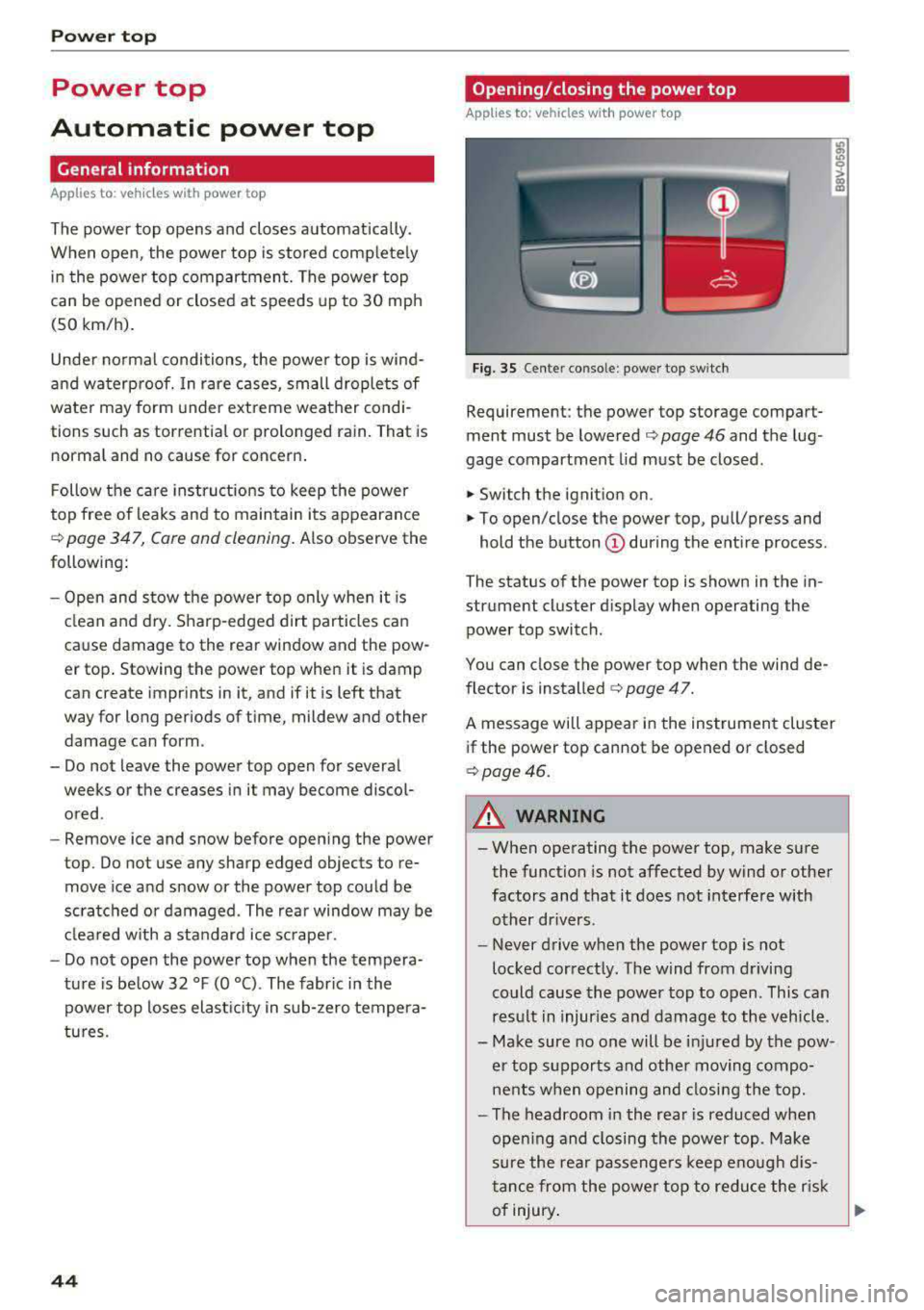
Opening /closing the power top
Applies to: vehicles with power top
Fig. 35 Cente r conso le : power top sw itch
Requirement: the power top storage compart
ment must be lowered
¢ page 46 and the lug
gage compartment lid must be closed .
.,. Switch the ignition on .
.,. To open/close the power top, pull/press and
hold the button
(D during the ent ire process .
The status of the power top is shown in the in
strument cluster d isplay when operating the
power top switch .
You can close the power top when the wind de
flector is
installed ¢ page 47.
A message will appear in the instrument cluster
if the power top cannot be opened or closed
¢page 46.
A WARNING
-- When operating the power top, make sure
the function is not affected by wind or other
factors and that it does not interfe re with
other drivers.
- Never drive when the power top is not
locked correctly. The wind from driving
could cause the power top to open. This can
res ult in injuries and damage to the vehicle .
- Make sure no one will be injured by the pow
er top supports and other moving compo
nents when opening and closing the top.
- The headroom in the rea r is reduced when
open ing and closing the power top . Make
sure the rea r passenge rs keep enou gh dis
tance from the powe r top to reduce the risk
of injury .
Ill>-
Page 47 of 400
a, a, ..... N
" N ..... 0 N > 00
-When operating the power top, visibility to
the rear is limited. Avoid operating the top
while driving in reverse.
(D Note
- To prevent damage to the power top:
- do not store any objects in the power top
storage compartment .
- make sure there is enough space above
the vehicle when opening or closing the
power top.
- To reduce the risk of damage, make sure
there are no sensit ive objects in the power
top storage compartment's range of mo
tion.
(D Tips
- To prevent the vehicle battery from draining unnecessarily, do not open or close the pow
er top repeatedly when the engine is switch
ed off.
- A message will appear in the instrument
cluster if there is a malfunction in the powe r
top
¢ page 46 .
-The powe r top can also be operated manual
l y temporari ly if there is a malfunc tion
¢ page 48, Power top emergen cy opera
tion .
An authorized A udi dealer or author
ized Audi Service Facility should diagnose
and correct the cause of the ma lfunction as
soon as possible.
- If the vehicle is parked with the power top
open, the vehicle interior is not protected
from damaging weather or unauthorized ac
cess. lock any items you leave behind in the
luggage compartment. Close the power top
before leaving the vehicle .
- The side windows automat ically lower
slight ly when opening or closing the power
top.
P owe r top
Power top convenience opening/closing
Applies to: vehicles with power top
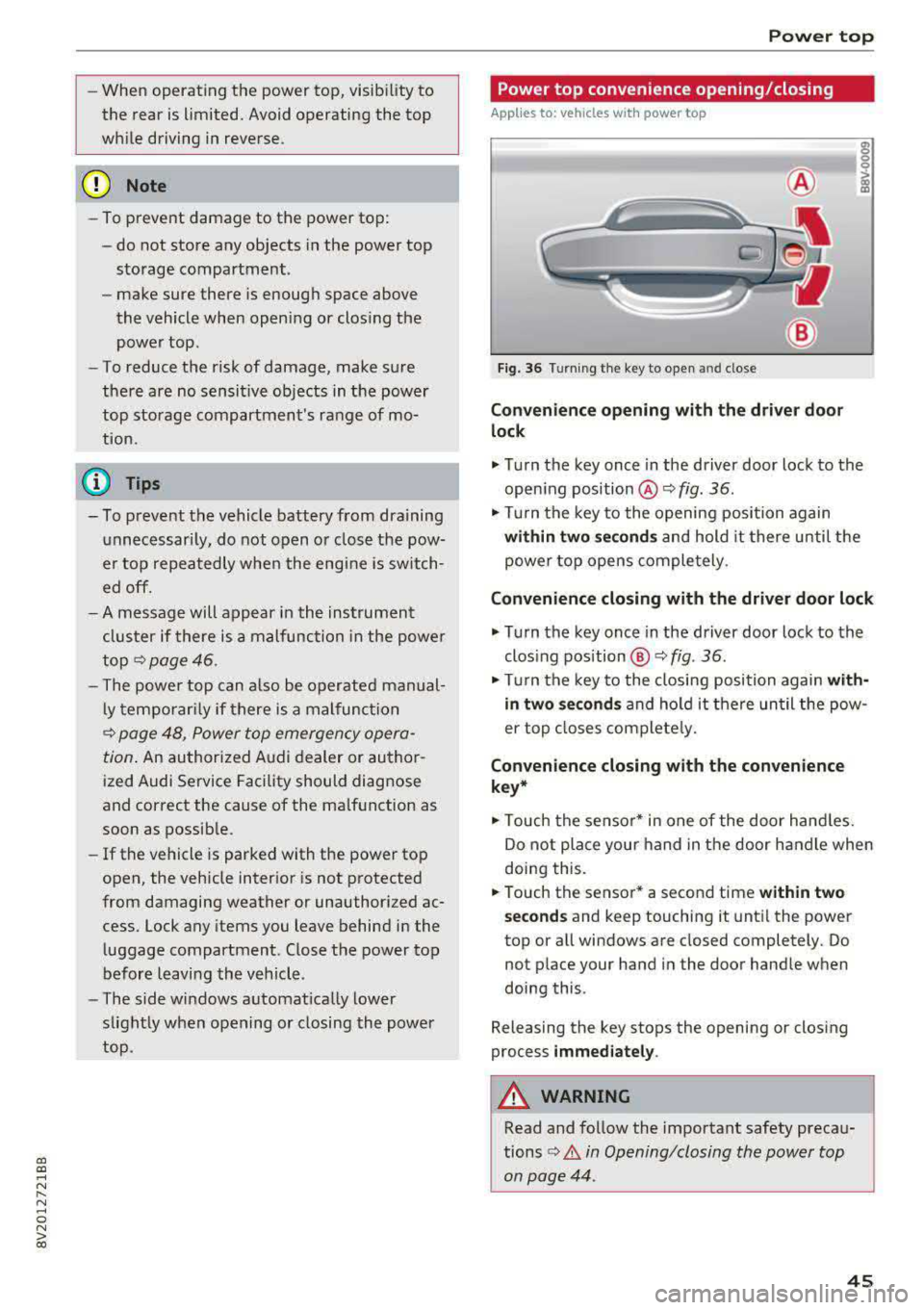
Fig. 36 Turning the key to open and close
Conven ie nce opening with the dri ver do or
lock
.,. Tu rn the key once in the driver door lock to the
open ing position @¢
fig. 36.
.,. Tur n the key to the opening position again
within tw o second s and hold it there until the
power top opens comple tely.
C onvenienc e closing with the driver door lock
.,. Turn the key once in the driver door lock to the
clos ing position @¢
fig. 36.
"Tu rn the key to the closing position again wit h
in two se co nd s
and hold it there until the pow
er top closes completely.
Con ven ienc e closing with the con venienc e
k ey *
.,. Touch the sensor* in one of the door hand les.
Do not place your hand in the door handle when
doing this.
.. Touch the sensor* a second time w ithin tw o
s ec ond s
and keep touching it until the power
top or all windows are closed completely. Do not place your hand in the door handle when
doing this .
Releasing the key stops the opening or closing
process
i mmed iatel y.
A WARNING
-
Read and follow the important safety precau-
tions
¢ A in Opening/closing the power top
on page 44 .
45
Page 48 of 400
Power top
Power top storage compartment
Applies to: vehicles w ith power top
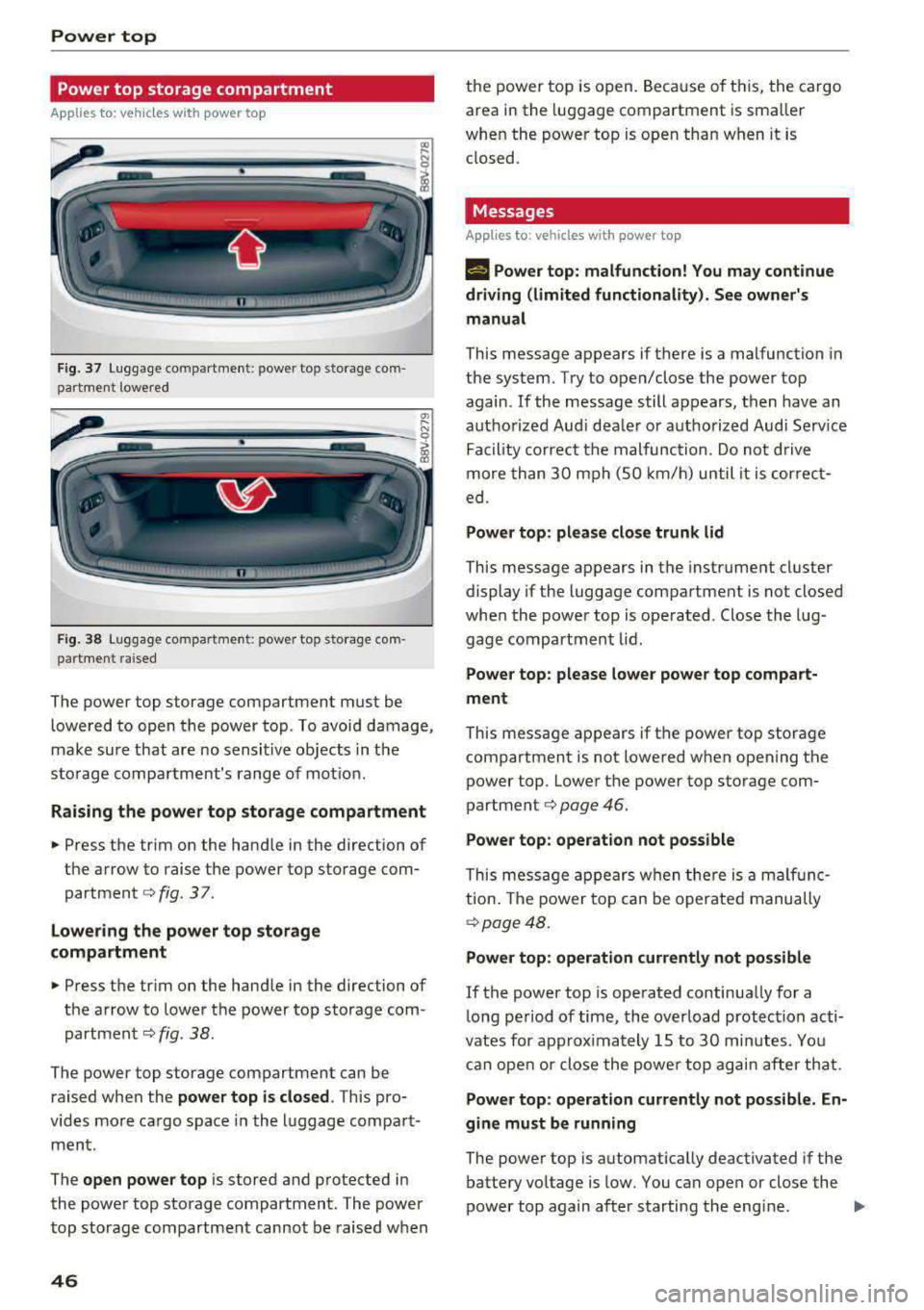
F ig. 37 Luggage com partment : power top storage com
partment lowered
-----------------
F ig. 38 Luggage compa rtme nt: power top sto rage com
pa rtment raised
The power top storage compartment must be
lowered to open the power top . To avoid damage,
make sure that are no sensit ive objects in t he
sto rage compa rtment's range of mot ion.
Rai sing the power top storage compartment
.,. Press the tr im on the hand le in the direction of
the arrow to raise the power top storage com partment
c:::> fig . 3 7.
Lowe ring th e power top sto rage
compartment
... Press the trim on the hand le in the direction of
the arrow to lower the power top storage com
partment
c:::> fig. 38 .
The power top storage compartment can be
raised when the
power top i s cl osed . This pro
v ides mo re cargo space in the luggage compar t
ment.
The
open po wer top is stored and protected in
the power top storage compartment . The power
top storage compartment cannot be raised when
46
the power top is open. Because of t his, the cargo
area in the luggage compartment is sma ller
when the power top is open than when it is closed .
Messages
Applies to : vehicles wit h power top
Ill Pow er top: malf unc tion! You m ay continue
driving (l imited functionality). See own er's
manu al
This message appears if there is a malfunction in
the system. Try to open/close the power top again .
If the message still appears, then have an
autho rized Aud i dea ler or authorized Audi Serv ice
Fac ility correct the malfunction. Do not drive
more than 30 mph (SO km/h) until it is correct
ed .
Power top : please close trunk lid
This message appears in the instrument cluster
display if the luggage compartment is not closed
whe n the power top is operated . Close the lug
gage compartment lid.
Power top : please lower powe r top compart·
ment
This message appears if the power top storage compartment is not lowered when opening the
power top . Lower the power top storage com
partment
c:::> page 46.
Power top : operatio n not po ssible
This message appears w hen there is a malf unc
tion . The power top can be operated manually
c:::> page 48.
Power top : operati on currently not possible
If the power top is operated continua lly for a
long period of time , the overload protection acti
vates for approx imately 15 to 30 minutes . Yo u
can open or close the powe r top again after that .
Power top: operation cur rently not possible. En
gine must be running
The power top is automat ically deactivated if the
battery vo ltage is low. You can open or close the
power top again after starting the eng ine.
.,.
Page 54 of 400
Lights and Vi sion
Turn signal and high beam lever
The lever operates the turn signals, the high
beams and the headlight flasher .
®
,
I
@
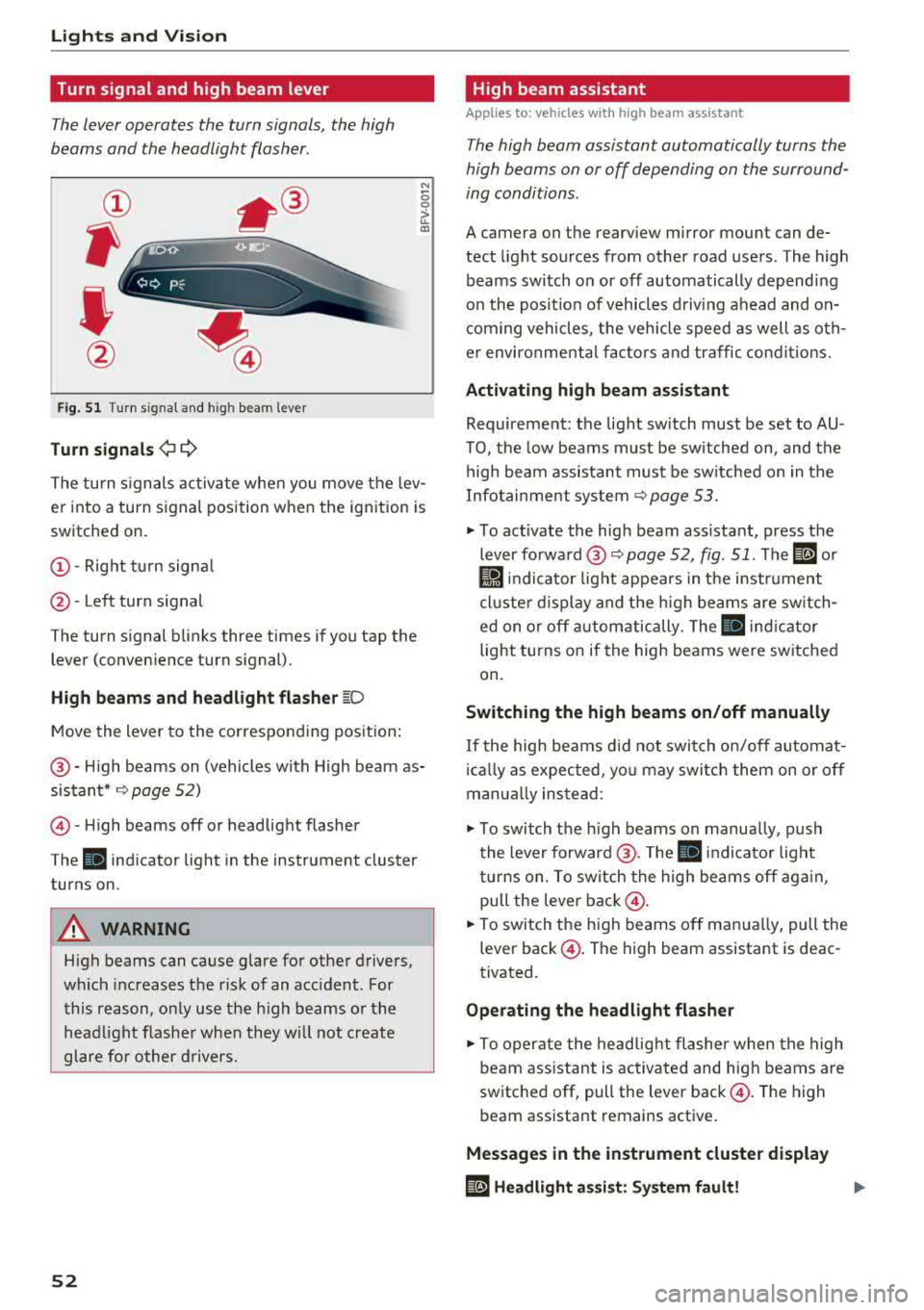
Fig . 51 Turn s ig nal and high bea m lev er
Tu rn signals ¢ 9
N
0 0
> u. a,
The turn s ignals activate when you move the lev
er into a turn signal position when the ignition is
switched on.
@ -Right tu rn signa l
@-Left turn signal
The turn signal blinks three times if you tap the lever (conven ience turn signal).
High b eam s and h eadlight fl ash er ~O
Move the lever to the corresponding pos ition :
@-High beams on (vehicles with High beam as
sistant*
~ page 52)
© -High beams off or headlight flasher
The
II indicator light in the instrument cluster
turns on .
A WARNING
High beams can cause glare for other drivers,
wh ich increases the risk of an accident. For
this reason, only use the h igh beams or the
head light f lashe r when they will not create
glare for other d rivers.
52
· High beam assistant
App lies to: vehicles wit h high beam ass istant
T he high beam assistant automatically turns the
high beams on or off depending on the surround
ing conditions .
A camera on the rearv iew mirror mount can de
tect light sources from other road users . The high
beams switch on or off automatically depending
on the posit ion of vehicles d riving ahead and on
com ing vehicles , the veh icle speed as well as oth
er environmenta l facto rs and traffic condit ions.
Activ ating high b eam assistant
Requirement: the light sw itch must be set to AU
TO, the low beams must be sw itched on, and the
high beam assistant must be sw itched on in the
Infotai nment
system ~ page 53.
~ To activate the high beam ass istant, press the
leverforward @~page52, fig . 51. The il or
ti1 indicator light appears in the i nstr ument
cl uste r display and the high beams are sw itch
ed on or off autom atically. The
II ind icator
light tu rns on if the high beams were sw itched
on .
Switching the high beams on /off manually
If the high beams d id not switch on/off automat
ic ally as expected, yo u may switch them on or off
manua lly ins tead :
~ To switch the h igh beams on manually, push
the lever forward @. T he
II indicator light
turns on. To switch the high beams off aga in ,
pull the leve r
back@.
~ To switch the h igh beams off manua lly, pull the
lever
back @. The high beam assistant is deac
tivated .
Operating the headlight flasher
~ To operate the headlight flashe r when the high
beam ass istant is activated and high beams are
switched off, pull the lever
back @. The high
beam assistant remains active .
Messages in the instrument cluster display
ID Headlight a ssist: S ys tem f ault!
Page 75 of 400
a, a, ..... N
" N ..... 0 N > 00
_& WARNING
-You should not use the recirculation mode
for an extended period of time, because no
fresh a ir is drawn in and the windows can
fog when coo ling mode* is switched off .
T his increases the r is k of an accide nt.
- Individuals with reduced sensitivity to pain
o r temperat ure cou ld develop burns when
using the seat heating fu nction . To reduce
the risk of injury, these ind iv iduals should
not use seat heating.
(D Note
To avoid damage to the heat ing elements in
the seats, do not kneel on the sea ts or place
heavy loads on a small area of the seat.
@ Tips
-The setting for the seat heating on the driv
er's side is ass igned to the key that is in use.
-If the front passenger's seat heat ing is
turned on, it will not turn on again automat
i ca lly if more than 10 m inutes have passed
between sw itching the ign ition off and
switching it on again .
Adjusting the air vents
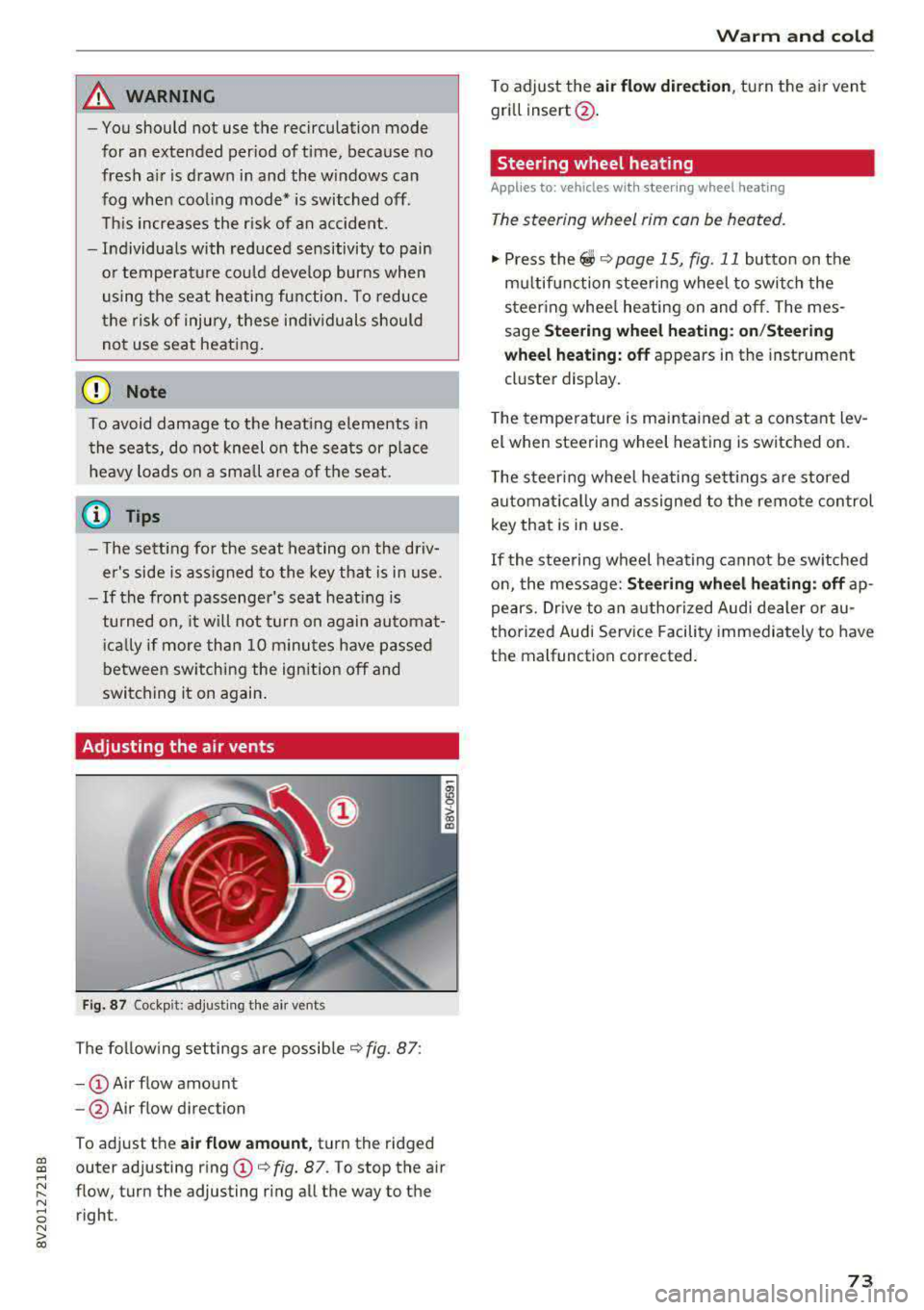
Fig. 87 Cockp it: adjust ing the air vents
The fol low ing settings are possib le ¢fig. 87:
- CD Air flow amount
-@ Air flow direction
To adjust the
air fl ow a mount , turn the ridged
outer adjusting ring
CD ¢ fig. 87. To stop the air
flow, turn the adjusting ring all the way to the right .
Warm and cold
To adjust the air fl ow directio n, turn the air vent
gri ll insert @.
Steering wheel heating
Applies to: vehicles with steering wheel heating
The steering wheel rim can be heated.
"' Press the ~ ¢ page 15, fig. 11 button on the
mu ltifunction steering wheel to switch the
steering whee l heating on and off. The mes
sage
St ee ring wheel h eatin g: on/St eering
w hee l heating: off
appears in the instrument
cluster display.
T he temperature is mainta ined at a constant lev
el when steering wheel heating is switched on.
T he s teering wheel heating settings a re stored
automat ica lly and assigned to the remote control
key that is in use .
If the steering wheel heating cannot be sw itched
on, the message:
S te e ring wh eel h eating : off ap
pears. Dr ive to an authorized Audi dea ler or au
thorized Audi Service Facility immediately to have
the malfunction corrected.
73
Page 83 of 400
a, a, ..... N
" N ..... 0 N > 00
Starting the engine
when there is a
malfunction
Appl ies to: vehicles with convenience key
It may not be possible to start the engine under
certain circumstances, for example if the battery
in the vehicl e key is drained, if interference is af
fect ed the key or if there is a syst em malfunc
tion.
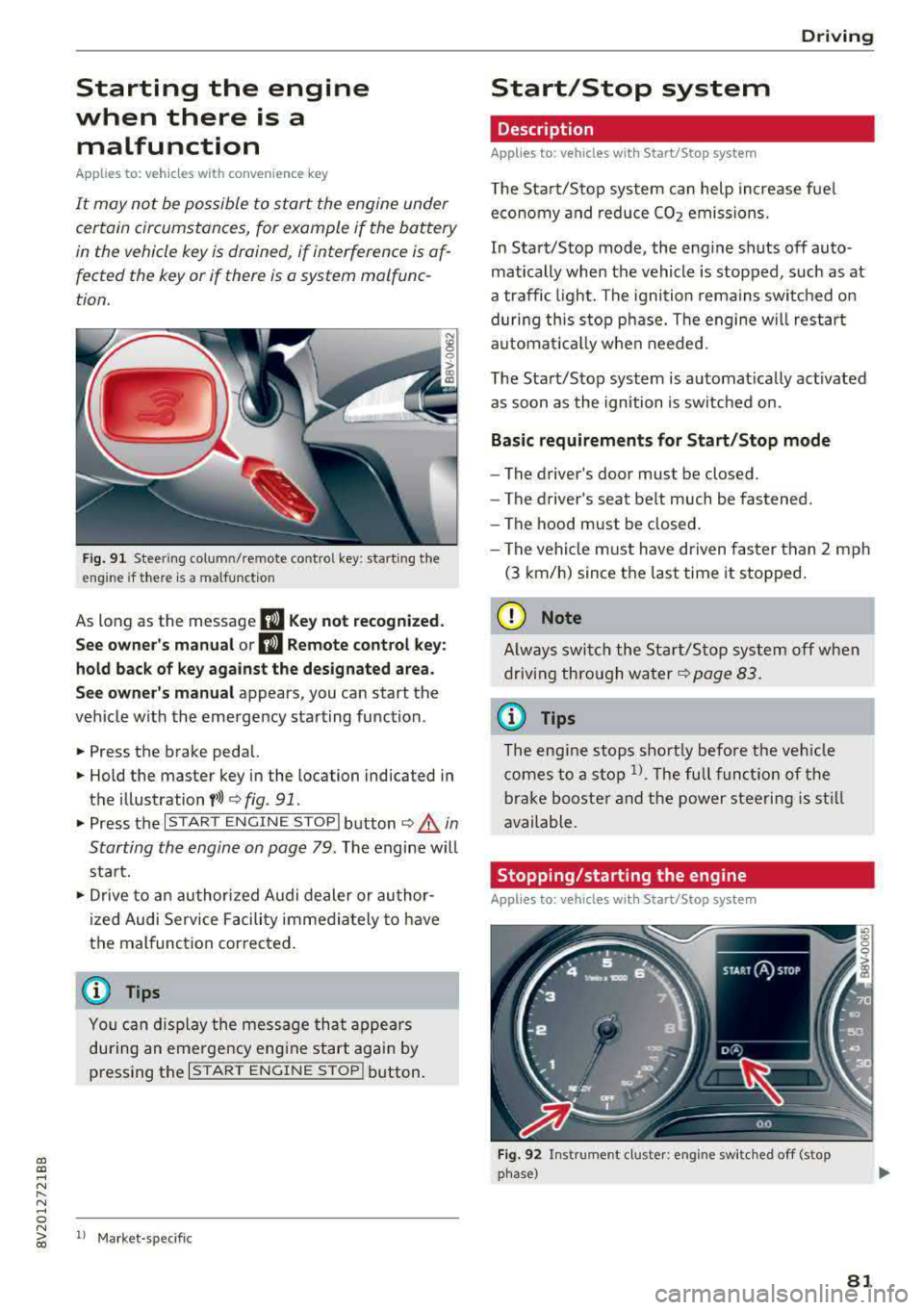
Fig. 91 Steer ing colum n/remote co ntro l key: starting the
e ngi ne if there is
a malfunction
As long as the message II Key not recognized.
See owner's manual or
II Remote control key:
hold back of key against the designated area.
See owner's manual
appears, you can start the
vehicle w ith the emergency starting function .
.,. Press the brake pedal.
.,. Hold the master key in the location indicated in
the illustration
f>l) r:> fig. 91.
.,. Press the I STAR T ENGIN E ST OPI button r:> _&. in
Starting the engine on page
79. The engine will
start.
.,. Drive to an authorized A udi dealer or author
ized Audi Service Facility immediately to have
the malfunction cor rected.
@ Tips
You can d isplay the message that appears
during an emergency engine start again by
pressing the
I START ENGINE STOPI button.
l l Market -s p ecific
D rivi ng
Start/Stop system
Description
Applies to: vehicles with Start/Stop system
The Start/Stop system can help increase fuel
economy and reduce CO2 emissions.
In Start/Stop mode, the engine shuts off auto
matically when the vehicle is stopped, such as at
a traffic light. The ignition remains switched on
during this stop phase. The engine w ill restart
automat ically when needed.
The Start/Stop system is automat ically act ivated
as soon as the ignition is switched on.
Basic requirements for Start/Stop mode
-The driver's door must be closed .
- The driver's seat belt much be fastened.
- The hood must be closed.
- The vehicle must have driven faster than
2 mph
(3 km/h) since the last time it stopped.
(D Note
Always switch the Start/Stop system off when
driving through water
r:> page 83.
(D Tips
The engine stops shortly before the veh icle
comes to a stop
l). The full function of the
brake booster and the power steering is still
available.
Stopping /starting the engine
Applies to: vehicles with Start/Stop system
Fig. 92 Instrument cluster: eng ine swi tched off (stop
phase)
81
Page 85 of 400
a, a, ..... N
" N ..... 0 N > 00
If the Start/Stop system has not turned off the
engine or if you have switched the Start/Stop sys
tem off manually, the ignition will not be auto
mat ically switched off and the engine w ill contin
ue to run
c:> ,& .
A WARNING
To reduce the risk of poisoning, never allow
the engine to run in confined spaces.
{!) Tips
If you select the D or N se lector lever position
in a vehicle with an automat ic transmission
after sh ift ing into reverse, the vehicle m ust
be driven fas ter than 6 m ph (10 km/h) in or
de r fo r the e ngine to switch off again.
Manually switching the Start/Stop system
on/off
Applies to: vehicles with Sta rt/Stop system
If you do not wish to use the system, you can
switch it off manually.
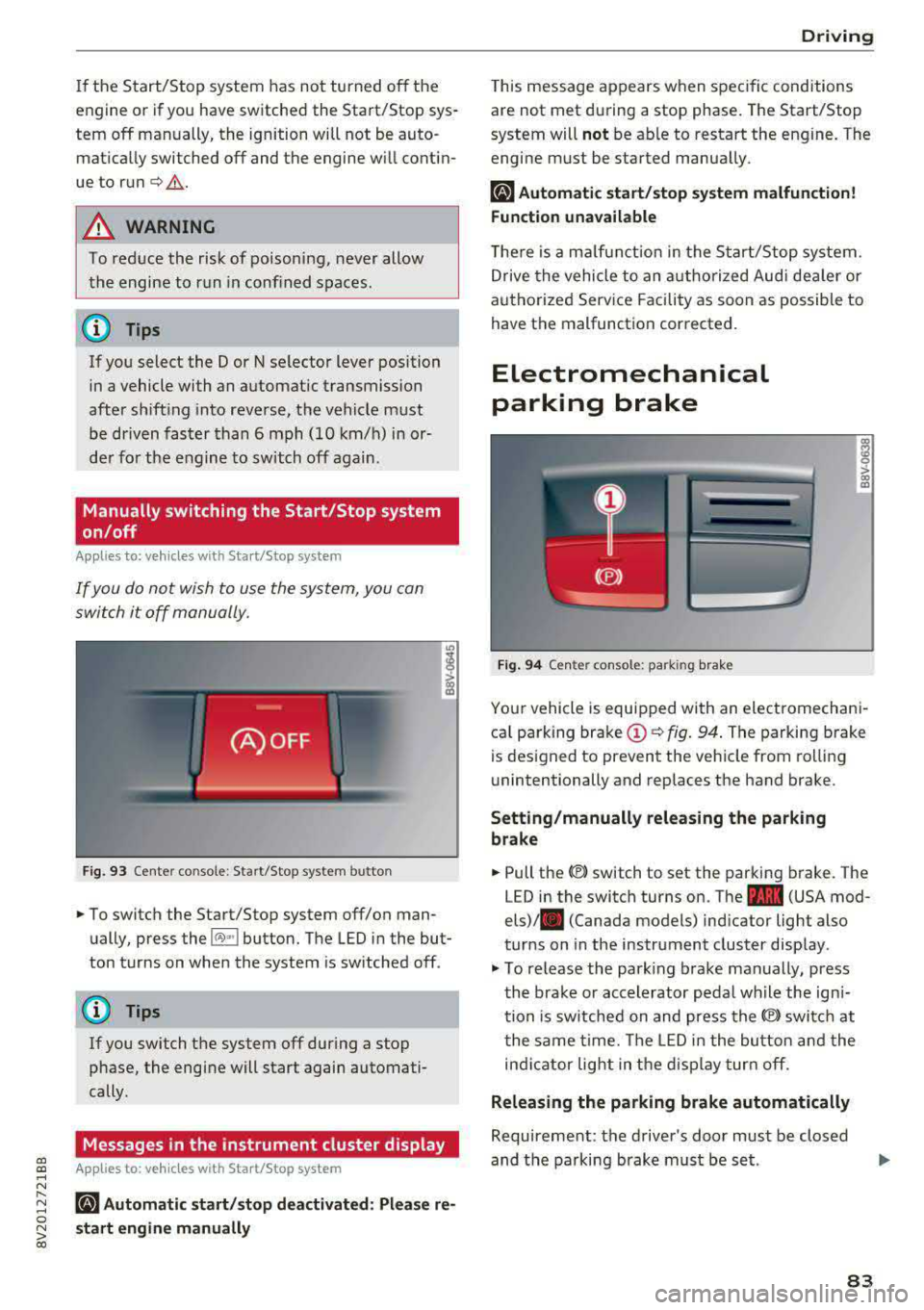
F ig . 93 Cen ter co nsole: Start/S top system button
-
"' To switch the Start/Stop system off/on man
ually, press the
l (A) ~I button. The LED in the but
ton turns on when the system is sw itched off .
@ Tips
If you switch the system off during a stop
phase, the engine will start again automati
cally.
Messages in the instrument cluster display
Applies to: veh icles with Start/Stop system
ml Automatic start /stop deactivated : Please re
s tart engine manually
D rivi ng
This message appears when spec ific conditions
are not met du ring a stop phase . The Start/Stop
system will
not be ab le to restart the engine. The
engi ne must be started manua lly .
ml Automati c start /stop system malfun ction!
Function unavailable
T he re is a m alfu nction in the S tart/Stop system.
Drive the vehicle to an a uth orized Aud i dea ler or
a uthori zed Serv ice Facility as soon as possible to
have the malfunction corrected.
Electromechanical
parking brake
F ig . 94 Cen ter console : park ing bra ke
ra 0 > co m
Yo ur vehicle is equipped with an electromechani
ca l parking brake
(D c:> fig. 94 . The parking brake
is des igned to prevent the veh icle from rol lin g
unintentionally and replaces the hand brake.
Setting /manually releasing the parking
brake
"' Pull the(®) switch to set the parking b rake. The
LED in the switch turns on. The
-(USA mod
els)/ . (Canada models) ind icator light also
turns on in the instrument cluster disp lay .
"'To re lease the park ing brake man ually, press
th e bra ke or accelerator peda l wh ile the ign i
tion is sw itched on and press the
(®) switc h at
t he same time. The LED i n the bu tton and the
in di cator light in the d isp lay turn off.
Releasing the parking brake automatically
Requireme nt: the driver's door must be closed
and the parking brake must be s et.
83