spare wheel AUDI S3 SEDAN 2017 User Guide
[x] Cancel search | Manufacturer: AUDI, Model Year: 2017, Model line: S3 SEDAN, Model: AUDI S3 SEDAN 2017Pages: 400, PDF Size: 67.32 MB
Page 363 of 400
CXl CXl .... N ,.__
N .... 0 N > 00
-When mountin g tires w ith unidirectional
tread design
ma ke sure the t read pattern is
p oin ted the r ight way ¢
page 36 1.
-The wheel bolts should be clean and easy to
turn. C heck for d irt a nd cor rosion on the
ma ting surfaces o f both the wheel an d the
hub. Remove all dirt from t hese surfaces be
fo re remo unt ing the wheel.
Tires with unidirectional tread design
Tires with unidirectional tread design must be
mounted with their tread pattern pointed in the
right direction.
Using a spare t ire with a tread pattern
intended for use in a specific direction
W hen using a spa re t ire with a tread patte rn in
tended fo r use in a specific direction, please note
the following:
-The direct ion of rotat ion is ma rked by an a rrow
on the side of the tire .
-If the spare tire has to be installed in the incor
rect d irection, use the spare tire only tempora
ri ly s ince the tire w ill not be ab le to achieve its
opt imum p erformance c harac ter istics wi th re
gard to aquaplaning, noise and wea r.
-We recommend t hat you pay particular atten
t io n t o this fac t during we t weat her and that
yo u adju st yo ur speed to match road condi
ti ons.
-Rep lace the flat t ire with a new one and have it
insta lled on yo ur ve hicl e as soon as possibl e to
r es to re th e hand li n g adva ntages of a unid irec
tional t ire.
Notes on changing tires
Please read the info rmation I:!> page 3 35 if you
are go ing to use a spare tire which is different
from the tires on your veh icle.
Af te r yo u c hange a tire:
-Check the tire pressure on the spare immedi
ately after in stallation .
-Have the wheel bolt tightening torque
checked with a torque wrench as soon as pos -
Emergency assistance
sible by your authorized Audi dealer or a
qualified service station.
-With steel and alloy wheel rims, the wheel bolts are correctly tightened at a torque of
90 ft lb (120 Nm).
-If you notice that the wheel bolts are corroded
and difficult to turn while changing a tire ,
they should be replaced before you check the
tightening torque.
-Replace the flat tire with a new one and have
it installed on your vehicle as soon as possi ·
ble. Remount the wheel cover .
Until then , dr ive with extra care and at reduced
speeds.
_& WARNING
-I f you are going to equip yo ur vehicle with
tires or r ims which differ from those w hich
were factory installed, the n be sure to read
th e information
¢ pag e 335.
-Always make sure the damaged wheel or
e ven a flat tire a nd the jack and tool kit are
p rop erly secur ed in t he lu ggag e compart
m en t an d are not l oose in th e p asseng er
compa rtme nt.
-In an accide nt or sudde n man euv er th ey
could fly forward, injuri ng a nyo ne in the ve
hicl e.
-Always s tor e damag ed w heel, jack and t ools
securely i n the lu ggage compa rtm ent. Ot h
erwise, in an accid ent or sud den m aneuve r
t he y c ould fl y forwar d, ca using injury to pas
sen gers in the ve hicle.
-
361
Page 364 of 400
Emergency assistance
Spare tire
General information
Applies to: vehicles with space-saving spare tire (compact
spare tire)
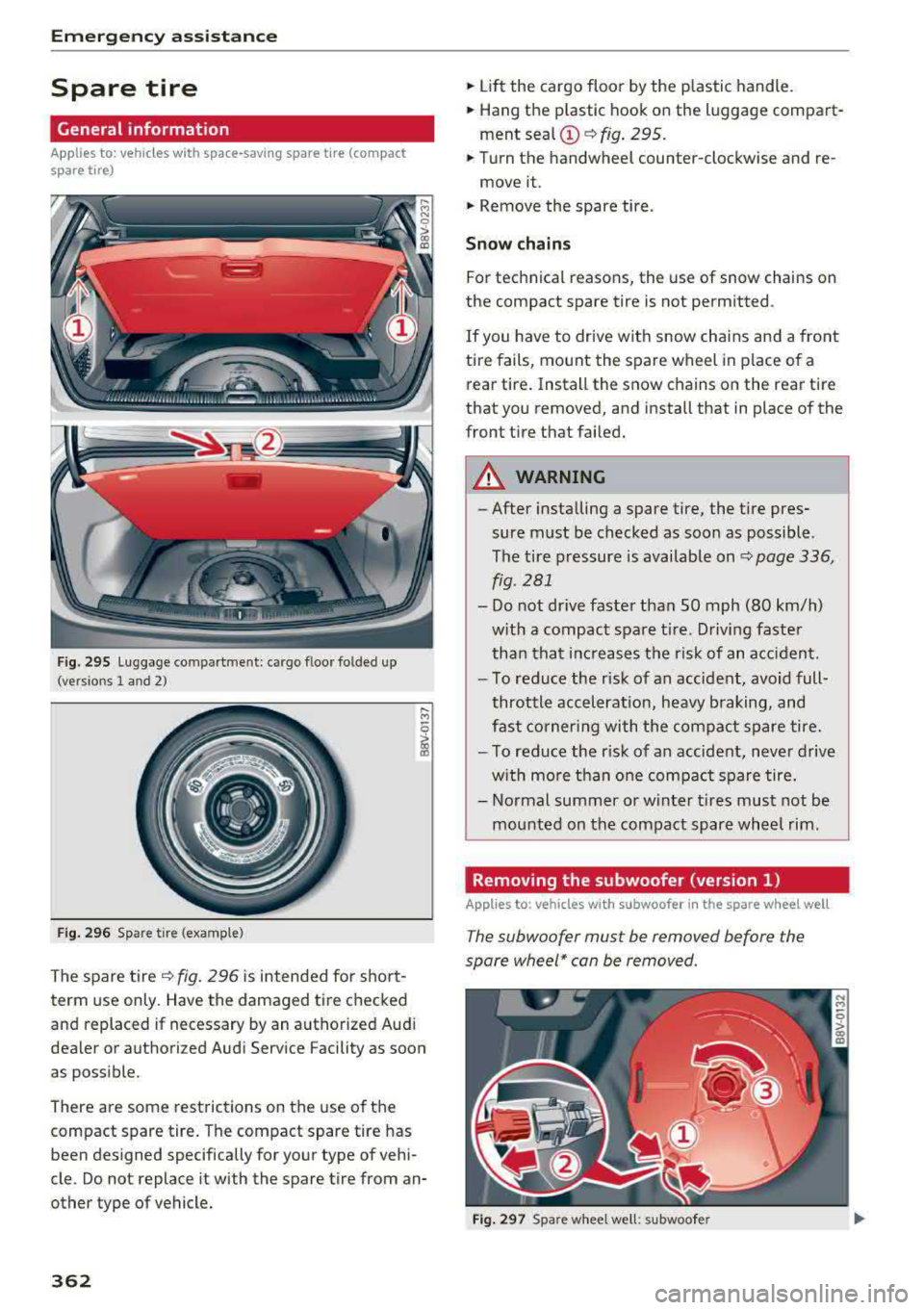
Fig. 295 L uggage compartment: cargo floor folded up
(versions 1 and 2)
Fig. 296 Spare tire (example)
The spare tire ~ fig. 296 is intended for short
term use only. Have the damaged tire checked
and replaced if necessary by an authorized Audi
dealer or authorized Audi Service Facility as soon
as possible.
There are some restrictions on the use of the
compact spare tire . The compact spare tire has
been designed specifically for your type of vehi
cle. Do not replace it with the spare tire from an
other type of vehicle.
362
.,. Lift the cargo floor by the plastic handle .
.,. Hang the p lastic hook on the luggage compart
ment
sea l© ~ fig. 295.
.,. Turn the handwheel counter-clockwise and re-
move it .
.,. Remove the spare tire.
Snow chains
For technical reasons, the use of snow chains on
the compact spare tire is not permitted .
If you have to drive with snow chains and a front
tire fails, mount the spare wheel in p lace of a
rear tire. Install the snow chains on the rear tire
that you removed, and install that in place of the
front tire that failed.
A WARNING
-
-After installing a spare tire, the tire pres
sure must be checked as soon as possible.
The tire pressure is available on
~ page 336,
fig.
281
- Do not dr ive faster than SO mph (80 km/h)
w ith a compact spare tire. Driving faster
than that increases the risk of an accident.
- To reduce the r isk of an accident, avoid full
throttle acceleration, heavy braking, and
fast cornering with the compact spare tire.
- To reduce the r isk of an accident, never drive
w ith more than one compact spare tire.
- Normal summer or w inter t ires must not be
mounted on the compact spare wheel rim.
Removing the subwoofer (version 1)
Applies to: vehicles with subwoofer in the spare whee l well
The subwoofer must be removed before the
spare wheel* can be removed.
Fig. 297 Spare whee l we ll: subwoofer
Page 365 of 400
a, a, ..... N
" N ..... 0 N > 00
Removing the subwoofer
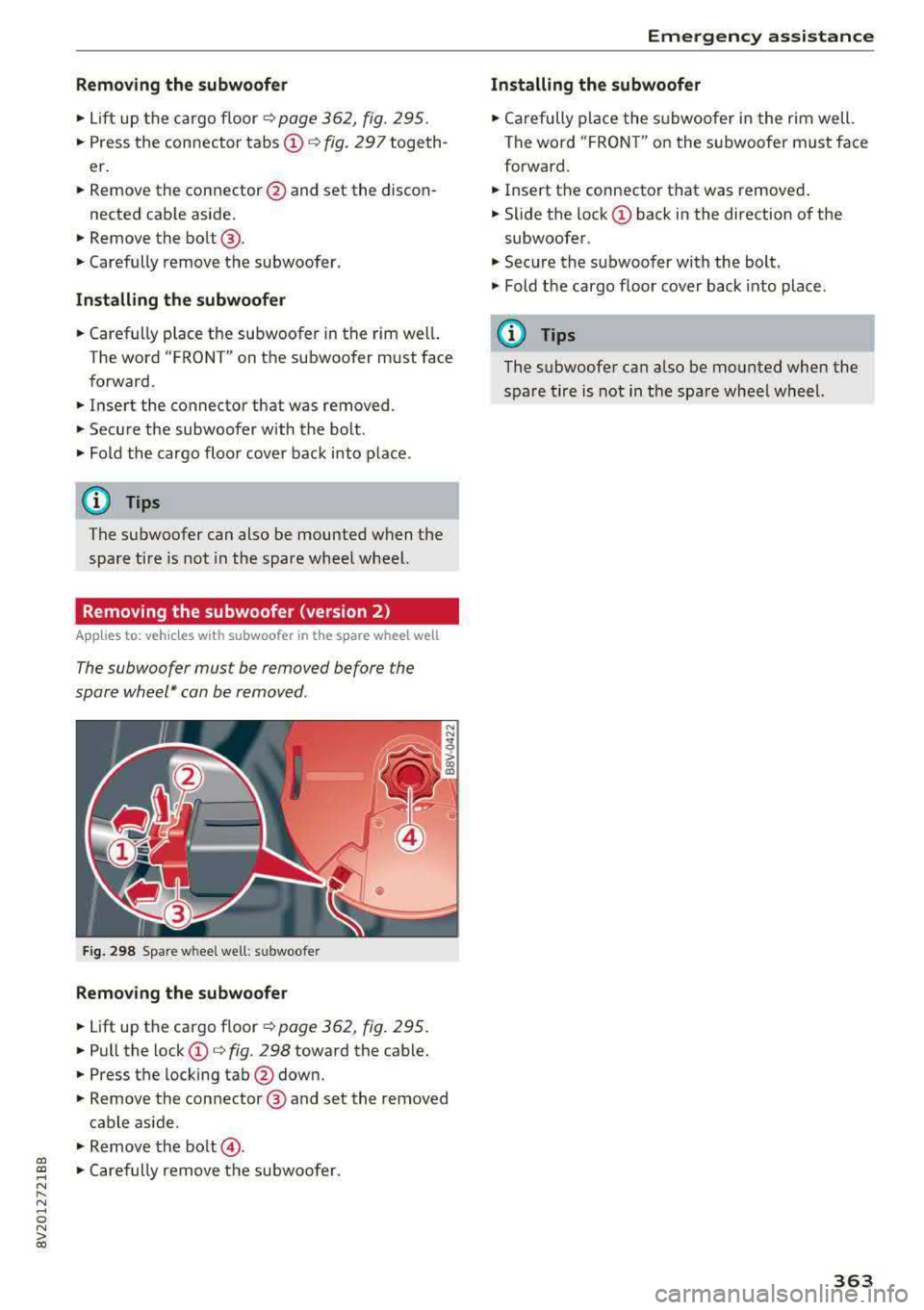
• Lift up the cargo floor ¢ page 362, fig. 295.
• Press the connector tabs CD¢ fig. 297 togeth
er.
• Remove the connector @and set the discon-
nected cab le aside.
• Remove the bolt@.
• Carefully remove the subwoofer .
Installing the subwoofer
• Carefully place the subwoofer in the rim wel l.
The word "FRONT" on the subwoofer must face
forward.
• Insert the connector that was removed .
• Secure the subwoofer with the bolt.
• Fold the cargo floor cover back into place .
@ Tips
The subwoofer can also be mounted when the
spare tire is not in the spare wheel wheel.
Removing the subwoofer (version 2)
App lies to: vehicles with subwoofer in the spare wheel well
The subwoofer must be removed before the
spore wheel* can be removed .
Fig. 298 Spare w heel well : su bwoofer
Removing the subwoofer
• Lift up the cargo floor ¢ page 362, fig . 295.
• Pull the lock CD¢ fig. 298 toward the cable.
• Press the locking tab@down.
• Remove the connector @ and set the removed
cable aside .
"' Remove the bolt@.
• Caref ully remove the subwoofer.
Emergency assistance
Installing the subwoofer
• Carefully place the subwoofer in the rim well.
The word "FRON T" on the subwoofer must face
forward.
• Insert the connector that was removed .
• Slide the lock CD back in the direction of the
subwoofer .
• Secure the subwoo fer with the bolt.
"' Fold the cargo floor cover back into place .
@ Tips
The subwoofer can also be mounted when the
spare tire is not in the spare wheel wheel.
363
Page 395 of 400
CXl CXl .... N ,.__
N .... 0 N > 00
Telephone. . . . . . . . . . . . . . . . . . . . . . . . . . 187
Voice recognition system . . . . . . . . . . . . . 241
Setting the language . . . . . . . . . . . . . . . . . . 241
Setting the temperature
Automatic climate control system . . . . . . . 71
Shift paddles (automatic transmission) . . . . 90
Shuffle . . . . . . . . . . . . . . . . . . . . . . . . . . . . . 233
Side airbags Description . . . . . . . . . . . . . . . . . . . . . . . . . 285
How they work . . . . . . . . . . . . . . . . . . . . . . 287
Side assist
refer to Audi side assist . . . . . . . . . . . . . . . 139
Side curtain airbags . . . . . . . . . . . . . . . . . . . 288
Description . . . . . . . . . . . . . . . . . . . . . . . . . 288
H ow they work . . . . . . . . . . . . . . . . . . . . . . 290
Safety instructions . . . . . . . . . . . . . . . . . . . 290
Sir iusXM alert notifications . . . . . . . . . . . . . 219
Sliding/tilting sunroof
refer to Panorama glass roof . . . . . . . . . . . 43
Snow chains . . . . . . . . . . . . . . . . . . . . . . . . . 342
Socket . . . . . . . . . . . . . . . . . . . . . . . . . . . . . . . 64
Software update
refer to Map update . . . . . . . . . . . . . . . . . . 193
refer to System update (MMI) . . . . . . . . . . 244
Software (MMI) License agreement . . . . . . . . . . . . . . . . . . . 246
Update .. .... ...................... 244
Version . . . . . . . . . . . . . . . . . . . . . . . . . . . . 244
Sources of information about child rest raints
and their use ... ................ ..... . 311
Space-saving spare tire (compact spare tire) 3 .62
Spare tire . . . . . . . . . . . . . . . . . . . . . . . . . . . 362
Spare whee l . . . . . . . . . . . . . . . . . . . . . . . . . 362
Speed dependent volume control . . . . . . . . 245
Index
Steering . . . . . . . . . . . . . . . . . . . . . . . . . . . . 154
Locking steering (ignition lock) . . . . . . . . . . 77
Locking the steering (button) . . . . . . . . . . . 79
also refer to Electromechanical steering 154
Steering wheel
Adjusting . . . . . . . . . . . . . . . . . . . . . . . . . . . 76
Shift paddles (automatic transmission) . . . 90
Steering wheel heating . . . . . . . . . . . . . . . . 73
also refer to Multifunction
steering wheel . . . . . . . . . . . . . . . . . 13, 15, 16
Steps for determining correct load limit . . . 341
Stopover (navigat ion) . . . . . . . . . . . . . . . . . . 204
Storage options . . . . . . . . . . . . . . . . . . . . . . . 65
Streaming
refer to Onl ine media . . . . . . . . . . . . . . . . . 227
Street View . . . . . . . . . . . . . . . . . . . . . . . . . . 212
S tronic (automatic transmission) . . . . . . . . . 85
Subtitles (DVD) . . . . . . . . . . . . . . . . . . . . . . . 233
Subwoofer .. .... .. .. ......... 245,362,363
Sun visors . . . . . . . . . . . . . . . . . . . . . . . . . . . . 56
Surround . . . . . . . . . . . . . . . . . . . . . . . . . . . . 245
Suspension control . . . . . . . . . . . . . . . . . . . . 143
Swap call . . . . . . . . . . . . . . . . . . . . . . . . . . . . 181
Switching tabs
refer to Multifunction
steering wheel . . . . . . . . . . . . . . . . . 13 , 15, 16
Symbols . . . . . . . . . . . . . . . . . . . . . . . . . . . . 167
Navigation . . . . . . . . . . . . . . . . . . . . . . . . . 209
Traffic ....... ... .. ................. 214
also refer to Indicator lights . . . . . . . . . . . . 24
System settings (MMI) . . . . . . . . . . . . . . . . . 241
System update (MMI) . . . . . . . . . . . . . . . . . . 244
System volume . . . . . . . . . . . . . . . . . . . . . . . 246
Speed limiter . . . . . . . . . . . . . . . . . . . . . . . . 123
T
Speedometer . . . . . . . . . . . . . . . . . . . . . . . . . 10
Speed warning system . . . . . . . . . . . . . . . . . 123
Speller . . . . . . . . . . . . . . . . . . . . . . . . . . . . . . 165
Sport view . . . . . . . . . . . . . . . . . . . . . . . . . . . . 15
Start/Stop system . . . . . . . . . . . . . . . . . . . . . 81
START ENGINE STOP (convenience key) . 78, 79
Station scanning (radio)
refer to Refresh station list (rad io) . . . . . . 221 Tachometer.
. . . . . . . . . . . . . . . . . . . . . . . 10, 12
T echn ica l data... .. .. ............... .. 374
Technical modifications . . . . . . . . . . . . . . . . 380
Telephone . . . . . . . . . . . . . . . . . . . . . . . . . . . 177
Connecting . . . . . . . . . . . . . . . . . . . . . . . . . 177
Dialing a number . . . . . . . . . . . . . . . . . . . . 180
Options during a phone call . . . . . . . . . . . 181
Playing music . . . . . . . . . . . . . . . . . . . . . . . 225
Settings . . . . . . . . . . . . . . . . . . . . . . . . . . . 187
393