steering AUDI S3 SEDAN 2017 Owner's Manual
[x] Cancel search | Manufacturer: AUDI, Model Year: 2017, Model line: S3 SEDAN, Model: AUDI S3 SEDAN 2017Pages: 400, PDF Size: 67.32 MB
Page 86 of 400
Driving
"'To start driving and release the parking brake
automatically, press the accelerator pedal as
usual.
In addition to releasing the parking brake auto
matically, other convenience and safety functions
are available when you start driving
¢ page 85,
Starting from a stop.
Preventing the automatic parking brake
release
The vehicle could begin rolling unintentionally,
dep ending on the hill or if towing a trailer.
"'To prevent the parking brake from releasing au
tomatically, pull and hold
the®> switch and
press the accelerator pedal. The parking brake
remains set and prevents the vehicle from roll
ing backward.
"'You can release the(®) switch again once you
are sure that you are giving enough driving
force to the wheels by pressing the accelerator pedal.
Emergency braking function
You can use the emergency braking function in an emergency situation, or if the standard brake op
eration malfunctions or is disabled .
"'Pull and hold the(®) switch.
"' As soon as you release the ®> switch or acceler-
ate, the braking stops .
Pulling and holding
the®> switch while driving
the vehicle activates the emergency braking func
tion . The vehicle is braked at all four wheels by
activating the hydraulic brake system. The brak ing effect is similar to heavy
braking ¢,&. .
To reduce the risk of activating the emergency
braking by mistake, a warning tone (bu zzer)
sounds when
the(®) switch is pulled. Emergency
braking stops as soon as
the(®) switch is released
or the accelerator pedal is pressed .
Parking
"' Press the brake pedal to stop the vehicle.
"'Pull the®> switch to set the parking brake.
"'Place the selector lever in the P position.
"'Turn the engine off ¢,&. .
84
"'Turn the steering wheel when parking on in
clines so that the wheels will roll into the curb
if the vehicle starts moving.
A WARNING
- Do not press the accelerator pedal inadver
tently if a gear is selected when the vehicle
is stationary and the engine is running . Oth
erwise, the vehicle will start to move imme
diately and this could result in an accident.
- Emergency braking should only be used in
an emergency, when the normal brake pedal has failed or the brake pedal is obstructed.
During emergency braking, your vehicle will
brake similar to heavy braking. ESC and the
associated components (ABS, ASR, EDL)
cannot overcome the laws of physics. In cor
ners and when road or weather conditions
are bad, a full brake application can cause
the vehicle to skid or the rear end to swerve,
which increases the risk of an accident.
- If the power supply fails, you cannot set the
parking brake if it is released . In this case,
park the vehicle on level ground and secure
it by placing the selector lever in the P posi
tion. See an authorized Audi dealer or au
thorized Audi Service Facility for assistance.
-Always take the vehicle key with you when
leaving your vehicle, even for a short period
of time . This applies particularly when chil
dren remain in the vehicle. Otherwise chil
dren could start the engine, release the
parking brake or operate electrical equip
ment such as power windows, which in
creases the risk of an accident.
- No one should remain in the vehicle when it
is locked - especially children. Locked doors
make it more difficult for emergency work
ers to get into the vehicle, which puts lives
at risk .
(D Tips
When stopping at a traffic signal or stopping
in city traffic, you can set the parking brake
manually . The vehicle does not have to be
held with the brake pedal. The parking brake
eliminates the tendency to creep when a se lector lever position is engaged . As soon as
Page 93 of 400
CXl CXl .... N ,.__
N
Requirement: the engine must be at operating
temperature and the steering whee l must not be
turned.
.,. Deact ivate ll the Start/Stop system*
¢ page 83. The LED in the ~ button turns on.
.,. With the engine running, press the l.t, O FFj but
ton briefly one time .
.,. Pull the selector lever back out of the D/S posi
t ion briefly to select the S posit ion, or press it
toward the right into the tiptronic pos ition or
select the
D ynamic driving mode in drive se
lect*
¢ page 143 .
.,. Press the b rake peda l firmly with you r left foot
and hold it all the way down for at least one
second .
.,. At the same time, press the gas pedal all the
way down with your right foot unti l the engine
reaches and stays at a high RPM level.
.,. Remove your left foot from the brake.
A WARNING
- Always adapt yo ur driv ing to the traffic flow .
- Only use Launch Control when road and traf-
fic cond itions allow it and other dr ivers will
not be endangered or impacted by your driv
ing and the vehicle's acceleration .
- Please note that the drive whee ls can sp in
and the vehicle can break away when sport
mode is switched on, especially when the
road is s lippery.
- Once the vehicle has started moving, press
the
I ~ OFF j button briefly to tu rn the sport
mode off.
@ Tips
-The transmiss ion temperature may increase
s ignificantly after us ing the launch cont rol
program.
If that happens, the program may
not be available for a few m inutes. It w ill be
available again after a cool-down pe riod.
-When accelerating using the la unch control
program, all veh icle parts are subject to
heavy loads. Th is can lead to increased
wear .
8 1
> It is not pos sib le to deact iv a te t he system w it h all vers io n s N iii of th e tran sm is s ion.
D riv ing
Emergency mode
Applies to: vehicles with automatic transmissions
In the event of a system malfunction, there is an
emergency program .
If all of the selector lever positions are highlight
ed with a light background in the instrument
cluster display, there is a system malfunct ion and
the transmission is running i n the emergency
program. The veh icle can sti ll be driven in emer
gency mode, but only with red uced speed and
not in all gears . In some cases, the vehicle
can
not d riv e in revers e .
([) Note
If the transm ission runs in eme rgency mode,
drive to a n author ized A udi dealer or author
i zed Audi Se rvice Facility immed iate ly to have
the malfunction corrected .
Transmission malfunction
Applies to: vehicles with automatic transmissions
• Tran smission: malfunction! Please stop ve
hicle and shift t o P
There is a ma lfunction in the transm ission. Park
the vehicle secure ly and do not continue driving.
See an author ized Audi dealer or authorized Audi
Service Facility for assistance .
• Transmis sion overheat ing! Plea se stop the
ve hicle!
The tra nsmission is too hot and can become dam
aged. Stop and le t the transmiss ion cool w ith the
engine r unning (at idle) in the P se lector lever po
sition . Then the indicator light and the message
turn off, drive to an authorized A udi dealer or au
thori zed Audi Serv ice Facility immediately to have
the malfunction corrected. If the indicator light
and the driver message do not turn off, do not
continue driving . See an authorized Aud i dealer
or authorized Audi Serv ice Facility for ass istance.
[!l Tran smiss ion malfunction : you can continu e
driving
.,,.
91
Page 100 of 400
e-tron
The power meter gives feedback about the pa rt ic
ular accelerator pedal position and shows the
cur rent demand
(%) fo r electric ity or fuel rega rd
less of which engine is active.
An economica l driv ing and recupe ra tion range is
shown i n green
r:!> page 101, Energy recovery (re
cuperation). A driving range that is not economi
cal is shown in orange.
CD Ve hicl e no t drive ready (O FF)
@ Recuperation (CHARGE)
® Ve hicl e ready to d rive ( READY) o r
c oastin g
@ Effic ient driving w ith electric moto r
and/or gasoline eng ine (EFFICIEN-
CY)
® Ec onomic driv ing while t he e lectr ic
mot or or g asoline e ng in e is i n th e
p a rt ial power range
® D riving in full power range
0 100 % outp ut
® Boosting -the elect ric motor as-
sists the gasoline engine (BOOST)
® H igh-voltage battery cha rge level
@ EV mo de: a ct ive av , standby, c::§V
or cur rently unavailable. ~v
@ Speed limit for elect ric driv ing in EV
m ode (80 mph/ 130 km/h)
Indicator lights and messages
A pp lies to: ve hicles w ith p lug -in hybr id drive
A lso note the in dica to r li ghts in r:!> page 24.
The gaso line engine is active when the
111 indica
to r ligh t turns o n.
./. Drive system: system fault! Safely park
vehicle
There is a malfunction in the plug-in hybrid sys
tem . T he br ake booster and the powe r steering
may stop wor king. Stop the veh icle immediately
or as soon as possib le . Park the vehicle in a safe
p lace o utdoors that is not near buildi ngs, roof
overhangs, carports o r similar structures . Sw itch
the ig nition off . Have the problem cor rected by
an a uthor ized A udi dealer or au thor ized A udi
S erv ice Facil it y .
98
•• Electric system: overheated. Safely park
vehicle and check coolant
The coolant level is too lo w or the coo lan t tem
p er at ure is too hig h.
Stop t he vehi cle in the o utdoors as soon as it is
safely possib le. Swi tch t he ig nitio n off.
Read the important safety precautions
r:!> .& in
Coolant on page 105 and check the coolant level
r:!> page 104.
If the coolant level is OK, the malfunction may be
ca used by the system ove rheating . Let the vehi
cle's e lectr ic dr ive system coo l dow n for so me
t im e.
If the message turns off after coo ling down and
switching the ignition back on, you can continue
driv ing . Co ntac t an author ized Audi dealer or au
t h orized Audi Serv ice Facili ty immedia tely to have
t h e malfunct io n co rrecte d.
If the indicato r light stays on , contact an autho r
i zed Audi dealer or author ized A udi Se rvice Facili
ty.
11;11 D rive system: system fault! Please con
tact workshop
There is a ma lf u nction in t he p lug -in hy brid sys
tem. D rive to an authorized Aud i deale r or au
thorized Aud i Serv ice Facility immediately to have
the malfunct ion co rrected.
11;11 Drive system: system fault! Restart not
possible. Please contact workshop
There is a ma lf u nction in the plug-in hybrid sys
tem. Do not ope n the hoo d. Drive to an a uth o r
i zed Audi dealer or author ized A udi Se rvice Facili
ty immediate ly to have the malfuncti on correct
ed.
11;11 Battery temperature too low. Engine
start not possible . See owner's manual
The o utsid e tem per atur e is too low. The veh icle
can no longer s tart at tem peratures be low -18 °F
(-28 ° C). Contact an author ized A udi dea ler or au
thorized Audi Serv ice Facility.
•
POWER LIMIT Warning! Limited power
Page 101 of 400
a, a, .... N
" N .... 0 N > 00
If the i ndicator lig ht t urns on and th is message
ap pears, there may be an en gine contro l ma l
function.
The ~* indicator light in t he instr u
ment cluster also turns on. The engine output is
reduced. Drive to an author ized Audi dealer or
author ized Audi Se rvice Facility immed iate ly to
h ave the ma lf u nct ion co rrected .
Ill e-tron mode: EV currently unavailable
This message appears when the 141 button is
p ressed and the cond itions for elect ric drive
mode a re not met .
@vehicle sound: malfunction! Pedestrians
cannot hear vehicle. Please contact Service
The vehicle sou nd is no longe r fu nct io nin g. Drive
ex tremely c are fully, sin ce o thers m ay no t hea r
your ve hicle. Dr ive to an au th orized Audi de aler
or author ized Audi Se rvice Facility immed iate ly to
have the ma lf u nction co rrecte d.
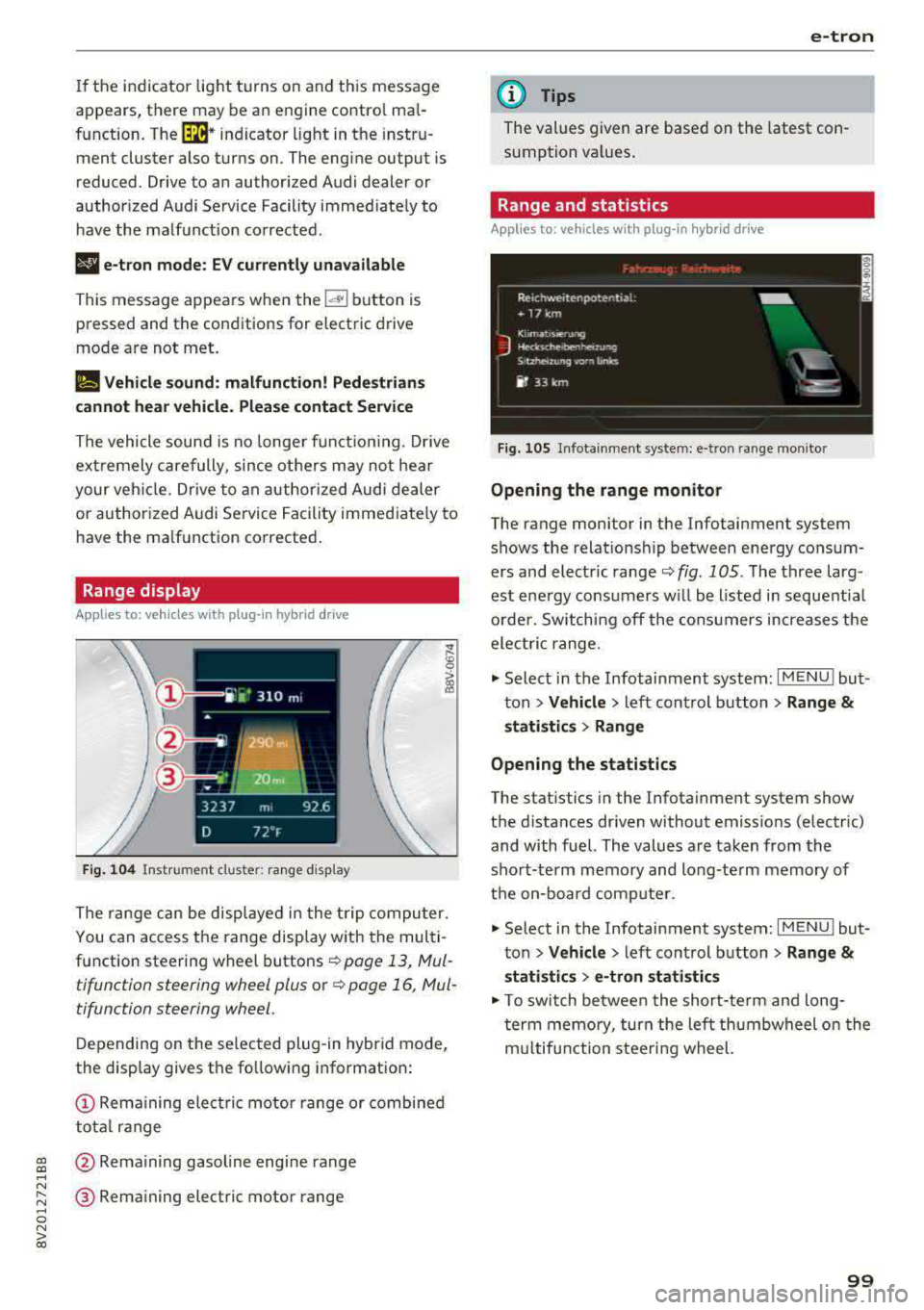
Range display
Applies to: vehicles with plug-in hybrid drive
Fig. 104 Inst rument cl uster: ra nge d is p lay
The range c an be displ aye d in t he t rip co mputer.
You can access the range disp lay with the mul ti
function steering wheel buttons
r::!') page 13, Mul
tifunction steering wheel plus o r
r::!') page 16, Mul
tifunction steering wheel.
D epen ding on t he se lected plug -in hybrid mode,
the display gives t he fo llowing informat ion:
(D Re mai ning ele ctric mo tor range or combined
to tal range
@ Rema ining gasol ine engine rang e
® Remaining electric motor range
e-tron
(D Tips
The values given are base d on the latest con
sumption val ues .
Range and statistics
Applies to: vehicles with plug-in hybrid drive
Fig. 105 In fotainme nt system: e-tro n range mo nito r
Opening the range monitor
The range monitor in the Infotainment system
s h ows the relat ions hip between ene rgy co nsu m
ers and elect ric ranger::!')
fig. 105 . The three larg
est ene rgy cons umers w ill be listed i n se que ntial
o rder. Sw itching off the co nsu mers increases the
ele ctri c range .
.,. Select i n the Infotainment system: I MENU ! but
t on
> Vehicle > left con trol button > Range &
statistics > Range
Opening the statistics
The stat istics in the Infota inment system show
t h e d istances dr iven without emiss ions (electric)
and with fuel. The values a re ta ken from the
sho rt-term memory and long-te rm memory of
t h e on-bo ard com puter.
.,. Select in the Infotainment system: I MENU! but
t on
> Vehicle > left control b utton > Range &
statistics > e-tron statistics
.,. To switch be twee n the short-te rm an d long
t er m memo ry, tur n the left th umbwheel o n the
m ultifun ction steeri ng wheel.
99
Page 104 of 400
e-tron
Driving situations Conditions Vehicle behavior
- Reduce the vehicle speed by re- Fuel consumption can be reduced by
leasing the accelerator peda l and coasting .
not by braking.
-Use the S selector lever position A sporty driv ing style increases fuel con -
and tiptron ic mode sparingly . sumption .
- Do not run the gasoline engine The temperature of the gasoline engine
while the vehicle is parked to warm rises very s lowly and the fuel consump-
the eng ine. tion increases considerably.
-Use the rear w indow/exterior This conserves the energy in the h igh-volt -
Driving in cold weath- mirror defroster and the seat
heat-age battery so that it is availab le to run
ing sparing ly. the vehicle in electric mode.
er
-Park the veh icle in a ga rage over-
This reduces exposure of the high-voltage
night.
Energy flow display
Ap plies to : ve hicles w ith p lug- in hybr id drive
F ig . 107 In strument cluste r: energy flow display
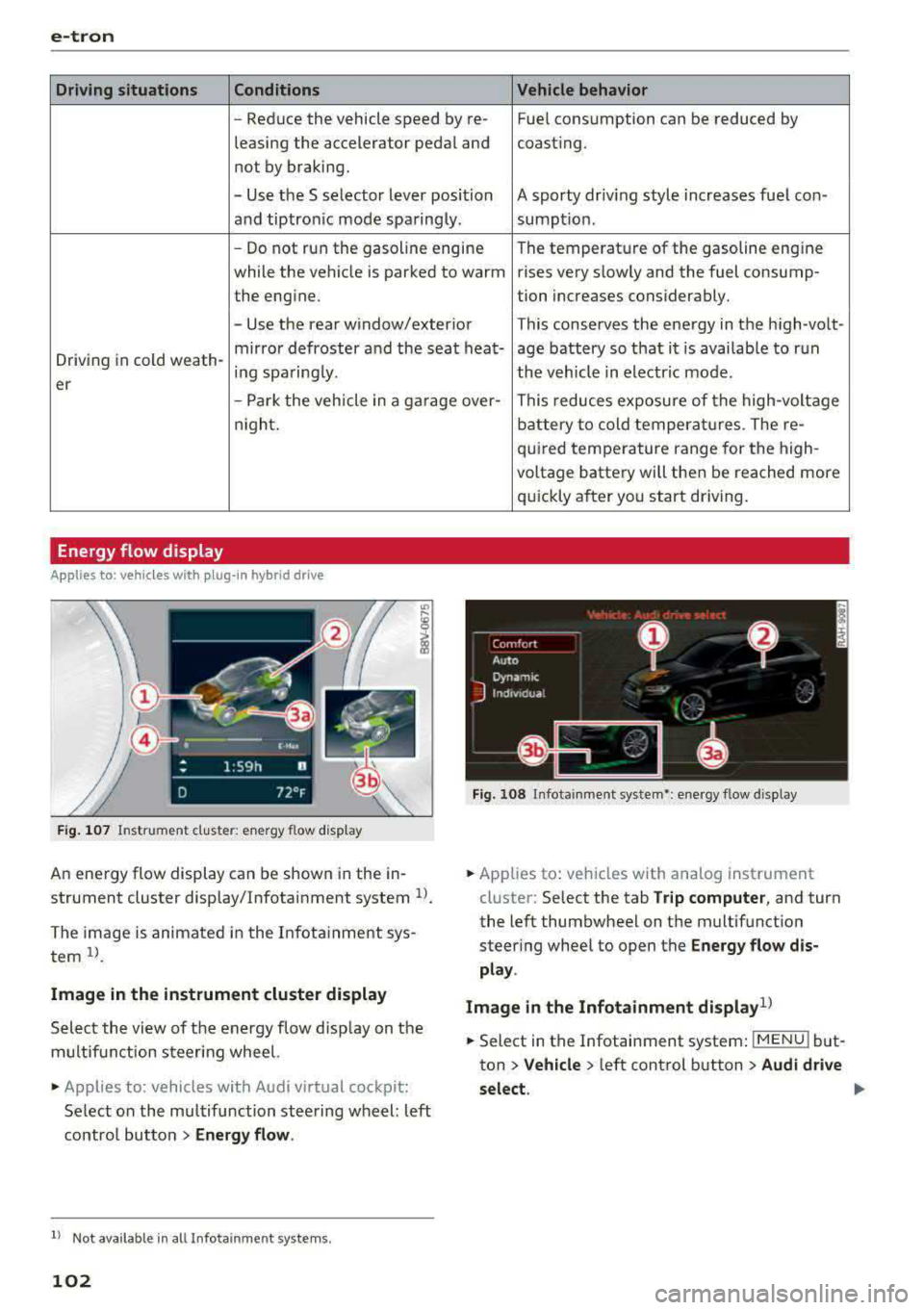
An energy flow display can be shown in the in
strument cluster display/Infotainment system
U .
The image is animated in the Infotainment sys
tem
ll .
Image in the instrument cluster display
Select the view of the energy flow display on the
m ultifunction steering wheel.
• Applies to : vehicles with Audi v irtual cockpit :
Select on the multifunction steering wheel: left
contro l button
> Energy flow.
l) Not availa ble in a ll Infota inm en t systems .
102
battery to cold temperatures . The re-
quired temperature range for the high-
voltage battery will then be reached more
qu ickly after you start driving.
Fig. 108 Infota inment system•: ene rgy flow display
• Applies to: veh icles with ana log instrument
cluster: Select the tab
Trip computer, and turn
the left thumbwheel on the multifunction
steer ing wheel to open the
Energy flow dis
play .
Image in the Infotainment display
1>
• Select in the Infotainment system : IMENUj but
ton
> Vehicle > left control button > Audi drive
select .
Page 123 of 400
CXl CXl .... N ,.__
N .... 0 N > 00
tires to trailer and tire manufacturers' specifica
tions.
Lights
Check to make sure both vehicle and trailer lights
are working p roperly.
Safety chains
Be sure trailer safety chains are properly connect
ed from the tra iler to the hitch on the vehicle.
Leave enough slack in the chains to permit turn
in g corners . When you install safety cha ins, ma ke
sure they w ill not drag on the road when yo u are
driving .
The chains shou ld cross under the trailer tongue
to prevent it from dropping in case of separat ion
from the hitch.
Driving instructions
Driving with a trailer always requires extra care
and consideration.
Weight distribution
Towing a loaded trailer w ith an empty car results
in a highly unstable distribution of weight . If this
cannot be avo ided, drive at very low speeds only
to avoid the risk of losing steering control.
A "balanced" rig is easier to operate and control.
This means that the tow vehicle should be loaded
to the extent possible and permissible, while
keep ing the tra iler as light as possib le under the
circumstances. Whenever possib le, t ransfer
some cargo to the luggage compartment of the
tow vehicle whi le observing tongue load require
ments and vehicle loading considerations .
Speed
The higher the speed, the more difficult it be
comes for the driver to control the rig. Do not
drive at the maximum permissible speed. Reduce
your speed even more if load, weather or wind
conditions are unfavorable
-particu larly when
going downhill.
Reduce vehicle speed
immediately if the trailer
shows the s lightest sign of swaying .
Do not try
to stop the swaying by accelerating.
Tra iler towing
Observe speed limits. In some a reas, speeds for
vehicles towing trailers are lower than for regular
vehicles .
Always apply brakes early. When driving down
hill, shift into a lower gear to use the engine
braking effect to slow the vehicle. Use of the
brakes alone can cause them to overheat and fa il.
Coolant temperature
T he coo lant tempe rature gauge ~ page 11 must
be observed carefully . The coolant temperature
can increase if you drive on long inclines in a low
gear at high engine speeds. Reduce your speed
immediately if the LEDs in the top part of the dis
play turn on.
For more information about indicator lights, re
fer
to . ~page 28.
A WARNING ,-
Anyone not properly restrained in a moving
vehicle is at a much greater risk in an acci
dent. Never let anyone ride in your car who is
not properly wearing the restraints provided
by Aud i.
Trailer towing
information
Important to know
Your vehicle handles differently when towing a
trailer because of the addit ional weight and dif
ferent weight distribution . Safety, performance
and economy will g reatly depend on how careful
ly you load your trailer and operate yo ur rig.
Before you actually tow your trailer, pract ice
turning, stopping and backing up in an area away
from traffic. Keep practic ing until you have be
come complete ly familiar w ith the way your vehi
cle-trailer combination behaves and responds.
Backing up is difficult and requires practice.
Backing up with a t railer genera lly requires steer
i ng action opposite to that when backing up your
vehicle without a tra iler.
Maintain a greater distance between your vehicle
and the one in front of you. You will need more
.,,.
121
Page 128 of 400
Assistance systems
(D Tips
-A maximum of 30 lap times (ana log instru
ment cluster) or 99 lap t imes (Audi virtual
cockpit*) can be measured.
- If timing is paused, you can continue it later
even if you switch the ignition off.
- Saved lap times cannot be individually de
l eted from the total resu lts.
- The saved lap timer values will remain after
switching the ignition off .
Lap statistics
Applies to: vehicles with lap timer
Display ing lap statistics
You can d isplay the number of laps driven, the
fastest lap" +", the s lowest lap" -", and the aver
age time
"0" in the instrument cluster.
~ Applies to: vehicles with analog instrument
cluster: select
Statistics in the menu using the
multifunction steering wheel.
~ Applies to: vehicles with Audi virtual cockpit: on
the multifunction steering wheel, select: left
control button
> Lap statistics or Statistics .
~ Turn the thumbwheel down or up to display the
individual lap times.
~ To retur n to the lap t iming that was begun,
press the left thumbwheel.
Resetting lap statistics
Applies to: vehicles with Audi virtual cockpit
~ On the multifunction steer ing wheel, select:
the right control button
> Reset statistics.
(D Tips
- The lap statistics list the lap times for the
last 30 laps.
-Applies to: vehicles with Audi virtual cock
pit: the fastest and slowest lap times from
up to 99 timed laps will be disp layed.
126
Audi adaptive cruise
control
Description
Applies to: vehicles with Audi adaptive cruise control
Fig. 128 Detect ion range
> (0 (0
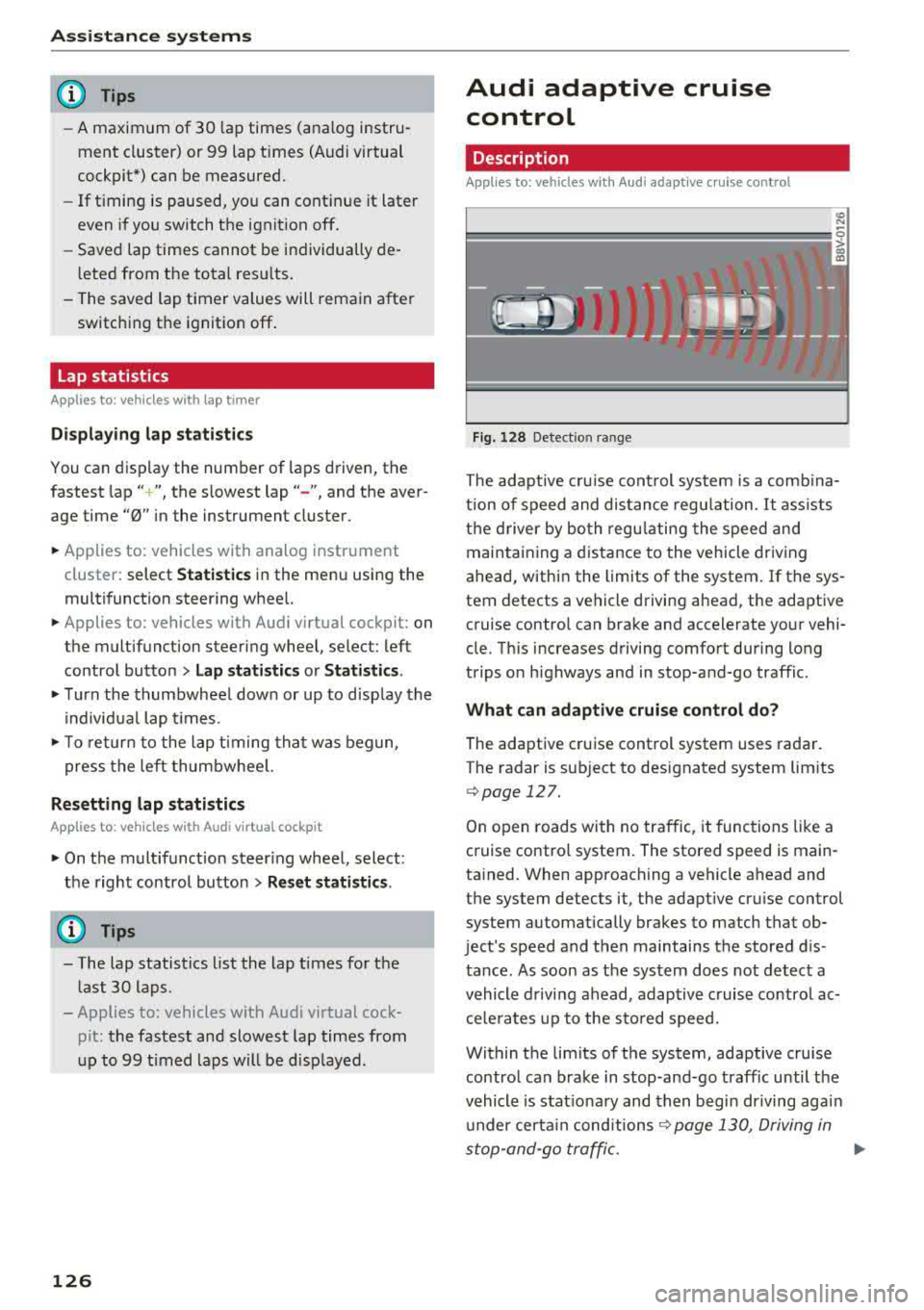
The adaptive cru ise control system is a comb ina
tion of speed and dis tance regu lation.
It ass ists
the d river by both regulating the speed and
maintaining a distance to the vehicle driving
ahead, within the limits of the system. If the sys
tem detects a vehicle driving ahead, the adaptive
cruise contro l can brake and accelerate your vehi
cle. Th is increases driving comfort during long
trips on highways and in stop-and-go traffic.
What can adaptive cruise control do?
The adaptive cruise control system uses radar.
The radar is sub ject to designated system lim its
q poge 127.
On open roads with no traffic, it functions like a
cruise contro l system. The stored speed is main
tained. When approaching a vehicle ahead and
the system detects it, the adapt ive cru ise control
system automatically brakes to match that ob
ject's speed and then maintains the stored dis
tance. As soon as the system does not detect a
vehicle driving ahead, adaptive cruise contro l ac
celerates up to the stored speed.
Within the limits of the system, adaptive cruise control can brake in stop-and-go traffic until the
vehicle is stat ionary and then begin driving agai n
under certain
conditions ~ page 130, Driving in
stop-and-go traffic.
ll>
Page 131 of 400
a, a, ..... N
" N ..... 0 N > 00
The stored speed in the LED line is erased.
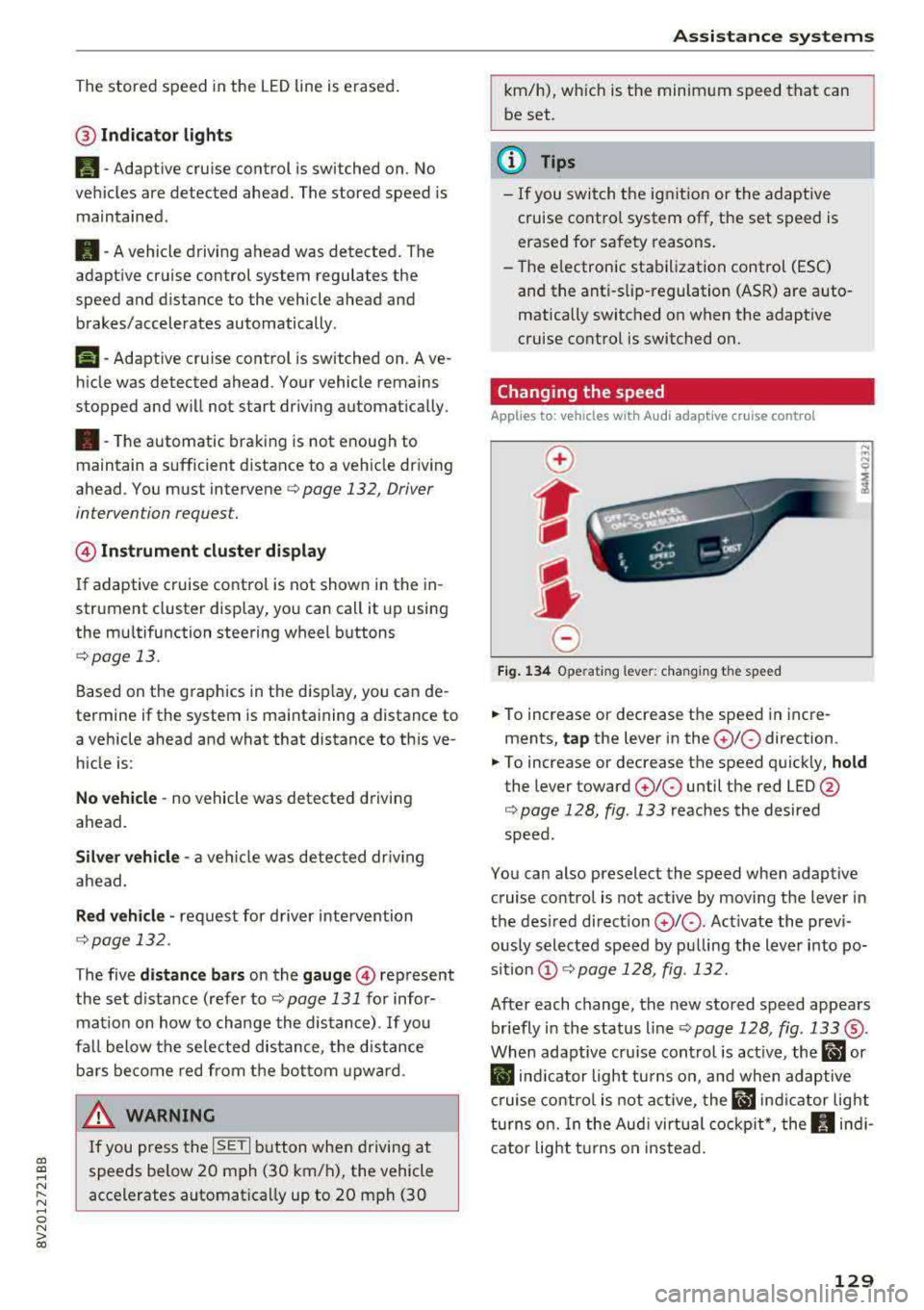
@ Indicator lights
It -Adaptive cruise control is switched on. No
vehicles are detected ahead. The stored speed is
maintained .
B-A vehicle driving ahead was detected. The
adaptive cruise control system regulates the
speed and distance to the vehicle ahead and
brakes/accelerates automatically.
r51 -Adaptive cruise control is switched on. Ave
hicle was detected ahead. Your vehicle remains
stopped and will not start driv ing automat ically.
•-The automatic braking is not enough to
maintain a sufficient distance to a veh icle driving
ahead. You must intervene
c::> page 132, Driver
intervention request.
@ Instrument cluster display
I f adaptive cruise control is not shown in the in
strument cluster display, yo u can call it up using
the mu ltifunction steering wheel buttons
c::> page 13.
Based on the g raphics in the disp lay, you can de
termine if the system is maintaining a distance to
a vehicle ahead and what that distance to th is ve
hicle is:
No vehicle -no vehicle was detected driving
ahead.
Silver vehicle -a veh icle was detec ted dr iv in g
ahead .
Red vehicle -request for driver intervention
<=:>page 132 .
The five distance bars on the gauge © represent
the set d istance (refer to
c::> page 131 for infor
mat ion on how to change the distance) .
If you
fal l below the selected distance, the distance
bars become red from the bottom upward.
A WARNING
If you press the !SETI button when driving at
speeds below 20 mph (30 km/h), the vehicle
accelerates automatically up to 20 mph (30
Assistance systems
km/h), which is the minimum speed that can
be set.
(D Tips
-If you switch the ignition or the adaptive
cruise control system off, the set speed is
erased for safety reasons .
-The e lectronic stabilization control (ESC)
and the anti-slip -regulation (ASR) are auto
matically switched on when the adaptive
cruise control is switched on.
Changing the speed
Applies to: vehicles with Audi adaptive cruise control
0
f
J
0
Fig. 134 Operat ing lever: changing the speed
.. To increase or decrease the speed in incre
ments,
tap the lever in the 0 10 direction .
.. To increase or decrease the speed quickly, hold
the lever toward 010 until the red LED @
c::> page 128, fig. 133 reaches the desired
speed.
You can also preselect the speed when adaptive cruise control is not active by moving the lever in
the desired direction
0 10 . Act ivate the previ
ously selected speed by pulling the lever into po
s ition
@ c::> page 128, fig . 132.
After each change, the new stored speed appears
briefly in the status line
c::> page 128, fig. 133 ®·
When adaptive cru ise control is active, the ill or
• indicator light turns on, and when adaptive
cruise control is not active, the
ill ind icator light
turns on. In the Audi virtual cockpit*, the
II indi
cator light t urns on instead.
129
Page 136 of 400
Assistance systems
-Due to the interlinking of various vehicle sys
tems, critica l driving situations can be detected
by
pre sense basic and measures for preventa
tive occupant protection are can be initiated.
-The pre sense front uses the data from the ra
dar sensors and calcu lates the probability of an
accident
c> page 127. An impending collision
with vehicles can be detected within the limits
of the system . In this case, the system warns
the driver visually, acoustically and with a jerk
on the brakes if necessary. If needed, it can i ni
tiate a partia l or full dece le rat ion to reduce the
collision speed o r to avoid the coll ision unde r
ce rtain c ircumstances. In conjunction with pre
sense basic, the front safety belts are also re
versib ly tensioned when needed . The pre sense
front is also active when adaptive cruise con
trol* is sw itched off.
.,&. WARNING
Also follow the general instructions found in
c> .&. in General information on page 127.
(i) Tips
-Certain pre sense functions switch off when
driving in reverse.
-The pre sense functions may not be availa ble if there is a malfunction in the ESC sys
tem or the airbag contro l module.
-Note that the reversible belt tensioner on
the front passenger's side deactivates when
the front passenger's a irbag is deactivated .
-Switch the pre sense off when you are not
us ing public streets or when loading the ve
hicle onto a vehicle carr ier, train, ship or
other type of transportation. This can pre
vent an undes ired intervention from the pre
sense system.
Audi pre sense basic
Description
Applies to: veh icles with Audi pre sense basic
The pre sense basic funct ions are activated at a
speed of approximately 20 mph (30 km/h) or h igher.
134 The following
functions can be triggered under
certain conditions within the limits of the sys
tem:
-Tensioning of the safety bel ts (for examp le,
during heavy braking): the front safety belts
have reversib le be lt tensioners. If a collision
does not occur, the safety belts loosen slightly
and are ready to trigger aga in.
-Initiating the closing of the windows and the
panorama glass roof* (for examp le when un
der- or oversteering).
Audi drive select* : the trigger times are adjusted
depending on the mode selected.
Audi pre sense front
· Description
Applies to: vehicles with Audi pre sense front
Within the limits of the system and depending
on the situation and speed, pre sense front can
warn you about impending collisions with sta
tionary, stopped, and moving vehicles and ini
tiate appropriate braking measures.
If detection is not possib le, then pre sense front
does not react.
The following func tions trigger in conjunction
with pre sense basic at corresponding vehicle
speeds :
-Reversible tens ion ing of the front safety belts.
-Closing the windows and panorama glass roof*.
Warnings and braking
Applies to: vehicles with Audi pre sense front
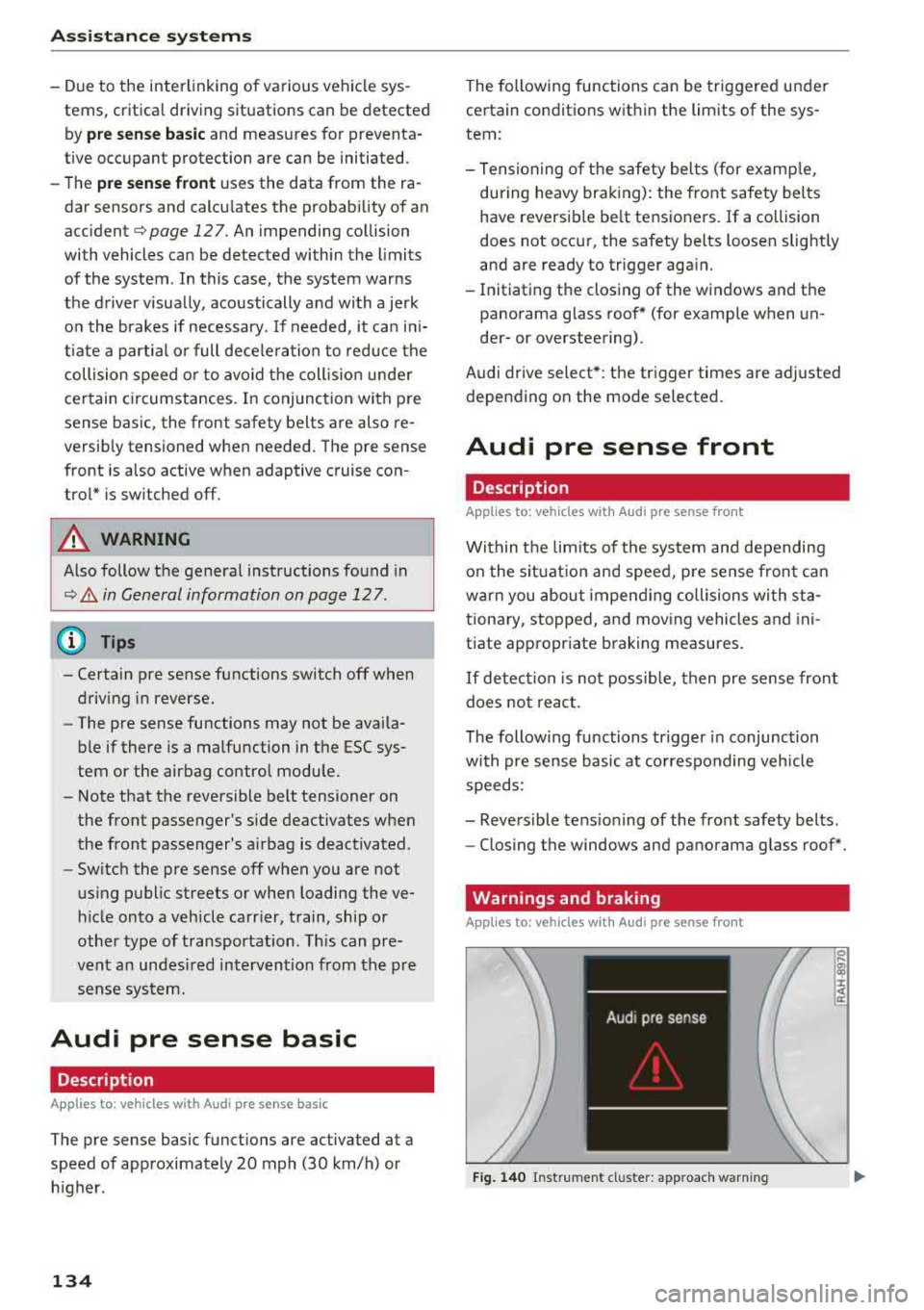
Fig. 140 Instrument cluster: approach warning
0
;
::c
Page 138 of 400
Assistance systems
by this. Have an authorized Audi dealer or au
thorized Audi Service Facility check their func
tion.
(D Tips
- You can cancel the braking with increasing
force that is initiated by the system by brak
ing yourself, by accelerating noticeably or
by swerving.
- Certain pre sense front functions switch off
when ESC is switched off (sport mode) or
when driving in reverse.
- If you restrict or switch off the ESC, the pre
sense also switches itself off ¢
page 152.
Settings in the Infotainment system
Applies to: vehicles with Audi pre sense front/Audi adaptive
cruise control
~ Select in the Infotainment system: I MENU I but
ton
> Vehicle > left control button > Driver as
sistance
> Audi pre sense.
System -
the pre sense functions can be switched
on/off.
If the system is switched off, it switches on again
automatically once the ignition is switched on
again.
Prewarning -the early warning can be switched
off permanently or the pre sense front warning
point can be set
(Early/Medium/Late).
Messages
Applies to: vehicles with Audi pre sense
IIJ Audi pre sense: malfunction! Please contact
Service
This message appears when the pre sense func
tion is affected. For example, this could be
caused by a faulty sensor. If the message stays
on, drive immediately to an authorized Audi deal
er or authorized Audi Service Facility to have the
malfunction corrected.
IIJ Audi pre sense currently restricted. Restrict
ed sensor vision due to surroundings.
This message appears if the sensor view is ob
structed, for example by leaves, snow, heavy
136
spray or dirt. Clean the sensor if necessary
¢page 127, fig. 129.
II] Audi pre sense: currently restricted
This message appears if the ESC is restricted or
switched off, for example .
II] Audi pre sense: currently restricted. See
owner's manual
This message appears when there is a temporary
failure in a subsystem, such as the ESC. If this
message appears repeatedly, drive to an author
ized Audi dealer or authorized Audi Service Facili
ty to have the malfunction corrected .
fl] Audi pre sense: emergency braking system
off
This message appears if the pre sense functions
are switched off through the Infotainment sys
tem or if the system is not ready.
Audi active lane assist
Description
Applies to: vehicles with Audi active lane assist
Active lane assist (lane departure warning) de
tects lane marker lines within the limits of the
system using a camera in the windshield. If you
are approaching a detected lane marker line and
it appears likely that you will leave the lane, the
system will warn you with corrective steering.
You can override this steering at any time. If you pass over a line, the steering wheel will vibrate
lightly. In order for this warning vibration to oc
cur, it must first be switched on in the Infotain
ment system. Active lane assist is ready for oper
ation when the lane marker line is detected on at
least one side of the vehicle.
The system is designed for driving on express
ways and highways and therefore only activates
at speeds above approximately 40 mph (65 km/
h).
Applies to: vehicles with Audi side assist
If you activate a turn signal when active lane as
sist is ready and it classifies a lane change as crit
ical because of vehicles traveling alongside you or
approaching you, there will be noticeable
.,.